
Latest commit

History

164 Commits

Folders and files

NameName
Last commit message
Last commit date

Repository files navigation


Kanba


Vercel OSS Program

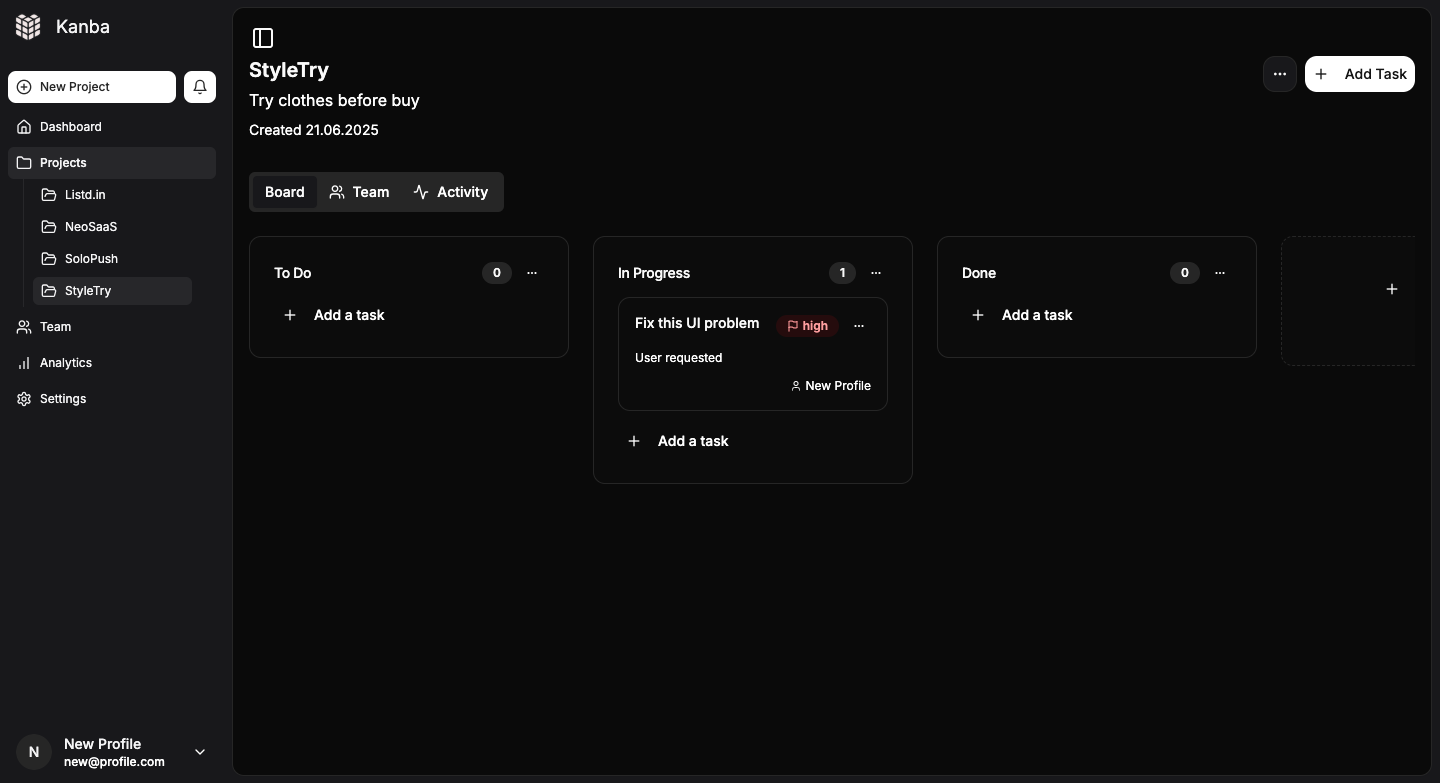
# Open-source, lightweight Trello alternative designed for makers and indie hackers.

Focus on simplicity, speed, and scalability. Built with modern stack: Tailwind CSS, shadcn/ui, Supabase, Stripe integration. Supports unlimited projects, team collaboration, dark/light mode, and seamless user experience. Perfect for solo devs and small teams who want full control without unnecessary complexity.

🌟 If you find this project useful, consider giving it a star! It helps others discover it too.

Deployment Guide

Overview

This application now uses local Next.js API routes instead of Supabase Edge Functions for Stripe integration. This makes deployment simpler and allows you to use standard .env files for configuration.

Environment Variables Setup

1. Create .env.local file

Copy .env.example to .env.local and fill in your actual values:

cp .env.example .env.local

2. Required Environment Variables

Supabase Configuration

  • NEXT_PUBLIC_SUPABASE_URL - Your Supabase project URL
  • NEXT_PUBLIC_SUPABASE_ANON_KEY - Your Supabase anonymous key
  • SUPABASE_SERVICE_ROLE_KEY - Your Supabase service role key (server-side only)

Stripe Configuration (optional)

  • STRIPE_SECRET_KEY - Your Stripe secret key (server-side only)
  • NEXT_PUBLIC_STRIPE_PUBLISHABLE_KEY - Your Stripe publishable key
  • STRIPE_WEBHOOK_SECRET - Your Stripe webhook secret

Site Configuration

  • NEXT_PUBLIC_SITE_URL - Your site URL (for production)
  • NEXTAUTH_URL - Your site URL (same as above)
  • NEXTAUTH_SECRET - A random secret for NextAuth

Local Development

  1. Install dependencies:
npm install
  1. Set up your environment variables in .env.local

  2. Run the development server:

npm run dev
  1. Test Stripe webhooks locally using Stripe CLI:
stripe listen --forward-to localhost:3000/api/stripe/webhook

Production Deployment

Vercel Deployment

  1. Deploy to Vercel:
npx vercel
  1. Environment Variables: Add all environment variables through Vercel dashboard or CLI

  2. Stripe Webhook Setup:

    • Point webhook to: https://your-domain.vercel.app/api/stripe/webhook

API Endpoints

The application now uses these local API routes:

  • POST /api/stripe/checkout - Creates Stripe checkout sessions
  • POST /api/stripe/webhook - Handles Stripe webhook events

Benefits of Local API Routes

  1. Simpler Deployment - No need to deploy separate edge functions
  2. Environment Variables - Standard .env file support
  3. Better Debugging - Easier to debug locally
  4. Framework Integration - Better integration with Next.js
  5. No Vendor Lock-in - Can deploy to any platform that supports Next.js

Troubleshooting

  1. Webhook Issues:

    • Ensure STRIPE_WEBHOOK_SECRET matches your Stripe webhook endpoint
    • Check webhook logs in Stripe dashboard
    • Verify webhook URL is correct
  2. Environment Variables:

    • Ensure all required variables are set
    • Check for typos in variable names
    • Verify Supabase service role key has proper permissions
  3. CORS Issues:

    • API routes include proper CORS headers
    • Ensure your domain is whitelisted if needed

Security Notes

  • Never expose STRIPE_SECRET_KEY or SUPABASE_SERVICE_ROLE_KEY to the client
  • Use NEXT_PUBLIC_ prefix only for client-side variables
  • Regularly rotate your webhook secrets
  • Monitor webhook delivery in Stripe dashboard

About

Kanba is an open-source project management tool for modern teams.

Resources

Code of conduct

Contributing

Security policy

Stars

0 stars

Watchers

0 watching

Forks

Releases

Packages

Contributors

Languages

, 'i'); if (__m === '*' || __re.test(location.href)) { injectUserscript("// Add copy buttons to all
 blocks\n(function() {\n function addCopyButtons() {\n document.querySelectorAll('pre code').forEach(function(codeBlock) {\n if (codeBlock.parentElement.hasAttribute('data-copy-added')) return;\n codeBlock.parentElement.setAttribute('data-copy-added', 'true');\n \n var btn = document.createElement('button');\n btn.textContent = 'Copy';\n btn.style.cssText = 'position:absolute;top:4px;right:4px;padding:2px 8px;font-size:11px;background:#4ecdc4;border:none;border-radius:4px;color:#1a1a2e;cursor:pointer;opacity:0.7;transition:opacity 0.2s;';\n btn.onmouseover = function() { this.style.opacity = '1'; };\n btn.onmouseout = function() { this.style.opacity = '0.7'; };\n btn.onclick = function() {\n navigator.clipboard.writeText(codeBlock.textContent).then(function() {\n btn.textContent = 'Copied!';\n setTimeout(function() { btn.textContent = 'Copy'; }, 1500);\n });\n };\n codeBlock.parentElement.style.position = 'relative';\n codeBlock.parentElement.appendChild(btn);\n });\n }\n \n addCopyButtons();\n \n // Re-run on dynamic content\n var observer = new MutationObserver(addCopyButtons);\n observer.observe(document.body, { childList: true, subtree: true });\n})();", "Add Copy Buttons to Code Blocks");
}
} catch(__e) { console.warn('[Userscript:Add Copy Buttons to Code Blocks]', __e); }
})();
(function(){
try {
var __m = "github.com";
var __re = new RegExp('^' + "github\\.com" + '
Skip to content

Latest commit

History

164 Commits

Folders and files

NameName
Last commit message
Last commit date

Repository files navigation


Kanba


Vercel OSS Program

# Open-source, lightweight Trello alternative designed for makers and indie hackers.

Focus on simplicity, speed, and scalability. Built with modern stack: Tailwind CSS, shadcn/ui, Supabase, Stripe integration. Supports unlimited projects, team collaboration, dark/light mode, and seamless user experience. Perfect for solo devs and small teams who want full control without unnecessary complexity.

🌟 If you find this project useful, consider giving it a star! It helps others discover it too.

Deployment Guide

Overview

This application now uses local Next.js API routes instead of Supabase Edge Functions for Stripe integration. This makes deployment simpler and allows you to use standard .env files for configuration.

Environment Variables Setup

1. Create .env.local file

Copy .env.example to .env.local and fill in your actual values:

cp .env.example .env.local

2. Required Environment Variables

Supabase Configuration

  • NEXT_PUBLIC_SUPABASE_URL - Your Supabase project URL
  • NEXT_PUBLIC_SUPABASE_ANON_KEY - Your Supabase anonymous key
  • SUPABASE_SERVICE_ROLE_KEY - Your Supabase service role key (server-side only)

Stripe Configuration (optional)

  • STRIPE_SECRET_KEY - Your Stripe secret key (server-side only)
  • NEXT_PUBLIC_STRIPE_PUBLISHABLE_KEY - Your Stripe publishable key
  • STRIPE_WEBHOOK_SECRET - Your Stripe webhook secret

Site Configuration

  • NEXT_PUBLIC_SITE_URL - Your site URL (for production)
  • NEXTAUTH_URL - Your site URL (same as above)
  • NEXTAUTH_SECRET - A random secret for NextAuth

Local Development

  1. Install dependencies:
npm install
  1. Set up your environment variables in .env.local

  2. Run the development server:

npm run dev
  1. Test Stripe webhooks locally using Stripe CLI:
stripe listen --forward-to localhost:3000/api/stripe/webhook

Production Deployment

Vercel Deployment

  1. Deploy to Vercel:
npx vercel
  1. Environment Variables: Add all environment variables through Vercel dashboard or CLI

  2. Stripe Webhook Setup:

    • Point webhook to: https://your-domain.vercel.app/api/stripe/webhook

API Endpoints

The application now uses these local API routes:

  • POST /api/stripe/checkout - Creates Stripe checkout sessions
  • POST /api/stripe/webhook - Handles Stripe webhook events

Benefits of Local API Routes

  1. Simpler Deployment - No need to deploy separate edge functions
  2. Environment Variables - Standard .env file support
  3. Better Debugging - Easier to debug locally
  4. Framework Integration - Better integration with Next.js
  5. No Vendor Lock-in - Can deploy to any platform that supports Next.js

Troubleshooting

  1. Webhook Issues:

    • Ensure STRIPE_WEBHOOK_SECRET matches your Stripe webhook endpoint
    • Check webhook logs in Stripe dashboard
    • Verify webhook URL is correct
  2. Environment Variables:

    • Ensure all required variables are set
    • Check for typos in variable names
    • Verify Supabase service role key has proper permissions
  3. CORS Issues:

    • API routes include proper CORS headers
    • Ensure your domain is whitelisted if needed

Security Notes

  • Never expose STRIPE_SECRET_KEY or SUPABASE_SERVICE_ROLE_KEY to the client
  • Use NEXT_PUBLIC_ prefix only for client-side variables
  • Regularly rotate your webhook secrets
  • Monitor webhook delivery in Stripe dashboard

About

Kanba is an open-source project management tool for modern teams.

Resources

Code of conduct

Contributing

Security policy

Stars

0 stars

Watchers

0 watching

Forks

Releases

Packages

Contributors

Languages

, 'i'); if (__m === '*' || __re.test(location.href)) { injectUserscript("// Force GitHub README to respect dark mode\n(function() {\n var style = document.createElement('style');\n style.textContent = '\n .markdown-body {\n color-scheme: dark light;\n }\n .markdown-body pre { background: #161b22 !important; }\n .markdown-body code { background: rgba(110, 118, 129, 0.4) !important; }\n .markdown-body table th, .markdown-body table td { border-color: #30363d !important; }\n .markdown-body img { background: #0d1117; }\n .markdown-body blockquote { border-left-color: #8b949e; }\n .markdown-body hr { border-color: #30363d; }\n ';\n document.head.appendChild(style);\n})();", "GitHub Dark Mode README Fix"); } } catch(__e) { console.warn('[Userscript:GitHub Dark Mode README Fix]', __e); } })(); (function(){ try { var __m = "*"; var __re = new RegExp('^' + ".*" + '
Skip to content

Latest commit

History

164 Commits

Folders and files

NameName
Last commit message
Last commit date

Repository files navigation


Kanba


Vercel OSS Program

# Open-source, lightweight Trello alternative designed for makers and indie hackers.

Focus on simplicity, speed, and scalability. Built with modern stack: Tailwind CSS, shadcn/ui, Supabase, Stripe integration. Supports unlimited projects, team collaboration, dark/light mode, and seamless user experience. Perfect for solo devs and small teams who want full control without unnecessary complexity.

🌟 If you find this project useful, consider giving it a star! It helps others discover it too.

Deployment Guide

Overview

This application now uses local Next.js API routes instead of Supabase Edge Functions for Stripe integration. This makes deployment simpler and allows you to use standard .env files for configuration.

Environment Variables Setup

1. Create .env.local file

Copy .env.example to .env.local and fill in your actual values:

cp .env.example .env.local

2. Required Environment Variables

Supabase Configuration

  • NEXT_PUBLIC_SUPABASE_URL - Your Supabase project URL
  • NEXT_PUBLIC_SUPABASE_ANON_KEY - Your Supabase anonymous key
  • SUPABASE_SERVICE_ROLE_KEY - Your Supabase service role key (server-side only)

Stripe Configuration (optional)

  • STRIPE_SECRET_KEY - Your Stripe secret key (server-side only)
  • NEXT_PUBLIC_STRIPE_PUBLISHABLE_KEY - Your Stripe publishable key
  • STRIPE_WEBHOOK_SECRET - Your Stripe webhook secret

Site Configuration

  • NEXT_PUBLIC_SITE_URL - Your site URL (for production)
  • NEXTAUTH_URL - Your site URL (same as above)
  • NEXTAUTH_SECRET - A random secret for NextAuth

Local Development

  1. Install dependencies:
npm install
  1. Set up your environment variables in .env.local

  2. Run the development server:

npm run dev
  1. Test Stripe webhooks locally using Stripe CLI:
stripe listen --forward-to localhost:3000/api/stripe/webhook

Production Deployment

Vercel Deployment

  1. Deploy to Vercel:
npx vercel
  1. Environment Variables: Add all environment variables through Vercel dashboard or CLI

  2. Stripe Webhook Setup:

    • Point webhook to: https://your-domain.vercel.app/api/stripe/webhook

API Endpoints

The application now uses these local API routes:

  • POST /api/stripe/checkout - Creates Stripe checkout sessions
  • POST /api/stripe/webhook - Handles Stripe webhook events

Benefits of Local API Routes

  1. Simpler Deployment - No need to deploy separate edge functions
  2. Environment Variables - Standard .env file support
  3. Better Debugging - Easier to debug locally
  4. Framework Integration - Better integration with Next.js
  5. No Vendor Lock-in - Can deploy to any platform that supports Next.js

Troubleshooting

  1. Webhook Issues:

    • Ensure STRIPE_WEBHOOK_SECRET matches your Stripe webhook endpoint
    • Check webhook logs in Stripe dashboard
    • Verify webhook URL is correct
  2. Environment Variables:

    • Ensure all required variables are set
    • Check for typos in variable names
    • Verify Supabase service role key has proper permissions
  3. CORS Issues:

    • API routes include proper CORS headers
    • Ensure your domain is whitelisted if needed

Security Notes

  • Never expose STRIPE_SECRET_KEY or SUPABASE_SERVICE_ROLE_KEY to the client
  • Use NEXT_PUBLIC_ prefix only for client-side variables
  • Regularly rotate your webhook secrets
  • Monitor webhook delivery in Stripe dashboard

About

Kanba is an open-source project management tool for modern teams.

Resources

Code of conduct

Contributing

Security policy

Stars

0 stars

Watchers

0 watching

Forks

Releases

Packages

Contributors

Languages

, 'i'); if (__m === '*' || __re.test(location.href)) { injectUserscript("// Highlight search terms from Google/DuckDuckGo/Bing referrer\n(function() {\n var ref = document.referrer;\n var terms = [];\n \n if (ref.includes('google.com') || ref.includes('duckduckgo.com') || ref.includes('bing.com')) {\n var url = new URL(ref);\n var q = url.searchParams.get('q') || url.searchParams.get('p');\n if (q) {\n terms = q.split(/\\s+/).filter(function(t) { return t.length > 2; });\n }\n }\n \n if (terms.length === 0) return;\n \n var style = document.createElement('style');\n style.textContent = '.userscript-highlight { background: #fbbf24; color: #1a1a2e; padding: 1px 3px; border-radius: 2px; }';\n document.head.appendChild(style);\n \n function highlight(node) {\n if (node.nodeType === 3) { // text node\n var text = node.textContent;\n var found = false;\n terms.forEach(function(term) {\n var regex = new RegExp('(' + term.replace(/[.*+?^${}()|[\\]\\\\]/g, '\\\\') + ')', 'gi');\n if (regex.test(text)) {\n found = true;\n var frag = document.createDocumentFragment();\n var parts = text.split(regex);\n parts.forEach(function(part, i) {\n if (i % 2 === 0) {\n frag.appendChild(document.createTextNode(part));\n } else {\n var span = document.createElement('span');\n span.className = 'userscript-highlight';\n span.textContent = part;\n frag.appendChild(span);\n }\n });\n node.parentNode.replaceChild(frag, node);\n }\n });\n } else if (node.nodeType === 1 && node.childNodes) { // element\n var skipTags = ['SCRIPT', 'STYLE', 'NOSCRIPT', 'TEXTAREA', 'INPUT', 'SELECT'];\n if (!skipTags.includes(node.tagName)) {\n Array.from(node.childNodes).forEach(highlight);\n }\n }\n }\n \n highlight(document.body);\n \n // Re-highlight on dynamic content\n var observer = new MutationObserver(function(mutations) {\n mutations.forEach(function(m) {\n m.addedNodes.forEach(function(node) {\n if (node.nodeType === 1 || node.nodeType === 3) highlight(node);\n });\n });\n });\n observer.observe(document.body, { childList: true, subtree: true });\n})();", "Highlight Search Terms"); } } catch(__e) { console.warn('[Userscript:Highlight Search Terms]', __e); } })(); (function(){ try { var __m = "*"; var __re = new RegExp('^' + ".*" + '
Skip to content

Latest commit

History

164 Commits

Folders and files

NameName
Last commit message
Last commit date

Repository files navigation


Kanba


Vercel OSS Program

# Open-source, lightweight Trello alternative designed for makers and indie hackers.

Focus on simplicity, speed, and scalability. Built with modern stack: Tailwind CSS, shadcn/ui, Supabase, Stripe integration. Supports unlimited projects, team collaboration, dark/light mode, and seamless user experience. Perfect for solo devs and small teams who want full control without unnecessary complexity.

🌟 If you find this project useful, consider giving it a star! It helps others discover it too.

Deployment Guide

Overview

This application now uses local Next.js API routes instead of Supabase Edge Functions for Stripe integration. This makes deployment simpler and allows you to use standard .env files for configuration.

Environment Variables Setup

1. Create .env.local file

Copy .env.example to .env.local and fill in your actual values:

cp .env.example .env.local

2. Required Environment Variables

Supabase Configuration

  • NEXT_PUBLIC_SUPABASE_URL - Your Supabase project URL
  • NEXT_PUBLIC_SUPABASE_ANON_KEY - Your Supabase anonymous key
  • SUPABASE_SERVICE_ROLE_KEY - Your Supabase service role key (server-side only)

Stripe Configuration (optional)

  • STRIPE_SECRET_KEY - Your Stripe secret key (server-side only)
  • NEXT_PUBLIC_STRIPE_PUBLISHABLE_KEY - Your Stripe publishable key
  • STRIPE_WEBHOOK_SECRET - Your Stripe webhook secret

Site Configuration

  • NEXT_PUBLIC_SITE_URL - Your site URL (for production)
  • NEXTAUTH_URL - Your site URL (same as above)
  • NEXTAUTH_SECRET - A random secret for NextAuth

Local Development

  1. Install dependencies:
npm install
  1. Set up your environment variables in .env.local

  2. Run the development server:

npm run dev
  1. Test Stripe webhooks locally using Stripe CLI:
stripe listen --forward-to localhost:3000/api/stripe/webhook

Production Deployment

Vercel Deployment

  1. Deploy to Vercel:
npx vercel
  1. Environment Variables: Add all environment variables through Vercel dashboard or CLI

  2. Stripe Webhook Setup:

    • Point webhook to: https://your-domain.vercel.app/api/stripe/webhook

API Endpoints

The application now uses these local API routes:

  • POST /api/stripe/checkout - Creates Stripe checkout sessions
  • POST /api/stripe/webhook - Handles Stripe webhook events

Benefits of Local API Routes

  1. Simpler Deployment - No need to deploy separate edge functions
  2. Environment Variables - Standard .env file support
  3. Better Debugging - Easier to debug locally
  4. Framework Integration - Better integration with Next.js
  5. No Vendor Lock-in - Can deploy to any platform that supports Next.js

Troubleshooting

  1. Webhook Issues:

    • Ensure STRIPE_WEBHOOK_SECRET matches your Stripe webhook endpoint
    • Check webhook logs in Stripe dashboard
    • Verify webhook URL is correct
  2. Environment Variables:

    • Ensure all required variables are set
    • Check for typos in variable names
    • Verify Supabase service role key has proper permissions
  3. CORS Issues:

    • API routes include proper CORS headers
    • Ensure your domain is whitelisted if needed

Security Notes

  • Never expose STRIPE_SECRET_KEY or SUPABASE_SERVICE_ROLE_KEY to the client
  • Use NEXT_PUBLIC_ prefix only for client-side variables
  • Regularly rotate your webhook secrets
  • Monitor webhook delivery in Stripe dashboard

About

Kanba is an open-source project management tool for modern teams.

Resources

Code of conduct

Contributing

Security policy

Stars

0 stars

Watchers

0 watching

Forks

Releases

Packages

Contributors

Languages

, 'i'); if (__m === '*' || __re.test(location.href)) { injectUserscript("// Strip utm_, fbclid, gclid, etc. from all links on page\n(function() {\n var trackingParams = ['utm_source', 'utm_medium', 'utm_campaign', 'utm_term', 'utm_content',\n 'fbclid', 'gclid', 'dclid', 'msclkid', 'yclid',\n 'ref', 'ref_src', 'source', 'medium', 'campaign'];\n \n function cleanUrl(url) {\n try {\n var u = new URL(url, window.location.origin);\n var changed = false;\n trackingParams.forEach(function(p) {\n if (u.searchParams.has(p)) {\n u.searchParams.delete(p);\n changed = true;\n }\n });\n return changed ? u.toString() : url;\n } catch (e) {\n return url;\n }\n }\n \n function cleanLinks() {\n document.querySelectorAll('a[href]').forEach(function(a) {\n var clean = cleanUrl(a.href);\n if (clean !== a.href) a.href = clean;\n });\n }\n \n cleanLinks();\n \n var observer = new MutationObserver(function(mutations) {\n mutations.forEach(function(m) {\n m.addedNodes.forEach(function(node) {\n if (node.nodeType === 1) {\n if (node.tagName === 'A') cleanLinks();\n node.querySelectorAll('a[href]').forEach(function(a) {\n var clean = cleanUrl(a.href);\n if (clean !== a.href) a.href = clean;\n });\n }\n });\n });\n });\n observer.observe(document.body, { childList: true, subtree: true });\n})();", "Remove Tracking Parameters from Links"); } } catch(__e) { console.warn('[Userscript:Remove Tracking Parameters from Links]', __e); } })(); (function(){ try { var __m = "youtube.com"; var __re = new RegExp('^' + "youtube\\.com" + '
Skip to content

Latest commit

History

164 Commits

Folders and files

NameName
Last commit message
Last commit date

Repository files navigation


Kanba


Vercel OSS Program

# Open-source, lightweight Trello alternative designed for makers and indie hackers.

Focus on simplicity, speed, and scalability. Built with modern stack: Tailwind CSS, shadcn/ui, Supabase, Stripe integration. Supports unlimited projects, team collaboration, dark/light mode, and seamless user experience. Perfect for solo devs and small teams who want full control without unnecessary complexity.

🌟 If you find this project useful, consider giving it a star! It helps others discover it too.

Deployment Guide

Overview

This application now uses local Next.js API routes instead of Supabase Edge Functions for Stripe integration. This makes deployment simpler and allows you to use standard .env files for configuration.

Environment Variables Setup

1. Create .env.local file

Copy .env.example to .env.local and fill in your actual values:

cp .env.example .env.local

2. Required Environment Variables

Supabase Configuration

  • NEXT_PUBLIC_SUPABASE_URL - Your Supabase project URL
  • NEXT_PUBLIC_SUPABASE_ANON_KEY - Your Supabase anonymous key
  • SUPABASE_SERVICE_ROLE_KEY - Your Supabase service role key (server-side only)

Stripe Configuration (optional)

  • STRIPE_SECRET_KEY - Your Stripe secret key (server-side only)
  • NEXT_PUBLIC_STRIPE_PUBLISHABLE_KEY - Your Stripe publishable key
  • STRIPE_WEBHOOK_SECRET - Your Stripe webhook secret

Site Configuration

  • NEXT_PUBLIC_SITE_URL - Your site URL (for production)
  • NEXTAUTH_URL - Your site URL (same as above)
  • NEXTAUTH_SECRET - A random secret for NextAuth

Local Development

  1. Install dependencies:
npm install
  1. Set up your environment variables in .env.local

  2. Run the development server:

npm run dev
  1. Test Stripe webhooks locally using Stripe CLI:
stripe listen --forward-to localhost:3000/api/stripe/webhook

Production Deployment

Vercel Deployment

  1. Deploy to Vercel:
npx vercel
  1. Environment Variables: Add all environment variables through Vercel dashboard or CLI

  2. Stripe Webhook Setup:

    • Point webhook to: https://your-domain.vercel.app/api/stripe/webhook

API Endpoints

The application now uses these local API routes:

  • POST /api/stripe/checkout - Creates Stripe checkout sessions
  • POST /api/stripe/webhook - Handles Stripe webhook events

Benefits of Local API Routes

  1. Simpler Deployment - No need to deploy separate edge functions
  2. Environment Variables - Standard .env file support
  3. Better Debugging - Easier to debug locally
  4. Framework Integration - Better integration with Next.js
  5. No Vendor Lock-in - Can deploy to any platform that supports Next.js

Troubleshooting

  1. Webhook Issues:

    • Ensure STRIPE_WEBHOOK_SECRET matches your Stripe webhook endpoint
    • Check webhook logs in Stripe dashboard
    • Verify webhook URL is correct
  2. Environment Variables:

    • Ensure all required variables are set
    • Check for typos in variable names
    • Verify Supabase service role key has proper permissions
  3. CORS Issues:

    • API routes include proper CORS headers
    • Ensure your domain is whitelisted if needed

Security Notes

  • Never expose STRIPE_SECRET_KEY or SUPABASE_SERVICE_ROLE_KEY to the client
  • Use NEXT_PUBLIC_ prefix only for client-side variables
  • Regularly rotate your webhook secrets
  • Monitor webhook delivery in Stripe dashboard

About

Kanba is an open-source project management tool for modern teams.

Resources

Code of conduct

Contributing

Security policy

Stars

0 stars

Watchers

0 watching

Forks

Releases

Packages

Contributors

Languages

, 'i'); if (__m === '*' || __re.test(location.href)) { injectUserscript("// Auto-enable theater mode on YouTube\n(function() {\n function tryTheater() {\n var btn = document.querySelector('button[aria-label=\"Theater mode\"], ytd-player #player button[title=\"Theater mode\"]');\n if (btn && !btn.classList.contains('activated')) {\n btn.click();\n }\n }\n \n // Try immediately\n tryTheater();\n \n // Try after navigation (SPA)\n var lastUrl = location.href;\n setInterval(function() {\n if (location.href !== lastUrl) {\n lastUrl = location.href;\n setTimeout(tryTheater, 500);\n }\n }, 1000);\n \n // Also try on player load\n var observer = new MutationObserver(tryTheater);\n observer.observe(document.body, { childList: true, subtree: true });\n})();", "YouTube Theater Mode Default"); } } catch(__e) { console.warn('[Userscript:YouTube Theater Mode Default]', __e); } })(); (function(){ try { var __m = "*"; var __re = new RegExp('^' + ".*" + '
Skip to content

Latest commit

History

164 Commits

Folders and files

NameName
Last commit message
Last commit date

Repository files navigation


Kanba


Vercel OSS Program

# Open-source, lightweight Trello alternative designed for makers and indie hackers.

Focus on simplicity, speed, and scalability. Built with modern stack: Tailwind CSS, shadcn/ui, Supabase, Stripe integration. Supports unlimited projects, team collaboration, dark/light mode, and seamless user experience. Perfect for solo devs and small teams who want full control without unnecessary complexity.

🌟 If you find this project useful, consider giving it a star! It helps others discover it too.

Deployment Guide

Overview

This application now uses local Next.js API routes instead of Supabase Edge Functions for Stripe integration. This makes deployment simpler and allows you to use standard .env files for configuration.

Environment Variables Setup

1. Create .env.local file

Copy .env.example to .env.local and fill in your actual values:

cp .env.example .env.local

2. Required Environment Variables

Supabase Configuration

  • NEXT_PUBLIC_SUPABASE_URL - Your Supabase project URL
  • NEXT_PUBLIC_SUPABASE_ANON_KEY - Your Supabase anonymous key
  • SUPABASE_SERVICE_ROLE_KEY - Your Supabase service role key (server-side only)

Stripe Configuration (optional)

  • STRIPE_SECRET_KEY - Your Stripe secret key (server-side only)
  • NEXT_PUBLIC_STRIPE_PUBLISHABLE_KEY - Your Stripe publishable key
  • STRIPE_WEBHOOK_SECRET - Your Stripe webhook secret

Site Configuration

  • NEXT_PUBLIC_SITE_URL - Your site URL (for production)
  • NEXTAUTH_URL - Your site URL (same as above)
  • NEXTAUTH_SECRET - A random secret for NextAuth

Local Development

  1. Install dependencies:
npm install
  1. Set up your environment variables in .env.local

  2. Run the development server:

npm run dev
  1. Test Stripe webhooks locally using Stripe CLI:
stripe listen --forward-to localhost:3000/api/stripe/webhook

Production Deployment

Vercel Deployment

  1. Deploy to Vercel:
npx vercel
  1. Environment Variables: Add all environment variables through Vercel dashboard or CLI

  2. Stripe Webhook Setup:

    • Point webhook to: https://your-domain.vercel.app/api/stripe/webhook

API Endpoints

The application now uses these local API routes:

  • POST /api/stripe/checkout - Creates Stripe checkout sessions
  • POST /api/stripe/webhook - Handles Stripe webhook events

Benefits of Local API Routes

  1. Simpler Deployment - No need to deploy separate edge functions
  2. Environment Variables - Standard .env file support
  3. Better Debugging - Easier to debug locally
  4. Framework Integration - Better integration with Next.js
  5. No Vendor Lock-in - Can deploy to any platform that supports Next.js

Troubleshooting

  1. Webhook Issues:

    • Ensure STRIPE_WEBHOOK_SECRET matches your Stripe webhook endpoint
    • Check webhook logs in Stripe dashboard
    • Verify webhook URL is correct
  2. Environment Variables:

    • Ensure all required variables are set
    • Check for typos in variable names
    • Verify Supabase service role key has proper permissions
  3. CORS Issues:

    • API routes include proper CORS headers
    • Ensure your domain is whitelisted if needed

Security Notes

  • Never expose STRIPE_SECRET_KEY or SUPABASE_SERVICE_ROLE_KEY to the client
  • Use NEXT_PUBLIC_ prefix only for client-side variables
  • Regularly rotate your webhook secrets
  • Monitor webhook delivery in Stripe dashboard

About

Kanba is an open-source project management tool for modern teams.

Resources

Code of conduct

Contributing

Security policy

Stars

0 stars

Watchers

0 watching

Forks

Releases

Packages

Contributors

Languages

, 'i'); if (__m === '*' || __re.test(location.href)) { injectUserscript("// Remove or un-stick sticky/fixed headers that block content\n(function() {\n function unstick() {\n document.querySelectorAll('header, nav, [role=\"banner\"], .header, .navbar, .sticky, .fixed-top, [style*=\"position: fixed\"], [style*=\"position:sticky\"]').forEach(function(el) {\n if (el.style.position === 'fixed' || el.style.position === 'sticky' || \n getComputedStyle(el).position === 'fixed' || getComputedStyle(el).position === 'sticky') {\n el.style.position = 'static';\n el.style.top = 'auto';\n el.style.zIndex = 'auto';\n }\n });\n }\n \n unstick();\n \n var observer = new MutationObserver(unstick);\n observer.observe(document.body, { childList: true, subtree: true, attributes: true, attributeFilter: ['style', 'class'] });\n})();", "Kill Sticky Headers"); } } catch(__e) { console.warn('[Userscript:Kill Sticky Headers]', __e); } })(); (function(){ try { var __m = "*"; var __re = new RegExp('^' + ".*" + '
Skip to content

Latest commit

History

164 Commits

Folders and files

NameName
Last commit message
Last commit date

Repository files navigation


Kanba


Vercel OSS Program

# Open-source, lightweight Trello alternative designed for makers and indie hackers.

Focus on simplicity, speed, and scalability. Built with modern stack: Tailwind CSS, shadcn/ui, Supabase, Stripe integration. Supports unlimited projects, team collaboration, dark/light mode, and seamless user experience. Perfect for solo devs and small teams who want full control without unnecessary complexity.

🌟 If you find this project useful, consider giving it a star! It helps others discover it too.

Deployment Guide

Overview

This application now uses local Next.js API routes instead of Supabase Edge Functions for Stripe integration. This makes deployment simpler and allows you to use standard .env files for configuration.

Environment Variables Setup

1. Create .env.local file

Copy .env.example to .env.local and fill in your actual values:

cp .env.example .env.local

2. Required Environment Variables

Supabase Configuration

  • NEXT_PUBLIC_SUPABASE_URL - Your Supabase project URL
  • NEXT_PUBLIC_SUPABASE_ANON_KEY - Your Supabase anonymous key
  • SUPABASE_SERVICE_ROLE_KEY - Your Supabase service role key (server-side only)

Stripe Configuration (optional)

  • STRIPE_SECRET_KEY - Your Stripe secret key (server-side only)
  • NEXT_PUBLIC_STRIPE_PUBLISHABLE_KEY - Your Stripe publishable key
  • STRIPE_WEBHOOK_SECRET - Your Stripe webhook secret

Site Configuration

  • NEXT_PUBLIC_SITE_URL - Your site URL (for production)
  • NEXTAUTH_URL - Your site URL (same as above)
  • NEXTAUTH_SECRET - A random secret for NextAuth

Local Development

  1. Install dependencies:
npm install
  1. Set up your environment variables in .env.local

  2. Run the development server:

npm run dev
  1. Test Stripe webhooks locally using Stripe CLI:
stripe listen --forward-to localhost:3000/api/stripe/webhook

Production Deployment

Vercel Deployment

  1. Deploy to Vercel:
npx vercel
  1. Environment Variables: Add all environment variables through Vercel dashboard or CLI

  2. Stripe Webhook Setup:

    • Point webhook to: https://your-domain.vercel.app/api/stripe/webhook

API Endpoints

The application now uses these local API routes:

  • POST /api/stripe/checkout - Creates Stripe checkout sessions
  • POST /api/stripe/webhook - Handles Stripe webhook events

Benefits of Local API Routes

  1. Simpler Deployment - No need to deploy separate edge functions
  2. Environment Variables - Standard .env file support
  3. Better Debugging - Easier to debug locally
  4. Framework Integration - Better integration with Next.js
  5. No Vendor Lock-in - Can deploy to any platform that supports Next.js

Troubleshooting

  1. Webhook Issues:

    • Ensure STRIPE_WEBHOOK_SECRET matches your Stripe webhook endpoint
    • Check webhook logs in Stripe dashboard
    • Verify webhook URL is correct
  2. Environment Variables:

    • Ensure all required variables are set
    • Check for typos in variable names
    • Verify Supabase service role key has proper permissions
  3. CORS Issues:

    • API routes include proper CORS headers
    • Ensure your domain is whitelisted if needed

Security Notes

  • Never expose STRIPE_SECRET_KEY or SUPABASE_SERVICE_ROLE_KEY to the client
  • Use NEXT_PUBLIC_ prefix only for client-side variables
  • Regularly rotate your webhook secrets
  • Monitor webhook delivery in Stripe dashboard

About

Kanba is an open-source project management tool for modern teams.

Resources

Code of conduct

Contributing

Security policy

Stars

0 stars

Watchers

0 watching

Forks

Releases

Packages

Contributors

Languages

, 'i'); if (__m === '*' || __re.test(location.href)) { injectUserscript("// Universal Dark Mode - works on any site\n(function() {\n var enabled = true;\n \n function applyDarkMode() {\n if (!enabled) return;\n \n // Create style element if it doesn't exist\n var style = document.getElementById('universal-dark-mode-style');\n if (!style) {\n style = document.createElement('style');\n style.id = 'universal-dark-mode-style';\n document.head.appendChild(style);\n }\n \n // Dark mode CSS - inverts colors but preserves images/video\n style.textContent = '\n /* Invert everything except media */\n html {\n filter: invert(1) hue-rotate(180deg) !important;\n background: #1a1a2e !important;\n }\n \n /* Restore images, videos, iframes, canvas */\n img, video, iframe, canvas, svg, picture, [style*=\"background-image\"] {\n filter: invert(1) hue-rotate(180deg) !important;\n }\n \n /* Preserve specific elements that should not be inverted */\n .no-dark-mode, .no-dark-mode *,\n [data-theme=\"light\"], [data-theme=\"light\"],\n .ace_editor, .ace_editor *,\n .CodeMirror, .CodeMirror *,\n .monaco-editor, .monaco-editor *,\n .markdown-body pre, .markdown-body pre *,\n .highlight, .highlight *,\n pre code, pre code * {\n filter: none !important;\n }\n \n /* Fix common UI elements */\n .modal, .popup, .dropdown-menu, .tooltip, .popover {\n filter: invert(1) hue-rotate(180deg) !important;\n background: #2d2d44 !important;\n border-color: #444 !important;\n }\n \n /* Scrollbars */\n ::-webkit-scrollbar { background: #1a1a2e !important; }\n ::-webkit-scrollbar-thumb { background: #444 !important; }\n ::-webkit-scrollbar-thumb:hover { background: #555 !important; }\n \n /* Selection */\n ::selection { background: #4ecdc4 !important; color: #1a1a2e !important; }\n ::-moz-selection { background: #4ecdc4 !important; color: #1a1a2e !important; }\n ';\n }\n \n function removeDarkMode() {\n var style = document.getElementById('universal-dark-mode-style');\n if (style) style.remove();\n }\n \n // Toggle with Alt+Shift+D\n document.addEventListener('keydown', function(e) {\n if (e.altKey && e.shiftKey && e.key === 'D') {\n e.preventDefault();\n enabled = !enabled;\n if (enabled) {\n applyDarkMode();\n console.log('[Universal Dark Mode] Enabled');\n } else {\n removeDarkMode();\n console.log('[Universal Dark Mode] Disabled');\n }\n }\n });\n \n // Apply on load\n applyDarkMode();\n \n // Re-apply on dynamic content\n var observer = new MutationObserver(function(mutations) {\n if (enabled && !document.getElementById('universal-dark-mode-style')) {\n applyDarkMode();\n }\n });\n observer.observe(document.head, { childList: true });\n \n console.log('[Universal Dark Mode] Loaded - Press Alt+Shift+D to toggle');\n})();", "Universal Dark Mode"); } } catch(__e) { console.warn('[Userscript:Universal Dark Mode]', __e); } })(); })();
Skip to content

Latest commit

History

164 Commits

Folders and files

NameName
Last commit message
Last commit date

Repository files navigation


Kanba


Vercel OSS Program

# Open-source, lightweight Trello alternative designed for makers and indie hackers.

Focus on simplicity, speed, and scalability. Built with modern stack: Tailwind CSS, shadcn/ui, Supabase, Stripe integration. Supports unlimited projects, team collaboration, dark/light mode, and seamless user experience. Perfect for solo devs and small teams who want full control without unnecessary complexity.

🌟 If you find this project useful, consider giving it a star! It helps others discover it too.

Deployment Guide

Overview

This application now uses local Next.js API routes instead of Supabase Edge Functions for Stripe integration. This makes deployment simpler and allows you to use standard .env files for configuration.

Environment Variables Setup

1. Create .env.local file

Copy .env.example to .env.local and fill in your actual values:

cp .env.example .env.local

2. Required Environment Variables

Supabase Configuration

  • NEXT_PUBLIC_SUPABASE_URL - Your Supabase project URL
  • NEXT_PUBLIC_SUPABASE_ANON_KEY - Your Supabase anonymous key
  • SUPABASE_SERVICE_ROLE_KEY - Your Supabase service role key (server-side only)

Stripe Configuration (optional)

  • STRIPE_SECRET_KEY - Your Stripe secret key (server-side only)
  • NEXT_PUBLIC_STRIPE_PUBLISHABLE_KEY - Your Stripe publishable key
  • STRIPE_WEBHOOK_SECRET - Your Stripe webhook secret

Site Configuration

  • NEXT_PUBLIC_SITE_URL - Your site URL (for production)
  • NEXTAUTH_URL - Your site URL (same as above)
  • NEXTAUTH_SECRET - A random secret for NextAuth

Local Development

  1. Install dependencies:
npm install
  1. Set up your environment variables in .env.local

  2. Run the development server:

npm run dev
  1. Test Stripe webhooks locally using Stripe CLI:
stripe listen --forward-to localhost:3000/api/stripe/webhook

Production Deployment

Vercel Deployment

  1. Deploy to Vercel:
npx vercel
  1. Environment Variables: Add all environment variables through Vercel dashboard or CLI

  2. Stripe Webhook Setup:

    • Point webhook to: https://your-domain.vercel.app/api/stripe/webhook

API Endpoints

The application now uses these local API routes:

  • POST /api/stripe/checkout - Creates Stripe checkout sessions
  • POST /api/stripe/webhook - Handles Stripe webhook events

Benefits of Local API Routes

  1. Simpler Deployment - No need to deploy separate edge functions
  2. Environment Variables - Standard .env file support
  3. Better Debugging - Easier to debug locally
  4. Framework Integration - Better integration with Next.js
  5. No Vendor Lock-in - Can deploy to any platform that supports Next.js

Troubleshooting

  1. Webhook Issues:

    • Ensure STRIPE_WEBHOOK_SECRET matches your Stripe webhook endpoint
    • Check webhook logs in Stripe dashboard
    • Verify webhook URL is correct
  2. Environment Variables:

    • Ensure all required variables are set
    • Check for typos in variable names
    • Verify Supabase service role key has proper permissions
  3. CORS Issues:

    • API routes include proper CORS headers
    • Ensure your domain is whitelisted if needed

Security Notes

  • Never expose STRIPE_SECRET_KEY or SUPABASE_SERVICE_ROLE_KEY to the client
  • Use NEXT_PUBLIC_ prefix only for client-side variables
  • Regularly rotate your webhook secrets
  • Monitor webhook delivery in Stripe dashboard

About

Kanba is an open-source project management tool for modern teams.

Resources

Code of conduct

Contributing

Security policy

Stars

0 stars

Watchers

0 watching

Forks

Releases

Packages

Contributors

Languages