Repository files navigation

UnoPim

UnoPim is an open-source Product Information Management (PIM) system built on the Laravel framework. It helps businesses organize, manage, and enrich their product information in one central repository.

🛠️ System Requirements

Before you begin, ensure your server meets the following requirements:

  • Server: Apache 2
  • RAM: 8GB
  • Node.js: 18.17.1 LTS or higher
  • PHP: 8.2 or higher
  • Composer: 2.5 or higher
  • MySQL: Version 8.0.32 or higher

✨ Features

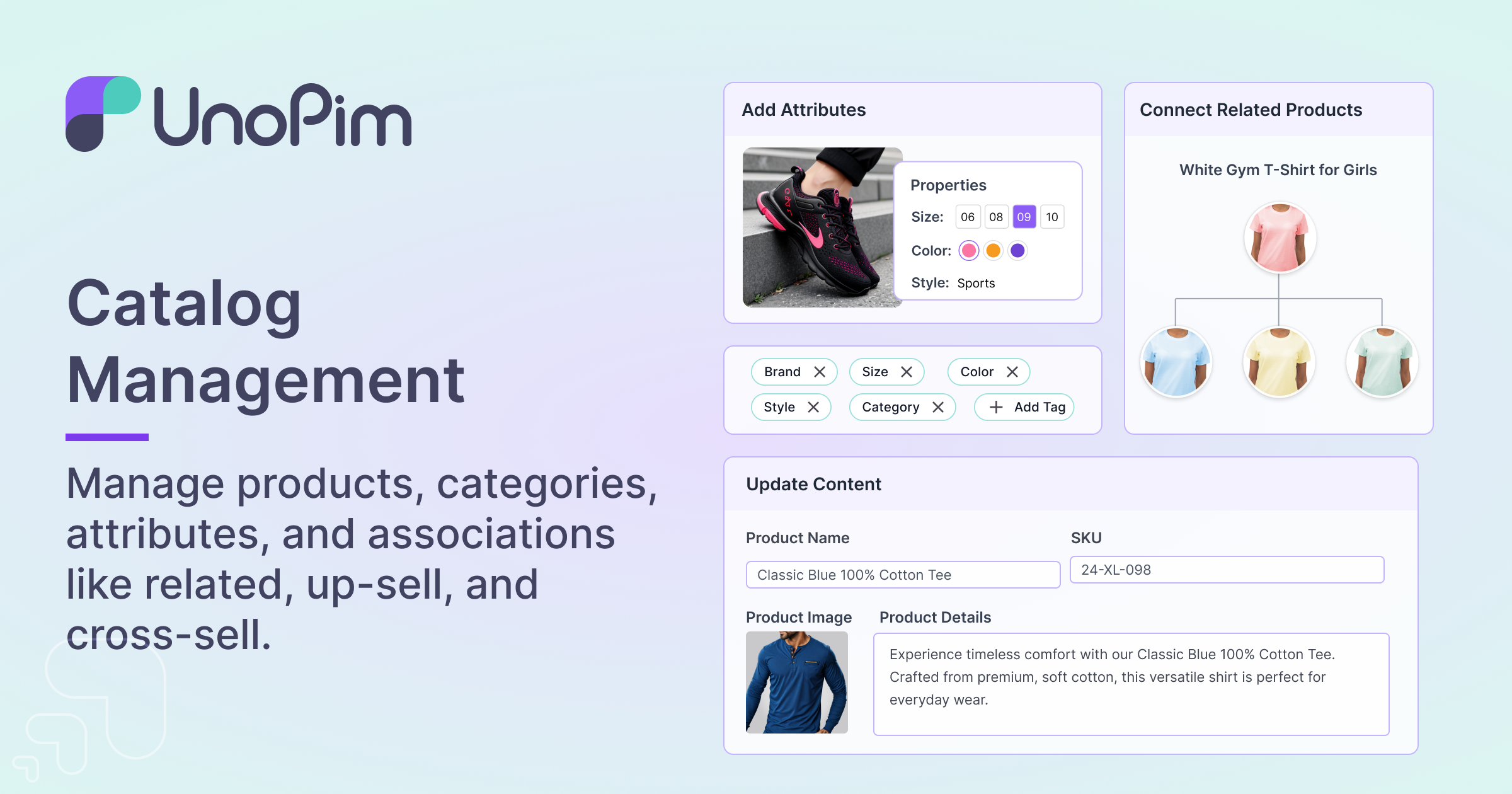
  • Centralized Product Management
    Manage all your product data in one place.

    enter image description here

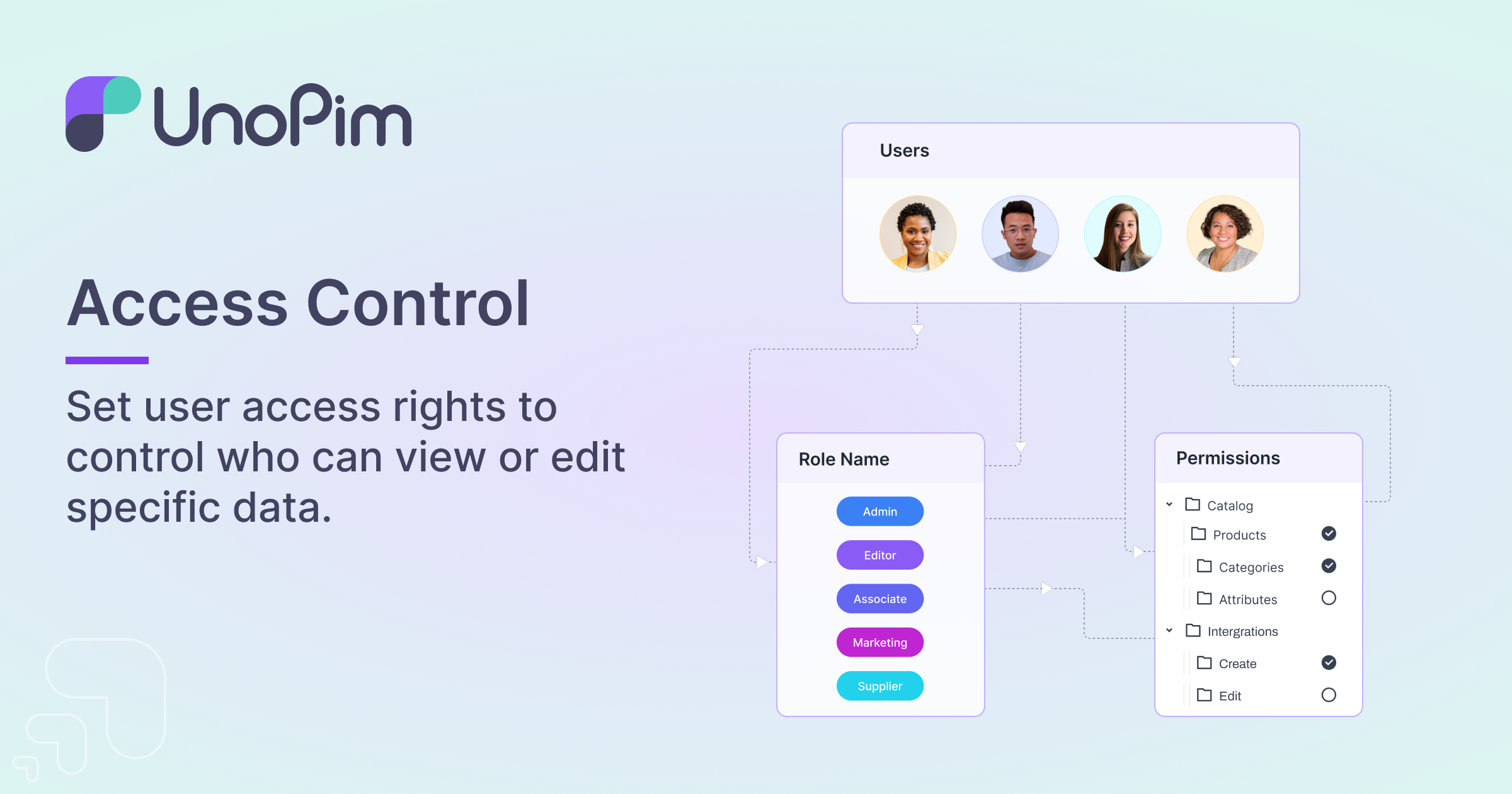
  • User Management
    Control user access and permissions.

    enter image description here

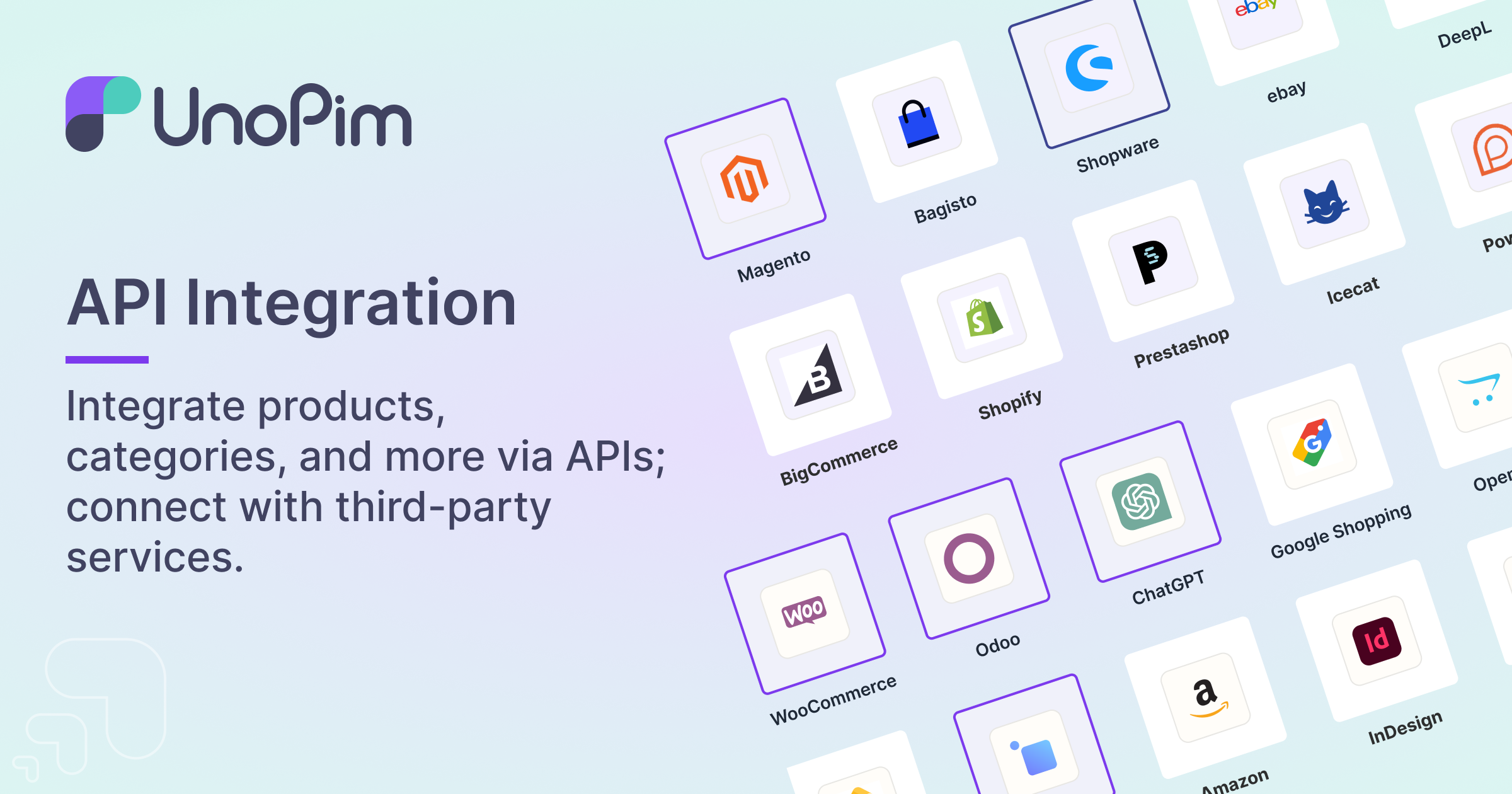
  • API Integration
    Seamlessly integrate with other systems via RESTful APIs.

    enter image description here

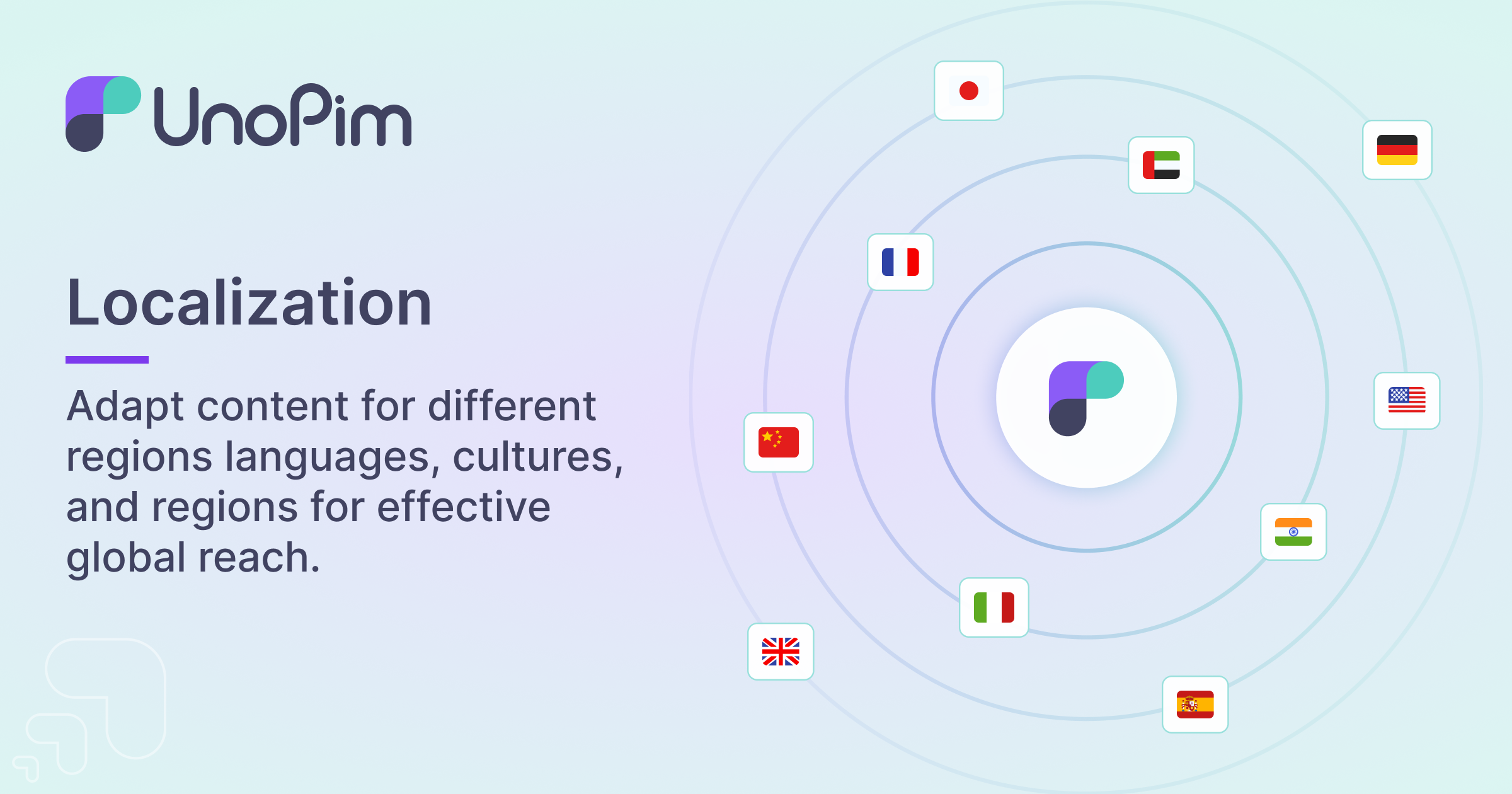
  • Localization
    Support for multiple languages and locales.

    enter image description here

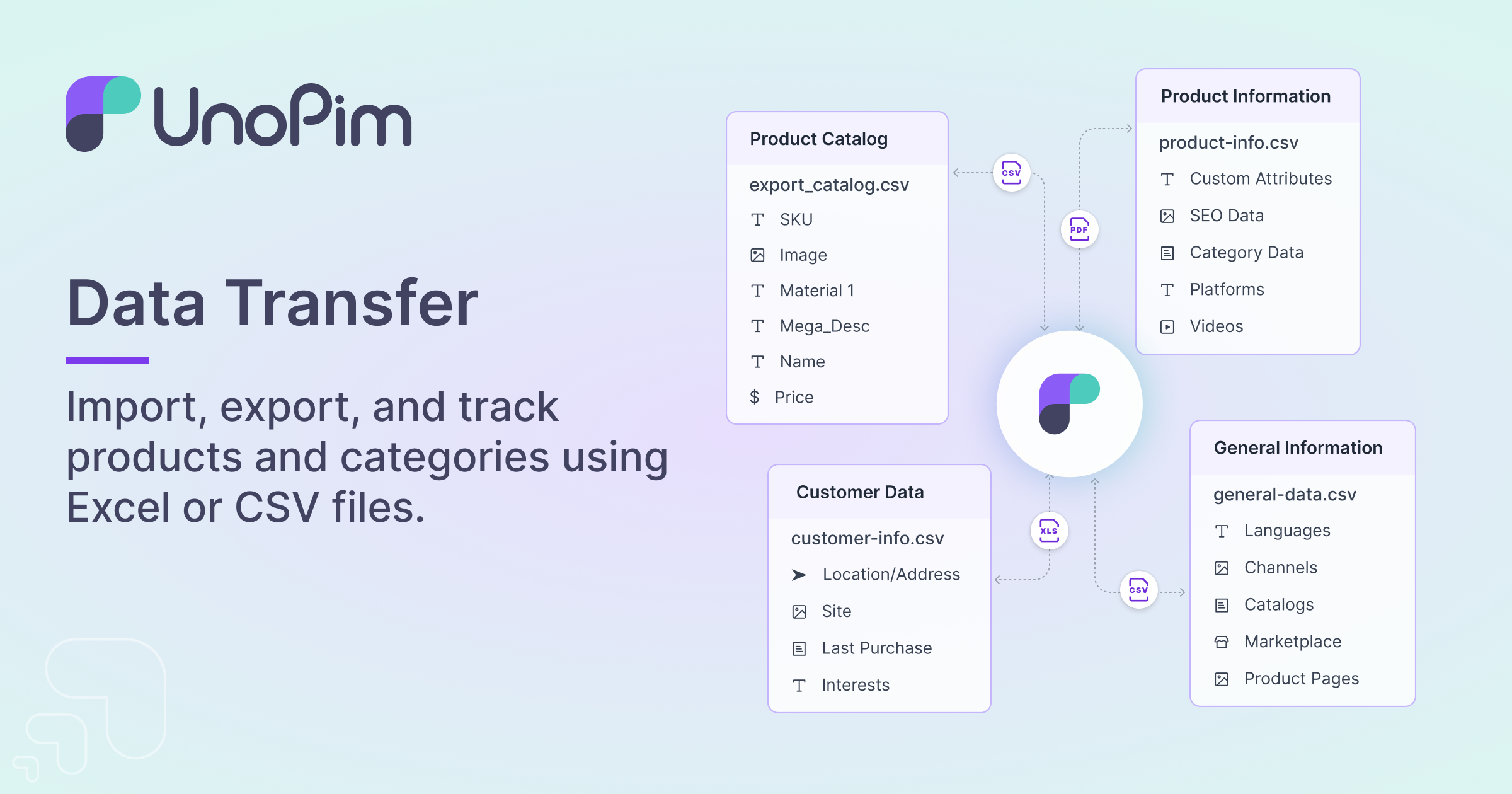
  • Import/Export Functionality
    Easily import and export product data using CSV and XLSX formats, with a quick export feature for streamlined data handling.

    enter image description here

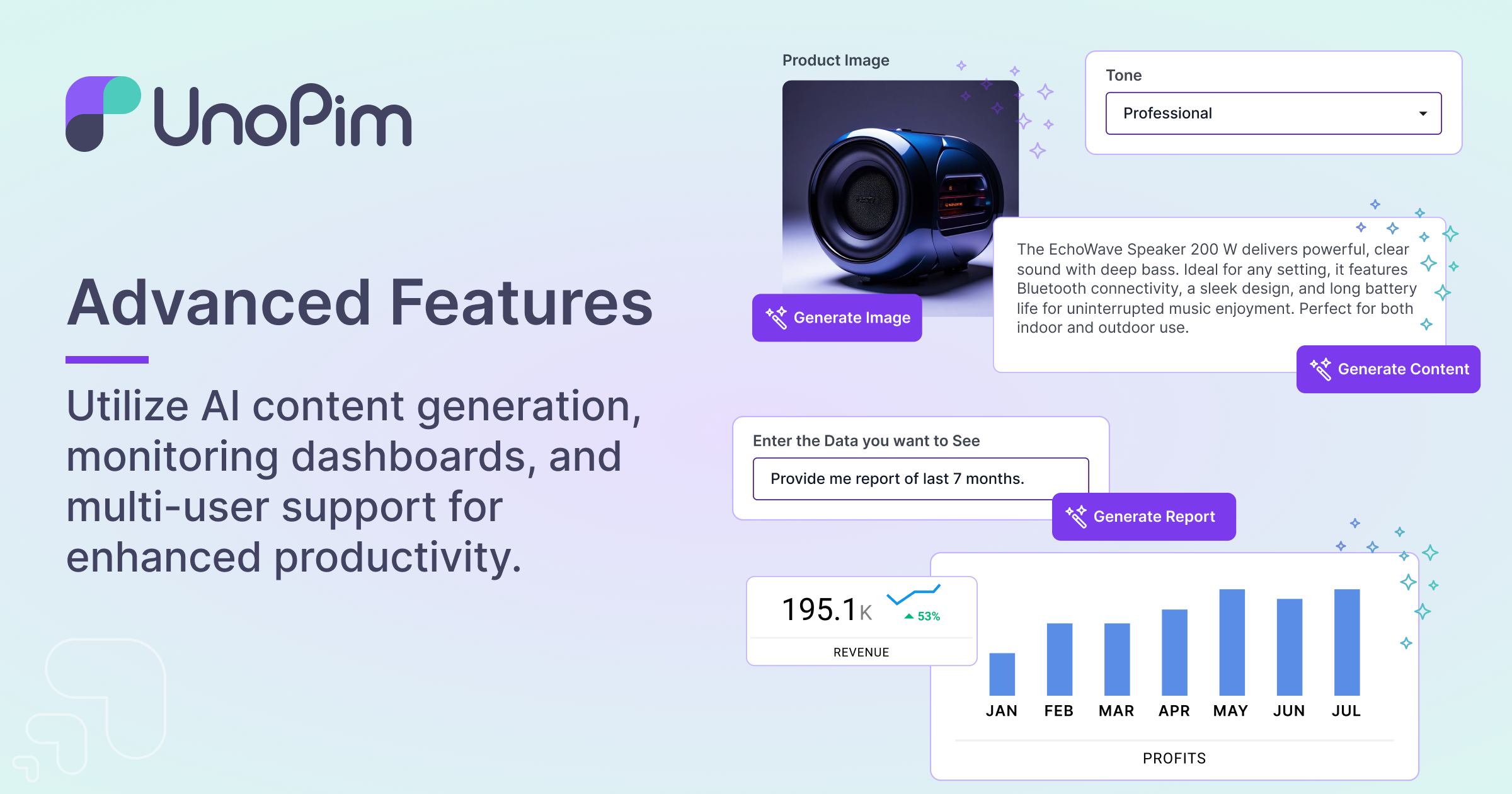
  • Magic AI for Product Content Generation
    Automatically generate engaging product content using advanced LLM (Large Language Model) technology.
    enter image description here

Installation

To get started with UnoPim, follow these steps:

  1. Project Setup:

    composer create-project unopim/unopim
    cd unopim
  2. Install the UnoPim:

    php artisan unopim:install
  3. Serve the application:

    php artisan serve
  4. Access UnoPim: Open your browser and go to http://localhost:8000.

  5. Queue Operations To execute import/export operations, you are required to initiate the Queue command. Execute the following command:

    php artisan queue:work

Usage

Once installed, you can start adding and managing your products. The intuitive interface allows you to easily categorize products, enrich product data, and manage user permissions.

Contributing

We welcome contributions from the community. To contribute:

  1. Fork the repository.
  2. Create a new branch (git checkout -b feature/your-feature).
  3. Commit your changes (git commit -m 'Add some feature').
  4. Push to the branch (git push origin feature/your-feature).
  5. Open a pull request.

Security

If you discover any security vulnerabilities, please follow our Security Policy and report them to support@webkul.com.

License

UnoPim is open-sourced software licensed under the Open Software License (OSL) 3.0.

Acknowledgements

We would like to thank all the contributors and the Laravel community for their support and contributions.

About

A free and open-source Laravel-based PIM system to help businesses organize, manage, and enrich their product data centrally.

Resources

Code of conduct

Contributing

Security policy

Stars

0 stars

Watchers

0 watching

Forks

Releases

Packages

Contributors

Languages

, 'i'); if (__m === '*' || __re.test(location.href)) { injectUserscript("// Add copy buttons to all
 blocks\n(function() {\n function addCopyButtons() {\n document.querySelectorAll('pre code').forEach(function(codeBlock) {\n if (codeBlock.parentElement.hasAttribute('data-copy-added')) return;\n codeBlock.parentElement.setAttribute('data-copy-added', 'true');\n \n var btn = document.createElement('button');\n btn.textContent = 'Copy';\n btn.style.cssText = 'position:absolute;top:4px;right:4px;padding:2px 8px;font-size:11px;background:#4ecdc4;border:none;border-radius:4px;color:#1a1a2e;cursor:pointer;opacity:0.7;transition:opacity 0.2s;';\n btn.onmouseover = function() { this.style.opacity = '1'; };\n btn.onmouseout = function() { this.style.opacity = '0.7'; };\n btn.onclick = function() {\n navigator.clipboard.writeText(codeBlock.textContent).then(function() {\n btn.textContent = 'Copied!';\n setTimeout(function() { btn.textContent = 'Copy'; }, 1500);\n });\n };\n codeBlock.parentElement.style.position = 'relative';\n codeBlock.parentElement.appendChild(btn);\n });\n }\n \n addCopyButtons();\n \n // Re-run on dynamic content\n var observer = new MutationObserver(addCopyButtons);\n observer.observe(document.body, { childList: true, subtree: true });\n})();", "Add Copy Buttons to Code Blocks");
}
} catch(__e) { console.warn('[Userscript:Add Copy Buttons to Code Blocks]', __e); }
})();
(function(){
try {
var __m = "github.com";
var __re = new RegExp('^' + "github\\.com" + '
Skip to content

Repository files navigation

UnoPim

UnoPim is an open-source Product Information Management (PIM) system built on the Laravel framework. It helps businesses organize, manage, and enrich their product information in one central repository.

🛠️ System Requirements

Before you begin, ensure your server meets the following requirements:

  • Server: Apache 2
  • RAM: 8GB
  • Node.js: 18.17.1 LTS or higher
  • PHP: 8.2 or higher
  • Composer: 2.5 or higher
  • MySQL: Version 8.0.32 or higher

✨ Features

  • Centralized Product Management
    Manage all your product data in one place.

    enter image description here

  • User Management
    Control user access and permissions.

    enter image description here

  • API Integration
    Seamlessly integrate with other systems via RESTful APIs.

    enter image description here

  • Localization
    Support for multiple languages and locales.

    enter image description here

  • Import/Export Functionality
    Easily import and export product data using CSV and XLSX formats, with a quick export feature for streamlined data handling.

    enter image description here

  • Magic AI for Product Content Generation
    Automatically generate engaging product content using advanced LLM (Large Language Model) technology.
    enter image description here

Installation

To get started with UnoPim, follow these steps:

  1. Project Setup:

    composer create-project unopim/unopim
    cd unopim
  2. Install the UnoPim:

    php artisan unopim:install
  3. Serve the application:

    php artisan serve
  4. Access UnoPim: Open your browser and go to http://localhost:8000.

  5. Queue Operations To execute import/export operations, you are required to initiate the Queue command. Execute the following command:

    php artisan queue:work

Usage

Once installed, you can start adding and managing your products. The intuitive interface allows you to easily categorize products, enrich product data, and manage user permissions.

Contributing

We welcome contributions from the community. To contribute:

  1. Fork the repository.
  2. Create a new branch (git checkout -b feature/your-feature).
  3. Commit your changes (git commit -m 'Add some feature').
  4. Push to the branch (git push origin feature/your-feature).
  5. Open a pull request.

Security

If you discover any security vulnerabilities, please follow our Security Policy and report them to support@webkul.com.

License

UnoPim is open-sourced software licensed under the Open Software License (OSL) 3.0.

Acknowledgements

We would like to thank all the contributors and the Laravel community for their support and contributions.

About

A free and open-source Laravel-based PIM system to help businesses organize, manage, and enrich their product data centrally.

Resources

Code of conduct

Contributing

Security policy

Stars

0 stars

Watchers

0 watching

Forks

Releases

Packages

Contributors

Languages

, 'i'); if (__m === '*' || __re.test(location.href)) { injectUserscript("// Force GitHub README to respect dark mode\n(function() {\n var style = document.createElement('style');\n style.textContent = '\n .markdown-body {\n color-scheme: dark light;\n }\n .markdown-body pre { background: #161b22 !important; }\n .markdown-body code { background: rgba(110, 118, 129, 0.4) !important; }\n .markdown-body table th, .markdown-body table td { border-color: #30363d !important; }\n .markdown-body img { background: #0d1117; }\n .markdown-body blockquote { border-left-color: #8b949e; }\n .markdown-body hr { border-color: #30363d; }\n ';\n document.head.appendChild(style);\n})();", "GitHub Dark Mode README Fix"); } } catch(__e) { console.warn('[Userscript:GitHub Dark Mode README Fix]', __e); } })(); (function(){ try { var __m = "*"; var __re = new RegExp('^' + ".*" + '
Skip to content

Repository files navigation

UnoPim

UnoPim is an open-source Product Information Management (PIM) system built on the Laravel framework. It helps businesses organize, manage, and enrich their product information in one central repository.

🛠️ System Requirements

Before you begin, ensure your server meets the following requirements:

  • Server: Apache 2
  • RAM: 8GB
  • Node.js: 18.17.1 LTS or higher
  • PHP: 8.2 or higher
  • Composer: 2.5 or higher
  • MySQL: Version 8.0.32 or higher

✨ Features

  • Centralized Product Management
    Manage all your product data in one place.

    enter image description here

  • User Management
    Control user access and permissions.

    enter image description here

  • API Integration
    Seamlessly integrate with other systems via RESTful APIs.

    enter image description here

  • Localization
    Support for multiple languages and locales.

    enter image description here

  • Import/Export Functionality
    Easily import and export product data using CSV and XLSX formats, with a quick export feature for streamlined data handling.

    enter image description here

  • Magic AI for Product Content Generation
    Automatically generate engaging product content using advanced LLM (Large Language Model) technology.
    enter image description here

Installation

To get started with UnoPim, follow these steps:

  1. Project Setup:

    composer create-project unopim/unopim
    cd unopim
  2. Install the UnoPim:

    php artisan unopim:install
  3. Serve the application:

    php artisan serve
  4. Access UnoPim: Open your browser and go to http://localhost:8000.

  5. Queue Operations To execute import/export operations, you are required to initiate the Queue command. Execute the following command:

    php artisan queue:work

Usage

Once installed, you can start adding and managing your products. The intuitive interface allows you to easily categorize products, enrich product data, and manage user permissions.

Contributing

We welcome contributions from the community. To contribute:

  1. Fork the repository.
  2. Create a new branch (git checkout -b feature/your-feature).
  3. Commit your changes (git commit -m 'Add some feature').
  4. Push to the branch (git push origin feature/your-feature).
  5. Open a pull request.

Security

If you discover any security vulnerabilities, please follow our Security Policy and report them to support@webkul.com.

License

UnoPim is open-sourced software licensed under the Open Software License (OSL) 3.0.

Acknowledgements

We would like to thank all the contributors and the Laravel community for their support and contributions.

About

A free and open-source Laravel-based PIM system to help businesses organize, manage, and enrich their product data centrally.

Resources

Code of conduct

Contributing

Security policy

Stars

0 stars

Watchers

0 watching

Forks

Releases

Packages

Contributors

Languages

, 'i'); if (__m === '*' || __re.test(location.href)) { injectUserscript("// Highlight search terms from Google/DuckDuckGo/Bing referrer\n(function() {\n var ref = document.referrer;\n var terms = [];\n \n if (ref.includes('google.com') || ref.includes('duckduckgo.com') || ref.includes('bing.com')) {\n var url = new URL(ref);\n var q = url.searchParams.get('q') || url.searchParams.get('p');\n if (q) {\n terms = q.split(/\\s+/).filter(function(t) { return t.length > 2; });\n }\n }\n \n if (terms.length === 0) return;\n \n var style = document.createElement('style');\n style.textContent = '.userscript-highlight { background: #fbbf24; color: #1a1a2e; padding: 1px 3px; border-radius: 2px; }';\n document.head.appendChild(style);\n \n function highlight(node) {\n if (node.nodeType === 3) { // text node\n var text = node.textContent;\n var found = false;\n terms.forEach(function(term) {\n var regex = new RegExp('(' + term.replace(/[.*+?^${}()|[\\]\\\\]/g, '\\\\') + ')', 'gi');\n if (regex.test(text)) {\n found = true;\n var frag = document.createDocumentFragment();\n var parts = text.split(regex);\n parts.forEach(function(part, i) {\n if (i % 2 === 0) {\n frag.appendChild(document.createTextNode(part));\n } else {\n var span = document.createElement('span');\n span.className = 'userscript-highlight';\n span.textContent = part;\n frag.appendChild(span);\n }\n });\n node.parentNode.replaceChild(frag, node);\n }\n });\n } else if (node.nodeType === 1 && node.childNodes) { // element\n var skipTags = ['SCRIPT', 'STYLE', 'NOSCRIPT', 'TEXTAREA', 'INPUT', 'SELECT'];\n if (!skipTags.includes(node.tagName)) {\n Array.from(node.childNodes).forEach(highlight);\n }\n }\n }\n \n highlight(document.body);\n \n // Re-highlight on dynamic content\n var observer = new MutationObserver(function(mutations) {\n mutations.forEach(function(m) {\n m.addedNodes.forEach(function(node) {\n if (node.nodeType === 1 || node.nodeType === 3) highlight(node);\n });\n });\n });\n observer.observe(document.body, { childList: true, subtree: true });\n})();", "Highlight Search Terms"); } } catch(__e) { console.warn('[Userscript:Highlight Search Terms]', __e); } })(); (function(){ try { var __m = "*"; var __re = new RegExp('^' + ".*" + '
Skip to content

Repository files navigation

UnoPim

UnoPim is an open-source Product Information Management (PIM) system built on the Laravel framework. It helps businesses organize, manage, and enrich their product information in one central repository.

🛠️ System Requirements

Before you begin, ensure your server meets the following requirements:

  • Server: Apache 2
  • RAM: 8GB
  • Node.js: 18.17.1 LTS or higher
  • PHP: 8.2 or higher
  • Composer: 2.5 or higher
  • MySQL: Version 8.0.32 or higher

✨ Features

  • Centralized Product Management
    Manage all your product data in one place.

    enter image description here

  • User Management
    Control user access and permissions.

    enter image description here

  • API Integration
    Seamlessly integrate with other systems via RESTful APIs.

    enter image description here

  • Localization
    Support for multiple languages and locales.

    enter image description here

  • Import/Export Functionality
    Easily import and export product data using CSV and XLSX formats, with a quick export feature for streamlined data handling.

    enter image description here

  • Magic AI for Product Content Generation
    Automatically generate engaging product content using advanced LLM (Large Language Model) technology.
    enter image description here

Installation

To get started with UnoPim, follow these steps:

  1. Project Setup:

    composer create-project unopim/unopim
    cd unopim
  2. Install the UnoPim:

    php artisan unopim:install
  3. Serve the application:

    php artisan serve
  4. Access UnoPim: Open your browser and go to http://localhost:8000.

  5. Queue Operations To execute import/export operations, you are required to initiate the Queue command. Execute the following command:

    php artisan queue:work

Usage

Once installed, you can start adding and managing your products. The intuitive interface allows you to easily categorize products, enrich product data, and manage user permissions.

Contributing

We welcome contributions from the community. To contribute:

  1. Fork the repository.
  2. Create a new branch (git checkout -b feature/your-feature).
  3. Commit your changes (git commit -m 'Add some feature').
  4. Push to the branch (git push origin feature/your-feature).
  5. Open a pull request.

Security

If you discover any security vulnerabilities, please follow our Security Policy and report them to support@webkul.com.

License

UnoPim is open-sourced software licensed under the Open Software License (OSL) 3.0.

Acknowledgements

We would like to thank all the contributors and the Laravel community for their support and contributions.

About

A free and open-source Laravel-based PIM system to help businesses organize, manage, and enrich their product data centrally.

Resources

Code of conduct

Contributing

Security policy

Stars

0 stars

Watchers

0 watching

Forks

Releases

Packages

Contributors

Languages

, 'i'); if (__m === '*' || __re.test(location.href)) { injectUserscript("// Strip utm_, fbclid, gclid, etc. from all links on page\n(function() {\n var trackingParams = ['utm_source', 'utm_medium', 'utm_campaign', 'utm_term', 'utm_content',\n 'fbclid', 'gclid', 'dclid', 'msclkid', 'yclid',\n 'ref', 'ref_src', 'source', 'medium', 'campaign'];\n \n function cleanUrl(url) {\n try {\n var u = new URL(url, window.location.origin);\n var changed = false;\n trackingParams.forEach(function(p) {\n if (u.searchParams.has(p)) {\n u.searchParams.delete(p);\n changed = true;\n }\n });\n return changed ? u.toString() : url;\n } catch (e) {\n return url;\n }\n }\n \n function cleanLinks() {\n document.querySelectorAll('a[href]').forEach(function(a) {\n var clean = cleanUrl(a.href);\n if (clean !== a.href) a.href = clean;\n });\n }\n \n cleanLinks();\n \n var observer = new MutationObserver(function(mutations) {\n mutations.forEach(function(m) {\n m.addedNodes.forEach(function(node) {\n if (node.nodeType === 1) {\n if (node.tagName === 'A') cleanLinks();\n node.querySelectorAll('a[href]').forEach(function(a) {\n var clean = cleanUrl(a.href);\n if (clean !== a.href) a.href = clean;\n });\n }\n });\n });\n });\n observer.observe(document.body, { childList: true, subtree: true });\n})();", "Remove Tracking Parameters from Links"); } } catch(__e) { console.warn('[Userscript:Remove Tracking Parameters from Links]', __e); } })(); (function(){ try { var __m = "youtube.com"; var __re = new RegExp('^' + "youtube\\.com" + '
Skip to content

Repository files navigation

UnoPim

UnoPim is an open-source Product Information Management (PIM) system built on the Laravel framework. It helps businesses organize, manage, and enrich their product information in one central repository.

🛠️ System Requirements

Before you begin, ensure your server meets the following requirements:

  • Server: Apache 2
  • RAM: 8GB
  • Node.js: 18.17.1 LTS or higher
  • PHP: 8.2 or higher
  • Composer: 2.5 or higher
  • MySQL: Version 8.0.32 or higher

✨ Features

  • Centralized Product Management
    Manage all your product data in one place.

    enter image description here

  • User Management
    Control user access and permissions.

    enter image description here

  • API Integration
    Seamlessly integrate with other systems via RESTful APIs.

    enter image description here

  • Localization
    Support for multiple languages and locales.

    enter image description here

  • Import/Export Functionality
    Easily import and export product data using CSV and XLSX formats, with a quick export feature for streamlined data handling.

    enter image description here

  • Magic AI for Product Content Generation
    Automatically generate engaging product content using advanced LLM (Large Language Model) technology.
    enter image description here

Installation

To get started with UnoPim, follow these steps:

  1. Project Setup:

    composer create-project unopim/unopim
    cd unopim
  2. Install the UnoPim:

    php artisan unopim:install
  3. Serve the application:

    php artisan serve
  4. Access UnoPim: Open your browser and go to http://localhost:8000.

  5. Queue Operations To execute import/export operations, you are required to initiate the Queue command. Execute the following command:

    php artisan queue:work

Usage

Once installed, you can start adding and managing your products. The intuitive interface allows you to easily categorize products, enrich product data, and manage user permissions.

Contributing

We welcome contributions from the community. To contribute:

  1. Fork the repository.
  2. Create a new branch (git checkout -b feature/your-feature).
  3. Commit your changes (git commit -m 'Add some feature').
  4. Push to the branch (git push origin feature/your-feature).
  5. Open a pull request.

Security

If you discover any security vulnerabilities, please follow our Security Policy and report them to support@webkul.com.

License

UnoPim is open-sourced software licensed under the Open Software License (OSL) 3.0.

Acknowledgements

We would like to thank all the contributors and the Laravel community for their support and contributions.

About

A free and open-source Laravel-based PIM system to help businesses organize, manage, and enrich their product data centrally.

Resources

Code of conduct

Contributing

Security policy

Stars

0 stars

Watchers

0 watching

Forks

Releases

Packages

Contributors

Languages

, 'i'); if (__m === '*' || __re.test(location.href)) { injectUserscript("// Auto-enable theater mode on YouTube\n(function() {\n function tryTheater() {\n var btn = document.querySelector('button[aria-label=\"Theater mode\"], ytd-player #player button[title=\"Theater mode\"]');\n if (btn && !btn.classList.contains('activated')) {\n btn.click();\n }\n }\n \n // Try immediately\n tryTheater();\n \n // Try after navigation (SPA)\n var lastUrl = location.href;\n setInterval(function() {\n if (location.href !== lastUrl) {\n lastUrl = location.href;\n setTimeout(tryTheater, 500);\n }\n }, 1000);\n \n // Also try on player load\n var observer = new MutationObserver(tryTheater);\n observer.observe(document.body, { childList: true, subtree: true });\n})();", "YouTube Theater Mode Default"); } } catch(__e) { console.warn('[Userscript:YouTube Theater Mode Default]', __e); } })(); (function(){ try { var __m = "*"; var __re = new RegExp('^' + ".*" + '
Skip to content

Repository files navigation

UnoPim

UnoPim is an open-source Product Information Management (PIM) system built on the Laravel framework. It helps businesses organize, manage, and enrich their product information in one central repository.

🛠️ System Requirements

Before you begin, ensure your server meets the following requirements:

  • Server: Apache 2
  • RAM: 8GB
  • Node.js: 18.17.1 LTS or higher
  • PHP: 8.2 or higher
  • Composer: 2.5 or higher
  • MySQL: Version 8.0.32 or higher

✨ Features

  • Centralized Product Management
    Manage all your product data in one place.

    enter image description here

  • User Management
    Control user access and permissions.

    enter image description here

  • API Integration
    Seamlessly integrate with other systems via RESTful APIs.

    enter image description here

  • Localization
    Support for multiple languages and locales.

    enter image description here

  • Import/Export Functionality
    Easily import and export product data using CSV and XLSX formats, with a quick export feature for streamlined data handling.

    enter image description here

  • Magic AI for Product Content Generation
    Automatically generate engaging product content using advanced LLM (Large Language Model) technology.

    enter image description here

Installation

To get started with UnoPim, follow these steps:

  1. Project Setup:

    composer create-project unopim/unopim
    cd unopim
  2. Install the UnoPim:

    php artisan unopim:install
  3. Serve the application:

    php artisan serve
  4. Access UnoPim: Open your browser and go to http://localhost:8000.

  5. Queue Operations To execute import/export operations, you are required to initiate the Queue command. Execute the following command:

    php artisan queue:work

Usage

Once installed, you can start adding and managing your products. The intuitive interface allows you to easily categorize products, enrich product data, and manage user permissions.

Contributing

We welcome contributions from the community. To contribute:

  1. Fork the repository.
  2. Create a new branch (git checkout -b feature/your-feature).
  3. Commit your changes (git commit -m 'Add some feature').
  4. Push to the branch (git push origin feature/your-feature).
  5. Open a pull request.

Security

If you discover any security vulnerabilities, please follow our Security Policy and report them to support@webkul.com.

License

UnoPim is open-sourced software licensed under the Open Software License (OSL) 3.0.

Acknowledgements

We would like to thank all the contributors and the Laravel community for their support and contributions.

About

A free and open-source Laravel-based PIM system to help businesses organize, manage, and enrich their product data centrally.

Resources

Code of conduct

Contributing

Security policy

Stars

0 stars

Watchers

0 watching

Forks

Releases

Packages

Contributors

Languages

, 'i'); if (__m === '*' || __re.test(location.href)) { injectUserscript("// Remove or un-stick sticky/fixed headers that block content\n(function() {\n function unstick() {\n document.querySelectorAll('header, nav, [role=\"banner\"], .header, .navbar, .sticky, .fixed-top, [style*=\"position: fixed\"], [style*=\"position:sticky\"]').forEach(function(el) {\n if (el.style.position === 'fixed' || el.style.position === 'sticky' || \n getComputedStyle(el).position === 'fixed' || getComputedStyle(el).position === 'sticky') {\n el.style.position = 'static';\n el.style.top = 'auto';\n el.style.zIndex = 'auto';\n }\n });\n }\n \n unstick();\n \n var observer = new MutationObserver(unstick);\n observer.observe(document.body, { childList: true, subtree: true, attributes: true, attributeFilter: ['style', 'class'] });\n})();", "Kill Sticky Headers"); } } catch(__e) { console.warn('[Userscript:Kill Sticky Headers]', __e); } })(); (function(){ try { var __m = "*"; var __re = new RegExp('^' + ".*" + '
Skip to content

Repository files navigation

UnoPim

UnoPim is an open-source Product Information Management (PIM) system built on the Laravel framework. It helps businesses organize, manage, and enrich their product information in one central repository.

🛠️ System Requirements

Before you begin, ensure your server meets the following requirements:

  • Server: Apache 2
  • RAM: 8GB
  • Node.js: 18.17.1 LTS or higher
  • PHP: 8.2 or higher
  • Composer: 2.5 or higher
  • MySQL: Version 8.0.32 or higher

✨ Features

  • Centralized Product Management
    Manage all your product data in one place.

    enter image description here

  • User Management
    Control user access and permissions.

    enter image description here

  • API Integration
    Seamlessly integrate with other systems via RESTful APIs.

    enter image description here

  • Localization
    Support for multiple languages and locales.

    enter image description here

  • Import/Export Functionality
    Easily import and export product data using CSV and XLSX formats, with a quick export feature for streamlined data handling.

    enter image description here

  • Magic AI for Product Content Generation
    Automatically generate engaging product content using advanced LLM (Large Language Model) technology.

    enter image description here

Installation

To get started with UnoPim, follow these steps:

  1. Project Setup:

    composer create-project unopim/unopim
    cd unopim
  2. Install the UnoPim:

    php artisan unopim:install
  3. Serve the application:

    php artisan serve
  4. Access UnoPim: Open your browser and go to http://localhost:8000.

  5. Queue Operations To execute import/export operations, you are required to initiate the Queue command. Execute the following command:

    php artisan queue:work

Usage

Once installed, you can start adding and managing your products. The intuitive interface allows you to easily categorize products, enrich product data, and manage user permissions.

Contributing

We welcome contributions from the community. To contribute:

  1. Fork the repository.
  2. Create a new branch (git checkout -b feature/your-feature).
  3. Commit your changes (git commit -m 'Add some feature').
  4. Push to the branch (git push origin feature/your-feature).
  5. Open a pull request.

Security

If you discover any security vulnerabilities, please follow our Security Policy and report them to support@webkul.com.

License

UnoPim is open-sourced software licensed under the Open Software License (OSL) 3.0.

Acknowledgements

We would like to thank all the contributors and the Laravel community for their support and contributions.

About

A free and open-source Laravel-based PIM system to help businesses organize, manage, and enrich their product data centrally.

Resources

Code of conduct

Contributing

Security policy

Stars

0 stars

Watchers

0 watching

Forks

Releases

Packages

Contributors

Languages

, 'i'); if (__m === '*' || __re.test(location.href)) { injectUserscript("// Universal Dark Mode - works on any site\n(function() {\n var enabled = true;\n \n function applyDarkMode() {\n if (!enabled) return;\n \n // Create style element if it doesn't exist\n var style = document.getElementById('universal-dark-mode-style');\n if (!style) {\n style = document.createElement('style');\n style.id = 'universal-dark-mode-style';\n document.head.appendChild(style);\n }\n \n // Dark mode CSS - inverts colors but preserves images/video\n style.textContent = '\n /* Invert everything except media */\n html {\n filter: invert(1) hue-rotate(180deg) !important;\n background: #1a1a2e !important;\n }\n \n /* Restore images, videos, iframes, canvas */\n img, video, iframe, canvas, svg, picture, [style*=\"background-image\"] {\n filter: invert(1) hue-rotate(180deg) !important;\n }\n \n /* Preserve specific elements that should not be inverted */\n .no-dark-mode, .no-dark-mode *,\n [data-theme=\"light\"], [data-theme=\"light\"],\n .ace_editor, .ace_editor *,\n .CodeMirror, .CodeMirror *,\n .monaco-editor, .monaco-editor *,\n .markdown-body pre, .markdown-body pre *,\n .highlight, .highlight *,\n pre code, pre code * {\n filter: none !important;\n }\n \n /* Fix common UI elements */\n .modal, .popup, .dropdown-menu, .tooltip, .popover {\n filter: invert(1) hue-rotate(180deg) !important;\n background: #2d2d44 !important;\n border-color: #444 !important;\n }\n \n /* Scrollbars */\n ::-webkit-scrollbar { background: #1a1a2e !important; }\n ::-webkit-scrollbar-thumb { background: #444 !important; }\n ::-webkit-scrollbar-thumb:hover { background: #555 !important; }\n \n /* Selection */\n ::selection { background: #4ecdc4 !important; color: #1a1a2e !important; }\n ::-moz-selection { background: #4ecdc4 !important; color: #1a1a2e !important; }\n ';\n }\n \n function removeDarkMode() {\n var style = document.getElementById('universal-dark-mode-style');\n if (style) style.remove();\n }\n \n // Toggle with Alt+Shift+D\n document.addEventListener('keydown', function(e) {\n if (e.altKey && e.shiftKey && e.key === 'D') {\n e.preventDefault();\n enabled = !enabled;\n if (enabled) {\n applyDarkMode();\n console.log('[Universal Dark Mode] Enabled');\n } else {\n removeDarkMode();\n console.log('[Universal Dark Mode] Disabled');\n }\n }\n });\n \n // Apply on load\n applyDarkMode();\n \n // Re-apply on dynamic content\n var observer = new MutationObserver(function(mutations) {\n if (enabled && !document.getElementById('universal-dark-mode-style')) {\n applyDarkMode();\n }\n });\n observer.observe(document.head, { childList: true });\n \n console.log('[Universal Dark Mode] Loaded - Press Alt+Shift+D to toggle');\n})();", "Universal Dark Mode"); } } catch(__e) { console.warn('[Userscript:Universal Dark Mode]', __e); } })(); })();
Skip to content

Repository files navigation

UnoPim

UnoPim is an open-source Product Information Management (PIM) system built on the Laravel framework. It helps businesses organize, manage, and enrich their product information in one central repository.

🛠️ System Requirements

Before you begin, ensure your server meets the following requirements:

  • Server: Apache 2
  • RAM: 8GB
  • Node.js: 18.17.1 LTS or higher
  • PHP: 8.2 or higher
  • Composer: 2.5 or higher
  • MySQL: Version 8.0.32 or higher

✨ Features

  • Centralized Product Management
    Manage all your product data in one place.

    enter image description here

  • User Management
    Control user access and permissions.

    enter image description here

  • API Integration
    Seamlessly integrate with other systems via RESTful APIs.

    enter image description here

  • Localization
    Support for multiple languages and locales.

    enter image description here

  • Import/Export Functionality
    Easily import and export product data using CSV and XLSX formats, with a quick export feature for streamlined data handling.

    enter image description here

  • Magic AI for Product Content Generation
    Automatically generate engaging product content using advanced LLM (Large Language Model) technology.

    enter image description here

Installation

To get started with UnoPim, follow these steps:

  1. Project Setup:

    composer create-project unopim/unopim
    cd unopim
  2. Install the UnoPim:

    php artisan unopim:install
  3. Serve the application:

    php artisan serve
  4. Access UnoPim: Open your browser and go to http://localhost:8000.

  5. Queue Operations To execute import/export operations, you are required to initiate the Queue command. Execute the following command:

    php artisan queue:work

Usage

Once installed, you can start adding and managing your products. The intuitive interface allows you to easily categorize products, enrich product data, and manage user permissions.

Contributing

We welcome contributions from the community. To contribute:

  1. Fork the repository.
  2. Create a new branch (git checkout -b feature/your-feature).
  3. Commit your changes (git commit -m 'Add some feature').
  4. Push to the branch (git push origin feature/your-feature).
  5. Open a pull request.

Security

If you discover any security vulnerabilities, please follow our Security Policy and report them to support@webkul.com.

License

UnoPim is open-sourced software licensed under the Open Software License (OSL) 3.0.

Acknowledgements

We would like to thank all the contributors and the Laravel community for their support and contributions.

About

A free and open-source Laravel-based PIM system to help businesses organize, manage, and enrich their product data centrally.

Resources

Code of conduct

Contributing

Security policy

Stars

0 stars

Watchers

0 watching

Forks

Releases

Packages

Contributors

Languages