


Shogi, or Japanese Chess, is based on very complex rules, and it is hard to implement all basic rules. This ShogibanKit aims to implement such complex algorithm to find valid move or action, or to find out whether it is checkmate or not. I also would like to state that ShogibanKit does not provide:
- Any Graphical User Interface
- Any Artificial Intelligence
Status: Under Development
- Now, Swift 5 ready
It would be controversial for sure, I tried using Japanese for class names, variable names, and others. It is part of my experiment to see if coding with non English name would work or not, or impact of maintaining the code. For example, all type of pieces is expressed as follows using Japanese. It would be natural and easier to read code or Shogi player programmers.
enum駒型:Int8{case 歩, 香, 桂, 銀, 金, 角, 飛, 王
// ...
}
Since there are no Capitalization in Japanese, Swift complains using the same name for type and variables.
enumKoma{...}varkoma=Koma(...) // OK: no problem!
enum駒{...}var駒=駒(...) // Error: variable name cannot be same as type name
So suffix 型 to be added for Japanese type names.
enum 駒型 { ... }
var 駒 = 駒型(...) // OK: no problem!
Here is the list of common classes or types.
| Name | Type | Description |
|---|---|---|
| 筋型 | enum | Column (right to left) |
| 段型 | enum | Row |
| 位置型 | enum | Position (row and column) |
| 駒型 | enum | Type of piece (no front/back) |
| 駒面型 | enum | Type of piece (cares front/back) |
| 持駒型 | struct | Captured pieces |
| 先後型 | enum | Which player |
| 升型 | enum | State of board position (which players which piece, or empty?) |
| 指手型 | enum | Describe the one movement |
| 局面型 | class | Snapshot of the state of game-board |
Here are some example of describe the location of the board. The column order is from right to left, same as Shogi official. Although columns and rows is 1 based index, actual rawValue is 0 based index.
letcol= 筋.4 // Zenkaku (全角)
letrow= 段.七 // Zenkaku (全角)
letposition1= 位置.5五 // Zenkaku (全角)
letposition2=位置(筋: col, 段: row)I am not sure how to describe 先手, 後手 in English. Black and White may be OK for Go (碁), but not Shogi. It does not describe the detail of individual, just describe which player.
enum先後型{case 先手, 後手
}駒型 and 駒面型 describe the pieces. 駒型 does not have state of front and back, on the other hand 駒面型 cares about the state of front and back, or promoted or not.
letfu= 駒型.歩
letto= 駒面型.と
For the formatting purpose, promoted pieces of 香, 桂, 銀 are expressed as 杏, 圭, 全 rather than 成香, 成桂, 成銀. They are not official way to describe it, but commonly used for computer scene.
enum駒面型{case 歩, 香, 桂, 銀, 金, 角, 飛, 王
case と, 杏, 圭, 全, 馬, 竜
}持駒型 describe the state of captured pieces. It knows which 駒型 is captured and its number. By the way, even though promoted pieces are captured, they cannot be used as state of promoted so are managed as 駒型.
You find number of captured 駒 as follows.
let先手持駒:持駒型=...let銀の持ち駒数=先手持駒[.銀]局面型 describes the snapshot of a game-board. And each cell is described as 升型.
let局面=局面型(string:"▽持駒:なし\r"+"|▽香|▽桂|▽銀|▽金|▽王|▽金|▽銀|▽桂|▽香|\r"+"| |▽飛| | | | | |▽角| |\r"+"|▽歩|▽歩|▽歩|▽歩|▽歩|▽歩|▽歩|▽歩|▽歩|\r"+"| | | | | | | | | |\r"+"| | | | | | | | | |\r"+"| | | | | | | | | |\r"+"|▲歩|▲歩|▲歩|▲歩|▲歩|▲歩|▲歩|▲歩|▲歩|\r"+"| |▲角| | | | | |▲飛| |\r"+"|▲香|▲桂|▲銀|▲金|▲王|▲金|▲銀|▲桂|▲香|\r"+"▲持駒:なし\r",
手番:.先手)
Or you may provide 指手型 to execute to create the next game-borad state.
let前の局面:局面型=...let指手=...let次の局面= 局面型.指手を実行(指手)You can also print() or .string property to extract string representation. And this string can be used for 局面型(_,手番:).
letある局面:=...print("\(ある局面)")letstringRepresentaion= ある局面.string
let手番= ある局面.手番
let再現局面=局面(stringRepresentaion, 手番: 手番)
後手持駒:桂 |▽香|▲龍| | | | | | |▽香| | | |▲金| |▲龍| | | | | |▽歩|▲全| | |▽金| |▽歩|▽桂|▽歩| | |▽歩| | |▽王| |▽銀| | | | | | |▲金|▲角| | | | | | | |▽香|▲歩|▲歩|▲銀|▲桂| | | |▲歩|▲歩| | | |▲歩|▲銀| |▲歩| | | | |▲金| | | |▲歩| | |▲香| | |▲玉| | | |▽馬| | 先手持駒:桂,歩7
A move can be described with 指手型. 指手型 three cases. 動 describes a piece move from one place to the other. 打 describes place captured piece on the game-board at specific location. 投了 describes the checkmate or equivalent.
enum指手型{case 動(先後:先後型, 移動前の位置:位置型, 移動後の位置:位置型, 移動後の駒面:駒面型)case 打(先後:先後型, 位置:位置型, 駒:駒型)case 終(終局理由:終局理由型, 勝者:先後型?)}You may construct hand written 指手型, but it has to be legitimate valid move. Invalid 指手型 will be rejected by 局面型's 指手を実行() method.
var局面=局面(string: 手合割型.平手初期盤面, 手番:.先手)
局面 = 局面.指手を実行(指手型.動(先後:.先手, 移動前の位置:.7七, 移動後の位置:.7六, 移動後の駒面:.歩))
局面 = 局面.指手を実行(指手型.動(先後:.後手, 移動前の位置:.3三, 移動後の位置:.3四, 移動後の駒面:.歩))
For professional player, this 投了 state may be sufficient, but for amateur, 王 may be captured by careless mistake. Therefore, extra end state should be added later on.
局面型 provides 全可能指手列() method to find all possible legitimate moves. So you may iterate through each candidate to examine all moves. You may also call 指手を実行() for each moves, but it is not suitable for creating millions of instances recursively.
let局面:局面型=...let全可能指手= 局面.全可能指手列()for候補指手in 全可能指手 {iflet 次の局面 =局面(候補指手){
// find one you like
}}- Iterate all positions in
局面型
let局面:局面型=...for位置in 局面 {letマス=局面[位置]let駒面= マス.駒面
}- All positions that a piece at location can make move
let局面:局面型=...let位置列= 局面.指定位置の駒の移動可能位置列(.5五) // only location
let指手列= 局面.指定位置の駒の移動可能指手列(.5五)- Find all positions of where specified type of piece are located
let局面:局面型=...let先手の桂の位置= 局面.駒の位置列(.桂, 先後:.先手)- Which pieces on game-board can make move to specified location?
let局面:局面型=...let味方の駒の位置列= 局面.指定位置へ移動可能な全ての駒の位置列(.7六,先後:.先手)let敵味方双方の駒の位置列= 局面.指定位置へ移動可能な全ての駒の位置列(.7六,先後:nil)let後手の移動指手列= 局面.指定位置へ移動可能な全ての駒を移動させる指手列(.7六,.後手)- Find all movies that can capture 王 (King).
let局面:局面型=...let王手列= 局面.王手列(.先手)- Checkmate? (needs more test)
let局面:局面型=...if 局面.詰みか(){
// checkmate!
}- Find opponent player
let局面:局面型=...let手番の敵方= 局面.手番.敵方- Is 先手's 王 is on the same line of 後手's 角? (English!!)
let局面:局面型=...let後手の角の位置=...for(vx, vy)in 駒面.角.移動可能なベクトル {var(x, y)=(後手の角の位置.筋 + vx, 後手の角の位置.段 + vy)whilelet x = x,let y = y {iflet マス =局面[x, y]where マス.駒面 ==.王 && マス.先後 ==.先手 {
// King is on the line
}(x, y)=(x + vx, y + vy)}}局面型 provides extension to generate image.
extension局面型{func imageForSize(size:CGSize)->CGImage}Here is the code sample of how to generate an image from 局面型, and a sample image that generated by this feature.
letimage= 局面.imageForSize(CGSizeMake(300,300))
In ShoogibanKit, textual expression for position can be used, and also, positions also can be printed on debug console in textual expression. If you simply use Menlo, or Hiragino, it would not be a good experiences for programmers after all.
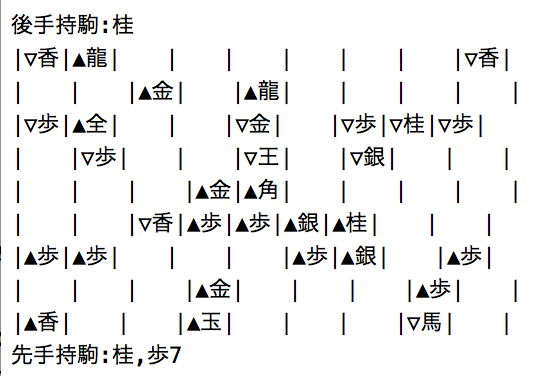
I recommend Source Han Code JP font from Adobe. It is free to use. By using this font, Shogi's textual expression will be look like in source code and in debugger log.

You can get the font from following URLs and try. https://github.com/adobe-fonts/source-han-code-jp
- Test for Check mate
- 打ち歩詰め and other special cases
- 千日手 and other rules
- 局面 compaction to save and load
- UnitTest - removed because it crashes (not sure may be Xcode issue)
- may be some more
- String representation of
局面型does not include手番. If手番is included, it is simple to go back and forth between局面型andString.
- Xcode Version 13.3.1
- Apple Swift version 5.6
Please give me your feedback to kaz.yoshikawa@gmail.com.