| Linux/OSX | Windows |
|---|---|
 |
This is a gate file to Hunter package manager.
The gate project will download the latest packages archive release, unless HUNTER_URL and HUNTER_SHA1 are configured.
The gate project will issue hunter_add_package to all packages specified in HUNTER_PACKAGES list. For every package it will create a hunter_config
in which VERSION and CMAKE_ARGS variables will be set.
For manual configuration of the hunter_config file you can set the HUNTER_LOCAL_CONFIG, HUNTER_GLOBAL_CONFIG, or HUNTER_FILEPATH_CONFIG variables.
The gate project will set CMAKE_BUILD_TYPE as HUNTER_CONFIGURATION_TYPES, so that if you're building Release you won't be getting a Debug build of the packages.
The gate project will create a HunterToolchain.cmake file which will set up the CMAKE_PREFIX_PATH and CMAKE_FIND_ROOT_PATH variables with the installed path of the Hunter packages.
If a CMAKE_TOOLCHAIN_FILE was used during compilation, it will be included in the HunterToolchain.cmake file.
Setting up Hunter, and adding a package list is as easy as:
# FetchContent_MakeAvailable is available since CMake version 3.14cmake_minimum_required(VERSION3.14)
# Setting up dlib as an external packageset(HUNTER_PACKAGES dlib)
include(FetchContent)
FetchContent_Declare(SetupHunter GIT_REPOSITORY https://github.com/cpp-pm/gate)
FetchContent_MakeAvailable(SetupHunter)
# Using the dlib packagefind_package(dlibREQUIRED)
target_link_libraries(myappPRIVATEdlib::dlib)set(HUNTER_pcre2_CMAKE_ARGS
PCRE2_BUILD_PCRE2_8=OFF
PCRE2_BUILD_PCRE2_16=ON
PCRE2_BUILD_PCRE2_32=OFF
PCRE2_SUPPORT_JIT=ON)
set(HUNTER_PACKAGES pcre2)set(HUNTER_Boost_COMPONENTS Filesystem Python)
set(HUNTER_PACKAGES Boost)set(HUNTER_fmt_VERSION 5.3.0)
set(HUNTER_PACKAGES fmt)set(HUNTER_URL "https://github.com/cpp-pm/hunter/archive/v0.23.224.tar.gz")
set(HUNTER_SHA1 "18e57a43efc435f2e1dae1291e82e42afbf940be")
set(HUNTER_PACKAGES fmt ZLIB)
include(FetchContent)
FetchContent_Declare(SetupHunter GIT_REPOSITORY https://github.com/cpp-pm/gate)
FetchContent_MakeAvailable(SetupHunter)With CMake 3.15 it is possible to inject CMake code before or after the project function call,
this way we can have a SetupHunter.cmake which will configure the 3rd party packages for the
project.
Give the following CMake code:
cmake_minimum_required(VERSION3.15)
project(ZLIBTest)
find_package(ZLIBREQUIRED)
add_executable(mainmain.c)
target_link_libraries(mainPRIVATEZLIB::ZLIB)
Notice that we do not have the CONFIG or NO_MODULE argument to find_package.
We can have a SetupHunter.cmake file like this:
set(CMAKE_FIND_PACKAGE_PREFER_CONFIG TRUE)
set(HUNTER_PACKAGES ZLIB)
include(FetchContent)
FetchContent_Declare(SetupHunter GIT_REPOSITORY https://github.com/cpp-pm/gate)
FetchContent_MakeAvailable(SetupHunter)
And then configuring the ZLIBTest project like:
cmake -GNinja -DCMAKE_PROJECT_INCLUDE_BEFORE=[%cd%|$PWD]/SetupHunter.cmake -S . -B build
By using CMake 3.15's CMAKE_FIND_PACKAGE_PREFER_CONFIG, and CMAKE_PROJECT_INCLUDE_BEFORE we can make sure that the Hunter 3rd party packages are built, and used in a non-intrusive manner.
This allows building the 3rd party packages separate than the user projects, and simply use CMake's
find_package with no usage of Hunter at all.
cmake_minimum_required(VERSION3.14)
set(HUNTER_PACKAGES freetype ZLIB PNG double-conversion pcre2)
set(HUNTER_pcre2_CMAKE_ARGS
PCRE2_BUILD_PCRE2_8=OFF
PCRE2_BUILD_PCRE2_16=ON
PCRE2_BUILD_PCRE2_32=OFF
PCRE2_SUPPORT_JIT=ON)
include(FetchContent)
FetchContent_Declare(SetupHunter GIT_REPOSITORY https://github.com/cpp-pm/gate)
FetchContent_MakeAvailable(SetupHunter)
project(3rdparty)
Then compile your project with:
cmake -DCMAKE_TOOLCHAIN_FILE=/path/to/your/3rdparty/build/HunterToolchain.cmake
file(WRITE${CMAKE_BUILD_DIR}/HunterConfig.cmake[=[hunter_config(zlib VERSION 1.2.8)hunter_config(pcre2 VERSION ${HUNTER_pcre2_VERSION} CMAKE_ARGS PCRE2_BUILD_PCRE2_8=OFF PCRE2_BUILD_PCRE2_16=ON PCRE2_BUILD_PCRE2_32=OFF PCRE2_SUPPORT_JIT=ON)]=])
set(HUNTER_URL "https://github.com/cpp-pm/hunter/archive/v0.23.224.tar.gz")
set(HUNTER_SHA1 "18e57a43efc435f2e1dae1291e82e42afbf940be")
set(HUNTER_FILEPATH_CONFIG ${CMAKE_BUILD_DIR}/HunterConfig.cmake)
include(FetchContent)
FetchContent_Declare(SetupHunter GIT_REPOSITORY https://github.com/cpp-pm/gate)
FetchContent_MakeAvailable(SetupHunter)
hunter_add_package(ZLIB)
hunter_add_package(pcre2)
find_package(ZLIBCONFIGREQUIRED)
find_package(pcre2CONFIGREQUIRED)
add_executable(boomain.c)
target_link_libraries(booPRIVATEZLIB::zlibPCRE2::PCRE2)- Copy
cmake/HunterGate.cmaketo your project - Put any valid Hunter archive with
SHA1hash:
include("cmake/HunterGate.cmake")
HunterGate(
URL"https://github.com/cpp-pm/hunter/archive/v0.23.224.tar.gz"SHA1"18e57a43efc435f2e1dae1291e82e42afbf940be"
)Optionally custom config.cmake file can be specified. File may has different locations:
GLOBAL. The one from Hunter archive:
include("cmake/HunterGate.cmake")
HunterGate(
URL"https://github.com/cpp-pm/hunter/archive/v0.23.224.tar.gz"SHA1"18e57a43efc435f2e1dae1291e82e42afbf940be"GLOBALmyconfig# load `${HUNTER_SELF}/cmake/configs/myconfig.cmake` instead of# default `${HUNTER_SELF}/cmake/configs/default.cmake`
)LOCAL. Default local config.
include("cmake/HunterGate.cmake")
HunterGate(
URL"https://github.com/cpp-pm/hunter/archive/v0.23.224.tar.gz"SHA1"18e57a43efc435f2e1dae1291e82e42afbf940be"LOCAL# load `${CMAKE_CURRENT_LIST_DIR}/cmake/Hunter/config.cmake`
)FILEPATH. Any location.
include("cmake/HunterGate.cmake")
HunterGate(
URL"https://github.com/cpp-pm/hunter/archive/v0.23.224.tar.gz"SHA1"18e57a43efc435f2e1dae1291e82e42afbf940be"FILEPATH"/any/path/to/config.cmake"
)
Example custom config.cmake:
hunter_config(zlibVERSION1.2.8)
hunter_config(pcre2VERSION10.13-p0CMAKE_ARGSPCRE2_BUILD_PCRE2_8=OFFPCRE2_BUILD_PCRE2_16=ONPCRE2_BUILD_PCRE2_32=OFFPCRE2_SUPPORT_JIT=ON
)
See the hunter_config documentation for details.
- If you're in process of patching Hunter and have a
HUNTER_ROOTpointed to a local copy of Hunter thenHunterGatewill not useURLandSHA1values. It means when you updateSHA1of Hunter archive new commits/fixes will not be applied at all. In this case you have to update your git repo manually (i.e. dogit pull). This can also be useful for debugging Hunter. - You don't need to specify hunter_config command for all projects. Set version of the package you're interested in - others will be used from default
config.cmake. - If you want to get full control of what Hunter-SHA1 root directories you want to auto-install you can set HUNTER_DISABLE_AUTOINSTALL environment variable and use HUNTER_RUN_INSTALL=YES CMake variable to allow installations explicitly.
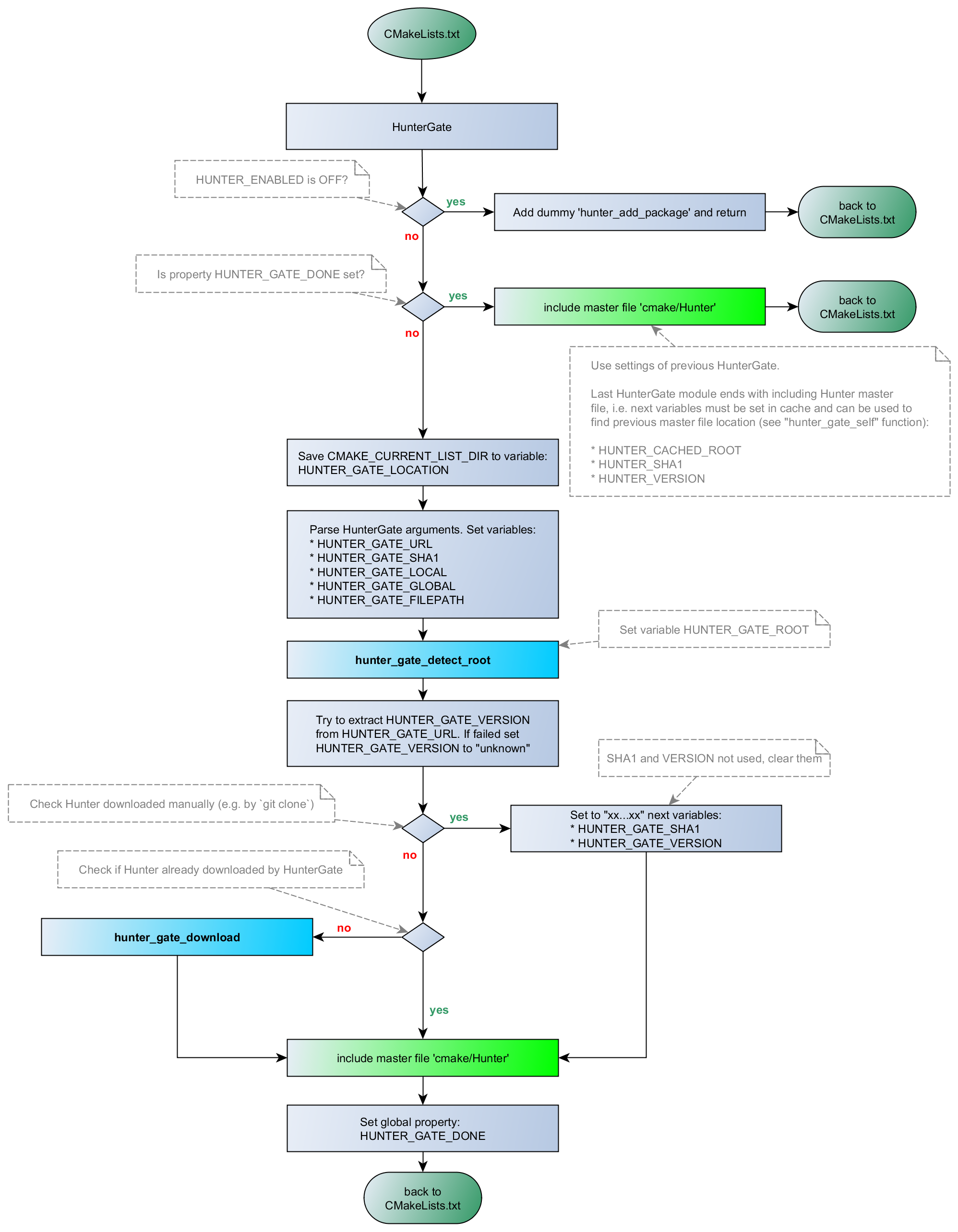
- Try to detect
Hunter: - test CMake variable
HUNTER_ROOT(control, shared downloads and builds) - test environment variable
HUNTER_ROOT(recommended: control, shared downloads and builds) - test directory
${HOME}/.hunter(shared downloads and builds) - test directory
${SYSTEMDRIVE}/.hunter(shared downloads and builds, windows only) - test directory
${USERPROFILE}/.hunter(shared downloads and builds, windows only) - Set
HUNTER_GATE_*variables - Try to include local Hunter master file
include("${HUNTER_ROOT}/cmake/Hunter")(mainly for debugging) - Download Hunter from the specified
URLandSHA1 - Include Hunter master file
include("${HUNTER_SELF}/cmake/Hunter")