A Cybernetical tool for svelte applications on deno in deno (Snel = fast in Nederlands)



It is a tool/framework to compile .svelte component to javascript files to create web application using deno, vite and svelte
- simple setup
- quick compilation
- hot reloading
- import maps support (WIP)
- support for scss and less out of the box (WIP)
- support for typescript
- SSG (WIP)
- SSR (WIP)
the only thing you need is to run the installation command.
deno install -A -n snel https://deno.land/x/snel/install.tsafter running the installation script you just have to run the create command:
snel create [project name]then you just have to enter the created project and start the development server
cd ./[project name]deno task startthis starts your application on a development server in the port you entered in the configuration
to use svelte core libraries such as transition, store, motion etc. must be called using the following syntax:
import{cubicOut}from"svelte/easing";import{tweened}from"svelte/motion";import{onMount}from"svelte";svelte tells the compiler that svelte core resources are being accessed.
You can use import maps to reference the dependencies you use, to use import maps from bes have an import_map.json file with the following structure:
{
"imports": {
"[package name]": "[package url]"
}
}
In order for the compiler to know that you are using import maps, you need to import the dependencies as follows:
importmomentfrom"moment";importaxiosfrom"axios";note: you can use import maps inside svelte components
snel uses a configuration file to define different things, like the development server port or add different plugins, this file can be named as snel.config.js or snel.config.ts.
example: snel.config.js
exportdefault{port: 3000,// development server portmode: "dom",// type project "dom" | "ssg"plugins: [],// plugins must be compatible with rollup denoextendsImportMap: [// extends import map using externas import maps"https://denopkg.com/crewdevio/Snel-carbon@main/components.map.json",],};config options:
- port (number): port number for development server
- mode (string): type project "dom" | "ssg"
- plugins (Plugin[ ]): plugins must be compatible with rollup deno
- extendsImportMap (string[ ]): extends from externas import maps
if you want to use snel.config.ts you can import snelConfig interface to provide type checking:
example: snel.config.ts
importtype{snelConfig}from"https://deno.land/x/snel/mod.ts";exportdefault<snelConfig>{
...
};
Manage import maps dependencies using trex
if you don't have an import map.json file you can create it using the trex install command, trex is mainly focused on handling dependencies for deno but this doesn't prevent you from being able to use it to handle your dependencies for snel/svelte. to install any dependency you just have to use the custom command from trex:
trex --custom axios=https://cdn.skypack.dev/axiosthis will install axios and it will make it accessible in the import map file:
{
"imports": {
"axios": "https://cdn.skypack.dev/axios"
}
}note: You should know that your dependencies must be compatible with es modules and with the browser, if you refer to some import maps package and it is not found by the compiler, it will not be transformed, so an error will appear in your browser.
we recommend these sites for you to install your dependencies
snel supports typescript out the box, so you can import typescript files into .svelte components without specifying the use of typescript within the component.
App.svelte
<script>import{PI}from"./pi.ts";</script><h1>PI is = {PI}</h1><style>h1 {
color:#ff3e00;
}
</style>
pi.ts
exportconstPI: number=Math.PI;Something important to know is that if you are going to import from typescript files without specifying the use of typescript within the component, you can only import non-types elements, example:
- types
- interfaces
in case you want to use the typescript inside the components, you just have to specify it in the lang attribute:
<scriptlang="ts">import{PI}from"./pi.ts";constmessage: string="hello world";interfaceUser{
name: string;
passworld: string;}
let user: User={name: "jhon",passworld: "1234"};</script>
to import types and interfaces into components these must be specified using the following syntax:
<scriptlang="ts">importtype{ ....}from"./types.ts";</script>and you should only import types using this syntax and not combine imports with other elements.
<scriptlang="ts">// badimporttype{UserInterface,myFunction}from"./user.ts";// goodimporttype{UserInterface}from"./user.ts";import{myFunction}from"./user.ts";</script>note: typescript support within components is not stable and compilation errors in hot reloading may appear.
in the same way you can use the syntax of sass and less inside the components to define the styles.
<stylelang="scss">/* .... */</style><!-- or --><stylelang="less">/* .... */</style>note: for now importing external styles is not available for css, sass and less.
when you create a project with snel you will notice that the components are imported as follows:
example
// App.svelteimportHomefrom"@/components/Home.svelte";@/ It is equivalent to ./, Similarly, if you need to access any component or file that is inside the src folder, you can use the following syntax:
example
// src/Users.tsexportdefaultclassUsers{
...
}
// src/components/views/content/User.svelteimportUsersfrom"~/Users.ts";this would be equivalent to:
importUsersfrom"../../../Users.ts";summary:
@/- equivalent to
./
- equivalent to
~/- equivalent to
[current work directory]/src/
- equivalent to
$/- equivalent to
[current work directory]/
- equivalent to
this syntax can be used in javascript, typescript files and components.
note: you can change the behavior by rewriting the pattern inside the import_map.json file, although be careful when doing this.
If you want to have a simple workflow to deploy your SPA application, you can use this.
deploy
name: Build and Deployon:
push:
branches:
- mainjobs:
build:
runs-on: windows-lateststeps:
- name: Checkout 🛎️uses: actions/checkout@v2.3.1
- name: Install Denouses: denolib/setup-deno@v2with:
deno-version: v1.x
- name: Buildrun: | deno run --allow-run --allow-read https://deno.land/x/snel/install.ts trex run build - name: Upload Artifacts 🔺uses: actions/upload-artifact@v1with:
name: sitepath: distdeploy:
needs: [build]runs-on: ubuntu-lateststeps:
- name: Checkout 🛎️uses: actions/checkout@v2.3.1
- name: Download Artifacts 🔻uses: actions/download-artifact@v1with:
name: site
- name: Deploy 🚀uses: JamesIves/github-pages-deploy-action@4.1.4with:
ACCESS_TOKEN: ${{ secrets.ACCESS_TOKEN }}branch: deployfolder: "site"clean-exclude: | vercel.json manifest.json
this compiles the application every time it is pushed to the main branch, and uploads the compiled files to the deploy branch, which could be deployed in hosts such as vercel or netlify.
If you are using the snel client router and you are going to deploy vercel or netlify you must add the respective configuration files to avoid having 404 errors.
for vercel: vercel.json
{
"routes": [
{ "handle": "filesystem" },
{ "src": "/.*", "dest": "/index.html" }
]
}
for netlify: _redirects
/* /index.html 200to avoid this files was removed in each deploy, you can ignore specific files:
....
- name: Deploy 🚀uses: JamesIves/github-pages-deploy-action@4.1.4with:
ACCESS_TOKEN: ${{ secrets.ACCESS_TOKEN }}branch: deployfolder: "site"clean-exclude: | vercel.json # <- ignore vercel.json and manifest.json file manifest.json
for github pages you can use this trick:
create a 404.html file:
<!DOCTYPE html><htmllang="en"><head><metacharset="utf-8" /><title>....</title><script>sessionStorage.redirect=location.href;</script><metahttp-equiv="refresh" content="0;URL='/sghpa'"></meta></head><body>
</body></html>and in your index.html add this:
<!DOCTYPE html><htmllang="en"><head><metacharset="utf-8" /><title>....</title><styletype="text/css">body:before {
content:attr(message);
}
</style></head><body>
.....
<script>(()=>{constredirect=sessionStorage.redirect;deletesessionStorage.redirect;if(redirect&&redirect!==location.href){history.replaceState(null,null,redirect);// REMOVE THIS - just showing the redirect route in the UIdocument.body.setAttribute("message","This page was redirected by 404.html, from the route: "+redirect);}else{// REMOVE THIS - just showing the redirect route in the UIdocument.body.setAttribute("message","This page was loaded directly from the index.html file");}})();</script></body></html>Snel provides hot reload capability, it compiles and updates the application when changes are applied to it
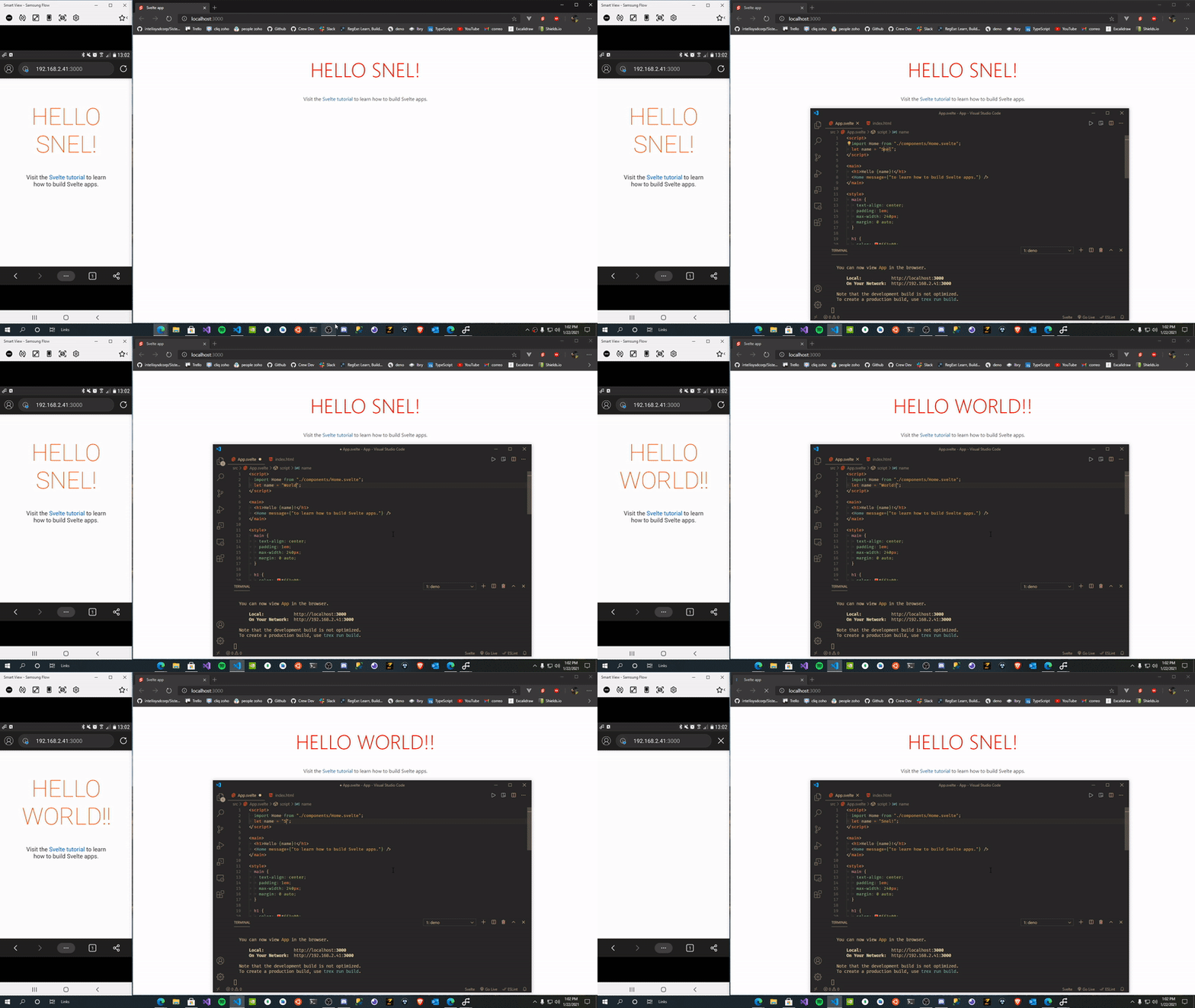
example