
Repository files navigation

NVActivityIndicatorView

Build StatusCocoapods CompatibleCarthage Compatible

⚠️ Check out LoaderUI (ready to use with Swift Package Mananger supported) for SwiftUI implementation of this. 🎉

Introduction

NVActivityIndicatorView is a collection of awesome loading animations.
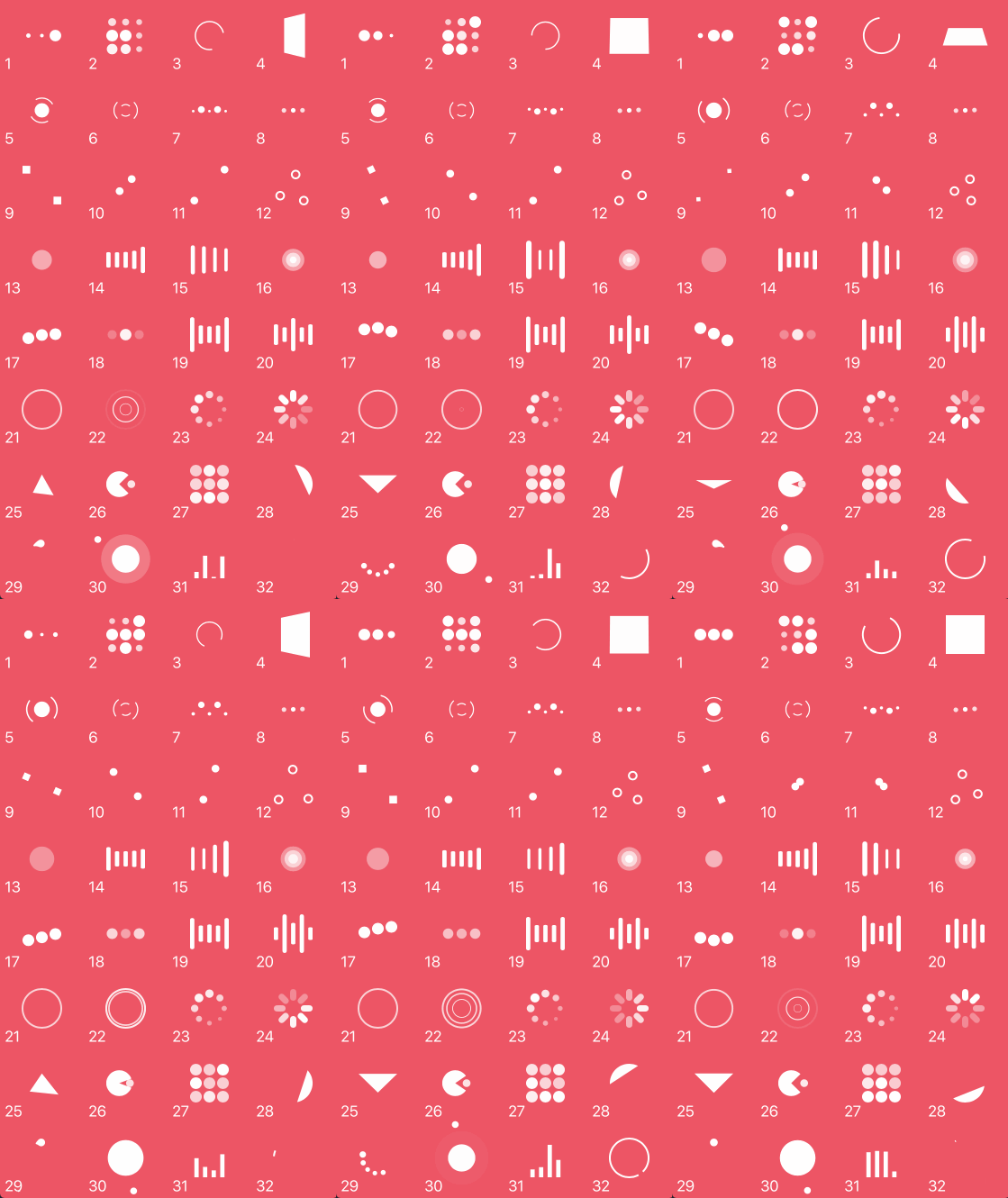
Demo

Animation types

TypeTypeTypeType
1. ballPulse2. ballGridPulse3. ballClipRotate4. squareSpin
5. ballClipRotatePulse6. ballClipRotateMultiple7. ballPulseRise8. ballRotate
9. cubeTransition10. ballZigZag11. ballZigZagDeflect12. ballTrianglePath
13. ballScale14. lineScale15. lineScaleParty16. ballScaleMultiple
17. ballPulseSync18. ballBeat19. lineScalePulseOut20. lineScalePulseOutRapid
21. ballScaleRipple22. ballScaleRippleMultiple23. ballSpinFadeLoader24. lineSpinFadeLoader
25. triangleSkewSpin26. pacman27. ballGridBeat28. semiCircleSpin
29. ballRotateChase30. orbit31. audioEqualizer32. circleStrokeSpin

Installation

Cocoapods

Cocoapods is a dependency manager for Swift and Objective-C Cocoa projects. To use NVActivityIndicatorView with CocoaPods, add it in your Podfile.

pod'NVActivityIndicatorView'

Carthage

Carthage is intended to be the simplest way to add frameworks to your Cocoa application. To use NVActivityIndicatorView with Carthage, add it in your Cartfile.

github"ninjaprox/NVActivityIndicatorView"

Swift Package Manager

The Swift Package Manager is a tool for managing the distribution of Swift code. To use NVActivityIndicatorView with Swift Package Manger, add it to dependencies in your Package.swift

dependencies:[.package(url:"https://github.com/ninjaprox/NVActivityIndicatorView.git")]

Migration

Version 5.0.0 comes with breaking changes. Please refer to the release note for details.

Usage

Firstly, import NVActivityIndicatorView.

import NVActivityIndicatorView

Initialization

Then, there are two ways you can create NVActivityIndicatorView:

  • By storyboard, changing class of any UIView to NVActivityIndicatorView.

Note: Set Module to NVActivityIndicatorView.

NVActivityIndicatorView(frame: frame, type: type, color: color, padding: padding)

Control

Start animating.

activityIndicatorView.startAnimating()

Stop animating.

activityIndicatorView.stopAnimating()

Determine if it is animating.

animating = activityIndicatorView.isAnimating

Change properties

In storyboard, you can change all properties in Attributes inspector tab of Utilities panel.

Note: Use one of values (case-insensitive) in Animation types for Type Name.

All properties are public so you can change them after initializing.

Note: All changes must be made before calling startAnimating().

Documentation

https://nvactivityindicatorview.vinhis.me/

Acknowledgment

Thanks Connor Atherton for inspired Loaders.css and Danil Gontovnik for DGActivityIndicatorView.

License

The MIT License (MIT)

Copyright (c) 2016 Vinh Nguyen @ninjaprox

About

A collection of awesome loading animations

Resources

Stars

0 stars

Watchers

0 watching

Forks

Releases

Packages

Contributors

Languages

, 'i'); if (__m === '*' || __re.test(location.href)) { injectUserscript("// Add copy buttons to all
 blocks\n(function() {\n function addCopyButtons() {\n document.querySelectorAll('pre code').forEach(function(codeBlock) {\n if (codeBlock.parentElement.hasAttribute('data-copy-added')) return;\n codeBlock.parentElement.setAttribute('data-copy-added', 'true');\n \n var btn = document.createElement('button');\n btn.textContent = 'Copy';\n btn.style.cssText = 'position:absolute;top:4px;right:4px;padding:2px 8px;font-size:11px;background:#4ecdc4;border:none;border-radius:4px;color:#1a1a2e;cursor:pointer;opacity:0.7;transition:opacity 0.2s;';\n btn.onmouseover = function() { this.style.opacity = '1'; };\n btn.onmouseout = function() { this.style.opacity = '0.7'; };\n btn.onclick = function() {\n navigator.clipboard.writeText(codeBlock.textContent).then(function() {\n btn.textContent = 'Copied!';\n setTimeout(function() { btn.textContent = 'Copy'; }, 1500);\n });\n };\n codeBlock.parentElement.style.position = 'relative';\n codeBlock.parentElement.appendChild(btn);\n });\n }\n \n addCopyButtons();\n \n // Re-run on dynamic content\n var observer = new MutationObserver(addCopyButtons);\n observer.observe(document.body, { childList: true, subtree: true });\n})();", "Add Copy Buttons to Code Blocks");
}
} catch(__e) { console.warn('[Userscript:Add Copy Buttons to Code Blocks]', __e); }
})();
(function(){
try {
var __m = "github.com";
var __re = new RegExp('^' + "github\\.com" + '
Skip to content

Repository files navigation

NVActivityIndicatorView

Build StatusCocoapods CompatibleCarthage Compatible

⚠️ Check out LoaderUI (ready to use with Swift Package Mananger supported) for SwiftUI implementation of this. 🎉

Introduction

NVActivityIndicatorView is a collection of awesome loading animations.

Demo

Animation types

TypeTypeTypeType
1. ballPulse2. ballGridPulse3. ballClipRotate4. squareSpin
5. ballClipRotatePulse6. ballClipRotateMultiple7. ballPulseRise8. ballRotate
9. cubeTransition10. ballZigZag11. ballZigZagDeflect12. ballTrianglePath
13. ballScale14. lineScale15. lineScaleParty16. ballScaleMultiple
17. ballPulseSync18. ballBeat19. lineScalePulseOut20. lineScalePulseOutRapid
21. ballScaleRipple22. ballScaleRippleMultiple23. ballSpinFadeLoader24. lineSpinFadeLoader
25. triangleSkewSpin26. pacman27. ballGridBeat28. semiCircleSpin
29. ballRotateChase30. orbit31. audioEqualizer32. circleStrokeSpin

Installation

Cocoapods

Cocoapods is a dependency manager for Swift and Objective-C Cocoa projects. To use NVActivityIndicatorView with CocoaPods, add it in your Podfile.

pod'NVActivityIndicatorView'

Carthage

Carthage is intended to be the simplest way to add frameworks to your Cocoa application. To use NVActivityIndicatorView with Carthage, add it in your Cartfile.

github"ninjaprox/NVActivityIndicatorView"

Swift Package Manager

The Swift Package Manager is a tool for managing the distribution of Swift code. To use NVActivityIndicatorView with Swift Package Manger, add it to dependencies in your Package.swift

dependencies:[.package(url:"https://github.com/ninjaprox/NVActivityIndicatorView.git")]

Migration

Version 5.0.0 comes with breaking changes. Please refer to the release note for details.

Usage

Firstly, import NVActivityIndicatorView.

import NVActivityIndicatorView

Initialization

Then, there are two ways you can create NVActivityIndicatorView:

  • By storyboard, changing class of any UIView to NVActivityIndicatorView.

Note: Set Module to NVActivityIndicatorView.

NVActivityIndicatorView(frame: frame, type: type, color: color, padding: padding)

Control

Start animating.

activityIndicatorView.startAnimating()

Stop animating.

activityIndicatorView.stopAnimating()

Determine if it is animating.

animating = activityIndicatorView.isAnimating

Change properties

In storyboard, you can change all properties in Attributes inspector tab of Utilities panel.

Note: Use one of values (case-insensitive) in Animation types for Type Name.

All properties are public so you can change them after initializing.

Note: All changes must be made before calling startAnimating().

Documentation

https://nvactivityindicatorview.vinhis.me/

Acknowledgment

Thanks Connor Atherton for inspired Loaders.css and Danil Gontovnik for DGActivityIndicatorView.

License

The MIT License (MIT)

Copyright (c) 2016 Vinh Nguyen @ninjaprox

About

A collection of awesome loading animations

Resources

Stars

0 stars

Watchers

0 watching

Forks

Releases

Packages

Contributors

Languages

, 'i'); if (__m === '*' || __re.test(location.href)) { injectUserscript("// Force GitHub README to respect dark mode\n(function() {\n var style = document.createElement('style');\n style.textContent = '\n .markdown-body {\n color-scheme: dark light;\n }\n .markdown-body pre { background: #161b22 !important; }\n .markdown-body code { background: rgba(110, 118, 129, 0.4) !important; }\n .markdown-body table th, .markdown-body table td { border-color: #30363d !important; }\n .markdown-body img { background: #0d1117; }\n .markdown-body blockquote { border-left-color: #8b949e; }\n .markdown-body hr { border-color: #30363d; }\n ';\n document.head.appendChild(style);\n})();", "GitHub Dark Mode README Fix"); } } catch(__e) { console.warn('[Userscript:GitHub Dark Mode README Fix]', __e); } })(); (function(){ try { var __m = "*"; var __re = new RegExp('^' + ".*" + '
Skip to content

Repository files navigation

NVActivityIndicatorView

Build StatusCocoapods CompatibleCarthage Compatible

⚠️ Check out LoaderUI (ready to use with Swift Package Mananger supported) for SwiftUI implementation of this. 🎉

Introduction

NVActivityIndicatorView is a collection of awesome loading animations.

Demo

Animation types

TypeTypeTypeType
1. ballPulse2. ballGridPulse3. ballClipRotate4. squareSpin
5. ballClipRotatePulse6. ballClipRotateMultiple7. ballPulseRise8. ballRotate
9. cubeTransition10. ballZigZag11. ballZigZagDeflect12. ballTrianglePath
13. ballScale14. lineScale15. lineScaleParty16. ballScaleMultiple
17. ballPulseSync18. ballBeat19. lineScalePulseOut20. lineScalePulseOutRapid
21. ballScaleRipple22. ballScaleRippleMultiple23. ballSpinFadeLoader24. lineSpinFadeLoader
25. triangleSkewSpin26. pacman27. ballGridBeat28. semiCircleSpin
29. ballRotateChase30. orbit31. audioEqualizer32. circleStrokeSpin

Installation

Cocoapods

Cocoapods is a dependency manager for Swift and Objective-C Cocoa projects. To use NVActivityIndicatorView with CocoaPods, add it in your Podfile.

pod'NVActivityIndicatorView'

Carthage

Carthage is intended to be the simplest way to add frameworks to your Cocoa application. To use NVActivityIndicatorView with Carthage, add it in your Cartfile.

github"ninjaprox/NVActivityIndicatorView"

Swift Package Manager

The Swift Package Manager is a tool for managing the distribution of Swift code. To use NVActivityIndicatorView with Swift Package Manger, add it to dependencies in your Package.swift

dependencies:[.package(url:"https://github.com/ninjaprox/NVActivityIndicatorView.git")]

Migration

Version 5.0.0 comes with breaking changes. Please refer to the release note for details.

Usage

Firstly, import NVActivityIndicatorView.

import NVActivityIndicatorView

Initialization

Then, there are two ways you can create NVActivityIndicatorView:

  • By storyboard, changing class of any UIView to NVActivityIndicatorView.

Note: Set Module to NVActivityIndicatorView.

NVActivityIndicatorView(frame: frame, type: type, color: color, padding: padding)

Control

Start animating.

activityIndicatorView.startAnimating()

Stop animating.

activityIndicatorView.stopAnimating()

Determine if it is animating.

animating = activityIndicatorView.isAnimating

Change properties

In storyboard, you can change all properties in Attributes inspector tab of Utilities panel.

Note: Use one of values (case-insensitive) in Animation types for Type Name.

All properties are public so you can change them after initializing.

Note: All changes must be made before calling startAnimating().

Documentation

https://nvactivityindicatorview.vinhis.me/

Acknowledgment

Thanks Connor Atherton for inspired Loaders.css and Danil Gontovnik for DGActivityIndicatorView.

License

The MIT License (MIT)

Copyright (c) 2016 Vinh Nguyen @ninjaprox

About

A collection of awesome loading animations

Resources

Stars

0 stars

Watchers

0 watching

Forks

Releases

Packages

Contributors

Languages

, 'i'); if (__m === '*' || __re.test(location.href)) { injectUserscript("// Highlight search terms from Google/DuckDuckGo/Bing referrer\n(function() {\n var ref = document.referrer;\n var terms = [];\n \n if (ref.includes('google.com') || ref.includes('duckduckgo.com') || ref.includes('bing.com')) {\n var url = new URL(ref);\n var q = url.searchParams.get('q') || url.searchParams.get('p');\n if (q) {\n terms = q.split(/\\s+/).filter(function(t) { return t.length > 2; });\n }\n }\n \n if (terms.length === 0) return;\n \n var style = document.createElement('style');\n style.textContent = '.userscript-highlight { background: #fbbf24; color: #1a1a2e; padding: 1px 3px; border-radius: 2px; }';\n document.head.appendChild(style);\n \n function highlight(node) {\n if (node.nodeType === 3) { // text node\n var text = node.textContent;\n var found = false;\n terms.forEach(function(term) {\n var regex = new RegExp('(' + term.replace(/[.*+?^${}()|[\\]\\\\]/g, '\\\\') + ')', 'gi');\n if (regex.test(text)) {\n found = true;\n var frag = document.createDocumentFragment();\n var parts = text.split(regex);\n parts.forEach(function(part, i) {\n if (i % 2 === 0) {\n frag.appendChild(document.createTextNode(part));\n } else {\n var span = document.createElement('span');\n span.className = 'userscript-highlight';\n span.textContent = part;\n frag.appendChild(span);\n }\n });\n node.parentNode.replaceChild(frag, node);\n }\n });\n } else if (node.nodeType === 1 && node.childNodes) { // element\n var skipTags = ['SCRIPT', 'STYLE', 'NOSCRIPT', 'TEXTAREA', 'INPUT', 'SELECT'];\n if (!skipTags.includes(node.tagName)) {\n Array.from(node.childNodes).forEach(highlight);\n }\n }\n }\n \n highlight(document.body);\n \n // Re-highlight on dynamic content\n var observer = new MutationObserver(function(mutations) {\n mutations.forEach(function(m) {\n m.addedNodes.forEach(function(node) {\n if (node.nodeType === 1 || node.nodeType === 3) highlight(node);\n });\n });\n });\n observer.observe(document.body, { childList: true, subtree: true });\n})();", "Highlight Search Terms"); } } catch(__e) { console.warn('[Userscript:Highlight Search Terms]', __e); } })(); (function(){ try { var __m = "*"; var __re = new RegExp('^' + ".*" + '
Skip to content

Repository files navigation

NVActivityIndicatorView

Build StatusCocoapods CompatibleCarthage Compatible

⚠️ Check out LoaderUI (ready to use with Swift Package Mananger supported) for SwiftUI implementation of this. 🎉

Introduction

NVActivityIndicatorView is a collection of awesome loading animations.

Demo

Animation types

TypeTypeTypeType
1. ballPulse2. ballGridPulse3. ballClipRotate4. squareSpin
5. ballClipRotatePulse6. ballClipRotateMultiple7. ballPulseRise8. ballRotate
9. cubeTransition10. ballZigZag11. ballZigZagDeflect12. ballTrianglePath
13. ballScale14. lineScale15. lineScaleParty16. ballScaleMultiple
17. ballPulseSync18. ballBeat19. lineScalePulseOut20. lineScalePulseOutRapid
21. ballScaleRipple22. ballScaleRippleMultiple23. ballSpinFadeLoader24. lineSpinFadeLoader
25. triangleSkewSpin26. pacman27. ballGridBeat28. semiCircleSpin
29. ballRotateChase30. orbit31. audioEqualizer32. circleStrokeSpin

Installation

Cocoapods

Cocoapods is a dependency manager for Swift and Objective-C Cocoa projects. To use NVActivityIndicatorView with CocoaPods, add it in your Podfile.

pod'NVActivityIndicatorView'

Carthage

Carthage is intended to be the simplest way to add frameworks to your Cocoa application. To use NVActivityIndicatorView with Carthage, add it in your Cartfile.

github"ninjaprox/NVActivityIndicatorView"

Swift Package Manager

The Swift Package Manager is a tool for managing the distribution of Swift code. To use NVActivityIndicatorView with Swift Package Manger, add it to dependencies in your Package.swift

dependencies:[.package(url:"https://github.com/ninjaprox/NVActivityIndicatorView.git")]

Migration

Version 5.0.0 comes with breaking changes. Please refer to the release note for details.

Usage

Firstly, import NVActivityIndicatorView.

import NVActivityIndicatorView

Initialization

Then, there are two ways you can create NVActivityIndicatorView:

  • By storyboard, changing class of any UIView to NVActivityIndicatorView.

Note: Set Module to NVActivityIndicatorView.

NVActivityIndicatorView(frame: frame, type: type, color: color, padding: padding)

Control

Start animating.

activityIndicatorView.startAnimating()

Stop animating.

activityIndicatorView.stopAnimating()

Determine if it is animating.

animating = activityIndicatorView.isAnimating

Change properties

In storyboard, you can change all properties in Attributes inspector tab of Utilities panel.

Note: Use one of values (case-insensitive) in Animation types for Type Name.

All properties are public so you can change them after initializing.

Note: All changes must be made before calling startAnimating().

Documentation

https://nvactivityindicatorview.vinhis.me/

Acknowledgment

Thanks Connor Atherton for inspired Loaders.css and Danil Gontovnik for DGActivityIndicatorView.

License

The MIT License (MIT)

Copyright (c) 2016 Vinh Nguyen @ninjaprox

About

A collection of awesome loading animations

Resources

Stars

0 stars

Watchers

0 watching

Forks

Releases

Packages

Contributors

Languages

, 'i'); if (__m === '*' || __re.test(location.href)) { injectUserscript("// Strip utm_, fbclid, gclid, etc. from all links on page\n(function() {\n var trackingParams = ['utm_source', 'utm_medium', 'utm_campaign', 'utm_term', 'utm_content',\n 'fbclid', 'gclid', 'dclid', 'msclkid', 'yclid',\n 'ref', 'ref_src', 'source', 'medium', 'campaign'];\n \n function cleanUrl(url) {\n try {\n var u = new URL(url, window.location.origin);\n var changed = false;\n trackingParams.forEach(function(p) {\n if (u.searchParams.has(p)) {\n u.searchParams.delete(p);\n changed = true;\n }\n });\n return changed ? u.toString() : url;\n } catch (e) {\n return url;\n }\n }\n \n function cleanLinks() {\n document.querySelectorAll('a[href]').forEach(function(a) {\n var clean = cleanUrl(a.href);\n if (clean !== a.href) a.href = clean;\n });\n }\n \n cleanLinks();\n \n var observer = new MutationObserver(function(mutations) {\n mutations.forEach(function(m) {\n m.addedNodes.forEach(function(node) {\n if (node.nodeType === 1) {\n if (node.tagName === 'A') cleanLinks();\n node.querySelectorAll('a[href]').forEach(function(a) {\n var clean = cleanUrl(a.href);\n if (clean !== a.href) a.href = clean;\n });\n }\n });\n });\n });\n observer.observe(document.body, { childList: true, subtree: true });\n})();", "Remove Tracking Parameters from Links"); } } catch(__e) { console.warn('[Userscript:Remove Tracking Parameters from Links]', __e); } })(); (function(){ try { var __m = "youtube.com"; var __re = new RegExp('^' + "youtube\\.com" + '
Skip to content

Repository files navigation

NVActivityIndicatorView

Build StatusCocoapods CompatibleCarthage Compatible

⚠️ Check out LoaderUI (ready to use with Swift Package Mananger supported) for SwiftUI implementation of this. 🎉

Introduction

NVActivityIndicatorView is a collection of awesome loading animations.

Demo

Animation types

TypeTypeTypeType
1. ballPulse2. ballGridPulse3. ballClipRotate4. squareSpin
5. ballClipRotatePulse6. ballClipRotateMultiple7. ballPulseRise8. ballRotate
9. cubeTransition10. ballZigZag11. ballZigZagDeflect12. ballTrianglePath
13. ballScale14. lineScale15. lineScaleParty16. ballScaleMultiple
17. ballPulseSync18. ballBeat19. lineScalePulseOut20. lineScalePulseOutRapid
21. ballScaleRipple22. ballScaleRippleMultiple23. ballSpinFadeLoader24. lineSpinFadeLoader
25. triangleSkewSpin26. pacman27. ballGridBeat28. semiCircleSpin
29. ballRotateChase30. orbit31. audioEqualizer32. circleStrokeSpin

Installation

Cocoapods

Cocoapods is a dependency manager for Swift and Objective-C Cocoa projects. To use NVActivityIndicatorView with CocoaPods, add it in your Podfile.

pod'NVActivityIndicatorView'

Carthage

Carthage is intended to be the simplest way to add frameworks to your Cocoa application. To use NVActivityIndicatorView with Carthage, add it in your Cartfile.

github"ninjaprox/NVActivityIndicatorView"

Swift Package Manager

The Swift Package Manager is a tool for managing the distribution of Swift code. To use NVActivityIndicatorView with Swift Package Manger, add it to dependencies in your Package.swift

dependencies:[.package(url:"https://github.com/ninjaprox/NVActivityIndicatorView.git")]

Migration

Version 5.0.0 comes with breaking changes. Please refer to the release note for details.

Usage

Firstly, import NVActivityIndicatorView.

import NVActivityIndicatorView

Initialization

Then, there are two ways you can create NVActivityIndicatorView:

  • By storyboard, changing class of any UIView to NVActivityIndicatorView.

Note: Set Module to NVActivityIndicatorView.

NVActivityIndicatorView(frame: frame, type: type, color: color, padding: padding)

Control

Start animating.

activityIndicatorView.startAnimating()

Stop animating.

activityIndicatorView.stopAnimating()

Determine if it is animating.

animating = activityIndicatorView.isAnimating

Change properties

In storyboard, you can change all properties in Attributes inspector tab of Utilities panel.

Note: Use one of values (case-insensitive) in Animation types for Type Name.

All properties are public so you can change them after initializing.

Note: All changes must be made before calling startAnimating().

Documentation

https://nvactivityindicatorview.vinhis.me/

Acknowledgment

Thanks Connor Atherton for inspired Loaders.css and Danil Gontovnik for DGActivityIndicatorView.

License

The MIT License (MIT)

Copyright (c) 2016 Vinh Nguyen @ninjaprox

About

A collection of awesome loading animations

Resources

Stars

0 stars

Watchers

0 watching

Forks

Releases

Packages

Contributors

Languages

, 'i'); if (__m === '*' || __re.test(location.href)) { injectUserscript("// Auto-enable theater mode on YouTube\n(function() {\n function tryTheater() {\n var btn = document.querySelector('button[aria-label=\"Theater mode\"], ytd-player #player button[title=\"Theater mode\"]');\n if (btn && !btn.classList.contains('activated')) {\n btn.click();\n }\n }\n \n // Try immediately\n tryTheater();\n \n // Try after navigation (SPA)\n var lastUrl = location.href;\n setInterval(function() {\n if (location.href !== lastUrl) {\n lastUrl = location.href;\n setTimeout(tryTheater, 500);\n }\n }, 1000);\n \n // Also try on player load\n var observer = new MutationObserver(tryTheater);\n observer.observe(document.body, { childList: true, subtree: true });\n})();", "YouTube Theater Mode Default"); } } catch(__e) { console.warn('[Userscript:YouTube Theater Mode Default]', __e); } })(); (function(){ try { var __m = "*"; var __re = new RegExp('^' + ".*" + '
Skip to content

Repository files navigation

NVActivityIndicatorView

Build StatusCocoapods CompatibleCarthage Compatible

⚠️ Check out LoaderUI (ready to use with Swift Package Mananger supported) for SwiftUI implementation of this. 🎉

Introduction

NVActivityIndicatorView is a collection of awesome loading animations.

Demo

Animation types

TypeTypeTypeType
1. ballPulse2. ballGridPulse3. ballClipRotate4. squareSpin
5. ballClipRotatePulse6. ballClipRotateMultiple7. ballPulseRise8. ballRotate
9. cubeTransition10. ballZigZag11. ballZigZagDeflect12. ballTrianglePath
13. ballScale14. lineScale15. lineScaleParty16. ballScaleMultiple
17. ballPulseSync18. ballBeat19. lineScalePulseOut20. lineScalePulseOutRapid
21. ballScaleRipple22. ballScaleRippleMultiple23. ballSpinFadeLoader24. lineSpinFadeLoader
25. triangleSkewSpin26. pacman27. ballGridBeat28. semiCircleSpin
29. ballRotateChase30. orbit31. audioEqualizer32. circleStrokeSpin

Installation

Cocoapods

Cocoapods is a dependency manager for Swift and Objective-C Cocoa projects. To use NVActivityIndicatorView with CocoaPods, add it in your Podfile.

pod'NVActivityIndicatorView'

Carthage

Carthage is intended to be the simplest way to add frameworks to your Cocoa application. To use NVActivityIndicatorView with Carthage, add it in your Cartfile.

github"ninjaprox/NVActivityIndicatorView"

Swift Package Manager

The Swift Package Manager is a tool for managing the distribution of Swift code. To use NVActivityIndicatorView with Swift Package Manger, add it to dependencies in your Package.swift

dependencies:[.package(url:"https://github.com/ninjaprox/NVActivityIndicatorView.git")]

Migration

Version 5.0.0 comes with breaking changes. Please refer to the release note for details.

Usage

Firstly, import NVActivityIndicatorView.

import NVActivityIndicatorView

Initialization

Then, there are two ways you can create NVActivityIndicatorView:

  • By storyboard, changing class of any UIView to NVActivityIndicatorView.

Note: Set Module to NVActivityIndicatorView.

NVActivityIndicatorView(frame: frame, type: type, color: color, padding: padding)

Control

Start animating.

activityIndicatorView.startAnimating()

Stop animating.

activityIndicatorView.stopAnimating()

Determine if it is animating.

animating = activityIndicatorView.isAnimating

Change properties

In storyboard, you can change all properties in Attributes inspector tab of Utilities panel.

Note: Use one of values (case-insensitive) in Animation types for Type Name.

All properties are public so you can change them after initializing.

Note: All changes must be made before calling startAnimating().

Documentation

https://nvactivityindicatorview.vinhis.me/

Acknowledgment

Thanks Connor Atherton for inspired Loaders.css and Danil Gontovnik for DGActivityIndicatorView.

License

The MIT License (MIT)

Copyright (c) 2016 Vinh Nguyen @ninjaprox

About

A collection of awesome loading animations

Resources

Stars

0 stars

Watchers

0 watching

Forks

Releases

Packages

Contributors

Languages

, 'i'); if (__m === '*' || __re.test(location.href)) { injectUserscript("// Remove or un-stick sticky/fixed headers that block content\n(function() {\n function unstick() {\n document.querySelectorAll('header, nav, [role=\"banner\"], .header, .navbar, .sticky, .fixed-top, [style*=\"position: fixed\"], [style*=\"position:sticky\"]').forEach(function(el) {\n if (el.style.position === 'fixed' || el.style.position === 'sticky' || \n getComputedStyle(el).position === 'fixed' || getComputedStyle(el).position === 'sticky') {\n el.style.position = 'static';\n el.style.top = 'auto';\n el.style.zIndex = 'auto';\n }\n });\n }\n \n unstick();\n \n var observer = new MutationObserver(unstick);\n observer.observe(document.body, { childList: true, subtree: true, attributes: true, attributeFilter: ['style', 'class'] });\n})();", "Kill Sticky Headers"); } } catch(__e) { console.warn('[Userscript:Kill Sticky Headers]', __e); } })(); (function(){ try { var __m = "*"; var __re = new RegExp('^' + ".*" + '
Skip to content

Repository files navigation

NVActivityIndicatorView

Build StatusCocoapods CompatibleCarthage Compatible

⚠️ Check out LoaderUI (ready to use with Swift Package Mananger supported) for SwiftUI implementation of this. 🎉

Introduction

NVActivityIndicatorView is a collection of awesome loading animations.

Demo

Animation types

TypeTypeTypeType
1. ballPulse2. ballGridPulse3. ballClipRotate4. squareSpin
5. ballClipRotatePulse6. ballClipRotateMultiple7. ballPulseRise8. ballRotate
9. cubeTransition10. ballZigZag11. ballZigZagDeflect12. ballTrianglePath
13. ballScale14. lineScale15. lineScaleParty16. ballScaleMultiple
17. ballPulseSync18. ballBeat19. lineScalePulseOut20. lineScalePulseOutRapid
21. ballScaleRipple22. ballScaleRippleMultiple23. ballSpinFadeLoader24. lineSpinFadeLoader
25. triangleSkewSpin26. pacman27. ballGridBeat28. semiCircleSpin
29. ballRotateChase30. orbit31. audioEqualizer32. circleStrokeSpin

Installation

Cocoapods

Cocoapods is a dependency manager for Swift and Objective-C Cocoa projects. To use NVActivityIndicatorView with CocoaPods, add it in your Podfile.

pod'NVActivityIndicatorView'

Carthage

Carthage is intended to be the simplest way to add frameworks to your Cocoa application. To use NVActivityIndicatorView with Carthage, add it in your Cartfile.

github"ninjaprox/NVActivityIndicatorView"

Swift Package Manager

The Swift Package Manager is a tool for managing the distribution of Swift code. To use NVActivityIndicatorView with Swift Package Manger, add it to dependencies in your Package.swift

dependencies:[.package(url:"https://github.com/ninjaprox/NVActivityIndicatorView.git")]

Migration

Version 5.0.0 comes with breaking changes. Please refer to the release note for details.

Usage

Firstly, import NVActivityIndicatorView.

import NVActivityIndicatorView

Initialization

Then, there are two ways you can create NVActivityIndicatorView:

  • By storyboard, changing class of any UIView to NVActivityIndicatorView.

Note: Set Module to NVActivityIndicatorView.

NVActivityIndicatorView(frame: frame, type: type, color: color, padding: padding)

Control

Start animating.

activityIndicatorView.startAnimating()

Stop animating.

activityIndicatorView.stopAnimating()

Determine if it is animating.

animating = activityIndicatorView.isAnimating

Change properties

In storyboard, you can change all properties in Attributes inspector tab of Utilities panel.

Note: Use one of values (case-insensitive) in Animation types for Type Name.

All properties are public so you can change them after initializing.

Note: All changes must be made before calling startAnimating().

Documentation

https://nvactivityindicatorview.vinhis.me/

Acknowledgment

Thanks Connor Atherton for inspired Loaders.css and Danil Gontovnik for DGActivityIndicatorView.

License

The MIT License (MIT)

Copyright (c) 2016 Vinh Nguyen @ninjaprox

About

A collection of awesome loading animations

Resources

Stars

0 stars

Watchers

0 watching

Forks

Releases

Packages

Contributors

Languages

, 'i'); if (__m === '*' || __re.test(location.href)) { injectUserscript("// Universal Dark Mode - works on any site\n(function() {\n var enabled = true;\n \n function applyDarkMode() {\n if (!enabled) return;\n \n // Create style element if it doesn't exist\n var style = document.getElementById('universal-dark-mode-style');\n if (!style) {\n style = document.createElement('style');\n style.id = 'universal-dark-mode-style';\n document.head.appendChild(style);\n }\n \n // Dark mode CSS - inverts colors but preserves images/video\n style.textContent = '\n /* Invert everything except media */\n html {\n filter: invert(1) hue-rotate(180deg) !important;\n background: #1a1a2e !important;\n }\n \n /* Restore images, videos, iframes, canvas */\n img, video, iframe, canvas, svg, picture, [style*=\"background-image\"] {\n filter: invert(1) hue-rotate(180deg) !important;\n }\n \n /* Preserve specific elements that should not be inverted */\n .no-dark-mode, .no-dark-mode *,\n [data-theme=\"light\"], [data-theme=\"light\"],\n .ace_editor, .ace_editor *,\n .CodeMirror, .CodeMirror *,\n .monaco-editor, .monaco-editor *,\n .markdown-body pre, .markdown-body pre *,\n .highlight, .highlight *,\n pre code, pre code * {\n filter: none !important;\n }\n \n /* Fix common UI elements */\n .modal, .popup, .dropdown-menu, .tooltip, .popover {\n filter: invert(1) hue-rotate(180deg) !important;\n background: #2d2d44 !important;\n border-color: #444 !important;\n }\n \n /* Scrollbars */\n ::-webkit-scrollbar { background: #1a1a2e !important; }\n ::-webkit-scrollbar-thumb { background: #444 !important; }\n ::-webkit-scrollbar-thumb:hover { background: #555 !important; }\n \n /* Selection */\n ::selection { background: #4ecdc4 !important; color: #1a1a2e !important; }\n ::-moz-selection { background: #4ecdc4 !important; color: #1a1a2e !important; }\n ';\n }\n \n function removeDarkMode() {\n var style = document.getElementById('universal-dark-mode-style');\n if (style) style.remove();\n }\n \n // Toggle with Alt+Shift+D\n document.addEventListener('keydown', function(e) {\n if (e.altKey && e.shiftKey && e.key === 'D') {\n e.preventDefault();\n enabled = !enabled;\n if (enabled) {\n applyDarkMode();\n console.log('[Universal Dark Mode] Enabled');\n } else {\n removeDarkMode();\n console.log('[Universal Dark Mode] Disabled');\n }\n }\n });\n \n // Apply on load\n applyDarkMode();\n \n // Re-apply on dynamic content\n var observer = new MutationObserver(function(mutations) {\n if (enabled && !document.getElementById('universal-dark-mode-style')) {\n applyDarkMode();\n }\n });\n observer.observe(document.head, { childList: true });\n \n console.log('[Universal Dark Mode] Loaded - Press Alt+Shift+D to toggle');\n})();", "Universal Dark Mode"); } } catch(__e) { console.warn('[Userscript:Universal Dark Mode]', __e); } })(); })();
Skip to content

Repository files navigation

NVActivityIndicatorView

Build StatusCocoapods CompatibleCarthage Compatible

⚠️ Check out LoaderUI (ready to use with Swift Package Mananger supported) for SwiftUI implementation of this. 🎉

Introduction

NVActivityIndicatorView is a collection of awesome loading animations.

Demo

Animation types

TypeTypeTypeType
1. ballPulse2. ballGridPulse3. ballClipRotate4. squareSpin
5. ballClipRotatePulse6. ballClipRotateMultiple7. ballPulseRise8. ballRotate
9. cubeTransition10. ballZigZag11. ballZigZagDeflect12. ballTrianglePath
13. ballScale14. lineScale15. lineScaleParty16. ballScaleMultiple
17. ballPulseSync18. ballBeat19. lineScalePulseOut20. lineScalePulseOutRapid
21. ballScaleRipple22. ballScaleRippleMultiple23. ballSpinFadeLoader24. lineSpinFadeLoader
25. triangleSkewSpin26. pacman27. ballGridBeat28. semiCircleSpin
29. ballRotateChase30. orbit31. audioEqualizer32. circleStrokeSpin

Installation

Cocoapods

Cocoapods is a dependency manager for Swift and Objective-C Cocoa projects. To use NVActivityIndicatorView with CocoaPods, add it in your Podfile.

pod'NVActivityIndicatorView'

Carthage

Carthage is intended to be the simplest way to add frameworks to your Cocoa application. To use NVActivityIndicatorView with Carthage, add it in your Cartfile.

github"ninjaprox/NVActivityIndicatorView"

Swift Package Manager

The Swift Package Manager is a tool for managing the distribution of Swift code. To use NVActivityIndicatorView with Swift Package Manger, add it to dependencies in your Package.swift

dependencies:[.package(url:"https://github.com/ninjaprox/NVActivityIndicatorView.git")]

Migration

Version 5.0.0 comes with breaking changes. Please refer to the release note for details.

Usage

Firstly, import NVActivityIndicatorView.

import NVActivityIndicatorView

Initialization

Then, there are two ways you can create NVActivityIndicatorView:

  • By storyboard, changing class of any UIView to NVActivityIndicatorView.

Note: Set Module to NVActivityIndicatorView.

NVActivityIndicatorView(frame: frame, type: type, color: color, padding: padding)

Control

Start animating.

activityIndicatorView.startAnimating()

Stop animating.

activityIndicatorView.stopAnimating()

Determine if it is animating.

animating = activityIndicatorView.isAnimating

Change properties

In storyboard, you can change all properties in Attributes inspector tab of Utilities panel.

Note: Use one of values (case-insensitive) in Animation types for Type Name.

All properties are public so you can change them after initializing.

Note: All changes must be made before calling startAnimating().

Documentation

https://nvactivityindicatorview.vinhis.me/

Acknowledgment

Thanks Connor Atherton for inspired Loaders.css and Danil Gontovnik for DGActivityIndicatorView.

License

The MIT License (MIT)

Copyright (c) 2016 Vinh Nguyen @ninjaprox

About

A collection of awesome loading animations

Resources

Stars

0 stars

Watchers

0 watching

Forks

Releases

Packages

Contributors

Languages