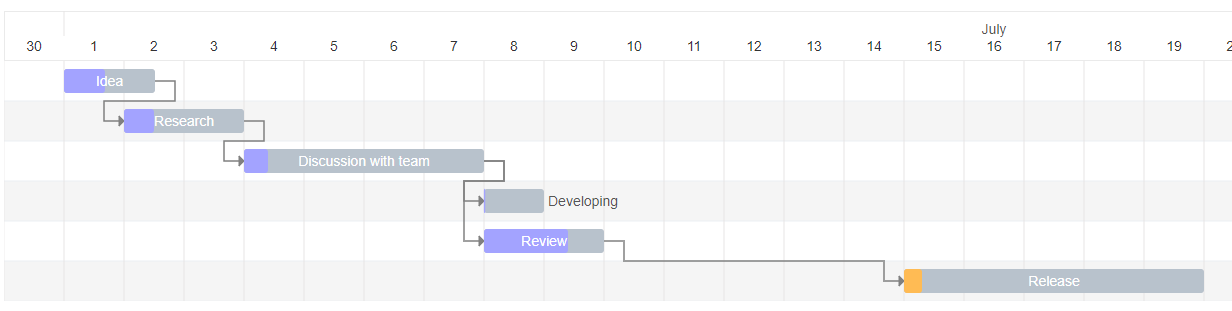
Interactive Gantt Chart for React with TypeScript.
npm install gantt-task-react
import { Gantt , Task , EventOption , StylingOption , ViewMode , DisplayOption } from 'gantt-task-react' ; import "gantt-task-react/dist/index.css" ; let tasks : Task [ ] = [ { start : new Date ( 2020 , 1 , 1 ) , end : new Date ( 2020 , 1 , 2 ) , name : 'Idea' , id : 'Task 0' , progress : 45 , isDisabled : true , styles : { progressColor : '#ffbb54' , progressSelectedColor : '#ff9e0d' } , } ,
...
] ; < Gantt tasks = { tasks } /> You may handle actions
< Gantt tasks = { tasks } viewMode = { view } onDateChange = { onTaskChange } onTaskDelete = { onTaskDelete } onProgressChange = { onProgressChange } onDoubleClick = { onDblClick } /> cd ./example
npm install
npm start
Parameter Name Type Description tasks* Task Tasks array. EventOption interface Specifies gantt events. DisplayOption interface Specifies view type and display timeline language. StylingOption interface Specifies chart and global tasks styles
Parameter Name Type Description onDoubleClick (task: Task) => any Specifies the function to be executed on the taskbar onDoubleClick event. onTaskDelete (task: Task) => void/Promise Specifies the function to be executed on the taskbar on Delete button press event. onDateChange (task: Task) => void/Promise Specifies the function to be executed when drag taskbar event on timeline has finished. onProgressChange (task: Task) => void/Promise Specifies the function to be executed when drag taskbar progress event has finished. timeStep number A time step value for onDateChange. Specify in milliseconds.
Parameter Name Type Description viewMode enum Specifies the time scale. Quarter Day, Half Day, Day, Week(ISO-8601, 1st day is Monday), Month. locale string Specifies the month name language. Able formats: ISO 639-2, Java Locale.
Parameter Name Type Description headerHeight number Specifies the header height. columnWidth number Specifies the time period width. rowHeight number Specifies the task row height. barCornerRadius number Specifies the taskbar corner rounding. barFill number Specifies the taskbar occupation. Sets in percent from 0 to 100. handleWidth number Specifies width the taskbar drag event control for start and end dates. fontFamily string Specifies the application font. fontSize string Specifies the application font size. barProgressColor string Specifies the taskbar progress fill color globally. barProgressSelectedColor string Specifies the taskbar progress fill color globally on select. barBackgroundColor string Specifies the taskbar background fill color globally. barBackgroundSelectedColor string Specifies the taskbar background fill color globally on select. arrowColor string Specifies the relationship arrow fill color. arrowIndent number Specifies the relationship arrow right indent. Sets in px todayColor string Specifies the current period column fill color. getTooltipContent ** Specifies the Tooltip for selected taskbar.
**(task:Task, fontSize:string , fontFamily:string) => JSX.Element;
Parameter Name Type Description id* string Task id. name* string Task display name. start* Date Task start date. end* Date Task end date. progress* number Task progress. Sets in percent from 0 to 100. dependencies string[] Specifies the parent dependencies ids. styles object Specifies the taskbar styling settings locally. Object is passed with the following attributes: - backgroundColor : String. Specifies the taskbar background fill color locally. - backgroundSelectedColor : String. Specifies the taskbar background fill color locally on select. - progressColor : String. Specifies the taskbar progress fill color locally. - progressSelectedColor : String. Specifies the taskbar progress fill color globally on select. isDisabled bool Disables all action for current task. fontSize string Specifies the taskbar font size locally.
*Required
MIT