Learn how to use struts2 framework.
- Introduction
The Struts framework resides in the web-tier. Struts applications are hosted by a web container and can make use of services provided by the container, such as handling requests via HTTP and HTTPS protocols. This frees developers to focus on building applications that solve business problems.
- Version
2.3.24
Import jars: Copying from the struts2-blank.war project in the folder apps of struts2-release.
Configuration:
** Core file location is fixed, and name it 'struts.xml' **
- Include dtd declarations
<!DOCTYPEstruts PUBLIC
"-//Apache Software Foundation//DTD Struts Configuration 2.3//EN"
"http://struts.apache.org/dtds/struts-2.3.dtd">- Write struts configuration
 <struts>
<packagename="hellodemo"extends="struts-default"namespace="/">
<!-- name: The url name -->
<actionname="hellostruts"class="com.liyiandxuegang.action.HelloAction">
<resultname="ok">/index.jsp</result>
</action>
</package>
</struts>- Write Filter-mapping (05)
 <filter>
<filter-name>struts2</filter-name>
<filter-class>org.apache.struts2.dispatcher.ng.filter.StrutsPrepareAndExecuteFilter</filter-class>
</filter>
<filter-mapping>
<filter-name>struts2</filter-name>
<url-pattern>/*</url-pattern>
</filter-mapping>- Create HelloAction.java
packagecom.liyiandxuegang.action;
publicclassHelloAction {
/*  * [Servlet] 1. Visit servlet, the service() method will be executed. *  * [Struts2] 2. Similarly, there is a method called execute(). *  */publicStringexecute() {
System.out.println("Run through here");
return"ok";
}
}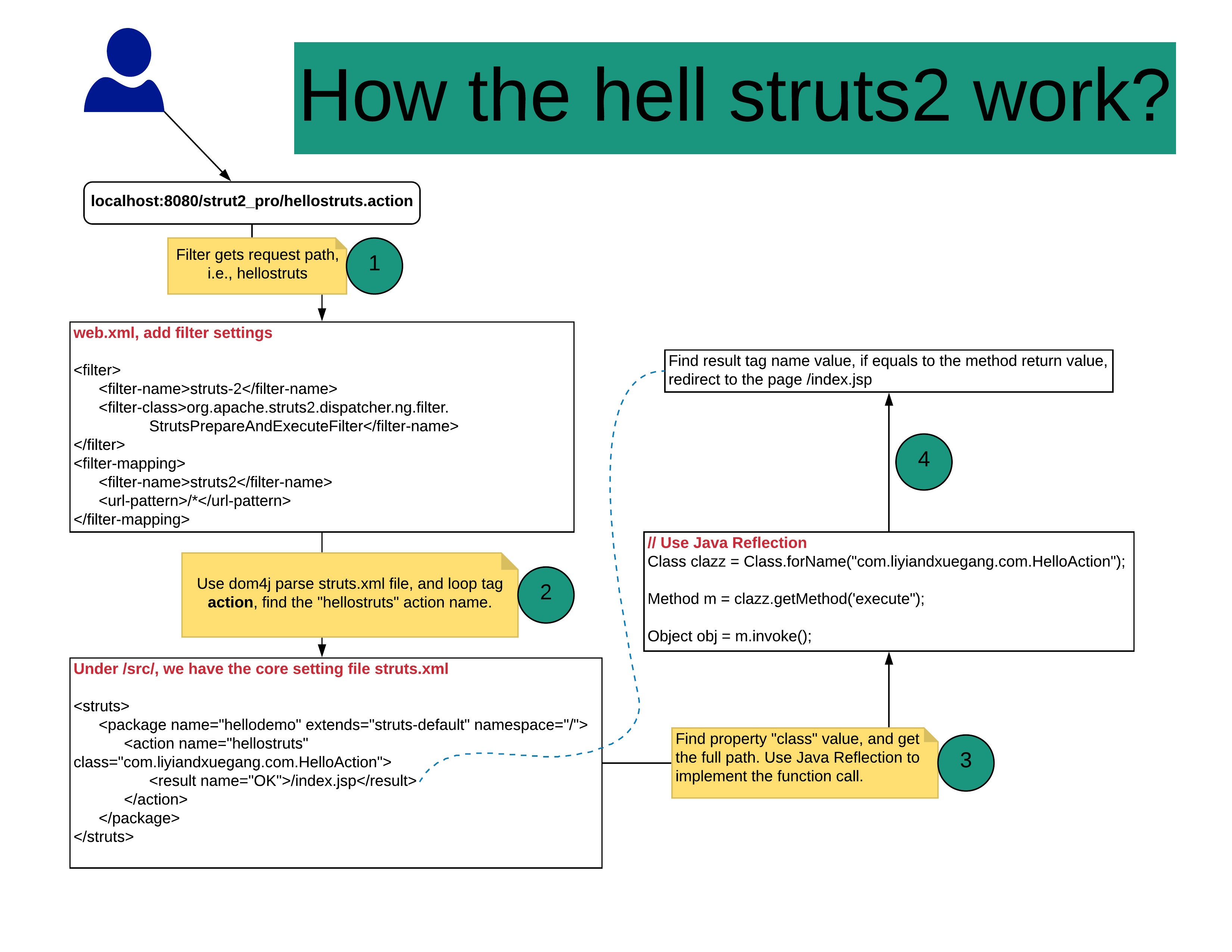
Filter will be created while the server starts, and init() method will be called.
Loading configuration files, including strut2-default.xm, struts2-plugin.xml, and struts.xml
Name and location are fixed.
Mainly used tags: package, action, and result
package: Similar to java code package. All the action should be started as package tag.
Properties: 1. name: 2. extends="struts-default", extends action. 3. namespace: by default "/", plus the action name get the access value. /hellostruts
Get access route
Properties:
name: namespace+name value = path name should be unique.
class: full path to the class
method: by default, action has method "execute".
result tag: According to the return-value, send to different path. name same as the method return value. Type: How to send to the path, including forward or include.
struts.i18n.encoding=UTF-8
Write your own configuration file, and include the xml file in the main file.
<!--If you have struts-hello.xml-->
<struts>
<includefile="com/liyiandxuegang/action/struts-hello.xml"></include>
</struts>- Use tag action method property. If Action methods have return-value and type must be String. If return value void, return none;
<!--If action has few methods-->
<actionname="addbook"class="com.liyiandxuegang.methods.BookAction"method="addBook" />
<actionname="updatebook"class="com.liyiandxuegang.methods.BookAction"method="updateBook" />- General *
** method = {1} **
<!--If we thousands of methods? -->
<struts>
<packagename="methoddemo"extends="struts-default"namespace="/">
<actionname="func_*"class="com.liyiandxuegang.methods.GeneralFuncsAction"method="{1}" />
</package>
</struts>
// GeneralFuncsAction.javapublicclassGeneralFuncsActionextendsActionSupport{
/** * */privatestaticfinallongserialVersionUID = 1L;
publicStringadd(){
System.out.println("add function");
returnNONE;
}
publicStringupdate() {
System.out.println("update function");
returnNONE;
}
}- Use global result page
If we have two functions, which returns the same value. We can use global-results
<struts>
<packagename="global_method"extends="struts-default"namespace="/">
<global-results>
<resultname="success">/index.jsp</result>
</global-results>
<actionname="book"class="com.liyiandxuegang.action2.BookAction" />
<actionname="order"class="com.liyiandxuegang.action2.OrderAction" />
</package>
</struts>- Local result page
<struts>
<packagename="global_method"extends="struts-default"namespace="/">
<actionname="book"class="com.liyiandxuegang.action2.BookAction">
<resultname="success">/index.jsp</result>
</action>
</package>
</struts>- 如果同时配置了两个页面,局部页面有效。
- For redirecting to pages, there are two values. dispatcher or redirect.
<resultname="success"type="redirect">/index.jsp</result>- If to other actions, there are two values: chain or redirectAction.
Ex: /book ---> page /order
<actionname="book"class="com.liyiandxuegang.action2.BookAction">
<resultname="success"type="redirectAction">order</result> </action>web阶段,servlet使用request对象获取对象。
How to get request object?
- Use ActionContext
We have a form page:
<h1>Hello, Struts</h1>
<formaction="${pageContext.request.contextPath }/form1.action"method="post">
User name: <inputtype="text"name="username"><br>
Password: <inputtype="password"name="pwd"><br>
Address: <textarearows="30"cols="50"name="address"></textarea><br>
<inputtype="submit"value="Submit">
</form>
And we have the seting file, called, struts-form.xml.
<struts>
<packagename="formSubmit"extends="struts-default"namespace="/">
<actionname="form1"class="com.liyiandxuegang.form.Form1Action">
<resultname="none">/success.jsp</result>
</action>
</package>
</struts>
In our java file, we do accept the parameter value.
publicclassForm1ActionextendsActionSupport{
@OverridepublicStringexecute() throwsException {
// Use method 1, ActionContextActionContextactionContext = ActionContext.getContext();
Map<String, Object> map = actionContext.getParameters();
// loop mapSet<String> keysSet = map.keySet();
for(Stringkey : keysSet) {
// Value is in array format. Object[] obj = (Object[]) map.get(key);
System.out.println(Arrays.toString(obj));
}
returnNONE;
}
}- User ServletActionContext
Similarly, we create one function.
publicStringtestServletActionContext() {
HttpServletRequesthttpServletRequest = ServletActionContext.getRequest();
Stringusername= httpServletRequest.getParameter("username");
Stringpassword = httpServletRequest.getParameter("pwd");
Stringaddress = httpServletRequest.getParameter("address");
System.out.println(username + ", " + password + ", " + address);
returnNONE;
}
This is static function, so it is much easier to get the request value.
- Use interface injection
- how to use request, session, servletContext object in Action.
HttpServletRequesthttpServletRequest = ServletActionContext.getRequest();
httpServletRequest.setAttribute("username", username);
HttpSessionsession = httpServletRequest.getSession();
session.setAttribute("sess", "sessVal");
ServletContext doesn't use much.
- Struts2 封装获取数据的方法
- Use original way
Imagine we have an Entity named "User"
packagecom.liyiandxuegang.entity;
publicclassUser {
privateStringusername;
privateStringpassword;
privateStringaddress;
publicStringgetUsername() {
returnusername;
}
publicvoidsetUsername(Stringusername) {
this.username = username;
}
publicStringgetPassword() {
returnpassword;
}
publicvoidsetPassword(Stringpassword) {
this.password = password;
}
publicStringgetAddress() {
returnaddress;
}
publicvoidsetAddress(Stringaddress) {
this.address = address;
}
@OverridepublicStringtoString() {
returnthis.getUsername() + ", " + this.getPassword() + ", " + this.getAddress();
}
}
And Action Class named Form2Action
publicclassForm2ActionextendsActionSupport{
@OverridepublicStringexecute() throwsException {
HttpServletRequesthttpServletRequest = ServletActionContext.getRequest();
Stringusername = httpServletRequest.getParameter("username");
Stringpassword = httpServletRequest.getParameter("pwd");
Stringaddress = httpServletRequest.getParameter("address");
Useruser = newUser();
user.setUsername(username);
user.setPassword(password);
user.setAddress(address);
System.out.println(user);
returnNONE;
}
}
** After we submit the form, we can get and set the Entity value in the action.**
Struts2提供的封装方式:
- 属性封装
在action成员变量位置定义变量,变量名称和表单输入项的name属性值一样。
<formaction="${pageContext.request.contextPath }/data"method="post">
User name: <inputtype="text"name="username"><br>
Password: <inputtype="password"name="pwd"><br>
Address: <textarearows="30"cols="50"name="address"></textarea><br>
<inputtype="submit"value="Submit">
</form>
In action class,
publicclassDate1ActionextendsActionSupport{
privateStringusername;
privateStringpwd;
privateStringaddress;
publicStringgetUsername() {
returnusername;
}
publicvoidsetUsername(Stringusername) {
this.username = username;
}
publicStringgetPwd() {
returnpwd;
}
publicvoidsetPwd(Stringpwd) {
this.pwd = pwd;
}
publicStringgetAddress() {
returnaddress;
}
publicvoidsetAddress(Stringaddress) {
this.address = address;
}
@OverridepublicStringexecute() throwsException {
System.out.println(username + ", " + pwd + ", " + address);
returnNONE;
}
}
After you click submit the form, the data has been binded to the Action Support member fields.
- 模型驱动封装: 可以把数据直接封装到实体对象里面
Keep the form fields name the same as the Entity properties name.
Easy to implement in Action class
<formaction="${pageContext.request.contextPath }/data1"method="post">
User name: <inputtype="text"name="username"><br>
Password: <inputtype="password"name="password"><br>
Address: <textarearows="30"cols="50"name="address"></textarea><br>
<inputtype="submit"value="Submit">
</form>- Create the Entity class and implement the function getModel();
publicclassData2ActionextendsActionSupportimplementsModelDriven<User>{
privatestaticfinallongserialVersionUID = 1L;
privateUseruser = newUser();
@OverridepublicUsergetModel() {
returnuser;
}
@OverridepublicStringexecute() throwsException {
System.out.println(user);
returnNONE;
}
}- 使用模型驱动和属性封装需要注意的问题:
在一个action中,获取表单数据可以属性封装,也可以使用模型驱动封装,不能同时使用属性封装和模型驱动封装。
- 表达式封装
在action里面声明实体类
生成实体类变量的set和get 方法
在表单输入项的name属性值里面写表达式形式
publicclassData3ActionextendsActionSupport{
privateUseruser;
publicUsergetUser() {
returnuser;
}
publicvoidsetUser(Useruser) {
this.user = user;
}
@OverridepublicStringexecute() throwsException {
System.out.println(user);
returnNONE;
}
}
and in jsp file
<formaction="${pageContext.request.contextPath }/data3"method="post">
User name: <inputtype="text"name="user.username"><br>
Password: <inputtype="password"name="user.password"><br>
Address: <textarearows="30"cols="50"name="user.address"></textarea><br>
<inputtype="submit"value="Submit">
</form>
比较表达式封装和模型驱动封装:
两者都可以把数据封装到实体类中。
在模型驱动中只能将数据封装到一个实体类中。使用表达式封装就可以把数据封装到不同的实体类中。[15]
Similar to EL expression. OGNL不是Struts2的一部分。
在struts2把数据放到值栈中,在页面中获取值栈数据。
Servlet和action区别:
Servlet对象默认第一次访问是创建,创建一次,单实例对象。
Action访问时创建,每次访问时都会创建一个action对象。
值栈的存储位置:每个action对象 只有一个值栈对象。
Use ActionContext get value stack.
// get ActionContext objActionContextcontext = ActionContext.getContext();
// get valuestack objValueStackvalueStack = context.getValueStack();
值栈中两部分内容:
root 就是 List集合
context 是Map集合
常用的就是root集合。[06]