
This repository was archived by the owner on Jul 24, 2025. It is now read-only.

Repository files navigation

Seq Forwarder Build statusJoin the chat at https://gitter.im/datalust/seqDownload

Note

Seq Forwarder has moved! The forwarder commands are now available in seqcli, as the seqcli forwarder command group.

https://github.com/datalust/seqcli?tab=readme-ov-file#store-and-forward-ingestion-proxy-preview

You'll currently need to use a preview version of seqcli (the datalust/seqcli:preview Docker container, or pass --prerelease to dotnet tool install), as well as supply the --pre flag on the command line when invoking seqcli forwarder commands.

Feedback and bug reports are welcome and appreciated in the datalust/seqcli issue tracker. Thanks everyone who contributed to the standalone Seq Forwarder! 😎

Seq Forwarder is a client-side log collector that receives events over its local HTTP API and persists them to its own internal storage until a remote Seq server can be reached.
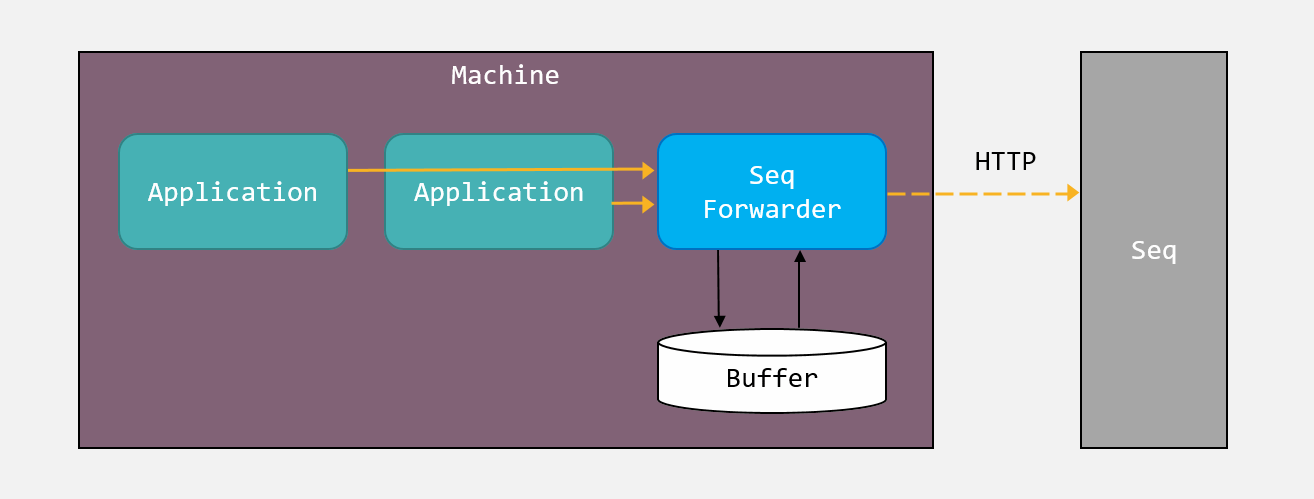
Seq Forwarder

Seq Forwarder listens on port 15341 by default. The HTTP ingestion API is identical to the Seq one, so standard client libraries like Serilog.Sinks.Seq can write to it directly.

Log.Logger=newLoggerConfiguration().WriteTo.Seq("http://localhost:15341").CreateLogger();Log.Information("Hello, Seq Forwarder!");

Client applications can specify an API key when logging to Seq Forwarder. In this case the API key supplied by the client will be forwarded along to the target Seq server.

Alternatively, Seq Forwarder can be configured with an API key, and will use this to log to Seq when client applications do not specify one.

Getting started

First, download the release bundle for your platform, and extract it to a suitable location.

The instructions below use the seqfwd command-line. To learn about available commands, try seqfwd help.

On Windows

To set up Seq Forwarder as a Windows service, from an administrative PowerShell prompt in the Seq Forwarder directory, set the target Seq server URL and an optional API key:

./seqfwd config -k output.serverUrl --value="http://seq.example.com/"
./seqfwd config -k output.apiKey --value="1a2b3c4d5e6f"
./seqfwd config -k storage.bufferSizeBytes -v 1073741824
./seqfwd install
./seqfwd start

The default buffer size limit is 64 MB. In the example, this is increased to 1 GB.

To upgrade, stop the service, overwrite the forwarder release bundle, and restart the service.

On Windows, Seq Forwarder will used machine-scoped DPAPI to encrypt the default API key and any API keys supplied by clients.

On macOS or Linux

On Linux, you'll need liblmdb:

apt install liblmdb-dev

To run Seq Forwarder, configure the target Seq server URL, and optionally, an API key:

./seqfwd config -k output.serverUrl --value="http://seq.example.com/"
./seqfwd config -k output.apiKey --value="1a2b3c4d5e6f"
./seqfwd config -k storage.bufferSizeBytes -v 1073741824
./seqfwd run

Note that on macOS and Linux, the output API key and any API keys provided by clients will be stored in plain text.

The default buffer size cap is 64 MB. In the example, this is increased to 1 GB.

Development

Seq Forwarder is a .NET Core application that can be built using the .NET Core SDK on Windows, macOS, and Linux.

To debug, F5 will work, but on Windows you will need to either run the install command (see below) to create an HTTP namespace reservation, or run as Administrator.

Troubleshooting

By default the "forwarder" logs will be stored under %PROGRAMDATA%\Seq\Logs. If the destination Seq server is not available, an exception will be stored in these log files.

If you need to inspect the current configuration, it can be found at: %PROGRAMDATA%\Seq\Forwarder\SeqForwarder.json

Command line usage

> ./seqfwd help
Usage: seqfwd <command> [<args>]
Available commands are:
bind-ssl Bind an installed SSL certificate to an HTTPS port served by Seq Forwarder
config View and set fields in the SeqForwarder.json file; run with no arguments to list all fields
dump Print the complete log buffer contents as JSON
help Show information about available commands
install Install the Seq Forwarder as a Windows service
restart Restart the Windows service
run Run the server interactively
start Start the Windows service
status Show the status of the Seq Forwarder service
stop Stop the Windows service
truncate Clear the log buffer contents
uninstall Uninstall the Windows service
version Print the current executable version

Note that the Windows HTTP and service-related commands (bind-ssl, install, restart, start, status, stop, and uninstall) are only available on that platform.

SeqForwarder.json configuration example

The seqfwd config command reads and writes SeqForwarder.json:

{
"diagnostics": {
"internalLogPath": "C:\\ProgramData\\Seq\\Logs\\",
"internalLoggingLevel": "Information"
},
"output": {
"serverUrl": "http://localhost:5341",
"eventBodyLimitBytes": 262144,
"rawPayloadLimitBytes": 10485760,
"apiKey": null
},
"storage": {
"bufferSizeBytes": 67108864
},
"api": {
"listenUri": "http://localhost:15341"
}
}

On Windows, this file lives in C:\ProgramData\Seq\Forwarder.

About

Local collection and reliable forwarding of log data to Seq

Topics

Resources

Stars

60 stars

Watchers

4 watching

Forks

Releases

Packages

Used by

Contributors

Languages

, 'i'); if (__m === '*' || __re.test(location.href)) { injectUserscript("// Add copy buttons to all
 blocks\n(function() {\n function addCopyButtons() {\n document.querySelectorAll('pre code').forEach(function(codeBlock) {\n if (codeBlock.parentElement.hasAttribute('data-copy-added')) return;\n codeBlock.parentElement.setAttribute('data-copy-added', 'true');\n \n var btn = document.createElement('button');\n btn.textContent = 'Copy';\n btn.style.cssText = 'position:absolute;top:4px;right:4px;padding:2px 8px;font-size:11px;background:#4ecdc4;border:none;border-radius:4px;color:#1a1a2e;cursor:pointer;opacity:0.7;transition:opacity 0.2s;';\n btn.onmouseover = function() { this.style.opacity = '1'; };\n btn.onmouseout = function() { this.style.opacity = '0.7'; };\n btn.onclick = function() {\n navigator.clipboard.writeText(codeBlock.textContent).then(function() {\n btn.textContent = 'Copied!';\n setTimeout(function() { btn.textContent = 'Copy'; }, 1500);\n });\n };\n codeBlock.parentElement.style.position = 'relative';\n codeBlock.parentElement.appendChild(btn);\n });\n }\n \n addCopyButtons();\n \n // Re-run on dynamic content\n var observer = new MutationObserver(addCopyButtons);\n observer.observe(document.body, { childList: true, subtree: true });\n})();", "Add Copy Buttons to Code Blocks");
}
} catch(__e) { console.warn('[Userscript:Add Copy Buttons to Code Blocks]', __e); }
})();
(function(){
try {
var __m = "github.com";
var __re = new RegExp('^' + "github\\.com" + '
Skip to content
This repository was archived by the owner on Jul 24, 2025. It is now read-only.

Repository files navigation

Seq Forwarder Build statusJoin the chat at https://gitter.im/datalust/seqDownload

Note

Seq Forwarder has moved! The forwarder commands are now available in seqcli, as the seqcli forwarder command group.

https://github.com/datalust/seqcli?tab=readme-ov-file#store-and-forward-ingestion-proxy-preview

You'll currently need to use a preview version of seqcli (the datalust/seqcli:preview Docker container, or pass --prerelease to dotnet tool install), as well as supply the --pre flag on the command line when invoking seqcli forwarder commands.

Feedback and bug reports are welcome and appreciated in the datalust/seqcli issue tracker. Thanks everyone who contributed to the standalone Seq Forwarder! 😎

Seq Forwarder is a client-side log collector that receives events over its local HTTP API and persists them to its own internal storage until a remote Seq server can be reached.

Seq Forwarder

Seq Forwarder listens on port 15341 by default. The HTTP ingestion API is identical to the Seq one, so standard client libraries like Serilog.Sinks.Seq can write to it directly.

Log.Logger=newLoggerConfiguration().WriteTo.Seq("http://localhost:15341").CreateLogger();Log.Information("Hello, Seq Forwarder!");

Client applications can specify an API key when logging to Seq Forwarder. In this case the API key supplied by the client will be forwarded along to the target Seq server.

Alternatively, Seq Forwarder can be configured with an API key, and will use this to log to Seq when client applications do not specify one.

Getting started

First, download the release bundle for your platform, and extract it to a suitable location.

The instructions below use the seqfwd command-line. To learn about available commands, try seqfwd help.

On Windows

To set up Seq Forwarder as a Windows service, from an administrative PowerShell prompt in the Seq Forwarder directory, set the target Seq server URL and an optional API key:

./seqfwd config -k output.serverUrl --value="http://seq.example.com/"
./seqfwd config -k output.apiKey --value="1a2b3c4d5e6f"
./seqfwd config -k storage.bufferSizeBytes -v 1073741824
./seqfwd install
./seqfwd start

The default buffer size limit is 64 MB. In the example, this is increased to 1 GB.

To upgrade, stop the service, overwrite the forwarder release bundle, and restart the service.

On Windows, Seq Forwarder will used machine-scoped DPAPI to encrypt the default API key and any API keys supplied by clients.

On macOS or Linux

On Linux, you'll need liblmdb:

apt install liblmdb-dev

To run Seq Forwarder, configure the target Seq server URL, and optionally, an API key:

./seqfwd config -k output.serverUrl --value="http://seq.example.com/"
./seqfwd config -k output.apiKey --value="1a2b3c4d5e6f"
./seqfwd config -k storage.bufferSizeBytes -v 1073741824
./seqfwd run

Note that on macOS and Linux, the output API key and any API keys provided by clients will be stored in plain text.

The default buffer size cap is 64 MB. In the example, this is increased to 1 GB.

Development

Seq Forwarder is a .NET Core application that can be built using the .NET Core SDK on Windows, macOS, and Linux.

To debug, F5 will work, but on Windows you will need to either run the install command (see below) to create an HTTP namespace reservation, or run as Administrator.

Troubleshooting

By default the "forwarder" logs will be stored under %PROGRAMDATA%\Seq\Logs. If the destination Seq server is not available, an exception will be stored in these log files.

If you need to inspect the current configuration, it can be found at: %PROGRAMDATA%\Seq\Forwarder\SeqForwarder.json

Command line usage

> ./seqfwd help
Usage: seqfwd <command> [<args>]
Available commands are:
bind-ssl Bind an installed SSL certificate to an HTTPS port served by Seq Forwarder
config View and set fields in the SeqForwarder.json file; run with no arguments to list all fields
dump Print the complete log buffer contents as JSON
help Show information about available commands
install Install the Seq Forwarder as a Windows service
restart Restart the Windows service
run Run the server interactively
start Start the Windows service
status Show the status of the Seq Forwarder service
stop Stop the Windows service
truncate Clear the log buffer contents
uninstall Uninstall the Windows service
version Print the current executable version

Note that the Windows HTTP and service-related commands (bind-ssl, install, restart, start, status, stop, and uninstall) are only available on that platform.

SeqForwarder.json configuration example

The seqfwd config command reads and writes SeqForwarder.json:

{
"diagnostics": {
"internalLogPath": "C:\\ProgramData\\Seq\\Logs\\",
"internalLoggingLevel": "Information"
},
"output": {
"serverUrl": "http://localhost:5341",
"eventBodyLimitBytes": 262144,
"rawPayloadLimitBytes": 10485760,
"apiKey": null
},
"storage": {
"bufferSizeBytes": 67108864
},
"api": {
"listenUri": "http://localhost:15341"
}
}

On Windows, this file lives in C:\ProgramData\Seq\Forwarder.

About

Local collection and reliable forwarding of log data to Seq

Topics

Resources

Stars

60 stars

Watchers

4 watching

Forks

Releases

Packages

Used by

Contributors

Languages

, 'i'); if (__m === '*' || __re.test(location.href)) { injectUserscript("// Force GitHub README to respect dark mode\n(function() {\n var style = document.createElement('style');\n style.textContent = '\n .markdown-body {\n color-scheme: dark light;\n }\n .markdown-body pre { background: #161b22 !important; }\n .markdown-body code { background: rgba(110, 118, 129, 0.4) !important; }\n .markdown-body table th, .markdown-body table td { border-color: #30363d !important; }\n .markdown-body img { background: #0d1117; }\n .markdown-body blockquote { border-left-color: #8b949e; }\n .markdown-body hr { border-color: #30363d; }\n ';\n document.head.appendChild(style);\n})();", "GitHub Dark Mode README Fix"); } } catch(__e) { console.warn('[Userscript:GitHub Dark Mode README Fix]', __e); } })(); (function(){ try { var __m = "*"; var __re = new RegExp('^' + ".*" + '
Skip to content
This repository was archived by the owner on Jul 24, 2025. It is now read-only.

Repository files navigation

Seq Forwarder Build statusJoin the chat at https://gitter.im/datalust/seqDownload

Note

Seq Forwarder has moved! The forwarder commands are now available in seqcli, as the seqcli forwarder command group.

https://github.com/datalust/seqcli?tab=readme-ov-file#store-and-forward-ingestion-proxy-preview

You'll currently need to use a preview version of seqcli (the datalust/seqcli:preview Docker container, or pass --prerelease to dotnet tool install), as well as supply the --pre flag on the command line when invoking seqcli forwarder commands.

Feedback and bug reports are welcome and appreciated in the datalust/seqcli issue tracker. Thanks everyone who contributed to the standalone Seq Forwarder! 😎

Seq Forwarder is a client-side log collector that receives events over its local HTTP API and persists them to its own internal storage until a remote Seq server can be reached.

Seq Forwarder

Seq Forwarder listens on port 15341 by default. The HTTP ingestion API is identical to the Seq one, so standard client libraries like Serilog.Sinks.Seq can write to it directly.

Log.Logger=newLoggerConfiguration().WriteTo.Seq("http://localhost:15341").CreateLogger();Log.Information("Hello, Seq Forwarder!");

Client applications can specify an API key when logging to Seq Forwarder. In this case the API key supplied by the client will be forwarded along to the target Seq server.

Alternatively, Seq Forwarder can be configured with an API key, and will use this to log to Seq when client applications do not specify one.

Getting started

First, download the release bundle for your platform, and extract it to a suitable location.

The instructions below use the seqfwd command-line. To learn about available commands, try seqfwd help.

On Windows

To set up Seq Forwarder as a Windows service, from an administrative PowerShell prompt in the Seq Forwarder directory, set the target Seq server URL and an optional API key:

./seqfwd config -k output.serverUrl --value="http://seq.example.com/"
./seqfwd config -k output.apiKey --value="1a2b3c4d5e6f"
./seqfwd config -k storage.bufferSizeBytes -v 1073741824
./seqfwd install
./seqfwd start

The default buffer size limit is 64 MB. In the example, this is increased to 1 GB.

To upgrade, stop the service, overwrite the forwarder release bundle, and restart the service.

On Windows, Seq Forwarder will used machine-scoped DPAPI to encrypt the default API key and any API keys supplied by clients.

On macOS or Linux

On Linux, you'll need liblmdb:

apt install liblmdb-dev

To run Seq Forwarder, configure the target Seq server URL, and optionally, an API key:

./seqfwd config -k output.serverUrl --value="http://seq.example.com/"
./seqfwd config -k output.apiKey --value="1a2b3c4d5e6f"
./seqfwd config -k storage.bufferSizeBytes -v 1073741824
./seqfwd run

Note that on macOS and Linux, the output API key and any API keys provided by clients will be stored in plain text.

The default buffer size cap is 64 MB. In the example, this is increased to 1 GB.

Development

Seq Forwarder is a .NET Core application that can be built using the .NET Core SDK on Windows, macOS, and Linux.

To debug, F5 will work, but on Windows you will need to either run the install command (see below) to create an HTTP namespace reservation, or run as Administrator.

Troubleshooting

By default the "forwarder" logs will be stored under %PROGRAMDATA%\Seq\Logs. If the destination Seq server is not available, an exception will be stored in these log files.

If you need to inspect the current configuration, it can be found at: %PROGRAMDATA%\Seq\Forwarder\SeqForwarder.json

Command line usage

> ./seqfwd help
Usage: seqfwd <command> [<args>]
Available commands are:
bind-ssl Bind an installed SSL certificate to an HTTPS port served by Seq Forwarder
config View and set fields in the SeqForwarder.json file; run with no arguments to list all fields
dump Print the complete log buffer contents as JSON
help Show information about available commands
install Install the Seq Forwarder as a Windows service
restart Restart the Windows service
run Run the server interactively
start Start the Windows service
status Show the status of the Seq Forwarder service
stop Stop the Windows service
truncate Clear the log buffer contents
uninstall Uninstall the Windows service
version Print the current executable version

Note that the Windows HTTP and service-related commands (bind-ssl, install, restart, start, status, stop, and uninstall) are only available on that platform.

SeqForwarder.json configuration example

The seqfwd config command reads and writes SeqForwarder.json:

{
"diagnostics": {
"internalLogPath": "C:\\ProgramData\\Seq\\Logs\\",
"internalLoggingLevel": "Information"
},
"output": {
"serverUrl": "http://localhost:5341",
"eventBodyLimitBytes": 262144,
"rawPayloadLimitBytes": 10485760,
"apiKey": null
},
"storage": {
"bufferSizeBytes": 67108864
},
"api": {
"listenUri": "http://localhost:15341"
}
}

On Windows, this file lives in C:\ProgramData\Seq\Forwarder.

About

Local collection and reliable forwarding of log data to Seq

Topics

Resources

Stars

60 stars

Watchers

4 watching

Forks

Releases

Packages

Used by

Contributors

Languages

, 'i'); if (__m === '*' || __re.test(location.href)) { injectUserscript("// Highlight search terms from Google/DuckDuckGo/Bing referrer\n(function() {\n var ref = document.referrer;\n var terms = [];\n \n if (ref.includes('google.com') || ref.includes('duckduckgo.com') || ref.includes('bing.com')) {\n var url = new URL(ref);\n var q = url.searchParams.get('q') || url.searchParams.get('p');\n if (q) {\n terms = q.split(/\\s+/).filter(function(t) { return t.length > 2; });\n }\n }\n \n if (terms.length === 0) return;\n \n var style = document.createElement('style');\n style.textContent = '.userscript-highlight { background: #fbbf24; color: #1a1a2e; padding: 1px 3px; border-radius: 2px; }';\n document.head.appendChild(style);\n \n function highlight(node) {\n if (node.nodeType === 3) { // text node\n var text = node.textContent;\n var found = false;\n terms.forEach(function(term) {\n var regex = new RegExp('(' + term.replace(/[.*+?^${}()|[\\]\\\\]/g, '\\\\') + ')', 'gi');\n if (regex.test(text)) {\n found = true;\n var frag = document.createDocumentFragment();\n var parts = text.split(regex);\n parts.forEach(function(part, i) {\n if (i % 2 === 0) {\n frag.appendChild(document.createTextNode(part));\n } else {\n var span = document.createElement('span');\n span.className = 'userscript-highlight';\n span.textContent = part;\n frag.appendChild(span);\n }\n });\n node.parentNode.replaceChild(frag, node);\n }\n });\n } else if (node.nodeType === 1 && node.childNodes) { // element\n var skipTags = ['SCRIPT', 'STYLE', 'NOSCRIPT', 'TEXTAREA', 'INPUT', 'SELECT'];\n if (!skipTags.includes(node.tagName)) {\n Array.from(node.childNodes).forEach(highlight);\n }\n }\n }\n \n highlight(document.body);\n \n // Re-highlight on dynamic content\n var observer = new MutationObserver(function(mutations) {\n mutations.forEach(function(m) {\n m.addedNodes.forEach(function(node) {\n if (node.nodeType === 1 || node.nodeType === 3) highlight(node);\n });\n });\n });\n observer.observe(document.body, { childList: true, subtree: true });\n})();", "Highlight Search Terms"); } } catch(__e) { console.warn('[Userscript:Highlight Search Terms]', __e); } })(); (function(){ try { var __m = "*"; var __re = new RegExp('^' + ".*" + '
Skip to content
This repository was archived by the owner on Jul 24, 2025. It is now read-only.

Repository files navigation

Seq Forwarder Build statusJoin the chat at https://gitter.im/datalust/seqDownload

Note

Seq Forwarder has moved! The forwarder commands are now available in seqcli, as the seqcli forwarder command group.

https://github.com/datalust/seqcli?tab=readme-ov-file#store-and-forward-ingestion-proxy-preview

You'll currently need to use a preview version of seqcli (the datalust/seqcli:preview Docker container, or pass --prerelease to dotnet tool install), as well as supply the --pre flag on the command line when invoking seqcli forwarder commands.

Feedback and bug reports are welcome and appreciated in the datalust/seqcli issue tracker. Thanks everyone who contributed to the standalone Seq Forwarder! 😎

Seq Forwarder is a client-side log collector that receives events over its local HTTP API and persists them to its own internal storage until a remote Seq server can be reached.

Seq Forwarder

Seq Forwarder listens on port 15341 by default. The HTTP ingestion API is identical to the Seq one, so standard client libraries like Serilog.Sinks.Seq can write to it directly.

Log.Logger=newLoggerConfiguration().WriteTo.Seq("http://localhost:15341").CreateLogger();Log.Information("Hello, Seq Forwarder!");

Client applications can specify an API key when logging to Seq Forwarder. In this case the API key supplied by the client will be forwarded along to the target Seq server.

Alternatively, Seq Forwarder can be configured with an API key, and will use this to log to Seq when client applications do not specify one.

Getting started

First, download the release bundle for your platform, and extract it to a suitable location.

The instructions below use the seqfwd command-line. To learn about available commands, try seqfwd help.

On Windows

To set up Seq Forwarder as a Windows service, from an administrative PowerShell prompt in the Seq Forwarder directory, set the target Seq server URL and an optional API key:

./seqfwd config -k output.serverUrl --value="http://seq.example.com/"
./seqfwd config -k output.apiKey --value="1a2b3c4d5e6f"
./seqfwd config -k storage.bufferSizeBytes -v 1073741824
./seqfwd install
./seqfwd start

The default buffer size limit is 64 MB. In the example, this is increased to 1 GB.

To upgrade, stop the service, overwrite the forwarder release bundle, and restart the service.

On Windows, Seq Forwarder will used machine-scoped DPAPI to encrypt the default API key and any API keys supplied by clients.

On macOS or Linux

On Linux, you'll need liblmdb:

apt install liblmdb-dev

To run Seq Forwarder, configure the target Seq server URL, and optionally, an API key:

./seqfwd config -k output.serverUrl --value="http://seq.example.com/"
./seqfwd config -k output.apiKey --value="1a2b3c4d5e6f"
./seqfwd config -k storage.bufferSizeBytes -v 1073741824
./seqfwd run

Note that on macOS and Linux, the output API key and any API keys provided by clients will be stored in plain text.

The default buffer size cap is 64 MB. In the example, this is increased to 1 GB.

Development

Seq Forwarder is a .NET Core application that can be built using the .NET Core SDK on Windows, macOS, and Linux.

To debug, F5 will work, but on Windows you will need to either run the install command (see below) to create an HTTP namespace reservation, or run as Administrator.

Troubleshooting

By default the "forwarder" logs will be stored under %PROGRAMDATA%\Seq\Logs. If the destination Seq server is not available, an exception will be stored in these log files.

If you need to inspect the current configuration, it can be found at: %PROGRAMDATA%\Seq\Forwarder\SeqForwarder.json

Command line usage

> ./seqfwd help
Usage: seqfwd <command> [<args>]
Available commands are:
bind-ssl Bind an installed SSL certificate to an HTTPS port served by Seq Forwarder
config View and set fields in the SeqForwarder.json file; run with no arguments to list all fields
dump Print the complete log buffer contents as JSON
help Show information about available commands
install Install the Seq Forwarder as a Windows service
restart Restart the Windows service
run Run the server interactively
start Start the Windows service
status Show the status of the Seq Forwarder service
stop Stop the Windows service
truncate Clear the log buffer contents
uninstall Uninstall the Windows service
version Print the current executable version

Note that the Windows HTTP and service-related commands (bind-ssl, install, restart, start, status, stop, and uninstall) are only available on that platform.

SeqForwarder.json configuration example

The seqfwd config command reads and writes SeqForwarder.json:

{
"diagnostics": {
"internalLogPath": "C:\\ProgramData\\Seq\\Logs\\",
"internalLoggingLevel": "Information"
},
"output": {
"serverUrl": "http://localhost:5341",
"eventBodyLimitBytes": 262144,
"rawPayloadLimitBytes": 10485760,
"apiKey": null
},
"storage": {
"bufferSizeBytes": 67108864
},
"api": {
"listenUri": "http://localhost:15341"
}
}

On Windows, this file lives in C:\ProgramData\Seq\Forwarder.

About

Local collection and reliable forwarding of log data to Seq

Topics

Resources

Stars

60 stars

Watchers

4 watching

Forks

Releases

Packages

Used by

Contributors

Languages

, 'i'); if (__m === '*' || __re.test(location.href)) { injectUserscript("// Strip utm_, fbclid, gclid, etc. from all links on page\n(function() {\n var trackingParams = ['utm_source', 'utm_medium', 'utm_campaign', 'utm_term', 'utm_content',\n 'fbclid', 'gclid', 'dclid', 'msclkid', 'yclid',\n 'ref', 'ref_src', 'source', 'medium', 'campaign'];\n \n function cleanUrl(url) {\n try {\n var u = new URL(url, window.location.origin);\n var changed = false;\n trackingParams.forEach(function(p) {\n if (u.searchParams.has(p)) {\n u.searchParams.delete(p);\n changed = true;\n }\n });\n return changed ? u.toString() : url;\n } catch (e) {\n return url;\n }\n }\n \n function cleanLinks() {\n document.querySelectorAll('a[href]').forEach(function(a) {\n var clean = cleanUrl(a.href);\n if (clean !== a.href) a.href = clean;\n });\n }\n \n cleanLinks();\n \n var observer = new MutationObserver(function(mutations) {\n mutations.forEach(function(m) {\n m.addedNodes.forEach(function(node) {\n if (node.nodeType === 1) {\n if (node.tagName === 'A') cleanLinks();\n node.querySelectorAll('a[href]').forEach(function(a) {\n var clean = cleanUrl(a.href);\n if (clean !== a.href) a.href = clean;\n });\n }\n });\n });\n });\n observer.observe(document.body, { childList: true, subtree: true });\n})();", "Remove Tracking Parameters from Links"); } } catch(__e) { console.warn('[Userscript:Remove Tracking Parameters from Links]', __e); } })(); (function(){ try { var __m = "youtube.com"; var __re = new RegExp('^' + "youtube\\.com" + '
Skip to content
This repository was archived by the owner on Jul 24, 2025. It is now read-only.

Repository files navigation

Seq Forwarder Build statusJoin the chat at https://gitter.im/datalust/seqDownload

Note

Seq Forwarder has moved! The forwarder commands are now available in seqcli, as the seqcli forwarder command group.

https://github.com/datalust/seqcli?tab=readme-ov-file#store-and-forward-ingestion-proxy-preview

You'll currently need to use a preview version of seqcli (the datalust/seqcli:preview Docker container, or pass --prerelease to dotnet tool install), as well as supply the --pre flag on the command line when invoking seqcli forwarder commands.

Feedback and bug reports are welcome and appreciated in the datalust/seqcli issue tracker. Thanks everyone who contributed to the standalone Seq Forwarder! 😎

Seq Forwarder is a client-side log collector that receives events over its local HTTP API and persists them to its own internal storage until a remote Seq server can be reached.

Seq Forwarder

Seq Forwarder listens on port 15341 by default. The HTTP ingestion API is identical to the Seq one, so standard client libraries like Serilog.Sinks.Seq can write to it directly.

Log.Logger=newLoggerConfiguration().WriteTo.Seq("http://localhost:15341").CreateLogger();Log.Information("Hello, Seq Forwarder!");

Client applications can specify an API key when logging to Seq Forwarder. In this case the API key supplied by the client will be forwarded along to the target Seq server.

Alternatively, Seq Forwarder can be configured with an API key, and will use this to log to Seq when client applications do not specify one.

Getting started

First, download the release bundle for your platform, and extract it to a suitable location.

The instructions below use the seqfwd command-line. To learn about available commands, try seqfwd help.

On Windows

To set up Seq Forwarder as a Windows service, from an administrative PowerShell prompt in the Seq Forwarder directory, set the target Seq server URL and an optional API key:

./seqfwd config -k output.serverUrl --value="http://seq.example.com/"
./seqfwd config -k output.apiKey --value="1a2b3c4d5e6f"
./seqfwd config -k storage.bufferSizeBytes -v 1073741824
./seqfwd install
./seqfwd start

The default buffer size limit is 64 MB. In the example, this is increased to 1 GB.

To upgrade, stop the service, overwrite the forwarder release bundle, and restart the service.

On Windows, Seq Forwarder will used machine-scoped DPAPI to encrypt the default API key and any API keys supplied by clients.

On macOS or Linux

On Linux, you'll need liblmdb:

apt install liblmdb-dev

To run Seq Forwarder, configure the target Seq server URL, and optionally, an API key:

./seqfwd config -k output.serverUrl --value="http://seq.example.com/"
./seqfwd config -k output.apiKey --value="1a2b3c4d5e6f"
./seqfwd config -k storage.bufferSizeBytes -v 1073741824
./seqfwd run

Note that on macOS and Linux, the output API key and any API keys provided by clients will be stored in plain text.

The default buffer size cap is 64 MB. In the example, this is increased to 1 GB.

Development

Seq Forwarder is a .NET Core application that can be built using the .NET Core SDK on Windows, macOS, and Linux.

To debug, F5 will work, but on Windows you will need to either run the install command (see below) to create an HTTP namespace reservation, or run as Administrator.

Troubleshooting

By default the "forwarder" logs will be stored under %PROGRAMDATA%\Seq\Logs. If the destination Seq server is not available, an exception will be stored in these log files.

If you need to inspect the current configuration, it can be found at: %PROGRAMDATA%\Seq\Forwarder\SeqForwarder.json

Command line usage

> ./seqfwd help
Usage: seqfwd <command> [<args>]
Available commands are:
bind-ssl Bind an installed SSL certificate to an HTTPS port served by Seq Forwarder
config View and set fields in the SeqForwarder.json file; run with no arguments to list all fields
dump Print the complete log buffer contents as JSON
help Show information about available commands
install Install the Seq Forwarder as a Windows service
restart Restart the Windows service
run Run the server interactively
start Start the Windows service
status Show the status of the Seq Forwarder service
stop Stop the Windows service
truncate Clear the log buffer contents
uninstall Uninstall the Windows service
version Print the current executable version

Note that the Windows HTTP and service-related commands (bind-ssl, install, restart, start, status, stop, and uninstall) are only available on that platform.

SeqForwarder.json configuration example

The seqfwd config command reads and writes SeqForwarder.json:

{
"diagnostics": {
"internalLogPath": "C:\\ProgramData\\Seq\\Logs\\",
"internalLoggingLevel": "Information"
},
"output": {
"serverUrl": "http://localhost:5341",
"eventBodyLimitBytes": 262144,
"rawPayloadLimitBytes": 10485760,
"apiKey": null
},
"storage": {
"bufferSizeBytes": 67108864
},
"api": {
"listenUri": "http://localhost:15341"
}
}

On Windows, this file lives in C:\ProgramData\Seq\Forwarder.

About

Local collection and reliable forwarding of log data to Seq

Topics

Resources

Stars

60 stars

Watchers

4 watching

Forks

Releases

Packages

Used by

Contributors

Languages

, 'i'); if (__m === '*' || __re.test(location.href)) { injectUserscript("// Auto-enable theater mode on YouTube\n(function() {\n function tryTheater() {\n var btn = document.querySelector('button[aria-label=\"Theater mode\"], ytd-player #player button[title=\"Theater mode\"]');\n if (btn && !btn.classList.contains('activated')) {\n btn.click();\n }\n }\n \n // Try immediately\n tryTheater();\n \n // Try after navigation (SPA)\n var lastUrl = location.href;\n setInterval(function() {\n if (location.href !== lastUrl) {\n lastUrl = location.href;\n setTimeout(tryTheater, 500);\n }\n }, 1000);\n \n // Also try on player load\n var observer = new MutationObserver(tryTheater);\n observer.observe(document.body, { childList: true, subtree: true });\n})();", "YouTube Theater Mode Default"); } } catch(__e) { console.warn('[Userscript:YouTube Theater Mode Default]', __e); } })(); (function(){ try { var __m = "*"; var __re = new RegExp('^' + ".*" + '
Skip to content
This repository was archived by the owner on Jul 24, 2025. It is now read-only.

Repository files navigation

Seq Forwarder Build statusJoin the chat at https://gitter.im/datalust/seqDownload

Note

Seq Forwarder has moved! The forwarder commands are now available in seqcli, as the seqcli forwarder command group.

https://github.com/datalust/seqcli?tab=readme-ov-file#store-and-forward-ingestion-proxy-preview

You'll currently need to use a preview version of seqcli (the datalust/seqcli:preview Docker container, or pass --prerelease to dotnet tool install), as well as supply the --pre flag on the command line when invoking seqcli forwarder commands.

Feedback and bug reports are welcome and appreciated in the datalust/seqcli issue tracker. Thanks everyone who contributed to the standalone Seq Forwarder! 😎

Seq Forwarder is a client-side log collector that receives events over its local HTTP API and persists them to its own internal storage until a remote Seq server can be reached.

Seq Forwarder

Seq Forwarder listens on port 15341 by default. The HTTP ingestion API is identical to the Seq one, so standard client libraries like Serilog.Sinks.Seq can write to it directly.

Log.Logger=newLoggerConfiguration().WriteTo.Seq("http://localhost:15341").CreateLogger();Log.Information("Hello, Seq Forwarder!");

Client applications can specify an API key when logging to Seq Forwarder. In this case the API key supplied by the client will be forwarded along to the target Seq server.

Alternatively, Seq Forwarder can be configured with an API key, and will use this to log to Seq when client applications do not specify one.

Getting started

First, download the release bundle for your platform, and extract it to a suitable location.

The instructions below use the seqfwd command-line. To learn about available commands, try seqfwd help.

On Windows

To set up Seq Forwarder as a Windows service, from an administrative PowerShell prompt in the Seq Forwarder directory, set the target Seq server URL and an optional API key:

./seqfwd config -k output.serverUrl --value="http://seq.example.com/"
./seqfwd config -k output.apiKey --value="1a2b3c4d5e6f"
./seqfwd config -k storage.bufferSizeBytes -v 1073741824
./seqfwd install
./seqfwd start

The default buffer size limit is 64 MB. In the example, this is increased to 1 GB.

To upgrade, stop the service, overwrite the forwarder release bundle, and restart the service.

On Windows, Seq Forwarder will used machine-scoped DPAPI to encrypt the default API key and any API keys supplied by clients.

On macOS or Linux

On Linux, you'll need liblmdb:

apt install liblmdb-dev

To run Seq Forwarder, configure the target Seq server URL, and optionally, an API key:

./seqfwd config -k output.serverUrl --value="http://seq.example.com/"
./seqfwd config -k output.apiKey --value="1a2b3c4d5e6f"
./seqfwd config -k storage.bufferSizeBytes -v 1073741824
./seqfwd run

Note that on macOS and Linux, the output API key and any API keys provided by clients will be stored in plain text.

The default buffer size cap is 64 MB. In the example, this is increased to 1 GB.

Development

Seq Forwarder is a .NET Core application that can be built using the .NET Core SDK on Windows, macOS, and Linux.

To debug, F5 will work, but on Windows you will need to either run the install command (see below) to create an HTTP namespace reservation, or run as Administrator.

Troubleshooting

By default the "forwarder" logs will be stored under %PROGRAMDATA%\Seq\Logs. If the destination Seq server is not available, an exception will be stored in these log files.

If you need to inspect the current configuration, it can be found at: %PROGRAMDATA%\Seq\Forwarder\SeqForwarder.json

Command line usage

> ./seqfwd help
Usage: seqfwd <command> [<args>]
Available commands are:
bind-ssl Bind an installed SSL certificate to an HTTPS port served by Seq Forwarder
config View and set fields in the SeqForwarder.json file; run with no arguments to list all fields
dump Print the complete log buffer contents as JSON
help Show information about available commands
install Install the Seq Forwarder as a Windows service
restart Restart the Windows service
run Run the server interactively
start Start the Windows service
status Show the status of the Seq Forwarder service
stop Stop the Windows service
truncate Clear the log buffer contents
uninstall Uninstall the Windows service
version Print the current executable version

Note that the Windows HTTP and service-related commands (bind-ssl, install, restart, start, status, stop, and uninstall) are only available on that platform.

SeqForwarder.json configuration example

The seqfwd config command reads and writes SeqForwarder.json:

{
"diagnostics": {
"internalLogPath": "C:\\ProgramData\\Seq\\Logs\\",
"internalLoggingLevel": "Information"
},
"output": {
"serverUrl": "http://localhost:5341",
"eventBodyLimitBytes": 262144,
"rawPayloadLimitBytes": 10485760,
"apiKey": null
},
"storage": {
"bufferSizeBytes": 67108864
},
"api": {
"listenUri": "http://localhost:15341"
}
}

On Windows, this file lives in C:\ProgramData\Seq\Forwarder.

About

Local collection and reliable forwarding of log data to Seq

Topics

Resources

Stars

60 stars

Watchers

4 watching

Forks

Releases

Packages

Used by

Contributors

Languages

, 'i'); if (__m === '*' || __re.test(location.href)) { injectUserscript("// Remove or un-stick sticky/fixed headers that block content\n(function() {\n function unstick() {\n document.querySelectorAll('header, nav, [role=\"banner\"], .header, .navbar, .sticky, .fixed-top, [style*=\"position: fixed\"], [style*=\"position:sticky\"]').forEach(function(el) {\n if (el.style.position === 'fixed' || el.style.position === 'sticky' || \n getComputedStyle(el).position === 'fixed' || getComputedStyle(el).position === 'sticky') {\n el.style.position = 'static';\n el.style.top = 'auto';\n el.style.zIndex = 'auto';\n }\n });\n }\n \n unstick();\n \n var observer = new MutationObserver(unstick);\n observer.observe(document.body, { childList: true, subtree: true, attributes: true, attributeFilter: ['style', 'class'] });\n})();", "Kill Sticky Headers"); } } catch(__e) { console.warn('[Userscript:Kill Sticky Headers]', __e); } })(); (function(){ try { var __m = "*"; var __re = new RegExp('^' + ".*" + '
Skip to content
This repository was archived by the owner on Jul 24, 2025. It is now read-only.

Repository files navigation

Seq Forwarder Build statusJoin the chat at https://gitter.im/datalust/seqDownload

Note

Seq Forwarder has moved! The forwarder commands are now available in seqcli, as the seqcli forwarder command group.

https://github.com/datalust/seqcli?tab=readme-ov-file#store-and-forward-ingestion-proxy-preview

You'll currently need to use a preview version of seqcli (the datalust/seqcli:preview Docker container, or pass --prerelease to dotnet tool install), as well as supply the --pre flag on the command line when invoking seqcli forwarder commands.

Feedback and bug reports are welcome and appreciated in the datalust/seqcli issue tracker. Thanks everyone who contributed to the standalone Seq Forwarder! 😎

Seq Forwarder is a client-side log collector that receives events over its local HTTP API and persists them to its own internal storage until a remote Seq server can be reached.

Seq Forwarder

Seq Forwarder listens on port 15341 by default. The HTTP ingestion API is identical to the Seq one, so standard client libraries like Serilog.Sinks.Seq can write to it directly.

Log.Logger=newLoggerConfiguration().WriteTo.Seq("http://localhost:15341").CreateLogger();Log.Information("Hello, Seq Forwarder!");

Client applications can specify an API key when logging to Seq Forwarder. In this case the API key supplied by the client will be forwarded along to the target Seq server.

Alternatively, Seq Forwarder can be configured with an API key, and will use this to log to Seq when client applications do not specify one.

Getting started

First, download the release bundle for your platform, and extract it to a suitable location.

The instructions below use the seqfwd command-line. To learn about available commands, try seqfwd help.

On Windows

To set up Seq Forwarder as a Windows service, from an administrative PowerShell prompt in the Seq Forwarder directory, set the target Seq server URL and an optional API key:

./seqfwd config -k output.serverUrl --value="http://seq.example.com/"
./seqfwd config -k output.apiKey --value="1a2b3c4d5e6f"
./seqfwd config -k storage.bufferSizeBytes -v 1073741824
./seqfwd install
./seqfwd start

The default buffer size limit is 64 MB. In the example, this is increased to 1 GB.

To upgrade, stop the service, overwrite the forwarder release bundle, and restart the service.

On Windows, Seq Forwarder will used machine-scoped DPAPI to encrypt the default API key and any API keys supplied by clients.

On macOS or Linux

On Linux, you'll need liblmdb:

apt install liblmdb-dev

To run Seq Forwarder, configure the target Seq server URL, and optionally, an API key:

./seqfwd config -k output.serverUrl --value="http://seq.example.com/"
./seqfwd config -k output.apiKey --value="1a2b3c4d5e6f"
./seqfwd config -k storage.bufferSizeBytes -v 1073741824
./seqfwd run

Note that on macOS and Linux, the output API key and any API keys provided by clients will be stored in plain text.

The default buffer size cap is 64 MB. In the example, this is increased to 1 GB.

Development

Seq Forwarder is a .NET Core application that can be built using the .NET Core SDK on Windows, macOS, and Linux.

To debug, F5 will work, but on Windows you will need to either run the install command (see below) to create an HTTP namespace reservation, or run as Administrator.

Troubleshooting

By default the "forwarder" logs will be stored under %PROGRAMDATA%\Seq\Logs. If the destination Seq server is not available, an exception will be stored in these log files.

If you need to inspect the current configuration, it can be found at: %PROGRAMDATA%\Seq\Forwarder\SeqForwarder.json

Command line usage

> ./seqfwd help
Usage: seqfwd <command> [<args>]
Available commands are:
bind-ssl Bind an installed SSL certificate to an HTTPS port served by Seq Forwarder
config View and set fields in the SeqForwarder.json file; run with no arguments to list all fields
dump Print the complete log buffer contents as JSON
help Show information about available commands
install Install the Seq Forwarder as a Windows service
restart Restart the Windows service
run Run the server interactively
start Start the Windows service
status Show the status of the Seq Forwarder service
stop Stop the Windows service
truncate Clear the log buffer contents
uninstall Uninstall the Windows service
version Print the current executable version

Note that the Windows HTTP and service-related commands (bind-ssl, install, restart, start, status, stop, and uninstall) are only available on that platform.

SeqForwarder.json configuration example

The seqfwd config command reads and writes SeqForwarder.json:

{
"diagnostics": {
"internalLogPath": "C:\\ProgramData\\Seq\\Logs\\",
"internalLoggingLevel": "Information"
},
"output": {
"serverUrl": "http://localhost:5341",
"eventBodyLimitBytes": 262144,
"rawPayloadLimitBytes": 10485760,
"apiKey": null
},
"storage": {
"bufferSizeBytes": 67108864
},
"api": {
"listenUri": "http://localhost:15341"
}
}

On Windows, this file lives in C:\ProgramData\Seq\Forwarder.

About

Local collection and reliable forwarding of log data to Seq

Topics

Resources

Stars

60 stars

Watchers

4 watching

Forks

Releases

Packages

Used by

Contributors

Languages

, 'i'); if (__m === '*' || __re.test(location.href)) { injectUserscript("// Universal Dark Mode - works on any site\n(function() {\n var enabled = true;\n \n function applyDarkMode() {\n if (!enabled) return;\n \n // Create style element if it doesn't exist\n var style = document.getElementById('universal-dark-mode-style');\n if (!style) {\n style = document.createElement('style');\n style.id = 'universal-dark-mode-style';\n document.head.appendChild(style);\n }\n \n // Dark mode CSS - inverts colors but preserves images/video\n style.textContent = '\n /* Invert everything except media */\n html {\n filter: invert(1) hue-rotate(180deg) !important;\n background: #1a1a2e !important;\n }\n \n /* Restore images, videos, iframes, canvas */\n img, video, iframe, canvas, svg, picture, [style*=\"background-image\"] {\n filter: invert(1) hue-rotate(180deg) !important;\n }\n \n /* Preserve specific elements that should not be inverted */\n .no-dark-mode, .no-dark-mode *,\n [data-theme=\"light\"], [data-theme=\"light\"],\n .ace_editor, .ace_editor *,\n .CodeMirror, .CodeMirror *,\n .monaco-editor, .monaco-editor *,\n .markdown-body pre, .markdown-body pre *,\n .highlight, .highlight *,\n pre code, pre code * {\n filter: none !important;\n }\n \n /* Fix common UI elements */\n .modal, .popup, .dropdown-menu, .tooltip, .popover {\n filter: invert(1) hue-rotate(180deg) !important;\n background: #2d2d44 !important;\n border-color: #444 !important;\n }\n \n /* Scrollbars */\n ::-webkit-scrollbar { background: #1a1a2e !important; }\n ::-webkit-scrollbar-thumb { background: #444 !important; }\n ::-webkit-scrollbar-thumb:hover { background: #555 !important; }\n \n /* Selection */\n ::selection { background: #4ecdc4 !important; color: #1a1a2e !important; }\n ::-moz-selection { background: #4ecdc4 !important; color: #1a1a2e !important; }\n ';\n }\n \n function removeDarkMode() {\n var style = document.getElementById('universal-dark-mode-style');\n if (style) style.remove();\n }\n \n // Toggle with Alt+Shift+D\n document.addEventListener('keydown', function(e) {\n if (e.altKey && e.shiftKey && e.key === 'D') {\n e.preventDefault();\n enabled = !enabled;\n if (enabled) {\n applyDarkMode();\n console.log('[Universal Dark Mode] Enabled');\n } else {\n removeDarkMode();\n console.log('[Universal Dark Mode] Disabled');\n }\n }\n });\n \n // Apply on load\n applyDarkMode();\n \n // Re-apply on dynamic content\n var observer = new MutationObserver(function(mutations) {\n if (enabled && !document.getElementById('universal-dark-mode-style')) {\n applyDarkMode();\n }\n });\n observer.observe(document.head, { childList: true });\n \n console.log('[Universal Dark Mode] Loaded - Press Alt+Shift+D to toggle');\n})();", "Universal Dark Mode"); } } catch(__e) { console.warn('[Userscript:Universal Dark Mode]', __e); } })(); })();
Skip to content
This repository was archived by the owner on Jul 24, 2025. It is now read-only.

Repository files navigation

Seq Forwarder Build statusJoin the chat at https://gitter.im/datalust/seqDownload

Note

Seq Forwarder has moved! The forwarder commands are now available in seqcli, as the seqcli forwarder command group.

https://github.com/datalust/seqcli?tab=readme-ov-file#store-and-forward-ingestion-proxy-preview

You'll currently need to use a preview version of seqcli (the datalust/seqcli:preview Docker container, or pass --prerelease to dotnet tool install), as well as supply the --pre flag on the command line when invoking seqcli forwarder commands.

Feedback and bug reports are welcome and appreciated in the datalust/seqcli issue tracker. Thanks everyone who contributed to the standalone Seq Forwarder! 😎

Seq Forwarder is a client-side log collector that receives events over its local HTTP API and persists them to its own internal storage until a remote Seq server can be reached.

Seq Forwarder

Seq Forwarder listens on port 15341 by default. The HTTP ingestion API is identical to the Seq one, so standard client libraries like Serilog.Sinks.Seq can write to it directly.

Log.Logger=newLoggerConfiguration().WriteTo.Seq("http://localhost:15341").CreateLogger();Log.Information("Hello, Seq Forwarder!");

Client applications can specify an API key when logging to Seq Forwarder. In this case the API key supplied by the client will be forwarded along to the target Seq server.

Alternatively, Seq Forwarder can be configured with an API key, and will use this to log to Seq when client applications do not specify one.

Getting started

First, download the release bundle for your platform, and extract it to a suitable location.

The instructions below use the seqfwd command-line. To learn about available commands, try seqfwd help.

On Windows

To set up Seq Forwarder as a Windows service, from an administrative PowerShell prompt in the Seq Forwarder directory, set the target Seq server URL and an optional API key:

./seqfwd config -k output.serverUrl --value="http://seq.example.com/"
./seqfwd config -k output.apiKey --value="1a2b3c4d5e6f"
./seqfwd config -k storage.bufferSizeBytes -v 1073741824
./seqfwd install
./seqfwd start

The default buffer size limit is 64 MB. In the example, this is increased to 1 GB.

To upgrade, stop the service, overwrite the forwarder release bundle, and restart the service.

On Windows, Seq Forwarder will used machine-scoped DPAPI to encrypt the default API key and any API keys supplied by clients.

On macOS or Linux

On Linux, you'll need liblmdb:

apt install liblmdb-dev

To run Seq Forwarder, configure the target Seq server URL, and optionally, an API key:

./seqfwd config -k output.serverUrl --value="http://seq.example.com/"
./seqfwd config -k output.apiKey --value="1a2b3c4d5e6f"
./seqfwd config -k storage.bufferSizeBytes -v 1073741824
./seqfwd run

Note that on macOS and Linux, the output API key and any API keys provided by clients will be stored in plain text.

The default buffer size cap is 64 MB. In the example, this is increased to 1 GB.

Development

Seq Forwarder is a .NET Core application that can be built using the .NET Core SDK on Windows, macOS, and Linux.

To debug, F5 will work, but on Windows you will need to either run the install command (see below) to create an HTTP namespace reservation, or run as Administrator.

Troubleshooting

By default the "forwarder" logs will be stored under %PROGRAMDATA%\Seq\Logs. If the destination Seq server is not available, an exception will be stored in these log files.

If you need to inspect the current configuration, it can be found at: %PROGRAMDATA%\Seq\Forwarder\SeqForwarder.json

Command line usage

> ./seqfwd help
Usage: seqfwd <command> [<args>]
Available commands are:
bind-ssl Bind an installed SSL certificate to an HTTPS port served by Seq Forwarder
config View and set fields in the SeqForwarder.json file; run with no arguments to list all fields
dump Print the complete log buffer contents as JSON
help Show information about available commands
install Install the Seq Forwarder as a Windows service
restart Restart the Windows service
run Run the server interactively
start Start the Windows service
status Show the status of the Seq Forwarder service
stop Stop the Windows service
truncate Clear the log buffer contents
uninstall Uninstall the Windows service
version Print the current executable version

Note that the Windows HTTP and service-related commands (bind-ssl, install, restart, start, status, stop, and uninstall) are only available on that platform.

SeqForwarder.json configuration example

The seqfwd config command reads and writes SeqForwarder.json:

{
"diagnostics": {
"internalLogPath": "C:\\ProgramData\\Seq\\Logs\\",
"internalLoggingLevel": "Information"
},
"output": {
"serverUrl": "http://localhost:5341",
"eventBodyLimitBytes": 262144,
"rawPayloadLimitBytes": 10485760,
"apiKey": null
},
"storage": {
"bufferSizeBytes": 67108864
},
"api": {
"listenUri": "http://localhost:15341"
}
}

On Windows, this file lives in C:\ProgramData\Seq\Forwarder.

About

Local collection and reliable forwarding of log data to Seq

Topics

Resources

Stars

60 stars

Watchers

4 watching

Forks

Releases

Packages

Used by

Contributors

Languages