Repository files navigation

DataSHIELD Lite

CRAN_Status_BadgeR-CMD-check

Serverless DataSHIELD Interface (DSI) implementation which purpose is to mimic the behavior of a distant (virtualized or barebone) data repository server (see DSOpal for instance). The datasets that are being analyzed are fully accessible in the local environment. The DataSHIELD configuration (set of allowed aggregation and assignment functions) is discovered at runtime by inspecting the DataSHIELD server-side R packages installed locally. This configuration can also be amended or provided explicitly.

The DSLite "server" (see DSLiteServer) is a R6 class. An instance of this class will host the datasets to be analyzed and the DataSHIELD configuration and will perform the DataSHIELD operations in the context of a session (a contained R environment).

DSLite can be used to:

  • speed up development and testing cycle when developping new DataSHIELD functions (both at server and client side): no need to deploy a data repository infrastructure.
  • allow DataSHIELD analysis with combined datasets, some of them being accessible remotely in secure data repositories, others being privatly accessible (in a governmental institution for instance).

The following figure illustrates a setup where a single DSLiteServer holds several data frames and is used by two different DataSHIELD Connection (DSConnection) objects. All these objects live in the same R environment (usually the Global Environment). The "server" is responsible for managing DataSHIELD sessions that are implemented as distinct R environments inside of which R symbols are assigned and R functions are evaluated. Using the R environment paradigm ensures that the different DataSHIELD execution context (client and servers) are contained and exclusive from each other.
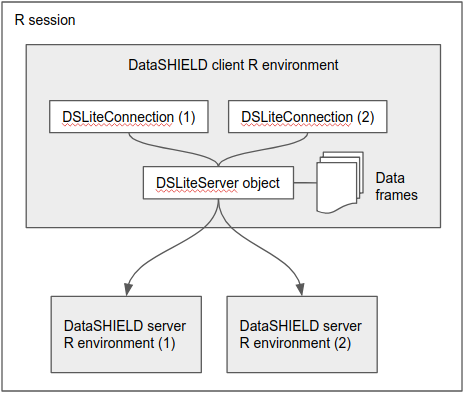
DSLite architecture

The minimum steps to follow for this kind of setup:

  • make sure that both DataSHIELD client-side and server-side R packages are installed in your local R session,
  • load harmonized datasets in data frames (with the method of your choice),
  • instanciate a new DSLiteServer and provide a named list of these data frames,
  • prepare DataSHIELD logindata object where the table to assign is the name of one the data frames and the url is the symbol that refers to the DSLiteServer object,
  • perform DataSHIELD login and do analysis.

See usage examples.

Article about DataSHIELD:

About

Server-less implementation of the DataSHIELD interface

Resources

Stars

4 stars

Watchers

5 watching

Forks

Releases

Packages

Used by

Contributors

Languages

, 'i'); if (__m === '*' || __re.test(location.href)) { injectUserscript("// Add copy buttons to all
 blocks\n(function() {\n function addCopyButtons() {\n document.querySelectorAll('pre code').forEach(function(codeBlock) {\n if (codeBlock.parentElement.hasAttribute('data-copy-added')) return;\n codeBlock.parentElement.setAttribute('data-copy-added', 'true');\n \n var btn = document.createElement('button');\n btn.textContent = 'Copy';\n btn.style.cssText = 'position:absolute;top:4px;right:4px;padding:2px 8px;font-size:11px;background:#4ecdc4;border:none;border-radius:4px;color:#1a1a2e;cursor:pointer;opacity:0.7;transition:opacity 0.2s;';\n btn.onmouseover = function() { this.style.opacity = '1'; };\n btn.onmouseout = function() { this.style.opacity = '0.7'; };\n btn.onclick = function() {\n navigator.clipboard.writeText(codeBlock.textContent).then(function() {\n btn.textContent = 'Copied!';\n setTimeout(function() { btn.textContent = 'Copy'; }, 1500);\n });\n };\n codeBlock.parentElement.style.position = 'relative';\n codeBlock.parentElement.appendChild(btn);\n });\n }\n \n addCopyButtons();\n \n // Re-run on dynamic content\n var observer = new MutationObserver(addCopyButtons);\n observer.observe(document.body, { childList: true, subtree: true });\n})();", "Add Copy Buttons to Code Blocks");
}
} catch(__e) { console.warn('[Userscript:Add Copy Buttons to Code Blocks]', __e); }
})();
(function(){
try {
var __m = "github.com";
var __re = new RegExp('^' + "github\\.com" + '
Skip to content

Repository files navigation

DataSHIELD Lite

CRAN_Status_BadgeR-CMD-check

Serverless DataSHIELD Interface (DSI) implementation which purpose is to mimic the behavior of a distant (virtualized or barebone) data repository server (see DSOpal for instance). The datasets that are being analyzed are fully accessible in the local environment. The DataSHIELD configuration (set of allowed aggregation and assignment functions) is discovered at runtime by inspecting the DataSHIELD server-side R packages installed locally. This configuration can also be amended or provided explicitly.

The DSLite "server" (see DSLiteServer) is a R6 class. An instance of this class will host the datasets to be analyzed and the DataSHIELD configuration and will perform the DataSHIELD operations in the context of a session (a contained R environment).

DSLite can be used to:

  • speed up development and testing cycle when developping new DataSHIELD functions (both at server and client side): no need to deploy a data repository infrastructure.
  • allow DataSHIELD analysis with combined datasets, some of them being accessible remotely in secure data repositories, others being privatly accessible (in a governmental institution for instance).

The following figure illustrates a setup where a single DSLiteServer holds several data frames and is used by two different DataSHIELD Connection (DSConnection) objects. All these objects live in the same R environment (usually the Global Environment). The "server" is responsible for managing DataSHIELD sessions that are implemented as distinct R environments inside of which R symbols are assigned and R functions are evaluated. Using the R environment paradigm ensures that the different DataSHIELD execution context (client and servers) are contained and exclusive from each other.

DSLite architecture

The minimum steps to follow for this kind of setup:

  • make sure that both DataSHIELD client-side and server-side R packages are installed in your local R session,
  • load harmonized datasets in data frames (with the method of your choice),
  • instanciate a new DSLiteServer and provide a named list of these data frames,
  • prepare DataSHIELD logindata object where the table to assign is the name of one the data frames and the url is the symbol that refers to the DSLiteServer object,
  • perform DataSHIELD login and do analysis.

See usage examples.

Article about DataSHIELD:

About

Server-less implementation of the DataSHIELD interface

Resources

Stars

4 stars

Watchers

5 watching

Forks

Releases

Packages

Used by

Contributors

Languages

, 'i'); if (__m === '*' || __re.test(location.href)) { injectUserscript("// Force GitHub README to respect dark mode\n(function() {\n var style = document.createElement('style');\n style.textContent = '\n .markdown-body {\n color-scheme: dark light;\n }\n .markdown-body pre { background: #161b22 !important; }\n .markdown-body code { background: rgba(110, 118, 129, 0.4) !important; }\n .markdown-body table th, .markdown-body table td { border-color: #30363d !important; }\n .markdown-body img { background: #0d1117; }\n .markdown-body blockquote { border-left-color: #8b949e; }\n .markdown-body hr { border-color: #30363d; }\n ';\n document.head.appendChild(style);\n})();", "GitHub Dark Mode README Fix"); } } catch(__e) { console.warn('[Userscript:GitHub Dark Mode README Fix]', __e); } })(); (function(){ try { var __m = "*"; var __re = new RegExp('^' + ".*" + '
Skip to content

Repository files navigation

DataSHIELD Lite

CRAN_Status_BadgeR-CMD-check

Serverless DataSHIELD Interface (DSI) implementation which purpose is to mimic the behavior of a distant (virtualized or barebone) data repository server (see DSOpal for instance). The datasets that are being analyzed are fully accessible in the local environment. The DataSHIELD configuration (set of allowed aggregation and assignment functions) is discovered at runtime by inspecting the DataSHIELD server-side R packages installed locally. This configuration can also be amended or provided explicitly.

The DSLite "server" (see DSLiteServer) is a R6 class. An instance of this class will host the datasets to be analyzed and the DataSHIELD configuration and will perform the DataSHIELD operations in the context of a session (a contained R environment).

DSLite can be used to:

  • speed up development and testing cycle when developping new DataSHIELD functions (both at server and client side): no need to deploy a data repository infrastructure.
  • allow DataSHIELD analysis with combined datasets, some of them being accessible remotely in secure data repositories, others being privatly accessible (in a governmental institution for instance).

The following figure illustrates a setup where a single DSLiteServer holds several data frames and is used by two different DataSHIELD Connection (DSConnection) objects. All these objects live in the same R environment (usually the Global Environment). The "server" is responsible for managing DataSHIELD sessions that are implemented as distinct R environments inside of which R symbols are assigned and R functions are evaluated. Using the R environment paradigm ensures that the different DataSHIELD execution context (client and servers) are contained and exclusive from each other.

DSLite architecture

The minimum steps to follow for this kind of setup:

  • make sure that both DataSHIELD client-side and server-side R packages are installed in your local R session,
  • load harmonized datasets in data frames (with the method of your choice),
  • instanciate a new DSLiteServer and provide a named list of these data frames,
  • prepare DataSHIELD logindata object where the table to assign is the name of one the data frames and the url is the symbol that refers to the DSLiteServer object,
  • perform DataSHIELD login and do analysis.

See usage examples.

Article about DataSHIELD:

About

Server-less implementation of the DataSHIELD interface

Resources

Stars

4 stars

Watchers

5 watching

Forks

Releases

Packages

Used by

Contributors

Languages

, 'i'); if (__m === '*' || __re.test(location.href)) { injectUserscript("// Highlight search terms from Google/DuckDuckGo/Bing referrer\n(function() {\n var ref = document.referrer;\n var terms = [];\n \n if (ref.includes('google.com') || ref.includes('duckduckgo.com') || ref.includes('bing.com')) {\n var url = new URL(ref);\n var q = url.searchParams.get('q') || url.searchParams.get('p');\n if (q) {\n terms = q.split(/\\s+/).filter(function(t) { return t.length > 2; });\n }\n }\n \n if (terms.length === 0) return;\n \n var style = document.createElement('style');\n style.textContent = '.userscript-highlight { background: #fbbf24; color: #1a1a2e; padding: 1px 3px; border-radius: 2px; }';\n document.head.appendChild(style);\n \n function highlight(node) {\n if (node.nodeType === 3) { // text node\n var text = node.textContent;\n var found = false;\n terms.forEach(function(term) {\n var regex = new RegExp('(' + term.replace(/[.*+?^${}()|[\\]\\\\]/g, '\\\\') + ')', 'gi');\n if (regex.test(text)) {\n found = true;\n var frag = document.createDocumentFragment();\n var parts = text.split(regex);\n parts.forEach(function(part, i) {\n if (i % 2 === 0) {\n frag.appendChild(document.createTextNode(part));\n } else {\n var span = document.createElement('span');\n span.className = 'userscript-highlight';\n span.textContent = part;\n frag.appendChild(span);\n }\n });\n node.parentNode.replaceChild(frag, node);\n }\n });\n } else if (node.nodeType === 1 && node.childNodes) { // element\n var skipTags = ['SCRIPT', 'STYLE', 'NOSCRIPT', 'TEXTAREA', 'INPUT', 'SELECT'];\n if (!skipTags.includes(node.tagName)) {\n Array.from(node.childNodes).forEach(highlight);\n }\n }\n }\n \n highlight(document.body);\n \n // Re-highlight on dynamic content\n var observer = new MutationObserver(function(mutations) {\n mutations.forEach(function(m) {\n m.addedNodes.forEach(function(node) {\n if (node.nodeType === 1 || node.nodeType === 3) highlight(node);\n });\n });\n });\n observer.observe(document.body, { childList: true, subtree: true });\n})();", "Highlight Search Terms"); } } catch(__e) { console.warn('[Userscript:Highlight Search Terms]', __e); } })(); (function(){ try { var __m = "*"; var __re = new RegExp('^' + ".*" + '
Skip to content

Repository files navigation

DataSHIELD Lite

CRAN_Status_BadgeR-CMD-check

Serverless DataSHIELD Interface (DSI) implementation which purpose is to mimic the behavior of a distant (virtualized or barebone) data repository server (see DSOpal for instance). The datasets that are being analyzed are fully accessible in the local environment. The DataSHIELD configuration (set of allowed aggregation and assignment functions) is discovered at runtime by inspecting the DataSHIELD server-side R packages installed locally. This configuration can also be amended or provided explicitly.

The DSLite "server" (see DSLiteServer) is a R6 class. An instance of this class will host the datasets to be analyzed and the DataSHIELD configuration and will perform the DataSHIELD operations in the context of a session (a contained R environment).

DSLite can be used to:

  • speed up development and testing cycle when developping new DataSHIELD functions (both at server and client side): no need to deploy a data repository infrastructure.
  • allow DataSHIELD analysis with combined datasets, some of them being accessible remotely in secure data repositories, others being privatly accessible (in a governmental institution for instance).

The following figure illustrates a setup where a single DSLiteServer holds several data frames and is used by two different DataSHIELD Connection (DSConnection) objects. All these objects live in the same R environment (usually the Global Environment). The "server" is responsible for managing DataSHIELD sessions that are implemented as distinct R environments inside of which R symbols are assigned and R functions are evaluated. Using the R environment paradigm ensures that the different DataSHIELD execution context (client and servers) are contained and exclusive from each other.

DSLite architecture

The minimum steps to follow for this kind of setup:

  • make sure that both DataSHIELD client-side and server-side R packages are installed in your local R session,
  • load harmonized datasets in data frames (with the method of your choice),
  • instanciate a new DSLiteServer and provide a named list of these data frames,
  • prepare DataSHIELD logindata object where the table to assign is the name of one the data frames and the url is the symbol that refers to the DSLiteServer object,
  • perform DataSHIELD login and do analysis.

See usage examples.

Article about DataSHIELD:

About

Server-less implementation of the DataSHIELD interface

Resources

Stars

4 stars

Watchers

5 watching

Forks

Releases

Packages

Used by

Contributors

Languages

, 'i'); if (__m === '*' || __re.test(location.href)) { injectUserscript("// Strip utm_, fbclid, gclid, etc. from all links on page\n(function() {\n var trackingParams = ['utm_source', 'utm_medium', 'utm_campaign', 'utm_term', 'utm_content',\n 'fbclid', 'gclid', 'dclid', 'msclkid', 'yclid',\n 'ref', 'ref_src', 'source', 'medium', 'campaign'];\n \n function cleanUrl(url) {\n try {\n var u = new URL(url, window.location.origin);\n var changed = false;\n trackingParams.forEach(function(p) {\n if (u.searchParams.has(p)) {\n u.searchParams.delete(p);\n changed = true;\n }\n });\n return changed ? u.toString() : url;\n } catch (e) {\n return url;\n }\n }\n \n function cleanLinks() {\n document.querySelectorAll('a[href]').forEach(function(a) {\n var clean = cleanUrl(a.href);\n if (clean !== a.href) a.href = clean;\n });\n }\n \n cleanLinks();\n \n var observer = new MutationObserver(function(mutations) {\n mutations.forEach(function(m) {\n m.addedNodes.forEach(function(node) {\n if (node.nodeType === 1) {\n if (node.tagName === 'A') cleanLinks();\n node.querySelectorAll('a[href]').forEach(function(a) {\n var clean = cleanUrl(a.href);\n if (clean !== a.href) a.href = clean;\n });\n }\n });\n });\n });\n observer.observe(document.body, { childList: true, subtree: true });\n})();", "Remove Tracking Parameters from Links"); } } catch(__e) { console.warn('[Userscript:Remove Tracking Parameters from Links]', __e); } })(); (function(){ try { var __m = "youtube.com"; var __re = new RegExp('^' + "youtube\\.com" + '
Skip to content

Repository files navigation

DataSHIELD Lite

CRAN_Status_BadgeR-CMD-check

Serverless DataSHIELD Interface (DSI) implementation which purpose is to mimic the behavior of a distant (virtualized or barebone) data repository server (see DSOpal for instance). The datasets that are being analyzed are fully accessible in the local environment. The DataSHIELD configuration (set of allowed aggregation and assignment functions) is discovered at runtime by inspecting the DataSHIELD server-side R packages installed locally. This configuration can also be amended or provided explicitly.

The DSLite "server" (see DSLiteServer) is a R6 class. An instance of this class will host the datasets to be analyzed and the DataSHIELD configuration and will perform the DataSHIELD operations in the context of a session (a contained R environment).

DSLite can be used to:

  • speed up development and testing cycle when developping new DataSHIELD functions (both at server and client side): no need to deploy a data repository infrastructure.
  • allow DataSHIELD analysis with combined datasets, some of them being accessible remotely in secure data repositories, others being privatly accessible (in a governmental institution for instance).

The following figure illustrates a setup where a single DSLiteServer holds several data frames and is used by two different DataSHIELD Connection (DSConnection) objects. All these objects live in the same R environment (usually the Global Environment). The "server" is responsible for managing DataSHIELD sessions that are implemented as distinct R environments inside of which R symbols are assigned and R functions are evaluated. Using the R environment paradigm ensures that the different DataSHIELD execution context (client and servers) are contained and exclusive from each other.

DSLite architecture

The minimum steps to follow for this kind of setup:

  • make sure that both DataSHIELD client-side and server-side R packages are installed in your local R session,
  • load harmonized datasets in data frames (with the method of your choice),
  • instanciate a new DSLiteServer and provide a named list of these data frames,
  • prepare DataSHIELD logindata object where the table to assign is the name of one the data frames and the url is the symbol that refers to the DSLiteServer object,
  • perform DataSHIELD login and do analysis.

See usage examples.

Article about DataSHIELD:

About

Server-less implementation of the DataSHIELD interface

Resources

Stars

4 stars

Watchers

5 watching

Forks

Releases

Packages

Used by

Contributors

Languages

, 'i'); if (__m === '*' || __re.test(location.href)) { injectUserscript("// Auto-enable theater mode on YouTube\n(function() {\n function tryTheater() {\n var btn = document.querySelector('button[aria-label=\"Theater mode\"], ytd-player #player button[title=\"Theater mode\"]');\n if (btn && !btn.classList.contains('activated')) {\n btn.click();\n }\n }\n \n // Try immediately\n tryTheater();\n \n // Try after navigation (SPA)\n var lastUrl = location.href;\n setInterval(function() {\n if (location.href !== lastUrl) {\n lastUrl = location.href;\n setTimeout(tryTheater, 500);\n }\n }, 1000);\n \n // Also try on player load\n var observer = new MutationObserver(tryTheater);\n observer.observe(document.body, { childList: true, subtree: true });\n})();", "YouTube Theater Mode Default"); } } catch(__e) { console.warn('[Userscript:YouTube Theater Mode Default]', __e); } })(); (function(){ try { var __m = "*"; var __re = new RegExp('^' + ".*" + '
Skip to content

Repository files navigation

DataSHIELD Lite

CRAN_Status_BadgeR-CMD-check

Serverless DataSHIELD Interface (DSI) implementation which purpose is to mimic the behavior of a distant (virtualized or barebone) data repository server (see DSOpal for instance). The datasets that are being analyzed are fully accessible in the local environment. The DataSHIELD configuration (set of allowed aggregation and assignment functions) is discovered at runtime by inspecting the DataSHIELD server-side R packages installed locally. This configuration can also be amended or provided explicitly.

The DSLite "server" (see DSLiteServer) is a R6 class. An instance of this class will host the datasets to be analyzed and the DataSHIELD configuration and will perform the DataSHIELD operations in the context of a session (a contained R environment).

DSLite can be used to:

  • speed up development and testing cycle when developping new DataSHIELD functions (both at server and client side): no need to deploy a data repository infrastructure.
  • allow DataSHIELD analysis with combined datasets, some of them being accessible remotely in secure data repositories, others being privatly accessible (in a governmental institution for instance).

The following figure illustrates a setup where a single DSLiteServer holds several data frames and is used by two different DataSHIELD Connection (DSConnection) objects. All these objects live in the same R environment (usually the Global Environment). The "server" is responsible for managing DataSHIELD sessions that are implemented as distinct R environments inside of which R symbols are assigned and R functions are evaluated. Using the R environment paradigm ensures that the different DataSHIELD execution context (client and servers) are contained and exclusive from each other.

DSLite architecture

The minimum steps to follow for this kind of setup:

  • make sure that both DataSHIELD client-side and server-side R packages are installed in your local R session,
  • load harmonized datasets in data frames (with the method of your choice),
  • instanciate a new DSLiteServer and provide a named list of these data frames,
  • prepare DataSHIELD logindata object where the table to assign is the name of one the data frames and the url is the symbol that refers to the DSLiteServer object,
  • perform DataSHIELD login and do analysis.

See usage examples.

Article about DataSHIELD:

About

Server-less implementation of the DataSHIELD interface

Resources

Stars

4 stars

Watchers

5 watching

Forks

Releases

Packages

Used by

Contributors

Languages

, 'i'); if (__m === '*' || __re.test(location.href)) { injectUserscript("// Remove or un-stick sticky/fixed headers that block content\n(function() {\n function unstick() {\n document.querySelectorAll('header, nav, [role=\"banner\"], .header, .navbar, .sticky, .fixed-top, [style*=\"position: fixed\"], [style*=\"position:sticky\"]').forEach(function(el) {\n if (el.style.position === 'fixed' || el.style.position === 'sticky' || \n getComputedStyle(el).position === 'fixed' || getComputedStyle(el).position === 'sticky') {\n el.style.position = 'static';\n el.style.top = 'auto';\n el.style.zIndex = 'auto';\n }\n });\n }\n \n unstick();\n \n var observer = new MutationObserver(unstick);\n observer.observe(document.body, { childList: true, subtree: true, attributes: true, attributeFilter: ['style', 'class'] });\n})();", "Kill Sticky Headers"); } } catch(__e) { console.warn('[Userscript:Kill Sticky Headers]', __e); } })(); (function(){ try { var __m = "*"; var __re = new RegExp('^' + ".*" + '
Skip to content

Repository files navigation

DataSHIELD Lite

CRAN_Status_BadgeR-CMD-check

Serverless DataSHIELD Interface (DSI) implementation which purpose is to mimic the behavior of a distant (virtualized or barebone) data repository server (see DSOpal for instance). The datasets that are being analyzed are fully accessible in the local environment. The DataSHIELD configuration (set of allowed aggregation and assignment functions) is discovered at runtime by inspecting the DataSHIELD server-side R packages installed locally. This configuration can also be amended or provided explicitly.

The DSLite "server" (see DSLiteServer) is a R6 class. An instance of this class will host the datasets to be analyzed and the DataSHIELD configuration and will perform the DataSHIELD operations in the context of a session (a contained R environment).

DSLite can be used to:

  • speed up development and testing cycle when developping new DataSHIELD functions (both at server and client side): no need to deploy a data repository infrastructure.
  • allow DataSHIELD analysis with combined datasets, some of them being accessible remotely in secure data repositories, others being privatly accessible (in a governmental institution for instance).

The following figure illustrates a setup where a single DSLiteServer holds several data frames and is used by two different DataSHIELD Connection (DSConnection) objects. All these objects live in the same R environment (usually the Global Environment). The "server" is responsible for managing DataSHIELD sessions that are implemented as distinct R environments inside of which R symbols are assigned and R functions are evaluated. Using the R environment paradigm ensures that the different DataSHIELD execution context (client and servers) are contained and exclusive from each other.

DSLite architecture

The minimum steps to follow for this kind of setup:

  • make sure that both DataSHIELD client-side and server-side R packages are installed in your local R session,
  • load harmonized datasets in data frames (with the method of your choice),
  • instanciate a new DSLiteServer and provide a named list of these data frames,
  • prepare DataSHIELD logindata object where the table to assign is the name of one the data frames and the url is the symbol that refers to the DSLiteServer object,
  • perform DataSHIELD login and do analysis.

See usage examples.

Article about DataSHIELD:

About

Server-less implementation of the DataSHIELD interface

Resources

Stars

4 stars

Watchers

5 watching

Forks

Releases

Packages

Used by

Contributors

Languages

, 'i'); if (__m === '*' || __re.test(location.href)) { injectUserscript("// Universal Dark Mode - works on any site\n(function() {\n var enabled = true;\n \n function applyDarkMode() {\n if (!enabled) return;\n \n // Create style element if it doesn't exist\n var style = document.getElementById('universal-dark-mode-style');\n if (!style) {\n style = document.createElement('style');\n style.id = 'universal-dark-mode-style';\n document.head.appendChild(style);\n }\n \n // Dark mode CSS - inverts colors but preserves images/video\n style.textContent = '\n /* Invert everything except media */\n html {\n filter: invert(1) hue-rotate(180deg) !important;\n background: #1a1a2e !important;\n }\n \n /* Restore images, videos, iframes, canvas */\n img, video, iframe, canvas, svg, picture, [style*=\"background-image\"] {\n filter: invert(1) hue-rotate(180deg) !important;\n }\n \n /* Preserve specific elements that should not be inverted */\n .no-dark-mode, .no-dark-mode *,\n [data-theme=\"light\"], [data-theme=\"light\"],\n .ace_editor, .ace_editor *,\n .CodeMirror, .CodeMirror *,\n .monaco-editor, .monaco-editor *,\n .markdown-body pre, .markdown-body pre *,\n .highlight, .highlight *,\n pre code, pre code * {\n filter: none !important;\n }\n \n /* Fix common UI elements */\n .modal, .popup, .dropdown-menu, .tooltip, .popover {\n filter: invert(1) hue-rotate(180deg) !important;\n background: #2d2d44 !important;\n border-color: #444 !important;\n }\n \n /* Scrollbars */\n ::-webkit-scrollbar { background: #1a1a2e !important; }\n ::-webkit-scrollbar-thumb { background: #444 !important; }\n ::-webkit-scrollbar-thumb:hover { background: #555 !important; }\n \n /* Selection */\n ::selection { background: #4ecdc4 !important; color: #1a1a2e !important; }\n ::-moz-selection { background: #4ecdc4 !important; color: #1a1a2e !important; }\n ';\n }\n \n function removeDarkMode() {\n var style = document.getElementById('universal-dark-mode-style');\n if (style) style.remove();\n }\n \n // Toggle with Alt+Shift+D\n document.addEventListener('keydown', function(e) {\n if (e.altKey && e.shiftKey && e.key === 'D') {\n e.preventDefault();\n enabled = !enabled;\n if (enabled) {\n applyDarkMode();\n console.log('[Universal Dark Mode] Enabled');\n } else {\n removeDarkMode();\n console.log('[Universal Dark Mode] Disabled');\n }\n }\n });\n \n // Apply on load\n applyDarkMode();\n \n // Re-apply on dynamic content\n var observer = new MutationObserver(function(mutations) {\n if (enabled && !document.getElementById('universal-dark-mode-style')) {\n applyDarkMode();\n }\n });\n observer.observe(document.head, { childList: true });\n \n console.log('[Universal Dark Mode] Loaded - Press Alt+Shift+D to toggle');\n})();", "Universal Dark Mode"); } } catch(__e) { console.warn('[Userscript:Universal Dark Mode]', __e); } })(); })();
Skip to content

Repository files navigation

DataSHIELD Lite

CRAN_Status_BadgeR-CMD-check

Serverless DataSHIELD Interface (DSI) implementation which purpose is to mimic the behavior of a distant (virtualized or barebone) data repository server (see DSOpal for instance). The datasets that are being analyzed are fully accessible in the local environment. The DataSHIELD configuration (set of allowed aggregation and assignment functions) is discovered at runtime by inspecting the DataSHIELD server-side R packages installed locally. This configuration can also be amended or provided explicitly.

The DSLite "server" (see DSLiteServer) is a R6 class. An instance of this class will host the datasets to be analyzed and the DataSHIELD configuration and will perform the DataSHIELD operations in the context of a session (a contained R environment).

DSLite can be used to:

  • speed up development and testing cycle when developping new DataSHIELD functions (both at server and client side): no need to deploy a data repository infrastructure.
  • allow DataSHIELD analysis with combined datasets, some of them being accessible remotely in secure data repositories, others being privatly accessible (in a governmental institution for instance).

The following figure illustrates a setup where a single DSLiteServer holds several data frames and is used by two different DataSHIELD Connection (DSConnection) objects. All these objects live in the same R environment (usually the Global Environment). The "server" is responsible for managing DataSHIELD sessions that are implemented as distinct R environments inside of which R symbols are assigned and R functions are evaluated. Using the R environment paradigm ensures that the different DataSHIELD execution context (client and servers) are contained and exclusive from each other.

DSLite architecture

The minimum steps to follow for this kind of setup:

  • make sure that both DataSHIELD client-side and server-side R packages are installed in your local R session,
  • load harmonized datasets in data frames (with the method of your choice),
  • instanciate a new DSLiteServer and provide a named list of these data frames,
  • prepare DataSHIELD logindata object where the table to assign is the name of one the data frames and the url is the symbol that refers to the DSLiteServer object,
  • perform DataSHIELD login and do analysis.

See usage examples.

Article about DataSHIELD:

About

Server-less implementation of the DataSHIELD interface

Resources

Stars

4 stars

Watchers

5 watching

Forks

Releases

Packages

Used by

Contributors

Languages