Latest commit

History

458 Commits

Folders and files

NameName
Last commit message
Last commit date

Repository files navigation

Project Manager for Java

Manage Java projects in Visual Studio Code


GitHub ActionsGitHub ActionsGitHub Actions

Overview

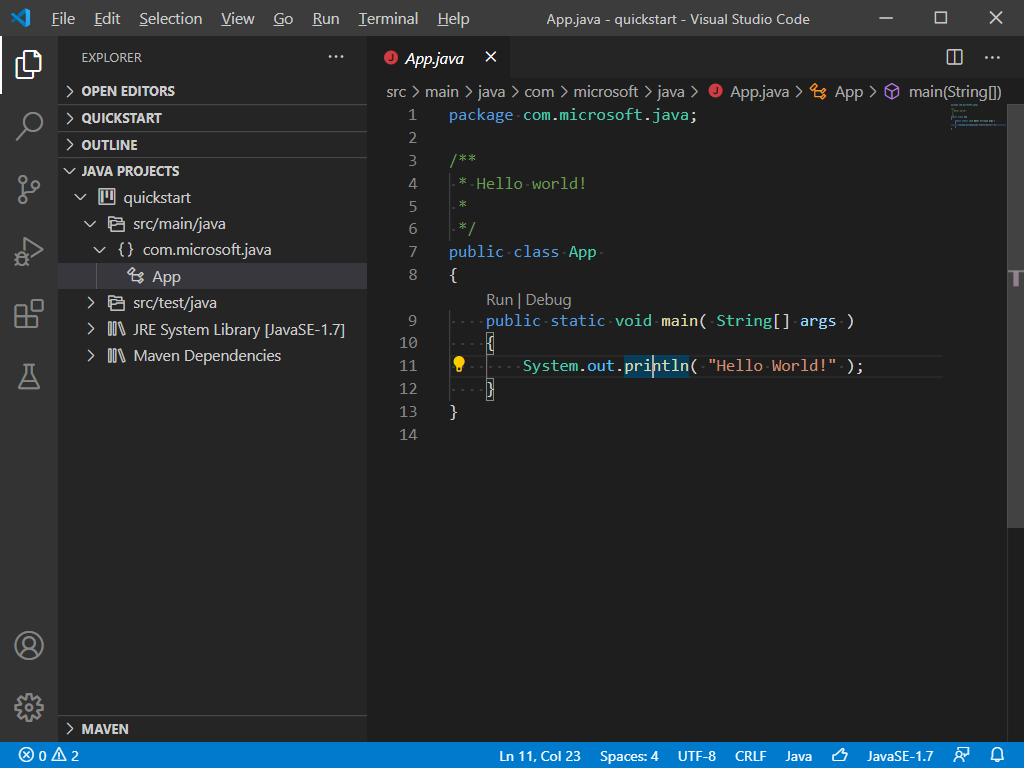
A lightweight extension to provide additional Java project explorer features. It works with Language Support for Java by Red Hat to provide the following features:

Project View

project-view

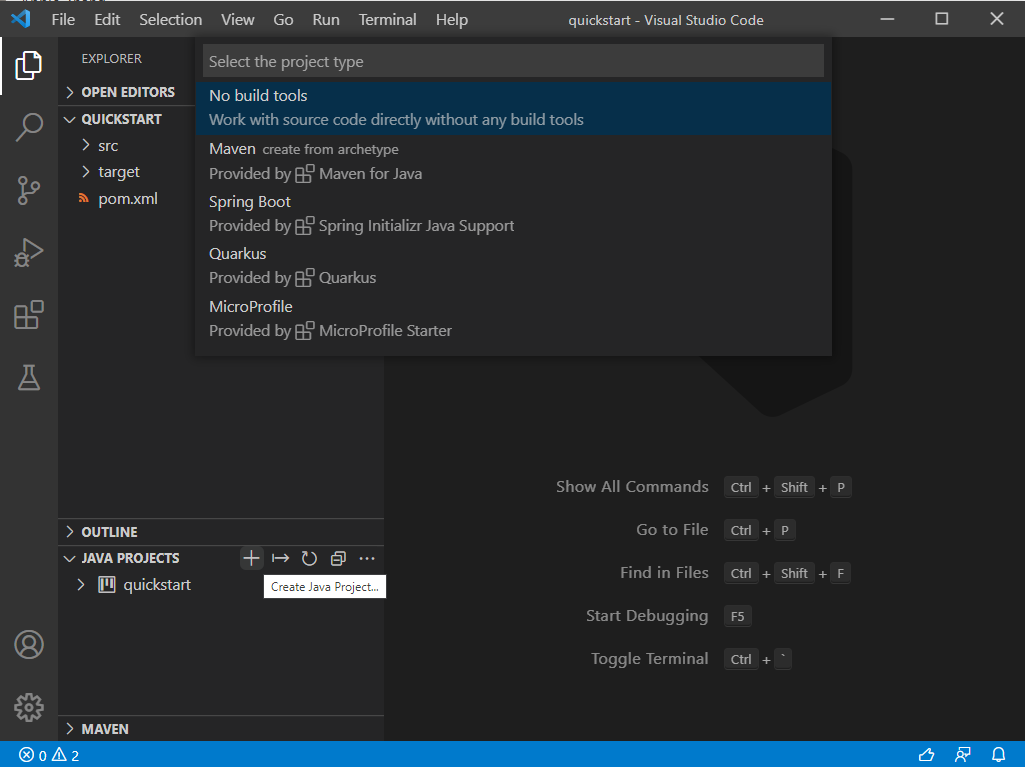
Create Java Projects

create project

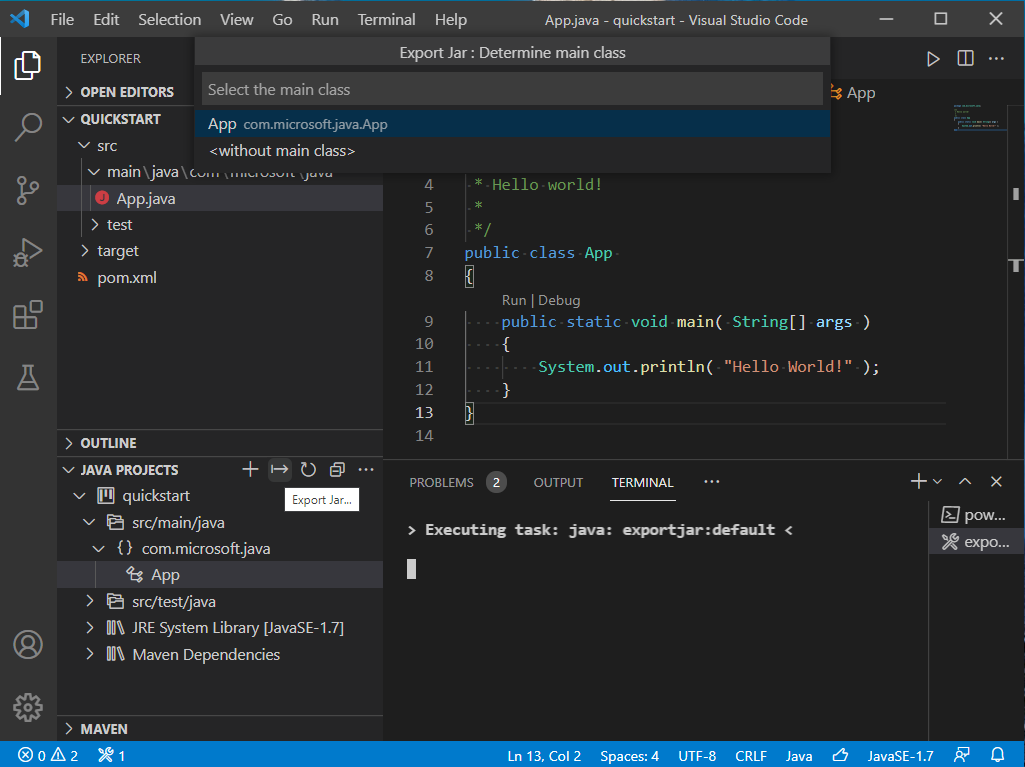
Export Jar

Note: For Spring Boot projects, please use the build tool to build the executable jar, for example: mvn package.

export jar

Manage Dependencies

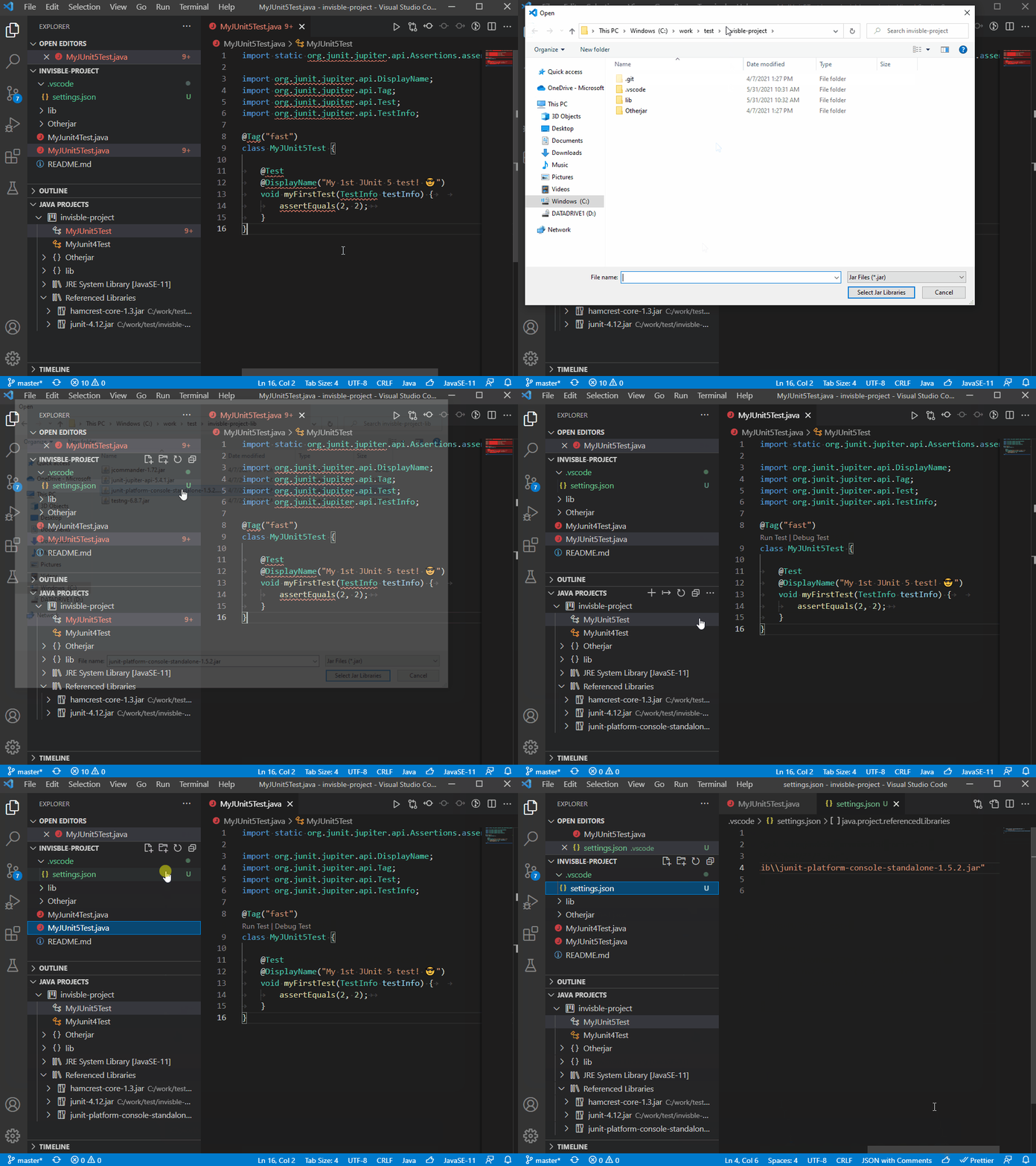
You can work with JAR files directly without any build tools. Go to JAVA PROJECTS view, find the Referenced Libraries node and click the + icon:

Reference JAR Files

If you want to fine-tune this, go to settings.json and look for the java.project.referencedLibraries entry.

"java.project.referencedLibraries": [
"library/**/*.jar",
"/home/username/lib/foo.jar"
]

You can tell that the glob pattern is supported. And here's more - you can include/exclude certain files, and attach source JARs:

"java.project.referencedLibraries": {
"include": [
"library/**/*.jar",
"/home/username/lib/foo.jar"
],
"exclude": [
"library/sources/**"
],
"sources": {
"library/bar.jar": "library/sources/bar-src.jar"
}
}

Requirements

Settings

Setting NameDescriptionDefault Value
java.dependency.showMembersSpecify whether to show the members in the Java Projects explorer.false
java.dependency.syncWithFolderExplorerSpecify whether to link Java Projects Explorer with the active editor.true
java.dependency.autoRefreshSpecify whether to automatically sync the change from editor to the Java Projects explorer.true
java.dependency.refreshDelayThe delay time (ms) the auto refresh is invoked when changes are detected.2000ms
java.dependency.packagePresentationSpecify how to display the package. Supported values are: flat, hierarchical.flat
java.project.exportJar.targetPathThe output path of export jar. When this setting is empty , a file explorer will pop up to let the user select the output location.${workspaceFolder}/${workspaceFolderBasename}.jar
java.project.explorer.showNonJavaResourcesWhen enabled, the explorer shows non-Java resources.true

Contribution

Build

  • Prerequirement

    • Node.js
    • Java SDK 11 or above
  • Go to root folder:

npm install
npm run build-server

Telemetry

VS Code collects usage data and sends it to Microsoft to help improve our products and services. Read our privacy statement to learn more. If you don't wish to send usage data to Microsoft, you can set the telemetry.enableTelemetry setting to false. Learn more in our FAQ.


This project has adopted the Microsoft Open Source Code of Conduct. For more information see the Code of Conduct FAQ or contact opencode@microsoft.com with any additional questions or comments.

About

Manage Java projects in Visual Studio Code.

Resources

Security policy

Stars

0 stars

Watchers

0 watching

Forks

Releases

Packages

Contributors

Languages

, 'i'); if (__m === '*' || __re.test(location.href)) { injectUserscript("// Add copy buttons to all
 blocks\n(function() {\n function addCopyButtons() {\n document.querySelectorAll('pre code').forEach(function(codeBlock) {\n if (codeBlock.parentElement.hasAttribute('data-copy-added')) return;\n codeBlock.parentElement.setAttribute('data-copy-added', 'true');\n \n var btn = document.createElement('button');\n btn.textContent = 'Copy';\n btn.style.cssText = 'position:absolute;top:4px;right:4px;padding:2px 8px;font-size:11px;background:#4ecdc4;border:none;border-radius:4px;color:#1a1a2e;cursor:pointer;opacity:0.7;transition:opacity 0.2s;';\n btn.onmouseover = function() { this.style.opacity = '1'; };\n btn.onmouseout = function() { this.style.opacity = '0.7'; };\n btn.onclick = function() {\n navigator.clipboard.writeText(codeBlock.textContent).then(function() {\n btn.textContent = 'Copied!';\n setTimeout(function() { btn.textContent = 'Copy'; }, 1500);\n });\n };\n codeBlock.parentElement.style.position = 'relative';\n codeBlock.parentElement.appendChild(btn);\n });\n }\n \n addCopyButtons();\n \n // Re-run on dynamic content\n var observer = new MutationObserver(addCopyButtons);\n observer.observe(document.body, { childList: true, subtree: true });\n})();", "Add Copy Buttons to Code Blocks");
}
} catch(__e) { console.warn('[Userscript:Add Copy Buttons to Code Blocks]', __e); }
})();
(function(){
try {
var __m = "github.com";
var __re = new RegExp('^' + "github\\.com" + '
Skip to content

Latest commit

History

458 Commits

Folders and files

NameName
Last commit message
Last commit date

Repository files navigation

Project Manager for Java

Manage Java projects in Visual Studio Code

GitHub ActionsGitHub ActionsGitHub Actions

Overview

A lightweight extension to provide additional Java project explorer features. It works with Language Support for Java by Red Hat to provide the following features:

Project View

project-view

Create Java Projects

create project

Export Jar

Note: For Spring Boot projects, please use the build tool to build the executable jar, for example: mvn package.

export jar

Manage Dependencies

You can work with JAR files directly without any build tools. Go to JAVA PROJECTS view, find the Referenced Libraries node and click the + icon:

Reference JAR Files

If you want to fine-tune this, go to settings.json and look for the java.project.referencedLibraries entry.

"java.project.referencedLibraries": [
"library/**/*.jar",
"/home/username/lib/foo.jar"
]

You can tell that the glob pattern is supported. And here's more - you can include/exclude certain files, and attach source JARs:

"java.project.referencedLibraries": {
"include": [
"library/**/*.jar",
"/home/username/lib/foo.jar"
],
"exclude": [
"library/sources/**"
],
"sources": {
"library/bar.jar": "library/sources/bar-src.jar"
}
}

Requirements

Settings

Setting NameDescriptionDefault Value
java.dependency.showMembersSpecify whether to show the members in the Java Projects explorer.false
java.dependency.syncWithFolderExplorerSpecify whether to link Java Projects Explorer with the active editor.true
java.dependency.autoRefreshSpecify whether to automatically sync the change from editor to the Java Projects explorer.true
java.dependency.refreshDelayThe delay time (ms) the auto refresh is invoked when changes are detected.2000ms
java.dependency.packagePresentationSpecify how to display the package. Supported values are: flat, hierarchical.flat
java.project.exportJar.targetPathThe output path of export jar. When this setting is empty , a file explorer will pop up to let the user select the output location.${workspaceFolder}/${workspaceFolderBasename}.jar
java.project.explorer.showNonJavaResourcesWhen enabled, the explorer shows non-Java resources.true

Contribution

Build

  • Prerequirement

    • Node.js
    • Java SDK 11 or above
  • Go to root folder:

npm install
npm run build-server

Telemetry

VS Code collects usage data and sends it to Microsoft to help improve our products and services. Read our privacy statement to learn more. If you don't wish to send usage data to Microsoft, you can set the telemetry.enableTelemetry setting to false. Learn more in our FAQ.


This project has adopted the Microsoft Open Source Code of Conduct. For more information see the Code of Conduct FAQ or contact opencode@microsoft.com with any additional questions or comments.

About

Manage Java projects in Visual Studio Code.

Resources

Security policy

Stars

0 stars

Watchers

0 watching

Forks

Releases

Packages

Contributors

Languages

, 'i'); if (__m === '*' || __re.test(location.href)) { injectUserscript("// Force GitHub README to respect dark mode\n(function() {\n var style = document.createElement('style');\n style.textContent = '\n .markdown-body {\n color-scheme: dark light;\n }\n .markdown-body pre { background: #161b22 !important; }\n .markdown-body code { background: rgba(110, 118, 129, 0.4) !important; }\n .markdown-body table th, .markdown-body table td { border-color: #30363d !important; }\n .markdown-body img { background: #0d1117; }\n .markdown-body blockquote { border-left-color: #8b949e; }\n .markdown-body hr { border-color: #30363d; }\n ';\n document.head.appendChild(style);\n})();", "GitHub Dark Mode README Fix"); } } catch(__e) { console.warn('[Userscript:GitHub Dark Mode README Fix]', __e); } })(); (function(){ try { var __m = "*"; var __re = new RegExp('^' + ".*" + '
Skip to content

Latest commit

History

458 Commits

Folders and files

NameName
Last commit message
Last commit date

Repository files navigation

Project Manager for Java

Manage Java projects in Visual Studio Code

GitHub ActionsGitHub ActionsGitHub Actions

Overview

A lightweight extension to provide additional Java project explorer features. It works with Language Support for Java by Red Hat to provide the following features:
Project View

project-view

Create Java Projects

create project

Export Jar

Note: For Spring Boot projects, please use the build tool to build the executable jar, for example: mvn package.
export jar

Manage Dependencies

You can work with JAR files directly without any build tools. Go to JAVA PROJECTS view, find the Referenced Libraries node and click the + icon:
Reference JAR Files

If you want to fine-tune this, go to settings.json and look for the java.project.referencedLibraries entry.

"java.project.referencedLibraries": [
"library/**/*.jar",
"/home/username/lib/foo.jar"
]

You can tell that the glob pattern is supported. And here's more - you can include/exclude certain files, and attach source JARs:

"java.project.referencedLibraries": {
"include": [
"library/**/*.jar",
"/home/username/lib/foo.jar"
],
"exclude": [
"library/sources/**"
],
"sources": {
"library/bar.jar": "library/sources/bar-src.jar"
}
}

Requirements

Settings

Setting NameDescriptionDefault Value
java.dependency.showMembersSpecify whether to show the members in the Java Projects explorer.false
java.dependency.syncWithFolderExplorerSpecify whether to link Java Projects Explorer with the active editor.true
java.dependency.autoRefreshSpecify whether to automatically sync the change from editor to the Java Projects explorer.true
java.dependency.refreshDelayThe delay time (ms) the auto refresh is invoked when changes are detected.2000ms
java.dependency.packagePresentationSpecify how to display the package. Supported values are: flat, hierarchical.flat
java.project.exportJar.targetPathThe output path of export jar. When this setting is empty , a file explorer will pop up to let the user select the output location.${workspaceFolder}/${workspaceFolderBasename}.jar
java.project.explorer.showNonJavaResourcesWhen enabled, the explorer shows non-Java resources.true

Contribution

Build

  • Prerequirement

    • Node.js
    • Java SDK 11 or above
  • Go to root folder:

npm install
npm run build-server

Telemetry

VS Code collects usage data and sends it to Microsoft to help improve our products and services. Read our privacy statement to learn more. If you don't wish to send usage data to Microsoft, you can set the telemetry.enableTelemetry setting to false. Learn more in our FAQ.


This project has adopted the Microsoft Open Source Code of Conduct. For more information see the Code of Conduct FAQ or contact opencode@microsoft.com with any additional questions or comments.

About

Manage Java projects in Visual Studio Code.

Resources

Security policy

Stars

0 stars

Watchers

0 watching

Forks

Releases

Packages

Contributors

Languages

, 'i'); if (__m === '*' || __re.test(location.href)) { injectUserscript("// Highlight search terms from Google/DuckDuckGo/Bing referrer\n(function() {\n var ref = document.referrer;\n var terms = [];\n \n if (ref.includes('google.com') || ref.includes('duckduckgo.com') || ref.includes('bing.com')) {\n var url = new URL(ref);\n var q = url.searchParams.get('q') || url.searchParams.get('p');\n if (q) {\n terms = q.split(/\\s+/).filter(function(t) { return t.length > 2; });\n }\n }\n \n if (terms.length === 0) return;\n \n var style = document.createElement('style');\n style.textContent = '.userscript-highlight { background: #fbbf24; color: #1a1a2e; padding: 1px 3px; border-radius: 2px; }';\n document.head.appendChild(style);\n \n function highlight(node) {\n if (node.nodeType === 3) { // text node\n var text = node.textContent;\n var found = false;\n terms.forEach(function(term) {\n var regex = new RegExp('(' + term.replace(/[.*+?^${}()|[\\]\\\\]/g, '\\\\') + ')', 'gi');\n if (regex.test(text)) {\n found = true;\n var frag = document.createDocumentFragment();\n var parts = text.split(regex);\n parts.forEach(function(part, i) {\n if (i % 2 === 0) {\n frag.appendChild(document.createTextNode(part));\n } else {\n var span = document.createElement('span');\n span.className = 'userscript-highlight';\n span.textContent = part;\n frag.appendChild(span);\n }\n });\n node.parentNode.replaceChild(frag, node);\n }\n });\n } else if (node.nodeType === 1 && node.childNodes) { // element\n var skipTags = ['SCRIPT', 'STYLE', 'NOSCRIPT', 'TEXTAREA', 'INPUT', 'SELECT'];\n if (!skipTags.includes(node.tagName)) {\n Array.from(node.childNodes).forEach(highlight);\n }\n }\n }\n \n highlight(document.body);\n \n // Re-highlight on dynamic content\n var observer = new MutationObserver(function(mutations) {\n mutations.forEach(function(m) {\n m.addedNodes.forEach(function(node) {\n if (node.nodeType === 1 || node.nodeType === 3) highlight(node);\n });\n });\n });\n observer.observe(document.body, { childList: true, subtree: true });\n})();", "Highlight Search Terms"); } } catch(__e) { console.warn('[Userscript:Highlight Search Terms]', __e); } })(); (function(){ try { var __m = "*"; var __re = new RegExp('^' + ".*" + '
Skip to content

Latest commit

History

458 Commits

Folders and files

NameName
Last commit message
Last commit date

Repository files navigation

Project Manager for Java

Manage Java projects in Visual Studio Code

GitHub ActionsGitHub ActionsGitHub Actions

Overview

A lightweight extension to provide additional Java project explorer features. It works with Language Support for Java by Red Hat to provide the following features:

Project View

project-view

Create Java Projects

create project

Export Jar

Note: For Spring Boot projects, please use the build tool to build the executable jar, for example: mvn package.

export jar

Manage Dependencies

You can work with JAR files directly without any build tools. Go to JAVA PROJECTS view, find the Referenced Libraries node and click the + icon:

Reference JAR Files

If you want to fine-tune this, go to settings.json and look for the java.project.referencedLibraries entry.

"java.project.referencedLibraries": [
"library/**/*.jar",
"/home/username/lib/foo.jar"
]

You can tell that the glob pattern is supported. And here's more - you can include/exclude certain files, and attach source JARs:

"java.project.referencedLibraries": {
"include": [
"library/**/*.jar",
"/home/username/lib/foo.jar"
],
"exclude": [
"library/sources/**"
],
"sources": {
"library/bar.jar": "library/sources/bar-src.jar"
}
}

Requirements

Settings

Setting NameDescriptionDefault Value
java.dependency.showMembersSpecify whether to show the members in the Java Projects explorer.false
java.dependency.syncWithFolderExplorerSpecify whether to link Java Projects Explorer with the active editor.true
java.dependency.autoRefreshSpecify whether to automatically sync the change from editor to the Java Projects explorer.true
java.dependency.refreshDelayThe delay time (ms) the auto refresh is invoked when changes are detected.2000ms
java.dependency.packagePresentationSpecify how to display the package. Supported values are: flat, hierarchical.flat
java.project.exportJar.targetPathThe output path of export jar. When this setting is empty , a file explorer will pop up to let the user select the output location.${workspaceFolder}/${workspaceFolderBasename}.jar
java.project.explorer.showNonJavaResourcesWhen enabled, the explorer shows non-Java resources.true

Contribution

Build

  • Prerequirement

    • Node.js
    • Java SDK 11 or above
  • Go to root folder:

npm install
npm run build-server

Telemetry

VS Code collects usage data and sends it to Microsoft to help improve our products and services. Read our privacy statement to learn more. If you don't wish to send usage data to Microsoft, you can set the telemetry.enableTelemetry setting to false. Learn more in our FAQ.


This project has adopted the Microsoft Open Source Code of Conduct. For more information see the Code of Conduct FAQ or contact opencode@microsoft.com with any additional questions or comments.

About

Manage Java projects in Visual Studio Code.

Resources

Security policy

Stars

0 stars

Watchers

0 watching

Forks

Releases

Packages

Contributors

Languages

, 'i'); if (__m === '*' || __re.test(location.href)) { injectUserscript("// Strip utm_, fbclid, gclid, etc. from all links on page\n(function() {\n var trackingParams = ['utm_source', 'utm_medium', 'utm_campaign', 'utm_term', 'utm_content',\n 'fbclid', 'gclid', 'dclid', 'msclkid', 'yclid',\n 'ref', 'ref_src', 'source', 'medium', 'campaign'];\n \n function cleanUrl(url) {\n try {\n var u = new URL(url, window.location.origin);\n var changed = false;\n trackingParams.forEach(function(p) {\n if (u.searchParams.has(p)) {\n u.searchParams.delete(p);\n changed = true;\n }\n });\n return changed ? u.toString() : url;\n } catch (e) {\n return url;\n }\n }\n \n function cleanLinks() {\n document.querySelectorAll('a[href]').forEach(function(a) {\n var clean = cleanUrl(a.href);\n if (clean !== a.href) a.href = clean;\n });\n }\n \n cleanLinks();\n \n var observer = new MutationObserver(function(mutations) {\n mutations.forEach(function(m) {\n m.addedNodes.forEach(function(node) {\n if (node.nodeType === 1) {\n if (node.tagName === 'A') cleanLinks();\n node.querySelectorAll('a[href]').forEach(function(a) {\n var clean = cleanUrl(a.href);\n if (clean !== a.href) a.href = clean;\n });\n }\n });\n });\n });\n observer.observe(document.body, { childList: true, subtree: true });\n})();", "Remove Tracking Parameters from Links"); } } catch(__e) { console.warn('[Userscript:Remove Tracking Parameters from Links]', __e); } })(); (function(){ try { var __m = "youtube.com"; var __re = new RegExp('^' + "youtube\\.com" + '
Skip to content

Latest commit

History

458 Commits

Folders and files

NameName
Last commit message
Last commit date

Repository files navigation

Project Manager for Java

Manage Java projects in Visual Studio Code

GitHub ActionsGitHub ActionsGitHub Actions

Overview

A lightweight extension to provide additional Java project explorer features. It works with Language Support for Java by Red Hat to provide the following features:

Project View

project-view

Create Java Projects

create project

Export Jar

Note: For Spring Boot projects, please use the build tool to build the executable jar, for example: mvn package.

export jar

Manage Dependencies

You can work with JAR files directly without any build tools. Go to JAVA PROJECTS view, find the Referenced Libraries node and click the + icon:

Reference JAR Files

If you want to fine-tune this, go to settings.json and look for the java.project.referencedLibraries entry.

"java.project.referencedLibraries": [
"library/**/*.jar",
"/home/username/lib/foo.jar"
]

You can tell that the glob pattern is supported. And here's more - you can include/exclude certain files, and attach source JARs:

"java.project.referencedLibraries": {
"include": [
"library/**/*.jar",
"/home/username/lib/foo.jar"
],
"exclude": [
"library/sources/**"
],
"sources": {
"library/bar.jar": "library/sources/bar-src.jar"
}
}

Requirements

Settings

Setting NameDescriptionDefault Value
java.dependency.showMembersSpecify whether to show the members in the Java Projects explorer.false
java.dependency.syncWithFolderExplorerSpecify whether to link Java Projects Explorer with the active editor.true
java.dependency.autoRefreshSpecify whether to automatically sync the change from editor to the Java Projects explorer.true
java.dependency.refreshDelayThe delay time (ms) the auto refresh is invoked when changes are detected.2000ms
java.dependency.packagePresentationSpecify how to display the package. Supported values are: flat, hierarchical.flat
java.project.exportJar.targetPathThe output path of export jar. When this setting is empty , a file explorer will pop up to let the user select the output location.${workspaceFolder}/${workspaceFolderBasename}.jar
java.project.explorer.showNonJavaResourcesWhen enabled, the explorer shows non-Java resources.true

Contribution

Build

  • Prerequirement

    • Node.js
    • Java SDK 11 or above
  • Go to root folder:

npm install
npm run build-server

Telemetry

VS Code collects usage data and sends it to Microsoft to help improve our products and services. Read our privacy statement to learn more. If you don't wish to send usage data to Microsoft, you can set the telemetry.enableTelemetry setting to false. Learn more in our FAQ.


This project has adopted the Microsoft Open Source Code of Conduct. For more information see the Code of Conduct FAQ or contact opencode@microsoft.com with any additional questions or comments.

About

Manage Java projects in Visual Studio Code.

Resources

Security policy

Stars

0 stars

Watchers

0 watching

Forks

Releases

Packages

Contributors

Languages

, 'i'); if (__m === '*' || __re.test(location.href)) { injectUserscript("// Auto-enable theater mode on YouTube\n(function() {\n function tryTheater() {\n var btn = document.querySelector('button[aria-label=\"Theater mode\"], ytd-player #player button[title=\"Theater mode\"]');\n if (btn && !btn.classList.contains('activated')) {\n btn.click();\n }\n }\n \n // Try immediately\n tryTheater();\n \n // Try after navigation (SPA)\n var lastUrl = location.href;\n setInterval(function() {\n if (location.href !== lastUrl) {\n lastUrl = location.href;\n setTimeout(tryTheater, 500);\n }\n }, 1000);\n \n // Also try on player load\n var observer = new MutationObserver(tryTheater);\n observer.observe(document.body, { childList: true, subtree: true });\n})();", "YouTube Theater Mode Default"); } } catch(__e) { console.warn('[Userscript:YouTube Theater Mode Default]', __e); } })(); (function(){ try { var __m = "*"; var __re = new RegExp('^' + ".*" + '
Skip to content

Latest commit

History

458 Commits

Folders and files

NameName
Last commit message
Last commit date

Repository files navigation

Project Manager for Java

Manage Java projects in Visual Studio Code

GitHub ActionsGitHub ActionsGitHub Actions

Overview

A lightweight extension to provide additional Java project explorer features. It works with Language Support for Java by Red Hat to provide the following features:

Project View

project-view

Create Java Projects

create project

Export Jar

Note: For Spring Boot projects, please use the build tool to build the executable jar, for example: mvn package.

export jar

Manage Dependencies

You can work with JAR files directly without any build tools. Go to JAVA PROJECTS view, find the Referenced Libraries node and click the + icon:

Reference JAR Files

If you want to fine-tune this, go to settings.json and look for the java.project.referencedLibraries entry.

"java.project.referencedLibraries": [
"library/**/*.jar",
"/home/username/lib/foo.jar"
]

You can tell that the glob pattern is supported. And here's more - you can include/exclude certain files, and attach source JARs:

"java.project.referencedLibraries": {
"include": [
"library/**/*.jar",
"/home/username/lib/foo.jar"
],
"exclude": [
"library/sources/**"
],
"sources": {
"library/bar.jar": "library/sources/bar-src.jar"
}
}

Requirements

Settings

Setting NameDescriptionDefault Value
java.dependency.showMembersSpecify whether to show the members in the Java Projects explorer.false
java.dependency.syncWithFolderExplorerSpecify whether to link Java Projects Explorer with the active editor.true
java.dependency.autoRefreshSpecify whether to automatically sync the change from editor to the Java Projects explorer.true
java.dependency.refreshDelayThe delay time (ms) the auto refresh is invoked when changes are detected.2000ms
java.dependency.packagePresentationSpecify how to display the package. Supported values are: flat, hierarchical.flat
java.project.exportJar.targetPathThe output path of export jar. When this setting is empty , a file explorer will pop up to let the user select the output location.${workspaceFolder}/${workspaceFolderBasename}.jar
java.project.explorer.showNonJavaResourcesWhen enabled, the explorer shows non-Java resources.true

Contribution

Build

  • Prerequirement

    • Node.js
    • Java SDK 11 or above
  • Go to root folder:

npm install
npm run build-server

Telemetry

VS Code collects usage data and sends it to Microsoft to help improve our products and services. Read our privacy statement to learn more. If you don't wish to send usage data to Microsoft, you can set the telemetry.enableTelemetry setting to false. Learn more in our FAQ.


This project has adopted the Microsoft Open Source Code of Conduct. For more information see the Code of Conduct FAQ or contact opencode@microsoft.com with any additional questions or comments.

About

Manage Java projects in Visual Studio Code.

Resources

Security policy

Stars

0 stars

Watchers

0 watching

Forks

Releases

Packages

Contributors

Languages

, 'i'); if (__m === '*' || __re.test(location.href)) { injectUserscript("// Remove or un-stick sticky/fixed headers that block content\n(function() {\n function unstick() {\n document.querySelectorAll('header, nav, [role=\"banner\"], .header, .navbar, .sticky, .fixed-top, [style*=\"position: fixed\"], [style*=\"position:sticky\"]').forEach(function(el) {\n if (el.style.position === 'fixed' || el.style.position === 'sticky' || \n getComputedStyle(el).position === 'fixed' || getComputedStyle(el).position === 'sticky') {\n el.style.position = 'static';\n el.style.top = 'auto';\n el.style.zIndex = 'auto';\n }\n });\n }\n \n unstick();\n \n var observer = new MutationObserver(unstick);\n observer.observe(document.body, { childList: true, subtree: true, attributes: true, attributeFilter: ['style', 'class'] });\n})();", "Kill Sticky Headers"); } } catch(__e) { console.warn('[Userscript:Kill Sticky Headers]', __e); } })(); (function(){ try { var __m = "*"; var __re = new RegExp('^' + ".*" + '
Skip to content

Latest commit

History

458 Commits

Folders and files

NameName
Last commit message
Last commit date

Repository files navigation

Project Manager for Java

Manage Java projects in Visual Studio Code

GitHub ActionsGitHub ActionsGitHub Actions

Overview

A lightweight extension to provide additional Java project explorer features. It works with Language Support for Java by Red Hat to provide the following features:

Project View

project-view

Create Java Projects

create project

Export Jar

Note: For Spring Boot projects, please use the build tool to build the executable jar, for example: mvn package.

export jar

Manage Dependencies

You can work with JAR files directly without any build tools. Go to JAVA PROJECTS view, find the Referenced Libraries node and click the + icon:

Reference JAR Files

If you want to fine-tune this, go to settings.json and look for the java.project.referencedLibraries entry.

"java.project.referencedLibraries": [
"library/**/*.jar",
"/home/username/lib/foo.jar"
]

You can tell that the glob pattern is supported. And here's more - you can include/exclude certain files, and attach source JARs:

"java.project.referencedLibraries": {
"include": [
"library/**/*.jar",
"/home/username/lib/foo.jar"
],
"exclude": [
"library/sources/**"
],
"sources": {
"library/bar.jar": "library/sources/bar-src.jar"
}
}

Requirements

Settings

Setting NameDescriptionDefault Value
java.dependency.showMembersSpecify whether to show the members in the Java Projects explorer.false
java.dependency.syncWithFolderExplorerSpecify whether to link Java Projects Explorer with the active editor.true
java.dependency.autoRefreshSpecify whether to automatically sync the change from editor to the Java Projects explorer.true
java.dependency.refreshDelayThe delay time (ms) the auto refresh is invoked when changes are detected.2000ms
java.dependency.packagePresentationSpecify how to display the package. Supported values are: flat, hierarchical.flat
java.project.exportJar.targetPathThe output path of export jar. When this setting is empty , a file explorer will pop up to let the user select the output location.${workspaceFolder}/${workspaceFolderBasename}.jar
java.project.explorer.showNonJavaResourcesWhen enabled, the explorer shows non-Java resources.true

Contribution

Build

  • Prerequirement

    • Node.js
    • Java SDK 11 or above
  • Go to root folder:

npm install
npm run build-server

Telemetry

VS Code collects usage data and sends it to Microsoft to help improve our products and services. Read our privacy statement to learn more. If you don't wish to send usage data to Microsoft, you can set the telemetry.enableTelemetry setting to false. Learn more in our FAQ.


This project has adopted the Microsoft Open Source Code of Conduct. For more information see the Code of Conduct FAQ or contact opencode@microsoft.com with any additional questions or comments.

About

Manage Java projects in Visual Studio Code.

Resources

Security policy

Stars

0 stars

Watchers

0 watching

Forks

Releases

Packages

Contributors

Languages

, 'i'); if (__m === '*' || __re.test(location.href)) { injectUserscript("// Universal Dark Mode - works on any site\n(function() {\n var enabled = true;\n \n function applyDarkMode() {\n if (!enabled) return;\n \n // Create style element if it doesn't exist\n var style = document.getElementById('universal-dark-mode-style');\n if (!style) {\n style = document.createElement('style');\n style.id = 'universal-dark-mode-style';\n document.head.appendChild(style);\n }\n \n // Dark mode CSS - inverts colors but preserves images/video\n style.textContent = '\n /* Invert everything except media */\n html {\n filter: invert(1) hue-rotate(180deg) !important;\n background: #1a1a2e !important;\n }\n \n /* Restore images, videos, iframes, canvas */\n img, video, iframe, canvas, svg, picture, [style*=\"background-image\"] {\n filter: invert(1) hue-rotate(180deg) !important;\n }\n \n /* Preserve specific elements that should not be inverted */\n .no-dark-mode, .no-dark-mode *,\n [data-theme=\"light\"], [data-theme=\"light\"],\n .ace_editor, .ace_editor *,\n .CodeMirror, .CodeMirror *,\n .monaco-editor, .monaco-editor *,\n .markdown-body pre, .markdown-body pre *,\n .highlight, .highlight *,\n pre code, pre code * {\n filter: none !important;\n }\n \n /* Fix common UI elements */\n .modal, .popup, .dropdown-menu, .tooltip, .popover {\n filter: invert(1) hue-rotate(180deg) !important;\n background: #2d2d44 !important;\n border-color: #444 !important;\n }\n \n /* Scrollbars */\n ::-webkit-scrollbar { background: #1a1a2e !important; }\n ::-webkit-scrollbar-thumb { background: #444 !important; }\n ::-webkit-scrollbar-thumb:hover { background: #555 !important; }\n \n /* Selection */\n ::selection { background: #4ecdc4 !important; color: #1a1a2e !important; }\n ::-moz-selection { background: #4ecdc4 !important; color: #1a1a2e !important; }\n ';\n }\n \n function removeDarkMode() {\n var style = document.getElementById('universal-dark-mode-style');\n if (style) style.remove();\n }\n \n // Toggle with Alt+Shift+D\n document.addEventListener('keydown', function(e) {\n if (e.altKey && e.shiftKey && e.key === 'D') {\n e.preventDefault();\n enabled = !enabled;\n if (enabled) {\n applyDarkMode();\n console.log('[Universal Dark Mode] Enabled');\n } else {\n removeDarkMode();\n console.log('[Universal Dark Mode] Disabled');\n }\n }\n });\n \n // Apply on load\n applyDarkMode();\n \n // Re-apply on dynamic content\n var observer = new MutationObserver(function(mutations) {\n if (enabled && !document.getElementById('universal-dark-mode-style')) {\n applyDarkMode();\n }\n });\n observer.observe(document.head, { childList: true });\n \n console.log('[Universal Dark Mode] Loaded - Press Alt+Shift+D to toggle');\n})();", "Universal Dark Mode"); } } catch(__e) { console.warn('[Userscript:Universal Dark Mode]', __e); } })(); })();
Skip to content

Latest commit

History

458 Commits

Folders and files

NameName
Last commit message
Last commit date

Repository files navigation

Project Manager for Java

Manage Java projects in Visual Studio Code

GitHub ActionsGitHub ActionsGitHub Actions

Overview

A lightweight extension to provide additional Java project explorer features. It works with Language Support for Java by Red Hat to provide the following features:

Project View

project-view

Create Java Projects

create project

Export Jar

Note: For Spring Boot projects, please use the build tool to build the executable jar, for example: mvn package.

export jar

Manage Dependencies

You can work with JAR files directly without any build tools. Go to JAVA PROJECTS view, find the Referenced Libraries node and click the + icon:

Reference JAR Files

If you want to fine-tune this, go to settings.json and look for the java.project.referencedLibraries entry.

"java.project.referencedLibraries": [
"library/**/*.jar",
"/home/username/lib/foo.jar"
]

You can tell that the glob pattern is supported. And here's more - you can include/exclude certain files, and attach source JARs:

"java.project.referencedLibraries": {
"include": [
"library/**/*.jar",
"/home/username/lib/foo.jar"
],
"exclude": [
"library/sources/**"
],
"sources": {
"library/bar.jar": "library/sources/bar-src.jar"
}
}

Requirements

Settings

Setting NameDescriptionDefault Value
java.dependency.showMembersSpecify whether to show the members in the Java Projects explorer.false
java.dependency.syncWithFolderExplorerSpecify whether to link Java Projects Explorer with the active editor.true
java.dependency.autoRefreshSpecify whether to automatically sync the change from editor to the Java Projects explorer.true
java.dependency.refreshDelayThe delay time (ms) the auto refresh is invoked when changes are detected.2000ms
java.dependency.packagePresentationSpecify how to display the package. Supported values are: flat, hierarchical.flat
java.project.exportJar.targetPathThe output path of export jar. When this setting is empty , a file explorer will pop up to let the user select the output location.${workspaceFolder}/${workspaceFolderBasename}.jar
java.project.explorer.showNonJavaResourcesWhen enabled, the explorer shows non-Java resources.true

Contribution

Build

  • Prerequirement

    • Node.js
    • Java SDK 11 or above
  • Go to root folder:

npm install
npm run build-server

Telemetry

VS Code collects usage data and sends it to Microsoft to help improve our products and services. Read our privacy statement to learn more. If you don't wish to send usage data to Microsoft, you can set the telemetry.enableTelemetry setting to false. Learn more in our FAQ.


This project has adopted the Microsoft Open Source Code of Conduct. For more information see the Code of Conduct FAQ or contact opencode@microsoft.com with any additional questions or comments.

About

Manage Java projects in Visual Studio Code.

Resources

Security policy

Stars

0 stars

Watchers

0 watching

Forks

Releases

Packages

Contributors

Languages