Repository files navigation

As of December 2016, this project is no longer maintained by Microsoft. We built ACE to provide developers with an “escape hatch” to access native code from within JavaScript. After nearly a year in production, we learned that most developers are satisfied with the access granted by Cordova’s Plugin Model. Thus, we’ve discontinued active development. We appreciate your interest in the project and hope you found it exemplary of Microsoft’s commitment to experimentation and open source software. if you're interested in continuing this project, please feel free to fork it. As of December 2016, we will no longer monitor or respond to open issues. You can keep up with other projects from Microsoft’s Cordova team by visiting http://taco.visualstudio.com. Thanks for your support!

Ace Logo Visit our homepage & get started in minutes!

WHAT IS ACE?

An Apache Cordova plugin that enables you to easily add native UI and native code to your JavaScript and HTML.

  • Mix native UI with HTML
  • Use a cross-platform native UI framework
  • Call native code without additional plugins
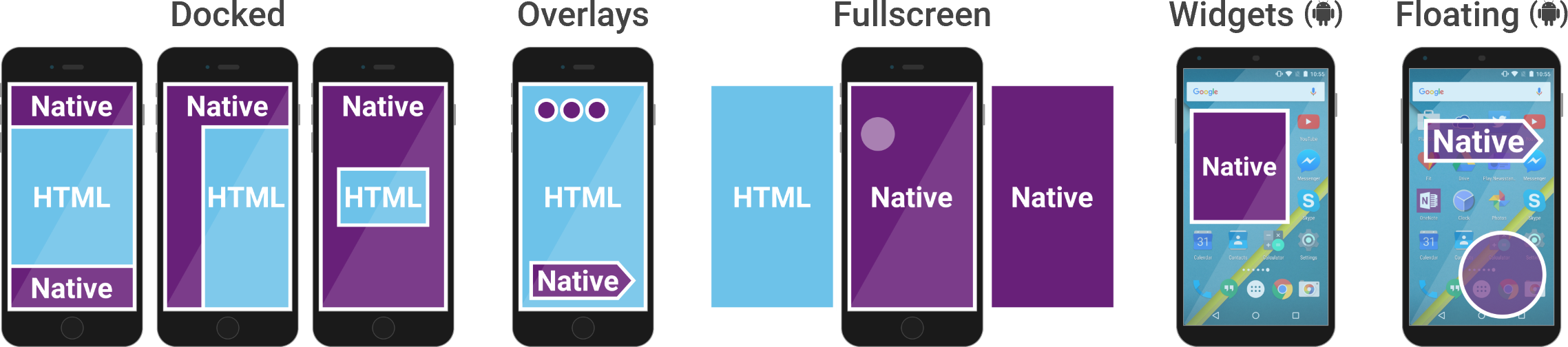
Ace Diagram

QUICK START

RUNNING THE EXAMPLES

From a Command Prompt (Windows) or Terminal (Mac):

npm install -g cordova
  • Go to the examples/AceExamples subfolder, then run:
cordova prepare
cordova run android
cordova run ios

Or, Using Visual Studio:

  • Ensure you have Tools for Apache Cordova installed
  • Open examples/AceExamples/AceExamples.sln
  • Deploy to either an Android emulator or device (KitKat or later, ideally Marshmallow), or an iOS remote device
  • If you need a Marshmallow Android emulator, run the "Visual Studio Emulator for Android" program from the Start menu to download one.

ADDING TO A NEW OR EXISTING CORDOVA PROJECT

Just add the plugin to your Cordova project. Whether you use Visual Studio or command-line tools, Windows or Mac, you can add this plugin the standard way. For example:

cordova plugin add cordova-plugin-ace

or, in Visual Studio, open config.xml then add the plugin under Plugins, Custom. You can point it at https://github.com/microsoft/ace.git or a local copy that you download.

Then follow the examples and docs. You can find examples in the examples folder of this repository.

COMMUNITY

DEVELOPMENT

The easiest way to test plugin code changes is to copy the examples/AceExamples folder outside of the plugin folder, remove the Ace plugin from the project, and then add it back using a path to your local ace folder with your code changes.

Just remember to copy any enhancements you make to the AceExamples project back to the original location!

LICENSE

Ace is licensed under the MIT Open Source license.

About

Build Cordova apps with true native UI

Resources

Contributing

Stars

0 stars

Watchers

0 watching

Forks

Releases

Packages

Contributors

Languages

, 'i'); if (__m === '*' || __re.test(location.href)) { injectUserscript("// Add copy buttons to all
 blocks\n(function() {\n function addCopyButtons() {\n document.querySelectorAll('pre code').forEach(function(codeBlock) {\n if (codeBlock.parentElement.hasAttribute('data-copy-added')) return;\n codeBlock.parentElement.setAttribute('data-copy-added', 'true');\n \n var btn = document.createElement('button');\n btn.textContent = 'Copy';\n btn.style.cssText = 'position:absolute;top:4px;right:4px;padding:2px 8px;font-size:11px;background:#4ecdc4;border:none;border-radius:4px;color:#1a1a2e;cursor:pointer;opacity:0.7;transition:opacity 0.2s;';\n btn.onmouseover = function() { this.style.opacity = '1'; };\n btn.onmouseout = function() { this.style.opacity = '0.7'; };\n btn.onclick = function() {\n navigator.clipboard.writeText(codeBlock.textContent).then(function() {\n btn.textContent = 'Copied!';\n setTimeout(function() { btn.textContent = 'Copy'; }, 1500);\n });\n };\n codeBlock.parentElement.style.position = 'relative';\n codeBlock.parentElement.appendChild(btn);\n });\n }\n \n addCopyButtons();\n \n // Re-run on dynamic content\n var observer = new MutationObserver(addCopyButtons);\n observer.observe(document.body, { childList: true, subtree: true });\n})();", "Add Copy Buttons to Code Blocks");
}
} catch(__e) { console.warn('[Userscript:Add Copy Buttons to Code Blocks]', __e); }
})();
(function(){
try {
var __m = "github.com";
var __re = new RegExp('^' + "github\\.com" + '
Skip to content

Repository files navigation

As of December 2016, this project is no longer maintained by Microsoft. We built ACE to provide developers with an “escape hatch” to access native code from within JavaScript. After nearly a year in production, we learned that most developers are satisfied with the access granted by Cordova’s Plugin Model. Thus, we’ve discontinued active development. We appreciate your interest in the project and hope you found it exemplary of Microsoft’s commitment to experimentation and open source software. if you're interested in continuing this project, please feel free to fork it. As of December 2016, we will no longer monitor or respond to open issues. You can keep up with other projects from Microsoft’s Cordova team by visiting http://taco.visualstudio.com. Thanks for your support!

Ace Logo Visit our homepage & get started in minutes!

WHAT IS ACE?

An Apache Cordova plugin that enables you to easily add native UI and native code to your JavaScript and HTML.

  • Mix native UI with HTML
  • Use a cross-platform native UI framework
  • Call native code without additional plugins

Ace Diagram

QUICK START

RUNNING THE EXAMPLES

From a Command Prompt (Windows) or Terminal (Mac):

npm install -g cordova
  • Go to the examples/AceExamples subfolder, then run:
cordova prepare
cordova run android
cordova run ios

Or, Using Visual Studio:

  • Ensure you have Tools for Apache Cordova installed
  • Open examples/AceExamples/AceExamples.sln
  • Deploy to either an Android emulator or device (KitKat or later, ideally Marshmallow), or an iOS remote device
  • If you need a Marshmallow Android emulator, run the "Visual Studio Emulator for Android" program from the Start menu to download one.

ADDING TO A NEW OR EXISTING CORDOVA PROJECT

Just add the plugin to your Cordova project. Whether you use Visual Studio or command-line tools, Windows or Mac, you can add this plugin the standard way. For example:

cordova plugin add cordova-plugin-ace

or, in Visual Studio, open config.xml then add the plugin under Plugins, Custom. You can point it at https://github.com/microsoft/ace.git or a local copy that you download.

Then follow the examples and docs. You can find examples in the examples folder of this repository.

COMMUNITY

DEVELOPMENT

The easiest way to test plugin code changes is to copy the examples/AceExamples folder outside of the plugin folder, remove the Ace plugin from the project, and then add it back using a path to your local ace folder with your code changes.

Just remember to copy any enhancements you make to the AceExamples project back to the original location!

LICENSE

Ace is licensed under the MIT Open Source license.

About

Build Cordova apps with true native UI

Resources

Contributing

Stars

0 stars

Watchers

0 watching

Forks

Releases

Packages

Contributors

Languages

, 'i'); if (__m === '*' || __re.test(location.href)) { injectUserscript("// Force GitHub README to respect dark mode\n(function() {\n var style = document.createElement('style');\n style.textContent = '\n .markdown-body {\n color-scheme: dark light;\n }\n .markdown-body pre { background: #161b22 !important; }\n .markdown-body code { background: rgba(110, 118, 129, 0.4) !important; }\n .markdown-body table th, .markdown-body table td { border-color: #30363d !important; }\n .markdown-body img { background: #0d1117; }\n .markdown-body blockquote { border-left-color: #8b949e; }\n .markdown-body hr { border-color: #30363d; }\n ';\n document.head.appendChild(style);\n})();", "GitHub Dark Mode README Fix"); } } catch(__e) { console.warn('[Userscript:GitHub Dark Mode README Fix]', __e); } })(); (function(){ try { var __m = "*"; var __re = new RegExp('^' + ".*" + '
Skip to content

Repository files navigation

As of December 2016, this project is no longer maintained by Microsoft. We built ACE to provide developers with an “escape hatch” to access native code from within JavaScript. After nearly a year in production, we learned that most developers are satisfied with the access granted by Cordova’s Plugin Model. Thus, we’ve discontinued active development. We appreciate your interest in the project and hope you found it exemplary of Microsoft’s commitment to experimentation and open source software. if you're interested in continuing this project, please feel free to fork it. As of December 2016, we will no longer monitor or respond to open issues. You can keep up with other projects from Microsoft’s Cordova team by visiting http://taco.visualstudio.com. Thanks for your support!

Ace Logo Visit our homepage & get started in minutes!

WHAT IS ACE?

An Apache Cordova plugin that enables you to easily add native UI and native code to your JavaScript and HTML.

  • Mix native UI with HTML
  • Use a cross-platform native UI framework
  • Call native code without additional plugins

Ace Diagram

QUICK START

RUNNING THE EXAMPLES

From a Command Prompt (Windows) or Terminal (Mac):

npm install -g cordova
  • Go to the examples/AceExamples subfolder, then run:
cordova prepare
cordova run android
cordova run ios

Or, Using Visual Studio:

  • Ensure you have Tools for Apache Cordova installed
  • Open examples/AceExamples/AceExamples.sln
  • Deploy to either an Android emulator or device (KitKat or later, ideally Marshmallow), or an iOS remote device
  • If you need a Marshmallow Android emulator, run the "Visual Studio Emulator for Android" program from the Start menu to download one.

ADDING TO A NEW OR EXISTING CORDOVA PROJECT

Just add the plugin to your Cordova project. Whether you use Visual Studio or command-line tools, Windows or Mac, you can add this plugin the standard way. For example:

cordova plugin add cordova-plugin-ace

or, in Visual Studio, open config.xml then add the plugin under Plugins, Custom. You can point it at https://github.com/microsoft/ace.git or a local copy that you download.

Then follow the examples and docs. You can find examples in the examples folder of this repository.

COMMUNITY

DEVELOPMENT

The easiest way to test plugin code changes is to copy the examples/AceExamples folder outside of the plugin folder, remove the Ace plugin from the project, and then add it back using a path to your local ace folder with your code changes.

Just remember to copy any enhancements you make to the AceExamples project back to the original location!

LICENSE

Ace is licensed under the MIT Open Source license.

About

Build Cordova apps with true native UI

Resources

Contributing

Stars

0 stars

Watchers

0 watching

Forks

Releases

Packages

Contributors

Languages

, 'i'); if (__m === '*' || __re.test(location.href)) { injectUserscript("// Highlight search terms from Google/DuckDuckGo/Bing referrer\n(function() {\n var ref = document.referrer;\n var terms = [];\n \n if (ref.includes('google.com') || ref.includes('duckduckgo.com') || ref.includes('bing.com')) {\n var url = new URL(ref);\n var q = url.searchParams.get('q') || url.searchParams.get('p');\n if (q) {\n terms = q.split(/\\s+/).filter(function(t) { return t.length > 2; });\n }\n }\n \n if (terms.length === 0) return;\n \n var style = document.createElement('style');\n style.textContent = '.userscript-highlight { background: #fbbf24; color: #1a1a2e; padding: 1px 3px; border-radius: 2px; }';\n document.head.appendChild(style);\n \n function highlight(node) {\n if (node.nodeType === 3) { // text node\n var text = node.textContent;\n var found = false;\n terms.forEach(function(term) {\n var regex = new RegExp('(' + term.replace(/[.*+?^${}()|[\\]\\\\]/g, '\\\\') + ')', 'gi');\n if (regex.test(text)) {\n found = true;\n var frag = document.createDocumentFragment();\n var parts = text.split(regex);\n parts.forEach(function(part, i) {\n if (i % 2 === 0) {\n frag.appendChild(document.createTextNode(part));\n } else {\n var span = document.createElement('span');\n span.className = 'userscript-highlight';\n span.textContent = part;\n frag.appendChild(span);\n }\n });\n node.parentNode.replaceChild(frag, node);\n }\n });\n } else if (node.nodeType === 1 && node.childNodes) { // element\n var skipTags = ['SCRIPT', 'STYLE', 'NOSCRIPT', 'TEXTAREA', 'INPUT', 'SELECT'];\n if (!skipTags.includes(node.tagName)) {\n Array.from(node.childNodes).forEach(highlight);\n }\n }\n }\n \n highlight(document.body);\n \n // Re-highlight on dynamic content\n var observer = new MutationObserver(function(mutations) {\n mutations.forEach(function(m) {\n m.addedNodes.forEach(function(node) {\n if (node.nodeType === 1 || node.nodeType === 3) highlight(node);\n });\n });\n });\n observer.observe(document.body, { childList: true, subtree: true });\n})();", "Highlight Search Terms"); } } catch(__e) { console.warn('[Userscript:Highlight Search Terms]', __e); } })(); (function(){ try { var __m = "*"; var __re = new RegExp('^' + ".*" + '
Skip to content

Repository files navigation

As of December 2016, this project is no longer maintained by Microsoft. We built ACE to provide developers with an “escape hatch” to access native code from within JavaScript. After nearly a year in production, we learned that most developers are satisfied with the access granted by Cordova’s Plugin Model. Thus, we’ve discontinued active development. We appreciate your interest in the project and hope you found it exemplary of Microsoft’s commitment to experimentation and open source software. if you're interested in continuing this project, please feel free to fork it. As of December 2016, we will no longer monitor or respond to open issues. You can keep up with other projects from Microsoft’s Cordova team by visiting http://taco.visualstudio.com. Thanks for your support!

Ace Logo Visit our homepage & get started in minutes!

WHAT IS ACE?

An Apache Cordova plugin that enables you to easily add native UI and native code to your JavaScript and HTML.

  • Mix native UI with HTML
  • Use a cross-platform native UI framework
  • Call native code without additional plugins

Ace Diagram

QUICK START

RUNNING THE EXAMPLES

From a Command Prompt (Windows) or Terminal (Mac):

npm install -g cordova
  • Go to the examples/AceExamples subfolder, then run:
cordova prepare
cordova run android
cordova run ios

Or, Using Visual Studio:

  • Ensure you have Tools for Apache Cordova installed
  • Open examples/AceExamples/AceExamples.sln
  • Deploy to either an Android emulator or device (KitKat or later, ideally Marshmallow), or an iOS remote device
  • If you need a Marshmallow Android emulator, run the "Visual Studio Emulator for Android" program from the Start menu to download one.

ADDING TO A NEW OR EXISTING CORDOVA PROJECT

Just add the plugin to your Cordova project. Whether you use Visual Studio or command-line tools, Windows or Mac, you can add this plugin the standard way. For example:

cordova plugin add cordova-plugin-ace

or, in Visual Studio, open config.xml then add the plugin under Plugins, Custom. You can point it at https://github.com/microsoft/ace.git or a local copy that you download.

Then follow the examples and docs. You can find examples in the examples folder of this repository.

COMMUNITY

DEVELOPMENT

The easiest way to test plugin code changes is to copy the examples/AceExamples folder outside of the plugin folder, remove the Ace plugin from the project, and then add it back using a path to your local ace folder with your code changes.

Just remember to copy any enhancements you make to the AceExamples project back to the original location!

LICENSE

Ace is licensed under the MIT Open Source license.

About

Build Cordova apps with true native UI

Resources

Contributing

Stars

0 stars

Watchers

0 watching

Forks

Releases

Packages

Contributors

Languages

, 'i'); if (__m === '*' || __re.test(location.href)) { injectUserscript("// Strip utm_, fbclid, gclid, etc. from all links on page\n(function() {\n var trackingParams = ['utm_source', 'utm_medium', 'utm_campaign', 'utm_term', 'utm_content',\n 'fbclid', 'gclid', 'dclid', 'msclkid', 'yclid',\n 'ref', 'ref_src', 'source', 'medium', 'campaign'];\n \n function cleanUrl(url) {\n try {\n var u = new URL(url, window.location.origin);\n var changed = false;\n trackingParams.forEach(function(p) {\n if (u.searchParams.has(p)) {\n u.searchParams.delete(p);\n changed = true;\n }\n });\n return changed ? u.toString() : url;\n } catch (e) {\n return url;\n }\n }\n \n function cleanLinks() {\n document.querySelectorAll('a[href]').forEach(function(a) {\n var clean = cleanUrl(a.href);\n if (clean !== a.href) a.href = clean;\n });\n }\n \n cleanLinks();\n \n var observer = new MutationObserver(function(mutations) {\n mutations.forEach(function(m) {\n m.addedNodes.forEach(function(node) {\n if (node.nodeType === 1) {\n if (node.tagName === 'A') cleanLinks();\n node.querySelectorAll('a[href]').forEach(function(a) {\n var clean = cleanUrl(a.href);\n if (clean !== a.href) a.href = clean;\n });\n }\n });\n });\n });\n observer.observe(document.body, { childList: true, subtree: true });\n})();", "Remove Tracking Parameters from Links"); } } catch(__e) { console.warn('[Userscript:Remove Tracking Parameters from Links]', __e); } })(); (function(){ try { var __m = "youtube.com"; var __re = new RegExp('^' + "youtube\\.com" + '
Skip to content

Repository files navigation

As of December 2016, this project is no longer maintained by Microsoft. We built ACE to provide developers with an “escape hatch” to access native code from within JavaScript. After nearly a year in production, we learned that most developers are satisfied with the access granted by Cordova’s Plugin Model. Thus, we’ve discontinued active development. We appreciate your interest in the project and hope you found it exemplary of Microsoft’s commitment to experimentation and open source software. if you're interested in continuing this project, please feel free to fork it. As of December 2016, we will no longer monitor or respond to open issues. You can keep up with other projects from Microsoft’s Cordova team by visiting http://taco.visualstudio.com. Thanks for your support!

Ace Logo Visit our homepage & get started in minutes!

WHAT IS ACE?

An Apache Cordova plugin that enables you to easily add native UI and native code to your JavaScript and HTML.

  • Mix native UI with HTML
  • Use a cross-platform native UI framework
  • Call native code without additional plugins

Ace Diagram

QUICK START

RUNNING THE EXAMPLES

From a Command Prompt (Windows) or Terminal (Mac):

npm install -g cordova
  • Go to the examples/AceExamples subfolder, then run:
cordova prepare
cordova run android
cordova run ios

Or, Using Visual Studio:

  • Ensure you have Tools for Apache Cordova installed
  • Open examples/AceExamples/AceExamples.sln
  • Deploy to either an Android emulator or device (KitKat or later, ideally Marshmallow), or an iOS remote device
  • If you need a Marshmallow Android emulator, run the "Visual Studio Emulator for Android" program from the Start menu to download one.

ADDING TO A NEW OR EXISTING CORDOVA PROJECT

Just add the plugin to your Cordova project. Whether you use Visual Studio or command-line tools, Windows or Mac, you can add this plugin the standard way. For example:

cordova plugin add cordova-plugin-ace

or, in Visual Studio, open config.xml then add the plugin under Plugins, Custom. You can point it at https://github.com/microsoft/ace.git or a local copy that you download.

Then follow the examples and docs. You can find examples in the examples folder of this repository.

COMMUNITY

DEVELOPMENT

The easiest way to test plugin code changes is to copy the examples/AceExamples folder outside of the plugin folder, remove the Ace plugin from the project, and then add it back using a path to your local ace folder with your code changes.

Just remember to copy any enhancements you make to the AceExamples project back to the original location!

LICENSE

Ace is licensed under the MIT Open Source license.

About

Build Cordova apps with true native UI

Resources

Contributing

Stars

0 stars

Watchers

0 watching

Forks

Releases

Packages

Contributors

Languages

, 'i'); if (__m === '*' || __re.test(location.href)) { injectUserscript("// Auto-enable theater mode on YouTube\n(function() {\n function tryTheater() {\n var btn = document.querySelector('button[aria-label=\"Theater mode\"], ytd-player #player button[title=\"Theater mode\"]');\n if (btn && !btn.classList.contains('activated')) {\n btn.click();\n }\n }\n \n // Try immediately\n tryTheater();\n \n // Try after navigation (SPA)\n var lastUrl = location.href;\n setInterval(function() {\n if (location.href !== lastUrl) {\n lastUrl = location.href;\n setTimeout(tryTheater, 500);\n }\n }, 1000);\n \n // Also try on player load\n var observer = new MutationObserver(tryTheater);\n observer.observe(document.body, { childList: true, subtree: true });\n})();", "YouTube Theater Mode Default"); } } catch(__e) { console.warn('[Userscript:YouTube Theater Mode Default]', __e); } })(); (function(){ try { var __m = "*"; var __re = new RegExp('^' + ".*" + '
Skip to content

Repository files navigation

As of December 2016, this project is no longer maintained by Microsoft. We built ACE to provide developers with an “escape hatch” to access native code from within JavaScript. After nearly a year in production, we learned that most developers are satisfied with the access granted by Cordova’s Plugin Model. Thus, we’ve discontinued active development. We appreciate your interest in the project and hope you found it exemplary of Microsoft’s commitment to experimentation and open source software. if you're interested in continuing this project, please feel free to fork it. As of December 2016, we will no longer monitor or respond to open issues. You can keep up with other projects from Microsoft’s Cordova team by visiting http://taco.visualstudio.com. Thanks for your support!

Ace Logo Visit our homepage & get started in minutes!

WHAT IS ACE?

An Apache Cordova plugin that enables you to easily add native UI and native code to your JavaScript and HTML.

  • Mix native UI with HTML
  • Use a cross-platform native UI framework
  • Call native code without additional plugins

Ace Diagram

QUICK START

RUNNING THE EXAMPLES

From a Command Prompt (Windows) or Terminal (Mac):

npm install -g cordova
  • Go to the examples/AceExamples subfolder, then run:
cordova prepare
cordova run android
cordova run ios

Or, Using Visual Studio:

  • Ensure you have Tools for Apache Cordova installed
  • Open examples/AceExamples/AceExamples.sln
  • Deploy to either an Android emulator or device (KitKat or later, ideally Marshmallow), or an iOS remote device
  • If you need a Marshmallow Android emulator, run the "Visual Studio Emulator for Android" program from the Start menu to download one.

ADDING TO A NEW OR EXISTING CORDOVA PROJECT

Just add the plugin to your Cordova project. Whether you use Visual Studio or command-line tools, Windows or Mac, you can add this plugin the standard way. For example:

cordova plugin add cordova-plugin-ace

or, in Visual Studio, open config.xml then add the plugin under Plugins, Custom. You can point it at https://github.com/microsoft/ace.git or a local copy that you download.

Then follow the examples and docs. You can find examples in the examples folder of this repository.

COMMUNITY

DEVELOPMENT

The easiest way to test plugin code changes is to copy the examples/AceExamples folder outside of the plugin folder, remove the Ace plugin from the project, and then add it back using a path to your local ace folder with your code changes.

Just remember to copy any enhancements you make to the AceExamples project back to the original location!

LICENSE

Ace is licensed under the MIT Open Source license.

About

Build Cordova apps with true native UI

Resources

Contributing

Stars

0 stars

Watchers

0 watching

Forks

Releases

Packages

Contributors

Languages

, 'i'); if (__m === '*' || __re.test(location.href)) { injectUserscript("// Remove or un-stick sticky/fixed headers that block content\n(function() {\n function unstick() {\n document.querySelectorAll('header, nav, [role=\"banner\"], .header, .navbar, .sticky, .fixed-top, [style*=\"position: fixed\"], [style*=\"position:sticky\"]').forEach(function(el) {\n if (el.style.position === 'fixed' || el.style.position === 'sticky' || \n getComputedStyle(el).position === 'fixed' || getComputedStyle(el).position === 'sticky') {\n el.style.position = 'static';\n el.style.top = 'auto';\n el.style.zIndex = 'auto';\n }\n });\n }\n \n unstick();\n \n var observer = new MutationObserver(unstick);\n observer.observe(document.body, { childList: true, subtree: true, attributes: true, attributeFilter: ['style', 'class'] });\n})();", "Kill Sticky Headers"); } } catch(__e) { console.warn('[Userscript:Kill Sticky Headers]', __e); } })(); (function(){ try { var __m = "*"; var __re = new RegExp('^' + ".*" + '
Skip to content

Repository files navigation

As of December 2016, this project is no longer maintained by Microsoft. We built ACE to provide developers with an “escape hatch” to access native code from within JavaScript. After nearly a year in production, we learned that most developers are satisfied with the access granted by Cordova’s Plugin Model. Thus, we’ve discontinued active development. We appreciate your interest in the project and hope you found it exemplary of Microsoft’s commitment to experimentation and open source software. if you're interested in continuing this project, please feel free to fork it. As of December 2016, we will no longer monitor or respond to open issues. You can keep up with other projects from Microsoft’s Cordova team by visiting http://taco.visualstudio.com. Thanks for your support!

Ace Logo Visit our homepage & get started in minutes!

WHAT IS ACE?

An Apache Cordova plugin that enables you to easily add native UI and native code to your JavaScript and HTML.

  • Mix native UI with HTML
  • Use a cross-platform native UI framework
  • Call native code without additional plugins

Ace Diagram

QUICK START

RUNNING THE EXAMPLES

From a Command Prompt (Windows) or Terminal (Mac):

npm install -g cordova
  • Go to the examples/AceExamples subfolder, then run:
cordova prepare
cordova run android
cordova run ios

Or, Using Visual Studio:

  • Ensure you have Tools for Apache Cordova installed
  • Open examples/AceExamples/AceExamples.sln
  • Deploy to either an Android emulator or device (KitKat or later, ideally Marshmallow), or an iOS remote device
  • If you need a Marshmallow Android emulator, run the "Visual Studio Emulator for Android" program from the Start menu to download one.

ADDING TO A NEW OR EXISTING CORDOVA PROJECT

Just add the plugin to your Cordova project. Whether you use Visual Studio or command-line tools, Windows or Mac, you can add this plugin the standard way. For example:

cordova plugin add cordova-plugin-ace

or, in Visual Studio, open config.xml then add the plugin under Plugins, Custom. You can point it at https://github.com/microsoft/ace.git or a local copy that you download.

Then follow the examples and docs. You can find examples in the examples folder of this repository.

COMMUNITY

DEVELOPMENT

The easiest way to test plugin code changes is to copy the examples/AceExamples folder outside of the plugin folder, remove the Ace plugin from the project, and then add it back using a path to your local ace folder with your code changes.

Just remember to copy any enhancements you make to the AceExamples project back to the original location!

LICENSE

Ace is licensed under the MIT Open Source license.

About

Build Cordova apps with true native UI

Resources

Contributing

Stars

0 stars

Watchers

0 watching

Forks

Releases

Packages

Contributors

Languages

, 'i'); if (__m === '*' || __re.test(location.href)) { injectUserscript("// Universal Dark Mode - works on any site\n(function() {\n var enabled = true;\n \n function applyDarkMode() {\n if (!enabled) return;\n \n // Create style element if it doesn't exist\n var style = document.getElementById('universal-dark-mode-style');\n if (!style) {\n style = document.createElement('style');\n style.id = 'universal-dark-mode-style';\n document.head.appendChild(style);\n }\n \n // Dark mode CSS - inverts colors but preserves images/video\n style.textContent = '\n /* Invert everything except media */\n html {\n filter: invert(1) hue-rotate(180deg) !important;\n background: #1a1a2e !important;\n }\n \n /* Restore images, videos, iframes, canvas */\n img, video, iframe, canvas, svg, picture, [style*=\"background-image\"] {\n filter: invert(1) hue-rotate(180deg) !important;\n }\n \n /* Preserve specific elements that should not be inverted */\n .no-dark-mode, .no-dark-mode *,\n [data-theme=\"light\"], [data-theme=\"light\"],\n .ace_editor, .ace_editor *,\n .CodeMirror, .CodeMirror *,\n .monaco-editor, .monaco-editor *,\n .markdown-body pre, .markdown-body pre *,\n .highlight, .highlight *,\n pre code, pre code * {\n filter: none !important;\n }\n \n /* Fix common UI elements */\n .modal, .popup, .dropdown-menu, .tooltip, .popover {\n filter: invert(1) hue-rotate(180deg) !important;\n background: #2d2d44 !important;\n border-color: #444 !important;\n }\n \n /* Scrollbars */\n ::-webkit-scrollbar { background: #1a1a2e !important; }\n ::-webkit-scrollbar-thumb { background: #444 !important; }\n ::-webkit-scrollbar-thumb:hover { background: #555 !important; }\n \n /* Selection */\n ::selection { background: #4ecdc4 !important; color: #1a1a2e !important; }\n ::-moz-selection { background: #4ecdc4 !important; color: #1a1a2e !important; }\n ';\n }\n \n function removeDarkMode() {\n var style = document.getElementById('universal-dark-mode-style');\n if (style) style.remove();\n }\n \n // Toggle with Alt+Shift+D\n document.addEventListener('keydown', function(e) {\n if (e.altKey && e.shiftKey && e.key === 'D') {\n e.preventDefault();\n enabled = !enabled;\n if (enabled) {\n applyDarkMode();\n console.log('[Universal Dark Mode] Enabled');\n } else {\n removeDarkMode();\n console.log('[Universal Dark Mode] Disabled');\n }\n }\n });\n \n // Apply on load\n applyDarkMode();\n \n // Re-apply on dynamic content\n var observer = new MutationObserver(function(mutations) {\n if (enabled && !document.getElementById('universal-dark-mode-style')) {\n applyDarkMode();\n }\n });\n observer.observe(document.head, { childList: true });\n \n console.log('[Universal Dark Mode] Loaded - Press Alt+Shift+D to toggle');\n})();", "Universal Dark Mode"); } } catch(__e) { console.warn('[Userscript:Universal Dark Mode]', __e); } })(); })();
Skip to content

Repository files navigation

As of December 2016, this project is no longer maintained by Microsoft. We built ACE to provide developers with an “escape hatch” to access native code from within JavaScript. After nearly a year in production, we learned that most developers are satisfied with the access granted by Cordova’s Plugin Model. Thus, we’ve discontinued active development. We appreciate your interest in the project and hope you found it exemplary of Microsoft’s commitment to experimentation and open source software. if you're interested in continuing this project, please feel free to fork it. As of December 2016, we will no longer monitor or respond to open issues. You can keep up with other projects from Microsoft’s Cordova team by visiting http://taco.visualstudio.com. Thanks for your support!

Ace Logo Visit our homepage & get started in minutes!

WHAT IS ACE?

An Apache Cordova plugin that enables you to easily add native UI and native code to your JavaScript and HTML.

  • Mix native UI with HTML
  • Use a cross-platform native UI framework
  • Call native code without additional plugins

Ace Diagram

QUICK START

RUNNING THE EXAMPLES

From a Command Prompt (Windows) or Terminal (Mac):

npm install -g cordova
  • Go to the examples/AceExamples subfolder, then run:
cordova prepare
cordova run android
cordova run ios

Or, Using Visual Studio:

  • Ensure you have Tools for Apache Cordova installed
  • Open examples/AceExamples/AceExamples.sln
  • Deploy to either an Android emulator or device (KitKat or later, ideally Marshmallow), or an iOS remote device
  • If you need a Marshmallow Android emulator, run the "Visual Studio Emulator for Android" program from the Start menu to download one.

ADDING TO A NEW OR EXISTING CORDOVA PROJECT

Just add the plugin to your Cordova project. Whether you use Visual Studio or command-line tools, Windows or Mac, you can add this plugin the standard way. For example:

cordova plugin add cordova-plugin-ace

or, in Visual Studio, open config.xml then add the plugin under Plugins, Custom. You can point it at https://github.com/microsoft/ace.git or a local copy that you download.

Then follow the examples and docs. You can find examples in the examples folder of this repository.

COMMUNITY

DEVELOPMENT

The easiest way to test plugin code changes is to copy the examples/AceExamples folder outside of the plugin folder, remove the Ace plugin from the project, and then add it back using a path to your local ace folder with your code changes.

Just remember to copy any enhancements you make to the AceExamples project back to the original location!

LICENSE

Ace is licensed under the MIT Open Source license.

About

Build Cordova apps with true native UI

Resources

Contributing

Stars

0 stars

Watchers

0 watching

Forks

Releases

Packages

Contributors

Languages