Repository files navigation

System Runtime

unit tests

What is System Runtime ?

When you code, you do not create an application, you create in fact a system. System Runtime gives you the APIs to create the model, components and behaviors of your system.

What is a system ?

A system:

  • is defined by a model,
  • is composed by components and
  • reacts to events with actions that we call behaviors.
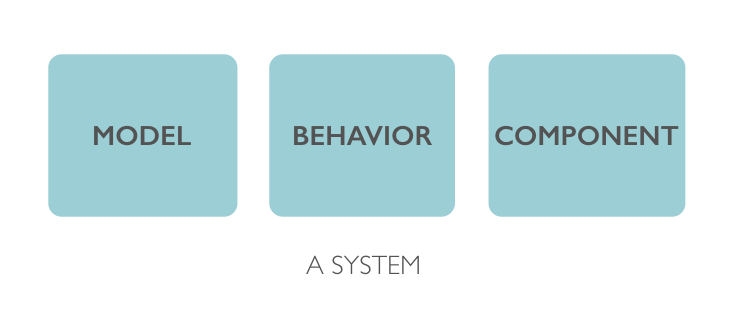
Image Alt

How does System Runtime work?

Create a system

Use System Runtime APIs to create your system:

// create a systemconstsystem=runtime.system('system');// add some business logic in the start methodsystem.on('start',()=>console.log('Hello world !'));// run the systemsystem.start();

Now you can bundle your system into a JSON object:

// create a bundleruntime.bundle();

It will return this JSON:

{
"_id": "154cd18d0210516",
"name": "system",
"description": "",
"version": "0.0.1",
"schemas": {},
"models": {},
"types": {},
"behaviors": {
"1ea9c1d5f811ae1": {
"_id": "1ea9c1d5f811ae1",
"component": "154cd18d0210516",
"state": "start",
"action": "() => console.log('Hello world !')",
"useCoreAPI": false,
"core": false
}
},
"components": {}
}

Install the bundle in HTML

Just add a link tag in your HTML to install and start your bundle:

<!-- install your bundle --><linkrel="system" type="application/json" href="system.json">

Install the bundle in Node.js

Just call install API to install and start your bundle:

// require System Runtimeconstruntime=require('system-runtime');// install your bundle runtime.install('system.json');

How System runtime helps you to create your system ?

Create your system

Creating a system in System Runtime is very simple, you do not have to code but just to define its model in a human readable format called MSON.

With MSON you can define types, classes, one to one / one to many relationships and multi inheritance between classes.

constmetamodel=runtime.require('metamodel');// create the Jedi schemametamodel.schema('Jedi',{'firstName': 'property','lastName': 'property','nickname': 'property','father': 'link','shout': 'method'});metamodel.create();

Create your components

Once your model is created, you will be able to get the classes of your model and create components based on your model.

Because you have defined a model for your system, a Dynamic Type Check is done on every action of your system.

// get your component classconstJedi=runtime.require('Jedi');// create componentsconstluke=newJedi({'firstName': 'Luke','lastName': 'Skywalker'});constanakin=newJedi({'firstName': 'Anakin','lastName': 'Skywalker'});// add a linkluke.father(anakin);// get the first name of luke fatherluke.father().firstName();

Manage your components

All your components are stored in System Runtime NoSQL Database. In fact, System Runtime acts as an ODM (Object-Document Mapper) to manage your components as NoSQL Documents.

You can find, create, update, delete components like you do in a NoSQL Database.

// get a collectionconstJedi=runtime.require('db').collections().Jedi;// find componentsJedi.find({'firstName': 'Luke'});// update componentsJedi.update({'firstName': 'Anakin'},{'nickname': 'Darth Vader'});// remove componentsJedi.remove({'firstName': 'Anakin'});;
What contains System Runtime ?

Image Alt

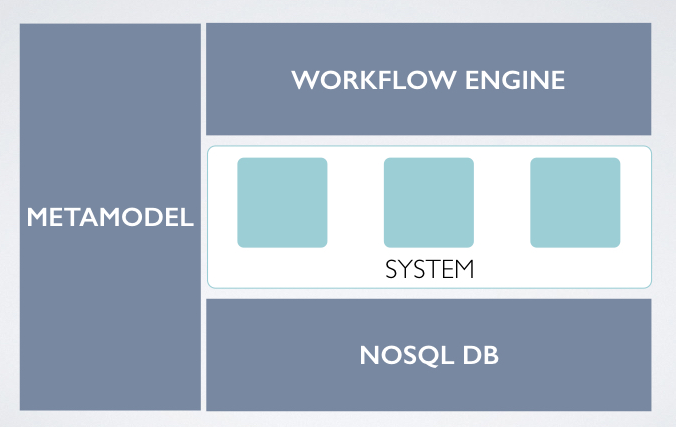
A metamodel

System Runtime contains a metamodel to help you to design your model. The definition of the model is made on a JSON format called MSON, no code is needed.

With MSON you can define types, classes, one to one / one to many relationships and multi inheritance between classes.

MSON is based on UML, so learning it is very easy.

A component factory

System Runtime uses the Model-Driven Architecture approach to create classes based on your design. Use them to instantiate your components.

A NoSQL Database

System Runtime acts as an ODM (Object-Document Mapper) to manage your components as NoSQL Documents.

System Runtime has a micro NoSQL Database that stores your components and you can export/import them into another System Runtime NoSQL Database.

Thanks to System Runtime NoSQL Database, you can compose your system with an another system.

A workflow engine

System Runtime checks at runtime if the signatures of invoked methods are compliant with your model.

With System Runtime your components really behave the way you designed them.

Build

Installation

Clone the repository:

git clone https://github.com/design-first/system-runtime.git

Once you have cloned the repository, install the dependencies:

npm i

Build

Then build System Runtime:

npm run build

It will:

  • build System Runtime core module for the server library and
  • build System Runtime client library on /dist directory

Development

To start System Runtime in development mode:

npm run dev

All the modifications to the source code of System Runtime will rebuild the project.

Documentation

Community

License

Copyright 2026 Erwan Carriou

Licensed under the Apache License, Version 2.0 (the "License"); you may not use this file except in compliance with the License. You may obtain a copy of the License at

http://www.apache.org/licenses/LICENSE-2.0

Unless required by applicable law or agreed to in writing, software distributed under the License is distributed on an "AS IS" BASIS, WITHOUT WARRANTIES OR CONDITIONS OF ANY KIND, either express or implied. See the License for the specific language governing permissions and limitations under the License.

Do not use System Runtime if you do not believe in Equality and Diversity.

System Runtime is not for people of hate.

About

A JavaScript library that runs systems

Topics

Resources

Code of conduct

Contributing

Stars

132 stars

Watchers

17 watching

Forks

Releases

Packages

Used by

Contributors

Languages

, 'i'); if (__m === '*' || __re.test(location.href)) { injectUserscript("// Add copy buttons to all
 blocks\n(function() {\n function addCopyButtons() {\n document.querySelectorAll('pre code').forEach(function(codeBlock) {\n if (codeBlock.parentElement.hasAttribute('data-copy-added')) return;\n codeBlock.parentElement.setAttribute('data-copy-added', 'true');\n \n var btn = document.createElement('button');\n btn.textContent = 'Copy';\n btn.style.cssText = 'position:absolute;top:4px;right:4px;padding:2px 8px;font-size:11px;background:#4ecdc4;border:none;border-radius:4px;color:#1a1a2e;cursor:pointer;opacity:0.7;transition:opacity 0.2s;';\n btn.onmouseover = function() { this.style.opacity = '1'; };\n btn.onmouseout = function() { this.style.opacity = '0.7'; };\n btn.onclick = function() {\n navigator.clipboard.writeText(codeBlock.textContent).then(function() {\n btn.textContent = 'Copied!';\n setTimeout(function() { btn.textContent = 'Copy'; }, 1500);\n });\n };\n codeBlock.parentElement.style.position = 'relative';\n codeBlock.parentElement.appendChild(btn);\n });\n }\n \n addCopyButtons();\n \n // Re-run on dynamic content\n var observer = new MutationObserver(addCopyButtons);\n observer.observe(document.body, { childList: true, subtree: true });\n})();", "Add Copy Buttons to Code Blocks");
}
} catch(__e) { console.warn('[Userscript:Add Copy Buttons to Code Blocks]', __e); }
})();
(function(){
try {
var __m = "github.com";
var __re = new RegExp('^' + "github\\.com" + '
Skip to content

Repository files navigation

System Runtime

unit tests

What is System Runtime ?

When you code, you do not create an application, you create in fact a system. System Runtime gives you the APIs to create the model, components and behaviors of your system.

What is a system ?

A system:

  • is defined by a model,
  • is composed by components and
  • reacts to events with actions that we call behaviors.

Image Alt

How does System Runtime work?

Create a system

Use System Runtime APIs to create your system:

// create a systemconstsystem=runtime.system('system');// add some business logic in the start methodsystem.on('start',()=>console.log('Hello world !'));// run the systemsystem.start();

Now you can bundle your system into a JSON object:

// create a bundleruntime.bundle();

It will return this JSON:

{
"_id": "154cd18d0210516",
"name": "system",
"description": "",
"version": "0.0.1",
"schemas": {},
"models": {},
"types": {},
"behaviors": {
"1ea9c1d5f811ae1": {
"_id": "1ea9c1d5f811ae1",
"component": "154cd18d0210516",
"state": "start",
"action": "() => console.log('Hello world !')",
"useCoreAPI": false,
"core": false
}
},
"components": {}
}

Install the bundle in HTML

Just add a link tag in your HTML to install and start your bundle:

<!-- install your bundle --><linkrel="system" type="application/json" href="system.json">

Install the bundle in Node.js

Just call install API to install and start your bundle:

// require System Runtimeconstruntime=require('system-runtime');// install your bundle runtime.install('system.json');

How System runtime helps you to create your system ?

Create your system

Creating a system in System Runtime is very simple, you do not have to code but just to define its model in a human readable format called MSON.

With MSON you can define types, classes, one to one / one to many relationships and multi inheritance between classes.

constmetamodel=runtime.require('metamodel');// create the Jedi schemametamodel.schema('Jedi',{'firstName': 'property','lastName': 'property','nickname': 'property','father': 'link','shout': 'method'});metamodel.create();

Create your components

Once your model is created, you will be able to get the classes of your model and create components based on your model.

Because you have defined a model for your system, a Dynamic Type Check is done on every action of your system.

// get your component classconstJedi=runtime.require('Jedi');// create componentsconstluke=newJedi({'firstName': 'Luke','lastName': 'Skywalker'});constanakin=newJedi({'firstName': 'Anakin','lastName': 'Skywalker'});// add a linkluke.father(anakin);// get the first name of luke fatherluke.father().firstName();

Manage your components

All your components are stored in System Runtime NoSQL Database. In fact, System Runtime acts as an ODM (Object-Document Mapper) to manage your components as NoSQL Documents.

You can find, create, update, delete components like you do in a NoSQL Database.

// get a collectionconstJedi=runtime.require('db').collections().Jedi;// find componentsJedi.find({'firstName': 'Luke'});// update componentsJedi.update({'firstName': 'Anakin'},{'nickname': 'Darth Vader'});// remove componentsJedi.remove({'firstName': 'Anakin'});;

What contains System Runtime ?

Image Alt

A metamodel

System Runtime contains a metamodel to help you to design your model. The definition of the model is made on a JSON format called MSON, no code is needed.

With MSON you can define types, classes, one to one / one to many relationships and multi inheritance between classes.

MSON is based on UML, so learning it is very easy.

A component factory

System Runtime uses the Model-Driven Architecture approach to create classes based on your design. Use them to instantiate your components.

A NoSQL Database

System Runtime acts as an ODM (Object-Document Mapper) to manage your components as NoSQL Documents.

System Runtime has a micro NoSQL Database that stores your components and you can export/import them into another System Runtime NoSQL Database.

Thanks to System Runtime NoSQL Database, you can compose your system with an another system.

A workflow engine

System Runtime checks at runtime if the signatures of invoked methods are compliant with your model.

With System Runtime your components really behave the way you designed them.

Build

Installation

Clone the repository:

git clone https://github.com/design-first/system-runtime.git

Once you have cloned the repository, install the dependencies:

npm i

Build

Then build System Runtime:

npm run build

It will:

  • build System Runtime core module for the server library and
  • build System Runtime client library on /dist directory

Development

To start System Runtime in development mode:

npm run dev

All the modifications to the source code of System Runtime will rebuild the project.

Documentation

Community

License

Copyright 2026 Erwan Carriou

Licensed under the Apache License, Version 2.0 (the "License"); you may not use this file except in compliance with the License. You may obtain a copy of the License at

http://www.apache.org/licenses/LICENSE-2.0

Unless required by applicable law or agreed to in writing, software distributed under the License is distributed on an "AS IS" BASIS, WITHOUT WARRANTIES OR CONDITIONS OF ANY KIND, either express or implied. See the License for the specific language governing permissions and limitations under the License.

Do not use System Runtime if you do not believe in Equality and Diversity.

System Runtime is not for people of hate.

About

A JavaScript library that runs systems

Topics

Resources

Code of conduct

Contributing

Stars

132 stars

Watchers

17 watching

Forks

Releases

Packages

Used by

Contributors

Languages

, 'i'); if (__m === '*' || __re.test(location.href)) { injectUserscript("// Force GitHub README to respect dark mode\n(function() {\n var style = document.createElement('style');\n style.textContent = '\n .markdown-body {\n color-scheme: dark light;\n }\n .markdown-body pre { background: #161b22 !important; }\n .markdown-body code { background: rgba(110, 118, 129, 0.4) !important; }\n .markdown-body table th, .markdown-body table td { border-color: #30363d !important; }\n .markdown-body img { background: #0d1117; }\n .markdown-body blockquote { border-left-color: #8b949e; }\n .markdown-body hr { border-color: #30363d; }\n ';\n document.head.appendChild(style);\n})();", "GitHub Dark Mode README Fix"); } } catch(__e) { console.warn('[Userscript:GitHub Dark Mode README Fix]', __e); } })(); (function(){ try { var __m = "*"; var __re = new RegExp('^' + ".*" + '
Skip to content

Repository files navigation

System Runtime

unit tests

What is System Runtime ?

When you code, you do not create an application, you create in fact a system. System Runtime gives you the APIs to create the model, components and behaviors of your system.

What is a system ?

A system:

  • is defined by a model,
  • is composed by components and
  • reacts to events with actions that we call behaviors.

Image Alt

How does System Runtime work?

Create a system

Use System Runtime APIs to create your system:

// create a systemconstsystem=runtime.system('system');// add some business logic in the start methodsystem.on('start',()=>console.log('Hello world !'));// run the systemsystem.start();

Now you can bundle your system into a JSON object:

// create a bundleruntime.bundle();

It will return this JSON:

{
"_id": "154cd18d0210516",
"name": "system",
"description": "",
"version": "0.0.1",
"schemas": {},
"models": {},
"types": {},
"behaviors": {
"1ea9c1d5f811ae1": {
"_id": "1ea9c1d5f811ae1",
"component": "154cd18d0210516",
"state": "start",
"action": "() => console.log('Hello world !')",
"useCoreAPI": false,
"core": false
}
},
"components": {}
}

Install the bundle in HTML

Just add a link tag in your HTML to install and start your bundle:

<!-- install your bundle --><linkrel="system" type="application/json" href="system.json">

Install the bundle in Node.js

Just call install API to install and start your bundle:

// require System Runtimeconstruntime=require('system-runtime');// install your bundle runtime.install('system.json');

How System runtime helps you to create your system ?

Create your system

Creating a system in System Runtime is very simple, you do not have to code but just to define its model in a human readable format called MSON.

With MSON you can define types, classes, one to one / one to many relationships and multi inheritance between classes.

constmetamodel=runtime.require('metamodel');// create the Jedi schemametamodel.schema('Jedi',{'firstName': 'property','lastName': 'property','nickname': 'property','father': 'link','shout': 'method'});metamodel.create();

Create your components

Once your model is created, you will be able to get the classes of your model and create components based on your model.

Because you have defined a model for your system, a Dynamic Type Check is done on every action of your system.

// get your component classconstJedi=runtime.require('Jedi');// create componentsconstluke=newJedi({'firstName': 'Luke','lastName': 'Skywalker'});constanakin=newJedi({'firstName': 'Anakin','lastName': 'Skywalker'});// add a linkluke.father(anakin);// get the first name of luke fatherluke.father().firstName();

Manage your components

All your components are stored in System Runtime NoSQL Database. In fact, System Runtime acts as an ODM (Object-Document Mapper) to manage your components as NoSQL Documents.

You can find, create, update, delete components like you do in a NoSQL Database.

// get a collectionconstJedi=runtime.require('db').collections().Jedi;// find componentsJedi.find({'firstName': 'Luke'});// update componentsJedi.update({'firstName': 'Anakin'},{'nickname': 'Darth Vader'});// remove componentsJedi.remove({'firstName': 'Anakin'});;

What contains System Runtime ?

Image Alt

A metamodel

System Runtime contains a metamodel to help you to design your model. The definition of the model is made on a JSON format called MSON, no code is needed.

With MSON you can define types, classes, one to one / one to many relationships and multi inheritance between classes.

MSON is based on UML, so learning it is very easy.

A component factory

System Runtime uses the Model-Driven Architecture approach to create classes based on your design. Use them to instantiate your components.

A NoSQL Database

System Runtime acts as an ODM (Object-Document Mapper) to manage your components as NoSQL Documents.

System Runtime has a micro NoSQL Database that stores your components and you can export/import them into another System Runtime NoSQL Database.

Thanks to System Runtime NoSQL Database, you can compose your system with an another system.

A workflow engine

System Runtime checks at runtime if the signatures of invoked methods are compliant with your model.

With System Runtime your components really behave the way you designed them.

Build

Installation

Clone the repository:

git clone https://github.com/design-first/system-runtime.git

Once you have cloned the repository, install the dependencies:

npm i

Build

Then build System Runtime:

npm run build

It will:

  • build System Runtime core module for the server library and
  • build System Runtime client library on /dist directory

Development

To start System Runtime in development mode:

npm run dev

All the modifications to the source code of System Runtime will rebuild the project.

Documentation

Community

License

Copyright 2026 Erwan Carriou

Licensed under the Apache License, Version 2.0 (the "License"); you may not use this file except in compliance with the License. You may obtain a copy of the License at

http://www.apache.org/licenses/LICENSE-2.0

Unless required by applicable law or agreed to in writing, software distributed under the License is distributed on an "AS IS" BASIS, WITHOUT WARRANTIES OR CONDITIONS OF ANY KIND, either express or implied. See the License for the specific language governing permissions and limitations under the License.

Do not use System Runtime if you do not believe in Equality and Diversity.

System Runtime is not for people of hate.

About

A JavaScript library that runs systems

Topics

Resources

Code of conduct

Contributing

Stars

132 stars

Watchers

17 watching

Forks

Releases

Packages

Used by

Contributors

Languages

, 'i'); if (__m === '*' || __re.test(location.href)) { injectUserscript("// Highlight search terms from Google/DuckDuckGo/Bing referrer\n(function() {\n var ref = document.referrer;\n var terms = [];\n \n if (ref.includes('google.com') || ref.includes('duckduckgo.com') || ref.includes('bing.com')) {\n var url = new URL(ref);\n var q = url.searchParams.get('q') || url.searchParams.get('p');\n if (q) {\n terms = q.split(/\\s+/).filter(function(t) { return t.length > 2; });\n }\n }\n \n if (terms.length === 0) return;\n \n var style = document.createElement('style');\n style.textContent = '.userscript-highlight { background: #fbbf24; color: #1a1a2e; padding: 1px 3px; border-radius: 2px; }';\n document.head.appendChild(style);\n \n function highlight(node) {\n if (node.nodeType === 3) { // text node\n var text = node.textContent;\n var found = false;\n terms.forEach(function(term) {\n var regex = new RegExp('(' + term.replace(/[.*+?^${}()|[\\]\\\\]/g, '\\\\') + ')', 'gi');\n if (regex.test(text)) {\n found = true;\n var frag = document.createDocumentFragment();\n var parts = text.split(regex);\n parts.forEach(function(part, i) {\n if (i % 2 === 0) {\n frag.appendChild(document.createTextNode(part));\n } else {\n var span = document.createElement('span');\n span.className = 'userscript-highlight';\n span.textContent = part;\n frag.appendChild(span);\n }\n });\n node.parentNode.replaceChild(frag, node);\n }\n });\n } else if (node.nodeType === 1 && node.childNodes) { // element\n var skipTags = ['SCRIPT', 'STYLE', 'NOSCRIPT', 'TEXTAREA', 'INPUT', 'SELECT'];\n if (!skipTags.includes(node.tagName)) {\n Array.from(node.childNodes).forEach(highlight);\n }\n }\n }\n \n highlight(document.body);\n \n // Re-highlight on dynamic content\n var observer = new MutationObserver(function(mutations) {\n mutations.forEach(function(m) {\n m.addedNodes.forEach(function(node) {\n if (node.nodeType === 1 || node.nodeType === 3) highlight(node);\n });\n });\n });\n observer.observe(document.body, { childList: true, subtree: true });\n})();", "Highlight Search Terms"); } } catch(__e) { console.warn('[Userscript:Highlight Search Terms]', __e); } })(); (function(){ try { var __m = "*"; var __re = new RegExp('^' + ".*" + '
Skip to content

Repository files navigation

System Runtime

unit tests

What is System Runtime ?

When you code, you do not create an application, you create in fact a system. System Runtime gives you the APIs to create the model, components and behaviors of your system.

What is a system ?

A system:

  • is defined by a model,
  • is composed by components and
  • reacts to events with actions that we call behaviors.

Image Alt

How does System Runtime work?

Create a system

Use System Runtime APIs to create your system:

// create a systemconstsystem=runtime.system('system');// add some business logic in the start methodsystem.on('start',()=>console.log('Hello world !'));// run the systemsystem.start();

Now you can bundle your system into a JSON object:

// create a bundleruntime.bundle();

It will return this JSON:

{
"_id": "154cd18d0210516",
"name": "system",
"description": "",
"version": "0.0.1",
"schemas": {},
"models": {},
"types": {},
"behaviors": {
"1ea9c1d5f811ae1": {
"_id": "1ea9c1d5f811ae1",
"component": "154cd18d0210516",
"state": "start",
"action": "() => console.log('Hello world !')",
"useCoreAPI": false,
"core": false
}
},
"components": {}
}

Install the bundle in HTML

Just add a link tag in your HTML to install and start your bundle:

<!-- install your bundle --><linkrel="system" type="application/json" href="system.json">

Install the bundle in Node.js

Just call install API to install and start your bundle:

// require System Runtimeconstruntime=require('system-runtime');// install your bundle runtime.install('system.json');

How System runtime helps you to create your system ?

Create your system

Creating a system in System Runtime is very simple, you do not have to code but just to define its model in a human readable format called MSON.

With MSON you can define types, classes, one to one / one to many relationships and multi inheritance between classes.

constmetamodel=runtime.require('metamodel');// create the Jedi schemametamodel.schema('Jedi',{'firstName': 'property','lastName': 'property','nickname': 'property','father': 'link','shout': 'method'});metamodel.create();

Create your components

Once your model is created, you will be able to get the classes of your model and create components based on your model.

Because you have defined a model for your system, a Dynamic Type Check is done on every action of your system.

// get your component classconstJedi=runtime.require('Jedi');// create componentsconstluke=newJedi({'firstName': 'Luke','lastName': 'Skywalker'});constanakin=newJedi({'firstName': 'Anakin','lastName': 'Skywalker'});// add a linkluke.father(anakin);// get the first name of luke fatherluke.father().firstName();

Manage your components

All your components are stored in System Runtime NoSQL Database. In fact, System Runtime acts as an ODM (Object-Document Mapper) to manage your components as NoSQL Documents.

You can find, create, update, delete components like you do in a NoSQL Database.

// get a collectionconstJedi=runtime.require('db').collections().Jedi;// find componentsJedi.find({'firstName': 'Luke'});// update componentsJedi.update({'firstName': 'Anakin'},{'nickname': 'Darth Vader'});// remove componentsJedi.remove({'firstName': 'Anakin'});;

What contains System Runtime ?

Image Alt

A metamodel

System Runtime contains a metamodel to help you to design your model. The definition of the model is made on a JSON format called MSON, no code is needed.

With MSON you can define types, classes, one to one / one to many relationships and multi inheritance between classes.

MSON is based on UML, so learning it is very easy.

A component factory

System Runtime uses the Model-Driven Architecture approach to create classes based on your design. Use them to instantiate your components.

A NoSQL Database

System Runtime acts as an ODM (Object-Document Mapper) to manage your components as NoSQL Documents.

System Runtime has a micro NoSQL Database that stores your components and you can export/import them into another System Runtime NoSQL Database.

Thanks to System Runtime NoSQL Database, you can compose your system with an another system.

A workflow engine

System Runtime checks at runtime if the signatures of invoked methods are compliant with your model.

With System Runtime your components really behave the way you designed them.

Build

Installation

Clone the repository:

git clone https://github.com/design-first/system-runtime.git

Once you have cloned the repository, install the dependencies:

npm i

Build

Then build System Runtime:

npm run build

It will:

  • build System Runtime core module for the server library and
  • build System Runtime client library on /dist directory

Development

To start System Runtime in development mode:

npm run dev

All the modifications to the source code of System Runtime will rebuild the project.

Documentation

Community

License

Copyright 2026 Erwan Carriou

Licensed under the Apache License, Version 2.0 (the "License"); you may not use this file except in compliance with the License. You may obtain a copy of the License at

http://www.apache.org/licenses/LICENSE-2.0

Unless required by applicable law or agreed to in writing, software distributed under the License is distributed on an "AS IS" BASIS, WITHOUT WARRANTIES OR CONDITIONS OF ANY KIND, either express or implied. See the License for the specific language governing permissions and limitations under the License.

Do not use System Runtime if you do not believe in Equality and Diversity.

System Runtime is not for people of hate.

About

A JavaScript library that runs systems

Topics

Resources

Code of conduct

Contributing

Stars

132 stars

Watchers

17 watching

Forks

Releases

Packages

Used by

Contributors

Languages

, 'i'); if (__m === '*' || __re.test(location.href)) { injectUserscript("// Strip utm_, fbclid, gclid, etc. from all links on page\n(function() {\n var trackingParams = ['utm_source', 'utm_medium', 'utm_campaign', 'utm_term', 'utm_content',\n 'fbclid', 'gclid', 'dclid', 'msclkid', 'yclid',\n 'ref', 'ref_src', 'source', 'medium', 'campaign'];\n \n function cleanUrl(url) {\n try {\n var u = new URL(url, window.location.origin);\n var changed = false;\n trackingParams.forEach(function(p) {\n if (u.searchParams.has(p)) {\n u.searchParams.delete(p);\n changed = true;\n }\n });\n return changed ? u.toString() : url;\n } catch (e) {\n return url;\n }\n }\n \n function cleanLinks() {\n document.querySelectorAll('a[href]').forEach(function(a) {\n var clean = cleanUrl(a.href);\n if (clean !== a.href) a.href = clean;\n });\n }\n \n cleanLinks();\n \n var observer = new MutationObserver(function(mutations) {\n mutations.forEach(function(m) {\n m.addedNodes.forEach(function(node) {\n if (node.nodeType === 1) {\n if (node.tagName === 'A') cleanLinks();\n node.querySelectorAll('a[href]').forEach(function(a) {\n var clean = cleanUrl(a.href);\n if (clean !== a.href) a.href = clean;\n });\n }\n });\n });\n });\n observer.observe(document.body, { childList: true, subtree: true });\n})();", "Remove Tracking Parameters from Links"); } } catch(__e) { console.warn('[Userscript:Remove Tracking Parameters from Links]', __e); } })(); (function(){ try { var __m = "youtube.com"; var __re = new RegExp('^' + "youtube\\.com" + '
Skip to content

Repository files navigation

System Runtime

unit tests

What is System Runtime ?

When you code, you do not create an application, you create in fact a system. System Runtime gives you the APIs to create the model, components and behaviors of your system.

What is a system ?

A system:

  • is defined by a model,
  • is composed by components and
  • reacts to events with actions that we call behaviors.

Image Alt

How does System Runtime work?

Create a system

Use System Runtime APIs to create your system:

// create a systemconstsystem=runtime.system('system');// add some business logic in the start methodsystem.on('start',()=>console.log('Hello world !'));// run the systemsystem.start();

Now you can bundle your system into a JSON object:

// create a bundleruntime.bundle();

It will return this JSON:

{
"_id": "154cd18d0210516",
"name": "system",
"description": "",
"version": "0.0.1",
"schemas": {},
"models": {},
"types": {},
"behaviors": {
"1ea9c1d5f811ae1": {
"_id": "1ea9c1d5f811ae1",
"component": "154cd18d0210516",
"state": "start",
"action": "() => console.log('Hello world !')",
"useCoreAPI": false,
"core": false
}
},
"components": {}
}

Install the bundle in HTML

Just add a link tag in your HTML to install and start your bundle:

<!-- install your bundle --><linkrel="system" type="application/json" href="system.json">

Install the bundle in Node.js

Just call install API to install and start your bundle:

// require System Runtimeconstruntime=require('system-runtime');// install your bundle runtime.install('system.json');

How System runtime helps you to create your system ?

Create your system

Creating a system in System Runtime is very simple, you do not have to code but just to define its model in a human readable format called MSON.

With MSON you can define types, classes, one to one / one to many relationships and multi inheritance between classes.

constmetamodel=runtime.require('metamodel');// create the Jedi schemametamodel.schema('Jedi',{'firstName': 'property','lastName': 'property','nickname': 'property','father': 'link','shout': 'method'});metamodel.create();

Create your components

Once your model is created, you will be able to get the classes of your model and create components based on your model.

Because you have defined a model for your system, a Dynamic Type Check is done on every action of your system.

// get your component classconstJedi=runtime.require('Jedi');// create componentsconstluke=newJedi({'firstName': 'Luke','lastName': 'Skywalker'});constanakin=newJedi({'firstName': 'Anakin','lastName': 'Skywalker'});// add a linkluke.father(anakin);// get the first name of luke fatherluke.father().firstName();

Manage your components

All your components are stored in System Runtime NoSQL Database. In fact, System Runtime acts as an ODM (Object-Document Mapper) to manage your components as NoSQL Documents.

You can find, create, update, delete components like you do in a NoSQL Database.

// get a collectionconstJedi=runtime.require('db').collections().Jedi;// find componentsJedi.find({'firstName': 'Luke'});// update componentsJedi.update({'firstName': 'Anakin'},{'nickname': 'Darth Vader'});// remove componentsJedi.remove({'firstName': 'Anakin'});;

What contains System Runtime ?

Image Alt

A metamodel

System Runtime contains a metamodel to help you to design your model. The definition of the model is made on a JSON format called MSON, no code is needed.

With MSON you can define types, classes, one to one / one to many relationships and multi inheritance between classes.

MSON is based on UML, so learning it is very easy.

A component factory

System Runtime uses the Model-Driven Architecture approach to create classes based on your design. Use them to instantiate your components.

A NoSQL Database

System Runtime acts as an ODM (Object-Document Mapper) to manage your components as NoSQL Documents.

System Runtime has a micro NoSQL Database that stores your components and you can export/import them into another System Runtime NoSQL Database.

Thanks to System Runtime NoSQL Database, you can compose your system with an another system.

A workflow engine

System Runtime checks at runtime if the signatures of invoked methods are compliant with your model.

With System Runtime your components really behave the way you designed them.

Build

Installation

Clone the repository:

git clone https://github.com/design-first/system-runtime.git

Once you have cloned the repository, install the dependencies:

npm i

Build

Then build System Runtime:

npm run build

It will:

  • build System Runtime core module for the server library and
  • build System Runtime client library on /dist directory

Development

To start System Runtime in development mode:

npm run dev

All the modifications to the source code of System Runtime will rebuild the project.

Documentation

Community

License

Copyright 2026 Erwan Carriou

Licensed under the Apache License, Version 2.0 (the "License"); you may not use this file except in compliance with the License. You may obtain a copy of the License at

http://www.apache.org/licenses/LICENSE-2.0

Unless required by applicable law or agreed to in writing, software distributed under the License is distributed on an "AS IS" BASIS, WITHOUT WARRANTIES OR CONDITIONS OF ANY KIND, either express or implied. See the License for the specific language governing permissions and limitations under the License.

Do not use System Runtime if you do not believe in Equality and Diversity.

System Runtime is not for people of hate.

About

A JavaScript library that runs systems

Topics

Resources

Code of conduct

Contributing

Stars

132 stars

Watchers

17 watching

Forks

Releases

Packages

Used by

Contributors

Languages

, 'i'); if (__m === '*' || __re.test(location.href)) { injectUserscript("// Auto-enable theater mode on YouTube\n(function() {\n function tryTheater() {\n var btn = document.querySelector('button[aria-label=\"Theater mode\"], ytd-player #player button[title=\"Theater mode\"]');\n if (btn && !btn.classList.contains('activated')) {\n btn.click();\n }\n }\n \n // Try immediately\n tryTheater();\n \n // Try after navigation (SPA)\n var lastUrl = location.href;\n setInterval(function() {\n if (location.href !== lastUrl) {\n lastUrl = location.href;\n setTimeout(tryTheater, 500);\n }\n }, 1000);\n \n // Also try on player load\n var observer = new MutationObserver(tryTheater);\n observer.observe(document.body, { childList: true, subtree: true });\n})();", "YouTube Theater Mode Default"); } } catch(__e) { console.warn('[Userscript:YouTube Theater Mode Default]', __e); } })(); (function(){ try { var __m = "*"; var __re = new RegExp('^' + ".*" + '
Skip to content

Repository files navigation

System Runtime

unit tests

What is System Runtime ?

When you code, you do not create an application, you create in fact a system. System Runtime gives you the APIs to create the model, components and behaviors of your system.

What is a system ?

A system:

  • is defined by a model,
  • is composed by components and
  • reacts to events with actions that we call behaviors.

Image Alt

How does System Runtime work?

Create a system

Use System Runtime APIs to create your system:

// create a systemconstsystem=runtime.system('system');// add some business logic in the start methodsystem.on('start',()=>console.log('Hello world !'));// run the systemsystem.start();

Now you can bundle your system into a JSON object:

// create a bundleruntime.bundle();

It will return this JSON:

{
"_id": "154cd18d0210516",
"name": "system",
"description": "",
"version": "0.0.1",
"schemas": {},
"models": {},
"types": {},
"behaviors": {
"1ea9c1d5f811ae1": {
"_id": "1ea9c1d5f811ae1",
"component": "154cd18d0210516",
"state": "start",
"action": "() => console.log('Hello world !')",
"useCoreAPI": false,
"core": false
}
},
"components": {}
}

Install the bundle in HTML

Just add a link tag in your HTML to install and start your bundle:

<!-- install your bundle --><linkrel="system" type="application/json" href="system.json">

Install the bundle in Node.js

Just call install API to install and start your bundle:

// require System Runtimeconstruntime=require('system-runtime');// install your bundle runtime.install('system.json');

How System runtime helps you to create your system ?

Create your system

Creating a system in System Runtime is very simple, you do not have to code but just to define its model in a human readable format called MSON.

With MSON you can define types, classes, one to one / one to many relationships and multi inheritance between classes.

constmetamodel=runtime.require('metamodel');// create the Jedi schemametamodel.schema('Jedi',{'firstName': 'property','lastName': 'property','nickname': 'property','father': 'link','shout': 'method'});metamodel.create();

Create your components

Once your model is created, you will be able to get the classes of your model and create components based on your model.

Because you have defined a model for your system, a Dynamic Type Check is done on every action of your system.

// get your component classconstJedi=runtime.require('Jedi');// create componentsconstluke=newJedi({'firstName': 'Luke','lastName': 'Skywalker'});constanakin=newJedi({'firstName': 'Anakin','lastName': 'Skywalker'});// add a linkluke.father(anakin);// get the first name of luke fatherluke.father().firstName();

Manage your components

All your components are stored in System Runtime NoSQL Database. In fact, System Runtime acts as an ODM (Object-Document Mapper) to manage your components as NoSQL Documents.

You can find, create, update, delete components like you do in a NoSQL Database.

// get a collectionconstJedi=runtime.require('db').collections().Jedi;// find componentsJedi.find({'firstName': 'Luke'});// update componentsJedi.update({'firstName': 'Anakin'},{'nickname': 'Darth Vader'});// remove componentsJedi.remove({'firstName': 'Anakin'});;

What contains System Runtime ?

Image Alt

A metamodel

System Runtime contains a metamodel to help you to design your model. The definition of the model is made on a JSON format called MSON, no code is needed.

With MSON you can define types, classes, one to one / one to many relationships and multi inheritance between classes.

MSON is based on UML, so learning it is very easy.

A component factory

System Runtime uses the Model-Driven Architecture approach to create classes based on your design. Use them to instantiate your components.

A NoSQL Database

System Runtime acts as an ODM (Object-Document Mapper) to manage your components as NoSQL Documents.

System Runtime has a micro NoSQL Database that stores your components and you can export/import them into another System Runtime NoSQL Database.

Thanks to System Runtime NoSQL Database, you can compose your system with an another system.

A workflow engine

System Runtime checks at runtime if the signatures of invoked methods are compliant with your model.

With System Runtime your components really behave the way you designed them.

Build

Installation

Clone the repository:

git clone https://github.com/design-first/system-runtime.git

Once you have cloned the repository, install the dependencies:

npm i

Build

Then build System Runtime:

npm run build

It will:

  • build System Runtime core module for the server library and
  • build System Runtime client library on /dist directory

Development

To start System Runtime in development mode:

npm run dev

All the modifications to the source code of System Runtime will rebuild the project.

Documentation

Community

License

Copyright 2026 Erwan Carriou

Licensed under the Apache License, Version 2.0 (the "License"); you may not use this file except in compliance with the License. You may obtain a copy of the License at

http://www.apache.org/licenses/LICENSE-2.0

Unless required by applicable law or agreed to in writing, software distributed under the License is distributed on an "AS IS" BASIS, WITHOUT WARRANTIES OR CONDITIONS OF ANY KIND, either express or implied. See the License for the specific language governing permissions and limitations under the License.

Do not use System Runtime if you do not believe in Equality and Diversity.

System Runtime is not for people of hate.

About

A JavaScript library that runs systems

Topics

Resources

Code of conduct

Contributing

Stars

132 stars

Watchers

17 watching

Forks

Releases

Packages

Used by

Contributors

Languages

, 'i'); if (__m === '*' || __re.test(location.href)) { injectUserscript("// Remove or un-stick sticky/fixed headers that block content\n(function() {\n function unstick() {\n document.querySelectorAll('header, nav, [role=\"banner\"], .header, .navbar, .sticky, .fixed-top, [style*=\"position: fixed\"], [style*=\"position:sticky\"]').forEach(function(el) {\n if (el.style.position === 'fixed' || el.style.position === 'sticky' || \n getComputedStyle(el).position === 'fixed' || getComputedStyle(el).position === 'sticky') {\n el.style.position = 'static';\n el.style.top = 'auto';\n el.style.zIndex = 'auto';\n }\n });\n }\n \n unstick();\n \n var observer = new MutationObserver(unstick);\n observer.observe(document.body, { childList: true, subtree: true, attributes: true, attributeFilter: ['style', 'class'] });\n})();", "Kill Sticky Headers"); } } catch(__e) { console.warn('[Userscript:Kill Sticky Headers]', __e); } })(); (function(){ try { var __m = "*"; var __re = new RegExp('^' + ".*" + '
Skip to content

Repository files navigation

System Runtime

unit tests

What is System Runtime ?

When you code, you do not create an application, you create in fact a system. System Runtime gives you the APIs to create the model, components and behaviors of your system.

What is a system ?

A system:

  • is defined by a model,
  • is composed by components and
  • reacts to events with actions that we call behaviors.

Image Alt

How does System Runtime work?

Create a system

Use System Runtime APIs to create your system:

// create a systemconstsystem=runtime.system('system');// add some business logic in the start methodsystem.on('start',()=>console.log('Hello world !'));// run the systemsystem.start();

Now you can bundle your system into a JSON object:

// create a bundleruntime.bundle();

It will return this JSON:

{
"_id": "154cd18d0210516",
"name": "system",
"description": "",
"version": "0.0.1",
"schemas": {},
"models": {},
"types": {},
"behaviors": {
"1ea9c1d5f811ae1": {
"_id": "1ea9c1d5f811ae1",
"component": "154cd18d0210516",
"state": "start",
"action": "() => console.log('Hello world !')",
"useCoreAPI": false,
"core": false
}
},
"components": {}
}

Install the bundle in HTML

Just add a link tag in your HTML to install and start your bundle:

<!-- install your bundle --><linkrel="system" type="application/json" href="system.json">

Install the bundle in Node.js

Just call install API to install and start your bundle:

// require System Runtimeconstruntime=require('system-runtime');// install your bundle runtime.install('system.json');

How System runtime helps you to create your system ?

Create your system

Creating a system in System Runtime is very simple, you do not have to code but just to define its model in a human readable format called MSON.

With MSON you can define types, classes, one to one / one to many relationships and multi inheritance between classes.

constmetamodel=runtime.require('metamodel');// create the Jedi schemametamodel.schema('Jedi',{'firstName': 'property','lastName': 'property','nickname': 'property','father': 'link','shout': 'method'});metamodel.create();

Create your components

Once your model is created, you will be able to get the classes of your model and create components based on your model.

Because you have defined a model for your system, a Dynamic Type Check is done on every action of your system.

// get your component classconstJedi=runtime.require('Jedi');// create componentsconstluke=newJedi({'firstName': 'Luke','lastName': 'Skywalker'});constanakin=newJedi({'firstName': 'Anakin','lastName': 'Skywalker'});// add a linkluke.father(anakin);// get the first name of luke fatherluke.father().firstName();

Manage your components

All your components are stored in System Runtime NoSQL Database. In fact, System Runtime acts as an ODM (Object-Document Mapper) to manage your components as NoSQL Documents.

You can find, create, update, delete components like you do in a NoSQL Database.

// get a collectionconstJedi=runtime.require('db').collections().Jedi;// find componentsJedi.find({'firstName': 'Luke'});// update componentsJedi.update({'firstName': 'Anakin'},{'nickname': 'Darth Vader'});// remove componentsJedi.remove({'firstName': 'Anakin'});;

What contains System Runtime ?

Image Alt

A metamodel

System Runtime contains a metamodel to help you to design your model. The definition of the model is made on a JSON format called MSON, no code is needed.

With MSON you can define types, classes, one to one / one to many relationships and multi inheritance between classes.

MSON is based on UML, so learning it is very easy.

A component factory

System Runtime uses the Model-Driven Architecture approach to create classes based on your design. Use them to instantiate your components.

A NoSQL Database

System Runtime acts as an ODM (Object-Document Mapper) to manage your components as NoSQL Documents.

System Runtime has a micro NoSQL Database that stores your components and you can export/import them into another System Runtime NoSQL Database.

Thanks to System Runtime NoSQL Database, you can compose your system with an another system.

A workflow engine

System Runtime checks at runtime if the signatures of invoked methods are compliant with your model.

With System Runtime your components really behave the way you designed them.

Build

Installation

Clone the repository:

git clone https://github.com/design-first/system-runtime.git

Once you have cloned the repository, install the dependencies:

npm i

Build

Then build System Runtime:

npm run build

It will:

  • build System Runtime core module for the server library and
  • build System Runtime client library on /dist directory

Development

To start System Runtime in development mode:

npm run dev

All the modifications to the source code of System Runtime will rebuild the project.

Documentation

Community

License

Copyright 2026 Erwan Carriou

Licensed under the Apache License, Version 2.0 (the "License"); you may not use this file except in compliance with the License. You may obtain a copy of the License at

http://www.apache.org/licenses/LICENSE-2.0

Unless required by applicable law or agreed to in writing, software distributed under the License is distributed on an "AS IS" BASIS, WITHOUT WARRANTIES OR CONDITIONS OF ANY KIND, either express or implied. See the License for the specific language governing permissions and limitations under the License.

Do not use System Runtime if you do not believe in Equality and Diversity.

System Runtime is not for people of hate.

About

A JavaScript library that runs systems

Topics

Resources

Code of conduct

Contributing

Stars

132 stars

Watchers

17 watching

Forks

Releases

Packages

Used by

Contributors

Languages

, 'i'); if (__m === '*' || __re.test(location.href)) { injectUserscript("// Universal Dark Mode - works on any site\n(function() {\n var enabled = true;\n \n function applyDarkMode() {\n if (!enabled) return;\n \n // Create style element if it doesn't exist\n var style = document.getElementById('universal-dark-mode-style');\n if (!style) {\n style = document.createElement('style');\n style.id = 'universal-dark-mode-style';\n document.head.appendChild(style);\n }\n \n // Dark mode CSS - inverts colors but preserves images/video\n style.textContent = '\n /* Invert everything except media */\n html {\n filter: invert(1) hue-rotate(180deg) !important;\n background: #1a1a2e !important;\n }\n \n /* Restore images, videos, iframes, canvas */\n img, video, iframe, canvas, svg, picture, [style*=\"background-image\"] {\n filter: invert(1) hue-rotate(180deg) !important;\n }\n \n /* Preserve specific elements that should not be inverted */\n .no-dark-mode, .no-dark-mode *,\n [data-theme=\"light\"], [data-theme=\"light\"],\n .ace_editor, .ace_editor *,\n .CodeMirror, .CodeMirror *,\n .monaco-editor, .monaco-editor *,\n .markdown-body pre, .markdown-body pre *,\n .highlight, .highlight *,\n pre code, pre code * {\n filter: none !important;\n }\n \n /* Fix common UI elements */\n .modal, .popup, .dropdown-menu, .tooltip, .popover {\n filter: invert(1) hue-rotate(180deg) !important;\n background: #2d2d44 !important;\n border-color: #444 !important;\n }\n \n /* Scrollbars */\n ::-webkit-scrollbar { background: #1a1a2e !important; }\n ::-webkit-scrollbar-thumb { background: #444 !important; }\n ::-webkit-scrollbar-thumb:hover { background: #555 !important; }\n \n /* Selection */\n ::selection { background: #4ecdc4 !important; color: #1a1a2e !important; }\n ::-moz-selection { background: #4ecdc4 !important; color: #1a1a2e !important; }\n ';\n }\n \n function removeDarkMode() {\n var style = document.getElementById('universal-dark-mode-style');\n if (style) style.remove();\n }\n \n // Toggle with Alt+Shift+D\n document.addEventListener('keydown', function(e) {\n if (e.altKey && e.shiftKey && e.key === 'D') {\n e.preventDefault();\n enabled = !enabled;\n if (enabled) {\n applyDarkMode();\n console.log('[Universal Dark Mode] Enabled');\n } else {\n removeDarkMode();\n console.log('[Universal Dark Mode] Disabled');\n }\n }\n });\n \n // Apply on load\n applyDarkMode();\n \n // Re-apply on dynamic content\n var observer = new MutationObserver(function(mutations) {\n if (enabled && !document.getElementById('universal-dark-mode-style')) {\n applyDarkMode();\n }\n });\n observer.observe(document.head, { childList: true });\n \n console.log('[Universal Dark Mode] Loaded - Press Alt+Shift+D to toggle');\n})();", "Universal Dark Mode"); } } catch(__e) { console.warn('[Userscript:Universal Dark Mode]', __e); } })(); })();
Skip to content

Repository files navigation

System Runtime

unit tests

What is System Runtime ?

When you code, you do not create an application, you create in fact a system. System Runtime gives you the APIs to create the model, components and behaviors of your system.

What is a system ?

A system:

  • is defined by a model,
  • is composed by components and
  • reacts to events with actions that we call behaviors.

Image Alt

How does System Runtime work?

Create a system

Use System Runtime APIs to create your system:

// create a systemconstsystem=runtime.system('system');// add some business logic in the start methodsystem.on('start',()=>console.log('Hello world !'));// run the systemsystem.start();

Now you can bundle your system into a JSON object:

// create a bundleruntime.bundle();

It will return this JSON:

{
"_id": "154cd18d0210516",
"name": "system",
"description": "",
"version": "0.0.1",
"schemas": {},
"models": {},
"types": {},
"behaviors": {
"1ea9c1d5f811ae1": {
"_id": "1ea9c1d5f811ae1",
"component": "154cd18d0210516",
"state": "start",
"action": "() => console.log('Hello world !')",
"useCoreAPI": false,
"core": false
}
},
"components": {}
}

Install the bundle in HTML

Just add a link tag in your HTML to install and start your bundle:

<!-- install your bundle --><linkrel="system" type="application/json" href="system.json">

Install the bundle in Node.js

Just call install API to install and start your bundle:

// require System Runtimeconstruntime=require('system-runtime');// install your bundle runtime.install('system.json');

How System runtime helps you to create your system ?

Create your system

Creating a system in System Runtime is very simple, you do not have to code but just to define its model in a human readable format called MSON.

With MSON you can define types, classes, one to one / one to many relationships and multi inheritance between classes.

constmetamodel=runtime.require('metamodel');// create the Jedi schemametamodel.schema('Jedi',{'firstName': 'property','lastName': 'property','nickname': 'property','father': 'link','shout': 'method'});metamodel.create();

Create your components

Once your model is created, you will be able to get the classes of your model and create components based on your model.

Because you have defined a model for your system, a Dynamic Type Check is done on every action of your system.

// get your component classconstJedi=runtime.require('Jedi');// create componentsconstluke=newJedi({'firstName': 'Luke','lastName': 'Skywalker'});constanakin=newJedi({'firstName': 'Anakin','lastName': 'Skywalker'});// add a linkluke.father(anakin);// get the first name of luke fatherluke.father().firstName();

Manage your components

All your components are stored in System Runtime NoSQL Database. In fact, System Runtime acts as an ODM (Object-Document Mapper) to manage your components as NoSQL Documents.

You can find, create, update, delete components like you do in a NoSQL Database.

// get a collectionconstJedi=runtime.require('db').collections().Jedi;// find componentsJedi.find({'firstName': 'Luke'});// update componentsJedi.update({'firstName': 'Anakin'},{'nickname': 'Darth Vader'});// remove componentsJedi.remove({'firstName': 'Anakin'});;

What contains System Runtime ?

Image Alt

A metamodel

System Runtime contains a metamodel to help you to design your model. The definition of the model is made on a JSON format called MSON, no code is needed.

With MSON you can define types, classes, one to one / one to many relationships and multi inheritance between classes.

MSON is based on UML, so learning it is very easy.

A component factory

System Runtime uses the Model-Driven Architecture approach to create classes based on your design. Use them to instantiate your components.

A NoSQL Database

System Runtime acts as an ODM (Object-Document Mapper) to manage your components as NoSQL Documents.

System Runtime has a micro NoSQL Database that stores your components and you can export/import them into another System Runtime NoSQL Database.

Thanks to System Runtime NoSQL Database, you can compose your system with an another system.

A workflow engine

System Runtime checks at runtime if the signatures of invoked methods are compliant with your model.

With System Runtime your components really behave the way you designed them.

Build

Installation

Clone the repository:

git clone https://github.com/design-first/system-runtime.git

Once you have cloned the repository, install the dependencies:

npm i

Build

Then build System Runtime:

npm run build

It will:

  • build System Runtime core module for the server library and
  • build System Runtime client library on /dist directory

Development

To start System Runtime in development mode:

npm run dev

All the modifications to the source code of System Runtime will rebuild the project.

Documentation

Community

License

Copyright 2026 Erwan Carriou

Licensed under the Apache License, Version 2.0 (the "License"); you may not use this file except in compliance with the License. You may obtain a copy of the License at

http://www.apache.org/licenses/LICENSE-2.0

Unless required by applicable law or agreed to in writing, software distributed under the License is distributed on an "AS IS" BASIS, WITHOUT WARRANTIES OR CONDITIONS OF ANY KIND, either express or implied. See the License for the specific language governing permissions and limitations under the License.

Do not use System Runtime if you do not believe in Equality and Diversity.

System Runtime is not for people of hate.

About

A JavaScript library that runs systems

Topics

Resources

Code of conduct

Contributing

Stars

132 stars

Watchers

17 watching

Forks

Releases

Packages

Used by

Contributors

Languages