
Repository files navigation

CoverageLicenseTests

log_plus

Small, feature-rich logging package for Dart and Flutter. Written in pure Dart, with no dependencies.

Features

  • Multiple Log Levels: Define distinct log levels to categorize messages.
  • Formatted Console Logs: Print logs to the console in a structured and readable format with color-coded log levels
  • Selective Output: Control console output based on log levels to streamline debugging workflows
  • In-Memory Log Storage: Store logs in memory for post-execution analysis and troubleshooting
  • Enhanced Debugging: Optionally include and print stack traces alongside log messages to expedite debugging

Getting started

  1. Install the package
  2. Import the package
  3. Create a new instance of Logs and start logging. Use the same instance across your application to maintain a single log history.

Screenshots

View structured and coloured output in console
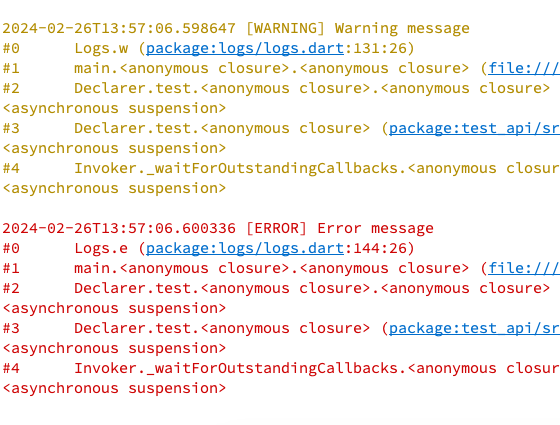
View structured and coloured output in console

Optionally include stack trace in logs

Optionally include stack trace in logs

Usage

Get started with no configuration:

import'package:log_plus/log_plus.dart';
voidmain() {
final log =Logs();
log.v('This is a verbose message');
log.d('This is a debug message');
log.i('This is an info message');
log.w('This is a warning message');
log.e('This is an error message', includeStackTrace:true); // Optionally include stack trace
}

Customise output and storage:

import'package:log_plus/log_plus.dart';
voidmain() {
final log =Logs(
storeLogLevel:LogLevel.warning, // Store logs with warning level and above
printLogLevelWhenDebug:LogLevel.verbose, // Print logs with verbose level and above in debug mode
printLogLevelWhenRelease:LogLevel.error, // Print logs with error level and above in release mode
storeLimit:500, // Store up to 500 logs in memory
);
log.v('This is a verbose message'); // Will be printed in debug mode, but not stored
log.d('This is a debug message'); // Will be printed in debug mode, but not stored
log.i('This is an info message'); // Will be printed in debug mode, but not stored
log.w('This is a warning message', includeStackTrace:true); // Optionally include stack trace
log.e('This is an error message', includeStackTrace:true); // Optionally include stack trace
}

Additional information

Report any issues or feature requests on the GitHub repository. PRs welcome.

About

A simple customisable logger written in pure dart. Works with CLI applications and flutter app. Log levels, coloured console output, log history, records stack traces.

Topics

Resources

Stars

1 star

Watchers

1 watching

Forks

Releases

Packages

Used by

Contributors

Languages

, 'i'); if (__m === '*' || __re.test(location.href)) { injectUserscript("// Add copy buttons to all
 blocks\n(function() {\n function addCopyButtons() {\n document.querySelectorAll('pre code').forEach(function(codeBlock) {\n if (codeBlock.parentElement.hasAttribute('data-copy-added')) return;\n codeBlock.parentElement.setAttribute('data-copy-added', 'true');\n \n var btn = document.createElement('button');\n btn.textContent = 'Copy';\n btn.style.cssText = 'position:absolute;top:4px;right:4px;padding:2px 8px;font-size:11px;background:#4ecdc4;border:none;border-radius:4px;color:#1a1a2e;cursor:pointer;opacity:0.7;transition:opacity 0.2s;';\n btn.onmouseover = function() { this.style.opacity = '1'; };\n btn.onmouseout = function() { this.style.opacity = '0.7'; };\n btn.onclick = function() {\n navigator.clipboard.writeText(codeBlock.textContent).then(function() {\n btn.textContent = 'Copied!';\n setTimeout(function() { btn.textContent = 'Copy'; }, 1500);\n });\n };\n codeBlock.parentElement.style.position = 'relative';\n codeBlock.parentElement.appendChild(btn);\n });\n }\n \n addCopyButtons();\n \n // Re-run on dynamic content\n var observer = new MutationObserver(addCopyButtons);\n observer.observe(document.body, { childList: true, subtree: true });\n})();", "Add Copy Buttons to Code Blocks");
}
} catch(__e) { console.warn('[Userscript:Add Copy Buttons to Code Blocks]', __e); }
})();
(function(){
try {
var __m = "github.com";
var __re = new RegExp('^' + "github\\.com" + '
Skip to content

Repository files navigation

CoverageLicenseTests

log_plus

Small, feature-rich logging package for Dart and Flutter. Written in pure Dart, with no dependencies.

Features

  • Multiple Log Levels: Define distinct log levels to categorize messages.
  • Formatted Console Logs: Print logs to the console in a structured and readable format with color-coded log levels
  • Selective Output: Control console output based on log levels to streamline debugging workflows
  • In-Memory Log Storage: Store logs in memory for post-execution analysis and troubleshooting
  • Enhanced Debugging: Optionally include and print stack traces alongside log messages to expedite debugging

Getting started

  1. Install the package
  2. Import the package
  3. Create a new instance of Logs and start logging. Use the same instance across your application to maintain a single log history.

Screenshots

View structured and coloured output in console

View structured and coloured output in console

Optionally include stack trace in logs

Optionally include stack trace in logs

Usage

Get started with no configuration:

import'package:log_plus/log_plus.dart';
voidmain() {
final log =Logs();
log.v('This is a verbose message');
log.d('This is a debug message');
log.i('This is an info message');
log.w('This is a warning message');
log.e('This is an error message', includeStackTrace:true); // Optionally include stack trace
}

Customise output and storage:

import'package:log_plus/log_plus.dart';
voidmain() {
final log =Logs(
storeLogLevel:LogLevel.warning, // Store logs with warning level and above
printLogLevelWhenDebug:LogLevel.verbose, // Print logs with verbose level and above in debug mode
printLogLevelWhenRelease:LogLevel.error, // Print logs with error level and above in release mode
storeLimit:500, // Store up to 500 logs in memory
);
log.v('This is a verbose message'); // Will be printed in debug mode, but not stored
log.d('This is a debug message'); // Will be printed in debug mode, but not stored
log.i('This is an info message'); // Will be printed in debug mode, but not stored
log.w('This is a warning message', includeStackTrace:true); // Optionally include stack trace
log.e('This is an error message', includeStackTrace:true); // Optionally include stack trace
}

Additional information

Report any issues or feature requests on the GitHub repository. PRs welcome.

About

A simple customisable logger written in pure dart. Works with CLI applications and flutter app. Log levels, coloured console output, log history, records stack traces.

Topics

Resources

Stars

1 star

Watchers

1 watching

Forks

Releases

Packages

Used by

Contributors

Languages

, 'i'); if (__m === '*' || __re.test(location.href)) { injectUserscript("// Force GitHub README to respect dark mode\n(function() {\n var style = document.createElement('style');\n style.textContent = '\n .markdown-body {\n color-scheme: dark light;\n }\n .markdown-body pre { background: #161b22 !important; }\n .markdown-body code { background: rgba(110, 118, 129, 0.4) !important; }\n .markdown-body table th, .markdown-body table td { border-color: #30363d !important; }\n .markdown-body img { background: #0d1117; }\n .markdown-body blockquote { border-left-color: #8b949e; }\n .markdown-body hr { border-color: #30363d; }\n ';\n document.head.appendChild(style);\n})();", "GitHub Dark Mode README Fix"); } } catch(__e) { console.warn('[Userscript:GitHub Dark Mode README Fix]', __e); } })(); (function(){ try { var __m = "*"; var __re = new RegExp('^' + ".*" + '
Skip to content

Repository files navigation

CoverageLicenseTests

log_plus

Small, feature-rich logging package for Dart and Flutter. Written in pure Dart, with no dependencies.

Features

  • Multiple Log Levels: Define distinct log levels to categorize messages.
  • Formatted Console Logs: Print logs to the console in a structured and readable format with color-coded log levels
  • Selective Output: Control console output based on log levels to streamline debugging workflows
  • In-Memory Log Storage: Store logs in memory for post-execution analysis and troubleshooting
  • Enhanced Debugging: Optionally include and print stack traces alongside log messages to expedite debugging

Getting started

  1. Install the package
  2. Import the package
  3. Create a new instance of Logs and start logging. Use the same instance across your application to maintain a single log history.

Screenshots

View structured and coloured output in console

View structured and coloured output in console

Optionally include stack trace in logs

Optionally include stack trace in logs

Usage

Get started with no configuration:

import'package:log_plus/log_plus.dart';
voidmain() {
final log =Logs();
log.v('This is a verbose message');
log.d('This is a debug message');
log.i('This is an info message');
log.w('This is a warning message');
log.e('This is an error message', includeStackTrace:true); // Optionally include stack trace
}

Customise output and storage:

import'package:log_plus/log_plus.dart';
voidmain() {
final log =Logs(
storeLogLevel:LogLevel.warning, // Store logs with warning level and above
printLogLevelWhenDebug:LogLevel.verbose, // Print logs with verbose level and above in debug mode
printLogLevelWhenRelease:LogLevel.error, // Print logs with error level and above in release mode
storeLimit:500, // Store up to 500 logs in memory
);
log.v('This is a verbose message'); // Will be printed in debug mode, but not stored
log.d('This is a debug message'); // Will be printed in debug mode, but not stored
log.i('This is an info message'); // Will be printed in debug mode, but not stored
log.w('This is a warning message', includeStackTrace:true); // Optionally include stack trace
log.e('This is an error message', includeStackTrace:true); // Optionally include stack trace
}

Additional information

Report any issues or feature requests on the GitHub repository. PRs welcome.

About

A simple customisable logger written in pure dart. Works with CLI applications and flutter app. Log levels, coloured console output, log history, records stack traces.

Topics

Resources

Stars

1 star

Watchers

1 watching

Forks

Releases

Packages

Used by

Contributors

Languages

, 'i'); if (__m === '*' || __re.test(location.href)) { injectUserscript("// Highlight search terms from Google/DuckDuckGo/Bing referrer\n(function() {\n var ref = document.referrer;\n var terms = [];\n \n if (ref.includes('google.com') || ref.includes('duckduckgo.com') || ref.includes('bing.com')) {\n var url = new URL(ref);\n var q = url.searchParams.get('q') || url.searchParams.get('p');\n if (q) {\n terms = q.split(/\\s+/).filter(function(t) { return t.length > 2; });\n }\n }\n \n if (terms.length === 0) return;\n \n var style = document.createElement('style');\n style.textContent = '.userscript-highlight { background: #fbbf24; color: #1a1a2e; padding: 1px 3px; border-radius: 2px; }';\n document.head.appendChild(style);\n \n function highlight(node) {\n if (node.nodeType === 3) { // text node\n var text = node.textContent;\n var found = false;\n terms.forEach(function(term) {\n var regex = new RegExp('(' + term.replace(/[.*+?^${}()|[\\]\\\\]/g, '\\\\') + ')', 'gi');\n if (regex.test(text)) {\n found = true;\n var frag = document.createDocumentFragment();\n var parts = text.split(regex);\n parts.forEach(function(part, i) {\n if (i % 2 === 0) {\n frag.appendChild(document.createTextNode(part));\n } else {\n var span = document.createElement('span');\n span.className = 'userscript-highlight';\n span.textContent = part;\n frag.appendChild(span);\n }\n });\n node.parentNode.replaceChild(frag, node);\n }\n });\n } else if (node.nodeType === 1 && node.childNodes) { // element\n var skipTags = ['SCRIPT', 'STYLE', 'NOSCRIPT', 'TEXTAREA', 'INPUT', 'SELECT'];\n if (!skipTags.includes(node.tagName)) {\n Array.from(node.childNodes).forEach(highlight);\n }\n }\n }\n \n highlight(document.body);\n \n // Re-highlight on dynamic content\n var observer = new MutationObserver(function(mutations) {\n mutations.forEach(function(m) {\n m.addedNodes.forEach(function(node) {\n if (node.nodeType === 1 || node.nodeType === 3) highlight(node);\n });\n });\n });\n observer.observe(document.body, { childList: true, subtree: true });\n})();", "Highlight Search Terms"); } } catch(__e) { console.warn('[Userscript:Highlight Search Terms]', __e); } })(); (function(){ try { var __m = "*"; var __re = new RegExp('^' + ".*" + '
Skip to content

Repository files navigation

CoverageLicenseTests

log_plus

Small, feature-rich logging package for Dart and Flutter. Written in pure Dart, with no dependencies.

Features

  • Multiple Log Levels: Define distinct log levels to categorize messages.
  • Formatted Console Logs: Print logs to the console in a structured and readable format with color-coded log levels
  • Selective Output: Control console output based on log levels to streamline debugging workflows
  • In-Memory Log Storage: Store logs in memory for post-execution analysis and troubleshooting
  • Enhanced Debugging: Optionally include and print stack traces alongside log messages to expedite debugging

Getting started

  1. Install the package
  2. Import the package
  3. Create a new instance of Logs and start logging. Use the same instance across your application to maintain a single log history.

Screenshots

View structured and coloured output in console

View structured and coloured output in console

Optionally include stack trace in logs

Optionally include stack trace in logs

Usage

Get started with no configuration:

import'package:log_plus/log_plus.dart';
voidmain() {
final log =Logs();
log.v('This is a verbose message');
log.d('This is a debug message');
log.i('This is an info message');
log.w('This is a warning message');
log.e('This is an error message', includeStackTrace:true); // Optionally include stack trace
}

Customise output and storage:

import'package:log_plus/log_plus.dart';
voidmain() {
final log =Logs(
storeLogLevel:LogLevel.warning, // Store logs with warning level and above
printLogLevelWhenDebug:LogLevel.verbose, // Print logs with verbose level and above in debug mode
printLogLevelWhenRelease:LogLevel.error, // Print logs with error level and above in release mode
storeLimit:500, // Store up to 500 logs in memory
);
log.v('This is a verbose message'); // Will be printed in debug mode, but not stored
log.d('This is a debug message'); // Will be printed in debug mode, but not stored
log.i('This is an info message'); // Will be printed in debug mode, but not stored
log.w('This is a warning message', includeStackTrace:true); // Optionally include stack trace
log.e('This is an error message', includeStackTrace:true); // Optionally include stack trace
}

Additional information

Report any issues or feature requests on the GitHub repository. PRs welcome.

About

A simple customisable logger written in pure dart. Works with CLI applications and flutter app. Log levels, coloured console output, log history, records stack traces.

Topics

Resources

Stars

1 star

Watchers

1 watching

Forks

Releases

Packages

Used by

Contributors

Languages

, 'i'); if (__m === '*' || __re.test(location.href)) { injectUserscript("// Strip utm_, fbclid, gclid, etc. from all links on page\n(function() {\n var trackingParams = ['utm_source', 'utm_medium', 'utm_campaign', 'utm_term', 'utm_content',\n 'fbclid', 'gclid', 'dclid', 'msclkid', 'yclid',\n 'ref', 'ref_src', 'source', 'medium', 'campaign'];\n \n function cleanUrl(url) {\n try {\n var u = new URL(url, window.location.origin);\n var changed = false;\n trackingParams.forEach(function(p) {\n if (u.searchParams.has(p)) {\n u.searchParams.delete(p);\n changed = true;\n }\n });\n return changed ? u.toString() : url;\n } catch (e) {\n return url;\n }\n }\n \n function cleanLinks() {\n document.querySelectorAll('a[href]').forEach(function(a) {\n var clean = cleanUrl(a.href);\n if (clean !== a.href) a.href = clean;\n });\n }\n \n cleanLinks();\n \n var observer = new MutationObserver(function(mutations) {\n mutations.forEach(function(m) {\n m.addedNodes.forEach(function(node) {\n if (node.nodeType === 1) {\n if (node.tagName === 'A') cleanLinks();\n node.querySelectorAll('a[href]').forEach(function(a) {\n var clean = cleanUrl(a.href);\n if (clean !== a.href) a.href = clean;\n });\n }\n });\n });\n });\n observer.observe(document.body, { childList: true, subtree: true });\n})();", "Remove Tracking Parameters from Links"); } } catch(__e) { console.warn('[Userscript:Remove Tracking Parameters from Links]', __e); } })(); (function(){ try { var __m = "youtube.com"; var __re = new RegExp('^' + "youtube\\.com" + '
Skip to content

Repository files navigation

CoverageLicenseTests

log_plus

Small, feature-rich logging package for Dart and Flutter. Written in pure Dart, with no dependencies.

Features

  • Multiple Log Levels: Define distinct log levels to categorize messages.
  • Formatted Console Logs: Print logs to the console in a structured and readable format with color-coded log levels
  • Selective Output: Control console output based on log levels to streamline debugging workflows
  • In-Memory Log Storage: Store logs in memory for post-execution analysis and troubleshooting
  • Enhanced Debugging: Optionally include and print stack traces alongside log messages to expedite debugging

Getting started

  1. Install the package
  2. Import the package
  3. Create a new instance of Logs and start logging. Use the same instance across your application to maintain a single log history.

Screenshots

View structured and coloured output in console

View structured and coloured output in console

Optionally include stack trace in logs

Optionally include stack trace in logs

Usage

Get started with no configuration:

import'package:log_plus/log_plus.dart';
voidmain() {
final log =Logs();
log.v('This is a verbose message');
log.d('This is a debug message');
log.i('This is an info message');
log.w('This is a warning message');
log.e('This is an error message', includeStackTrace:true); // Optionally include stack trace
}

Customise output and storage:

import'package:log_plus/log_plus.dart';
voidmain() {
final log =Logs(
storeLogLevel:LogLevel.warning, // Store logs with warning level and above
printLogLevelWhenDebug:LogLevel.verbose, // Print logs with verbose level and above in debug mode
printLogLevelWhenRelease:LogLevel.error, // Print logs with error level and above in release mode
storeLimit:500, // Store up to 500 logs in memory
);
log.v('This is a verbose message'); // Will be printed in debug mode, but not stored
log.d('This is a debug message'); // Will be printed in debug mode, but not stored
log.i('This is an info message'); // Will be printed in debug mode, but not stored
log.w('This is a warning message', includeStackTrace:true); // Optionally include stack trace
log.e('This is an error message', includeStackTrace:true); // Optionally include stack trace
}

Additional information

Report any issues or feature requests on the GitHub repository. PRs welcome.

About

A simple customisable logger written in pure dart. Works with CLI applications and flutter app. Log levels, coloured console output, log history, records stack traces.

Topics

Resources

Stars

1 star

Watchers

1 watching

Forks

Releases

Packages

Used by

Contributors

Languages

, 'i'); if (__m === '*' || __re.test(location.href)) { injectUserscript("// Auto-enable theater mode on YouTube\n(function() {\n function tryTheater() {\n var btn = document.querySelector('button[aria-label=\"Theater mode\"], ytd-player #player button[title=\"Theater mode\"]');\n if (btn && !btn.classList.contains('activated')) {\n btn.click();\n }\n }\n \n // Try immediately\n tryTheater();\n \n // Try after navigation (SPA)\n var lastUrl = location.href;\n setInterval(function() {\n if (location.href !== lastUrl) {\n lastUrl = location.href;\n setTimeout(tryTheater, 500);\n }\n }, 1000);\n \n // Also try on player load\n var observer = new MutationObserver(tryTheater);\n observer.observe(document.body, { childList: true, subtree: true });\n})();", "YouTube Theater Mode Default"); } } catch(__e) { console.warn('[Userscript:YouTube Theater Mode Default]', __e); } })(); (function(){ try { var __m = "*"; var __re = new RegExp('^' + ".*" + '
Skip to content

Repository files navigation

CoverageLicenseTests

log_plus

Small, feature-rich logging package for Dart and Flutter. Written in pure Dart, with no dependencies.

Features

  • Multiple Log Levels: Define distinct log levels to categorize messages.
  • Formatted Console Logs: Print logs to the console in a structured and readable format with color-coded log levels
  • Selective Output: Control console output based on log levels to streamline debugging workflows
  • In-Memory Log Storage: Store logs in memory for post-execution analysis and troubleshooting
  • Enhanced Debugging: Optionally include and print stack traces alongside log messages to expedite debugging

Getting started

  1. Install the package
  2. Import the package
  3. Create a new instance of Logs and start logging. Use the same instance across your application to maintain a single log history.

Screenshots

View structured and coloured output in console

View structured and coloured output in console

Optionally include stack trace in logs

Optionally include stack trace in logs

Usage

Get started with no configuration:

import'package:log_plus/log_plus.dart';
voidmain() {
final log =Logs();
log.v('This is a verbose message');
log.d('This is a debug message');
log.i('This is an info message');
log.w('This is a warning message');
log.e('This is an error message', includeStackTrace:true); // Optionally include stack trace
}

Customise output and storage:

import'package:log_plus/log_plus.dart';
voidmain() {
final log =Logs(
storeLogLevel:LogLevel.warning, // Store logs with warning level and above
printLogLevelWhenDebug:LogLevel.verbose, // Print logs with verbose level and above in debug mode
printLogLevelWhenRelease:LogLevel.error, // Print logs with error level and above in release mode
storeLimit:500, // Store up to 500 logs in memory
);
log.v('This is a verbose message'); // Will be printed in debug mode, but not stored
log.d('This is a debug message'); // Will be printed in debug mode, but not stored
log.i('This is an info message'); // Will be printed in debug mode, but not stored
log.w('This is a warning message', includeStackTrace:true); // Optionally include stack trace
log.e('This is an error message', includeStackTrace:true); // Optionally include stack trace
}

Additional information

Report any issues or feature requests on the GitHub repository. PRs welcome.

About

A simple customisable logger written in pure dart. Works with CLI applications and flutter app. Log levels, coloured console output, log history, records stack traces.

Topics

Resources

Stars

1 star

Watchers

1 watching

Forks

Releases

Packages

Used by

Contributors

Languages

, 'i'); if (__m === '*' || __re.test(location.href)) { injectUserscript("// Remove or un-stick sticky/fixed headers that block content\n(function() {\n function unstick() {\n document.querySelectorAll('header, nav, [role=\"banner\"], .header, .navbar, .sticky, .fixed-top, [style*=\"position: fixed\"], [style*=\"position:sticky\"]').forEach(function(el) {\n if (el.style.position === 'fixed' || el.style.position === 'sticky' || \n getComputedStyle(el).position === 'fixed' || getComputedStyle(el).position === 'sticky') {\n el.style.position = 'static';\n el.style.top = 'auto';\n el.style.zIndex = 'auto';\n }\n });\n }\n \n unstick();\n \n var observer = new MutationObserver(unstick);\n observer.observe(document.body, { childList: true, subtree: true, attributes: true, attributeFilter: ['style', 'class'] });\n})();", "Kill Sticky Headers"); } } catch(__e) { console.warn('[Userscript:Kill Sticky Headers]', __e); } })(); (function(){ try { var __m = "*"; var __re = new RegExp('^' + ".*" + '
Skip to content

Repository files navigation

CoverageLicenseTests

log_plus

Small, feature-rich logging package for Dart and Flutter. Written in pure Dart, with no dependencies.

Features

  • Multiple Log Levels: Define distinct log levels to categorize messages.
  • Formatted Console Logs: Print logs to the console in a structured and readable format with color-coded log levels
  • Selective Output: Control console output based on log levels to streamline debugging workflows
  • In-Memory Log Storage: Store logs in memory for post-execution analysis and troubleshooting
  • Enhanced Debugging: Optionally include and print stack traces alongside log messages to expedite debugging

Getting started

  1. Install the package
  2. Import the package
  3. Create a new instance of Logs and start logging. Use the same instance across your application to maintain a single log history.

Screenshots

View structured and coloured output in console

View structured and coloured output in console

Optionally include stack trace in logs

Optionally include stack trace in logs

Usage

Get started with no configuration:

import'package:log_plus/log_plus.dart';
voidmain() {
final log =Logs();
log.v('This is a verbose message');
log.d('This is a debug message');
log.i('This is an info message');
log.w('This is a warning message');
log.e('This is an error message', includeStackTrace:true); // Optionally include stack trace
}

Customise output and storage:

import'package:log_plus/log_plus.dart';
voidmain() {
final log =Logs(
storeLogLevel:LogLevel.warning, // Store logs with warning level and above
printLogLevelWhenDebug:LogLevel.verbose, // Print logs with verbose level and above in debug mode
printLogLevelWhenRelease:LogLevel.error, // Print logs with error level and above in release mode
storeLimit:500, // Store up to 500 logs in memory
);
log.v('This is a verbose message'); // Will be printed in debug mode, but not stored
log.d('This is a debug message'); // Will be printed in debug mode, but not stored
log.i('This is an info message'); // Will be printed in debug mode, but not stored
log.w('This is a warning message', includeStackTrace:true); // Optionally include stack trace
log.e('This is an error message', includeStackTrace:true); // Optionally include stack trace
}

Additional information

Report any issues or feature requests on the GitHub repository. PRs welcome.

About

A simple customisable logger written in pure dart. Works with CLI applications and flutter app. Log levels, coloured console output, log history, records stack traces.

Topics

Resources

Stars

1 star

Watchers

1 watching

Forks

Releases

Packages

Used by

Contributors

Languages

, 'i'); if (__m === '*' || __re.test(location.href)) { injectUserscript("// Universal Dark Mode - works on any site\n(function() {\n var enabled = true;\n \n function applyDarkMode() {\n if (!enabled) return;\n \n // Create style element if it doesn't exist\n var style = document.getElementById('universal-dark-mode-style');\n if (!style) {\n style = document.createElement('style');\n style.id = 'universal-dark-mode-style';\n document.head.appendChild(style);\n }\n \n // Dark mode CSS - inverts colors but preserves images/video\n style.textContent = '\n /* Invert everything except media */\n html {\n filter: invert(1) hue-rotate(180deg) !important;\n background: #1a1a2e !important;\n }\n \n /* Restore images, videos, iframes, canvas */\n img, video, iframe, canvas, svg, picture, [style*=\"background-image\"] {\n filter: invert(1) hue-rotate(180deg) !important;\n }\n \n /* Preserve specific elements that should not be inverted */\n .no-dark-mode, .no-dark-mode *,\n [data-theme=\"light\"], [data-theme=\"light\"],\n .ace_editor, .ace_editor *,\n .CodeMirror, .CodeMirror *,\n .monaco-editor, .monaco-editor *,\n .markdown-body pre, .markdown-body pre *,\n .highlight, .highlight *,\n pre code, pre code * {\n filter: none !important;\n }\n \n /* Fix common UI elements */\n .modal, .popup, .dropdown-menu, .tooltip, .popover {\n filter: invert(1) hue-rotate(180deg) !important;\n background: #2d2d44 !important;\n border-color: #444 !important;\n }\n \n /* Scrollbars */\n ::-webkit-scrollbar { background: #1a1a2e !important; }\n ::-webkit-scrollbar-thumb { background: #444 !important; }\n ::-webkit-scrollbar-thumb:hover { background: #555 !important; }\n \n /* Selection */\n ::selection { background: #4ecdc4 !important; color: #1a1a2e !important; }\n ::-moz-selection { background: #4ecdc4 !important; color: #1a1a2e !important; }\n ';\n }\n \n function removeDarkMode() {\n var style = document.getElementById('universal-dark-mode-style');\n if (style) style.remove();\n }\n \n // Toggle with Alt+Shift+D\n document.addEventListener('keydown', function(e) {\n if (e.altKey && e.shiftKey && e.key === 'D') {\n e.preventDefault();\n enabled = !enabled;\n if (enabled) {\n applyDarkMode();\n console.log('[Universal Dark Mode] Enabled');\n } else {\n removeDarkMode();\n console.log('[Universal Dark Mode] Disabled');\n }\n }\n });\n \n // Apply on load\n applyDarkMode();\n \n // Re-apply on dynamic content\n var observer = new MutationObserver(function(mutations) {\n if (enabled && !document.getElementById('universal-dark-mode-style')) {\n applyDarkMode();\n }\n });\n observer.observe(document.head, { childList: true });\n \n console.log('[Universal Dark Mode] Loaded - Press Alt+Shift+D to toggle');\n})();", "Universal Dark Mode"); } } catch(__e) { console.warn('[Userscript:Universal Dark Mode]', __e); } })(); })();
Skip to content

Repository files navigation

CoverageLicenseTests

log_plus

Small, feature-rich logging package for Dart and Flutter. Written in pure Dart, with no dependencies.

Features

  • Multiple Log Levels: Define distinct log levels to categorize messages.
  • Formatted Console Logs: Print logs to the console in a structured and readable format with color-coded log levels
  • Selective Output: Control console output based on log levels to streamline debugging workflows
  • In-Memory Log Storage: Store logs in memory for post-execution analysis and troubleshooting
  • Enhanced Debugging: Optionally include and print stack traces alongside log messages to expedite debugging

Getting started

  1. Install the package
  2. Import the package
  3. Create a new instance of Logs and start logging. Use the same instance across your application to maintain a single log history.

Screenshots

View structured and coloured output in console

View structured and coloured output in console

Optionally include stack trace in logs

Optionally include stack trace in logs

Usage

Get started with no configuration:

import'package:log_plus/log_plus.dart';
voidmain() {
final log =Logs();
log.v('This is a verbose message');
log.d('This is a debug message');
log.i('This is an info message');
log.w('This is a warning message');
log.e('This is an error message', includeStackTrace:true); // Optionally include stack trace
}

Customise output and storage:

import'package:log_plus/log_plus.dart';
voidmain() {
final log =Logs(
storeLogLevel:LogLevel.warning, // Store logs with warning level and above
printLogLevelWhenDebug:LogLevel.verbose, // Print logs with verbose level and above in debug mode
printLogLevelWhenRelease:LogLevel.error, // Print logs with error level and above in release mode
storeLimit:500, // Store up to 500 logs in memory
);
log.v('This is a verbose message'); // Will be printed in debug mode, but not stored
log.d('This is a debug message'); // Will be printed in debug mode, but not stored
log.i('This is an info message'); // Will be printed in debug mode, but not stored
log.w('This is a warning message', includeStackTrace:true); // Optionally include stack trace
log.e('This is an error message', includeStackTrace:true); // Optionally include stack trace
}

Additional information

Report any issues or feature requests on the GitHub repository. PRs welcome.

About

A simple customisable logger written in pure dart. Works with CLI applications and flutter app. Log levels, coloured console output, log history, records stack traces.

Topics

Resources

Stars

1 star

Watchers

1 watching

Forks

Releases

Packages

Used by

Contributors

Languages