




Mercury: messenger of the Roman gods
Mercury > Merq-ry > Merq
Merq brings the Message Bus pattern together with a command-oriented interface for an extensible and decoupled in-process application architecture.
These patterns are well established in microservices and service oriented architectures, but their benefits can be applied to apps too, especially extensible ones where multiple teams can contribute extensions which are composed at run-time.
Note
This is also commonly used as a Mediator pattern, such as in MediatR and others libraries.
The resulting improved decoupling between components makes it easier to evolve them independently, while improving discoverability of available commands and events. You can see this approach applied in the real world in VSCode commands and various events such as window events. Clearly, in the case of VSCode, everything is in-process, but the benefits of a clean and predictable API are pretty obvious.
Merq provides the same capabilities for .NET apps.
To ensure the long-term sustainability of this project, users of this package who generate revenue must pay an Open Source Maintenance Fee. While the source code is freely available under the terms of the License, this package and other aspects of the project require adherence to the Maintenance Fee.
To pay the Maintenance Fee, become a Sponsor at the proper OSMF tier. A single fee covers all of Devlooped packages.
Events can be any type, there is no restriction or interfaces you must implement. Nowadays, C# record types are a perfect fit for event data types. An example event could be a one-liner such as:
publicrecordItemShipped(stringId,DateTimeOffsetDate);The events-based API surface on the message bus is simple enough:
publicinterfaceIMessageBus{voidNotify<TEvent>(TEvente);IObservable<TEvent>Observe<TEvent>();}By relying on IObservable<TEvent>, Merq integrates seamlessly with
more powerful event-driven handling via System.Reactive
or the more lightweight RxFree.
Subscribing to events with either of those packages is trivial:
IDisposablesubscription;// constructor may use DI to get the dependencypublicCustomerViewModel(IMessageBus bus){subscription=bus.Observe<ItemShipped>().Subscribe(OnItemShipped);}voidOnItemShipped(ItemShippede)=>// Refresh item statuspublicvoid Dispose()=>subscription.Dispose();In addition to event producers just invoking Notify, they can also be
implemented as IObservable<TEvent> directly, which is useful when the
producer is itself an observable sequence.
Both features integrate seamlessly and leverage all the power of Reactive Extensions.
Commands can also be any type, and C# records make for concise definitions:
recordCancelOrder(stringOrderId):IAsyncCommand;Unlike events, command messages need to signal the invocation style they require for execution:
| Scenario | Interface | Invocation |
|---|---|---|
| void synchronous command | ICommand | IMessageBus.Execute(command) |
| value-returning synchronous command | ICommand<TResult> | var result = await IMessageBus.Execute(command) |
| void asynchronous command | IAsyncCommand | await IMessageBus.ExecuteAsync(command) |
| value-returning asynchronous command | IAsyncCommand<TResult> | var result = await IMessageBus.ExecuteAsync(command) |
| async stream command | IStreamCommand<TResult> | await foreach(var item in IMessageBus.ExecuteStream(command)) |
The sample command shown before can be executed using the following code:
// perhaps a method invoked when a user // clicks/taps a Cancel button next to an orderasyncTaskOnCancel(stringorderId){awaitbus.ExecuteAsync(newCancelOrder(orderId),CancellationToken.None);// refresh UI for new state.}An example of a synchronous command could be:
// Command declarationrecordSignOut():ICommand;// Command invocationvoidOnSignOut()=>bus.Execute(newSignOut());// or alternatively, for void commands that have no additional data:voidOnSignOut()=>bus.Execute<SignOut>();The marker interfaces on the command messages drive the compiler to only allow the right invocation style on the message bus, as defined by the command author:
publicinterfaceIMessageBus{// sync voidvoidExecute(ICommandcommand);// sync value-returningTResultExecute<TResult>(ICommand<TResult>command);// async voidTaskExecuteAsync(IAsyncCommandcommand,CancellationTokencancellation);// async value-returningTask<TResult>ExecuteAsync<TResult>(IAsyncCommand<TResult>command,CancellationTokencancellation);// async streamIAsyncEnumerable<TResult>ExecuteStream<TResult>(IStreamCommand<TResult>command,CancellationTokencancellation);}For example, to create a value-returning async command that retrieves some value, you would have:
recordFindDocuments(stringFilter):IAsyncCommand<IEnumerable<string>>;classFindDocumentsHandler:IAsyncCommandHandler<FindDocument,IEnumerable<string>>{publicboolCanExecute(FindDocumentcommand)=>!string.IsNullOrEmpty(command.Filter);publicTask<IEnumerable<string>>ExecuteAsync(FindDocumentcommand,CancellationTokencancellation)=>// evaluate command.Filter across all documents and return matches}In order to execute such command, the only execute method the compiler will allow is:
IEnumerable<string>files=awaitbus.ExecuteAsync(newFindDocuments("*.json"));If the consumer tries to use Execute, the compiler will complain that the
command does not implement ICommand<TResult>, which is the synchronous version
of the marker interface.
While these marker interfaces on the command messages might seem unnecessary, they are actually quite important. They solve a key problem that execution abstractions face: whether a command execution is synchronous or asynchronous (as well as void or value-returning) should not be abstracted away since otherwise you can end up in two common anti-patterns (i.e. async guidelines for ASP.NET), known as sync over async and async over sync.
Likewise, mistakes cannot be made when implementing the handler, since the handler interfaces define constraints on what the commands must implement:
// syncpublicinterfaceICommandHandler<inTCommand>: ...where TCommand :ICommand;
public interfaceICommandHandler<in TCommand,out TResult>: ...where TCommand :ICommand<TResult>;// async
public interfaceIAsyncCommandHandler<in TCommand>: ...where TCommand :IAsyncCommand;
public interfaceIAsyncCommandHandler<in TCommand,TResult>: ...where TCommand :IAsyncCommand<TResult>// async stream
public interfaceIStreamCommandHandler<in TCommand,out TResult>: ...where TCommand :IStreamCommand<TResult>
This design choice also makes it impossible to end up executing a command implementation improperly.
In addition to execution, the IMessageBus also provides a mechanism to determine
if a command has a registered handler at all via the CanHandle<T> method as well
as a validation mechanism via CanExecute<T>, as shown above in the FindDocumentsHandler example.
Commands can notify new events, and event observers/subscribers can in turn execute commands.
For .NET6+ apps, Merq also supports async streams as a command invocation style. This is useful for scenarios where the command execution produces a potentially large number of results, and the consumer wants to process them as they are produced, rather than waiting for the entire sequence to be produced.
For example, the filter documents command above could be implemented as an async stream command instead:
recordFindDocuments(stringFilter):IStreamCommand<string>;classFindDocumentsHandler:IStreamCommandHandler<FindDocument,string>{publicboolCanExecute(FindDocumentcommand)=>!string.IsNullOrEmpty(command.Filter);publicasyncIAsyncEnumerable<string>ExecuteAsync(FindDocumentcommand,[EnumeratorCancellation]CancellationTokencancellation){awaitforeach(varfileinFindFilesAsync(command.Filter,cancellation))yieldreturnfile;}}In order to execute such command, the only execute method the compiler will allow is:
awaitforeach(varfileinbus.ExecuteStream(newFindDocuments("*.json")))Console.WriteLine(file);Beyond the compiler complaining, Merq also provides a set of analyzers and code fixes to learn the patterns and avoid common mistakes. For example, if you created a simple record to use as a command, such as:
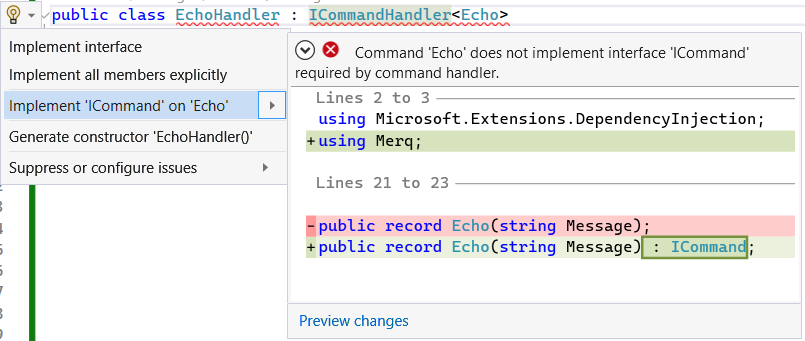
publicrecordEcho(stringMessage);And then tried to implement a command handler for it:
publicclassEchoHandler:ICommandHandler<Echo>{}the compiler would immediately complain about various contraints and interfaces
that aren't satisfied due to the requirements on the Echo type itself. For
a seasoned Merq developer, this is a no-brainer, but for new developers,
it can be a bit puzzling:

A code fix is provided to automatically implement the required interfaces in this case:
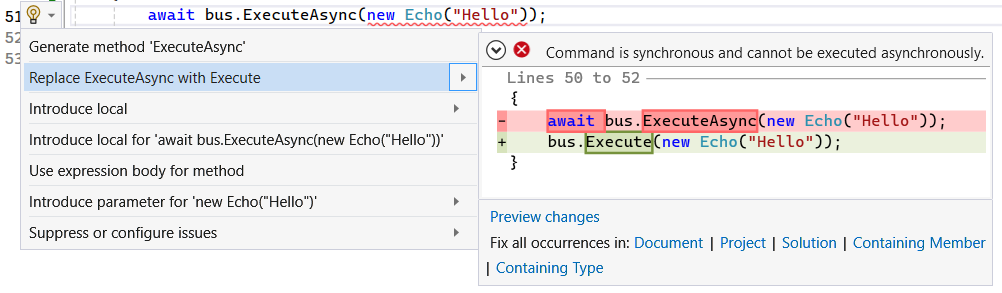
Likewise, if a consumer attempted to invoke the above Echo command asynchronously
(known as the async over sync anti-pattern),
they would get a somewhat unintuitive compiler error:

But the second error is more helpful, since it points to the actual problem, and a code fix can be applied to resolve it:
The same analyzers and code fixes are provided for the opposite anti-pattern, known as sync over async, where a synchronous command is executed asynchronously.
The default implementation of the message bus interface IMessageBus has
no external dependencies and can be instantiated via the MessageBus constructor
directly by an application host.
The bus locates command handlers and event producers via the passed-in
IServiceProvider instance in the constructor:
varbus=newMessageBus(serviceProvider);// execute a commandbus.Execute(newMyCommand());// observe an event from the busbus.Observe<MyEvent>().Subscribe(e =>Console.WriteLine(e.Message));Merq integrates out of the box with dependency injection for .NET, making it straightforward to properly register the bus and all command handlers and event producers.
varbuilder=WebApplication.CreateBuilder(args);
...builder.Services.AddMessageBus();
All command handlers and event producers need to be registered with the
services collection as usual, using the main interface for the component,
such as ICommandHandler<T> and IObservable<TEvent>. In addition, if
you use the IMessageBus.CanExecute<T> method, handlers need to also be
registered with the ICanExecute<T> interface.
NOTE: Merq makes no assumptions about the lifetime of the registered components, so it's up to the consumer to register them with the desired lifetime.
To drastically simplify registration of handlers and producers, we
recommend the Devlooped.Extensions.DependencyInjection.
package, which provides a simple attribute-based mechanism for automatically
emitting at compile-time the required service registrations for all types
marked with the provided [Service] attribute, which also allows setting the
component lifetime, such as [Service(ServiceLifetime.Transient)] (default
lifetime is ServiceLifetime.Singleton for this source generator-based
package).
This allows to simply mark all command handlers and event producers as
[Service] and then register them all with a single line of code:
builder.Services.AddServices();This package emits all registrations at compile-time using source generators, so run-time performance is not affected at all.
The core implementation of the IMessageBus is instrumented with ActivitySource and
Metric, providing out of the box support for Open Telemetry-based monitoring, as well
as via dotnet trace
and dotnet counters.
To export telemetry using Open Telemetry, for example:
usingvartracer=Sdk.CreateTracerProviderBuilder().SetResourceBuilder(ResourceBuilder.CreateDefault().AddService("ConsoleApp")).AddSource(source.Name).AddSource("Merq").AddConsoleExporter().AddZipkinExporter().AddAzureMonitorTraceExporter(o =>o.ConnectionString=config["AppInsights"]).Build();For integration from a plain CLI app with Aspire (or whenever an OLTP endpoint is provided as an environment variable), you can simplify it as:
varbuilder=Host.CreateApplicationBuilder(args);if(!string.IsNullOrWhiteSpace(builder.Configuration["OTEL_EXPORTER_OTLP_ENDPOINT"])){builder.Services.AddOpenTelemetry().ConfigureResource(x =>x.AddService("MyApp")).WithTracing(x =>x.AddSource("Merq").AddOtlpExporter()).WithMetrics(x =>x.AddMeter("Merq").AddOtlpExporter());}Collecting traces via dotnet-trace:
dotnet trace collect --name [PROCESS_NAME] --providers="Microsoft-Diagnostics-DiagnosticSource:::FilterAndPayloadSpecs=[AS]Merq,System.Diagnostics.Metrics:::Metrics=Merq"Monitoring metrics via dotnet-counters:
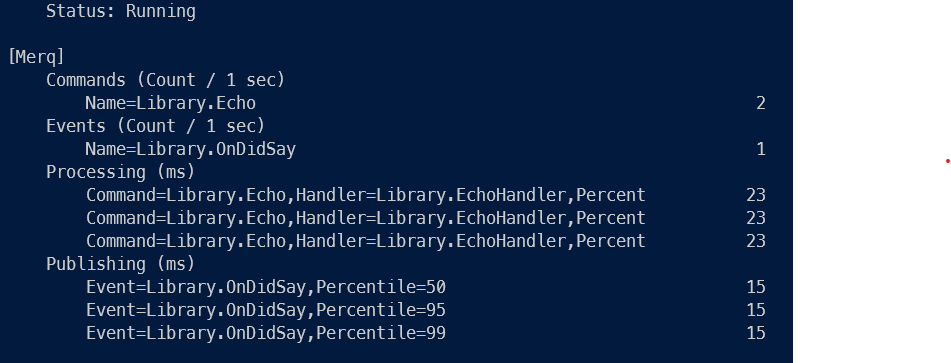
dotnet counters monitor --process-id [PROCESS_ID] --counters MerqExample rendering from the included sample console app:
The performance of Merq is on par with the best implementations of the the same pattern, for example MediatR. Note it sacrifices (minimally) performance for fewer allocations, most notably for the synchronous command execution path:
BenchmarkDotNet v0.13.12, Windows 11 (10.0.22622.575)
Intel Core i9-10900T CPU 1.90GHz, 1 CPU, 20 logical and 10 physical cores
.NET SDK 9.0.100-preview.2.24074.1
[Host] : .NET 8.0.1 (8.0.123.58001), X64 RyuJIT AVX2
DefaultJob : .NET 8.0.1 (8.0.123.58001), X64 RyuJIT AVX2
| Method | Mean | Error | StdDev | Median | Gen0 | Allocated |
|---|---|---|---|---|---|---|
| PingMerq | 303.8 ns | 6.05 ns | 15.84 ns | 302.7 ns | 0.0172 | 184 B |
| PingMerqAsync | 294.7 ns | 5.35 ns | 5.95 ns | 295.2 ns | 0.0248 | 264 B |
| PingMediatR | 166.8 ns | 3.15 ns | 6.99 ns | 164.2 ns | 0.0319 | 336 B |


The Merq.Abstractions contains just the interfaces for Merq for scenarios where messages are shared across multiple assemblies or defined separately from the main app host.
Being able to loosely couple both events (and their consumers) and command execution (from their
command handler implementations) is a key feature of Merq. To take this decoupling to the extreme,
Merq allows a similar capability as allowed by the TypeScript/JavaScript in VSCode: you can just
copy/paste an event/command definition as source into your assembly, and perform the regular
operations with it (like Observe an event and Execute a command), in a "duck typing" manner.
As long as the types' full name match, the conversion will happen automatically. Since this
functionality isn't required in many scenarios, and since there are a myriad ways to implement
such an object mapping functionality, the Merq.Core package only provides the hooks to enable
this, but does not provide any built-in implementation for it. In other words, no duck typing
is performed by default.
The Merq.AutoMapper package provides one such implementation, based on the excelent AutoMapper library. It can be registered with the DI container as follows:
builder.Services.AddMessageBus<AutoMapperMessageBus>();// register all services, including handlers and producersbuilder.Services.AddServices();

We also produce CI packages from branches and pull requests so you can dogfood builds as quickly as they are produced.
The CI feed is https://pkg.kzu.app/index.json.
The versioning scheme for packages is:
- PR builds: 42.42.42-pr
[NUMBER] - Branch builds: 42.42.42-
[BRANCH].[COMMITS]