




Run AI-powered C# files using Microsoft.Extensions.AI and Devlooped.Extensions.AI
Example leveraging Grok:
#:packageSmith@0.*// Sample X.AI client usage with .NETvar messages =newChat(){{"system","You are a highly intelligent AI assistant."},{"user","What is 101*3?"},};IChatClientgrok=newGrokClient(Throw.IfNullOrEmpty(Env.Get("XAI_API_KEY"))).GetChatClient("grok-3-mini").AsIChatClient();varoptions=newGrokChatOptions{ReasoningEffort=ReasoningEffort.High,// or ReasoningEffort.LowSearch=GrokSearch.Auto,// or GrokSearch.On/GrokSearch.Off};varresponse=awaitgrok.GetResponseAsync(messages,options);AnsiConsole.MarkupLine($":robot: {response.Text}");Note
The most useful namespaces and dependencies for developing Microsoft.Extensions.AI-powered applications are automatically referenced and imported when using this package.
Example using Claude:
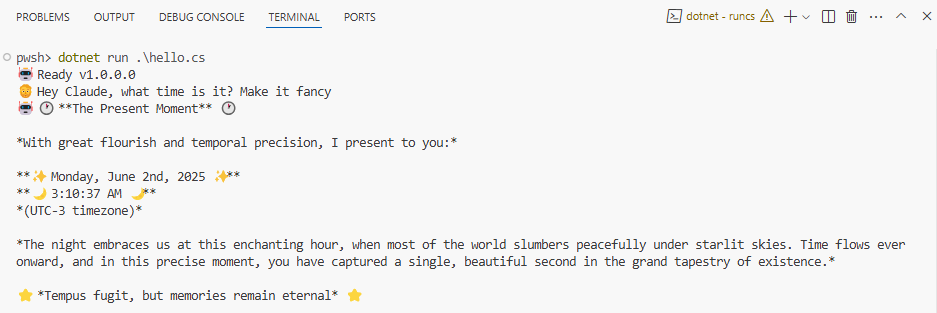
#:packageSmith@0.*var client =newAnthropic.AnthropicClient(Throw.Env.Get("Claude:Key")??thrownewInvalidOperationException("Missing Claude:Key configuration."),services.GetRequiredService<IHttpClientFactory>().CreateClient("ai"))).UseLogging().UseFunctionInvocation();varbuilder=App.CreateBuilder(args);builder.Services.AddChatClient(new);varapp=builder.Build();varhistory=newList<ChatMessage>{newChatMessage(ChatRole.System,Prompts.System)};varchat=app.Services.GetRequiredService<IChatClient>();varoptions=newChatOptions{ModelId="claude-sonnet-4-20250514",MaxOutputTokens=1000,Temperature=0.7f,Tools=[AIFunctionFactory.Create(()=>DateTime.Now,"get_datetime","Gets the current date and time on the user's local machine.")]};AnsiConsole.MarkupLine($":robot: Ready v{ThisAssembly.Info.Version}");AnsiConsole.Markup($":person_beard: ");while(true){varinput=Console.ReadLine()?.Trim();if(string.IsNullOrEmpty(input))continue;history.Add(newChatMessage(ChatRole.User,input));try{varresponse=awaitAnsiConsole.Status().StartAsync(":robot: Thinking...",
ctx =>chat.GetResponseAsync(input,options));history.AddRange(response.Messages);// Try rendering as formatted markuptry{if(response.Textis{Length:>0})AnsiConsole.MarkupLine($":robot: {response.Text}");}catch(Exception){// Fallback to escaped markup text if rendering failsAnsiConsole.MarkupInterpolated($":robot: {response.Text}");}AnsiConsole.WriteLine();AnsiConsole.Markup($":person_beard: ");}catch(Exceptione){AnsiConsole.WriteException(e);}}staticclassPrompts{publicconststringSystem=""" Your responses will be rendered using Spectre.Console.AnsiConsole.Write(new Markup(string text))). This means that you can use rich text formatting, colors, and styles in your responses, but you must ensure that the text is valid markup syntax. """;}The Env class provides access to the following variables/configuration automatically:
.envfiles: in local and parent directories~/.envfile: in the user's home directory (%userprofile%\.envon Windows)- All default configuration sources from App Builder:
- Environment variables prefixed with DOTNET_.
- Command-line arguments.
- appsettings.json.
- appsettings.{Environment}.json.
- Secret Manager when the app runs in the Development environment.
- Environment variables.
- Command-line arguments.


