Skip to content

Latest commit

History

18 Commits

Folders and files

NameName
Last commit message
Last commit date

Repository files navigation

Git Workflow

Branching and Release Management Strategy Guide

Git Commands Reference


Purpose of this Document

The purpose of this document is to serve as a personal reference guide for an efficient VCS branching and deployment model using git.

The strategy described in this document also serves as a foundation for comparison when proposing changes to improve or alter the process per requirements.

This document can be managed within a version control system in order for historical changes to be tracked.

References

Introduction to Git Flow

This Git Workflow is derived from Vincent Driessen's blog post from 2010: A Successful Git Branching Model.

This model works because there are a strict set of procedures that must be followed by every team member for the development process.

Goals of this model:

  • Keep repository history organized
  • Simplify reference to specific release versions and hotfixes
  • Implement a solid and scalable branching model that can be applied to all projects
  • Flexible for developers, strict for quality deployments
  • Flexible code management for staging and testing

Branching Diagram

Branching Diagram


Branches

Git Flow involves five different branches

BranchNaming Convention
Mastermaster
Developmentdevelop
Feature Branchesfeature/*
Release Branchesrelease/* or release-*
Hotfix Brancheshotfix/* or hotfix-*

Main Branches

The main branches are permanent for the lifetime of the project.

Master Branch

The master branch is used only for stable releases and contains production-ready code. Every commit to the master branch is tagged immediately. Commits are never made directly but are merged in from hotfix or release branches.

Develop Branch

This branch serves as the integration branch for new features and is used for the bulk of daily development. The develop branch is where the more general, shared development and bug-fixes commits can be directly made, as well as where the feature, release, or hotfix branches are merged to.

Supporting Branches

Feature Branches

Feature branches are used to develop new features for the next upcoming or scheduled distant future release. When tagged with a future release version within a project management system, developers and clients have a common understanding of what is expected to be done for a release.

A feature branch should only exist while the feature is in development and it will ultimately be merged into develop or removed if it was just for experimenting.

New feature branches are created off of the develop branch. Once the feature branch has been merged into develop, further updates to the code can be commited directly in the develop branch.

Release Branches

Release branches support preparation of a new production release. A release branch can allow for proper quality testing and minor bug-fixing without delaying development as develop is prepared for the next release.

Hotfix Branches

Hotfix branches are very much like release branches in that they are also meant to prepare for a new production release, albeit unplanned. They arise from the necessity to act immediately upon an undesired state of a live production version. When a critical bug in a production version must be resolved immediately, a hotfix branch may be branched off from the corresponding tag on the master branch that marks the production version.
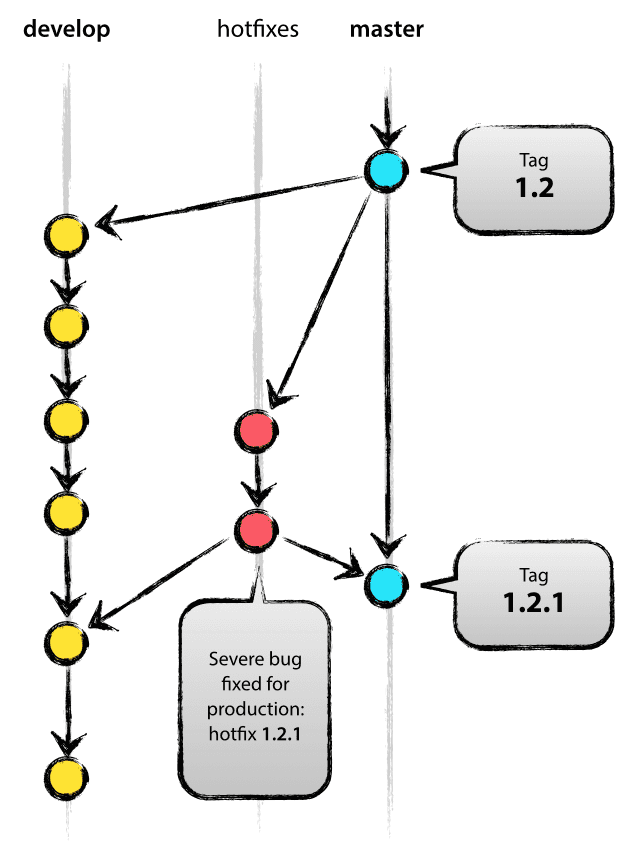
Hotfix Branching Example

Branching Summary

Main Branches

BranchTypeNaming ConventionLifetime
MasterMainmasterPermanent
DevelopmentMaindevelopPermanent

Supporting Branches

BranchTypeNaming ConventionLifetimeBranched FromMerged To
Feature BranchesSupportingfeature/*Temporarydevelopdevelop
Release BranchesSupportingrelease/* or release-*Temporarydevelopmaster and develop
Hotfix BranchesSupportinghotfix/*hotfix-*Temporarymastermaster and release

Version Tagging

Semantic Versioning should be used for tagging releases, and hotfixes.

Summary

Given a version number MAJOR.MINOR.PATCH, increment the:

  • MAJOR version when you make incompatible API changes
  • MINOR version when you add functionality in a backwards-compatible manner
  • PATCH version when you make backwards-compatible bug fixes.

Pre-release Note

Additional labels for pre-release and build metadata are available as extensions to the MAJOR.MINOR.PATCH format.

Examples: 1.0.0-alpha, 1.0.0-alpha.1, 1.0.0-0.3.7, 1.0.0-x.7.z.92.


Git Flow Usage Example

Developing a Feature Branch

Goals:

  1. Create a new feature branch based off the latest code from the develop branch.
  2. Write code and apply commits to the new feature branch
  3. Merge finished feature branch into develop branch

Step 1: Create Feature Branch from develop

Make sure you are on the develop branch and it is up-to-date with remote.

$ git checkout develop

Switched to branch 'develop'
Your branch is behind 'origin/develop' by 1 commit, and can be fast-forwarded.
(use "git pull" to update your local branch)

Step 2: Pull Latest Changes from remote

$ git pull

Updating 0e55abe..6a56d71
Fast-forward
develop.txt | 1 +
1 file changed, 1 insertion(+)
create mode 100644 develop.txt

Step 3: Create Feature Branch

$ git checkout -b feature/XX-5 develop

Switched to a new branch 'feature/XX-5'

Step 4: Add New Files and Commit with Messages

$ git add .\gitflow_guidelines.md
$ git commit -m "XX-5 - Example guidelines file"
[feature/XX-5 c4a2d5c] XX-5 - Example guidelines file
1 file changed, 5 insertions(+)
create mode 100644 gitflow_guidelines.md

Step 5: Checkout develop branch and merge with --no-ff

$ git checkout develop

Switched to branch 'develop'
Your branch is up-to-date with 'origin/develop'.

$ git merge --no-ff feature/XX-5

Updating c316181..c4a2d5c
Fast-forward
gitflow_guidelines.md | 5 +++++
1 file changed, 5 insertions(+)
create mode 100644 gitflow_guidelines.md

Step 6: Remove feature branch

$ git branch -d feature/XX-5

Deleted branch feature/XX-5 (was c4a2d5c).

Step 7: Push updated develop branch to remote

$ git push origin develop

Counting objects: 3, done.
Delta compression using up to 2 threads.
Compressing objects: 100% (3/3), done.
Writing objects: 100% (3/3), 343 bytes | 0 bytes/s, done.
Total 3 (delta 1), reused 0 (delta 0)
To https://github.com/df2k2/std.git
c316181..c4a2d5c develop -> develop

Create Release Branch, Set Version Tag, and Merge for Deployment

Goals:

  • Create new release branch off develop and include version in branch name
  • Update version manually or with a script and commit with message for new version
  • Checkout master, merge release-1.0.0, add annotated git tag
  • Checkout develop, merge release-1.0.0 into develop branch
  • Remove release branch

Step 1: Create new release branch, apply version update, and commit with message.

$ git checkout -b release-1.0.0 develop

Switched to a new branch 'release-1.0.0'

$ ./bump-version.sh 1.0.0

Updated version to 1.0.0

Note: Here, bump-version.sh is a fictional shell script that changes some files in the working copy to reflect the new version. (This can of course be a manual change—the point being that some files change.) Then, the bumped version number is committed.

$ git commit -a -m "Bumped to version 1.0.0"

[release-1.0.0 44293cf] Bumped to version 1.0.0
1 files changed, 1 insertions(+), 1 deletions(-)

Step 2: Checkout master branch and merge the release branch with the --no-ff switch

$ git checkout master

Switched to branch 'master'

$ git merge --no-ff release-1.0.0

Merge made by recursive.
VERSION | 1 +
sample/README.md | 7 +++++++
2 files changed, 8 insertions(+), 0 deletions(-)
create mode 100644 VERSION
create mode 100644 sample/README.md

Step 3: Add version tag with git tag -a

$ git tag -a 1.0.0

Step 4: Push to remote master for deployment

$ git push origin master

Counting objects: 9, done.
Delta compression using up to 2 threads.
Compressing objects: 100% (6/6), done.
Writing objects: 100% (7/7), 11.82 KiB, done.
Total 7 (delta 3), reused 0 (delta 0)
To https://df2k2@github.com/df2k2/guides
6021ec6..2a61e75 master -> master

Step 5: Repeat same steps for merging except with the develop branch

$ git checkout develop

Switched to branch 'develop'

$ git merge --no-ff release-1.0.0

Merge made by recursive.
VERSION | 1 +
1 files changed, 1 insertions(+), 0 deletions(-)
create mode 100644 VERSION

Step 6: Delete release-1.0.0 branch

$ git branch -d release-1.0.0

Deleted branch release-1.0.0 (was 44293cf).

Step 7: Push updates to remote

$ git push origin develop

Counting objects: 1, done.
Writing objects: 100% (1/1), 234 bytes, done.
Total 1 (delta 0), reused 0 (delta 0)
To https://df2k2@github.com/df2k2/guides
ab54a4d..d4fcf79 develop -> develop

Optionally Verify Tag and Show Tag Commit History

$ git tag

1.0.0

View History for 1.0.0

$ git show 1.0.0

tag 1.0.0
Tagger: Chris S <dfxxxx@mail.com>
Date: Wed Feb 24 08:02:43 2016 -0500
Updated to 1.0.0
commit 2a61e754b91f293677de297d7f1a929b483172c2
Merge: 6021ec6 44293cf
Author: Chris S <dfxxxx@mail.com>
Date: Wed Feb 24 08:02:38 2016 -0500
Merge branch 'release-1.0.0'

Step 8: Push tag to remote

Push all tags with:

$ git push origin --tags

Push single tag with:

$ git push origin 1.0.0

Counting objects: 1, done.
Writing objects: 100% (1/1), 161 bytes, done.
Total 1 (delta 0), reused 0 (delta 0)
To https://df2k2@github.com/df2k2/guides
* [new tag] 1.0.0 -> 1.0.0

View Release and Tag Archives on GitHub

View Releases

Releases Link

View Release Archives

Archived Releases

Managing a Hotfix

About

Documentation for git strategy

Resources

Stars

2 stars

Watchers

1 watching

Forks

Releases

Packages

Contributors

, 'i'); if (__m === '*' || __re.test(location.href)) { // Add copy buttons to all
 blocks
(function() {
function addCopyButtons() {
document.querySelectorAll('pre code').forEach(function(codeBlock) {
if (codeBlock.parentElement.hasAttribute('data-copy-added')) return;
codeBlock.parentElement.setAttribute('data-copy-added', 'true');
var btn = document.createElement('button');
btn.textContent = 'Copy';
btn.style.cssText = 'position:absolute;top:4px;right:4px;padding:2px 8px;font-size:11px;background:#4ecdc4;border:none;border-radius:4px;color:#1a1a2e;cursor:pointer;opacity:0.7;transition:opacity 0.2s;';
btn.onmouseover = function() { this.style.opacity = '1'; };
btn.onmouseout = function() { this.style.opacity = '0.7'; };
btn.onclick = function() {
navigator.clipboard.writeText(codeBlock.textContent).then(function() {
btn.textContent = 'Copied!';
setTimeout(function() { btn.textContent = 'Copy'; }, 1500);
});
};
codeBlock.parentElement.style.position = 'relative';
codeBlock.parentElement.appendChild(btn);
});
}
addCopyButtons();
// Re-run on dynamic content
var observer = new MutationObserver(addCopyButtons);
observer.observe(document.body, { childList: true, subtree: true });
})();
}
} catch(__e) { console.warn('[Userscript:Add Copy Buttons to Code Blocks]', __e); }
})();
(function(){
try {
var __m = "github.com";
var __re = new RegExp('^' + "github\\.com" + '
GitHub - df2k2/gitdoc: Documentation for git strategy · GitHub
Skip to content

Latest commit

History

18 Commits

Folders and files

NameName
Last commit message
Last commit date

Repository files navigation

Git Workflow

Branching and Release Management Strategy Guide

Git Commands Reference


Purpose of this Document

The purpose of this document is to serve as a personal reference guide for an efficient VCS branching and deployment model using git.

The strategy described in this document also serves as a foundation for comparison when proposing changes to improve or alter the process per requirements.

This document can be managed within a version control system in order for historical changes to be tracked.

References

Introduction to Git Flow

This Git Workflow is derived from Vincent Driessen's blog post from 2010: A Successful Git Branching Model.

This model works because there are a strict set of procedures that must be followed by every team member for the development process.

Goals of this model:

  • Keep repository history organized
  • Simplify reference to specific release versions and hotfixes
  • Implement a solid and scalable branching model that can be applied to all projects
  • Flexible for developers, strict for quality deployments
  • Flexible code management for staging and testing

Branching Diagram

Branching Diagram


Branches

Git Flow involves five different branches

BranchNaming Convention
Mastermaster
Developmentdevelop
Feature Branchesfeature/*
Release Branchesrelease/* or release-*
Hotfix Brancheshotfix/* or hotfix-*

Main Branches

The main branches are permanent for the lifetime of the project.

Master Branch

The master branch is used only for stable releases and contains production-ready code. Every commit to the master branch is tagged immediately. Commits are never made directly but are merged in from hotfix or release branches.

Develop Branch

This branch serves as the integration branch for new features and is used for the bulk of daily development. The develop branch is where the more general, shared development and bug-fixes commits can be directly made, as well as where the feature, release, or hotfix branches are merged to.

Supporting Branches

Feature Branches

Feature branches are used to develop new features for the next upcoming or scheduled distant future release. When tagged with a future release version within a project management system, developers and clients have a common understanding of what is expected to be done for a release.

A feature branch should only exist while the feature is in development and it will ultimately be merged into develop or removed if it was just for experimenting.

New feature branches are created off of the develop branch. Once the feature branch has been merged into develop, further updates to the code can be commited directly in the develop branch.

Release Branches

Release branches support preparation of a new production release. A release branch can allow for proper quality testing and minor bug-fixing without delaying development as develop is prepared for the next release.

Hotfix Branches

Hotfix branches are very much like release branches in that they are also meant to prepare for a new production release, albeit unplanned. They arise from the necessity to act immediately upon an undesired state of a live production version. When a critical bug in a production version must be resolved immediately, a hotfix branch may be branched off from the corresponding tag on the master branch that marks the production version.

Hotfix Branching Example

Branching Summary

Main Branches

BranchTypeNaming ConventionLifetime
MasterMainmasterPermanent
DevelopmentMaindevelopPermanent

Supporting Branches

BranchTypeNaming ConventionLifetimeBranched FromMerged To
Feature BranchesSupportingfeature/*Temporarydevelopdevelop
Release BranchesSupportingrelease/* or release-*Temporarydevelopmaster and develop
Hotfix BranchesSupportinghotfix/*hotfix-*Temporarymastermaster and release

Version Tagging

Semantic Versioning should be used for tagging releases, and hotfixes.

Summary

Given a version number MAJOR.MINOR.PATCH, increment the:

  • MAJOR version when you make incompatible API changes
  • MINOR version when you add functionality in a backwards-compatible manner
  • PATCH version when you make backwards-compatible bug fixes.

Pre-release Note

Additional labels for pre-release and build metadata are available as extensions to the MAJOR.MINOR.PATCH format.

Examples: 1.0.0-alpha, 1.0.0-alpha.1, 1.0.0-0.3.7, 1.0.0-x.7.z.92.


Git Flow Usage Example

Developing a Feature Branch

Goals:

  1. Create a new feature branch based off the latest code from the develop branch.
  2. Write code and apply commits to the new feature branch
  3. Merge finished feature branch into develop branch

Step 1: Create Feature Branch from develop

Make sure you are on the develop branch and it is up-to-date with remote.

$ git checkout develop

Switched to branch 'develop'
Your branch is behind 'origin/develop' by 1 commit, and can be fast-forwarded.
(use "git pull" to update your local branch)

Step 2: Pull Latest Changes from remote

$ git pull

Updating 0e55abe..6a56d71
Fast-forward
develop.txt | 1 +
1 file changed, 1 insertion(+)
create mode 100644 develop.txt

Step 3: Create Feature Branch

$ git checkout -b feature/XX-5 develop

Switched to a new branch 'feature/XX-5'

Step 4: Add New Files and Commit with Messages

$ git add .\gitflow_guidelines.md
$ git commit -m "XX-5 - Example guidelines file"
[feature/XX-5 c4a2d5c] XX-5 - Example guidelines file
1 file changed, 5 insertions(+)
create mode 100644 gitflow_guidelines.md

Step 5: Checkout develop branch and merge with --no-ff

$ git checkout develop

Switched to branch 'develop'
Your branch is up-to-date with 'origin/develop'.

$ git merge --no-ff feature/XX-5

Updating c316181..c4a2d5c
Fast-forward
gitflow_guidelines.md | 5 +++++
1 file changed, 5 insertions(+)
create mode 100644 gitflow_guidelines.md

Step 6: Remove feature branch

$ git branch -d feature/XX-5

Deleted branch feature/XX-5 (was c4a2d5c).

Step 7: Push updated develop branch to remote

$ git push origin develop

Counting objects: 3, done.
Delta compression using up to 2 threads.
Compressing objects: 100% (3/3), done.
Writing objects: 100% (3/3), 343 bytes | 0 bytes/s, done.
Total 3 (delta 1), reused 0 (delta 0)
To https://github.com/df2k2/std.git
c316181..c4a2d5c develop -> develop

Create Release Branch, Set Version Tag, and Merge for Deployment

Goals:

  • Create new release branch off develop and include version in branch name
  • Update version manually or with a script and commit with message for new version
  • Checkout master, merge release-1.0.0, add annotated git tag
  • Checkout develop, merge release-1.0.0 into develop branch
  • Remove release branch

Step 1: Create new release branch, apply version update, and commit with message.

$ git checkout -b release-1.0.0 develop

Switched to a new branch 'release-1.0.0'

$ ./bump-version.sh 1.0.0

Updated version to 1.0.0

Note: Here, bump-version.sh is a fictional shell script that changes some files in the working copy to reflect the new version. (This can of course be a manual change—the point being that some files change.) Then, the bumped version number is committed.

$ git commit -a -m "Bumped to version 1.0.0"

[release-1.0.0 44293cf] Bumped to version 1.0.0
1 files changed, 1 insertions(+), 1 deletions(-)

Step 2: Checkout master branch and merge the release branch with the --no-ff switch

$ git checkout master

Switched to branch 'master'

$ git merge --no-ff release-1.0.0

Merge made by recursive.
VERSION | 1 +
sample/README.md | 7 +++++++
2 files changed, 8 insertions(+), 0 deletions(-)
create mode 100644 VERSION
create mode 100644 sample/README.md

Step 3: Add version tag with git tag -a

$ git tag -a 1.0.0

Step 4: Push to remote master for deployment

$ git push origin master

Counting objects: 9, done.
Delta compression using up to 2 threads.
Compressing objects: 100% (6/6), done.
Writing objects: 100% (7/7), 11.82 KiB, done.
Total 7 (delta 3), reused 0 (delta 0)
To https://df2k2@github.com/df2k2/guides
6021ec6..2a61e75 master -> master

Step 5: Repeat same steps for merging except with the develop branch

$ git checkout develop

Switched to branch 'develop'

$ git merge --no-ff release-1.0.0

Merge made by recursive.
VERSION | 1 +
1 files changed, 1 insertions(+), 0 deletions(-)
create mode 100644 VERSION

Step 6: Delete release-1.0.0 branch

$ git branch -d release-1.0.0

Deleted branch release-1.0.0 (was 44293cf).

Step 7: Push updates to remote

$ git push origin develop

Counting objects: 1, done.
Writing objects: 100% (1/1), 234 bytes, done.
Total 1 (delta 0), reused 0 (delta 0)
To https://df2k2@github.com/df2k2/guides
ab54a4d..d4fcf79 develop -> develop

Optionally Verify Tag and Show Tag Commit History

$ git tag

1.0.0

View History for 1.0.0

$ git show 1.0.0

tag 1.0.0
Tagger: Chris S <dfxxxx@mail.com>
Date: Wed Feb 24 08:02:43 2016 -0500
Updated to 1.0.0
commit 2a61e754b91f293677de297d7f1a929b483172c2
Merge: 6021ec6 44293cf
Author: Chris S <dfxxxx@mail.com>
Date: Wed Feb 24 08:02:38 2016 -0500
Merge branch 'release-1.0.0'

Step 8: Push tag to remote

Push all tags with:

$ git push origin --tags

Push single tag with:

$ git push origin 1.0.0

Counting objects: 1, done.
Writing objects: 100% (1/1), 161 bytes, done.
Total 1 (delta 0), reused 0 (delta 0)
To https://df2k2@github.com/df2k2/guides
* [new tag] 1.0.0 -> 1.0.0

View Release and Tag Archives on GitHub

View Releases

Releases Link

View Release Archives

Archived Releases

Managing a Hotfix

About

Documentation for git strategy

Resources

Stars

2 stars

Watchers

1 watching

Forks

Releases

Packages

Contributors

, 'i'); if (__m === '*' || __re.test(location.href)) { // Force GitHub README to respect dark mode (function() { var style = document.createElement('style'); style.textContent = ' .markdown-body { color-scheme: dark light; } .markdown-body pre { background: #161b22 !important; } .markdown-body code { background: rgba(110, 118, 129, 0.4) !important; } .markdown-body table th, .markdown-body table td { border-color: #30363d !important; } .markdown-body img { background: #0d1117; } .markdown-body blockquote { border-left-color: #8b949e; } .markdown-body hr { border-color: #30363d; } '; document.head.appendChild(style); })(); } } catch(__e) { console.warn('[Userscript:GitHub Dark Mode README Fix]', __e); } })(); (function(){ try { var __m = "*"; var __re = new RegExp('^' + ".*" + ' GitHub - df2k2/gitdoc: Documentation for git strategy · GitHub
Skip to content

Latest commit

History

18 Commits

Folders and files

NameName
Last commit message
Last commit date

Repository files navigation

Git Workflow

Branching and Release Management Strategy Guide

Git Commands Reference


Purpose of this Document

The purpose of this document is to serve as a personal reference guide for an efficient VCS branching and deployment model using git.

The strategy described in this document also serves as a foundation for comparison when proposing changes to improve or alter the process per requirements.

This document can be managed within a version control system in order for historical changes to be tracked.

References

Introduction to Git Flow

This Git Workflow is derived from Vincent Driessen's blog post from 2010: A Successful Git Branching Model.

This model works because there are a strict set of procedures that must be followed by every team member for the development process.

Goals of this model:

  • Keep repository history organized
  • Simplify reference to specific release versions and hotfixes
  • Implement a solid and scalable branching model that can be applied to all projects
  • Flexible for developers, strict for quality deployments
  • Flexible code management for staging and testing

Branching Diagram

Branching Diagram


Branches

Git Flow involves five different branches

BranchNaming Convention
Mastermaster
Developmentdevelop
Feature Branchesfeature/*
Release Branchesrelease/* or release-*
Hotfix Brancheshotfix/* or hotfix-*

Main Branches

The main branches are permanent for the lifetime of the project.

Master Branch

The master branch is used only for stable releases and contains production-ready code. Every commit to the master branch is tagged immediately. Commits are never made directly but are merged in from hotfix or release branches.

Develop Branch

This branch serves as the integration branch for new features and is used for the bulk of daily development. The develop branch is where the more general, shared development and bug-fixes commits can be directly made, as well as where the feature, release, or hotfix branches are merged to.

Supporting Branches

Feature Branches

Feature branches are used to develop new features for the next upcoming or scheduled distant future release. When tagged with a future release version within a project management system, developers and clients have a common understanding of what is expected to be done for a release.

A feature branch should only exist while the feature is in development and it will ultimately be merged into develop or removed if it was just for experimenting.

New feature branches are created off of the develop branch. Once the feature branch has been merged into develop, further updates to the code can be commited directly in the develop branch.

Release Branches

Release branches support preparation of a new production release. A release branch can allow for proper quality testing and minor bug-fixing without delaying development as develop is prepared for the next release.

Hotfix Branches

Hotfix branches are very much like release branches in that they are also meant to prepare for a new production release, albeit unplanned. They arise from the necessity to act immediately upon an undesired state of a live production version. When a critical bug in a production version must be resolved immediately, a hotfix branch may be branched off from the corresponding tag on the master branch that marks the production version.

Hotfix Branching Example

Branching Summary

Main Branches

BranchTypeNaming ConventionLifetime
MasterMainmasterPermanent
DevelopmentMaindevelopPermanent

Supporting Branches

BranchTypeNaming ConventionLifetimeBranched FromMerged To
Feature BranchesSupportingfeature/*Temporarydevelopdevelop
Release BranchesSupportingrelease/* or release-*Temporarydevelopmaster and develop
Hotfix BranchesSupportinghotfix/*hotfix-*Temporarymastermaster and release

Version Tagging

Semantic Versioning should be used for tagging releases, and hotfixes.

Summary

Given a version number MAJOR.MINOR.PATCH, increment the:

  • MAJOR version when you make incompatible API changes
  • MINOR version when you add functionality in a backwards-compatible manner
  • PATCH version when you make backwards-compatible bug fixes.

Pre-release Note

Additional labels for pre-release and build metadata are available as extensions to the MAJOR.MINOR.PATCH format.

Examples: 1.0.0-alpha, 1.0.0-alpha.1, 1.0.0-0.3.7, 1.0.0-x.7.z.92.


Git Flow Usage Example

Developing a Feature Branch

Goals:

  1. Create a new feature branch based off the latest code from the develop branch.
  2. Write code and apply commits to the new feature branch
  3. Merge finished feature branch into develop branch

Step 1: Create Feature Branch from develop

Make sure you are on the develop branch and it is up-to-date with remote.

$ git checkout develop

Switched to branch 'develop'
Your branch is behind 'origin/develop' by 1 commit, and can be fast-forwarded.
(use "git pull" to update your local branch)

Step 2: Pull Latest Changes from remote

$ git pull

Updating 0e55abe..6a56d71
Fast-forward
develop.txt | 1 +
1 file changed, 1 insertion(+)
create mode 100644 develop.txt

Step 3: Create Feature Branch

$ git checkout -b feature/XX-5 develop

Switched to a new branch 'feature/XX-5'

Step 4: Add New Files and Commit with Messages

$ git add .\gitflow_guidelines.md
$ git commit -m "XX-5 - Example guidelines file"
[feature/XX-5 c4a2d5c] XX-5 - Example guidelines file
1 file changed, 5 insertions(+)
create mode 100644 gitflow_guidelines.md

Step 5: Checkout develop branch and merge with --no-ff

$ git checkout develop

Switched to branch 'develop'
Your branch is up-to-date with 'origin/develop'.

$ git merge --no-ff feature/XX-5

Updating c316181..c4a2d5c
Fast-forward
gitflow_guidelines.md | 5 +++++
1 file changed, 5 insertions(+)
create mode 100644 gitflow_guidelines.md

Step 6: Remove feature branch

$ git branch -d feature/XX-5

Deleted branch feature/XX-5 (was c4a2d5c).

Step 7: Push updated develop branch to remote

$ git push origin develop

Counting objects: 3, done.
Delta compression using up to 2 threads.
Compressing objects: 100% (3/3), done.
Writing objects: 100% (3/3), 343 bytes | 0 bytes/s, done.
Total 3 (delta 1), reused 0 (delta 0)
To https://github.com/df2k2/std.git
c316181..c4a2d5c develop -> develop

Create Release Branch, Set Version Tag, and Merge for Deployment

Goals:

  • Create new release branch off develop and include version in branch name
  • Update version manually or with a script and commit with message for new version
  • Checkout master, merge release-1.0.0, add annotated git tag
  • Checkout develop, merge release-1.0.0 into develop branch
  • Remove release branch

Step 1: Create new release branch, apply version update, and commit with message.

$ git checkout -b release-1.0.0 develop

Switched to a new branch 'release-1.0.0'

$ ./bump-version.sh 1.0.0

Updated version to 1.0.0

Note: Here, bump-version.sh is a fictional shell script that changes some files in the working copy to reflect the new version. (This can of course be a manual change—the point being that some files change.) Then, the bumped version number is committed.

$ git commit -a -m "Bumped to version 1.0.0"

[release-1.0.0 44293cf] Bumped to version 1.0.0
1 files changed, 1 insertions(+), 1 deletions(-)

Step 2: Checkout master branch and merge the release branch with the --no-ff switch

$ git checkout master

Switched to branch 'master'

$ git merge --no-ff release-1.0.0

Merge made by recursive.
VERSION | 1 +
sample/README.md | 7 +++++++
2 files changed, 8 insertions(+), 0 deletions(-)
create mode 100644 VERSION
create mode 100644 sample/README.md

Step 3: Add version tag with git tag -a

$ git tag -a 1.0.0

Step 4: Push to remote master for deployment

$ git push origin master

Counting objects: 9, done.
Delta compression using up to 2 threads.
Compressing objects: 100% (6/6), done.
Writing objects: 100% (7/7), 11.82 KiB, done.
Total 7 (delta 3), reused 0 (delta 0)
To https://df2k2@github.com/df2k2/guides
6021ec6..2a61e75 master -> master

Step 5: Repeat same steps for merging except with the develop branch

$ git checkout develop

Switched to branch 'develop'

$ git merge --no-ff release-1.0.0

Merge made by recursive.
VERSION | 1 +
1 files changed, 1 insertions(+), 0 deletions(-)
create mode 100644 VERSION

Step 6: Delete release-1.0.0 branch

$ git branch -d release-1.0.0

Deleted branch release-1.0.0 (was 44293cf).

Step 7: Push updates to remote

$ git push origin develop

Counting objects: 1, done.
Writing objects: 100% (1/1), 234 bytes, done.
Total 1 (delta 0), reused 0 (delta 0)
To https://df2k2@github.com/df2k2/guides
ab54a4d..d4fcf79 develop -> develop

Optionally Verify Tag and Show Tag Commit History

$ git tag

1.0.0

View History for 1.0.0

$ git show 1.0.0

tag 1.0.0
Tagger: Chris S <dfxxxx@mail.com>
Date: Wed Feb 24 08:02:43 2016 -0500
Updated to 1.0.0
commit 2a61e754b91f293677de297d7f1a929b483172c2
Merge: 6021ec6 44293cf
Author: Chris S <dfxxxx@mail.com>
Date: Wed Feb 24 08:02:38 2016 -0500
Merge branch 'release-1.0.0'

Step 8: Push tag to remote

Push all tags with:

$ git push origin --tags

Push single tag with:

$ git push origin 1.0.0

Counting objects: 1, done.
Writing objects: 100% (1/1), 161 bytes, done.
Total 1 (delta 0), reused 0 (delta 0)
To https://df2k2@github.com/df2k2/guides
* [new tag] 1.0.0 -> 1.0.0

View Release and Tag Archives on GitHub

View Releases

Releases Link

View Release Archives

Archived Releases

Managing a Hotfix

About

Documentation for git strategy

Resources

Stars

2 stars

Watchers

1 watching

Forks

Releases

Packages

Contributors

, 'i'); if (__m === '*' || __re.test(location.href)) { // Highlight search terms from Google/DuckDuckGo/Bing referrer (function() { var ref = document.referrer; var terms = []; if (ref.includes('google.com') || ref.includes('duckduckgo.com') || ref.includes('bing.com')) { var url = new URL(ref); var q = url.searchParams.get('q') || url.searchParams.get('p'); if (q) { terms = q.split(/\s+/).filter(function(t) { return t.length > 2; }); } } if (terms.length === 0) return; var style = document.createElement('style'); style.textContent = '.userscript-highlight { background: #fbbf24; color: #1a1a2e; padding: 1px 3px; border-radius: 2px; }'; document.head.appendChild(style); function highlight(node) { if (node.nodeType === 3) { // text node var text = node.textContent; var found = false; terms.forEach(function(term) { var regex = new RegExp('(' + term.replace(/[.*+?^${}()|[\]\\]/g, '\\') + ')', 'gi'); if (regex.test(text)) { found = true; var frag = document.createDocumentFragment(); var parts = text.split(regex); parts.forEach(function(part, i) { if (i % 2 === 0) { frag.appendChild(document.createTextNode(part)); } else { var span = document.createElement('span'); span.className = 'userscript-highlight'; span.textContent = part; frag.appendChild(span); } }); node.parentNode.replaceChild(frag, node); } }); } else if (node.nodeType === 1 && node.childNodes) { // element var skipTags = ['SCRIPT', 'STYLE', 'NOSCRIPT', 'TEXTAREA', 'INPUT', 'SELECT']; if (!skipTags.includes(node.tagName)) { Array.from(node.childNodes).forEach(highlight); } } } highlight(document.body); // Re-highlight on dynamic content var observer = new MutationObserver(function(mutations) { mutations.forEach(function(m) { m.addedNodes.forEach(function(node) { if (node.nodeType === 1 || node.nodeType === 3) highlight(node); }); }); }); observer.observe(document.body, { childList: true, subtree: true }); })(); } } catch(__e) { console.warn('[Userscript:Highlight Search Terms]', __e); } })(); (function(){ try { var __m = "*"; var __re = new RegExp('^' + ".*" + ' GitHub - df2k2/gitdoc: Documentation for git strategy · GitHub
Skip to content

Latest commit

History

18 Commits

Folders and files

NameName
Last commit message
Last commit date

Repository files navigation

Git Workflow

Branching and Release Management Strategy Guide

Git Commands Reference


Purpose of this Document

The purpose of this document is to serve as a personal reference guide for an efficient VCS branching and deployment model using git.

The strategy described in this document also serves as a foundation for comparison when proposing changes to improve or alter the process per requirements.

This document can be managed within a version control system in order for historical changes to be tracked.

References

Introduction to Git Flow

This Git Workflow is derived from Vincent Driessen's blog post from 2010: A Successful Git Branching Model.

This model works because there are a strict set of procedures that must be followed by every team member for the development process.

Goals of this model:

  • Keep repository history organized
  • Simplify reference to specific release versions and hotfixes
  • Implement a solid and scalable branching model that can be applied to all projects
  • Flexible for developers, strict for quality deployments
  • Flexible code management for staging and testing

Branching Diagram

Branching Diagram


Branches

Git Flow involves five different branches

BranchNaming Convention
Mastermaster
Developmentdevelop
Feature Branchesfeature/*
Release Branchesrelease/* or release-*
Hotfix Brancheshotfix/* or hotfix-*

Main Branches

The main branches are permanent for the lifetime of the project.

Master Branch

The master branch is used only for stable releases and contains production-ready code. Every commit to the master branch is tagged immediately. Commits are never made directly but are merged in from hotfix or release branches.

Develop Branch

This branch serves as the integration branch for new features and is used for the bulk of daily development. The develop branch is where the more general, shared development and bug-fixes commits can be directly made, as well as where the feature, release, or hotfix branches are merged to.

Supporting Branches

Feature Branches

Feature branches are used to develop new features for the next upcoming or scheduled distant future release. When tagged with a future release version within a project management system, developers and clients have a common understanding of what is expected to be done for a release.

A feature branch should only exist while the feature is in development and it will ultimately be merged into develop or removed if it was just for experimenting.

New feature branches are created off of the develop branch. Once the feature branch has been merged into develop, further updates to the code can be commited directly in the develop branch.

Release Branches

Release branches support preparation of a new production release. A release branch can allow for proper quality testing and minor bug-fixing without delaying development as develop is prepared for the next release.

Hotfix Branches

Hotfix branches are very much like release branches in that they are also meant to prepare for a new production release, albeit unplanned. They arise from the necessity to act immediately upon an undesired state of a live production version. When a critical bug in a production version must be resolved immediately, a hotfix branch may be branched off from the corresponding tag on the master branch that marks the production version.

Hotfix Branching Example

Branching Summary

Main Branches

BranchTypeNaming ConventionLifetime
MasterMainmasterPermanent
DevelopmentMaindevelopPermanent

Supporting Branches

BranchTypeNaming ConventionLifetimeBranched FromMerged To
Feature BranchesSupportingfeature/*Temporarydevelopdevelop
Release BranchesSupportingrelease/* or release-*Temporarydevelopmaster and develop
Hotfix BranchesSupportinghotfix/*hotfix-*Temporarymastermaster and release

Version Tagging

Semantic Versioning should be used for tagging releases, and hotfixes.

Summary

Given a version number MAJOR.MINOR.PATCH, increment the:

  • MAJOR version when you make incompatible API changes
  • MINOR version when you add functionality in a backwards-compatible manner
  • PATCH version when you make backwards-compatible bug fixes.

Pre-release Note

Additional labels for pre-release and build metadata are available as extensions to the MAJOR.MINOR.PATCH format.

Examples: 1.0.0-alpha, 1.0.0-alpha.1, 1.0.0-0.3.7, 1.0.0-x.7.z.92.


Git Flow Usage Example

Developing a Feature Branch

Goals:

  1. Create a new feature branch based off the latest code from the develop branch.
  2. Write code and apply commits to the new feature branch
  3. Merge finished feature branch into develop branch

Step 1: Create Feature Branch from develop

Make sure you are on the develop branch and it is up-to-date with remote.

$ git checkout develop

Switched to branch 'develop'
Your branch is behind 'origin/develop' by 1 commit, and can be fast-forwarded.
(use "git pull" to update your local branch)

Step 2: Pull Latest Changes from remote

$ git pull

Updating 0e55abe..6a56d71
Fast-forward
develop.txt | 1 +
1 file changed, 1 insertion(+)
create mode 100644 develop.txt

Step 3: Create Feature Branch

$ git checkout -b feature/XX-5 develop

Switched to a new branch 'feature/XX-5'

Step 4: Add New Files and Commit with Messages

$ git add .\gitflow_guidelines.md
$ git commit -m "XX-5 - Example guidelines file"
[feature/XX-5 c4a2d5c] XX-5 - Example guidelines file
1 file changed, 5 insertions(+)
create mode 100644 gitflow_guidelines.md

Step 5: Checkout develop branch and merge with --no-ff

$ git checkout develop

Switched to branch 'develop'
Your branch is up-to-date with 'origin/develop'.

$ git merge --no-ff feature/XX-5

Updating c316181..c4a2d5c
Fast-forward
gitflow_guidelines.md | 5 +++++
1 file changed, 5 insertions(+)
create mode 100644 gitflow_guidelines.md

Step 6: Remove feature branch

$ git branch -d feature/XX-5

Deleted branch feature/XX-5 (was c4a2d5c).

Step 7: Push updated develop branch to remote

$ git push origin develop

Counting objects: 3, done.
Delta compression using up to 2 threads.
Compressing objects: 100% (3/3), done.
Writing objects: 100% (3/3), 343 bytes | 0 bytes/s, done.
Total 3 (delta 1), reused 0 (delta 0)
To https://github.com/df2k2/std.git
c316181..c4a2d5c develop -> develop

Create Release Branch, Set Version Tag, and Merge for Deployment

Goals:

  • Create new release branch off develop and include version in branch name
  • Update version manually or with a script and commit with message for new version
  • Checkout master, merge release-1.0.0, add annotated git tag
  • Checkout develop, merge release-1.0.0 into develop branch
  • Remove release branch

Step 1: Create new release branch, apply version update, and commit with message.

$ git checkout -b release-1.0.0 develop

Switched to a new branch 'release-1.0.0'

$ ./bump-version.sh 1.0.0

Updated version to 1.0.0

Note: Here, bump-version.sh is a fictional shell script that changes some files in the working copy to reflect the new version. (This can of course be a manual change—the point being that some files change.) Then, the bumped version number is committed.

$ git commit -a -m "Bumped to version 1.0.0"

[release-1.0.0 44293cf] Bumped to version 1.0.0
1 files changed, 1 insertions(+), 1 deletions(-)

Step 2: Checkout master branch and merge the release branch with the --no-ff switch

$ git checkout master

Switched to branch 'master'

$ git merge --no-ff release-1.0.0

Merge made by recursive.
VERSION | 1 +
sample/README.md | 7 +++++++
2 files changed, 8 insertions(+), 0 deletions(-)
create mode 100644 VERSION
create mode 100644 sample/README.md

Step 3: Add version tag with git tag -a

$ git tag -a 1.0.0

Step 4: Push to remote master for deployment

$ git push origin master

Counting objects: 9, done.
Delta compression using up to 2 threads.
Compressing objects: 100% (6/6), done.
Writing objects: 100% (7/7), 11.82 KiB, done.
Total 7 (delta 3), reused 0 (delta 0)
To https://df2k2@github.com/df2k2/guides
6021ec6..2a61e75 master -> master

Step 5: Repeat same steps for merging except with the develop branch

$ git checkout develop

Switched to branch 'develop'

$ git merge --no-ff release-1.0.0

Merge made by recursive.
VERSION | 1 +
1 files changed, 1 insertions(+), 0 deletions(-)
create mode 100644 VERSION

Step 6: Delete release-1.0.0 branch

$ git branch -d release-1.0.0

Deleted branch release-1.0.0 (was 44293cf).

Step 7: Push updates to remote

$ git push origin develop

Counting objects: 1, done.
Writing objects: 100% (1/1), 234 bytes, done.
Total 1 (delta 0), reused 0 (delta 0)
To https://df2k2@github.com/df2k2/guides
ab54a4d..d4fcf79 develop -> develop

Optionally Verify Tag and Show Tag Commit History

$ git tag

1.0.0

View History for 1.0.0

$ git show 1.0.0

tag 1.0.0
Tagger: Chris S <dfxxxx@mail.com>
Date: Wed Feb 24 08:02:43 2016 -0500
Updated to 1.0.0
commit 2a61e754b91f293677de297d7f1a929b483172c2
Merge: 6021ec6 44293cf
Author: Chris S <dfxxxx@mail.com>
Date: Wed Feb 24 08:02:38 2016 -0500
Merge branch 'release-1.0.0'

Step 8: Push tag to remote

Push all tags with:

$ git push origin --tags

Push single tag with:

$ git push origin 1.0.0

Counting objects: 1, done.
Writing objects: 100% (1/1), 161 bytes, done.
Total 1 (delta 0), reused 0 (delta 0)
To https://df2k2@github.com/df2k2/guides
* [new tag] 1.0.0 -> 1.0.0

View Release and Tag Archives on GitHub

View Releases

Releases Link

View Release Archives

Archived Releases

Managing a Hotfix

About

Documentation for git strategy

Resources

Stars

2 stars

Watchers

1 watching

Forks

Releases

Packages

Contributors

, 'i'); if (__m === '*' || __re.test(location.href)) { // Strip utm_, fbclid, gclid, etc. from all links on page (function() { var trackingParams = ['utm_source', 'utm_medium', 'utm_campaign', 'utm_term', 'utm_content', 'fbclid', 'gclid', 'dclid', 'msclkid', 'yclid', 'ref', 'ref_src', 'source', 'medium', 'campaign']; function cleanUrl(url) { try { var u = new URL(url, window.location.origin); var changed = false; trackingParams.forEach(function(p) { if (u.searchParams.has(p)) { u.searchParams.delete(p); changed = true; } }); return changed ? u.toString() : url; } catch (e) { return url; } } function cleanLinks() { document.querySelectorAll('a[href]').forEach(function(a) { var clean = cleanUrl(a.href); if (clean !== a.href) a.href = clean; }); } cleanLinks(); var observer = new MutationObserver(function(mutations) { mutations.forEach(function(m) { m.addedNodes.forEach(function(node) { if (node.nodeType === 1) { if (node.tagName === 'A') cleanLinks(); node.querySelectorAll('a[href]').forEach(function(a) { var clean = cleanUrl(a.href); if (clean !== a.href) a.href = clean; }); } }); }); }); observer.observe(document.body, { childList: true, subtree: true }); })(); } } catch(__e) { console.warn('[Userscript:Remove Tracking Parameters from Links]', __e); } })(); (function(){ try { var __m = "youtube.com"; var __re = new RegExp('^' + "youtube\\.com" + ' GitHub - df2k2/gitdoc: Documentation for git strategy · GitHub
Skip to content

Latest commit

History

18 Commits

Folders and files

NameName
Last commit message
Last commit date

Repository files navigation

Git Workflow

Branching and Release Management Strategy Guide

Git Commands Reference


Purpose of this Document

The purpose of this document is to serve as a personal reference guide for an efficient VCS branching and deployment model using git.

The strategy described in this document also serves as a foundation for comparison when proposing changes to improve or alter the process per requirements.

This document can be managed within a version control system in order for historical changes to be tracked.

References

Introduction to Git Flow

This Git Workflow is derived from Vincent Driessen's blog post from 2010: A Successful Git Branching Model.

This model works because there are a strict set of procedures that must be followed by every team member for the development process.

Goals of this model:

  • Keep repository history organized
  • Simplify reference to specific release versions and hotfixes
  • Implement a solid and scalable branching model that can be applied to all projects
  • Flexible for developers, strict for quality deployments
  • Flexible code management for staging and testing

Branching Diagram

Branching Diagram


Branches

Git Flow involves five different branches

BranchNaming Convention
Mastermaster
Developmentdevelop
Feature Branchesfeature/*
Release Branchesrelease/* or release-*
Hotfix Brancheshotfix/* or hotfix-*

Main Branches

The main branches are permanent for the lifetime of the project.

Master Branch

The master branch is used only for stable releases and contains production-ready code. Every commit to the master branch is tagged immediately. Commits are never made directly but are merged in from hotfix or release branches.

Develop Branch

This branch serves as the integration branch for new features and is used for the bulk of daily development. The develop branch is where the more general, shared development and bug-fixes commits can be directly made, as well as where the feature, release, or hotfix branches are merged to.

Supporting Branches

Feature Branches

Feature branches are used to develop new features for the next upcoming or scheduled distant future release. When tagged with a future release version within a project management system, developers and clients have a common understanding of what is expected to be done for a release.

A feature branch should only exist while the feature is in development and it will ultimately be merged into develop or removed if it was just for experimenting.

New feature branches are created off of the develop branch. Once the feature branch has been merged into develop, further updates to the code can be commited directly in the develop branch.

Release Branches

Release branches support preparation of a new production release. A release branch can allow for proper quality testing and minor bug-fixing without delaying development as develop is prepared for the next release.

Hotfix Branches

Hotfix branches are very much like release branches in that they are also meant to prepare for a new production release, albeit unplanned. They arise from the necessity to act immediately upon an undesired state of a live production version. When a critical bug in a production version must be resolved immediately, a hotfix branch may be branched off from the corresponding tag on the master branch that marks the production version.

Hotfix Branching Example

Branching Summary

Main Branches

BranchTypeNaming ConventionLifetime
MasterMainmasterPermanent
DevelopmentMaindevelopPermanent

Supporting Branches

BranchTypeNaming ConventionLifetimeBranched FromMerged To
Feature BranchesSupportingfeature/*Temporarydevelopdevelop
Release BranchesSupportingrelease/* or release-*Temporarydevelopmaster and develop
Hotfix BranchesSupportinghotfix/*hotfix-*Temporarymastermaster and release

Version Tagging

Semantic Versioning should be used for tagging releases, and hotfixes.

Summary

Given a version number MAJOR.MINOR.PATCH, increment the:

  • MAJOR version when you make incompatible API changes
  • MINOR version when you add functionality in a backwards-compatible manner
  • PATCH version when you make backwards-compatible bug fixes.

Pre-release Note

Additional labels for pre-release and build metadata are available as extensions to the MAJOR.MINOR.PATCH format.

Examples: 1.0.0-alpha, 1.0.0-alpha.1, 1.0.0-0.3.7, 1.0.0-x.7.z.92.


Git Flow Usage Example

Developing a Feature Branch

Goals:

  1. Create a new feature branch based off the latest code from the develop branch.
  2. Write code and apply commits to the new feature branch
  3. Merge finished feature branch into develop branch

Step 1: Create Feature Branch from develop

Make sure you are on the develop branch and it is up-to-date with remote.

$ git checkout develop

Switched to branch 'develop'
Your branch is behind 'origin/develop' by 1 commit, and can be fast-forwarded.
(use "git pull" to update your local branch)

Step 2: Pull Latest Changes from remote

$ git pull

Updating 0e55abe..6a56d71
Fast-forward
develop.txt | 1 +
1 file changed, 1 insertion(+)
create mode 100644 develop.txt

Step 3: Create Feature Branch

$ git checkout -b feature/XX-5 develop

Switched to a new branch 'feature/XX-5'

Step 4: Add New Files and Commit with Messages

$ git add .\gitflow_guidelines.md
$ git commit -m "XX-5 - Example guidelines file"
[feature/XX-5 c4a2d5c] XX-5 - Example guidelines file
1 file changed, 5 insertions(+)
create mode 100644 gitflow_guidelines.md

Step 5: Checkout develop branch and merge with --no-ff

$ git checkout develop

Switched to branch 'develop'
Your branch is up-to-date with 'origin/develop'.

$ git merge --no-ff feature/XX-5

Updating c316181..c4a2d5c
Fast-forward
gitflow_guidelines.md | 5 +++++
1 file changed, 5 insertions(+)
create mode 100644 gitflow_guidelines.md

Step 6: Remove feature branch

$ git branch -d feature/XX-5

Deleted branch feature/XX-5 (was c4a2d5c).

Step 7: Push updated develop branch to remote

$ git push origin develop

Counting objects: 3, done.
Delta compression using up to 2 threads.
Compressing objects: 100% (3/3), done.
Writing objects: 100% (3/3), 343 bytes | 0 bytes/s, done.
Total 3 (delta 1), reused 0 (delta 0)
To https://github.com/df2k2/std.git
c316181..c4a2d5c develop -> develop

Create Release Branch, Set Version Tag, and Merge for Deployment

Goals:

  • Create new release branch off develop and include version in branch name
  • Update version manually or with a script and commit with message for new version
  • Checkout master, merge release-1.0.0, add annotated git tag
  • Checkout develop, merge release-1.0.0 into develop branch
  • Remove release branch

Step 1: Create new release branch, apply version update, and commit with message.

$ git checkout -b release-1.0.0 develop

Switched to a new branch 'release-1.0.0'

$ ./bump-version.sh 1.0.0

Updated version to 1.0.0

Note: Here, bump-version.sh is a fictional shell script that changes some files in the working copy to reflect the new version. (This can of course be a manual change—the point being that some files change.) Then, the bumped version number is committed.

$ git commit -a -m "Bumped to version 1.0.0"

[release-1.0.0 44293cf] Bumped to version 1.0.0
1 files changed, 1 insertions(+), 1 deletions(-)

Step 2: Checkout master branch and merge the release branch with the --no-ff switch

$ git checkout master

Switched to branch 'master'

$ git merge --no-ff release-1.0.0

Merge made by recursive.
VERSION | 1 +
sample/README.md | 7 +++++++
2 files changed, 8 insertions(+), 0 deletions(-)
create mode 100644 VERSION
create mode 100644 sample/README.md

Step 3: Add version tag with git tag -a

$ git tag -a 1.0.0

Step 4: Push to remote master for deployment

$ git push origin master

Counting objects: 9, done.
Delta compression using up to 2 threads.
Compressing objects: 100% (6/6), done.
Writing objects: 100% (7/7), 11.82 KiB, done.
Total 7 (delta 3), reused 0 (delta 0)
To https://df2k2@github.com/df2k2/guides
6021ec6..2a61e75 master -> master

Step 5: Repeat same steps for merging except with the develop branch

$ git checkout develop

Switched to branch 'develop'

$ git merge --no-ff release-1.0.0

Merge made by recursive.
VERSION | 1 +
1 files changed, 1 insertions(+), 0 deletions(-)
create mode 100644 VERSION

Step 6: Delete release-1.0.0 branch

$ git branch -d release-1.0.0

Deleted branch release-1.0.0 (was 44293cf).

Step 7: Push updates to remote

$ git push origin develop

Counting objects: 1, done.
Writing objects: 100% (1/1), 234 bytes, done.
Total 1 (delta 0), reused 0 (delta 0)
To https://df2k2@github.com/df2k2/guides
ab54a4d..d4fcf79 develop -> develop

Optionally Verify Tag and Show Tag Commit History

$ git tag

1.0.0

View History for 1.0.0

$ git show 1.0.0

tag 1.0.0
Tagger: Chris S <dfxxxx@mail.com>
Date: Wed Feb 24 08:02:43 2016 -0500
Updated to 1.0.0
commit 2a61e754b91f293677de297d7f1a929b483172c2
Merge: 6021ec6 44293cf
Author: Chris S <dfxxxx@mail.com>
Date: Wed Feb 24 08:02:38 2016 -0500
Merge branch 'release-1.0.0'

Step 8: Push tag to remote

Push all tags with:

$ git push origin --tags

Push single tag with:

$ git push origin 1.0.0

Counting objects: 1, done.
Writing objects: 100% (1/1), 161 bytes, done.
Total 1 (delta 0), reused 0 (delta 0)
To https://df2k2@github.com/df2k2/guides
* [new tag] 1.0.0 -> 1.0.0

View Release and Tag Archives on GitHub

View Releases

Releases Link

View Release Archives

Archived Releases

Managing a Hotfix

About

Documentation for git strategy

Resources

Stars

2 stars

Watchers

1 watching

Forks

Releases

Packages

Contributors

, 'i'); if (__m === '*' || __re.test(location.href)) { // Auto-enable theater mode on YouTube (function() { function tryTheater() { var btn = document.querySelector('button[aria-label="Theater mode"], ytd-player #player button[title="Theater mode"]'); if (btn && !btn.classList.contains('activated')) { btn.click(); } } // Try immediately tryTheater(); // Try after navigation (SPA) var lastUrl = location.href; setInterval(function() { if (location.href !== lastUrl) { lastUrl = location.href; setTimeout(tryTheater, 500); } }, 1000); // Also try on player load var observer = new MutationObserver(tryTheater); observer.observe(document.body, { childList: true, subtree: true }); })(); } } catch(__e) { console.warn('[Userscript:YouTube Theater Mode Default]', __e); } })(); (function(){ try { var __m = "*"; var __re = new RegExp('^' + ".*" + ' GitHub - df2k2/gitdoc: Documentation for git strategy · GitHub
Skip to content

Latest commit

History

18 Commits

Folders and files

NameName
Last commit message
Last commit date

Repository files navigation

Git Workflow

Branching and Release Management Strategy Guide

Git Commands Reference


Purpose of this Document

The purpose of this document is to serve as a personal reference guide for an efficient VCS branching and deployment model using git.

The strategy described in this document also serves as a foundation for comparison when proposing changes to improve or alter the process per requirements.

This document can be managed within a version control system in order for historical changes to be tracked.

References

Introduction to Git Flow

This Git Workflow is derived from Vincent Driessen's blog post from 2010: A Successful Git Branching Model.

This model works because there are a strict set of procedures that must be followed by every team member for the development process.

Goals of this model:

  • Keep repository history organized
  • Simplify reference to specific release versions and hotfixes
  • Implement a solid and scalable branching model that can be applied to all projects
  • Flexible for developers, strict for quality deployments
  • Flexible code management for staging and testing

Branching Diagram

Branching Diagram


Branches

Git Flow involves five different branches

BranchNaming Convention
Mastermaster
Developmentdevelop
Feature Branchesfeature/*
Release Branchesrelease/* or release-*
Hotfix Brancheshotfix/* or hotfix-*

Main Branches

The main branches are permanent for the lifetime of the project.

Master Branch

The master branch is used only for stable releases and contains production-ready code. Every commit to the master branch is tagged immediately. Commits are never made directly but are merged in from hotfix or release branches.

Develop Branch

This branch serves as the integration branch for new features and is used for the bulk of daily development. The develop branch is where the more general, shared development and bug-fixes commits can be directly made, as well as where the feature, release, or hotfix branches are merged to.

Supporting Branches

Feature Branches

Feature branches are used to develop new features for the next upcoming or scheduled distant future release. When tagged with a future release version within a project management system, developers and clients have a common understanding of what is expected to be done for a release.

A feature branch should only exist while the feature is in development and it will ultimately be merged into develop or removed if it was just for experimenting.

New feature branches are created off of the develop branch. Once the feature branch has been merged into develop, further updates to the code can be commited directly in the develop branch.

Release Branches

Release branches support preparation of a new production release. A release branch can allow for proper quality testing and minor bug-fixing without delaying development as develop is prepared for the next release.

Hotfix Branches

Hotfix branches are very much like release branches in that they are also meant to prepare for a new production release, albeit unplanned. They arise from the necessity to act immediately upon an undesired state of a live production version. When a critical bug in a production version must be resolved immediately, a hotfix branch may be branched off from the corresponding tag on the master branch that marks the production version.

Hotfix Branching Example

Branching Summary

Main Branches

BranchTypeNaming ConventionLifetime
MasterMainmasterPermanent
DevelopmentMaindevelopPermanent

Supporting Branches

BranchTypeNaming ConventionLifetimeBranched FromMerged To
Feature BranchesSupportingfeature/*Temporarydevelopdevelop
Release BranchesSupportingrelease/* or release-*Temporarydevelopmaster and develop
Hotfix BranchesSupportinghotfix/*hotfix-*Temporarymastermaster and release

Version Tagging

Semantic Versioning should be used for tagging releases, and hotfixes.

Summary

Given a version number MAJOR.MINOR.PATCH, increment the:

  • MAJOR version when you make incompatible API changes
  • MINOR version when you add functionality in a backwards-compatible manner
  • PATCH version when you make backwards-compatible bug fixes.

Pre-release Note

Additional labels for pre-release and build metadata are available as extensions to the MAJOR.MINOR.PATCH format.

Examples: 1.0.0-alpha, 1.0.0-alpha.1, 1.0.0-0.3.7, 1.0.0-x.7.z.92.


Git Flow Usage Example

Developing a Feature Branch

Goals:

  1. Create a new feature branch based off the latest code from the develop branch.
  2. Write code and apply commits to the new feature branch
  3. Merge finished feature branch into develop branch

Step 1: Create Feature Branch from develop

Make sure you are on the develop branch and it is up-to-date with remote.

$ git checkout develop

Switched to branch 'develop'
Your branch is behind 'origin/develop' by 1 commit, and can be fast-forwarded.
(use "git pull" to update your local branch)

Step 2: Pull Latest Changes from remote

$ git pull

Updating 0e55abe..6a56d71
Fast-forward
develop.txt | 1 +
1 file changed, 1 insertion(+)
create mode 100644 develop.txt

Step 3: Create Feature Branch

$ git checkout -b feature/XX-5 develop

Switched to a new branch 'feature/XX-5'

Step 4: Add New Files and Commit with Messages

$ git add .\gitflow_guidelines.md
$ git commit -m "XX-5 - Example guidelines file"
[feature/XX-5 c4a2d5c] XX-5 - Example guidelines file
1 file changed, 5 insertions(+)
create mode 100644 gitflow_guidelines.md

Step 5: Checkout develop branch and merge with --no-ff

$ git checkout develop

Switched to branch 'develop'
Your branch is up-to-date with 'origin/develop'.

$ git merge --no-ff feature/XX-5

Updating c316181..c4a2d5c
Fast-forward
gitflow_guidelines.md | 5 +++++
1 file changed, 5 insertions(+)
create mode 100644 gitflow_guidelines.md

Step 6: Remove feature branch

$ git branch -d feature/XX-5

Deleted branch feature/XX-5 (was c4a2d5c).

Step 7: Push updated develop branch to remote

$ git push origin develop

Counting objects: 3, done.
Delta compression using up to 2 threads.
Compressing objects: 100% (3/3), done.
Writing objects: 100% (3/3), 343 bytes | 0 bytes/s, done.
Total 3 (delta 1), reused 0 (delta 0)
To https://github.com/df2k2/std.git
c316181..c4a2d5c develop -> develop

Create Release Branch, Set Version Tag, and Merge for Deployment

Goals:

  • Create new release branch off develop and include version in branch name
  • Update version manually or with a script and commit with message for new version
  • Checkout master, merge release-1.0.0, add annotated git tag
  • Checkout develop, merge release-1.0.0 into develop branch
  • Remove release branch

Step 1: Create new release branch, apply version update, and commit with message.

$ git checkout -b release-1.0.0 develop

Switched to a new branch 'release-1.0.0'

$ ./bump-version.sh 1.0.0

Updated version to 1.0.0

Note: Here, bump-version.sh is a fictional shell script that changes some files in the working copy to reflect the new version. (This can of course be a manual change—the point being that some files change.) Then, the bumped version number is committed.

$ git commit -a -m "Bumped to version 1.0.0"

[release-1.0.0 44293cf] Bumped to version 1.0.0
1 files changed, 1 insertions(+), 1 deletions(-)

Step 2: Checkout master branch and merge the release branch with the --no-ff switch

$ git checkout master

Switched to branch 'master'

$ git merge --no-ff release-1.0.0

Merge made by recursive.
VERSION | 1 +
sample/README.md | 7 +++++++
2 files changed, 8 insertions(+), 0 deletions(-)
create mode 100644 VERSION
create mode 100644 sample/README.md

Step 3: Add version tag with git tag -a

$ git tag -a 1.0.0

Step 4: Push to remote master for deployment

$ git push origin master

Counting objects: 9, done.
Delta compression using up to 2 threads.
Compressing objects: 100% (6/6), done.
Writing objects: 100% (7/7), 11.82 KiB, done.
Total 7 (delta 3), reused 0 (delta 0)
To https://df2k2@github.com/df2k2/guides
6021ec6..2a61e75 master -> master

Step 5: Repeat same steps for merging except with the develop branch

$ git checkout develop

Switched to branch 'develop'

$ git merge --no-ff release-1.0.0

Merge made by recursive.
VERSION | 1 +
1 files changed, 1 insertions(+), 0 deletions(-)
create mode 100644 VERSION

Step 6: Delete release-1.0.0 branch

$ git branch -d release-1.0.0

Deleted branch release-1.0.0 (was 44293cf).

Step 7: Push updates to remote

$ git push origin develop

Counting objects: 1, done.
Writing objects: 100% (1/1), 234 bytes, done.
Total 1 (delta 0), reused 0 (delta 0)
To https://df2k2@github.com/df2k2/guides
ab54a4d..d4fcf79 develop -> develop

Optionally Verify Tag and Show Tag Commit History

$ git tag

1.0.0

View History for 1.0.0

$ git show 1.0.0

tag 1.0.0
Tagger: Chris S <dfxxxx@mail.com>
Date: Wed Feb 24 08:02:43 2016 -0500
Updated to 1.0.0
commit 2a61e754b91f293677de297d7f1a929b483172c2
Merge: 6021ec6 44293cf
Author: Chris S <dfxxxx@mail.com>
Date: Wed Feb 24 08:02:38 2016 -0500
Merge branch 'release-1.0.0'

Step 8: Push tag to remote

Push all tags with:

$ git push origin --tags

Push single tag with:

$ git push origin 1.0.0

Counting objects: 1, done.
Writing objects: 100% (1/1), 161 bytes, done.
Total 1 (delta 0), reused 0 (delta 0)
To https://df2k2@github.com/df2k2/guides
* [new tag] 1.0.0 -> 1.0.0

View Release and Tag Archives on GitHub

View Releases

Releases Link

View Release Archives

Archived Releases

Managing a Hotfix

About

Documentation for git strategy

Resources

Stars

2 stars

Watchers

1 watching

Forks

Releases

Packages

Contributors

, 'i'); if (__m === '*' || __re.test(location.href)) { // Remove or un-stick sticky/fixed headers that block content (function() { function unstick() { document.querySelectorAll('header, nav, [role="banner"], .header, .navbar, .sticky, .fixed-top, [style*="position: fixed"], [style*="position:sticky"]').forEach(function(el) { if (el.style.position === 'fixed' || el.style.position === 'sticky' || getComputedStyle(el).position === 'fixed' || getComputedStyle(el).position === 'sticky') { el.style.position = 'static'; el.style.top = 'auto'; el.style.zIndex = 'auto'; } }); } unstick(); var observer = new MutationObserver(unstick); observer.observe(document.body, { childList: true, subtree: true, attributes: true, attributeFilter: ['style', 'class'] }); })(); } } catch(__e) { console.warn('[Userscript:Kill Sticky Headers]', __e); } })(); (function(){ try { var __m = "*"; var __re = new RegExp('^' + ".*" + ' GitHub - df2k2/gitdoc: Documentation for git strategy · GitHub
Skip to content

Latest commit

History

18 Commits

Folders and files

NameName
Last commit message
Last commit date

Repository files navigation

Git Workflow

Branching and Release Management Strategy Guide

Git Commands Reference


Purpose of this Document

The purpose of this document is to serve as a personal reference guide for an efficient VCS branching and deployment model using git.

The strategy described in this document also serves as a foundation for comparison when proposing changes to improve or alter the process per requirements.

This document can be managed within a version control system in order for historical changes to be tracked.

References

Introduction to Git Flow

This Git Workflow is derived from Vincent Driessen's blog post from 2010: A Successful Git Branching Model.

This model works because there are a strict set of procedures that must be followed by every team member for the development process.

Goals of this model:

  • Keep repository history organized
  • Simplify reference to specific release versions and hotfixes
  • Implement a solid and scalable branching model that can be applied to all projects
  • Flexible for developers, strict for quality deployments
  • Flexible code management for staging and testing

Branching Diagram

Branching Diagram


Branches

Git Flow involves five different branches

BranchNaming Convention
Mastermaster
Developmentdevelop
Feature Branchesfeature/*
Release Branchesrelease/* or release-*
Hotfix Brancheshotfix/* or hotfix-*

Main Branches

The main branches are permanent for the lifetime of the project.

Master Branch

The master branch is used only for stable releases and contains production-ready code. Every commit to the master branch is tagged immediately. Commits are never made directly but are merged in from hotfix or release branches.

Develop Branch

This branch serves as the integration branch for new features and is used for the bulk of daily development. The develop branch is where the more general, shared development and bug-fixes commits can be directly made, as well as where the feature, release, or hotfix branches are merged to.

Supporting Branches

Feature Branches

Feature branches are used to develop new features for the next upcoming or scheduled distant future release. When tagged with a future release version within a project management system, developers and clients have a common understanding of what is expected to be done for a release.

A feature branch should only exist while the feature is in development and it will ultimately be merged into develop or removed if it was just for experimenting.

New feature branches are created off of the develop branch. Once the feature branch has been merged into develop, further updates to the code can be commited directly in the develop branch.

Release Branches

Release branches support preparation of a new production release. A release branch can allow for proper quality testing and minor bug-fixing without delaying development as develop is prepared for the next release.

Hotfix Branches

Hotfix branches are very much like release branches in that they are also meant to prepare for a new production release, albeit unplanned. They arise from the necessity to act immediately upon an undesired state of a live production version. When a critical bug in a production version must be resolved immediately, a hotfix branch may be branched off from the corresponding tag on the master branch that marks the production version.

Hotfix Branching Example

Branching Summary

Main Branches

BranchTypeNaming ConventionLifetime
MasterMainmasterPermanent
DevelopmentMaindevelopPermanent

Supporting Branches

BranchTypeNaming ConventionLifetimeBranched FromMerged To
Feature BranchesSupportingfeature/*Temporarydevelopdevelop
Release BranchesSupportingrelease/* or release-*Temporarydevelopmaster and develop
Hotfix BranchesSupportinghotfix/*hotfix-*Temporarymastermaster and release

Version Tagging

Semantic Versioning should be used for tagging releases, and hotfixes.

Summary

Given a version number MAJOR.MINOR.PATCH, increment the:

  • MAJOR version when you make incompatible API changes
  • MINOR version when you add functionality in a backwards-compatible manner
  • PATCH version when you make backwards-compatible bug fixes.

Pre-release Note

Additional labels for pre-release and build metadata are available as extensions to the MAJOR.MINOR.PATCH format.

Examples: 1.0.0-alpha, 1.0.0-alpha.1, 1.0.0-0.3.7, 1.0.0-x.7.z.92.


Git Flow Usage Example

Developing a Feature Branch

Goals:

  1. Create a new feature branch based off the latest code from the develop branch.
  2. Write code and apply commits to the new feature branch
  3. Merge finished feature branch into develop branch

Step 1: Create Feature Branch from develop

Make sure you are on the develop branch and it is up-to-date with remote.

$ git checkout develop

Switched to branch 'develop'
Your branch is behind 'origin/develop' by 1 commit, and can be fast-forwarded.
(use "git pull" to update your local branch)

Step 2: Pull Latest Changes from remote

$ git pull

Updating 0e55abe..6a56d71
Fast-forward
develop.txt | 1 +
1 file changed, 1 insertion(+)
create mode 100644 develop.txt

Step 3: Create Feature Branch

$ git checkout -b feature/XX-5 develop

Switched to a new branch 'feature/XX-5'

Step 4: Add New Files and Commit with Messages

$ git add .\gitflow_guidelines.md
$ git commit -m "XX-5 - Example guidelines file"
[feature/XX-5 c4a2d5c] XX-5 - Example guidelines file
1 file changed, 5 insertions(+)
create mode 100644 gitflow_guidelines.md

Step 5: Checkout develop branch and merge with --no-ff

$ git checkout develop

Switched to branch 'develop'
Your branch is up-to-date with 'origin/develop'.

$ git merge --no-ff feature/XX-5

Updating c316181..c4a2d5c
Fast-forward
gitflow_guidelines.md | 5 +++++
1 file changed, 5 insertions(+)
create mode 100644 gitflow_guidelines.md

Step 6: Remove feature branch

$ git branch -d feature/XX-5

Deleted branch feature/XX-5 (was c4a2d5c).

Step 7: Push updated develop branch to remote

$ git push origin develop

Counting objects: 3, done.
Delta compression using up to 2 threads.
Compressing objects: 100% (3/3), done.
Writing objects: 100% (3/3), 343 bytes | 0 bytes/s, done.
Total 3 (delta 1), reused 0 (delta 0)
To https://github.com/df2k2/std.git
c316181..c4a2d5c develop -> develop

Create Release Branch, Set Version Tag, and Merge for Deployment

Goals:

  • Create new release branch off develop and include version in branch name
  • Update version manually or with a script and commit with message for new version
  • Checkout master, merge release-1.0.0, add annotated git tag
  • Checkout develop, merge release-1.0.0 into develop branch
  • Remove release branch

Step 1: Create new release branch, apply version update, and commit with message.

$ git checkout -b release-1.0.0 develop

Switched to a new branch 'release-1.0.0'

$ ./bump-version.sh 1.0.0

Updated version to 1.0.0

Note: Here, bump-version.sh is a fictional shell script that changes some files in the working copy to reflect the new version. (This can of course be a manual change—the point being that some files change.) Then, the bumped version number is committed.

$ git commit -a -m "Bumped to version 1.0.0"

[release-1.0.0 44293cf] Bumped to version 1.0.0
1 files changed, 1 insertions(+), 1 deletions(-)

Step 2: Checkout master branch and merge the release branch with the --no-ff switch

$ git checkout master

Switched to branch 'master'

$ git merge --no-ff release-1.0.0

Merge made by recursive.
VERSION | 1 +
sample/README.md | 7 +++++++
2 files changed, 8 insertions(+), 0 deletions(-)
create mode 100644 VERSION
create mode 100644 sample/README.md

Step 3: Add version tag with git tag -a

$ git tag -a 1.0.0

Step 4: Push to remote master for deployment

$ git push origin master

Counting objects: 9, done.
Delta compression using up to 2 threads.
Compressing objects: 100% (6/6), done.
Writing objects: 100% (7/7), 11.82 KiB, done.
Total 7 (delta 3), reused 0 (delta 0)
To https://df2k2@github.com/df2k2/guides
6021ec6..2a61e75 master -> master

Step 5: Repeat same steps for merging except with the develop branch

$ git checkout develop

Switched to branch 'develop'

$ git merge --no-ff release-1.0.0

Merge made by recursive.
VERSION | 1 +
1 files changed, 1 insertions(+), 0 deletions(-)
create mode 100644 VERSION

Step 6: Delete release-1.0.0 branch

$ git branch -d release-1.0.0

Deleted branch release-1.0.0 (was 44293cf).

Step 7: Push updates to remote

$ git push origin develop

Counting objects: 1, done.
Writing objects: 100% (1/1), 234 bytes, done.
Total 1 (delta 0), reused 0 (delta 0)
To https://df2k2@github.com/df2k2/guides
ab54a4d..d4fcf79 develop -> develop

Optionally Verify Tag and Show Tag Commit History

$ git tag

1.0.0

View History for 1.0.0

$ git show 1.0.0

tag 1.0.0
Tagger: Chris S <dfxxxx@mail.com>
Date: Wed Feb 24 08:02:43 2016 -0500
Updated to 1.0.0
commit 2a61e754b91f293677de297d7f1a929b483172c2
Merge: 6021ec6 44293cf
Author: Chris S <dfxxxx@mail.com>
Date: Wed Feb 24 08:02:38 2016 -0500
Merge branch 'release-1.0.0'

Step 8: Push tag to remote

Push all tags with:

$ git push origin --tags

Push single tag with:

$ git push origin 1.0.0

Counting objects: 1, done.
Writing objects: 100% (1/1), 161 bytes, done.
Total 1 (delta 0), reused 0 (delta 0)
To https://df2k2@github.com/df2k2/guides
* [new tag] 1.0.0 -> 1.0.0

View Release and Tag Archives on GitHub

View Releases

Releases Link

View Release Archives

Archived Releases

Managing a Hotfix

About

Documentation for git strategy

Resources

Stars

2 stars

Watchers

1 watching

Forks

Releases

Packages

Contributors

, 'i'); if (__m === '*' || __re.test(location.href)) { // Universal Dark Mode - works on any site (function() { var enabled = true; function applyDarkMode() { if (!enabled) return; // Create style element if it doesn't exist var style = document.getElementById('universal-dark-mode-style'); if (!style) { style = document.createElement('style'); style.id = 'universal-dark-mode-style'; document.head.appendChild(style); } // Dark mode CSS - inverts colors but preserves images/video style.textContent = ' /* Invert everything except media */ html { filter: invert(1) hue-rotate(180deg) !important; background: #1a1a2e !important; } /* Restore images, videos, iframes, canvas */ img, video, iframe, canvas, svg, picture, [style*="background-image"] { filter: invert(1) hue-rotate(180deg) !important; } /* Preserve specific elements that should not be inverted */ .no-dark-mode, .no-dark-mode *, [data-theme="light"], [data-theme="light"], .ace_editor, .ace_editor *, .CodeMirror, .CodeMirror *, .monaco-editor, .monaco-editor *, .markdown-body pre, .markdown-body pre *, .highlight, .highlight *, pre code, pre code * { filter: none !important; } /* Fix common UI elements */ .modal, .popup, .dropdown-menu, .tooltip, .popover { filter: invert(1) hue-rotate(180deg) !important; background: #2d2d44 !important; border-color: #444 !important; } /* Scrollbars */ ::-webkit-scrollbar { background: #1a1a2e !important; } ::-webkit-scrollbar-thumb { background: #444 !important; } ::-webkit-scrollbar-thumb:hover { background: #555 !important; } /* Selection */ ::selection { background: #4ecdc4 !important; color: #1a1a2e !important; } ::-moz-selection { background: #4ecdc4 !important; color: #1a1a2e !important; } '; } function removeDarkMode() { var style = document.getElementById('universal-dark-mode-style'); if (style) style.remove(); } // Toggle with Alt+Shift+D document.addEventListener('keydown', function(e) { if (e.altKey && e.shiftKey && e.key === 'D') { e.preventDefault(); enabled = !enabled; if (enabled) { applyDarkMode(); console.log('[Universal Dark Mode] Enabled'); } else { removeDarkMode(); console.log('[Universal Dark Mode] Disabled'); } } }); // Apply on load applyDarkMode(); // Re-apply on dynamic content var observer = new MutationObserver(function(mutations) { if (enabled && !document.getElementById('universal-dark-mode-style')) { applyDarkMode(); } }); observer.observe(document.head, { childList: true }); console.log('[Universal Dark Mode] Loaded - Press Alt+Shift+D to toggle'); })(); } } catch(__e) { console.warn('[Userscript:Universal Dark Mode]', __e); } })(); })(); GitHub - df2k2/gitdoc: Documentation for git strategy · GitHub
Skip to content

Latest commit

History

18 Commits

Folders and files

NameName
Last commit message
Last commit date

Repository files navigation

Git Workflow

Branching and Release Management Strategy Guide

Git Commands Reference


Purpose of this Document

The purpose of this document is to serve as a personal reference guide for an efficient VCS branching and deployment model using git.

The strategy described in this document also serves as a foundation for comparison when proposing changes to improve or alter the process per requirements.

This document can be managed within a version control system in order for historical changes to be tracked.

References

Introduction to Git Flow

This Git Workflow is derived from Vincent Driessen's blog post from 2010: A Successful Git Branching Model.

This model works because there are a strict set of procedures that must be followed by every team member for the development process.

Goals of this model:

  • Keep repository history organized
  • Simplify reference to specific release versions and hotfixes
  • Implement a solid and scalable branching model that can be applied to all projects
  • Flexible for developers, strict for quality deployments
  • Flexible code management for staging and testing

Branching Diagram

Branching Diagram


Branches

Git Flow involves five different branches

BranchNaming Convention
Mastermaster
Developmentdevelop
Feature Branchesfeature/*
Release Branchesrelease/* or release-*
Hotfix Brancheshotfix/* or hotfix-*

Main Branches

The main branches are permanent for the lifetime of the project.

Master Branch

The master branch is used only for stable releases and contains production-ready code. Every commit to the master branch is tagged immediately. Commits are never made directly but are merged in from hotfix or release branches.

Develop Branch

This branch serves as the integration branch for new features and is used for the bulk of daily development. The develop branch is where the more general, shared development and bug-fixes commits can be directly made, as well as where the feature, release, or hotfix branches are merged to.

Supporting Branches

Feature Branches

Feature branches are used to develop new features for the next upcoming or scheduled distant future release. When tagged with a future release version within a project management system, developers and clients have a common understanding of what is expected to be done for a release.

A feature branch should only exist while the feature is in development and it will ultimately be merged into develop or removed if it was just for experimenting.

New feature branches are created off of the develop branch. Once the feature branch has been merged into develop, further updates to the code can be commited directly in the develop branch.

Release Branches

Release branches support preparation of a new production release. A release branch can allow for proper quality testing and minor bug-fixing without delaying development as develop is prepared for the next release.

Hotfix Branches

Hotfix branches are very much like release branches in that they are also meant to prepare for a new production release, albeit unplanned. They arise from the necessity to act immediately upon an undesired state of a live production version. When a critical bug in a production version must be resolved immediately, a hotfix branch may be branched off from the corresponding tag on the master branch that marks the production version.

Hotfix Branching Example

Branching Summary

Main Branches

BranchTypeNaming ConventionLifetime
MasterMainmasterPermanent
DevelopmentMaindevelopPermanent

Supporting Branches

BranchTypeNaming ConventionLifetimeBranched FromMerged To
Feature BranchesSupportingfeature/*Temporarydevelopdevelop
Release BranchesSupportingrelease/* or release-*Temporarydevelopmaster and develop
Hotfix BranchesSupportinghotfix/*hotfix-*Temporarymastermaster and release

Version Tagging

Semantic Versioning should be used for tagging releases, and hotfixes.

Summary

Given a version number MAJOR.MINOR.PATCH, increment the:

  • MAJOR version when you make incompatible API changes
  • MINOR version when you add functionality in a backwards-compatible manner
  • PATCH version when you make backwards-compatible bug fixes.

Pre-release Note

Additional labels for pre-release and build metadata are available as extensions to the MAJOR.MINOR.PATCH format.

Examples: 1.0.0-alpha, 1.0.0-alpha.1, 1.0.0-0.3.7, 1.0.0-x.7.z.92.


Git Flow Usage Example

Developing a Feature Branch

Goals:

  1. Create a new feature branch based off the latest code from the develop branch.
  2. Write code and apply commits to the new feature branch
  3. Merge finished feature branch into develop branch

Step 1: Create Feature Branch from develop

Make sure you are on the develop branch and it is up-to-date with remote.

$ git checkout develop

Switched to branch 'develop'
Your branch is behind 'origin/develop' by 1 commit, and can be fast-forwarded.
(use "git pull" to update your local branch)

Step 2: Pull Latest Changes from remote

$ git pull

Updating 0e55abe..6a56d71
Fast-forward
develop.txt | 1 +
1 file changed, 1 insertion(+)
create mode 100644 develop.txt

Step 3: Create Feature Branch

$ git checkout -b feature/XX-5 develop

Switched to a new branch 'feature/XX-5'

Step 4: Add New Files and Commit with Messages

$ git add .\gitflow_guidelines.md
$ git commit -m "XX-5 - Example guidelines file"
[feature/XX-5 c4a2d5c] XX-5 - Example guidelines file
1 file changed, 5 insertions(+)
create mode 100644 gitflow_guidelines.md

Step 5: Checkout develop branch and merge with --no-ff

$ git checkout develop

Switched to branch 'develop'
Your branch is up-to-date with 'origin/develop'.

$ git merge --no-ff feature/XX-5

Updating c316181..c4a2d5c
Fast-forward
gitflow_guidelines.md | 5 +++++
1 file changed, 5 insertions(+)
create mode 100644 gitflow_guidelines.md

Step 6: Remove feature branch

$ git branch -d feature/XX-5

Deleted branch feature/XX-5 (was c4a2d5c).

Step 7: Push updated develop branch to remote

$ git push origin develop

Counting objects: 3, done.
Delta compression using up to 2 threads.
Compressing objects: 100% (3/3), done.
Writing objects: 100% (3/3), 343 bytes | 0 bytes/s, done.
Total 3 (delta 1), reused 0 (delta 0)
To https://github.com/df2k2/std.git
c316181..c4a2d5c develop -> develop

Create Release Branch, Set Version Tag, and Merge for Deployment

Goals:

  • Create new release branch off develop and include version in branch name
  • Update version manually or with a script and commit with message for new version
  • Checkout master, merge release-1.0.0, add annotated git tag
  • Checkout develop, merge release-1.0.0 into develop branch
  • Remove release branch

Step 1: Create new release branch, apply version update, and commit with message.

$ git checkout -b release-1.0.0 develop

Switched to a new branch 'release-1.0.0'

$ ./bump-version.sh 1.0.0

Updated version to 1.0.0

Note: Here, bump-version.sh is a fictional shell script that changes some files in the working copy to reflect the new version. (This can of course be a manual change—the point being that some files change.) Then, the bumped version number is committed.

$ git commit -a -m "Bumped to version 1.0.0"

[release-1.0.0 44293cf] Bumped to version 1.0.0
1 files changed, 1 insertions(+), 1 deletions(-)

Step 2: Checkout master branch and merge the release branch with the --no-ff switch

$ git checkout master

Switched to branch 'master'

$ git merge --no-ff release-1.0.0

Merge made by recursive.
VERSION | 1 +
sample/README.md | 7 +++++++
2 files changed, 8 insertions(+), 0 deletions(-)
create mode 100644 VERSION
create mode 100644 sample/README.md

Step 3: Add version tag with git tag -a

$ git tag -a 1.0.0

Step 4: Push to remote master for deployment

$ git push origin master

Counting objects: 9, done.
Delta compression using up to 2 threads.
Compressing objects: 100% (6/6), done.
Writing objects: 100% (7/7), 11.82 KiB, done.
Total 7 (delta 3), reused 0 (delta 0)
To https://df2k2@github.com/df2k2/guides
6021ec6..2a61e75 master -> master

Step 5: Repeat same steps for merging except with the develop branch

$ git checkout develop

Switched to branch 'develop'

$ git merge --no-ff release-1.0.0

Merge made by recursive.
VERSION | 1 +
1 files changed, 1 insertions(+), 0 deletions(-)
create mode 100644 VERSION

Step 6: Delete release-1.0.0 branch

$ git branch -d release-1.0.0

Deleted branch release-1.0.0 (was 44293cf).

Step 7: Push updates to remote

$ git push origin develop

Counting objects: 1, done.
Writing objects: 100% (1/1), 234 bytes, done.
Total 1 (delta 0), reused 0 (delta 0)
To https://df2k2@github.com/df2k2/guides
ab54a4d..d4fcf79 develop -> develop

Optionally Verify Tag and Show Tag Commit History

$ git tag

1.0.0

View History for 1.0.0

$ git show 1.0.0

tag 1.0.0
Tagger: Chris S <dfxxxx@mail.com>
Date: Wed Feb 24 08:02:43 2016 -0500
Updated to 1.0.0
commit 2a61e754b91f293677de297d7f1a929b483172c2
Merge: 6021ec6 44293cf
Author: Chris S <dfxxxx@mail.com>
Date: Wed Feb 24 08:02:38 2016 -0500
Merge branch 'release-1.0.0'

Step 8: Push tag to remote

Push all tags with:

$ git push origin --tags

Push single tag with:

$ git push origin 1.0.0

Counting objects: 1, done.
Writing objects: 100% (1/1), 161 bytes, done.
Total 1 (delta 0), reused 0 (delta 0)
To https://df2k2@github.com/df2k2/guides
* [new tag] 1.0.0 -> 1.0.0

View Release and Tag Archives on GitHub

View Releases

Releases Link

View Release Archives

Archived Releases

Managing a Hotfix

About

Documentation for git strategy

Resources

Stars

2 stars

Watchers

1 watching

Forks

Releases

Packages

Contributors