





Batch convert web pages, HTML files or images to a single e-book.
Features:
- Auto-generate cover: Uses matching
<title>text (per COVER_TITLE_LIST) or a random generated cover default. - Auto-extract core content: Filters HTML to retain key elements (see SUPPORTED_TAGS).
xml2epub is available on pypi: https://pypi.org/project/xml2epub/
pip3 install xml2epubimportxml2epub## create an empty eBook, with toc located after coverbook=xml2epub.Epub("My New E-book Name", toc_location="afterFirstChapter")
## create chapters by url#### custom your own cover imagechapter0=xml2epub.create_chapter_from_string("https://cdn.jsdelivr.net/gh/dfface/img0@master/2022/02-10-0R7kll.png", title='cover', strict=False)
#### create chapter objectschapter1=xml2epub.create_chapter_from_url("https://dev.to/devteam/top-7-featured-dev-posts-from-the-past-week-h6h")
chapter2=xml2epub.create_chapter_from_url("https://dev.to/ks1912/getting-started-with-docker-34g6")
## add chapters to your eBookbook.add_chapter(chapter0)
book.add_chapter(chapter1)
book.add_chapter(chapter2)
## generate epub filebook.create_epub("Your Output Directory")After a short wait (no errors), "My New E-book Name.epub" will be generated in "Your Output Directory":
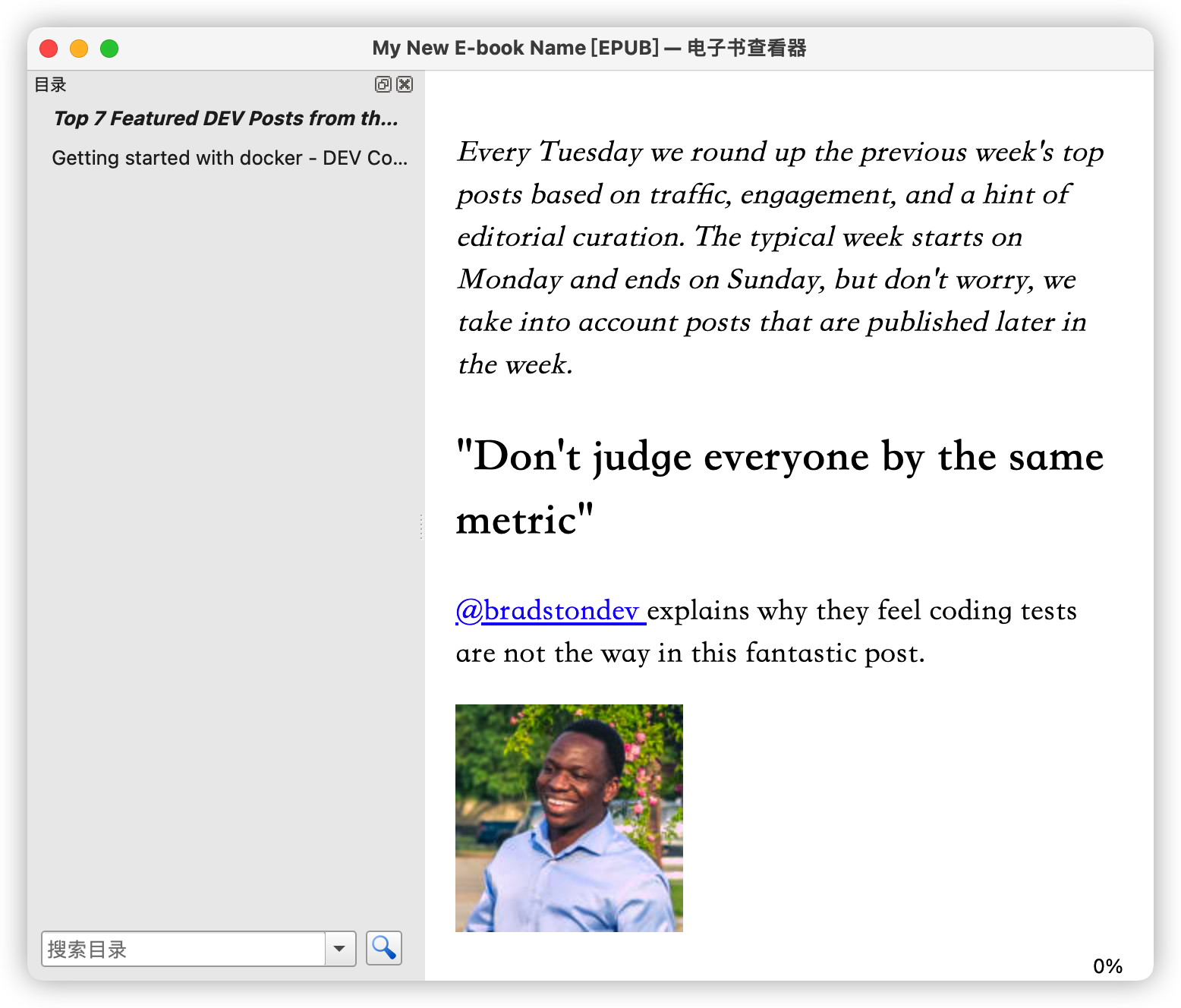
For more examples, check the examples directory.
If no cover is inferred from the HTML, a random cover is generated.

Epub(title, creator='dfface', language='en', rights='', publisher='dfface/xml2epub', epub_dir=None, toc_location='end')
Creates Epub object (adds book info/chapters, generates EPUB file).
- title (str): EPUB title (per spec).
- creator (Optional[str]): EPUB author (per spec).
- owner (Optional[str]): The owner of this file—yes, that's you! This affects the text in the top banner if you use our generated cover.
- language (Optional[str]): EPUB language (per spec).
- rights (Optional[str]): EPUB copyright (per spec).
- publisher (Optional[str]): EPUB publisher (per spec).
- epub_dir (Optional[str]): Intermediate file path (default: system temp path).
- toc_location (Optional[str]): ToC position (default: end; options: beginning/afterFirstChapter/end):
- beginning: ToC → chapters
- afterFirstChapter: Chapter1 (cover) → ToC → chapters
- end: Chapters → ToC
Add Chapter object (Created via 3 chapter creation methods) to EPUB.
Epub.create_epub(output_directory, epub_name=None, absolute_location=None)
Generate EPUB file.
output_directory(str): Output directory for EPUB.epub_name(Optional[str]): EPUB filename (no.epubsuffix; printable chars only, defaults totitle).absolute_location(Optional[str]): Absolute path/name (no.epubsuffix; overrides default${cwd}/${output_directory}/${epub_name}.epub; requires write permissions).
create_chapter_from_file(file_name, url=None, title=None, strict=True, local=False)
Create Chapter from HTML/XHTML file.
file_name(string): HTML/XHTML file path.url(Optional[string]): Infers title; recommended for relative links.title(Optional[string]): Chapter name (uses HTML<title>if None).strict(Optional[boolean]): Strict cleaning (removes inline styles, trivial attrs); default True.local(Optional[boolean]): Use local resources (copy images/CSS via paths, no online fetch).
create_chapter_from_url(url, title=None, strict=True, local=False)
Create Chapter by extracting webpage from URL.
url(string): Website link (recommended for resolving relative links).title(Optional[string]): Chapter name (uses HTML<title>if None).strict(Optional[boolean]): Strict page cleaning (removes inline styles/attrs; default True).False allows image links for custom covers.local(Optional[boolean]): Use local resources (copy images/CSS via paths, no online fetch).
create_chapter_from_string(html_string, url=None, title=None, strict=True, local=False)
Create Chapter from string (base method for URL/file variants).
html_string(string): HTML/XHTML string; or image URL (strict=False) / image path (strict=False + local=True). Image as cover if title is None/ in [COVER_TITLE_LIST] (e.g., cover).url(Optional[string]): Infers title; recommended for relative links.title(Optional[string]): Chapter name (uses HTML <title> if None).strict(Optional[boolean]): Strict page cleaning (removes inline styles/attrs; default True).local(Optional[boolean]): Use local resources (copy images/CSS via paths, no online fetch).
html_clean(input_string, help_url=None, tag_clean_list=constants.TAG_DELETE_LIST, class_list=constants.CLASS_INCLUDE_LIST, tag_dictionary=constants.SUPPORTED_TAGS)
Exposed internal default clean method for easy customization.
input_string(str): HTML/XML string.help_url(Optional[str]): Current chapter URL (resolves relative links).tag_dictionary(Optional[dict]): Tags/classes to retain (default: SUPPORTED_TAGS, can beNone: retain all tags except those specified intag_clean_list).tag_clean_list(Optional[list]): Tags to delete (full tag + subtags; default: TAG_DELETE_LIST). Preferably settag_dictionarytoNone.class_clean_list(Optional[list]): Tags to delete (class matches list; full tag + subtags; default: CLASS_DELETE_LIST).
- Custom cover: Use
create_chapter_from_string– sethtml_stringto image URL (withstrict=False) or local path (withlocal=True+strict=False). Recommend addingtitle='Cover'. - Custom web content cleaning: Fetch HTML via crawler → use exposed
html_clean(recommendtag_clean_list,class_clean_list, url) → pass output tocreate_chapter_from_string'shtml_string(keepstrict=False). - For
create_chapter_*+strict=False: Recommendurl(resolves relative links). - For
html_clean: Recommendhelp_url(resolves relative links). - Post-EPUB generation: Use Calibre to convert to standard EPUB/mobi/azw3 (fix compatibility) or edit/adjust styles.
- If the reading effect of the generated EPUB e-books is unsatisfactory on traditional readers such as Calibre, you can consider using epub-browser to read the generated EPUB e-books in your browser.
- Local images/CSS/resources: Set
local=Trueincreate_chapter_*– program copies local resources instead of fetching online.
- Generated EPUB has no content?
Ensure the target URL is a static page accessible without login. If empty, fetch the HTML string (via crawler) and use create_chapter_from_string to generate EPUB.
- Generated EPUB has unwanted content?
Our default HTML filtering may not cover all cases. Filter the HTML string yourself before using create_chapter_from_string.
- Generate EPUB from HTML string without content sanitization?
Set strict=False in create_chapter_from_string to skip internal cleaning.
- Self-fetch & clean HTML string (steps):
- Get HTML string via crawler (e.g.,
requests.get(url).text). - Clean it with exposed
html_clean(e.g.,html_clean(html_string, tag_clean_list=['sidebar'])) or custom methods. - Generate Chapter via
create_chapter_from_string(html_string, strict=False)(setstrict=Falseto skip internal cleaning). - Generate EPUB per basic usage (see example: hugo2epub.py).
- Get HTML string via crawler (e.g.,