



Glance at the results of the last 3 runs of your Github Actions.
Want to see a demo before you read the rest of the documentation? View
act3in action here.

homebrew:
brew install dhth/tap/act3go:
go install github.com/dhth/act3@latestOr get the binary directly from a release. Read more about verifying the authenticity of released artifacts here.
You can have act3 make authenticated calls to GitHub on your behalf in either
of two ways:
- Have an authenticated instance of gh available (recommended).
- Provide a valid Github token via
$GH_TOKEN, which has the following permissions for the repos you want to query data for.actions:readchecks:read
Usage:
act3 [flags]
act3 [command]
Available Commands:
config Interact with act3's config
help Help about any command
Flags:
-c, --config-path string location of act3's config file (default "/Users/user/Library/Application Support/act3/act3.yml")
-f, --format string output format to use; possible values: default, table, html (default "default")
-g, --global whether to use workflows defined globally via the config file
-h, --help help for act3
--html-template-path string path of the HTML template file to use
--html-title string title to use in the HTML output (default "act3")
-o, --open-failed whether to open failed workflows
-r, --repos strings repos to fetch workflows for, in the format "owner/repo"
-n, --workflow-name-filter string regex expression to filter workflows by name
By default, act3 will show results for the repository associated with the
current directory. Simply run act3 from the project root.
You can also specify a list of repositories to fetch results for using the -r
flag.
act3 -r dhth/act3,dhth/bmm
You can also fetch results for specific workflows using a config file, that
looks like the following. Run act3 -h to view the default location where
act3 looks for this config file.
workflows:
- id: W_kwDOLkC0eM4FaKV_repo: dhth/act3name: build
- id: W_kwDOLb3Pms4FRxjXrepo: dhth/cueitupname: buildkey: cueitup-release # optional
- id: W_kwDOLb3Pms4FRxjYrepo: dhth/cueitupname: releaseurl: https://asampleurl.com/{{runNumber}} # optional
{{runNumber}} gets replaced with the actual run number of the workflow.
You can generate this configuration using act3 itself.
Usage:
act3 config gen [flags]
Flags:
-h, --help helpfor gen
-r, --repos strings repos to generate the config for, in the format "owner/repo"
-n, --workflow-name-filter string regex expression to filter workflows by name
act3 can also output results in a tabular format.
act3 -f table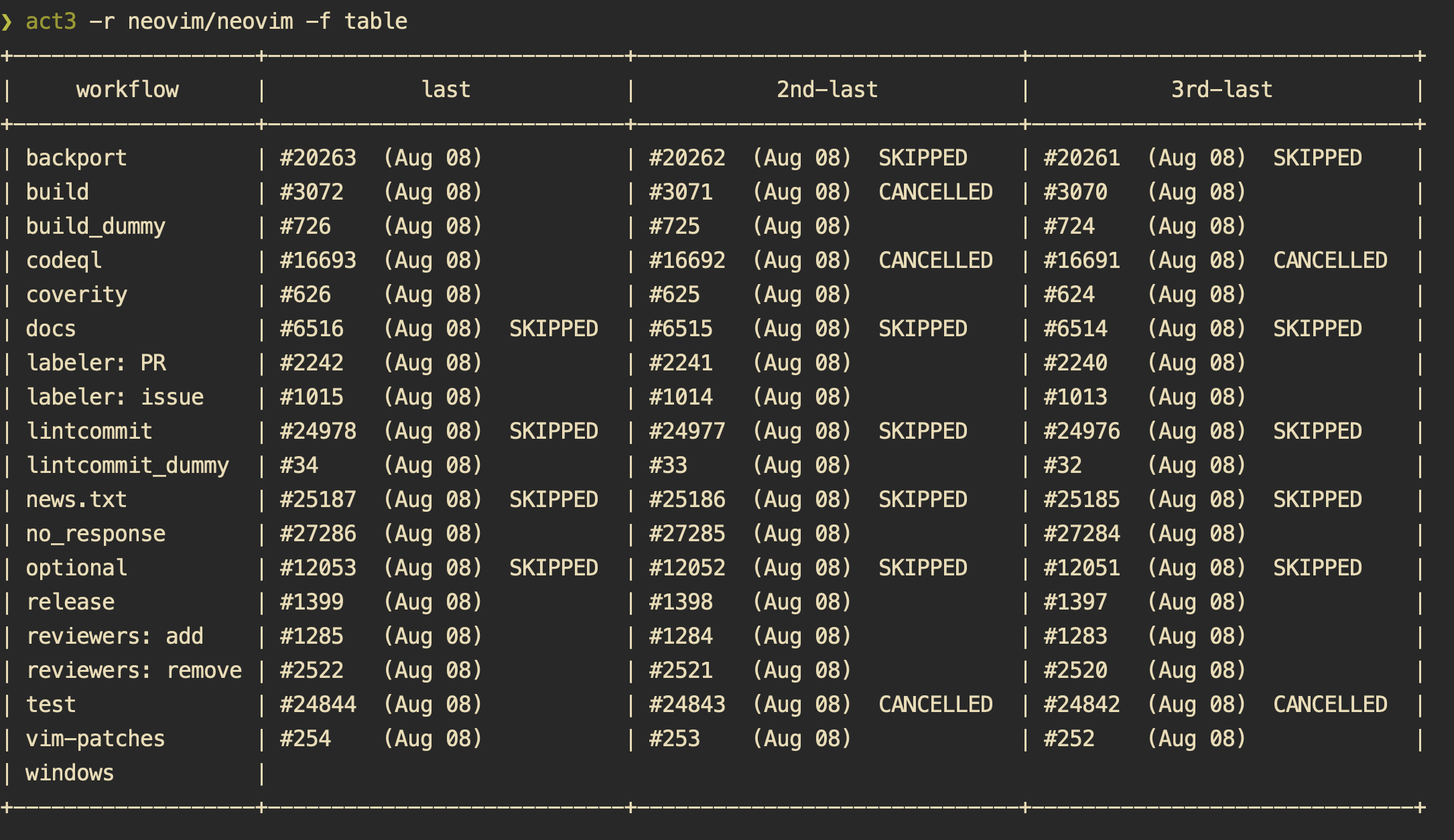
act3 can also output results in HTML format. You can also specify a template
using the -t flag (refer to
./internal/ui/assets/template.html for the
default template.)
act3 -f htmlThe resultant HTML page looks like this.
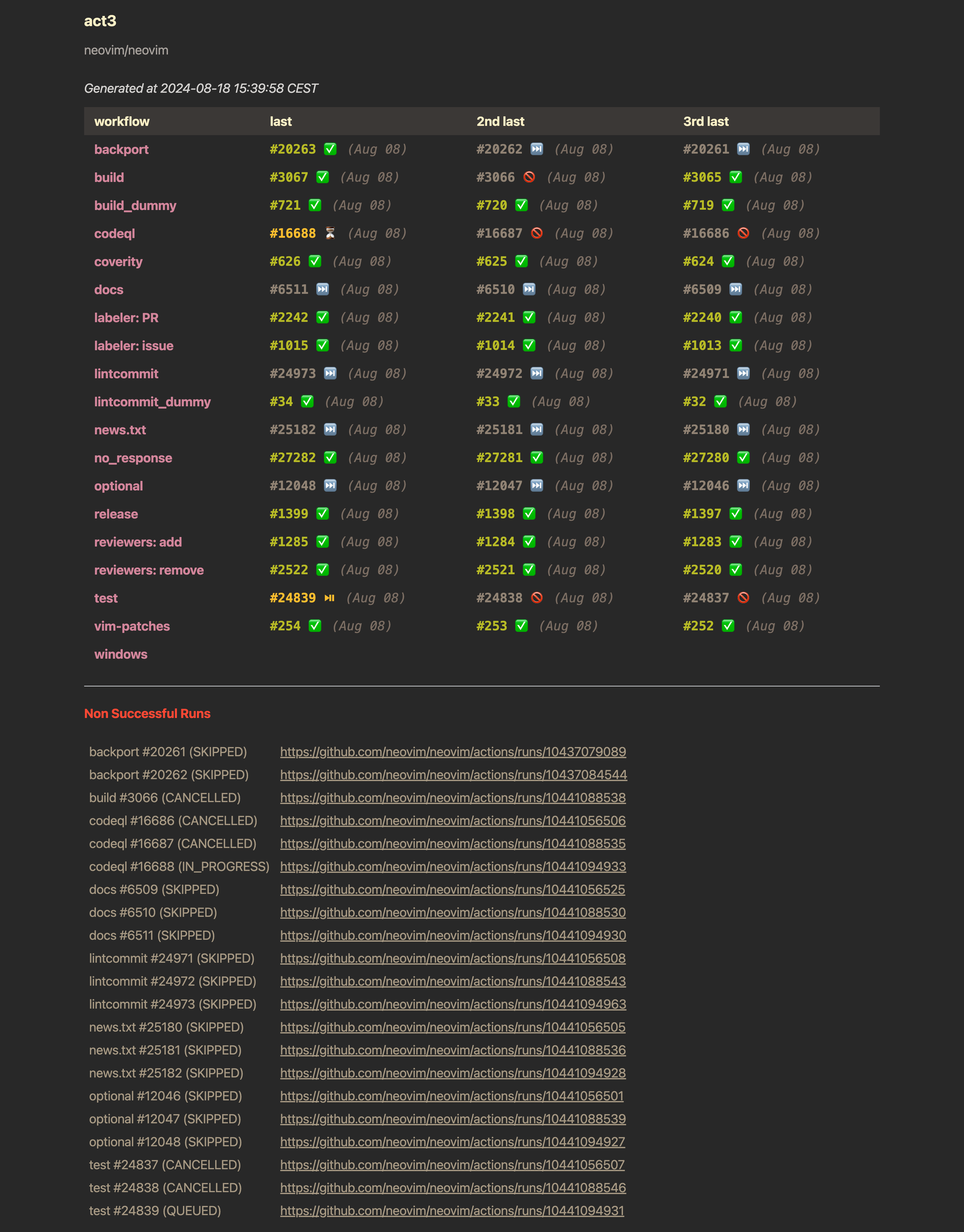
You can see this in action here.
In case you get the act3 binary directly from a release, you may want to
verify its authenticity. Checksums are applied to all released artifacts, and
the resulting checksum file is signed using
cosign.
Steps to verify (replace x.y.z in the commands listed below with the version
you want):
Download the following files from the release:
- act3_x.y.z_checksums.txt
- act3_x.y.z_checksums.txt.pem
- act3_x.y.z_checksums.txt.sig
Verify the signature:
cosign verify-blob act3_x.y.z_checksums.txt \
--certificate act3_x.y.z_checksums.txt.pem \
--signature act3_x.y.z_checksums.txt.sig \
--certificate-identity-regexp 'https://github\.com/dhth/act3/\.github/workflows/.+' \
--certificate-oidc-issuer "https://token.actions.githubusercontent.com"
Download the compressed archive you want, and validate its checksum:
curl -sSLO https://github.com/dhth/act3/releases/download/vx.y.z/act3_x.y.z_linux_amd64.tar.gz
sha256sum --ignore-missing -c act3_x.y.z_checksums.txt
If checksum validation goes through, uncompress the archive:
tar -xzf act3_x.y.z_linux_amd64.tar.gz
./act3
# profit!