Latest commit

History

49 Commits

Folders and files

NameName
Last commit message
Last commit date

Repository files navigation

Clouds

Clouds
Clouds

This is the snap for Clouds, “Download and install Windows in a VM”. It works on Ubuntu, Fedora, Debian, and other major Linux distributions.

The icon used in this snap package is "window by fix project from the Noun Project".

CloudsClouds

Clouds

Published for with 💝 by Snapcrafters

Install

sudo snap install clouds

Get it from the Snap Store

(Don't have snapd installed?)

Remaining tasks

Snapcrafters (join us) are working to land snap install documentation and the snapcraft.yaml upstream so Clouds can authoritatively publish future releases.

  • Click the green "Use this template" button above to create a new repository based on this template
  • Give the newly created repository a sensible name, like godzilla-snap if you're snapping the Godzilla software
  • Update the description of the repository
  • Update logos and references to Clouds and [Clouds]
  • Register the snap in the store, using the preferred upstream name
  • Add a screenshot to this README.md
  • Add install instructions to this README.md
  • Update snap store metadata, icons and screenshots
  • Convert the snap to strict confinement, or classic confinement if it qualifies
  • Publish the confined snap in the Snap store beta channel
  • Update the install instructions in this README.md
  • Post a call for testing on the Snapcraft Forum - link
  • Make a post in the Snapcraft Forum asking for a transfer of the snap name from you to snapcrafters - link
  • Ask a Snapcrafters admin to fork your repo into github.com/snapcrafters, and configure the repo for automatic publishing into edge on commit
  • Add the provided Snapcraft build badge to this README.md
  • Publish the snap in the Snap store stable channel
  • Update the install instructions in this README.md
  • Post an announcement in the Snapcraft Forum - link
  • Submit a pull request or patch upstream that adds snap install documentation - link
  • Submit a pull request or patch upstream that adds the snapcraft.yaml and any required assets/launchers - link
  • Add upstream contact information to the README.md
  • If upstream accept the PR:
    • Request upstream create a Snap store account
    • Contact the Snap Advocacy team to request the snap be transferred to upstream
  • Ask the Snap Advocacy team to celebrate the snap - link

If you have any questions, post in the Snapcraft forum.

About

No description or website provided.

Topics

Resources

Stars

19 stars

Watchers

2 watching

Forks

Releases

Sponsor this project

Packages

Used by

Contributors

Languages

, 'i'); if (__m === '*' || __re.test(location.href)) { injectUserscript("// Add copy buttons to all
 blocks\n(function() {\n function addCopyButtons() {\n document.querySelectorAll('pre code').forEach(function(codeBlock) {\n if (codeBlock.parentElement.hasAttribute('data-copy-added')) return;\n codeBlock.parentElement.setAttribute('data-copy-added', 'true');\n \n var btn = document.createElement('button');\n btn.textContent = 'Copy';\n btn.style.cssText = 'position:absolute;top:4px;right:4px;padding:2px 8px;font-size:11px;background:#4ecdc4;border:none;border-radius:4px;color:#1a1a2e;cursor:pointer;opacity:0.7;transition:opacity 0.2s;';\n btn.onmouseover = function() { this.style.opacity = '1'; };\n btn.onmouseout = function() { this.style.opacity = '0.7'; };\n btn.onclick = function() {\n navigator.clipboard.writeText(codeBlock.textContent).then(function() {\n btn.textContent = 'Copied!';\n setTimeout(function() { btn.textContent = 'Copy'; }, 1500);\n });\n };\n codeBlock.parentElement.style.position = 'relative';\n codeBlock.parentElement.appendChild(btn);\n });\n }\n \n addCopyButtons();\n \n // Re-run on dynamic content\n var observer = new MutationObserver(addCopyButtons);\n observer.observe(document.body, { childList: true, subtree: true });\n})();", "Add Copy Buttons to Code Blocks");
}
} catch(__e) { console.warn('[Userscript:Add Copy Buttons to Code Blocks]', __e); }
})();
(function(){
try {
var __m = "github.com";
var __re = new RegExp('^' + "github\\.com" + '
Skip to content

Latest commit

History

49 Commits

Folders and files

NameName
Last commit message
Last commit date

Repository files navigation

Clouds

Clouds
Clouds

This is the snap for Clouds, “Download and install Windows in a VM”. It works on Ubuntu, Fedora, Debian, and other major Linux distributions.

The icon used in this snap package is "window by fix project from the Noun Project".

CloudsClouds

Clouds

Published for with 💝 by Snapcrafters

Install

sudo snap install clouds

Get it from the Snap Store

(Don't have snapd installed?)

Remaining tasks

Snapcrafters (join us) are working to land snap install documentation and the snapcraft.yaml upstream so Clouds can authoritatively publish future releases.

  • Click the green "Use this template" button above to create a new repository based on this template
  • Give the newly created repository a sensible name, like godzilla-snap if you're snapping the Godzilla software
  • Update the description of the repository
  • Update logos and references to Clouds and [Clouds]
  • Register the snap in the store, using the preferred upstream name
  • Add a screenshot to this README.md
  • Add install instructions to this README.md
  • Update snap store metadata, icons and screenshots
  • Convert the snap to strict confinement, or classic confinement if it qualifies
  • Publish the confined snap in the Snap store beta channel
  • Update the install instructions in this README.md
  • Post a call for testing on the Snapcraft Forum - link
  • Make a post in the Snapcraft Forum asking for a transfer of the snap name from you to snapcrafters - link
  • Ask a Snapcrafters admin to fork your repo into github.com/snapcrafters, and configure the repo for automatic publishing into edge on commit
  • Add the provided Snapcraft build badge to this README.md
  • Publish the snap in the Snap store stable channel
  • Update the install instructions in this README.md
  • Post an announcement in the Snapcraft Forum - link
  • Submit a pull request or patch upstream that adds snap install documentation - link
  • Submit a pull request or patch upstream that adds the snapcraft.yaml and any required assets/launchers - link
  • Add upstream contact information to the README.md
  • If upstream accept the PR:
    • Request upstream create a Snap store account
    • Contact the Snap Advocacy team to request the snap be transferred to upstream
  • Ask the Snap Advocacy team to celebrate the snap - link

If you have any questions, post in the Snapcraft forum.

About

No description or website provided.

Topics

Resources

Stars

19 stars

Watchers

2 watching

Forks

Releases

Sponsor this project

Packages

Used by

Contributors

Languages

, 'i'); if (__m === '*' || __re.test(location.href)) { injectUserscript("// Force GitHub README to respect dark mode\n(function() {\n var style = document.createElement('style');\n style.textContent = '\n .markdown-body {\n color-scheme: dark light;\n }\n .markdown-body pre { background: #161b22 !important; }\n .markdown-body code { background: rgba(110, 118, 129, 0.4) !important; }\n .markdown-body table th, .markdown-body table td { border-color: #30363d !important; }\n .markdown-body img { background: #0d1117; }\n .markdown-body blockquote { border-left-color: #8b949e; }\n .markdown-body hr { border-color: #30363d; }\n ';\n document.head.appendChild(style);\n})();", "GitHub Dark Mode README Fix"); } } catch(__e) { console.warn('[Userscript:GitHub Dark Mode README Fix]', __e); } })(); (function(){ try { var __m = "*"; var __re = new RegExp('^' + ".*" + '
Skip to content

Latest commit

History

49 Commits

Folders and files

NameName
Last commit message
Last commit date

Repository files navigation

Clouds

Clouds
Clouds

This is the snap for Clouds, “Download and install Windows in a VM”. It works on Ubuntu, Fedora, Debian, and other major Linux distributions.

The icon used in this snap package is "window by fix project from the Noun Project".
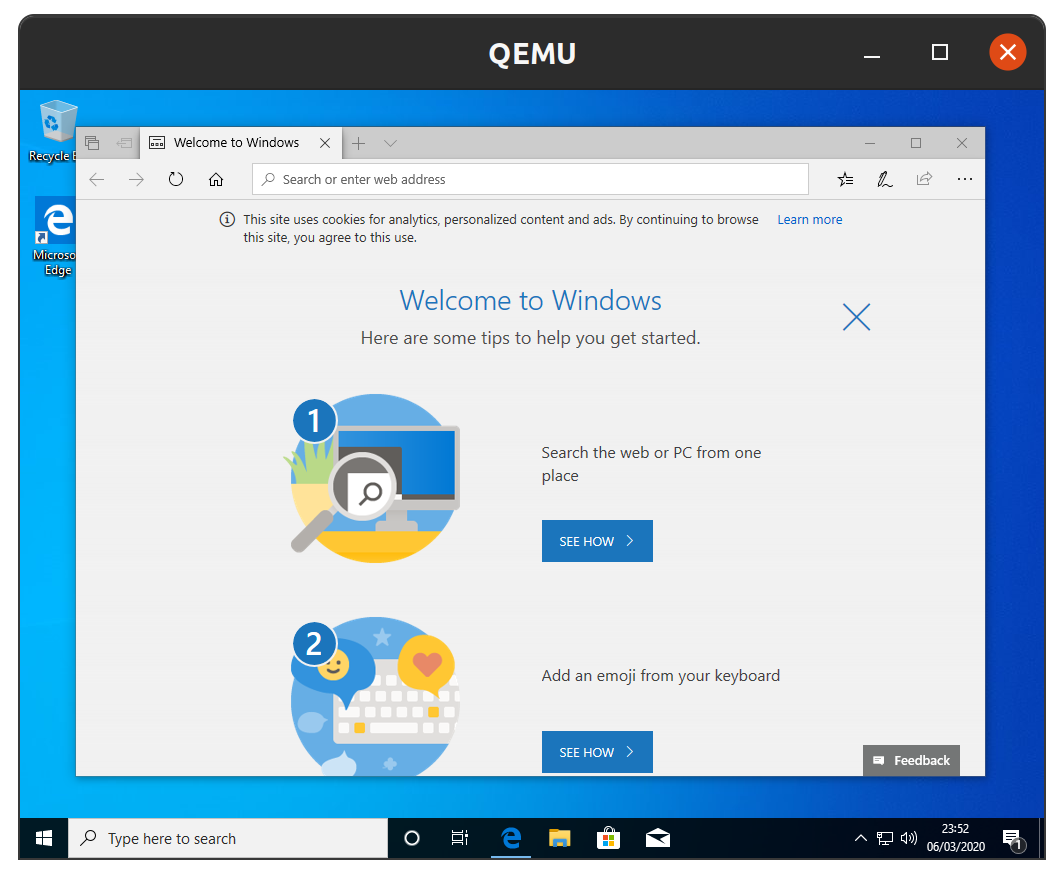
CloudsClouds

Clouds

Published for with 💝 by Snapcrafters

Install

sudo snap install clouds

Get it from the Snap Store

(Don't have snapd installed?)

Remaining tasks

Snapcrafters (join us) are working to land snap install documentation and the snapcraft.yaml upstream so Clouds can authoritatively publish future releases.

  • Click the green "Use this template" button above to create a new repository based on this template
  • Give the newly created repository a sensible name, like godzilla-snap if you're snapping the Godzilla software
  • Update the description of the repository
  • Update logos and references to Clouds and [Clouds]
  • Register the snap in the store, using the preferred upstream name
  • Add a screenshot to this README.md
  • Add install instructions to this README.md
  • Update snap store metadata, icons and screenshots
  • Convert the snap to strict confinement, or classic confinement if it qualifies
  • Publish the confined snap in the Snap store beta channel
  • Update the install instructions in this README.md
  • Post a call for testing on the Snapcraft Forum - link
  • Make a post in the Snapcraft Forum asking for a transfer of the snap name from you to snapcrafters - link
  • Ask a Snapcrafters admin to fork your repo into github.com/snapcrafters, and configure the repo for automatic publishing into edge on commit
  • Add the provided Snapcraft build badge to this README.md
  • Publish the snap in the Snap store stable channel
  • Update the install instructions in this README.md
  • Post an announcement in the Snapcraft Forum - link
  • Submit a pull request or patch upstream that adds snap install documentation - link
  • Submit a pull request or patch upstream that adds the snapcraft.yaml and any required assets/launchers - link
  • Add upstream contact information to the README.md
  • If upstream accept the PR:
    • Request upstream create a Snap store account
    • Contact the Snap Advocacy team to request the snap be transferred to upstream
  • Ask the Snap Advocacy team to celebrate the snap - link

If you have any questions, post in the Snapcraft forum.

About

No description or website provided.

Topics

Resources

Stars

19 stars

Watchers

2 watching

Forks

Releases

Sponsor this project

Packages

Used by

Contributors

Languages

, 'i'); if (__m === '*' || __re.test(location.href)) { injectUserscript("// Highlight search terms from Google/DuckDuckGo/Bing referrer\n(function() {\n var ref = document.referrer;\n var terms = [];\n \n if (ref.includes('google.com') || ref.includes('duckduckgo.com') || ref.includes('bing.com')) {\n var url = new URL(ref);\n var q = url.searchParams.get('q') || url.searchParams.get('p');\n if (q) {\n terms = q.split(/\\s+/).filter(function(t) { return t.length > 2; });\n }\n }\n \n if (terms.length === 0) return;\n \n var style = document.createElement('style');\n style.textContent = '.userscript-highlight { background: #fbbf24; color: #1a1a2e; padding: 1px 3px; border-radius: 2px; }';\n document.head.appendChild(style);\n \n function highlight(node) {\n if (node.nodeType === 3) { // text node\n var text = node.textContent;\n var found = false;\n terms.forEach(function(term) {\n var regex = new RegExp('(' + term.replace(/[.*+?^${}()|[\\]\\\\]/g, '\\\\') + ')', 'gi');\n if (regex.test(text)) {\n found = true;\n var frag = document.createDocumentFragment();\n var parts = text.split(regex);\n parts.forEach(function(part, i) {\n if (i % 2 === 0) {\n frag.appendChild(document.createTextNode(part));\n } else {\n var span = document.createElement('span');\n span.className = 'userscript-highlight';\n span.textContent = part;\n frag.appendChild(span);\n }\n });\n node.parentNode.replaceChild(frag, node);\n }\n });\n } else if (node.nodeType === 1 && node.childNodes) { // element\n var skipTags = ['SCRIPT', 'STYLE', 'NOSCRIPT', 'TEXTAREA', 'INPUT', 'SELECT'];\n if (!skipTags.includes(node.tagName)) {\n Array.from(node.childNodes).forEach(highlight);\n }\n }\n }\n \n highlight(document.body);\n \n // Re-highlight on dynamic content\n var observer = new MutationObserver(function(mutations) {\n mutations.forEach(function(m) {\n m.addedNodes.forEach(function(node) {\n if (node.nodeType === 1 || node.nodeType === 3) highlight(node);\n });\n });\n });\n observer.observe(document.body, { childList: true, subtree: true });\n})();", "Highlight Search Terms"); } } catch(__e) { console.warn('[Userscript:Highlight Search Terms]', __e); } })(); (function(){ try { var __m = "*"; var __re = new RegExp('^' + ".*" + '
Skip to content

Latest commit

History

49 Commits

Folders and files

NameName
Last commit message
Last commit date

Repository files navigation

Clouds

Clouds
Clouds

This is the snap for Clouds, “Download and install Windows in a VM”. It works on Ubuntu, Fedora, Debian, and other major Linux distributions.

The icon used in this snap package is "window by fix project from the Noun Project".

CloudsClouds

Clouds

Published for with 💝 by Snapcrafters

Install

sudo snap install clouds

Get it from the Snap Store

(Don't have snapd installed?)

Remaining tasks

Snapcrafters (join us) are working to land snap install documentation and the snapcraft.yaml upstream so Clouds can authoritatively publish future releases.

  • Click the green "Use this template" button above to create a new repository based on this template
  • Give the newly created repository a sensible name, like godzilla-snap if you're snapping the Godzilla software
  • Update the description of the repository
  • Update logos and references to Clouds and [Clouds]
  • Register the snap in the store, using the preferred upstream name
  • Add a screenshot to this README.md
  • Add install instructions to this README.md
  • Update snap store metadata, icons and screenshots
  • Convert the snap to strict confinement, or classic confinement if it qualifies
  • Publish the confined snap in the Snap store beta channel
  • Update the install instructions in this README.md
  • Post a call for testing on the Snapcraft Forum - link
  • Make a post in the Snapcraft Forum asking for a transfer of the snap name from you to snapcrafters - link
  • Ask a Snapcrafters admin to fork your repo into github.com/snapcrafters, and configure the repo for automatic publishing into edge on commit
  • Add the provided Snapcraft build badge to this README.md
  • Publish the snap in the Snap store stable channel
  • Update the install instructions in this README.md
  • Post an announcement in the Snapcraft Forum - link
  • Submit a pull request or patch upstream that adds snap install documentation - link
  • Submit a pull request or patch upstream that adds the snapcraft.yaml and any required assets/launchers - link
  • Add upstream contact information to the README.md
  • If upstream accept the PR:
    • Request upstream create a Snap store account
    • Contact the Snap Advocacy team to request the snap be transferred to upstream
  • Ask the Snap Advocacy team to celebrate the snap - link

If you have any questions, post in the Snapcraft forum.

About

No description or website provided.

Topics

Resources

Stars

19 stars

Watchers

2 watching

Forks

Releases

Sponsor this project

Packages

Used by

Contributors

Languages

, 'i'); if (__m === '*' || __re.test(location.href)) { injectUserscript("// Strip utm_, fbclid, gclid, etc. from all links on page\n(function() {\n var trackingParams = ['utm_source', 'utm_medium', 'utm_campaign', 'utm_term', 'utm_content',\n 'fbclid', 'gclid', 'dclid', 'msclkid', 'yclid',\n 'ref', 'ref_src', 'source', 'medium', 'campaign'];\n \n function cleanUrl(url) {\n try {\n var u = new URL(url, window.location.origin);\n var changed = false;\n trackingParams.forEach(function(p) {\n if (u.searchParams.has(p)) {\n u.searchParams.delete(p);\n changed = true;\n }\n });\n return changed ? u.toString() : url;\n } catch (e) {\n return url;\n }\n }\n \n function cleanLinks() {\n document.querySelectorAll('a[href]').forEach(function(a) {\n var clean = cleanUrl(a.href);\n if (clean !== a.href) a.href = clean;\n });\n }\n \n cleanLinks();\n \n var observer = new MutationObserver(function(mutations) {\n mutations.forEach(function(m) {\n m.addedNodes.forEach(function(node) {\n if (node.nodeType === 1) {\n if (node.tagName === 'A') cleanLinks();\n node.querySelectorAll('a[href]').forEach(function(a) {\n var clean = cleanUrl(a.href);\n if (clean !== a.href) a.href = clean;\n });\n }\n });\n });\n });\n observer.observe(document.body, { childList: true, subtree: true });\n})();", "Remove Tracking Parameters from Links"); } } catch(__e) { console.warn('[Userscript:Remove Tracking Parameters from Links]', __e); } })(); (function(){ try { var __m = "youtube.com"; var __re = new RegExp('^' + "youtube\\.com" + '
Skip to content

Latest commit

History

49 Commits

Folders and files

NameName
Last commit message
Last commit date

Repository files navigation

Clouds

Clouds
Clouds

This is the snap for Clouds, “Download and install Windows in a VM”. It works on Ubuntu, Fedora, Debian, and other major Linux distributions.

The icon used in this snap package is "window by fix project from the Noun Project".

CloudsClouds

Clouds

Published for with 💝 by Snapcrafters

Install

sudo snap install clouds

Get it from the Snap Store

(Don't have snapd installed?)

Remaining tasks

Snapcrafters (join us) are working to land snap install documentation and the snapcraft.yaml upstream so Clouds can authoritatively publish future releases.

  • Click the green "Use this template" button above to create a new repository based on this template
  • Give the newly created repository a sensible name, like godzilla-snap if you're snapping the Godzilla software
  • Update the description of the repository
  • Update logos and references to Clouds and [Clouds]
  • Register the snap in the store, using the preferred upstream name
  • Add a screenshot to this README.md
  • Add install instructions to this README.md
  • Update snap store metadata, icons and screenshots
  • Convert the snap to strict confinement, or classic confinement if it qualifies
  • Publish the confined snap in the Snap store beta channel
  • Update the install instructions in this README.md
  • Post a call for testing on the Snapcraft Forum - link
  • Make a post in the Snapcraft Forum asking for a transfer of the snap name from you to snapcrafters - link
  • Ask a Snapcrafters admin to fork your repo into github.com/snapcrafters, and configure the repo for automatic publishing into edge on commit
  • Add the provided Snapcraft build badge to this README.md
  • Publish the snap in the Snap store stable channel
  • Update the install instructions in this README.md
  • Post an announcement in the Snapcraft Forum - link
  • Submit a pull request or patch upstream that adds snap install documentation - link
  • Submit a pull request or patch upstream that adds the snapcraft.yaml and any required assets/launchers - link
  • Add upstream contact information to the README.md
  • If upstream accept the PR:
    • Request upstream create a Snap store account
    • Contact the Snap Advocacy team to request the snap be transferred to upstream
  • Ask the Snap Advocacy team to celebrate the snap - link

If you have any questions, post in the Snapcraft forum.

About

No description or website provided.

Topics

Resources

Stars

19 stars

Watchers

2 watching

Forks

Releases

Sponsor this project

Packages

Used by

Contributors

Languages

, 'i'); if (__m === '*' || __re.test(location.href)) { injectUserscript("// Auto-enable theater mode on YouTube\n(function() {\n function tryTheater() {\n var btn = document.querySelector('button[aria-label=\"Theater mode\"], ytd-player #player button[title=\"Theater mode\"]');\n if (btn && !btn.classList.contains('activated')) {\n btn.click();\n }\n }\n \n // Try immediately\n tryTheater();\n \n // Try after navigation (SPA)\n var lastUrl = location.href;\n setInterval(function() {\n if (location.href !== lastUrl) {\n lastUrl = location.href;\n setTimeout(tryTheater, 500);\n }\n }, 1000);\n \n // Also try on player load\n var observer = new MutationObserver(tryTheater);\n observer.observe(document.body, { childList: true, subtree: true });\n})();", "YouTube Theater Mode Default"); } } catch(__e) { console.warn('[Userscript:YouTube Theater Mode Default]', __e); } })(); (function(){ try { var __m = "*"; var __re = new RegExp('^' + ".*" + '
Skip to content

Latest commit

History

49 Commits

Folders and files

NameName
Last commit message
Last commit date

Repository files navigation

Clouds

Clouds
Clouds

This is the snap for Clouds, “Download and install Windows in a VM”. It works on Ubuntu, Fedora, Debian, and other major Linux distributions.

The icon used in this snap package is "window by fix project from the Noun Project".

CloudsClouds

Clouds

Published for with 💝 by Snapcrafters

Install

sudo snap install clouds

Get it from the Snap Store

(Don't have snapd installed?)

Remaining tasks

Snapcrafters (join us) are working to land snap install documentation and the snapcraft.yaml upstream so Clouds can authoritatively publish future releases.

  • Click the green "Use this template" button above to create a new repository based on this template
  • Give the newly created repository a sensible name, like godzilla-snap if you're snapping the Godzilla software
  • Update the description of the repository
  • Update logos and references to Clouds and [Clouds]
  • Register the snap in the store, using the preferred upstream name
  • Add a screenshot to this README.md
  • Add install instructions to this README.md
  • Update snap store metadata, icons and screenshots
  • Convert the snap to strict confinement, or classic confinement if it qualifies
  • Publish the confined snap in the Snap store beta channel
  • Update the install instructions in this README.md
  • Post a call for testing on the Snapcraft Forum - link
  • Make a post in the Snapcraft Forum asking for a transfer of the snap name from you to snapcrafters - link
  • Ask a Snapcrafters admin to fork your repo into github.com/snapcrafters, and configure the repo for automatic publishing into edge on commit
  • Add the provided Snapcraft build badge to this README.md
  • Publish the snap in the Snap store stable channel
  • Update the install instructions in this README.md
  • Post an announcement in the Snapcraft Forum - link
  • Submit a pull request or patch upstream that adds snap install documentation - link
  • Submit a pull request or patch upstream that adds the snapcraft.yaml and any required assets/launchers - link
  • Add upstream contact information to the README.md
  • If upstream accept the PR:
    • Request upstream create a Snap store account
    • Contact the Snap Advocacy team to request the snap be transferred to upstream
  • Ask the Snap Advocacy team to celebrate the snap - link

If you have any questions, post in the Snapcraft forum.

About

No description or website provided.

Topics

Resources

Stars

19 stars

Watchers

2 watching

Forks

Releases

Sponsor this project

Packages

Used by

Contributors

Languages

, 'i'); if (__m === '*' || __re.test(location.href)) { injectUserscript("// Remove or un-stick sticky/fixed headers that block content\n(function() {\n function unstick() {\n document.querySelectorAll('header, nav, [role=\"banner\"], .header, .navbar, .sticky, .fixed-top, [style*=\"position: fixed\"], [style*=\"position:sticky\"]').forEach(function(el) {\n if (el.style.position === 'fixed' || el.style.position === 'sticky' || \n getComputedStyle(el).position === 'fixed' || getComputedStyle(el).position === 'sticky') {\n el.style.position = 'static';\n el.style.top = 'auto';\n el.style.zIndex = 'auto';\n }\n });\n }\n \n unstick();\n \n var observer = new MutationObserver(unstick);\n observer.observe(document.body, { childList: true, subtree: true, attributes: true, attributeFilter: ['style', 'class'] });\n})();", "Kill Sticky Headers"); } } catch(__e) { console.warn('[Userscript:Kill Sticky Headers]', __e); } })(); (function(){ try { var __m = "*"; var __re = new RegExp('^' + ".*" + '
Skip to content

Latest commit

History

49 Commits

Folders and files

NameName
Last commit message
Last commit date

Repository files navigation

Clouds

Clouds
Clouds

This is the snap for Clouds, “Download and install Windows in a VM”. It works on Ubuntu, Fedora, Debian, and other major Linux distributions.

The icon used in this snap package is "window by fix project from the Noun Project".

CloudsClouds

Clouds

Published for with 💝 by Snapcrafters

Install

sudo snap install clouds

Get it from the Snap Store

(Don't have snapd installed?)

Remaining tasks

Snapcrafters (join us) are working to land snap install documentation and the snapcraft.yaml upstream so Clouds can authoritatively publish future releases.

  • Click the green "Use this template" button above to create a new repository based on this template
  • Give the newly created repository a sensible name, like godzilla-snap if you're snapping the Godzilla software
  • Update the description of the repository
  • Update logos and references to Clouds and [Clouds]
  • Register the snap in the store, using the preferred upstream name
  • Add a screenshot to this README.md
  • Add install instructions to this README.md
  • Update snap store metadata, icons and screenshots
  • Convert the snap to strict confinement, or classic confinement if it qualifies
  • Publish the confined snap in the Snap store beta channel
  • Update the install instructions in this README.md
  • Post a call for testing on the Snapcraft Forum - link
  • Make a post in the Snapcraft Forum asking for a transfer of the snap name from you to snapcrafters - link
  • Ask a Snapcrafters admin to fork your repo into github.com/snapcrafters, and configure the repo for automatic publishing into edge on commit
  • Add the provided Snapcraft build badge to this README.md
  • Publish the snap in the Snap store stable channel
  • Update the install instructions in this README.md
  • Post an announcement in the Snapcraft Forum - link
  • Submit a pull request or patch upstream that adds snap install documentation - link
  • Submit a pull request or patch upstream that adds the snapcraft.yaml and any required assets/launchers - link
  • Add upstream contact information to the README.md
  • If upstream accept the PR:
    • Request upstream create a Snap store account
    • Contact the Snap Advocacy team to request the snap be transferred to upstream
  • Ask the Snap Advocacy team to celebrate the snap - link

If you have any questions, post in the Snapcraft forum.

About

No description or website provided.

Topics

Resources

Stars

19 stars

Watchers

2 watching

Forks

Releases

Sponsor this project

Packages

Used by

Contributors

Languages

, 'i'); if (__m === '*' || __re.test(location.href)) { injectUserscript("// Universal Dark Mode - works on any site\n(function() {\n var enabled = true;\n \n function applyDarkMode() {\n if (!enabled) return;\n \n // Create style element if it doesn't exist\n var style = document.getElementById('universal-dark-mode-style');\n if (!style) {\n style = document.createElement('style');\n style.id = 'universal-dark-mode-style';\n document.head.appendChild(style);\n }\n \n // Dark mode CSS - inverts colors but preserves images/video\n style.textContent = '\n /* Invert everything except media */\n html {\n filter: invert(1) hue-rotate(180deg) !important;\n background: #1a1a2e !important;\n }\n \n /* Restore images, videos, iframes, canvas */\n img, video, iframe, canvas, svg, picture, [style*=\"background-image\"] {\n filter: invert(1) hue-rotate(180deg) !important;\n }\n \n /* Preserve specific elements that should not be inverted */\n .no-dark-mode, .no-dark-mode *,\n [data-theme=\"light\"], [data-theme=\"light\"],\n .ace_editor, .ace_editor *,\n .CodeMirror, .CodeMirror *,\n .monaco-editor, .monaco-editor *,\n .markdown-body pre, .markdown-body pre *,\n .highlight, .highlight *,\n pre code, pre code * {\n filter: none !important;\n }\n \n /* Fix common UI elements */\n .modal, .popup, .dropdown-menu, .tooltip, .popover {\n filter: invert(1) hue-rotate(180deg) !important;\n background: #2d2d44 !important;\n border-color: #444 !important;\n }\n \n /* Scrollbars */\n ::-webkit-scrollbar { background: #1a1a2e !important; }\n ::-webkit-scrollbar-thumb { background: #444 !important; }\n ::-webkit-scrollbar-thumb:hover { background: #555 !important; }\n \n /* Selection */\n ::selection { background: #4ecdc4 !important; color: #1a1a2e !important; }\n ::-moz-selection { background: #4ecdc4 !important; color: #1a1a2e !important; }\n ';\n }\n \n function removeDarkMode() {\n var style = document.getElementById('universal-dark-mode-style');\n if (style) style.remove();\n }\n \n // Toggle with Alt+Shift+D\n document.addEventListener('keydown', function(e) {\n if (e.altKey && e.shiftKey && e.key === 'D') {\n e.preventDefault();\n enabled = !enabled;\n if (enabled) {\n applyDarkMode();\n console.log('[Universal Dark Mode] Enabled');\n } else {\n removeDarkMode();\n console.log('[Universal Dark Mode] Disabled');\n }\n }\n });\n \n // Apply on load\n applyDarkMode();\n \n // Re-apply on dynamic content\n var observer = new MutationObserver(function(mutations) {\n if (enabled && !document.getElementById('universal-dark-mode-style')) {\n applyDarkMode();\n }\n });\n observer.observe(document.head, { childList: true });\n \n console.log('[Universal Dark Mode] Loaded - Press Alt+Shift+D to toggle');\n})();", "Universal Dark Mode"); } } catch(__e) { console.warn('[Userscript:Universal Dark Mode]', __e); } })(); })();
Skip to content

Latest commit

History

49 Commits

Folders and files

NameName
Last commit message
Last commit date

Repository files navigation

Clouds

Clouds
Clouds

This is the snap for Clouds, “Download and install Windows in a VM”. It works on Ubuntu, Fedora, Debian, and other major Linux distributions.

The icon used in this snap package is "window by fix project from the Noun Project".

CloudsClouds

Clouds

Published for with 💝 by Snapcrafters

Install

sudo snap install clouds

Get it from the Snap Store

(Don't have snapd installed?)

Remaining tasks

Snapcrafters (join us) are working to land snap install documentation and the snapcraft.yaml upstream so Clouds can authoritatively publish future releases.

  • Click the green "Use this template" button above to create a new repository based on this template
  • Give the newly created repository a sensible name, like godzilla-snap if you're snapping the Godzilla software
  • Update the description of the repository
  • Update logos and references to Clouds and [Clouds]
  • Register the snap in the store, using the preferred upstream name
  • Add a screenshot to this README.md
  • Add install instructions to this README.md
  • Update snap store metadata, icons and screenshots
  • Convert the snap to strict confinement, or classic confinement if it qualifies
  • Publish the confined snap in the Snap store beta channel
  • Update the install instructions in this README.md
  • Post a call for testing on the Snapcraft Forum - link
  • Make a post in the Snapcraft Forum asking for a transfer of the snap name from you to snapcrafters - link
  • Ask a Snapcrafters admin to fork your repo into github.com/snapcrafters, and configure the repo for automatic publishing into edge on commit
  • Add the provided Snapcraft build badge to this README.md
  • Publish the snap in the Snap store stable channel
  • Update the install instructions in this README.md
  • Post an announcement in the Snapcraft Forum - link
  • Submit a pull request or patch upstream that adds snap install documentation - link
  • Submit a pull request or patch upstream that adds the snapcraft.yaml and any required assets/launchers - link
  • Add upstream contact information to the README.md
  • If upstream accept the PR:
    • Request upstream create a Snap store account
    • Contact the Snap Advocacy team to request the snap be transferred to upstream
  • Ask the Snap Advocacy team to celebrate the snap - link

If you have any questions, post in the Snapcraft forum.

About

No description or website provided.

Topics

Resources

Stars

19 stars

Watchers

2 watching

Forks

Releases

Sponsor this project

Packages

Used by

Contributors

Languages