A lightweight markdown editor library with perfect WYSIWYG alignment using an invisible textarea overlay technique. Includes optional toolbar. ~85KB minified with all features.
🎮 Try it out: Interactive demos on overtype.dev
- Basic Editor - Minimal setup with live preview
- With Toolbar - Full formatting toolbar
- Multiple Instances - Several editors on one page
- View Modes - Preview synchronization
- Themes - Light/dark theme switching
- All Features - Complete markdown showcase
- 👻 Invisible textarea overlay - Transparent input layer overlaid on styled preview for seamless editing
- 🎨 Global theming - Solar (light) and Cave (dark) themes that apply to all instances
- ⌨️ Keyboard shortcuts - Common markdown shortcuts (Cmd/Ctrl+B for bold, etc.)
- 📱 Mobile optimized - Responsive design with mobile-specific styles
- 🔄 DOM persistence aware - Recovers from existing DOM (perfect for HyperClay and similar platforms)
- 🚀 Lightweight - ~85KB minified
- 🎯 Optional toolbar - Clean, minimal toolbar with all essential formatting
- ✨ Smart shortcuts - Keyboard shortcuts with selection preservation
- 📝 Smart list continuation - GitHub-style automatic list continuation on Enter
- 🔧 Framework agnostic - Works with React, Vue, vanilla JS, and more
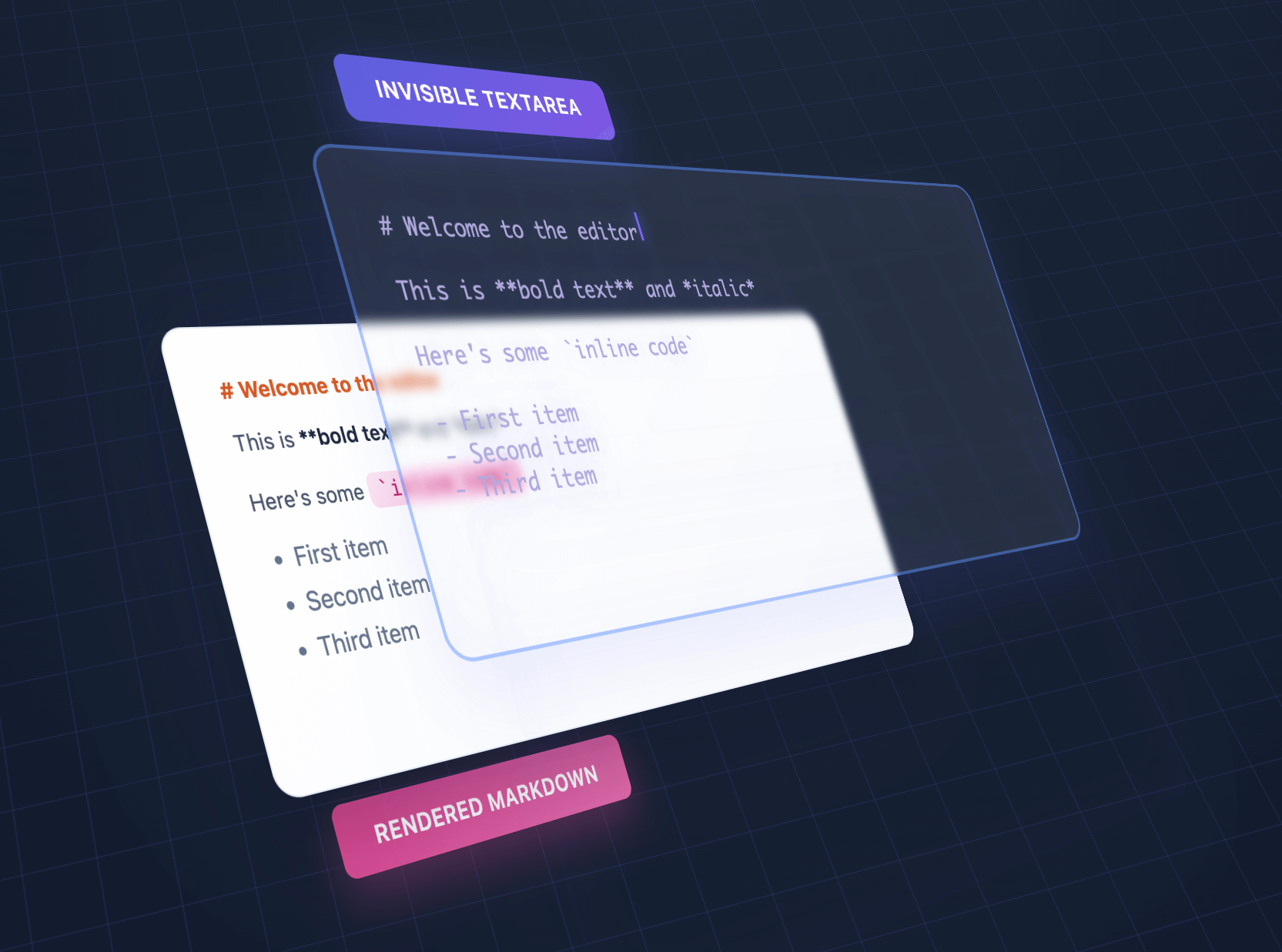


We overlap an invisible textarea on top of styled output, giving the illusion of editing styled text using a plain textarea.
| Feature | OverType | HyperMD | Milkdown | TUI Editor | EasyMDE |
|---|---|---|---|---|---|
| Size | ~85KB | 364.02 KB | 344.51 KB | 560.99 KB | 323.69 KB |
| Dependencies | Bundled | CodeMirror | ProseMirror + plugins | Multiple libs | CodeMirror |
| Setup | Single file | Complex config | Build step required | Complex config | Moderate |
| Approach | Invisible textarea | ContentEditable | ContentEditable | ContentEditable | CodeMirror |
| Mobile | Perfect native | Issues common | Issues common | Issues common | Limited |
| Markdown syntax | Visible | Hidden | Hidden | Toggle | Visible |
| Advanced features | Basic | Full | Full | Full | Moderate |
| Best for | Simple, fast, mobile | Full WYSIWYG | Modern frameworks | Enterprise apps | Classic editing |
Choose OverType when you need:
- Tiny bundle size (10x smaller than alternatives)
- Zero dependencies - single file that works immediately
- Perfect native browser features (undo/redo, mobile keyboards, spellcheck)
- Dead-simple integration without build tools
- Easy to understand, modify, and extend
- Excellent mobile support with visible markdown syntax
Choose other editors when you need:
- Full WYSIWYG with hidden markdown syntax
- Advanced features like tables, diagrams, or collaborative editing
- Rich plugin ecosystems
- Enterprise features and extensive customization
- Framework-specific integration (React, Vue, etc.)
- Complex multi-layered architecture for deep customization
npm install overtype<scriptsrc="https://unpkg.com/overtype/dist/overtype.min.js"></script>// Create a single editorconst[editor]=newOverType('#editor',{value: '# Hello World',theme: 'solar'});// Get/set contenteditor.getValue();editor.setValue('# New Content');// Change themeeditor.setTheme('cave');<divid="editor" style="height: 400px;"></div><script>const[editor]=newOverType('#editor',{placeholder: 'Start typing markdown...',value: '# Welcome\n\nStart writing **markdown** here!',onChange: (value,instance)=>{console.log('Content changed:',value);}});</script>// Enable the toolbar with view mode switcherconst[editor]=newOverType('#editor',{toolbar: true,// Enables the toolbarvalue: '# Document\n\nSelect text and use the toolbar buttons!'});// Toolbar provides:// - Bold, Italic formatting// - Heading levels (H1, H2, H3)// - Links, inline code, code blocks// - Bullet and numbered lists// - View mode switcher (eye icon dropdown)// - All with keyboard shortcuts!// Three view modes available via toolbar dropdown:// 1. Normal Edit - Default WYSIWYG markdown editing// 2. Plain Textarea - Shows raw markdown without preview overlay// 3. Preview Mode - Read-only rendered preview with clickable links// Programmatically switch modes:editor.showPlainTextarea(true);// Switch to plain textarea modeeditor.showPreviewMode(true);// Switch to preview modeThe toolbar and keyboard shortcuts work together seamlessly:
- Cmd/Ctrl + B - Bold
- Cmd/Ctrl + I - Italic
- Cmd/Ctrl + K - Insert link
- Cmd/Ctrl + Shift + 7 - Numbered list
- Cmd/Ctrl + Shift + 8 - Bullet list
All shortcuts preserve text selection, allowing you to apply multiple formats quickly.
// Initialize multiple editors at onceconsteditors=OverType.init('.markdown-editor',{theme: 'cave',fontSize: '16px'});// Each editor is independenteditors.forEach((editor,index)=>{editor.setValue(`# Editor ${index+1}`);});// Use with form validationconst[editor]=newOverType('#message',{placeholder: 'Your message...',textareaProps: {required: true,maxLength: 500,name: 'message'}});// The textarea will work with native form validationdocument.querySelector('form').addEventListener('submit',(e)=>{constcontent=editor.getValue();// Form will automatically validate required field});const[editor]=newOverType('#editor',{theme: {name: 'my-theme',colors: {bgPrimary: '#faf0ca',bgSecondary: '#ffffff',text: '#0d3b66',h1: '#f95738',h2: '#ee964b',h3: '#3d8a51',strong: '#ee964b',em: '#f95738',link: '#0d3b66',code: '#0d3b66',codeBg: 'rgba(244, 211, 94, 0.2)',blockquote: '#5a7a9b',hr: '#5a7a9b',syntaxMarker: 'rgba(13, 59, 102, 0.52)',cursor: '#f95738',selection: 'rgba(244, 211, 94, 0.4)'}}});Generate HTML previews or export the rendered content:
const[editor]=newOverType('#editor',{value: '# Title\n\n**Bold** text with [links](https://example.com)'});// Get the raw markdownconstmarkdown=editor.getValue();// Returns: "# Title\n\n**Bold** text with [links](https://example.com)"// Get rendered HTML with syntax markers (for debugging/inspection)consthtml=editor.getRenderedHTML();// Returns HTML with <span class="syntax-marker"> elements visible// Get clean HTML for export (no OverType-specific markup)constcleanHTML=editor.getRenderedHTML({cleanHTML: true});// Returns clean HTML suitable for saving/exporting// Convenience method for clean HTMLconstexportHTML=editor.getCleanHTML();// Same as getRenderedHTML({ cleanHTML: true })// Get the current preview element's HTML (actual DOM content)constpreviewHTML=editor.getPreviewHTML();// Returns exactly what's shown in the editor's preview layer// Example: Export clean HTML to serverconsthtmlToSave=editor.getCleanHTML();// No syntax markers// Example: Clone exact preview appearancedocument.getElementById('clone').innerHTML=editor.getPreviewHTML();Enable a built-in stats bar that shows character, word, and line counts:
// Enable stats bar on initializationconst[editor]=newOverType('#editor',{showStats: true});// Show or hide stats bar dynamicallyeditor.showStats(true);// Showeditor.showStats(false);// Hide// Custom stats formatconst[editor]=newOverType('#editor',{showStats: true,statsFormatter: (stats)=>{// stats object contains: { chars, words, lines, line, column }return`<span>${stats.chars} characters</span> <span>${stats.words} words</span> <span>${stats.lines} lines</span> <span>Line ${stats.line}, Col ${stats.column}</span>`;}});The stats bar automatically adapts to your theme colors using CSS variables.
functionMarkdownEditor({ value, onChange }){constref=useRef();consteditorRef=useRef();useEffect(()=>{const[instance]=OverType.init(ref.current,{
value,
onChange
});editorRef.current=instance;return()=>editorRef.current?.destroy();},[]);useEffect(()=>{if(editorRef.current&&value!==editorRef.current.getValue()){editorRef.current.setValue(value);}},[value]);return<divref={ref}style={{height: '400px'}}/>;}newOverType(target,options)Parameters:
target- Selector string, Element, NodeList, or Array of elementsoptions- Configuration object (see below)
Returns: Array of OverType instances (always an array, even for single element)
{// TypographyfontSize: '14px',lineHeight: 1.6,fontFamily: 'monospace',padding: '16px',// Theme - 'solar', 'cave', or custom theme objecttheme: 'solar',// Custom colors (override theme colors)colors: {h1: '#e63946',h2: '#457b9d',// ... any color variable},// Mobile styles (applied at <= 640px)mobile: {fontSize: '16px',padding: '12px',lineHeight: 1.5},// Behaviorautofocus: false,placeholder: 'Start typing...',value: '',// Auto-resizeautoResize: false,// Auto-expand height with contentminHeight: '100px',// Minimum height when autoResize is enabledmaxHeight: null,// Maximum height (null = unlimited)// Native textarea propertiestextareaProps: {required: true,maxLength: 500,name: 'content',// Any HTML textarea attribute},// Toolbartoolbar: false,// Enable/disable toolbar with formatting buttons// Smart listssmartLists: true,// Enable GitHub-style list continuation on Enter// Stats barshowStats: false,// Enable/disable stats barstatsFormatter: (stats)=>{// Custom stats formatreturn`${stats.chars} chars | ${stats.words} words`;},// CallbacksonChange: (value,instance)=>{},onKeydown: (event,instance)=>{}}// Get current markdown contenteditor.getValue()// Set markdown contenteditor.setValue(markdown)// Get rendered HTML of the current contenteditor.getRenderedHTML()// With syntax markers (for debugging)editor.getRenderedHTML({cleanHTML: true})// Clean HTML without OverType markupeditor.getCleanHTML()// Alias for getRenderedHTML({ cleanHTML: true })// Get the current preview element's HTMLeditor.getPreviewHTML()// Actual DOM content from preview layer// Change themeeditor.setTheme('cave')// Built-in theme nameeditor.setTheme(customThemeObject)// Custom theme// View modeseditor.showPlainTextarea(true)// Switch to plain textarea modeeditor.showPlainTextarea(false)// Switch back to normal modeeditor.showPreviewMode(true)// Switch to preview modeeditor.showPreviewMode(false)// Switch back to normal mode// Focus/blureditor.focus()editor.blur()// Show or hide stats bareditor.showStats(true)// Show statseditor.showStats(false)// Hide stats// Check if initializededitor.isInitialized()// Re-initialize with new optionseditor.reinit(options)// Destroy the editoreditor.destroy()// Set global theme (affects all instances)OverType.setTheme('cave')// Built-in themeOverType.setTheme(customTheme)// Custom theme objectOverType.setTheme('solar',{h1: '#custom'})// Override specific colors// Initialize multiple editors (same as constructor)OverType.init(target,options)// Get instance from elementOverType.getInstance(element)// Destroy all instancesOverType.destroyAll()// Access themesOverType.themes.solarOverType.themes.cave| Shortcut | Action |
|---|---|
| Cmd/Ctrl + B | Toggle bold |
| Cmd/Ctrl + I | Toggle italic |
| Cmd/Ctrl + K | Wrap in code |
| Cmd/Ctrl + Shift + K | Insert link |
| Cmd/Ctrl + Shift + 7 | Toggle numbered list |
| Cmd/Ctrl + Shift + 8 | Toggle bullet list |
- Headers -
# H1,## H2,### H3 - Bold -
**text**or__text__ - Italic -
*text*or_text_ - Code -
`inline code` - Links -
[text](url) - Lists -
- item,* item,1. item - Blockquotes -
> quote - Horizontal rule -
---,***, or___
Note: Markdown syntax remains visible but styled (e.g., **bold** shows with styled markers).
OverType is designed to work with platforms that persist DOM across page loads (like HyperClay):
// Safe to call multiple times - will recover existing editorsOverType.init('.editor');// The library will:// 1. Check for existing OverType DOM structure// 2. Recover content from existing textarea if found// 3. Re-establish event bindings// 4. Or create fresh editor if no existing DOMCheck the examples folder for complete examples:
basic.html- Simple single editormultiple.html- Multiple independent editorscustom-theme.html- Theme customizationdynamic.html- Dynamic creation/destruction
Due to the transparent textarea overlay approach, OverType has some intentional design limitations:
Images () are not rendered. Variable-height images would break the character alignment between textarea and preview.
All text must use a monospace font to maintain alignment. Variable-width fonts would cause the textarea cursor position to drift from the visual text position.
All content must use the same font size. Different sizes for headers or other elements would break vertical alignment.
All markdown formatting characters remain visible (e.g., **bold** shows the asterisks). This is intentional - hiding them would break the 1:1 character mapping.
Links are clickable with Cmd/Ctrl+Click only. Direct clicking would interfere with text editing since clicks need to position the cursor in the textarea.
These limitations are what enable OverType's core benefits: perfect native textarea behavior, tiny size, and zero complexity.
# Install dependencies
npm install
# Development build with watch
npm run dev
# Production build
npm run build
# Run tests
npm test# Check bundle size
npm run size- Chrome 62+
- Firefox 78+
- Safari 16+
- Edge (Chromium)
Requires support for:
- CSS Custom Properties
- ES6 features
- Lookbehind assertions in RegExp (for italic parsing)
OverType uses a unique invisible textarea overlay approach:
Two perfectly aligned layers:
- Invisible textarea (top) - handles input and cursor
- Styled preview div (bottom) - shows formatted markdown
Character-perfect alignment:
- Monospace font required
- No size changes in styling
- Syntax markers remain visible
Single source of truth:
- Textarea content drives everything
- One-way data flow: textarea → parser → preview
Special thanks to:
- Josh Doman - Fixed inline code formatting preservation (#6), improved code fence detection (#19)
- kbhomes - Fixed text selection desynchronization during overscroll (#17)
- merlinz01 - Initial TypeScript definitions implementation (#20)
- Max Bernstein - Fixed typo in website (#11)
- davidlazar - Suggested view mode feature for toggling overlay and preview modes (#24)
MIT
Contributions are welcome! Please feel free to submit a Pull Request.
Built with the radical idea that sometimes dumb ideas work.
Ready for another radical idea?
Let's remove every layer of the web application stack.
Hyperclay by @panphora allows you to make a web app in a single, portable, self-updating, vanilla HTML file. No frameworks, no build steps, no deployment pipelines. Just a single HTML file that persists its own state and can be edited live.
Think of it as a Google Document for interactive code, where the UI, logic, and data all live in one self-modifying file. Share apps instantly, edit them directly, use them offline.