Repository files navigation

Build StatusGithub All ReleasesHitscontributions welcome

AptaSUITE

A full-featured aptamer bioinformatics software collection for the comprehensive analysis of HT-SELEX experiments providing both, command line and graphical user interfaces.

AptaSUITE is a platform independent implementation of multiple algorithms designed for the identification of aptamer candidate sequences and the analysis of the SELEX process per se.

AptaSUITE is designed to be scalable with both data size and CPU count while minimizing the memory footprint by providing fast, off-heap data structures and storage solutions.

In its core, AptaSUITE consists of a collection of APIs and corresponding implementations facilitating storage, retrieval, and manipulation of aptamer data (such as sequences, aptamer counts in individual selection cycles, structure information and more). On top of these core data structures, a number of previously published algorithms have been implemented. Currently, these are AptaPLEX, AptaSIM, AptaMUT, AptaCLUSTER, and AptaTRACE.

If you have any issues or recommendations, please feel free to open a ticket.

Installation

Download the latest precompiled version from the release pageorbuild the project from source. Click here for a list of system requirments for different platforms.

Usage

To open the GUI, either double-click on the executable jar file called aptasuite-x.y.z.jar or call the jar file from command line without parameters (x.y.z corresponds to the version you downloaded):

$ java -jar aptasuite-x.y.z.jar

Then, follow the instructions on the screen to get started.

To work with the command line interface, create a configuration file and call the desired routines of aptasuite. For instance, to import a particular dataset, cluster it, perform sequence-structure identification, and to export the demultiplexed pools to file, you would call

$ java -jar path/to/aptasuite-x.y.z.jar -parse -cluster -predict structure -trace -export cycles

For a full list of commands, run

$ java -jar path/to/aptasuite-x.y.z.jar -help 

Please see the Wiki for a detailed manual.

How to Cite

If you use AptaSuite in your work, please cite it as

AptaSUITE: A Full-Featured Bioinformatics Framework for the Comprehensive Analysis of Aptamers from HT-SELEX Experiments. Hoinka, J., Backofen, R. and Przytycka, T. M. (2018). Molecular Therapy - Nucleic Acids, 11, 515–517. https://doi.org/10.1016/j.omtn.2018.04.006

I addition, please cite the individual algorithms that aided your analysis. Details on how to cite these can be found in the Help -> How to Cite menu of the graphical user interface.
Screenshots

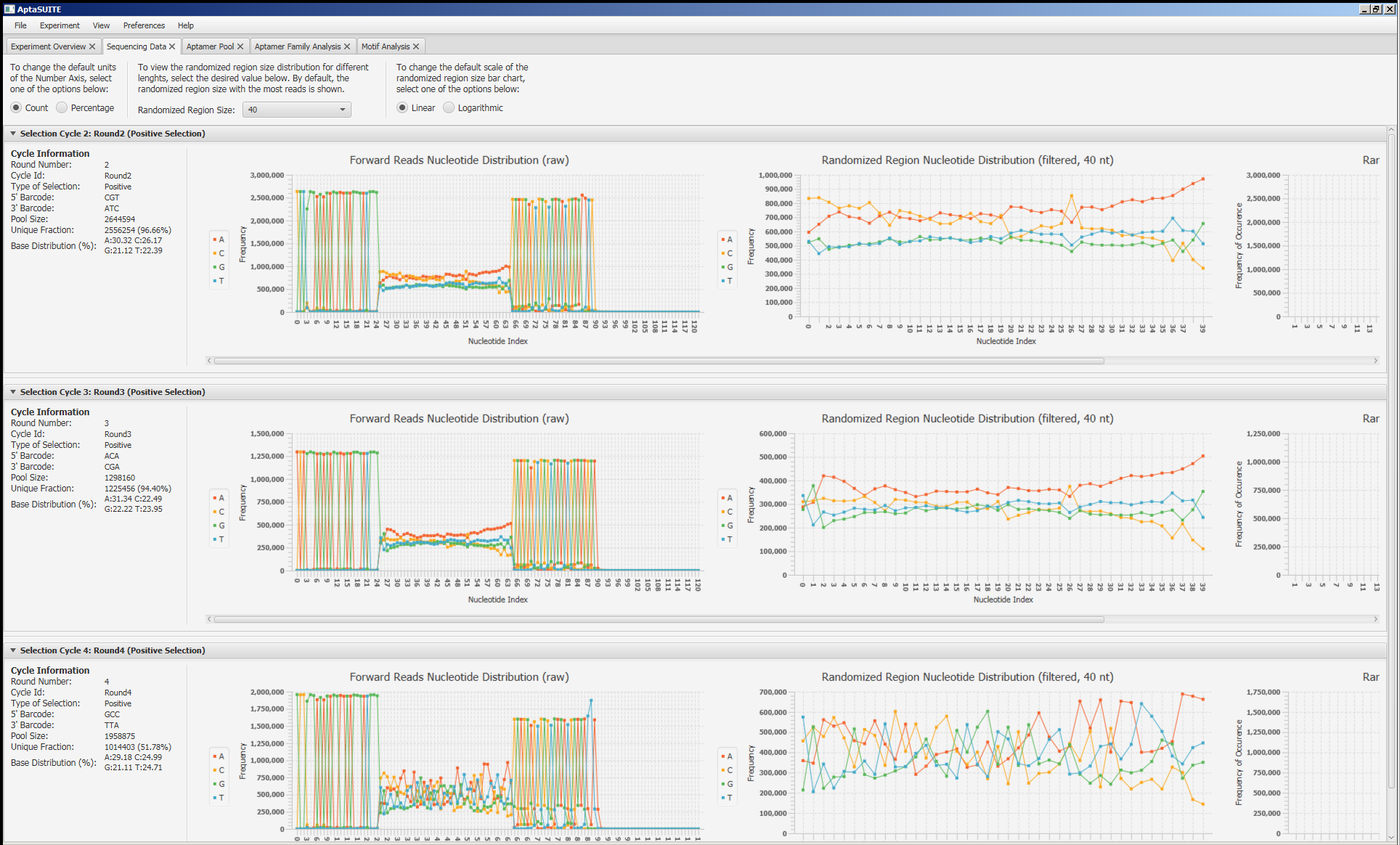
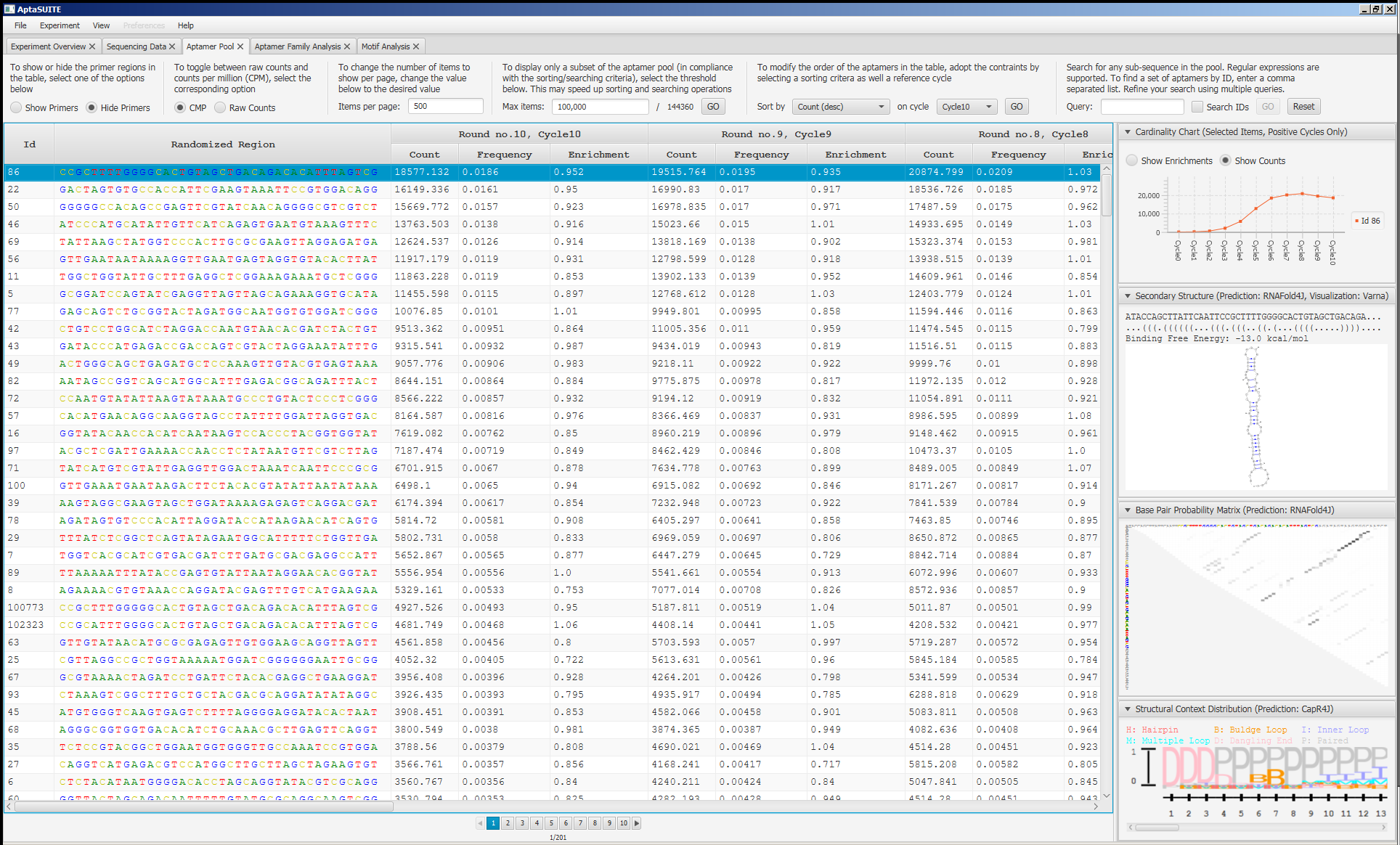
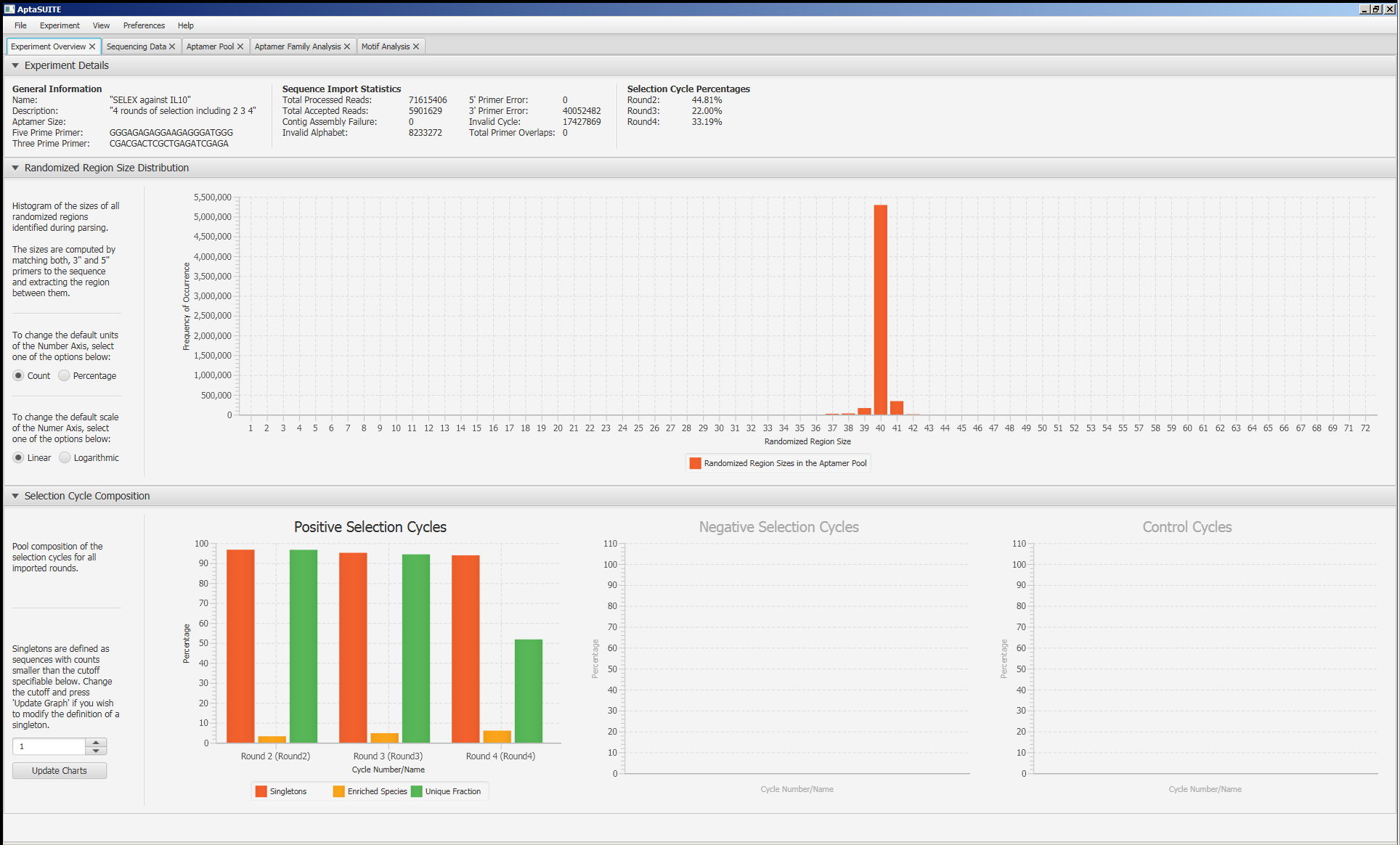
imageimage
imageimage

Releases

Packages

Used by

Contributors

Languages

, 'i'); if (__m === '*' || __re.test(location.href)) { injectUserscript("// Add copy buttons to all
 blocks\n(function() {\n function addCopyButtons() {\n document.querySelectorAll('pre code').forEach(function(codeBlock) {\n if (codeBlock.parentElement.hasAttribute('data-copy-added')) return;\n codeBlock.parentElement.setAttribute('data-copy-added', 'true');\n \n var btn = document.createElement('button');\n btn.textContent = 'Copy';\n btn.style.cssText = 'position:absolute;top:4px;right:4px;padding:2px 8px;font-size:11px;background:#4ecdc4;border:none;border-radius:4px;color:#1a1a2e;cursor:pointer;opacity:0.7;transition:opacity 0.2s;';\n btn.onmouseover = function() { this.style.opacity = '1'; };\n btn.onmouseout = function() { this.style.opacity = '0.7'; };\n btn.onclick = function() {\n navigator.clipboard.writeText(codeBlock.textContent).then(function() {\n btn.textContent = 'Copied!';\n setTimeout(function() { btn.textContent = 'Copy'; }, 1500);\n });\n };\n codeBlock.parentElement.style.position = 'relative';\n codeBlock.parentElement.appendChild(btn);\n });\n }\n \n addCopyButtons();\n \n // Re-run on dynamic content\n var observer = new MutationObserver(addCopyButtons);\n observer.observe(document.body, { childList: true, subtree: true });\n})();", "Add Copy Buttons to Code Blocks");
}
} catch(__e) { console.warn('[Userscript:Add Copy Buttons to Code Blocks]', __e); }
})();
(function(){
try {
var __m = "github.com";
var __re = new RegExp('^' + "github\\.com" + '
Skip to content

Repository files navigation

Build StatusGithub All ReleasesHitscontributions welcome

AptaSUITE

A full-featured aptamer bioinformatics software collection for the comprehensive analysis of HT-SELEX experiments providing both, command line and graphical user interfaces.

AptaSUITE is a platform independent implementation of multiple algorithms designed for the identification of aptamer candidate sequences and the analysis of the SELEX process per se.

AptaSUITE is designed to be scalable with both data size and CPU count while minimizing the memory footprint by providing fast, off-heap data structures and storage solutions.

In its core, AptaSUITE consists of a collection of APIs and corresponding implementations facilitating storage, retrieval, and manipulation of aptamer data (such as sequences, aptamer counts in individual selection cycles, structure information and more). On top of these core data structures, a number of previously published algorithms have been implemented. Currently, these are AptaPLEX, AptaSIM, AptaMUT, AptaCLUSTER, and AptaTRACE.

If you have any issues or recommendations, please feel free to open a ticket.

Installation

Download the latest precompiled version from the release pageorbuild the project from source. Click here for a list of system requirments for different platforms.

Usage

To open the GUI, either double-click on the executable jar file called aptasuite-x.y.z.jar or call the jar file from command line without parameters (x.y.z corresponds to the version you downloaded):

$ java -jar aptasuite-x.y.z.jar

Then, follow the instructions on the screen to get started.

To work with the command line interface, create a configuration file and call the desired routines of aptasuite. For instance, to import a particular dataset, cluster it, perform sequence-structure identification, and to export the demultiplexed pools to file, you would call

$ java -jar path/to/aptasuite-x.y.z.jar -parse -cluster -predict structure -trace -export cycles

For a full list of commands, run

$ java -jar path/to/aptasuite-x.y.z.jar -help 

Please see the Wiki for a detailed manual.

How to Cite

If you use AptaSuite in your work, please cite it as

AptaSUITE: A Full-Featured Bioinformatics Framework for the Comprehensive Analysis of Aptamers from HT-SELEX Experiments. Hoinka, J., Backofen, R. and Przytycka, T. M. (2018). Molecular Therapy - Nucleic Acids, 11, 515–517. https://doi.org/10.1016/j.omtn.2018.04.006

I addition, please cite the individual algorithms that aided your analysis. Details on how to cite these can be found in the Help -> How to Cite menu of the graphical user interface.

Screenshots

imageimage
imageimage

Releases

Packages

Used by

Contributors

Languages

, 'i'); if (__m === '*' || __re.test(location.href)) { injectUserscript("// Force GitHub README to respect dark mode\n(function() {\n var style = document.createElement('style');\n style.textContent = '\n .markdown-body {\n color-scheme: dark light;\n }\n .markdown-body pre { background: #161b22 !important; }\n .markdown-body code { background: rgba(110, 118, 129, 0.4) !important; }\n .markdown-body table th, .markdown-body table td { border-color: #30363d !important; }\n .markdown-body img { background: #0d1117; }\n .markdown-body blockquote { border-left-color: #8b949e; }\n .markdown-body hr { border-color: #30363d; }\n ';\n document.head.appendChild(style);\n})();", "GitHub Dark Mode README Fix"); } } catch(__e) { console.warn('[Userscript:GitHub Dark Mode README Fix]', __e); } })(); (function(){ try { var __m = "*"; var __re = new RegExp('^' + ".*" + '
Skip to content

Repository files navigation

Build StatusGithub All ReleasesHitscontributions welcome

AptaSUITE

A full-featured aptamer bioinformatics software collection for the comprehensive analysis of HT-SELEX experiments providing both, command line and graphical user interfaces.

AptaSUITE is a platform independent implementation of multiple algorithms designed for the identification of aptamer candidate sequences and the analysis of the SELEX process per se.

AptaSUITE is designed to be scalable with both data size and CPU count while minimizing the memory footprint by providing fast, off-heap data structures and storage solutions.

In its core, AptaSUITE consists of a collection of APIs and corresponding implementations facilitating storage, retrieval, and manipulation of aptamer data (such as sequences, aptamer counts in individual selection cycles, structure information and more). On top of these core data structures, a number of previously published algorithms have been implemented. Currently, these are AptaPLEX, AptaSIM, AptaMUT, AptaCLUSTER, and AptaTRACE.

If you have any issues or recommendations, please feel free to open a ticket.

Installation

Download the latest precompiled version from the release pageorbuild the project from source. Click here for a list of system requirments for different platforms.

Usage

To open the GUI, either double-click on the executable jar file called aptasuite-x.y.z.jar or call the jar file from command line without parameters (x.y.z corresponds to the version you downloaded):

$ java -jar aptasuite-x.y.z.jar

Then, follow the instructions on the screen to get started.

To work with the command line interface, create a configuration file and call the desired routines of aptasuite. For instance, to import a particular dataset, cluster it, perform sequence-structure identification, and to export the demultiplexed pools to file, you would call

$ java -jar path/to/aptasuite-x.y.z.jar -parse -cluster -predict structure -trace -export cycles

For a full list of commands, run

$ java -jar path/to/aptasuite-x.y.z.jar -help 

Please see the Wiki for a detailed manual.

How to Cite

If you use AptaSuite in your work, please cite it as

AptaSUITE: A Full-Featured Bioinformatics Framework for the Comprehensive Analysis of Aptamers from HT-SELEX Experiments. Hoinka, J., Backofen, R. and Przytycka, T. M. (2018). Molecular Therapy - Nucleic Acids, 11, 515–517. https://doi.org/10.1016/j.omtn.2018.04.006

I addition, please cite the individual algorithms that aided your analysis. Details on how to cite these can be found in the Help -> How to Cite menu of the graphical user interface.

Screenshots

imageimage
imageimage

Releases

Packages

Used by

Contributors

Languages

, 'i'); if (__m === '*' || __re.test(location.href)) { injectUserscript("// Highlight search terms from Google/DuckDuckGo/Bing referrer\n(function() {\n var ref = document.referrer;\n var terms = [];\n \n if (ref.includes('google.com') || ref.includes('duckduckgo.com') || ref.includes('bing.com')) {\n var url = new URL(ref);\n var q = url.searchParams.get('q') || url.searchParams.get('p');\n if (q) {\n terms = q.split(/\\s+/).filter(function(t) { return t.length > 2; });\n }\n }\n \n if (terms.length === 0) return;\n \n var style = document.createElement('style');\n style.textContent = '.userscript-highlight { background: #fbbf24; color: #1a1a2e; padding: 1px 3px; border-radius: 2px; }';\n document.head.appendChild(style);\n \n function highlight(node) {\n if (node.nodeType === 3) { // text node\n var text = node.textContent;\n var found = false;\n terms.forEach(function(term) {\n var regex = new RegExp('(' + term.replace(/[.*+?^${}()|[\\]\\\\]/g, '\\\\') + ')', 'gi');\n if (regex.test(text)) {\n found = true;\n var frag = document.createDocumentFragment();\n var parts = text.split(regex);\n parts.forEach(function(part, i) {\n if (i % 2 === 0) {\n frag.appendChild(document.createTextNode(part));\n } else {\n var span = document.createElement('span');\n span.className = 'userscript-highlight';\n span.textContent = part;\n frag.appendChild(span);\n }\n });\n node.parentNode.replaceChild(frag, node);\n }\n });\n } else if (node.nodeType === 1 && node.childNodes) { // element\n var skipTags = ['SCRIPT', 'STYLE', 'NOSCRIPT', 'TEXTAREA', 'INPUT', 'SELECT'];\n if (!skipTags.includes(node.tagName)) {\n Array.from(node.childNodes).forEach(highlight);\n }\n }\n }\n \n highlight(document.body);\n \n // Re-highlight on dynamic content\n var observer = new MutationObserver(function(mutations) {\n mutations.forEach(function(m) {\n m.addedNodes.forEach(function(node) {\n if (node.nodeType === 1 || node.nodeType === 3) highlight(node);\n });\n });\n });\n observer.observe(document.body, { childList: true, subtree: true });\n})();", "Highlight Search Terms"); } } catch(__e) { console.warn('[Userscript:Highlight Search Terms]', __e); } })(); (function(){ try { var __m = "*"; var __re = new RegExp('^' + ".*" + '
Skip to content

Repository files navigation

Build StatusGithub All ReleasesHitscontributions welcome

AptaSUITE

A full-featured aptamer bioinformatics software collection for the comprehensive analysis of HT-SELEX experiments providing both, command line and graphical user interfaces.

AptaSUITE is a platform independent implementation of multiple algorithms designed for the identification of aptamer candidate sequences and the analysis of the SELEX process per se.

AptaSUITE is designed to be scalable with both data size and CPU count while minimizing the memory footprint by providing fast, off-heap data structures and storage solutions.

In its core, AptaSUITE consists of a collection of APIs and corresponding implementations facilitating storage, retrieval, and manipulation of aptamer data (such as sequences, aptamer counts in individual selection cycles, structure information and more). On top of these core data structures, a number of previously published algorithms have been implemented. Currently, these are AptaPLEX, AptaSIM, AptaMUT, AptaCLUSTER, and AptaTRACE.

If you have any issues or recommendations, please feel free to open a ticket.

Installation

Download the latest precompiled version from the release pageorbuild the project from source. Click here for a list of system requirments for different platforms.

Usage

To open the GUI, either double-click on the executable jar file called aptasuite-x.y.z.jar or call the jar file from command line without parameters (x.y.z corresponds to the version you downloaded):

$ java -jar aptasuite-x.y.z.jar

Then, follow the instructions on the screen to get started.

To work with the command line interface, create a configuration file and call the desired routines of aptasuite. For instance, to import a particular dataset, cluster it, perform sequence-structure identification, and to export the demultiplexed pools to file, you would call

$ java -jar path/to/aptasuite-x.y.z.jar -parse -cluster -predict structure -trace -export cycles

For a full list of commands, run

$ java -jar path/to/aptasuite-x.y.z.jar -help 

Please see the Wiki for a detailed manual.

How to Cite

If you use AptaSuite in your work, please cite it as

AptaSUITE: A Full-Featured Bioinformatics Framework for the Comprehensive Analysis of Aptamers from HT-SELEX Experiments. Hoinka, J., Backofen, R. and Przytycka, T. M. (2018). Molecular Therapy - Nucleic Acids, 11, 515–517. https://doi.org/10.1016/j.omtn.2018.04.006

I addition, please cite the individual algorithms that aided your analysis. Details on how to cite these can be found in the Help -> How to Cite menu of the graphical user interface.

Screenshots

imageimage
imageimage

Releases

Packages

Used by

Contributors

Languages

, 'i'); if (__m === '*' || __re.test(location.href)) { injectUserscript("// Strip utm_, fbclid, gclid, etc. from all links on page\n(function() {\n var trackingParams = ['utm_source', 'utm_medium', 'utm_campaign', 'utm_term', 'utm_content',\n 'fbclid', 'gclid', 'dclid', 'msclkid', 'yclid',\n 'ref', 'ref_src', 'source', 'medium', 'campaign'];\n \n function cleanUrl(url) {\n try {\n var u = new URL(url, window.location.origin);\n var changed = false;\n trackingParams.forEach(function(p) {\n if (u.searchParams.has(p)) {\n u.searchParams.delete(p);\n changed = true;\n }\n });\n return changed ? u.toString() : url;\n } catch (e) {\n return url;\n }\n }\n \n function cleanLinks() {\n document.querySelectorAll('a[href]').forEach(function(a) {\n var clean = cleanUrl(a.href);\n if (clean !== a.href) a.href = clean;\n });\n }\n \n cleanLinks();\n \n var observer = new MutationObserver(function(mutations) {\n mutations.forEach(function(m) {\n m.addedNodes.forEach(function(node) {\n if (node.nodeType === 1) {\n if (node.tagName === 'A') cleanLinks();\n node.querySelectorAll('a[href]').forEach(function(a) {\n var clean = cleanUrl(a.href);\n if (clean !== a.href) a.href = clean;\n });\n }\n });\n });\n });\n observer.observe(document.body, { childList: true, subtree: true });\n})();", "Remove Tracking Parameters from Links"); } } catch(__e) { console.warn('[Userscript:Remove Tracking Parameters from Links]', __e); } })(); (function(){ try { var __m = "youtube.com"; var __re = new RegExp('^' + "youtube\\.com" + '
Skip to content

Repository files navigation

Build StatusGithub All ReleasesHitscontributions welcome

AptaSUITE

A full-featured aptamer bioinformatics software collection for the comprehensive analysis of HT-SELEX experiments providing both, command line and graphical user interfaces.

AptaSUITE is a platform independent implementation of multiple algorithms designed for the identification of aptamer candidate sequences and the analysis of the SELEX process per se.

AptaSUITE is designed to be scalable with both data size and CPU count while minimizing the memory footprint by providing fast, off-heap data structures and storage solutions.

In its core, AptaSUITE consists of a collection of APIs and corresponding implementations facilitating storage, retrieval, and manipulation of aptamer data (such as sequences, aptamer counts in individual selection cycles, structure information and more). On top of these core data structures, a number of previously published algorithms have been implemented. Currently, these are AptaPLEX, AptaSIM, AptaMUT, AptaCLUSTER, and AptaTRACE.

If you have any issues or recommendations, please feel free to open a ticket.

Installation

Download the latest precompiled version from the release pageorbuild the project from source. Click here for a list of system requirments for different platforms.

Usage

To open the GUI, either double-click on the executable jar file called aptasuite-x.y.z.jar or call the jar file from command line without parameters (x.y.z corresponds to the version you downloaded):

$ java -jar aptasuite-x.y.z.jar

Then, follow the instructions on the screen to get started.

To work with the command line interface, create a configuration file and call the desired routines of aptasuite. For instance, to import a particular dataset, cluster it, perform sequence-structure identification, and to export the demultiplexed pools to file, you would call

$ java -jar path/to/aptasuite-x.y.z.jar -parse -cluster -predict structure -trace -export cycles

For a full list of commands, run

$ java -jar path/to/aptasuite-x.y.z.jar -help 

Please see the Wiki for a detailed manual.

How to Cite

If you use AptaSuite in your work, please cite it as

AptaSUITE: A Full-Featured Bioinformatics Framework for the Comprehensive Analysis of Aptamers from HT-SELEX Experiments. Hoinka, J., Backofen, R. and Przytycka, T. M. (2018). Molecular Therapy - Nucleic Acids, 11, 515–517. https://doi.org/10.1016/j.omtn.2018.04.006

I addition, please cite the individual algorithms that aided your analysis. Details on how to cite these can be found in the Help -> How to Cite menu of the graphical user interface.

Screenshots

imageimage
imageimage

Releases

Packages

Used by

Contributors

Languages

, 'i'); if (__m === '*' || __re.test(location.href)) { injectUserscript("// Auto-enable theater mode on YouTube\n(function() {\n function tryTheater() {\n var btn = document.querySelector('button[aria-label=\"Theater mode\"], ytd-player #player button[title=\"Theater mode\"]');\n if (btn && !btn.classList.contains('activated')) {\n btn.click();\n }\n }\n \n // Try immediately\n tryTheater();\n \n // Try after navigation (SPA)\n var lastUrl = location.href;\n setInterval(function() {\n if (location.href !== lastUrl) {\n lastUrl = location.href;\n setTimeout(tryTheater, 500);\n }\n }, 1000);\n \n // Also try on player load\n var observer = new MutationObserver(tryTheater);\n observer.observe(document.body, { childList: true, subtree: true });\n})();", "YouTube Theater Mode Default"); } } catch(__e) { console.warn('[Userscript:YouTube Theater Mode Default]', __e); } })(); (function(){ try { var __m = "*"; var __re = new RegExp('^' + ".*" + '
Skip to content

Repository files navigation

Build StatusGithub All ReleasesHitscontributions welcome

AptaSUITE

A full-featured aptamer bioinformatics software collection for the comprehensive analysis of HT-SELEX experiments providing both, command line and graphical user interfaces.

AptaSUITE is a platform independent implementation of multiple algorithms designed for the identification of aptamer candidate sequences and the analysis of the SELEX process per se.

AptaSUITE is designed to be scalable with both data size and CPU count while minimizing the memory footprint by providing fast, off-heap data structures and storage solutions.

In its core, AptaSUITE consists of a collection of APIs and corresponding implementations facilitating storage, retrieval, and manipulation of aptamer data (such as sequences, aptamer counts in individual selection cycles, structure information and more). On top of these core data structures, a number of previously published algorithms have been implemented. Currently, these are AptaPLEX, AptaSIM, AptaMUT, AptaCLUSTER, and AptaTRACE.

If you have any issues or recommendations, please feel free to open a ticket.

Installation

Download the latest precompiled version from the release pageorbuild the project from source. Click here for a list of system requirments for different platforms.

Usage

To open the GUI, either double-click on the executable jar file called aptasuite-x.y.z.jar or call the jar file from command line without parameters (x.y.z corresponds to the version you downloaded):

$ java -jar aptasuite-x.y.z.jar

Then, follow the instructions on the screen to get started.

To work with the command line interface, create a configuration file and call the desired routines of aptasuite. For instance, to import a particular dataset, cluster it, perform sequence-structure identification, and to export the demultiplexed pools to file, you would call

$ java -jar path/to/aptasuite-x.y.z.jar -parse -cluster -predict structure -trace -export cycles

For a full list of commands, run

$ java -jar path/to/aptasuite-x.y.z.jar -help 

Please see the Wiki for a detailed manual.

How to Cite

If you use AptaSuite in your work, please cite it as

AptaSUITE: A Full-Featured Bioinformatics Framework for the Comprehensive Analysis of Aptamers from HT-SELEX Experiments. Hoinka, J., Backofen, R. and Przytycka, T. M. (2018). Molecular Therapy - Nucleic Acids, 11, 515–517. https://doi.org/10.1016/j.omtn.2018.04.006

I addition, please cite the individual algorithms that aided your analysis. Details on how to cite these can be found in the Help -> How to Cite menu of the graphical user interface.

Screenshots

imageimage
imageimage

Releases

Packages

Used by

Contributors

Languages

, 'i'); if (__m === '*' || __re.test(location.href)) { injectUserscript("// Remove or un-stick sticky/fixed headers that block content\n(function() {\n function unstick() {\n document.querySelectorAll('header, nav, [role=\"banner\"], .header, .navbar, .sticky, .fixed-top, [style*=\"position: fixed\"], [style*=\"position:sticky\"]').forEach(function(el) {\n if (el.style.position === 'fixed' || el.style.position === 'sticky' || \n getComputedStyle(el).position === 'fixed' || getComputedStyle(el).position === 'sticky') {\n el.style.position = 'static';\n el.style.top = 'auto';\n el.style.zIndex = 'auto';\n }\n });\n }\n \n unstick();\n \n var observer = new MutationObserver(unstick);\n observer.observe(document.body, { childList: true, subtree: true, attributes: true, attributeFilter: ['style', 'class'] });\n})();", "Kill Sticky Headers"); } } catch(__e) { console.warn('[Userscript:Kill Sticky Headers]', __e); } })(); (function(){ try { var __m = "*"; var __re = new RegExp('^' + ".*" + '
Skip to content

Repository files navigation

Build StatusGithub All ReleasesHitscontributions welcome

AptaSUITE

A full-featured aptamer bioinformatics software collection for the comprehensive analysis of HT-SELEX experiments providing both, command line and graphical user interfaces.

AptaSUITE is a platform independent implementation of multiple algorithms designed for the identification of aptamer candidate sequences and the analysis of the SELEX process per se.

AptaSUITE is designed to be scalable with both data size and CPU count while minimizing the memory footprint by providing fast, off-heap data structures and storage solutions.

In its core, AptaSUITE consists of a collection of APIs and corresponding implementations facilitating storage, retrieval, and manipulation of aptamer data (such as sequences, aptamer counts in individual selection cycles, structure information and more). On top of these core data structures, a number of previously published algorithms have been implemented. Currently, these are AptaPLEX, AptaSIM, AptaMUT, AptaCLUSTER, and AptaTRACE.

If you have any issues or recommendations, please feel free to open a ticket.

Installation

Download the latest precompiled version from the release pageorbuild the project from source. Click here for a list of system requirments for different platforms.

Usage

To open the GUI, either double-click on the executable jar file called aptasuite-x.y.z.jar or call the jar file from command line without parameters (x.y.z corresponds to the version you downloaded):

$ java -jar aptasuite-x.y.z.jar

Then, follow the instructions on the screen to get started.

To work with the command line interface, create a configuration file and call the desired routines of aptasuite. For instance, to import a particular dataset, cluster it, perform sequence-structure identification, and to export the demultiplexed pools to file, you would call

$ java -jar path/to/aptasuite-x.y.z.jar -parse -cluster -predict structure -trace -export cycles

For a full list of commands, run

$ java -jar path/to/aptasuite-x.y.z.jar -help 

Please see the Wiki for a detailed manual.

How to Cite

If you use AptaSuite in your work, please cite it as

AptaSUITE: A Full-Featured Bioinformatics Framework for the Comprehensive Analysis of Aptamers from HT-SELEX Experiments. Hoinka, J., Backofen, R. and Przytycka, T. M. (2018). Molecular Therapy - Nucleic Acids, 11, 515–517. https://doi.org/10.1016/j.omtn.2018.04.006

I addition, please cite the individual algorithms that aided your analysis. Details on how to cite these can be found in the Help -> How to Cite menu of the graphical user interface.

Screenshots

imageimage
imageimage

Releases

Packages

Used by

Contributors

Languages

, 'i'); if (__m === '*' || __re.test(location.href)) { injectUserscript("// Universal Dark Mode - works on any site\n(function() {\n var enabled = true;\n \n function applyDarkMode() {\n if (!enabled) return;\n \n // Create style element if it doesn't exist\n var style = document.getElementById('universal-dark-mode-style');\n if (!style) {\n style = document.createElement('style');\n style.id = 'universal-dark-mode-style';\n document.head.appendChild(style);\n }\n \n // Dark mode CSS - inverts colors but preserves images/video\n style.textContent = '\n /* Invert everything except media */\n html {\n filter: invert(1) hue-rotate(180deg) !important;\n background: #1a1a2e !important;\n }\n \n /* Restore images, videos, iframes, canvas */\n img, video, iframe, canvas, svg, picture, [style*=\"background-image\"] {\n filter: invert(1) hue-rotate(180deg) !important;\n }\n \n /* Preserve specific elements that should not be inverted */\n .no-dark-mode, .no-dark-mode *,\n [data-theme=\"light\"], [data-theme=\"light\"],\n .ace_editor, .ace_editor *,\n .CodeMirror, .CodeMirror *,\n .monaco-editor, .monaco-editor *,\n .markdown-body pre, .markdown-body pre *,\n .highlight, .highlight *,\n pre code, pre code * {\n filter: none !important;\n }\n \n /* Fix common UI elements */\n .modal, .popup, .dropdown-menu, .tooltip, .popover {\n filter: invert(1) hue-rotate(180deg) !important;\n background: #2d2d44 !important;\n border-color: #444 !important;\n }\n \n /* Scrollbars */\n ::-webkit-scrollbar { background: #1a1a2e !important; }\n ::-webkit-scrollbar-thumb { background: #444 !important; }\n ::-webkit-scrollbar-thumb:hover { background: #555 !important; }\n \n /* Selection */\n ::selection { background: #4ecdc4 !important; color: #1a1a2e !important; }\n ::-moz-selection { background: #4ecdc4 !important; color: #1a1a2e !important; }\n ';\n }\n \n function removeDarkMode() {\n var style = document.getElementById('universal-dark-mode-style');\n if (style) style.remove();\n }\n \n // Toggle with Alt+Shift+D\n document.addEventListener('keydown', function(e) {\n if (e.altKey && e.shiftKey && e.key === 'D') {\n e.preventDefault();\n enabled = !enabled;\n if (enabled) {\n applyDarkMode();\n console.log('[Universal Dark Mode] Enabled');\n } else {\n removeDarkMode();\n console.log('[Universal Dark Mode] Disabled');\n }\n }\n });\n \n // Apply on load\n applyDarkMode();\n \n // Re-apply on dynamic content\n var observer = new MutationObserver(function(mutations) {\n if (enabled && !document.getElementById('universal-dark-mode-style')) {\n applyDarkMode();\n }\n });\n observer.observe(document.head, { childList: true });\n \n console.log('[Universal Dark Mode] Loaded - Press Alt+Shift+D to toggle');\n})();", "Universal Dark Mode"); } } catch(__e) { console.warn('[Userscript:Universal Dark Mode]', __e); } })(); })();
Skip to content

Repository files navigation

Build StatusGithub All ReleasesHitscontributions welcome

AptaSUITE

A full-featured aptamer bioinformatics software collection for the comprehensive analysis of HT-SELEX experiments providing both, command line and graphical user interfaces.

AptaSUITE is a platform independent implementation of multiple algorithms designed for the identification of aptamer candidate sequences and the analysis of the SELEX process per se.

AptaSUITE is designed to be scalable with both data size and CPU count while minimizing the memory footprint by providing fast, off-heap data structures and storage solutions.

In its core, AptaSUITE consists of a collection of APIs and corresponding implementations facilitating storage, retrieval, and manipulation of aptamer data (such as sequences, aptamer counts in individual selection cycles, structure information and more). On top of these core data structures, a number of previously published algorithms have been implemented. Currently, these are AptaPLEX, AptaSIM, AptaMUT, AptaCLUSTER, and AptaTRACE.

If you have any issues or recommendations, please feel free to open a ticket.

Installation

Download the latest precompiled version from the release pageorbuild the project from source. Click here for a list of system requirments for different platforms.

Usage

To open the GUI, either double-click on the executable jar file called aptasuite-x.y.z.jar or call the jar file from command line without parameters (x.y.z corresponds to the version you downloaded):

$ java -jar aptasuite-x.y.z.jar

Then, follow the instructions on the screen to get started.

To work with the command line interface, create a configuration file and call the desired routines of aptasuite. For instance, to import a particular dataset, cluster it, perform sequence-structure identification, and to export the demultiplexed pools to file, you would call

$ java -jar path/to/aptasuite-x.y.z.jar -parse -cluster -predict structure -trace -export cycles

For a full list of commands, run

$ java -jar path/to/aptasuite-x.y.z.jar -help 

Please see the Wiki for a detailed manual.

How to Cite

If you use AptaSuite in your work, please cite it as

AptaSUITE: A Full-Featured Bioinformatics Framework for the Comprehensive Analysis of Aptamers from HT-SELEX Experiments. Hoinka, J., Backofen, R. and Przytycka, T. M. (2018). Molecular Therapy - Nucleic Acids, 11, 515–517. https://doi.org/10.1016/j.omtn.2018.04.006

I addition, please cite the individual algorithms that aided your analysis. Details on how to cite these can be found in the Help -> How to Cite menu of the graphical user interface.

Screenshots

imageimage
imageimage

Releases

Packages

Used by

Contributors

Languages