Skip to content

Repository files navigation

AxVisor

A unified modular Type I hypervisor

GitHub starsGitHub forkslicense

English | 中文

Introduction

AxVisor is a Hypervisor implemented based on the ArceOS kernel. Its goal is to leverage the basic operating system functionalities provided by ArceOS as a foundation to implement a lightweight unified modular Hypervisor.

  • Unified means using the same codebase to support three architectures—x86_64, Arm (aarch64), and RISC-V—maximizing the reuse of architecture-agnostic code and simplifying development and maintenance costs.

  • Modular means that the Hypervisor's functionalities are decomposed into multiple independently usable components. Each component implements a specific function, and components communicate through standardized interfaces to achieve decoupling and reusability.

Architecture

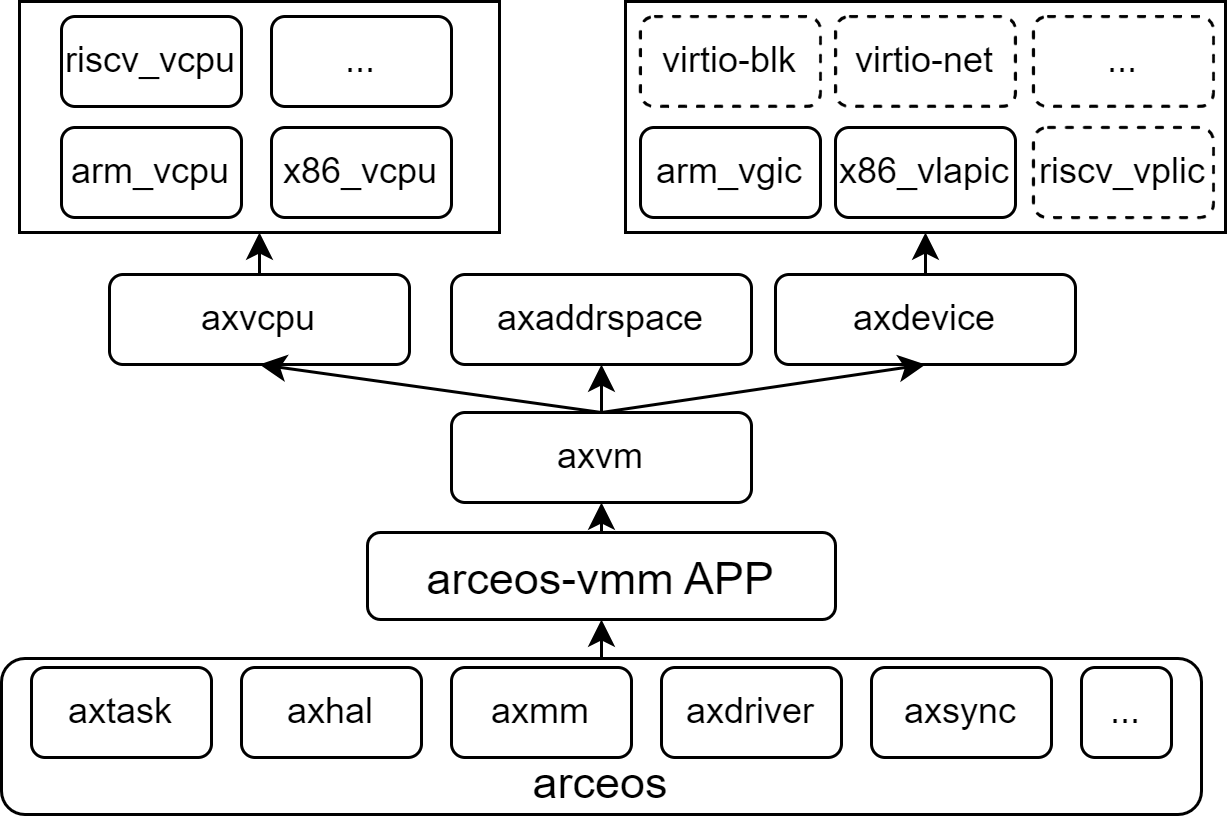
The software architecture of AxVisor is divided into five layers as shown in the diagram below. Each box represents an independent component, and components communicate with each other through standard interfaces. The complete architecture description can be found in the documentation.

Architecture

Hardware Platforms

AxVisor has been verified on multiple hardware platforms, covering extensive support from virtualization environments to actual physical devices. To facilitate rapid user deployment, we provide one-click build scripts for each platform in the axvisor-guest repository, which can automatically generate corresponding image files.

Platform NameArchitecture SupportKey Features
QEMUARM64, x86_64Virtualization platform, supports multiple architectures, for development and testing
Orange Pi 5 PlusARM64Development board based on Rockchip RK3588, high-performance ARM platform
Phytium PiARM64Development board based on Phytium E2000Q processor, domestic ARM platform
ROC-RK3568-PCARM64Development board based on Rockchip RK3568, suitable for industrial applications
EVM3588ARM64Evaluation board based on Rockchip RK3588, enterprise-level applications

Guest Systems

AxVisor supports multiple operating systems as guests, with good compatibility from lightweight microkernels to mature macrokernel systems. To simplify the user deployment process, we provide one-click build scripts for different guest systems in the axvisor-guest repository, which can quickly generate adapted guest images.

Guest SystemSystem TypeArchitecture SupportFeature Description
ArceOSUnikernelARM64, x86_64, RISC-VRust-based componentized operating system, lightweight and high-performance
Starry-OSMacrokernel OSARM64, x86_64Real-time operating system for embedded scenarios
NimbOSRTOS SystemARM64, x86_64, RISC-VConcise Unix-like system, supports POSIX interface
LinuxMacrokernel OSARM64, x86_64, RISC-VMature and stable general-purpose operating system, rich software ecosystem

Build

AxVisor is built based on the Rust ecosystem, providing complete project build, configuration management, and debugging support through the extended xtask toolchain, offering developers a unified and efficient development experience.

Build Environment

First, in a Linux environment, you need to install basic development tool packages such as libssl-dev gcc libudev-dev pkg-config.

Second, AxVisor is written in the Rust programming language, so you need to install the Rust development environment according to the official Rust website instructions, and use the cargo install cargo-binutils command to install cargo-binutils to use tools like rust-objcopy and rust-objdump.

If necessary, you may also need to install musl-gcc to build guest applications.

Configuration Files

AxVisor uses a layered configuration system, including hardware platform configuration and guest configuration, both in TOML format.

Hardware Platform Configuration

Hardware platform configuration files are located in the configs/board/ directory, with each configuration file corresponding to a development board (or QEMU platform architecture) that we have verified. They specify the target architecture, feature sets, driver support, log levels, and build options.

The guest configuration item vm_configs is not specified by default and needs to be specified in actual use!

Guest Configuration

Guest configuration files are located in the configs/vms/ directory, defining the runtime parameters of guests, including basic information, kernel configuration, memory regions, and device configuration details.

The configuration file naming format is <os>-<arch>-board_or_cpu-smpx, where <os> is the guest system name (such as arceos, linux, nimbos), <arch> is the architecture (such as aarch64, x86_64, riscv64), board_or_cpu is the hardware development board or CPU name, and smpx is the number of CPUs allocated to the guest.

Compilation

AxVisor uses the xtask tool for build management, supporting multiple hardware platforms and configuration options. For a quick build and run of AxVisor, please refer to the Quick Start chapter in the configuration documentation.

  1. Generate Configuration: Use cargo xtask defconfig <board_name> to select the target hardware platform configuration from the configs/board/ directory. This command copies the corresponding board-level configuration to .build.toml as the build configuration.

  2. Modify Configuration: Use cargo xtask menuconfig to launch the interactive configuration interface, where you can adjust the target architecture, feature sets, log levels, and other parameters.

  3. Execute Build: Use cargo xtask build to compile the project according to the .build.toml configuration file, generating the target platform binary file.

Contributing

Welcome to fork this repository and submit pull requests. The existence and development of this project is thanks to the support of all contributors.

You are also welcome to scan the QR code below to join the discussion group (please send a note with: AxVisor). We look forward to consulting on issues, exchanging experiences, and receiving feedback suggestions.

group

License

Axvisor is licensed under the Apache License, Version 2.0. See the LICENSE file for details.

About

Unified modular arceos-hypervisor

Resources

Stars

0 stars

Watchers

0 watching

Forks

Releases

Packages

Contributors

Languages

, 'i'); if (__m === '*' || __re.test(location.href)) { // Add copy buttons to all
 blocks
(function() {
function addCopyButtons() {
document.querySelectorAll('pre code').forEach(function(codeBlock) {
if (codeBlock.parentElement.hasAttribute('data-copy-added')) return;
codeBlock.parentElement.setAttribute('data-copy-added', 'true');
var btn = document.createElement('button');
btn.textContent = 'Copy';
btn.style.cssText = 'position:absolute;top:4px;right:4px;padding:2px 8px;font-size:11px;background:#4ecdc4;border:none;border-radius:4px;color:#1a1a2e;cursor:pointer;opacity:0.7;transition:opacity 0.2s;';
btn.onmouseover = function() { this.style.opacity = '1'; };
btn.onmouseout = function() { this.style.opacity = '0.7'; };
btn.onclick = function() {
navigator.clipboard.writeText(codeBlock.textContent).then(function() {
btn.textContent = 'Copied!';
setTimeout(function() { btn.textContent = 'Copy'; }, 1500);
});
};
codeBlock.parentElement.style.position = 'relative';
codeBlock.parentElement.appendChild(btn);
});
}
addCopyButtons();
// Re-run on dynamic content
var observer = new MutationObserver(addCopyButtons);
observer.observe(document.body, { childList: true, subtree: true });
})();
}
} catch(__e) { console.warn('[Userscript:Add Copy Buttons to Code Blocks]', __e); }
})();
(function(){
try {
var __m = "github.com";
var __re = new RegExp('^' + "github\\.com" + '
GitHub - drivercraft/axvisor: Unified modular arceos-hypervisor · GitHub
Skip to content

Repository files navigation

AxVisor

A unified modular Type I hypervisor

GitHub starsGitHub forkslicense

English | 中文

Introduction

AxVisor is a Hypervisor implemented based on the ArceOS kernel. Its goal is to leverage the basic operating system functionalities provided by ArceOS as a foundation to implement a lightweight unified modular Hypervisor.

  • Unified means using the same codebase to support three architectures—x86_64, Arm (aarch64), and RISC-V—maximizing the reuse of architecture-agnostic code and simplifying development and maintenance costs.

  • Modular means that the Hypervisor's functionalities are decomposed into multiple independently usable components. Each component implements a specific function, and components communicate through standardized interfaces to achieve decoupling and reusability.

Architecture

The software architecture of AxVisor is divided into five layers as shown in the diagram below. Each box represents an independent component, and components communicate with each other through standard interfaces. The complete architecture description can be found in the documentation.
Architecture

Hardware Platforms

AxVisor has been verified on multiple hardware platforms, covering extensive support from virtualization environments to actual physical devices. To facilitate rapid user deployment, we provide one-click build scripts for each platform in the axvisor-guest repository, which can automatically generate corresponding image files.

Platform NameArchitecture SupportKey Features
QEMUARM64, x86_64Virtualization platform, supports multiple architectures, for development and testing
Orange Pi 5 PlusARM64Development board based on Rockchip RK3588, high-performance ARM platform
Phytium PiARM64Development board based on Phytium E2000Q processor, domestic ARM platform
ROC-RK3568-PCARM64Development board based on Rockchip RK3568, suitable for industrial applications
EVM3588ARM64Evaluation board based on Rockchip RK3588, enterprise-level applications

Guest Systems

AxVisor supports multiple operating systems as guests, with good compatibility from lightweight microkernels to mature macrokernel systems. To simplify the user deployment process, we provide one-click build scripts for different guest systems in the axvisor-guest repository, which can quickly generate adapted guest images.

Guest SystemSystem TypeArchitecture SupportFeature Description
ArceOSUnikernelARM64, x86_64, RISC-VRust-based componentized operating system, lightweight and high-performance
Starry-OSMacrokernel OSARM64, x86_64Real-time operating system for embedded scenarios
NimbOSRTOS SystemARM64, x86_64, RISC-VConcise Unix-like system, supports POSIX interface
LinuxMacrokernel OSARM64, x86_64, RISC-VMature and stable general-purpose operating system, rich software ecosystem

Build

AxVisor is built based on the Rust ecosystem, providing complete project build, configuration management, and debugging support through the extended xtask toolchain, offering developers a unified and efficient development experience.

Build Environment

First, in a Linux environment, you need to install basic development tool packages such as libssl-dev gcc libudev-dev pkg-config.

Second, AxVisor is written in the Rust programming language, so you need to install the Rust development environment according to the official Rust website instructions, and use the cargo install cargo-binutils command to install cargo-binutils to use tools like rust-objcopy and rust-objdump.

If necessary, you may also need to install musl-gcc to build guest applications.

Configuration Files

AxVisor uses a layered configuration system, including hardware platform configuration and guest configuration, both in TOML format.

Hardware Platform Configuration

Hardware platform configuration files are located in the configs/board/ directory, with each configuration file corresponding to a development board (or QEMU platform architecture) that we have verified. They specify the target architecture, feature sets, driver support, log levels, and build options.

The guest configuration item vm_configs is not specified by default and needs to be specified in actual use!

Guest Configuration

Guest configuration files are located in the configs/vms/ directory, defining the runtime parameters of guests, including basic information, kernel configuration, memory regions, and device configuration details.

The configuration file naming format is <os>-<arch>-board_or_cpu-smpx, where <os> is the guest system name (such as arceos, linux, nimbos), <arch> is the architecture (such as aarch64, x86_64, riscv64), board_or_cpu is the hardware development board or CPU name, and smpx is the number of CPUs allocated to the guest.

Compilation

AxVisor uses the xtask tool for build management, supporting multiple hardware platforms and configuration options. For a quick build and run of AxVisor, please refer to the Quick Start chapter in the configuration documentation.

  1. Generate Configuration: Use cargo xtask defconfig <board_name> to select the target hardware platform configuration from the configs/board/ directory. This command copies the corresponding board-level configuration to .build.toml as the build configuration.

  2. Modify Configuration: Use cargo xtask menuconfig to launch the interactive configuration interface, where you can adjust the target architecture, feature sets, log levels, and other parameters.

  3. Execute Build: Use cargo xtask build to compile the project according to the .build.toml configuration file, generating the target platform binary file.

Contributing

Welcome to fork this repository and submit pull requests. The existence and development of this project is thanks to the support of all contributors.

You are also welcome to scan the QR code below to join the discussion group (please send a note with: AxVisor). We look forward to consulting on issues, exchanging experiences, and receiving feedback suggestions.

group

License

Axvisor is licensed under the Apache License, Version 2.0. See the LICENSE file for details.

About

Unified modular arceos-hypervisor

Resources

Stars

0 stars

Watchers

0 watching

Forks

Releases

Packages

Contributors

Languages

, 'i'); if (__m === '*' || __re.test(location.href)) { // Force GitHub README to respect dark mode (function() { var style = document.createElement('style'); style.textContent = ' .markdown-body { color-scheme: dark light; } .markdown-body pre { background: #161b22 !important; } .markdown-body code { background: rgba(110, 118, 129, 0.4) !important; } .markdown-body table th, .markdown-body table td { border-color: #30363d !important; } .markdown-body img { background: #0d1117; } .markdown-body blockquote { border-left-color: #8b949e; } .markdown-body hr { border-color: #30363d; } '; document.head.appendChild(style); })(); } } catch(__e) { console.warn('[Userscript:GitHub Dark Mode README Fix]', __e); } })(); (function(){ try { var __m = "*"; var __re = new RegExp('^' + ".*" + ' GitHub - drivercraft/axvisor: Unified modular arceos-hypervisor · GitHub
Skip to content

Repository files navigation

AxVisor

A unified modular Type I hypervisor

GitHub starsGitHub forkslicense

English | 中文

Introduction

AxVisor is a Hypervisor implemented based on the ArceOS kernel. Its goal is to leverage the basic operating system functionalities provided by ArceOS as a foundation to implement a lightweight unified modular Hypervisor.

  • Unified means using the same codebase to support three architectures—x86_64, Arm (aarch64), and RISC-V—maximizing the reuse of architecture-agnostic code and simplifying development and maintenance costs.

  • Modular means that the Hypervisor's functionalities are decomposed into multiple independently usable components. Each component implements a specific function, and components communicate through standardized interfaces to achieve decoupling and reusability.

Architecture

The software architecture of AxVisor is divided into five layers as shown in the diagram below. Each box represents an independent component, and components communicate with each other through standard interfaces. The complete architecture description can be found in the documentation.

Architecture

Hardware Platforms

AxVisor has been verified on multiple hardware platforms, covering extensive support from virtualization environments to actual physical devices. To facilitate rapid user deployment, we provide one-click build scripts for each platform in the axvisor-guest repository, which can automatically generate corresponding image files.

Platform NameArchitecture SupportKey Features
QEMUARM64, x86_64Virtualization platform, supports multiple architectures, for development and testing
Orange Pi 5 PlusARM64Development board based on Rockchip RK3588, high-performance ARM platform
Phytium PiARM64Development board based on Phytium E2000Q processor, domestic ARM platform
ROC-RK3568-PCARM64Development board based on Rockchip RK3568, suitable for industrial applications
EVM3588ARM64Evaluation board based on Rockchip RK3588, enterprise-level applications

Guest Systems

AxVisor supports multiple operating systems as guests, with good compatibility from lightweight microkernels to mature macrokernel systems. To simplify the user deployment process, we provide one-click build scripts for different guest systems in the axvisor-guest repository, which can quickly generate adapted guest images.

Guest SystemSystem TypeArchitecture SupportFeature Description
ArceOSUnikernelARM64, x86_64, RISC-VRust-based componentized operating system, lightweight and high-performance
Starry-OSMacrokernel OSARM64, x86_64Real-time operating system for embedded scenarios
NimbOSRTOS SystemARM64, x86_64, RISC-VConcise Unix-like system, supports POSIX interface
LinuxMacrokernel OSARM64, x86_64, RISC-VMature and stable general-purpose operating system, rich software ecosystem

Build

AxVisor is built based on the Rust ecosystem, providing complete project build, configuration management, and debugging support through the extended xtask toolchain, offering developers a unified and efficient development experience.

Build Environment

First, in a Linux environment, you need to install basic development tool packages such as libssl-dev gcc libudev-dev pkg-config.

Second, AxVisor is written in the Rust programming language, so you need to install the Rust development environment according to the official Rust website instructions, and use the cargo install cargo-binutils command to install cargo-binutils to use tools like rust-objcopy and rust-objdump.

If necessary, you may also need to install musl-gcc to build guest applications.

Configuration Files

AxVisor uses a layered configuration system, including hardware platform configuration and guest configuration, both in TOML format.

Hardware Platform Configuration

Hardware platform configuration files are located in the configs/board/ directory, with each configuration file corresponding to a development board (or QEMU platform architecture) that we have verified. They specify the target architecture, feature sets, driver support, log levels, and build options.

The guest configuration item vm_configs is not specified by default and needs to be specified in actual use!

Guest Configuration

Guest configuration files are located in the configs/vms/ directory, defining the runtime parameters of guests, including basic information, kernel configuration, memory regions, and device configuration details.

The configuration file naming format is <os>-<arch>-board_or_cpu-smpx, where <os> is the guest system name (such as arceos, linux, nimbos), <arch> is the architecture (such as aarch64, x86_64, riscv64), board_or_cpu is the hardware development board or CPU name, and smpx is the number of CPUs allocated to the guest.

Compilation

AxVisor uses the xtask tool for build management, supporting multiple hardware platforms and configuration options. For a quick build and run of AxVisor, please refer to the Quick Start chapter in the configuration documentation.

  1. Generate Configuration: Use cargo xtask defconfig <board_name> to select the target hardware platform configuration from the configs/board/ directory. This command copies the corresponding board-level configuration to .build.toml as the build configuration.

  2. Modify Configuration: Use cargo xtask menuconfig to launch the interactive configuration interface, where you can adjust the target architecture, feature sets, log levels, and other parameters.

  3. Execute Build: Use cargo xtask build to compile the project according to the .build.toml configuration file, generating the target platform binary file.

Contributing

Welcome to fork this repository and submit pull requests. The existence and development of this project is thanks to the support of all contributors.

You are also welcome to scan the QR code below to join the discussion group (please send a note with: AxVisor). We look forward to consulting on issues, exchanging experiences, and receiving feedback suggestions.

group

License

Axvisor is licensed under the Apache License, Version 2.0. See the LICENSE file for details.

About

Unified modular arceos-hypervisor

Resources

Stars

0 stars

Watchers

0 watching

Forks

Releases

Packages

Contributors

Languages

, 'i'); if (__m === '*' || __re.test(location.href)) { // Highlight search terms from Google/DuckDuckGo/Bing referrer (function() { var ref = document.referrer; var terms = []; if (ref.includes('google.com') || ref.includes('duckduckgo.com') || ref.includes('bing.com')) { var url = new URL(ref); var q = url.searchParams.get('q') || url.searchParams.get('p'); if (q) { terms = q.split(/\s+/).filter(function(t) { return t.length > 2; }); } } if (terms.length === 0) return; var style = document.createElement('style'); style.textContent = '.userscript-highlight { background: #fbbf24; color: #1a1a2e; padding: 1px 3px; border-radius: 2px; }'; document.head.appendChild(style); function highlight(node) { if (node.nodeType === 3) { // text node var text = node.textContent; var found = false; terms.forEach(function(term) { var regex = new RegExp('(' + term.replace(/[.*+?^${}()|[\]\\]/g, '\\') + ')', 'gi'); if (regex.test(text)) { found = true; var frag = document.createDocumentFragment(); var parts = text.split(regex); parts.forEach(function(part, i) { if (i % 2 === 0) { frag.appendChild(document.createTextNode(part)); } else { var span = document.createElement('span'); span.className = 'userscript-highlight'; span.textContent = part; frag.appendChild(span); } }); node.parentNode.replaceChild(frag, node); } }); } else if (node.nodeType === 1 && node.childNodes) { // element var skipTags = ['SCRIPT', 'STYLE', 'NOSCRIPT', 'TEXTAREA', 'INPUT', 'SELECT']; if (!skipTags.includes(node.tagName)) { Array.from(node.childNodes).forEach(highlight); } } } highlight(document.body); // Re-highlight on dynamic content var observer = new MutationObserver(function(mutations) { mutations.forEach(function(m) { m.addedNodes.forEach(function(node) { if (node.nodeType === 1 || node.nodeType === 3) highlight(node); }); }); }); observer.observe(document.body, { childList: true, subtree: true }); })(); } } catch(__e) { console.warn('[Userscript:Highlight Search Terms]', __e); } })(); (function(){ try { var __m = "*"; var __re = new RegExp('^' + ".*" + ' GitHub - drivercraft/axvisor: Unified modular arceos-hypervisor · GitHub
Skip to content

Repository files navigation

AxVisor

A unified modular Type I hypervisor

GitHub starsGitHub forkslicense

English | 中文

Introduction

AxVisor is a Hypervisor implemented based on the ArceOS kernel. Its goal is to leverage the basic operating system functionalities provided by ArceOS as a foundation to implement a lightweight unified modular Hypervisor.

  • Unified means using the same codebase to support three architectures—x86_64, Arm (aarch64), and RISC-V—maximizing the reuse of architecture-agnostic code and simplifying development and maintenance costs.

  • Modular means that the Hypervisor's functionalities are decomposed into multiple independently usable components. Each component implements a specific function, and components communicate through standardized interfaces to achieve decoupling and reusability.

Architecture

The software architecture of AxVisor is divided into five layers as shown in the diagram below. Each box represents an independent component, and components communicate with each other through standard interfaces. The complete architecture description can be found in the documentation.

Architecture

Hardware Platforms

AxVisor has been verified on multiple hardware platforms, covering extensive support from virtualization environments to actual physical devices. To facilitate rapid user deployment, we provide one-click build scripts for each platform in the axvisor-guest repository, which can automatically generate corresponding image files.

Platform NameArchitecture SupportKey Features
QEMUARM64, x86_64Virtualization platform, supports multiple architectures, for development and testing
Orange Pi 5 PlusARM64Development board based on Rockchip RK3588, high-performance ARM platform
Phytium PiARM64Development board based on Phytium E2000Q processor, domestic ARM platform
ROC-RK3568-PCARM64Development board based on Rockchip RK3568, suitable for industrial applications
EVM3588ARM64Evaluation board based on Rockchip RK3588, enterprise-level applications

Guest Systems

AxVisor supports multiple operating systems as guests, with good compatibility from lightweight microkernels to mature macrokernel systems. To simplify the user deployment process, we provide one-click build scripts for different guest systems in the axvisor-guest repository, which can quickly generate adapted guest images.

Guest SystemSystem TypeArchitecture SupportFeature Description
ArceOSUnikernelARM64, x86_64, RISC-VRust-based componentized operating system, lightweight and high-performance
Starry-OSMacrokernel OSARM64, x86_64Real-time operating system for embedded scenarios
NimbOSRTOS SystemARM64, x86_64, RISC-VConcise Unix-like system, supports POSIX interface
LinuxMacrokernel OSARM64, x86_64, RISC-VMature and stable general-purpose operating system, rich software ecosystem

Build

AxVisor is built based on the Rust ecosystem, providing complete project build, configuration management, and debugging support through the extended xtask toolchain, offering developers a unified and efficient development experience.

Build Environment

First, in a Linux environment, you need to install basic development tool packages such as libssl-dev gcc libudev-dev pkg-config.

Second, AxVisor is written in the Rust programming language, so you need to install the Rust development environment according to the official Rust website instructions, and use the cargo install cargo-binutils command to install cargo-binutils to use tools like rust-objcopy and rust-objdump.

If necessary, you may also need to install musl-gcc to build guest applications.

Configuration Files

AxVisor uses a layered configuration system, including hardware platform configuration and guest configuration, both in TOML format.

Hardware Platform Configuration

Hardware platform configuration files are located in the configs/board/ directory, with each configuration file corresponding to a development board (or QEMU platform architecture) that we have verified. They specify the target architecture, feature sets, driver support, log levels, and build options.

The guest configuration item vm_configs is not specified by default and needs to be specified in actual use!

Guest Configuration

Guest configuration files are located in the configs/vms/ directory, defining the runtime parameters of guests, including basic information, kernel configuration, memory regions, and device configuration details.

The configuration file naming format is <os>-<arch>-board_or_cpu-smpx, where <os> is the guest system name (such as arceos, linux, nimbos), <arch> is the architecture (such as aarch64, x86_64, riscv64), board_or_cpu is the hardware development board or CPU name, and smpx is the number of CPUs allocated to the guest.

Compilation

AxVisor uses the xtask tool for build management, supporting multiple hardware platforms and configuration options. For a quick build and run of AxVisor, please refer to the Quick Start chapter in the configuration documentation.

  1. Generate Configuration: Use cargo xtask defconfig <board_name> to select the target hardware platform configuration from the configs/board/ directory. This command copies the corresponding board-level configuration to .build.toml as the build configuration.

  2. Modify Configuration: Use cargo xtask menuconfig to launch the interactive configuration interface, where you can adjust the target architecture, feature sets, log levels, and other parameters.

  3. Execute Build: Use cargo xtask build to compile the project according to the .build.toml configuration file, generating the target platform binary file.

Contributing

Welcome to fork this repository and submit pull requests. The existence and development of this project is thanks to the support of all contributors.

You are also welcome to scan the QR code below to join the discussion group (please send a note with: AxVisor). We look forward to consulting on issues, exchanging experiences, and receiving feedback suggestions.

group

License

Axvisor is licensed under the Apache License, Version 2.0. See the LICENSE file for details.

About

Unified modular arceos-hypervisor

Resources

Stars

0 stars

Watchers

0 watching

Forks

Releases

Packages

Contributors

Languages

, 'i'); if (__m === '*' || __re.test(location.href)) { // Strip utm_, fbclid, gclid, etc. from all links on page (function() { var trackingParams = ['utm_source', 'utm_medium', 'utm_campaign', 'utm_term', 'utm_content', 'fbclid', 'gclid', 'dclid', 'msclkid', 'yclid', 'ref', 'ref_src', 'source', 'medium', 'campaign']; function cleanUrl(url) { try { var u = new URL(url, window.location.origin); var changed = false; trackingParams.forEach(function(p) { if (u.searchParams.has(p)) { u.searchParams.delete(p); changed = true; } }); return changed ? u.toString() : url; } catch (e) { return url; } } function cleanLinks() { document.querySelectorAll('a[href]').forEach(function(a) { var clean = cleanUrl(a.href); if (clean !== a.href) a.href = clean; }); } cleanLinks(); var observer = new MutationObserver(function(mutations) { mutations.forEach(function(m) { m.addedNodes.forEach(function(node) { if (node.nodeType === 1) { if (node.tagName === 'A') cleanLinks(); node.querySelectorAll('a[href]').forEach(function(a) { var clean = cleanUrl(a.href); if (clean !== a.href) a.href = clean; }); } }); }); }); observer.observe(document.body, { childList: true, subtree: true }); })(); } } catch(__e) { console.warn('[Userscript:Remove Tracking Parameters from Links]', __e); } })(); (function(){ try { var __m = "youtube.com"; var __re = new RegExp('^' + "youtube\\.com" + ' GitHub - drivercraft/axvisor: Unified modular arceos-hypervisor · GitHub
Skip to content

Repository files navigation

AxVisor

A unified modular Type I hypervisor

GitHub starsGitHub forkslicense

English | 中文

Introduction

AxVisor is a Hypervisor implemented based on the ArceOS kernel. Its goal is to leverage the basic operating system functionalities provided by ArceOS as a foundation to implement a lightweight unified modular Hypervisor.

  • Unified means using the same codebase to support three architectures—x86_64, Arm (aarch64), and RISC-V—maximizing the reuse of architecture-agnostic code and simplifying development and maintenance costs.

  • Modular means that the Hypervisor's functionalities are decomposed into multiple independently usable components. Each component implements a specific function, and components communicate through standardized interfaces to achieve decoupling and reusability.

Architecture

The software architecture of AxVisor is divided into five layers as shown in the diagram below. Each box represents an independent component, and components communicate with each other through standard interfaces. The complete architecture description can be found in the documentation.

Architecture

Hardware Platforms

AxVisor has been verified on multiple hardware platforms, covering extensive support from virtualization environments to actual physical devices. To facilitate rapid user deployment, we provide one-click build scripts for each platform in the axvisor-guest repository, which can automatically generate corresponding image files.

Platform NameArchitecture SupportKey Features
QEMUARM64, x86_64Virtualization platform, supports multiple architectures, for development and testing
Orange Pi 5 PlusARM64Development board based on Rockchip RK3588, high-performance ARM platform
Phytium PiARM64Development board based on Phytium E2000Q processor, domestic ARM platform
ROC-RK3568-PCARM64Development board based on Rockchip RK3568, suitable for industrial applications
EVM3588ARM64Evaluation board based on Rockchip RK3588, enterprise-level applications

Guest Systems

AxVisor supports multiple operating systems as guests, with good compatibility from lightweight microkernels to mature macrokernel systems. To simplify the user deployment process, we provide one-click build scripts for different guest systems in the axvisor-guest repository, which can quickly generate adapted guest images.

Guest SystemSystem TypeArchitecture SupportFeature Description
ArceOSUnikernelARM64, x86_64, RISC-VRust-based componentized operating system, lightweight and high-performance
Starry-OSMacrokernel OSARM64, x86_64Real-time operating system for embedded scenarios
NimbOSRTOS SystemARM64, x86_64, RISC-VConcise Unix-like system, supports POSIX interface
LinuxMacrokernel OSARM64, x86_64, RISC-VMature and stable general-purpose operating system, rich software ecosystem

Build

AxVisor is built based on the Rust ecosystem, providing complete project build, configuration management, and debugging support through the extended xtask toolchain, offering developers a unified and efficient development experience.

Build Environment

First, in a Linux environment, you need to install basic development tool packages such as libssl-dev gcc libudev-dev pkg-config.

Second, AxVisor is written in the Rust programming language, so you need to install the Rust development environment according to the official Rust website instructions, and use the cargo install cargo-binutils command to install cargo-binutils to use tools like rust-objcopy and rust-objdump.

If necessary, you may also need to install musl-gcc to build guest applications.

Configuration Files

AxVisor uses a layered configuration system, including hardware platform configuration and guest configuration, both in TOML format.

Hardware Platform Configuration

Hardware platform configuration files are located in the configs/board/ directory, with each configuration file corresponding to a development board (or QEMU platform architecture) that we have verified. They specify the target architecture, feature sets, driver support, log levels, and build options.

The guest configuration item vm_configs is not specified by default and needs to be specified in actual use!

Guest Configuration

Guest configuration files are located in the configs/vms/ directory, defining the runtime parameters of guests, including basic information, kernel configuration, memory regions, and device configuration details.

The configuration file naming format is <os>-<arch>-board_or_cpu-smpx, where <os> is the guest system name (such as arceos, linux, nimbos), <arch> is the architecture (such as aarch64, x86_64, riscv64), board_or_cpu is the hardware development board or CPU name, and smpx is the number of CPUs allocated to the guest.

Compilation

AxVisor uses the xtask tool for build management, supporting multiple hardware platforms and configuration options. For a quick build and run of AxVisor, please refer to the Quick Start chapter in the configuration documentation.

  1. Generate Configuration: Use cargo xtask defconfig <board_name> to select the target hardware platform configuration from the configs/board/ directory. This command copies the corresponding board-level configuration to .build.toml as the build configuration.

  2. Modify Configuration: Use cargo xtask menuconfig to launch the interactive configuration interface, where you can adjust the target architecture, feature sets, log levels, and other parameters.

  3. Execute Build: Use cargo xtask build to compile the project according to the .build.toml configuration file, generating the target platform binary file.

Contributing

Welcome to fork this repository and submit pull requests. The existence and development of this project is thanks to the support of all contributors.

You are also welcome to scan the QR code below to join the discussion group (please send a note with: AxVisor). We look forward to consulting on issues, exchanging experiences, and receiving feedback suggestions.

group

License

Axvisor is licensed under the Apache License, Version 2.0. See the LICENSE file for details.

About

Unified modular arceos-hypervisor

Resources

Stars

0 stars

Watchers

0 watching

Forks

Releases

Packages

Contributors

Languages

, 'i'); if (__m === '*' || __re.test(location.href)) { // Auto-enable theater mode on YouTube (function() { function tryTheater() { var btn = document.querySelector('button[aria-label="Theater mode"], ytd-player #player button[title="Theater mode"]'); if (btn && !btn.classList.contains('activated')) { btn.click(); } } // Try immediately tryTheater(); // Try after navigation (SPA) var lastUrl = location.href; setInterval(function() { if (location.href !== lastUrl) { lastUrl = location.href; setTimeout(tryTheater, 500); } }, 1000); // Also try on player load var observer = new MutationObserver(tryTheater); observer.observe(document.body, { childList: true, subtree: true }); })(); } } catch(__e) { console.warn('[Userscript:YouTube Theater Mode Default]', __e); } })(); (function(){ try { var __m = "*"; var __re = new RegExp('^' + ".*" + ' GitHub - drivercraft/axvisor: Unified modular arceos-hypervisor · GitHub
Skip to content

Repository files navigation

AxVisor

A unified modular Type I hypervisor

GitHub starsGitHub forkslicense

English | 中文

Introduction

AxVisor is a Hypervisor implemented based on the ArceOS kernel. Its goal is to leverage the basic operating system functionalities provided by ArceOS as a foundation to implement a lightweight unified modular Hypervisor.

  • Unified means using the same codebase to support three architectures—x86_64, Arm (aarch64), and RISC-V—maximizing the reuse of architecture-agnostic code and simplifying development and maintenance costs.

  • Modular means that the Hypervisor's functionalities are decomposed into multiple independently usable components. Each component implements a specific function, and components communicate through standardized interfaces to achieve decoupling and reusability.

Architecture

The software architecture of AxVisor is divided into five layers as shown in the diagram below. Each box represents an independent component, and components communicate with each other through standard interfaces. The complete architecture description can be found in the documentation.

Architecture

Hardware Platforms

AxVisor has been verified on multiple hardware platforms, covering extensive support from virtualization environments to actual physical devices. To facilitate rapid user deployment, we provide one-click build scripts for each platform in the axvisor-guest repository, which can automatically generate corresponding image files.

Platform NameArchitecture SupportKey Features
QEMUARM64, x86_64Virtualization platform, supports multiple architectures, for development and testing
Orange Pi 5 PlusARM64Development board based on Rockchip RK3588, high-performance ARM platform
Phytium PiARM64Development board based on Phytium E2000Q processor, domestic ARM platform
ROC-RK3568-PCARM64Development board based on Rockchip RK3568, suitable for industrial applications
EVM3588ARM64Evaluation board based on Rockchip RK3588, enterprise-level applications

Guest Systems

AxVisor supports multiple operating systems as guests, with good compatibility from lightweight microkernels to mature macrokernel systems. To simplify the user deployment process, we provide one-click build scripts for different guest systems in the axvisor-guest repository, which can quickly generate adapted guest images.

Guest SystemSystem TypeArchitecture SupportFeature Description
ArceOSUnikernelARM64, x86_64, RISC-VRust-based componentized operating system, lightweight and high-performance
Starry-OSMacrokernel OSARM64, x86_64Real-time operating system for embedded scenarios
NimbOSRTOS SystemARM64, x86_64, RISC-VConcise Unix-like system, supports POSIX interface
LinuxMacrokernel OSARM64, x86_64, RISC-VMature and stable general-purpose operating system, rich software ecosystem

Build

AxVisor is built based on the Rust ecosystem, providing complete project build, configuration management, and debugging support through the extended xtask toolchain, offering developers a unified and efficient development experience.

Build Environment

First, in a Linux environment, you need to install basic development tool packages such as libssl-dev gcc libudev-dev pkg-config.

Second, AxVisor is written in the Rust programming language, so you need to install the Rust development environment according to the official Rust website instructions, and use the cargo install cargo-binutils command to install cargo-binutils to use tools like rust-objcopy and rust-objdump.

If necessary, you may also need to install musl-gcc to build guest applications.

Configuration Files

AxVisor uses a layered configuration system, including hardware platform configuration and guest configuration, both in TOML format.

Hardware Platform Configuration

Hardware platform configuration files are located in the configs/board/ directory, with each configuration file corresponding to a development board (or QEMU platform architecture) that we have verified. They specify the target architecture, feature sets, driver support, log levels, and build options.

The guest configuration item vm_configs is not specified by default and needs to be specified in actual use!

Guest Configuration

Guest configuration files are located in the configs/vms/ directory, defining the runtime parameters of guests, including basic information, kernel configuration, memory regions, and device configuration details.

The configuration file naming format is <os>-<arch>-board_or_cpu-smpx, where <os> is the guest system name (such as arceos, linux, nimbos), <arch> is the architecture (such as aarch64, x86_64, riscv64), board_or_cpu is the hardware development board or CPU name, and smpx is the number of CPUs allocated to the guest.

Compilation

AxVisor uses the xtask tool for build management, supporting multiple hardware platforms and configuration options. For a quick build and run of AxVisor, please refer to the Quick Start chapter in the configuration documentation.

  1. Generate Configuration: Use cargo xtask defconfig <board_name> to select the target hardware platform configuration from the configs/board/ directory. This command copies the corresponding board-level configuration to .build.toml as the build configuration.

  2. Modify Configuration: Use cargo xtask menuconfig to launch the interactive configuration interface, where you can adjust the target architecture, feature sets, log levels, and other parameters.

  3. Execute Build: Use cargo xtask build to compile the project according to the .build.toml configuration file, generating the target platform binary file.

Contributing

Welcome to fork this repository and submit pull requests. The existence and development of this project is thanks to the support of all contributors.

You are also welcome to scan the QR code below to join the discussion group (please send a note with: AxVisor). We look forward to consulting on issues, exchanging experiences, and receiving feedback suggestions.

group

License

Axvisor is licensed under the Apache License, Version 2.0. See the LICENSE file for details.

About

Unified modular arceos-hypervisor

Resources

Stars

0 stars

Watchers

0 watching

Forks

Releases

Packages

Contributors

Languages

, 'i'); if (__m === '*' || __re.test(location.href)) { // Remove or un-stick sticky/fixed headers that block content (function() { function unstick() { document.querySelectorAll('header, nav, [role="banner"], .header, .navbar, .sticky, .fixed-top, [style*="position: fixed"], [style*="position:sticky"]').forEach(function(el) { if (el.style.position === 'fixed' || el.style.position === 'sticky' || getComputedStyle(el).position === 'fixed' || getComputedStyle(el).position === 'sticky') { el.style.position = 'static'; el.style.top = 'auto'; el.style.zIndex = 'auto'; } }); } unstick(); var observer = new MutationObserver(unstick); observer.observe(document.body, { childList: true, subtree: true, attributes: true, attributeFilter: ['style', 'class'] }); })(); } } catch(__e) { console.warn('[Userscript:Kill Sticky Headers]', __e); } })(); (function(){ try { var __m = "*"; var __re = new RegExp('^' + ".*" + ' GitHub - drivercraft/axvisor: Unified modular arceos-hypervisor · GitHub
Skip to content

Repository files navigation

AxVisor

A unified modular Type I hypervisor

GitHub starsGitHub forkslicense

English | 中文

Introduction

AxVisor is a Hypervisor implemented based on the ArceOS kernel. Its goal is to leverage the basic operating system functionalities provided by ArceOS as a foundation to implement a lightweight unified modular Hypervisor.

  • Unified means using the same codebase to support three architectures—x86_64, Arm (aarch64), and RISC-V—maximizing the reuse of architecture-agnostic code and simplifying development and maintenance costs.

  • Modular means that the Hypervisor's functionalities are decomposed into multiple independently usable components. Each component implements a specific function, and components communicate through standardized interfaces to achieve decoupling and reusability.

Architecture

The software architecture of AxVisor is divided into five layers as shown in the diagram below. Each box represents an independent component, and components communicate with each other through standard interfaces. The complete architecture description can be found in the documentation.

Architecture

Hardware Platforms

AxVisor has been verified on multiple hardware platforms, covering extensive support from virtualization environments to actual physical devices. To facilitate rapid user deployment, we provide one-click build scripts for each platform in the axvisor-guest repository, which can automatically generate corresponding image files.

Platform NameArchitecture SupportKey Features
QEMUARM64, x86_64Virtualization platform, supports multiple architectures, for development and testing
Orange Pi 5 PlusARM64Development board based on Rockchip RK3588, high-performance ARM platform
Phytium PiARM64Development board based on Phytium E2000Q processor, domestic ARM platform
ROC-RK3568-PCARM64Development board based on Rockchip RK3568, suitable for industrial applications
EVM3588ARM64Evaluation board based on Rockchip RK3588, enterprise-level applications

Guest Systems

AxVisor supports multiple operating systems as guests, with good compatibility from lightweight microkernels to mature macrokernel systems. To simplify the user deployment process, we provide one-click build scripts for different guest systems in the axvisor-guest repository, which can quickly generate adapted guest images.

Guest SystemSystem TypeArchitecture SupportFeature Description
ArceOSUnikernelARM64, x86_64, RISC-VRust-based componentized operating system, lightweight and high-performance
Starry-OSMacrokernel OSARM64, x86_64Real-time operating system for embedded scenarios
NimbOSRTOS SystemARM64, x86_64, RISC-VConcise Unix-like system, supports POSIX interface
LinuxMacrokernel OSARM64, x86_64, RISC-VMature and stable general-purpose operating system, rich software ecosystem

Build

AxVisor is built based on the Rust ecosystem, providing complete project build, configuration management, and debugging support through the extended xtask toolchain, offering developers a unified and efficient development experience.

Build Environment

First, in a Linux environment, you need to install basic development tool packages such as libssl-dev gcc libudev-dev pkg-config.

Second, AxVisor is written in the Rust programming language, so you need to install the Rust development environment according to the official Rust website instructions, and use the cargo install cargo-binutils command to install cargo-binutils to use tools like rust-objcopy and rust-objdump.

If necessary, you may also need to install musl-gcc to build guest applications.

Configuration Files

AxVisor uses a layered configuration system, including hardware platform configuration and guest configuration, both in TOML format.

Hardware Platform Configuration

Hardware platform configuration files are located in the configs/board/ directory, with each configuration file corresponding to a development board (or QEMU platform architecture) that we have verified. They specify the target architecture, feature sets, driver support, log levels, and build options.

The guest configuration item vm_configs is not specified by default and needs to be specified in actual use!

Guest Configuration

Guest configuration files are located in the configs/vms/ directory, defining the runtime parameters of guests, including basic information, kernel configuration, memory regions, and device configuration details.

The configuration file naming format is <os>-<arch>-board_or_cpu-smpx, where <os> is the guest system name (such as arceos, linux, nimbos), <arch> is the architecture (such as aarch64, x86_64, riscv64), board_or_cpu is the hardware development board or CPU name, and smpx is the number of CPUs allocated to the guest.

Compilation

AxVisor uses the xtask tool for build management, supporting multiple hardware platforms and configuration options. For a quick build and run of AxVisor, please refer to the Quick Start chapter in the configuration documentation.

  1. Generate Configuration: Use cargo xtask defconfig <board_name> to select the target hardware platform configuration from the configs/board/ directory. This command copies the corresponding board-level configuration to .build.toml as the build configuration.

  2. Modify Configuration: Use cargo xtask menuconfig to launch the interactive configuration interface, where you can adjust the target architecture, feature sets, log levels, and other parameters.

  3. Execute Build: Use cargo xtask build to compile the project according to the .build.toml configuration file, generating the target platform binary file.

Contributing

Welcome to fork this repository and submit pull requests. The existence and development of this project is thanks to the support of all contributors.

You are also welcome to scan the QR code below to join the discussion group (please send a note with: AxVisor). We look forward to consulting on issues, exchanging experiences, and receiving feedback suggestions.

group

License

Axvisor is licensed under the Apache License, Version 2.0. See the LICENSE file for details.

About

Unified modular arceos-hypervisor

Resources

Stars

0 stars

Watchers

0 watching

Forks

Releases

Packages

Contributors

Languages

, 'i'); if (__m === '*' || __re.test(location.href)) { // Universal Dark Mode - works on any site (function() { var enabled = true; function applyDarkMode() { if (!enabled) return; // Create style element if it doesn't exist var style = document.getElementById('universal-dark-mode-style'); if (!style) { style = document.createElement('style'); style.id = 'universal-dark-mode-style'; document.head.appendChild(style); } // Dark mode CSS - inverts colors but preserves images/video style.textContent = ' /* Invert everything except media */ html { filter: invert(1) hue-rotate(180deg) !important; background: #1a1a2e !important; } /* Restore images, videos, iframes, canvas */ img, video, iframe, canvas, svg, picture, [style*="background-image"] { filter: invert(1) hue-rotate(180deg) !important; } /* Preserve specific elements that should not be inverted */ .no-dark-mode, .no-dark-mode *, [data-theme="light"], [data-theme="light"], .ace_editor, .ace_editor *, .CodeMirror, .CodeMirror *, .monaco-editor, .monaco-editor *, .markdown-body pre, .markdown-body pre *, .highlight, .highlight *, pre code, pre code * { filter: none !important; } /* Fix common UI elements */ .modal, .popup, .dropdown-menu, .tooltip, .popover { filter: invert(1) hue-rotate(180deg) !important; background: #2d2d44 !important; border-color: #444 !important; } /* Scrollbars */ ::-webkit-scrollbar { background: #1a1a2e !important; } ::-webkit-scrollbar-thumb { background: #444 !important; } ::-webkit-scrollbar-thumb:hover { background: #555 !important; } /* Selection */ ::selection { background: #4ecdc4 !important; color: #1a1a2e !important; } ::-moz-selection { background: #4ecdc4 !important; color: #1a1a2e !important; } '; } function removeDarkMode() { var style = document.getElementById('universal-dark-mode-style'); if (style) style.remove(); } // Toggle with Alt+Shift+D document.addEventListener('keydown', function(e) { if (e.altKey && e.shiftKey && e.key === 'D') { e.preventDefault(); enabled = !enabled; if (enabled) { applyDarkMode(); console.log('[Universal Dark Mode] Enabled'); } else { removeDarkMode(); console.log('[Universal Dark Mode] Disabled'); } } }); // Apply on load applyDarkMode(); // Re-apply on dynamic content var observer = new MutationObserver(function(mutations) { if (enabled && !document.getElementById('universal-dark-mode-style')) { applyDarkMode(); } }); observer.observe(document.head, { childList: true }); console.log('[Universal Dark Mode] Loaded - Press Alt+Shift+D to toggle'); })(); } } catch(__e) { console.warn('[Userscript:Universal Dark Mode]', __e); } })(); })(); GitHub - drivercraft/axvisor: Unified modular arceos-hypervisor · GitHub
Skip to content

Repository files navigation

AxVisor

A unified modular Type I hypervisor

GitHub starsGitHub forkslicense

English | 中文

Introduction

AxVisor is a Hypervisor implemented based on the ArceOS kernel. Its goal is to leverage the basic operating system functionalities provided by ArceOS as a foundation to implement a lightweight unified modular Hypervisor.

  • Unified means using the same codebase to support three architectures—x86_64, Arm (aarch64), and RISC-V—maximizing the reuse of architecture-agnostic code and simplifying development and maintenance costs.

  • Modular means that the Hypervisor's functionalities are decomposed into multiple independently usable components. Each component implements a specific function, and components communicate through standardized interfaces to achieve decoupling and reusability.

Architecture

The software architecture of AxVisor is divided into five layers as shown in the diagram below. Each box represents an independent component, and components communicate with each other through standard interfaces. The complete architecture description can be found in the documentation.

Architecture

Hardware Platforms

AxVisor has been verified on multiple hardware platforms, covering extensive support from virtualization environments to actual physical devices. To facilitate rapid user deployment, we provide one-click build scripts for each platform in the axvisor-guest repository, which can automatically generate corresponding image files.

Platform NameArchitecture SupportKey Features
QEMUARM64, x86_64Virtualization platform, supports multiple architectures, for development and testing
Orange Pi 5 PlusARM64Development board based on Rockchip RK3588, high-performance ARM platform
Phytium PiARM64Development board based on Phytium E2000Q processor, domestic ARM platform
ROC-RK3568-PCARM64Development board based on Rockchip RK3568, suitable for industrial applications
EVM3588ARM64Evaluation board based on Rockchip RK3588, enterprise-level applications

Guest Systems

AxVisor supports multiple operating systems as guests, with good compatibility from lightweight microkernels to mature macrokernel systems. To simplify the user deployment process, we provide one-click build scripts for different guest systems in the axvisor-guest repository, which can quickly generate adapted guest images.

Guest SystemSystem TypeArchitecture SupportFeature Description
ArceOSUnikernelARM64, x86_64, RISC-VRust-based componentized operating system, lightweight and high-performance
Starry-OSMacrokernel OSARM64, x86_64Real-time operating system for embedded scenarios
NimbOSRTOS SystemARM64, x86_64, RISC-VConcise Unix-like system, supports POSIX interface
LinuxMacrokernel OSARM64, x86_64, RISC-VMature and stable general-purpose operating system, rich software ecosystem

Build

AxVisor is built based on the Rust ecosystem, providing complete project build, configuration management, and debugging support through the extended xtask toolchain, offering developers a unified and efficient development experience.

Build Environment

First, in a Linux environment, you need to install basic development tool packages such as libssl-dev gcc libudev-dev pkg-config.

Second, AxVisor is written in the Rust programming language, so you need to install the Rust development environment according to the official Rust website instructions, and use the cargo install cargo-binutils command to install cargo-binutils to use tools like rust-objcopy and rust-objdump.

If necessary, you may also need to install musl-gcc to build guest applications.

Configuration Files

AxVisor uses a layered configuration system, including hardware platform configuration and guest configuration, both in TOML format.

Hardware Platform Configuration

Hardware platform configuration files are located in the configs/board/ directory, with each configuration file corresponding to a development board (or QEMU platform architecture) that we have verified. They specify the target architecture, feature sets, driver support, log levels, and build options.

The guest configuration item vm_configs is not specified by default and needs to be specified in actual use!

Guest Configuration

Guest configuration files are located in the configs/vms/ directory, defining the runtime parameters of guests, including basic information, kernel configuration, memory regions, and device configuration details.

The configuration file naming format is <os>-<arch>-board_or_cpu-smpx, where <os> is the guest system name (such as arceos, linux, nimbos), <arch> is the architecture (such as aarch64, x86_64, riscv64), board_or_cpu is the hardware development board or CPU name, and smpx is the number of CPUs allocated to the guest.

Compilation

AxVisor uses the xtask tool for build management, supporting multiple hardware platforms and configuration options. For a quick build and run of AxVisor, please refer to the Quick Start chapter in the configuration documentation.

  1. Generate Configuration: Use cargo xtask defconfig <board_name> to select the target hardware platform configuration from the configs/board/ directory. This command copies the corresponding board-level configuration to .build.toml as the build configuration.

  2. Modify Configuration: Use cargo xtask menuconfig to launch the interactive configuration interface, where you can adjust the target architecture, feature sets, log levels, and other parameters.

  3. Execute Build: Use cargo xtask build to compile the project according to the .build.toml configuration file, generating the target platform binary file.

Contributing

Welcome to fork this repository and submit pull requests. The existence and development of this project is thanks to the support of all contributors.

You are also welcome to scan the QR code below to join the discussion group (please send a note with: AxVisor). We look forward to consulting on issues, exchanging experiences, and receiving feedback suggestions.

group

License

Axvisor is licensed under the Apache License, Version 2.0. See the LICENSE file for details.

About

Unified modular arceos-hypervisor

Resources

Stars

0 stars

Watchers

0 watching

Forks

Releases

Packages

Contributors

Languages