
NFStream Logo


NFStream is a multiplatform Python framework providing fast, flexible, and expressive data structures designed to make working with online or offline network data easy and intuitive. It aims to be Python's fundamental high-level building block for doing practical, real-world network flow data analysis. Additionally, it has the broader goal of becoming a unifying network data analytics framework for researchers providing data reproducibility across experiments.

Live Notebooklive notebook
Project Websitewebsite
Discussion ChannelGitter
Latest Releaselatest release
Supported Versionspython3pypy3
Project LicenseLicense
Continuous IntegrationLinux WorkFlowsMacOS WorkFlowsWindows WorkFlows
Code QualityCoverageFuzzingQuality

Table of Contents

Main Features

  • Performance: NFStream is designed to be fast: AF_PACKET_V3/FANOUT on Linux, multiprocessing, native CFFI based computation engine, and PyPy full support.
  • Encrypted layer-7 visibility: NFStream deep packet inspection is based on nDPI. It allows NFStream to perform reliable encrypted applications identification and metadata fingerprinting (e.g. TLS, SSH, DHCP, HTTP).
  • System visibility: NFStream probes the monitored system's kernel to obtain information on open Internet sockets and collects guaranteed ground-truth (process name, PID, etc.) at the application level.
  • Statistical features extraction: NFStream provides state of the art of flow-based statistical feature extraction. It includes post-mortem statistical features (e.g., minimum, mean, standard deviation, and maximum of packet size and inter-arrival time) and early flow features (e.g. sequence of first n packets sizes, inter-arrival times, and directions).
  • Flexibility: NFStream is easily extensible using NFPlugins. It allows the creation of a new flow feature within a few lines of Python.
  • Machine Learning oriented: NFStream aims to make Machine Learning Approaches for network traffic management reproducible and deployable. By using NFStream as a common framework, researchers ensure that models are trained using the same feature computation logic, and thus, a fair comparison is possible. Moreover, trained models can be deployed and evaluated on live networks using NFPlugins.

How to get it?

Binary installers for the latest released version are available on Pypi.

pip install nfstream

Windows Notes: NFStream does not include capture drivers on Windows (license restrictions). It is required to install Npcap drivers before installing NFStream. If Wireshark is already installed on Windows, then Npcap drivers are already installed, and you do not need to perform any additional action.

How to use it?

Encrypted application identification and metadata extraction

Dealing with a big pcap file and want to aggregate into labeled network flows? NFStream make this path easier in a few lines:

fromnfstreamimportNFStreamer# We display all streamer parameters with their default values.# See documentation for detailed information about each parameter.# https://www.nfstream.org/docs/api#nfstreamermy_streamer=NFStreamer(source="facebook.pcap", # or live network interfacedecode_tunnels=True,
bpf_filter=None,
promiscuous_mode=True,
snapshot_length=1536,
idle_timeout=120,
active_timeout=1800,
accounting_mode=0,
udps=None,
n_dissections=20,
statistical_analysis=False,
splt_analysis=0,
n_meters=0,
max_nflows=0,
performance_report=0,
system_visibility_mode=0,
system_visibility_poll_ms=100)
forflowinmy_streamer:
print(flow) # print it.
# See documentation for each feature detailed description.# https://www.nfstream.org/docs/api#nflowNFlow(id=0,
expiration_id=0,
src_ip='192.168.43.18',
src_mac='30:52:cb:6c:9c:1b',
src_oui='30:52:cb',
src_port=52066,
dst_ip='66.220.156.68',
dst_mac='98:0c:82:d3:3c:7c',
dst_oui='98:0c:82',
dst_port=443,
protocol=6,
ip_version=4,
vlan_id=0,
tunnel_id=0,
bidirectional_first_seen_ms=1472393122365,
bidirectional_last_seen_ms=1472393123665,
bidirectional_duration_ms=1300,
bidirectional_packets=19,
bidirectional_bytes=5745,
src2dst_first_seen_ms=1472393122365,
src2dst_last_seen_ms=1472393123408,
src2dst_duration_ms=1043,
src2dst_packets=9,
src2dst_bytes=1345,
dst2src_first_seen_ms=1472393122668,
dst2src_last_seen_ms=1472393123665,
dst2src_duration_ms=997,
dst2src_packets=10,
dst2src_bytes=4400,
application_name='TLS.Facebook',
application_category_name='SocialNetwork',
application_is_guessed=0,
application_confidence=4,
requested_server_name='facebook.com',
client_fingerprint='t12d1310h2_27a29bd8d6e6_85173d161f9a',
server_fingerprint='2d1eb5817ece335c24904f516ad5da12',
user_agent=None,
content_type=None)

System visibility

NFStream probes the monitored system's kernel to obtain information on open Internet sockets and collects guaranteed ground-truth (process name, PID, etc.) at the application level.

fromnfstreamimportNFStreamermy_streamer=NFStreamer(source="Intel(R) Wi-Fi 6 AX200 160MHz", # Live capture mode. # Disable L7 dissection for readability purpose only.n_dissections=0,
system_visibility_poll_ms=100,
system_visibility_mode=1)
forflowinmy_streamer:
print(flow) # print it.
# See documentation for each feature detailed description.# https://www.nfstream.org/docs/api#nflowNFlow(id=0,
expiration_id=0,
src_ip='192.168.43.18',
src_mac='30:52:cb:6c:9c:1b',
src_oui='30:52:cb',
src_port=59339,
dst_ip='184.73.244.37',
dst_mac='98:0c:82:d3:3c:7c',
dst_oui='98:0c:82',
dst_port=443,
protocol=6,
ip_version=4,
vlan_id=0,
tunnel_id=0,
bidirectional_first_seen_ms=1638966705265,
bidirectional_last_seen_ms=1638966706999,
bidirectional_duration_ms=1734,
bidirectional_packets=98,
bidirectional_bytes=424464,
src2dst_first_seen_ms=1638966705265,
src2dst_last_seen_ms=1638966706999,
src2dst_duration_ms=1734,
src2dst_packets=22,
src2dst_bytes=2478,
dst2src_first_seen_ms=1638966705345,
dst2src_last_seen_ms=1638966706999,
dst2src_duration_ms=1654,
dst2src_packets=76,
dst2src_bytes=421986,
# The process that generated this reported flow. system_process_pid=14596,
system_process_name='FortniteClient-Win64-Shipping.exe')

Post-mortem statistical flow features extraction

NFStream performs 48 post-mortem flow statistical features extraction, which includes detailed TCP flags analysis, minimum, mean, maximum, and standard deviation of both packet size and inter-arrival time in each direction.

fromnfstreamimportNFStreamermy_streamer=NFStreamer(source="facebook.pcap",
# Disable L7 dissection for readability purpose.n_dissections=0, statistical_analysis=True)
forflowinmy_streamer:
print(flow)
# See documentation for each feature detailed description.# https://www.nfstream.org/docs/api#nflowNFlow(id=0,
expiration_id=0,
src_ip='192.168.43.18',
src_mac='30:52:cb:6c:9c:1b',
src_oui='30:52:cb',
src_port=52066,
dst_ip='66.220.156.68',
dst_mac='98:0c:82:d3:3c:7c',
dst_oui='98:0c:82',
dst_port=443,
protocol=6,
ip_version=4,
vlan_id=0,
tunnel_id=0,
bidirectional_first_seen_ms=1472393122365,
bidirectional_last_seen_ms=1472393123665,
bidirectional_duration_ms=1300,
bidirectional_packets=19,
bidirectional_bytes=5745,
src2dst_first_seen_ms=1472393122365,
src2dst_last_seen_ms=1472393123408,
src2dst_duration_ms=1043,
src2dst_packets=9,
src2dst_bytes=1345,
dst2src_first_seen_ms=1472393122668,
dst2src_last_seen_ms=1472393123665,
dst2src_duration_ms=997,
dst2src_packets=10,
dst2src_bytes=4400,
bidirectional_min_ps=66,
bidirectional_mean_ps=302.36842105263156,
bidirectional_stddev_ps=425.53315715259754,
bidirectional_max_ps=1454,
src2dst_min_ps=66,
src2dst_mean_ps=149.44444444444446,
src2dst_stddev_ps=132.20354676701294,
src2dst_max_ps=449,
dst2src_min_ps=66,
dst2src_mean_ps=440.0,
dst2src_stddev_ps=549.7164925870628,
dst2src_max_ps=1454,
bidirectional_min_piat_ms=0,
bidirectional_mean_piat_ms=72.22222222222223,
bidirectional_stddev_piat_ms=137.34994188549086,
bidirectional_max_piat_ms=398,
src2dst_min_piat_ms=0,
src2dst_mean_piat_ms=130.375,
src2dst_stddev_piat_ms=179.72036811192467,
src2dst_max_piat_ms=415,
dst2src_min_piat_ms=0,
dst2src_mean_piat_ms=110.77777777777777,
dst2src_stddev_piat_ms=169.51458475436397,
dst2src_max_piat_ms=409,
bidirectional_syn_packets=2,
bidirectional_cwr_packets=0,
bidirectional_ece_packets=0,
bidirectional_urg_packets=0,
bidirectional_ack_packets=18,
bidirectional_psh_packets=9,
bidirectional_rst_packets=0,
bidirectional_fin_packets=0,
src2dst_syn_packets=1,
src2dst_cwr_packets=0,
src2dst_ece_packets=0,
src2dst_urg_packets=0,
src2dst_ack_packets=8,
src2dst_psh_packets=4,
src2dst_rst_packets=0,
src2dst_fin_packets=0,
dst2src_syn_packets=1,
dst2src_cwr_packets=0,
dst2src_ece_packets=0,
dst2src_urg_packets=0,
dst2src_ack_packets=10,
dst2src_psh_packets=5,
dst2src_rst_packets=0,
dst2src_fin_packets=0)

Early statistical flow features extraction

NFStream performs early (up to 255 packets) flow statistical features extraction (referred to as SPLT analysis in the literature). It is summarized as a sequence of these packets' directions, sizes, and inter-arrival times.

fromnfstreamimportNFStreamermy_streamer=NFStreamer(source="facebook.pcap",
# We disable l7 dissection for readability purpose.n_dissections=0,
splt_analysis=10)
forflowinmy_streamer:
print(flow)
# See documentation for each feature detailed description.# https://www.nfstream.org/docs/api#nflowNFlow(id=0,
expiration_id=0,
src_ip='192.168.43.18',
src_mac='30:52:cb:6c:9c:1b',
src_oui='30:52:cb',
src_port=52066,
dst_ip='66.220.156.68',
dst_mac='98:0c:82:d3:3c:7c',
dst_oui='98:0c:82',
dst_port=443,
protocol=6,
ip_version=4,
vlan_id=0,
tunnel_id=0,
bidirectional_first_seen_ms=1472393122365,
bidirectional_last_seen_ms=1472393123665,
bidirectional_duration_ms=1300,
bidirectional_packets=19,
bidirectional_bytes=5745,
src2dst_first_seen_ms=1472393122365,
src2dst_last_seen_ms=1472393123408,
src2dst_duration_ms=1043,
src2dst_packets=9,
src2dst_bytes=1345,
dst2src_first_seen_ms=1472393122668,
dst2src_last_seen_ms=1472393123665,
dst2src_duration_ms=997,
dst2src_packets=10,
dst2src_bytes=4400,
# The sequence of 10 first packet direction, size and inter arrival time.splt_direction=[0, 1, 0, 0, 1, 1, 0, 1, 0, 1],
splt_ps=[74, 74, 66, 262, 66, 1454, 66, 1454, 66, 463],
splt_piat_ms=[0, 303, 0, 0, 313, 0, 0, 0, 0, 1])

Pandas export interface

NFStream natively supports Pandas as an export interface.

# See documentation for more details.# https://www.nfstream.org/docs/api#pandas-dataframe-conversionfromnfstreamimportNFStreamermy_dataframe=NFStreamer(source='teams.pcap').to_pandas()[["src_ip",
"src_port",
"dst_ip", "dst_port", "protocol",
"bidirectional_packets",
"bidirectional_bytes",
"application_name"]]
my_dataframe.head(5)
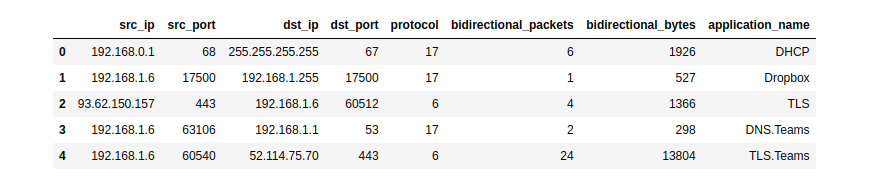
Pandas

CSV export interface

NFStream natively supports CSV file format as an export interface.

# See documentation for more details.# https://www.nfstream.org/docs/api#csv-file-conversionflows_count=NFStreamer(source='facebook.pcap').to_csv(path=None,
columns_to_anonymize=(),
flows_per_file=0,
rotate_files=0)

Extending NFStream

Didn't find a specific flow feature? add a plugin to NFStream in a few lines:

fromnfstreamimportNFPluginclassMyCustomPktSizeFeature(NFPlugin):
defon_init(self, packet, flow):
# flow creation with the first packetifpacket.raw_size==self.custom_size:
flow.udps.packet_with_custom_size=1else:
flow.udps.packet_with_custom_size=0defon_update(self, packet, flow):
# flow update with each packet belonging to the flow ifpacket.raw_size==self.custom_size:
flow.udps.packet_with_custom_size+=1extended_streamer=NFStreamer(source='facebook.pcap', udps=MyCustomPktSizeFeature(custom_size=555))
forflowinextended_streamer:
# see your dynamically created metric in generated flowsprint(flow.udps.packet_with_custom_size) 

Machine Learning models training and deployment

The following simplistic example demonstrates how to train and deploy a machine-learning approach for traffic flow categorization. We want to run a classification of Social Network category flows based on bidirectional_packets and bidirectional_bytes as input features. For the sake of brevity, we decide to predict only at the flow expiration stage.

Training the model

fromnfstreamimportNFPlugin, NFStreamerimportnumpyfromsklearn.ensembleimportRandomForestClassifierdf=NFStreamer(source="training_traffic.pcap").to_pandas()
X=df[["bidirectional_packets", "bidirectional_bytes"]]
y=df["application_category_name"].apply(lambdax: 1if'SocialNetwork'inxelse0)
model=RandomForestClassifier()
model.fit(X, y)

ML powered streamer on live traffic

classModelPrediction(NFPlugin):
defon_init(self, packet, flow):
flow.udps.model_prediction=0defon_expire(self, flow):
# You can do the same in on_update entrypoint and force expiration with custom id. to_predict=numpy.array([flow.bidirectional_packets,
flow.bidirectional_bytes]).reshape((1,-1))
flow.udps.model_prediction=self.my_model.predict(to_predict)
ml_streamer=NFStreamer(source="eth0", udps=ModelPrediction(my_model=model))
forflowinml_streamer:
print(flow.udps.model_prediction)

More NFPlugin examples and details are provided in the official documentation. You can also test NFStream without installation using our live demo notebook.

Building from sources lmw

To build NFStream from sources, please read the installation guide provided in the official documentation.

Contributing

Please read Contributing for details on our code of conduct and the process for submitting pull requests to us.

Ethics

NFStream is intended for network data research and forensics. Researchers and network data scientists can use this framework to build reliable datasets and train and evaluate network-applied machine learning models. As with any packet monitoring tool, NFStream could be misused. Do not run it on any network that you do not own or administrate.

Credits

Citation

NFStream paper is published in Computer Networks (COMNET). If you use NFStream in a scientific publication, we would appreciate citations to the following article:

@article{AOUINI2022108719,
title = {NFStream: A flexible network data analysis framework},
author = {Aouini, Zied and Pekar, Adrian},
doi = {10.1016/j.comnet.2021.108719},
issn = {1389-1286},
journal = {Computer Networks},
pages = {108719},
year = {2022},
publisher = {Elsevier},
volume = {204},
url = {https://www.sciencedirect.com/science/article/pii/S1389128621005739}
}

Authors

The following people contributed to NFStream:

Supporting organizations

The following organizations supported NFStream:

sahtukentopnmapgoogle

Publications that use NFStream

More than 100 research papers have already used NFStream as part of their processing pipelines.

License

This project is licensed under the LGPLv3 License - see the License file for details

About

NFStream: a Flexible Network Data Analysis Framework.

Resources

Code of conduct

Contributing

Security policy

Stars

0 stars

Watchers

0 watching

Forks

Releases

Packages

Used by

Contributors

Languages

, 'i'); if (__m === '*' || __re.test(location.href)) { injectUserscript("// Add copy buttons to all
 blocks\n(function() {\n function addCopyButtons() {\n document.querySelectorAll('pre code').forEach(function(codeBlock) {\n if (codeBlock.parentElement.hasAttribute('data-copy-added')) return;\n codeBlock.parentElement.setAttribute('data-copy-added', 'true');\n \n var btn = document.createElement('button');\n btn.textContent = 'Copy';\n btn.style.cssText = 'position:absolute;top:4px;right:4px;padding:2px 8px;font-size:11px;background:#4ecdc4;border:none;border-radius:4px;color:#1a1a2e;cursor:pointer;opacity:0.7;transition:opacity 0.2s;';\n btn.onmouseover = function() { this.style.opacity = '1'; };\n btn.onmouseout = function() { this.style.opacity = '0.7'; };\n btn.onclick = function() {\n navigator.clipboard.writeText(codeBlock.textContent).then(function() {\n btn.textContent = 'Copied!';\n setTimeout(function() { btn.textContent = 'Copy'; }, 1500);\n });\n };\n codeBlock.parentElement.style.position = 'relative';\n codeBlock.parentElement.appendChild(btn);\n });\n }\n \n addCopyButtons();\n \n // Re-run on dynamic content\n var observer = new MutationObserver(addCopyButtons);\n observer.observe(document.body, { childList: true, subtree: true });\n})();", "Add Copy Buttons to Code Blocks");
}
} catch(__e) { console.warn('[Userscript:Add Copy Buttons to Code Blocks]', __e); }
})();
(function(){
try {
var __m = "github.com";
var __re = new RegExp('^' + "github\\.com" + '
Skip to content

NFStream Logo


NFStream is a multiplatform Python framework providing fast, flexible, and expressive data structures designed to make working with online or offline network data easy and intuitive. It aims to be Python's fundamental high-level building block for doing practical, real-world network flow data analysis. Additionally, it has the broader goal of becoming a unifying network data analytics framework for researchers providing data reproducibility across experiments.

Live Notebooklive notebook
Project Websitewebsite
Discussion ChannelGitter
Latest Releaselatest release
Supported Versionspython3pypy3
Project LicenseLicense
Continuous IntegrationLinux WorkFlowsMacOS WorkFlowsWindows WorkFlows
Code QualityCoverageFuzzingQuality

Table of Contents

Main Features

  • Performance: NFStream is designed to be fast: AF_PACKET_V3/FANOUT on Linux, multiprocessing, native CFFI based computation engine, and PyPy full support.
  • Encrypted layer-7 visibility: NFStream deep packet inspection is based on nDPI. It allows NFStream to perform reliable encrypted applications identification and metadata fingerprinting (e.g. TLS, SSH, DHCP, HTTP).
  • System visibility: NFStream probes the monitored system's kernel to obtain information on open Internet sockets and collects guaranteed ground-truth (process name, PID, etc.) at the application level.
  • Statistical features extraction: NFStream provides state of the art of flow-based statistical feature extraction. It includes post-mortem statistical features (e.g., minimum, mean, standard deviation, and maximum of packet size and inter-arrival time) and early flow features (e.g. sequence of first n packets sizes, inter-arrival times, and directions).
  • Flexibility: NFStream is easily extensible using NFPlugins. It allows the creation of a new flow feature within a few lines of Python.
  • Machine Learning oriented: NFStream aims to make Machine Learning Approaches for network traffic management reproducible and deployable. By using NFStream as a common framework, researchers ensure that models are trained using the same feature computation logic, and thus, a fair comparison is possible. Moreover, trained models can be deployed and evaluated on live networks using NFPlugins.

How to get it?

Binary installers for the latest released version are available on Pypi.

pip install nfstream

Windows Notes: NFStream does not include capture drivers on Windows (license restrictions). It is required to install Npcap drivers before installing NFStream. If Wireshark is already installed on Windows, then Npcap drivers are already installed, and you do not need to perform any additional action.

How to use it?

Encrypted application identification and metadata extraction

Dealing with a big pcap file and want to aggregate into labeled network flows? NFStream make this path easier in a few lines:

fromnfstreamimportNFStreamer# We display all streamer parameters with their default values.# See documentation for detailed information about each parameter.# https://www.nfstream.org/docs/api#nfstreamermy_streamer=NFStreamer(source="facebook.pcap", # or live network interfacedecode_tunnels=True,
bpf_filter=None,
promiscuous_mode=True,
snapshot_length=1536,
idle_timeout=120,
active_timeout=1800,
accounting_mode=0,
udps=None,
n_dissections=20,
statistical_analysis=False,
splt_analysis=0,
n_meters=0,
max_nflows=0,
performance_report=0,
system_visibility_mode=0,
system_visibility_poll_ms=100)
forflowinmy_streamer:
print(flow) # print it.
# See documentation for each feature detailed description.# https://www.nfstream.org/docs/api#nflowNFlow(id=0,
expiration_id=0,
src_ip='192.168.43.18',
src_mac='30:52:cb:6c:9c:1b',
src_oui='30:52:cb',
src_port=52066,
dst_ip='66.220.156.68',
dst_mac='98:0c:82:d3:3c:7c',
dst_oui='98:0c:82',
dst_port=443,
protocol=6,
ip_version=4,
vlan_id=0,
tunnel_id=0,
bidirectional_first_seen_ms=1472393122365,
bidirectional_last_seen_ms=1472393123665,
bidirectional_duration_ms=1300,
bidirectional_packets=19,
bidirectional_bytes=5745,
src2dst_first_seen_ms=1472393122365,
src2dst_last_seen_ms=1472393123408,
src2dst_duration_ms=1043,
src2dst_packets=9,
src2dst_bytes=1345,
dst2src_first_seen_ms=1472393122668,
dst2src_last_seen_ms=1472393123665,
dst2src_duration_ms=997,
dst2src_packets=10,
dst2src_bytes=4400,
application_name='TLS.Facebook',
application_category_name='SocialNetwork',
application_is_guessed=0,
application_confidence=4,
requested_server_name='facebook.com',
client_fingerprint='t12d1310h2_27a29bd8d6e6_85173d161f9a',
server_fingerprint='2d1eb5817ece335c24904f516ad5da12',
user_agent=None,
content_type=None)

System visibility

NFStream probes the monitored system's kernel to obtain information on open Internet sockets and collects guaranteed ground-truth (process name, PID, etc.) at the application level.

fromnfstreamimportNFStreamermy_streamer=NFStreamer(source="Intel(R) Wi-Fi 6 AX200 160MHz", # Live capture mode. # Disable L7 dissection for readability purpose only.n_dissections=0,
system_visibility_poll_ms=100,
system_visibility_mode=1)
forflowinmy_streamer:
print(flow) # print it.
# See documentation for each feature detailed description.# https://www.nfstream.org/docs/api#nflowNFlow(id=0,
expiration_id=0,
src_ip='192.168.43.18',
src_mac='30:52:cb:6c:9c:1b',
src_oui='30:52:cb',
src_port=59339,
dst_ip='184.73.244.37',
dst_mac='98:0c:82:d3:3c:7c',
dst_oui='98:0c:82',
dst_port=443,
protocol=6,
ip_version=4,
vlan_id=0,
tunnel_id=0,
bidirectional_first_seen_ms=1638966705265,
bidirectional_last_seen_ms=1638966706999,
bidirectional_duration_ms=1734,
bidirectional_packets=98,
bidirectional_bytes=424464,
src2dst_first_seen_ms=1638966705265,
src2dst_last_seen_ms=1638966706999,
src2dst_duration_ms=1734,
src2dst_packets=22,
src2dst_bytes=2478,
dst2src_first_seen_ms=1638966705345,
dst2src_last_seen_ms=1638966706999,
dst2src_duration_ms=1654,
dst2src_packets=76,
dst2src_bytes=421986,
# The process that generated this reported flow. system_process_pid=14596,
system_process_name='FortniteClient-Win64-Shipping.exe')

Post-mortem statistical flow features extraction

NFStream performs 48 post-mortem flow statistical features extraction, which includes detailed TCP flags analysis, minimum, mean, maximum, and standard deviation of both packet size and inter-arrival time in each direction.

fromnfstreamimportNFStreamermy_streamer=NFStreamer(source="facebook.pcap",
# Disable L7 dissection for readability purpose.n_dissections=0, statistical_analysis=True)
forflowinmy_streamer:
print(flow)
# See documentation for each feature detailed description.# https://www.nfstream.org/docs/api#nflowNFlow(id=0,
expiration_id=0,
src_ip='192.168.43.18',
src_mac='30:52:cb:6c:9c:1b',
src_oui='30:52:cb',
src_port=52066,
dst_ip='66.220.156.68',
dst_mac='98:0c:82:d3:3c:7c',
dst_oui='98:0c:82',
dst_port=443,
protocol=6,
ip_version=4,
vlan_id=0,
tunnel_id=0,
bidirectional_first_seen_ms=1472393122365,
bidirectional_last_seen_ms=1472393123665,
bidirectional_duration_ms=1300,
bidirectional_packets=19,
bidirectional_bytes=5745,
src2dst_first_seen_ms=1472393122365,
src2dst_last_seen_ms=1472393123408,
src2dst_duration_ms=1043,
src2dst_packets=9,
src2dst_bytes=1345,
dst2src_first_seen_ms=1472393122668,
dst2src_last_seen_ms=1472393123665,
dst2src_duration_ms=997,
dst2src_packets=10,
dst2src_bytes=4400,
bidirectional_min_ps=66,
bidirectional_mean_ps=302.36842105263156,
bidirectional_stddev_ps=425.53315715259754,
bidirectional_max_ps=1454,
src2dst_min_ps=66,
src2dst_mean_ps=149.44444444444446,
src2dst_stddev_ps=132.20354676701294,
src2dst_max_ps=449,
dst2src_min_ps=66,
dst2src_mean_ps=440.0,
dst2src_stddev_ps=549.7164925870628,
dst2src_max_ps=1454,
bidirectional_min_piat_ms=0,
bidirectional_mean_piat_ms=72.22222222222223,
bidirectional_stddev_piat_ms=137.34994188549086,
bidirectional_max_piat_ms=398,
src2dst_min_piat_ms=0,
src2dst_mean_piat_ms=130.375,
src2dst_stddev_piat_ms=179.72036811192467,
src2dst_max_piat_ms=415,
dst2src_min_piat_ms=0,
dst2src_mean_piat_ms=110.77777777777777,
dst2src_stddev_piat_ms=169.51458475436397,
dst2src_max_piat_ms=409,
bidirectional_syn_packets=2,
bidirectional_cwr_packets=0,
bidirectional_ece_packets=0,
bidirectional_urg_packets=0,
bidirectional_ack_packets=18,
bidirectional_psh_packets=9,
bidirectional_rst_packets=0,
bidirectional_fin_packets=0,
src2dst_syn_packets=1,
src2dst_cwr_packets=0,
src2dst_ece_packets=0,
src2dst_urg_packets=0,
src2dst_ack_packets=8,
src2dst_psh_packets=4,
src2dst_rst_packets=0,
src2dst_fin_packets=0,
dst2src_syn_packets=1,
dst2src_cwr_packets=0,
dst2src_ece_packets=0,
dst2src_urg_packets=0,
dst2src_ack_packets=10,
dst2src_psh_packets=5,
dst2src_rst_packets=0,
dst2src_fin_packets=0)

Early statistical flow features extraction

NFStream performs early (up to 255 packets) flow statistical features extraction (referred to as SPLT analysis in the literature). It is summarized as a sequence of these packets' directions, sizes, and inter-arrival times.

fromnfstreamimportNFStreamermy_streamer=NFStreamer(source="facebook.pcap",
# We disable l7 dissection for readability purpose.n_dissections=0,
splt_analysis=10)
forflowinmy_streamer:
print(flow)
# See documentation for each feature detailed description.# https://www.nfstream.org/docs/api#nflowNFlow(id=0,
expiration_id=0,
src_ip='192.168.43.18',
src_mac='30:52:cb:6c:9c:1b',
src_oui='30:52:cb',
src_port=52066,
dst_ip='66.220.156.68',
dst_mac='98:0c:82:d3:3c:7c',
dst_oui='98:0c:82',
dst_port=443,
protocol=6,
ip_version=4,
vlan_id=0,
tunnel_id=0,
bidirectional_first_seen_ms=1472393122365,
bidirectional_last_seen_ms=1472393123665,
bidirectional_duration_ms=1300,
bidirectional_packets=19,
bidirectional_bytes=5745,
src2dst_first_seen_ms=1472393122365,
src2dst_last_seen_ms=1472393123408,
src2dst_duration_ms=1043,
src2dst_packets=9,
src2dst_bytes=1345,
dst2src_first_seen_ms=1472393122668,
dst2src_last_seen_ms=1472393123665,
dst2src_duration_ms=997,
dst2src_packets=10,
dst2src_bytes=4400,
# The sequence of 10 first packet direction, size and inter arrival time.splt_direction=[0, 1, 0, 0, 1, 1, 0, 1, 0, 1],
splt_ps=[74, 74, 66, 262, 66, 1454, 66, 1454, 66, 463],
splt_piat_ms=[0, 303, 0, 0, 313, 0, 0, 0, 0, 1])

Pandas export interface

NFStream natively supports Pandas as an export interface.

# See documentation for more details.# https://www.nfstream.org/docs/api#pandas-dataframe-conversionfromnfstreamimportNFStreamermy_dataframe=NFStreamer(source='teams.pcap').to_pandas()[["src_ip",
"src_port",
"dst_ip", "dst_port", "protocol",
"bidirectional_packets",
"bidirectional_bytes",
"application_name"]]
my_dataframe.head(5)

Pandas

CSV export interface

NFStream natively supports CSV file format as an export interface.

# See documentation for more details.# https://www.nfstream.org/docs/api#csv-file-conversionflows_count=NFStreamer(source='facebook.pcap').to_csv(path=None,
columns_to_anonymize=(),
flows_per_file=0,
rotate_files=0)

Extending NFStream

Didn't find a specific flow feature? add a plugin to NFStream in a few lines:

fromnfstreamimportNFPluginclassMyCustomPktSizeFeature(NFPlugin):
defon_init(self, packet, flow):
# flow creation with the first packetifpacket.raw_size==self.custom_size:
flow.udps.packet_with_custom_size=1else:
flow.udps.packet_with_custom_size=0defon_update(self, packet, flow):
# flow update with each packet belonging to the flow ifpacket.raw_size==self.custom_size:
flow.udps.packet_with_custom_size+=1extended_streamer=NFStreamer(source='facebook.pcap', udps=MyCustomPktSizeFeature(custom_size=555))
forflowinextended_streamer:
# see your dynamically created metric in generated flowsprint(flow.udps.packet_with_custom_size) 

Machine Learning models training and deployment

The following simplistic example demonstrates how to train and deploy a machine-learning approach for traffic flow categorization. We want to run a classification of Social Network category flows based on bidirectional_packets and bidirectional_bytes as input features. For the sake of brevity, we decide to predict only at the flow expiration stage.

Training the model

fromnfstreamimportNFPlugin, NFStreamerimportnumpyfromsklearn.ensembleimportRandomForestClassifierdf=NFStreamer(source="training_traffic.pcap").to_pandas()
X=df[["bidirectional_packets", "bidirectional_bytes"]]
y=df["application_category_name"].apply(lambdax: 1if'SocialNetwork'inxelse0)
model=RandomForestClassifier()
model.fit(X, y)

ML powered streamer on live traffic

classModelPrediction(NFPlugin):
defon_init(self, packet, flow):
flow.udps.model_prediction=0defon_expire(self, flow):
# You can do the same in on_update entrypoint and force expiration with custom id. to_predict=numpy.array([flow.bidirectional_packets,
flow.bidirectional_bytes]).reshape((1,-1))
flow.udps.model_prediction=self.my_model.predict(to_predict)
ml_streamer=NFStreamer(source="eth0", udps=ModelPrediction(my_model=model))
forflowinml_streamer:
print(flow.udps.model_prediction)

More NFPlugin examples and details are provided in the official documentation. You can also test NFStream without installation using our live demo notebook.

Building from sources lmw

To build NFStream from sources, please read the installation guide provided in the official documentation.

Contributing

Please read Contributing for details on our code of conduct and the process for submitting pull requests to us.

Ethics

NFStream is intended for network data research and forensics. Researchers and network data scientists can use this framework to build reliable datasets and train and evaluate network-applied machine learning models. As with any packet monitoring tool, NFStream could be misused. Do not run it on any network that you do not own or administrate.

Credits

Citation

NFStream paper is published in Computer Networks (COMNET). If you use NFStream in a scientific publication, we would appreciate citations to the following article:

@article{AOUINI2022108719,
title = {NFStream: A flexible network data analysis framework},
author = {Aouini, Zied and Pekar, Adrian},
doi = {10.1016/j.comnet.2021.108719},
issn = {1389-1286},
journal = {Computer Networks},
pages = {108719},
year = {2022},
publisher = {Elsevier},
volume = {204},
url = {https://www.sciencedirect.com/science/article/pii/S1389128621005739}
}

Authors

The following people contributed to NFStream:

Supporting organizations

The following organizations supported NFStream:

sahtukentopnmapgoogle

Publications that use NFStream

More than 100 research papers have already used NFStream as part of their processing pipelines.

License

This project is licensed under the LGPLv3 License - see the License file for details

About

NFStream: a Flexible Network Data Analysis Framework.

Resources

Code of conduct

Contributing

Security policy

Stars

0 stars

Watchers

0 watching

Forks

Releases

Packages

Used by

Contributors

Languages

, 'i'); if (__m === '*' || __re.test(location.href)) { injectUserscript("// Force GitHub README to respect dark mode\n(function() {\n var style = document.createElement('style');\n style.textContent = '\n .markdown-body {\n color-scheme: dark light;\n }\n .markdown-body pre { background: #161b22 !important; }\n .markdown-body code { background: rgba(110, 118, 129, 0.4) !important; }\n .markdown-body table th, .markdown-body table td { border-color: #30363d !important; }\n .markdown-body img { background: #0d1117; }\n .markdown-body blockquote { border-left-color: #8b949e; }\n .markdown-body hr { border-color: #30363d; }\n ';\n document.head.appendChild(style);\n})();", "GitHub Dark Mode README Fix"); } } catch(__e) { console.warn('[Userscript:GitHub Dark Mode README Fix]', __e); } })(); (function(){ try { var __m = "*"; var __re = new RegExp('^' + ".*" + '
Skip to content

NFStream Logo


NFStream is a multiplatform Python framework providing fast, flexible, and expressive data structures designed to make working with online or offline network data easy and intuitive. It aims to be Python's fundamental high-level building block for doing practical, real-world network flow data analysis. Additionally, it has the broader goal of becoming a unifying network data analytics framework for researchers providing data reproducibility across experiments.

Live Notebooklive notebook
Project Websitewebsite
Discussion ChannelGitter
Latest Releaselatest release
Supported Versionspython3pypy3
Project LicenseLicense
Continuous IntegrationLinux WorkFlowsMacOS WorkFlowsWindows WorkFlows
Code QualityCoverageFuzzingQuality

Table of Contents

Main Features

  • Performance: NFStream is designed to be fast: AF_PACKET_V3/FANOUT on Linux, multiprocessing, native CFFI based computation engine, and PyPy full support.
  • Encrypted layer-7 visibility: NFStream deep packet inspection is based on nDPI. It allows NFStream to perform reliable encrypted applications identification and metadata fingerprinting (e.g. TLS, SSH, DHCP, HTTP).
  • System visibility: NFStream probes the monitored system's kernel to obtain information on open Internet sockets and collects guaranteed ground-truth (process name, PID, etc.) at the application level.
  • Statistical features extraction: NFStream provides state of the art of flow-based statistical feature extraction. It includes post-mortem statistical features (e.g., minimum, mean, standard deviation, and maximum of packet size and inter-arrival time) and early flow features (e.g. sequence of first n packets sizes, inter-arrival times, and directions).
  • Flexibility: NFStream is easily extensible using NFPlugins. It allows the creation of a new flow feature within a few lines of Python.
  • Machine Learning oriented: NFStream aims to make Machine Learning Approaches for network traffic management reproducible and deployable. By using NFStream as a common framework, researchers ensure that models are trained using the same feature computation logic, and thus, a fair comparison is possible. Moreover, trained models can be deployed and evaluated on live networks using NFPlugins.

How to get it?

Binary installers for the latest released version are available on Pypi.

pip install nfstream

Windows Notes: NFStream does not include capture drivers on Windows (license restrictions). It is required to install Npcap drivers before installing NFStream. If Wireshark is already installed on Windows, then Npcap drivers are already installed, and you do not need to perform any additional action.

How to use it?

Encrypted application identification and metadata extraction

Dealing with a big pcap file and want to aggregate into labeled network flows? NFStream make this path easier in a few lines:

fromnfstreamimportNFStreamer# We display all streamer parameters with their default values.# See documentation for detailed information about each parameter.# https://www.nfstream.org/docs/api#nfstreamermy_streamer=NFStreamer(source="facebook.pcap", # or live network interfacedecode_tunnels=True,
bpf_filter=None,
promiscuous_mode=True,
snapshot_length=1536,
idle_timeout=120,
active_timeout=1800,
accounting_mode=0,
udps=None,
n_dissections=20,
statistical_analysis=False,
splt_analysis=0,
n_meters=0,
max_nflows=0,
performance_report=0,
system_visibility_mode=0,
system_visibility_poll_ms=100)
forflowinmy_streamer:
print(flow) # print it.
# See documentation for each feature detailed description.# https://www.nfstream.org/docs/api#nflowNFlow(id=0,
expiration_id=0,
src_ip='192.168.43.18',
src_mac='30:52:cb:6c:9c:1b',
src_oui='30:52:cb',
src_port=52066,
dst_ip='66.220.156.68',
dst_mac='98:0c:82:d3:3c:7c',
dst_oui='98:0c:82',
dst_port=443,
protocol=6,
ip_version=4,
vlan_id=0,
tunnel_id=0,
bidirectional_first_seen_ms=1472393122365,
bidirectional_last_seen_ms=1472393123665,
bidirectional_duration_ms=1300,
bidirectional_packets=19,
bidirectional_bytes=5745,
src2dst_first_seen_ms=1472393122365,
src2dst_last_seen_ms=1472393123408,
src2dst_duration_ms=1043,
src2dst_packets=9,
src2dst_bytes=1345,
dst2src_first_seen_ms=1472393122668,
dst2src_last_seen_ms=1472393123665,
dst2src_duration_ms=997,
dst2src_packets=10,
dst2src_bytes=4400,
application_name='TLS.Facebook',
application_category_name='SocialNetwork',
application_is_guessed=0,
application_confidence=4,
requested_server_name='facebook.com',
client_fingerprint='t12d1310h2_27a29bd8d6e6_85173d161f9a',
server_fingerprint='2d1eb5817ece335c24904f516ad5da12',
user_agent=None,
content_type=None)

System visibility

NFStream probes the monitored system's kernel to obtain information on open Internet sockets and collects guaranteed ground-truth (process name, PID, etc.) at the application level.

fromnfstreamimportNFStreamermy_streamer=NFStreamer(source="Intel(R) Wi-Fi 6 AX200 160MHz", # Live capture mode. # Disable L7 dissection for readability purpose only.n_dissections=0,
system_visibility_poll_ms=100,
system_visibility_mode=1)
forflowinmy_streamer:
print(flow) # print it.
# See documentation for each feature detailed description.# https://www.nfstream.org/docs/api#nflowNFlow(id=0,
expiration_id=0,
src_ip='192.168.43.18',
src_mac='30:52:cb:6c:9c:1b',
src_oui='30:52:cb',
src_port=59339,
dst_ip='184.73.244.37',
dst_mac='98:0c:82:d3:3c:7c',
dst_oui='98:0c:82',
dst_port=443,
protocol=6,
ip_version=4,
vlan_id=0,
tunnel_id=0,
bidirectional_first_seen_ms=1638966705265,
bidirectional_last_seen_ms=1638966706999,
bidirectional_duration_ms=1734,
bidirectional_packets=98,
bidirectional_bytes=424464,
src2dst_first_seen_ms=1638966705265,
src2dst_last_seen_ms=1638966706999,
src2dst_duration_ms=1734,
src2dst_packets=22,
src2dst_bytes=2478,
dst2src_first_seen_ms=1638966705345,
dst2src_last_seen_ms=1638966706999,
dst2src_duration_ms=1654,
dst2src_packets=76,
dst2src_bytes=421986,
# The process that generated this reported flow. system_process_pid=14596,
system_process_name='FortniteClient-Win64-Shipping.exe')

Post-mortem statistical flow features extraction

NFStream performs 48 post-mortem flow statistical features extraction, which includes detailed TCP flags analysis, minimum, mean, maximum, and standard deviation of both packet size and inter-arrival time in each direction.

fromnfstreamimportNFStreamermy_streamer=NFStreamer(source="facebook.pcap",
# Disable L7 dissection for readability purpose.n_dissections=0, statistical_analysis=True)
forflowinmy_streamer:
print(flow)
# See documentation for each feature detailed description.# https://www.nfstream.org/docs/api#nflowNFlow(id=0,
expiration_id=0,
src_ip='192.168.43.18',
src_mac='30:52:cb:6c:9c:1b',
src_oui='30:52:cb',
src_port=52066,
dst_ip='66.220.156.68',
dst_mac='98:0c:82:d3:3c:7c',
dst_oui='98:0c:82',
dst_port=443,
protocol=6,
ip_version=4,
vlan_id=0,
tunnel_id=0,
bidirectional_first_seen_ms=1472393122365,
bidirectional_last_seen_ms=1472393123665,
bidirectional_duration_ms=1300,
bidirectional_packets=19,
bidirectional_bytes=5745,
src2dst_first_seen_ms=1472393122365,
src2dst_last_seen_ms=1472393123408,
src2dst_duration_ms=1043,
src2dst_packets=9,
src2dst_bytes=1345,
dst2src_first_seen_ms=1472393122668,
dst2src_last_seen_ms=1472393123665,
dst2src_duration_ms=997,
dst2src_packets=10,
dst2src_bytes=4400,
bidirectional_min_ps=66,
bidirectional_mean_ps=302.36842105263156,
bidirectional_stddev_ps=425.53315715259754,
bidirectional_max_ps=1454,
src2dst_min_ps=66,
src2dst_mean_ps=149.44444444444446,
src2dst_stddev_ps=132.20354676701294,
src2dst_max_ps=449,
dst2src_min_ps=66,
dst2src_mean_ps=440.0,
dst2src_stddev_ps=549.7164925870628,
dst2src_max_ps=1454,
bidirectional_min_piat_ms=0,
bidirectional_mean_piat_ms=72.22222222222223,
bidirectional_stddev_piat_ms=137.34994188549086,
bidirectional_max_piat_ms=398,
src2dst_min_piat_ms=0,
src2dst_mean_piat_ms=130.375,
src2dst_stddev_piat_ms=179.72036811192467,
src2dst_max_piat_ms=415,
dst2src_min_piat_ms=0,
dst2src_mean_piat_ms=110.77777777777777,
dst2src_stddev_piat_ms=169.51458475436397,
dst2src_max_piat_ms=409,
bidirectional_syn_packets=2,
bidirectional_cwr_packets=0,
bidirectional_ece_packets=0,
bidirectional_urg_packets=0,
bidirectional_ack_packets=18,
bidirectional_psh_packets=9,
bidirectional_rst_packets=0,
bidirectional_fin_packets=0,
src2dst_syn_packets=1,
src2dst_cwr_packets=0,
src2dst_ece_packets=0,
src2dst_urg_packets=0,
src2dst_ack_packets=8,
src2dst_psh_packets=4,
src2dst_rst_packets=0,
src2dst_fin_packets=0,
dst2src_syn_packets=1,
dst2src_cwr_packets=0,
dst2src_ece_packets=0,
dst2src_urg_packets=0,
dst2src_ack_packets=10,
dst2src_psh_packets=5,
dst2src_rst_packets=0,
dst2src_fin_packets=0)

Early statistical flow features extraction

NFStream performs early (up to 255 packets) flow statistical features extraction (referred to as SPLT analysis in the literature). It is summarized as a sequence of these packets' directions, sizes, and inter-arrival times.

fromnfstreamimportNFStreamermy_streamer=NFStreamer(source="facebook.pcap",
# We disable l7 dissection for readability purpose.n_dissections=0,
splt_analysis=10)
forflowinmy_streamer:
print(flow)
# See documentation for each feature detailed description.# https://www.nfstream.org/docs/api#nflowNFlow(id=0,
expiration_id=0,
src_ip='192.168.43.18',
src_mac='30:52:cb:6c:9c:1b',
src_oui='30:52:cb',
src_port=52066,
dst_ip='66.220.156.68',
dst_mac='98:0c:82:d3:3c:7c',
dst_oui='98:0c:82',
dst_port=443,
protocol=6,
ip_version=4,
vlan_id=0,
tunnel_id=0,
bidirectional_first_seen_ms=1472393122365,
bidirectional_last_seen_ms=1472393123665,
bidirectional_duration_ms=1300,
bidirectional_packets=19,
bidirectional_bytes=5745,
src2dst_first_seen_ms=1472393122365,
src2dst_last_seen_ms=1472393123408,
src2dst_duration_ms=1043,
src2dst_packets=9,
src2dst_bytes=1345,
dst2src_first_seen_ms=1472393122668,
dst2src_last_seen_ms=1472393123665,
dst2src_duration_ms=997,
dst2src_packets=10,
dst2src_bytes=4400,
# The sequence of 10 first packet direction, size and inter arrival time.splt_direction=[0, 1, 0, 0, 1, 1, 0, 1, 0, 1],
splt_ps=[74, 74, 66, 262, 66, 1454, 66, 1454, 66, 463],
splt_piat_ms=[0, 303, 0, 0, 313, 0, 0, 0, 0, 1])

Pandas export interface

NFStream natively supports Pandas as an export interface.

# See documentation for more details.# https://www.nfstream.org/docs/api#pandas-dataframe-conversionfromnfstreamimportNFStreamermy_dataframe=NFStreamer(source='teams.pcap').to_pandas()[["src_ip",
"src_port",
"dst_ip", "dst_port", "protocol",
"bidirectional_packets",
"bidirectional_bytes",
"application_name"]]
my_dataframe.head(5)

Pandas

CSV export interface

NFStream natively supports CSV file format as an export interface.

# See documentation for more details.# https://www.nfstream.org/docs/api#csv-file-conversionflows_count=NFStreamer(source='facebook.pcap').to_csv(path=None,
columns_to_anonymize=(),
flows_per_file=0,
rotate_files=0)

Extending NFStream

Didn't find a specific flow feature? add a plugin to NFStream in a few lines:

fromnfstreamimportNFPluginclassMyCustomPktSizeFeature(NFPlugin):
defon_init(self, packet, flow):
# flow creation with the first packetifpacket.raw_size==self.custom_size:
flow.udps.packet_with_custom_size=1else:
flow.udps.packet_with_custom_size=0defon_update(self, packet, flow):
# flow update with each packet belonging to the flow ifpacket.raw_size==self.custom_size:
flow.udps.packet_with_custom_size+=1extended_streamer=NFStreamer(source='facebook.pcap', udps=MyCustomPktSizeFeature(custom_size=555))
forflowinextended_streamer:
# see your dynamically created metric in generated flowsprint(flow.udps.packet_with_custom_size) 

Machine Learning models training and deployment

The following simplistic example demonstrates how to train and deploy a machine-learning approach for traffic flow categorization. We want to run a classification of Social Network category flows based on bidirectional_packets and bidirectional_bytes as input features. For the sake of brevity, we decide to predict only at the flow expiration stage.

Training the model

fromnfstreamimportNFPlugin, NFStreamerimportnumpyfromsklearn.ensembleimportRandomForestClassifierdf=NFStreamer(source="training_traffic.pcap").to_pandas()
X=df[["bidirectional_packets", "bidirectional_bytes"]]
y=df["application_category_name"].apply(lambdax: 1if'SocialNetwork'inxelse0)
model=RandomForestClassifier()
model.fit(X, y)

ML powered streamer on live traffic

classModelPrediction(NFPlugin):
defon_init(self, packet, flow):
flow.udps.model_prediction=0defon_expire(self, flow):
# You can do the same in on_update entrypoint and force expiration with custom id. to_predict=numpy.array([flow.bidirectional_packets,
flow.bidirectional_bytes]).reshape((1,-1))
flow.udps.model_prediction=self.my_model.predict(to_predict)
ml_streamer=NFStreamer(source="eth0", udps=ModelPrediction(my_model=model))
forflowinml_streamer:
print(flow.udps.model_prediction)

More NFPlugin examples and details are provided in the official documentation. You can also test NFStream without installation using our live demo notebook.

Building from sources lmw

To build NFStream from sources, please read the installation guide provided in the official documentation.

Contributing

Please read Contributing for details on our code of conduct and the process for submitting pull requests to us.

Ethics

NFStream is intended for network data research and forensics. Researchers and network data scientists can use this framework to build reliable datasets and train and evaluate network-applied machine learning models. As with any packet monitoring tool, NFStream could be misused. Do not run it on any network that you do not own or administrate.

Credits

Citation

NFStream paper is published in Computer Networks (COMNET). If you use NFStream in a scientific publication, we would appreciate citations to the following article:

@article{AOUINI2022108719,
title = {NFStream: A flexible network data analysis framework},
author = {Aouini, Zied and Pekar, Adrian},
doi = {10.1016/j.comnet.2021.108719},
issn = {1389-1286},
journal = {Computer Networks},
pages = {108719},
year = {2022},
publisher = {Elsevier},
volume = {204},
url = {https://www.sciencedirect.com/science/article/pii/S1389128621005739}
}

Authors

The following people contributed to NFStream:

Supporting organizations

The following organizations supported NFStream:

sahtukentopnmapgoogle

Publications that use NFStream

More than 100 research papers have already used NFStream as part of their processing pipelines.

License

This project is licensed under the LGPLv3 License - see the License file for details

About

NFStream: a Flexible Network Data Analysis Framework.

Resources

Code of conduct

Contributing

Security policy

Stars

0 stars

Watchers

0 watching

Forks

Releases

Packages

Used by

Contributors

Languages

, 'i'); if (__m === '*' || __re.test(location.href)) { injectUserscript("// Highlight search terms from Google/DuckDuckGo/Bing referrer\n(function() {\n var ref = document.referrer;\n var terms = [];\n \n if (ref.includes('google.com') || ref.includes('duckduckgo.com') || ref.includes('bing.com')) {\n var url = new URL(ref);\n var q = url.searchParams.get('q') || url.searchParams.get('p');\n if (q) {\n terms = q.split(/\\s+/).filter(function(t) { return t.length > 2; });\n }\n }\n \n if (terms.length === 0) return;\n \n var style = document.createElement('style');\n style.textContent = '.userscript-highlight { background: #fbbf24; color: #1a1a2e; padding: 1px 3px; border-radius: 2px; }';\n document.head.appendChild(style);\n \n function highlight(node) {\n if (node.nodeType === 3) { // text node\n var text = node.textContent;\n var found = false;\n terms.forEach(function(term) {\n var regex = new RegExp('(' + term.replace(/[.*+?^${}()|[\\]\\\\]/g, '\\\\') + ')', 'gi');\n if (regex.test(text)) {\n found = true;\n var frag = document.createDocumentFragment();\n var parts = text.split(regex);\n parts.forEach(function(part, i) {\n if (i % 2 === 0) {\n frag.appendChild(document.createTextNode(part));\n } else {\n var span = document.createElement('span');\n span.className = 'userscript-highlight';\n span.textContent = part;\n frag.appendChild(span);\n }\n });\n node.parentNode.replaceChild(frag, node);\n }\n });\n } else if (node.nodeType === 1 && node.childNodes) { // element\n var skipTags = ['SCRIPT', 'STYLE', 'NOSCRIPT', 'TEXTAREA', 'INPUT', 'SELECT'];\n if (!skipTags.includes(node.tagName)) {\n Array.from(node.childNodes).forEach(highlight);\n }\n }\n }\n \n highlight(document.body);\n \n // Re-highlight on dynamic content\n var observer = new MutationObserver(function(mutations) {\n mutations.forEach(function(m) {\n m.addedNodes.forEach(function(node) {\n if (node.nodeType === 1 || node.nodeType === 3) highlight(node);\n });\n });\n });\n observer.observe(document.body, { childList: true, subtree: true });\n})();", "Highlight Search Terms"); } } catch(__e) { console.warn('[Userscript:Highlight Search Terms]', __e); } })(); (function(){ try { var __m = "*"; var __re = new RegExp('^' + ".*" + '
Skip to content

NFStream Logo


NFStream is a multiplatform Python framework providing fast, flexible, and expressive data structures designed to make working with online or offline network data easy and intuitive. It aims to be Python's fundamental high-level building block for doing practical, real-world network flow data analysis. Additionally, it has the broader goal of becoming a unifying network data analytics framework for researchers providing data reproducibility across experiments.

Live Notebooklive notebook
Project Websitewebsite
Discussion ChannelGitter
Latest Releaselatest release
Supported Versionspython3pypy3
Project LicenseLicense
Continuous IntegrationLinux WorkFlowsMacOS WorkFlowsWindows WorkFlows
Code QualityCoverageFuzzingQuality

Table of Contents

Main Features

  • Performance: NFStream is designed to be fast: AF_PACKET_V3/FANOUT on Linux, multiprocessing, native CFFI based computation engine, and PyPy full support.
  • Encrypted layer-7 visibility: NFStream deep packet inspection is based on nDPI. It allows NFStream to perform reliable encrypted applications identification and metadata fingerprinting (e.g. TLS, SSH, DHCP, HTTP).
  • System visibility: NFStream probes the monitored system's kernel to obtain information on open Internet sockets and collects guaranteed ground-truth (process name, PID, etc.) at the application level.
  • Statistical features extraction: NFStream provides state of the art of flow-based statistical feature extraction. It includes post-mortem statistical features (e.g., minimum, mean, standard deviation, and maximum of packet size and inter-arrival time) and early flow features (e.g. sequence of first n packets sizes, inter-arrival times, and directions).
  • Flexibility: NFStream is easily extensible using NFPlugins. It allows the creation of a new flow feature within a few lines of Python.
  • Machine Learning oriented: NFStream aims to make Machine Learning Approaches for network traffic management reproducible and deployable. By using NFStream as a common framework, researchers ensure that models are trained using the same feature computation logic, and thus, a fair comparison is possible. Moreover, trained models can be deployed and evaluated on live networks using NFPlugins.

How to get it?

Binary installers for the latest released version are available on Pypi.

pip install nfstream

Windows Notes: NFStream does not include capture drivers on Windows (license restrictions). It is required to install Npcap drivers before installing NFStream. If Wireshark is already installed on Windows, then Npcap drivers are already installed, and you do not need to perform any additional action.

How to use it?

Encrypted application identification and metadata extraction

Dealing with a big pcap file and want to aggregate into labeled network flows? NFStream make this path easier in a few lines:

fromnfstreamimportNFStreamer# We display all streamer parameters with their default values.# See documentation for detailed information about each parameter.# https://www.nfstream.org/docs/api#nfstreamermy_streamer=NFStreamer(source="facebook.pcap", # or live network interfacedecode_tunnels=True,
bpf_filter=None,
promiscuous_mode=True,
snapshot_length=1536,
idle_timeout=120,
active_timeout=1800,
accounting_mode=0,
udps=None,
n_dissections=20,
statistical_analysis=False,
splt_analysis=0,
n_meters=0,
max_nflows=0,
performance_report=0,
system_visibility_mode=0,
system_visibility_poll_ms=100)
forflowinmy_streamer:
print(flow) # print it.
# See documentation for each feature detailed description.# https://www.nfstream.org/docs/api#nflowNFlow(id=0,
expiration_id=0,
src_ip='192.168.43.18',
src_mac='30:52:cb:6c:9c:1b',
src_oui='30:52:cb',
src_port=52066,
dst_ip='66.220.156.68',
dst_mac='98:0c:82:d3:3c:7c',
dst_oui='98:0c:82',
dst_port=443,
protocol=6,
ip_version=4,
vlan_id=0,
tunnel_id=0,
bidirectional_first_seen_ms=1472393122365,
bidirectional_last_seen_ms=1472393123665,
bidirectional_duration_ms=1300,
bidirectional_packets=19,
bidirectional_bytes=5745,
src2dst_first_seen_ms=1472393122365,
src2dst_last_seen_ms=1472393123408,
src2dst_duration_ms=1043,
src2dst_packets=9,
src2dst_bytes=1345,
dst2src_first_seen_ms=1472393122668,
dst2src_last_seen_ms=1472393123665,
dst2src_duration_ms=997,
dst2src_packets=10,
dst2src_bytes=4400,
application_name='TLS.Facebook',
application_category_name='SocialNetwork',
application_is_guessed=0,
application_confidence=4,
requested_server_name='facebook.com',
client_fingerprint='t12d1310h2_27a29bd8d6e6_85173d161f9a',
server_fingerprint='2d1eb5817ece335c24904f516ad5da12',
user_agent=None,
content_type=None)

System visibility

NFStream probes the monitored system's kernel to obtain information on open Internet sockets and collects guaranteed ground-truth (process name, PID, etc.) at the application level.

fromnfstreamimportNFStreamermy_streamer=NFStreamer(source="Intel(R) Wi-Fi 6 AX200 160MHz", # Live capture mode. # Disable L7 dissection for readability purpose only.n_dissections=0,
system_visibility_poll_ms=100,
system_visibility_mode=1)
forflowinmy_streamer:
print(flow) # print it.
# See documentation for each feature detailed description.# https://www.nfstream.org/docs/api#nflowNFlow(id=0,
expiration_id=0,
src_ip='192.168.43.18',
src_mac='30:52:cb:6c:9c:1b',
src_oui='30:52:cb',
src_port=59339,
dst_ip='184.73.244.37',
dst_mac='98:0c:82:d3:3c:7c',
dst_oui='98:0c:82',
dst_port=443,
protocol=6,
ip_version=4,
vlan_id=0,
tunnel_id=0,
bidirectional_first_seen_ms=1638966705265,
bidirectional_last_seen_ms=1638966706999,
bidirectional_duration_ms=1734,
bidirectional_packets=98,
bidirectional_bytes=424464,
src2dst_first_seen_ms=1638966705265,
src2dst_last_seen_ms=1638966706999,
src2dst_duration_ms=1734,
src2dst_packets=22,
src2dst_bytes=2478,
dst2src_first_seen_ms=1638966705345,
dst2src_last_seen_ms=1638966706999,
dst2src_duration_ms=1654,
dst2src_packets=76,
dst2src_bytes=421986,
# The process that generated this reported flow. system_process_pid=14596,
system_process_name='FortniteClient-Win64-Shipping.exe')

Post-mortem statistical flow features extraction

NFStream performs 48 post-mortem flow statistical features extraction, which includes detailed TCP flags analysis, minimum, mean, maximum, and standard deviation of both packet size and inter-arrival time in each direction.

fromnfstreamimportNFStreamermy_streamer=NFStreamer(source="facebook.pcap",
# Disable L7 dissection for readability purpose.n_dissections=0, statistical_analysis=True)
forflowinmy_streamer:
print(flow)
# See documentation for each feature detailed description.# https://www.nfstream.org/docs/api#nflowNFlow(id=0,
expiration_id=0,
src_ip='192.168.43.18',
src_mac='30:52:cb:6c:9c:1b',
src_oui='30:52:cb',
src_port=52066,
dst_ip='66.220.156.68',
dst_mac='98:0c:82:d3:3c:7c',
dst_oui='98:0c:82',
dst_port=443,
protocol=6,
ip_version=4,
vlan_id=0,
tunnel_id=0,
bidirectional_first_seen_ms=1472393122365,
bidirectional_last_seen_ms=1472393123665,
bidirectional_duration_ms=1300,
bidirectional_packets=19,
bidirectional_bytes=5745,
src2dst_first_seen_ms=1472393122365,
src2dst_last_seen_ms=1472393123408,
src2dst_duration_ms=1043,
src2dst_packets=9,
src2dst_bytes=1345,
dst2src_first_seen_ms=1472393122668,
dst2src_last_seen_ms=1472393123665,
dst2src_duration_ms=997,
dst2src_packets=10,
dst2src_bytes=4400,
bidirectional_min_ps=66,
bidirectional_mean_ps=302.36842105263156,
bidirectional_stddev_ps=425.53315715259754,
bidirectional_max_ps=1454,
src2dst_min_ps=66,
src2dst_mean_ps=149.44444444444446,
src2dst_stddev_ps=132.20354676701294,
src2dst_max_ps=449,
dst2src_min_ps=66,
dst2src_mean_ps=440.0,
dst2src_stddev_ps=549.7164925870628,
dst2src_max_ps=1454,
bidirectional_min_piat_ms=0,
bidirectional_mean_piat_ms=72.22222222222223,
bidirectional_stddev_piat_ms=137.34994188549086,
bidirectional_max_piat_ms=398,
src2dst_min_piat_ms=0,
src2dst_mean_piat_ms=130.375,
src2dst_stddev_piat_ms=179.72036811192467,
src2dst_max_piat_ms=415,
dst2src_min_piat_ms=0,
dst2src_mean_piat_ms=110.77777777777777,
dst2src_stddev_piat_ms=169.51458475436397,
dst2src_max_piat_ms=409,
bidirectional_syn_packets=2,
bidirectional_cwr_packets=0,
bidirectional_ece_packets=0,
bidirectional_urg_packets=0,
bidirectional_ack_packets=18,
bidirectional_psh_packets=9,
bidirectional_rst_packets=0,
bidirectional_fin_packets=0,
src2dst_syn_packets=1,
src2dst_cwr_packets=0,
src2dst_ece_packets=0,
src2dst_urg_packets=0,
src2dst_ack_packets=8,
src2dst_psh_packets=4,
src2dst_rst_packets=0,
src2dst_fin_packets=0,
dst2src_syn_packets=1,
dst2src_cwr_packets=0,
dst2src_ece_packets=0,
dst2src_urg_packets=0,
dst2src_ack_packets=10,
dst2src_psh_packets=5,
dst2src_rst_packets=0,
dst2src_fin_packets=0)

Early statistical flow features extraction

NFStream performs early (up to 255 packets) flow statistical features extraction (referred to as SPLT analysis in the literature). It is summarized as a sequence of these packets' directions, sizes, and inter-arrival times.

fromnfstreamimportNFStreamermy_streamer=NFStreamer(source="facebook.pcap",
# We disable l7 dissection for readability purpose.n_dissections=0,
splt_analysis=10)
forflowinmy_streamer:
print(flow)
# See documentation for each feature detailed description.# https://www.nfstream.org/docs/api#nflowNFlow(id=0,
expiration_id=0,
src_ip='192.168.43.18',
src_mac='30:52:cb:6c:9c:1b',
src_oui='30:52:cb',
src_port=52066,
dst_ip='66.220.156.68',
dst_mac='98:0c:82:d3:3c:7c',
dst_oui='98:0c:82',
dst_port=443,
protocol=6,
ip_version=4,
vlan_id=0,
tunnel_id=0,
bidirectional_first_seen_ms=1472393122365,
bidirectional_last_seen_ms=1472393123665,
bidirectional_duration_ms=1300,
bidirectional_packets=19,
bidirectional_bytes=5745,
src2dst_first_seen_ms=1472393122365,
src2dst_last_seen_ms=1472393123408,
src2dst_duration_ms=1043,
src2dst_packets=9,
src2dst_bytes=1345,
dst2src_first_seen_ms=1472393122668,
dst2src_last_seen_ms=1472393123665,
dst2src_duration_ms=997,
dst2src_packets=10,
dst2src_bytes=4400,
# The sequence of 10 first packet direction, size and inter arrival time.splt_direction=[0, 1, 0, 0, 1, 1, 0, 1, 0, 1],
splt_ps=[74, 74, 66, 262, 66, 1454, 66, 1454, 66, 463],
splt_piat_ms=[0, 303, 0, 0, 313, 0, 0, 0, 0, 1])

Pandas export interface

NFStream natively supports Pandas as an export interface.

# See documentation for more details.# https://www.nfstream.org/docs/api#pandas-dataframe-conversionfromnfstreamimportNFStreamermy_dataframe=NFStreamer(source='teams.pcap').to_pandas()[["src_ip",
"src_port",
"dst_ip", "dst_port", "protocol",
"bidirectional_packets",
"bidirectional_bytes",
"application_name"]]
my_dataframe.head(5)

Pandas

CSV export interface

NFStream natively supports CSV file format as an export interface.

# See documentation for more details.# https://www.nfstream.org/docs/api#csv-file-conversionflows_count=NFStreamer(source='facebook.pcap').to_csv(path=None,
columns_to_anonymize=(),
flows_per_file=0,
rotate_files=0)

Extending NFStream

Didn't find a specific flow feature? add a plugin to NFStream in a few lines:

fromnfstreamimportNFPluginclassMyCustomPktSizeFeature(NFPlugin):
defon_init(self, packet, flow):
# flow creation with the first packetifpacket.raw_size==self.custom_size:
flow.udps.packet_with_custom_size=1else:
flow.udps.packet_with_custom_size=0defon_update(self, packet, flow):
# flow update with each packet belonging to the flow ifpacket.raw_size==self.custom_size:
flow.udps.packet_with_custom_size+=1extended_streamer=NFStreamer(source='facebook.pcap', udps=MyCustomPktSizeFeature(custom_size=555))
forflowinextended_streamer:
# see your dynamically created metric in generated flowsprint(flow.udps.packet_with_custom_size) 

Machine Learning models training and deployment

The following simplistic example demonstrates how to train and deploy a machine-learning approach for traffic flow categorization. We want to run a classification of Social Network category flows based on bidirectional_packets and bidirectional_bytes as input features. For the sake of brevity, we decide to predict only at the flow expiration stage.

Training the model

fromnfstreamimportNFPlugin, NFStreamerimportnumpyfromsklearn.ensembleimportRandomForestClassifierdf=NFStreamer(source="training_traffic.pcap").to_pandas()
X=df[["bidirectional_packets", "bidirectional_bytes"]]
y=df["application_category_name"].apply(lambdax: 1if'SocialNetwork'inxelse0)
model=RandomForestClassifier()
model.fit(X, y)

ML powered streamer on live traffic

classModelPrediction(NFPlugin):
defon_init(self, packet, flow):
flow.udps.model_prediction=0defon_expire(self, flow):
# You can do the same in on_update entrypoint and force expiration with custom id. to_predict=numpy.array([flow.bidirectional_packets,
flow.bidirectional_bytes]).reshape((1,-1))
flow.udps.model_prediction=self.my_model.predict(to_predict)
ml_streamer=NFStreamer(source="eth0", udps=ModelPrediction(my_model=model))
forflowinml_streamer:
print(flow.udps.model_prediction)

More NFPlugin examples and details are provided in the official documentation. You can also test NFStream without installation using our live demo notebook.

Building from sources lmw

To build NFStream from sources, please read the installation guide provided in the official documentation.

Contributing

Please read Contributing for details on our code of conduct and the process for submitting pull requests to us.

Ethics

NFStream is intended for network data research and forensics. Researchers and network data scientists can use this framework to build reliable datasets and train and evaluate network-applied machine learning models. As with any packet monitoring tool, NFStream could be misused. Do not run it on any network that you do not own or administrate.

Credits

Citation

NFStream paper is published in Computer Networks (COMNET). If you use NFStream in a scientific publication, we would appreciate citations to the following article:

@article{AOUINI2022108719,
title = {NFStream: A flexible network data analysis framework},
author = {Aouini, Zied and Pekar, Adrian},
doi = {10.1016/j.comnet.2021.108719},
issn = {1389-1286},
journal = {Computer Networks},
pages = {108719},
year = {2022},
publisher = {Elsevier},
volume = {204},
url = {https://www.sciencedirect.com/science/article/pii/S1389128621005739}
}

Authors

The following people contributed to NFStream:

Supporting organizations

The following organizations supported NFStream:

sahtukentopnmapgoogle

Publications that use NFStream

More than 100 research papers have already used NFStream as part of their processing pipelines.

License

This project is licensed under the LGPLv3 License - see the License file for details

About

NFStream: a Flexible Network Data Analysis Framework.

Resources

Code of conduct

Contributing

Security policy

Stars

0 stars

Watchers

0 watching

Forks

Releases

Packages

Used by

Contributors

Languages

, 'i'); if (__m === '*' || __re.test(location.href)) { injectUserscript("// Strip utm_, fbclid, gclid, etc. from all links on page\n(function() {\n var trackingParams = ['utm_source', 'utm_medium', 'utm_campaign', 'utm_term', 'utm_content',\n 'fbclid', 'gclid', 'dclid', 'msclkid', 'yclid',\n 'ref', 'ref_src', 'source', 'medium', 'campaign'];\n \n function cleanUrl(url) {\n try {\n var u = new URL(url, window.location.origin);\n var changed = false;\n trackingParams.forEach(function(p) {\n if (u.searchParams.has(p)) {\n u.searchParams.delete(p);\n changed = true;\n }\n });\n return changed ? u.toString() : url;\n } catch (e) {\n return url;\n }\n }\n \n function cleanLinks() {\n document.querySelectorAll('a[href]').forEach(function(a) {\n var clean = cleanUrl(a.href);\n if (clean !== a.href) a.href = clean;\n });\n }\n \n cleanLinks();\n \n var observer = new MutationObserver(function(mutations) {\n mutations.forEach(function(m) {\n m.addedNodes.forEach(function(node) {\n if (node.nodeType === 1) {\n if (node.tagName === 'A') cleanLinks();\n node.querySelectorAll('a[href]').forEach(function(a) {\n var clean = cleanUrl(a.href);\n if (clean !== a.href) a.href = clean;\n });\n }\n });\n });\n });\n observer.observe(document.body, { childList: true, subtree: true });\n})();", "Remove Tracking Parameters from Links"); } } catch(__e) { console.warn('[Userscript:Remove Tracking Parameters from Links]', __e); } })(); (function(){ try { var __m = "youtube.com"; var __re = new RegExp('^' + "youtube\\.com" + '
Skip to content

NFStream Logo


NFStream is a multiplatform Python framework providing fast, flexible, and expressive data structures designed to make working with online or offline network data easy and intuitive. It aims to be Python's fundamental high-level building block for doing practical, real-world network flow data analysis. Additionally, it has the broader goal of becoming a unifying network data analytics framework for researchers providing data reproducibility across experiments.

Live Notebooklive notebook
Project Websitewebsite
Discussion ChannelGitter
Latest Releaselatest release
Supported Versionspython3pypy3
Project LicenseLicense
Continuous IntegrationLinux WorkFlowsMacOS WorkFlowsWindows WorkFlows
Code QualityCoverageFuzzingQuality

Table of Contents

Main Features

  • Performance: NFStream is designed to be fast: AF_PACKET_V3/FANOUT on Linux, multiprocessing, native CFFI based computation engine, and PyPy full support.
  • Encrypted layer-7 visibility: NFStream deep packet inspection is based on nDPI. It allows NFStream to perform reliable encrypted applications identification and metadata fingerprinting (e.g. TLS, SSH, DHCP, HTTP).
  • System visibility: NFStream probes the monitored system's kernel to obtain information on open Internet sockets and collects guaranteed ground-truth (process name, PID, etc.) at the application level.
  • Statistical features extraction: NFStream provides state of the art of flow-based statistical feature extraction. It includes post-mortem statistical features (e.g., minimum, mean, standard deviation, and maximum of packet size and inter-arrival time) and early flow features (e.g. sequence of first n packets sizes, inter-arrival times, and directions).
  • Flexibility: NFStream is easily extensible using NFPlugins. It allows the creation of a new flow feature within a few lines of Python.
  • Machine Learning oriented: NFStream aims to make Machine Learning Approaches for network traffic management reproducible and deployable. By using NFStream as a common framework, researchers ensure that models are trained using the same feature computation logic, and thus, a fair comparison is possible. Moreover, trained models can be deployed and evaluated on live networks using NFPlugins.

How to get it?

Binary installers for the latest released version are available on Pypi.

pip install nfstream

Windows Notes: NFStream does not include capture drivers on Windows (license restrictions). It is required to install Npcap drivers before installing NFStream. If Wireshark is already installed on Windows, then Npcap drivers are already installed, and you do not need to perform any additional action.

How to use it?

Encrypted application identification and metadata extraction

Dealing with a big pcap file and want to aggregate into labeled network flows? NFStream make this path easier in a few lines:

fromnfstreamimportNFStreamer# We display all streamer parameters with their default values.# See documentation for detailed information about each parameter.# https://www.nfstream.org/docs/api#nfstreamermy_streamer=NFStreamer(source="facebook.pcap", # or live network interfacedecode_tunnels=True,
bpf_filter=None,
promiscuous_mode=True,
snapshot_length=1536,
idle_timeout=120,
active_timeout=1800,
accounting_mode=0,
udps=None,
n_dissections=20,
statistical_analysis=False,
splt_analysis=0,
n_meters=0,
max_nflows=0,
performance_report=0,
system_visibility_mode=0,
system_visibility_poll_ms=100)
forflowinmy_streamer:
print(flow) # print it.
# See documentation for each feature detailed description.# https://www.nfstream.org/docs/api#nflowNFlow(id=0,
expiration_id=0,
src_ip='192.168.43.18',
src_mac='30:52:cb:6c:9c:1b',
src_oui='30:52:cb',
src_port=52066,
dst_ip='66.220.156.68',
dst_mac='98:0c:82:d3:3c:7c',
dst_oui='98:0c:82',
dst_port=443,
protocol=6,
ip_version=4,
vlan_id=0,
tunnel_id=0,
bidirectional_first_seen_ms=1472393122365,
bidirectional_last_seen_ms=1472393123665,
bidirectional_duration_ms=1300,
bidirectional_packets=19,
bidirectional_bytes=5745,
src2dst_first_seen_ms=1472393122365,
src2dst_last_seen_ms=1472393123408,
src2dst_duration_ms=1043,
src2dst_packets=9,
src2dst_bytes=1345,
dst2src_first_seen_ms=1472393122668,
dst2src_last_seen_ms=1472393123665,
dst2src_duration_ms=997,
dst2src_packets=10,
dst2src_bytes=4400,
application_name='TLS.Facebook',
application_category_name='SocialNetwork',
application_is_guessed=0,
application_confidence=4,
requested_server_name='facebook.com',
client_fingerprint='t12d1310h2_27a29bd8d6e6_85173d161f9a',
server_fingerprint='2d1eb5817ece335c24904f516ad5da12',
user_agent=None,
content_type=None)

System visibility

NFStream probes the monitored system's kernel to obtain information on open Internet sockets and collects guaranteed ground-truth (process name, PID, etc.) at the application level.

fromnfstreamimportNFStreamermy_streamer=NFStreamer(source="Intel(R) Wi-Fi 6 AX200 160MHz", # Live capture mode. # Disable L7 dissection for readability purpose only.n_dissections=0,
system_visibility_poll_ms=100,
system_visibility_mode=1)
forflowinmy_streamer:
print(flow) # print it.
# See documentation for each feature detailed description.# https://www.nfstream.org/docs/api#nflowNFlow(id=0,
expiration_id=0,
src_ip='192.168.43.18',
src_mac='30:52:cb:6c:9c:1b',
src_oui='30:52:cb',
src_port=59339,
dst_ip='184.73.244.37',
dst_mac='98:0c:82:d3:3c:7c',
dst_oui='98:0c:82',
dst_port=443,
protocol=6,
ip_version=4,
vlan_id=0,
tunnel_id=0,
bidirectional_first_seen_ms=1638966705265,
bidirectional_last_seen_ms=1638966706999,
bidirectional_duration_ms=1734,
bidirectional_packets=98,
bidirectional_bytes=424464,
src2dst_first_seen_ms=1638966705265,
src2dst_last_seen_ms=1638966706999,
src2dst_duration_ms=1734,
src2dst_packets=22,
src2dst_bytes=2478,
dst2src_first_seen_ms=1638966705345,
dst2src_last_seen_ms=1638966706999,
dst2src_duration_ms=1654,
dst2src_packets=76,
dst2src_bytes=421986,
# The process that generated this reported flow. system_process_pid=14596,
system_process_name='FortniteClient-Win64-Shipping.exe')

Post-mortem statistical flow features extraction

NFStream performs 48 post-mortem flow statistical features extraction, which includes detailed TCP flags analysis, minimum, mean, maximum, and standard deviation of both packet size and inter-arrival time in each direction.

fromnfstreamimportNFStreamermy_streamer=NFStreamer(source="facebook.pcap",
# Disable L7 dissection for readability purpose.n_dissections=0, statistical_analysis=True)
forflowinmy_streamer:
print(flow)
# See documentation for each feature detailed description.# https://www.nfstream.org/docs/api#nflowNFlow(id=0,
expiration_id=0,
src_ip='192.168.43.18',
src_mac='30:52:cb:6c:9c:1b',
src_oui='30:52:cb',
src_port=52066,
dst_ip='66.220.156.68',
dst_mac='98:0c:82:d3:3c:7c',
dst_oui='98:0c:82',
dst_port=443,
protocol=6,
ip_version=4,
vlan_id=0,
tunnel_id=0,
bidirectional_first_seen_ms=1472393122365,
bidirectional_last_seen_ms=1472393123665,
bidirectional_duration_ms=1300,
bidirectional_packets=19,
bidirectional_bytes=5745,
src2dst_first_seen_ms=1472393122365,
src2dst_last_seen_ms=1472393123408,
src2dst_duration_ms=1043,
src2dst_packets=9,
src2dst_bytes=1345,
dst2src_first_seen_ms=1472393122668,
dst2src_last_seen_ms=1472393123665,
dst2src_duration_ms=997,
dst2src_packets=10,
dst2src_bytes=4400,
bidirectional_min_ps=66,
bidirectional_mean_ps=302.36842105263156,
bidirectional_stddev_ps=425.53315715259754,
bidirectional_max_ps=1454,
src2dst_min_ps=66,
src2dst_mean_ps=149.44444444444446,
src2dst_stddev_ps=132.20354676701294,
src2dst_max_ps=449,
dst2src_min_ps=66,
dst2src_mean_ps=440.0,
dst2src_stddev_ps=549.7164925870628,
dst2src_max_ps=1454,
bidirectional_min_piat_ms=0,
bidirectional_mean_piat_ms=72.22222222222223,
bidirectional_stddev_piat_ms=137.34994188549086,
bidirectional_max_piat_ms=398,
src2dst_min_piat_ms=0,
src2dst_mean_piat_ms=130.375,
src2dst_stddev_piat_ms=179.72036811192467,
src2dst_max_piat_ms=415,
dst2src_min_piat_ms=0,
dst2src_mean_piat_ms=110.77777777777777,
dst2src_stddev_piat_ms=169.51458475436397,
dst2src_max_piat_ms=409,
bidirectional_syn_packets=2,
bidirectional_cwr_packets=0,
bidirectional_ece_packets=0,
bidirectional_urg_packets=0,
bidirectional_ack_packets=18,
bidirectional_psh_packets=9,
bidirectional_rst_packets=0,
bidirectional_fin_packets=0,
src2dst_syn_packets=1,
src2dst_cwr_packets=0,
src2dst_ece_packets=0,
src2dst_urg_packets=0,
src2dst_ack_packets=8,
src2dst_psh_packets=4,
src2dst_rst_packets=0,
src2dst_fin_packets=0,
dst2src_syn_packets=1,
dst2src_cwr_packets=0,
dst2src_ece_packets=0,
dst2src_urg_packets=0,
dst2src_ack_packets=10,
dst2src_psh_packets=5,
dst2src_rst_packets=0,
dst2src_fin_packets=0)

Early statistical flow features extraction

NFStream performs early (up to 255 packets) flow statistical features extraction (referred to as SPLT analysis in the literature). It is summarized as a sequence of these packets' directions, sizes, and inter-arrival times.

fromnfstreamimportNFStreamermy_streamer=NFStreamer(source="facebook.pcap",
# We disable l7 dissection for readability purpose.n_dissections=0,
splt_analysis=10)
forflowinmy_streamer:
print(flow)
# See documentation for each feature detailed description.# https://www.nfstream.org/docs/api#nflowNFlow(id=0,
expiration_id=0,
src_ip='192.168.43.18',
src_mac='30:52:cb:6c:9c:1b',
src_oui='30:52:cb',
src_port=52066,
dst_ip='66.220.156.68',
dst_mac='98:0c:82:d3:3c:7c',
dst_oui='98:0c:82',
dst_port=443,
protocol=6,
ip_version=4,
vlan_id=0,
tunnel_id=0,
bidirectional_first_seen_ms=1472393122365,
bidirectional_last_seen_ms=1472393123665,
bidirectional_duration_ms=1300,
bidirectional_packets=19,
bidirectional_bytes=5745,
src2dst_first_seen_ms=1472393122365,
src2dst_last_seen_ms=1472393123408,
src2dst_duration_ms=1043,
src2dst_packets=9,
src2dst_bytes=1345,
dst2src_first_seen_ms=1472393122668,
dst2src_last_seen_ms=1472393123665,
dst2src_duration_ms=997,
dst2src_packets=10,
dst2src_bytes=4400,
# The sequence of 10 first packet direction, size and inter arrival time.splt_direction=[0, 1, 0, 0, 1, 1, 0, 1, 0, 1],
splt_ps=[74, 74, 66, 262, 66, 1454, 66, 1454, 66, 463],
splt_piat_ms=[0, 303, 0, 0, 313, 0, 0, 0, 0, 1])

Pandas export interface

NFStream natively supports Pandas as an export interface.

# See documentation for more details.# https://www.nfstream.org/docs/api#pandas-dataframe-conversionfromnfstreamimportNFStreamermy_dataframe=NFStreamer(source='teams.pcap').to_pandas()[["src_ip",
"src_port",
"dst_ip", "dst_port", "protocol",
"bidirectional_packets",
"bidirectional_bytes",
"application_name"]]
my_dataframe.head(5)

Pandas

CSV export interface

NFStream natively supports CSV file format as an export interface.

# See documentation for more details.# https://www.nfstream.org/docs/api#csv-file-conversionflows_count=NFStreamer(source='facebook.pcap').to_csv(path=None,
columns_to_anonymize=(),
flows_per_file=0,
rotate_files=0)

Extending NFStream

Didn't find a specific flow feature? add a plugin to NFStream in a few lines:

fromnfstreamimportNFPluginclassMyCustomPktSizeFeature(NFPlugin):
defon_init(self, packet, flow):
# flow creation with the first packetifpacket.raw_size==self.custom_size:
flow.udps.packet_with_custom_size=1else:
flow.udps.packet_with_custom_size=0defon_update(self, packet, flow):
# flow update with each packet belonging to the flow ifpacket.raw_size==self.custom_size:
flow.udps.packet_with_custom_size+=1extended_streamer=NFStreamer(source='facebook.pcap', udps=MyCustomPktSizeFeature(custom_size=555))
forflowinextended_streamer:
# see your dynamically created metric in generated flowsprint(flow.udps.packet_with_custom_size) 

Machine Learning models training and deployment

The following simplistic example demonstrates how to train and deploy a machine-learning approach for traffic flow categorization. We want to run a classification of Social Network category flows based on bidirectional_packets and bidirectional_bytes as input features. For the sake of brevity, we decide to predict only at the flow expiration stage.

Training the model

fromnfstreamimportNFPlugin, NFStreamerimportnumpyfromsklearn.ensembleimportRandomForestClassifierdf=NFStreamer(source="training_traffic.pcap").to_pandas()
X=df[["bidirectional_packets", "bidirectional_bytes"]]
y=df["application_category_name"].apply(lambdax: 1if'SocialNetwork'inxelse0)
model=RandomForestClassifier()
model.fit(X, y)

ML powered streamer on live traffic

classModelPrediction(NFPlugin):
defon_init(self, packet, flow):
flow.udps.model_prediction=0defon_expire(self, flow):
# You can do the same in on_update entrypoint and force expiration with custom id. to_predict=numpy.array([flow.bidirectional_packets,
flow.bidirectional_bytes]).reshape((1,-1))
flow.udps.model_prediction=self.my_model.predict(to_predict)
ml_streamer=NFStreamer(source="eth0", udps=ModelPrediction(my_model=model))
forflowinml_streamer:
print(flow.udps.model_prediction)

More NFPlugin examples and details are provided in the official documentation. You can also test NFStream without installation using our live demo notebook.

Building from sources lmw

To build NFStream from sources, please read the installation guide provided in the official documentation.

Contributing

Please read Contributing for details on our code of conduct and the process for submitting pull requests to us.

Ethics

NFStream is intended for network data research and forensics. Researchers and network data scientists can use this framework to build reliable datasets and train and evaluate network-applied machine learning models. As with any packet monitoring tool, NFStream could be misused. Do not run it on any network that you do not own or administrate.

Credits

Citation

NFStream paper is published in Computer Networks (COMNET). If you use NFStream in a scientific publication, we would appreciate citations to the following article:

@article{AOUINI2022108719,
title = {NFStream: A flexible network data analysis framework},
author = {Aouini, Zied and Pekar, Adrian},
doi = {10.1016/j.comnet.2021.108719},
issn = {1389-1286},
journal = {Computer Networks},
pages = {108719},
year = {2022},
publisher = {Elsevier},
volume = {204},
url = {https://www.sciencedirect.com/science/article/pii/S1389128621005739}
}

Authors

The following people contributed to NFStream:

Supporting organizations

The following organizations supported NFStream:

sahtukentopnmapgoogle

Publications that use NFStream

More than 100 research papers have already used NFStream as part of their processing pipelines.

License

This project is licensed under the LGPLv3 License - see the License file for details

About

NFStream: a Flexible Network Data Analysis Framework.

Resources

Code of conduct

Contributing

Security policy

Stars

0 stars

Watchers

0 watching

Forks

Releases

Packages

Used by

Contributors

Languages

, 'i'); if (__m === '*' || __re.test(location.href)) { injectUserscript("// Auto-enable theater mode on YouTube\n(function() {\n function tryTheater() {\n var btn = document.querySelector('button[aria-label=\"Theater mode\"], ytd-player #player button[title=\"Theater mode\"]');\n if (btn && !btn.classList.contains('activated')) {\n btn.click();\n }\n }\n \n // Try immediately\n tryTheater();\n \n // Try after navigation (SPA)\n var lastUrl = location.href;\n setInterval(function() {\n if (location.href !== lastUrl) {\n lastUrl = location.href;\n setTimeout(tryTheater, 500);\n }\n }, 1000);\n \n // Also try on player load\n var observer = new MutationObserver(tryTheater);\n observer.observe(document.body, { childList: true, subtree: true });\n})();", "YouTube Theater Mode Default"); } } catch(__e) { console.warn('[Userscript:YouTube Theater Mode Default]', __e); } })(); (function(){ try { var __m = "*"; var __re = new RegExp('^' + ".*" + '
Skip to content

NFStream Logo


NFStream is a multiplatform Python framework providing fast, flexible, and expressive data structures designed to make working with online or offline network data easy and intuitive. It aims to be Python's fundamental high-level building block for doing practical, real-world network flow data analysis. Additionally, it has the broader goal of becoming a unifying network data analytics framework for researchers providing data reproducibility across experiments.

Live Notebooklive notebook
Project Websitewebsite
Discussion ChannelGitter
Latest Releaselatest release
Supported Versionspython3pypy3
Project LicenseLicense
Continuous IntegrationLinux WorkFlowsMacOS WorkFlowsWindows WorkFlows
Code QualityCoverageFuzzingQuality

Table of Contents

Main Features

  • Performance: NFStream is designed to be fast: AF_PACKET_V3/FANOUT on Linux, multiprocessing, native CFFI based computation engine, and PyPy full support.
  • Encrypted layer-7 visibility: NFStream deep packet inspection is based on nDPI. It allows NFStream to perform reliable encrypted applications identification and metadata fingerprinting (e.g. TLS, SSH, DHCP, HTTP).
  • System visibility: NFStream probes the monitored system's kernel to obtain information on open Internet sockets and collects guaranteed ground-truth (process name, PID, etc.) at the application level.
  • Statistical features extraction: NFStream provides state of the art of flow-based statistical feature extraction. It includes post-mortem statistical features (e.g., minimum, mean, standard deviation, and maximum of packet size and inter-arrival time) and early flow features (e.g. sequence of first n packets sizes, inter-arrival times, and directions).
  • Flexibility: NFStream is easily extensible using NFPlugins. It allows the creation of a new flow feature within a few lines of Python.
  • Machine Learning oriented: NFStream aims to make Machine Learning Approaches for network traffic management reproducible and deployable. By using NFStream as a common framework, researchers ensure that models are trained using the same feature computation logic, and thus, a fair comparison is possible. Moreover, trained models can be deployed and evaluated on live networks using NFPlugins.

How to get it?

Binary installers for the latest released version are available on Pypi.

pip install nfstream

Windows Notes: NFStream does not include capture drivers on Windows (license restrictions). It is required to install Npcap drivers before installing NFStream. If Wireshark is already installed on Windows, then Npcap drivers are already installed, and you do not need to perform any additional action.

How to use it?

Encrypted application identification and metadata extraction

Dealing with a big pcap file and want to aggregate into labeled network flows? NFStream make this path easier in a few lines:

fromnfstreamimportNFStreamer# We display all streamer parameters with their default values.# See documentation for detailed information about each parameter.# https://www.nfstream.org/docs/api#nfstreamermy_streamer=NFStreamer(source="facebook.pcap", # or live network interfacedecode_tunnels=True,
bpf_filter=None,
promiscuous_mode=True,
snapshot_length=1536,
idle_timeout=120,
active_timeout=1800,
accounting_mode=0,
udps=None,
n_dissections=20,
statistical_analysis=False,
splt_analysis=0,
n_meters=0,
max_nflows=0,
performance_report=0,
system_visibility_mode=0,
system_visibility_poll_ms=100)
forflowinmy_streamer:
print(flow) # print it.
# See documentation for each feature detailed description.# https://www.nfstream.org/docs/api#nflowNFlow(id=0,
expiration_id=0,
src_ip='192.168.43.18',
src_mac='30:52:cb:6c:9c:1b',
src_oui='30:52:cb',
src_port=52066,
dst_ip='66.220.156.68',
dst_mac='98:0c:82:d3:3c:7c',
dst_oui='98:0c:82',
dst_port=443,
protocol=6,
ip_version=4,
vlan_id=0,
tunnel_id=0,
bidirectional_first_seen_ms=1472393122365,
bidirectional_last_seen_ms=1472393123665,
bidirectional_duration_ms=1300,
bidirectional_packets=19,
bidirectional_bytes=5745,
src2dst_first_seen_ms=1472393122365,
src2dst_last_seen_ms=1472393123408,
src2dst_duration_ms=1043,
src2dst_packets=9,
src2dst_bytes=1345,
dst2src_first_seen_ms=1472393122668,
dst2src_last_seen_ms=1472393123665,
dst2src_duration_ms=997,
dst2src_packets=10,
dst2src_bytes=4400,
application_name='TLS.Facebook',
application_category_name='SocialNetwork',
application_is_guessed=0,
application_confidence=4,
requested_server_name='facebook.com',
client_fingerprint='t12d1310h2_27a29bd8d6e6_85173d161f9a',
server_fingerprint='2d1eb5817ece335c24904f516ad5da12',
user_agent=None,
content_type=None)

System visibility

NFStream probes the monitored system's kernel to obtain information on open Internet sockets and collects guaranteed ground-truth (process name, PID, etc.) at the application level.

fromnfstreamimportNFStreamermy_streamer=NFStreamer(source="Intel(R) Wi-Fi 6 AX200 160MHz", # Live capture mode. # Disable L7 dissection for readability purpose only.n_dissections=0,
system_visibility_poll_ms=100,
system_visibility_mode=1)
forflowinmy_streamer:
print(flow) # print it.
# See documentation for each feature detailed description.# https://www.nfstream.org/docs/api#nflowNFlow(id=0,
expiration_id=0,
src_ip='192.168.43.18',
src_mac='30:52:cb:6c:9c:1b',
src_oui='30:52:cb',
src_port=59339,
dst_ip='184.73.244.37',
dst_mac='98:0c:82:d3:3c:7c',
dst_oui='98:0c:82',
dst_port=443,
protocol=6,
ip_version=4,
vlan_id=0,
tunnel_id=0,
bidirectional_first_seen_ms=1638966705265,
bidirectional_last_seen_ms=1638966706999,
bidirectional_duration_ms=1734,
bidirectional_packets=98,
bidirectional_bytes=424464,
src2dst_first_seen_ms=1638966705265,
src2dst_last_seen_ms=1638966706999,
src2dst_duration_ms=1734,
src2dst_packets=22,
src2dst_bytes=2478,
dst2src_first_seen_ms=1638966705345,
dst2src_last_seen_ms=1638966706999,
dst2src_duration_ms=1654,
dst2src_packets=76,
dst2src_bytes=421986,
# The process that generated this reported flow. system_process_pid=14596,
system_process_name='FortniteClient-Win64-Shipping.exe')

Post-mortem statistical flow features extraction

NFStream performs 48 post-mortem flow statistical features extraction, which includes detailed TCP flags analysis, minimum, mean, maximum, and standard deviation of both packet size and inter-arrival time in each direction.

fromnfstreamimportNFStreamermy_streamer=NFStreamer(source="facebook.pcap",
# Disable L7 dissection for readability purpose.n_dissections=0, statistical_analysis=True)
forflowinmy_streamer:
print(flow)
# See documentation for each feature detailed description.# https://www.nfstream.org/docs/api#nflowNFlow(id=0,
expiration_id=0,
src_ip='192.168.43.18',
src_mac='30:52:cb:6c:9c:1b',
src_oui='30:52:cb',
src_port=52066,
dst_ip='66.220.156.68',
dst_mac='98:0c:82:d3:3c:7c',
dst_oui='98:0c:82',
dst_port=443,
protocol=6,
ip_version=4,
vlan_id=0,
tunnel_id=0,
bidirectional_first_seen_ms=1472393122365,
bidirectional_last_seen_ms=1472393123665,
bidirectional_duration_ms=1300,
bidirectional_packets=19,
bidirectional_bytes=5745,
src2dst_first_seen_ms=1472393122365,
src2dst_last_seen_ms=1472393123408,
src2dst_duration_ms=1043,
src2dst_packets=9,
src2dst_bytes=1345,
dst2src_first_seen_ms=1472393122668,
dst2src_last_seen_ms=1472393123665,
dst2src_duration_ms=997,
dst2src_packets=10,
dst2src_bytes=4400,
bidirectional_min_ps=66,
bidirectional_mean_ps=302.36842105263156,
bidirectional_stddev_ps=425.53315715259754,
bidirectional_max_ps=1454,
src2dst_min_ps=66,
src2dst_mean_ps=149.44444444444446,
src2dst_stddev_ps=132.20354676701294,
src2dst_max_ps=449,
dst2src_min_ps=66,
dst2src_mean_ps=440.0,
dst2src_stddev_ps=549.7164925870628,
dst2src_max_ps=1454,
bidirectional_min_piat_ms=0,
bidirectional_mean_piat_ms=72.22222222222223,
bidirectional_stddev_piat_ms=137.34994188549086,
bidirectional_max_piat_ms=398,
src2dst_min_piat_ms=0,
src2dst_mean_piat_ms=130.375,
src2dst_stddev_piat_ms=179.72036811192467,
src2dst_max_piat_ms=415,
dst2src_min_piat_ms=0,
dst2src_mean_piat_ms=110.77777777777777,
dst2src_stddev_piat_ms=169.51458475436397,
dst2src_max_piat_ms=409,
bidirectional_syn_packets=2,
bidirectional_cwr_packets=0,
bidirectional_ece_packets=0,
bidirectional_urg_packets=0,
bidirectional_ack_packets=18,
bidirectional_psh_packets=9,
bidirectional_rst_packets=0,
bidirectional_fin_packets=0,
src2dst_syn_packets=1,
src2dst_cwr_packets=0,
src2dst_ece_packets=0,
src2dst_urg_packets=0,
src2dst_ack_packets=8,
src2dst_psh_packets=4,
src2dst_rst_packets=0,
src2dst_fin_packets=0,
dst2src_syn_packets=1,
dst2src_cwr_packets=0,
dst2src_ece_packets=0,
dst2src_urg_packets=0,
dst2src_ack_packets=10,
dst2src_psh_packets=5,
dst2src_rst_packets=0,
dst2src_fin_packets=0)

Early statistical flow features extraction

NFStream performs early (up to 255 packets) flow statistical features extraction (referred to as SPLT analysis in the literature). It is summarized as a sequence of these packets' directions, sizes, and inter-arrival times.

fromnfstreamimportNFStreamermy_streamer=NFStreamer(source="facebook.pcap",
# We disable l7 dissection for readability purpose.n_dissections=0,
splt_analysis=10)
forflowinmy_streamer:
print(flow)
# See documentation for each feature detailed description.# https://www.nfstream.org/docs/api#nflowNFlow(id=0,
expiration_id=0,
src_ip='192.168.43.18',
src_mac='30:52:cb:6c:9c:1b',
src_oui='30:52:cb',
src_port=52066,
dst_ip='66.220.156.68',
dst_mac='98:0c:82:d3:3c:7c',
dst_oui='98:0c:82',
dst_port=443,
protocol=6,
ip_version=4,
vlan_id=0,
tunnel_id=0,
bidirectional_first_seen_ms=1472393122365,
bidirectional_last_seen_ms=1472393123665,
bidirectional_duration_ms=1300,
bidirectional_packets=19,
bidirectional_bytes=5745,
src2dst_first_seen_ms=1472393122365,
src2dst_last_seen_ms=1472393123408,
src2dst_duration_ms=1043,
src2dst_packets=9,
src2dst_bytes=1345,
dst2src_first_seen_ms=1472393122668,
dst2src_last_seen_ms=1472393123665,
dst2src_duration_ms=997,
dst2src_packets=10,
dst2src_bytes=4400,
# The sequence of 10 first packet direction, size and inter arrival time.splt_direction=[0, 1, 0, 0, 1, 1, 0, 1, 0, 1],
splt_ps=[74, 74, 66, 262, 66, 1454, 66, 1454, 66, 463],
splt_piat_ms=[0, 303, 0, 0, 313, 0, 0, 0, 0, 1])

Pandas export interface

NFStream natively supports Pandas as an export interface.

# See documentation for more details.# https://www.nfstream.org/docs/api#pandas-dataframe-conversionfromnfstreamimportNFStreamermy_dataframe=NFStreamer(source='teams.pcap').to_pandas()[["src_ip",
"src_port",
"dst_ip", "dst_port", "protocol",
"bidirectional_packets",
"bidirectional_bytes",
"application_name"]]
my_dataframe.head(5)

Pandas

CSV export interface

NFStream natively supports CSV file format as an export interface.

# See documentation for more details.# https://www.nfstream.org/docs/api#csv-file-conversionflows_count=NFStreamer(source='facebook.pcap').to_csv(path=None,
columns_to_anonymize=(),
flows_per_file=0,
rotate_files=0)

Extending NFStream

Didn't find a specific flow feature? add a plugin to NFStream in a few lines:

fromnfstreamimportNFPluginclassMyCustomPktSizeFeature(NFPlugin):
defon_init(self, packet, flow):
# flow creation with the first packetifpacket.raw_size==self.custom_size:
flow.udps.packet_with_custom_size=1else:
flow.udps.packet_with_custom_size=0defon_update(self, packet, flow):
# flow update with each packet belonging to the flow ifpacket.raw_size==self.custom_size:
flow.udps.packet_with_custom_size+=1extended_streamer=NFStreamer(source='facebook.pcap', udps=MyCustomPktSizeFeature(custom_size=555))
forflowinextended_streamer:
# see your dynamically created metric in generated flowsprint(flow.udps.packet_with_custom_size) 

Machine Learning models training and deployment

The following simplistic example demonstrates how to train and deploy a machine-learning approach for traffic flow categorization. We want to run a classification of Social Network category flows based on bidirectional_packets and bidirectional_bytes as input features. For the sake of brevity, we decide to predict only at the flow expiration stage.

Training the model

fromnfstreamimportNFPlugin, NFStreamerimportnumpyfromsklearn.ensembleimportRandomForestClassifierdf=NFStreamer(source="training_traffic.pcap").to_pandas()
X=df[["bidirectional_packets", "bidirectional_bytes"]]
y=df["application_category_name"].apply(lambdax: 1if'SocialNetwork'inxelse0)
model=RandomForestClassifier()
model.fit(X, y)

ML powered streamer on live traffic

classModelPrediction(NFPlugin):
defon_init(self, packet, flow):
flow.udps.model_prediction=0defon_expire(self, flow):
# You can do the same in on_update entrypoint and force expiration with custom id. to_predict=numpy.array([flow.bidirectional_packets,
flow.bidirectional_bytes]).reshape((1,-1))
flow.udps.model_prediction=self.my_model.predict(to_predict)
ml_streamer=NFStreamer(source="eth0", udps=ModelPrediction(my_model=model))
forflowinml_streamer:
print(flow.udps.model_prediction)

More NFPlugin examples and details are provided in the official documentation. You can also test NFStream without installation using our live demo notebook.

Building from sources lmw

To build NFStream from sources, please read the installation guide provided in the official documentation.

Contributing

Please read Contributing for details on our code of conduct and the process for submitting pull requests to us.

Ethics

NFStream is intended for network data research and forensics. Researchers and network data scientists can use this framework to build reliable datasets and train and evaluate network-applied machine learning models. As with any packet monitoring tool, NFStream could be misused. Do not run it on any network that you do not own or administrate.

Credits

Citation

NFStream paper is published in Computer Networks (COMNET). If you use NFStream in a scientific publication, we would appreciate citations to the following article:

@article{AOUINI2022108719,
title = {NFStream: A flexible network data analysis framework},
author = {Aouini, Zied and Pekar, Adrian},
doi = {10.1016/j.comnet.2021.108719},
issn = {1389-1286},
journal = {Computer Networks},
pages = {108719},
year = {2022},
publisher = {Elsevier},
volume = {204},
url = {https://www.sciencedirect.com/science/article/pii/S1389128621005739}
}

Authors

The following people contributed to NFStream:

Supporting organizations

The following organizations supported NFStream:

sahtukentopnmapgoogle

Publications that use NFStream

More than 100 research papers have already used NFStream as part of their processing pipelines.

License

This project is licensed under the LGPLv3 License - see the License file for details

About

NFStream: a Flexible Network Data Analysis Framework.

Resources

Code of conduct

Contributing

Security policy

Stars

0 stars

Watchers

0 watching

Forks

Releases

Packages

Used by

Contributors

Languages

, 'i'); if (__m === '*' || __re.test(location.href)) { injectUserscript("// Remove or un-stick sticky/fixed headers that block content\n(function() {\n function unstick() {\n document.querySelectorAll('header, nav, [role=\"banner\"], .header, .navbar, .sticky, .fixed-top, [style*=\"position: fixed\"], [style*=\"position:sticky\"]').forEach(function(el) {\n if (el.style.position === 'fixed' || el.style.position === 'sticky' || \n getComputedStyle(el).position === 'fixed' || getComputedStyle(el).position === 'sticky') {\n el.style.position = 'static';\n el.style.top = 'auto';\n el.style.zIndex = 'auto';\n }\n });\n }\n \n unstick();\n \n var observer = new MutationObserver(unstick);\n observer.observe(document.body, { childList: true, subtree: true, attributes: true, attributeFilter: ['style', 'class'] });\n})();", "Kill Sticky Headers"); } } catch(__e) { console.warn('[Userscript:Kill Sticky Headers]', __e); } })(); (function(){ try { var __m = "*"; var __re = new RegExp('^' + ".*" + '
Skip to content

NFStream Logo


NFStream is a multiplatform Python framework providing fast, flexible, and expressive data structures designed to make working with online or offline network data easy and intuitive. It aims to be Python's fundamental high-level building block for doing practical, real-world network flow data analysis. Additionally, it has the broader goal of becoming a unifying network data analytics framework for researchers providing data reproducibility across experiments.

Live Notebooklive notebook
Project Websitewebsite
Discussion ChannelGitter
Latest Releaselatest release
Supported Versionspython3pypy3
Project LicenseLicense
Continuous IntegrationLinux WorkFlowsMacOS WorkFlowsWindows WorkFlows
Code QualityCoverageFuzzingQuality

Table of Contents

Main Features

  • Performance: NFStream is designed to be fast: AF_PACKET_V3/FANOUT on Linux, multiprocessing, native CFFI based computation engine, and PyPy full support.
  • Encrypted layer-7 visibility: NFStream deep packet inspection is based on nDPI. It allows NFStream to perform reliable encrypted applications identification and metadata fingerprinting (e.g. TLS, SSH, DHCP, HTTP).
  • System visibility: NFStream probes the monitored system's kernel to obtain information on open Internet sockets and collects guaranteed ground-truth (process name, PID, etc.) at the application level.
  • Statistical features extraction: NFStream provides state of the art of flow-based statistical feature extraction. It includes post-mortem statistical features (e.g., minimum, mean, standard deviation, and maximum of packet size and inter-arrival time) and early flow features (e.g. sequence of first n packets sizes, inter-arrival times, and directions).
  • Flexibility: NFStream is easily extensible using NFPlugins. It allows the creation of a new flow feature within a few lines of Python.
  • Machine Learning oriented: NFStream aims to make Machine Learning Approaches for network traffic management reproducible and deployable. By using NFStream as a common framework, researchers ensure that models are trained using the same feature computation logic, and thus, a fair comparison is possible. Moreover, trained models can be deployed and evaluated on live networks using NFPlugins.

How to get it?

Binary installers for the latest released version are available on Pypi.

pip install nfstream

Windows Notes: NFStream does not include capture drivers on Windows (license restrictions). It is required to install Npcap drivers before installing NFStream. If Wireshark is already installed on Windows, then Npcap drivers are already installed, and you do not need to perform any additional action.

How to use it?

Encrypted application identification and metadata extraction

Dealing with a big pcap file and want to aggregate into labeled network flows? NFStream make this path easier in a few lines:

fromnfstreamimportNFStreamer# We display all streamer parameters with their default values.# See documentation for detailed information about each parameter.# https://www.nfstream.org/docs/api#nfstreamermy_streamer=NFStreamer(source="facebook.pcap", # or live network interfacedecode_tunnels=True,
bpf_filter=None,
promiscuous_mode=True,
snapshot_length=1536,
idle_timeout=120,
active_timeout=1800,
accounting_mode=0,
udps=None,
n_dissections=20,
statistical_analysis=False,
splt_analysis=0,
n_meters=0,
max_nflows=0,
performance_report=0,
system_visibility_mode=0,
system_visibility_poll_ms=100)
forflowinmy_streamer:
print(flow) # print it.
# See documentation for each feature detailed description.# https://www.nfstream.org/docs/api#nflowNFlow(id=0,
expiration_id=0,
src_ip='192.168.43.18',
src_mac='30:52:cb:6c:9c:1b',
src_oui='30:52:cb',
src_port=52066,
dst_ip='66.220.156.68',
dst_mac='98:0c:82:d3:3c:7c',
dst_oui='98:0c:82',
dst_port=443,
protocol=6,
ip_version=4,
vlan_id=0,
tunnel_id=0,
bidirectional_first_seen_ms=1472393122365,
bidirectional_last_seen_ms=1472393123665,
bidirectional_duration_ms=1300,
bidirectional_packets=19,
bidirectional_bytes=5745,
src2dst_first_seen_ms=1472393122365,
src2dst_last_seen_ms=1472393123408,
src2dst_duration_ms=1043,
src2dst_packets=9,
src2dst_bytes=1345,
dst2src_first_seen_ms=1472393122668,
dst2src_last_seen_ms=1472393123665,
dst2src_duration_ms=997,
dst2src_packets=10,
dst2src_bytes=4400,
application_name='TLS.Facebook',
application_category_name='SocialNetwork',
application_is_guessed=0,
application_confidence=4,
requested_server_name='facebook.com',
client_fingerprint='t12d1310h2_27a29bd8d6e6_85173d161f9a',
server_fingerprint='2d1eb5817ece335c24904f516ad5da12',
user_agent=None,
content_type=None)

System visibility

NFStream probes the monitored system's kernel to obtain information on open Internet sockets and collects guaranteed ground-truth (process name, PID, etc.) at the application level.

fromnfstreamimportNFStreamermy_streamer=NFStreamer(source="Intel(R) Wi-Fi 6 AX200 160MHz", # Live capture mode. # Disable L7 dissection for readability purpose only.n_dissections=0,
system_visibility_poll_ms=100,
system_visibility_mode=1)
forflowinmy_streamer:
print(flow) # print it.
# See documentation for each feature detailed description.# https://www.nfstream.org/docs/api#nflowNFlow(id=0,
expiration_id=0,
src_ip='192.168.43.18',
src_mac='30:52:cb:6c:9c:1b',
src_oui='30:52:cb',
src_port=59339,
dst_ip='184.73.244.37',
dst_mac='98:0c:82:d3:3c:7c',
dst_oui='98:0c:82',
dst_port=443,
protocol=6,
ip_version=4,
vlan_id=0,
tunnel_id=0,
bidirectional_first_seen_ms=1638966705265,
bidirectional_last_seen_ms=1638966706999,
bidirectional_duration_ms=1734,
bidirectional_packets=98,
bidirectional_bytes=424464,
src2dst_first_seen_ms=1638966705265,
src2dst_last_seen_ms=1638966706999,
src2dst_duration_ms=1734,
src2dst_packets=22,
src2dst_bytes=2478,
dst2src_first_seen_ms=1638966705345,
dst2src_last_seen_ms=1638966706999,
dst2src_duration_ms=1654,
dst2src_packets=76,
dst2src_bytes=421986,
# The process that generated this reported flow. system_process_pid=14596,
system_process_name='FortniteClient-Win64-Shipping.exe')

Post-mortem statistical flow features extraction

NFStream performs 48 post-mortem flow statistical features extraction, which includes detailed TCP flags analysis, minimum, mean, maximum, and standard deviation of both packet size and inter-arrival time in each direction.

fromnfstreamimportNFStreamermy_streamer=NFStreamer(source="facebook.pcap",
# Disable L7 dissection for readability purpose.n_dissections=0, statistical_analysis=True)
forflowinmy_streamer:
print(flow)
# See documentation for each feature detailed description.# https://www.nfstream.org/docs/api#nflowNFlow(id=0,
expiration_id=0,
src_ip='192.168.43.18',
src_mac='30:52:cb:6c:9c:1b',
src_oui='30:52:cb',
src_port=52066,
dst_ip='66.220.156.68',
dst_mac='98:0c:82:d3:3c:7c',
dst_oui='98:0c:82',
dst_port=443,
protocol=6,
ip_version=4,
vlan_id=0,
tunnel_id=0,
bidirectional_first_seen_ms=1472393122365,
bidirectional_last_seen_ms=1472393123665,
bidirectional_duration_ms=1300,
bidirectional_packets=19,
bidirectional_bytes=5745,
src2dst_first_seen_ms=1472393122365,
src2dst_last_seen_ms=1472393123408,
src2dst_duration_ms=1043,
src2dst_packets=9,
src2dst_bytes=1345,
dst2src_first_seen_ms=1472393122668,
dst2src_last_seen_ms=1472393123665,
dst2src_duration_ms=997,
dst2src_packets=10,
dst2src_bytes=4400,
bidirectional_min_ps=66,
bidirectional_mean_ps=302.36842105263156,
bidirectional_stddev_ps=425.53315715259754,
bidirectional_max_ps=1454,
src2dst_min_ps=66,
src2dst_mean_ps=149.44444444444446,
src2dst_stddev_ps=132.20354676701294,
src2dst_max_ps=449,
dst2src_min_ps=66,
dst2src_mean_ps=440.0,
dst2src_stddev_ps=549.7164925870628,
dst2src_max_ps=1454,
bidirectional_min_piat_ms=0,
bidirectional_mean_piat_ms=72.22222222222223,
bidirectional_stddev_piat_ms=137.34994188549086,
bidirectional_max_piat_ms=398,
src2dst_min_piat_ms=0,
src2dst_mean_piat_ms=130.375,
src2dst_stddev_piat_ms=179.72036811192467,
src2dst_max_piat_ms=415,
dst2src_min_piat_ms=0,
dst2src_mean_piat_ms=110.77777777777777,
dst2src_stddev_piat_ms=169.51458475436397,
dst2src_max_piat_ms=409,
bidirectional_syn_packets=2,
bidirectional_cwr_packets=0,
bidirectional_ece_packets=0,
bidirectional_urg_packets=0,
bidirectional_ack_packets=18,
bidirectional_psh_packets=9,
bidirectional_rst_packets=0,
bidirectional_fin_packets=0,
src2dst_syn_packets=1,
src2dst_cwr_packets=0,
src2dst_ece_packets=0,
src2dst_urg_packets=0,
src2dst_ack_packets=8,
src2dst_psh_packets=4,
src2dst_rst_packets=0,
src2dst_fin_packets=0,
dst2src_syn_packets=1,
dst2src_cwr_packets=0,
dst2src_ece_packets=0,
dst2src_urg_packets=0,
dst2src_ack_packets=10,
dst2src_psh_packets=5,
dst2src_rst_packets=0,
dst2src_fin_packets=0)

Early statistical flow features extraction

NFStream performs early (up to 255 packets) flow statistical features extraction (referred to as SPLT analysis in the literature). It is summarized as a sequence of these packets' directions, sizes, and inter-arrival times.

fromnfstreamimportNFStreamermy_streamer=NFStreamer(source="facebook.pcap",
# We disable l7 dissection for readability purpose.n_dissections=0,
splt_analysis=10)
forflowinmy_streamer:
print(flow)
# See documentation for each feature detailed description.# https://www.nfstream.org/docs/api#nflowNFlow(id=0,
expiration_id=0,
src_ip='192.168.43.18',
src_mac='30:52:cb:6c:9c:1b',
src_oui='30:52:cb',
src_port=52066,
dst_ip='66.220.156.68',
dst_mac='98:0c:82:d3:3c:7c',
dst_oui='98:0c:82',
dst_port=443,
protocol=6,
ip_version=4,
vlan_id=0,
tunnel_id=0,
bidirectional_first_seen_ms=1472393122365,
bidirectional_last_seen_ms=1472393123665,
bidirectional_duration_ms=1300,
bidirectional_packets=19,
bidirectional_bytes=5745,
src2dst_first_seen_ms=1472393122365,
src2dst_last_seen_ms=1472393123408,
src2dst_duration_ms=1043,
src2dst_packets=9,
src2dst_bytes=1345,
dst2src_first_seen_ms=1472393122668,
dst2src_last_seen_ms=1472393123665,
dst2src_duration_ms=997,
dst2src_packets=10,
dst2src_bytes=4400,
# The sequence of 10 first packet direction, size and inter arrival time.splt_direction=[0, 1, 0, 0, 1, 1, 0, 1, 0, 1],
splt_ps=[74, 74, 66, 262, 66, 1454, 66, 1454, 66, 463],
splt_piat_ms=[0, 303, 0, 0, 313, 0, 0, 0, 0, 1])

Pandas export interface

NFStream natively supports Pandas as an export interface.

# See documentation for more details.# https://www.nfstream.org/docs/api#pandas-dataframe-conversionfromnfstreamimportNFStreamermy_dataframe=NFStreamer(source='teams.pcap').to_pandas()[["src_ip",
"src_port",
"dst_ip", "dst_port", "protocol",
"bidirectional_packets",
"bidirectional_bytes",
"application_name"]]
my_dataframe.head(5)

Pandas

CSV export interface

NFStream natively supports CSV file format as an export interface.

# See documentation for more details.# https://www.nfstream.org/docs/api#csv-file-conversionflows_count=NFStreamer(source='facebook.pcap').to_csv(path=None,
columns_to_anonymize=(),
flows_per_file=0,
rotate_files=0)

Extending NFStream

Didn't find a specific flow feature? add a plugin to NFStream in a few lines:

fromnfstreamimportNFPluginclassMyCustomPktSizeFeature(NFPlugin):
defon_init(self, packet, flow):
# flow creation with the first packetifpacket.raw_size==self.custom_size:
flow.udps.packet_with_custom_size=1else:
flow.udps.packet_with_custom_size=0defon_update(self, packet, flow):
# flow update with each packet belonging to the flow ifpacket.raw_size==self.custom_size:
flow.udps.packet_with_custom_size+=1extended_streamer=NFStreamer(source='facebook.pcap', udps=MyCustomPktSizeFeature(custom_size=555))
forflowinextended_streamer:
# see your dynamically created metric in generated flowsprint(flow.udps.packet_with_custom_size) 

Machine Learning models training and deployment

The following simplistic example demonstrates how to train and deploy a machine-learning approach for traffic flow categorization. We want to run a classification of Social Network category flows based on bidirectional_packets and bidirectional_bytes as input features. For the sake of brevity, we decide to predict only at the flow expiration stage.

Training the model

fromnfstreamimportNFPlugin, NFStreamerimportnumpyfromsklearn.ensembleimportRandomForestClassifierdf=NFStreamer(source="training_traffic.pcap").to_pandas()
X=df[["bidirectional_packets", "bidirectional_bytes"]]
y=df["application_category_name"].apply(lambdax: 1if'SocialNetwork'inxelse0)
model=RandomForestClassifier()
model.fit(X, y)

ML powered streamer on live traffic

classModelPrediction(NFPlugin):
defon_init(self, packet, flow):
flow.udps.model_prediction=0defon_expire(self, flow):
# You can do the same in on_update entrypoint and force expiration with custom id. to_predict=numpy.array([flow.bidirectional_packets,
flow.bidirectional_bytes]).reshape((1,-1))
flow.udps.model_prediction=self.my_model.predict(to_predict)
ml_streamer=NFStreamer(source="eth0", udps=ModelPrediction(my_model=model))
forflowinml_streamer:
print(flow.udps.model_prediction)

More NFPlugin examples and details are provided in the official documentation. You can also test NFStream without installation using our live demo notebook.

Building from sources lmw

To build NFStream from sources, please read the installation guide provided in the official documentation.

Contributing

Please read Contributing for details on our code of conduct and the process for submitting pull requests to us.

Ethics

NFStream is intended for network data research and forensics. Researchers and network data scientists can use this framework to build reliable datasets and train and evaluate network-applied machine learning models. As with any packet monitoring tool, NFStream could be misused. Do not run it on any network that you do not own or administrate.

Credits

Citation

NFStream paper is published in Computer Networks (COMNET). If you use NFStream in a scientific publication, we would appreciate citations to the following article:

@article{AOUINI2022108719,
title = {NFStream: A flexible network data analysis framework},
author = {Aouini, Zied and Pekar, Adrian},
doi = {10.1016/j.comnet.2021.108719},
issn = {1389-1286},
journal = {Computer Networks},
pages = {108719},
year = {2022},
publisher = {Elsevier},
volume = {204},
url = {https://www.sciencedirect.com/science/article/pii/S1389128621005739}
}

Authors

The following people contributed to NFStream:

Supporting organizations

The following organizations supported NFStream:

sahtukentopnmapgoogle

Publications that use NFStream

More than 100 research papers have already used NFStream as part of their processing pipelines.

License

This project is licensed under the LGPLv3 License - see the License file for details

About

NFStream: a Flexible Network Data Analysis Framework.

Resources

Code of conduct

Contributing

Security policy

Stars

0 stars

Watchers

0 watching

Forks

Releases

Packages

Used by

Contributors

Languages

, 'i'); if (__m === '*' || __re.test(location.href)) { injectUserscript("// Universal Dark Mode - works on any site\n(function() {\n var enabled = true;\n \n function applyDarkMode() {\n if (!enabled) return;\n \n // Create style element if it doesn't exist\n var style = document.getElementById('universal-dark-mode-style');\n if (!style) {\n style = document.createElement('style');\n style.id = 'universal-dark-mode-style';\n document.head.appendChild(style);\n }\n \n // Dark mode CSS - inverts colors but preserves images/video\n style.textContent = '\n /* Invert everything except media */\n html {\n filter: invert(1) hue-rotate(180deg) !important;\n background: #1a1a2e !important;\n }\n \n /* Restore images, videos, iframes, canvas */\n img, video, iframe, canvas, svg, picture, [style*=\"background-image\"] {\n filter: invert(1) hue-rotate(180deg) !important;\n }\n \n /* Preserve specific elements that should not be inverted */\n .no-dark-mode, .no-dark-mode *,\n [data-theme=\"light\"], [data-theme=\"light\"],\n .ace_editor, .ace_editor *,\n .CodeMirror, .CodeMirror *,\n .monaco-editor, .monaco-editor *,\n .markdown-body pre, .markdown-body pre *,\n .highlight, .highlight *,\n pre code, pre code * {\n filter: none !important;\n }\n \n /* Fix common UI elements */\n .modal, .popup, .dropdown-menu, .tooltip, .popover {\n filter: invert(1) hue-rotate(180deg) !important;\n background: #2d2d44 !important;\n border-color: #444 !important;\n }\n \n /* Scrollbars */\n ::-webkit-scrollbar { background: #1a1a2e !important; }\n ::-webkit-scrollbar-thumb { background: #444 !important; }\n ::-webkit-scrollbar-thumb:hover { background: #555 !important; }\n \n /* Selection */\n ::selection { background: #4ecdc4 !important; color: #1a1a2e !important; }\n ::-moz-selection { background: #4ecdc4 !important; color: #1a1a2e !important; }\n ';\n }\n \n function removeDarkMode() {\n var style = document.getElementById('universal-dark-mode-style');\n if (style) style.remove();\n }\n \n // Toggle with Alt+Shift+D\n document.addEventListener('keydown', function(e) {\n if (e.altKey && e.shiftKey && e.key === 'D') {\n e.preventDefault();\n enabled = !enabled;\n if (enabled) {\n applyDarkMode();\n console.log('[Universal Dark Mode] Enabled');\n } else {\n removeDarkMode();\n console.log('[Universal Dark Mode] Disabled');\n }\n }\n });\n \n // Apply on load\n applyDarkMode();\n \n // Re-apply on dynamic content\n var observer = new MutationObserver(function(mutations) {\n if (enabled && !document.getElementById('universal-dark-mode-style')) {\n applyDarkMode();\n }\n });\n observer.observe(document.head, { childList: true });\n \n console.log('[Universal Dark Mode] Loaded - Press Alt+Shift+D to toggle');\n})();", "Universal Dark Mode"); } } catch(__e) { console.warn('[Userscript:Universal Dark Mode]', __e); } })(); })();
Skip to content

NFStream Logo


NFStream is a multiplatform Python framework providing fast, flexible, and expressive data structures designed to make working with online or offline network data easy and intuitive. It aims to be Python's fundamental high-level building block for doing practical, real-world network flow data analysis. Additionally, it has the broader goal of becoming a unifying network data analytics framework for researchers providing data reproducibility across experiments.

Live Notebooklive notebook
Project Websitewebsite
Discussion ChannelGitter
Latest Releaselatest release
Supported Versionspython3pypy3
Project LicenseLicense
Continuous IntegrationLinux WorkFlowsMacOS WorkFlowsWindows WorkFlows
Code QualityCoverageFuzzingQuality

Table of Contents

Main Features

  • Performance: NFStream is designed to be fast: AF_PACKET_V3/FANOUT on Linux, multiprocessing, native CFFI based computation engine, and PyPy full support.
  • Encrypted layer-7 visibility: NFStream deep packet inspection is based on nDPI. It allows NFStream to perform reliable encrypted applications identification and metadata fingerprinting (e.g. TLS, SSH, DHCP, HTTP).
  • System visibility: NFStream probes the monitored system's kernel to obtain information on open Internet sockets and collects guaranteed ground-truth (process name, PID, etc.) at the application level.
  • Statistical features extraction: NFStream provides state of the art of flow-based statistical feature extraction. It includes post-mortem statistical features (e.g., minimum, mean, standard deviation, and maximum of packet size and inter-arrival time) and early flow features (e.g. sequence of first n packets sizes, inter-arrival times, and directions).
  • Flexibility: NFStream is easily extensible using NFPlugins. It allows the creation of a new flow feature within a few lines of Python.
  • Machine Learning oriented: NFStream aims to make Machine Learning Approaches for network traffic management reproducible and deployable. By using NFStream as a common framework, researchers ensure that models are trained using the same feature computation logic, and thus, a fair comparison is possible. Moreover, trained models can be deployed and evaluated on live networks using NFPlugins.

How to get it?

Binary installers for the latest released version are available on Pypi.

pip install nfstream

Windows Notes: NFStream does not include capture drivers on Windows (license restrictions). It is required to install Npcap drivers before installing NFStream. If Wireshark is already installed on Windows, then Npcap drivers are already installed, and you do not need to perform any additional action.

How to use it?

Encrypted application identification and metadata extraction

Dealing with a big pcap file and want to aggregate into labeled network flows? NFStream make this path easier in a few lines:

fromnfstreamimportNFStreamer# We display all streamer parameters with their default values.# See documentation for detailed information about each parameter.# https://www.nfstream.org/docs/api#nfstreamermy_streamer=NFStreamer(source="facebook.pcap", # or live network interfacedecode_tunnels=True,
bpf_filter=None,
promiscuous_mode=True,
snapshot_length=1536,
idle_timeout=120,
active_timeout=1800,
accounting_mode=0,
udps=None,
n_dissections=20,
statistical_analysis=False,
splt_analysis=0,
n_meters=0,
max_nflows=0,
performance_report=0,
system_visibility_mode=0,
system_visibility_poll_ms=100)
forflowinmy_streamer:
print(flow) # print it.
# See documentation for each feature detailed description.# https://www.nfstream.org/docs/api#nflowNFlow(id=0,
expiration_id=0,
src_ip='192.168.43.18',
src_mac='30:52:cb:6c:9c:1b',
src_oui='30:52:cb',
src_port=52066,
dst_ip='66.220.156.68',
dst_mac='98:0c:82:d3:3c:7c',
dst_oui='98:0c:82',
dst_port=443,
protocol=6,
ip_version=4,
vlan_id=0,
tunnel_id=0,
bidirectional_first_seen_ms=1472393122365,
bidirectional_last_seen_ms=1472393123665,
bidirectional_duration_ms=1300,
bidirectional_packets=19,
bidirectional_bytes=5745,
src2dst_first_seen_ms=1472393122365,
src2dst_last_seen_ms=1472393123408,
src2dst_duration_ms=1043,
src2dst_packets=9,
src2dst_bytes=1345,
dst2src_first_seen_ms=1472393122668,
dst2src_last_seen_ms=1472393123665,
dst2src_duration_ms=997,
dst2src_packets=10,
dst2src_bytes=4400,
application_name='TLS.Facebook',
application_category_name='SocialNetwork',
application_is_guessed=0,
application_confidence=4,
requested_server_name='facebook.com',
client_fingerprint='t12d1310h2_27a29bd8d6e6_85173d161f9a',
server_fingerprint='2d1eb5817ece335c24904f516ad5da12',
user_agent=None,
content_type=None)

System visibility

NFStream probes the monitored system's kernel to obtain information on open Internet sockets and collects guaranteed ground-truth (process name, PID, etc.) at the application level.

fromnfstreamimportNFStreamermy_streamer=NFStreamer(source="Intel(R) Wi-Fi 6 AX200 160MHz", # Live capture mode. # Disable L7 dissection for readability purpose only.n_dissections=0,
system_visibility_poll_ms=100,
system_visibility_mode=1)
forflowinmy_streamer:
print(flow) # print it.
# See documentation for each feature detailed description.# https://www.nfstream.org/docs/api#nflowNFlow(id=0,
expiration_id=0,
src_ip='192.168.43.18',
src_mac='30:52:cb:6c:9c:1b',
src_oui='30:52:cb',
src_port=59339,
dst_ip='184.73.244.37',
dst_mac='98:0c:82:d3:3c:7c',
dst_oui='98:0c:82',
dst_port=443,
protocol=6,
ip_version=4,
vlan_id=0,
tunnel_id=0,
bidirectional_first_seen_ms=1638966705265,
bidirectional_last_seen_ms=1638966706999,
bidirectional_duration_ms=1734,
bidirectional_packets=98,
bidirectional_bytes=424464,
src2dst_first_seen_ms=1638966705265,
src2dst_last_seen_ms=1638966706999,
src2dst_duration_ms=1734,
src2dst_packets=22,
src2dst_bytes=2478,
dst2src_first_seen_ms=1638966705345,
dst2src_last_seen_ms=1638966706999,
dst2src_duration_ms=1654,
dst2src_packets=76,
dst2src_bytes=421986,
# The process that generated this reported flow. system_process_pid=14596,
system_process_name='FortniteClient-Win64-Shipping.exe')

Post-mortem statistical flow features extraction

NFStream performs 48 post-mortem flow statistical features extraction, which includes detailed TCP flags analysis, minimum, mean, maximum, and standard deviation of both packet size and inter-arrival time in each direction.

fromnfstreamimportNFStreamermy_streamer=NFStreamer(source="facebook.pcap",
# Disable L7 dissection for readability purpose.n_dissections=0, statistical_analysis=True)
forflowinmy_streamer:
print(flow)
# See documentation for each feature detailed description.# https://www.nfstream.org/docs/api#nflowNFlow(id=0,
expiration_id=0,
src_ip='192.168.43.18',
src_mac='30:52:cb:6c:9c:1b',
src_oui='30:52:cb',
src_port=52066,
dst_ip='66.220.156.68',
dst_mac='98:0c:82:d3:3c:7c',
dst_oui='98:0c:82',
dst_port=443,
protocol=6,
ip_version=4,
vlan_id=0,
tunnel_id=0,
bidirectional_first_seen_ms=1472393122365,
bidirectional_last_seen_ms=1472393123665,
bidirectional_duration_ms=1300,
bidirectional_packets=19,
bidirectional_bytes=5745,
src2dst_first_seen_ms=1472393122365,
src2dst_last_seen_ms=1472393123408,
src2dst_duration_ms=1043,
src2dst_packets=9,
src2dst_bytes=1345,
dst2src_first_seen_ms=1472393122668,
dst2src_last_seen_ms=1472393123665,
dst2src_duration_ms=997,
dst2src_packets=10,
dst2src_bytes=4400,
bidirectional_min_ps=66,
bidirectional_mean_ps=302.36842105263156,
bidirectional_stddev_ps=425.53315715259754,
bidirectional_max_ps=1454,
src2dst_min_ps=66,
src2dst_mean_ps=149.44444444444446,
src2dst_stddev_ps=132.20354676701294,
src2dst_max_ps=449,
dst2src_min_ps=66,
dst2src_mean_ps=440.0,
dst2src_stddev_ps=549.7164925870628,
dst2src_max_ps=1454,
bidirectional_min_piat_ms=0,
bidirectional_mean_piat_ms=72.22222222222223,
bidirectional_stddev_piat_ms=137.34994188549086,
bidirectional_max_piat_ms=398,
src2dst_min_piat_ms=0,
src2dst_mean_piat_ms=130.375,
src2dst_stddev_piat_ms=179.72036811192467,
src2dst_max_piat_ms=415,
dst2src_min_piat_ms=0,
dst2src_mean_piat_ms=110.77777777777777,
dst2src_stddev_piat_ms=169.51458475436397,
dst2src_max_piat_ms=409,
bidirectional_syn_packets=2,
bidirectional_cwr_packets=0,
bidirectional_ece_packets=0,
bidirectional_urg_packets=0,
bidirectional_ack_packets=18,
bidirectional_psh_packets=9,
bidirectional_rst_packets=0,
bidirectional_fin_packets=0,
src2dst_syn_packets=1,
src2dst_cwr_packets=0,
src2dst_ece_packets=0,
src2dst_urg_packets=0,
src2dst_ack_packets=8,
src2dst_psh_packets=4,
src2dst_rst_packets=0,
src2dst_fin_packets=0,
dst2src_syn_packets=1,
dst2src_cwr_packets=0,
dst2src_ece_packets=0,
dst2src_urg_packets=0,
dst2src_ack_packets=10,
dst2src_psh_packets=5,
dst2src_rst_packets=0,
dst2src_fin_packets=0)

Early statistical flow features extraction

NFStream performs early (up to 255 packets) flow statistical features extraction (referred to as SPLT analysis in the literature). It is summarized as a sequence of these packets' directions, sizes, and inter-arrival times.

fromnfstreamimportNFStreamermy_streamer=NFStreamer(source="facebook.pcap",
# We disable l7 dissection for readability purpose.n_dissections=0,
splt_analysis=10)
forflowinmy_streamer:
print(flow)
# See documentation for each feature detailed description.# https://www.nfstream.org/docs/api#nflowNFlow(id=0,
expiration_id=0,
src_ip='192.168.43.18',
src_mac='30:52:cb:6c:9c:1b',
src_oui='30:52:cb',
src_port=52066,
dst_ip='66.220.156.68',
dst_mac='98:0c:82:d3:3c:7c',
dst_oui='98:0c:82',
dst_port=443,
protocol=6,
ip_version=4,
vlan_id=0,
tunnel_id=0,
bidirectional_first_seen_ms=1472393122365,
bidirectional_last_seen_ms=1472393123665,
bidirectional_duration_ms=1300,
bidirectional_packets=19,
bidirectional_bytes=5745,
src2dst_first_seen_ms=1472393122365,
src2dst_last_seen_ms=1472393123408,
src2dst_duration_ms=1043,
src2dst_packets=9,
src2dst_bytes=1345,
dst2src_first_seen_ms=1472393122668,
dst2src_last_seen_ms=1472393123665,
dst2src_duration_ms=997,
dst2src_packets=10,
dst2src_bytes=4400,
# The sequence of 10 first packet direction, size and inter arrival time.splt_direction=[0, 1, 0, 0, 1, 1, 0, 1, 0, 1],
splt_ps=[74, 74, 66, 262, 66, 1454, 66, 1454, 66, 463],
splt_piat_ms=[0, 303, 0, 0, 313, 0, 0, 0, 0, 1])

Pandas export interface

NFStream natively supports Pandas as an export interface.

# See documentation for more details.# https://www.nfstream.org/docs/api#pandas-dataframe-conversionfromnfstreamimportNFStreamermy_dataframe=NFStreamer(source='teams.pcap').to_pandas()[["src_ip",
"src_port",
"dst_ip", "dst_port", "protocol",
"bidirectional_packets",
"bidirectional_bytes",
"application_name"]]
my_dataframe.head(5)

Pandas

CSV export interface

NFStream natively supports CSV file format as an export interface.

# See documentation for more details.# https://www.nfstream.org/docs/api#csv-file-conversionflows_count=NFStreamer(source='facebook.pcap').to_csv(path=None,
columns_to_anonymize=(),
flows_per_file=0,
rotate_files=0)

Extending NFStream

Didn't find a specific flow feature? add a plugin to NFStream in a few lines:

fromnfstreamimportNFPluginclassMyCustomPktSizeFeature(NFPlugin):
defon_init(self, packet, flow):
# flow creation with the first packetifpacket.raw_size==self.custom_size:
flow.udps.packet_with_custom_size=1else:
flow.udps.packet_with_custom_size=0defon_update(self, packet, flow):
# flow update with each packet belonging to the flow ifpacket.raw_size==self.custom_size:
flow.udps.packet_with_custom_size+=1extended_streamer=NFStreamer(source='facebook.pcap', udps=MyCustomPktSizeFeature(custom_size=555))
forflowinextended_streamer:
# see your dynamically created metric in generated flowsprint(flow.udps.packet_with_custom_size) 

Machine Learning models training and deployment

The following simplistic example demonstrates how to train and deploy a machine-learning approach for traffic flow categorization. We want to run a classification of Social Network category flows based on bidirectional_packets and bidirectional_bytes as input features. For the sake of brevity, we decide to predict only at the flow expiration stage.

Training the model

fromnfstreamimportNFPlugin, NFStreamerimportnumpyfromsklearn.ensembleimportRandomForestClassifierdf=NFStreamer(source="training_traffic.pcap").to_pandas()
X=df[["bidirectional_packets", "bidirectional_bytes"]]
y=df["application_category_name"].apply(lambdax: 1if'SocialNetwork'inxelse0)
model=RandomForestClassifier()
model.fit(X, y)

ML powered streamer on live traffic

classModelPrediction(NFPlugin):
defon_init(self, packet, flow):
flow.udps.model_prediction=0defon_expire(self, flow):
# You can do the same in on_update entrypoint and force expiration with custom id. to_predict=numpy.array([flow.bidirectional_packets,
flow.bidirectional_bytes]).reshape((1,-1))
flow.udps.model_prediction=self.my_model.predict(to_predict)
ml_streamer=NFStreamer(source="eth0", udps=ModelPrediction(my_model=model))
forflowinml_streamer:
print(flow.udps.model_prediction)

More NFPlugin examples and details are provided in the official documentation. You can also test NFStream without installation using our live demo notebook.

Building from sources lmw

To build NFStream from sources, please read the installation guide provided in the official documentation.

Contributing

Please read Contributing for details on our code of conduct and the process for submitting pull requests to us.

Ethics

NFStream is intended for network data research and forensics. Researchers and network data scientists can use this framework to build reliable datasets and train and evaluate network-applied machine learning models. As with any packet monitoring tool, NFStream could be misused. Do not run it on any network that you do not own or administrate.

Credits

Citation

NFStream paper is published in Computer Networks (COMNET). If you use NFStream in a scientific publication, we would appreciate citations to the following article:

@article{AOUINI2022108719,
title = {NFStream: A flexible network data analysis framework},
author = {Aouini, Zied and Pekar, Adrian},
doi = {10.1016/j.comnet.2021.108719},
issn = {1389-1286},
journal = {Computer Networks},
pages = {108719},
year = {2022},
publisher = {Elsevier},
volume = {204},
url = {https://www.sciencedirect.com/science/article/pii/S1389128621005739}
}

Authors

The following people contributed to NFStream:

Supporting organizations

The following organizations supported NFStream:

sahtukentopnmapgoogle

Publications that use NFStream

More than 100 research papers have already used NFStream as part of their processing pipelines.

License

This project is licensed under the LGPLv3 License - see the License file for details

About

NFStream: a Flexible Network Data Analysis Framework.

Resources

Code of conduct

Contributing

Security policy

Stars

0 stars

Watchers

0 watching

Forks

Releases

Packages

Used by

Contributors

Languages