Repository files navigation

Vennt

  • Dynamic Venn diagrams for exploring lists of differential expressed genes

Try a Live Demo
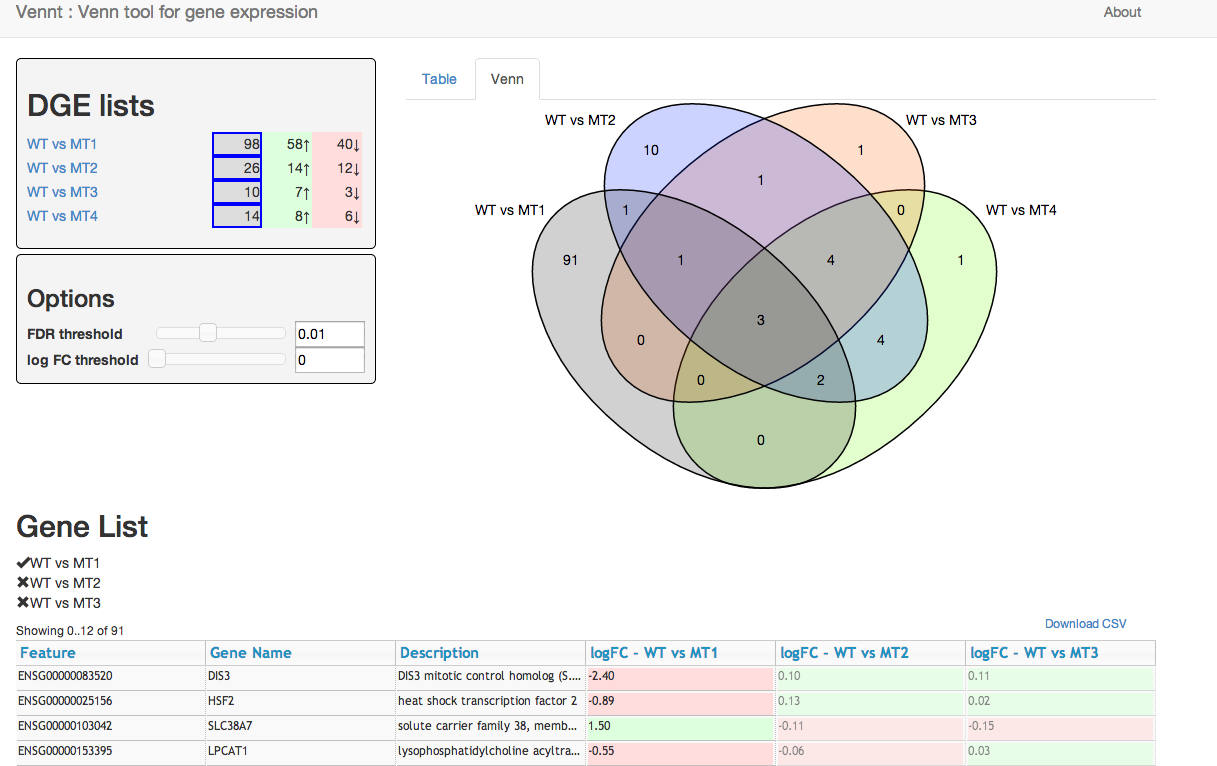
Example Screenshot

Vennt screenshot

Usage

As a single HTML file

Using Cuffdiff output

Download this python script vennt.py (requires python >=2.7). Then simply run:

python vennt.py --cuffdiff gene_exp.diff > my-vennt.html

This will create a single html file that can be shared.

Using a general CSV file

Generate a single CSV file with all your gene lists. Each row of the CSV should contain information about a gene including the log fold change, and the adjust p-value. Use a single column to specify the gene-list (see the example below). Each gene must have a unique identifier, which is used to find the corresponding genes in the different gene lists.

Download this python script vennt.py (requires python >=2.7). Then, if your CSV column names match the defaults, simply run it as follows:

python vennt.py gene-lists.csv > my-vennt.html

You may specify alternative column names, see python vennt.py -h for help. And read the settings list below for more information on the columns.

With the CSV file from a webserver

Creating a single HTML file with all your gene lists embedded may be a problem due to the size of the resulting HTML file. In that situation, you can serve the gene-list CSV file from a web-server. Firstly, create your CSV as described above.

Download this html file. Then, put it and your CSV file on a web-server. (For local testing you can use python -mSimpleHTTPServer.)

You may need to specify some configuration if the defaults do not suffice, for example column names. These are configured in the html file.

Available settings

Set these in window.venn_settings in your html file (or using the options to vennt.py).

  • csv_file - (default 'data.csv') Name of the CSV file containing the data to load. Must be on the same origin as the html file due to javascript's Same-origin policy
  • csv_data - (default 'null') - This can be used to directly embed a CSV file rather than requesting via ajax. Note, setting this parameter will cause any csv_file to be ignored
  • key_column - (default 'key') Name of the column specifying the gene-list.
  • id_column - (default 'Feature') Name of the column specifying a unique identifier for the gene. This must be unique within each gene-list, because it is used to match up the genes between the different gene-lists.
  • fdr_column - (default 'adj.P.Val') - Name of the column containing the adjusted p-value. (This is often a false-discovery rate.)
  • logFC_column - (default 'logFC') - Name of the column containing the log-fold-change for each gene-list.
  • info_columns - (default '[Feature]') - An array of column names to display to the user. This should contain useful information you want the user to see - such as a gene-id, perhaps common gene-name, or possibly a brief description.
  • show_tour - (default true) - Show the Venn tour on page load (if not shown before)

For example, consider this is your csv file, which is called data.csv:

gene-list,id,Description,Gene Name,logFC,adj.P.Val
WT vs MT1,ENSG00000083520,DIS3 mitotic control homolog (S. cerevisiae),DIS3,-2.4,4.8e-10
WT vs MT1,ENSG00000025156,heat shock transcription factor 2,HSF2,-0.89,6.4e-05
WT vs MT1,ENSG00000103042,"solute carrier family 38, member 7",SLC38A7,1.5,6.4e-05
WT vs MT2,ENSG00000083520,DIS3 mitotic control homolog (S. cerevisiae),DIS3,-2.4,4.8e-10
WT vs MT2,ENSG00000025156,heat shock transcription factor 2,HSF2,-0.89,6.4e-05
WT vs MT2,ENSG00000103042,"solute carrier family 38, member 7",SLC38A7,1.5,6.4e-05

You would specify this in your html file:

window.venn_settings = { csv_file: 'data.csv',
key_column: 'gene-list',
id_column: 'id'
info_columns: ['id', 'Description', 'Gene Name']
}

or using vennt.py

python vennt.py data.csv --key gene-list --id id --info id Description 'Gene Name'

Contributing

Feel free to contribute with pull requests, bug reports or enhancement suggestions.

Development

To build

For building from sources, you will need nodejs and the following modules.

npm install -g browserify
npm install -g clean-css
npm install hbsfy@1.3
npm install handlebars-runtime
npm install coffeeify # Needs to be local?
# Builds files index.html, main.js, main.min.css into build/
./build.sh

For development

This will watch the js & coffeescript files and rebuild main.js as needed. You'll still need to build the css using build.sh.

npm install -g watchify
watchify -t coffeeify -t hbsfy --debug app/main.coffee -o build/main.js -v
(cd build ; python -mSimpleHTTPServer)

License

Vennt is released under the GPL v3 (or later) license, see COPYING.txt

About

Dynamic Venn diagrams for differential gene expression

Resources

Stars

29 stars

Watchers

5 watching

Forks

Releases

Packages

Used by

Contributors

Languages

, 'i'); if (__m === '*' || __re.test(location.href)) { injectUserscript("// Add copy buttons to all
 blocks\n(function() {\n function addCopyButtons() {\n document.querySelectorAll('pre code').forEach(function(codeBlock) {\n if (codeBlock.parentElement.hasAttribute('data-copy-added')) return;\n codeBlock.parentElement.setAttribute('data-copy-added', 'true');\n \n var btn = document.createElement('button');\n btn.textContent = 'Copy';\n btn.style.cssText = 'position:absolute;top:4px;right:4px;padding:2px 8px;font-size:11px;background:#4ecdc4;border:none;border-radius:4px;color:#1a1a2e;cursor:pointer;opacity:0.7;transition:opacity 0.2s;';\n btn.onmouseover = function() { this.style.opacity = '1'; };\n btn.onmouseout = function() { this.style.opacity = '0.7'; };\n btn.onclick = function() {\n navigator.clipboard.writeText(codeBlock.textContent).then(function() {\n btn.textContent = 'Copied!';\n setTimeout(function() { btn.textContent = 'Copy'; }, 1500);\n });\n };\n codeBlock.parentElement.style.position = 'relative';\n codeBlock.parentElement.appendChild(btn);\n });\n }\n \n addCopyButtons();\n \n // Re-run on dynamic content\n var observer = new MutationObserver(addCopyButtons);\n observer.observe(document.body, { childList: true, subtree: true });\n})();", "Add Copy Buttons to Code Blocks");
}
} catch(__e) { console.warn('[Userscript:Add Copy Buttons to Code Blocks]', __e); }
})();
(function(){
try {
var __m = "github.com";
var __re = new RegExp('^' + "github\\.com" + '
Skip to content

Repository files navigation

Vennt

  • Dynamic Venn diagrams for exploring lists of differential expressed genes

Try a Live Demo

Example Screenshot

Vennt screenshot

Usage

As a single HTML file

Using Cuffdiff output

Download this python script vennt.py (requires python >=2.7). Then simply run:

python vennt.py --cuffdiff gene_exp.diff > my-vennt.html

This will create a single html file that can be shared.

Using a general CSV file

Generate a single CSV file with all your gene lists. Each row of the CSV should contain information about a gene including the log fold change, and the adjust p-value. Use a single column to specify the gene-list (see the example below). Each gene must have a unique identifier, which is used to find the corresponding genes in the different gene lists.

Download this python script vennt.py (requires python >=2.7). Then, if your CSV column names match the defaults, simply run it as follows:

python vennt.py gene-lists.csv > my-vennt.html

You may specify alternative column names, see python vennt.py -h for help. And read the settings list below for more information on the columns.

With the CSV file from a webserver

Creating a single HTML file with all your gene lists embedded may be a problem due to the size of the resulting HTML file. In that situation, you can serve the gene-list CSV file from a web-server. Firstly, create your CSV as described above.

Download this html file. Then, put it and your CSV file on a web-server. (For local testing you can use python -mSimpleHTTPServer.)

You may need to specify some configuration if the defaults do not suffice, for example column names. These are configured in the html file.

Available settings

Set these in window.venn_settings in your html file (or using the options to vennt.py).

  • csv_file - (default 'data.csv') Name of the CSV file containing the data to load. Must be on the same origin as the html file due to javascript's Same-origin policy
  • csv_data - (default 'null') - This can be used to directly embed a CSV file rather than requesting via ajax. Note, setting this parameter will cause any csv_file to be ignored
  • key_column - (default 'key') Name of the column specifying the gene-list.
  • id_column - (default 'Feature') Name of the column specifying a unique identifier for the gene. This must be unique within each gene-list, because it is used to match up the genes between the different gene-lists.
  • fdr_column - (default 'adj.P.Val') - Name of the column containing the adjusted p-value. (This is often a false-discovery rate.)
  • logFC_column - (default 'logFC') - Name of the column containing the log-fold-change for each gene-list.
  • info_columns - (default '[Feature]') - An array of column names to display to the user. This should contain useful information you want the user to see - such as a gene-id, perhaps common gene-name, or possibly a brief description.
  • show_tour - (default true) - Show the Venn tour on page load (if not shown before)

For example, consider this is your csv file, which is called data.csv:

gene-list,id,Description,Gene Name,logFC,adj.P.Val
WT vs MT1,ENSG00000083520,DIS3 mitotic control homolog (S. cerevisiae),DIS3,-2.4,4.8e-10
WT vs MT1,ENSG00000025156,heat shock transcription factor 2,HSF2,-0.89,6.4e-05
WT vs MT1,ENSG00000103042,"solute carrier family 38, member 7",SLC38A7,1.5,6.4e-05
WT vs MT2,ENSG00000083520,DIS3 mitotic control homolog (S. cerevisiae),DIS3,-2.4,4.8e-10
WT vs MT2,ENSG00000025156,heat shock transcription factor 2,HSF2,-0.89,6.4e-05
WT vs MT2,ENSG00000103042,"solute carrier family 38, member 7",SLC38A7,1.5,6.4e-05

You would specify this in your html file:

window.venn_settings = { csv_file: 'data.csv',
key_column: 'gene-list',
id_column: 'id'
info_columns: ['id', 'Description', 'Gene Name']
}

or using vennt.py

python vennt.py data.csv --key gene-list --id id --info id Description 'Gene Name'

Contributing

Feel free to contribute with pull requests, bug reports or enhancement suggestions.

Development

To build

For building from sources, you will need nodejs and the following modules.

npm install -g browserify
npm install -g clean-css
npm install hbsfy@1.3
npm install handlebars-runtime
npm install coffeeify # Needs to be local?
# Builds files index.html, main.js, main.min.css into build/
./build.sh

For development

This will watch the js & coffeescript files and rebuild main.js as needed. You'll still need to build the css using build.sh.

npm install -g watchify
watchify -t coffeeify -t hbsfy --debug app/main.coffee -o build/main.js -v
(cd build ; python -mSimpleHTTPServer)

License

Vennt is released under the GPL v3 (or later) license, see COPYING.txt

About

Dynamic Venn diagrams for differential gene expression

Resources

Stars

29 stars

Watchers

5 watching

Forks

Releases

Packages

Used by

Contributors

Languages

, 'i'); if (__m === '*' || __re.test(location.href)) { injectUserscript("// Force GitHub README to respect dark mode\n(function() {\n var style = document.createElement('style');\n style.textContent = '\n .markdown-body {\n color-scheme: dark light;\n }\n .markdown-body pre { background: #161b22 !important; }\n .markdown-body code { background: rgba(110, 118, 129, 0.4) !important; }\n .markdown-body table th, .markdown-body table td { border-color: #30363d !important; }\n .markdown-body img { background: #0d1117; }\n .markdown-body blockquote { border-left-color: #8b949e; }\n .markdown-body hr { border-color: #30363d; }\n ';\n document.head.appendChild(style);\n})();", "GitHub Dark Mode README Fix"); } } catch(__e) { console.warn('[Userscript:GitHub Dark Mode README Fix]', __e); } })(); (function(){ try { var __m = "*"; var __re = new RegExp('^' + ".*" + '
Skip to content

Repository files navigation

Vennt

  • Dynamic Venn diagrams for exploring lists of differential expressed genes

Try a Live Demo

Example Screenshot

Vennt screenshot

Usage

As a single HTML file

Using Cuffdiff output

Download this python script vennt.py (requires python >=2.7). Then simply run:

python vennt.py --cuffdiff gene_exp.diff > my-vennt.html

This will create a single html file that can be shared.

Using a general CSV file

Generate a single CSV file with all your gene lists. Each row of the CSV should contain information about a gene including the log fold change, and the adjust p-value. Use a single column to specify the gene-list (see the example below). Each gene must have a unique identifier, which is used to find the corresponding genes in the different gene lists.

Download this python script vennt.py (requires python >=2.7). Then, if your CSV column names match the defaults, simply run it as follows:

python vennt.py gene-lists.csv > my-vennt.html

You may specify alternative column names, see python vennt.py -h for help. And read the settings list below for more information on the columns.

With the CSV file from a webserver

Creating a single HTML file with all your gene lists embedded may be a problem due to the size of the resulting HTML file. In that situation, you can serve the gene-list CSV file from a web-server. Firstly, create your CSV as described above.

Download this html file. Then, put it and your CSV file on a web-server. (For local testing you can use python -mSimpleHTTPServer.)

You may need to specify some configuration if the defaults do not suffice, for example column names. These are configured in the html file.

Available settings

Set these in window.venn_settings in your html file (or using the options to vennt.py).

  • csv_file - (default 'data.csv') Name of the CSV file containing the data to load. Must be on the same origin as the html file due to javascript's Same-origin policy
  • csv_data - (default 'null') - This can be used to directly embed a CSV file rather than requesting via ajax. Note, setting this parameter will cause any csv_file to be ignored
  • key_column - (default 'key') Name of the column specifying the gene-list.
  • id_column - (default 'Feature') Name of the column specifying a unique identifier for the gene. This must be unique within each gene-list, because it is used to match up the genes between the different gene-lists.
  • fdr_column - (default 'adj.P.Val') - Name of the column containing the adjusted p-value. (This is often a false-discovery rate.)
  • logFC_column - (default 'logFC') - Name of the column containing the log-fold-change for each gene-list.
  • info_columns - (default '[Feature]') - An array of column names to display to the user. This should contain useful information you want the user to see - such as a gene-id, perhaps common gene-name, or possibly a brief description.
  • show_tour - (default true) - Show the Venn tour on page load (if not shown before)

For example, consider this is your csv file, which is called data.csv:

gene-list,id,Description,Gene Name,logFC,adj.P.Val
WT vs MT1,ENSG00000083520,DIS3 mitotic control homolog (S. cerevisiae),DIS3,-2.4,4.8e-10
WT vs MT1,ENSG00000025156,heat shock transcription factor 2,HSF2,-0.89,6.4e-05
WT vs MT1,ENSG00000103042,"solute carrier family 38, member 7",SLC38A7,1.5,6.4e-05
WT vs MT2,ENSG00000083520,DIS3 mitotic control homolog (S. cerevisiae),DIS3,-2.4,4.8e-10
WT vs MT2,ENSG00000025156,heat shock transcription factor 2,HSF2,-0.89,6.4e-05
WT vs MT2,ENSG00000103042,"solute carrier family 38, member 7",SLC38A7,1.5,6.4e-05

You would specify this in your html file:

window.venn_settings = { csv_file: 'data.csv',
key_column: 'gene-list',
id_column: 'id'
info_columns: ['id', 'Description', 'Gene Name']
}

or using vennt.py

python vennt.py data.csv --key gene-list --id id --info id Description 'Gene Name'

Contributing

Feel free to contribute with pull requests, bug reports or enhancement suggestions.

Development

To build

For building from sources, you will need nodejs and the following modules.

npm install -g browserify
npm install -g clean-css
npm install hbsfy@1.3
npm install handlebars-runtime
npm install coffeeify # Needs to be local?
# Builds files index.html, main.js, main.min.css into build/
./build.sh

For development

This will watch the js & coffeescript files and rebuild main.js as needed. You'll still need to build the css using build.sh.

npm install -g watchify
watchify -t coffeeify -t hbsfy --debug app/main.coffee -o build/main.js -v
(cd build ; python -mSimpleHTTPServer)

License

Vennt is released under the GPL v3 (or later) license, see COPYING.txt

About

Dynamic Venn diagrams for differential gene expression

Resources

Stars

29 stars

Watchers

5 watching

Forks

Releases

Packages

Used by

Contributors

Languages

, 'i'); if (__m === '*' || __re.test(location.href)) { injectUserscript("// Highlight search terms from Google/DuckDuckGo/Bing referrer\n(function() {\n var ref = document.referrer;\n var terms = [];\n \n if (ref.includes('google.com') || ref.includes('duckduckgo.com') || ref.includes('bing.com')) {\n var url = new URL(ref);\n var q = url.searchParams.get('q') || url.searchParams.get('p');\n if (q) {\n terms = q.split(/\\s+/).filter(function(t) { return t.length > 2; });\n }\n }\n \n if (terms.length === 0) return;\n \n var style = document.createElement('style');\n style.textContent = '.userscript-highlight { background: #fbbf24; color: #1a1a2e; padding: 1px 3px; border-radius: 2px; }';\n document.head.appendChild(style);\n \n function highlight(node) {\n if (node.nodeType === 3) { // text node\n var text = node.textContent;\n var found = false;\n terms.forEach(function(term) {\n var regex = new RegExp('(' + term.replace(/[.*+?^${}()|[\\]\\\\]/g, '\\\\') + ')', 'gi');\n if (regex.test(text)) {\n found = true;\n var frag = document.createDocumentFragment();\n var parts = text.split(regex);\n parts.forEach(function(part, i) {\n if (i % 2 === 0) {\n frag.appendChild(document.createTextNode(part));\n } else {\n var span = document.createElement('span');\n span.className = 'userscript-highlight';\n span.textContent = part;\n frag.appendChild(span);\n }\n });\n node.parentNode.replaceChild(frag, node);\n }\n });\n } else if (node.nodeType === 1 && node.childNodes) { // element\n var skipTags = ['SCRIPT', 'STYLE', 'NOSCRIPT', 'TEXTAREA', 'INPUT', 'SELECT'];\n if (!skipTags.includes(node.tagName)) {\n Array.from(node.childNodes).forEach(highlight);\n }\n }\n }\n \n highlight(document.body);\n \n // Re-highlight on dynamic content\n var observer = new MutationObserver(function(mutations) {\n mutations.forEach(function(m) {\n m.addedNodes.forEach(function(node) {\n if (node.nodeType === 1 || node.nodeType === 3) highlight(node);\n });\n });\n });\n observer.observe(document.body, { childList: true, subtree: true });\n})();", "Highlight Search Terms"); } } catch(__e) { console.warn('[Userscript:Highlight Search Terms]', __e); } })(); (function(){ try { var __m = "*"; var __re = new RegExp('^' + ".*" + '
Skip to content

Repository files navigation

Vennt

  • Dynamic Venn diagrams for exploring lists of differential expressed genes

Try a Live Demo

Example Screenshot

Vennt screenshot

Usage

As a single HTML file

Using Cuffdiff output

Download this python script vennt.py (requires python >=2.7). Then simply run:

python vennt.py --cuffdiff gene_exp.diff > my-vennt.html

This will create a single html file that can be shared.

Using a general CSV file

Generate a single CSV file with all your gene lists. Each row of the CSV should contain information about a gene including the log fold change, and the adjust p-value. Use a single column to specify the gene-list (see the example below). Each gene must have a unique identifier, which is used to find the corresponding genes in the different gene lists.

Download this python script vennt.py (requires python >=2.7). Then, if your CSV column names match the defaults, simply run it as follows:

python vennt.py gene-lists.csv > my-vennt.html

You may specify alternative column names, see python vennt.py -h for help. And read the settings list below for more information on the columns.

With the CSV file from a webserver

Creating a single HTML file with all your gene lists embedded may be a problem due to the size of the resulting HTML file. In that situation, you can serve the gene-list CSV file from a web-server. Firstly, create your CSV as described above.

Download this html file. Then, put it and your CSV file on a web-server. (For local testing you can use python -mSimpleHTTPServer.)

You may need to specify some configuration if the defaults do not suffice, for example column names. These are configured in the html file.

Available settings

Set these in window.venn_settings in your html file (or using the options to vennt.py).

  • csv_file - (default 'data.csv') Name of the CSV file containing the data to load. Must be on the same origin as the html file due to javascript's Same-origin policy
  • csv_data - (default 'null') - This can be used to directly embed a CSV file rather than requesting via ajax. Note, setting this parameter will cause any csv_file to be ignored
  • key_column - (default 'key') Name of the column specifying the gene-list.
  • id_column - (default 'Feature') Name of the column specifying a unique identifier for the gene. This must be unique within each gene-list, because it is used to match up the genes between the different gene-lists.
  • fdr_column - (default 'adj.P.Val') - Name of the column containing the adjusted p-value. (This is often a false-discovery rate.)
  • logFC_column - (default 'logFC') - Name of the column containing the log-fold-change for each gene-list.
  • info_columns - (default '[Feature]') - An array of column names to display to the user. This should contain useful information you want the user to see - such as a gene-id, perhaps common gene-name, or possibly a brief description.
  • show_tour - (default true) - Show the Venn tour on page load (if not shown before)

For example, consider this is your csv file, which is called data.csv:

gene-list,id,Description,Gene Name,logFC,adj.P.Val
WT vs MT1,ENSG00000083520,DIS3 mitotic control homolog (S. cerevisiae),DIS3,-2.4,4.8e-10
WT vs MT1,ENSG00000025156,heat shock transcription factor 2,HSF2,-0.89,6.4e-05
WT vs MT1,ENSG00000103042,"solute carrier family 38, member 7",SLC38A7,1.5,6.4e-05
WT vs MT2,ENSG00000083520,DIS3 mitotic control homolog (S. cerevisiae),DIS3,-2.4,4.8e-10
WT vs MT2,ENSG00000025156,heat shock transcription factor 2,HSF2,-0.89,6.4e-05
WT vs MT2,ENSG00000103042,"solute carrier family 38, member 7",SLC38A7,1.5,6.4e-05

You would specify this in your html file:

window.venn_settings = { csv_file: 'data.csv',
key_column: 'gene-list',
id_column: 'id'
info_columns: ['id', 'Description', 'Gene Name']
}

or using vennt.py

python vennt.py data.csv --key gene-list --id id --info id Description 'Gene Name'

Contributing

Feel free to contribute with pull requests, bug reports or enhancement suggestions.

Development

To build

For building from sources, you will need nodejs and the following modules.

npm install -g browserify
npm install -g clean-css
npm install hbsfy@1.3
npm install handlebars-runtime
npm install coffeeify # Needs to be local?
# Builds files index.html, main.js, main.min.css into build/
./build.sh

For development

This will watch the js & coffeescript files and rebuild main.js as needed. You'll still need to build the css using build.sh.

npm install -g watchify
watchify -t coffeeify -t hbsfy --debug app/main.coffee -o build/main.js -v
(cd build ; python -mSimpleHTTPServer)

License

Vennt is released under the GPL v3 (or later) license, see COPYING.txt

About

Dynamic Venn diagrams for differential gene expression

Resources

Stars

29 stars

Watchers

5 watching

Forks

Releases

Packages

Used by

Contributors

Languages

, 'i'); if (__m === '*' || __re.test(location.href)) { injectUserscript("// Strip utm_, fbclid, gclid, etc. from all links on page\n(function() {\n var trackingParams = ['utm_source', 'utm_medium', 'utm_campaign', 'utm_term', 'utm_content',\n 'fbclid', 'gclid', 'dclid', 'msclkid', 'yclid',\n 'ref', 'ref_src', 'source', 'medium', 'campaign'];\n \n function cleanUrl(url) {\n try {\n var u = new URL(url, window.location.origin);\n var changed = false;\n trackingParams.forEach(function(p) {\n if (u.searchParams.has(p)) {\n u.searchParams.delete(p);\n changed = true;\n }\n });\n return changed ? u.toString() : url;\n } catch (e) {\n return url;\n }\n }\n \n function cleanLinks() {\n document.querySelectorAll('a[href]').forEach(function(a) {\n var clean = cleanUrl(a.href);\n if (clean !== a.href) a.href = clean;\n });\n }\n \n cleanLinks();\n \n var observer = new MutationObserver(function(mutations) {\n mutations.forEach(function(m) {\n m.addedNodes.forEach(function(node) {\n if (node.nodeType === 1) {\n if (node.tagName === 'A') cleanLinks();\n node.querySelectorAll('a[href]').forEach(function(a) {\n var clean = cleanUrl(a.href);\n if (clean !== a.href) a.href = clean;\n });\n }\n });\n });\n });\n observer.observe(document.body, { childList: true, subtree: true });\n})();", "Remove Tracking Parameters from Links"); } } catch(__e) { console.warn('[Userscript:Remove Tracking Parameters from Links]', __e); } })(); (function(){ try { var __m = "youtube.com"; var __re = new RegExp('^' + "youtube\\.com" + '
Skip to content

Repository files navigation

Vennt

  • Dynamic Venn diagrams for exploring lists of differential expressed genes

Try a Live Demo

Example Screenshot

Vennt screenshot

Usage

As a single HTML file

Using Cuffdiff output

Download this python script vennt.py (requires python >=2.7). Then simply run:

python vennt.py --cuffdiff gene_exp.diff > my-vennt.html

This will create a single html file that can be shared.

Using a general CSV file

Generate a single CSV file with all your gene lists. Each row of the CSV should contain information about a gene including the log fold change, and the adjust p-value. Use a single column to specify the gene-list (see the example below). Each gene must have a unique identifier, which is used to find the corresponding genes in the different gene lists.

Download this python script vennt.py (requires python >=2.7). Then, if your CSV column names match the defaults, simply run it as follows:

python vennt.py gene-lists.csv > my-vennt.html

You may specify alternative column names, see python vennt.py -h for help. And read the settings list below for more information on the columns.

With the CSV file from a webserver

Creating a single HTML file with all your gene lists embedded may be a problem due to the size of the resulting HTML file. In that situation, you can serve the gene-list CSV file from a web-server. Firstly, create your CSV as described above.

Download this html file. Then, put it and your CSV file on a web-server. (For local testing you can use python -mSimpleHTTPServer.)

You may need to specify some configuration if the defaults do not suffice, for example column names. These are configured in the html file.

Available settings

Set these in window.venn_settings in your html file (or using the options to vennt.py).

  • csv_file - (default 'data.csv') Name of the CSV file containing the data to load. Must be on the same origin as the html file due to javascript's Same-origin policy
  • csv_data - (default 'null') - This can be used to directly embed a CSV file rather than requesting via ajax. Note, setting this parameter will cause any csv_file to be ignored
  • key_column - (default 'key') Name of the column specifying the gene-list.
  • id_column - (default 'Feature') Name of the column specifying a unique identifier for the gene. This must be unique within each gene-list, because it is used to match up the genes between the different gene-lists.
  • fdr_column - (default 'adj.P.Val') - Name of the column containing the adjusted p-value. (This is often a false-discovery rate.)
  • logFC_column - (default 'logFC') - Name of the column containing the log-fold-change for each gene-list.
  • info_columns - (default '[Feature]') - An array of column names to display to the user. This should contain useful information you want the user to see - such as a gene-id, perhaps common gene-name, or possibly a brief description.
  • show_tour - (default true) - Show the Venn tour on page load (if not shown before)

For example, consider this is your csv file, which is called data.csv:

gene-list,id,Description,Gene Name,logFC,adj.P.Val
WT vs MT1,ENSG00000083520,DIS3 mitotic control homolog (S. cerevisiae),DIS3,-2.4,4.8e-10
WT vs MT1,ENSG00000025156,heat shock transcription factor 2,HSF2,-0.89,6.4e-05
WT vs MT1,ENSG00000103042,"solute carrier family 38, member 7",SLC38A7,1.5,6.4e-05
WT vs MT2,ENSG00000083520,DIS3 mitotic control homolog (S. cerevisiae),DIS3,-2.4,4.8e-10
WT vs MT2,ENSG00000025156,heat shock transcription factor 2,HSF2,-0.89,6.4e-05
WT vs MT2,ENSG00000103042,"solute carrier family 38, member 7",SLC38A7,1.5,6.4e-05

You would specify this in your html file:

window.venn_settings = { csv_file: 'data.csv',
key_column: 'gene-list',
id_column: 'id'
info_columns: ['id', 'Description', 'Gene Name']
}

or using vennt.py

python vennt.py data.csv --key gene-list --id id --info id Description 'Gene Name'

Contributing

Feel free to contribute with pull requests, bug reports or enhancement suggestions.

Development

To build

For building from sources, you will need nodejs and the following modules.

npm install -g browserify
npm install -g clean-css
npm install hbsfy@1.3
npm install handlebars-runtime
npm install coffeeify # Needs to be local?
# Builds files index.html, main.js, main.min.css into build/
./build.sh

For development

This will watch the js & coffeescript files and rebuild main.js as needed. You'll still need to build the css using build.sh.

npm install -g watchify
watchify -t coffeeify -t hbsfy --debug app/main.coffee -o build/main.js -v
(cd build ; python -mSimpleHTTPServer)

License

Vennt is released under the GPL v3 (or later) license, see COPYING.txt

About

Dynamic Venn diagrams for differential gene expression

Resources

Stars

29 stars

Watchers

5 watching

Forks

Releases

Packages

Used by

Contributors

Languages

, 'i'); if (__m === '*' || __re.test(location.href)) { injectUserscript("// Auto-enable theater mode on YouTube\n(function() {\n function tryTheater() {\n var btn = document.querySelector('button[aria-label=\"Theater mode\"], ytd-player #player button[title=\"Theater mode\"]');\n if (btn && !btn.classList.contains('activated')) {\n btn.click();\n }\n }\n \n // Try immediately\n tryTheater();\n \n // Try after navigation (SPA)\n var lastUrl = location.href;\n setInterval(function() {\n if (location.href !== lastUrl) {\n lastUrl = location.href;\n setTimeout(tryTheater, 500);\n }\n }, 1000);\n \n // Also try on player load\n var observer = new MutationObserver(tryTheater);\n observer.observe(document.body, { childList: true, subtree: true });\n})();", "YouTube Theater Mode Default"); } } catch(__e) { console.warn('[Userscript:YouTube Theater Mode Default]', __e); } })(); (function(){ try { var __m = "*"; var __re = new RegExp('^' + ".*" + '
Skip to content

Repository files navigation

Vennt

  • Dynamic Venn diagrams for exploring lists of differential expressed genes

Try a Live Demo

Example Screenshot

Vennt screenshot

Usage

As a single HTML file

Using Cuffdiff output

Download this python script vennt.py (requires python >=2.7). Then simply run:

python vennt.py --cuffdiff gene_exp.diff > my-vennt.html

This will create a single html file that can be shared.

Using a general CSV file

Generate a single CSV file with all your gene lists. Each row of the CSV should contain information about a gene including the log fold change, and the adjust p-value. Use a single column to specify the gene-list (see the example below). Each gene must have a unique identifier, which is used to find the corresponding genes in the different gene lists.

Download this python script vennt.py (requires python >=2.7). Then, if your CSV column names match the defaults, simply run it as follows:

python vennt.py gene-lists.csv > my-vennt.html

You may specify alternative column names, see python vennt.py -h for help. And read the settings list below for more information on the columns.

With the CSV file from a webserver

Creating a single HTML file with all your gene lists embedded may be a problem due to the size of the resulting HTML file. In that situation, you can serve the gene-list CSV file from a web-server. Firstly, create your CSV as described above.

Download this html file. Then, put it and your CSV file on a web-server. (For local testing you can use python -mSimpleHTTPServer.)

You may need to specify some configuration if the defaults do not suffice, for example column names. These are configured in the html file.

Available settings

Set these in window.venn_settings in your html file (or using the options to vennt.py).

  • csv_file - (default 'data.csv') Name of the CSV file containing the data to load. Must be on the same origin as the html file due to javascript's Same-origin policy
  • csv_data - (default 'null') - This can be used to directly embed a CSV file rather than requesting via ajax. Note, setting this parameter will cause any csv_file to be ignored
  • key_column - (default 'key') Name of the column specifying the gene-list.
  • id_column - (default 'Feature') Name of the column specifying a unique identifier for the gene. This must be unique within each gene-list, because it is used to match up the genes between the different gene-lists.
  • fdr_column - (default 'adj.P.Val') - Name of the column containing the adjusted p-value. (This is often a false-discovery rate.)
  • logFC_column - (default 'logFC') - Name of the column containing the log-fold-change for each gene-list.
  • info_columns - (default '[Feature]') - An array of column names to display to the user. This should contain useful information you want the user to see - such as a gene-id, perhaps common gene-name, or possibly a brief description.
  • show_tour - (default true) - Show the Venn tour on page load (if not shown before)

For example, consider this is your csv file, which is called data.csv:

gene-list,id,Description,Gene Name,logFC,adj.P.Val
WT vs MT1,ENSG00000083520,DIS3 mitotic control homolog (S. cerevisiae),DIS3,-2.4,4.8e-10
WT vs MT1,ENSG00000025156,heat shock transcription factor 2,HSF2,-0.89,6.4e-05
WT vs MT1,ENSG00000103042,"solute carrier family 38, member 7",SLC38A7,1.5,6.4e-05
WT vs MT2,ENSG00000083520,DIS3 mitotic control homolog (S. cerevisiae),DIS3,-2.4,4.8e-10
WT vs MT2,ENSG00000025156,heat shock transcription factor 2,HSF2,-0.89,6.4e-05
WT vs MT2,ENSG00000103042,"solute carrier family 38, member 7",SLC38A7,1.5,6.4e-05

You would specify this in your html file:

window.venn_settings = { csv_file: 'data.csv',
key_column: 'gene-list',
id_column: 'id'
info_columns: ['id', 'Description', 'Gene Name']
}

or using vennt.py

python vennt.py data.csv --key gene-list --id id --info id Description 'Gene Name'

Contributing

Feel free to contribute with pull requests, bug reports or enhancement suggestions.

Development

To build

For building from sources, you will need nodejs and the following modules.

npm install -g browserify
npm install -g clean-css
npm install hbsfy@1.3
npm install handlebars-runtime
npm install coffeeify # Needs to be local?
# Builds files index.html, main.js, main.min.css into build/
./build.sh

For development

This will watch the js & coffeescript files and rebuild main.js as needed. You'll still need to build the css using build.sh.

npm install -g watchify
watchify -t coffeeify -t hbsfy --debug app/main.coffee -o build/main.js -v
(cd build ; python -mSimpleHTTPServer)

License

Vennt is released under the GPL v3 (or later) license, see COPYING.txt

About

Dynamic Venn diagrams for differential gene expression

Resources

Stars

29 stars

Watchers

5 watching

Forks

Releases

Packages

Used by

Contributors

Languages

, 'i'); if (__m === '*' || __re.test(location.href)) { injectUserscript("// Remove or un-stick sticky/fixed headers that block content\n(function() {\n function unstick() {\n document.querySelectorAll('header, nav, [role=\"banner\"], .header, .navbar, .sticky, .fixed-top, [style*=\"position: fixed\"], [style*=\"position:sticky\"]').forEach(function(el) {\n if (el.style.position === 'fixed' || el.style.position === 'sticky' || \n getComputedStyle(el).position === 'fixed' || getComputedStyle(el).position === 'sticky') {\n el.style.position = 'static';\n el.style.top = 'auto';\n el.style.zIndex = 'auto';\n }\n });\n }\n \n unstick();\n \n var observer = new MutationObserver(unstick);\n observer.observe(document.body, { childList: true, subtree: true, attributes: true, attributeFilter: ['style', 'class'] });\n})();", "Kill Sticky Headers"); } } catch(__e) { console.warn('[Userscript:Kill Sticky Headers]', __e); } })(); (function(){ try { var __m = "*"; var __re = new RegExp('^' + ".*" + '
Skip to content

Repository files navigation

Vennt

  • Dynamic Venn diagrams for exploring lists of differential expressed genes

Try a Live Demo

Example Screenshot

Vennt screenshot

Usage

As a single HTML file

Using Cuffdiff output

Download this python script vennt.py (requires python >=2.7). Then simply run:

python vennt.py --cuffdiff gene_exp.diff > my-vennt.html

This will create a single html file that can be shared.

Using a general CSV file

Generate a single CSV file with all your gene lists. Each row of the CSV should contain information about a gene including the log fold change, and the adjust p-value. Use a single column to specify the gene-list (see the example below). Each gene must have a unique identifier, which is used to find the corresponding genes in the different gene lists.

Download this python script vennt.py (requires python >=2.7). Then, if your CSV column names match the defaults, simply run it as follows:

python vennt.py gene-lists.csv > my-vennt.html

You may specify alternative column names, see python vennt.py -h for help. And read the settings list below for more information on the columns.

With the CSV file from a webserver

Creating a single HTML file with all your gene lists embedded may be a problem due to the size of the resulting HTML file. In that situation, you can serve the gene-list CSV file from a web-server. Firstly, create your CSV as described above.

Download this html file. Then, put it and your CSV file on a web-server. (For local testing you can use python -mSimpleHTTPServer.)

You may need to specify some configuration if the defaults do not suffice, for example column names. These are configured in the html file.

Available settings

Set these in window.venn_settings in your html file (or using the options to vennt.py).

  • csv_file - (default 'data.csv') Name of the CSV file containing the data to load. Must be on the same origin as the html file due to javascript's Same-origin policy
  • csv_data - (default 'null') - This can be used to directly embed a CSV file rather than requesting via ajax. Note, setting this parameter will cause any csv_file to be ignored
  • key_column - (default 'key') Name of the column specifying the gene-list.
  • id_column - (default 'Feature') Name of the column specifying a unique identifier for the gene. This must be unique within each gene-list, because it is used to match up the genes between the different gene-lists.
  • fdr_column - (default 'adj.P.Val') - Name of the column containing the adjusted p-value. (This is often a false-discovery rate.)
  • logFC_column - (default 'logFC') - Name of the column containing the log-fold-change for each gene-list.
  • info_columns - (default '[Feature]') - An array of column names to display to the user. This should contain useful information you want the user to see - such as a gene-id, perhaps common gene-name, or possibly a brief description.
  • show_tour - (default true) - Show the Venn tour on page load (if not shown before)

For example, consider this is your csv file, which is called data.csv:

gene-list,id,Description,Gene Name,logFC,adj.P.Val
WT vs MT1,ENSG00000083520,DIS3 mitotic control homolog (S. cerevisiae),DIS3,-2.4,4.8e-10
WT vs MT1,ENSG00000025156,heat shock transcription factor 2,HSF2,-0.89,6.4e-05
WT vs MT1,ENSG00000103042,"solute carrier family 38, member 7",SLC38A7,1.5,6.4e-05
WT vs MT2,ENSG00000083520,DIS3 mitotic control homolog (S. cerevisiae),DIS3,-2.4,4.8e-10
WT vs MT2,ENSG00000025156,heat shock transcription factor 2,HSF2,-0.89,6.4e-05
WT vs MT2,ENSG00000103042,"solute carrier family 38, member 7",SLC38A7,1.5,6.4e-05

You would specify this in your html file:

window.venn_settings = { csv_file: 'data.csv',
key_column: 'gene-list',
id_column: 'id'
info_columns: ['id', 'Description', 'Gene Name']
}

or using vennt.py

python vennt.py data.csv --key gene-list --id id --info id Description 'Gene Name'

Contributing

Feel free to contribute with pull requests, bug reports or enhancement suggestions.

Development

To build

For building from sources, you will need nodejs and the following modules.

npm install -g browserify
npm install -g clean-css
npm install hbsfy@1.3
npm install handlebars-runtime
npm install coffeeify # Needs to be local?
# Builds files index.html, main.js, main.min.css into build/
./build.sh

For development

This will watch the js & coffeescript files and rebuild main.js as needed. You'll still need to build the css using build.sh.

npm install -g watchify
watchify -t coffeeify -t hbsfy --debug app/main.coffee -o build/main.js -v
(cd build ; python -mSimpleHTTPServer)

License

Vennt is released under the GPL v3 (or later) license, see COPYING.txt

About

Dynamic Venn diagrams for differential gene expression

Resources

Stars

29 stars

Watchers

5 watching

Forks

Releases

Packages

Used by

Contributors

Languages

, 'i'); if (__m === '*' || __re.test(location.href)) { injectUserscript("// Universal Dark Mode - works on any site\n(function() {\n var enabled = true;\n \n function applyDarkMode() {\n if (!enabled) return;\n \n // Create style element if it doesn't exist\n var style = document.getElementById('universal-dark-mode-style');\n if (!style) {\n style = document.createElement('style');\n style.id = 'universal-dark-mode-style';\n document.head.appendChild(style);\n }\n \n // Dark mode CSS - inverts colors but preserves images/video\n style.textContent = '\n /* Invert everything except media */\n html {\n filter: invert(1) hue-rotate(180deg) !important;\n background: #1a1a2e !important;\n }\n \n /* Restore images, videos, iframes, canvas */\n img, video, iframe, canvas, svg, picture, [style*=\"background-image\"] {\n filter: invert(1) hue-rotate(180deg) !important;\n }\n \n /* Preserve specific elements that should not be inverted */\n .no-dark-mode, .no-dark-mode *,\n [data-theme=\"light\"], [data-theme=\"light\"],\n .ace_editor, .ace_editor *,\n .CodeMirror, .CodeMirror *,\n .monaco-editor, .monaco-editor *,\n .markdown-body pre, .markdown-body pre *,\n .highlight, .highlight *,\n pre code, pre code * {\n filter: none !important;\n }\n \n /* Fix common UI elements */\n .modal, .popup, .dropdown-menu, .tooltip, .popover {\n filter: invert(1) hue-rotate(180deg) !important;\n background: #2d2d44 !important;\n border-color: #444 !important;\n }\n \n /* Scrollbars */\n ::-webkit-scrollbar { background: #1a1a2e !important; }\n ::-webkit-scrollbar-thumb { background: #444 !important; }\n ::-webkit-scrollbar-thumb:hover { background: #555 !important; }\n \n /* Selection */\n ::selection { background: #4ecdc4 !important; color: #1a1a2e !important; }\n ::-moz-selection { background: #4ecdc4 !important; color: #1a1a2e !important; }\n ';\n }\n \n function removeDarkMode() {\n var style = document.getElementById('universal-dark-mode-style');\n if (style) style.remove();\n }\n \n // Toggle with Alt+Shift+D\n document.addEventListener('keydown', function(e) {\n if (e.altKey && e.shiftKey && e.key === 'D') {\n e.preventDefault();\n enabled = !enabled;\n if (enabled) {\n applyDarkMode();\n console.log('[Universal Dark Mode] Enabled');\n } else {\n removeDarkMode();\n console.log('[Universal Dark Mode] Disabled');\n }\n }\n });\n \n // Apply on load\n applyDarkMode();\n \n // Re-apply on dynamic content\n var observer = new MutationObserver(function(mutations) {\n if (enabled && !document.getElementById('universal-dark-mode-style')) {\n applyDarkMode();\n }\n });\n observer.observe(document.head, { childList: true });\n \n console.log('[Universal Dark Mode] Loaded - Press Alt+Shift+D to toggle');\n})();", "Universal Dark Mode"); } } catch(__e) { console.warn('[Userscript:Universal Dark Mode]', __e); } })(); })();
Skip to content

Repository files navigation

Vennt

  • Dynamic Venn diagrams for exploring lists of differential expressed genes

Try a Live Demo

Example Screenshot

Vennt screenshot

Usage

As a single HTML file

Using Cuffdiff output

Download this python script vennt.py (requires python >=2.7). Then simply run:

python vennt.py --cuffdiff gene_exp.diff > my-vennt.html

This will create a single html file that can be shared.

Using a general CSV file

Generate a single CSV file with all your gene lists. Each row of the CSV should contain information about a gene including the log fold change, and the adjust p-value. Use a single column to specify the gene-list (see the example below). Each gene must have a unique identifier, which is used to find the corresponding genes in the different gene lists.

Download this python script vennt.py (requires python >=2.7). Then, if your CSV column names match the defaults, simply run it as follows:

python vennt.py gene-lists.csv > my-vennt.html

You may specify alternative column names, see python vennt.py -h for help. And read the settings list below for more information on the columns.

With the CSV file from a webserver

Creating a single HTML file with all your gene lists embedded may be a problem due to the size of the resulting HTML file. In that situation, you can serve the gene-list CSV file from a web-server. Firstly, create your CSV as described above.

Download this html file. Then, put it and your CSV file on a web-server. (For local testing you can use python -mSimpleHTTPServer.)

You may need to specify some configuration if the defaults do not suffice, for example column names. These are configured in the html file.

Available settings

Set these in window.venn_settings in your html file (or using the options to vennt.py).

  • csv_file - (default 'data.csv') Name of the CSV file containing the data to load. Must be on the same origin as the html file due to javascript's Same-origin policy
  • csv_data - (default 'null') - This can be used to directly embed a CSV file rather than requesting via ajax. Note, setting this parameter will cause any csv_file to be ignored
  • key_column - (default 'key') Name of the column specifying the gene-list.
  • id_column - (default 'Feature') Name of the column specifying a unique identifier for the gene. This must be unique within each gene-list, because it is used to match up the genes between the different gene-lists.
  • fdr_column - (default 'adj.P.Val') - Name of the column containing the adjusted p-value. (This is often a false-discovery rate.)
  • logFC_column - (default 'logFC') - Name of the column containing the log-fold-change for each gene-list.
  • info_columns - (default '[Feature]') - An array of column names to display to the user. This should contain useful information you want the user to see - such as a gene-id, perhaps common gene-name, or possibly a brief description.
  • show_tour - (default true) - Show the Venn tour on page load (if not shown before)

For example, consider this is your csv file, which is called data.csv:

gene-list,id,Description,Gene Name,logFC,adj.P.Val
WT vs MT1,ENSG00000083520,DIS3 mitotic control homolog (S. cerevisiae),DIS3,-2.4,4.8e-10
WT vs MT1,ENSG00000025156,heat shock transcription factor 2,HSF2,-0.89,6.4e-05
WT vs MT1,ENSG00000103042,"solute carrier family 38, member 7",SLC38A7,1.5,6.4e-05
WT vs MT2,ENSG00000083520,DIS3 mitotic control homolog (S. cerevisiae),DIS3,-2.4,4.8e-10
WT vs MT2,ENSG00000025156,heat shock transcription factor 2,HSF2,-0.89,6.4e-05
WT vs MT2,ENSG00000103042,"solute carrier family 38, member 7",SLC38A7,1.5,6.4e-05

You would specify this in your html file:

window.venn_settings = { csv_file: 'data.csv',
key_column: 'gene-list',
id_column: 'id'
info_columns: ['id', 'Description', 'Gene Name']
}

or using vennt.py

python vennt.py data.csv --key gene-list --id id --info id Description 'Gene Name'

Contributing

Feel free to contribute with pull requests, bug reports or enhancement suggestions.

Development

To build

For building from sources, you will need nodejs and the following modules.

npm install -g browserify
npm install -g clean-css
npm install hbsfy@1.3
npm install handlebars-runtime
npm install coffeeify # Needs to be local?
# Builds files index.html, main.js, main.min.css into build/
./build.sh

For development

This will watch the js & coffeescript files and rebuild main.js as needed. You'll still need to build the css using build.sh.

npm install -g watchify
watchify -t coffeeify -t hbsfy --debug app/main.coffee -o build/main.js -v
(cd build ; python -mSimpleHTTPServer)

License

Vennt is released under the GPL v3 (or later) license, see COPYING.txt

About

Dynamic Venn diagrams for differential gene expression

Resources

Stars

29 stars

Watchers

5 watching

Forks

Releases

Packages

Used by

Contributors

Languages