node module:rtm-cli
GitHub repo:dwaring87/rtm-cli
This Node module provides a command line interface, written in JavaScript, for the popular Remember the Milk task list manager.
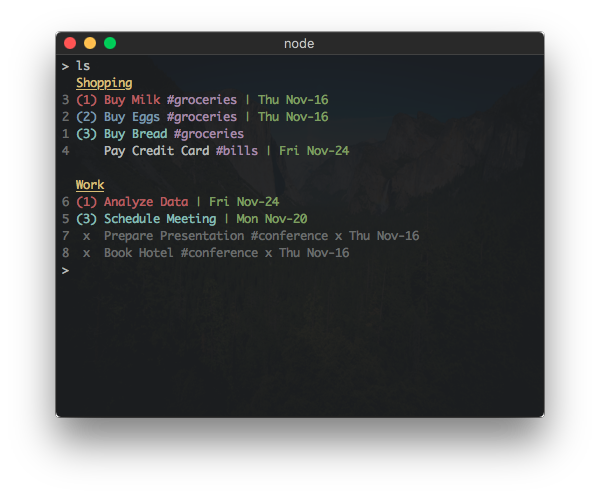
If you already have Node installed, this program can be
installed via npm:
npm install -g rtm-cliwhich will install the executable rtm into your $PATH.
Note: RTM CLI requires Node version >= 7.5.0
Standalone executables, that do not require a pre-existing installation of Node, are available in the Releases page.
The main usage of the program:
 Usage: rtm [options] <command> [command arguments]
Options:
-V, --version output the version number
-p, --plain do not use styled/colored text (overrides --color)
-c, --color force the use of styled/colored text
-s, --status toggle the display of the status spinner
-x, --completed [value] set display of completed tasks (true/false/number of days)
-d, --hideDue [value] hide tasks due more than n days from today (false/number of days)
-f, --config [file] specify configuration file
-v, --verbose print stack traces on errors
-h, --help output usage information
Commands:
add|a [task...] Add a new Task
addList|al [name] [filter...] Add a new List or Smart List
addTags|at [index] [tags...] Add one or more tags to a Task
archiveList|arl [name...] Archive a List
comp|x [indices...] Complete one or more Tasks
decPri|- [indices...] Decrease the Priority of one or more Tasks
due [index] [due...] Set the Due Date of a Task
edit [index] [name...] Change the name of a Task
incPri|+ [indices...] Increase the Priority of one or more Tasks
lists|l Display all lists
login Add RTM User information
logout Remove RTM User information
ls [filter...] List all tasks sorted first by list then by priority
lsd [filter...] List all tasks sorted first by due date then by priority
lsp [filter...] List all tasks sorted first by priority then due date
move|mv [index] [list...] Move Task to a different List
planner [options] [filter...] Display tasks in a weekly planner (--start: sun, mon, today)
postpone|pp [indices...] Postpone one or more Tasks
pri|p [index] [priority] Change Task Priority
remove|rm [indices...] Remove one or more Tasks
removeList|rml [name...] Remove a List
removeTags|rmt [index] [tags...] Remove one or more tags from a Task
renameList|mvl [oldName] [newName] Rename a List
reset Reset cached task indices
setUrl|su [index] [url] Set the URL of a Task
tags|t Display all tags
uncomp|unc [indices...] Mark one or more Tasks as not complete
url [options] [index...] Display the associated URL of a Task
whoami Display RTM user information
overdue Display incomplete tasks that are overdue
An interactive mode is started when no commands are given to rtm, which
allows commands to be given sequentially.
Use the quit command to leave the interactive mode.
For full documentation on the usage of the built-in commands and options, see the Command Reference.
RTM CLI has a number of properties that can be configured using a separate JSON configuration
file. The default user configuration file is located at $HOME/.rtm.json but can be changed
using the --config <file> option.
Currently, the configuration can customize:
- the formats of displayed dates
- styled text output for different task properties
- the display of completed tasks
- the display of tasks with due dates in the future
- custom aliases for existing commands
- these are useful for applying commonly used RTM advanced search filters to display commands
- ex:
overdue=ls dueBefore:today AND status:incomplete
For full documentation on the configuration properties, see the Configuration Reference.
RTM CLI supports adding additional commands through plugins.
Available Plugins:
- Export - rtm-plugin-export
- Provides an
exportcommand to export tasks to a CSV file
- Provides an
For information on installing plugins, see the Plugin Reference.
For information on creating commands, see the Creating Commands section in the Project Wiki.