



To run the example project, clone the repo, and run pod repo update then run pod install from the Example directory first.
- xcode 9.x
- swift 3.x
- swift 4.0
EasyLocalization is available through CocoaPods. To install it, simply add the following line to your Podfile:
pod'EasyLocalization','~> 0.1.1.beta.1'#now rtl direction is supported
#Make dictionary for every language with
vararabicDic=["test navigation title":"تجربة عنوان","test button":"تجربة زر","test label":"تجربة نص","test textfield":"تجربة حقل نصي","lorem":"لوريم إيبسوم هو ببساطة نص شكلي بمعنى أن الغاية هي الشكل وليس المحتوى ويُستخدم في صناعات المطابع ودور النشر"]varenglishDic=["test navigation title":"test navigation title","test button":"test button","test label":"test label","test textfield":"test textfield","lorem":"Lorem ipsum dolor sit er elit lamet, consectetaur cillium adipisicing pecu, sed do eiusmod tempor incididunt ut labore et dolore magna aliqua."]#In AppDelegate.swift, just import EasyLocalization framework and make configration.
EasyLocalization.config(
locale:.en,
languageDictionary:[.ar : /* set your arbic dictionary for example "arabicDic" */,.en : /* set your english dictionary for example "englishDic" */,])
#Change your language
EasyLocalization.setLanguage(.ar)#Get your language
EasyLocalization.getLanguage()#usage in controllers
title ="test navigation title".locale#usage in storyboard
UIButton title

UILabel text

textfield placeholder
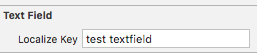
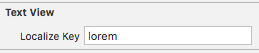
textview text
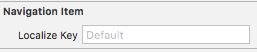
UINavigationItem title
list of languages keys
[.en,.fr,.de,.zhHans,.zhHant,.ja,.es,.es419,.it,.nl,.ko,.ptBR,.ptPT,.da,.fi,.nb,.sv,.ru,.pl,.tr,.ar,.th,.cs,.hu,.ca,.hr,.el,.he,.ro,.sk,.uk,.id,.ms,.vi,.hi
]abdelrahman eldesoky, abdelrahman.m.desoky@gmail.com
EasyLocalization is available under the MIT license. See the LICENSE file for more info.