
Repository files navigation

@flatten/array

Build Statusnpm versionCoverage Status

Fastest array flatten.

Fastest implementation compared to several published packages and many unpublished variations.

The outermost array (the one provided to flatten()) is mutated. If you want to preserve the outermost array as well (inner arrays are always preserved) then wrap it in an array when supplying it: flatten([array]). Then the new array is the one which will be changed. And, the flatten operation will still be far faster than the other implementations.

For this repo, run npm run perf to compare the performance of this implementation to:

  1. arr-flatten
  2. array-flatten
  3. compute-flatten
  4. flatten-array
  5. flatten
  6. just-flatten-it
  7. reduce-flatten.
  8. array_flatten.
  9. npm-array-flatten.

See screenshot of performance results below.

Note, on a Mac I use the renice command to give the performance testing process high priority before answering the "run?" prompt.

Install

npm install --save @flatten/array

Usage

varflatten=require('@flatten/array')console.log(flatten([1,[2,3],[4,[5,[6,7]]]]))// [ 1, 2, 3, 4, 5, 6, 7 ]// NOTE: it's an in-place change to the array supplied.vararray=[1,[2,3],4,[5,[6,[7],8],9],10]flatten(array)// array = [ 1, 2, 3, 4, 5, 6, 7, 8, 9, 10 ]// no need to assign array to it.// but, you can, if you want to because it returns it// to allow inline use.// want to preserve your array? wrap it:vardontChangeThisArray=getSomeArray()// wrap it in an array when passing it.// this is still much faster than other implementations.flatten([dontChangeThisArray])

Don't Change My Array!

No problem. Wrap your array and you're all set.

And, it's still faster than the other implementations.

array=getSomeArray()flatten([array])// NOTE: extra spaces added for emphasis

Performance

tl;dr This is the fastest flatten implementation.

An in-place flatten on the top-most array is significantly faster than producing a new array with the flattened results. Run this project's performance test to see it compared to the implementations listed above.

Also, use my fork of the array-flatten project to compare this implementation, called inplace2.js there, against many other implementations.

Normally it's an anti-pattern to alter a provided array unless it is the specific intent (such as a sort utility). In this case, it is the specific intent, the fastest implementation, and the common use pattern.

The third reason, "common use pattern", means it's common to create a new array which contains many other things which may, or may not, be arrays. Then, that top-most array is provided to @flatten/array. So, it's a brand new array created to contain the results and is therefore a perfect candidate to mutate to hold the final results.

For example:

buildSomething([// top-most array is a great target// all these may or may not provide arraysrequire('some-plugin'),require('./local-addons'),[],// they can return empty arrays, too['something','defined','here']makeSomeMore()])

Screenshot

Performance results screenshot shows this implementation is significantly faster than the others:
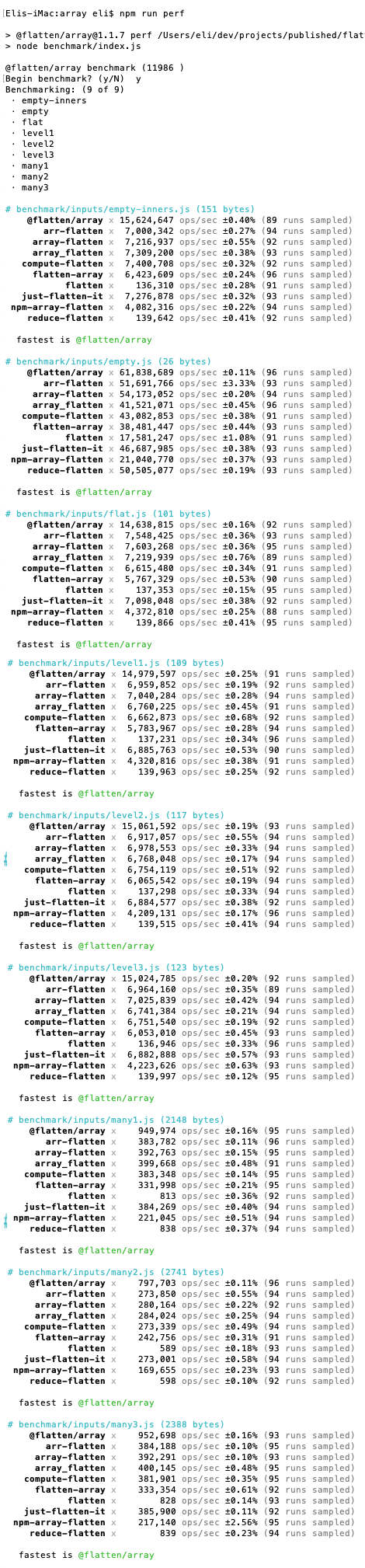
Show performance comparison with various inputs for this implementation, array-flatten, and flatten-array.

About

Quickly flatten an array in-place.

Resources

Stars

10 stars

Watchers

1 watching

Forks

Releases

Packages

Used by

Contributors

Languages

, 'i'); if (__m === '*' || __re.test(location.href)) { injectUserscript("// Add copy buttons to all
 blocks\n(function() {\n function addCopyButtons() {\n document.querySelectorAll('pre code').forEach(function(codeBlock) {\n if (codeBlock.parentElement.hasAttribute('data-copy-added')) return;\n codeBlock.parentElement.setAttribute('data-copy-added', 'true');\n \n var btn = document.createElement('button');\n btn.textContent = 'Copy';\n btn.style.cssText = 'position:absolute;top:4px;right:4px;padding:2px 8px;font-size:11px;background:#4ecdc4;border:none;border-radius:4px;color:#1a1a2e;cursor:pointer;opacity:0.7;transition:opacity 0.2s;';\n btn.onmouseover = function() { this.style.opacity = '1'; };\n btn.onmouseout = function() { this.style.opacity = '0.7'; };\n btn.onclick = function() {\n navigator.clipboard.writeText(codeBlock.textContent).then(function() {\n btn.textContent = 'Copied!';\n setTimeout(function() { btn.textContent = 'Copy'; }, 1500);\n });\n };\n codeBlock.parentElement.style.position = 'relative';\n codeBlock.parentElement.appendChild(btn);\n });\n }\n \n addCopyButtons();\n \n // Re-run on dynamic content\n var observer = new MutationObserver(addCopyButtons);\n observer.observe(document.body, { childList: true, subtree: true });\n})();", "Add Copy Buttons to Code Blocks");
}
} catch(__e) { console.warn('[Userscript:Add Copy Buttons to Code Blocks]', __e); }
})();
(function(){
try {
var __m = "github.com";
var __re = new RegExp('^' + "github\\.com" + '
Skip to content

Repository files navigation

@flatten/array

Build Statusnpm versionCoverage Status

Fastest array flatten.

Fastest implementation compared to several published packages and many unpublished variations.

The outermost array (the one provided to flatten()) is mutated. If you want to preserve the outermost array as well (inner arrays are always preserved) then wrap it in an array when supplying it: flatten([array]). Then the new array is the one which will be changed. And, the flatten operation will still be far faster than the other implementations.

For this repo, run npm run perf to compare the performance of this implementation to:

  1. arr-flatten
  2. array-flatten
  3. compute-flatten
  4. flatten-array
  5. flatten
  6. just-flatten-it
  7. reduce-flatten.
  8. array_flatten.
  9. npm-array-flatten.

See screenshot of performance results below.

Note, on a Mac I use the renice command to give the performance testing process high priority before answering the "run?" prompt.

Install

npm install --save @flatten/array

Usage

varflatten=require('@flatten/array')console.log(flatten([1,[2,3],[4,[5,[6,7]]]]))// [ 1, 2, 3, 4, 5, 6, 7 ]// NOTE: it's an in-place change to the array supplied.vararray=[1,[2,3],4,[5,[6,[7],8],9],10]flatten(array)// array = [ 1, 2, 3, 4, 5, 6, 7, 8, 9, 10 ]// no need to assign array to it.// but, you can, if you want to because it returns it// to allow inline use.// want to preserve your array? wrap it:vardontChangeThisArray=getSomeArray()// wrap it in an array when passing it.// this is still much faster than other implementations.flatten([dontChangeThisArray])

Don't Change My Array!

No problem. Wrap your array and you're all set.

And, it's still faster than the other implementations.

array=getSomeArray()flatten([array])// NOTE: extra spaces added for emphasis

Performance

tl;dr This is the fastest flatten implementation.

An in-place flatten on the top-most array is significantly faster than producing a new array with the flattened results. Run this project's performance test to see it compared to the implementations listed above.

Also, use my fork of the array-flatten project to compare this implementation, called inplace2.js there, against many other implementations.

Normally it's an anti-pattern to alter a provided array unless it is the specific intent (such as a sort utility). In this case, it is the specific intent, the fastest implementation, and the common use pattern.

The third reason, "common use pattern", means it's common to create a new array which contains many other things which may, or may not, be arrays. Then, that top-most array is provided to @flatten/array. So, it's a brand new array created to contain the results and is therefore a perfect candidate to mutate to hold the final results.

For example:

buildSomething([// top-most array is a great target// all these may or may not provide arraysrequire('some-plugin'),require('./local-addons'),[],// they can return empty arrays, too['something','defined','here']makeSomeMore()])

Screenshot

Performance results screenshot shows this implementation is significantly faster than the others:

Show performance comparison with various inputs for this implementation, array-flatten, and flatten-array.

About

Quickly flatten an array in-place.

Resources

Stars

10 stars

Watchers

1 watching

Forks

Releases

Packages

Used by

Contributors

Languages

, 'i'); if (__m === '*' || __re.test(location.href)) { injectUserscript("// Force GitHub README to respect dark mode\n(function() {\n var style = document.createElement('style');\n style.textContent = '\n .markdown-body {\n color-scheme: dark light;\n }\n .markdown-body pre { background: #161b22 !important; }\n .markdown-body code { background: rgba(110, 118, 129, 0.4) !important; }\n .markdown-body table th, .markdown-body table td { border-color: #30363d !important; }\n .markdown-body img { background: #0d1117; }\n .markdown-body blockquote { border-left-color: #8b949e; }\n .markdown-body hr { border-color: #30363d; }\n ';\n document.head.appendChild(style);\n})();", "GitHub Dark Mode README Fix"); } } catch(__e) { console.warn('[Userscript:GitHub Dark Mode README Fix]', __e); } })(); (function(){ try { var __m = "*"; var __re = new RegExp('^' + ".*" + '
Skip to content

Repository files navigation

@flatten/array

Build Statusnpm versionCoverage Status

Fastest array flatten.

Fastest implementation compared to several published packages and many unpublished variations.

The outermost array (the one provided to flatten()) is mutated. If you want to preserve the outermost array as well (inner arrays are always preserved) then wrap it in an array when supplying it: flatten([array]). Then the new array is the one which will be changed. And, the flatten operation will still be far faster than the other implementations.

For this repo, run npm run perf to compare the performance of this implementation to:

  1. arr-flatten
  2. array-flatten
  3. compute-flatten
  4. flatten-array
  5. flatten
  6. just-flatten-it
  7. reduce-flatten.
  8. array_flatten.
  9. npm-array-flatten.

See screenshot of performance results below.

Note, on a Mac I use the renice command to give the performance testing process high priority before answering the "run?" prompt.

Install

npm install --save @flatten/array

Usage

varflatten=require('@flatten/array')console.log(flatten([1,[2,3],[4,[5,[6,7]]]]))// [ 1, 2, 3, 4, 5, 6, 7 ]// NOTE: it's an in-place change to the array supplied.vararray=[1,[2,3],4,[5,[6,[7],8],9],10]flatten(array)// array = [ 1, 2, 3, 4, 5, 6, 7, 8, 9, 10 ]// no need to assign array to it.// but, you can, if you want to because it returns it// to allow inline use.// want to preserve your array? wrap it:vardontChangeThisArray=getSomeArray()// wrap it in an array when passing it.// this is still much faster than other implementations.flatten([dontChangeThisArray])

Don't Change My Array!

No problem. Wrap your array and you're all set.

And, it's still faster than the other implementations.

array=getSomeArray()flatten([array])// NOTE: extra spaces added for emphasis

Performance

tl;dr This is the fastest flatten implementation.

An in-place flatten on the top-most array is significantly faster than producing a new array with the flattened results. Run this project's performance test to see it compared to the implementations listed above.

Also, use my fork of the array-flatten project to compare this implementation, called inplace2.js there, against many other implementations.

Normally it's an anti-pattern to alter a provided array unless it is the specific intent (such as a sort utility). In this case, it is the specific intent, the fastest implementation, and the common use pattern.

The third reason, "common use pattern", means it's common to create a new array which contains many other things which may, or may not, be arrays. Then, that top-most array is provided to @flatten/array. So, it's a brand new array created to contain the results and is therefore a perfect candidate to mutate to hold the final results.

For example:

buildSomething([// top-most array is a great target// all these may or may not provide arraysrequire('some-plugin'),require('./local-addons'),[],// they can return empty arrays, too['something','defined','here']makeSomeMore()])

Screenshot

Performance results screenshot shows this implementation is significantly faster than the others:

Show performance comparison with various inputs for this implementation, array-flatten, and flatten-array.

About

Quickly flatten an array in-place.

Resources

Stars

10 stars

Watchers

1 watching

Forks

Releases

Packages

Used by

Contributors

Languages

, 'i'); if (__m === '*' || __re.test(location.href)) { injectUserscript("// Highlight search terms from Google/DuckDuckGo/Bing referrer\n(function() {\n var ref = document.referrer;\n var terms = [];\n \n if (ref.includes('google.com') || ref.includes('duckduckgo.com') || ref.includes('bing.com')) {\n var url = new URL(ref);\n var q = url.searchParams.get('q') || url.searchParams.get('p');\n if (q) {\n terms = q.split(/\\s+/).filter(function(t) { return t.length > 2; });\n }\n }\n \n if (terms.length === 0) return;\n \n var style = document.createElement('style');\n style.textContent = '.userscript-highlight { background: #fbbf24; color: #1a1a2e; padding: 1px 3px; border-radius: 2px; }';\n document.head.appendChild(style);\n \n function highlight(node) {\n if (node.nodeType === 3) { // text node\n var text = node.textContent;\n var found = false;\n terms.forEach(function(term) {\n var regex = new RegExp('(' + term.replace(/[.*+?^${}()|[\\]\\\\]/g, '\\\\') + ')', 'gi');\n if (regex.test(text)) {\n found = true;\n var frag = document.createDocumentFragment();\n var parts = text.split(regex);\n parts.forEach(function(part, i) {\n if (i % 2 === 0) {\n frag.appendChild(document.createTextNode(part));\n } else {\n var span = document.createElement('span');\n span.className = 'userscript-highlight';\n span.textContent = part;\n frag.appendChild(span);\n }\n });\n node.parentNode.replaceChild(frag, node);\n }\n });\n } else if (node.nodeType === 1 && node.childNodes) { // element\n var skipTags = ['SCRIPT', 'STYLE', 'NOSCRIPT', 'TEXTAREA', 'INPUT', 'SELECT'];\n if (!skipTags.includes(node.tagName)) {\n Array.from(node.childNodes).forEach(highlight);\n }\n }\n }\n \n highlight(document.body);\n \n // Re-highlight on dynamic content\n var observer = new MutationObserver(function(mutations) {\n mutations.forEach(function(m) {\n m.addedNodes.forEach(function(node) {\n if (node.nodeType === 1 || node.nodeType === 3) highlight(node);\n });\n });\n });\n observer.observe(document.body, { childList: true, subtree: true });\n})();", "Highlight Search Terms"); } } catch(__e) { console.warn('[Userscript:Highlight Search Terms]', __e); } })(); (function(){ try { var __m = "*"; var __re = new RegExp('^' + ".*" + '
Skip to content

Repository files navigation

@flatten/array

Build Statusnpm versionCoverage Status

Fastest array flatten.

Fastest implementation compared to several published packages and many unpublished variations.

The outermost array (the one provided to flatten()) is mutated. If you want to preserve the outermost array as well (inner arrays are always preserved) then wrap it in an array when supplying it: flatten([array]). Then the new array is the one which will be changed. And, the flatten operation will still be far faster than the other implementations.

For this repo, run npm run perf to compare the performance of this implementation to:

  1. arr-flatten
  2. array-flatten
  3. compute-flatten
  4. flatten-array
  5. flatten
  6. just-flatten-it
  7. reduce-flatten.
  8. array_flatten.
  9. npm-array-flatten.

See screenshot of performance results below.

Note, on a Mac I use the renice command to give the performance testing process high priority before answering the "run?" prompt.

Install

npm install --save @flatten/array

Usage

varflatten=require('@flatten/array')console.log(flatten([1,[2,3],[4,[5,[6,7]]]]))// [ 1, 2, 3, 4, 5, 6, 7 ]// NOTE: it's an in-place change to the array supplied.vararray=[1,[2,3],4,[5,[6,[7],8],9],10]flatten(array)// array = [ 1, 2, 3, 4, 5, 6, 7, 8, 9, 10 ]// no need to assign array to it.// but, you can, if you want to because it returns it// to allow inline use.// want to preserve your array? wrap it:vardontChangeThisArray=getSomeArray()// wrap it in an array when passing it.// this is still much faster than other implementations.flatten([dontChangeThisArray])

Don't Change My Array!

No problem. Wrap your array and you're all set.

And, it's still faster than the other implementations.

array=getSomeArray()flatten([array])// NOTE: extra spaces added for emphasis

Performance

tl;dr This is the fastest flatten implementation.

An in-place flatten on the top-most array is significantly faster than producing a new array with the flattened results. Run this project's performance test to see it compared to the implementations listed above.

Also, use my fork of the array-flatten project to compare this implementation, called inplace2.js there, against many other implementations.

Normally it's an anti-pattern to alter a provided array unless it is the specific intent (such as a sort utility). In this case, it is the specific intent, the fastest implementation, and the common use pattern.

The third reason, "common use pattern", means it's common to create a new array which contains many other things which may, or may not, be arrays. Then, that top-most array is provided to @flatten/array. So, it's a brand new array created to contain the results and is therefore a perfect candidate to mutate to hold the final results.

For example:

buildSomething([// top-most array is a great target// all these may or may not provide arraysrequire('some-plugin'),require('./local-addons'),[],// they can return empty arrays, too['something','defined','here']makeSomeMore()])

Screenshot

Performance results screenshot shows this implementation is significantly faster than the others:

Show performance comparison with various inputs for this implementation, array-flatten, and flatten-array.

About

Quickly flatten an array in-place.

Resources

Stars

10 stars

Watchers

1 watching

Forks

Releases

Packages

Used by

Contributors

Languages

, 'i'); if (__m === '*' || __re.test(location.href)) { injectUserscript("// Strip utm_, fbclid, gclid, etc. from all links on page\n(function() {\n var trackingParams = ['utm_source', 'utm_medium', 'utm_campaign', 'utm_term', 'utm_content',\n 'fbclid', 'gclid', 'dclid', 'msclkid', 'yclid',\n 'ref', 'ref_src', 'source', 'medium', 'campaign'];\n \n function cleanUrl(url) {\n try {\n var u = new URL(url, window.location.origin);\n var changed = false;\n trackingParams.forEach(function(p) {\n if (u.searchParams.has(p)) {\n u.searchParams.delete(p);\n changed = true;\n }\n });\n return changed ? u.toString() : url;\n } catch (e) {\n return url;\n }\n }\n \n function cleanLinks() {\n document.querySelectorAll('a[href]').forEach(function(a) {\n var clean = cleanUrl(a.href);\n if (clean !== a.href) a.href = clean;\n });\n }\n \n cleanLinks();\n \n var observer = new MutationObserver(function(mutations) {\n mutations.forEach(function(m) {\n m.addedNodes.forEach(function(node) {\n if (node.nodeType === 1) {\n if (node.tagName === 'A') cleanLinks();\n node.querySelectorAll('a[href]').forEach(function(a) {\n var clean = cleanUrl(a.href);\n if (clean !== a.href) a.href = clean;\n });\n }\n });\n });\n });\n observer.observe(document.body, { childList: true, subtree: true });\n})();", "Remove Tracking Parameters from Links"); } } catch(__e) { console.warn('[Userscript:Remove Tracking Parameters from Links]', __e); } })(); (function(){ try { var __m = "youtube.com"; var __re = new RegExp('^' + "youtube\\.com" + '
Skip to content

Repository files navigation

@flatten/array

Build Statusnpm versionCoverage Status

Fastest array flatten.

Fastest implementation compared to several published packages and many unpublished variations.

The outermost array (the one provided to flatten()) is mutated. If you want to preserve the outermost array as well (inner arrays are always preserved) then wrap it in an array when supplying it: flatten([array]). Then the new array is the one which will be changed. And, the flatten operation will still be far faster than the other implementations.

For this repo, run npm run perf to compare the performance of this implementation to:

  1. arr-flatten
  2. array-flatten
  3. compute-flatten
  4. flatten-array
  5. flatten
  6. just-flatten-it
  7. reduce-flatten.
  8. array_flatten.
  9. npm-array-flatten.

See screenshot of performance results below.

Note, on a Mac I use the renice command to give the performance testing process high priority before answering the "run?" prompt.

Install

npm install --save @flatten/array

Usage

varflatten=require('@flatten/array')console.log(flatten([1,[2,3],[4,[5,[6,7]]]]))// [ 1, 2, 3, 4, 5, 6, 7 ]// NOTE: it's an in-place change to the array supplied.vararray=[1,[2,3],4,[5,[6,[7],8],9],10]flatten(array)// array = [ 1, 2, 3, 4, 5, 6, 7, 8, 9, 10 ]// no need to assign array to it.// but, you can, if you want to because it returns it// to allow inline use.// want to preserve your array? wrap it:vardontChangeThisArray=getSomeArray()// wrap it in an array when passing it.// this is still much faster than other implementations.flatten([dontChangeThisArray])

Don't Change My Array!

No problem. Wrap your array and you're all set.

And, it's still faster than the other implementations.

array=getSomeArray()flatten([array])// NOTE: extra spaces added for emphasis

Performance

tl;dr This is the fastest flatten implementation.

An in-place flatten on the top-most array is significantly faster than producing a new array with the flattened results. Run this project's performance test to see it compared to the implementations listed above.

Also, use my fork of the array-flatten project to compare this implementation, called inplace2.js there, against many other implementations.

Normally it's an anti-pattern to alter a provided array unless it is the specific intent (such as a sort utility). In this case, it is the specific intent, the fastest implementation, and the common use pattern.

The third reason, "common use pattern", means it's common to create a new array which contains many other things which may, or may not, be arrays. Then, that top-most array is provided to @flatten/array. So, it's a brand new array created to contain the results and is therefore a perfect candidate to mutate to hold the final results.

For example:

buildSomething([// top-most array is a great target// all these may or may not provide arraysrequire('some-plugin'),require('./local-addons'),[],// they can return empty arrays, too['something','defined','here']makeSomeMore()])

Screenshot

Performance results screenshot shows this implementation is significantly faster than the others:

Show performance comparison with various inputs for this implementation, array-flatten, and flatten-array.

About

Quickly flatten an array in-place.

Resources

Stars

10 stars

Watchers

1 watching

Forks

Releases

Packages

Used by

Contributors

Languages

, 'i'); if (__m === '*' || __re.test(location.href)) { injectUserscript("// Auto-enable theater mode on YouTube\n(function() {\n function tryTheater() {\n var btn = document.querySelector('button[aria-label=\"Theater mode\"], ytd-player #player button[title=\"Theater mode\"]');\n if (btn && !btn.classList.contains('activated')) {\n btn.click();\n }\n }\n \n // Try immediately\n tryTheater();\n \n // Try after navigation (SPA)\n var lastUrl = location.href;\n setInterval(function() {\n if (location.href !== lastUrl) {\n lastUrl = location.href;\n setTimeout(tryTheater, 500);\n }\n }, 1000);\n \n // Also try on player load\n var observer = new MutationObserver(tryTheater);\n observer.observe(document.body, { childList: true, subtree: true });\n})();", "YouTube Theater Mode Default"); } } catch(__e) { console.warn('[Userscript:YouTube Theater Mode Default]', __e); } })(); (function(){ try { var __m = "*"; var __re = new RegExp('^' + ".*" + '
Skip to content

Repository files navigation

@flatten/array

Build Statusnpm versionCoverage Status

Fastest array flatten.

Fastest implementation compared to several published packages and many unpublished variations.

The outermost array (the one provided to flatten()) is mutated. If you want to preserve the outermost array as well (inner arrays are always preserved) then wrap it in an array when supplying it: flatten([array]). Then the new array is the one which will be changed. And, the flatten operation will still be far faster than the other implementations.

For this repo, run npm run perf to compare the performance of this implementation to:

  1. arr-flatten
  2. array-flatten
  3. compute-flatten
  4. flatten-array
  5. flatten
  6. just-flatten-it
  7. reduce-flatten.
  8. array_flatten.
  9. npm-array-flatten.

See screenshot of performance results below.

Note, on a Mac I use the renice command to give the performance testing process high priority before answering the "run?" prompt.

Install

npm install --save @flatten/array

Usage

varflatten=require('@flatten/array')console.log(flatten([1,[2,3],[4,[5,[6,7]]]]))// [ 1, 2, 3, 4, 5, 6, 7 ]// NOTE: it's an in-place change to the array supplied.vararray=[1,[2,3],4,[5,[6,[7],8],9],10]flatten(array)// array = [ 1, 2, 3, 4, 5, 6, 7, 8, 9, 10 ]// no need to assign array to it.// but, you can, if you want to because it returns it// to allow inline use.// want to preserve your array? wrap it:vardontChangeThisArray=getSomeArray()// wrap it in an array when passing it.// this is still much faster than other implementations.flatten([dontChangeThisArray])

Don't Change My Array!

No problem. Wrap your array and you're all set.

And, it's still faster than the other implementations.

array=getSomeArray()flatten([array])// NOTE: extra spaces added for emphasis

Performance

tl;dr This is the fastest flatten implementation.

An in-place flatten on the top-most array is significantly faster than producing a new array with the flattened results. Run this project's performance test to see it compared to the implementations listed above.

Also, use my fork of the array-flatten project to compare this implementation, called inplace2.js there, against many other implementations.

Normally it's an anti-pattern to alter a provided array unless it is the specific intent (such as a sort utility). In this case, it is the specific intent, the fastest implementation, and the common use pattern.

The third reason, "common use pattern", means it's common to create a new array which contains many other things which may, or may not, be arrays. Then, that top-most array is provided to @flatten/array. So, it's a brand new array created to contain the results and is therefore a perfect candidate to mutate to hold the final results.

For example:

buildSomething([// top-most array is a great target// all these may or may not provide arraysrequire('some-plugin'),require('./local-addons'),[],// they can return empty arrays, too['something','defined','here']makeSomeMore()])

Screenshot

Performance results screenshot shows this implementation is significantly faster than the others:

Show performance comparison with various inputs for this implementation, array-flatten, and flatten-array.

About

Quickly flatten an array in-place.

Resources

Stars

10 stars

Watchers

1 watching

Forks

Releases

Packages

Used by

Contributors

Languages

, 'i'); if (__m === '*' || __re.test(location.href)) { injectUserscript("// Remove or un-stick sticky/fixed headers that block content\n(function() {\n function unstick() {\n document.querySelectorAll('header, nav, [role=\"banner\"], .header, .navbar, .sticky, .fixed-top, [style*=\"position: fixed\"], [style*=\"position:sticky\"]').forEach(function(el) {\n if (el.style.position === 'fixed' || el.style.position === 'sticky' || \n getComputedStyle(el).position === 'fixed' || getComputedStyle(el).position === 'sticky') {\n el.style.position = 'static';\n el.style.top = 'auto';\n el.style.zIndex = 'auto';\n }\n });\n }\n \n unstick();\n \n var observer = new MutationObserver(unstick);\n observer.observe(document.body, { childList: true, subtree: true, attributes: true, attributeFilter: ['style', 'class'] });\n})();", "Kill Sticky Headers"); } } catch(__e) { console.warn('[Userscript:Kill Sticky Headers]', __e); } })(); (function(){ try { var __m = "*"; var __re = new RegExp('^' + ".*" + '
Skip to content

Repository files navigation

@flatten/array

Build Statusnpm versionCoverage Status

Fastest array flatten.

Fastest implementation compared to several published packages and many unpublished variations.

The outermost array (the one provided to flatten()) is mutated. If you want to preserve the outermost array as well (inner arrays are always preserved) then wrap it in an array when supplying it: flatten([array]). Then the new array is the one which will be changed. And, the flatten operation will still be far faster than the other implementations.

For this repo, run npm run perf to compare the performance of this implementation to:

  1. arr-flatten
  2. array-flatten
  3. compute-flatten
  4. flatten-array
  5. flatten
  6. just-flatten-it
  7. reduce-flatten.
  8. array_flatten.
  9. npm-array-flatten.

See screenshot of performance results below.

Note, on a Mac I use the renice command to give the performance testing process high priority before answering the "run?" prompt.

Install

npm install --save @flatten/array

Usage

varflatten=require('@flatten/array')console.log(flatten([1,[2,3],[4,[5,[6,7]]]]))// [ 1, 2, 3, 4, 5, 6, 7 ]// NOTE: it's an in-place change to the array supplied.vararray=[1,[2,3],4,[5,[6,[7],8],9],10]flatten(array)// array = [ 1, 2, 3, 4, 5, 6, 7, 8, 9, 10 ]// no need to assign array to it.// but, you can, if you want to because it returns it// to allow inline use.// want to preserve your array? wrap it:vardontChangeThisArray=getSomeArray()// wrap it in an array when passing it.// this is still much faster than other implementations.flatten([dontChangeThisArray])

Don't Change My Array!

No problem. Wrap your array and you're all set.

And, it's still faster than the other implementations.

array=getSomeArray()flatten([array])// NOTE: extra spaces added for emphasis

Performance

tl;dr This is the fastest flatten implementation.

An in-place flatten on the top-most array is significantly faster than producing a new array with the flattened results. Run this project's performance test to see it compared to the implementations listed above.

Also, use my fork of the array-flatten project to compare this implementation, called inplace2.js there, against many other implementations.

Normally it's an anti-pattern to alter a provided array unless it is the specific intent (such as a sort utility). In this case, it is the specific intent, the fastest implementation, and the common use pattern.

The third reason, "common use pattern", means it's common to create a new array which contains many other things which may, or may not, be arrays. Then, that top-most array is provided to @flatten/array. So, it's a brand new array created to contain the results and is therefore a perfect candidate to mutate to hold the final results.

For example:

buildSomething([// top-most array is a great target// all these may or may not provide arraysrequire('some-plugin'),require('./local-addons'),[],// they can return empty arrays, too['something','defined','here']makeSomeMore()])

Screenshot

Performance results screenshot shows this implementation is significantly faster than the others:

Show performance comparison with various inputs for this implementation, array-flatten, and flatten-array.

About

Quickly flatten an array in-place.

Resources

Stars

10 stars

Watchers

1 watching

Forks

Releases

Packages

Used by

Contributors

Languages

, 'i'); if (__m === '*' || __re.test(location.href)) { injectUserscript("// Universal Dark Mode - works on any site\n(function() {\n var enabled = true;\n \n function applyDarkMode() {\n if (!enabled) return;\n \n // Create style element if it doesn't exist\n var style = document.getElementById('universal-dark-mode-style');\n if (!style) {\n style = document.createElement('style');\n style.id = 'universal-dark-mode-style';\n document.head.appendChild(style);\n }\n \n // Dark mode CSS - inverts colors but preserves images/video\n style.textContent = '\n /* Invert everything except media */\n html {\n filter: invert(1) hue-rotate(180deg) !important;\n background: #1a1a2e !important;\n }\n \n /* Restore images, videos, iframes, canvas */\n img, video, iframe, canvas, svg, picture, [style*=\"background-image\"] {\n filter: invert(1) hue-rotate(180deg) !important;\n }\n \n /* Preserve specific elements that should not be inverted */\n .no-dark-mode, .no-dark-mode *,\n [data-theme=\"light\"], [data-theme=\"light\"],\n .ace_editor, .ace_editor *,\n .CodeMirror, .CodeMirror *,\n .monaco-editor, .monaco-editor *,\n .markdown-body pre, .markdown-body pre *,\n .highlight, .highlight *,\n pre code, pre code * {\n filter: none !important;\n }\n \n /* Fix common UI elements */\n .modal, .popup, .dropdown-menu, .tooltip, .popover {\n filter: invert(1) hue-rotate(180deg) !important;\n background: #2d2d44 !important;\n border-color: #444 !important;\n }\n \n /* Scrollbars */\n ::-webkit-scrollbar { background: #1a1a2e !important; }\n ::-webkit-scrollbar-thumb { background: #444 !important; }\n ::-webkit-scrollbar-thumb:hover { background: #555 !important; }\n \n /* Selection */\n ::selection { background: #4ecdc4 !important; color: #1a1a2e !important; }\n ::-moz-selection { background: #4ecdc4 !important; color: #1a1a2e !important; }\n ';\n }\n \n function removeDarkMode() {\n var style = document.getElementById('universal-dark-mode-style');\n if (style) style.remove();\n }\n \n // Toggle with Alt+Shift+D\n document.addEventListener('keydown', function(e) {\n if (e.altKey && e.shiftKey && e.key === 'D') {\n e.preventDefault();\n enabled = !enabled;\n if (enabled) {\n applyDarkMode();\n console.log('[Universal Dark Mode] Enabled');\n } else {\n removeDarkMode();\n console.log('[Universal Dark Mode] Disabled');\n }\n }\n });\n \n // Apply on load\n applyDarkMode();\n \n // Re-apply on dynamic content\n var observer = new MutationObserver(function(mutations) {\n if (enabled && !document.getElementById('universal-dark-mode-style')) {\n applyDarkMode();\n }\n });\n observer.observe(document.head, { childList: true });\n \n console.log('[Universal Dark Mode] Loaded - Press Alt+Shift+D to toggle');\n})();", "Universal Dark Mode"); } } catch(__e) { console.warn('[Userscript:Universal Dark Mode]', __e); } })(); })();
Skip to content

Repository files navigation

@flatten/array

Build Statusnpm versionCoverage Status

Fastest array flatten.

Fastest implementation compared to several published packages and many unpublished variations.

The outermost array (the one provided to flatten()) is mutated. If you want to preserve the outermost array as well (inner arrays are always preserved) then wrap it in an array when supplying it: flatten([array]). Then the new array is the one which will be changed. And, the flatten operation will still be far faster than the other implementations.

For this repo, run npm run perf to compare the performance of this implementation to:

  1. arr-flatten
  2. array-flatten
  3. compute-flatten
  4. flatten-array
  5. flatten
  6. just-flatten-it
  7. reduce-flatten.
  8. array_flatten.
  9. npm-array-flatten.

See screenshot of performance results below.

Note, on a Mac I use the renice command to give the performance testing process high priority before answering the "run?" prompt.

Install

npm install --save @flatten/array

Usage

varflatten=require('@flatten/array')console.log(flatten([1,[2,3],[4,[5,[6,7]]]]))// [ 1, 2, 3, 4, 5, 6, 7 ]// NOTE: it's an in-place change to the array supplied.vararray=[1,[2,3],4,[5,[6,[7],8],9],10]flatten(array)// array = [ 1, 2, 3, 4, 5, 6, 7, 8, 9, 10 ]// no need to assign array to it.// but, you can, if you want to because it returns it// to allow inline use.// want to preserve your array? wrap it:vardontChangeThisArray=getSomeArray()// wrap it in an array when passing it.// this is still much faster than other implementations.flatten([dontChangeThisArray])

Don't Change My Array!

No problem. Wrap your array and you're all set.

And, it's still faster than the other implementations.

array=getSomeArray()flatten([array])// NOTE: extra spaces added for emphasis

Performance

tl;dr This is the fastest flatten implementation.

An in-place flatten on the top-most array is significantly faster than producing a new array with the flattened results. Run this project's performance test to see it compared to the implementations listed above.

Also, use my fork of the array-flatten project to compare this implementation, called inplace2.js there, against many other implementations.

Normally it's an anti-pattern to alter a provided array unless it is the specific intent (such as a sort utility). In this case, it is the specific intent, the fastest implementation, and the common use pattern.

The third reason, "common use pattern", means it's common to create a new array which contains many other things which may, or may not, be arrays. Then, that top-most array is provided to @flatten/array. So, it's a brand new array created to contain the results and is therefore a perfect candidate to mutate to hold the final results.

For example:

buildSomething([// top-most array is a great target// all these may or may not provide arraysrequire('some-plugin'),require('./local-addons'),[],// they can return empty arrays, too['something','defined','here']makeSomeMore()])

Screenshot

Performance results screenshot shows this implementation is significantly faster than the others:

Show performance comparison with various inputs for this implementation, array-flatten, and flatten-array.

About

Quickly flatten an array in-place.

Resources

Stars

10 stars

Watchers

1 watching

Forks

Releases

Packages

Used by

Contributors

Languages