


TextBox for embedded-graphics.
This crate provides a configurable TextBox to render multiline text inside a bounding
Rectangle using embedded-graphics.
TextBox supports the common text alignments:
- Horizontal:
LeftRightCenterJustified
- Vertical:
TopMiddleBottom
TextBox also supports some special characters not handled by embedded-graphics' Text:
- non-breaking space (
\u{200b}) - zero-width space (
\u{a0}) - soft hyphen (
\u{ad}) - carriage return (
\r) - tab (
\t) with configurable tab size
TextBox also supports text coloring using ANSI escape codes via the Ansi plugin.
The examples are based on the embedded-graphics simulator. The simulator is built on top of
SDL2. See the simulator README for more information.
use embedded_graphics::{
mono_font::{ascii::FONT_6X10,MonoTextStyle},
pixelcolor::BinaryColor,
prelude::*,
primitives::Rectangle,};use embedded_graphics_simulator::{BinaryColorTheme,OutputSettingsBuilder,SimulatorDisplay,Window,};use embedded_text::{
alignment::HorizontalAlignment,
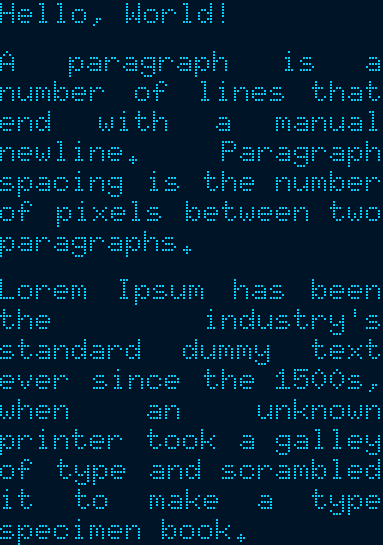
style::{HeightMode,TextBoxStyleBuilder},TextBox,};fnmain(){let text = "Hello, World!\n\ A paragraph is a number of lines that end with a manual newline. Paragraph spacing is the \ number of pixels between two paragraphs.\n\ Lorem Ipsum has been the industry's standard dummy text ever since the 1500s, when \ an unknown printer took a galley of type and scrambled it to make a type specimen book.";// Specify the styling options:// * Use the 6x10 MonoFont from embedded-graphics.// * Draw the text fully justified.// * Use `FitToText` height mode to stretch the text box to the exact height of the text.// * Draw the text with `BinaryColor::On`, which will be displayed as light blue.let character_style = MonoTextStyle::new(&FONT_6X10,BinaryColor::On);let textbox_style = TextBoxStyleBuilder::new().height_mode(HeightMode::FitToText).alignment(HorizontalAlignment::Justified).paragraph_spacing(6).build();// Specify the bounding box. Note the 0px height. The `FitToText` height mode will// measure and adjust the height of the text box in `into_styled()`.let bounds = Rectangle::new(Point::zero(),Size::new(128,0));// Create the text box and apply styling options.let text_box = TextBox::with_textbox_style(text, bounds, character_style, textbox_style);// Create a simulated display with the dimensions of the text box.letmut display = SimulatorDisplay::new(text_box.bounding_box().size);// Draw the text box.
text_box.draw(&mut display).unwrap();// Set up the window and show the display's contents.let output_settings = OutputSettingsBuilder::new().theme(BinaryColorTheme::OledBlue).scale(2).build();Window::new("TextBox example with paragraph spacing",&output_settings).show_static(&display);}plugin(experimental): allows implementing custom plugins.ansi: enables ANSI sequence support using theAnsiplugin.
The minimum supported Rust version for embedded-text is 1.61.0 or greater. Ensure you have the latest stable version of Rust installed, preferably through https://rustup.rs.
For setup in general, follow the installation instructions for embedded-graphics.
To install SDL2 on Windows, see https://github.com/Rust-SDL2/rust-sdl2#windows-msvc
The last paragraph of the example text is copied from https://www.lipsum.com