
The world's easiest, most powerful edgar library




- 🧠 Intuitive and easy to use: edgartools has a super simple API that is easy to use.
- 🛠️ Works as a library or a CLI: You can use edgartools as a library in your code or as a CLI tool.
- 📁 Access any SEC filing: You can access any SEC filing since 1994.
- 📅 List filings for any date range: List filings for year, quarter e.g. or date range
2024-02-29:2024-03-15 - 🌟 Best looking edgar library: Uses rich library to display SEC Edgar data in a beautiful way.
- 🔄 Page through filings: Use
filings.next()andfilings.previous()to page through filings - 🏗️ Build Data Pipelines: Build data pipelines by finding, filtering, transforming and saving filings
- ✅ Select a filing: You can select a filing from the list of filings.
- 📄 View the filing as HTML or text: Find a filing then get the content as HTML or text.
- 🔢 Chunk filing text: You can chunk the filing text into sections for vector embedding.
- 🔍 Preview the filing: You can preview the filing in the terminal or a notebook.
- 🔎 Search through a filing: You can search through a filing for a keyword.
- 📊 Parse XBRL: If a filing has XBRL, you can parse it to a dataframe.
- 💾 Data Objects: Automatically downloads and parses filings into data objects.
- 📥 Download any attachment: You can download any attachment from the filing.
- 🕒 Automatic throttling: Automatically throttles requests to Edgar to avoid being blocked.
- 📥 Bulk downloads: Faster batch processing through bulk downloads of filings and facts
- 🔢 Get company by Ticker or Cik: Get a company by ticker
Company("SNOW")or cikCompany(1640147) - 📚 Get company filings: You can get all the company's historical filings using
company.get_filings() - 📈 Get company facts: You can get company facts using
company.get_facts() - 💰 Company Financials: You can get company financials using
company.financials - 🔍 Lookup Ticker by CUSIP: You can lookup a ticker by CUSIP
- 📑 Dataset of SEC entities: You can get a dataset of SEC companies and persons
- 📈 Fund Reports: Search for and get 13F-HR fund reports
- 👤 Insider Transactions: Search for and get insider transactions
Install using pip
pip install edgartoolsImport and start using
fromedgarimport*# Tell the SEC who you areset_identity("Michael Mccallum mike.mccalum@indigo.com")
filings=get_filings()Depends on what you know
filing=find("0001065280-23-000273")filings=Company("NFLX").get_filings(form="10-Q").latest(1)filings=get_filings(form="10-Q")
filing=filings[0]You can view it in the terminal or open it in the browser, get the filing as html, xml or text, and download attachments. You can extract data from the filing into a data object.
You can get the company's filings, facts and financials.
| Task | Code |
|---|---|
| Set your EDGAR identity in Linux/Mac | export EDGAR_IDENTITY="First Last email@domain.com" |
| Set your EDGAR identity in Windows | set EDGAR_IDENTITY="First Last email@domain.com" |
| Set identity in Windows Powershell | $env:EDGAR_IDENTITY="First Last email@domain.com" |
| Set identity in Python | set_identity("First Last email@domain.com") |
| Importing the library | from edgar import * |
| Task | Code |
|---|---|
| Get filings for the year to date | filings = get_filings() |
| Get only xbrl filings | filings = get_filings(index="xbrl") |
| Get filings for a specific year | filings = get_filings(2020) |
| Get filings for a specific quarter | filings = get_filings(2020, 1) |
| Get filings for multiple years | filings = get_filings([2020, 2021]) |
| Get filigs for a range of years | filings = get_filings(year=range(2010, 2020) |
| Get filings for a specific form | filings = get_filings(form="10-K") |
| Get filings for a list of forms | filings = get_filings(form=["10-K", "10-Q"]) |
| Show the next page of filings | filings.next() |
| Show the previous page of filings | filings.prev() |
| Get the first n filings | filings.head(20) |
| Get the last n filings | filings.tail(20) |
| Get the latest n filings by date | filings.latest(20) |
| Get a random sample of the filings | filings.sample(20) |
| Filter filings on a date | filings = filings.filter(date="2020-01-01") |
| Filter filings between dates | filings.filter(date="2020-01-01:2020-03-01") |
| Filter filings before a date | filings.filter(date=":2020-03-01") |
| Filter filings after a date | filings.filter(date="2020-03-01:") |
| Get filings as a pandas dataframe | filings.to_pandas() |
| Task | Code |
|---|---|
| Get a single filing | filing = filings[3] |
| Get a filing by accession number | filing = get_by_accession_number("0000320193-20-34576") |
| Get the filing homepage | filing.homepage |
| Open a filing in the browser | filing.open() |
| Open the filing homepage in the browser | filing.homepage.open() |
| View the filing in the terminal | filing.view() |
| Get the html of the filing document | filing.html() |
| Get the XBRL of the filing document | filing.xbrl() |
| Get the filing document as markdown | filing.markdown() |
| Get the full submission text of a filing | filing.text() |
| Get and parse the data object of a filing | filing.obj() |
| Get the filing attachments | filing.attachments |
| Get a single attachment | attachment = filing.attachments[0] |
| Open an attachment in the browser | attachment.open() |
| Download an attachment | content = attachment.download() |
| Task | Code |
|---|---|
| Get a company by ticker | company = Company("AAPL") |
| Get a company by CIK | company = Company("0000320193") |
| Get company facts | company.get_facts() |
| Get company facts as a pandas dataframe | company.get_facts().to_pandas() |
| Get company filings | company.get_filings() |
| Get company filings by form | company.get_filings(form="10-K") |
| Get a company filing by accession_number | company.get_filing(accession_number="0000320193-21-000139") |
| Get the company's financials | company.financials |
| Get the company's balance sheet | company.financials.balance_sheet |
| Get the company's income statement | company.financials.income_statement |
| Get the company's cash flow statement | company.financials.cash_flow_statement |
pip install edgartoolsBefore you can access the SEC Edgar API you need to set the identity that you will use to access Edgar. This is usually your name and email, or a company name and email.
Sample Company Name AdminContact@<sample company domain>.comThe user identity is sent in the User-Agent string and the Edgar API will refuse to respond to your request without it.
EdgarTools will look for an environment variable called EDGAR_IDENTITY and use that in each request.
So, you need to set this environment variable before using it.
export EDGAR_IDENTITY="Michael Mccallum mcalum@gmail.com"$Env:EDGAR_IDENTITY="Michael Mccallum mcalum@gmail.com"Alternatively, you can call set_identity which does the same thing.
fromedgarimportset_identityset_identity("Michael Mccallum mcalum@gmail.com")For more detail see https://www.sec.gov/os/accessing-edgar-data
fromedgarimport*Use the Filing API when you are not working with a specific company, but want to get a list of filings.
For details on how to use the Filing API see Using the Filing API
With the Company API you can find a company by ticker or CIK, and get the company's filings, facts and financials.
Company("AAPL")
.get_filings(form="10-Q")
.latest(1)
.obj()
Every filing has a list of attachments. You can view the attachments using filing.attachments
# View the attachmentsfiling.attachments
You can access each attachment using the bracket operator [] and the index of the attachment.
# Get the first attachmentattachment=filing.attachments[0]
You can download the attachment using attachment.download(). This will download the attachment to string or bytes in memory.
Now the reason you may want to download attachments is to get information contained in data files. For example, 13F-HR filings have attached infotable.xml files containing data from the holding report for that filing.
Fortunately, the library handles this for you. If you call filing.obj() it will automatically download and parse the data files
into a data object, for several different form types. Currently, the following forms are supported:
| Form | Data Object | Description |
|---|---|---|
| 10-K | TenK | Annual report |
| 10-Q | TenQ | Quarterly report |
| 8-K | EightK | Current report |
| MA-I | MunicipalAdvisorForm | Municipal advisor initial filing |
| Form 144 | Form144 | Notice of proposed sale of securities |
| C, C-U, C-AR, C-TR | FormC | Form C Crowdfunding Offering |
| D | FormD | Form D Offering |
| 3,4,5 | Ownership | Ownership reports |
| 13F-HR | ThirteenF | 13F Holdings Report |
| NPORT-P | FundReport | Fund Report |
| EFFECT | Effect | Notice of Effectiveness |
| And other filing with XBRL | FilingXbrl |
For example, to get the data object for a 13F-HR filing you can do the following:
filings=get_filings(form="13F-HR")
filing=filings[0]
thirteenf=filing.obj()
If you call obj() on a filing that does not have a data file, then it will return None.
Some filings are in XBRL (eXtensible Business Markup Language) format. These are mainly the newer filings, as the SEC has started requiring this for newer filings.
If a filing is in XBRL format then it opens up a lot more ways to get structured data about that specific filing and also about the company referred to in that filing.
The Filing class has an xbrl function that will download, parse and structure the filing's XBRL document if one exists.
If it does not exist, then filing.xbrl() will return None.
The function filing.xbrl() returns a FilingXbrl instance, which wraps the data, and provides convenient
ways of working with the xbrl data.
filing_xbrl=filing.xbrl()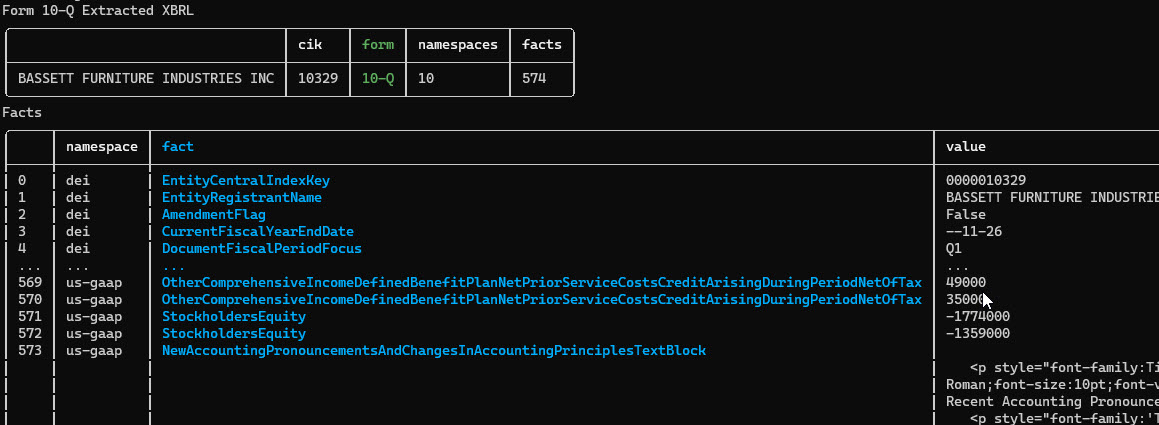
Some filings, notably 10-K and 10-Q filings contain financial statements in XBRL format.
You can get the financials from the XBRL data using the Financials class.
fromedgar.financialsimportFinancialsfinancials=Financials.from_xbrl(filing.xbrl())
financials.balance_sheetfinancials.income_statementfinancials.cash_flow_statement
Or automatically through the Tenk and TenQ data objects.
Here is an example that gets the latest Apple financials
tenk=Company("AAPL").get_filings(form="10-K").latest(1).obj()
financials=tenk.financialsfinancials.balance_sheet
Each of the financial statements - BalanceSheet, IncomeStatement and CashFlowStatement - have a to_dataframe() method that will return the data as a pandas dataframe.
balance_sheet_df=financials.balance_sheet.to_dataframe()Contributions are welcome! We would love to hear your thoughts on how this library could be better at working with SEC Edgar.
We use GitHub issues to track public bugs. Report a bug by opening a new issue; it's that easy!
- Fork the repo and create your branch from master.
- If you've added code that should be tested, add tests.
- If you've changed APIs, update the documentation.
- Ensure the test suite passes.
- Make sure your code lints.
- Issue that pull request!
edgartools is distributed under the terms of the MIT license.
 4
4