


Beta: v1.4.2 / Stable: v1.2.1 / Roadmap | F.A.Q.
High-performance inference of OpenAI's Whisper automatic speech recognition (ASR) model:
- Plain C/C++ implementation without dependencies
- Apple Silicon first-class citizen - optimized via ARM NEON, Accelerate framework, Metal and Core ML
- AVX intrinsics support for x86 architectures
- VSX intrinsics support for POWER architectures
- Mixed F16 / F32 precision
- 4-bit and 5-bit integer quantization support
- Low memory usage (Flash Attention)
- Zero memory allocations at runtime
- Support for CPU-only inference
- Partial GPU support for NVIDIA via cuBLAS
- Partial OpenCL GPU support via CLBlast
- BLAS CPU support via OpenBLAS
- OpenVINO Support
- C-style API
Supported platforms:
- Mac OS (Intel and Arm)
- iOS
- Android
- Java
- Linux / FreeBSD
- WebAssembly
- Windows (MSVC and MinGW]
- Raspberry Pi
The entire implementation of the model is contained in 2 source files:
- Tensor operations: ggml.h / ggml.c
- Transformer inference: whisper.h / whisper.cpp
Having such a lightweight implementation of the model allows to easily integrate it in different platforms and applications. As an example, here is a video of running the model on an iPhone 13 device - fully offline, on-device: whisper.objc
whisper-iphone-13-mini-2.mp4
You can also easily make your own offline voice assistant application: command
command-0.mp4
On Apply Silicon, the inference runs fully on the GPU via Metal:
metal-base-1.mp4
Or you can even run it straight in the browser: talk.wasm
- The core tensor operations are implemented in C (ggml.h / ggml.c)
- The transformer model and the high-level C-style API are implemented in C++ (whisper.h / whisper.cpp)
- Sample usage is demonstrated in main.cpp
- Sample real-time audio transcription from the microphone is demonstrated in stream.cpp
- Various other examples are available in the examples folder
The tensor operators are optimized heavily for Apple silicon CPUs. Depending on the computation size, Arm Neon SIMD intrinsics or CBLAS Accelerate framework routines are used. The latter are especially effective for bigger sizes since the Accelerate framework utilizes the special-purpose AMX coprocessor available in modern Apple products.
First clone the repository.
Then, download one of the Whisper models converted in ggml format. For example:
bash ./models/download-ggml-model.sh base.enIf you wish to convert the Whisper models to ggml format yourself, instructions are in models/README.md.
Now build the main example and transcribe an audio file like this:
# build the main example
make
# transcribe an audio file
./main -f samples/jfk.wav
For a quick demo, simply run make base.en:
$makebase.encc -I. -O3 -std=c11 -pthread -DGGML_USE_ACCELERATE -cggml.c -oggml.oc++ -I. -I./examples -O3 -std=c++11 -pthread -cwhisper.cpp -owhisper.oc++ -I. -I./examples -O3 -std=c++11 -pthreadexamples/main/main.cppwhisper.oggml.o -omain -frameworkAccelerate
./main -husage: ./main [options] file0.wavfile1.wav ...
options:
-h, --help [default] showthishelpmessageandexit
-tN, --threadsN [4 ] numberofthreadstouseduringcomputation
-pN, --processorsN [1 ] numberofprocessorstouseduringcomputation
-otN, --offset-tN [0 ] timeoffsetinmilliseconds
-onN, --offset-nN [0 ] segmentindexoffset
-dN, --durationN [0 ] durationofaudiotoprocessinmilliseconds
-mcN, --max-contextN [-1 ] maximumnumberoftextcontexttokenstostore
-mlN, --max-lenN [0 ] maximumsegmentlengthincharacters
-sow, --split-on-word [false ] splitonwordratherthanontoken
-boN, --best-ofN [2 ] numberofbestcandidatestokeep
-bsN, --beam-sizeN [-1 ] beamsizeforbeamsearch
-wtN, --word-tholdN [0.01 ] wordtimestampprobabilitythreshold
-etN, --entropy-tholdN [2.40 ] entropythresholdfordecoderfail
-lptN, --logprob-tholdN [-1.00 ] logprobabilitythresholdfordecoderfail
-debug, --debug-mode [false ] enabledebugmode (eg. dumplog_mel)
-tr, --translate [false ] translatefromsourcelanguagetoenglish
-di, --diarize [false ] stereoaudiodiarization
-tdrz, --tinydiarize [false ] enabletinydiarize (requiresatdrzmodel)
-nf, --no-fallback [false ] donotusetemperaturefallbackwhiledecoding
-otxt, --output-txt [false ] outputresultinatextfile
-ovtt, --output-vtt [false ] outputresultinavttfile
-osrt, --output-srt [false ] outputresultinasrtfile
-olrc, --output-lrc [false ] outputresultinalrcfile
-owts, --output-words [false ] outputscriptforgeneratingkaraokevideo
-fp, --font-path [/System/Library/Fonts/Supplemental/CourierNewBold.ttf] pathtoamonospacefontforkaraokevideo
-ocsv, --output-csv [false ] outputresultinaCSVfile
-oj, --output-json [false ] outputresultinaJSONfile
-ofFNAME, --output-fileFNAME [ ] outputfilepath (withoutfileextension)
-ps, --print-special [false ] printspecialtokens
-pc, --print-colors [false ] printcolors
-pp, --print-progress [false ] printprogress
-nt, --no-timestamps [false ] donotprinttimestamps
-lLANG, --languageLANG [en ] spokenlanguage ('auto'forauto-detect)
-dl, --detect-language [false ] exitafterautomaticallydetectinglanguage
--promptPROMPT [ ] initialprompt
-mFNAME, --modelFNAME [models/ggml-base.en.bin] modelpath
-fFNAME, --fileFNAME [ ] inputWAVfilepath
-ovedD, --ov-e-deviceDNAME [CPU ] theOpenVINOdeviceusedforencodeinference
-ls, --log-score [false ] logbestdecoderscoresoftokenbash ./models/download-ggml-model.shbase.enDownloadingggmlmodelbase.en ...
ggml-base.en.bin100%[========================>] 141.11M6.34MB/sin24sDone! Model'base.en'savedin'models/ggml-base.en.bin'Youcannowuseitlikethis:
$ ./main -mmodels/ggml-base.en.bin -fsamples/jfk.wav
===============================================
Runningbase.enonallsamplesin ./samples ...
===============================================
----------------------------------------------
[+] Runningbase.enonsamples/jfk.wav ... (run'ffplay samples/jfk.wav'tolisten)
----------------------------------------------
whisper_init_from_file: loadingmodelfrom'models/ggml-base.en.bin'whisper_model_load: loadingmodelwhisper_model_load: n_vocab = 51864whisper_model_load: n_audio_ctx = 1500whisper_model_load: n_audio_state = 512whisper_model_load: n_audio_head = 8whisper_model_load: n_audio_layer = 6whisper_model_load: n_text_ctx = 448whisper_model_load: n_text_state = 512whisper_model_load: n_text_head = 8whisper_model_load: n_text_layer = 6whisper_model_load: n_mels = 80whisper_model_load: f16 = 1whisper_model_load: type = 2whisper_model_load: memrequired = 215.00MB (+ 6.00MBperdecoder)
whisper_model_load: kvselfsize = 5.25MBwhisper_model_load: kvcrosssize = 17.58MBwhisper_model_load: adding1607extratokenswhisper_model_load: modelctx = 140.60MBwhisper_model_load: modelsize = 140.54MBsystem_info: n_threads = 4 / 10 | AVX = 0 | AVX2 = 0 | AVX512 = 0 | FMA = 0 | NEON = 1 | ARM_FMA = 1 | F16C = 0 | FP16_VA = 1 | WASM_SIMD = 0 | BLAS = 1 | SSE3 = 0 | VSX = 0 |
main: processing'samples/jfk.wav' (176000samples, 11.0sec), 4threads, 1processors, lang = en, task = transcribe, timestamps = 1 ...
[00:00:00.000 --> 00:00:11.000] AndsomyfellowAmericans, asknotwhatyourcountrycandoforyou, askwhatyoucandoforyourcountry.
whisper_print_timings: fallbacks = 0p / 0hwhisper_print_timings: loadtime = 113.81mswhisper_print_timings: meltime = 15.40mswhisper_print_timings: sampletime = 11.58ms / 27runs ( 0.43msperrun)
whisper_print_timings: encodetime = 266.60ms / 1runs ( 266.60msperrun)
whisper_print_timings: decodetime = 66.11ms / 27runs ( 2.45msperrun)
whisper_print_timings: totaltime = 476.31ms
The command downloads the base.en model converted to custom ggml format and runs the inference on all .wav samples in the folder samples.
For detailed usage instructions, run: ./main -h
Note that the main example currently runs only with 16-bit WAV files, so make sure to convert your input before running the tool.
For example, you can use ffmpeg like this:
ffmpeg -iinput.mp3 -ar16000 -ac1 -c:apcm_s16leoutput.wavIf you want some extra audio samples to play with, simply run:
make samples
This will download a few more audio files from Wikipedia and convert them to 16-bit WAV format via ffmpeg.
You can download and run the other models as follows:
make tiny.en
make tiny
make base.en
make base
make small.en
make small
make medium.en
make medium
make large-v1
make large
| Model | Disk | Mem | SHA |
|---|---|---|---|
| tiny | 75 MB | ~125 MB | bd577a113a864445d4c299885e0cb97d4ba92b5f |
| base | 142 MB | ~210 MB | 465707469ff3a37a2b9b8d8f89f2f99de7299dac |
| small | 466 MB | ~600 MB | 55356645c2b361a969dfd0ef2c5a50d530afd8d5 |
| medium | 1.5 GB | ~1.7 GB | fd9727b6e1217c2f614f9b698455c4ffd82463b4 |
| large | 2.9 GB | ~3.3 GB | 0f4c8e34f21cf1a914c59d8b3ce882345ad349d6 |
whisper.cpp supports integer quantization of the Whisper ggml models.
Quantized models require less memory and disk space and depending on the hardware can be processed more efficiently.
Here are the steps for creating and using a quantized model:
# quantize a model with Q5_0 method
make quantize
./quantize models/ggml-base.en.bin models/ggml-base.en-q5_0.bin q5_0
# run the examples as usual, specifying the quantized model file
./main -m models/ggml-base.en-q5_0.bin ./samples/gb0.wavOn Apple Silicon devices, the Encoder inference can be executed on the Apple Neural Engine (ANE) via Core ML. This can result in significant
speed-up - more than x3 faster compared with CPU-only execution. Here are the instructions for generating a Core ML model and using it with whisper.cpp:
Install Python dependencies needed for the creation of the Core ML model:
pip install ane_transformers
pip install openai-whisper
pip install coremltools
- To ensure
coremltoolsoperates correctly, please confirm that Xcode is installed and executexcode-select --installto install the command-line tools. - Python 3.10 is recommended.
- [OPTIONAL] It is recommended to utilize a Python version management system, such as Miniconda for this step:
- To create an environment, use:
conda create -n py310-whisper python=3.10 -y - To activate the environment, use:
conda activate py310-whisper
- To create an environment, use:
- To ensure
Generate a Core ML model. For example, to generate a
base.enmodel, use:./models/generate-coreml-model.sh base.en
This will generate the folder
models/ggml-base.en-encoder.mlmodelcBuild
whisper.cppwith Core ML support:# using Makefile make clean WHISPER_COREML=1 make -j # using CMake cmake -B build -DWHISPER_COREML=1 cmake --build build -j --config Release
Run the examples as usual. For example:
./main -m models/ggml-base.en.bin -f samples/jfk.wav
...
whisper_init_state: loading Core ML model from 'models/ggml-base.en-encoder.mlmodelc'
whisper_init_state: first run on a device may take a while ...
whisper_init_state: Core ML model loaded
system_info: n_threads = 4 / 10 | AVX = 0 | AVX2 = 0 | AVX512 = 0 | FMA = 0 | NEON = 1 | ARM_FMA = 1 | F16C = 0 | FP16_VA = 1 | WASM_SIMD = 0 | BLAS = 1 | SSE3 = 0 | VSX = 0 | COREML = 1 |
...
The first run on a device is slow, since the ANE service compiles the Core ML model to some device-specific format. Next runs are faster.
For more information about the Core ML implementation please refer to PR #566.
On platforms that support OpenVINO, the Encoder inference can be executed on OpenVINO-supported devices including x86 CPUs and Intel GPUs (integrated & discrete).
This can result in significant speedup in encoder performance. Here are the instructions for generating the OpenVINO model and using it with whisper.cpp:
First, setup python virtual env. and install python dependencies. Python 3.10 is recommended.
Windows:
cd models
python -m venv openvino_conv_env
openvino_conv_env\Scripts\activate
python -m pip install --upgrade pip
pip install -r openvino-conversion-requirements.txt
Linux and macOS:
cd models
python3 -m venv openvino_conv_env
source openvino_conv_env/bin/activate
python -m pip install --upgrade pip
pip install -r openvino-conversion-requirements.txt
Generate an OpenVINO encoder model. For example, to generate a
base.enmodel, use:python convert-whisper-to-openvino.py --model base.enThis will produce ggml-base.en-encoder-openvino.xml/.bin IR model files. It's recommended to relocate these to the same folder as ggml models, as that is the default location that the OpenVINO extension will search at runtime.
Build
whisper.cppwith OpenVINO support:Download OpenVINO package from release page. The recommended version to use is 2023.0.0.
After downloading & extracting package onto your development system, set up required environment by sourcing setupvars script. For example:
Linux:
source /path/to/l_openvino_toolkit_ubuntu22_2023.0.0.10926.b4452d56304_x86_64/setupvars.shWindows (cmd):
C:\Path\To\w_openvino_toolkit_windows_2023.0.0.10926.b4452d56304_x86_64\setupvars.batAnd then build the project using cmake:
cmake -B build -DWHISPER_OPENVINO=1
cmake --build build -j --config Release
Run the examples as usual. For example:
./main -m models/ggml-base.en.bin -f samples/jfk.wav
...
whisper_ctx_init_openvino_encoder: loading OpenVINO model from 'models/ggml-base.en-encoder-openvino.xml'
whisper_ctx_init_openvino_encoder: first run on a device may take a while ...
whisper_openvino_init: path_model = models/ggml-base.en-encoder-openvino.xml, device = GPU, cache_dir = models/ggml-base.en-encoder-openvino-cache
whisper_ctx_init_openvino_encoder: OpenVINO model loaded
system_info: n_threads = 4 / 8 | AVX = 1 | AVX2 = 1 | AVX512 = 0 | FMA = 1 | NEON = 0 | ARM_FMA = 0 | F16C = 1 | FP16_VA = 0 | WASM_SIMD = 0 | BLAS = 0 | SSE3 = 1 | VSX = 0 | COREML = 0 | OPENVINO = 1 |
...
The first time run on an OpenVINO device is slow, since the OpenVINO framework will compile the IR (Intermediate Representation) model to a device-specific 'blob'. This device-specific blob will get cached for the next run.
For more information about the Core ML implementation please refer to PR #1037.
With NVIDIA cards the Encoder processing can to a large extent be offloaded to the GPU through cuBLAS.
First, make sure you have installed cuda: https://developer.nvidia.com/cuda-downloads
Now build whisper.cpp with cuBLAS support:
make clean
WHISPER_CUBLAS=1 make -j
For cards and integrated GPUs that support OpenCL, the Encoder processing can be largely offloaded to the GPU through CLBlast. This is especially useful for users with AMD APUs or low end devices for up to ~2x speedup.
First, make sure you have installed CLBlast for your OS or Distribution: https://github.com/CNugteren/CLBlast
Now build whisper.cpp with CLBlast support:
Makefile:
cd whisper.cpp
make clean
WHISPER_CLBLAST=1 make -j
CMake:
cd whisper.cpp
cmake -B build -DWHISPER_CLBLAST=ON
cmake --build build -j --config Release
Run all the examples as usual.
Encoder processing can be accelerated on the CPU via OpenBLAS.
First, make sure you have installed openblas: https://www.openblas.net/
Now build whisper.cpp with OpenBLAS support:
make clean
WHISPER_OPENBLAS=1 make -j
- Inference only
Here is another example of transcribing a 3:24 min speech
in about half a minute on a MacBook M1 Pro, using medium.en model:
Expand to see the result
$ ./main -mmodels/ggml-medium.en.bin -fsamples/gb1.wav -t8whisper_init_from_file: loadingmodelfrom'models/ggml-medium.en.bin'whisper_model_load: loadingmodelwhisper_model_load: n_vocab = 51864whisper_model_load: n_audio_ctx = 1500whisper_model_load: n_audio_state = 1024whisper_model_load: n_audio_head = 16whisper_model_load: n_audio_layer = 24whisper_model_load: n_text_ctx = 448whisper_model_load: n_text_state = 1024whisper_model_load: n_text_head = 16whisper_model_load: n_text_layer = 24whisper_model_load: n_mels = 80whisper_model_load: f16 = 1whisper_model_load: type = 4whisper_model_load: memrequired = 1720.00MB (+ 43.00MBperdecoder)
whisper_model_load: kvselfsize = 42.00MBwhisper_model_load: kvcrosssize = 140.62MBwhisper_model_load: adding1607extratokenswhisper_model_load: modelctx = 1462.35MBwhisper_model_load: modelsize = 1462.12MBsystem_info: n_threads = 8 / 10 | AVX = 0 | AVX2 = 0 | AVX512 = 0 | FMA = 0 | NEON = 1 | ARM_FMA = 1 | F16C = 0 | FP16_VA = 1 | WASM_SIMD = 0 | BLAS = 1 | SSE3 = 0 | VSX = 0 |
main: processing'samples/gb1.wav' (3179750samples, 198.7sec), 8threads, 1processors, lang = en, task = transcribe, timestamps = 1 ...
[00:00:00.000 --> 00:00:08.000] MyfellowAmericans, thisdayhasbroughtterriblenewsandgreatsadnesstoourcountry.
[00:00:08.000 --> 00:00:17.000] Atnineo'clock this morning, Mission Control in Houston lost contact with our Space Shuttle Columbia.
[00:00:17.000 --> 00:00:23.000] Ashorttimelater, debriswasseenfallingfromtheskiesaboveTexas.
[00:00:23.000 --> 00:00:29.000] TheColumbia's lost. There are no survivors.
[00:00:29.000 --> 00:00:32.000] Onboardwasacrewofseven.
[00:00:32.000 --> 00:00:39.000] ColonelRickHusband, LieutenantColonelMichaelAnderson, CommanderLaurelClark,
[00:00:39.000 --> 00:00:48.000] CaptainDavidBrown, CommanderWilliamMcCool, Dr. KultnaShavla, andIlanRamon,
[00:00:48.000 --> 00:00:52.000] acolonelintheIsraeliAirForce.
[00:00:52.000 --> 00:00:58.000] Thesemenandwomenassumedgreatriskintheservicetoallhumanity.
[00:00:58.000 --> 00:01:03.000] Inanagewhenspaceflighthascometoseemalmostroutine,
[00:01:03.000 --> 00:01:07.000] itiseasytooverlookthedangersoftravelbyrocket
[00:01:07.000 --> 00:01:12.000] andthedifficultiesofnavigatingthefierceouteratmosphereoftheEarth.
[00:01:12.000 --> 00:01:18.000] Theseastronautsknewthedangers, andtheyfacedthemwillingly,
[00:01:18.000 --> 00:01:23.000] knowingtheyhadahighandnoblepurposeinlife.
[00:01:23.000 --> 00:01:31.000] Becauseoftheircourageanddaringandidealism, wewillmissthemallthemore.
[00:01:31.000 --> 00:01:36.000] AllAmericanstodayarethinkingaswellofthefamiliesofthesemenandwomen
[00:01:36.000 --> 00:01:40.000] whohavebeengiventhissuddenshockandgrief.
[00:01:40.000 --> 00:01:45.000] You're not alone. Our entire nation grieves with you,
[00:01:45.000 --> 00:01:52.000] andthoseyoulovewillalwayshavetherespectandgratitudeofthiscountry.
[00:01:52.000 --> 00:01:56.000] Thecauseinwhichtheydiedwillcontinue.
[00:01:56.000 --> 00:02:04.000] Mankindisledintothedarknessbeyondourworldbytheinspirationofdiscovery
[00:02:04.000 --> 00:02:11.000] andthelongingtounderstand. Ourjourneyintospacewillgoon.
[00:02:11.000 --> 00:02:16.000] Intheskiestoday, wesawdestructionandtragedy.
[00:02:16.000 --> 00:02:22.000] Yetfartherthanwecansee, thereiscomfortandhope.
[00:02:22.000 --> 00:02:29.000] InthewordsoftheprophetIsaiah, "Lift your eyes and look to the heavens[00:02:29.000 --> 00:02:35.000] who created all these. He who brings out the starry hosts one by one[00:02:35.000 --> 00:02:39.000] and calls them each by name."
[00:02:39.000 --> 00:02:46.000] BecauseofHisgreatpowerandmightystrength, notoneofthemismissing.
[00:02:46.000 --> 00:02:55.000] ThesameCreatorwhonamesthestarsalsoknowsthenamesofthesevensoulswemourntoday.
[00:02:55.000 --> 00:03:01.000] ThecrewoftheshuttleColumbiadidnotreturnsafelytoearth,
[00:03:01.000 --> 00:03:05.000] yetwecanpraythatallaresafelyhome.
[00:03:05.000 --> 00:03:13.000] MayGodblessthegrievingfamilies, andmayGodcontinuetoblessAmerica.
[00:03:13.000 --> 00:03:19.000] [Silence]
whisper_print_timings: fallbacks = 1p / 0hwhisper_print_timings: loadtime = 569.03mswhisper_print_timings: meltime = 146.85mswhisper_print_timings: sampletime = 238.66ms / 553runs ( 0.43msperrun)
whisper_print_timings: encodetime = 18665.10ms / 9runs ( 2073.90msperrun)
whisper_print_timings: decodetime = 13090.93ms / 549runs ( 23.85msperrun)
whisper_print_timings: totaltime = 32733.52msThis is a naive example of performing real-time inference on audio from your microphone. The stream tool samples the audio every half a second and runs the transcription continuously. More info is available in issue #10.
makestream
./stream -m ./models/ggml-base.en.bin -t8 --step500 --length5000
rt_esl_csgo_2.mp4
Adding the --print-colors argument will print the transcribed text using an experimental color coding strategy
to highlight words with high or low confidence:
./main -mmodels/ggml-base.en.bin -fsamples/gb0.wav --print-colors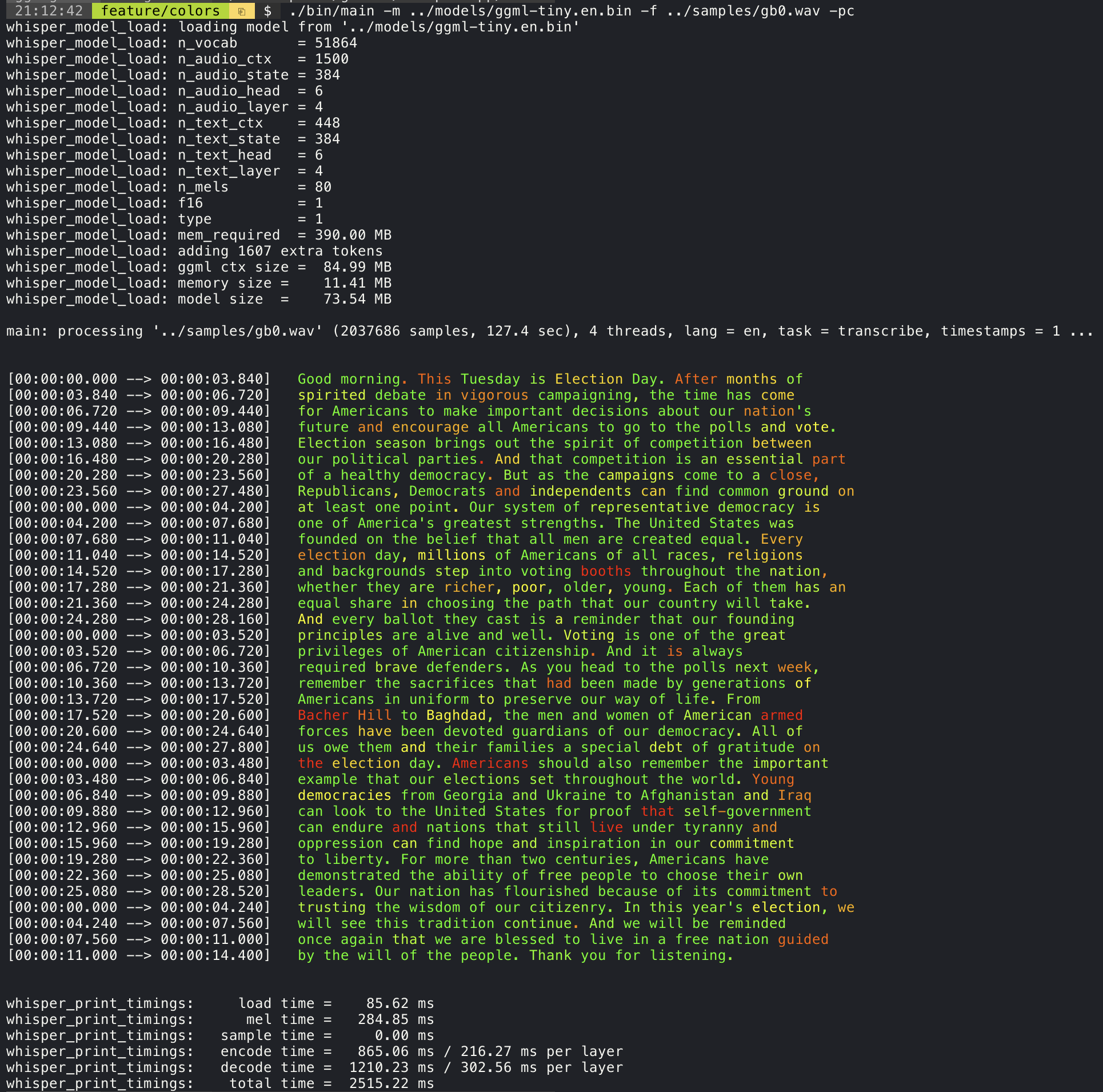
For example, to limit the line length to a maximum of 16 characters, simply add -ml 16:
./main -m ./models/ggml-base.en.bin -f ./samples/jfk.wav -ml16whisper_model_load: loadingmodelfrom'./models/ggml-base.en.bin'
...
system_info: n_threads = 4 / 10 | AVX2 = 0 | AVX512 = 0 | NEON = 1 | FP16_VA = 1 | WASM_SIMD = 0 | BLAS = 1 |
main: processing'./samples/jfk.wav' (176000samples, 11.0sec), 4threads, 1processors, lang = en, task = transcribe, timestamps = 1 ...
[00:00:00.000 --> 00:00:00.850] Andsomy
[00:00:00.850 --> 00:00:01.590] fellow
[00:00:01.590 --> 00:00:04.140] Americans, ask
[00:00:04.140 --> 00:00:05.660] notwhatyour
[00:00:05.660 --> 00:00:06.840] countrycando
[00:00:06.840 --> 00:00:08.430] foryou, ask
[00:00:08.430 --> 00:00:09.440] whatyoucando
[00:00:09.440 --> 00:00:10.020] foryour
[00:00:10.020 --> 00:00:11.000] country.The --max-len argument can be used to obtain word-level timestamps. Simply use -ml 1:
./main -m ./models/ggml-base.en.bin -f ./samples/jfk.wav -ml1whisper_model_load: loadingmodelfrom'./models/ggml-base.en.bin'
...
system_info: n_threads = 4 / 10 | AVX2 = 0 | AVX512 = 0 | NEON = 1 | FP16_VA = 1 | WASM_SIMD = 0 | BLAS = 1 |
main: processing'./samples/jfk.wav' (176000samples, 11.0sec), 4threads, 1processors, lang = en, task = transcribe, timestamps = 1 ...
[00:00:00.000 --> 00:00:00.320]
[00:00:00.320 --> 00:00:00.370] And
[00:00:00.370 --> 00:00:00.690] so
[00:00:00.690 --> 00:00:00.850] my
[00:00:00.850 --> 00:00:01.590] fellow
[00:00:01.590 --> 00:00:02.850] Americans
[00:00:02.850 --> 00:00:03.300] ,
[00:00:03.300 --> 00:00:04.140] ask
[00:00:04.140 --> 00:00:04.990] not
[00:00:04.990 --> 00:00:05.410] what
[00:00:05.410 --> 00:00:05.660] your
[00:00:05.660 --> 00:00:06.260] country
[00:00:06.260 --> 00:00:06.600] can
[00:00:06.600 --> 00:00:06.840] do
[00:00:06.840 --> 00:00:07.010] for
[00:00:07.010 --> 00:00:08.170] you
[00:00:08.170 --> 00:00:08.190] ,
[00:00:08.190 --> 00:00:08.430] ask
[00:00:08.430 --> 00:00:08.910] what
[00:00:08.910 --> 00:00:09.040] you
[00:00:09.040 --> 00:00:09.320] can
[00:00:09.320 --> 00:00:09.440] do
[00:00:09.440 --> 00:00:09.760] for
[00:00:09.760 --> 00:00:10.020] your
[00:00:10.020 --> 00:00:10.510] country
[00:00:10.510 --> 00:00:11.000] .More information about this approach is available here: ggml-org#1058
Sample usage:
# download a tinydiarize compatible model
./models/download-ggml-model.shsmall.en-tdrz# run as usual, adding the "-tdrz" command-line argument
./main-f ./samples/a13.wav-m ./models/ggml-small.en-tdrz.bin-tdrz
...
main: processing'./samples/a13.wav' (480000samples, 30.0sec), 4threads, 1processors, lang=en, task=transcribe, tdrz=1, timestamps=1 ...
...
[00:00:00.000-->00:00:03.800] OkayHouston, we'vehadaproblemhere. [SPEAKER_TURN]
[00:00:03.800-->00:00:06.200] ThisisHouston. Sayagainplease. [SPEAKER_TURN]
[00:00:06.200-->00:00:08.260] UhHoustonwe'vehadaproblem.
[00:00:08.260-->00:00:11.320] We'vehadamainbeamuponavolt. [SPEAKER_TURN]
[00:00:11.320-->00:00:13.820] Rogermainbeaminterval. [SPEAKER_TURN]
[00:00:13.820-->00:00:15.100] Uhuh [SPEAKER_TURN]
[00:00:15.100-->00:00:18.020] Sookaystand, bythirteenwe'relookingatit. [SPEAKER_TURN]
[00:00:18.020-->00:00:25.740] OkayuhrightnowuhHoustontheuhvoltageisuhislookinggoodum.
[00:00:27.620-->00:00:29.940] Andwehadaaprettylargebankorso.The main example provides support for output of karaoke-style movies, where the
currently pronounced word is highlighted. Use the -wts argument and run the generated bash script.
This requires to have ffmpeg installed.
Here are a few "typical" examples:
./main -m ./models/ggml-base.en.bin -f ./samples/jfk.wav -owtssource ./samples/jfk.wav.wtsffplay ./samples/jfk.wav.mp4jfk.wav.mp4
./main -m ./models/ggml-base.en.bin -f ./samples/mm0.wav -owtssource ./samples/mm0.wav.wtsffplay ./samples/mm0.wav.mp4mm0.wav.mp4
./main -m ./models/ggml-base.en.bin -f ./samples/gb0.wav -owtssource ./samples/gb0.wav.wtsffplay ./samples/gb0.wav.mp4gb0.wav.mp4
Use the extra/bench-wts.sh script to generate a video in the following format:
./extra/bench-wts.shsamples/jfk.wavffplay ./samples/jfk.wav.all.mp4jfk.wav.all.mp4
In order to have an objective comparison of the performance of the inference across different system configurations, use the bench tool. The tool simply runs the Encoder part of the model and prints how much time it took to execute it. The results are summarized in the following Github issue:
The original models are converted to a custom binary format. This allows to pack everything needed into a single file:
- model parameters
- mel filters
- vocabulary
- weights
You can download the converted models using the models/download-ggml-model.sh script or manually from here:
For more details, see the conversion script models/convert-pt-to-ggml.py or the README in models.
- Rust: tazz4843/whisper-rs | #310
- JavaScript: bindings/javascript | #309
- React Native (iOS / Android): whisper.rn
- Go: bindings/go | #312
- Java:
- Ruby: bindings/ruby | #507
- Objective-C / Swift: ggerganov/whisper.spm | #313
- .NET: | #422
- Python: | #9
- stlukey/whispercpp.py (Cython)
- aarnphm/whispercpp (Pybind11)
- R: bnosac/audio.whisper
- Unity: macoron/whisper.unity
There are various examples of using the library for different projects in the examples folder. Some of the examples are even ported to run in the browser using WebAssembly. Check them out!
| Example | Web | Description |
|---|---|---|
| main | whisper.wasm | Tool for translating and transcribing audio using Whisper |
| bench | bench.wasm | Benchmark the performance of Whisper on your machine |
| stream | stream.wasm | Real-time transcription of raw microphone capture |
| command | command.wasm | Basic voice assistant example for receiving voice commands from the mic |
| talk | talk.wasm | Talk with a GPT-2 bot |
| talk-llama | Talk with a LLaMA bot | |
| whisper.objc | iOS mobile application using whisper.cpp | |
| whisper.swiftui | SwiftUI iOS / macOS application using whisper.cpp | |
| whisper.android | Android mobile application using whisper.cpp | |
| whisper.nvim | Speech-to-text plugin for Neovim | |
| generate-karaoke.sh | Helper script to easily generate a karaoke video of raw audio capture | |
| livestream.sh | Livestream audio transcription | |
| yt-wsp.sh | Download + transcribe and/or translate any VOD (original) |
If you have any kind of feedback about this project feel free to use the Discussions section and open a new topic.
You can use the Show and tell category
to share your own projects that use whisper.cpp. If you have a question, make sure to check the
Frequently asked questions (#126) discussion.