- Go to GitHub → Settings → Developer settings → Personal access tokens → Tokens (classic)
- Click Generate new token (classic)
- Give it a descriptive name (e.g.
github-stats) - Select the following scope:
read:user— read access to your public profile data
- Click Generate token and copy the value immediately (it won't be shown again)
Locally: create a .env file at the project root:
GITHUB_TOKEN=your_token_here
On Vercel: add it as an environment variable in your project's dashboard (see Deploy to Vercel below).
Prerequisites: Node.js 18+, Vercel CLI (npm i -g vercel)
# Install dependencies
npm install
# Start the local development server (serves /api routes via Vercel CLI)
vercel dev
The API will be available at http://localhost:3000.
- Fork or clone this repository
- Import the project in the Vercel dashboard
- In Project Settings → Environment Variables, add:
GITHUB_TOKEN= your personal access token from the step above
- Click Deploy
That's it — Vercel will detect the /api directory and deploy each file as a serverless function automatically.
| Limit | Value | Reason |
|---|---|---|
| Repositories scanned | 100 | GitHub GraphQL API maximum per request |
| Languages fetched per repository | 10 | GraphQL query limit |
| Languages displayed in charts | 5 | Top 5 by byte count |
If you have more than 100 public repositories, only the most recent 100 will be used when computing statistics.
Copy the piece of code from below and paste it into your markdown.
Change the value of username= to your GitHub's username.
[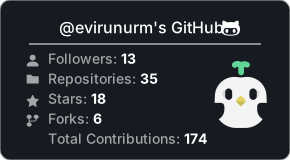](https://github.com/evirunurm/github-stats)`/api/stats.js` endpoint accepts the following parameters.
A query parameter must follow the `parameter=value` structure.
Several parameters must go separated by `&`
| Parameter | Type | Description |
|---|---|---|
username | string | Required. Your GitHub username |
color | "white" | Set to "white" if you want the background to be white |
peng | boolean | If you want the GitHub icon instead of the cute little penguin, set this to false. |
Copy the piece of code from below and paste it into your markdown.
Change the value of username= to your GitHub's username.
[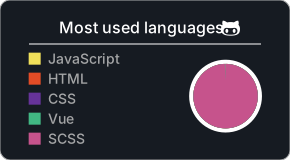](https://github.com/evirunurm/github-stats)`/api/languages.js` endpoint accepts the following parameters.
A query parameter must follow the `parameter=value` structure.
Several parameters must go separated by `&`
| Parameter | Type | Description |
|---|---|---|
username | string | Required. Your GitHub username |
color | "white" | Set to "white" if you want the background to be white |
pie | boolean | If you don't want the pie chart but want percentage bars instead, set this to "false". |
| Parameter | Output |
|---|---|
| default |  |
peng=false |  |
color=white |  |
| Parameter | Output |
|---|---|
| default |  |
pie=false |  |
color=white |  |
color=white&pie=false |  |