Uh oh!
There was an error while loading. Please reload this page.
Usage Guide
ExtentReports is an logger-style reporting library for automated tests. A logger is simply an object to log messages or events for a specific system or application. ExtentReports uses the logging style to add information about test sessions, such as creation of tests, adding screenshots, assigning tags, and adding events or series of steps to sequentially indicate the flow of test steps.
All methods on ExtentReports are multi-thread safe. The recommended usage is to maintain a single instance of ExtentReports object for your test session.
ExtentReports extent = new ExtentReports();
For brevity, wherever extent is mentioned, it would indicate an instance of ExtentReports.
Below is how a test would be created with 1 passing log.
extent.createTest("MyFirstTest")
.log(Status.Pass, "This is a logging event for MyFirstTest, and it passed!");
extent.flush();
The line extent.flush() instructs ExtentReports write the test information to a destination. However, the examples above are incomplete as we need to define a destination where they will be saved. Reporters (next section) define the destination.
The information you create during your runs can be forwarded to a variety of destinations including files, database or stored in memory to be used at a later point in time.
ExtentReports uses the Observer pattern making all reporters observers that are known by ExtentReports.
Below, an instance of ExtentSparkReporter (the Observer) is attached to ExtentReports (the Subject), which notifies ExtentSparkReporter of any changes in state such as creation of tests, adding logs etc.
ExtentReportsextent = newExtentReports();
ExtentSparkReporterspark = newExtentSparkReporter("target/Spark.html");
extent.attachReporter(spark);
extent.createTest("MyFirstTest")
.log(Status.PASS, "This is a logging event for MyFirstTest, and it passed!");
extent.flush();
Running the above code would produce the file Spark.html in the target folder of your project root.

It is possible to create separate reports for each status (or a group of them). For example, 2 reports can be created per run session to:
- view all tests
- view only failed ones.
The example below shows ExtentReports attaching 2 instances of ExtentSparkReporter: one adding all tests and the other only failed.
// will only contain failuresExtentSparkReportersparkFail = newExtentSparkReporter("target/SparkFail.html")
.filter()
.statusFilter()
.as(newStatus[] { Status.FAIL })
.apply();
// will contain all testsExtentSparkReportersparkAll = newExtentSparkReporter("spark/SparkAll.html");
extent.attachReporter(sparkFail, sparkAll);It is also possible to select the views and their order. The example below will limit the views to only 2: Dashboard and Test. It will also make Dashboard as the primary view of the report.
ExtentSparkReporterspark = newExtentSparkReporter("spark/spark.html")
.viewConfigurer()
.viewOrder()
.as(newViewName[] { ViewName.DASHBOARD, ViewName.TEST })
.apply();
The default setting is to display all views in this order:
- Test (default: primary)
- Category
- Device
- Author
- Exception
- Dashboard
- Log
If you intend to change the view order to a view other than Test as the primary, while maintaining presence of all others, use:
ExtentSparkReporter spark = new ExtentSparkReporter("spark/spark.html")
.viewConfigurer()
.viewOrder()
.as(new ViewName[] { ViewName.DASHBOARD, ViewName.TEST, ViewName.TAG, ViewName.AUTHOR, ViewName.DEVICE, ViewName.EXCEPTION, ViewName.LOG })
.apply();
Tests are created using ExtentReports::createTest. The createTest method returns a ExtentTest object which can be used to publish logs, create nodes, assign attributes (tags, devices, authors) or attach screenshots.
ExtentTesttest = extent.createTest("MyFirstTest");
test.pass("Pass");
// fluentExtentTesttest = extent.createTest("MyFirstTest").pass("Pass");ExtentReports creates the test and returns an ExtentTest object, which can create nodes using createNode. Depending on the output and reporter type, this method creates a subsection within the test, generally as a box or toggle.
ExtentTesttest = extent.createTest("MyFirstTest");
ExtentTestnode = test.createNode("Node");
node.pass("Pass");
// fluentExtentTestnode = extent.createTest("MyFirstTest")
.createNode("Node") .pass("Pass");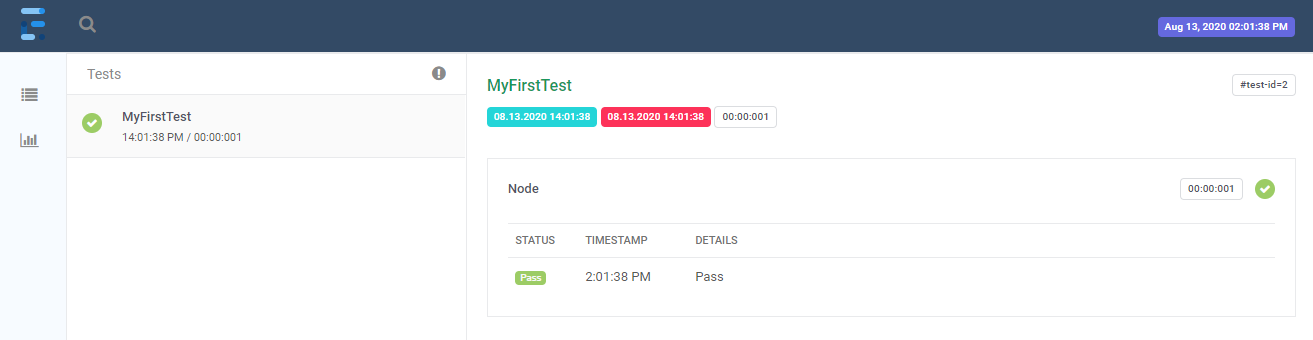
ExtentReports support Gherkin-style reports using the same nested structure as shown in the previous section using createNode. The BDD hierarchy can be created using Gherkin classes provided by the ExtentReports library:
ExtentTestfeature = extent.createTest(Feature.class, "Refund item");
ExtentTestscenario = feature.createNode(Scenario.class, "Jeff returns a faulty microwave");
scenario.createNode(Given.class, "Jeff has bought a microwave for $100").pass("pass");
scenario.createNode(And.class, "he has a receipt").pass("pass");
scenario.createNode(When.class, "he returns the microwave").pass("pass");
scenario.createNode(Then.class, "Jeff should be refunded $100").fail("fail");
The above can also be written without specifying the BDD class by passing the keyword:
ExtentTestfeature = extent.createTest(newGherkinKeyword("Feature"), "Refund item");
ExtentTestscenario = feature.createNode(newGherkinKeyword("Scenario"), "Jeff returns a faulty microwave");
scenario.createNode(newGherkinKeyword("Given"), "Jeff has bought a microwave for $100").pass("pass");
scenario.createNode(newGherkinKeyword("And"), "he has a receipt").pass("pass");
scenario.createNode(newGherkinKeyword("When"), "he returns the microwave").pass("pass");
scenario.createNode(newGherkinKeyword("Then"), "Jeff should be refunded $100").fail("fail");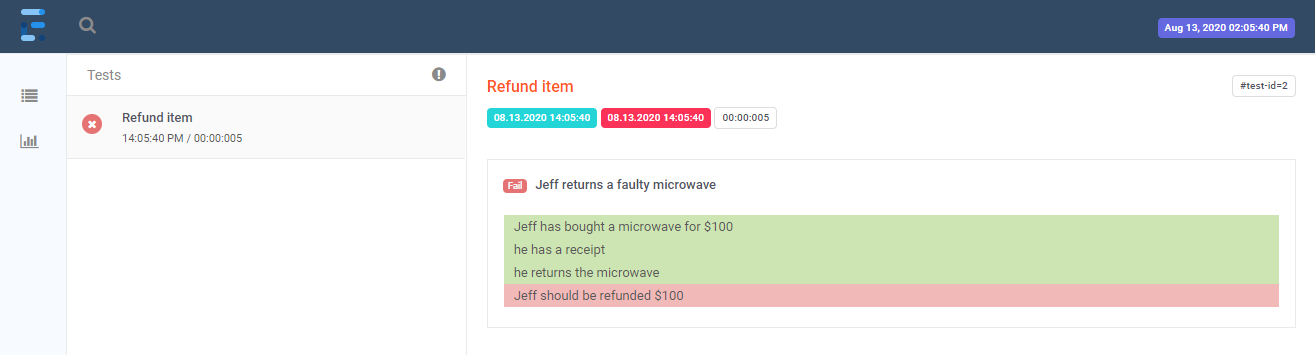
To specify the dialect of your Gherkin keywords, use setGherkinDialect. This method is helpful if you are using Gherkin keywords not supported out-of-box by ExtentReports, but are supported with Gherkin.
extent.setGherkinDialect("de");
ExtentTestfeature = extent.createTest(newGherkinKeyword("Funktionalität"), "Refund item VM");
ExtentTestscenario = feature.createNode(newGherkinKeyword("Szenario"), "Jeff returns a faulty microwave");
ExtentTestgiven = scenario.createNode(newGherkinKeyword("Angenommen"), "Jeff has bought a microwave for $100").skip("skip");Using removeTest completely deletes the test from the run session. Note: this method will also remove all information associated with the test, including logs, screenshots, children (nodes), tags etc.
ExtentTesttest = extent.createTest("Test").fail("reason");
extent.removeTest(test);
// or remove using test nameextent.removeTest("Test");ExtentTesttest = extent.createTest("Test");
ExtentTestnode = test.createNode("Node").fail("reason");
extent.removeTest(node);
// or remove using test nameextent.removeTest("node");It is possible to create log with text details, Exception/Throwable, ScreenCapture or custom Markup using MarkupHelper.
ExtentTesttest = extent.createTest("MyFirstTest");
test.pass("Text details");
test.log(Status.PASS, "Text details");Throwablet = newRuntimeException("A runtime exception");
ExtentTesttest = extent.createTest("MyFirstTest");
test.fail(t);
test.log(Status.FAIL, t);ExtentTesttest = extent.createTest("MyFirstTest");
// reference image saved to disktest.fail(MediaEntityBuilder.createScreenCaptureFromPath("img.png").build());
// base64test.fail(MediaEntityBuilder.createScreenCaptureFromBase64String("base64").build());More information on this topic can be found in the Markup System section.
Stringjson = "{'foo' : 'bar', 'foos' : ['b','a','r'], 'bar' : {'foo':'bar', 'bar':false,'foobar':1234}}";
test.info(MarkupHelper.createCodeBlock(json, CodeLanguage.JSON));You can create your own custom logs, tables with custom headers, pass your objects directly to be converted into a table etc. You can also specify any CSS classes to be applied on the table, like in the below example with "table-sm" (a bootstrap table class).
publicclassMyCustomLog {
privateList<Object> names = Arrays.asList("Anshoo", "Extent", "Klov");
privateObject[] favStack = newObject[]{"Java", "C#", "Angular"};
@MarkupIgnoreprivateList<Object> ignored = Arrays.asList("Ignored", "Ignored", "Ignored");
privateMap<Object, Object> items = newHashMap<Object, Object>() {
{
put("Item1", "Value1");
put("Item2", "Value2");
put("Item3", "Value3");
}
};
}
extent.createTest("GeneratedLog")
.generateLog(Status.PASS, MarkupHelper.toTable(newMyCustomLog(), "table-sm"));