

BendableView is a UIView subclass that bends its edges when its position change is animated. Internally, BendableView contains CAShapeLayer, which acts as its background. The layer's path changes during animations, creating an effect of bending. Subviews stay intact. You can find a more extensive description on my blog: Recreating Skype's Action Sheet Animation and Follow-Up Post.
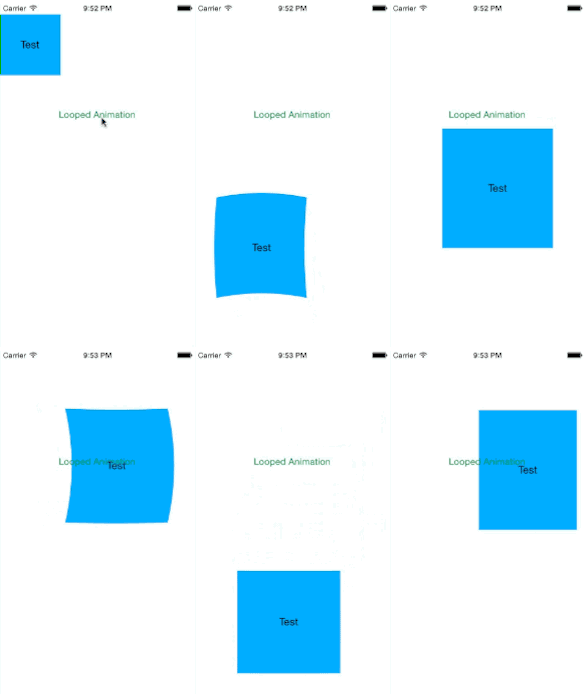
BendableView contains three public properties:
vardamping:CGFloat // set to animate the view's edges differently than the whole view (used in an internal spring animation)
varinitialSpringVelocity:CGFloat // same as above
varfillColor:UIColor // "background" color of the bendable layer
You should set them before animating the position change of the view. I propose to use slightly lower values for damping and initialSpringVelocity than the values used when calling +animateWithDuration:delay:usingSpringWithDamping: initialSpringVelocity:options:animations:completion:, just like in this example:
letbv=BendableView(frame:CGRect(x:0, y:0, width:100, height:100))
view.addSubview(bv)
// bending setup
bv.fillColor =UIColor.redColor()
bv.damping =0.7
bv.initialSpringVelocity =0.8UIView.animateWithDuration(0.5, delay:0, usingSpringWithDamping:0.9, initialSpringVelocity:0.9, options:.BeginFromCurrentState | .AllowUserInteraction, animations:{
bv.frame.origin =CGPoint(x:200, y:300)
bv.frame.size =CGSize(width:150, height:150)}, completion:nil)
Have fun!
To run the example project, clone the repo, and open Example/AHKBendableView.xcodeproj.
- iOS 7.0
- ARC
AHKBendableView is available through CocoaPods. To install it, simply add the following line to your Podfile:
pod "AHKBendableView"
Arkadiusz Holko: