






In many fields of mathematics, morphism refers to a structure-preserving map from one mathematical structure to another. A morphism f with source X and target Y is written f : X → Y. Thus a morphism is represented by an arrow from its source to its target.
https://en.wikipedia.org/wiki/Morphism
- ⚛️ Write your schema once, Transform your data everywhere
- 0️⃣ Zero dependencies
- 💪🏽 Typescript Support
- Morphism
npm install --save morphismor in the browser
<scriptsrc="https://unpkg.com/morphism/dist/morphism.js"></script><script>const{ morphism, createSchema }=Morphism</script>The entry point of a morphism is the schema. The keys represent the shape of your target object, and the values represents one of the several ways to access the properties of the incoming source.
constschema={targetProperty: 'sourceProperty'};Then use the morphism function along with the schema to transform any source to your desired target
import{morphism}from'morphism';constsource={_firstName: 'Mirza'};constschema={name: '_firstName'};morphism(schema,source);➡{"name": "Mirza"}You may specify properties deep within the source object to be copied to your desired target by using dot notation in the mapping value.
This is one of the actions available to transform the source data
constschema={foo: 'deep.foo',bar: {baz: 'deep.foo'}};constsource={deep: {foo: 'value'}};morphism(schema,source);➡{"foo": "value","bar": {"baz": "value"}}One important rule of Morphism is that it will always return a result respecting the dimension of the source data. If the source data is an array, morphism will outputs an array, if the source data is an object you'll have an object
constschema={foo: 'bar'};// The source is a single objectconstobject={bar: 'value'};morphism(schema,object);➡{"foo": "value"}// The source is a collection of objectsconstmultipleObjects=[{bar: 'value'}];morphism(schema,multipleObjects);➡[{"foo": "value"}]import{morphism,StrictSchema}from'morphism';// What we haveinterfaceSource{ugly_field: string;}// What we wantinterfaceDestination{field: string;}constsource: Source={ugly_field: 'field value'};// Destination and Source types are optionalmorphism<StrictSchema<Destination,Source>>({field: 'ugly_field'},source);// => {field: "field value"}// Orconstsources=[source];constschema: StrictSchema<Destination,Source>={field: 'ugly_field'};morphism(schema,sources);// => [{field: "field value"}]We live in a era where we deal with mutiple data contracts coming from several sources (Rest API, Services, Raw JSON...). When it comes to transform multiple data contracts to match with your domain objects, it's common to create your objects with Object.assign, new Object(sourceProperty1, sourceProperty2) or by simply assigning each source properties to your destination. This can leads you to have your business logic spread all over the place.
Morphism allows you to keep this business logic centralized and brings you a top-down view of your data transformation. When a contract change occurs, it helps to track the bug since you just need to refer to your schema
When you type your schema, this library will require you to specify each transformation for your required fields.
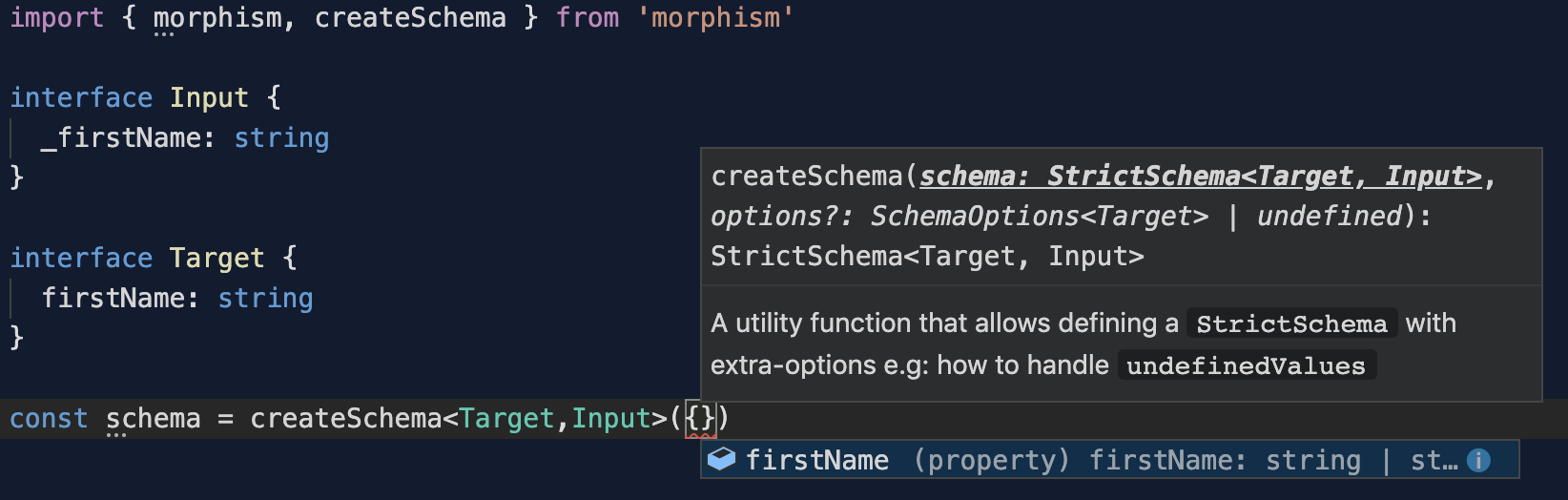
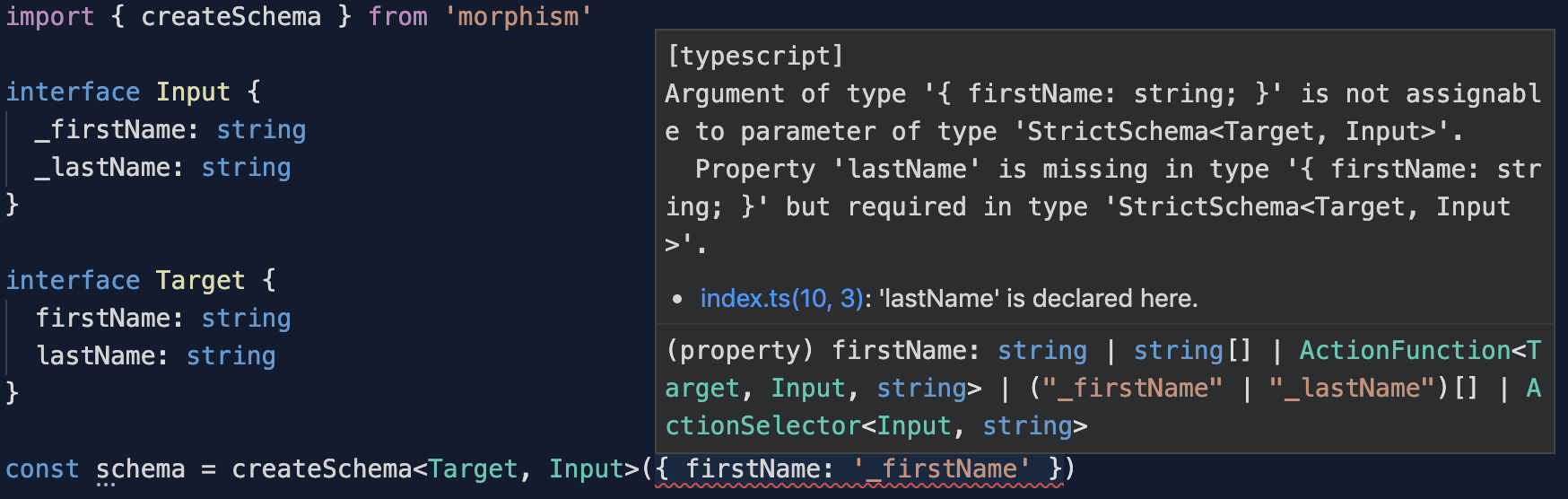
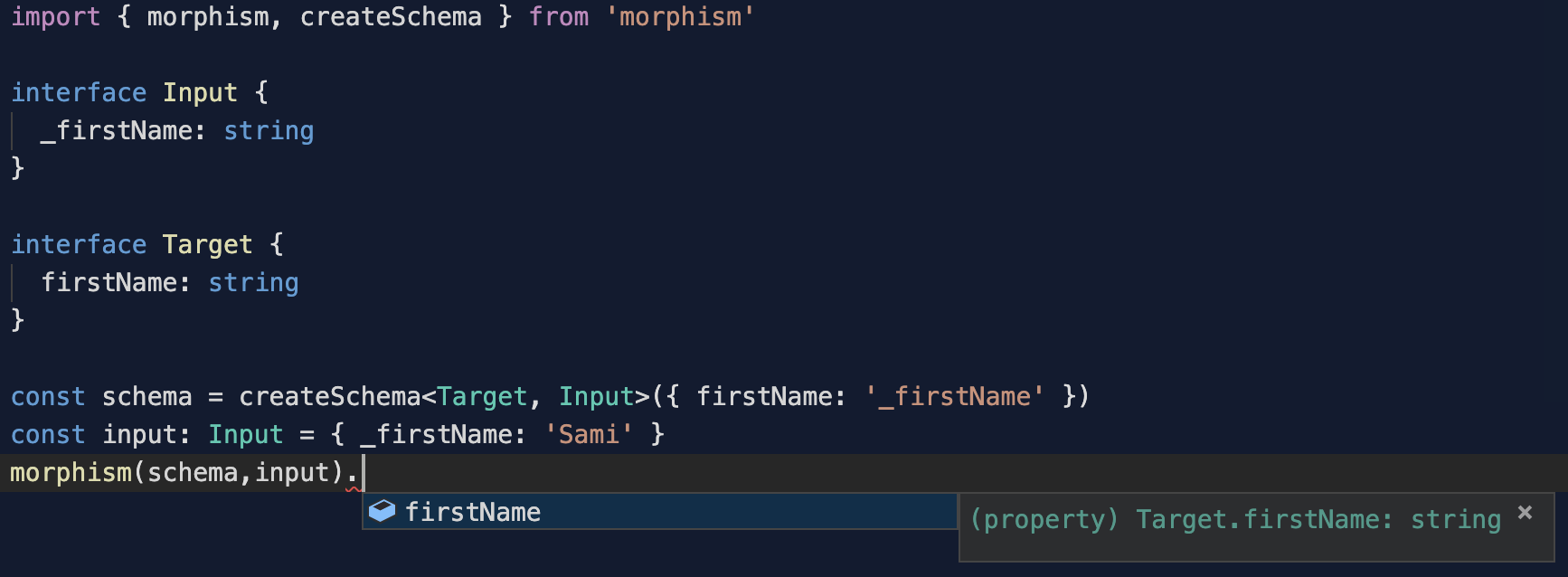
This library uses TypeScript extensively. The target type will be inferred from the defined schema.
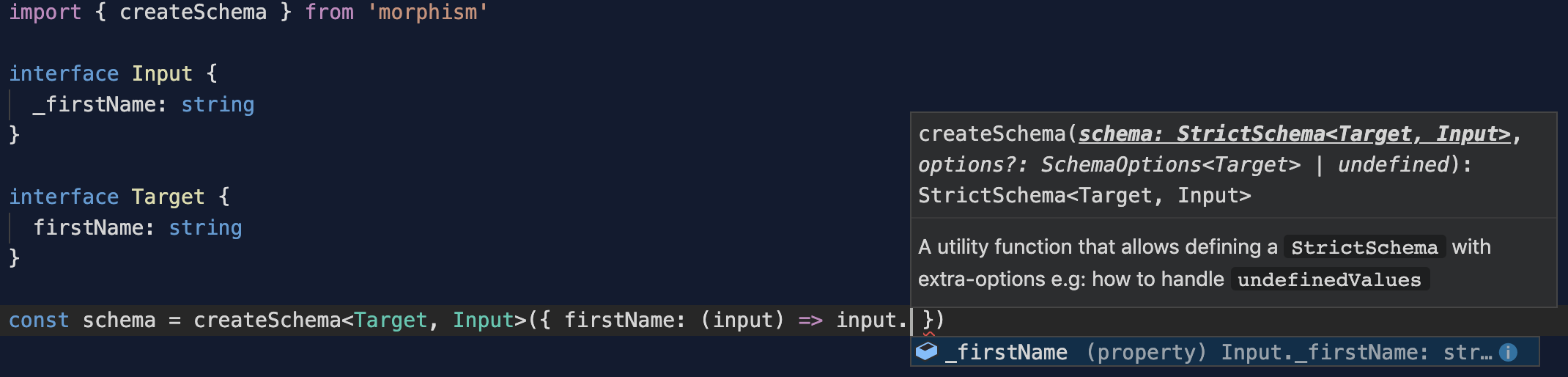
When using an ActionFunction the input type is also inferred to enforce your transformations
See below the different options you have for the schema.
Morphism comes with 3 artifacts to achieve your transformations:
A schema is an object-preserving map from one data structure to another.
The keys of the schema match the desired destination structure. Each value corresponds to an Action applied by Morphism when iterating over the input data.
You can use 4 kind of values for the keys of your schema:
ActionString: A string that allows to perform a projection from a propertyActionSelector: An Object that allows to perform a function over a source property's valueActionFunction: A Function that allows to perform a function over source propertyActionAggregator: An Array of Strings that allows to perform a function over source property
import{morphism}from'morphism';constinput={foo: {baz: 'value1'}};constschema={bar: 'foo',// ActionString: Allows to perform a projection from a propertyqux: ['foo','foo.baz'],// ActionAggregator: Allows to aggregate multiple propertiesquux: (iteratee,source,destination)=>{// ActionFunction: Allows to perform a function over source propertyreturniteratee.foo;},corge: {// ActionSelector: Allows to perform a function over a source property's valuepath: 'foo.baz',fn: (propertyValue,source)=>{returnpropertyValue;}}};morphism(schema,input);// {// "bar": {// "baz": "value1"// },// "qux": {// "foo": {// "baz": "value1"// }// },// "quux": {// "baz": "value1"// },// "corge": "value1"// }You might want to enforce the keys provided in your schema using Typescript. This is possible using a StrictSchema. Doing so will require to map every field of the Target type provided.
interfaceIFoo{foo: string;bar: number;}constschema: StrictSchema<IFoo>={foo: 'qux',bar: ()=>'test'};constsource={qux: 'foo'};consttarget=morphism(schema,source);// {// "foo": "qux",// "bar": "test"// }The simplest way to use morphism is to import the currying function:
import{morphism}from'morphism';morphism either outputs a mapping function or the transformed data depending on the usage:
morphism(schema: Schema,items?: any,type?: any): any// Outputs a function when only a schema is providedconstfn=morphism(schema);constresult=fn(data);// Outputs the transformed data when a schema and the source data are providedconstresult=morphism(schema,data);// Outputs the transformed data as an ES6 Class Object when a schema, the source data and an ES6 Class are providedconstresult=morphism(schema,data,Foo);// => Items in result are instance of FooYou can also use Function Decorators on your method or functions to transform the return value using Morphism:
import{toJSObject}from'morphism';classService{
@toJSObject({foo: currentItem=>currentItem.foo,baz: 'bar.baz'})asyncfetch(){constresponse=awaitfetch('https://api.com');returnresponse.json();// =>// {// foo: 'fooValue'// bar: {// baz: 'bazValue'// }// };}}// await service.fetch() will return// =>// {// foo: 'fooValue',// baz: 'bazValue'// }--------------------------------// Using Typescript will enforce the key from the target to be requiredclassTarget{a: string=null;b: string=null;}classService{// By Using <Target>, Mapping for Properties `a` and `b` will be required
@toJSObject<Target>({a: currentItem=>currentItem.foo,b: 'bar.baz'})fetch();}import{toClassObject}from'morphism';classTarget{foo=null;bar=null;}constschema={foo: currentItem=>currentItem.foo,baz: 'bar.baz'};classService{
@toClassObject(schema,Target)asyncfetch(){constresponse=awaitfetch('https://api.com');returnresponse.json();// =>// {// foo: 'fooValue'// bar: {// baz: 'bazValue'// }// };}}// await service.fetch() will be instanceof Target// =>// Target {// foo: 'fooValue',// baz: 'bazValue'// }Utility decorator wrapping toClassObject and toJSObject decorators
import{toClassObject}from'morphism';classTarget{foo=null;bar=null;}constschema={foo: currentItem=>currentItem.foo,baz: 'bar.baz'};classService{
@morph(schema)asyncfetch(){constresponse=awaitfetch('https://api.com');returnresponse.json();// =>// {// foo: 'fooValue'// bar: {// baz: 'bazValue'// }// };}
@morph(schema,Target)asyncfetch2(){constresponse=awaitfetch('https://api.com');returnresponse.json();}}// await service.fetch() will be// =>// {// foo: 'fooValue',// baz: 'bazValue'// }// await service.fetch() will be instanceof Target// =>// Target {// foo: 'fooValue',// baz: 'bazValue'// }Morphism comes along with an internal registry you can use to save your schema attached to a specific ES6 Class.
In order to use the registry, you might want to use the default export:
importMorphismfrom'morphism';All features available with the currying function are also available when using the plain object plus the internal registry:
// Currying FunctionMorphism(schema: Schema,items?: any,type?: any): any// Registry APIMorphism.register(type: any,schema?: Schema);Morphism.map(type: any,data?: any);Morphism.setMapper(type: any,schema: Schema);Morphism.getMapper(type);Morphism.deleteMapper(type);Morphism.mappersimport{morphism}from'morphism';// Source data coming from an API.constsource={foo: 'baz',bar: ['bar','foo'],baz: {qux: 'bazqux'}};constschema={foo: 'foo',// Simple Projectionbazqux: 'baz.qux'// Grab a value from a deep path};morphism(schema,source);//=> { foo: 'baz', bazqux: 'bazqux' }import{morphism}from'morphism';// Source data coming from an API.constsource={foo: {bar: 'bar'}};letschema={barqux: {path: 'foo.bar',fn: value=>`${value}qux`// Apply a function over the source property's value}};morphism(schema,source);//=> { barqux: 'barqux' }import{morphism}from'morphism';// Source data coming from an API.constsource={foo: {bar: 'bar'}};letschema={bar: iteratee=>{// Apply a function over the source properyreturniteratee.foo.bar;}};morphism(schema,source);//=> { bar: 'bar' }import{morphism}from'morphism';// Source data coming from an API.constsource={foo: 'foo',bar: 'bar'};letschema={fooAndBar: ['foo','bar']// Grab these properties into fooAndBar};morphism(schema,source);//=> { fooAndBar: { foo: 'foo', bar: 'bar' }}Register a mapper for a specific type. The schema is optional.
Morphism.register(type: any,schema?: Schema);Map a collection of objects to the specified type
Morphism.map(type: any,data?: any);Morphism.setMapper(type: any,schema: Schema);Morphism.getMapper(type);Morphism.deleteMapper(type);Morphism.mappers;- Twitter: @renaudin_yann
- Pull requests and stars are always welcome 🙏🏽 For bugs and feature requests, please create an issue
This project exists thanks to all the people who contribute. [Contribute].

Become a financial contributor and help us sustain our community. [Contribute]

Support this project with your organization. Your logo will show up here with a link to your website. [Contribute]



MIT © Yann Renaudin