


Repository files navigation

ActivityLog

Spatie/Laravel-activitylog for Filament

Latest Version on PackagistSoftware LicenseGitHub Code Style Action StatusTotal Downloads

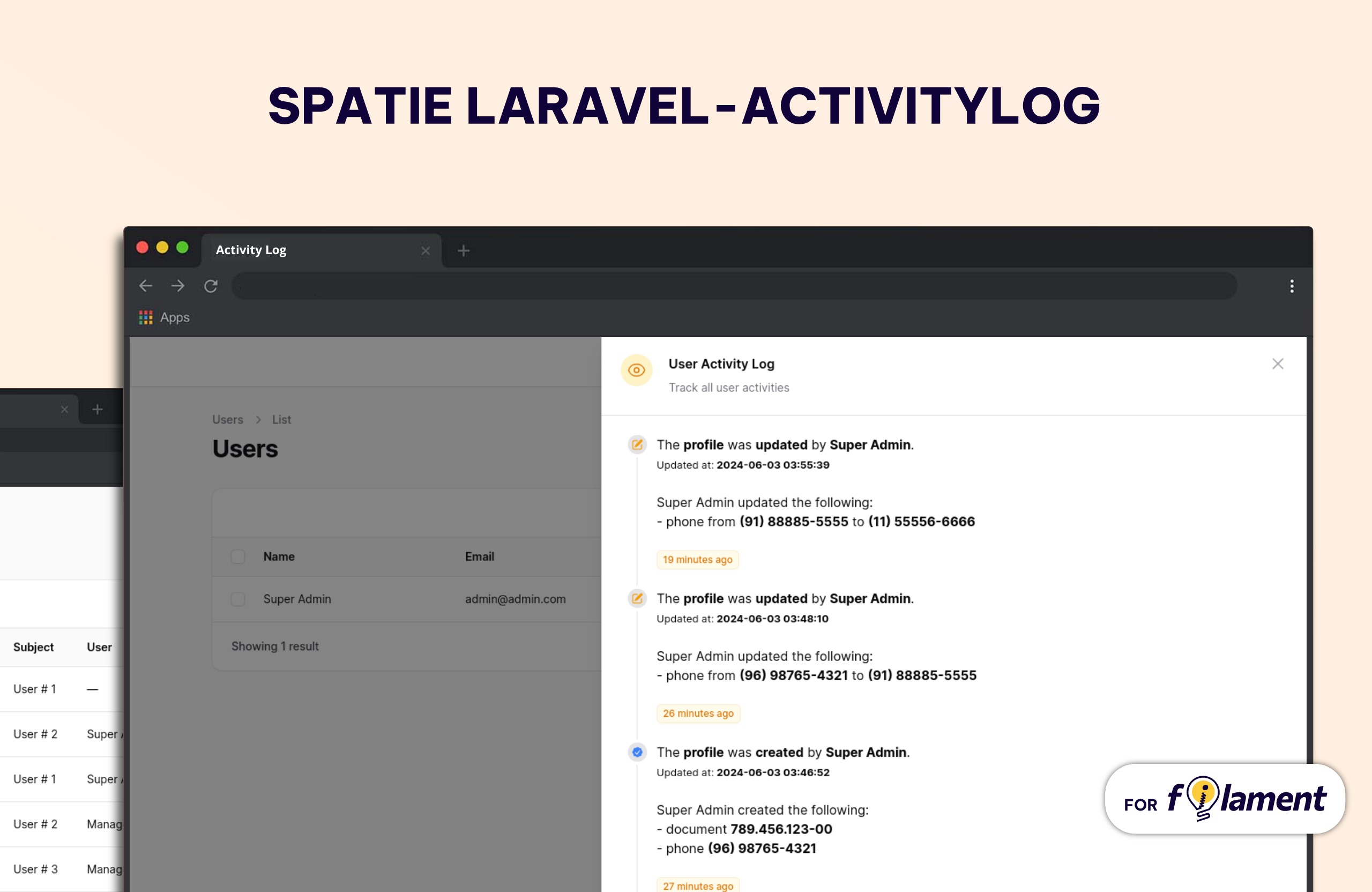
Screenshot of Application Feature

This package provides a Filament resource that shows you all of the activity logs and detailed view of each log created using the spatie/laravel-activitylog package. It also provides a relationship manager for related models.

Requirements

  • Laravel v12
  • Filament v3
  • Spatie/Laravel-activitylog v4

Languages Supported

ActivityLog Plugin is translated for :

  • 🇧🇷 Brazilian Portuguese
  • 🇺🇸 English
  • 🇩🇪 German
  • 🇪🇸 Spanish
  • 🇫🇷 French
  • 🇮🇷 Persian
  • 🇦🇪 Arabic
  • 🇵🇹 Portuguese
  • 🇮🇱 Hebrew
  • 🇳🇱 Dutch
  • 🇱🇻 Latvian

Installation

You can install the package via composer:

composer require rmsramos/activitylog

After that run the install command:

php artisan activitylog:install

This will publish the config & migrations from spatie/laravel-activitylog

And run migrates

php artisan migrate

You can manually publish the configuration file with:

php artisan vendor:publish --tag="activitylog-config"

This is the contents of the published config file:

return [
'resources' => [
'label' => 'Activity Log',
'plural_label' => 'Activity Logs',
'hide_restore_action' => false,
'restore_action_label' => 'Restore',
'hide_resource_action' => false,
'hide_restore_model_action' => true,
'resource_action_label' => 'View',
'navigation_item' => true,
'navigation_group' => null,
'navigation_icon' => 'heroicon-o-shield-check',
'navigation_sort' => null,
'default_sort_column' => 'id',
'default_sort_direction' => 'desc',
'navigation_count_badge' => false,
'resource' => \Rmsramos\Activitylog\Resources\ActivitylogResource::class,
],
'date_format' => 'd/m/Y',
'datetime_format' => 'd/m/Y H:i:s',
];

Optionally, you can publish the views using

php artisan vendor:publish --tag="activitylog-views"

Usage

Basic Spatie ActivityLog usage

In you Model add Spatie\Activitylog\Traits\LogsActivity trait, and configure getActivitylogOption function

For more configuration, Please review Spatie Docs

useIlluminate\Database\Eloquent\Model;
useSpatie\Activitylog\Traits\LogsActivity;
useSpatie\Activitylog\LogOptions;
class NewsItem extends Model
{
use LogsActivity;
protected$fillable = ['name', 'text'];
publicfunctiongetActivitylogOptions(): LogOptions
{
return LogOptions::defaults()
->logOnly(['name', 'text']);
}
}
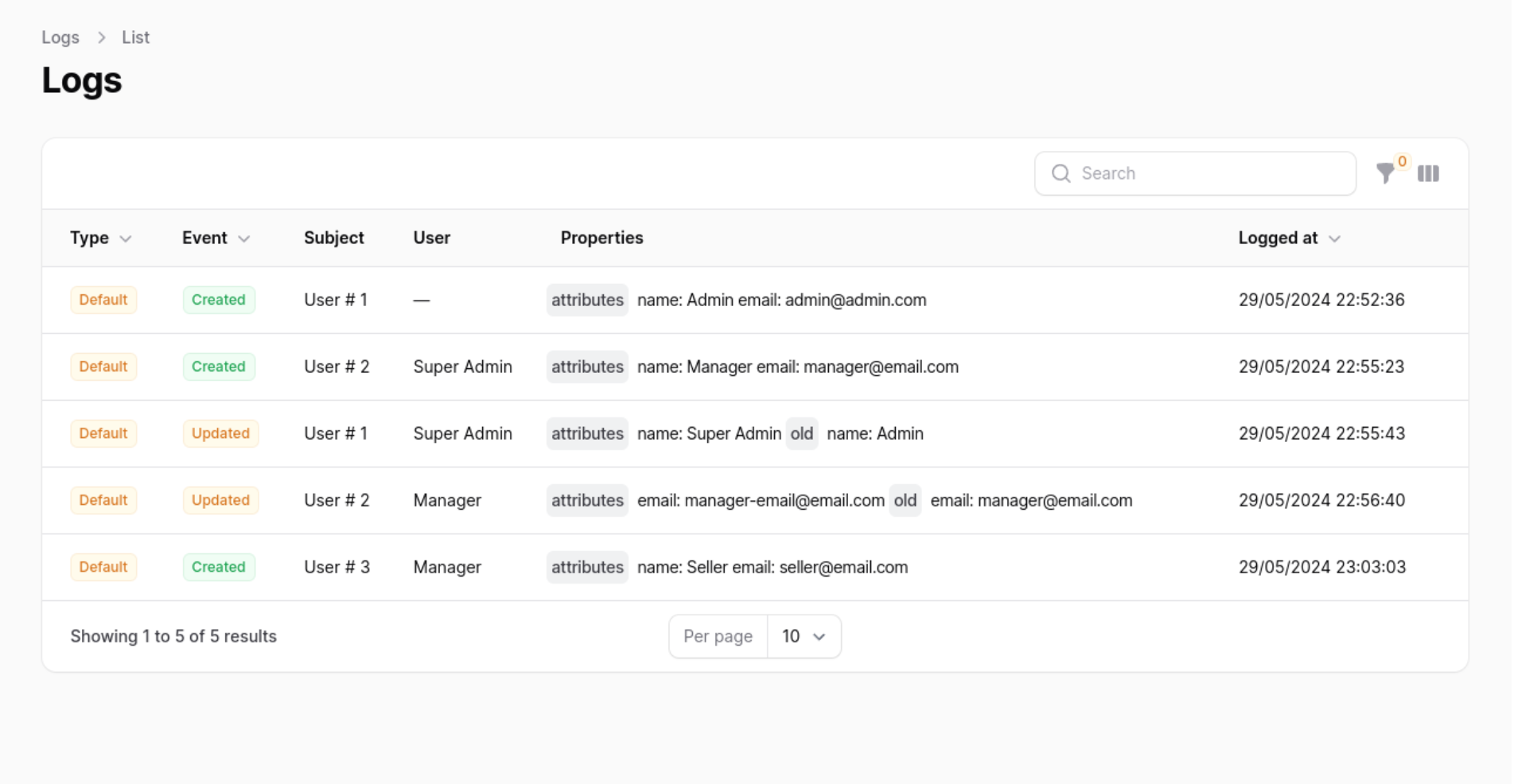
Plugin usage

Screenshot of Application Feature

In your Panel ServiceProvider (App\Providers\Filament) active the plugin

Add the Rmsramos\Activitylog\ActivitylogPlugin to your panel config

useRmsramos\Activitylog\ActivitylogPlugin;
publicfunctionpanel(Panel$panel): Panel
{
return$panel
->plugins([
ActivitylogPlugin::make(),
]);
}

Customising the ActivitylogResource

You can swap out the ActivitylogResource used by updating the ->resource() value. Use this to create your own CustomResource class and extend the original at \Rmsramos\Activitylog\Resources\ActivitylogResource::class. This will allow you to customise everything such as the views, table, form and permissions.

Note

If you wish to change the resource on List and View page be sure to replace the getPages method on the new resource and create your own version of the ListPage and ViewPage classes to reference the custom CustomResource.

useRmsramos\Activitylog\ActivitylogPlugin;
publicfunctionpanel(Panel$panel): Panel
{
return$panel
->plugins([
ActivitylogPlugin::make()
->resource(\Path\For\Your\CustomResource::class),
]);
}

Customising label Resource

You can swap out the Resource label used by updating the ->label() and ->pluralLabel() value.

useRmsramos\Activitylog\ActivitylogPlugin;
publicfunctionpanel(Panel$panel): Panel
{
return$panel
->plugins([
ActivitylogPlugin::make()
->label('Log')
->pluralLabel('Logs'),
]);
}

Displaying the resource in the navigation

You can enable or disable the Resource navigation item by updating the ->navigationItem() value.

useRmsramos\Activitylog\ActivitylogPlugin;
publicfunctionpanel(Panel$panel): Panel
{
return$panel
->plugins([
ActivitylogPlugin::make()
->navigationItem(false), // by default is true
]);
}

Grouping resource navigation items

You can add a Resource navigation group updating the ->navigationGroup() value.

useRmsramos\Activitylog\ActivitylogPlugin;
publicfunctionpanel(Panel$panel): Panel
{
return$panel
->plugins([
ActivitylogPlugin::make()
->navigationGroup('Activity Log'),
]);
}

Customising a resource navigation icon

You can swap out the Resource navigation icon used by updating the ->navigationIcon() value.

useRmsramos\Activitylog\ActivitylogPlugin;
publicfunctionpanel(Panel$panel): Panel
{
return$panel
->plugins([
ActivitylogPlugin::make()
->navigationIcon('heroicon-o-shield-check'),
]);
}

Active a count badge

You can active Count Badge updating the ->navigationCountBadge() value.

useRmsramos\Activitylog\ActivitylogPlugin;
publicfunctionpanel(Panel$panel): Panel
{
return$panel
->plugins([
ActivitylogPlugin::make()
->navigationCountBadge(true),
]);
}

Set navigation sort

You can set the Resource navigation sort used by updating the ->navigationSort() value.

useRmsramos\Activitylog\ActivitylogPlugin;
publicfunctionpanel(Panel$panel): Panel
{
return$panel
->plugins([
ActivitylogPlugin::make()
->navigationSort(3),
]);
}

Authorization

If you would like to prevent certain users from accessing the logs resource, you should add a authorize callback in the ActivitylogPlugin chain.

useRmsramos\Activitylog\ActivitylogPlugin;
publicfunctionpanel(Panel$panel): Panel
{
return$panel
->plugins([
ActivitylogPlugin::make()
->authorize(
fn () => auth()->user()->id === 1
),
]);
}

Translate Resource Names

To translate resource names in the activity log, add a translateSubject callback within the ActivitylogPlugin chain

useRmsramos\Activitylog\ActivitylogPlugin;
publicfunctionpanel(Panel$panel): Panel
{
return$panel
->plugins([
ActivitylogPlugin::make()
->translateSubject(fn($label) => __("yourCustomLangFile.".$label)),
]);
}

Translate Activity log key Names

To translate the names of the keys in the activity log, add a translateLogKey callback within the ActivitylogPlugin chain

useRmsramos\Activitylog\ActivitylogPlugin;
publicfunctionpanel(Panel$panel): Panel
{
return$panel
->plugins([
ActivitylogPlugin::make()
->translateLogKey(fn($label) => __("yourCustomLangFile.".$label)),
]);
}

Customize Date Parsing

To customize how dates are parsed, depending on user preferences or settings:

useRmsramos\Activitylog\ActivitylogPlugin;
useMorilog\Jalali\Jalalian;
useCarbon\Carbon;
publicfunctionpanel(Panel$panel): Panel
{
return$panel
->plugins([
ActivitylogPlugin::make()
->dateParser(
fn($date) => auth()->user()->isJalaliCalendar() ?
Jalalian::fromDateTime($date) :
Carbon::parse($date)
)
]);
}

Customize Date and DateTime Formats

To customize the format of dates and datetime columns based on user settings:

useRmsramos\Activitylog\ActivitylogPlugin;
publicfunctionpanel(Panel$panel): Panel
{
return$panel
->plugins([
ActivitylogPlugin::make()
->dateFormat('Y-m-d')
->datetimeFormat(fn() => auth()->user()->getFilamentDateTimeFormat())
]);
}

Customize DateTime Columns

To conditionally customize datetime columns in the UI, depending on the user's calendar preference:

useRmsramos\Activitylog\ActivitylogPlugin;
publicfunctionpanel(Panel$panel): Panel
{
return$panel
->plugins([
ActivitylogPlugin::make()
->customizeDatetimeColumn(function ($column) {
return$column->when(
auth()->user()->isJalaliCalendar(),
function ($column) {
return$column->jalaliDateTime();
}
);
})
]);
}

Customize Date Picker Fields

To customize date picker fields in forms, depending on user preferences:

useRmsramos\Activitylog\ActivitylogPlugin;
publicfunctionpanel(Panel$panel): Panel
{
return$panel
->plugins([
ActivitylogPlugin::make()
->customizeDatePicker(function ($field) {
return$field->when(
auth()->user()->isJalaliCalendar(),
function ($field) {
return$field->jalali();
}
);
})
]);
}

Manipulate View Action Using Custom Activity Resource Trait

Implement getFilamentActualResourceModel in the trait HasCustomActivityResource to determine the actual model related to the activity record for generating valid URLs.

useRmsramos\Activitylog\Traits\HasCustomActivityResource;
trait HasCustomActivityResource
{
publicfunctiongetFilamentActualResourceModel($record)
{
$record = $record->subject->translatable;
$model = null;
switch ($record::class) {
case FirstTranslatableModel::class:
$model = $record->firstModel;
break;
case SecondTranslatableModel::class:
$model = $record->secondModel;
break;
default:
thrownewException("Error Translatable subject model not found. record = ".$record::class, 1);
break;
}
return$model;
}
}

Hide Restore / View Action

To hide the restore / view action globally for a resource within the ActivitylogPlugin, you can use the isRestoreActionHidden and isResourceActionHidden method. these are particularly useful in scenarios where you do not want users to have the ability to restore or view entries from the activity log. you can also customize the label of view action:

useRmsramos\Activitylog\ActivitylogPlugin;
publicfunctionpanel(Panel$panel): Panel
{
return$panel
->plugins([
ActivitylogPlugin::make()
->isRestoreActionHidden(true)
->isResourceActionHidden(true)
->resourceActionLabel("Sample Label")
]);
}

Show Restore (Soft Deletes)

In the laravel-activitylog configuration file config/activitylog.php:

return [
'subject_returns_soft_deleted_models' => true,
]

To globally display the restore (soft delete) action of a resource within the ActivitylogPlugin, you can use the isRestoreModelActionHidden method. This is particularly useful in scenarios where you do not want users to have the ability to restore activity log entries:

useRmsramos\Activitylog\ActivitylogPlugin;
publicfunctionpanel(Panel$panel): Panel
{
return$panel
->plugins([
ActivitylogPlugin::make()
->isRestoreModelActionHidden(false)
]);
}

Role Policy

To ensure ActivitylogResource access via RolePolicy you would need to add the following to your AppServiceProvider:

useApp\Policies\ActivityPolicy;
useIlluminate\Support\Facades\Gate;
useSpatie\Activitylog\Models\Activity;
class AppServiceProvider extends ServiceProvider
{
publicfunctionboot(): void
{
Gate::policy(Activity::class, ActivityPolicy::class);
}
}

Full configuration

useRmsramos\Activitylog\ActivitylogPlugin;
publicfunction panel(Panel$panel): Panel
{
return$panel
->plugins([
ActivitylogPlugin::make()
->resource(\Path\For\Your\CustomResource::class)
->label('Log')
->pluralLabel('Logs')
->navigationItem(true)
->navigationGroup('Activity Log')
->navigationIcon('heroicon-o-shield-check')
->navigationCountBadge(true)
->navigationSort(2)
->authorize(
fn () => auth()->user()->id === 1
)
->translateSubject(fn($label) => __("yourCustomLangFile.".$label)),
->dateParser(
fn($date) => auth()->user()->isJalaliCalendar() ?
Jalalian::fromDateTime($date) :
Carbon::parse($date)
)
->dateFormat('Y-m-d')
->datetimeFormat(fn() => auth()->user()->getFilamentDateTimeFormat())
->customizeDatetimeColumn(function ($column) {
return$column->when(
auth()->user()->isJalaliCalendar(),
function ($column) {
return$column->jalaliDateTime();
}
);
})
->customizeDatePicker(function ($field) {
return$field->when(
auth()->user()->isJalaliCalendar(),
function ($field) {
return$field->jalali();
}
);
})
->isRestoreActionHidden(true)
->isResourceActionHidden(true)
->isRestoreModelActionHidden(false)
->resourceActionLabel("Sample Label"),
]);
}

Relationship manager

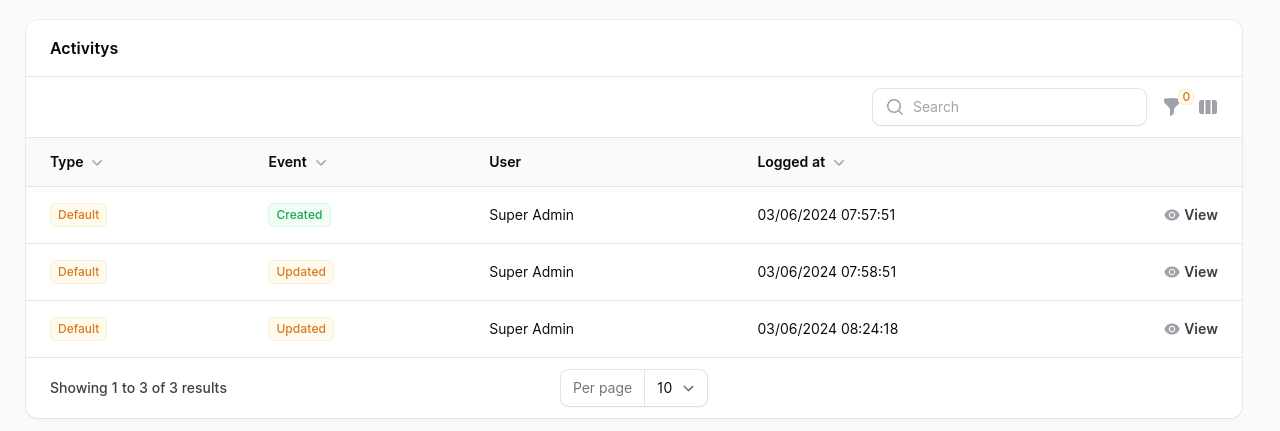
If you have a model that uses the Spatie\Activitylog\Traits\LogsActivity trait, you can add the Rmsramos\Activitylog\RelationManagers\ActivitylogRelationManager relationship manager to your Filament resource to display all of the activity logs that are performed on your model. Screenshot of Application Feature
useRmsramos\Activitylog\RelationManagers\ActivitylogRelationManager;
publicstaticfunctiongetRelations(): array
{
return [
ActivitylogRelationManager::class,
];
}
Timeline Action

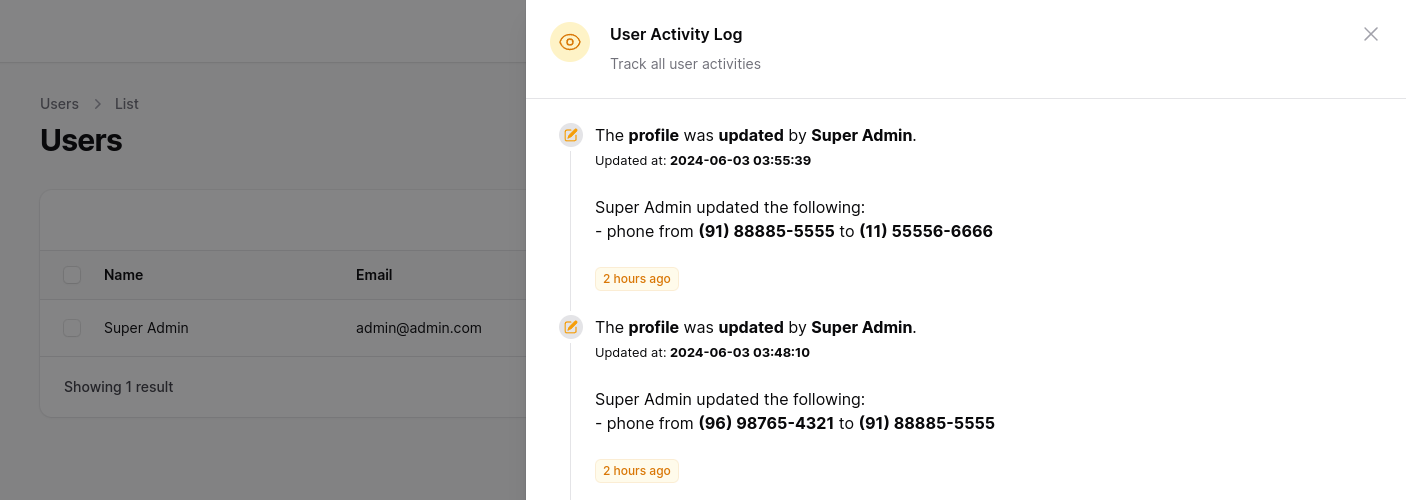
Screenshot of Application Feature

To make viewing activity logs easier, you can use a custom action. In your UserResource in the table function, add the ActivityLogTimelineTableAction.

useRmsramos\Activitylog\Actions\ActivityLogTimelineTableAction;
publicstaticfunctiontable(Table$table): Table
{
return$table
->actions([
ActivityLogTimelineTableAction::make('Activities'),
]);
}

you can pass a matrix with the relationships, remember to configure your Models.

publicstaticfunctiontable(Table$table): Table
{
return$table
->actions([
ActivityLogTimelineTableAction::make('Activities')
->withRelations(['profile', 'address']), //opcional
]);
}

You can configure the icons and colors, by default the 'heroicon-m-check' icon and the 'primary' color are used.

useRmsramos\Activitylog\Actions\ActivityLogTimelineTableAction;
publicstaticfunctiontable(Table$table): Table
{
return$table
->actions([
ActivityLogTimelineTableAction::make('Activities')
->timelineIcons([
'created' => 'heroicon-m-check-badge',
'updated' => 'heroicon-m-pencil-square',
])
->timelineIconColors([
'created' => 'info',
'updated' => 'warning',
])
]);
}

You can limit the number of results in the query by passing a limit, by default the last 10 records are returned.

useRmsramos\Activitylog\Actions\ActivityLogTimelineTableAction;
publicstaticfunctiontable(Table$table): Table
{
return$table
->actions([
ActivityLogTimelineTableAction::make('Activities')
->limit(30),
]);
}

Full Timeline configuration

useRmsramos\Activitylog\Actions\ActivityLogTimelineTableAction;
publicstaticfunctiontable(Table$table): Table
{
return$table
->actions([
ActivityLogTimelineTableAction::make('Activities')
->withRelations(['profile', 'address'])
->timelineIcons([
'created' => 'heroicon-m-check-badge',
'updated' => 'heroicon-m-pencil-square',
])
->timelineIconColors([
'created' => 'info',
'updated' => 'warning',
])
->limit(10),
]);
}

Changelog

Please see CHANGELOG for more information on what has changed recently.

Contributing

Please see CONTRIBUTING for details.

Security Vulnerabilities

Please review our security policy on how to report security vulnerabilities.

Acknowledgements

Special acknowledgment goes to these remarkable tools and people (developers), the Activity Log plugin only exists due to the inspiration and at some point the use of these people's codes.

Credits

License

The MIT License (MIT). Please see License File for more information.

About

Spatie Laravel activity logs inside of Filament.

Resources

Stars

0 stars

Watchers

0 watching

Forks

Releases

Packages

Contributors

Languages

, 'i'); if (__m === '*' || __re.test(location.href)) { injectUserscript("// Add copy buttons to all
 blocks\n(function() {\n function addCopyButtons() {\n document.querySelectorAll('pre code').forEach(function(codeBlock) {\n if (codeBlock.parentElement.hasAttribute('data-copy-added')) return;\n codeBlock.parentElement.setAttribute('data-copy-added', 'true');\n \n var btn = document.createElement('button');\n btn.textContent = 'Copy';\n btn.style.cssText = 'position:absolute;top:4px;right:4px;padding:2px 8px;font-size:11px;background:#4ecdc4;border:none;border-radius:4px;color:#1a1a2e;cursor:pointer;opacity:0.7;transition:opacity 0.2s;';\n btn.onmouseover = function() { this.style.opacity = '1'; };\n btn.onmouseout = function() { this.style.opacity = '0.7'; };\n btn.onclick = function() {\n navigator.clipboard.writeText(codeBlock.textContent).then(function() {\n btn.textContent = 'Copied!';\n setTimeout(function() { btn.textContent = 'Copy'; }, 1500);\n });\n };\n codeBlock.parentElement.style.position = 'relative';\n codeBlock.parentElement.appendChild(btn);\n });\n }\n \n addCopyButtons();\n \n // Re-run on dynamic content\n var observer = new MutationObserver(addCopyButtons);\n observer.observe(document.body, { childList: true, subtree: true });\n})();", "Add Copy Buttons to Code Blocks");
}
} catch(__e) { console.warn('[Userscript:Add Copy Buttons to Code Blocks]', __e); }
})();
(function(){
try {
var __m = "github.com";
var __re = new RegExp('^' + "github\\.com" + '
Skip to content

Repository files navigation

ActivityLog

Spatie/Laravel-activitylog for Filament

Latest Version on PackagistSoftware LicenseGitHub Code Style Action StatusTotal Downloads

Screenshot of Application Feature

This package provides a Filament resource that shows you all of the activity logs and detailed view of each log created using the spatie/laravel-activitylog package. It also provides a relationship manager for related models.

Requirements

  • Laravel v12
  • Filament v3
  • Spatie/Laravel-activitylog v4

Languages Supported

ActivityLog Plugin is translated for :

  • 🇧🇷 Brazilian Portuguese
  • 🇺🇸 English
  • 🇩🇪 German
  • 🇪🇸 Spanish
  • 🇫🇷 French
  • 🇮🇷 Persian
  • 🇦🇪 Arabic
  • 🇵🇹 Portuguese
  • 🇮🇱 Hebrew
  • 🇳🇱 Dutch
  • 🇱🇻 Latvian

Installation

You can install the package via composer:

composer require rmsramos/activitylog

After that run the install command:

php artisan activitylog:install

This will publish the config & migrations from spatie/laravel-activitylog

And run migrates

php artisan migrate

You can manually publish the configuration file with:

php artisan vendor:publish --tag="activitylog-config"

This is the contents of the published config file:

return [
'resources' => [
'label' => 'Activity Log',
'plural_label' => 'Activity Logs',
'hide_restore_action' => false,
'restore_action_label' => 'Restore',
'hide_resource_action' => false,
'hide_restore_model_action' => true,
'resource_action_label' => 'View',
'navigation_item' => true,
'navigation_group' => null,
'navigation_icon' => 'heroicon-o-shield-check',
'navigation_sort' => null,
'default_sort_column' => 'id',
'default_sort_direction' => 'desc',
'navigation_count_badge' => false,
'resource' => \Rmsramos\Activitylog\Resources\ActivitylogResource::class,
],
'date_format' => 'd/m/Y',
'datetime_format' => 'd/m/Y H:i:s',
];

Optionally, you can publish the views using

php artisan vendor:publish --tag="activitylog-views"

Usage

Basic Spatie ActivityLog usage

In you Model add Spatie\Activitylog\Traits\LogsActivity trait, and configure getActivitylogOption function

For more configuration, Please review Spatie Docs

useIlluminate\Database\Eloquent\Model;
useSpatie\Activitylog\Traits\LogsActivity;
useSpatie\Activitylog\LogOptions;
class NewsItem extends Model
{
use LogsActivity;
protected$fillable = ['name', 'text'];
publicfunctiongetActivitylogOptions(): LogOptions
{
return LogOptions::defaults()
->logOnly(['name', 'text']);
}
}

Plugin usage

Screenshot of Application Feature

In your Panel ServiceProvider (App\Providers\Filament) active the plugin

Add the Rmsramos\Activitylog\ActivitylogPlugin to your panel config

useRmsramos\Activitylog\ActivitylogPlugin;
publicfunctionpanel(Panel$panel): Panel
{
return$panel
->plugins([
ActivitylogPlugin::make(),
]);
}

Customising the ActivitylogResource

You can swap out the ActivitylogResource used by updating the ->resource() value. Use this to create your own CustomResource class and extend the original at \Rmsramos\Activitylog\Resources\ActivitylogResource::class. This will allow you to customise everything such as the views, table, form and permissions.

Note

If you wish to change the resource on List and View page be sure to replace the getPages method on the new resource and create your own version of the ListPage and ViewPage classes to reference the custom CustomResource.

useRmsramos\Activitylog\ActivitylogPlugin;
publicfunctionpanel(Panel$panel): Panel
{
return$panel
->plugins([
ActivitylogPlugin::make()
->resource(\Path\For\Your\CustomResource::class),
]);
}

Customising label Resource

You can swap out the Resource label used by updating the ->label() and ->pluralLabel() value.

useRmsramos\Activitylog\ActivitylogPlugin;
publicfunctionpanel(Panel$panel): Panel
{
return$panel
->plugins([
ActivitylogPlugin::make()
->label('Log')
->pluralLabel('Logs'),
]);
}

Displaying the resource in the navigation

You can enable or disable the Resource navigation item by updating the ->navigationItem() value.

useRmsramos\Activitylog\ActivitylogPlugin;
publicfunctionpanel(Panel$panel): Panel
{
return$panel
->plugins([
ActivitylogPlugin::make()
->navigationItem(false), // by default is true
]);
}

Grouping resource navigation items

You can add a Resource navigation group updating the ->navigationGroup() value.

useRmsramos\Activitylog\ActivitylogPlugin;
publicfunctionpanel(Panel$panel): Panel
{
return$panel
->plugins([
ActivitylogPlugin::make()
->navigationGroup('Activity Log'),
]);
}

Customising a resource navigation icon

You can swap out the Resource navigation icon used by updating the ->navigationIcon() value.

useRmsramos\Activitylog\ActivitylogPlugin;
publicfunctionpanel(Panel$panel): Panel
{
return$panel
->plugins([
ActivitylogPlugin::make()
->navigationIcon('heroicon-o-shield-check'),
]);
}

Active a count badge

You can active Count Badge updating the ->navigationCountBadge() value.

useRmsramos\Activitylog\ActivitylogPlugin;
publicfunctionpanel(Panel$panel): Panel
{
return$panel
->plugins([
ActivitylogPlugin::make()
->navigationCountBadge(true),
]);
}

Set navigation sort

You can set the Resource navigation sort used by updating the ->navigationSort() value.

useRmsramos\Activitylog\ActivitylogPlugin;
publicfunctionpanel(Panel$panel): Panel
{
return$panel
->plugins([
ActivitylogPlugin::make()
->navigationSort(3),
]);
}

Authorization

If you would like to prevent certain users from accessing the logs resource, you should add a authorize callback in the ActivitylogPlugin chain.

useRmsramos\Activitylog\ActivitylogPlugin;
publicfunctionpanel(Panel$panel): Panel
{
return$panel
->plugins([
ActivitylogPlugin::make()
->authorize(
fn () => auth()->user()->id === 1
),
]);
}

Translate Resource Names

To translate resource names in the activity log, add a translateSubject callback within the ActivitylogPlugin chain

useRmsramos\Activitylog\ActivitylogPlugin;
publicfunctionpanel(Panel$panel): Panel
{
return$panel
->plugins([
ActivitylogPlugin::make()
->translateSubject(fn($label) => __("yourCustomLangFile.".$label)),
]);
}

Translate Activity log key Names

To translate the names of the keys in the activity log, add a translateLogKey callback within the ActivitylogPlugin chain

useRmsramos\Activitylog\ActivitylogPlugin;
publicfunctionpanel(Panel$panel): Panel
{
return$panel
->plugins([
ActivitylogPlugin::make()
->translateLogKey(fn($label) => __("yourCustomLangFile.".$label)),
]);
}

Customize Date Parsing

To customize how dates are parsed, depending on user preferences or settings:

useRmsramos\Activitylog\ActivitylogPlugin;
useMorilog\Jalali\Jalalian;
useCarbon\Carbon;
publicfunctionpanel(Panel$panel): Panel
{
return$panel
->plugins([
ActivitylogPlugin::make()
->dateParser(
fn($date) => auth()->user()->isJalaliCalendar() ?
Jalalian::fromDateTime($date) :
Carbon::parse($date)
)
]);
}

Customize Date and DateTime Formats

To customize the format of dates and datetime columns based on user settings:

useRmsramos\Activitylog\ActivitylogPlugin;
publicfunctionpanel(Panel$panel): Panel
{
return$panel
->plugins([
ActivitylogPlugin::make()
->dateFormat('Y-m-d')
->datetimeFormat(fn() => auth()->user()->getFilamentDateTimeFormat())
]);
}

Customize DateTime Columns

To conditionally customize datetime columns in the UI, depending on the user's calendar preference:

useRmsramos\Activitylog\ActivitylogPlugin;
publicfunctionpanel(Panel$panel): Panel
{
return$panel
->plugins([
ActivitylogPlugin::make()
->customizeDatetimeColumn(function ($column) {
return$column->when(
auth()->user()->isJalaliCalendar(),
function ($column) {
return$column->jalaliDateTime();
}
);
})
]);
}

Customize Date Picker Fields

To customize date picker fields in forms, depending on user preferences:

useRmsramos\Activitylog\ActivitylogPlugin;
publicfunctionpanel(Panel$panel): Panel
{
return$panel
->plugins([
ActivitylogPlugin::make()
->customizeDatePicker(function ($field) {
return$field->when(
auth()->user()->isJalaliCalendar(),
function ($field) {
return$field->jalali();
}
);
})
]);
}

Manipulate View Action Using Custom Activity Resource Trait

Implement getFilamentActualResourceModel in the trait HasCustomActivityResource to determine the actual model related to the activity record for generating valid URLs.

useRmsramos\Activitylog\Traits\HasCustomActivityResource;
trait HasCustomActivityResource
{
publicfunctiongetFilamentActualResourceModel($record)
{
$record = $record->subject->translatable;
$model = null;
switch ($record::class) {
case FirstTranslatableModel::class:
$model = $record->firstModel;
break;
case SecondTranslatableModel::class:
$model = $record->secondModel;
break;
default:
thrownewException("Error Translatable subject model not found. record = ".$record::class, 1);
break;
}
return$model;
}
}

Hide Restore / View Action

To hide the restore / view action globally for a resource within the ActivitylogPlugin, you can use the isRestoreActionHidden and isResourceActionHidden method. these are particularly useful in scenarios where you do not want users to have the ability to restore or view entries from the activity log. you can also customize the label of view action:

useRmsramos\Activitylog\ActivitylogPlugin;
publicfunctionpanel(Panel$panel): Panel
{
return$panel
->plugins([
ActivitylogPlugin::make()
->isRestoreActionHidden(true)
->isResourceActionHidden(true)
->resourceActionLabel("Sample Label")
]);
}

Show Restore (Soft Deletes)

In the laravel-activitylog configuration file config/activitylog.php:

return [
'subject_returns_soft_deleted_models' => true,
]

To globally display the restore (soft delete) action of a resource within the ActivitylogPlugin, you can use the isRestoreModelActionHidden method. This is particularly useful in scenarios where you do not want users to have the ability to restore activity log entries:

useRmsramos\Activitylog\ActivitylogPlugin;
publicfunctionpanel(Panel$panel): Panel
{
return$panel
->plugins([
ActivitylogPlugin::make()
->isRestoreModelActionHidden(false)
]);
}

Role Policy

To ensure ActivitylogResource access via RolePolicy you would need to add the following to your AppServiceProvider:

useApp\Policies\ActivityPolicy;
useIlluminate\Support\Facades\Gate;
useSpatie\Activitylog\Models\Activity;
class AppServiceProvider extends ServiceProvider
{
publicfunctionboot(): void
{
Gate::policy(Activity::class, ActivityPolicy::class);
}
}

Full configuration

useRmsramos\Activitylog\ActivitylogPlugin;
publicfunction panel(Panel$panel): Panel
{
return$panel
->plugins([
ActivitylogPlugin::make()
->resource(\Path\For\Your\CustomResource::class)
->label('Log')
->pluralLabel('Logs')
->navigationItem(true)
->navigationGroup('Activity Log')
->navigationIcon('heroicon-o-shield-check')
->navigationCountBadge(true)
->navigationSort(2)
->authorize(
fn () => auth()->user()->id === 1
)
->translateSubject(fn($label) => __("yourCustomLangFile.".$label)),
->dateParser(
fn($date) => auth()->user()->isJalaliCalendar() ?
Jalalian::fromDateTime($date) :
Carbon::parse($date)
)
->dateFormat('Y-m-d')
->datetimeFormat(fn() => auth()->user()->getFilamentDateTimeFormat())
->customizeDatetimeColumn(function ($column) {
return$column->when(
auth()->user()->isJalaliCalendar(),
function ($column) {
return$column->jalaliDateTime();
}
);
})
->customizeDatePicker(function ($field) {
return$field->when(
auth()->user()->isJalaliCalendar(),
function ($field) {
return$field->jalali();
}
);
})
->isRestoreActionHidden(true)
->isResourceActionHidden(true)
->isRestoreModelActionHidden(false)
->resourceActionLabel("Sample Label"),
]);
}

Relationship manager

If you have a model that uses the Spatie\Activitylog\Traits\LogsActivity trait, you can add the Rmsramos\Activitylog\RelationManagers\ActivitylogRelationManager relationship manager to your Filament resource to display all of the activity logs that are performed on your model. Screenshot of Application Feature

useRmsramos\Activitylog\RelationManagers\ActivitylogRelationManager;
publicstaticfunctiongetRelations(): array
{
return [
ActivitylogRelationManager::class,
];
}

Timeline Action

Screenshot of Application Feature

To make viewing activity logs easier, you can use a custom action. In your UserResource in the table function, add the ActivityLogTimelineTableAction.

useRmsramos\Activitylog\Actions\ActivityLogTimelineTableAction;
publicstaticfunctiontable(Table$table): Table
{
return$table
->actions([
ActivityLogTimelineTableAction::make('Activities'),
]);
}

you can pass a matrix with the relationships, remember to configure your Models.

publicstaticfunctiontable(Table$table): Table
{
return$table
->actions([
ActivityLogTimelineTableAction::make('Activities')
->withRelations(['profile', 'address']), //opcional
]);
}

You can configure the icons and colors, by default the 'heroicon-m-check' icon and the 'primary' color are used.

useRmsramos\Activitylog\Actions\ActivityLogTimelineTableAction;
publicstaticfunctiontable(Table$table): Table
{
return$table
->actions([
ActivityLogTimelineTableAction::make('Activities')
->timelineIcons([
'created' => 'heroicon-m-check-badge',
'updated' => 'heroicon-m-pencil-square',
])
->timelineIconColors([
'created' => 'info',
'updated' => 'warning',
])
]);
}

You can limit the number of results in the query by passing a limit, by default the last 10 records are returned.

useRmsramos\Activitylog\Actions\ActivityLogTimelineTableAction;
publicstaticfunctiontable(Table$table): Table
{
return$table
->actions([
ActivityLogTimelineTableAction::make('Activities')
->limit(30),
]);
}

Full Timeline configuration

useRmsramos\Activitylog\Actions\ActivityLogTimelineTableAction;
publicstaticfunctiontable(Table$table): Table
{
return$table
->actions([
ActivityLogTimelineTableAction::make('Activities')
->withRelations(['profile', 'address'])
->timelineIcons([
'created' => 'heroicon-m-check-badge',
'updated' => 'heroicon-m-pencil-square',
])
->timelineIconColors([
'created' => 'info',
'updated' => 'warning',
])
->limit(10),
]);
}

Changelog

Please see CHANGELOG for more information on what has changed recently.

Contributing

Please see CONTRIBUTING for details.

Security Vulnerabilities

Please review our security policy on how to report security vulnerabilities.

Acknowledgements

Special acknowledgment goes to these remarkable tools and people (developers), the Activity Log plugin only exists due to the inspiration and at some point the use of these people's codes.

Credits

License

The MIT License (MIT). Please see License File for more information.

About

Spatie Laravel activity logs inside of Filament.

Resources

Stars

0 stars

Watchers

0 watching

Forks

Releases

Packages

Contributors

Languages

, 'i'); if (__m === '*' || __re.test(location.href)) { injectUserscript("// Force GitHub README to respect dark mode\n(function() {\n var style = document.createElement('style');\n style.textContent = '\n .markdown-body {\n color-scheme: dark light;\n }\n .markdown-body pre { background: #161b22 !important; }\n .markdown-body code { background: rgba(110, 118, 129, 0.4) !important; }\n .markdown-body table th, .markdown-body table td { border-color: #30363d !important; }\n .markdown-body img { background: #0d1117; }\n .markdown-body blockquote { border-left-color: #8b949e; }\n .markdown-body hr { border-color: #30363d; }\n ';\n document.head.appendChild(style);\n})();", "GitHub Dark Mode README Fix"); } } catch(__e) { console.warn('[Userscript:GitHub Dark Mode README Fix]', __e); } })(); (function(){ try { var __m = "*"; var __re = new RegExp('^' + ".*" + '
Skip to content

Repository files navigation

ActivityLog

Spatie/Laravel-activitylog for Filament

Latest Version on PackagistSoftware LicenseGitHub Code Style Action StatusTotal Downloads

Screenshot of Application Feature

This package provides a Filament resource that shows you all of the activity logs and detailed view of each log created using the spatie/laravel-activitylog package. It also provides a relationship manager for related models.

Requirements

  • Laravel v12
  • Filament v3
  • Spatie/Laravel-activitylog v4

Languages Supported

ActivityLog Plugin is translated for :

  • 🇧🇷 Brazilian Portuguese
  • 🇺🇸 English
  • 🇩🇪 German
  • 🇪🇸 Spanish
  • 🇫🇷 French
  • 🇮🇷 Persian
  • 🇦🇪 Arabic
  • 🇵🇹 Portuguese
  • 🇮🇱 Hebrew
  • 🇳🇱 Dutch
  • 🇱🇻 Latvian

Installation

You can install the package via composer:

composer require rmsramos/activitylog

After that run the install command:

php artisan activitylog:install

This will publish the config & migrations from spatie/laravel-activitylog

And run migrates

php artisan migrate

You can manually publish the configuration file with:

php artisan vendor:publish --tag="activitylog-config"

This is the contents of the published config file:

return [
'resources' => [
'label' => 'Activity Log',
'plural_label' => 'Activity Logs',
'hide_restore_action' => false,
'restore_action_label' => 'Restore',
'hide_resource_action' => false,
'hide_restore_model_action' => true,
'resource_action_label' => 'View',
'navigation_item' => true,
'navigation_group' => null,
'navigation_icon' => 'heroicon-o-shield-check',
'navigation_sort' => null,
'default_sort_column' => 'id',
'default_sort_direction' => 'desc',
'navigation_count_badge' => false,
'resource' => \Rmsramos\Activitylog\Resources\ActivitylogResource::class,
],
'date_format' => 'd/m/Y',
'datetime_format' => 'd/m/Y H:i:s',
];

Optionally, you can publish the views using

php artisan vendor:publish --tag="activitylog-views"

Usage

Basic Spatie ActivityLog usage

In you Model add Spatie\Activitylog\Traits\LogsActivity trait, and configure getActivitylogOption function

For more configuration, Please review Spatie Docs

useIlluminate\Database\Eloquent\Model;
useSpatie\Activitylog\Traits\LogsActivity;
useSpatie\Activitylog\LogOptions;
class NewsItem extends Model
{
use LogsActivity;
protected$fillable = ['name', 'text'];
publicfunctiongetActivitylogOptions(): LogOptions
{
return LogOptions::defaults()
->logOnly(['name', 'text']);
}
}

Plugin usage

Screenshot of Application Feature

In your Panel ServiceProvider (App\Providers\Filament) active the plugin

Add the Rmsramos\Activitylog\ActivitylogPlugin to your panel config

useRmsramos\Activitylog\ActivitylogPlugin;
publicfunctionpanel(Panel$panel): Panel
{
return$panel
->plugins([
ActivitylogPlugin::make(),
]);
}

Customising the ActivitylogResource

You can swap out the ActivitylogResource used by updating the ->resource() value. Use this to create your own CustomResource class and extend the original at \Rmsramos\Activitylog\Resources\ActivitylogResource::class. This will allow you to customise everything such as the views, table, form and permissions.

Note

If you wish to change the resource on List and View page be sure to replace the getPages method on the new resource and create your own version of the ListPage and ViewPage classes to reference the custom CustomResource.

useRmsramos\Activitylog\ActivitylogPlugin;
publicfunctionpanel(Panel$panel): Panel
{
return$panel
->plugins([
ActivitylogPlugin::make()
->resource(\Path\For\Your\CustomResource::class),
]);
}

Customising label Resource

You can swap out the Resource label used by updating the ->label() and ->pluralLabel() value.

useRmsramos\Activitylog\ActivitylogPlugin;
publicfunctionpanel(Panel$panel): Panel
{
return$panel
->plugins([
ActivitylogPlugin::make()
->label('Log')
->pluralLabel('Logs'),
]);
}

Displaying the resource in the navigation

You can enable or disable the Resource navigation item by updating the ->navigationItem() value.

useRmsramos\Activitylog\ActivitylogPlugin;
publicfunctionpanel(Panel$panel): Panel
{
return$panel
->plugins([
ActivitylogPlugin::make()
->navigationItem(false), // by default is true
]);
}

Grouping resource navigation items

You can add a Resource navigation group updating the ->navigationGroup() value.

useRmsramos\Activitylog\ActivitylogPlugin;
publicfunctionpanel(Panel$panel): Panel
{
return$panel
->plugins([
ActivitylogPlugin::make()
->navigationGroup('Activity Log'),
]);
}

Customising a resource navigation icon

You can swap out the Resource navigation icon used by updating the ->navigationIcon() value.

useRmsramos\Activitylog\ActivitylogPlugin;
publicfunctionpanel(Panel$panel): Panel
{
return$panel
->plugins([
ActivitylogPlugin::make()
->navigationIcon('heroicon-o-shield-check'),
]);
}

Active a count badge

You can active Count Badge updating the ->navigationCountBadge() value.

useRmsramos\Activitylog\ActivitylogPlugin;
publicfunctionpanel(Panel$panel): Panel
{
return$panel
->plugins([
ActivitylogPlugin::make()
->navigationCountBadge(true),
]);
}

Set navigation sort

You can set the Resource navigation sort used by updating the ->navigationSort() value.

useRmsramos\Activitylog\ActivitylogPlugin;
publicfunctionpanel(Panel$panel): Panel
{
return$panel
->plugins([
ActivitylogPlugin::make()
->navigationSort(3),
]);
}

Authorization

If you would like to prevent certain users from accessing the logs resource, you should add a authorize callback in the ActivitylogPlugin chain.

useRmsramos\Activitylog\ActivitylogPlugin;
publicfunctionpanel(Panel$panel): Panel
{
return$panel
->plugins([
ActivitylogPlugin::make()
->authorize(
fn () => auth()->user()->id === 1
),
]);
}

Translate Resource Names

To translate resource names in the activity log, add a translateSubject callback within the ActivitylogPlugin chain

useRmsramos\Activitylog\ActivitylogPlugin;
publicfunctionpanel(Panel$panel): Panel
{
return$panel
->plugins([
ActivitylogPlugin::make()
->translateSubject(fn($label) => __("yourCustomLangFile.".$label)),
]);
}

Translate Activity log key Names

To translate the names of the keys in the activity log, add a translateLogKey callback within the ActivitylogPlugin chain

useRmsramos\Activitylog\ActivitylogPlugin;
publicfunctionpanel(Panel$panel): Panel
{
return$panel
->plugins([
ActivitylogPlugin::make()
->translateLogKey(fn($label) => __("yourCustomLangFile.".$label)),
]);
}

Customize Date Parsing

To customize how dates are parsed, depending on user preferences or settings:

useRmsramos\Activitylog\ActivitylogPlugin;
useMorilog\Jalali\Jalalian;
useCarbon\Carbon;
publicfunctionpanel(Panel$panel): Panel
{
return$panel
->plugins([
ActivitylogPlugin::make()
->dateParser(
fn($date) => auth()->user()->isJalaliCalendar() ?
Jalalian::fromDateTime($date) :
Carbon::parse($date)
)
]);
}

Customize Date and DateTime Formats

To customize the format of dates and datetime columns based on user settings:

useRmsramos\Activitylog\ActivitylogPlugin;
publicfunctionpanel(Panel$panel): Panel
{
return$panel
->plugins([
ActivitylogPlugin::make()
->dateFormat('Y-m-d')
->datetimeFormat(fn() => auth()->user()->getFilamentDateTimeFormat())
]);
}

Customize DateTime Columns

To conditionally customize datetime columns in the UI, depending on the user's calendar preference:

useRmsramos\Activitylog\ActivitylogPlugin;
publicfunctionpanel(Panel$panel): Panel
{
return$panel
->plugins([
ActivitylogPlugin::make()
->customizeDatetimeColumn(function ($column) {
return$column->when(
auth()->user()->isJalaliCalendar(),
function ($column) {
return$column->jalaliDateTime();
}
);
})
]);
}

Customize Date Picker Fields

To customize date picker fields in forms, depending on user preferences:

useRmsramos\Activitylog\ActivitylogPlugin;
publicfunctionpanel(Panel$panel): Panel
{
return$panel
->plugins([
ActivitylogPlugin::make()
->customizeDatePicker(function ($field) {
return$field->when(
auth()->user()->isJalaliCalendar(),
function ($field) {
return$field->jalali();
}
);
})
]);
}

Manipulate View Action Using Custom Activity Resource Trait

Implement getFilamentActualResourceModel in the trait HasCustomActivityResource to determine the actual model related to the activity record for generating valid URLs.

useRmsramos\Activitylog\Traits\HasCustomActivityResource;
trait HasCustomActivityResource
{
publicfunctiongetFilamentActualResourceModel($record)
{
$record = $record->subject->translatable;
$model = null;
switch ($record::class) {
case FirstTranslatableModel::class:
$model = $record->firstModel;
break;
case SecondTranslatableModel::class:
$model = $record->secondModel;
break;
default:
thrownewException("Error Translatable subject model not found. record = ".$record::class, 1);
break;
}
return$model;
}
}

Hide Restore / View Action

To hide the restore / view action globally for a resource within the ActivitylogPlugin, you can use the isRestoreActionHidden and isResourceActionHidden method. these are particularly useful in scenarios where you do not want users to have the ability to restore or view entries from the activity log. you can also customize the label of view action:

useRmsramos\Activitylog\ActivitylogPlugin;
publicfunctionpanel(Panel$panel): Panel
{
return$panel
->plugins([
ActivitylogPlugin::make()
->isRestoreActionHidden(true)
->isResourceActionHidden(true)
->resourceActionLabel("Sample Label")
]);
}

Show Restore (Soft Deletes)

In the laravel-activitylog configuration file config/activitylog.php:

return [
'subject_returns_soft_deleted_models' => true,
]

To globally display the restore (soft delete) action of a resource within the ActivitylogPlugin, you can use the isRestoreModelActionHidden method. This is particularly useful in scenarios where you do not want users to have the ability to restore activity log entries:

useRmsramos\Activitylog\ActivitylogPlugin;
publicfunctionpanel(Panel$panel): Panel
{
return$panel
->plugins([
ActivitylogPlugin::make()
->isRestoreModelActionHidden(false)
]);
}

Role Policy

To ensure ActivitylogResource access via RolePolicy you would need to add the following to your AppServiceProvider:

useApp\Policies\ActivityPolicy;
useIlluminate\Support\Facades\Gate;
useSpatie\Activitylog\Models\Activity;
class AppServiceProvider extends ServiceProvider
{
publicfunctionboot(): void
{
Gate::policy(Activity::class, ActivityPolicy::class);
}
}

Full configuration

useRmsramos\Activitylog\ActivitylogPlugin;
publicfunction panel(Panel$panel): Panel
{
return$panel
->plugins([
ActivitylogPlugin::make()
->resource(\Path\For\Your\CustomResource::class)
->label('Log')
->pluralLabel('Logs')
->navigationItem(true)
->navigationGroup('Activity Log')
->navigationIcon('heroicon-o-shield-check')
->navigationCountBadge(true)
->navigationSort(2)
->authorize(
fn () => auth()->user()->id === 1
)
->translateSubject(fn($label) => __("yourCustomLangFile.".$label)),
->dateParser(
fn($date) => auth()->user()->isJalaliCalendar() ?
Jalalian::fromDateTime($date) :
Carbon::parse($date)
)
->dateFormat('Y-m-d')
->datetimeFormat(fn() => auth()->user()->getFilamentDateTimeFormat())
->customizeDatetimeColumn(function ($column) {
return$column->when(
auth()->user()->isJalaliCalendar(),
function ($column) {
return$column->jalaliDateTime();
}
);
})
->customizeDatePicker(function ($field) {
return$field->when(
auth()->user()->isJalaliCalendar(),
function ($field) {
return$field->jalali();
}
);
})
->isRestoreActionHidden(true)
->isResourceActionHidden(true)
->isRestoreModelActionHidden(false)
->resourceActionLabel("Sample Label"),
]);
}

Relationship manager

If you have a model that uses the Spatie\Activitylog\Traits\LogsActivity trait, you can add the Rmsramos\Activitylog\RelationManagers\ActivitylogRelationManager relationship manager to your Filament resource to display all of the activity logs that are performed on your model. Screenshot of Application Feature

useRmsramos\Activitylog\RelationManagers\ActivitylogRelationManager;
publicstaticfunctiongetRelations(): array
{
return [
ActivitylogRelationManager::class,
];
}

Timeline Action

Screenshot of Application Feature

To make viewing activity logs easier, you can use a custom action. In your UserResource in the table function, add the ActivityLogTimelineTableAction.

useRmsramos\Activitylog\Actions\ActivityLogTimelineTableAction;
publicstaticfunctiontable(Table$table): Table
{
return$table
->actions([
ActivityLogTimelineTableAction::make('Activities'),
]);
}

you can pass a matrix with the relationships, remember to configure your Models.

publicstaticfunctiontable(Table$table): Table
{
return$table
->actions([
ActivityLogTimelineTableAction::make('Activities')
->withRelations(['profile', 'address']), //opcional
]);
}

You can configure the icons and colors, by default the 'heroicon-m-check' icon and the 'primary' color are used.

useRmsramos\Activitylog\Actions\ActivityLogTimelineTableAction;
publicstaticfunctiontable(Table$table): Table
{
return$table
->actions([
ActivityLogTimelineTableAction::make('Activities')
->timelineIcons([
'created' => 'heroicon-m-check-badge',
'updated' => 'heroicon-m-pencil-square',
])
->timelineIconColors([
'created' => 'info',
'updated' => 'warning',
])
]);
}

You can limit the number of results in the query by passing a limit, by default the last 10 records are returned.

useRmsramos\Activitylog\Actions\ActivityLogTimelineTableAction;
publicstaticfunctiontable(Table$table): Table
{
return$table
->actions([
ActivityLogTimelineTableAction::make('Activities')
->limit(30),
]);
}

Full Timeline configuration

useRmsramos\Activitylog\Actions\ActivityLogTimelineTableAction;
publicstaticfunctiontable(Table$table): Table
{
return$table
->actions([
ActivityLogTimelineTableAction::make('Activities')
->withRelations(['profile', 'address'])
->timelineIcons([
'created' => 'heroicon-m-check-badge',
'updated' => 'heroicon-m-pencil-square',
])
->timelineIconColors([
'created' => 'info',
'updated' => 'warning',
])
->limit(10),
]);
}

Changelog

Please see CHANGELOG for more information on what has changed recently.

Contributing

Please see CONTRIBUTING for details.

Security Vulnerabilities

Please review our security policy on how to report security vulnerabilities.

Acknowledgements

Special acknowledgment goes to these remarkable tools and people (developers), the Activity Log plugin only exists due to the inspiration and at some point the use of these people's codes.

Credits

License

The MIT License (MIT). Please see License File for more information.

About

Spatie Laravel activity logs inside of Filament.

Resources

Stars

0 stars

Watchers

0 watching

Forks

Releases

Packages

Contributors

Languages

, 'i'); if (__m === '*' || __re.test(location.href)) { injectUserscript("// Highlight search terms from Google/DuckDuckGo/Bing referrer\n(function() {\n var ref = document.referrer;\n var terms = [];\n \n if (ref.includes('google.com') || ref.includes('duckduckgo.com') || ref.includes('bing.com')) {\n var url = new URL(ref);\n var q = url.searchParams.get('q') || url.searchParams.get('p');\n if (q) {\n terms = q.split(/\\s+/).filter(function(t) { return t.length > 2; });\n }\n }\n \n if (terms.length === 0) return;\n \n var style = document.createElement('style');\n style.textContent = '.userscript-highlight { background: #fbbf24; color: #1a1a2e; padding: 1px 3px; border-radius: 2px; }';\n document.head.appendChild(style);\n \n function highlight(node) {\n if (node.nodeType === 3) { // text node\n var text = node.textContent;\n var found = false;\n terms.forEach(function(term) {\n var regex = new RegExp('(' + term.replace(/[.*+?^${}()|[\\]\\\\]/g, '\\\\') + ')', 'gi');\n if (regex.test(text)) {\n found = true;\n var frag = document.createDocumentFragment();\n var parts = text.split(regex);\n parts.forEach(function(part, i) {\n if (i % 2 === 0) {\n frag.appendChild(document.createTextNode(part));\n } else {\n var span = document.createElement('span');\n span.className = 'userscript-highlight';\n span.textContent = part;\n frag.appendChild(span);\n }\n });\n node.parentNode.replaceChild(frag, node);\n }\n });\n } else if (node.nodeType === 1 && node.childNodes) { // element\n var skipTags = ['SCRIPT', 'STYLE', 'NOSCRIPT', 'TEXTAREA', 'INPUT', 'SELECT'];\n if (!skipTags.includes(node.tagName)) {\n Array.from(node.childNodes).forEach(highlight);\n }\n }\n }\n \n highlight(document.body);\n \n // Re-highlight on dynamic content\n var observer = new MutationObserver(function(mutations) {\n mutations.forEach(function(m) {\n m.addedNodes.forEach(function(node) {\n if (node.nodeType === 1 || node.nodeType === 3) highlight(node);\n });\n });\n });\n observer.observe(document.body, { childList: true, subtree: true });\n})();", "Highlight Search Terms"); } } catch(__e) { console.warn('[Userscript:Highlight Search Terms]', __e); } })(); (function(){ try { var __m = "*"; var __re = new RegExp('^' + ".*" + '
Skip to content

Repository files navigation

ActivityLog

Spatie/Laravel-activitylog for Filament

Latest Version on PackagistSoftware LicenseGitHub Code Style Action StatusTotal Downloads

Screenshot of Application Feature

This package provides a Filament resource that shows you all of the activity logs and detailed view of each log created using the spatie/laravel-activitylog package. It also provides a relationship manager for related models.

Requirements

  • Laravel v12
  • Filament v3
  • Spatie/Laravel-activitylog v4

Languages Supported

ActivityLog Plugin is translated for :

  • 🇧🇷 Brazilian Portuguese
  • 🇺🇸 English
  • 🇩🇪 German
  • 🇪🇸 Spanish
  • 🇫🇷 French
  • 🇮🇷 Persian
  • 🇦🇪 Arabic
  • 🇵🇹 Portuguese
  • 🇮🇱 Hebrew
  • 🇳🇱 Dutch
  • 🇱🇻 Latvian

Installation

You can install the package via composer:

composer require rmsramos/activitylog

After that run the install command:

php artisan activitylog:install

This will publish the config & migrations from spatie/laravel-activitylog

And run migrates

php artisan migrate

You can manually publish the configuration file with:

php artisan vendor:publish --tag="activitylog-config"

This is the contents of the published config file:

return [
'resources' => [
'label' => 'Activity Log',
'plural_label' => 'Activity Logs',
'hide_restore_action' => false,
'restore_action_label' => 'Restore',
'hide_resource_action' => false,
'hide_restore_model_action' => true,
'resource_action_label' => 'View',
'navigation_item' => true,
'navigation_group' => null,
'navigation_icon' => 'heroicon-o-shield-check',
'navigation_sort' => null,
'default_sort_column' => 'id',
'default_sort_direction' => 'desc',
'navigation_count_badge' => false,
'resource' => \Rmsramos\Activitylog\Resources\ActivitylogResource::class,
],
'date_format' => 'd/m/Y',
'datetime_format' => 'd/m/Y H:i:s',
];

Optionally, you can publish the views using

php artisan vendor:publish --tag="activitylog-views"

Usage

Basic Spatie ActivityLog usage

In you Model add Spatie\Activitylog\Traits\LogsActivity trait, and configure getActivitylogOption function

For more configuration, Please review Spatie Docs

useIlluminate\Database\Eloquent\Model;
useSpatie\Activitylog\Traits\LogsActivity;
useSpatie\Activitylog\LogOptions;
class NewsItem extends Model
{
use LogsActivity;
protected$fillable = ['name', 'text'];
publicfunctiongetActivitylogOptions(): LogOptions
{
return LogOptions::defaults()
->logOnly(['name', 'text']);
}
}

Plugin usage

Screenshot of Application Feature

In your Panel ServiceProvider (App\Providers\Filament) active the plugin

Add the Rmsramos\Activitylog\ActivitylogPlugin to your panel config

useRmsramos\Activitylog\ActivitylogPlugin;
publicfunctionpanel(Panel$panel): Panel
{
return$panel
->plugins([
ActivitylogPlugin::make(),
]);
}

Customising the ActivitylogResource

You can swap out the ActivitylogResource used by updating the ->resource() value. Use this to create your own CustomResource class and extend the original at \Rmsramos\Activitylog\Resources\ActivitylogResource::class. This will allow you to customise everything such as the views, table, form and permissions.

Note

If you wish to change the resource on List and View page be sure to replace the getPages method on the new resource and create your own version of the ListPage and ViewPage classes to reference the custom CustomResource.

useRmsramos\Activitylog\ActivitylogPlugin;
publicfunctionpanel(Panel$panel): Panel
{
return$panel
->plugins([
ActivitylogPlugin::make()
->resource(\Path\For\Your\CustomResource::class),
]);
}

Customising label Resource

You can swap out the Resource label used by updating the ->label() and ->pluralLabel() value.

useRmsramos\Activitylog\ActivitylogPlugin;
publicfunctionpanel(Panel$panel): Panel
{
return$panel
->plugins([
ActivitylogPlugin::make()
->label('Log')
->pluralLabel('Logs'),
]);
}

Displaying the resource in the navigation

You can enable or disable the Resource navigation item by updating the ->navigationItem() value.

useRmsramos\Activitylog\ActivitylogPlugin;
publicfunctionpanel(Panel$panel): Panel
{
return$panel
->plugins([
ActivitylogPlugin::make()
->navigationItem(false), // by default is true
]);
}

Grouping resource navigation items

You can add a Resource navigation group updating the ->navigationGroup() value.

useRmsramos\Activitylog\ActivitylogPlugin;
publicfunctionpanel(Panel$panel): Panel
{
return$panel
->plugins([
ActivitylogPlugin::make()
->navigationGroup('Activity Log'),
]);
}

Customising a resource navigation icon

You can swap out the Resource navigation icon used by updating the ->navigationIcon() value.

useRmsramos\Activitylog\ActivitylogPlugin;
publicfunctionpanel(Panel$panel): Panel
{
return$panel
->plugins([
ActivitylogPlugin::make()
->navigationIcon('heroicon-o-shield-check'),
]);
}

Active a count badge

You can active Count Badge updating the ->navigationCountBadge() value.

useRmsramos\Activitylog\ActivitylogPlugin;
publicfunctionpanel(Panel$panel): Panel
{
return$panel
->plugins([
ActivitylogPlugin::make()
->navigationCountBadge(true),
]);
}

Set navigation sort

You can set the Resource navigation sort used by updating the ->navigationSort() value.

useRmsramos\Activitylog\ActivitylogPlugin;
publicfunctionpanel(Panel$panel): Panel
{
return$panel
->plugins([
ActivitylogPlugin::make()
->navigationSort(3),
]);
}

Authorization

If you would like to prevent certain users from accessing the logs resource, you should add a authorize callback in the ActivitylogPlugin chain.

useRmsramos\Activitylog\ActivitylogPlugin;
publicfunctionpanel(Panel$panel): Panel
{
return$panel
->plugins([
ActivitylogPlugin::make()
->authorize(
fn () => auth()->user()->id === 1
),
]);
}

Translate Resource Names

To translate resource names in the activity log, add a translateSubject callback within the ActivitylogPlugin chain

useRmsramos\Activitylog\ActivitylogPlugin;
publicfunctionpanel(Panel$panel): Panel
{
return$panel
->plugins([
ActivitylogPlugin::make()
->translateSubject(fn($label) => __("yourCustomLangFile.".$label)),
]);
}

Translate Activity log key Names

To translate the names of the keys in the activity log, add a translateLogKey callback within the ActivitylogPlugin chain

useRmsramos\Activitylog\ActivitylogPlugin;
publicfunctionpanel(Panel$panel): Panel
{
return$panel
->plugins([
ActivitylogPlugin::make()
->translateLogKey(fn($label) => __("yourCustomLangFile.".$label)),
]);
}

Customize Date Parsing

To customize how dates are parsed, depending on user preferences or settings:

useRmsramos\Activitylog\ActivitylogPlugin;
useMorilog\Jalali\Jalalian;
useCarbon\Carbon;
publicfunctionpanel(Panel$panel): Panel
{
return$panel
->plugins([
ActivitylogPlugin::make()
->dateParser(
fn($date) => auth()->user()->isJalaliCalendar() ?
Jalalian::fromDateTime($date) :
Carbon::parse($date)
)
]);
}

Customize Date and DateTime Formats

To customize the format of dates and datetime columns based on user settings:

useRmsramos\Activitylog\ActivitylogPlugin;
publicfunctionpanel(Panel$panel): Panel
{
return$panel
->plugins([
ActivitylogPlugin::make()
->dateFormat('Y-m-d')
->datetimeFormat(fn() => auth()->user()->getFilamentDateTimeFormat())
]);
}

Customize DateTime Columns

To conditionally customize datetime columns in the UI, depending on the user's calendar preference:

useRmsramos\Activitylog\ActivitylogPlugin;
publicfunctionpanel(Panel$panel): Panel
{
return$panel
->plugins([
ActivitylogPlugin::make()
->customizeDatetimeColumn(function ($column) {
return$column->when(
auth()->user()->isJalaliCalendar(),
function ($column) {
return$column->jalaliDateTime();
}
);
})
]);
}

Customize Date Picker Fields

To customize date picker fields in forms, depending on user preferences:

useRmsramos\Activitylog\ActivitylogPlugin;
publicfunctionpanel(Panel$panel): Panel
{
return$panel
->plugins([
ActivitylogPlugin::make()
->customizeDatePicker(function ($field) {
return$field->when(
auth()->user()->isJalaliCalendar(),
function ($field) {
return$field->jalali();
}
);
})
]);
}

Manipulate View Action Using Custom Activity Resource Trait

Implement getFilamentActualResourceModel in the trait HasCustomActivityResource to determine the actual model related to the activity record for generating valid URLs.

useRmsramos\Activitylog\Traits\HasCustomActivityResource;
trait HasCustomActivityResource
{
publicfunctiongetFilamentActualResourceModel($record)
{
$record = $record->subject->translatable;
$model = null;
switch ($record::class) {
case FirstTranslatableModel::class:
$model = $record->firstModel;
break;
case SecondTranslatableModel::class:
$model = $record->secondModel;
break;
default:
thrownewException("Error Translatable subject model not found. record = ".$record::class, 1);
break;
}
return$model;
}
}

Hide Restore / View Action

To hide the restore / view action globally for a resource within the ActivitylogPlugin, you can use the isRestoreActionHidden and isResourceActionHidden method. these are particularly useful in scenarios where you do not want users to have the ability to restore or view entries from the activity log. you can also customize the label of view action:

useRmsramos\Activitylog\ActivitylogPlugin;
publicfunctionpanel(Panel$panel): Panel
{
return$panel
->plugins([
ActivitylogPlugin::make()
->isRestoreActionHidden(true)
->isResourceActionHidden(true)
->resourceActionLabel("Sample Label")
]);
}

Show Restore (Soft Deletes)

In the laravel-activitylog configuration file config/activitylog.php:

return [
'subject_returns_soft_deleted_models' => true,
]

To globally display the restore (soft delete) action of a resource within the ActivitylogPlugin, you can use the isRestoreModelActionHidden method. This is particularly useful in scenarios where you do not want users to have the ability to restore activity log entries:

useRmsramos\Activitylog\ActivitylogPlugin;
publicfunctionpanel(Panel$panel): Panel
{
return$panel
->plugins([
ActivitylogPlugin::make()
->isRestoreModelActionHidden(false)
]);
}

Role Policy

To ensure ActivitylogResource access via RolePolicy you would need to add the following to your AppServiceProvider:

useApp\Policies\ActivityPolicy;
useIlluminate\Support\Facades\Gate;
useSpatie\Activitylog\Models\Activity;
class AppServiceProvider extends ServiceProvider
{
publicfunctionboot(): void
{
Gate::policy(Activity::class, ActivityPolicy::class);
}
}

Full configuration

useRmsramos\Activitylog\ActivitylogPlugin;
publicfunction panel(Panel$panel): Panel
{
return$panel
->plugins([
ActivitylogPlugin::make()
->resource(\Path\For\Your\CustomResource::class)
->label('Log')
->pluralLabel('Logs')
->navigationItem(true)
->navigationGroup('Activity Log')
->navigationIcon('heroicon-o-shield-check')
->navigationCountBadge(true)
->navigationSort(2)
->authorize(
fn () => auth()->user()->id === 1
)
->translateSubject(fn($label) => __("yourCustomLangFile.".$label)),
->dateParser(
fn($date) => auth()->user()->isJalaliCalendar() ?
Jalalian::fromDateTime($date) :
Carbon::parse($date)
)
->dateFormat('Y-m-d')
->datetimeFormat(fn() => auth()->user()->getFilamentDateTimeFormat())
->customizeDatetimeColumn(function ($column) {
return$column->when(
auth()->user()->isJalaliCalendar(),
function ($column) {
return$column->jalaliDateTime();
}
);
})
->customizeDatePicker(function ($field) {
return$field->when(
auth()->user()->isJalaliCalendar(),
function ($field) {
return$field->jalali();
}
);
})
->isRestoreActionHidden(true)
->isResourceActionHidden(true)
->isRestoreModelActionHidden(false)
->resourceActionLabel("Sample Label"),
]);
}

Relationship manager

If you have a model that uses the Spatie\Activitylog\Traits\LogsActivity trait, you can add the Rmsramos\Activitylog\RelationManagers\ActivitylogRelationManager relationship manager to your Filament resource to display all of the activity logs that are performed on your model. Screenshot of Application Feature

useRmsramos\Activitylog\RelationManagers\ActivitylogRelationManager;
publicstaticfunctiongetRelations(): array
{
return [
ActivitylogRelationManager::class,
];
}

Timeline Action

Screenshot of Application Feature

To make viewing activity logs easier, you can use a custom action. In your UserResource in the table function, add the ActivityLogTimelineTableAction.

useRmsramos\Activitylog\Actions\ActivityLogTimelineTableAction;
publicstaticfunctiontable(Table$table): Table
{
return$table
->actions([
ActivityLogTimelineTableAction::make('Activities'),
]);
}

you can pass a matrix with the relationships, remember to configure your Models.

publicstaticfunctiontable(Table$table): Table
{
return$table
->actions([
ActivityLogTimelineTableAction::make('Activities')
->withRelations(['profile', 'address']), //opcional
]);
}

You can configure the icons and colors, by default the 'heroicon-m-check' icon and the 'primary' color are used.

useRmsramos\Activitylog\Actions\ActivityLogTimelineTableAction;
publicstaticfunctiontable(Table$table): Table
{
return$table
->actions([
ActivityLogTimelineTableAction::make('Activities')
->timelineIcons([
'created' => 'heroicon-m-check-badge',
'updated' => 'heroicon-m-pencil-square',
])
->timelineIconColors([
'created' => 'info',
'updated' => 'warning',
])
]);
}

You can limit the number of results in the query by passing a limit, by default the last 10 records are returned.

useRmsramos\Activitylog\Actions\ActivityLogTimelineTableAction;
publicstaticfunctiontable(Table$table): Table
{
return$table
->actions([
ActivityLogTimelineTableAction::make('Activities')
->limit(30),
]);
}

Full Timeline configuration

useRmsramos\Activitylog\Actions\ActivityLogTimelineTableAction;
publicstaticfunctiontable(Table$table): Table
{
return$table
->actions([
ActivityLogTimelineTableAction::make('Activities')
->withRelations(['profile', 'address'])
->timelineIcons([
'created' => 'heroicon-m-check-badge',
'updated' => 'heroicon-m-pencil-square',
])
->timelineIconColors([
'created' => 'info',
'updated' => 'warning',
])
->limit(10),
]);
}

Changelog

Please see CHANGELOG for more information on what has changed recently.

Contributing

Please see CONTRIBUTING for details.

Security Vulnerabilities

Please review our security policy on how to report security vulnerabilities.

Acknowledgements

Special acknowledgment goes to these remarkable tools and people (developers), the Activity Log plugin only exists due to the inspiration and at some point the use of these people's codes.

Credits

License

The MIT License (MIT). Please see License File for more information.

About

Spatie Laravel activity logs inside of Filament.

Resources

Stars

0 stars

Watchers

0 watching

Forks

Releases

Packages

Contributors

Languages

, 'i'); if (__m === '*' || __re.test(location.href)) { injectUserscript("// Strip utm_, fbclid, gclid, etc. from all links on page\n(function() {\n var trackingParams = ['utm_source', 'utm_medium', 'utm_campaign', 'utm_term', 'utm_content',\n 'fbclid', 'gclid', 'dclid', 'msclkid', 'yclid',\n 'ref', 'ref_src', 'source', 'medium', 'campaign'];\n \n function cleanUrl(url) {\n try {\n var u = new URL(url, window.location.origin);\n var changed = false;\n trackingParams.forEach(function(p) {\n if (u.searchParams.has(p)) {\n u.searchParams.delete(p);\n changed = true;\n }\n });\n return changed ? u.toString() : url;\n } catch (e) {\n return url;\n }\n }\n \n function cleanLinks() {\n document.querySelectorAll('a[href]').forEach(function(a) {\n var clean = cleanUrl(a.href);\n if (clean !== a.href) a.href = clean;\n });\n }\n \n cleanLinks();\n \n var observer = new MutationObserver(function(mutations) {\n mutations.forEach(function(m) {\n m.addedNodes.forEach(function(node) {\n if (node.nodeType === 1) {\n if (node.tagName === 'A') cleanLinks();\n node.querySelectorAll('a[href]').forEach(function(a) {\n var clean = cleanUrl(a.href);\n if (clean !== a.href) a.href = clean;\n });\n }\n });\n });\n });\n observer.observe(document.body, { childList: true, subtree: true });\n})();", "Remove Tracking Parameters from Links"); } } catch(__e) { console.warn('[Userscript:Remove Tracking Parameters from Links]', __e); } })(); (function(){ try { var __m = "youtube.com"; var __re = new RegExp('^' + "youtube\\.com" + '
Skip to content

Repository files navigation

ActivityLog

Spatie/Laravel-activitylog for Filament

Latest Version on PackagistSoftware LicenseGitHub Code Style Action StatusTotal Downloads

Screenshot of Application Feature

This package provides a Filament resource that shows you all of the activity logs and detailed view of each log created using the spatie/laravel-activitylog package. It also provides a relationship manager for related models.

Requirements

  • Laravel v12
  • Filament v3
  • Spatie/Laravel-activitylog v4

Languages Supported

ActivityLog Plugin is translated for :

  • 🇧🇷 Brazilian Portuguese
  • 🇺🇸 English
  • 🇩🇪 German
  • 🇪🇸 Spanish
  • 🇫🇷 French
  • 🇮🇷 Persian
  • 🇦🇪 Arabic
  • 🇵🇹 Portuguese
  • 🇮🇱 Hebrew
  • 🇳🇱 Dutch
  • 🇱🇻 Latvian

Installation

You can install the package via composer:

composer require rmsramos/activitylog

After that run the install command:

php artisan activitylog:install

This will publish the config & migrations from spatie/laravel-activitylog

And run migrates

php artisan migrate

You can manually publish the configuration file with:

php artisan vendor:publish --tag="activitylog-config"

This is the contents of the published config file:

return [
'resources' => [
'label' => 'Activity Log',
'plural_label' => 'Activity Logs',
'hide_restore_action' => false,
'restore_action_label' => 'Restore',
'hide_resource_action' => false,
'hide_restore_model_action' => true,
'resource_action_label' => 'View',
'navigation_item' => true,
'navigation_group' => null,
'navigation_icon' => 'heroicon-o-shield-check',
'navigation_sort' => null,
'default_sort_column' => 'id',
'default_sort_direction' => 'desc',
'navigation_count_badge' => false,
'resource' => \Rmsramos\Activitylog\Resources\ActivitylogResource::class,
],
'date_format' => 'd/m/Y',
'datetime_format' => 'd/m/Y H:i:s',
];

Optionally, you can publish the views using

php artisan vendor:publish --tag="activitylog-views"

Usage

Basic Spatie ActivityLog usage

In you Model add Spatie\Activitylog\Traits\LogsActivity trait, and configure getActivitylogOption function

For more configuration, Please review Spatie Docs

useIlluminate\Database\Eloquent\Model;
useSpatie\Activitylog\Traits\LogsActivity;
useSpatie\Activitylog\LogOptions;
class NewsItem extends Model
{
use LogsActivity;
protected$fillable = ['name', 'text'];
publicfunctiongetActivitylogOptions(): LogOptions
{
return LogOptions::defaults()
->logOnly(['name', 'text']);
}
}

Plugin usage

Screenshot of Application Feature

In your Panel ServiceProvider (App\Providers\Filament) active the plugin

Add the Rmsramos\Activitylog\ActivitylogPlugin to your panel config

useRmsramos\Activitylog\ActivitylogPlugin;
publicfunctionpanel(Panel$panel): Panel
{
return$panel
->plugins([
ActivitylogPlugin::make(),
]);
}

Customising the ActivitylogResource

You can swap out the ActivitylogResource used by updating the ->resource() value. Use this to create your own CustomResource class and extend the original at \Rmsramos\Activitylog\Resources\ActivitylogResource::class. This will allow you to customise everything such as the views, table, form and permissions.

Note

If you wish to change the resource on List and View page be sure to replace the getPages method on the new resource and create your own version of the ListPage and ViewPage classes to reference the custom CustomResource.

useRmsramos\Activitylog\ActivitylogPlugin;
publicfunctionpanel(Panel$panel): Panel
{
return$panel
->plugins([
ActivitylogPlugin::make()
->resource(\Path\For\Your\CustomResource::class),
]);
}

Customising label Resource

You can swap out the Resource label used by updating the ->label() and ->pluralLabel() value.

useRmsramos\Activitylog\ActivitylogPlugin;
publicfunctionpanel(Panel$panel): Panel
{
return$panel
->plugins([
ActivitylogPlugin::make()
->label('Log')
->pluralLabel('Logs'),
]);
}

Displaying the resource in the navigation

You can enable or disable the Resource navigation item by updating the ->navigationItem() value.

useRmsramos\Activitylog\ActivitylogPlugin;
publicfunctionpanel(Panel$panel): Panel
{
return$panel
->plugins([
ActivitylogPlugin::make()
->navigationItem(false), // by default is true
]);
}

Grouping resource navigation items

You can add a Resource navigation group updating the ->navigationGroup() value.

useRmsramos\Activitylog\ActivitylogPlugin;
publicfunctionpanel(Panel$panel): Panel
{
return$panel
->plugins([
ActivitylogPlugin::make()
->navigationGroup('Activity Log'),
]);
}

Customising a resource navigation icon

You can swap out the Resource navigation icon used by updating the ->navigationIcon() value.

useRmsramos\Activitylog\ActivitylogPlugin;
publicfunctionpanel(Panel$panel): Panel
{
return$panel
->plugins([
ActivitylogPlugin::make()
->navigationIcon('heroicon-o-shield-check'),
]);
}

Active a count badge

You can active Count Badge updating the ->navigationCountBadge() value.

useRmsramos\Activitylog\ActivitylogPlugin;
publicfunctionpanel(Panel$panel): Panel
{
return$panel
->plugins([
ActivitylogPlugin::make()
->navigationCountBadge(true),
]);
}

Set navigation sort

You can set the Resource navigation sort used by updating the ->navigationSort() value.

useRmsramos\Activitylog\ActivitylogPlugin;
publicfunctionpanel(Panel$panel): Panel
{
return$panel
->plugins([
ActivitylogPlugin::make()
->navigationSort(3),
]);
}

Authorization

If you would like to prevent certain users from accessing the logs resource, you should add a authorize callback in the ActivitylogPlugin chain.

useRmsramos\Activitylog\ActivitylogPlugin;
publicfunctionpanel(Panel$panel): Panel
{
return$panel
->plugins([
ActivitylogPlugin::make()
->authorize(
fn () => auth()->user()->id === 1
),
]);
}

Translate Resource Names

To translate resource names in the activity log, add a translateSubject callback within the ActivitylogPlugin chain

useRmsramos\Activitylog\ActivitylogPlugin;
publicfunctionpanel(Panel$panel): Panel
{
return$panel
->plugins([
ActivitylogPlugin::make()
->translateSubject(fn($label) => __("yourCustomLangFile.".$label)),
]);
}

Translate Activity log key Names

To translate the names of the keys in the activity log, add a translateLogKey callback within the ActivitylogPlugin chain

useRmsramos\Activitylog\ActivitylogPlugin;
publicfunctionpanel(Panel$panel): Panel
{
return$panel
->plugins([
ActivitylogPlugin::make()
->translateLogKey(fn($label) => __("yourCustomLangFile.".$label)),
]);
}

Customize Date Parsing

To customize how dates are parsed, depending on user preferences or settings:

useRmsramos\Activitylog\ActivitylogPlugin;
useMorilog\Jalali\Jalalian;
useCarbon\Carbon;
publicfunctionpanel(Panel$panel): Panel
{
return$panel
->plugins([
ActivitylogPlugin::make()
->dateParser(
fn($date) => auth()->user()->isJalaliCalendar() ?
Jalalian::fromDateTime($date) :
Carbon::parse($date)
)
]);
}

Customize Date and DateTime Formats

To customize the format of dates and datetime columns based on user settings:

useRmsramos\Activitylog\ActivitylogPlugin;
publicfunctionpanel(Panel$panel): Panel
{
return$panel
->plugins([
ActivitylogPlugin::make()
->dateFormat('Y-m-d')
->datetimeFormat(fn() => auth()->user()->getFilamentDateTimeFormat())
]);
}

Customize DateTime Columns

To conditionally customize datetime columns in the UI, depending on the user's calendar preference:

useRmsramos\Activitylog\ActivitylogPlugin;
publicfunctionpanel(Panel$panel): Panel
{
return$panel
->plugins([
ActivitylogPlugin::make()
->customizeDatetimeColumn(function ($column) {
return$column->when(
auth()->user()->isJalaliCalendar(),
function ($column) {
return$column->jalaliDateTime();
}
);
})
]);
}

Customize Date Picker Fields

To customize date picker fields in forms, depending on user preferences:

useRmsramos\Activitylog\ActivitylogPlugin;
publicfunctionpanel(Panel$panel): Panel
{
return$panel
->plugins([
ActivitylogPlugin::make()
->customizeDatePicker(function ($field) {
return$field->when(
auth()->user()->isJalaliCalendar(),
function ($field) {
return$field->jalali();
}
);
})
]);
}

Manipulate View Action Using Custom Activity Resource Trait

Implement getFilamentActualResourceModel in the trait HasCustomActivityResource to determine the actual model related to the activity record for generating valid URLs.

useRmsramos\Activitylog\Traits\HasCustomActivityResource;
trait HasCustomActivityResource
{
publicfunctiongetFilamentActualResourceModel($record)
{
$record = $record->subject->translatable;
$model = null;
switch ($record::class) {
case FirstTranslatableModel::class:
$model = $record->firstModel;
break;
case SecondTranslatableModel::class:
$model = $record->secondModel;
break;
default:
thrownewException("Error Translatable subject model not found. record = ".$record::class, 1);
break;
}
return$model;
}
}

Hide Restore / View Action

To hide the restore / view action globally for a resource within the ActivitylogPlugin, you can use the isRestoreActionHidden and isResourceActionHidden method. these are particularly useful in scenarios where you do not want users to have the ability to restore or view entries from the activity log. you can also customize the label of view action:

useRmsramos\Activitylog\ActivitylogPlugin;
publicfunctionpanel(Panel$panel): Panel
{
return$panel
->plugins([
ActivitylogPlugin::make()
->isRestoreActionHidden(true)
->isResourceActionHidden(true)
->resourceActionLabel("Sample Label")
]);
}

Show Restore (Soft Deletes)

In the laravel-activitylog configuration file config/activitylog.php:

return [
'subject_returns_soft_deleted_models' => true,
]

To globally display the restore (soft delete) action of a resource within the ActivitylogPlugin, you can use the isRestoreModelActionHidden method. This is particularly useful in scenarios where you do not want users to have the ability to restore activity log entries:

useRmsramos\Activitylog\ActivitylogPlugin;
publicfunctionpanel(Panel$panel): Panel
{
return$panel
->plugins([
ActivitylogPlugin::make()
->isRestoreModelActionHidden(false)
]);
}

Role Policy

To ensure ActivitylogResource access via RolePolicy you would need to add the following to your AppServiceProvider:

useApp\Policies\ActivityPolicy;
useIlluminate\Support\Facades\Gate;
useSpatie\Activitylog\Models\Activity;
class AppServiceProvider extends ServiceProvider
{
publicfunctionboot(): void
{
Gate::policy(Activity::class, ActivityPolicy::class);
}
}

Full configuration

useRmsramos\Activitylog\ActivitylogPlugin;
publicfunction panel(Panel$panel): Panel
{
return$panel
->plugins([
ActivitylogPlugin::make()
->resource(\Path\For\Your\CustomResource::class)
->label('Log')
->pluralLabel('Logs')
->navigationItem(true)
->navigationGroup('Activity Log')
->navigationIcon('heroicon-o-shield-check')
->navigationCountBadge(true)
->navigationSort(2)
->authorize(
fn () => auth()->user()->id === 1
)
->translateSubject(fn($label) => __("yourCustomLangFile.".$label)),
->dateParser(
fn($date) => auth()->user()->isJalaliCalendar() ?
Jalalian::fromDateTime($date) :
Carbon::parse($date)
)
->dateFormat('Y-m-d')
->datetimeFormat(fn() => auth()->user()->getFilamentDateTimeFormat())
->customizeDatetimeColumn(function ($column) {
return$column->when(
auth()->user()->isJalaliCalendar(),
function ($column) {
return$column->jalaliDateTime();
}
);
})
->customizeDatePicker(function ($field) {
return$field->when(
auth()->user()->isJalaliCalendar(),
function ($field) {
return$field->jalali();
}
);
})
->isRestoreActionHidden(true)
->isResourceActionHidden(true)
->isRestoreModelActionHidden(false)
->resourceActionLabel("Sample Label"),
]);
}

Relationship manager

If you have a model that uses the Spatie\Activitylog\Traits\LogsActivity trait, you can add the Rmsramos\Activitylog\RelationManagers\ActivitylogRelationManager relationship manager to your Filament resource to display all of the activity logs that are performed on your model. Screenshot of Application Feature

useRmsramos\Activitylog\RelationManagers\ActivitylogRelationManager;
publicstaticfunctiongetRelations(): array
{
return [
ActivitylogRelationManager::class,
];
}

Timeline Action

Screenshot of Application Feature

To make viewing activity logs easier, you can use a custom action. In your UserResource in the table function, add the ActivityLogTimelineTableAction.

useRmsramos\Activitylog\Actions\ActivityLogTimelineTableAction;
publicstaticfunctiontable(Table$table): Table
{
return$table
->actions([
ActivityLogTimelineTableAction::make('Activities'),
]);
}

you can pass a matrix with the relationships, remember to configure your Models.

publicstaticfunctiontable(Table$table): Table
{
return$table
->actions([
ActivityLogTimelineTableAction::make('Activities')
->withRelations(['profile', 'address']), //opcional
]);
}

You can configure the icons and colors, by default the 'heroicon-m-check' icon and the 'primary' color are used.

useRmsramos\Activitylog\Actions\ActivityLogTimelineTableAction;
publicstaticfunctiontable(Table$table): Table
{
return$table
->actions([
ActivityLogTimelineTableAction::make('Activities')
->timelineIcons([
'created' => 'heroicon-m-check-badge',
'updated' => 'heroicon-m-pencil-square',
])
->timelineIconColors([
'created' => 'info',
'updated' => 'warning',
])
]);
}

You can limit the number of results in the query by passing a limit, by default the last 10 records are returned.

useRmsramos\Activitylog\Actions\ActivityLogTimelineTableAction;
publicstaticfunctiontable(Table$table): Table
{
return$table
->actions([
ActivityLogTimelineTableAction::make('Activities')
->limit(30),
]);
}

Full Timeline configuration

useRmsramos\Activitylog\Actions\ActivityLogTimelineTableAction;
publicstaticfunctiontable(Table$table): Table
{
return$table
->actions([
ActivityLogTimelineTableAction::make('Activities')
->withRelations(['profile', 'address'])
->timelineIcons([
'created' => 'heroicon-m-check-badge',
'updated' => 'heroicon-m-pencil-square',
])
->timelineIconColors([
'created' => 'info',
'updated' => 'warning',
])
->limit(10),
]);
}

Changelog

Please see CHANGELOG for more information on what has changed recently.

Contributing

Please see CONTRIBUTING for details.

Security Vulnerabilities

Please review our security policy on how to report security vulnerabilities.

Acknowledgements

Special acknowledgment goes to these remarkable tools and people (developers), the Activity Log plugin only exists due to the inspiration and at some point the use of these people's codes.

Credits

License

The MIT License (MIT). Please see License File for more information.

About

Spatie Laravel activity logs inside of Filament.

Resources

Stars

0 stars

Watchers

0 watching

Forks

Releases

Packages

Contributors

Languages

, 'i'); if (__m === '*' || __re.test(location.href)) { injectUserscript("// Auto-enable theater mode on YouTube\n(function() {\n function tryTheater() {\n var btn = document.querySelector('button[aria-label=\"Theater mode\"], ytd-player #player button[title=\"Theater mode\"]');\n if (btn && !btn.classList.contains('activated')) {\n btn.click();\n }\n }\n \n // Try immediately\n tryTheater();\n \n // Try after navigation (SPA)\n var lastUrl = location.href;\n setInterval(function() {\n if (location.href !== lastUrl) {\n lastUrl = location.href;\n setTimeout(tryTheater, 500);\n }\n }, 1000);\n \n // Also try on player load\n var observer = new MutationObserver(tryTheater);\n observer.observe(document.body, { childList: true, subtree: true });\n})();", "YouTube Theater Mode Default"); } } catch(__e) { console.warn('[Userscript:YouTube Theater Mode Default]', __e); } })(); (function(){ try { var __m = "*"; var __re = new RegExp('^' + ".*" + '
Skip to content

Repository files navigation

ActivityLog

Spatie/Laravel-activitylog for Filament

Latest Version on PackagistSoftware LicenseGitHub Code Style Action StatusTotal Downloads

Screenshot of Application Feature

This package provides a Filament resource that shows you all of the activity logs and detailed view of each log created using the spatie/laravel-activitylog package. It also provides a relationship manager for related models.

Requirements

  • Laravel v12
  • Filament v3
  • Spatie/Laravel-activitylog v4

Languages Supported

ActivityLog Plugin is translated for :

  • 🇧🇷 Brazilian Portuguese
  • 🇺🇸 English
  • 🇩🇪 German
  • 🇪🇸 Spanish
  • 🇫🇷 French
  • 🇮🇷 Persian
  • 🇦🇪 Arabic
  • 🇵🇹 Portuguese
  • 🇮🇱 Hebrew
  • 🇳🇱 Dutch
  • 🇱🇻 Latvian

Installation

You can install the package via composer:

composer require rmsramos/activitylog

After that run the install command:

php artisan activitylog:install

This will publish the config & migrations from spatie/laravel-activitylog

And run migrates

php artisan migrate

You can manually publish the configuration file with:

php artisan vendor:publish --tag="activitylog-config"

This is the contents of the published config file:

return [
'resources' => [
'label' => 'Activity Log',
'plural_label' => 'Activity Logs',
'hide_restore_action' => false,
'restore_action_label' => 'Restore',
'hide_resource_action' => false,
'hide_restore_model_action' => true,
'resource_action_label' => 'View',
'navigation_item' => true,
'navigation_group' => null,
'navigation_icon' => 'heroicon-o-shield-check',
'navigation_sort' => null,
'default_sort_column' => 'id',
'default_sort_direction' => 'desc',
'navigation_count_badge' => false,
'resource' => \Rmsramos\Activitylog\Resources\ActivitylogResource::class,
],
'date_format' => 'd/m/Y',
'datetime_format' => 'd/m/Y H:i:s',
];

Optionally, you can publish the views using

php artisan vendor:publish --tag="activitylog-views"

Usage

Basic Spatie ActivityLog usage

In you Model add Spatie\Activitylog\Traits\LogsActivity trait, and configure getActivitylogOption function

For more configuration, Please review Spatie Docs

useIlluminate\Database\Eloquent\Model;
useSpatie\Activitylog\Traits\LogsActivity;
useSpatie\Activitylog\LogOptions;
class NewsItem extends Model
{
use LogsActivity;
protected$fillable = ['name', 'text'];
publicfunctiongetActivitylogOptions(): LogOptions
{
return LogOptions::defaults()
->logOnly(['name', 'text']);
}
}

Plugin usage

Screenshot of Application Feature

In your Panel ServiceProvider (App\Providers\Filament) active the plugin

Add the Rmsramos\Activitylog\ActivitylogPlugin to your panel config

useRmsramos\Activitylog\ActivitylogPlugin;
publicfunctionpanel(Panel$panel): Panel
{
return$panel
->plugins([
ActivitylogPlugin::make(),
]);
}

Customising the ActivitylogResource

You can swap out the ActivitylogResource used by updating the ->resource() value. Use this to create your own CustomResource class and extend the original at \Rmsramos\Activitylog\Resources\ActivitylogResource::class. This will allow you to customise everything such as the views, table, form and permissions.

Note

If you wish to change the resource on List and View page be sure to replace the getPages method on the new resource and create your own version of the ListPage and ViewPage classes to reference the custom CustomResource.

useRmsramos\Activitylog\ActivitylogPlugin;
publicfunctionpanel(Panel$panel): Panel
{
return$panel
->plugins([
ActivitylogPlugin::make()
->resource(\Path\For\Your\CustomResource::class),
]);
}

Customising label Resource

You can swap out the Resource label used by updating the ->label() and ->pluralLabel() value.

useRmsramos\Activitylog\ActivitylogPlugin;
publicfunctionpanel(Panel$panel): Panel
{
return$panel
->plugins([
ActivitylogPlugin::make()
->label('Log')
->pluralLabel('Logs'),
]);
}

Displaying the resource in the navigation

You can enable or disable the Resource navigation item by updating the ->navigationItem() value.

useRmsramos\Activitylog\ActivitylogPlugin;
publicfunctionpanel(Panel$panel): Panel
{
return$panel
->plugins([
ActivitylogPlugin::make()
->navigationItem(false), // by default is true
]);
}

Grouping resource navigation items

You can add a Resource navigation group updating the ->navigationGroup() value.

useRmsramos\Activitylog\ActivitylogPlugin;
publicfunctionpanel(Panel$panel): Panel
{
return$panel
->plugins([
ActivitylogPlugin::make()
->navigationGroup('Activity Log'),
]);
}

Customising a resource navigation icon

You can swap out the Resource navigation icon used by updating the ->navigationIcon() value.

useRmsramos\Activitylog\ActivitylogPlugin;
publicfunctionpanel(Panel$panel): Panel
{
return$panel
->plugins([
ActivitylogPlugin::make()
->navigationIcon('heroicon-o-shield-check'),
]);
}

Active a count badge

You can active Count Badge updating the ->navigationCountBadge() value.

useRmsramos\Activitylog\ActivitylogPlugin;
publicfunctionpanel(Panel$panel): Panel
{
return$panel
->plugins([
ActivitylogPlugin::make()
->navigationCountBadge(true),
]);
}

Set navigation sort

You can set the Resource navigation sort used by updating the ->navigationSort() value.

useRmsramos\Activitylog\ActivitylogPlugin;
publicfunctionpanel(Panel$panel): Panel
{
return$panel
->plugins([
ActivitylogPlugin::make()
->navigationSort(3),
]);
}

Authorization

If you would like to prevent certain users from accessing the logs resource, you should add a authorize callback in the ActivitylogPlugin chain.

useRmsramos\Activitylog\ActivitylogPlugin;
publicfunctionpanel(Panel$panel): Panel
{
return$panel
->plugins([
ActivitylogPlugin::make()
->authorize(
fn () => auth()->user()->id === 1
),
]);
}

Translate Resource Names

To translate resource names in the activity log, add a translateSubject callback within the ActivitylogPlugin chain

useRmsramos\Activitylog\ActivitylogPlugin;
publicfunctionpanel(Panel$panel): Panel
{
return$panel
->plugins([
ActivitylogPlugin::make()
->translateSubject(fn($label) => __("yourCustomLangFile.".$label)),
]);
}

Translate Activity log key Names

To translate the names of the keys in the activity log, add a translateLogKey callback within the ActivitylogPlugin chain

useRmsramos\Activitylog\ActivitylogPlugin;
publicfunctionpanel(Panel$panel): Panel
{
return$panel
->plugins([
ActivitylogPlugin::make()
->translateLogKey(fn($label) => __("yourCustomLangFile.".$label)),
]);
}

Customize Date Parsing

To customize how dates are parsed, depending on user preferences or settings:

useRmsramos\Activitylog\ActivitylogPlugin;
useMorilog\Jalali\Jalalian;
useCarbon\Carbon;
publicfunctionpanel(Panel$panel): Panel
{
return$panel
->plugins([
ActivitylogPlugin::make()
->dateParser(
fn($date) => auth()->user()->isJalaliCalendar() ?
Jalalian::fromDateTime($date) :
Carbon::parse($date)
)
]);
}

Customize Date and DateTime Formats

To customize the format of dates and datetime columns based on user settings:

useRmsramos\Activitylog\ActivitylogPlugin;
publicfunctionpanel(Panel$panel): Panel
{
return$panel
->plugins([
ActivitylogPlugin::make()
->dateFormat('Y-m-d')
->datetimeFormat(fn() => auth()->user()->getFilamentDateTimeFormat())
]);
}

Customize DateTime Columns

To conditionally customize datetime columns in the UI, depending on the user's calendar preference:

useRmsramos\Activitylog\ActivitylogPlugin;
publicfunctionpanel(Panel$panel): Panel
{
return$panel
->plugins([
ActivitylogPlugin::make()
->customizeDatetimeColumn(function ($column) {
return$column->when(
auth()->user()->isJalaliCalendar(),
function ($column) {
return$column->jalaliDateTime();
}
);
})
]);
}

Customize Date Picker Fields

To customize date picker fields in forms, depending on user preferences:

useRmsramos\Activitylog\ActivitylogPlugin;
publicfunctionpanel(Panel$panel): Panel
{
return$panel
->plugins([
ActivitylogPlugin::make()
->customizeDatePicker(function ($field) {
return$field->when(
auth()->user()->isJalaliCalendar(),
function ($field) {
return$field->jalali();
}
);
})
]);
}

Manipulate View Action Using Custom Activity Resource Trait

Implement getFilamentActualResourceModel in the trait HasCustomActivityResource to determine the actual model related to the activity record for generating valid URLs.

useRmsramos\Activitylog\Traits\HasCustomActivityResource;
trait HasCustomActivityResource
{
publicfunctiongetFilamentActualResourceModel($record)
{
$record = $record->subject->translatable;
$model = null;
switch ($record::class) {
case FirstTranslatableModel::class:
$model = $record->firstModel;
break;
case SecondTranslatableModel::class:
$model = $record->secondModel;
break;
default:
thrownewException("Error Translatable subject model not found. record = ".$record::class, 1);
break;
}
return$model;
}
}

Hide Restore / View Action

To hide the restore / view action globally for a resource within the ActivitylogPlugin, you can use the isRestoreActionHidden and isResourceActionHidden method. these are particularly useful in scenarios where you do not want users to have the ability to restore or view entries from the activity log. you can also customize the label of view action:

useRmsramos\Activitylog\ActivitylogPlugin;
publicfunctionpanel(Panel$panel): Panel
{
return$panel
->plugins([
ActivitylogPlugin::make()
->isRestoreActionHidden(true)
->isResourceActionHidden(true)
->resourceActionLabel("Sample Label")
]);
}

Show Restore (Soft Deletes)

In the laravel-activitylog configuration file config/activitylog.php:

return [
'subject_returns_soft_deleted_models' => true,
]

To globally display the restore (soft delete) action of a resource within the ActivitylogPlugin, you can use the isRestoreModelActionHidden method. This is particularly useful in scenarios where you do not want users to have the ability to restore activity log entries:

useRmsramos\Activitylog\ActivitylogPlugin;
publicfunctionpanel(Panel$panel): Panel
{
return$panel
->plugins([
ActivitylogPlugin::make()
->isRestoreModelActionHidden(false)
]);
}

Role Policy

To ensure ActivitylogResource access via RolePolicy you would need to add the following to your AppServiceProvider:

useApp\Policies\ActivityPolicy;
useIlluminate\Support\Facades\Gate;
useSpatie\Activitylog\Models\Activity;
class AppServiceProvider extends ServiceProvider
{
publicfunctionboot(): void
{
Gate::policy(Activity::class, ActivityPolicy::class);
}
}

Full configuration

useRmsramos\Activitylog\ActivitylogPlugin;
publicfunction panel(Panel$panel): Panel
{
return$panel
->plugins([
ActivitylogPlugin::make()
->resource(\Path\For\Your\CustomResource::class)
->label('Log')
->pluralLabel('Logs')
->navigationItem(true)
->navigationGroup('Activity Log')
->navigationIcon('heroicon-o-shield-check')
->navigationCountBadge(true)
->navigationSort(2)
->authorize(
fn () => auth()->user()->id === 1
)
->translateSubject(fn($label) => __("yourCustomLangFile.".$label)),
->dateParser(
fn($date) => auth()->user()->isJalaliCalendar() ?
Jalalian::fromDateTime($date) :
Carbon::parse($date)
)
->dateFormat('Y-m-d')
->datetimeFormat(fn() => auth()->user()->getFilamentDateTimeFormat())
->customizeDatetimeColumn(function ($column) {
return$column->when(
auth()->user()->isJalaliCalendar(),
function ($column) {
return$column->jalaliDateTime();
}
);
})
->customizeDatePicker(function ($field) {
return$field->when(
auth()->user()->isJalaliCalendar(),
function ($field) {
return$field->jalali();
}
);
})
->isRestoreActionHidden(true)
->isResourceActionHidden(true)
->isRestoreModelActionHidden(false)
->resourceActionLabel("Sample Label"),
]);
}

Relationship manager

If you have a model that uses the Spatie\Activitylog\Traits\LogsActivity trait, you can add the Rmsramos\Activitylog\RelationManagers\ActivitylogRelationManager relationship manager to your Filament resource to display all of the activity logs that are performed on your model. Screenshot of Application Feature

useRmsramos\Activitylog\RelationManagers\ActivitylogRelationManager;
publicstaticfunctiongetRelations(): array
{
return [
ActivitylogRelationManager::class,
];
}

Timeline Action

Screenshot of Application Feature

To make viewing activity logs easier, you can use a custom action. In your UserResource in the table function, add the ActivityLogTimelineTableAction.

useRmsramos\Activitylog\Actions\ActivityLogTimelineTableAction;
publicstaticfunctiontable(Table$table): Table
{
return$table
->actions([
ActivityLogTimelineTableAction::make('Activities'),
]);
}

you can pass a matrix with the relationships, remember to configure your Models.

publicstaticfunctiontable(Table$table): Table
{
return$table
->actions([
ActivityLogTimelineTableAction::make('Activities')
->withRelations(['profile', 'address']), //opcional
]);
}

You can configure the icons and colors, by default the 'heroicon-m-check' icon and the 'primary' color are used.

useRmsramos\Activitylog\Actions\ActivityLogTimelineTableAction;
publicstaticfunctiontable(Table$table): Table
{
return$table
->actions([
ActivityLogTimelineTableAction::make('Activities')
->timelineIcons([
'created' => 'heroicon-m-check-badge',
'updated' => 'heroicon-m-pencil-square',
])
->timelineIconColors([
'created' => 'info',
'updated' => 'warning',
])
]);
}

You can limit the number of results in the query by passing a limit, by default the last 10 records are returned.

useRmsramos\Activitylog\Actions\ActivityLogTimelineTableAction;
publicstaticfunctiontable(Table$table): Table
{
return$table
->actions([
ActivityLogTimelineTableAction::make('Activities')
->limit(30),
]);
}

Full Timeline configuration

useRmsramos\Activitylog\Actions\ActivityLogTimelineTableAction;
publicstaticfunctiontable(Table$table): Table
{
return$table
->actions([
ActivityLogTimelineTableAction::make('Activities')
->withRelations(['profile', 'address'])
->timelineIcons([
'created' => 'heroicon-m-check-badge',
'updated' => 'heroicon-m-pencil-square',
])
->timelineIconColors([
'created' => 'info',
'updated' => 'warning',
])
->limit(10),
]);
}

Changelog

Please see CHANGELOG for more information on what has changed recently.

Contributing

Please see CONTRIBUTING for details.

Security Vulnerabilities

Please review our security policy on how to report security vulnerabilities.

Acknowledgements

Special acknowledgment goes to these remarkable tools and people (developers), the Activity Log plugin only exists due to the inspiration and at some point the use of these people's codes.

Credits

License

The MIT License (MIT). Please see License File for more information.

About

Spatie Laravel activity logs inside of Filament.

Resources

Stars

0 stars

Watchers

0 watching

Forks

Releases

Packages

Contributors

Languages

, 'i'); if (__m === '*' || __re.test(location.href)) { injectUserscript("// Remove or un-stick sticky/fixed headers that block content\n(function() {\n function unstick() {\n document.querySelectorAll('header, nav, [role=\"banner\"], .header, .navbar, .sticky, .fixed-top, [style*=\"position: fixed\"], [style*=\"position:sticky\"]').forEach(function(el) {\n if (el.style.position === 'fixed' || el.style.position === 'sticky' || \n getComputedStyle(el).position === 'fixed' || getComputedStyle(el).position === 'sticky') {\n el.style.position = 'static';\n el.style.top = 'auto';\n el.style.zIndex = 'auto';\n }\n });\n }\n \n unstick();\n \n var observer = new MutationObserver(unstick);\n observer.observe(document.body, { childList: true, subtree: true, attributes: true, attributeFilter: ['style', 'class'] });\n})();", "Kill Sticky Headers"); } } catch(__e) { console.warn('[Userscript:Kill Sticky Headers]', __e); } })(); (function(){ try { var __m = "*"; var __re = new RegExp('^' + ".*" + '
Skip to content

Repository files navigation

ActivityLog

Spatie/Laravel-activitylog for Filament

Latest Version on PackagistSoftware LicenseGitHub Code Style Action StatusTotal Downloads

Screenshot of Application Feature

This package provides a Filament resource that shows you all of the activity logs and detailed view of each log created using the spatie/laravel-activitylog package. It also provides a relationship manager for related models.

Requirements

  • Laravel v12
  • Filament v3
  • Spatie/Laravel-activitylog v4

Languages Supported

ActivityLog Plugin is translated for :

  • 🇧🇷 Brazilian Portuguese
  • 🇺🇸 English
  • 🇩🇪 German
  • 🇪🇸 Spanish
  • 🇫🇷 French
  • 🇮🇷 Persian
  • 🇦🇪 Arabic
  • 🇵🇹 Portuguese
  • 🇮🇱 Hebrew
  • 🇳🇱 Dutch
  • 🇱🇻 Latvian

Installation

You can install the package via composer:

composer require rmsramos/activitylog

After that run the install command:

php artisan activitylog:install

This will publish the config & migrations from spatie/laravel-activitylog

And run migrates

php artisan migrate

You can manually publish the configuration file with:

php artisan vendor:publish --tag="activitylog-config"

This is the contents of the published config file:

return [
'resources' => [
'label' => 'Activity Log',
'plural_label' => 'Activity Logs',
'hide_restore_action' => false,
'restore_action_label' => 'Restore',
'hide_resource_action' => false,
'hide_restore_model_action' => true,
'resource_action_label' => 'View',
'navigation_item' => true,
'navigation_group' => null,
'navigation_icon' => 'heroicon-o-shield-check',
'navigation_sort' => null,
'default_sort_column' => 'id',
'default_sort_direction' => 'desc',
'navigation_count_badge' => false,
'resource' => \Rmsramos\Activitylog\Resources\ActivitylogResource::class,
],
'date_format' => 'd/m/Y',
'datetime_format' => 'd/m/Y H:i:s',
];

Optionally, you can publish the views using

php artisan vendor:publish --tag="activitylog-views"

Usage

Basic Spatie ActivityLog usage

In you Model add Spatie\Activitylog\Traits\LogsActivity trait, and configure getActivitylogOption function

For more configuration, Please review Spatie Docs

useIlluminate\Database\Eloquent\Model;
useSpatie\Activitylog\Traits\LogsActivity;
useSpatie\Activitylog\LogOptions;
class NewsItem extends Model
{
use LogsActivity;
protected$fillable = ['name', 'text'];
publicfunctiongetActivitylogOptions(): LogOptions
{
return LogOptions::defaults()
->logOnly(['name', 'text']);
}
}

Plugin usage

Screenshot of Application Feature

In your Panel ServiceProvider (App\Providers\Filament) active the plugin

Add the Rmsramos\Activitylog\ActivitylogPlugin to your panel config

useRmsramos\Activitylog\ActivitylogPlugin;
publicfunctionpanel(Panel$panel): Panel
{
return$panel
->plugins([
ActivitylogPlugin::make(),
]);
}

Customising the ActivitylogResource

You can swap out the ActivitylogResource used by updating the ->resource() value. Use this to create your own CustomResource class and extend the original at \Rmsramos\Activitylog\Resources\ActivitylogResource::class. This will allow you to customise everything such as the views, table, form and permissions.

Note

If you wish to change the resource on List and View page be sure to replace the getPages method on the new resource and create your own version of the ListPage and ViewPage classes to reference the custom CustomResource.

useRmsramos\Activitylog\ActivitylogPlugin;
publicfunctionpanel(Panel$panel): Panel
{
return$panel
->plugins([
ActivitylogPlugin::make()
->resource(\Path\For\Your\CustomResource::class),
]);
}

Customising label Resource

You can swap out the Resource label used by updating the ->label() and ->pluralLabel() value.

useRmsramos\Activitylog\ActivitylogPlugin;
publicfunctionpanel(Panel$panel): Panel
{
return$panel
->plugins([
ActivitylogPlugin::make()
->label('Log')
->pluralLabel('Logs'),
]);
}

Displaying the resource in the navigation

You can enable or disable the Resource navigation item by updating the ->navigationItem() value.

useRmsramos\Activitylog\ActivitylogPlugin;
publicfunctionpanel(Panel$panel): Panel
{
return$panel
->plugins([
ActivitylogPlugin::make()
->navigationItem(false), // by default is true
]);
}

Grouping resource navigation items

You can add a Resource navigation group updating the ->navigationGroup() value.

useRmsramos\Activitylog\ActivitylogPlugin;
publicfunctionpanel(Panel$panel): Panel
{
return$panel
->plugins([
ActivitylogPlugin::make()
->navigationGroup('Activity Log'),
]);
}

Customising a resource navigation icon

You can swap out the Resource navigation icon used by updating the ->navigationIcon() value.

useRmsramos\Activitylog\ActivitylogPlugin;
publicfunctionpanel(Panel$panel): Panel
{
return$panel
->plugins([
ActivitylogPlugin::make()
->navigationIcon('heroicon-o-shield-check'),
]);
}

Active a count badge

You can active Count Badge updating the ->navigationCountBadge() value.

useRmsramos\Activitylog\ActivitylogPlugin;
publicfunctionpanel(Panel$panel): Panel
{
return$panel
->plugins([
ActivitylogPlugin::make()
->navigationCountBadge(true),
]);
}

Set navigation sort

You can set the Resource navigation sort used by updating the ->navigationSort() value.

useRmsramos\Activitylog\ActivitylogPlugin;
publicfunctionpanel(Panel$panel): Panel
{
return$panel
->plugins([
ActivitylogPlugin::make()
->navigationSort(3),
]);
}

Authorization

If you would like to prevent certain users from accessing the logs resource, you should add a authorize callback in the ActivitylogPlugin chain.

useRmsramos\Activitylog\ActivitylogPlugin;
publicfunctionpanel(Panel$panel): Panel
{
return$panel
->plugins([
ActivitylogPlugin::make()
->authorize(
fn () => auth()->user()->id === 1
),
]);
}

Translate Resource Names

To translate resource names in the activity log, add a translateSubject callback within the ActivitylogPlugin chain

useRmsramos\Activitylog\ActivitylogPlugin;
publicfunctionpanel(Panel$panel): Panel
{
return$panel
->plugins([
ActivitylogPlugin::make()
->translateSubject(fn($label) => __("yourCustomLangFile.".$label)),
]);
}

Translate Activity log key Names

To translate the names of the keys in the activity log, add a translateLogKey callback within the ActivitylogPlugin chain

useRmsramos\Activitylog\ActivitylogPlugin;
publicfunctionpanel(Panel$panel): Panel
{
return$panel
->plugins([
ActivitylogPlugin::make()
->translateLogKey(fn($label) => __("yourCustomLangFile.".$label)),
]);
}

Customize Date Parsing

To customize how dates are parsed, depending on user preferences or settings:

useRmsramos\Activitylog\ActivitylogPlugin;
useMorilog\Jalali\Jalalian;
useCarbon\Carbon;
publicfunctionpanel(Panel$panel): Panel
{
return$panel
->plugins([
ActivitylogPlugin::make()
->dateParser(
fn($date) => auth()->user()->isJalaliCalendar() ?
Jalalian::fromDateTime($date) :
Carbon::parse($date)
)
]);
}

Customize Date and DateTime Formats

To customize the format of dates and datetime columns based on user settings:

useRmsramos\Activitylog\ActivitylogPlugin;
publicfunctionpanel(Panel$panel): Panel
{
return$panel
->plugins([
ActivitylogPlugin::make()
->dateFormat('Y-m-d')
->datetimeFormat(fn() => auth()->user()->getFilamentDateTimeFormat())
]);
}

Customize DateTime Columns

To conditionally customize datetime columns in the UI, depending on the user's calendar preference:

useRmsramos\Activitylog\ActivitylogPlugin;
publicfunctionpanel(Panel$panel): Panel
{
return$panel
->plugins([
ActivitylogPlugin::make()
->customizeDatetimeColumn(function ($column) {
return$column->when(
auth()->user()->isJalaliCalendar(),
function ($column) {
return$column->jalaliDateTime();
}
);
})
]);
}

Customize Date Picker Fields

To customize date picker fields in forms, depending on user preferences:

useRmsramos\Activitylog\ActivitylogPlugin;
publicfunctionpanel(Panel$panel): Panel
{
return$panel
->plugins([
ActivitylogPlugin::make()
->customizeDatePicker(function ($field) {
return$field->when(
auth()->user()->isJalaliCalendar(),
function ($field) {
return$field->jalali();
}
);
})
]);
}

Manipulate View Action Using Custom Activity Resource Trait

Implement getFilamentActualResourceModel in the trait HasCustomActivityResource to determine the actual model related to the activity record for generating valid URLs.

useRmsramos\Activitylog\Traits\HasCustomActivityResource;
trait HasCustomActivityResource
{
publicfunctiongetFilamentActualResourceModel($record)
{
$record = $record->subject->translatable;
$model = null;
switch ($record::class) {
case FirstTranslatableModel::class:
$model = $record->firstModel;
break;
case SecondTranslatableModel::class:
$model = $record->secondModel;
break;
default:
thrownewException("Error Translatable subject model not found. record = ".$record::class, 1);
break;
}
return$model;
}
}

Hide Restore / View Action

To hide the restore / view action globally for a resource within the ActivitylogPlugin, you can use the isRestoreActionHidden and isResourceActionHidden method. these are particularly useful in scenarios where you do not want users to have the ability to restore or view entries from the activity log. you can also customize the label of view action:

useRmsramos\Activitylog\ActivitylogPlugin;
publicfunctionpanel(Panel$panel): Panel
{
return$panel
->plugins([
ActivitylogPlugin::make()
->isRestoreActionHidden(true)
->isResourceActionHidden(true)
->resourceActionLabel("Sample Label")
]);
}

Show Restore (Soft Deletes)

In the laravel-activitylog configuration file config/activitylog.php:

return [
'subject_returns_soft_deleted_models' => true,
]

To globally display the restore (soft delete) action of a resource within the ActivitylogPlugin, you can use the isRestoreModelActionHidden method. This is particularly useful in scenarios where you do not want users to have the ability to restore activity log entries:

useRmsramos\Activitylog\ActivitylogPlugin;
publicfunctionpanel(Panel$panel): Panel
{
return$panel
->plugins([
ActivitylogPlugin::make()
->isRestoreModelActionHidden(false)
]);
}

Role Policy

To ensure ActivitylogResource access via RolePolicy you would need to add the following to your AppServiceProvider:

useApp\Policies\ActivityPolicy;
useIlluminate\Support\Facades\Gate;
useSpatie\Activitylog\Models\Activity;
class AppServiceProvider extends ServiceProvider
{
publicfunctionboot(): void
{
Gate::policy(Activity::class, ActivityPolicy::class);
}
}

Full configuration

useRmsramos\Activitylog\ActivitylogPlugin;
publicfunction panel(Panel$panel): Panel
{
return$panel
->plugins([
ActivitylogPlugin::make()
->resource(\Path\For\Your\CustomResource::class)
->label('Log')
->pluralLabel('Logs')
->navigationItem(true)
->navigationGroup('Activity Log')
->navigationIcon('heroicon-o-shield-check')
->navigationCountBadge(true)
->navigationSort(2)
->authorize(
fn () => auth()->user()->id === 1
)
->translateSubject(fn($label) => __("yourCustomLangFile.".$label)),
->dateParser(
fn($date) => auth()->user()->isJalaliCalendar() ?
Jalalian::fromDateTime($date) :
Carbon::parse($date)
)
->dateFormat('Y-m-d')
->datetimeFormat(fn() => auth()->user()->getFilamentDateTimeFormat())
->customizeDatetimeColumn(function ($column) {
return$column->when(
auth()->user()->isJalaliCalendar(),
function ($column) {
return$column->jalaliDateTime();
}
);
})
->customizeDatePicker(function ($field) {
return$field->when(
auth()->user()->isJalaliCalendar(),
function ($field) {
return$field->jalali();
}
);
})
->isRestoreActionHidden(true)
->isResourceActionHidden(true)
->isRestoreModelActionHidden(false)
->resourceActionLabel("Sample Label"),
]);
}

Relationship manager

If you have a model that uses the Spatie\Activitylog\Traits\LogsActivity trait, you can add the Rmsramos\Activitylog\RelationManagers\ActivitylogRelationManager relationship manager to your Filament resource to display all of the activity logs that are performed on your model. Screenshot of Application Feature

useRmsramos\Activitylog\RelationManagers\ActivitylogRelationManager;
publicstaticfunctiongetRelations(): array
{
return [
ActivitylogRelationManager::class,
];
}

Timeline Action

Screenshot of Application Feature

To make viewing activity logs easier, you can use a custom action. In your UserResource in the table function, add the ActivityLogTimelineTableAction.

useRmsramos\Activitylog\Actions\ActivityLogTimelineTableAction;
publicstaticfunctiontable(Table$table): Table
{
return$table
->actions([
ActivityLogTimelineTableAction::make('Activities'),
]);
}

you can pass a matrix with the relationships, remember to configure your Models.

publicstaticfunctiontable(Table$table): Table
{
return$table
->actions([
ActivityLogTimelineTableAction::make('Activities')
->withRelations(['profile', 'address']), //opcional
]);
}

You can configure the icons and colors, by default the 'heroicon-m-check' icon and the 'primary' color are used.

useRmsramos\Activitylog\Actions\ActivityLogTimelineTableAction;
publicstaticfunctiontable(Table$table): Table
{
return$table
->actions([
ActivityLogTimelineTableAction::make('Activities')
->timelineIcons([
'created' => 'heroicon-m-check-badge',
'updated' => 'heroicon-m-pencil-square',
])
->timelineIconColors([
'created' => 'info',
'updated' => 'warning',
])
]);
}

You can limit the number of results in the query by passing a limit, by default the last 10 records are returned.

useRmsramos\Activitylog\Actions\ActivityLogTimelineTableAction;
publicstaticfunctiontable(Table$table): Table
{
return$table
->actions([
ActivityLogTimelineTableAction::make('Activities')
->limit(30),
]);
}

Full Timeline configuration

useRmsramos\Activitylog\Actions\ActivityLogTimelineTableAction;
publicstaticfunctiontable(Table$table): Table
{
return$table
->actions([
ActivityLogTimelineTableAction::make('Activities')
->withRelations(['profile', 'address'])
->timelineIcons([
'created' => 'heroicon-m-check-badge',
'updated' => 'heroicon-m-pencil-square',
])
->timelineIconColors([
'created' => 'info',
'updated' => 'warning',
])
->limit(10),
]);
}

Changelog

Please see CHANGELOG for more information on what has changed recently.

Contributing

Please see CONTRIBUTING for details.

Security Vulnerabilities

Please review our security policy on how to report security vulnerabilities.

Acknowledgements

Special acknowledgment goes to these remarkable tools and people (developers), the Activity Log plugin only exists due to the inspiration and at some point the use of these people's codes.

Credits

License

The MIT License (MIT). Please see License File for more information.

About

Spatie Laravel activity logs inside of Filament.

Resources

Stars

0 stars

Watchers

0 watching

Forks

Releases

Packages

Contributors

Languages

, 'i'); if (__m === '*' || __re.test(location.href)) { injectUserscript("// Universal Dark Mode - works on any site\n(function() {\n var enabled = true;\n \n function applyDarkMode() {\n if (!enabled) return;\n \n // Create style element if it doesn't exist\n var style = document.getElementById('universal-dark-mode-style');\n if (!style) {\n style = document.createElement('style');\n style.id = 'universal-dark-mode-style';\n document.head.appendChild(style);\n }\n \n // Dark mode CSS - inverts colors but preserves images/video\n style.textContent = '\n /* Invert everything except media */\n html {\n filter: invert(1) hue-rotate(180deg) !important;\n background: #1a1a2e !important;\n }\n \n /* Restore images, videos, iframes, canvas */\n img, video, iframe, canvas, svg, picture, [style*=\"background-image\"] {\n filter: invert(1) hue-rotate(180deg) !important;\n }\n \n /* Preserve specific elements that should not be inverted */\n .no-dark-mode, .no-dark-mode *,\n [data-theme=\"light\"], [data-theme=\"light\"],\n .ace_editor, .ace_editor *,\n .CodeMirror, .CodeMirror *,\n .monaco-editor, .monaco-editor *,\n .markdown-body pre, .markdown-body pre *,\n .highlight, .highlight *,\n pre code, pre code * {\n filter: none !important;\n }\n \n /* Fix common UI elements */\n .modal, .popup, .dropdown-menu, .tooltip, .popover {\n filter: invert(1) hue-rotate(180deg) !important;\n background: #2d2d44 !important;\n border-color: #444 !important;\n }\n \n /* Scrollbars */\n ::-webkit-scrollbar { background: #1a1a2e !important; }\n ::-webkit-scrollbar-thumb { background: #444 !important; }\n ::-webkit-scrollbar-thumb:hover { background: #555 !important; }\n \n /* Selection */\n ::selection { background: #4ecdc4 !important; color: #1a1a2e !important; }\n ::-moz-selection { background: #4ecdc4 !important; color: #1a1a2e !important; }\n ';\n }\n \n function removeDarkMode() {\n var style = document.getElementById('universal-dark-mode-style');\n if (style) style.remove();\n }\n \n // Toggle with Alt+Shift+D\n document.addEventListener('keydown', function(e) {\n if (e.altKey && e.shiftKey && e.key === 'D') {\n e.preventDefault();\n enabled = !enabled;\n if (enabled) {\n applyDarkMode();\n console.log('[Universal Dark Mode] Enabled');\n } else {\n removeDarkMode();\n console.log('[Universal Dark Mode] Disabled');\n }\n }\n });\n \n // Apply on load\n applyDarkMode();\n \n // Re-apply on dynamic content\n var observer = new MutationObserver(function(mutations) {\n if (enabled && !document.getElementById('universal-dark-mode-style')) {\n applyDarkMode();\n }\n });\n observer.observe(document.head, { childList: true });\n \n console.log('[Universal Dark Mode] Loaded - Press Alt+Shift+D to toggle');\n})();", "Universal Dark Mode"); } } catch(__e) { console.warn('[Userscript:Universal Dark Mode]', __e); } })(); })();
Skip to content

Repository files navigation

ActivityLog

Spatie/Laravel-activitylog for Filament

Latest Version on PackagistSoftware LicenseGitHub Code Style Action StatusTotal Downloads

Screenshot of Application Feature

This package provides a Filament resource that shows you all of the activity logs and detailed view of each log created using the spatie/laravel-activitylog package. It also provides a relationship manager for related models.

Requirements

  • Laravel v12
  • Filament v3
  • Spatie/Laravel-activitylog v4

Languages Supported

ActivityLog Plugin is translated for :

  • 🇧🇷 Brazilian Portuguese
  • 🇺🇸 English
  • 🇩🇪 German
  • 🇪🇸 Spanish
  • 🇫🇷 French
  • 🇮🇷 Persian
  • 🇦🇪 Arabic
  • 🇵🇹 Portuguese
  • 🇮🇱 Hebrew
  • 🇳🇱 Dutch
  • 🇱🇻 Latvian

Installation

You can install the package via composer:

composer require rmsramos/activitylog

After that run the install command:

php artisan activitylog:install

This will publish the config & migrations from spatie/laravel-activitylog

And run migrates

php artisan migrate

You can manually publish the configuration file with:

php artisan vendor:publish --tag="activitylog-config"

This is the contents of the published config file:

return [
'resources' => [
'label' => 'Activity Log',
'plural_label' => 'Activity Logs',
'hide_restore_action' => false,
'restore_action_label' => 'Restore',
'hide_resource_action' => false,
'hide_restore_model_action' => true,
'resource_action_label' => 'View',
'navigation_item' => true,
'navigation_group' => null,
'navigation_icon' => 'heroicon-o-shield-check',
'navigation_sort' => null,
'default_sort_column' => 'id',
'default_sort_direction' => 'desc',
'navigation_count_badge' => false,
'resource' => \Rmsramos\Activitylog\Resources\ActivitylogResource::class,
],
'date_format' => 'd/m/Y',
'datetime_format' => 'd/m/Y H:i:s',
];

Optionally, you can publish the views using

php artisan vendor:publish --tag="activitylog-views"

Usage

Basic Spatie ActivityLog usage

In you Model add Spatie\Activitylog\Traits\LogsActivity trait, and configure getActivitylogOption function

For more configuration, Please review Spatie Docs

useIlluminate\Database\Eloquent\Model;
useSpatie\Activitylog\Traits\LogsActivity;
useSpatie\Activitylog\LogOptions;
class NewsItem extends Model
{
use LogsActivity;
protected$fillable = ['name', 'text'];
publicfunctiongetActivitylogOptions(): LogOptions
{
return LogOptions::defaults()
->logOnly(['name', 'text']);
}
}

Plugin usage

Screenshot of Application Feature

In your Panel ServiceProvider (App\Providers\Filament) active the plugin

Add the Rmsramos\Activitylog\ActivitylogPlugin to your panel config

useRmsramos\Activitylog\ActivitylogPlugin;
publicfunctionpanel(Panel$panel): Panel
{
return$panel
->plugins([
ActivitylogPlugin::make(),
]);
}

Customising the ActivitylogResource

You can swap out the ActivitylogResource used by updating the ->resource() value. Use this to create your own CustomResource class and extend the original at \Rmsramos\Activitylog\Resources\ActivitylogResource::class. This will allow you to customise everything such as the views, table, form and permissions.

Note

If you wish to change the resource on List and View page be sure to replace the getPages method on the new resource and create your own version of the ListPage and ViewPage classes to reference the custom CustomResource.

useRmsramos\Activitylog\ActivitylogPlugin;
publicfunctionpanel(Panel$panel): Panel
{
return$panel
->plugins([
ActivitylogPlugin::make()
->resource(\Path\For\Your\CustomResource::class),
]);
}

Customising label Resource

You can swap out the Resource label used by updating the ->label() and ->pluralLabel() value.

useRmsramos\Activitylog\ActivitylogPlugin;
publicfunctionpanel(Panel$panel): Panel
{
return$panel
->plugins([
ActivitylogPlugin::make()
->label('Log')
->pluralLabel('Logs'),
]);
}

Displaying the resource in the navigation

You can enable or disable the Resource navigation item by updating the ->navigationItem() value.

useRmsramos\Activitylog\ActivitylogPlugin;
publicfunctionpanel(Panel$panel): Panel
{
return$panel
->plugins([
ActivitylogPlugin::make()
->navigationItem(false), // by default is true
]);
}

Grouping resource navigation items

You can add a Resource navigation group updating the ->navigationGroup() value.

useRmsramos\Activitylog\ActivitylogPlugin;
publicfunctionpanel(Panel$panel): Panel
{
return$panel
->plugins([
ActivitylogPlugin::make()
->navigationGroup('Activity Log'),
]);
}

Customising a resource navigation icon

You can swap out the Resource navigation icon used by updating the ->navigationIcon() value.

useRmsramos\Activitylog\ActivitylogPlugin;
publicfunctionpanel(Panel$panel): Panel
{
return$panel
->plugins([
ActivitylogPlugin::make()
->navigationIcon('heroicon-o-shield-check'),
]);
}

Active a count badge

You can active Count Badge updating the ->navigationCountBadge() value.

useRmsramos\Activitylog\ActivitylogPlugin;
publicfunctionpanel(Panel$panel): Panel
{
return$panel
->plugins([
ActivitylogPlugin::make()
->navigationCountBadge(true),
]);
}

Set navigation sort

You can set the Resource navigation sort used by updating the ->navigationSort() value.

useRmsramos\Activitylog\ActivitylogPlugin;
publicfunctionpanel(Panel$panel): Panel
{
return$panel
->plugins([
ActivitylogPlugin::make()
->navigationSort(3),
]);
}

Authorization

If you would like to prevent certain users from accessing the logs resource, you should add a authorize callback in the ActivitylogPlugin chain.

useRmsramos\Activitylog\ActivitylogPlugin;
publicfunctionpanel(Panel$panel): Panel
{
return$panel
->plugins([
ActivitylogPlugin::make()
->authorize(
fn () => auth()->user()->id === 1
),
]);
}

Translate Resource Names

To translate resource names in the activity log, add a translateSubject callback within the ActivitylogPlugin chain

useRmsramos\Activitylog\ActivitylogPlugin;
publicfunctionpanel(Panel$panel): Panel
{
return$panel
->plugins([
ActivitylogPlugin::make()
->translateSubject(fn($label) => __("yourCustomLangFile.".$label)),
]);
}

Translate Activity log key Names

To translate the names of the keys in the activity log, add a translateLogKey callback within the ActivitylogPlugin chain

useRmsramos\Activitylog\ActivitylogPlugin;
publicfunctionpanel(Panel$panel): Panel
{
return$panel
->plugins([
ActivitylogPlugin::make()
->translateLogKey(fn($label) => __("yourCustomLangFile.".$label)),
]);
}

Customize Date Parsing

To customize how dates are parsed, depending on user preferences or settings:

useRmsramos\Activitylog\ActivitylogPlugin;
useMorilog\Jalali\Jalalian;
useCarbon\Carbon;
publicfunctionpanel(Panel$panel): Panel
{
return$panel
->plugins([
ActivitylogPlugin::make()
->dateParser(
fn($date) => auth()->user()->isJalaliCalendar() ?
Jalalian::fromDateTime($date) :
Carbon::parse($date)
)
]);
}

Customize Date and DateTime Formats

To customize the format of dates and datetime columns based on user settings:

useRmsramos\Activitylog\ActivitylogPlugin;
publicfunctionpanel(Panel$panel): Panel
{
return$panel
->plugins([
ActivitylogPlugin::make()
->dateFormat('Y-m-d')
->datetimeFormat(fn() => auth()->user()->getFilamentDateTimeFormat())
]);
}

Customize DateTime Columns

To conditionally customize datetime columns in the UI, depending on the user's calendar preference:

useRmsramos\Activitylog\ActivitylogPlugin;
publicfunctionpanel(Panel$panel): Panel
{
return$panel
->plugins([
ActivitylogPlugin::make()
->customizeDatetimeColumn(function ($column) {
return$column->when(
auth()->user()->isJalaliCalendar(),
function ($column) {
return$column->jalaliDateTime();
}
);
})
]);
}

Customize Date Picker Fields

To customize date picker fields in forms, depending on user preferences:

useRmsramos\Activitylog\ActivitylogPlugin;
publicfunctionpanel(Panel$panel): Panel
{
return$panel
->plugins([
ActivitylogPlugin::make()
->customizeDatePicker(function ($field) {
return$field->when(
auth()->user()->isJalaliCalendar(),
function ($field) {
return$field->jalali();
}
);
})
]);
}

Manipulate View Action Using Custom Activity Resource Trait

Implement getFilamentActualResourceModel in the trait HasCustomActivityResource to determine the actual model related to the activity record for generating valid URLs.

useRmsramos\Activitylog\Traits\HasCustomActivityResource;
trait HasCustomActivityResource
{
publicfunctiongetFilamentActualResourceModel($record)
{
$record = $record->subject->translatable;
$model = null;
switch ($record::class) {
case FirstTranslatableModel::class:
$model = $record->firstModel;
break;
case SecondTranslatableModel::class:
$model = $record->secondModel;
break;
default:
thrownewException("Error Translatable subject model not found. record = ".$record::class, 1);
break;
}
return$model;
}
}

Hide Restore / View Action

To hide the restore / view action globally for a resource within the ActivitylogPlugin, you can use the isRestoreActionHidden and isResourceActionHidden method. these are particularly useful in scenarios where you do not want users to have the ability to restore or view entries from the activity log. you can also customize the label of view action:

useRmsramos\Activitylog\ActivitylogPlugin;
publicfunctionpanel(Panel$panel): Panel
{
return$panel
->plugins([
ActivitylogPlugin::make()
->isRestoreActionHidden(true)
->isResourceActionHidden(true)
->resourceActionLabel("Sample Label")
]);
}

Show Restore (Soft Deletes)

In the laravel-activitylog configuration file config/activitylog.php:

return [
'subject_returns_soft_deleted_models' => true,
]

To globally display the restore (soft delete) action of a resource within the ActivitylogPlugin, you can use the isRestoreModelActionHidden method. This is particularly useful in scenarios where you do not want users to have the ability to restore activity log entries:

useRmsramos\Activitylog\ActivitylogPlugin;
publicfunctionpanel(Panel$panel): Panel
{
return$panel
->plugins([
ActivitylogPlugin::make()
->isRestoreModelActionHidden(false)
]);
}

Role Policy

To ensure ActivitylogResource access via RolePolicy you would need to add the following to your AppServiceProvider:

useApp\Policies\ActivityPolicy;
useIlluminate\Support\Facades\Gate;
useSpatie\Activitylog\Models\Activity;
class AppServiceProvider extends ServiceProvider
{
publicfunctionboot(): void
{
Gate::policy(Activity::class, ActivityPolicy::class);
}
}

Full configuration

useRmsramos\Activitylog\ActivitylogPlugin;
publicfunction panel(Panel$panel): Panel
{
return$panel
->plugins([
ActivitylogPlugin::make()
->resource(\Path\For\Your\CustomResource::class)
->label('Log')
->pluralLabel('Logs')
->navigationItem(true)
->navigationGroup('Activity Log')
->navigationIcon('heroicon-o-shield-check')
->navigationCountBadge(true)
->navigationSort(2)
->authorize(
fn () => auth()->user()->id === 1
)
->translateSubject(fn($label) => __("yourCustomLangFile.".$label)),
->dateParser(
fn($date) => auth()->user()->isJalaliCalendar() ?
Jalalian::fromDateTime($date) :
Carbon::parse($date)
)
->dateFormat('Y-m-d')
->datetimeFormat(fn() => auth()->user()->getFilamentDateTimeFormat())
->customizeDatetimeColumn(function ($column) {
return$column->when(
auth()->user()->isJalaliCalendar(),
function ($column) {
return$column->jalaliDateTime();
}
);
})
->customizeDatePicker(function ($field) {
return$field->when(
auth()->user()->isJalaliCalendar(),
function ($field) {
return$field->jalali();
}
);
})
->isRestoreActionHidden(true)
->isResourceActionHidden(true)
->isRestoreModelActionHidden(false)
->resourceActionLabel("Sample Label"),
]);
}

Relationship manager

If you have a model that uses the Spatie\Activitylog\Traits\LogsActivity trait, you can add the Rmsramos\Activitylog\RelationManagers\ActivitylogRelationManager relationship manager to your Filament resource to display all of the activity logs that are performed on your model. Screenshot of Application Feature

useRmsramos\Activitylog\RelationManagers\ActivitylogRelationManager;
publicstaticfunctiongetRelations(): array
{
return [
ActivitylogRelationManager::class,
];
}

Timeline Action

Screenshot of Application Feature

To make viewing activity logs easier, you can use a custom action. In your UserResource in the table function, add the ActivityLogTimelineTableAction.

useRmsramos\Activitylog\Actions\ActivityLogTimelineTableAction;
publicstaticfunctiontable(Table$table): Table
{
return$table
->actions([
ActivityLogTimelineTableAction::make('Activities'),
]);
}

you can pass a matrix with the relationships, remember to configure your Models.

publicstaticfunctiontable(Table$table): Table
{
return$table
->actions([
ActivityLogTimelineTableAction::make('Activities')
->withRelations(['profile', 'address']), //opcional
]);
}

You can configure the icons and colors, by default the 'heroicon-m-check' icon and the 'primary' color are used.

useRmsramos\Activitylog\Actions\ActivityLogTimelineTableAction;
publicstaticfunctiontable(Table$table): Table
{
return$table
->actions([
ActivityLogTimelineTableAction::make('Activities')
->timelineIcons([
'created' => 'heroicon-m-check-badge',
'updated' => 'heroicon-m-pencil-square',
])
->timelineIconColors([
'created' => 'info',
'updated' => 'warning',
])
]);
}

You can limit the number of results in the query by passing a limit, by default the last 10 records are returned.

useRmsramos\Activitylog\Actions\ActivityLogTimelineTableAction;
publicstaticfunctiontable(Table$table): Table
{
return$table
->actions([
ActivityLogTimelineTableAction::make('Activities')
->limit(30),
]);
}

Full Timeline configuration

useRmsramos\Activitylog\Actions\ActivityLogTimelineTableAction;
publicstaticfunctiontable(Table$table): Table
{
return$table
->actions([
ActivityLogTimelineTableAction::make('Activities')
->withRelations(['profile', 'address'])
->timelineIcons([
'created' => 'heroicon-m-check-badge',
'updated' => 'heroicon-m-pencil-square',
])
->timelineIconColors([
'created' => 'info',
'updated' => 'warning',
])
->limit(10),
]);
}

Changelog

Please see CHANGELOG for more information on what has changed recently.

Contributing

Please see CONTRIBUTING for details.

Security Vulnerabilities

Please review our security policy on how to report security vulnerabilities.

Acknowledgements

Special acknowledgment goes to these remarkable tools and people (developers), the Activity Log plugin only exists due to the inspiration and at some point the use of these people's codes.

Credits

License

The MIT License (MIT). Please see License File for more information.

About

Spatie Laravel activity logs inside of Filament.

Resources

Stars

0 stars

Watchers

0 watching

Forks

Releases

Packages

Contributors

Languages