Repository files navigation

LibreAutomate C#

C# script editor and automation library for Windows.

Some features of the automation library:

  • Automate desktop and web UI using keys, mouse and API. Find and click buttons, links, images.
  • Launch programs. Manage files and windows. Transfer and process text and other data.
  • Hotkeys, autotext and other triggers. Auto-replace/expand text when typing. Auto-close windows. Remap keys.
  • Custom toolbars that can be attached to windows or screen edges. And menus.
  • Custom dialog windows of any complexity can be created easily in code.
  • All classes/functions are documented.
  • The library can be used in other programs too. More info, NuGet.
  • Uses .NET 9.

Some features of the script editor program:

  • The scripting language is C#. The program is a good way to learn it.
  • C# code editor with intellisense. Script manager, cookbook, debugger.
  • Tools for recording keyboard/mouse and selecting UI objects such as buttons, links and images.
  • Also you can use .NET and other libraries. Tools and databases for NuGet, Windows API, icons.
  • Can create independent .exe programs and .NET libraries.

More info and download: https://www.libreautomate.com/

Editor window
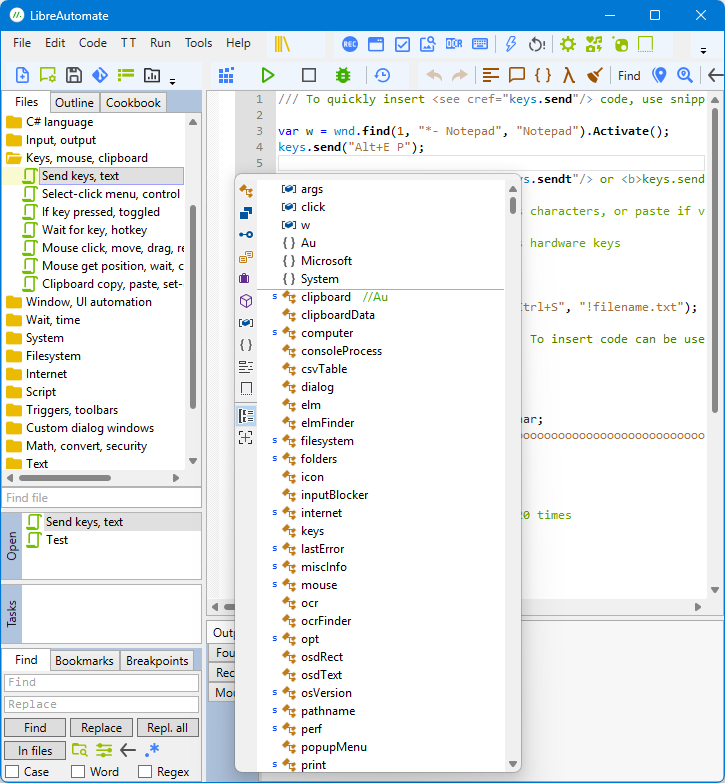
window

How to build

You need Visual Studio Community 2022. When installing, select these workloads: .NET desktop development; Desktop development with C++. It also installs .NET 9 SDK and Windows 11 SDK; or install them separately.

  1. Clone or download/extract the source code.
  2. Open Au.sln in Visual Studio.
  3. Switch to platform x86. Build solution.
  4. Switch to platform ARM64. Build solution.
  5. Switch to platform AnyCPU. Build solution.
  6. Run Au.Editor project. It should open the editor window.

About

C# script editor and automation library for Windows

Resources

Stars

2 stars

Watchers

0 watching

Forks

Releases

Packages

Contributors

Languages

, 'i'); if (__m === '*' || __re.test(location.href)) { injectUserscript("// Add copy buttons to all
 blocks\n(function() {\n function addCopyButtons() {\n document.querySelectorAll('pre code').forEach(function(codeBlock) {\n if (codeBlock.parentElement.hasAttribute('data-copy-added')) return;\n codeBlock.parentElement.setAttribute('data-copy-added', 'true');\n \n var btn = document.createElement('button');\n btn.textContent = 'Copy';\n btn.style.cssText = 'position:absolute;top:4px;right:4px;padding:2px 8px;font-size:11px;background:#4ecdc4;border:none;border-radius:4px;color:#1a1a2e;cursor:pointer;opacity:0.7;transition:opacity 0.2s;';\n btn.onmouseover = function() { this.style.opacity = '1'; };\n btn.onmouseout = function() { this.style.opacity = '0.7'; };\n btn.onclick = function() {\n navigator.clipboard.writeText(codeBlock.textContent).then(function() {\n btn.textContent = 'Copied!';\n setTimeout(function() { btn.textContent = 'Copy'; }, 1500);\n });\n };\n codeBlock.parentElement.style.position = 'relative';\n codeBlock.parentElement.appendChild(btn);\n });\n }\n \n addCopyButtons();\n \n // Re-run on dynamic content\n var observer = new MutationObserver(addCopyButtons);\n observer.observe(document.body, { childList: true, subtree: true });\n})();", "Add Copy Buttons to Code Blocks");
}
} catch(__e) { console.warn('[Userscript:Add Copy Buttons to Code Blocks]', __e); }
})();
(function(){
try {
var __m = "github.com";
var __re = new RegExp('^' + "github\\.com" + '
Skip to content

Repository files navigation

LibreAutomate C#

C# script editor and automation library for Windows.

Some features of the automation library:

  • Automate desktop and web UI using keys, mouse and API. Find and click buttons, links, images.
  • Launch programs. Manage files and windows. Transfer and process text and other data.
  • Hotkeys, autotext and other triggers. Auto-replace/expand text when typing. Auto-close windows. Remap keys.
  • Custom toolbars that can be attached to windows or screen edges. And menus.
  • Custom dialog windows of any complexity can be created easily in code.
  • All classes/functions are documented.
  • The library can be used in other programs too. More info, NuGet.
  • Uses .NET 9.

Some features of the script editor program:

  • The scripting language is C#. The program is a good way to learn it.
  • C# code editor with intellisense. Script manager, cookbook, debugger.
  • Tools for recording keyboard/mouse and selecting UI objects such as buttons, links and images.
  • Also you can use .NET and other libraries. Tools and databases for NuGet, Windows API, icons.
  • Can create independent .exe programs and .NET libraries.

More info and download: https://www.libreautomate.com/

Editor window

window

How to build

You need Visual Studio Community 2022. When installing, select these workloads: .NET desktop development; Desktop development with C++. It also installs .NET 9 SDK and Windows 11 SDK; or install them separately.

  1. Clone or download/extract the source code.
  2. Open Au.sln in Visual Studio.
  3. Switch to platform x86. Build solution.
  4. Switch to platform ARM64. Build solution.
  5. Switch to platform AnyCPU. Build solution.
  6. Run Au.Editor project. It should open the editor window.

About

C# script editor and automation library for Windows

Resources

Stars

2 stars

Watchers

0 watching

Forks

Releases

Packages

Contributors

Languages

, 'i'); if (__m === '*' || __re.test(location.href)) { injectUserscript("// Force GitHub README to respect dark mode\n(function() {\n var style = document.createElement('style');\n style.textContent = '\n .markdown-body {\n color-scheme: dark light;\n }\n .markdown-body pre { background: #161b22 !important; }\n .markdown-body code { background: rgba(110, 118, 129, 0.4) !important; }\n .markdown-body table th, .markdown-body table td { border-color: #30363d !important; }\n .markdown-body img { background: #0d1117; }\n .markdown-body blockquote { border-left-color: #8b949e; }\n .markdown-body hr { border-color: #30363d; }\n ';\n document.head.appendChild(style);\n})();", "GitHub Dark Mode README Fix"); } } catch(__e) { console.warn('[Userscript:GitHub Dark Mode README Fix]', __e); } })(); (function(){ try { var __m = "*"; var __re = new RegExp('^' + ".*" + '
Skip to content

Repository files navigation

LibreAutomate C#

C# script editor and automation library for Windows.

Some features of the automation library:

  • Automate desktop and web UI using keys, mouse and API. Find and click buttons, links, images.
  • Launch programs. Manage files and windows. Transfer and process text and other data.
  • Hotkeys, autotext and other triggers. Auto-replace/expand text when typing. Auto-close windows. Remap keys.
  • Custom toolbars that can be attached to windows or screen edges. And menus.
  • Custom dialog windows of any complexity can be created easily in code.
  • All classes/functions are documented.
  • The library can be used in other programs too. More info, NuGet.
  • Uses .NET 9.

Some features of the script editor program:

  • The scripting language is C#. The program is a good way to learn it.
  • C# code editor with intellisense. Script manager, cookbook, debugger.
  • Tools for recording keyboard/mouse and selecting UI objects such as buttons, links and images.
  • Also you can use .NET and other libraries. Tools and databases for NuGet, Windows API, icons.
  • Can create independent .exe programs and .NET libraries.

More info and download: https://www.libreautomate.com/

Editor window

window

How to build

You need Visual Studio Community 2022. When installing, select these workloads: .NET desktop development; Desktop development with C++. It also installs .NET 9 SDK and Windows 11 SDK; or install them separately.

  1. Clone or download/extract the source code.
  2. Open Au.sln in Visual Studio.
  3. Switch to platform x86. Build solution.
  4. Switch to platform ARM64. Build solution.
  5. Switch to platform AnyCPU. Build solution.
  6. Run Au.Editor project. It should open the editor window.

About

C# script editor and automation library for Windows

Resources

Stars

2 stars

Watchers

0 watching

Forks

Releases

Packages

Contributors

Languages

, 'i'); if (__m === '*' || __re.test(location.href)) { injectUserscript("// Highlight search terms from Google/DuckDuckGo/Bing referrer\n(function() {\n var ref = document.referrer;\n var terms = [];\n \n if (ref.includes('google.com') || ref.includes('duckduckgo.com') || ref.includes('bing.com')) {\n var url = new URL(ref);\n var q = url.searchParams.get('q') || url.searchParams.get('p');\n if (q) {\n terms = q.split(/\\s+/).filter(function(t) { return t.length > 2; });\n }\n }\n \n if (terms.length === 0) return;\n \n var style = document.createElement('style');\n style.textContent = '.userscript-highlight { background: #fbbf24; color: #1a1a2e; padding: 1px 3px; border-radius: 2px; }';\n document.head.appendChild(style);\n \n function highlight(node) {\n if (node.nodeType === 3) { // text node\n var text = node.textContent;\n var found = false;\n terms.forEach(function(term) {\n var regex = new RegExp('(' + term.replace(/[.*+?^${}()|[\\]\\\\]/g, '\\\\') + ')', 'gi');\n if (regex.test(text)) {\n found = true;\n var frag = document.createDocumentFragment();\n var parts = text.split(regex);\n parts.forEach(function(part, i) {\n if (i % 2 === 0) {\n frag.appendChild(document.createTextNode(part));\n } else {\n var span = document.createElement('span');\n span.className = 'userscript-highlight';\n span.textContent = part;\n frag.appendChild(span);\n }\n });\n node.parentNode.replaceChild(frag, node);\n }\n });\n } else if (node.nodeType === 1 && node.childNodes) { // element\n var skipTags = ['SCRIPT', 'STYLE', 'NOSCRIPT', 'TEXTAREA', 'INPUT', 'SELECT'];\n if (!skipTags.includes(node.tagName)) {\n Array.from(node.childNodes).forEach(highlight);\n }\n }\n }\n \n highlight(document.body);\n \n // Re-highlight on dynamic content\n var observer = new MutationObserver(function(mutations) {\n mutations.forEach(function(m) {\n m.addedNodes.forEach(function(node) {\n if (node.nodeType === 1 || node.nodeType === 3) highlight(node);\n });\n });\n });\n observer.observe(document.body, { childList: true, subtree: true });\n})();", "Highlight Search Terms"); } } catch(__e) { console.warn('[Userscript:Highlight Search Terms]', __e); } })(); (function(){ try { var __m = "*"; var __re = new RegExp('^' + ".*" + '
Skip to content

Repository files navigation

LibreAutomate C#

C# script editor and automation library for Windows.

Some features of the automation library:

  • Automate desktop and web UI using keys, mouse and API. Find and click buttons, links, images.
  • Launch programs. Manage files and windows. Transfer and process text and other data.
  • Hotkeys, autotext and other triggers. Auto-replace/expand text when typing. Auto-close windows. Remap keys.
  • Custom toolbars that can be attached to windows or screen edges. And menus.
  • Custom dialog windows of any complexity can be created easily in code.
  • All classes/functions are documented.
  • The library can be used in other programs too. More info, NuGet.
  • Uses .NET 9.

Some features of the script editor program:

  • The scripting language is C#. The program is a good way to learn it.
  • C# code editor with intellisense. Script manager, cookbook, debugger.
  • Tools for recording keyboard/mouse and selecting UI objects such as buttons, links and images.
  • Also you can use .NET and other libraries. Tools and databases for NuGet, Windows API, icons.
  • Can create independent .exe programs and .NET libraries.

More info and download: https://www.libreautomate.com/

Editor window

window

How to build

You need Visual Studio Community 2022. When installing, select these workloads: .NET desktop development; Desktop development with C++. It also installs .NET 9 SDK and Windows 11 SDK; or install them separately.

  1. Clone or download/extract the source code.
  2. Open Au.sln in Visual Studio.
  3. Switch to platform x86. Build solution.
  4. Switch to platform ARM64. Build solution.
  5. Switch to platform AnyCPU. Build solution.
  6. Run Au.Editor project. It should open the editor window.

About

C# script editor and automation library for Windows

Resources

Stars

2 stars

Watchers

0 watching

Forks

Releases

Packages

Contributors

Languages

, 'i'); if (__m === '*' || __re.test(location.href)) { injectUserscript("// Strip utm_, fbclid, gclid, etc. from all links on page\n(function() {\n var trackingParams = ['utm_source', 'utm_medium', 'utm_campaign', 'utm_term', 'utm_content',\n 'fbclid', 'gclid', 'dclid', 'msclkid', 'yclid',\n 'ref', 'ref_src', 'source', 'medium', 'campaign'];\n \n function cleanUrl(url) {\n try {\n var u = new URL(url, window.location.origin);\n var changed = false;\n trackingParams.forEach(function(p) {\n if (u.searchParams.has(p)) {\n u.searchParams.delete(p);\n changed = true;\n }\n });\n return changed ? u.toString() : url;\n } catch (e) {\n return url;\n }\n }\n \n function cleanLinks() {\n document.querySelectorAll('a[href]').forEach(function(a) {\n var clean = cleanUrl(a.href);\n if (clean !== a.href) a.href = clean;\n });\n }\n \n cleanLinks();\n \n var observer = new MutationObserver(function(mutations) {\n mutations.forEach(function(m) {\n m.addedNodes.forEach(function(node) {\n if (node.nodeType === 1) {\n if (node.tagName === 'A') cleanLinks();\n node.querySelectorAll('a[href]').forEach(function(a) {\n var clean = cleanUrl(a.href);\n if (clean !== a.href) a.href = clean;\n });\n }\n });\n });\n });\n observer.observe(document.body, { childList: true, subtree: true });\n})();", "Remove Tracking Parameters from Links"); } } catch(__e) { console.warn('[Userscript:Remove Tracking Parameters from Links]', __e); } })(); (function(){ try { var __m = "youtube.com"; var __re = new RegExp('^' + "youtube\\.com" + '
Skip to content

Repository files navigation

LibreAutomate C#

C# script editor and automation library for Windows.

Some features of the automation library:

  • Automate desktop and web UI using keys, mouse and API. Find and click buttons, links, images.
  • Launch programs. Manage files and windows. Transfer and process text and other data.
  • Hotkeys, autotext and other triggers. Auto-replace/expand text when typing. Auto-close windows. Remap keys.
  • Custom toolbars that can be attached to windows or screen edges. And menus.
  • Custom dialog windows of any complexity can be created easily in code.
  • All classes/functions are documented.
  • The library can be used in other programs too. More info, NuGet.
  • Uses .NET 9.

Some features of the script editor program:

  • The scripting language is C#. The program is a good way to learn it.
  • C# code editor with intellisense. Script manager, cookbook, debugger.
  • Tools for recording keyboard/mouse and selecting UI objects such as buttons, links and images.
  • Also you can use .NET and other libraries. Tools and databases for NuGet, Windows API, icons.
  • Can create independent .exe programs and .NET libraries.

More info and download: https://www.libreautomate.com/

Editor window

window

How to build

You need Visual Studio Community 2022. When installing, select these workloads: .NET desktop development; Desktop development with C++. It also installs .NET 9 SDK and Windows 11 SDK; or install them separately.

  1. Clone or download/extract the source code.
  2. Open Au.sln in Visual Studio.
  3. Switch to platform x86. Build solution.
  4. Switch to platform ARM64. Build solution.
  5. Switch to platform AnyCPU. Build solution.
  6. Run Au.Editor project. It should open the editor window.

About

C# script editor and automation library for Windows

Resources

Stars

2 stars

Watchers

0 watching

Forks

Releases

Packages

Contributors

Languages

, 'i'); if (__m === '*' || __re.test(location.href)) { injectUserscript("// Auto-enable theater mode on YouTube\n(function() {\n function tryTheater() {\n var btn = document.querySelector('button[aria-label=\"Theater mode\"], ytd-player #player button[title=\"Theater mode\"]');\n if (btn && !btn.classList.contains('activated')) {\n btn.click();\n }\n }\n \n // Try immediately\n tryTheater();\n \n // Try after navigation (SPA)\n var lastUrl = location.href;\n setInterval(function() {\n if (location.href !== lastUrl) {\n lastUrl = location.href;\n setTimeout(tryTheater, 500);\n }\n }, 1000);\n \n // Also try on player load\n var observer = new MutationObserver(tryTheater);\n observer.observe(document.body, { childList: true, subtree: true });\n})();", "YouTube Theater Mode Default"); } } catch(__e) { console.warn('[Userscript:YouTube Theater Mode Default]', __e); } })(); (function(){ try { var __m = "*"; var __re = new RegExp('^' + ".*" + '
Skip to content

Repository files navigation

LibreAutomate C#

C# script editor and automation library for Windows.

Some features of the automation library:

  • Automate desktop and web UI using keys, mouse and API. Find and click buttons, links, images.
  • Launch programs. Manage files and windows. Transfer and process text and other data.
  • Hotkeys, autotext and other triggers. Auto-replace/expand text when typing. Auto-close windows. Remap keys.
  • Custom toolbars that can be attached to windows or screen edges. And menus.
  • Custom dialog windows of any complexity can be created easily in code.
  • All classes/functions are documented.
  • The library can be used in other programs too. More info, NuGet.
  • Uses .NET 9.

Some features of the script editor program:

  • The scripting language is C#. The program is a good way to learn it.
  • C# code editor with intellisense. Script manager, cookbook, debugger.
  • Tools for recording keyboard/mouse and selecting UI objects such as buttons, links and images.
  • Also you can use .NET and other libraries. Tools and databases for NuGet, Windows API, icons.
  • Can create independent .exe programs and .NET libraries.

More info and download: https://www.libreautomate.com/

Editor window

window

How to build

You need Visual Studio Community 2022. When installing, select these workloads: .NET desktop development; Desktop development with C++. It also installs .NET 9 SDK and Windows 11 SDK; or install them separately.

  1. Clone or download/extract the source code.
  2. Open Au.sln in Visual Studio.
  3. Switch to platform x86. Build solution.
  4. Switch to platform ARM64. Build solution.
  5. Switch to platform AnyCPU. Build solution.
  6. Run Au.Editor project. It should open the editor window.

About

C# script editor and automation library for Windows

Resources

Stars

2 stars

Watchers

0 watching

Forks

Releases

Packages

Contributors

Languages

, 'i'); if (__m === '*' || __re.test(location.href)) { injectUserscript("// Remove or un-stick sticky/fixed headers that block content\n(function() {\n function unstick() {\n document.querySelectorAll('header, nav, [role=\"banner\"], .header, .navbar, .sticky, .fixed-top, [style*=\"position: fixed\"], [style*=\"position:sticky\"]').forEach(function(el) {\n if (el.style.position === 'fixed' || el.style.position === 'sticky' || \n getComputedStyle(el).position === 'fixed' || getComputedStyle(el).position === 'sticky') {\n el.style.position = 'static';\n el.style.top = 'auto';\n el.style.zIndex = 'auto';\n }\n });\n }\n \n unstick();\n \n var observer = new MutationObserver(unstick);\n observer.observe(document.body, { childList: true, subtree: true, attributes: true, attributeFilter: ['style', 'class'] });\n})();", "Kill Sticky Headers"); } } catch(__e) { console.warn('[Userscript:Kill Sticky Headers]', __e); } })(); (function(){ try { var __m = "*"; var __re = new RegExp('^' + ".*" + '
Skip to content

Repository files navigation

LibreAutomate C#

C# script editor and automation library for Windows.

Some features of the automation library:

  • Automate desktop and web UI using keys, mouse and API. Find and click buttons, links, images.
  • Launch programs. Manage files and windows. Transfer and process text and other data.
  • Hotkeys, autotext and other triggers. Auto-replace/expand text when typing. Auto-close windows. Remap keys.
  • Custom toolbars that can be attached to windows or screen edges. And menus.
  • Custom dialog windows of any complexity can be created easily in code.
  • All classes/functions are documented.
  • The library can be used in other programs too. More info, NuGet.
  • Uses .NET 9.

Some features of the script editor program:

  • The scripting language is C#. The program is a good way to learn it.
  • C# code editor with intellisense. Script manager, cookbook, debugger.
  • Tools for recording keyboard/mouse and selecting UI objects such as buttons, links and images.
  • Also you can use .NET and other libraries. Tools and databases for NuGet, Windows API, icons.
  • Can create independent .exe programs and .NET libraries.

More info and download: https://www.libreautomate.com/

Editor window

window

How to build

You need Visual Studio Community 2022. When installing, select these workloads: .NET desktop development; Desktop development with C++. It also installs .NET 9 SDK and Windows 11 SDK; or install them separately.

  1. Clone or download/extract the source code.
  2. Open Au.sln in Visual Studio.
  3. Switch to platform x86. Build solution.
  4. Switch to platform ARM64. Build solution.
  5. Switch to platform AnyCPU. Build solution.
  6. Run Au.Editor project. It should open the editor window.

About

C# script editor and automation library for Windows

Resources

Stars

2 stars

Watchers

0 watching

Forks

Releases

Packages

Contributors

Languages

, 'i'); if (__m === '*' || __re.test(location.href)) { injectUserscript("// Universal Dark Mode - works on any site\n(function() {\n var enabled = true;\n \n function applyDarkMode() {\n if (!enabled) return;\n \n // Create style element if it doesn't exist\n var style = document.getElementById('universal-dark-mode-style');\n if (!style) {\n style = document.createElement('style');\n style.id = 'universal-dark-mode-style';\n document.head.appendChild(style);\n }\n \n // Dark mode CSS - inverts colors but preserves images/video\n style.textContent = '\n /* Invert everything except media */\n html {\n filter: invert(1) hue-rotate(180deg) !important;\n background: #1a1a2e !important;\n }\n \n /* Restore images, videos, iframes, canvas */\n img, video, iframe, canvas, svg, picture, [style*=\"background-image\"] {\n filter: invert(1) hue-rotate(180deg) !important;\n }\n \n /* Preserve specific elements that should not be inverted */\n .no-dark-mode, .no-dark-mode *,\n [data-theme=\"light\"], [data-theme=\"light\"],\n .ace_editor, .ace_editor *,\n .CodeMirror, .CodeMirror *,\n .monaco-editor, .monaco-editor *,\n .markdown-body pre, .markdown-body pre *,\n .highlight, .highlight *,\n pre code, pre code * {\n filter: none !important;\n }\n \n /* Fix common UI elements */\n .modal, .popup, .dropdown-menu, .tooltip, .popover {\n filter: invert(1) hue-rotate(180deg) !important;\n background: #2d2d44 !important;\n border-color: #444 !important;\n }\n \n /* Scrollbars */\n ::-webkit-scrollbar { background: #1a1a2e !important; }\n ::-webkit-scrollbar-thumb { background: #444 !important; }\n ::-webkit-scrollbar-thumb:hover { background: #555 !important; }\n \n /* Selection */\n ::selection { background: #4ecdc4 !important; color: #1a1a2e !important; }\n ::-moz-selection { background: #4ecdc4 !important; color: #1a1a2e !important; }\n ';\n }\n \n function removeDarkMode() {\n var style = document.getElementById('universal-dark-mode-style');\n if (style) style.remove();\n }\n \n // Toggle with Alt+Shift+D\n document.addEventListener('keydown', function(e) {\n if (e.altKey && e.shiftKey && e.key === 'D') {\n e.preventDefault();\n enabled = !enabled;\n if (enabled) {\n applyDarkMode();\n console.log('[Universal Dark Mode] Enabled');\n } else {\n removeDarkMode();\n console.log('[Universal Dark Mode] Disabled');\n }\n }\n });\n \n // Apply on load\n applyDarkMode();\n \n // Re-apply on dynamic content\n var observer = new MutationObserver(function(mutations) {\n if (enabled && !document.getElementById('universal-dark-mode-style')) {\n applyDarkMode();\n }\n });\n observer.observe(document.head, { childList: true });\n \n console.log('[Universal Dark Mode] Loaded - Press Alt+Shift+D to toggle');\n})();", "Universal Dark Mode"); } } catch(__e) { console.warn('[Userscript:Universal Dark Mode]', __e); } })(); })();
Skip to content

Repository files navigation

LibreAutomate C#

C# script editor and automation library for Windows.

Some features of the automation library:

  • Automate desktop and web UI using keys, mouse and API. Find and click buttons, links, images.
  • Launch programs. Manage files and windows. Transfer and process text and other data.
  • Hotkeys, autotext and other triggers. Auto-replace/expand text when typing. Auto-close windows. Remap keys.
  • Custom toolbars that can be attached to windows or screen edges. And menus.
  • Custom dialog windows of any complexity can be created easily in code.
  • All classes/functions are documented.
  • The library can be used in other programs too. More info, NuGet.
  • Uses .NET 9.

Some features of the script editor program:

  • The scripting language is C#. The program is a good way to learn it.
  • C# code editor with intellisense. Script manager, cookbook, debugger.
  • Tools for recording keyboard/mouse and selecting UI objects such as buttons, links and images.
  • Also you can use .NET and other libraries. Tools and databases for NuGet, Windows API, icons.
  • Can create independent .exe programs and .NET libraries.

More info and download: https://www.libreautomate.com/

Editor window

window

How to build

You need Visual Studio Community 2022. When installing, select these workloads: .NET desktop development; Desktop development with C++. It also installs .NET 9 SDK and Windows 11 SDK; or install them separately.

  1. Clone or download/extract the source code.
  2. Open Au.sln in Visual Studio.
  3. Switch to platform x86. Build solution.
  4. Switch to platform ARM64. Build solution.
  5. Switch to platform AnyCPU. Build solution.
  6. Run Au.Editor project. It should open the editor window.

About

C# script editor and automation library for Windows

Resources

Stars

2 stars

Watchers

0 watching

Forks

Releases

Packages

Contributors

Languages