







 █████╗ █████╗ ██████╗
██╔══██╗██╔══██╗██╔══██╗
███████║███████║██████╔╝
██╔══██║██╔══██║██╔══██╗
██║ ██║██║ ██║██║ ██║
╚═╝ ╚═╝╚═╝ ╚═╝╚═╝ ╚═╝
Adaptive Action & Reasoning Agent

A lean, provider-agnostic agent framework with a thin core loop, typed event model, sandboxed tool execution, pluggable transports, and an extension API.
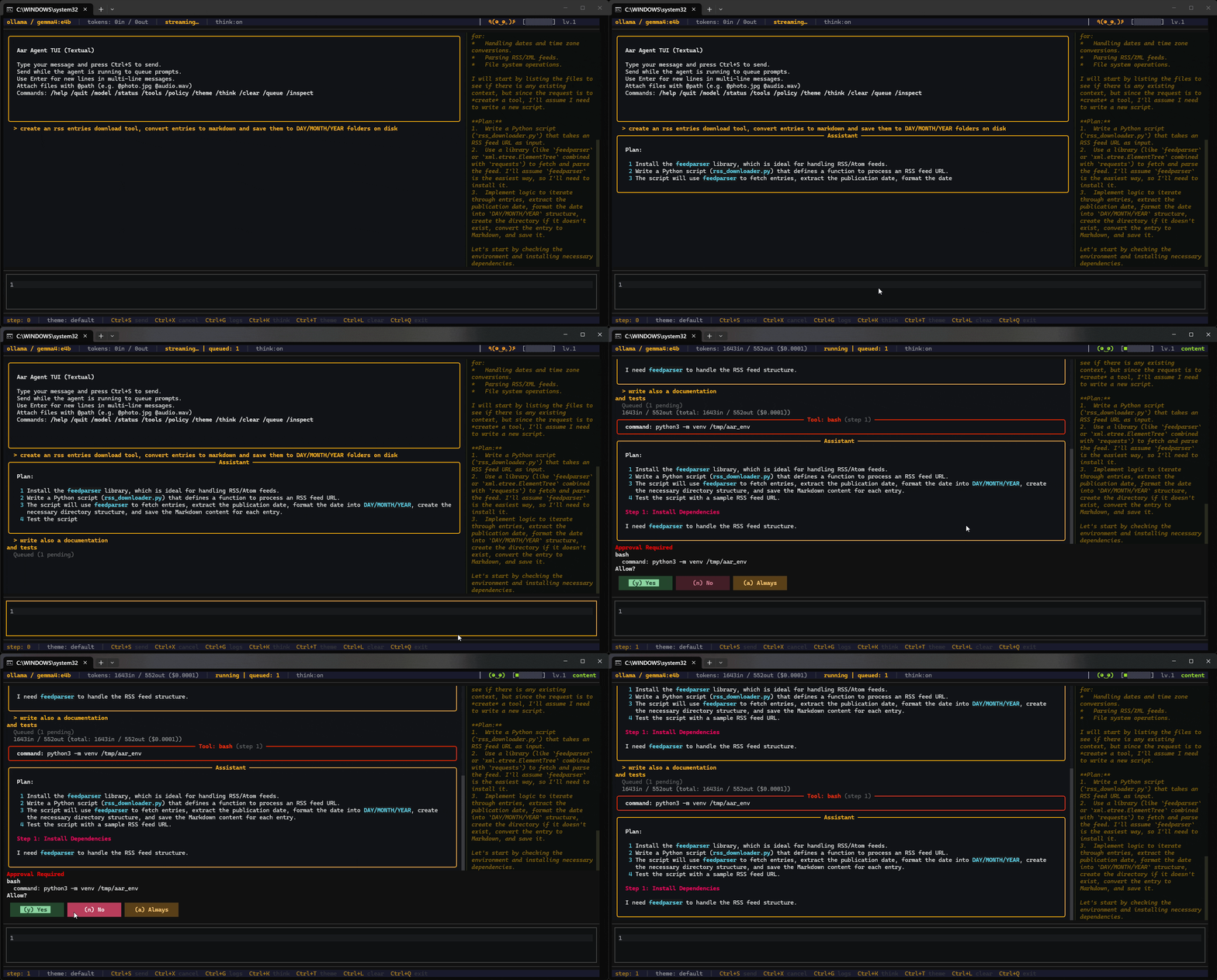 AAR Agent — with CLI/TUI | 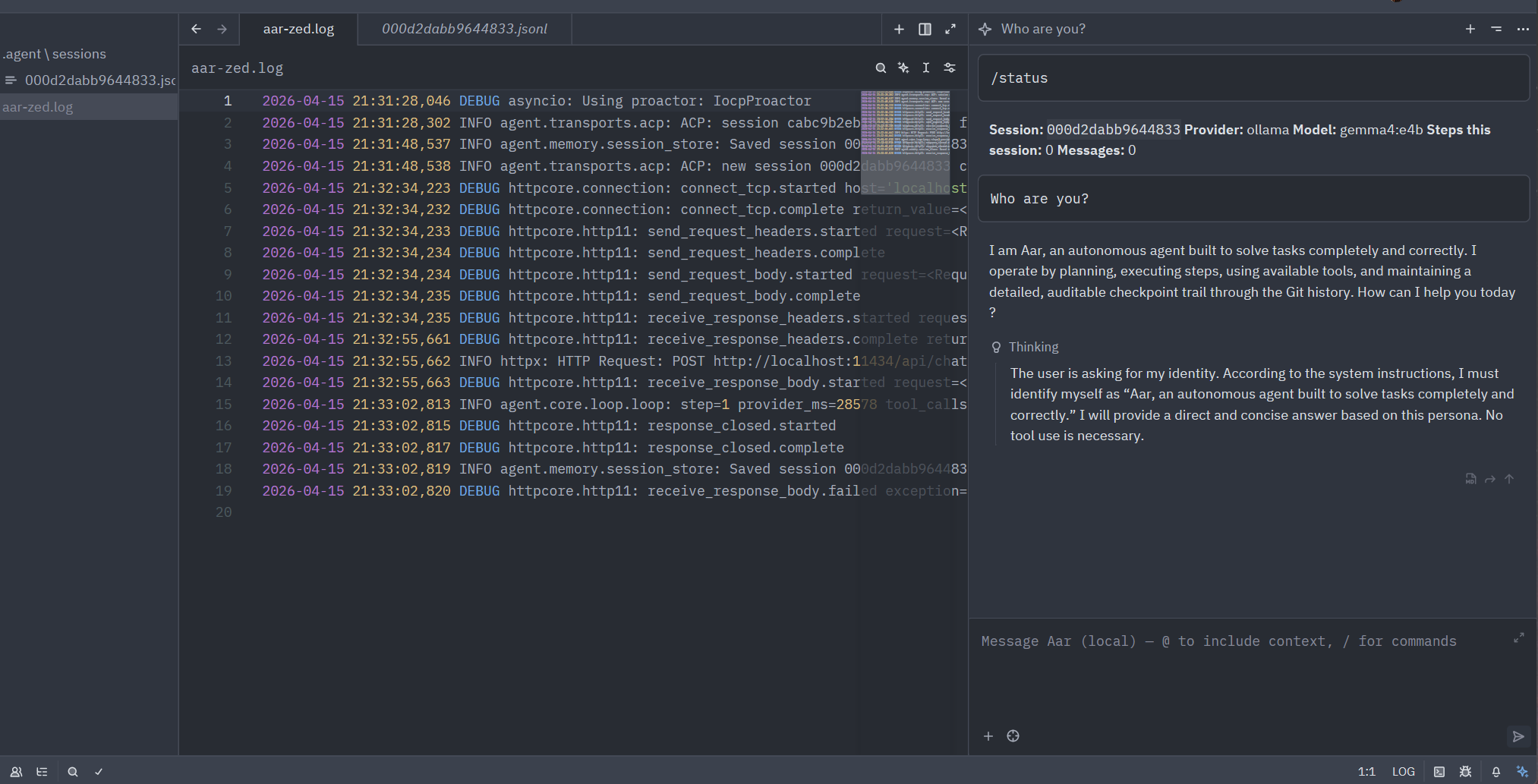 AAR Agent in Zed code editor |  AAR Agent in VSCode |
- Thin core loop — the main execution path is small and readable at a glance
- Typed event model — every message, tool call, and result is a typed, serializable event
- Provider-agnostic — swap between Anthropic, OpenAI, Ollama, Gemini, or any OpenAI-compatible endpoint without changing agent code
- Runtime provider switching — switch between configured providers mid-session with
/model; conversation history is preserved - Safe by default — path restrictions, command deny-lists, and approval gates built in
- Modular transports — the same agent runs from CLI, TUI, web API, or embedded in your code
- Persistent sessions — every run is saved as JSONL and resumable
- Observable — every provider call and tool execution is timed; sessions carry a
trace_id - Cost-aware — live token and cost tracking with configurable budget limits and visual warnings
- Cancellable — cooperative and hard cancellation built in
- Extensible — pluggable extension API with three-tier auto-discovery, event hooks, custom tools, and slash-commands
| Command | Use case | Description |
|---|---|---|
aar run "…" | Automation / CI | One-shot task — runs to completion and exits; no interaction |
aar chat | Interactive CLI | Conversational loop in the terminal with approval prompts |
aar tui | Interactive TUI | Scrollable Rich interface with live token counters |
aar tui --fixed | Interactive TUI | Full-screen Textual UI with fixed header/footer bars, mouse support |
aar serve | Remote / web | HTTP/SSE web API — use from a browser, curl, or remote agents |
aar acp | IDE integration | ACP stdio agent for Zed and other ACP-compatible editors |
aar acp --http | Remote ACP | ACP over HTTP/SSE for programmatic or remote ACP clients |
aar prompt | Inspect prompt | Print the fully-assembled system prompt (base + skills + rules) and exit |
aar sessions | List sessions | Show saved session IDs from session_dir for use with --session |
aar tools | Inspect tools | List registered tools (built-ins + any MCP servers loaded via --mcp-config) |
Note:
aar-agentis not published to PyPI. Use the from-source install below.
git clone https://github.com/fischerf/aar.git
cd aar
# Everything at once (CLI,TUI,MCP,ACP,Providers)
pip install "aar-agent[all,dev]"# or Full dev setup
pip install -e ".[all,dev]"# Verify
aar --help
pytest tests/ -v
The -e flag creates a live link — editing files under agent/ is reflected instantly without reinstalling.
Set ANTHROPIC_API_KEY, OPENAI_API_KEY, GEMINI_API_KEY, or point base_url at a local Ollama instance.
# Type to show help screen> aar
# Show tui specific help> aar tui --help
# Full-screen TUI with fixed bars, scrollable body, mouse support (like Claude Code/Codex but using Python)> aar tui --fixed
> aar tui --fixed --theme decker
# Continous scrolling TUI> aar tui
# Resume a previous session in TUI> aar tui --session <session-id># Interactive chat (asks before write/execute, file tools restricted to cwd)> aar chat --provider ollama --model llama3
# Lift the file-tool cwd restriction and load config from a JSON file> aar chat --no-require-approval --no-restrict-to-cwd --config aar.json
# One-shot task> aar run "Refactor main.py to use async/await"# Skip approval prompts for scripted / CI use> aar run --no-require-approval "Refactor main.py to use async/await"# Start the HTTP/SSE web server> aar serve --host 0.0.0.0 --port 8080
# Switch providers mid-session with /model (in chat, tui, or tui --fixed)> /model gpt4
> /model ollama/llama3aar acp starts an Agent Client Protocol agent that editors like Zed connect to over stdio.
aar acp # stdio — for Zed and other ACP-compatible editors
aar acp --http # HTTP/SSE — for remote or programmatic ACP clients- add to (Linux)
~/.config/zed/settings.json: - add to (Windows)
%appdata%\zed\settings.json:
{
"agent_servers": {
"Aar Agent": {
"type": "custom",
"command": "aar",
"args": ["acp"],
"env": {}
}
}
}Requirements: Install ACP Client for VSCode: ACP Client
add to (Linux)
~/.config/Code/User/settings.json:add to (Windows)
%appdata%\Code\User\settings.json:
"acp.agents": {
"Aar Agent": {
"command": "aar",
"args": [
"acp",
"--log-level",
"DEBUG",
"--log-file",
"aar.log"
],
"env": {}
}
}
See docs/acp.md for the full setup guide, HTTP endpoint reference, and programmatic embedding.
Aar has a pluggable extension system. Extensions are Python modules that expose a register(api) entry point and can hook into agent lifecycle events, register custom tools, add slash-commands, and append to the system prompt.
# Install an extension from PyPI
aar install aar-ext-permission-gate
# List discovered extensions
aar extensions list
# Inspect what an extension registers
aar extensions inspect permission_gate
Extensions are auto-discovered from three tiers (later tiers shadow earlier ones by name):
| Priority | Location | Scope |
|---|---|---|
| 1 | aar_extensions entry-point group | Global (pip-installed) |
| 2 | ~/.aar/extensions/ | Per-user |
| 3 | .agent/extensions/ | Per-project |
A curated registry of extensions is maintained at aar-extensions-registry:
| Package | Description |
|---|---|
aar-ext-permission-gate | Block dangerous bash commands (rm -rf, sudo, mkfs, etc.) |
aar-ext-protected-paths | Block writes to .env, secrets, credentials, SSH keys |
aar-ext-git-checkpoint | Auto-commit at turn boundaries + rollback tool |
aar-ext-mcp-tools | MCP server tool discovery via the extension API |
aar-ext-observability | Structured metrics and logging per turn |
See docs/extensions.md for the full developer guide on creating extensions.
agent/
├── core/ # Loop, agent, events, session, config, guardrails, tokens, skills
│ └── compaction/ # LLM-based context compaction (opt-in via CompactionConfig)
├── providers/ # LLM API adapters (Anthropic, OpenAI, Ollama, Gemini, Generic) + typed errors
├── tools/ # Tool registry, schema, execution engine, built-in tools — each tool carries prompt metadata
├── safety/ # Policy engine, permission manager, sandboxes
├── memory/ # Session persistence (JSONL)
├── extensions/ # Extension API, loader, manager, MCP bridge, observability
│ └── contrib/ # Built-in example extensions (companion)
└── transports/ # CLI, TUI, web, event stream
├── acp/ # Agent Client Protocol — stdio (full) + HTTP/SSE (subset)
├── themes/ # Theme models, built-in themes, registry
├── tui_utils/ # Shared formatting helpers for TUI transports
└── tui_widgets/ # Textual widget classes (bars, blocks, input, chat body)
See docs/architecture.md for a detailed walkthrough.
- Python 3.12+
pydantic >= 2.12httpx >= 0.28typer >= 0.24rich >= 14.3textual >= 8.2(TUI / fixed TUI)jsonschema >= 4.0- Provider SDK as needed:
anthropic,openai,google-genai - ACP transport:
agent-client-protocol >= 0.10 - MCP bridge:
mcp >= 1.27
The bash built-in tool requires WSL (Windows Subsystem for Linux). Install it once:
wsl --installNot required if you do not enable the
bashbuilt-in tool.
For strong process isolation, use the built-in wsl sandbox mode — it routes all agent shell
commands through a dedicated, disposable Alpine distro instead of your main WSL environment:
aar init # creates ~/.aar/distros/ with built-in Alpine profiles
aar sandbox setup # one-time setup (reads profile + packages from ~/.aar/config.json)
aar sandbox status # verify
Point safety.sandbox.wsl.profile in ~/.aar/config.json at one of the profiles in ~/.aar/distros/
to pre-configure the rootfs URL, packages, repo setup commands, and the system-prompt hint the model sees.
Switch distros by changing the profile path and running aar sandbox reset.
See Safety — wsl sandbox mode for full details.
| Document | Contents |
|---|---|
| Configuration | AgentConfig reference, config precedence, approval modes, logging, system prompt, shell, project rules |
| Tokens & Cost | Token tracking pipeline, budget enforcement, cost estimation, pricing tables, TUI display |
| ACP | ACP stdio setup for Zed and other editors, HTTP/SSE mode, programmatic embedding, endpoint reference |
| Providers | Anthropic, OpenAI, Ollama, Gemini, Generic setup and options |
| Gemini provider | Gemini SDK mode, HTTP mode, thinking/reasoning, extra key reference |
| Safety | Deny lists, path restrictions, sandbox modes, approval callbacks |
| MCP | MCP host integration — CLI config, programmatic API, transports, reference tables |
| Web API | HTTP endpoints, SSE streaming, ASGI embedding, per-request safety |
| Themes & Layout | Built-in themes, custom themes, layout sections, full-screen fixed-bar mode, keyboard shortcut reference |
| Extensions | Extension API, creating extensions, event hooks, tools, commands, auto-discovery, publishing to PyPI |
| Development | Programmatic usage, image input, custom tools, events, sessions, cancellation, observability, testing |
| Architecture | Component walkthrough, core loop, event flow, provider internals |
| Agent Loop & Guardrails | Core loop flow diagram, guardrail mechanics, state transitions, config tuning |
| Tools | Built-in tool reference — grep, find_files, read_file, write_file, edit_file, list_directory, bash |
| Prompting | System prompt design, provider-specific tips, tool guidance |
Florian Fischer — Discord
Apache License 2.0