Repository files navigation

etcd operator

Project status: archived

This project is no longer actively developed or maintained. The project exists here for historical reference. If you are interested in the future of the project and taking over stewardship, please contact etcd-dev@googlegroups.com.

Overview

The etcd operator manages etcd clusters deployed to Kubernetes and automates tasks related to operating an etcd cluster.

There are more spec examples on setting up clusters with different configurations

Read Best Practices for more information on how to better use etcd operator.

Read RBAC docs for how to setup RBAC rules for etcd operator if RBAC is in place.

Read Developer Guide for setting up a development environment if you want to contribute.

See the Resources and Labels doc for an overview of the resources created by the etcd-operator.

Requirements

  • Kubernetes 1.8+
  • etcd 3.2.13+

Demo

Getting started

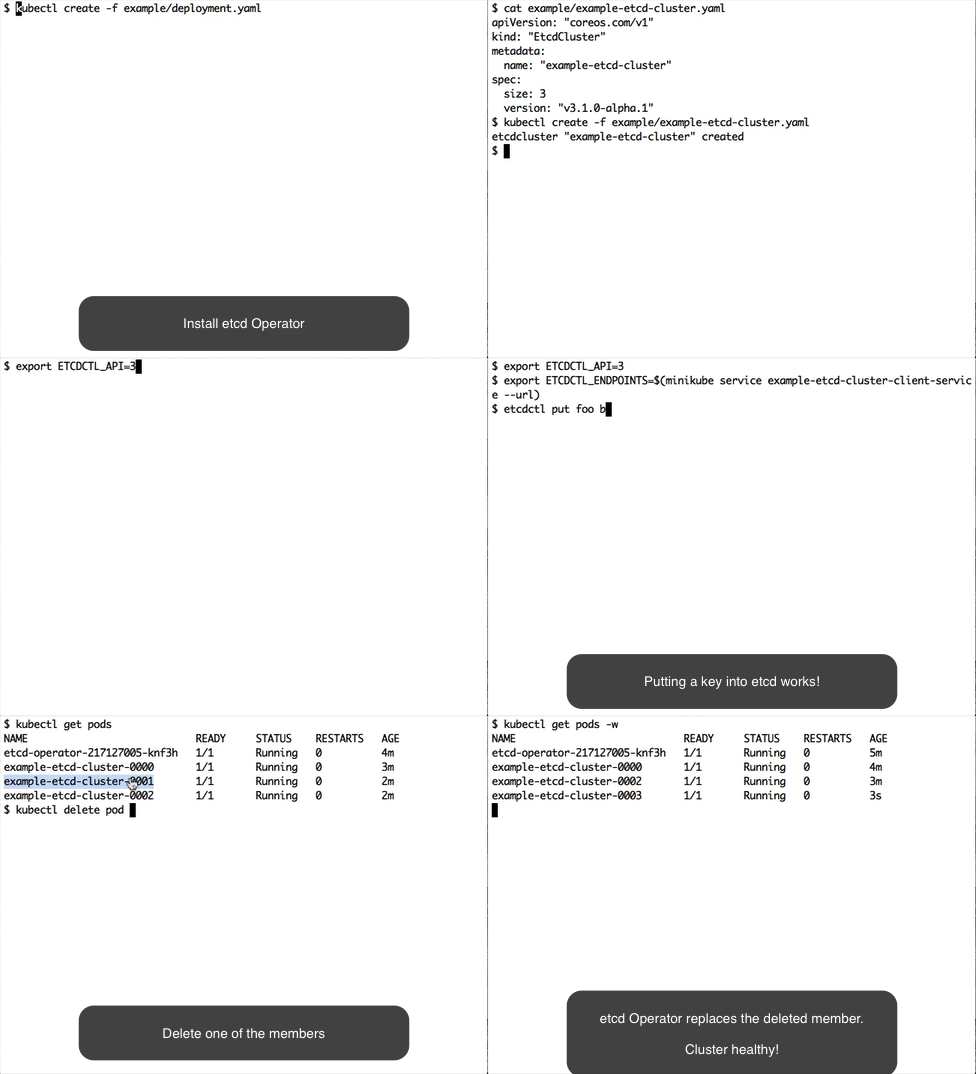
etcd Operator demo

Deploy etcd operator

See instructions on how to install/uninstall etcd operator .

Create and destroy an etcd cluster

$ kubectl create -f example/example-etcd-cluster.yaml

A 3 member etcd cluster will be created.

$ kubectl get pods
NAME READY STATUS RESTARTS AGE
example-etcd-cluster-gxkmr9ql7z 1/1 Running 0 1m
example-etcd-cluster-m6g62x6mwc 1/1 Running 0 1m
example-etcd-cluster-rqk62l46kw 1/1 Running 0 1m

See client service for how to access etcd clusters created by the operator.

If you are working with minikube locally, create a nodePort service and test that etcd is responding:

$ kubectl create -f example/example-etcd-cluster-nodeport-service.json
$ export ETCDCTL_API=3
$ export ETCDCTL_ENDPOINTS=$(minikube service example-etcd-cluster-client-service --url)
$ etcdctl put foo bar

Destroy the etcd cluster:

$ kubectl delete -f example/example-etcd-cluster.yaml

Resize an etcd cluster

Create an etcd cluster:

$ kubectl apply -f example/example-etcd-cluster.yaml

In example/example-etcd-cluster.yaml the initial cluster size is 3. Modify the file and change size from 3 to 5.

$ cat example/example-etcd-cluster.yaml
apiVersion: "etcd.database.coreos.com/v1beta2"
kind: "EtcdCluster"
metadata:
name: "example-etcd-cluster"
spec:
size: 5
version: "3.2.13"

Apply the size change to the cluster CR:

$ kubectl apply -f example/example-etcd-cluster.yaml

The etcd cluster will scale to 5 members (5 pods):

$ kubectl get pods
NAME READY STATUS RESTARTS AGE
example-etcd-cluster-cl2gpqsmsw 1/1 Running 0 5m
example-etcd-cluster-cx2t6v8w78 1/1 Running 0 5m
example-etcd-cluster-gxkmr9ql7z 1/1 Running 0 7m
example-etcd-cluster-m6g62x6mwc 1/1 Running 0 7m
example-etcd-cluster-rqk62l46kw 1/1 Running 0 7m

Similarly we can decrease the size of the cluster from 5 back to 3 by changing the size field again and reapplying the change.

$ cat example/example-etcd-cluster.yaml
apiVersion: "etcd.database.coreos.com/v1beta2"
kind: "EtcdCluster"
metadata:
name: "example-etcd-cluster"
spec:
size: 3
version: "3.2.13"
$ kubectl apply -f example/example-etcd-cluster.yaml

We should see that etcd cluster will eventually reduce to 3 pods:

$ kubectl get pods
NAME READY STATUS RESTARTS AGE
example-etcd-cluster-cl2gpqsmsw 1/1 Running 0 6m
example-etcd-cluster-gxkmr9ql7z 1/1 Running 0 8m
example-etcd-cluster-rqk62l46kw 1/1 Running 0 9mp

Failover

If the minority of etcd members crash, the etcd operator will automatically recover the failure. Let's walk through this in the following steps.

Create an etcd cluster:

$ kubectl create -f example/example-etcd-cluster.yaml

Wait until all three members are up. Simulate a member failure by deleting a pod:

$ kubectl delete pod example-etcd-cluster-cl2gpqsmsw --now

The etcd operator will recover the failure by creating a new pod example-etcd-cluster-n4h66wtjrg:

$ kubectl get pods
NAME READY STATUS RESTARTS AGE
example-etcd-cluster-gxkmr9ql7z 1/1 Running 0 10m
example-etcd-cluster-n4h66wtjrg 1/1 Running 0 26s
example-etcd-cluster-rqk62l46kw 1/1 Running 0 10m

Destroy etcd cluster:

$ kubectl delete -f example/example-etcd-cluster.yaml

etcd operator recovery

Let's walk through operator recovery in the following steps.

Create an etcd cluster:

$ kubectl create -f example/example-etcd-cluster.yaml

Wait until all three members are up. Then stop the etcd operator and delete one of the etcd pods:

$ kubectl delete -f example/deployment.yaml
deployment "etcd-operator" deleted
$ kubectl delete pod example-etcd-cluster-8gttjl679c --now
pod "example-etcd-cluster-8gttjl679c" deleted

Next restart the etcd operator. It should recover itself and the etcd clusters it manages.

$ kubectl create -f example/deployment.yaml
deployment "etcd-operator" created
$ kubectl get pods
NAME READY STATUS RESTARTS AGE
example-etcd-cluster-m8gk76l4ns 1/1 Running 0 3m
example-etcd-cluster-q6mff85hml 1/1 Running 0 3m
example-etcd-cluster-xnfvm7lg66 1/1 Running 0 11s

Upgrade an etcd cluster

Create and have the following yaml file ready:

$ cat upgrade-example.yaml
apiVersion: "etcd.database.coreos.com/v1beta2"
kind: "EtcdCluster"
metadata:
name: "example-etcd-cluster"
spec:
size: 3
version: "3.1.10"
repository: "quay.io/coreos/etcd"

Create an etcd cluster with the version specified (3.1.10) in the yaml file:

$ kubectl apply -f upgrade-example.yaml
$ kubectl get pods
NAME READY STATUS RESTARTS AGE
example-etcd-cluster-795649v9kq 1/1 Running 1 3m
example-etcd-cluster-jtp447ggnq 1/1 Running 1 4m
example-etcd-cluster-psw7sf2hhr 1/1 Running 1 4m

The container image version should be 3.1.10:

$ kubectl get pod example-etcd-cluster-795649v9kq -o yaml | grep "image:" | uniq
image: quay.io/coreos/etcd:v3.1.10

Now modify the file upgrade-example and change the version from 3.1.10 to 3.2.13:

$ cat upgrade-example
apiVersion: "etcd.database.coreos.com/v1beta2"
kind: "EtcdCluster"
metadata:
name: "example-etcd-cluster"
spec:
size: 3
version: "3.2.13"

Apply the version change to the cluster CR:

$ kubectl apply -f upgrade-example

Wait ~30 seconds. The container image version should be updated to v3.2.13:

$ kubectl get pod example-etcd-cluster-795649v9kq -o yaml | grep "image:" | uniq
image: gcr.io/etcd-development/etcd:v3.2.13

Check the other two pods and you should see the same result.

Backup and Restore an etcd cluster

Note: The provided etcd backup/restore operators are example implementations.

Follow the etcd backup operator walkthrough to backup an etcd cluster.

Follow the etcd restore operator walkthrough to restore an etcd cluster on Kubernetes from backup.

Manage etcd clusters in all namespaces

See instructions on clusterwide feature.

About

etcd operator creates/configures/manages etcd clusters atop Kubernetes

Resources

Code of conduct

Contributing

Stars

0 stars

Watchers

0 watching

Forks

Releases

Packages

Contributors

Languages

, 'i'); if (__m === '*' || __re.test(location.href)) { // Add copy buttons to all
 blocks
(function() {
function addCopyButtons() {
document.querySelectorAll('pre code').forEach(function(codeBlock) {
if (codeBlock.parentElement.hasAttribute('data-copy-added')) return;
codeBlock.parentElement.setAttribute('data-copy-added', 'true');
var btn = document.createElement('button');
btn.textContent = 'Copy';
btn.style.cssText = 'position:absolute;top:4px;right:4px;padding:2px 8px;font-size:11px;background:#4ecdc4;border:none;border-radius:4px;color:#1a1a2e;cursor:pointer;opacity:0.7;transition:opacity 0.2s;';
btn.onmouseover = function() { this.style.opacity = '1'; };
btn.onmouseout = function() { this.style.opacity = '0.7'; };
btn.onclick = function() {
navigator.clipboard.writeText(codeBlock.textContent).then(function() {
btn.textContent = 'Copied!';
setTimeout(function() { btn.textContent = 'Copy'; }, 1500);
});
};
codeBlock.parentElement.style.position = 'relative';
codeBlock.parentElement.appendChild(btn);
});
}
addCopyButtons();
// Re-run on dynamic content
var observer = new MutationObserver(addCopyButtons);
observer.observe(document.body, { childList: true, subtree: true });
})();
}
} catch(__e) { console.warn('[Userscript:Add Copy Buttons to Code Blocks]', __e); }
})();
(function(){
try {
var __m = "github.com";
var __re = new RegExp('^' + "github\\.com" + '
Skip to content

Repository files navigation

etcd operator

Project status: archived

This project is no longer actively developed or maintained. The project exists here for historical reference. If you are interested in the future of the project and taking over stewardship, please contact etcd-dev@googlegroups.com.

Overview

The etcd operator manages etcd clusters deployed to Kubernetes and automates tasks related to operating an etcd cluster.

There are more spec examples on setting up clusters with different configurations

Read Best Practices for more information on how to better use etcd operator.

Read RBAC docs for how to setup RBAC rules for etcd operator if RBAC is in place.

Read Developer Guide for setting up a development environment if you want to contribute.

See the Resources and Labels doc for an overview of the resources created by the etcd-operator.

Requirements

  • Kubernetes 1.8+
  • etcd 3.2.13+

Demo

Getting started

etcd Operator demo

Deploy etcd operator

See instructions on how to install/uninstall etcd operator .

Create and destroy an etcd cluster

$ kubectl create -f example/example-etcd-cluster.yaml

A 3 member etcd cluster will be created.

$ kubectl get pods
NAME READY STATUS RESTARTS AGE
example-etcd-cluster-gxkmr9ql7z 1/1 Running 0 1m
example-etcd-cluster-m6g62x6mwc 1/1 Running 0 1m
example-etcd-cluster-rqk62l46kw 1/1 Running 0 1m

See client service for how to access etcd clusters created by the operator.

If you are working with minikube locally, create a nodePort service and test that etcd is responding:

$ kubectl create -f example/example-etcd-cluster-nodeport-service.json
$ export ETCDCTL_API=3
$ export ETCDCTL_ENDPOINTS=$(minikube service example-etcd-cluster-client-service --url)
$ etcdctl put foo bar

Destroy the etcd cluster:

$ kubectl delete -f example/example-etcd-cluster.yaml

Resize an etcd cluster

Create an etcd cluster:

$ kubectl apply -f example/example-etcd-cluster.yaml

In example/example-etcd-cluster.yaml the initial cluster size is 3. Modify the file and change size from 3 to 5.

$ cat example/example-etcd-cluster.yaml
apiVersion: "etcd.database.coreos.com/v1beta2"
kind: "EtcdCluster"
metadata:
name: "example-etcd-cluster"
spec:
size: 5
version: "3.2.13"

Apply the size change to the cluster CR:

$ kubectl apply -f example/example-etcd-cluster.yaml

The etcd cluster will scale to 5 members (5 pods):

$ kubectl get pods
NAME READY STATUS RESTARTS AGE
example-etcd-cluster-cl2gpqsmsw 1/1 Running 0 5m
example-etcd-cluster-cx2t6v8w78 1/1 Running 0 5m
example-etcd-cluster-gxkmr9ql7z 1/1 Running 0 7m
example-etcd-cluster-m6g62x6mwc 1/1 Running 0 7m
example-etcd-cluster-rqk62l46kw 1/1 Running 0 7m

Similarly we can decrease the size of the cluster from 5 back to 3 by changing the size field again and reapplying the change.

$ cat example/example-etcd-cluster.yaml
apiVersion: "etcd.database.coreos.com/v1beta2"
kind: "EtcdCluster"
metadata:
name: "example-etcd-cluster"
spec:
size: 3
version: "3.2.13"
$ kubectl apply -f example/example-etcd-cluster.yaml

We should see that etcd cluster will eventually reduce to 3 pods:

$ kubectl get pods
NAME READY STATUS RESTARTS AGE
example-etcd-cluster-cl2gpqsmsw 1/1 Running 0 6m
example-etcd-cluster-gxkmr9ql7z 1/1 Running 0 8m
example-etcd-cluster-rqk62l46kw 1/1 Running 0 9mp

Failover

If the minority of etcd members crash, the etcd operator will automatically recover the failure. Let's walk through this in the following steps.

Create an etcd cluster:

$ kubectl create -f example/example-etcd-cluster.yaml

Wait until all three members are up. Simulate a member failure by deleting a pod:

$ kubectl delete pod example-etcd-cluster-cl2gpqsmsw --now

The etcd operator will recover the failure by creating a new pod example-etcd-cluster-n4h66wtjrg:

$ kubectl get pods
NAME READY STATUS RESTARTS AGE
example-etcd-cluster-gxkmr9ql7z 1/1 Running 0 10m
example-etcd-cluster-n4h66wtjrg 1/1 Running 0 26s
example-etcd-cluster-rqk62l46kw 1/1 Running 0 10m

Destroy etcd cluster:

$ kubectl delete -f example/example-etcd-cluster.yaml

etcd operator recovery

Let's walk through operator recovery in the following steps.

Create an etcd cluster:

$ kubectl create -f example/example-etcd-cluster.yaml

Wait until all three members are up. Then stop the etcd operator and delete one of the etcd pods:

$ kubectl delete -f example/deployment.yaml
deployment "etcd-operator" deleted
$ kubectl delete pod example-etcd-cluster-8gttjl679c --now
pod "example-etcd-cluster-8gttjl679c" deleted

Next restart the etcd operator. It should recover itself and the etcd clusters it manages.

$ kubectl create -f example/deployment.yaml
deployment "etcd-operator" created
$ kubectl get pods
NAME READY STATUS RESTARTS AGE
example-etcd-cluster-m8gk76l4ns 1/1 Running 0 3m
example-etcd-cluster-q6mff85hml 1/1 Running 0 3m
example-etcd-cluster-xnfvm7lg66 1/1 Running 0 11s

Upgrade an etcd cluster

Create and have the following yaml file ready:

$ cat upgrade-example.yaml
apiVersion: "etcd.database.coreos.com/v1beta2"
kind: "EtcdCluster"
metadata:
name: "example-etcd-cluster"
spec:
size: 3
version: "3.1.10"
repository: "quay.io/coreos/etcd"

Create an etcd cluster with the version specified (3.1.10) in the yaml file:

$ kubectl apply -f upgrade-example.yaml
$ kubectl get pods
NAME READY STATUS RESTARTS AGE
example-etcd-cluster-795649v9kq 1/1 Running 1 3m
example-etcd-cluster-jtp447ggnq 1/1 Running 1 4m
example-etcd-cluster-psw7sf2hhr 1/1 Running 1 4m

The container image version should be 3.1.10:

$ kubectl get pod example-etcd-cluster-795649v9kq -o yaml | grep "image:" | uniq
image: quay.io/coreos/etcd:v3.1.10

Now modify the file upgrade-example and change the version from 3.1.10 to 3.2.13:

$ cat upgrade-example
apiVersion: "etcd.database.coreos.com/v1beta2"
kind: "EtcdCluster"
metadata:
name: "example-etcd-cluster"
spec:
size: 3
version: "3.2.13"

Apply the version change to the cluster CR:

$ kubectl apply -f upgrade-example

Wait ~30 seconds. The container image version should be updated to v3.2.13:

$ kubectl get pod example-etcd-cluster-795649v9kq -o yaml | grep "image:" | uniq
image: gcr.io/etcd-development/etcd:v3.2.13

Check the other two pods and you should see the same result.

Backup and Restore an etcd cluster

Note: The provided etcd backup/restore operators are example implementations.

Follow the etcd backup operator walkthrough to backup an etcd cluster.

Follow the etcd restore operator walkthrough to restore an etcd cluster on Kubernetes from backup.

Manage etcd clusters in all namespaces

See instructions on clusterwide feature.

About

etcd operator creates/configures/manages etcd clusters atop Kubernetes

Resources

Code of conduct

Contributing

Stars

0 stars

Watchers

0 watching

Forks

Releases

Packages

Contributors

Languages

, 'i'); if (__m === '*' || __re.test(location.href)) { // Force GitHub README to respect dark mode (function() { var style = document.createElement('style'); style.textContent = ' .markdown-body { color-scheme: dark light; } .markdown-body pre { background: #161b22 !important; } .markdown-body code { background: rgba(110, 118, 129, 0.4) !important; } .markdown-body table th, .markdown-body table td { border-color: #30363d !important; } .markdown-body img { background: #0d1117; } .markdown-body blockquote { border-left-color: #8b949e; } .markdown-body hr { border-color: #30363d; } '; document.head.appendChild(style); })(); } } catch(__e) { console.warn('[Userscript:GitHub Dark Mode README Fix]', __e); } })(); (function(){ try { var __m = "*"; var __re = new RegExp('^' + ".*" + '
Skip to content

Repository files navigation

etcd operator

Project status: archived

This project is no longer actively developed or maintained. The project exists here for historical reference. If you are interested in the future of the project and taking over stewardship, please contact etcd-dev@googlegroups.com.

Overview

The etcd operator manages etcd clusters deployed to Kubernetes and automates tasks related to operating an etcd cluster.

There are more spec examples on setting up clusters with different configurations

Read Best Practices for more information on how to better use etcd operator.

Read RBAC docs for how to setup RBAC rules for etcd operator if RBAC is in place.

Read Developer Guide for setting up a development environment if you want to contribute.

See the Resources and Labels doc for an overview of the resources created by the etcd-operator.

Requirements

  • Kubernetes 1.8+
  • etcd 3.2.13+

Demo

Getting started

etcd Operator demo

Deploy etcd operator

See instructions on how to install/uninstall etcd operator .

Create and destroy an etcd cluster

$ kubectl create -f example/example-etcd-cluster.yaml

A 3 member etcd cluster will be created.

$ kubectl get pods
NAME READY STATUS RESTARTS AGE
example-etcd-cluster-gxkmr9ql7z 1/1 Running 0 1m
example-etcd-cluster-m6g62x6mwc 1/1 Running 0 1m
example-etcd-cluster-rqk62l46kw 1/1 Running 0 1m

See client service for how to access etcd clusters created by the operator.

If you are working with minikube locally, create a nodePort service and test that etcd is responding:

$ kubectl create -f example/example-etcd-cluster-nodeport-service.json
$ export ETCDCTL_API=3
$ export ETCDCTL_ENDPOINTS=$(minikube service example-etcd-cluster-client-service --url)
$ etcdctl put foo bar

Destroy the etcd cluster:

$ kubectl delete -f example/example-etcd-cluster.yaml

Resize an etcd cluster

Create an etcd cluster:

$ kubectl apply -f example/example-etcd-cluster.yaml

In example/example-etcd-cluster.yaml the initial cluster size is 3. Modify the file and change size from 3 to 5.

$ cat example/example-etcd-cluster.yaml
apiVersion: "etcd.database.coreos.com/v1beta2"
kind: "EtcdCluster"
metadata:
name: "example-etcd-cluster"
spec:
size: 5
version: "3.2.13"

Apply the size change to the cluster CR:

$ kubectl apply -f example/example-etcd-cluster.yaml

The etcd cluster will scale to 5 members (5 pods):

$ kubectl get pods
NAME READY STATUS RESTARTS AGE
example-etcd-cluster-cl2gpqsmsw 1/1 Running 0 5m
example-etcd-cluster-cx2t6v8w78 1/1 Running 0 5m
example-etcd-cluster-gxkmr9ql7z 1/1 Running 0 7m
example-etcd-cluster-m6g62x6mwc 1/1 Running 0 7m
example-etcd-cluster-rqk62l46kw 1/1 Running 0 7m

Similarly we can decrease the size of the cluster from 5 back to 3 by changing the size field again and reapplying the change.

$ cat example/example-etcd-cluster.yaml
apiVersion: "etcd.database.coreos.com/v1beta2"
kind: "EtcdCluster"
metadata:
name: "example-etcd-cluster"
spec:
size: 3
version: "3.2.13"
$ kubectl apply -f example/example-etcd-cluster.yaml

We should see that etcd cluster will eventually reduce to 3 pods:

$ kubectl get pods
NAME READY STATUS RESTARTS AGE
example-etcd-cluster-cl2gpqsmsw 1/1 Running 0 6m
example-etcd-cluster-gxkmr9ql7z 1/1 Running 0 8m
example-etcd-cluster-rqk62l46kw 1/1 Running 0 9mp

Failover

If the minority of etcd members crash, the etcd operator will automatically recover the failure. Let's walk through this in the following steps.

Create an etcd cluster:

$ kubectl create -f example/example-etcd-cluster.yaml

Wait until all three members are up. Simulate a member failure by deleting a pod:

$ kubectl delete pod example-etcd-cluster-cl2gpqsmsw --now

The etcd operator will recover the failure by creating a new pod example-etcd-cluster-n4h66wtjrg:

$ kubectl get pods
NAME READY STATUS RESTARTS AGE
example-etcd-cluster-gxkmr9ql7z 1/1 Running 0 10m
example-etcd-cluster-n4h66wtjrg 1/1 Running 0 26s
example-etcd-cluster-rqk62l46kw 1/1 Running 0 10m

Destroy etcd cluster:

$ kubectl delete -f example/example-etcd-cluster.yaml

etcd operator recovery

Let's walk through operator recovery in the following steps.

Create an etcd cluster:

$ kubectl create -f example/example-etcd-cluster.yaml

Wait until all three members are up. Then stop the etcd operator and delete one of the etcd pods:

$ kubectl delete -f example/deployment.yaml
deployment "etcd-operator" deleted
$ kubectl delete pod example-etcd-cluster-8gttjl679c --now
pod "example-etcd-cluster-8gttjl679c" deleted

Next restart the etcd operator. It should recover itself and the etcd clusters it manages.

$ kubectl create -f example/deployment.yaml
deployment "etcd-operator" created
$ kubectl get pods
NAME READY STATUS RESTARTS AGE
example-etcd-cluster-m8gk76l4ns 1/1 Running 0 3m
example-etcd-cluster-q6mff85hml 1/1 Running 0 3m
example-etcd-cluster-xnfvm7lg66 1/1 Running 0 11s

Upgrade an etcd cluster

Create and have the following yaml file ready:

$ cat upgrade-example.yaml
apiVersion: "etcd.database.coreos.com/v1beta2"
kind: "EtcdCluster"
metadata:
name: "example-etcd-cluster"
spec:
size: 3
version: "3.1.10"
repository: "quay.io/coreos/etcd"

Create an etcd cluster with the version specified (3.1.10) in the yaml file:

$ kubectl apply -f upgrade-example.yaml
$ kubectl get pods
NAME READY STATUS RESTARTS AGE
example-etcd-cluster-795649v9kq 1/1 Running 1 3m
example-etcd-cluster-jtp447ggnq 1/1 Running 1 4m
example-etcd-cluster-psw7sf2hhr 1/1 Running 1 4m

The container image version should be 3.1.10:

$ kubectl get pod example-etcd-cluster-795649v9kq -o yaml | grep "image:" | uniq
image: quay.io/coreos/etcd:v3.1.10

Now modify the file upgrade-example and change the version from 3.1.10 to 3.2.13:

$ cat upgrade-example
apiVersion: "etcd.database.coreos.com/v1beta2"
kind: "EtcdCluster"
metadata:
name: "example-etcd-cluster"
spec:
size: 3
version: "3.2.13"

Apply the version change to the cluster CR:

$ kubectl apply -f upgrade-example

Wait ~30 seconds. The container image version should be updated to v3.2.13:

$ kubectl get pod example-etcd-cluster-795649v9kq -o yaml | grep "image:" | uniq
image: gcr.io/etcd-development/etcd:v3.2.13

Check the other two pods and you should see the same result.

Backup and Restore an etcd cluster

Note: The provided etcd backup/restore operators are example implementations.

Follow the etcd backup operator walkthrough to backup an etcd cluster.

Follow the etcd restore operator walkthrough to restore an etcd cluster on Kubernetes from backup.

Manage etcd clusters in all namespaces

See instructions on clusterwide feature.

About

etcd operator creates/configures/manages etcd clusters atop Kubernetes

Resources

Code of conduct

Contributing

Stars

0 stars

Watchers

0 watching

Forks

Releases

Packages

Contributors

Languages

, 'i'); if (__m === '*' || __re.test(location.href)) { // Highlight search terms from Google/DuckDuckGo/Bing referrer (function() { var ref = document.referrer; var terms = []; if (ref.includes('google.com') || ref.includes('duckduckgo.com') || ref.includes('bing.com')) { var url = new URL(ref); var q = url.searchParams.get('q') || url.searchParams.get('p'); if (q) { terms = q.split(/\s+/).filter(function(t) { return t.length > 2; }); } } if (terms.length === 0) return; var style = document.createElement('style'); style.textContent = '.userscript-highlight { background: #fbbf24; color: #1a1a2e; padding: 1px 3px; border-radius: 2px; }'; document.head.appendChild(style); function highlight(node) { if (node.nodeType === 3) { // text node var text = node.textContent; var found = false; terms.forEach(function(term) { var regex = new RegExp('(' + term.replace(/[.*+?^${}()|[\]\\]/g, '\\') + ')', 'gi'); if (regex.test(text)) { found = true; var frag = document.createDocumentFragment(); var parts = text.split(regex); parts.forEach(function(part, i) { if (i % 2 === 0) { frag.appendChild(document.createTextNode(part)); } else { var span = document.createElement('span'); span.className = 'userscript-highlight'; span.textContent = part; frag.appendChild(span); } }); node.parentNode.replaceChild(frag, node); } }); } else if (node.nodeType === 1 && node.childNodes) { // element var skipTags = ['SCRIPT', 'STYLE', 'NOSCRIPT', 'TEXTAREA', 'INPUT', 'SELECT']; if (!skipTags.includes(node.tagName)) { Array.from(node.childNodes).forEach(highlight); } } } highlight(document.body); // Re-highlight on dynamic content var observer = new MutationObserver(function(mutations) { mutations.forEach(function(m) { m.addedNodes.forEach(function(node) { if (node.nodeType === 1 || node.nodeType === 3) highlight(node); }); }); }); observer.observe(document.body, { childList: true, subtree: true }); })(); } } catch(__e) { console.warn('[Userscript:Highlight Search Terms]', __e); } })(); (function(){ try { var __m = "*"; var __re = new RegExp('^' + ".*" + '
Skip to content

Repository files navigation

etcd operator

Project status: archived

This project is no longer actively developed or maintained. The project exists here for historical reference. If you are interested in the future of the project and taking over stewardship, please contact etcd-dev@googlegroups.com.

Overview

The etcd operator manages etcd clusters deployed to Kubernetes and automates tasks related to operating an etcd cluster.

There are more spec examples on setting up clusters with different configurations

Read Best Practices for more information on how to better use etcd operator.

Read RBAC docs for how to setup RBAC rules for etcd operator if RBAC is in place.

Read Developer Guide for setting up a development environment if you want to contribute.

See the Resources and Labels doc for an overview of the resources created by the etcd-operator.

Requirements

  • Kubernetes 1.8+
  • etcd 3.2.13+

Demo

Getting started

etcd Operator demo

Deploy etcd operator

See instructions on how to install/uninstall etcd operator .

Create and destroy an etcd cluster

$ kubectl create -f example/example-etcd-cluster.yaml

A 3 member etcd cluster will be created.

$ kubectl get pods
NAME READY STATUS RESTARTS AGE
example-etcd-cluster-gxkmr9ql7z 1/1 Running 0 1m
example-etcd-cluster-m6g62x6mwc 1/1 Running 0 1m
example-etcd-cluster-rqk62l46kw 1/1 Running 0 1m

See client service for how to access etcd clusters created by the operator.

If you are working with minikube locally, create a nodePort service and test that etcd is responding:

$ kubectl create -f example/example-etcd-cluster-nodeport-service.json
$ export ETCDCTL_API=3
$ export ETCDCTL_ENDPOINTS=$(minikube service example-etcd-cluster-client-service --url)
$ etcdctl put foo bar

Destroy the etcd cluster:

$ kubectl delete -f example/example-etcd-cluster.yaml

Resize an etcd cluster

Create an etcd cluster:

$ kubectl apply -f example/example-etcd-cluster.yaml

In example/example-etcd-cluster.yaml the initial cluster size is 3. Modify the file and change size from 3 to 5.

$ cat example/example-etcd-cluster.yaml
apiVersion: "etcd.database.coreos.com/v1beta2"
kind: "EtcdCluster"
metadata:
name: "example-etcd-cluster"
spec:
size: 5
version: "3.2.13"

Apply the size change to the cluster CR:

$ kubectl apply -f example/example-etcd-cluster.yaml

The etcd cluster will scale to 5 members (5 pods):

$ kubectl get pods
NAME READY STATUS RESTARTS AGE
example-etcd-cluster-cl2gpqsmsw 1/1 Running 0 5m
example-etcd-cluster-cx2t6v8w78 1/1 Running 0 5m
example-etcd-cluster-gxkmr9ql7z 1/1 Running 0 7m
example-etcd-cluster-m6g62x6mwc 1/1 Running 0 7m
example-etcd-cluster-rqk62l46kw 1/1 Running 0 7m

Similarly we can decrease the size of the cluster from 5 back to 3 by changing the size field again and reapplying the change.

$ cat example/example-etcd-cluster.yaml
apiVersion: "etcd.database.coreos.com/v1beta2"
kind: "EtcdCluster"
metadata:
name: "example-etcd-cluster"
spec:
size: 3
version: "3.2.13"
$ kubectl apply -f example/example-etcd-cluster.yaml

We should see that etcd cluster will eventually reduce to 3 pods:

$ kubectl get pods
NAME READY STATUS RESTARTS AGE
example-etcd-cluster-cl2gpqsmsw 1/1 Running 0 6m
example-etcd-cluster-gxkmr9ql7z 1/1 Running 0 8m
example-etcd-cluster-rqk62l46kw 1/1 Running 0 9mp

Failover

If the minority of etcd members crash, the etcd operator will automatically recover the failure. Let's walk through this in the following steps.

Create an etcd cluster:

$ kubectl create -f example/example-etcd-cluster.yaml

Wait until all three members are up. Simulate a member failure by deleting a pod:

$ kubectl delete pod example-etcd-cluster-cl2gpqsmsw --now

The etcd operator will recover the failure by creating a new pod example-etcd-cluster-n4h66wtjrg:

$ kubectl get pods
NAME READY STATUS RESTARTS AGE
example-etcd-cluster-gxkmr9ql7z 1/1 Running 0 10m
example-etcd-cluster-n4h66wtjrg 1/1 Running 0 26s
example-etcd-cluster-rqk62l46kw 1/1 Running 0 10m

Destroy etcd cluster:

$ kubectl delete -f example/example-etcd-cluster.yaml

etcd operator recovery

Let's walk through operator recovery in the following steps.

Create an etcd cluster:

$ kubectl create -f example/example-etcd-cluster.yaml

Wait until all three members are up. Then stop the etcd operator and delete one of the etcd pods:

$ kubectl delete -f example/deployment.yaml
deployment "etcd-operator" deleted
$ kubectl delete pod example-etcd-cluster-8gttjl679c --now
pod "example-etcd-cluster-8gttjl679c" deleted

Next restart the etcd operator. It should recover itself and the etcd clusters it manages.

$ kubectl create -f example/deployment.yaml
deployment "etcd-operator" created
$ kubectl get pods
NAME READY STATUS RESTARTS AGE
example-etcd-cluster-m8gk76l4ns 1/1 Running 0 3m
example-etcd-cluster-q6mff85hml 1/1 Running 0 3m
example-etcd-cluster-xnfvm7lg66 1/1 Running 0 11s

Upgrade an etcd cluster

Create and have the following yaml file ready:

$ cat upgrade-example.yaml
apiVersion: "etcd.database.coreos.com/v1beta2"
kind: "EtcdCluster"
metadata:
name: "example-etcd-cluster"
spec:
size: 3
version: "3.1.10"
repository: "quay.io/coreos/etcd"

Create an etcd cluster with the version specified (3.1.10) in the yaml file:

$ kubectl apply -f upgrade-example.yaml
$ kubectl get pods
NAME READY STATUS RESTARTS AGE
example-etcd-cluster-795649v9kq 1/1 Running 1 3m
example-etcd-cluster-jtp447ggnq 1/1 Running 1 4m
example-etcd-cluster-psw7sf2hhr 1/1 Running 1 4m

The container image version should be 3.1.10:

$ kubectl get pod example-etcd-cluster-795649v9kq -o yaml | grep "image:" | uniq
image: quay.io/coreos/etcd:v3.1.10

Now modify the file upgrade-example and change the version from 3.1.10 to 3.2.13:

$ cat upgrade-example
apiVersion: "etcd.database.coreos.com/v1beta2"
kind: "EtcdCluster"
metadata:
name: "example-etcd-cluster"
spec:
size: 3
version: "3.2.13"

Apply the version change to the cluster CR:

$ kubectl apply -f upgrade-example

Wait ~30 seconds. The container image version should be updated to v3.2.13:

$ kubectl get pod example-etcd-cluster-795649v9kq -o yaml | grep "image:" | uniq
image: gcr.io/etcd-development/etcd:v3.2.13

Check the other two pods and you should see the same result.

Backup and Restore an etcd cluster

Note: The provided etcd backup/restore operators are example implementations.

Follow the etcd backup operator walkthrough to backup an etcd cluster.

Follow the etcd restore operator walkthrough to restore an etcd cluster on Kubernetes from backup.

Manage etcd clusters in all namespaces

See instructions on clusterwide feature.

About

etcd operator creates/configures/manages etcd clusters atop Kubernetes

Resources

Code of conduct

Contributing

Stars

0 stars

Watchers

0 watching

Forks

Releases

Packages

Contributors

Languages

, 'i'); if (__m === '*' || __re.test(location.href)) { // Strip utm_, fbclid, gclid, etc. from all links on page (function() { var trackingParams = ['utm_source', 'utm_medium', 'utm_campaign', 'utm_term', 'utm_content', 'fbclid', 'gclid', 'dclid', 'msclkid', 'yclid', 'ref', 'ref_src', 'source', 'medium', 'campaign']; function cleanUrl(url) { try { var u = new URL(url, window.location.origin); var changed = false; trackingParams.forEach(function(p) { if (u.searchParams.has(p)) { u.searchParams.delete(p); changed = true; } }); return changed ? u.toString() : url; } catch (e) { return url; } } function cleanLinks() { document.querySelectorAll('a[href]').forEach(function(a) { var clean = cleanUrl(a.href); if (clean !== a.href) a.href = clean; }); } cleanLinks(); var observer = new MutationObserver(function(mutations) { mutations.forEach(function(m) { m.addedNodes.forEach(function(node) { if (node.nodeType === 1) { if (node.tagName === 'A') cleanLinks(); node.querySelectorAll('a[href]').forEach(function(a) { var clean = cleanUrl(a.href); if (clean !== a.href) a.href = clean; }); } }); }); }); observer.observe(document.body, { childList: true, subtree: true }); })(); } } catch(__e) { console.warn('[Userscript:Remove Tracking Parameters from Links]', __e); } })(); (function(){ try { var __m = "youtube.com"; var __re = new RegExp('^' + "youtube\\.com" + '
Skip to content

Repository files navigation

etcd operator

Project status: archived

This project is no longer actively developed or maintained. The project exists here for historical reference. If you are interested in the future of the project and taking over stewardship, please contact etcd-dev@googlegroups.com.

Overview

The etcd operator manages etcd clusters deployed to Kubernetes and automates tasks related to operating an etcd cluster.

There are more spec examples on setting up clusters with different configurations

Read Best Practices for more information on how to better use etcd operator.

Read RBAC docs for how to setup RBAC rules for etcd operator if RBAC is in place.

Read Developer Guide for setting up a development environment if you want to contribute.

See the Resources and Labels doc for an overview of the resources created by the etcd-operator.

Requirements

  • Kubernetes 1.8+
  • etcd 3.2.13+

Demo

Getting started

etcd Operator demo

Deploy etcd operator

See instructions on how to install/uninstall etcd operator .

Create and destroy an etcd cluster

$ kubectl create -f example/example-etcd-cluster.yaml

A 3 member etcd cluster will be created.

$ kubectl get pods
NAME READY STATUS RESTARTS AGE
example-etcd-cluster-gxkmr9ql7z 1/1 Running 0 1m
example-etcd-cluster-m6g62x6mwc 1/1 Running 0 1m
example-etcd-cluster-rqk62l46kw 1/1 Running 0 1m

See client service for how to access etcd clusters created by the operator.

If you are working with minikube locally, create a nodePort service and test that etcd is responding:

$ kubectl create -f example/example-etcd-cluster-nodeport-service.json
$ export ETCDCTL_API=3
$ export ETCDCTL_ENDPOINTS=$(minikube service example-etcd-cluster-client-service --url)
$ etcdctl put foo bar

Destroy the etcd cluster:

$ kubectl delete -f example/example-etcd-cluster.yaml

Resize an etcd cluster

Create an etcd cluster:

$ kubectl apply -f example/example-etcd-cluster.yaml

In example/example-etcd-cluster.yaml the initial cluster size is 3. Modify the file and change size from 3 to 5.

$ cat example/example-etcd-cluster.yaml
apiVersion: "etcd.database.coreos.com/v1beta2"
kind: "EtcdCluster"
metadata:
name: "example-etcd-cluster"
spec:
size: 5
version: "3.2.13"

Apply the size change to the cluster CR:

$ kubectl apply -f example/example-etcd-cluster.yaml

The etcd cluster will scale to 5 members (5 pods):

$ kubectl get pods
NAME READY STATUS RESTARTS AGE
example-etcd-cluster-cl2gpqsmsw 1/1 Running 0 5m
example-etcd-cluster-cx2t6v8w78 1/1 Running 0 5m
example-etcd-cluster-gxkmr9ql7z 1/1 Running 0 7m
example-etcd-cluster-m6g62x6mwc 1/1 Running 0 7m
example-etcd-cluster-rqk62l46kw 1/1 Running 0 7m

Similarly we can decrease the size of the cluster from 5 back to 3 by changing the size field again and reapplying the change.

$ cat example/example-etcd-cluster.yaml
apiVersion: "etcd.database.coreos.com/v1beta2"
kind: "EtcdCluster"
metadata:
name: "example-etcd-cluster"
spec:
size: 3
version: "3.2.13"
$ kubectl apply -f example/example-etcd-cluster.yaml

We should see that etcd cluster will eventually reduce to 3 pods:

$ kubectl get pods
NAME READY STATUS RESTARTS AGE
example-etcd-cluster-cl2gpqsmsw 1/1 Running 0 6m
example-etcd-cluster-gxkmr9ql7z 1/1 Running 0 8m
example-etcd-cluster-rqk62l46kw 1/1 Running 0 9mp

Failover

If the minority of etcd members crash, the etcd operator will automatically recover the failure. Let's walk through this in the following steps.

Create an etcd cluster:

$ kubectl create -f example/example-etcd-cluster.yaml

Wait until all three members are up. Simulate a member failure by deleting a pod:

$ kubectl delete pod example-etcd-cluster-cl2gpqsmsw --now

The etcd operator will recover the failure by creating a new pod example-etcd-cluster-n4h66wtjrg:

$ kubectl get pods
NAME READY STATUS RESTARTS AGE
example-etcd-cluster-gxkmr9ql7z 1/1 Running 0 10m
example-etcd-cluster-n4h66wtjrg 1/1 Running 0 26s
example-etcd-cluster-rqk62l46kw 1/1 Running 0 10m

Destroy etcd cluster:

$ kubectl delete -f example/example-etcd-cluster.yaml

etcd operator recovery

Let's walk through operator recovery in the following steps.

Create an etcd cluster:

$ kubectl create -f example/example-etcd-cluster.yaml

Wait until all three members are up. Then stop the etcd operator and delete one of the etcd pods:

$ kubectl delete -f example/deployment.yaml
deployment "etcd-operator" deleted
$ kubectl delete pod example-etcd-cluster-8gttjl679c --now
pod "example-etcd-cluster-8gttjl679c" deleted

Next restart the etcd operator. It should recover itself and the etcd clusters it manages.

$ kubectl create -f example/deployment.yaml
deployment "etcd-operator" created
$ kubectl get pods
NAME READY STATUS RESTARTS AGE
example-etcd-cluster-m8gk76l4ns 1/1 Running 0 3m
example-etcd-cluster-q6mff85hml 1/1 Running 0 3m
example-etcd-cluster-xnfvm7lg66 1/1 Running 0 11s

Upgrade an etcd cluster

Create and have the following yaml file ready:

$ cat upgrade-example.yaml
apiVersion: "etcd.database.coreos.com/v1beta2"
kind: "EtcdCluster"
metadata:
name: "example-etcd-cluster"
spec:
size: 3
version: "3.1.10"
repository: "quay.io/coreos/etcd"

Create an etcd cluster with the version specified (3.1.10) in the yaml file:

$ kubectl apply -f upgrade-example.yaml
$ kubectl get pods
NAME READY STATUS RESTARTS AGE
example-etcd-cluster-795649v9kq 1/1 Running 1 3m
example-etcd-cluster-jtp447ggnq 1/1 Running 1 4m
example-etcd-cluster-psw7sf2hhr 1/1 Running 1 4m

The container image version should be 3.1.10:

$ kubectl get pod example-etcd-cluster-795649v9kq -o yaml | grep "image:" | uniq
image: quay.io/coreos/etcd:v3.1.10

Now modify the file upgrade-example and change the version from 3.1.10 to 3.2.13:

$ cat upgrade-example
apiVersion: "etcd.database.coreos.com/v1beta2"
kind: "EtcdCluster"
metadata:
name: "example-etcd-cluster"
spec:
size: 3
version: "3.2.13"

Apply the version change to the cluster CR:

$ kubectl apply -f upgrade-example

Wait ~30 seconds. The container image version should be updated to v3.2.13:

$ kubectl get pod example-etcd-cluster-795649v9kq -o yaml | grep "image:" | uniq
image: gcr.io/etcd-development/etcd:v3.2.13

Check the other two pods and you should see the same result.

Backup and Restore an etcd cluster

Note: The provided etcd backup/restore operators are example implementations.

Follow the etcd backup operator walkthrough to backup an etcd cluster.

Follow the etcd restore operator walkthrough to restore an etcd cluster on Kubernetes from backup.

Manage etcd clusters in all namespaces

See instructions on clusterwide feature.

About

etcd operator creates/configures/manages etcd clusters atop Kubernetes

Resources

Code of conduct

Contributing

Stars

0 stars

Watchers

0 watching

Forks

Releases

Packages

Contributors

Languages

, 'i'); if (__m === '*' || __re.test(location.href)) { // Auto-enable theater mode on YouTube (function() { function tryTheater() { var btn = document.querySelector('button[aria-label="Theater mode"], ytd-player #player button[title="Theater mode"]'); if (btn && !btn.classList.contains('activated')) { btn.click(); } } // Try immediately tryTheater(); // Try after navigation (SPA) var lastUrl = location.href; setInterval(function() { if (location.href !== lastUrl) { lastUrl = location.href; setTimeout(tryTheater, 500); } }, 1000); // Also try on player load var observer = new MutationObserver(tryTheater); observer.observe(document.body, { childList: true, subtree: true }); })(); } } catch(__e) { console.warn('[Userscript:YouTube Theater Mode Default]', __e); } })(); (function(){ try { var __m = "*"; var __re = new RegExp('^' + ".*" + '
Skip to content

Repository files navigation

etcd operator

Project status: archived

This project is no longer actively developed or maintained. The project exists here for historical reference. If you are interested in the future of the project and taking over stewardship, please contact etcd-dev@googlegroups.com.

Overview

The etcd operator manages etcd clusters deployed to Kubernetes and automates tasks related to operating an etcd cluster.

There are more spec examples on setting up clusters with different configurations

Read Best Practices for more information on how to better use etcd operator.

Read RBAC docs for how to setup RBAC rules for etcd operator if RBAC is in place.

Read Developer Guide for setting up a development environment if you want to contribute.

See the Resources and Labels doc for an overview of the resources created by the etcd-operator.

Requirements

  • Kubernetes 1.8+
  • etcd 3.2.13+

Demo

Getting started

etcd Operator demo

Deploy etcd operator

See instructions on how to install/uninstall etcd operator .

Create and destroy an etcd cluster

$ kubectl create -f example/example-etcd-cluster.yaml

A 3 member etcd cluster will be created.

$ kubectl get pods
NAME READY STATUS RESTARTS AGE
example-etcd-cluster-gxkmr9ql7z 1/1 Running 0 1m
example-etcd-cluster-m6g62x6mwc 1/1 Running 0 1m
example-etcd-cluster-rqk62l46kw 1/1 Running 0 1m

See client service for how to access etcd clusters created by the operator.

If you are working with minikube locally, create a nodePort service and test that etcd is responding:

$ kubectl create -f example/example-etcd-cluster-nodeport-service.json
$ export ETCDCTL_API=3
$ export ETCDCTL_ENDPOINTS=$(minikube service example-etcd-cluster-client-service --url)
$ etcdctl put foo bar

Destroy the etcd cluster:

$ kubectl delete -f example/example-etcd-cluster.yaml

Resize an etcd cluster

Create an etcd cluster:

$ kubectl apply -f example/example-etcd-cluster.yaml

In example/example-etcd-cluster.yaml the initial cluster size is 3. Modify the file and change size from 3 to 5.

$ cat example/example-etcd-cluster.yaml
apiVersion: "etcd.database.coreos.com/v1beta2"
kind: "EtcdCluster"
metadata:
name: "example-etcd-cluster"
spec:
size: 5
version: "3.2.13"

Apply the size change to the cluster CR:

$ kubectl apply -f example/example-etcd-cluster.yaml

The etcd cluster will scale to 5 members (5 pods):

$ kubectl get pods
NAME READY STATUS RESTARTS AGE
example-etcd-cluster-cl2gpqsmsw 1/1 Running 0 5m
example-etcd-cluster-cx2t6v8w78 1/1 Running 0 5m
example-etcd-cluster-gxkmr9ql7z 1/1 Running 0 7m
example-etcd-cluster-m6g62x6mwc 1/1 Running 0 7m
example-etcd-cluster-rqk62l46kw 1/1 Running 0 7m

Similarly we can decrease the size of the cluster from 5 back to 3 by changing the size field again and reapplying the change.

$ cat example/example-etcd-cluster.yaml
apiVersion: "etcd.database.coreos.com/v1beta2"
kind: "EtcdCluster"
metadata:
name: "example-etcd-cluster"
spec:
size: 3
version: "3.2.13"
$ kubectl apply -f example/example-etcd-cluster.yaml

We should see that etcd cluster will eventually reduce to 3 pods:

$ kubectl get pods
NAME READY STATUS RESTARTS AGE
example-etcd-cluster-cl2gpqsmsw 1/1 Running 0 6m
example-etcd-cluster-gxkmr9ql7z 1/1 Running 0 8m
example-etcd-cluster-rqk62l46kw 1/1 Running 0 9mp

Failover

If the minority of etcd members crash, the etcd operator will automatically recover the failure. Let's walk through this in the following steps.

Create an etcd cluster:

$ kubectl create -f example/example-etcd-cluster.yaml

Wait until all three members are up. Simulate a member failure by deleting a pod:

$ kubectl delete pod example-etcd-cluster-cl2gpqsmsw --now

The etcd operator will recover the failure by creating a new pod example-etcd-cluster-n4h66wtjrg:

$ kubectl get pods
NAME READY STATUS RESTARTS AGE
example-etcd-cluster-gxkmr9ql7z 1/1 Running 0 10m
example-etcd-cluster-n4h66wtjrg 1/1 Running 0 26s
example-etcd-cluster-rqk62l46kw 1/1 Running 0 10m

Destroy etcd cluster:

$ kubectl delete -f example/example-etcd-cluster.yaml

etcd operator recovery

Let's walk through operator recovery in the following steps.

Create an etcd cluster:

$ kubectl create -f example/example-etcd-cluster.yaml

Wait until all three members are up. Then stop the etcd operator and delete one of the etcd pods:

$ kubectl delete -f example/deployment.yaml
deployment "etcd-operator" deleted
$ kubectl delete pod example-etcd-cluster-8gttjl679c --now
pod "example-etcd-cluster-8gttjl679c" deleted

Next restart the etcd operator. It should recover itself and the etcd clusters it manages.

$ kubectl create -f example/deployment.yaml
deployment "etcd-operator" created
$ kubectl get pods
NAME READY STATUS RESTARTS AGE
example-etcd-cluster-m8gk76l4ns 1/1 Running 0 3m
example-etcd-cluster-q6mff85hml 1/1 Running 0 3m
example-etcd-cluster-xnfvm7lg66 1/1 Running 0 11s

Upgrade an etcd cluster

Create and have the following yaml file ready:

$ cat upgrade-example.yaml
apiVersion: "etcd.database.coreos.com/v1beta2"
kind: "EtcdCluster"
metadata:
name: "example-etcd-cluster"
spec:
size: 3
version: "3.1.10"
repository: "quay.io/coreos/etcd"

Create an etcd cluster with the version specified (3.1.10) in the yaml file:

$ kubectl apply -f upgrade-example.yaml
$ kubectl get pods
NAME READY STATUS RESTARTS AGE
example-etcd-cluster-795649v9kq 1/1 Running 1 3m
example-etcd-cluster-jtp447ggnq 1/1 Running 1 4m
example-etcd-cluster-psw7sf2hhr 1/1 Running 1 4m

The container image version should be 3.1.10:

$ kubectl get pod example-etcd-cluster-795649v9kq -o yaml | grep "image:" | uniq
image: quay.io/coreos/etcd:v3.1.10

Now modify the file upgrade-example and change the version from 3.1.10 to 3.2.13:

$ cat upgrade-example
apiVersion: "etcd.database.coreos.com/v1beta2"
kind: "EtcdCluster"
metadata:
name: "example-etcd-cluster"
spec:
size: 3
version: "3.2.13"

Apply the version change to the cluster CR:

$ kubectl apply -f upgrade-example

Wait ~30 seconds. The container image version should be updated to v3.2.13:

$ kubectl get pod example-etcd-cluster-795649v9kq -o yaml | grep "image:" | uniq
image: gcr.io/etcd-development/etcd:v3.2.13

Check the other two pods and you should see the same result.

Backup and Restore an etcd cluster

Note: The provided etcd backup/restore operators are example implementations.

Follow the etcd backup operator walkthrough to backup an etcd cluster.

Follow the etcd restore operator walkthrough to restore an etcd cluster on Kubernetes from backup.

Manage etcd clusters in all namespaces

See instructions on clusterwide feature.

About

etcd operator creates/configures/manages etcd clusters atop Kubernetes

Resources

Code of conduct

Contributing

Stars

0 stars

Watchers

0 watching

Forks

Releases

Packages

Contributors

Languages

, 'i'); if (__m === '*' || __re.test(location.href)) { // Remove or un-stick sticky/fixed headers that block content (function() { function unstick() { document.querySelectorAll('header, nav, [role="banner"], .header, .navbar, .sticky, .fixed-top, [style*="position: fixed"], [style*="position:sticky"]').forEach(function(el) { if (el.style.position === 'fixed' || el.style.position === 'sticky' || getComputedStyle(el).position === 'fixed' || getComputedStyle(el).position === 'sticky') { el.style.position = 'static'; el.style.top = 'auto'; el.style.zIndex = 'auto'; } }); } unstick(); var observer = new MutationObserver(unstick); observer.observe(document.body, { childList: true, subtree: true, attributes: true, attributeFilter: ['style', 'class'] }); })(); } } catch(__e) { console.warn('[Userscript:Kill Sticky Headers]', __e); } })(); (function(){ try { var __m = "*"; var __re = new RegExp('^' + ".*" + '
Skip to content

Repository files navigation

etcd operator

Project status: archived

This project is no longer actively developed or maintained. The project exists here for historical reference. If you are interested in the future of the project and taking over stewardship, please contact etcd-dev@googlegroups.com.

Overview

The etcd operator manages etcd clusters deployed to Kubernetes and automates tasks related to operating an etcd cluster.

There are more spec examples on setting up clusters with different configurations

Read Best Practices for more information on how to better use etcd operator.

Read RBAC docs for how to setup RBAC rules for etcd operator if RBAC is in place.

Read Developer Guide for setting up a development environment if you want to contribute.

See the Resources and Labels doc for an overview of the resources created by the etcd-operator.

Requirements

  • Kubernetes 1.8+
  • etcd 3.2.13+

Demo

Getting started

etcd Operator demo

Deploy etcd operator

See instructions on how to install/uninstall etcd operator .

Create and destroy an etcd cluster

$ kubectl create -f example/example-etcd-cluster.yaml

A 3 member etcd cluster will be created.

$ kubectl get pods
NAME READY STATUS RESTARTS AGE
example-etcd-cluster-gxkmr9ql7z 1/1 Running 0 1m
example-etcd-cluster-m6g62x6mwc 1/1 Running 0 1m
example-etcd-cluster-rqk62l46kw 1/1 Running 0 1m

See client service for how to access etcd clusters created by the operator.

If you are working with minikube locally, create a nodePort service and test that etcd is responding:

$ kubectl create -f example/example-etcd-cluster-nodeport-service.json
$ export ETCDCTL_API=3
$ export ETCDCTL_ENDPOINTS=$(minikube service example-etcd-cluster-client-service --url)
$ etcdctl put foo bar

Destroy the etcd cluster:

$ kubectl delete -f example/example-etcd-cluster.yaml

Resize an etcd cluster

Create an etcd cluster:

$ kubectl apply -f example/example-etcd-cluster.yaml

In example/example-etcd-cluster.yaml the initial cluster size is 3. Modify the file and change size from 3 to 5.

$ cat example/example-etcd-cluster.yaml
apiVersion: "etcd.database.coreos.com/v1beta2"
kind: "EtcdCluster"
metadata:
name: "example-etcd-cluster"
spec:
size: 5
version: "3.2.13"

Apply the size change to the cluster CR:

$ kubectl apply -f example/example-etcd-cluster.yaml

The etcd cluster will scale to 5 members (5 pods):

$ kubectl get pods
NAME READY STATUS RESTARTS AGE
example-etcd-cluster-cl2gpqsmsw 1/1 Running 0 5m
example-etcd-cluster-cx2t6v8w78 1/1 Running 0 5m
example-etcd-cluster-gxkmr9ql7z 1/1 Running 0 7m
example-etcd-cluster-m6g62x6mwc 1/1 Running 0 7m
example-etcd-cluster-rqk62l46kw 1/1 Running 0 7m

Similarly we can decrease the size of the cluster from 5 back to 3 by changing the size field again and reapplying the change.

$ cat example/example-etcd-cluster.yaml
apiVersion: "etcd.database.coreos.com/v1beta2"
kind: "EtcdCluster"
metadata:
name: "example-etcd-cluster"
spec:
size: 3
version: "3.2.13"
$ kubectl apply -f example/example-etcd-cluster.yaml

We should see that etcd cluster will eventually reduce to 3 pods:

$ kubectl get pods
NAME READY STATUS RESTARTS AGE
example-etcd-cluster-cl2gpqsmsw 1/1 Running 0 6m
example-etcd-cluster-gxkmr9ql7z 1/1 Running 0 8m
example-etcd-cluster-rqk62l46kw 1/1 Running 0 9mp

Failover

If the minority of etcd members crash, the etcd operator will automatically recover the failure. Let's walk through this in the following steps.

Create an etcd cluster:

$ kubectl create -f example/example-etcd-cluster.yaml

Wait until all three members are up. Simulate a member failure by deleting a pod:

$ kubectl delete pod example-etcd-cluster-cl2gpqsmsw --now

The etcd operator will recover the failure by creating a new pod example-etcd-cluster-n4h66wtjrg:

$ kubectl get pods
NAME READY STATUS RESTARTS AGE
example-etcd-cluster-gxkmr9ql7z 1/1 Running 0 10m
example-etcd-cluster-n4h66wtjrg 1/1 Running 0 26s
example-etcd-cluster-rqk62l46kw 1/1 Running 0 10m

Destroy etcd cluster:

$ kubectl delete -f example/example-etcd-cluster.yaml

etcd operator recovery

Let's walk through operator recovery in the following steps.

Create an etcd cluster:

$ kubectl create -f example/example-etcd-cluster.yaml

Wait until all three members are up. Then stop the etcd operator and delete one of the etcd pods:

$ kubectl delete -f example/deployment.yaml
deployment "etcd-operator" deleted
$ kubectl delete pod example-etcd-cluster-8gttjl679c --now
pod "example-etcd-cluster-8gttjl679c" deleted

Next restart the etcd operator. It should recover itself and the etcd clusters it manages.

$ kubectl create -f example/deployment.yaml
deployment "etcd-operator" created
$ kubectl get pods
NAME READY STATUS RESTARTS AGE
example-etcd-cluster-m8gk76l4ns 1/1 Running 0 3m
example-etcd-cluster-q6mff85hml 1/1 Running 0 3m
example-etcd-cluster-xnfvm7lg66 1/1 Running 0 11s

Upgrade an etcd cluster

Create and have the following yaml file ready:

$ cat upgrade-example.yaml
apiVersion: "etcd.database.coreos.com/v1beta2"
kind: "EtcdCluster"
metadata:
name: "example-etcd-cluster"
spec:
size: 3
version: "3.1.10"
repository: "quay.io/coreos/etcd"

Create an etcd cluster with the version specified (3.1.10) in the yaml file:

$ kubectl apply -f upgrade-example.yaml
$ kubectl get pods
NAME READY STATUS RESTARTS AGE
example-etcd-cluster-795649v9kq 1/1 Running 1 3m
example-etcd-cluster-jtp447ggnq 1/1 Running 1 4m
example-etcd-cluster-psw7sf2hhr 1/1 Running 1 4m

The container image version should be 3.1.10:

$ kubectl get pod example-etcd-cluster-795649v9kq -o yaml | grep "image:" | uniq
image: quay.io/coreos/etcd:v3.1.10

Now modify the file upgrade-example and change the version from 3.1.10 to 3.2.13:

$ cat upgrade-example
apiVersion: "etcd.database.coreos.com/v1beta2"
kind: "EtcdCluster"
metadata:
name: "example-etcd-cluster"
spec:
size: 3
version: "3.2.13"

Apply the version change to the cluster CR:

$ kubectl apply -f upgrade-example

Wait ~30 seconds. The container image version should be updated to v3.2.13:

$ kubectl get pod example-etcd-cluster-795649v9kq -o yaml | grep "image:" | uniq
image: gcr.io/etcd-development/etcd:v3.2.13

Check the other two pods and you should see the same result.

Backup and Restore an etcd cluster

Note: The provided etcd backup/restore operators are example implementations.

Follow the etcd backup operator walkthrough to backup an etcd cluster.

Follow the etcd restore operator walkthrough to restore an etcd cluster on Kubernetes from backup.

Manage etcd clusters in all namespaces

See instructions on clusterwide feature.

About

etcd operator creates/configures/manages etcd clusters atop Kubernetes

Resources

Code of conduct

Contributing

Stars

0 stars

Watchers

0 watching

Forks

Releases

Packages

Contributors

Languages

, 'i'); if (__m === '*' || __re.test(location.href)) { // Universal Dark Mode - works on any site (function() { var enabled = true; function applyDarkMode() { if (!enabled) return; // Create style element if it doesn't exist var style = document.getElementById('universal-dark-mode-style'); if (!style) { style = document.createElement('style'); style.id = 'universal-dark-mode-style'; document.head.appendChild(style); } // Dark mode CSS - inverts colors but preserves images/video style.textContent = ' /* Invert everything except media */ html { filter: invert(1) hue-rotate(180deg) !important; background: #1a1a2e !important; } /* Restore images, videos, iframes, canvas */ img, video, iframe, canvas, svg, picture, [style*="background-image"] { filter: invert(1) hue-rotate(180deg) !important; } /* Preserve specific elements that should not be inverted */ .no-dark-mode, .no-dark-mode *, [data-theme="light"], [data-theme="light"], .ace_editor, .ace_editor *, .CodeMirror, .CodeMirror *, .monaco-editor, .monaco-editor *, .markdown-body pre, .markdown-body pre *, .highlight, .highlight *, pre code, pre code * { filter: none !important; } /* Fix common UI elements */ .modal, .popup, .dropdown-menu, .tooltip, .popover { filter: invert(1) hue-rotate(180deg) !important; background: #2d2d44 !important; border-color: #444 !important; } /* Scrollbars */ ::-webkit-scrollbar { background: #1a1a2e !important; } ::-webkit-scrollbar-thumb { background: #444 !important; } ::-webkit-scrollbar-thumb:hover { background: #555 !important; } /* Selection */ ::selection { background: #4ecdc4 !important; color: #1a1a2e !important; } ::-moz-selection { background: #4ecdc4 !important; color: #1a1a2e !important; } '; } function removeDarkMode() { var style = document.getElementById('universal-dark-mode-style'); if (style) style.remove(); } // Toggle with Alt+Shift+D document.addEventListener('keydown', function(e) { if (e.altKey && e.shiftKey && e.key === 'D') { e.preventDefault(); enabled = !enabled; if (enabled) { applyDarkMode(); console.log('[Universal Dark Mode] Enabled'); } else { removeDarkMode(); console.log('[Universal Dark Mode] Disabled'); } } }); // Apply on load applyDarkMode(); // Re-apply on dynamic content var observer = new MutationObserver(function(mutations) { if (enabled && !document.getElementById('universal-dark-mode-style')) { applyDarkMode(); } }); observer.observe(document.head, { childList: true }); console.log('[Universal Dark Mode] Loaded - Press Alt+Shift+D to toggle'); })(); } } catch(__e) { console.warn('[Userscript:Universal Dark Mode]', __e); } })(); })();
Skip to content

Repository files navigation

etcd operator

Project status: archived

This project is no longer actively developed or maintained. The project exists here for historical reference. If you are interested in the future of the project and taking over stewardship, please contact etcd-dev@googlegroups.com.

Overview

The etcd operator manages etcd clusters deployed to Kubernetes and automates tasks related to operating an etcd cluster.

There are more spec examples on setting up clusters with different configurations

Read Best Practices for more information on how to better use etcd operator.

Read RBAC docs for how to setup RBAC rules for etcd operator if RBAC is in place.

Read Developer Guide for setting up a development environment if you want to contribute.

See the Resources and Labels doc for an overview of the resources created by the etcd-operator.

Requirements

  • Kubernetes 1.8+
  • etcd 3.2.13+

Demo

Getting started

etcd Operator demo

Deploy etcd operator

See instructions on how to install/uninstall etcd operator .

Create and destroy an etcd cluster

$ kubectl create -f example/example-etcd-cluster.yaml

A 3 member etcd cluster will be created.

$ kubectl get pods
NAME READY STATUS RESTARTS AGE
example-etcd-cluster-gxkmr9ql7z 1/1 Running 0 1m
example-etcd-cluster-m6g62x6mwc 1/1 Running 0 1m
example-etcd-cluster-rqk62l46kw 1/1 Running 0 1m

See client service for how to access etcd clusters created by the operator.

If you are working with minikube locally, create a nodePort service and test that etcd is responding:

$ kubectl create -f example/example-etcd-cluster-nodeport-service.json
$ export ETCDCTL_API=3
$ export ETCDCTL_ENDPOINTS=$(minikube service example-etcd-cluster-client-service --url)
$ etcdctl put foo bar

Destroy the etcd cluster:

$ kubectl delete -f example/example-etcd-cluster.yaml

Resize an etcd cluster

Create an etcd cluster:

$ kubectl apply -f example/example-etcd-cluster.yaml

In example/example-etcd-cluster.yaml the initial cluster size is 3. Modify the file and change size from 3 to 5.

$ cat example/example-etcd-cluster.yaml
apiVersion: "etcd.database.coreos.com/v1beta2"
kind: "EtcdCluster"
metadata:
name: "example-etcd-cluster"
spec:
size: 5
version: "3.2.13"

Apply the size change to the cluster CR:

$ kubectl apply -f example/example-etcd-cluster.yaml

The etcd cluster will scale to 5 members (5 pods):

$ kubectl get pods
NAME READY STATUS RESTARTS AGE
example-etcd-cluster-cl2gpqsmsw 1/1 Running 0 5m
example-etcd-cluster-cx2t6v8w78 1/1 Running 0 5m
example-etcd-cluster-gxkmr9ql7z 1/1 Running 0 7m
example-etcd-cluster-m6g62x6mwc 1/1 Running 0 7m
example-etcd-cluster-rqk62l46kw 1/1 Running 0 7m

Similarly we can decrease the size of the cluster from 5 back to 3 by changing the size field again and reapplying the change.

$ cat example/example-etcd-cluster.yaml
apiVersion: "etcd.database.coreos.com/v1beta2"
kind: "EtcdCluster"
metadata:
name: "example-etcd-cluster"
spec:
size: 3
version: "3.2.13"
$ kubectl apply -f example/example-etcd-cluster.yaml

We should see that etcd cluster will eventually reduce to 3 pods:

$ kubectl get pods
NAME READY STATUS RESTARTS AGE
example-etcd-cluster-cl2gpqsmsw 1/1 Running 0 6m
example-etcd-cluster-gxkmr9ql7z 1/1 Running 0 8m
example-etcd-cluster-rqk62l46kw 1/1 Running 0 9mp

Failover

If the minority of etcd members crash, the etcd operator will automatically recover the failure. Let's walk through this in the following steps.

Create an etcd cluster:

$ kubectl create -f example/example-etcd-cluster.yaml

Wait until all three members are up. Simulate a member failure by deleting a pod:

$ kubectl delete pod example-etcd-cluster-cl2gpqsmsw --now

The etcd operator will recover the failure by creating a new pod example-etcd-cluster-n4h66wtjrg:

$ kubectl get pods
NAME READY STATUS RESTARTS AGE
example-etcd-cluster-gxkmr9ql7z 1/1 Running 0 10m
example-etcd-cluster-n4h66wtjrg 1/1 Running 0 26s
example-etcd-cluster-rqk62l46kw 1/1 Running 0 10m

Destroy etcd cluster:

$ kubectl delete -f example/example-etcd-cluster.yaml

etcd operator recovery

Let's walk through operator recovery in the following steps.

Create an etcd cluster:

$ kubectl create -f example/example-etcd-cluster.yaml

Wait until all three members are up. Then stop the etcd operator and delete one of the etcd pods:

$ kubectl delete -f example/deployment.yaml
deployment "etcd-operator" deleted
$ kubectl delete pod example-etcd-cluster-8gttjl679c --now
pod "example-etcd-cluster-8gttjl679c" deleted

Next restart the etcd operator. It should recover itself and the etcd clusters it manages.

$ kubectl create -f example/deployment.yaml
deployment "etcd-operator" created
$ kubectl get pods
NAME READY STATUS RESTARTS AGE
example-etcd-cluster-m8gk76l4ns 1/1 Running 0 3m
example-etcd-cluster-q6mff85hml 1/1 Running 0 3m
example-etcd-cluster-xnfvm7lg66 1/1 Running 0 11s

Upgrade an etcd cluster

Create and have the following yaml file ready:

$ cat upgrade-example.yaml
apiVersion: "etcd.database.coreos.com/v1beta2"
kind: "EtcdCluster"
metadata:
name: "example-etcd-cluster"
spec:
size: 3
version: "3.1.10"
repository: "quay.io/coreos/etcd"

Create an etcd cluster with the version specified (3.1.10) in the yaml file:

$ kubectl apply -f upgrade-example.yaml
$ kubectl get pods
NAME READY STATUS RESTARTS AGE
example-etcd-cluster-795649v9kq 1/1 Running 1 3m
example-etcd-cluster-jtp447ggnq 1/1 Running 1 4m
example-etcd-cluster-psw7sf2hhr 1/1 Running 1 4m

The container image version should be 3.1.10:

$ kubectl get pod example-etcd-cluster-795649v9kq -o yaml | grep "image:" | uniq
image: quay.io/coreos/etcd:v3.1.10

Now modify the file upgrade-example and change the version from 3.1.10 to 3.2.13:

$ cat upgrade-example
apiVersion: "etcd.database.coreos.com/v1beta2"
kind: "EtcdCluster"
metadata:
name: "example-etcd-cluster"
spec:
size: 3
version: "3.2.13"

Apply the version change to the cluster CR:

$ kubectl apply -f upgrade-example

Wait ~30 seconds. The container image version should be updated to v3.2.13:

$ kubectl get pod example-etcd-cluster-795649v9kq -o yaml | grep "image:" | uniq
image: gcr.io/etcd-development/etcd:v3.2.13

Check the other two pods and you should see the same result.

Backup and Restore an etcd cluster

Note: The provided etcd backup/restore operators are example implementations.

Follow the etcd backup operator walkthrough to backup an etcd cluster.

Follow the etcd restore operator walkthrough to restore an etcd cluster on Kubernetes from backup.

Manage etcd clusters in all namespaces

See instructions on clusterwide feature.

About

etcd operator creates/configures/manages etcd clusters atop Kubernetes

Resources

Code of conduct

Contributing

Stars

0 stars

Watchers

0 watching

Forks

Releases

Packages

Contributors

Languages