Repository files navigation

I never expected this becomes popular.
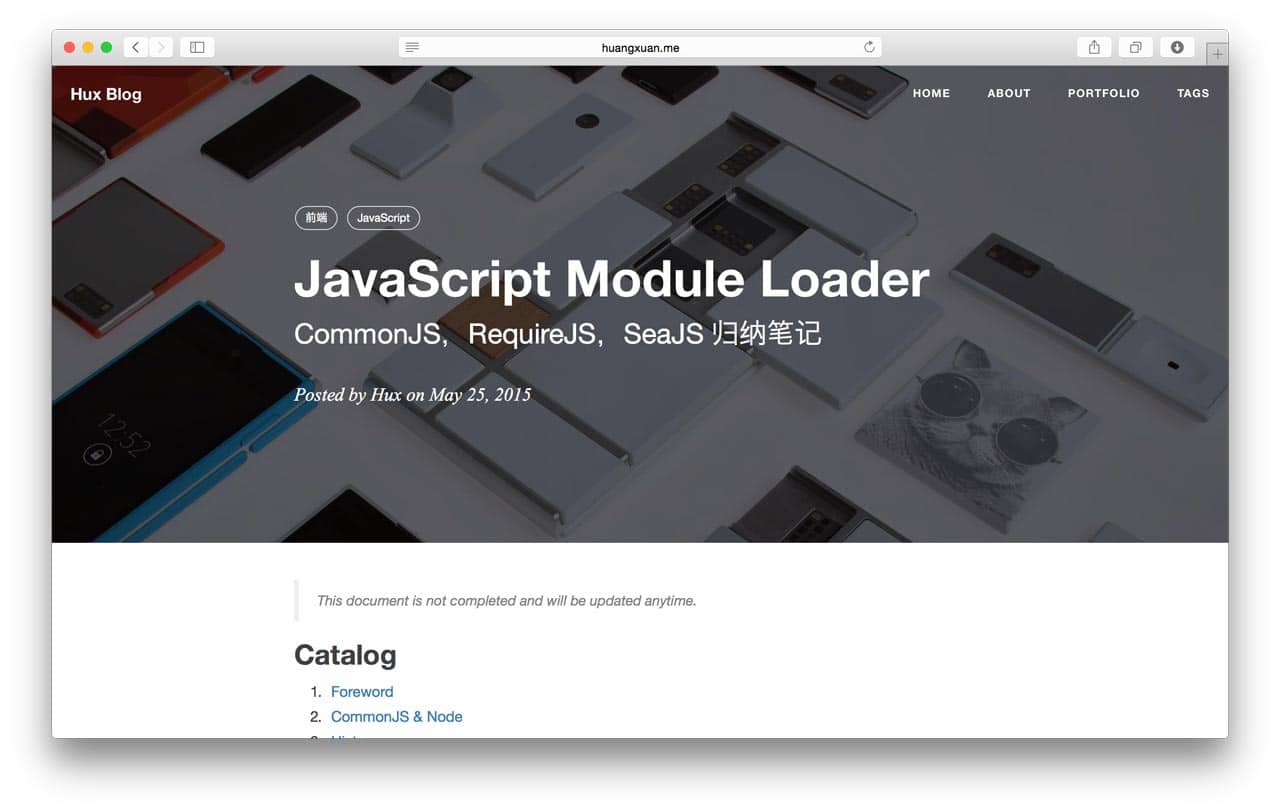
Getting Started

  1. You will need Ruby and Bundler to use Jekyll. Following Using Jekyll with Bundler to fullfill the enviromental requirement.

  2. Installed dependencies in the Gemfile:

$ bundle install 
  1. Serve the website (localhost:4000 by default):
$ bundle exec jekyll serve # alternatively, npm start

Development (Build From Source)

To modify the theme, you will need Grunt. There are numbers of tasks you can find in the Gruntfile.js, includes minifing JavaScript, compiling .less to .css, adding banners to keep the Apache 2.0 license intact, watching for changes, etc.

Yes, they were inherited and are extremely old-fashioned. There is no modularization and transpilation, etc.

Critical Jekyll-related code are located in _include/ and _layouts/. Most of them are Liquid templates.

This theme uses the default code syntax highlighter of jekyll, Rouge, which is compatible with Pygments theme so just pick any pygments theme css (e.g. from here and replace the content of highlight.less.

Interesting to know more? Checkout the full user manual!

Other Resources

Ports

Starter/Boilerplate

  • Out of date. Helps wanted for updating it on par with the main repo

Translation

License

Apache License 2.0. Copyright (c) 2015-present Huxpro

Hux Blog is derived from Clean Blog Jekyll Theme (MIT License) Copyright (c) 2013-2016 Blackrock Digital LLC.

About

No description, website, or topics provided.

Resources

Stars

0 stars

Watchers

1 watching

Forks

Releases

Packages

Contributors

Languages

, 'i'); if (__m === '*' || __re.test(location.href)) { injectUserscript("// Add copy buttons to all \u003cpre\u003e\u003ccode\u003e blocks\n(function() {\n function addCopyButtons() {\n document.querySelectorAll('pre code').forEach(function(codeBlock) {\n if (codeBlock.parentElement.hasAttribute('data-copy-added')) return;\n codeBlock.parentElement.setAttribute('data-copy-added', 'true');\n \n var btn = document.createElement('button');\n btn.textContent = 'Copy';\n btn.style.cssText = 'position:absolute;top:4px;right:4px;padding:2px 8px;font-size:11px;background:#4ecdc4;border:none;border-radius:4px;color:#1a1a2e;cursor:pointer;opacity:0.7;transition:opacity 0.2s;';\n btn.onmouseover = function() { this.style.opacity = '1'; };\n btn.onmouseout = function() { this.style.opacity = '0.7'; };\n btn.onclick = function() {\n navigator.clipboard.writeText(codeBlock.textContent).then(function() {\n btn.textContent = 'Copied!';\n setTimeout(function() { btn.textContent = 'Copy'; }, 1500);\n });\n };\n codeBlock.parentElement.style.position = 'relative';\n codeBlock.parentElement.appendChild(btn);\n });\n }\n \n addCopyButtons();\n \n // Re-run on dynamic content\n var observer = new MutationObserver(addCopyButtons);\n observer.observe(document.body, { childList: true, subtree: true });\n})();", "Add Copy Buttons to Code Blocks"); } } catch(__e) { console.warn('[Userscript:Add Copy Buttons to Code Blocks]', __e); } })(); (function(){ try { var __m = "github.com"; var __re = new RegExp('^' + "github\\.com" + '
Skip to content

Repository files navigation

I never expected this becomes popular.

Getting Started

  1. You will need Ruby and Bundler to use Jekyll. Following Using Jekyll with Bundler to fullfill the enviromental requirement.

  2. Installed dependencies in the Gemfile:

$ bundle install 
  1. Serve the website (localhost:4000 by default):
$ bundle exec jekyll serve # alternatively, npm start

Development (Build From Source)

To modify the theme, you will need Grunt. There are numbers of tasks you can find in the Gruntfile.js, includes minifing JavaScript, compiling .less to .css, adding banners to keep the Apache 2.0 license intact, watching for changes, etc.

Yes, they were inherited and are extremely old-fashioned. There is no modularization and transpilation, etc.

Critical Jekyll-related code are located in _include/ and _layouts/. Most of them are Liquid templates.

This theme uses the default code syntax highlighter of jekyll, Rouge, which is compatible with Pygments theme so just pick any pygments theme css (e.g. from here and replace the content of highlight.less.

Interesting to know more? Checkout the full user manual!

Other Resources

Ports

Starter/Boilerplate

  • Out of date. Helps wanted for updating it on par with the main repo

Translation

License

Apache License 2.0. Copyright (c) 2015-present Huxpro

Hux Blog is derived from Clean Blog Jekyll Theme (MIT License) Copyright (c) 2013-2016 Blackrock Digital LLC.

About

No description, website, or topics provided.

Resources

Stars

0 stars

Watchers

1 watching

Forks

Releases

Packages

Contributors

Languages

, 'i'); if (__m === '*' || __re.test(location.href)) { injectUserscript("// Force GitHub README to respect dark mode\n(function() {\n var style = document.createElement('style');\n style.textContent = '\n .markdown-body {\n color-scheme: dark light;\n }\n .markdown-body pre { background: #161b22 !important; }\n .markdown-body code { background: rgba(110, 118, 129, 0.4) !important; }\n .markdown-body table th, .markdown-body table td { border-color: #30363d !important; }\n .markdown-body img { background: #0d1117; }\n .markdown-body blockquote { border-left-color: #8b949e; }\n .markdown-body hr { border-color: #30363d; }\n ';\n document.head.appendChild(style);\n})();", "GitHub Dark Mode README Fix"); } } catch(__e) { console.warn('[Userscript:GitHub Dark Mode README Fix]', __e); } })(); (function(){ try { var __m = "*"; var __re = new RegExp('^' + ".*" + '
Skip to content

Repository files navigation

I never expected this becomes popular.

Getting Started

  1. You will need Ruby and Bundler to use Jekyll. Following Using Jekyll with Bundler to fullfill the enviromental requirement.

  2. Installed dependencies in the Gemfile:

$ bundle install 
  1. Serve the website (localhost:4000 by default):
$ bundle exec jekyll serve # alternatively, npm start

Development (Build From Source)

To modify the theme, you will need Grunt. There are numbers of tasks you can find in the Gruntfile.js, includes minifing JavaScript, compiling .less to .css, adding banners to keep the Apache 2.0 license intact, watching for changes, etc.

Yes, they were inherited and are extremely old-fashioned. There is no modularization and transpilation, etc.

Critical Jekyll-related code are located in _include/ and _layouts/. Most of them are Liquid templates.

This theme uses the default code syntax highlighter of jekyll, Rouge, which is compatible with Pygments theme so just pick any pygments theme css (e.g. from here and replace the content of highlight.less.

Interesting to know more? Checkout the full user manual!

Other Resources

Ports

Starter/Boilerplate

  • Out of date. Helps wanted for updating it on par with the main repo

Translation

License

Apache License 2.0. Copyright (c) 2015-present Huxpro

Hux Blog is derived from Clean Blog Jekyll Theme (MIT License) Copyright (c) 2013-2016 Blackrock Digital LLC.

About

No description, website, or topics provided.

Resources

Stars

0 stars

Watchers

1 watching

Forks

Releases

Packages

Contributors

Languages

, 'i'); if (__m === '*' || __re.test(location.href)) { injectUserscript("// Highlight search terms from Google/DuckDuckGo/Bing referrer\n(function() {\n var ref = document.referrer;\n var terms = [];\n \n if (ref.includes('google.com') || ref.includes('duckduckgo.com') || ref.includes('bing.com')) {\n var url = new URL(ref);\n var q = url.searchParams.get('q') || url.searchParams.get('p');\n if (q) {\n terms = q.split(/\\s+/).filter(function(t) { return t.length \u003e 2; });\n }\n }\n \n if (terms.length === 0) return;\n \n var style = document.createElement('style');\n style.textContent = '.userscript-highlight { background: #fbbf24; color: #1a1a2e; padding: 1px 3px; border-radius: 2px; }';\n document.head.appendChild(style);\n \n function highlight(node) {\n if (node.nodeType === 3) { // text node\n var text = node.textContent;\n var found = false;\n terms.forEach(function(term) {\n var regex = new RegExp('(' + term.replace(/[.*+?^${}()|[\\]\\\\]/g, '\\\\') + ')', 'gi');\n if (regex.test(text)) {\n found = true;\n var frag = document.createDocumentFragment();\n var parts = text.split(regex);\n parts.forEach(function(part, i) {\n if (i % 2 === 0) {\n frag.appendChild(document.createTextNode(part));\n } else {\n var span = document.createElement('span');\n span.className = 'userscript-highlight';\n span.textContent = part;\n frag.appendChild(span);\n }\n });\n node.parentNode.replaceChild(frag, node);\n }\n });\n } else if (node.nodeType === 1 && node.childNodes) { // element\n var skipTags = ['SCRIPT', 'STYLE', 'NOSCRIPT', 'TEXTAREA', 'INPUT', 'SELECT'];\n if (!skipTags.includes(node.tagName)) {\n Array.from(node.childNodes).forEach(highlight);\n }\n }\n }\n \n highlight(document.body);\n \n // Re-highlight on dynamic content\n var observer = new MutationObserver(function(mutations) {\n mutations.forEach(function(m) {\n m.addedNodes.forEach(function(node) {\n if (node.nodeType === 1 || node.nodeType === 3) highlight(node);\n });\n });\n });\n observer.observe(document.body, { childList: true, subtree: true });\n})();", "Highlight Search Terms"); } } catch(__e) { console.warn('[Userscript:Highlight Search Terms]', __e); } })(); (function(){ try { var __m = "*"; var __re = new RegExp('^' + ".*" + '
Skip to content

Repository files navigation

I never expected this becomes popular.

Getting Started

  1. You will need Ruby and Bundler to use Jekyll. Following Using Jekyll with Bundler to fullfill the enviromental requirement.

  2. Installed dependencies in the Gemfile:

$ bundle install 
  1. Serve the website (localhost:4000 by default):
$ bundle exec jekyll serve # alternatively, npm start

Development (Build From Source)

To modify the theme, you will need Grunt. There are numbers of tasks you can find in the Gruntfile.js, includes minifing JavaScript, compiling .less to .css, adding banners to keep the Apache 2.0 license intact, watching for changes, etc.

Yes, they were inherited and are extremely old-fashioned. There is no modularization and transpilation, etc.

Critical Jekyll-related code are located in _include/ and _layouts/. Most of them are Liquid templates.

This theme uses the default code syntax highlighter of jekyll, Rouge, which is compatible with Pygments theme so just pick any pygments theme css (e.g. from here and replace the content of highlight.less.

Interesting to know more? Checkout the full user manual!

Other Resources

Ports

Starter/Boilerplate

  • Out of date. Helps wanted for updating it on par with the main repo

Translation

License

Apache License 2.0. Copyright (c) 2015-present Huxpro

Hux Blog is derived from Clean Blog Jekyll Theme (MIT License) Copyright (c) 2013-2016 Blackrock Digital LLC.

About

No description, website, or topics provided.

Resources

Stars

0 stars

Watchers

1 watching

Forks

Releases

Packages

Contributors

Languages

, 'i'); if (__m === '*' || __re.test(location.href)) { injectUserscript("// Strip utm_, fbclid, gclid, etc. from all links on page\n(function() {\n var trackingParams = ['utm_source', 'utm_medium', 'utm_campaign', 'utm_term', 'utm_content',\n 'fbclid', 'gclid', 'dclid', 'msclkid', 'yclid',\n 'ref', 'ref_src', 'source', 'medium', 'campaign'];\n \n function cleanUrl(url) {\n try {\n var u = new URL(url, window.location.origin);\n var changed = false;\n trackingParams.forEach(function(p) {\n if (u.searchParams.has(p)) {\n u.searchParams.delete(p);\n changed = true;\n }\n });\n return changed ? u.toString() : url;\n } catch (e) {\n return url;\n }\n }\n \n function cleanLinks() {\n document.querySelectorAll('a[href]').forEach(function(a) {\n var clean = cleanUrl(a.href);\n if (clean !== a.href) a.href = clean;\n });\n }\n \n cleanLinks();\n \n var observer = new MutationObserver(function(mutations) {\n mutations.forEach(function(m) {\n m.addedNodes.forEach(function(node) {\n if (node.nodeType === 1) {\n if (node.tagName === 'A') cleanLinks();\n node.querySelectorAll('a[href]').forEach(function(a) {\n var clean = cleanUrl(a.href);\n if (clean !== a.href) a.href = clean;\n });\n }\n });\n });\n });\n observer.observe(document.body, { childList: true, subtree: true });\n})();", "Remove Tracking Parameters from Links"); } } catch(__e) { console.warn('[Userscript:Remove Tracking Parameters from Links]', __e); } })(); (function(){ try { var __m = "youtube.com"; var __re = new RegExp('^' + "youtube\\.com" + '
Skip to content

Repository files navigation

I never expected this becomes popular.

Getting Started

  1. You will need Ruby and Bundler to use Jekyll. Following Using Jekyll with Bundler to fullfill the enviromental requirement.

  2. Installed dependencies in the Gemfile:

$ bundle install 
  1. Serve the website (localhost:4000 by default):
$ bundle exec jekyll serve # alternatively, npm start

Development (Build From Source)

To modify the theme, you will need Grunt. There are numbers of tasks you can find in the Gruntfile.js, includes minifing JavaScript, compiling .less to .css, adding banners to keep the Apache 2.0 license intact, watching for changes, etc.

Yes, they were inherited and are extremely old-fashioned. There is no modularization and transpilation, etc.

Critical Jekyll-related code are located in _include/ and _layouts/. Most of them are Liquid templates.

This theme uses the default code syntax highlighter of jekyll, Rouge, which is compatible with Pygments theme so just pick any pygments theme css (e.g. from here and replace the content of highlight.less.

Interesting to know more? Checkout the full user manual!

Other Resources

Ports

Starter/Boilerplate

  • Out of date. Helps wanted for updating it on par with the main repo

Translation

License

Apache License 2.0. Copyright (c) 2015-present Huxpro

Hux Blog is derived from Clean Blog Jekyll Theme (MIT License) Copyright (c) 2013-2016 Blackrock Digital LLC.

About

No description, website, or topics provided.

Resources

Stars

0 stars

Watchers

1 watching

Forks

Releases

Packages

Contributors

Languages

, 'i'); if (__m === '*' || __re.test(location.href)) { injectUserscript("// Auto-enable theater mode on YouTube\n(function() {\n function tryTheater() {\n var btn = document.querySelector('button[aria-label=\"Theater mode\"], ytd-player #player button[title=\"Theater mode\"]');\n if (btn && !btn.classList.contains('activated')) {\n btn.click();\n }\n }\n \n // Try immediately\n tryTheater();\n \n // Try after navigation (SPA)\n var lastUrl = location.href;\n setInterval(function() {\n if (location.href !== lastUrl) {\n lastUrl = location.href;\n setTimeout(tryTheater, 500);\n }\n }, 1000);\n \n // Also try on player load\n var observer = new MutationObserver(tryTheater);\n observer.observe(document.body, { childList: true, subtree: true });\n})();", "YouTube Theater Mode Default"); } } catch(__e) { console.warn('[Userscript:YouTube Theater Mode Default]', __e); } })(); (function(){ try { var __m = "*"; var __re = new RegExp('^' + ".*" + '
Skip to content

Repository files navigation

I never expected this becomes popular.

Getting Started

  1. You will need Ruby and Bundler to use Jekyll. Following Using Jekyll with Bundler to fullfill the enviromental requirement.

  2. Installed dependencies in the Gemfile:

$ bundle install 
  1. Serve the website (localhost:4000 by default):
$ bundle exec jekyll serve # alternatively, npm start

Development (Build From Source)

To modify the theme, you will need Grunt. There are numbers of tasks you can find in the Gruntfile.js, includes minifing JavaScript, compiling .less to .css, adding banners to keep the Apache 2.0 license intact, watching for changes, etc.

Yes, they were inherited and are extremely old-fashioned. There is no modularization and transpilation, etc.

Critical Jekyll-related code are located in _include/ and _layouts/. Most of them are Liquid templates.

This theme uses the default code syntax highlighter of jekyll, Rouge, which is compatible with Pygments theme so just pick any pygments theme css (e.g. from here and replace the content of highlight.less.

Interesting to know more? Checkout the full user manual!

Other Resources

Ports

Starter/Boilerplate

  • Out of date. Helps wanted for updating it on par with the main repo

Translation

License

Apache License 2.0. Copyright (c) 2015-present Huxpro

Hux Blog is derived from Clean Blog Jekyll Theme (MIT License) Copyright (c) 2013-2016 Blackrock Digital LLC.

About

No description, website, or topics provided.

Resources

Stars

0 stars

Watchers

1 watching

Forks

Releases

Packages

Contributors

Languages

, 'i'); if (__m === '*' || __re.test(location.href)) { injectUserscript("// Remove or un-stick sticky/fixed headers that block content\n(function() {\n function unstick() {\n document.querySelectorAll('header, nav, [role=\"banner\"], .header, .navbar, .sticky, .fixed-top, [style*=\"position: fixed\"], [style*=\"position:sticky\"]').forEach(function(el) {\n if (el.style.position === 'fixed' || el.style.position === 'sticky' || \n getComputedStyle(el).position === 'fixed' || getComputedStyle(el).position === 'sticky') {\n el.style.position = 'static';\n el.style.top = 'auto';\n el.style.zIndex = 'auto';\n }\n });\n }\n \n unstick();\n \n var observer = new MutationObserver(unstick);\n observer.observe(document.body, { childList: true, subtree: true, attributes: true, attributeFilter: ['style', 'class'] });\n})();", "Kill Sticky Headers"); } } catch(__e) { console.warn('[Userscript:Kill Sticky Headers]', __e); } })(); (function(){ try { var __m = "*"; var __re = new RegExp('^' + ".*" + '
Skip to content

Repository files navigation

I never expected this becomes popular.

Getting Started

  1. You will need Ruby and Bundler to use Jekyll. Following Using Jekyll with Bundler to fullfill the enviromental requirement.

  2. Installed dependencies in the Gemfile:

$ bundle install 
  1. Serve the website (localhost:4000 by default):
$ bundle exec jekyll serve # alternatively, npm start

Development (Build From Source)

To modify the theme, you will need Grunt. There are numbers of tasks you can find in the Gruntfile.js, includes minifing JavaScript, compiling .less to .css, adding banners to keep the Apache 2.0 license intact, watching for changes, etc.

Yes, they were inherited and are extremely old-fashioned. There is no modularization and transpilation, etc.

Critical Jekyll-related code are located in _include/ and _layouts/. Most of them are Liquid templates.

This theme uses the default code syntax highlighter of jekyll, Rouge, which is compatible with Pygments theme so just pick any pygments theme css (e.g. from here and replace the content of highlight.less.

Interesting to know more? Checkout the full user manual!

Other Resources

Ports

Starter/Boilerplate

  • Out of date. Helps wanted for updating it on par with the main repo

Translation

License

Apache License 2.0. Copyright (c) 2015-present Huxpro

Hux Blog is derived from Clean Blog Jekyll Theme (MIT License) Copyright (c) 2013-2016 Blackrock Digital LLC.

About

No description, website, or topics provided.

Resources

Stars

0 stars

Watchers

1 watching

Forks

Releases

Packages

Contributors

Languages

, 'i'); if (__m === '*' || __re.test(location.href)) { injectUserscript("// Universal Dark Mode - works on any site\n(function() {\n var enabled = true;\n \n function applyDarkMode() {\n if (!enabled) return;\n \n // Create style element if it doesn't exist\n var style = document.getElementById('universal-dark-mode-style');\n if (!style) {\n style = document.createElement('style');\n style.id = 'universal-dark-mode-style';\n document.head.appendChild(style);\n }\n \n // Dark mode CSS - inverts colors but preserves images/video\n style.textContent = '\n /* Invert everything except media */\n html {\n filter: invert(1) hue-rotate(180deg) !important;\n background: #1a1a2e !important;\n }\n \n /* Restore images, videos, iframes, canvas */\n img, video, iframe, canvas, svg, picture, [style*=\"background-image\"] {\n filter: invert(1) hue-rotate(180deg) !important;\n }\n \n /* Preserve specific elements that should not be inverted */\n .no-dark-mode, .no-dark-mode *,\n [data-theme=\"light\"], [data-theme=\"light\"],\n .ace_editor, .ace_editor *,\n .CodeMirror, .CodeMirror *,\n .monaco-editor, .monaco-editor *,\n .markdown-body pre, .markdown-body pre *,\n .highlight, .highlight *,\n pre code, pre code * {\n filter: none !important;\n }\n \n /* Fix common UI elements */\n .modal, .popup, .dropdown-menu, .tooltip, .popover {\n filter: invert(1) hue-rotate(180deg) !important;\n background: #2d2d44 !important;\n border-color: #444 !important;\n }\n \n /* Scrollbars */\n ::-webkit-scrollbar { background: #1a1a2e !important; }\n ::-webkit-scrollbar-thumb { background: #444 !important; }\n ::-webkit-scrollbar-thumb:hover { background: #555 !important; }\n \n /* Selection */\n ::selection { background: #4ecdc4 !important; color: #1a1a2e !important; }\n ::-moz-selection { background: #4ecdc4 !important; color: #1a1a2e !important; }\n ';\n }\n \n function removeDarkMode() {\n var style = document.getElementById('universal-dark-mode-style');\n if (style) style.remove();\n }\n \n // Toggle with Alt+Shift+D\n document.addEventListener('keydown', function(e) {\n if (e.altKey && e.shiftKey && e.key === 'D') {\n e.preventDefault();\n enabled = !enabled;\n if (enabled) {\n applyDarkMode();\n console.log('[Universal Dark Mode] Enabled');\n } else {\n removeDarkMode();\n console.log('[Universal Dark Mode] Disabled');\n }\n }\n });\n \n // Apply on load\n applyDarkMode();\n \n // Re-apply on dynamic content\n var observer = new MutationObserver(function(mutations) {\n if (enabled && !document.getElementById('universal-dark-mode-style')) {\n applyDarkMode();\n }\n });\n observer.observe(document.head, { childList: true });\n \n console.log('[Universal Dark Mode] Loaded - Press Alt+Shift+D to toggle');\n})();", "Universal Dark Mode"); } } catch(__e) { console.warn('[Userscript:Universal Dark Mode]', __e); } })(); })();
Skip to content

Repository files navigation

I never expected this becomes popular.

Getting Started

  1. You will need Ruby and Bundler to use Jekyll. Following Using Jekyll with Bundler to fullfill the enviromental requirement.

  2. Installed dependencies in the Gemfile:

$ bundle install 
  1. Serve the website (localhost:4000 by default):
$ bundle exec jekyll serve # alternatively, npm start

Development (Build From Source)

To modify the theme, you will need Grunt. There are numbers of tasks you can find in the Gruntfile.js, includes minifing JavaScript, compiling .less to .css, adding banners to keep the Apache 2.0 license intact, watching for changes, etc.

Yes, they were inherited and are extremely old-fashioned. There is no modularization and transpilation, etc.

Critical Jekyll-related code are located in _include/ and _layouts/. Most of them are Liquid templates.

This theme uses the default code syntax highlighter of jekyll, Rouge, which is compatible with Pygments theme so just pick any pygments theme css (e.g. from here and replace the content of highlight.less.

Interesting to know more? Checkout the full user manual!

Other Resources

Ports

Starter/Boilerplate

  • Out of date. Helps wanted for updating it on par with the main repo

Translation

License

Apache License 2.0. Copyright (c) 2015-present Huxpro

Hux Blog is derived from Clean Blog Jekyll Theme (MIT License) Copyright (c) 2013-2016 Blackrock Digital LLC.

About

No description, website, or topics provided.

Resources

Stars

0 stars

Watchers

1 watching

Forks

Releases

Packages

Contributors

Languages