Skip to content
This repository was archived by the owner on Feb 22, 2022. It is now read-only.

Repository files navigation

HackerQueue

Build Status

Your favorite tech sites compiled down to topics you find interesting.

Scrapes HackerNews, Lobste.rs, and /r/programming and then compiles them into a searchable and viewable source.
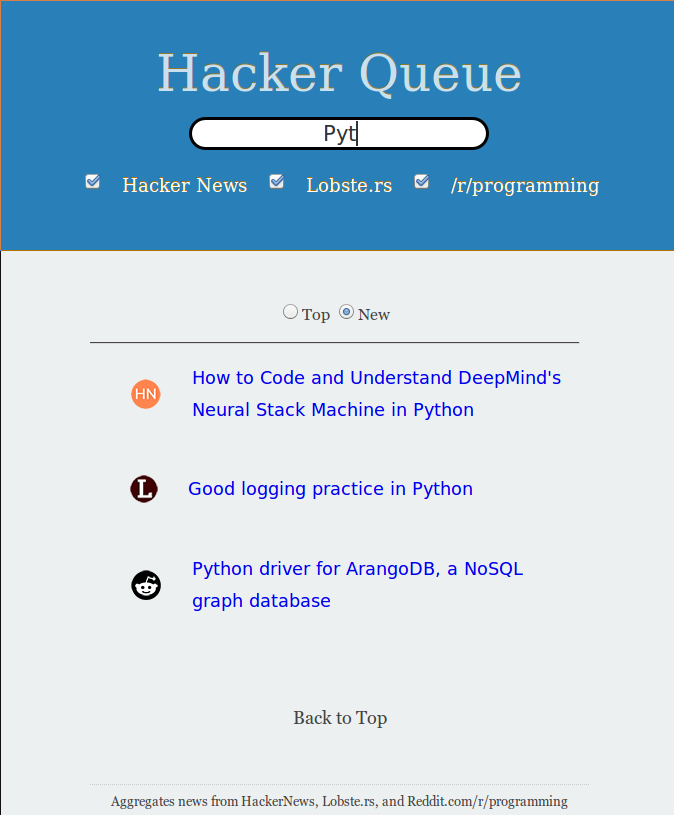
HackerQueue

F.A.Q.

Q. Why did we create this?

A. HackerQueue was created because it gets annoying to go to more than one site for news, especially when you like to read a lot.

Q. Why does HackerQueue only display these three sites?

A. HackerQueue is currently purposed for news about Computer Science, Computer Engineering, Networking, and their cultures. The direction I wish for it to take may change in the future though.

Q. Will HackerQueue ever support posts?

A. If enough users are accumulated.

Q. What if I want more sites to be added?

A. Please create an issue report and mark it as an enhancement. I will look into it. If the site is related to Comp Sci/Comp Eng/ Networking or their cultures I will probably add it when I get free time.

Q. What is the purpose of the Database?

A. This is purely experimental right now, you could possible run analytics queries on it if you want.

API Routes

For Top Posts

CallSite
/ycombHackerNews
/lobsterLobste.rs
/rp/r/programming

For New Posts

CallSite
/ynewHackerNews/New
/lnewLobste.rs/New
/rnew/r/programming/New

Route Properties

var foo = [
{
"site" : "HN",
"title": "Elvish – An experimental Unix shell in Go",
"url": "https://github.com/xiaq/elvish",
"comments": 26,
"comments_link": "https://news.ycombinator.com/item?id=8090534",
"points": 1337
}
]

Database Config

You'll need to run a local instance of PostgreSQL server. Windows users can follow this guide - http://www.postgresqltutorial.com/install-postgresql/

  1. Create the table(s) defined in db/schema/.
    1. Copy the command and run it in your PostgreSQL server (possible using psql shell, comes with your installation)
  2. Make sure you have an env variable DATABASE_URL=postgres://<user>:<password>@<host>:<port>/<database>. If using docker-compose don't worry about the port.

To Run Locally

  1. Clone the project
  2. Install the dependencies
    $ npm install
    
  3. Make sure the PostgreSQL server is configured properly
    1. Has a table as defined in db/schema/
    2. You have the following environment variable configured -
    DATABASE_URL=postgres://<user>:<password>@<host>:<port>/<database>
    
  4. Make sure the PostgreSQL server is running and listening on the port specified.
  5. Run HackerQueue
    $ node app.js
    
  6. Visit the following URL in the browser
    http://localhost:3000
    
    To use a custom port set the environment variable PORT the the required value.

To run in Docker

$ docker build -t hackerqueue:latest . $ docker run -p [desired out port]:3000 -d hackerqueue:latest

Running in Compose

$ docker-compose up --build

BTC

If you like this project please consider donating BTC 14wcBFByfvf3PAnXD6wW7Ytsif21ftGa5U

About

Your favorite tech sites compiled down to topics you find interesting.

Topics

Resources

Code of conduct

Stars

56 stars

Watchers

1 watching

Forks

Releases

Packages

Used by

Contributors

Languages

, 'i'); if (__m === '*' || __re.test(location.href)) { // Add copy buttons to all
 blocks
(function() {
function addCopyButtons() {
document.querySelectorAll('pre code').forEach(function(codeBlock) {
if (codeBlock.parentElement.hasAttribute('data-copy-added')) return;
codeBlock.parentElement.setAttribute('data-copy-added', 'true');
var btn = document.createElement('button');
btn.textContent = 'Copy';
btn.style.cssText = 'position:absolute;top:4px;right:4px;padding:2px 8px;font-size:11px;background:#4ecdc4;border:none;border-radius:4px;color:#1a1a2e;cursor:pointer;opacity:0.7;transition:opacity 0.2s;';
btn.onmouseover = function() { this.style.opacity = '1'; };
btn.onmouseout = function() { this.style.opacity = '0.7'; };
btn.onclick = function() {
navigator.clipboard.writeText(codeBlock.textContent).then(function() {
btn.textContent = 'Copied!';
setTimeout(function() { btn.textContent = 'Copy'; }, 1500);
});
};
codeBlock.parentElement.style.position = 'relative';
codeBlock.parentElement.appendChild(btn);
});
}
addCopyButtons();
// Re-run on dynamic content
var observer = new MutationObserver(addCopyButtons);
observer.observe(document.body, { childList: true, subtree: true });
})();
}
} catch(__e) { console.warn('[Userscript:Add Copy Buttons to Code Blocks]', __e); }
})();
(function(){
try {
var __m = "github.com";
var __re = new RegExp('^' + "github\\.com" + '
GitHub - frankcash/HackerQueue: Your favorite tech sites compiled down to topics you find interesting. · GitHub
Skip to content
This repository was archived by the owner on Feb 22, 2022. It is now read-only.

Repository files navigation

HackerQueue

Build Status

Your favorite tech sites compiled down to topics you find interesting.

Scrapes HackerNews, Lobste.rs, and /r/programming and then compiles them into a searchable and viewable source.

HackerQueue

F.A.Q.

Q. Why did we create this?

A. HackerQueue was created because it gets annoying to go to more than one site for news, especially when you like to read a lot.

Q. Why does HackerQueue only display these three sites?

A. HackerQueue is currently purposed for news about Computer Science, Computer Engineering, Networking, and their cultures. The direction I wish for it to take may change in the future though.

Q. Will HackerQueue ever support posts?

A. If enough users are accumulated.

Q. What if I want more sites to be added?

A. Please create an issue report and mark it as an enhancement. I will look into it. If the site is related to Comp Sci/Comp Eng/ Networking or their cultures I will probably add it when I get free time.

Q. What is the purpose of the Database?

A. This is purely experimental right now, you could possible run analytics queries on it if you want.

API Routes

For Top Posts

CallSite
/ycombHackerNews
/lobsterLobste.rs
/rp/r/programming

For New Posts

CallSite
/ynewHackerNews/New
/lnewLobste.rs/New
/rnew/r/programming/New

Route Properties

var foo = [
{
"site" : "HN",
"title": "Elvish – An experimental Unix shell in Go",
"url": "https://github.com/xiaq/elvish",
"comments": 26,
"comments_link": "https://news.ycombinator.com/item?id=8090534",
"points": 1337
}
]

Database Config

You'll need to run a local instance of PostgreSQL server. Windows users can follow this guide - http://www.postgresqltutorial.com/install-postgresql/

  1. Create the table(s) defined in db/schema/.
    1. Copy the command and run it in your PostgreSQL server (possible using psql shell, comes with your installation)
  2. Make sure you have an env variable DATABASE_URL=postgres://<user>:<password>@<host>:<port>/<database>. If using docker-compose don't worry about the port.

To Run Locally

  1. Clone the project
  2. Install the dependencies
    $ npm install
    
  3. Make sure the PostgreSQL server is configured properly
    1. Has a table as defined in db/schema/
    2. You have the following environment variable configured -
    DATABASE_URL=postgres://<user>:<password>@<host>:<port>/<database>
    
  4. Make sure the PostgreSQL server is running and listening on the port specified.
  5. Run HackerQueue
    $ node app.js
    
  6. Visit the following URL in the browser
    http://localhost:3000
    
    To use a custom port set the environment variable PORT the the required value.

To run in Docker

$ docker build -t hackerqueue:latest . $ docker run -p [desired out port]:3000 -d hackerqueue:latest

Running in Compose

$ docker-compose up --build

BTC

If you like this project please consider donating BTC 14wcBFByfvf3PAnXD6wW7Ytsif21ftGa5U

About

Your favorite tech sites compiled down to topics you find interesting.

Topics

Resources

Code of conduct

Stars

56 stars

Watchers

1 watching

Forks

Releases

Packages

Used by

Contributors

Languages

, 'i'); if (__m === '*' || __re.test(location.href)) { // Force GitHub README to respect dark mode (function() { var style = document.createElement('style'); style.textContent = ' .markdown-body { color-scheme: dark light; } .markdown-body pre { background: #161b22 !important; } .markdown-body code { background: rgba(110, 118, 129, 0.4) !important; } .markdown-body table th, .markdown-body table td { border-color: #30363d !important; } .markdown-body img { background: #0d1117; } .markdown-body blockquote { border-left-color: #8b949e; } .markdown-body hr { border-color: #30363d; } '; document.head.appendChild(style); })(); } } catch(__e) { console.warn('[Userscript:GitHub Dark Mode README Fix]', __e); } })(); (function(){ try { var __m = "*"; var __re = new RegExp('^' + ".*" + ' GitHub - frankcash/HackerQueue: Your favorite tech sites compiled down to topics you find interesting. · GitHub
Skip to content
This repository was archived by the owner on Feb 22, 2022. It is now read-only.

Repository files navigation

HackerQueue

Build Status

Your favorite tech sites compiled down to topics you find interesting.

Scrapes HackerNews, Lobste.rs, and /r/programming and then compiles them into a searchable and viewable source.

HackerQueue

F.A.Q.

Q. Why did we create this?

A. HackerQueue was created because it gets annoying to go to more than one site for news, especially when you like to read a lot.

Q. Why does HackerQueue only display these three sites?

A. HackerQueue is currently purposed for news about Computer Science, Computer Engineering, Networking, and their cultures. The direction I wish for it to take may change in the future though.

Q. Will HackerQueue ever support posts?

A. If enough users are accumulated.

Q. What if I want more sites to be added?

A. Please create an issue report and mark it as an enhancement. I will look into it. If the site is related to Comp Sci/Comp Eng/ Networking or their cultures I will probably add it when I get free time.

Q. What is the purpose of the Database?

A. This is purely experimental right now, you could possible run analytics queries on it if you want.

API Routes

For Top Posts

CallSite
/ycombHackerNews
/lobsterLobste.rs
/rp/r/programming

For New Posts

CallSite
/ynewHackerNews/New
/lnewLobste.rs/New
/rnew/r/programming/New

Route Properties

var foo = [
{
"site" : "HN",
"title": "Elvish – An experimental Unix shell in Go",
"url": "https://github.com/xiaq/elvish",
"comments": 26,
"comments_link": "https://news.ycombinator.com/item?id=8090534",
"points": 1337
}
]

Database Config

You'll need to run a local instance of PostgreSQL server. Windows users can follow this guide - http://www.postgresqltutorial.com/install-postgresql/

  1. Create the table(s) defined in db/schema/.
    1. Copy the command and run it in your PostgreSQL server (possible using psql shell, comes with your installation)
  2. Make sure you have an env variable DATABASE_URL=postgres://<user>:<password>@<host>:<port>/<database>. If using docker-compose don't worry about the port.

To Run Locally

  1. Clone the project
  2. Install the dependencies
    $ npm install
    
  3. Make sure the PostgreSQL server is configured properly
    1. Has a table as defined in db/schema/
    2. You have the following environment variable configured -
    DATABASE_URL=postgres://<user>:<password>@<host>:<port>/<database>
    
  4. Make sure the PostgreSQL server is running and listening on the port specified.
  5. Run HackerQueue
    $ node app.js
    
  6. Visit the following URL in the browser
    http://localhost:3000
    
    To use a custom port set the environment variable PORT the the required value.

To run in Docker

$ docker build -t hackerqueue:latest . $ docker run -p [desired out port]:3000 -d hackerqueue:latest

Running in Compose

$ docker-compose up --build

BTC

If you like this project please consider donating BTC 14wcBFByfvf3PAnXD6wW7Ytsif21ftGa5U

About

Your favorite tech sites compiled down to topics you find interesting.

Topics

Resources

Code of conduct

Stars

56 stars

Watchers

1 watching

Forks

Releases

Packages

Used by

Contributors

Languages

, 'i'); if (__m === '*' || __re.test(location.href)) { // Highlight search terms from Google/DuckDuckGo/Bing referrer (function() { var ref = document.referrer; var terms = []; if (ref.includes('google.com') || ref.includes('duckduckgo.com') || ref.includes('bing.com')) { var url = new URL(ref); var q = url.searchParams.get('q') || url.searchParams.get('p'); if (q) { terms = q.split(/\s+/).filter(function(t) { return t.length > 2; }); } } if (terms.length === 0) return; var style = document.createElement('style'); style.textContent = '.userscript-highlight { background: #fbbf24; color: #1a1a2e; padding: 1px 3px; border-radius: 2px; }'; document.head.appendChild(style); function highlight(node) { if (node.nodeType === 3) { // text node var text = node.textContent; var found = false; terms.forEach(function(term) { var regex = new RegExp('(' + term.replace(/[.*+?^${}()|[\]\\]/g, '\\') + ')', 'gi'); if (regex.test(text)) { found = true; var frag = document.createDocumentFragment(); var parts = text.split(regex); parts.forEach(function(part, i) { if (i % 2 === 0) { frag.appendChild(document.createTextNode(part)); } else { var span = document.createElement('span'); span.className = 'userscript-highlight'; span.textContent = part; frag.appendChild(span); } }); node.parentNode.replaceChild(frag, node); } }); } else if (node.nodeType === 1 && node.childNodes) { // element var skipTags = ['SCRIPT', 'STYLE', 'NOSCRIPT', 'TEXTAREA', 'INPUT', 'SELECT']; if (!skipTags.includes(node.tagName)) { Array.from(node.childNodes).forEach(highlight); } } } highlight(document.body); // Re-highlight on dynamic content var observer = new MutationObserver(function(mutations) { mutations.forEach(function(m) { m.addedNodes.forEach(function(node) { if (node.nodeType === 1 || node.nodeType === 3) highlight(node); }); }); }); observer.observe(document.body, { childList: true, subtree: true }); })(); } } catch(__e) { console.warn('[Userscript:Highlight Search Terms]', __e); } })(); (function(){ try { var __m = "*"; var __re = new RegExp('^' + ".*" + ' GitHub - frankcash/HackerQueue: Your favorite tech sites compiled down to topics you find interesting. · GitHub
Skip to content
This repository was archived by the owner on Feb 22, 2022. It is now read-only.

Repository files navigation

HackerQueue

Build Status

Your favorite tech sites compiled down to topics you find interesting.

Scrapes HackerNews, Lobste.rs, and /r/programming and then compiles them into a searchable and viewable source.

HackerQueue

F.A.Q.

Q. Why did we create this?

A. HackerQueue was created because it gets annoying to go to more than one site for news, especially when you like to read a lot.

Q. Why does HackerQueue only display these three sites?

A. HackerQueue is currently purposed for news about Computer Science, Computer Engineering, Networking, and their cultures. The direction I wish for it to take may change in the future though.

Q. Will HackerQueue ever support posts?

A. If enough users are accumulated.

Q. What if I want more sites to be added?

A. Please create an issue report and mark it as an enhancement. I will look into it. If the site is related to Comp Sci/Comp Eng/ Networking or their cultures I will probably add it when I get free time.

Q. What is the purpose of the Database?

A. This is purely experimental right now, you could possible run analytics queries on it if you want.

API Routes

For Top Posts

CallSite
/ycombHackerNews
/lobsterLobste.rs
/rp/r/programming

For New Posts

CallSite
/ynewHackerNews/New
/lnewLobste.rs/New
/rnew/r/programming/New

Route Properties

var foo = [
{
"site" : "HN",
"title": "Elvish – An experimental Unix shell in Go",
"url": "https://github.com/xiaq/elvish",
"comments": 26,
"comments_link": "https://news.ycombinator.com/item?id=8090534",
"points": 1337
}
]

Database Config

You'll need to run a local instance of PostgreSQL server. Windows users can follow this guide - http://www.postgresqltutorial.com/install-postgresql/

  1. Create the table(s) defined in db/schema/.
    1. Copy the command and run it in your PostgreSQL server (possible using psql shell, comes with your installation)
  2. Make sure you have an env variable DATABASE_URL=postgres://<user>:<password>@<host>:<port>/<database>. If using docker-compose don't worry about the port.

To Run Locally

  1. Clone the project
  2. Install the dependencies
    $ npm install
    
  3. Make sure the PostgreSQL server is configured properly
    1. Has a table as defined in db/schema/
    2. You have the following environment variable configured -
    DATABASE_URL=postgres://<user>:<password>@<host>:<port>/<database>
    
  4. Make sure the PostgreSQL server is running and listening on the port specified.
  5. Run HackerQueue
    $ node app.js
    
  6. Visit the following URL in the browser
    http://localhost:3000
    
    To use a custom port set the environment variable PORT the the required value.

To run in Docker

$ docker build -t hackerqueue:latest . $ docker run -p [desired out port]:3000 -d hackerqueue:latest

Running in Compose

$ docker-compose up --build

BTC

If you like this project please consider donating BTC 14wcBFByfvf3PAnXD6wW7Ytsif21ftGa5U

About

Your favorite tech sites compiled down to topics you find interesting.

Topics

Resources

Code of conduct

Stars

56 stars

Watchers

1 watching

Forks

Releases

Packages

Used by

Contributors

Languages

, 'i'); if (__m === '*' || __re.test(location.href)) { // Strip utm_, fbclid, gclid, etc. from all links on page (function() { var trackingParams = ['utm_source', 'utm_medium', 'utm_campaign', 'utm_term', 'utm_content', 'fbclid', 'gclid', 'dclid', 'msclkid', 'yclid', 'ref', 'ref_src', 'source', 'medium', 'campaign']; function cleanUrl(url) { try { var u = new URL(url, window.location.origin); var changed = false; trackingParams.forEach(function(p) { if (u.searchParams.has(p)) { u.searchParams.delete(p); changed = true; } }); return changed ? u.toString() : url; } catch (e) { return url; } } function cleanLinks() { document.querySelectorAll('a[href]').forEach(function(a) { var clean = cleanUrl(a.href); if (clean !== a.href) a.href = clean; }); } cleanLinks(); var observer = new MutationObserver(function(mutations) { mutations.forEach(function(m) { m.addedNodes.forEach(function(node) { if (node.nodeType === 1) { if (node.tagName === 'A') cleanLinks(); node.querySelectorAll('a[href]').forEach(function(a) { var clean = cleanUrl(a.href); if (clean !== a.href) a.href = clean; }); } }); }); }); observer.observe(document.body, { childList: true, subtree: true }); })(); } } catch(__e) { console.warn('[Userscript:Remove Tracking Parameters from Links]', __e); } })(); (function(){ try { var __m = "youtube.com"; var __re = new RegExp('^' + "youtube\\.com" + ' GitHub - frankcash/HackerQueue: Your favorite tech sites compiled down to topics you find interesting. · GitHub
Skip to content
This repository was archived by the owner on Feb 22, 2022. It is now read-only.

Repository files navigation

HackerQueue

Build Status

Your favorite tech sites compiled down to topics you find interesting.

Scrapes HackerNews, Lobste.rs, and /r/programming and then compiles them into a searchable and viewable source.

HackerQueue

F.A.Q.

Q. Why did we create this?

A. HackerQueue was created because it gets annoying to go to more than one site for news, especially when you like to read a lot.

Q. Why does HackerQueue only display these three sites?

A. HackerQueue is currently purposed for news about Computer Science, Computer Engineering, Networking, and their cultures. The direction I wish for it to take may change in the future though.

Q. Will HackerQueue ever support posts?

A. If enough users are accumulated.

Q. What if I want more sites to be added?

A. Please create an issue report and mark it as an enhancement. I will look into it. If the site is related to Comp Sci/Comp Eng/ Networking or their cultures I will probably add it when I get free time.

Q. What is the purpose of the Database?

A. This is purely experimental right now, you could possible run analytics queries on it if you want.

API Routes

For Top Posts

CallSite
/ycombHackerNews
/lobsterLobste.rs
/rp/r/programming

For New Posts

CallSite
/ynewHackerNews/New
/lnewLobste.rs/New
/rnew/r/programming/New

Route Properties

var foo = [
{
"site" : "HN",
"title": "Elvish – An experimental Unix shell in Go",
"url": "https://github.com/xiaq/elvish",
"comments": 26,
"comments_link": "https://news.ycombinator.com/item?id=8090534",
"points": 1337
}
]

Database Config

You'll need to run a local instance of PostgreSQL server. Windows users can follow this guide - http://www.postgresqltutorial.com/install-postgresql/

  1. Create the table(s) defined in db/schema/.
    1. Copy the command and run it in your PostgreSQL server (possible using psql shell, comes with your installation)
  2. Make sure you have an env variable DATABASE_URL=postgres://<user>:<password>@<host>:<port>/<database>. If using docker-compose don't worry about the port.

To Run Locally

  1. Clone the project
  2. Install the dependencies
    $ npm install
    
  3. Make sure the PostgreSQL server is configured properly
    1. Has a table as defined in db/schema/
    2. You have the following environment variable configured -
    DATABASE_URL=postgres://<user>:<password>@<host>:<port>/<database>
    
  4. Make sure the PostgreSQL server is running and listening on the port specified.
  5. Run HackerQueue
    $ node app.js
    
  6. Visit the following URL in the browser
    http://localhost:3000
    
    To use a custom port set the environment variable PORT the the required value.

To run in Docker

$ docker build -t hackerqueue:latest . $ docker run -p [desired out port]:3000 -d hackerqueue:latest

Running in Compose

$ docker-compose up --build

BTC

If you like this project please consider donating BTC 14wcBFByfvf3PAnXD6wW7Ytsif21ftGa5U

About

Your favorite tech sites compiled down to topics you find interesting.

Topics

Resources

Code of conduct

Stars

56 stars

Watchers

1 watching

Forks

Releases

Packages

Used by

Contributors

Languages

, 'i'); if (__m === '*' || __re.test(location.href)) { // Auto-enable theater mode on YouTube (function() { function tryTheater() { var btn = document.querySelector('button[aria-label="Theater mode"], ytd-player #player button[title="Theater mode"]'); if (btn && !btn.classList.contains('activated')) { btn.click(); } } // Try immediately tryTheater(); // Try after navigation (SPA) var lastUrl = location.href; setInterval(function() { if (location.href !== lastUrl) { lastUrl = location.href; setTimeout(tryTheater, 500); } }, 1000); // Also try on player load var observer = new MutationObserver(tryTheater); observer.observe(document.body, { childList: true, subtree: true }); })(); } } catch(__e) { console.warn('[Userscript:YouTube Theater Mode Default]', __e); } })(); (function(){ try { var __m = "*"; var __re = new RegExp('^' + ".*" + ' GitHub - frankcash/HackerQueue: Your favorite tech sites compiled down to topics you find interesting. · GitHub
Skip to content
This repository was archived by the owner on Feb 22, 2022. It is now read-only.

Repository files navigation

HackerQueue

Build Status

Your favorite tech sites compiled down to topics you find interesting.

Scrapes HackerNews, Lobste.rs, and /r/programming and then compiles them into a searchable and viewable source.

HackerQueue

F.A.Q.

Q. Why did we create this?

A. HackerQueue was created because it gets annoying to go to more than one site for news, especially when you like to read a lot.

Q. Why does HackerQueue only display these three sites?

A. HackerQueue is currently purposed for news about Computer Science, Computer Engineering, Networking, and their cultures. The direction I wish for it to take may change in the future though.

Q. Will HackerQueue ever support posts?

A. If enough users are accumulated.

Q. What if I want more sites to be added?

A. Please create an issue report and mark it as an enhancement. I will look into it. If the site is related to Comp Sci/Comp Eng/ Networking or their cultures I will probably add it when I get free time.

Q. What is the purpose of the Database?

A. This is purely experimental right now, you could possible run analytics queries on it if you want.

API Routes

For Top Posts

CallSite
/ycombHackerNews
/lobsterLobste.rs
/rp/r/programming

For New Posts

CallSite
/ynewHackerNews/New
/lnewLobste.rs/New
/rnew/r/programming/New

Route Properties

var foo = [
{
"site" : "HN",
"title": "Elvish – An experimental Unix shell in Go",
"url": "https://github.com/xiaq/elvish",
"comments": 26,
"comments_link": "https://news.ycombinator.com/item?id=8090534",
"points": 1337
}
]

Database Config

You'll need to run a local instance of PostgreSQL server. Windows users can follow this guide - http://www.postgresqltutorial.com/install-postgresql/

  1. Create the table(s) defined in db/schema/.
    1. Copy the command and run it in your PostgreSQL server (possible using psql shell, comes with your installation)
  2. Make sure you have an env variable DATABASE_URL=postgres://<user>:<password>@<host>:<port>/<database>. If using docker-compose don't worry about the port.

To Run Locally

  1. Clone the project
  2. Install the dependencies
    $ npm install
    
  3. Make sure the PostgreSQL server is configured properly
    1. Has a table as defined in db/schema/
    2. You have the following environment variable configured -
    DATABASE_URL=postgres://<user>:<password>@<host>:<port>/<database>
    
  4. Make sure the PostgreSQL server is running and listening on the port specified.
  5. Run HackerQueue
    $ node app.js
    
  6. Visit the following URL in the browser
    http://localhost:3000
    
    To use a custom port set the environment variable PORT the the required value.

To run in Docker

$ docker build -t hackerqueue:latest . $ docker run -p [desired out port]:3000 -d hackerqueue:latest

Running in Compose

$ docker-compose up --build

BTC

If you like this project please consider donating BTC 14wcBFByfvf3PAnXD6wW7Ytsif21ftGa5U

About

Your favorite tech sites compiled down to topics you find interesting.

Topics

Resources

Code of conduct

Stars

56 stars

Watchers

1 watching

Forks

Releases

Packages

Used by

Contributors

Languages

, 'i'); if (__m === '*' || __re.test(location.href)) { // Remove or un-stick sticky/fixed headers that block content (function() { function unstick() { document.querySelectorAll('header, nav, [role="banner"], .header, .navbar, .sticky, .fixed-top, [style*="position: fixed"], [style*="position:sticky"]').forEach(function(el) { if (el.style.position === 'fixed' || el.style.position === 'sticky' || getComputedStyle(el).position === 'fixed' || getComputedStyle(el).position === 'sticky') { el.style.position = 'static'; el.style.top = 'auto'; el.style.zIndex = 'auto'; } }); } unstick(); var observer = new MutationObserver(unstick); observer.observe(document.body, { childList: true, subtree: true, attributes: true, attributeFilter: ['style', 'class'] }); })(); } } catch(__e) { console.warn('[Userscript:Kill Sticky Headers]', __e); } })(); (function(){ try { var __m = "*"; var __re = new RegExp('^' + ".*" + ' GitHub - frankcash/HackerQueue: Your favorite tech sites compiled down to topics you find interesting. · GitHub
Skip to content
This repository was archived by the owner on Feb 22, 2022. It is now read-only.

Repository files navigation

HackerQueue

Build Status

Your favorite tech sites compiled down to topics you find interesting.

Scrapes HackerNews, Lobste.rs, and /r/programming and then compiles them into a searchable and viewable source.

HackerQueue

F.A.Q.

Q. Why did we create this?

A. HackerQueue was created because it gets annoying to go to more than one site for news, especially when you like to read a lot.

Q. Why does HackerQueue only display these three sites?

A. HackerQueue is currently purposed for news about Computer Science, Computer Engineering, Networking, and their cultures. The direction I wish for it to take may change in the future though.

Q. Will HackerQueue ever support posts?

A. If enough users are accumulated.

Q. What if I want more sites to be added?

A. Please create an issue report and mark it as an enhancement. I will look into it. If the site is related to Comp Sci/Comp Eng/ Networking or their cultures I will probably add it when I get free time.

Q. What is the purpose of the Database?

A. This is purely experimental right now, you could possible run analytics queries on it if you want.

API Routes

For Top Posts

CallSite
/ycombHackerNews
/lobsterLobste.rs
/rp/r/programming

For New Posts

CallSite
/ynewHackerNews/New
/lnewLobste.rs/New
/rnew/r/programming/New

Route Properties

var foo = [
{
"site" : "HN",
"title": "Elvish – An experimental Unix shell in Go",
"url": "https://github.com/xiaq/elvish",
"comments": 26,
"comments_link": "https://news.ycombinator.com/item?id=8090534",
"points": 1337
}
]

Database Config

You'll need to run a local instance of PostgreSQL server. Windows users can follow this guide - http://www.postgresqltutorial.com/install-postgresql/

  1. Create the table(s) defined in db/schema/.
    1. Copy the command and run it in your PostgreSQL server (possible using psql shell, comes with your installation)
  2. Make sure you have an env variable DATABASE_URL=postgres://<user>:<password>@<host>:<port>/<database>. If using docker-compose don't worry about the port.

To Run Locally

  1. Clone the project
  2. Install the dependencies
    $ npm install
    
  3. Make sure the PostgreSQL server is configured properly
    1. Has a table as defined in db/schema/
    2. You have the following environment variable configured -
    DATABASE_URL=postgres://<user>:<password>@<host>:<port>/<database>
    
  4. Make sure the PostgreSQL server is running and listening on the port specified.
  5. Run HackerQueue
    $ node app.js
    
  6. Visit the following URL in the browser
    http://localhost:3000
    
    To use a custom port set the environment variable PORT the the required value.

To run in Docker

$ docker build -t hackerqueue:latest . $ docker run -p [desired out port]:3000 -d hackerqueue:latest

Running in Compose

$ docker-compose up --build

BTC

If you like this project please consider donating BTC 14wcBFByfvf3PAnXD6wW7Ytsif21ftGa5U

About

Your favorite tech sites compiled down to topics you find interesting.

Topics

Resources

Code of conduct

Stars

56 stars

Watchers

1 watching

Forks

Releases

Packages

Used by

Contributors

Languages

, 'i'); if (__m === '*' || __re.test(location.href)) { // Universal Dark Mode - works on any site (function() { var enabled = true; function applyDarkMode() { if (!enabled) return; // Create style element if it doesn't exist var style = document.getElementById('universal-dark-mode-style'); if (!style) { style = document.createElement('style'); style.id = 'universal-dark-mode-style'; document.head.appendChild(style); } // Dark mode CSS - inverts colors but preserves images/video style.textContent = ' /* Invert everything except media */ html { filter: invert(1) hue-rotate(180deg) !important; background: #1a1a2e !important; } /* Restore images, videos, iframes, canvas */ img, video, iframe, canvas, svg, picture, [style*="background-image"] { filter: invert(1) hue-rotate(180deg) !important; } /* Preserve specific elements that should not be inverted */ .no-dark-mode, .no-dark-mode *, [data-theme="light"], [data-theme="light"], .ace_editor, .ace_editor *, .CodeMirror, .CodeMirror *, .monaco-editor, .monaco-editor *, .markdown-body pre, .markdown-body pre *, .highlight, .highlight *, pre code, pre code * { filter: none !important; } /* Fix common UI elements */ .modal, .popup, .dropdown-menu, .tooltip, .popover { filter: invert(1) hue-rotate(180deg) !important; background: #2d2d44 !important; border-color: #444 !important; } /* Scrollbars */ ::-webkit-scrollbar { background: #1a1a2e !important; } ::-webkit-scrollbar-thumb { background: #444 !important; } ::-webkit-scrollbar-thumb:hover { background: #555 !important; } /* Selection */ ::selection { background: #4ecdc4 !important; color: #1a1a2e !important; } ::-moz-selection { background: #4ecdc4 !important; color: #1a1a2e !important; } '; } function removeDarkMode() { var style = document.getElementById('universal-dark-mode-style'); if (style) style.remove(); } // Toggle with Alt+Shift+D document.addEventListener('keydown', function(e) { if (e.altKey && e.shiftKey && e.key === 'D') { e.preventDefault(); enabled = !enabled; if (enabled) { applyDarkMode(); console.log('[Universal Dark Mode] Enabled'); } else { removeDarkMode(); console.log('[Universal Dark Mode] Disabled'); } } }); // Apply on load applyDarkMode(); // Re-apply on dynamic content var observer = new MutationObserver(function(mutations) { if (enabled && !document.getElementById('universal-dark-mode-style')) { applyDarkMode(); } }); observer.observe(document.head, { childList: true }); console.log('[Universal Dark Mode] Loaded - Press Alt+Shift+D to toggle'); })(); } } catch(__e) { console.warn('[Userscript:Universal Dark Mode]', __e); } })(); })(); GitHub - frankcash/HackerQueue: Your favorite tech sites compiled down to topics you find interesting. · GitHub
Skip to content
This repository was archived by the owner on Feb 22, 2022. It is now read-only.

Repository files navigation

HackerQueue

Build Status

Your favorite tech sites compiled down to topics you find interesting.

Scrapes HackerNews, Lobste.rs, and /r/programming and then compiles them into a searchable and viewable source.

HackerQueue

F.A.Q.

Q. Why did we create this?

A. HackerQueue was created because it gets annoying to go to more than one site for news, especially when you like to read a lot.

Q. Why does HackerQueue only display these three sites?

A. HackerQueue is currently purposed for news about Computer Science, Computer Engineering, Networking, and their cultures. The direction I wish for it to take may change in the future though.

Q. Will HackerQueue ever support posts?

A. If enough users are accumulated.

Q. What if I want more sites to be added?

A. Please create an issue report and mark it as an enhancement. I will look into it. If the site is related to Comp Sci/Comp Eng/ Networking or their cultures I will probably add it when I get free time.

Q. What is the purpose of the Database?

A. This is purely experimental right now, you could possible run analytics queries on it if you want.

API Routes

For Top Posts

CallSite
/ycombHackerNews
/lobsterLobste.rs
/rp/r/programming

For New Posts

CallSite
/ynewHackerNews/New
/lnewLobste.rs/New
/rnew/r/programming/New

Route Properties

var foo = [
{
"site" : "HN",
"title": "Elvish – An experimental Unix shell in Go",
"url": "https://github.com/xiaq/elvish",
"comments": 26,
"comments_link": "https://news.ycombinator.com/item?id=8090534",
"points": 1337
}
]

Database Config

You'll need to run a local instance of PostgreSQL server. Windows users can follow this guide - http://www.postgresqltutorial.com/install-postgresql/

  1. Create the table(s) defined in db/schema/.
    1. Copy the command and run it in your PostgreSQL server (possible using psql shell, comes with your installation)
  2. Make sure you have an env variable DATABASE_URL=postgres://<user>:<password>@<host>:<port>/<database>. If using docker-compose don't worry about the port.

To Run Locally

  1. Clone the project
  2. Install the dependencies
    $ npm install
    
  3. Make sure the PostgreSQL server is configured properly
    1. Has a table as defined in db/schema/
    2. You have the following environment variable configured -
    DATABASE_URL=postgres://<user>:<password>@<host>:<port>/<database>
    
  4. Make sure the PostgreSQL server is running and listening on the port specified.
  5. Run HackerQueue
    $ node app.js
    
  6. Visit the following URL in the browser
    http://localhost:3000
    
    To use a custom port set the environment variable PORT the the required value.

To run in Docker

$ docker build -t hackerqueue:latest . $ docker run -p [desired out port]:3000 -d hackerqueue:latest

Running in Compose

$ docker-compose up --build

BTC

If you like this project please consider donating BTC 14wcBFByfvf3PAnXD6wW7Ytsif21ftGa5U

About

Your favorite tech sites compiled down to topics you find interesting.

Topics

Resources

Code of conduct

Stars

56 stars

Watchers

1 watching

Forks

Releases

Packages

Used by

Contributors

Languages