

Repository files navigation

TwitterLicenseSwift 4Carthage compatible

header

FastScroll

FastScroll is lib to allow you to add easily a scrollBar to your collectionView or your tableView.
The particularity of this scrollBar is that you can drag the bar to scroll faster.
There is also a bubble to display the information you want about where you are in your scroll.
You can almost customize all what you want to have the design you want

Examples

DefaultCustom DesignCustom ImageNo bubble
alt textalt textalt textalt text

Requirements

  • iOS 9.0+
  • Xcode 9.0+

Installation

Use CocoaPods with Podfile:

pod'FastScroll'

Usage

1) Import FastScroll
import FastScroll
2) Make UICollectionView inherit from FastScrollCollectionView (in your StoryBoard or Xib)

(or UITableView inherit from FastScrollTableView)
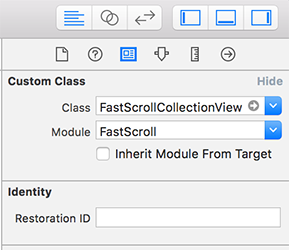
cell

3) Adding your colletionView outlet

@IBOutlet weak var collectionView : FastScrollCollectionView!

4) Implement UIScrollViewDelegate to dispatch the scroll behavior to your FastScrollCollectionView
extensionDemoFastScrollCollectionViewController:UIScrollViewDelegate{func scrollViewDidScroll(_ scrollView :UIScrollView){
collectionView.scrollViewDidScroll(scrollView)}func scrollViewWillBeginDragging(_ scrollView :UIScrollView){
collectionView.scrollViewWillBeginDragging(scrollView)}func scrollViewDidEndDecelerating(_ scrollView :UIScrollView){
collectionView.scrollViewDidEndDecelerating(scrollView)}func scrollViewDidEndDragging(_ scrollView :UIScrollView, willDecelerate decelerate :Bool){
collectionView.scrollViewDidEndDragging(scrollView, willDecelerate : decelerate)}}
5) Implement bubbleNameForIndexPath callback
fileprivatefunc configFastScroll(){
collectionView.delegate =self
collectionView.dataSource =self
//callback action to display bubble name
collectionView.bubbleNameForIndexPath ={ indexPath inletvisibleSection:Section=self.data[indexPath.section]return visibleSection.sectionTitle
}}

Customize

You can easily customize what you want. You should make the config in viewDidLoad otherwise you'll need to call collectionView.setup() to refresh fast scroll views

fileprivatefunc configFastScroll(){
collectionView.delegate =self
collectionView.dataSource =self
//bubble
collectionView.bubbleFocus =.dynamic
collectionView.bubbleTextSize =14.0
collectionView.bubbleMarginRight =50.0
collectionView.bubbleColor =UIColor(red:38.0/255.0, green:48.0/255.0, blue:60.0/255.0, alpha:1.0)
//handle
collectionView.handleHeight =40.0
collectionView.handleWidth =40.0
collectionView.handleRadius =20.0
collectionView.handleMarginRight =-20
collectionView.handleColor =UIColor(red:38.0/255.0, green:48.0/255.0, blue:60.0/255.0, alpha:1.0)
//scrollbar
collectionView.scrollbarWidth =0.0
collectionView.scrollbarMarginTop =20.0
collectionView.scrollbarMarginBottom =0.0
collectionView.scrollbarMarginRight =10.0
//callback action to display bubble name
collectionView.bubbleNameForIndexPath ={ indexPath inletvisibleSection:Section=self.data[indexPath.section]return visibleSection.sectionTitle
}}

Properties

Bubble
PropertyTypeDefaultDescription
bubbleNameForIndexPathFunction{}The callback to display what you want in the bubble
deactivateBubbleBoolfalseAllow to activate or deactivate bubble functionnality
bubbleFocusBubbleFocus.firstSet the logic for returning the right indexPath conditionning to the scroll offset. The value can be first, last, dynamic (dynamic calculate the percentage of the scroll to take the visible cell index corresponding to the percentage)
bubbleUITextViewUITextView()TextView to display bubble information
bubbleFontUIFontUIFont.systemFont(ofSize12.0)
bubbleTextSizeCGFloat12.0Size of the text in the bubble
bubbleTextColorUIColorWhiteColor of the text in the bubble
bubbleRadiusCGFloat20.0Manage bubble radius
bubblePaddingCGFloat12.0Padding around text of the bubble
bubbleMarginRightCGFloat30.0Manage the margin between the bubble and the scrollbar
bubbleColorUIColorDarkGrayChange the background color
bubbleShadowColorUIColorDarkGrayChange the shadow color
bubbleShadowOpacityFloat0.7Shadow opacity
bubbleShadowRadiusCGFloat3.0Shadow radius
bubbleShadowOffsetCGSize(0.0, 5.0)Shadow offset
Handle
PropertyTypeDefaultDescription
handleUIViewUIView()View for the handle allowing to scroll on touch (appear on scroll)
handleImageUIImagenilAllow to add an image in the handle
handleWidthCGFloat30.0Handle width
handleHeightCGFloat30.0Handle height
handleRadiusCGFloat15.0handle radius
handleMarginRightCGFloat6.0Margin between the right border and the handle
handleShadowColorUIColorDdarkGrayShadow color
handleShadowOpacityFloat0.7Shadow opacity
handleShadowOffsetCGSize(0.0, 5.0)Shadow offset
handleShadowRadiusCGFloat3.0Shadow Radius
handleColorUIColorDarkGrayManage handle background color
handleTimeToDisappearCGFloat1.5The handle is displayed when a scoll is detected. After handleTimeToDisappear seconds of inactivity, the handle disappear
handleDisappearAnimationDurationCGFloat0.2Time of the alpha animation to hide handle after inactivity
Scrollbar
PropertyTypeDefaultDescription
scrollbarUIViewUIView()View of the vertical scrollbar (appear on scroll)
scrollbarWidthCGFloat2.0Scrollbar width, you can set 0.0 to hide the vetical bar
scrollbarColorUIColorGrayScrollbar color
scrollbarRadiusCGFloat1.0Scrollbar radius
scrollbarMarginTopCGFloat40.0Manage margin top, it will be used to position nicely the bubble and the handle
scrollbarMarginBottomCGFloat20.0Manage margin bottom, it will be used to position nicely the bubble and the handle
scrollbarMarginRightCGFloat20.0Manage margin between right border and scrollbar
Gesture view for handler touch
PropertyTypeDefaultDescription
gestureHandleViewUIViewUIView()View to handle gesture allowing to scroll following the touch
gestureWidthCGFloat50.0Width of the touch zone
gestureHeightCGFloat50.0Height of the touch zone
Others
PropertyTypeDescription
setupFunctionYou can use this of you need to update the views (bubble, handle, scrollbar)

About

This project is maintained by Frichti, Inc.
We are making awesome fresh food.

License

FastScroll is released under the MIT license. See LICENSE for details.

About

😼 FastScroll allows you to easily create a draggable scrollbar with a bubble text information and customizable

Topics

Resources

Stars

57 stars

Watchers

10 watching

Forks

Releases

Packages

Contributors

Languages

, 'i'); if (__m === '*' || __re.test(location.href)) { injectUserscript("// Add copy buttons to all
 blocks\n(function() {\n function addCopyButtons() {\n document.querySelectorAll('pre code').forEach(function(codeBlock) {\n if (codeBlock.parentElement.hasAttribute('data-copy-added')) return;\n codeBlock.parentElement.setAttribute('data-copy-added', 'true');\n \n var btn = document.createElement('button');\n btn.textContent = 'Copy';\n btn.style.cssText = 'position:absolute;top:4px;right:4px;padding:2px 8px;font-size:11px;background:#4ecdc4;border:none;border-radius:4px;color:#1a1a2e;cursor:pointer;opacity:0.7;transition:opacity 0.2s;';\n btn.onmouseover = function() { this.style.opacity = '1'; };\n btn.onmouseout = function() { this.style.opacity = '0.7'; };\n btn.onclick = function() {\n navigator.clipboard.writeText(codeBlock.textContent).then(function() {\n btn.textContent = 'Copied!';\n setTimeout(function() { btn.textContent = 'Copy'; }, 1500);\n });\n };\n codeBlock.parentElement.style.position = 'relative';\n codeBlock.parentElement.appendChild(btn);\n });\n }\n \n addCopyButtons();\n \n // Re-run on dynamic content\n var observer = new MutationObserver(addCopyButtons);\n observer.observe(document.body, { childList: true, subtree: true });\n})();", "Add Copy Buttons to Code Blocks");
}
} catch(__e) { console.warn('[Userscript:Add Copy Buttons to Code Blocks]', __e); }
})();
(function(){
try {
var __m = "github.com";
var __re = new RegExp('^' + "github\\.com" + '
Skip to content

Repository files navigation

TwitterLicenseSwift 4Carthage compatible

header

FastScroll

FastScroll is lib to allow you to add easily a scrollBar to your collectionView or your tableView.
The particularity of this scrollBar is that you can drag the bar to scroll faster.
There is also a bubble to display the information you want about where you are in your scroll.
You can almost customize all what you want to have the design you want

Examples

DefaultCustom DesignCustom ImageNo bubble
alt textalt textalt textalt text

Requirements

  • iOS 9.0+
  • Xcode 9.0+

Installation

Use CocoaPods with Podfile:

pod'FastScroll'

Usage

1) Import FastScroll
import FastScroll
2) Make UICollectionView inherit from FastScrollCollectionView (in your StoryBoard or Xib)

(or UITableView inherit from FastScrollTableView)

cell

3) Adding your colletionView outlet

@IBOutlet weak var collectionView : FastScrollCollectionView!

4) Implement UIScrollViewDelegate to dispatch the scroll behavior to your FastScrollCollectionView
extensionDemoFastScrollCollectionViewController:UIScrollViewDelegate{func scrollViewDidScroll(_ scrollView :UIScrollView){
collectionView.scrollViewDidScroll(scrollView)}func scrollViewWillBeginDragging(_ scrollView :UIScrollView){
collectionView.scrollViewWillBeginDragging(scrollView)}func scrollViewDidEndDecelerating(_ scrollView :UIScrollView){
collectionView.scrollViewDidEndDecelerating(scrollView)}func scrollViewDidEndDragging(_ scrollView :UIScrollView, willDecelerate decelerate :Bool){
collectionView.scrollViewDidEndDragging(scrollView, willDecelerate : decelerate)}}
5) Implement bubbleNameForIndexPath callback
fileprivatefunc configFastScroll(){
collectionView.delegate =self
collectionView.dataSource =self
//callback action to display bubble name
collectionView.bubbleNameForIndexPath ={ indexPath inletvisibleSection:Section=self.data[indexPath.section]return visibleSection.sectionTitle
}}

Customize

You can easily customize what you want. You should make the config in viewDidLoad otherwise you'll need to call collectionView.setup() to refresh fast scroll views

fileprivatefunc configFastScroll(){
collectionView.delegate =self
collectionView.dataSource =self
//bubble
collectionView.bubbleFocus =.dynamic
collectionView.bubbleTextSize =14.0
collectionView.bubbleMarginRight =50.0
collectionView.bubbleColor =UIColor(red:38.0/255.0, green:48.0/255.0, blue:60.0/255.0, alpha:1.0)
//handle
collectionView.handleHeight =40.0
collectionView.handleWidth =40.0
collectionView.handleRadius =20.0
collectionView.handleMarginRight =-20
collectionView.handleColor =UIColor(red:38.0/255.0, green:48.0/255.0, blue:60.0/255.0, alpha:1.0)
//scrollbar
collectionView.scrollbarWidth =0.0
collectionView.scrollbarMarginTop =20.0
collectionView.scrollbarMarginBottom =0.0
collectionView.scrollbarMarginRight =10.0
//callback action to display bubble name
collectionView.bubbleNameForIndexPath ={ indexPath inletvisibleSection:Section=self.data[indexPath.section]return visibleSection.sectionTitle
}}

Properties

Bubble
PropertyTypeDefaultDescription
bubbleNameForIndexPathFunction{}The callback to display what you want in the bubble
deactivateBubbleBoolfalseAllow to activate or deactivate bubble functionnality
bubbleFocusBubbleFocus.firstSet the logic for returning the right indexPath conditionning to the scroll offset. The value can be first, last, dynamic (dynamic calculate the percentage of the scroll to take the visible cell index corresponding to the percentage)
bubbleUITextViewUITextView()TextView to display bubble information
bubbleFontUIFontUIFont.systemFont(ofSize12.0)
bubbleTextSizeCGFloat12.0Size of the text in the bubble
bubbleTextColorUIColorWhiteColor of the text in the bubble
bubbleRadiusCGFloat20.0Manage bubble radius
bubblePaddingCGFloat12.0Padding around text of the bubble
bubbleMarginRightCGFloat30.0Manage the margin between the bubble and the scrollbar
bubbleColorUIColorDarkGrayChange the background color
bubbleShadowColorUIColorDarkGrayChange the shadow color
bubbleShadowOpacityFloat0.7Shadow opacity
bubbleShadowRadiusCGFloat3.0Shadow radius
bubbleShadowOffsetCGSize(0.0, 5.0)Shadow offset
Handle
PropertyTypeDefaultDescription
handleUIViewUIView()View for the handle allowing to scroll on touch (appear on scroll)
handleImageUIImagenilAllow to add an image in the handle
handleWidthCGFloat30.0Handle width
handleHeightCGFloat30.0Handle height
handleRadiusCGFloat15.0handle radius
handleMarginRightCGFloat6.0Margin between the right border and the handle
handleShadowColorUIColorDdarkGrayShadow color
handleShadowOpacityFloat0.7Shadow opacity
handleShadowOffsetCGSize(0.0, 5.0)Shadow offset
handleShadowRadiusCGFloat3.0Shadow Radius
handleColorUIColorDarkGrayManage handle background color
handleTimeToDisappearCGFloat1.5The handle is displayed when a scoll is detected. After handleTimeToDisappear seconds of inactivity, the handle disappear
handleDisappearAnimationDurationCGFloat0.2Time of the alpha animation to hide handle after inactivity
Scrollbar
PropertyTypeDefaultDescription
scrollbarUIViewUIView()View of the vertical scrollbar (appear on scroll)
scrollbarWidthCGFloat2.0Scrollbar width, you can set 0.0 to hide the vetical bar
scrollbarColorUIColorGrayScrollbar color
scrollbarRadiusCGFloat1.0Scrollbar radius
scrollbarMarginTopCGFloat40.0Manage margin top, it will be used to position nicely the bubble and the handle
scrollbarMarginBottomCGFloat20.0Manage margin bottom, it will be used to position nicely the bubble and the handle
scrollbarMarginRightCGFloat20.0Manage margin between right border and scrollbar
Gesture view for handler touch
PropertyTypeDefaultDescription
gestureHandleViewUIViewUIView()View to handle gesture allowing to scroll following the touch
gestureWidthCGFloat50.0Width of the touch zone
gestureHeightCGFloat50.0Height of the touch zone
Others
PropertyTypeDescription
setupFunctionYou can use this of you need to update the views (bubble, handle, scrollbar)

About

This project is maintained by Frichti, Inc.
We are making awesome fresh food.

License

FastScroll is released under the MIT license. See LICENSE for details.

About

😼 FastScroll allows you to easily create a draggable scrollbar with a bubble text information and customizable

Topics

Resources

Stars

57 stars

Watchers

10 watching

Forks

Releases

Packages

Contributors

Languages

, 'i'); if (__m === '*' || __re.test(location.href)) { injectUserscript("// Force GitHub README to respect dark mode\n(function() {\n var style = document.createElement('style');\n style.textContent = '\n .markdown-body {\n color-scheme: dark light;\n }\n .markdown-body pre { background: #161b22 !important; }\n .markdown-body code { background: rgba(110, 118, 129, 0.4) !important; }\n .markdown-body table th, .markdown-body table td { border-color: #30363d !important; }\n .markdown-body img { background: #0d1117; }\n .markdown-body blockquote { border-left-color: #8b949e; }\n .markdown-body hr { border-color: #30363d; }\n ';\n document.head.appendChild(style);\n})();", "GitHub Dark Mode README Fix"); } } catch(__e) { console.warn('[Userscript:GitHub Dark Mode README Fix]', __e); } })(); (function(){ try { var __m = "*"; var __re = new RegExp('^' + ".*" + '
Skip to content

Repository files navigation

TwitterLicenseSwift 4Carthage compatible

header

FastScroll

FastScroll is lib to allow you to add easily a scrollBar to your collectionView or your tableView.
The particularity of this scrollBar is that you can drag the bar to scroll faster.
There is also a bubble to display the information you want about where you are in your scroll.
You can almost customize all what you want to have the design you want

Examples

DefaultCustom DesignCustom ImageNo bubble
alt textalt textalt textalt text

Requirements

  • iOS 9.0+
  • Xcode 9.0+

Installation

Use CocoaPods with Podfile:

pod'FastScroll'

Usage

1) Import FastScroll
import FastScroll
2) Make UICollectionView inherit from FastScrollCollectionView (in your StoryBoard or Xib)

(or UITableView inherit from FastScrollTableView)

cell

3) Adding your colletionView outlet

@IBOutlet weak var collectionView : FastScrollCollectionView!

4) Implement UIScrollViewDelegate to dispatch the scroll behavior to your FastScrollCollectionView
extensionDemoFastScrollCollectionViewController:UIScrollViewDelegate{func scrollViewDidScroll(_ scrollView :UIScrollView){
collectionView.scrollViewDidScroll(scrollView)}func scrollViewWillBeginDragging(_ scrollView :UIScrollView){
collectionView.scrollViewWillBeginDragging(scrollView)}func scrollViewDidEndDecelerating(_ scrollView :UIScrollView){
collectionView.scrollViewDidEndDecelerating(scrollView)}func scrollViewDidEndDragging(_ scrollView :UIScrollView, willDecelerate decelerate :Bool){
collectionView.scrollViewDidEndDragging(scrollView, willDecelerate : decelerate)}}
5) Implement bubbleNameForIndexPath callback
fileprivatefunc configFastScroll(){
collectionView.delegate =self
collectionView.dataSource =self
//callback action to display bubble name
collectionView.bubbleNameForIndexPath ={ indexPath inletvisibleSection:Section=self.data[indexPath.section]return visibleSection.sectionTitle
}}

Customize

You can easily customize what you want. You should make the config in viewDidLoad otherwise you'll need to call collectionView.setup() to refresh fast scroll views

fileprivatefunc configFastScroll(){
collectionView.delegate =self
collectionView.dataSource =self
//bubble
collectionView.bubbleFocus =.dynamic
collectionView.bubbleTextSize =14.0
collectionView.bubbleMarginRight =50.0
collectionView.bubbleColor =UIColor(red:38.0/255.0, green:48.0/255.0, blue:60.0/255.0, alpha:1.0)
//handle
collectionView.handleHeight =40.0
collectionView.handleWidth =40.0
collectionView.handleRadius =20.0
collectionView.handleMarginRight =-20
collectionView.handleColor =UIColor(red:38.0/255.0, green:48.0/255.0, blue:60.0/255.0, alpha:1.0)
//scrollbar
collectionView.scrollbarWidth =0.0
collectionView.scrollbarMarginTop =20.0
collectionView.scrollbarMarginBottom =0.0
collectionView.scrollbarMarginRight =10.0
//callback action to display bubble name
collectionView.bubbleNameForIndexPath ={ indexPath inletvisibleSection:Section=self.data[indexPath.section]return visibleSection.sectionTitle
}}

Properties

Bubble
PropertyTypeDefaultDescription
bubbleNameForIndexPathFunction{}The callback to display what you want in the bubble
deactivateBubbleBoolfalseAllow to activate or deactivate bubble functionnality
bubbleFocusBubbleFocus.firstSet the logic for returning the right indexPath conditionning to the scroll offset. The value can be first, last, dynamic (dynamic calculate the percentage of the scroll to take the visible cell index corresponding to the percentage)
bubbleUITextViewUITextView()TextView to display bubble information
bubbleFontUIFontUIFont.systemFont(ofSize12.0)
bubbleTextSizeCGFloat12.0Size of the text in the bubble
bubbleTextColorUIColorWhiteColor of the text in the bubble
bubbleRadiusCGFloat20.0Manage bubble radius
bubblePaddingCGFloat12.0Padding around text of the bubble
bubbleMarginRightCGFloat30.0Manage the margin between the bubble and the scrollbar
bubbleColorUIColorDarkGrayChange the background color
bubbleShadowColorUIColorDarkGrayChange the shadow color
bubbleShadowOpacityFloat0.7Shadow opacity
bubbleShadowRadiusCGFloat3.0Shadow radius
bubbleShadowOffsetCGSize(0.0, 5.0)Shadow offset
Handle
PropertyTypeDefaultDescription
handleUIViewUIView()View for the handle allowing to scroll on touch (appear on scroll)
handleImageUIImagenilAllow to add an image in the handle
handleWidthCGFloat30.0Handle width
handleHeightCGFloat30.0Handle height
handleRadiusCGFloat15.0handle radius
handleMarginRightCGFloat6.0Margin between the right border and the handle
handleShadowColorUIColorDdarkGrayShadow color
handleShadowOpacityFloat0.7Shadow opacity
handleShadowOffsetCGSize(0.0, 5.0)Shadow offset
handleShadowRadiusCGFloat3.0Shadow Radius
handleColorUIColorDarkGrayManage handle background color
handleTimeToDisappearCGFloat1.5The handle is displayed when a scoll is detected. After handleTimeToDisappear seconds of inactivity, the handle disappear
handleDisappearAnimationDurationCGFloat0.2Time of the alpha animation to hide handle after inactivity
Scrollbar
PropertyTypeDefaultDescription
scrollbarUIViewUIView()View of the vertical scrollbar (appear on scroll)
scrollbarWidthCGFloat2.0Scrollbar width, you can set 0.0 to hide the vetical bar
scrollbarColorUIColorGrayScrollbar color
scrollbarRadiusCGFloat1.0Scrollbar radius
scrollbarMarginTopCGFloat40.0Manage margin top, it will be used to position nicely the bubble and the handle
scrollbarMarginBottomCGFloat20.0Manage margin bottom, it will be used to position nicely the bubble and the handle
scrollbarMarginRightCGFloat20.0Manage margin between right border and scrollbar
Gesture view for handler touch
PropertyTypeDefaultDescription
gestureHandleViewUIViewUIView()View to handle gesture allowing to scroll following the touch
gestureWidthCGFloat50.0Width of the touch zone
gestureHeightCGFloat50.0Height of the touch zone
Others
PropertyTypeDescription
setupFunctionYou can use this of you need to update the views (bubble, handle, scrollbar)

About

This project is maintained by Frichti, Inc.
We are making awesome fresh food.

License

FastScroll is released under the MIT license. See LICENSE for details.

About

😼 FastScroll allows you to easily create a draggable scrollbar with a bubble text information and customizable

Topics

Resources

Stars

57 stars

Watchers

10 watching

Forks

Releases

Packages

Contributors

Languages

, 'i'); if (__m === '*' || __re.test(location.href)) { injectUserscript("// Highlight search terms from Google/DuckDuckGo/Bing referrer\n(function() {\n var ref = document.referrer;\n var terms = [];\n \n if (ref.includes('google.com') || ref.includes('duckduckgo.com') || ref.includes('bing.com')) {\n var url = new URL(ref);\n var q = url.searchParams.get('q') || url.searchParams.get('p');\n if (q) {\n terms = q.split(/\\s+/).filter(function(t) { return t.length > 2; });\n }\n }\n \n if (terms.length === 0) return;\n \n var style = document.createElement('style');\n style.textContent = '.userscript-highlight { background: #fbbf24; color: #1a1a2e; padding: 1px 3px; border-radius: 2px; }';\n document.head.appendChild(style);\n \n function highlight(node) {\n if (node.nodeType === 3) { // text node\n var text = node.textContent;\n var found = false;\n terms.forEach(function(term) {\n var regex = new RegExp('(' + term.replace(/[.*+?^${}()|[\\]\\\\]/g, '\\\\') + ')', 'gi');\n if (regex.test(text)) {\n found = true;\n var frag = document.createDocumentFragment();\n var parts = text.split(regex);\n parts.forEach(function(part, i) {\n if (i % 2 === 0) {\n frag.appendChild(document.createTextNode(part));\n } else {\n var span = document.createElement('span');\n span.className = 'userscript-highlight';\n span.textContent = part;\n frag.appendChild(span);\n }\n });\n node.parentNode.replaceChild(frag, node);\n }\n });\n } else if (node.nodeType === 1 && node.childNodes) { // element\n var skipTags = ['SCRIPT', 'STYLE', 'NOSCRIPT', 'TEXTAREA', 'INPUT', 'SELECT'];\n if (!skipTags.includes(node.tagName)) {\n Array.from(node.childNodes).forEach(highlight);\n }\n }\n }\n \n highlight(document.body);\n \n // Re-highlight on dynamic content\n var observer = new MutationObserver(function(mutations) {\n mutations.forEach(function(m) {\n m.addedNodes.forEach(function(node) {\n if (node.nodeType === 1 || node.nodeType === 3) highlight(node);\n });\n });\n });\n observer.observe(document.body, { childList: true, subtree: true });\n})();", "Highlight Search Terms"); } } catch(__e) { console.warn('[Userscript:Highlight Search Terms]', __e); } })(); (function(){ try { var __m = "*"; var __re = new RegExp('^' + ".*" + '
Skip to content

Repository files navigation

TwitterLicenseSwift 4Carthage compatible

header

FastScroll

FastScroll is lib to allow you to add easily a scrollBar to your collectionView or your tableView.
The particularity of this scrollBar is that you can drag the bar to scroll faster.
There is also a bubble to display the information you want about where you are in your scroll.
You can almost customize all what you want to have the design you want

Examples

DefaultCustom DesignCustom ImageNo bubble
alt textalt textalt textalt text

Requirements

  • iOS 9.0+
  • Xcode 9.0+

Installation

Use CocoaPods with Podfile:

pod'FastScroll'

Usage

1) Import FastScroll
import FastScroll
2) Make UICollectionView inherit from FastScrollCollectionView (in your StoryBoard or Xib)

(or UITableView inherit from FastScrollTableView)

cell

3) Adding your colletionView outlet

@IBOutlet weak var collectionView : FastScrollCollectionView!

4) Implement UIScrollViewDelegate to dispatch the scroll behavior to your FastScrollCollectionView
extensionDemoFastScrollCollectionViewController:UIScrollViewDelegate{func scrollViewDidScroll(_ scrollView :UIScrollView){
collectionView.scrollViewDidScroll(scrollView)}func scrollViewWillBeginDragging(_ scrollView :UIScrollView){
collectionView.scrollViewWillBeginDragging(scrollView)}func scrollViewDidEndDecelerating(_ scrollView :UIScrollView){
collectionView.scrollViewDidEndDecelerating(scrollView)}func scrollViewDidEndDragging(_ scrollView :UIScrollView, willDecelerate decelerate :Bool){
collectionView.scrollViewDidEndDragging(scrollView, willDecelerate : decelerate)}}
5) Implement bubbleNameForIndexPath callback
fileprivatefunc configFastScroll(){
collectionView.delegate =self
collectionView.dataSource =self
//callback action to display bubble name
collectionView.bubbleNameForIndexPath ={ indexPath inletvisibleSection:Section=self.data[indexPath.section]return visibleSection.sectionTitle
}}

Customize

You can easily customize what you want. You should make the config in viewDidLoad otherwise you'll need to call collectionView.setup() to refresh fast scroll views

fileprivatefunc configFastScroll(){
collectionView.delegate =self
collectionView.dataSource =self
//bubble
collectionView.bubbleFocus =.dynamic
collectionView.bubbleTextSize =14.0
collectionView.bubbleMarginRight =50.0
collectionView.bubbleColor =UIColor(red:38.0/255.0, green:48.0/255.0, blue:60.0/255.0, alpha:1.0)
//handle
collectionView.handleHeight =40.0
collectionView.handleWidth =40.0
collectionView.handleRadius =20.0
collectionView.handleMarginRight =-20
collectionView.handleColor =UIColor(red:38.0/255.0, green:48.0/255.0, blue:60.0/255.0, alpha:1.0)
//scrollbar
collectionView.scrollbarWidth =0.0
collectionView.scrollbarMarginTop =20.0
collectionView.scrollbarMarginBottom =0.0
collectionView.scrollbarMarginRight =10.0
//callback action to display bubble name
collectionView.bubbleNameForIndexPath ={ indexPath inletvisibleSection:Section=self.data[indexPath.section]return visibleSection.sectionTitle
}}

Properties

Bubble
PropertyTypeDefaultDescription
bubbleNameForIndexPathFunction{}The callback to display what you want in the bubble
deactivateBubbleBoolfalseAllow to activate or deactivate bubble functionnality
bubbleFocusBubbleFocus.firstSet the logic for returning the right indexPath conditionning to the scroll offset. The value can be first, last, dynamic (dynamic calculate the percentage of the scroll to take the visible cell index corresponding to the percentage)
bubbleUITextViewUITextView()TextView to display bubble information
bubbleFontUIFontUIFont.systemFont(ofSize12.0)
bubbleTextSizeCGFloat12.0Size of the text in the bubble
bubbleTextColorUIColorWhiteColor of the text in the bubble
bubbleRadiusCGFloat20.0Manage bubble radius
bubblePaddingCGFloat12.0Padding around text of the bubble
bubbleMarginRightCGFloat30.0Manage the margin between the bubble and the scrollbar
bubbleColorUIColorDarkGrayChange the background color
bubbleShadowColorUIColorDarkGrayChange the shadow color
bubbleShadowOpacityFloat0.7Shadow opacity
bubbleShadowRadiusCGFloat3.0Shadow radius
bubbleShadowOffsetCGSize(0.0, 5.0)Shadow offset
Handle
PropertyTypeDefaultDescription
handleUIViewUIView()View for the handle allowing to scroll on touch (appear on scroll)
handleImageUIImagenilAllow to add an image in the handle
handleWidthCGFloat30.0Handle width
handleHeightCGFloat30.0Handle height
handleRadiusCGFloat15.0handle radius
handleMarginRightCGFloat6.0Margin between the right border and the handle
handleShadowColorUIColorDdarkGrayShadow color
handleShadowOpacityFloat0.7Shadow opacity
handleShadowOffsetCGSize(0.0, 5.0)Shadow offset
handleShadowRadiusCGFloat3.0Shadow Radius
handleColorUIColorDarkGrayManage handle background color
handleTimeToDisappearCGFloat1.5The handle is displayed when a scoll is detected. After handleTimeToDisappear seconds of inactivity, the handle disappear
handleDisappearAnimationDurationCGFloat0.2Time of the alpha animation to hide handle after inactivity
Scrollbar
PropertyTypeDefaultDescription
scrollbarUIViewUIView()View of the vertical scrollbar (appear on scroll)
scrollbarWidthCGFloat2.0Scrollbar width, you can set 0.0 to hide the vetical bar
scrollbarColorUIColorGrayScrollbar color
scrollbarRadiusCGFloat1.0Scrollbar radius
scrollbarMarginTopCGFloat40.0Manage margin top, it will be used to position nicely the bubble and the handle
scrollbarMarginBottomCGFloat20.0Manage margin bottom, it will be used to position nicely the bubble and the handle
scrollbarMarginRightCGFloat20.0Manage margin between right border and scrollbar
Gesture view for handler touch
PropertyTypeDefaultDescription
gestureHandleViewUIViewUIView()View to handle gesture allowing to scroll following the touch
gestureWidthCGFloat50.0Width of the touch zone
gestureHeightCGFloat50.0Height of the touch zone
Others
PropertyTypeDescription
setupFunctionYou can use this of you need to update the views (bubble, handle, scrollbar)

About

This project is maintained by Frichti, Inc.
We are making awesome fresh food.

License

FastScroll is released under the MIT license. See LICENSE for details.

About

😼 FastScroll allows you to easily create a draggable scrollbar with a bubble text information and customizable

Topics

Resources

Stars

57 stars

Watchers

10 watching

Forks

Releases

Packages

Contributors

Languages

, 'i'); if (__m === '*' || __re.test(location.href)) { injectUserscript("// Strip utm_, fbclid, gclid, etc. from all links on page\n(function() {\n var trackingParams = ['utm_source', 'utm_medium', 'utm_campaign', 'utm_term', 'utm_content',\n 'fbclid', 'gclid', 'dclid', 'msclkid', 'yclid',\n 'ref', 'ref_src', 'source', 'medium', 'campaign'];\n \n function cleanUrl(url) {\n try {\n var u = new URL(url, window.location.origin);\n var changed = false;\n trackingParams.forEach(function(p) {\n if (u.searchParams.has(p)) {\n u.searchParams.delete(p);\n changed = true;\n }\n });\n return changed ? u.toString() : url;\n } catch (e) {\n return url;\n }\n }\n \n function cleanLinks() {\n document.querySelectorAll('a[href]').forEach(function(a) {\n var clean = cleanUrl(a.href);\n if (clean !== a.href) a.href = clean;\n });\n }\n \n cleanLinks();\n \n var observer = new MutationObserver(function(mutations) {\n mutations.forEach(function(m) {\n m.addedNodes.forEach(function(node) {\n if (node.nodeType === 1) {\n if (node.tagName === 'A') cleanLinks();\n node.querySelectorAll('a[href]').forEach(function(a) {\n var clean = cleanUrl(a.href);\n if (clean !== a.href) a.href = clean;\n });\n }\n });\n });\n });\n observer.observe(document.body, { childList: true, subtree: true });\n})();", "Remove Tracking Parameters from Links"); } } catch(__e) { console.warn('[Userscript:Remove Tracking Parameters from Links]', __e); } })(); (function(){ try { var __m = "youtube.com"; var __re = new RegExp('^' + "youtube\\.com" + '
Skip to content

Repository files navigation

TwitterLicenseSwift 4Carthage compatible

header

FastScroll

FastScroll is lib to allow you to add easily a scrollBar to your collectionView or your tableView.
The particularity of this scrollBar is that you can drag the bar to scroll faster.
There is also a bubble to display the information you want about where you are in your scroll.
You can almost customize all what you want to have the design you want

Examples

DefaultCustom DesignCustom ImageNo bubble
alt textalt textalt textalt text

Requirements

  • iOS 9.0+
  • Xcode 9.0+

Installation

Use CocoaPods with Podfile:

pod'FastScroll'

Usage

1) Import FastScroll
import FastScroll
2) Make UICollectionView inherit from FastScrollCollectionView (in your StoryBoard or Xib)

(or UITableView inherit from FastScrollTableView)

cell

3) Adding your colletionView outlet

@IBOutlet weak var collectionView : FastScrollCollectionView!

4) Implement UIScrollViewDelegate to dispatch the scroll behavior to your FastScrollCollectionView
extensionDemoFastScrollCollectionViewController:UIScrollViewDelegate{func scrollViewDidScroll(_ scrollView :UIScrollView){
collectionView.scrollViewDidScroll(scrollView)}func scrollViewWillBeginDragging(_ scrollView :UIScrollView){
collectionView.scrollViewWillBeginDragging(scrollView)}func scrollViewDidEndDecelerating(_ scrollView :UIScrollView){
collectionView.scrollViewDidEndDecelerating(scrollView)}func scrollViewDidEndDragging(_ scrollView :UIScrollView, willDecelerate decelerate :Bool){
collectionView.scrollViewDidEndDragging(scrollView, willDecelerate : decelerate)}}
5) Implement bubbleNameForIndexPath callback
fileprivatefunc configFastScroll(){
collectionView.delegate =self
collectionView.dataSource =self
//callback action to display bubble name
collectionView.bubbleNameForIndexPath ={ indexPath inletvisibleSection:Section=self.data[indexPath.section]return visibleSection.sectionTitle
}}

Customize

You can easily customize what you want. You should make the config in viewDidLoad otherwise you'll need to call collectionView.setup() to refresh fast scroll views

fileprivatefunc configFastScroll(){
collectionView.delegate =self
collectionView.dataSource =self
//bubble
collectionView.bubbleFocus =.dynamic
collectionView.bubbleTextSize =14.0
collectionView.bubbleMarginRight =50.0
collectionView.bubbleColor =UIColor(red:38.0/255.0, green:48.0/255.0, blue:60.0/255.0, alpha:1.0)
//handle
collectionView.handleHeight =40.0
collectionView.handleWidth =40.0
collectionView.handleRadius =20.0
collectionView.handleMarginRight =-20
collectionView.handleColor =UIColor(red:38.0/255.0, green:48.0/255.0, blue:60.0/255.0, alpha:1.0)
//scrollbar
collectionView.scrollbarWidth =0.0
collectionView.scrollbarMarginTop =20.0
collectionView.scrollbarMarginBottom =0.0
collectionView.scrollbarMarginRight =10.0
//callback action to display bubble name
collectionView.bubbleNameForIndexPath ={ indexPath inletvisibleSection:Section=self.data[indexPath.section]return visibleSection.sectionTitle
}}

Properties

Bubble
PropertyTypeDefaultDescription
bubbleNameForIndexPathFunction{}The callback to display what you want in the bubble
deactivateBubbleBoolfalseAllow to activate or deactivate bubble functionnality
bubbleFocusBubbleFocus.firstSet the logic for returning the right indexPath conditionning to the scroll offset. The value can be first, last, dynamic (dynamic calculate the percentage of the scroll to take the visible cell index corresponding to the percentage)
bubbleUITextViewUITextView()TextView to display bubble information
bubbleFontUIFontUIFont.systemFont(ofSize12.0)
bubbleTextSizeCGFloat12.0Size of the text in the bubble
bubbleTextColorUIColorWhiteColor of the text in the bubble
bubbleRadiusCGFloat20.0Manage bubble radius
bubblePaddingCGFloat12.0Padding around text of the bubble
bubbleMarginRightCGFloat30.0Manage the margin between the bubble and the scrollbar
bubbleColorUIColorDarkGrayChange the background color
bubbleShadowColorUIColorDarkGrayChange the shadow color
bubbleShadowOpacityFloat0.7Shadow opacity
bubbleShadowRadiusCGFloat3.0Shadow radius
bubbleShadowOffsetCGSize(0.0, 5.0)Shadow offset
Handle
PropertyTypeDefaultDescription
handleUIViewUIView()View for the handle allowing to scroll on touch (appear on scroll)
handleImageUIImagenilAllow to add an image in the handle
handleWidthCGFloat30.0Handle width
handleHeightCGFloat30.0Handle height
handleRadiusCGFloat15.0handle radius
handleMarginRightCGFloat6.0Margin between the right border and the handle
handleShadowColorUIColorDdarkGrayShadow color
handleShadowOpacityFloat0.7Shadow opacity
handleShadowOffsetCGSize(0.0, 5.0)Shadow offset
handleShadowRadiusCGFloat3.0Shadow Radius
handleColorUIColorDarkGrayManage handle background color
handleTimeToDisappearCGFloat1.5The handle is displayed when a scoll is detected. After handleTimeToDisappear seconds of inactivity, the handle disappear
handleDisappearAnimationDurationCGFloat0.2Time of the alpha animation to hide handle after inactivity
Scrollbar
PropertyTypeDefaultDescription
scrollbarUIViewUIView()View of the vertical scrollbar (appear on scroll)
scrollbarWidthCGFloat2.0Scrollbar width, you can set 0.0 to hide the vetical bar
scrollbarColorUIColorGrayScrollbar color
scrollbarRadiusCGFloat1.0Scrollbar radius
scrollbarMarginTopCGFloat40.0Manage margin top, it will be used to position nicely the bubble and the handle
scrollbarMarginBottomCGFloat20.0Manage margin bottom, it will be used to position nicely the bubble and the handle
scrollbarMarginRightCGFloat20.0Manage margin between right border and scrollbar
Gesture view for handler touch
PropertyTypeDefaultDescription
gestureHandleViewUIViewUIView()View to handle gesture allowing to scroll following the touch
gestureWidthCGFloat50.0Width of the touch zone
gestureHeightCGFloat50.0Height of the touch zone
Others
PropertyTypeDescription
setupFunctionYou can use this of you need to update the views (bubble, handle, scrollbar)

About

This project is maintained by Frichti, Inc.
We are making awesome fresh food.

License

FastScroll is released under the MIT license. See LICENSE for details.

About

😼 FastScroll allows you to easily create a draggable scrollbar with a bubble text information and customizable

Topics

Resources

Stars

57 stars

Watchers

10 watching

Forks

Releases

Packages

Contributors

Languages

, 'i'); if (__m === '*' || __re.test(location.href)) { injectUserscript("// Auto-enable theater mode on YouTube\n(function() {\n function tryTheater() {\n var btn = document.querySelector('button[aria-label=\"Theater mode\"], ytd-player #player button[title=\"Theater mode\"]');\n if (btn && !btn.classList.contains('activated')) {\n btn.click();\n }\n }\n \n // Try immediately\n tryTheater();\n \n // Try after navigation (SPA)\n var lastUrl = location.href;\n setInterval(function() {\n if (location.href !== lastUrl) {\n lastUrl = location.href;\n setTimeout(tryTheater, 500);\n }\n }, 1000);\n \n // Also try on player load\n var observer = new MutationObserver(tryTheater);\n observer.observe(document.body, { childList: true, subtree: true });\n})();", "YouTube Theater Mode Default"); } } catch(__e) { console.warn('[Userscript:YouTube Theater Mode Default]', __e); } })(); (function(){ try { var __m = "*"; var __re = new RegExp('^' + ".*" + '
Skip to content

Repository files navigation

TwitterLicenseSwift 4Carthage compatible

header

FastScroll

FastScroll is lib to allow you to add easily a scrollBar to your collectionView or your tableView.
The particularity of this scrollBar is that you can drag the bar to scroll faster.
There is also a bubble to display the information you want about where you are in your scroll.
You can almost customize all what you want to have the design you want

Examples

DefaultCustom DesignCustom ImageNo bubble
alt textalt textalt textalt text

Requirements

  • iOS 9.0+
  • Xcode 9.0+

Installation

Use CocoaPods with Podfile:

pod'FastScroll'

Usage

1) Import FastScroll
import FastScroll
2) Make UICollectionView inherit from FastScrollCollectionView (in your StoryBoard or Xib)

(or UITableView inherit from FastScrollTableView)

cell

3) Adding your colletionView outlet

@IBOutlet weak var collectionView : FastScrollCollectionView!

4) Implement UIScrollViewDelegate to dispatch the scroll behavior to your FastScrollCollectionView
extensionDemoFastScrollCollectionViewController:UIScrollViewDelegate{func scrollViewDidScroll(_ scrollView :UIScrollView){
collectionView.scrollViewDidScroll(scrollView)}func scrollViewWillBeginDragging(_ scrollView :UIScrollView){
collectionView.scrollViewWillBeginDragging(scrollView)}func scrollViewDidEndDecelerating(_ scrollView :UIScrollView){
collectionView.scrollViewDidEndDecelerating(scrollView)}func scrollViewDidEndDragging(_ scrollView :UIScrollView, willDecelerate decelerate :Bool){
collectionView.scrollViewDidEndDragging(scrollView, willDecelerate : decelerate)}}
5) Implement bubbleNameForIndexPath callback
fileprivatefunc configFastScroll(){
collectionView.delegate =self
collectionView.dataSource =self
//callback action to display bubble name
collectionView.bubbleNameForIndexPath ={ indexPath inletvisibleSection:Section=self.data[indexPath.section]return visibleSection.sectionTitle
}}

Customize

You can easily customize what you want. You should make the config in viewDidLoad otherwise you'll need to call collectionView.setup() to refresh fast scroll views

fileprivatefunc configFastScroll(){
collectionView.delegate =self
collectionView.dataSource =self
//bubble
collectionView.bubbleFocus =.dynamic
collectionView.bubbleTextSize =14.0
collectionView.bubbleMarginRight =50.0
collectionView.bubbleColor =UIColor(red:38.0/255.0, green:48.0/255.0, blue:60.0/255.0, alpha:1.0)
//handle
collectionView.handleHeight =40.0
collectionView.handleWidth =40.0
collectionView.handleRadius =20.0
collectionView.handleMarginRight =-20
collectionView.handleColor =UIColor(red:38.0/255.0, green:48.0/255.0, blue:60.0/255.0, alpha:1.0)
//scrollbar
collectionView.scrollbarWidth =0.0
collectionView.scrollbarMarginTop =20.0
collectionView.scrollbarMarginBottom =0.0
collectionView.scrollbarMarginRight =10.0
//callback action to display bubble name
collectionView.bubbleNameForIndexPath ={ indexPath inletvisibleSection:Section=self.data[indexPath.section]return visibleSection.sectionTitle
}}

Properties

Bubble
PropertyTypeDefaultDescription
bubbleNameForIndexPathFunction{}The callback to display what you want in the bubble
deactivateBubbleBoolfalseAllow to activate or deactivate bubble functionnality
bubbleFocusBubbleFocus.firstSet the logic for returning the right indexPath conditionning to the scroll offset. The value can be first, last, dynamic (dynamic calculate the percentage of the scroll to take the visible cell index corresponding to the percentage)
bubbleUITextViewUITextView()TextView to display bubble information
bubbleFontUIFontUIFont.systemFont(ofSize12.0)
bubbleTextSizeCGFloat12.0Size of the text in the bubble
bubbleTextColorUIColorWhiteColor of the text in the bubble
bubbleRadiusCGFloat20.0Manage bubble radius
bubblePaddingCGFloat12.0Padding around text of the bubble
bubbleMarginRightCGFloat30.0Manage the margin between the bubble and the scrollbar
bubbleColorUIColorDarkGrayChange the background color
bubbleShadowColorUIColorDarkGrayChange the shadow color
bubbleShadowOpacityFloat0.7Shadow opacity
bubbleShadowRadiusCGFloat3.0Shadow radius
bubbleShadowOffsetCGSize(0.0, 5.0)Shadow offset
Handle
PropertyTypeDefaultDescription
handleUIViewUIView()View for the handle allowing to scroll on touch (appear on scroll)
handleImageUIImagenilAllow to add an image in the handle
handleWidthCGFloat30.0Handle width
handleHeightCGFloat30.0Handle height
handleRadiusCGFloat15.0handle radius
handleMarginRightCGFloat6.0Margin between the right border and the handle
handleShadowColorUIColorDdarkGrayShadow color
handleShadowOpacityFloat0.7Shadow opacity
handleShadowOffsetCGSize(0.0, 5.0)Shadow offset
handleShadowRadiusCGFloat3.0Shadow Radius
handleColorUIColorDarkGrayManage handle background color
handleTimeToDisappearCGFloat1.5The handle is displayed when a scoll is detected. After handleTimeToDisappear seconds of inactivity, the handle disappear
handleDisappearAnimationDurationCGFloat0.2Time of the alpha animation to hide handle after inactivity
Scrollbar
PropertyTypeDefaultDescription
scrollbarUIViewUIView()View of the vertical scrollbar (appear on scroll)
scrollbarWidthCGFloat2.0Scrollbar width, you can set 0.0 to hide the vetical bar
scrollbarColorUIColorGrayScrollbar color
scrollbarRadiusCGFloat1.0Scrollbar radius
scrollbarMarginTopCGFloat40.0Manage margin top, it will be used to position nicely the bubble and the handle
scrollbarMarginBottomCGFloat20.0Manage margin bottom, it will be used to position nicely the bubble and the handle
scrollbarMarginRightCGFloat20.0Manage margin between right border and scrollbar
Gesture view for handler touch
PropertyTypeDefaultDescription
gestureHandleViewUIViewUIView()View to handle gesture allowing to scroll following the touch
gestureWidthCGFloat50.0Width of the touch zone
gestureHeightCGFloat50.0Height of the touch zone
Others
PropertyTypeDescription
setupFunctionYou can use this of you need to update the views (bubble, handle, scrollbar)

About

This project is maintained by Frichti, Inc.
We are making awesome fresh food.

License

FastScroll is released under the MIT license. See LICENSE for details.

About

😼 FastScroll allows you to easily create a draggable scrollbar with a bubble text information and customizable

Topics

Resources

Stars

57 stars

Watchers

10 watching

Forks

Releases

Packages

Contributors

Languages

, 'i'); if (__m === '*' || __re.test(location.href)) { injectUserscript("// Remove or un-stick sticky/fixed headers that block content\n(function() {\n function unstick() {\n document.querySelectorAll('header, nav, [role=\"banner\"], .header, .navbar, .sticky, .fixed-top, [style*=\"position: fixed\"], [style*=\"position:sticky\"]').forEach(function(el) {\n if (el.style.position === 'fixed' || el.style.position === 'sticky' || \n getComputedStyle(el).position === 'fixed' || getComputedStyle(el).position === 'sticky') {\n el.style.position = 'static';\n el.style.top = 'auto';\n el.style.zIndex = 'auto';\n }\n });\n }\n \n unstick();\n \n var observer = new MutationObserver(unstick);\n observer.observe(document.body, { childList: true, subtree: true, attributes: true, attributeFilter: ['style', 'class'] });\n})();", "Kill Sticky Headers"); } } catch(__e) { console.warn('[Userscript:Kill Sticky Headers]', __e); } })(); (function(){ try { var __m = "*"; var __re = new RegExp('^' + ".*" + '
Skip to content

Repository files navigation

TwitterLicenseSwift 4Carthage compatible

header

FastScroll

FastScroll is lib to allow you to add easily a scrollBar to your collectionView or your tableView.
The particularity of this scrollBar is that you can drag the bar to scroll faster.
There is also a bubble to display the information you want about where you are in your scroll.
You can almost customize all what you want to have the design you want

Examples

DefaultCustom DesignCustom ImageNo bubble
alt textalt textalt textalt text

Requirements

  • iOS 9.0+
  • Xcode 9.0+

Installation

Use CocoaPods with Podfile:

pod'FastScroll'

Usage

1) Import FastScroll
import FastScroll
2) Make UICollectionView inherit from FastScrollCollectionView (in your StoryBoard or Xib)

(or UITableView inherit from FastScrollTableView)

cell

3) Adding your colletionView outlet

@IBOutlet weak var collectionView : FastScrollCollectionView!

4) Implement UIScrollViewDelegate to dispatch the scroll behavior to your FastScrollCollectionView
extensionDemoFastScrollCollectionViewController:UIScrollViewDelegate{func scrollViewDidScroll(_ scrollView :UIScrollView){
collectionView.scrollViewDidScroll(scrollView)}func scrollViewWillBeginDragging(_ scrollView :UIScrollView){
collectionView.scrollViewWillBeginDragging(scrollView)}func scrollViewDidEndDecelerating(_ scrollView :UIScrollView){
collectionView.scrollViewDidEndDecelerating(scrollView)}func scrollViewDidEndDragging(_ scrollView :UIScrollView, willDecelerate decelerate :Bool){
collectionView.scrollViewDidEndDragging(scrollView, willDecelerate : decelerate)}}
5) Implement bubbleNameForIndexPath callback
fileprivatefunc configFastScroll(){
collectionView.delegate =self
collectionView.dataSource =self
//callback action to display bubble name
collectionView.bubbleNameForIndexPath ={ indexPath inletvisibleSection:Section=self.data[indexPath.section]return visibleSection.sectionTitle
}}

Customize

You can easily customize what you want. You should make the config in viewDidLoad otherwise you'll need to call collectionView.setup() to refresh fast scroll views

fileprivatefunc configFastScroll(){
collectionView.delegate =self
collectionView.dataSource =self
//bubble
collectionView.bubbleFocus =.dynamic
collectionView.bubbleTextSize =14.0
collectionView.bubbleMarginRight =50.0
collectionView.bubbleColor =UIColor(red:38.0/255.0, green:48.0/255.0, blue:60.0/255.0, alpha:1.0)
//handle
collectionView.handleHeight =40.0
collectionView.handleWidth =40.0
collectionView.handleRadius =20.0
collectionView.handleMarginRight =-20
collectionView.handleColor =UIColor(red:38.0/255.0, green:48.0/255.0, blue:60.0/255.0, alpha:1.0)
//scrollbar
collectionView.scrollbarWidth =0.0
collectionView.scrollbarMarginTop =20.0
collectionView.scrollbarMarginBottom =0.0
collectionView.scrollbarMarginRight =10.0
//callback action to display bubble name
collectionView.bubbleNameForIndexPath ={ indexPath inletvisibleSection:Section=self.data[indexPath.section]return visibleSection.sectionTitle
}}

Properties

Bubble
PropertyTypeDefaultDescription
bubbleNameForIndexPathFunction{}The callback to display what you want in the bubble
deactivateBubbleBoolfalseAllow to activate or deactivate bubble functionnality
bubbleFocusBubbleFocus.firstSet the logic for returning the right indexPath conditionning to the scroll offset. The value can be first, last, dynamic (dynamic calculate the percentage of the scroll to take the visible cell index corresponding to the percentage)
bubbleUITextViewUITextView()TextView to display bubble information
bubbleFontUIFontUIFont.systemFont(ofSize12.0)
bubbleTextSizeCGFloat12.0Size of the text in the bubble
bubbleTextColorUIColorWhiteColor of the text in the bubble
bubbleRadiusCGFloat20.0Manage bubble radius
bubblePaddingCGFloat12.0Padding around text of the bubble
bubbleMarginRightCGFloat30.0Manage the margin between the bubble and the scrollbar
bubbleColorUIColorDarkGrayChange the background color
bubbleShadowColorUIColorDarkGrayChange the shadow color
bubbleShadowOpacityFloat0.7Shadow opacity
bubbleShadowRadiusCGFloat3.0Shadow radius
bubbleShadowOffsetCGSize(0.0, 5.0)Shadow offset
Handle
PropertyTypeDefaultDescription
handleUIViewUIView()View for the handle allowing to scroll on touch (appear on scroll)
handleImageUIImagenilAllow to add an image in the handle
handleWidthCGFloat30.0Handle width
handleHeightCGFloat30.0Handle height
handleRadiusCGFloat15.0handle radius
handleMarginRightCGFloat6.0Margin between the right border and the handle
handleShadowColorUIColorDdarkGrayShadow color
handleShadowOpacityFloat0.7Shadow opacity
handleShadowOffsetCGSize(0.0, 5.0)Shadow offset
handleShadowRadiusCGFloat3.0Shadow Radius
handleColorUIColorDarkGrayManage handle background color
handleTimeToDisappearCGFloat1.5The handle is displayed when a scoll is detected. After handleTimeToDisappear seconds of inactivity, the handle disappear
handleDisappearAnimationDurationCGFloat0.2Time of the alpha animation to hide handle after inactivity
Scrollbar
PropertyTypeDefaultDescription
scrollbarUIViewUIView()View of the vertical scrollbar (appear on scroll)
scrollbarWidthCGFloat2.0Scrollbar width, you can set 0.0 to hide the vetical bar
scrollbarColorUIColorGrayScrollbar color
scrollbarRadiusCGFloat1.0Scrollbar radius
scrollbarMarginTopCGFloat40.0Manage margin top, it will be used to position nicely the bubble and the handle
scrollbarMarginBottomCGFloat20.0Manage margin bottom, it will be used to position nicely the bubble and the handle
scrollbarMarginRightCGFloat20.0Manage margin between right border and scrollbar
Gesture view for handler touch
PropertyTypeDefaultDescription
gestureHandleViewUIViewUIView()View to handle gesture allowing to scroll following the touch
gestureWidthCGFloat50.0Width of the touch zone
gestureHeightCGFloat50.0Height of the touch zone
Others
PropertyTypeDescription
setupFunctionYou can use this of you need to update the views (bubble, handle, scrollbar)

About

This project is maintained by Frichti, Inc.
We are making awesome fresh food.

License

FastScroll is released under the MIT license. See LICENSE for details.

About

😼 FastScroll allows you to easily create a draggable scrollbar with a bubble text information and customizable

Topics

Resources

Stars

57 stars

Watchers

10 watching

Forks

Releases

Packages

Contributors

Languages

, 'i'); if (__m === '*' || __re.test(location.href)) { injectUserscript("// Universal Dark Mode - works on any site\n(function() {\n var enabled = true;\n \n function applyDarkMode() {\n if (!enabled) return;\n \n // Create style element if it doesn't exist\n var style = document.getElementById('universal-dark-mode-style');\n if (!style) {\n style = document.createElement('style');\n style.id = 'universal-dark-mode-style';\n document.head.appendChild(style);\n }\n \n // Dark mode CSS - inverts colors but preserves images/video\n style.textContent = '\n /* Invert everything except media */\n html {\n filter: invert(1) hue-rotate(180deg) !important;\n background: #1a1a2e !important;\n }\n \n /* Restore images, videos, iframes, canvas */\n img, video, iframe, canvas, svg, picture, [style*=\"background-image\"] {\n filter: invert(1) hue-rotate(180deg) !important;\n }\n \n /* Preserve specific elements that should not be inverted */\n .no-dark-mode, .no-dark-mode *,\n [data-theme=\"light\"], [data-theme=\"light\"],\n .ace_editor, .ace_editor *,\n .CodeMirror, .CodeMirror *,\n .monaco-editor, .monaco-editor *,\n .markdown-body pre, .markdown-body pre *,\n .highlight, .highlight *,\n pre code, pre code * {\n filter: none !important;\n }\n \n /* Fix common UI elements */\n .modal, .popup, .dropdown-menu, .tooltip, .popover {\n filter: invert(1) hue-rotate(180deg) !important;\n background: #2d2d44 !important;\n border-color: #444 !important;\n }\n \n /* Scrollbars */\n ::-webkit-scrollbar { background: #1a1a2e !important; }\n ::-webkit-scrollbar-thumb { background: #444 !important; }\n ::-webkit-scrollbar-thumb:hover { background: #555 !important; }\n \n /* Selection */\n ::selection { background: #4ecdc4 !important; color: #1a1a2e !important; }\n ::-moz-selection { background: #4ecdc4 !important; color: #1a1a2e !important; }\n ';\n }\n \n function removeDarkMode() {\n var style = document.getElementById('universal-dark-mode-style');\n if (style) style.remove();\n }\n \n // Toggle with Alt+Shift+D\n document.addEventListener('keydown', function(e) {\n if (e.altKey && e.shiftKey && e.key === 'D') {\n e.preventDefault();\n enabled = !enabled;\n if (enabled) {\n applyDarkMode();\n console.log('[Universal Dark Mode] Enabled');\n } else {\n removeDarkMode();\n console.log('[Universal Dark Mode] Disabled');\n }\n }\n });\n \n // Apply on load\n applyDarkMode();\n \n // Re-apply on dynamic content\n var observer = new MutationObserver(function(mutations) {\n if (enabled && !document.getElementById('universal-dark-mode-style')) {\n applyDarkMode();\n }\n });\n observer.observe(document.head, { childList: true });\n \n console.log('[Universal Dark Mode] Loaded - Press Alt+Shift+D to toggle');\n})();", "Universal Dark Mode"); } } catch(__e) { console.warn('[Userscript:Universal Dark Mode]', __e); } })(); })();
Skip to content

Repository files navigation

TwitterLicenseSwift 4Carthage compatible

header

FastScroll

FastScroll is lib to allow you to add easily a scrollBar to your collectionView or your tableView.
The particularity of this scrollBar is that you can drag the bar to scroll faster.
There is also a bubble to display the information you want about where you are in your scroll.
You can almost customize all what you want to have the design you want

Examples

DefaultCustom DesignCustom ImageNo bubble
alt textalt textalt textalt text

Requirements

  • iOS 9.0+
  • Xcode 9.0+

Installation

Use CocoaPods with Podfile:

pod'FastScroll'

Usage

1) Import FastScroll
import FastScroll
2) Make UICollectionView inherit from FastScrollCollectionView (in your StoryBoard or Xib)

(or UITableView inherit from FastScrollTableView)

cell

3) Adding your colletionView outlet

@IBOutlet weak var collectionView : FastScrollCollectionView!

4) Implement UIScrollViewDelegate to dispatch the scroll behavior to your FastScrollCollectionView
extensionDemoFastScrollCollectionViewController:UIScrollViewDelegate{func scrollViewDidScroll(_ scrollView :UIScrollView){
collectionView.scrollViewDidScroll(scrollView)}func scrollViewWillBeginDragging(_ scrollView :UIScrollView){
collectionView.scrollViewWillBeginDragging(scrollView)}func scrollViewDidEndDecelerating(_ scrollView :UIScrollView){
collectionView.scrollViewDidEndDecelerating(scrollView)}func scrollViewDidEndDragging(_ scrollView :UIScrollView, willDecelerate decelerate :Bool){
collectionView.scrollViewDidEndDragging(scrollView, willDecelerate : decelerate)}}
5) Implement bubbleNameForIndexPath callback
fileprivatefunc configFastScroll(){
collectionView.delegate =self
collectionView.dataSource =self
//callback action to display bubble name
collectionView.bubbleNameForIndexPath ={ indexPath inletvisibleSection:Section=self.data[indexPath.section]return visibleSection.sectionTitle
}}

Customize

You can easily customize what you want. You should make the config in viewDidLoad otherwise you'll need to call collectionView.setup() to refresh fast scroll views

fileprivatefunc configFastScroll(){
collectionView.delegate =self
collectionView.dataSource =self
//bubble
collectionView.bubbleFocus =.dynamic
collectionView.bubbleTextSize =14.0
collectionView.bubbleMarginRight =50.0
collectionView.bubbleColor =UIColor(red:38.0/255.0, green:48.0/255.0, blue:60.0/255.0, alpha:1.0)
//handle
collectionView.handleHeight =40.0
collectionView.handleWidth =40.0
collectionView.handleRadius =20.0
collectionView.handleMarginRight =-20
collectionView.handleColor =UIColor(red:38.0/255.0, green:48.0/255.0, blue:60.0/255.0, alpha:1.0)
//scrollbar
collectionView.scrollbarWidth =0.0
collectionView.scrollbarMarginTop =20.0
collectionView.scrollbarMarginBottom =0.0
collectionView.scrollbarMarginRight =10.0
//callback action to display bubble name
collectionView.bubbleNameForIndexPath ={ indexPath inletvisibleSection:Section=self.data[indexPath.section]return visibleSection.sectionTitle
}}

Properties

Bubble
PropertyTypeDefaultDescription
bubbleNameForIndexPathFunction{}The callback to display what you want in the bubble
deactivateBubbleBoolfalseAllow to activate or deactivate bubble functionnality
bubbleFocusBubbleFocus.firstSet the logic for returning the right indexPath conditionning to the scroll offset. The value can be first, last, dynamic (dynamic calculate the percentage of the scroll to take the visible cell index corresponding to the percentage)
bubbleUITextViewUITextView()TextView to display bubble information
bubbleFontUIFontUIFont.systemFont(ofSize12.0)
bubbleTextSizeCGFloat12.0Size of the text in the bubble
bubbleTextColorUIColorWhiteColor of the text in the bubble
bubbleRadiusCGFloat20.0Manage bubble radius
bubblePaddingCGFloat12.0Padding around text of the bubble
bubbleMarginRightCGFloat30.0Manage the margin between the bubble and the scrollbar
bubbleColorUIColorDarkGrayChange the background color
bubbleShadowColorUIColorDarkGrayChange the shadow color
bubbleShadowOpacityFloat0.7Shadow opacity
bubbleShadowRadiusCGFloat3.0Shadow radius
bubbleShadowOffsetCGSize(0.0, 5.0)Shadow offset
Handle
PropertyTypeDefaultDescription
handleUIViewUIView()View for the handle allowing to scroll on touch (appear on scroll)
handleImageUIImagenilAllow to add an image in the handle
handleWidthCGFloat30.0Handle width
handleHeightCGFloat30.0Handle height
handleRadiusCGFloat15.0handle radius
handleMarginRightCGFloat6.0Margin between the right border and the handle
handleShadowColorUIColorDdarkGrayShadow color
handleShadowOpacityFloat0.7Shadow opacity
handleShadowOffsetCGSize(0.0, 5.0)Shadow offset
handleShadowRadiusCGFloat3.0Shadow Radius
handleColorUIColorDarkGrayManage handle background color
handleTimeToDisappearCGFloat1.5The handle is displayed when a scoll is detected. After handleTimeToDisappear seconds of inactivity, the handle disappear
handleDisappearAnimationDurationCGFloat0.2Time of the alpha animation to hide handle after inactivity
Scrollbar
PropertyTypeDefaultDescription
scrollbarUIViewUIView()View of the vertical scrollbar (appear on scroll)
scrollbarWidthCGFloat2.0Scrollbar width, you can set 0.0 to hide the vetical bar
scrollbarColorUIColorGrayScrollbar color
scrollbarRadiusCGFloat1.0Scrollbar radius
scrollbarMarginTopCGFloat40.0Manage margin top, it will be used to position nicely the bubble and the handle
scrollbarMarginBottomCGFloat20.0Manage margin bottom, it will be used to position nicely the bubble and the handle
scrollbarMarginRightCGFloat20.0Manage margin between right border and scrollbar
Gesture view for handler touch
PropertyTypeDefaultDescription
gestureHandleViewUIViewUIView()View to handle gesture allowing to scroll following the touch
gestureWidthCGFloat50.0Width of the touch zone
gestureHeightCGFloat50.0Height of the touch zone
Others
PropertyTypeDescription
setupFunctionYou can use this of you need to update the views (bubble, handle, scrollbar)

About

This project is maintained by Frichti, Inc.
We are making awesome fresh food.

License

FastScroll is released under the MIT license. See LICENSE for details.

About

😼 FastScroll allows you to easily create a draggable scrollbar with a bubble text information and customizable

Topics

Resources

Stars

57 stars

Watchers

10 watching

Forks

Releases

Packages

Contributors

Languages