


I work on components of the Kubernetes and OpenShift control plane — with strong focus on API machinery, operators, and cluster reliability.


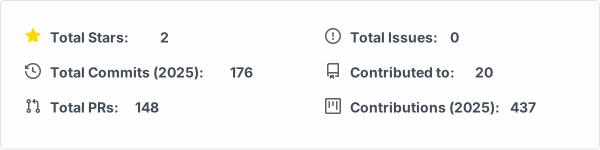

This repository contains a custom GitHub stats card generator built in Go. The stats card is automatically generated daily via GitHub Actions and displays various GitHub contribution metrics.
- Automatic Updates: Stats card regenerates daily via GitHub Actions
- Retry Logic: Exponential backoff for resilient API calls
- Rate Limit Handling: Gracefully handles GitHub API rate limits
- Dark Mode Support: Automatically adapts to user's color scheme preference
- Configurable: Environment variables for customization
- Accessibility: SVG includes proper ARIA labels and semantic markup
- Go 1.23 or higher
- GitHub Personal Access Token with
read:userandreposcopes
- Clone this repository:
git clone https://github.com/gangwgr/gangwgr.git
cd gangwgr- Install dependencies:
go mod download- Set up your GitHub token:
export GITHUB_TOKEN="your_github_token_here"# Using Go run
make run
# Or build and run
make build
./bin/generate-stats-cardConfigure the generator using environment variables:
| Variable | Description | Default |
|---|---|---|
GITHUB_TOKEN | GitHub Personal Access Token (required) | - |
GITHUB_USERNAME | GitHub username to generate stats for | gangwgr |
OUTPUT_DIR | Directory to save the generated SVG | output |
OUTPUT_FILE | Filename for the SVG | stats-card.svg |
VERBOSE | Enable verbose logging | false |
Example with custom configuration:
export GITHUB_TOKEN="ghp_xxxxx"export GITHUB_USERNAME="yourusername"export OUTPUT_DIR="custom-output"export VERBOSE=true
make runmake help# Show available commands
make build # Build the binary
make run # Generate stats card
make clean # Remove generated files
make fmt # Format Go code
make lint # Run linters
make test# Run tests
make check # Run formatting and linting
make generate # Clean and regenerate stats card
make install-tools # Install development toolsThe stats card is automatically regenerated daily at 00:00 UTC using GitHub Actions. The workflow:
- Fetches the latest contribution data from GitHub API
- Generates a new SVG stats card
- Commits and pushes the updated card to the
outputbranch
To set up automation for your own fork:
- Fork this repository
- Go to Settings → Secrets and variables → Actions
- Add a new secret named
STATS_TOKENwith your GitHub Personal Access Token - The workflow will run automatically daily
Run the test suite:
# Run all tests
make test# Run tests with verbose output
go test -v ./...
# Run tests with coverage
go test -v -race -coverprofile=coverage.out ./...
go tool cover -html=coverage.outThe generated card displays:
- Total Stars: Stars across all your repositories
- Total Commits: Commits made in 2025
- Total PRs: Pull requests opened in 2025
- Total Issues: Issues opened in 2025
- Contributed To: Number of repositories you've contributed to
- Total Contributions: Total contributions in 2025
Edit the SVG styles in generate-stats-card.go in the generateStatsCardSVG function. The SVG uses CSS for styling and includes both light and dark mode themes.
To add new metrics:
- Update the GraphQL query in
fetchStats()function - Add fields to the
StatsCardstruct - Update the
GitHubResponsestruct to match the API response - Modify
generateStatsCardSVG()to display the new metrics
Contributions are welcome! Feel free to:
- Report bugs
- Suggest new features
- Submit pull requests
- Improve documentation
This project is open source and available under the MIT License.
Built with ❤️ using Go and GitHub Actions