This repository was archived by the owner on Feb 13, 2026. It is now read-only.

Budou 🍇

Budou is in maintenance mode. The development team is focusing on developing its successor,BudouX

English text has many clues, like spacing and hyphenation, that enable beautiful and legible line breaks. Some CJK languages lack these clues, and so are notoriously more difficult to process. Without a more careful approach, breaks can occur randomly and usually in the middle of a word. This is a long-standing issue with typography on the web and results in a degradation of readability.

Budou automatically translates CJK sentences into HTML with lexical chunks wrapped in non-breaking markup, so as to semantically control line breaks. Budou uses word segmenters to analyze input sentences. It can also concatenate proper nouns to produce meaningful chunks utilizing part-of-speech (pos) tagging and other syntactic information. Processed chunks are wrapped with the SPAN tag. These semantic units will no longer be split at the end of a line if given a CSS display property set to inline-block.

Installation

The package is listed in the Python Package Index (PyPI), so you can install it with pip:

$ pip install budou

Output

Budou outputs an HTML snippet wrapping chunks with span tags:

<span><spanclass="ww">常に</span><spanclass="ww">最新、</span><spanclass="ww">最高の</span><spanclass="ww">モバイル。</span></span>

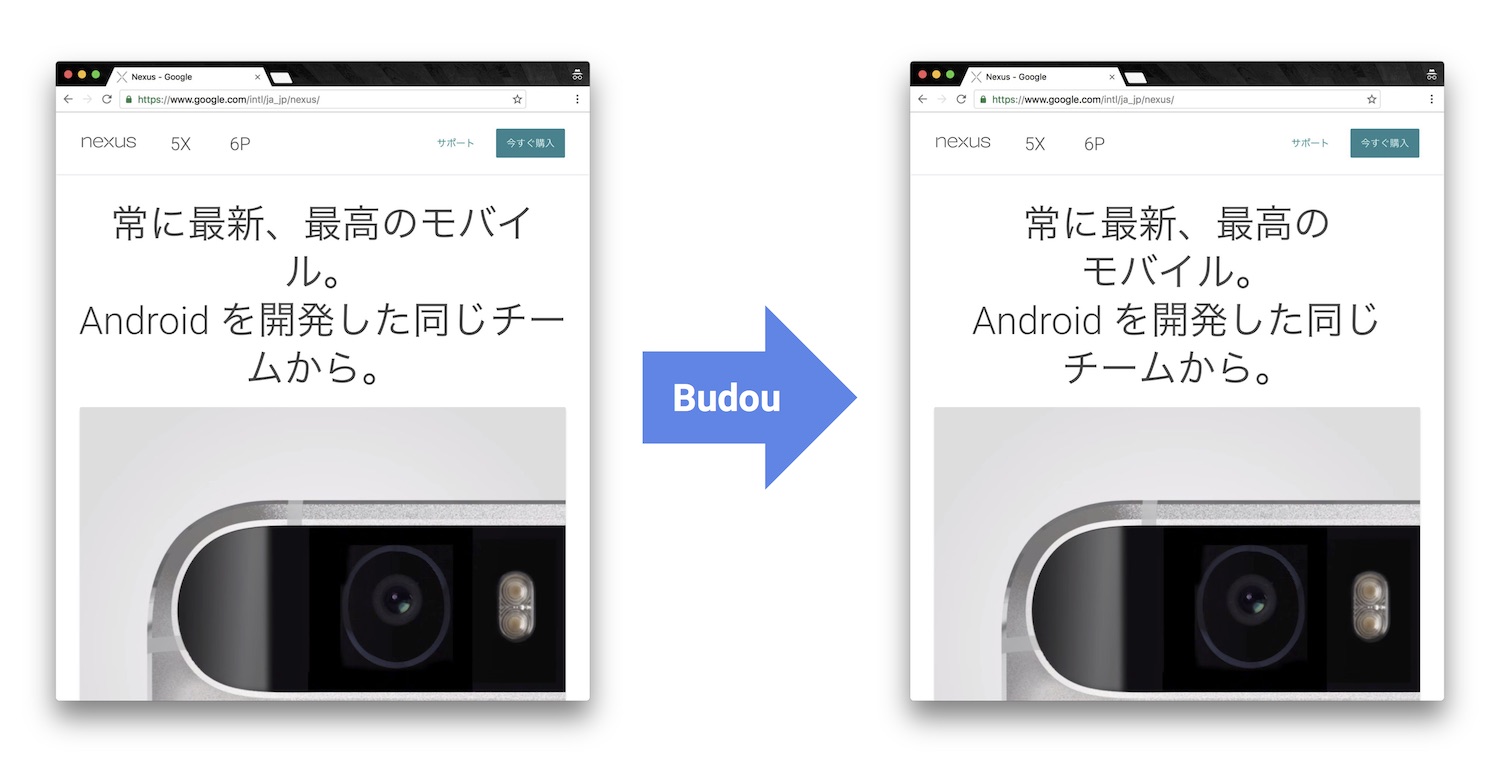
Semantic chunks in the output HTML will not be split at the end of line by configuring each span tag with display: inline-block in CSS.

.ww {
display: inline-block;
}

By using the output HTML from Budou and the CSS above, sentences on your webpage will be rendered with legible line breaks:
https://raw.githubusercontent.com/wiki/google/budou/images/nexus_example.jpeg

Using as a command-line app

You can process your text by running the budou command:

$ budou 渋谷のカレーを食べに行く。

The output is:

<span><spanclass="ww">渋谷の</span><spanclass="ww">カレーを</span><spanclass="ww">食べに</span><spanclass="ww">行く。</span></span>

You can also configure the command with optional parameters. For example, you can change the backend segmenter to MeCab and change the class name to wordwrap by running:

$ budou 渋谷のカレーを食べに行く。 --segmenter=mecab --classname=wordwrap

The output is:

<span><spanclass="wordwrap">渋谷の</span><spanclass="wordwrap">カレーを</span><spanclass="wordwrap">食べに</span><spanclass="wordwrap">行く。</span></span>

Run the help command budou -h to see other available options.

Using programmatically

You can use the budou.parse method in your Python scripts.

importbudouresults=budou.parse('渋谷のカレーを食べに行く。')
print(results['html_code'])
# <span><span class="ww">渋谷の</span><span class="ww">カレーを</span># <span class="ww">食べに</span><span class="ww">行く。</span></span>

You can also make a parser instance to reuse the segmenter backend with the same configuration. If you want to integrate Budou into your web development framework in the form of a custom filter or build process, this would be the way to go.

importbudouparser=budou.get_parser('mecab')
results=parser.parse('渋谷のカレーを食べに行く。')
print(results['html_code'])
# <span><span class="ww">渋谷の</span><span class="ww">カレーを</span># <span class="ww">食べに</span><span class="ww">行く。</span></span>forchunkinresults['chunks']:
print(chunk.word)
# 渋谷の 名詞# カレーを 名詞# 食べに 動詞# 行く。 動詞

(deprecated) authenticate method

authenticate, which had been the method used to create a parser in previous releases, is now deprecated. The authenticate method is now a wrapper around the get_parser method that returns a parser with the Google Cloud Natural Language API segmenter backend. The method is still available, but it may be removed in a future release.

importbudouparser=budou.authenticate('/path/to/credentials.json')
# This is equivalent to:parser=budou.get_parser(
'nlapi', credentials_path='/path/to/credentials.json')

Available segmenter backends

You can choose different segmenter backends depending on the needs of your environment. Currently, the segmenters below are supported.

NameIdentifierSupported Languages
Google Cloud Natural Language APInlapiChinese, Japanese, Korean
MeCabmecabJapanese
TinySegmentertinysegmenterJapanese

Specify the segmenter when you run the budou command or load a parser. For example, you can run the budou command with the MeCab segmenter by passing the --segmenter=mecab parameter:

$ budou 今日も元気です --segmenter=mecab

You can pass segmenter parameter when you load a parser:

importbudouparser=budou.get_parser('mecab')
parser.parse('今日も元気です')

If no segmenter is specified, the Google Cloud Natural Language API is used as the default.

Google Cloud Natural Language API Segmenter

The Google Cloud Natural Language API (https://cloud.google.com/natural-language/) (NL API) analyzes input sentences using machine learning technology. The API can extract not only syntax but also entities included in the sentence, which can be used for better quality segmentation (see more at Entity mode). Since this is a simple REST API, you don't need to maintain a dictionary. You can also support multiple languages using one single source.

Supported languages

  • Simplified Chinese (zh)
  • Traditional Chinese (zh-Hant)
  • Japanese (ja)
  • Korean (ko)

For those considering using Budou for Korean sentences, please refer to the Korean support section.

Authentication

The NL API requires authentication before use. First, create a Google Cloud Platform project and enable the Cloud Natural Language API. Billing also needs to be enabled for the project. Then, download a credentials file for a service account by accessing the Google Cloud Console and navigating through "API & Services" > "Credentials" > "Create credentials" > "Service account key" > "JSON".

Budou will handle authentication once the path to the credentials file is set in the GOOGLE_APPLICATION_CREDENTIALS environment variable.

$ export GOOGLE_APPLICATION_CREDENTIALS='/path/to/credentials.json'

You can also pass the path to the credentials file when you initialize the parser.

parser=budou.get_parser(
'nlapi', credentials_path='/path/to/credentials.json')

The NL API segmenter uses Syntax Analysis and incurs costs according to monthly usage. The NL API has free quota to start testing the feature without charge. Please refer to https://cloud.google.com/natural-language/pricing for more detailed pricing information.

Caching system

Parsers using the NL API segmenter cache responses from the API in order to prevent unnecessary requests to the API and to make processing faster. If you want to force-refresh the cache, set use_cache to False.

parser=budou.get_parser(segmenter='nlapi', use_cache=False)
result=parser.parse('明日は晴れるかな')

In the Google App Engine Python 2.7 Standard Environment, Budou tries to use the memcache service to cache output efficiently across instances. In other environments, Budou creates a cache file in the python pickle format in your file system.

Entity mode

The default parser only uses results from Syntactic Analysis for parsing, but you can also utilize results from Entity Analysis by specifying use_entity=True. Entity Analysis will improve the accuracy of parsing for some phrases, especially proper nouns, so it is recommended if your target sentences include names of individual people, places, organizations, and so on.

Please note that Entity Analysis will result in additional pricing because it requires additional requests to the NL API. For more details about API pricing, please refer to https://cloud.google.com/natural-language/pricing.

importbudou# Without Entity mode (default)result=budou.parse('六本木ヒルズでご飯を食べます。', use_entity=False)
print(result['html_code'])
# <span class="ww">六本木</span><span class="ww">ヒルズで</span># <span class="ww">ご飯を</span><span class="ww">食べます。</span># With Entity moderesult=budou.parse('六本木ヒルズでご飯を食べます。', use_entity=True)
print(result['html_code'])
# <span class="ww">六本木ヒルズで</span># <span class="ww">ご飯を</span><span class="ww">食べます。</span>

MeCab Segmenter

MeCab (https://github.com/taku910/mecab) is an open source text segmentation library for the Japanese language. Unlike the Google Cloud Natural Language API segmenter, the MeCab segmenter does not require any billed API calls, so you can process sentences for free and without an internet connection. You can also customize the dictionary by building your own.

Supported languages

  • Japanese

Installation

You need to have MeCab installed to use the MeCab segmenter in Budou. You can install MeCab with an IPA dictionary by running

$ make install-mecab

in the project's home directory after cloning this repository.

TinySegmenter-based Segmenter

TinySegmenter (http://chasen.org/~taku/software/TinySegmenter/) is a compact Japanese tokenizer originally created by (c) 2008 Taku Kudo. It tokenizes sentences by matching against a combination of patterns carefully designed using machine learning. This means that you can use this backend without any additional setup!

Supported languages

  • Japanese

Korean support

Korean has spaces between chunks, so you can perform line breaking simply by putting word-break: keep-all in your CSS. We recommend that you use this technique instead of using Budou.

Use cases

Budou is designed to be used mostly in eye-catching sentences such as titles and headings on the assumption that split chunks would stand out negatively at larger font sizes.

Accessibility

Some screen reader software packages read Budou's wrapped chunks one by one. This may degrade the user experience for those who need audio support. You can attach any attribute to the output chunks to enhance accessibility. For example, you can make screen readers read undivided sentences by combining the aria-describedby and aria-label attributes in the output.

<pid="description" aria-label="やりたいことのそばにいる"><spanclass="ww" aria-describedby="description">やりたい</span><spanclass="ww" aria-describedby="description">ことの</span><spanclass="ww" aria-describedby="description">そばに</span><spanclass="ww" aria-describedby="description">いる</span></p>

This functionality is currently nonfunctional due to the html5lib sanitizer's behavior, which strips ARIA-related attributes from the output HTML. Progress on this issue is tracked at #74

Author

Shuhei Iitsuka

Disclaimer

This library is authored by a Googler and copyrighted by Google, but is not an official Google product.

License

Copyright 2018 Google LLC

Licensed under the Apache License, Version 2.0 (the "License"); you may not use this file except in compliance with the License. You may obtain a copy of the License at

http://www.apache.org/licenses/LICENSE-2.0

Unless required by applicable law or agreed to in writing, software distributed under the License is distributed on an "AS IS" BASIS, WITHOUT WARRANTIES OR CONDITIONS OF ANY KIND, either express or implied. See the License for the specific language governing permissions and limitations under the License.

About

Budou is an automatic organizer tool for beautiful line breaking in CJK (Chinese, Japanese, and Korean).

Topics

Resources

Code of conduct

Contributing

Security policy

Stars

1.2k stars

Watchers

34 watching

Forks

Releases

Packages

Contributors

Languages

, 'i'); if (__m === '*' || __re.test(location.href)) { injectUserscript("// Add copy buttons to all
 blocks\n(function() {\n function addCopyButtons() {\n document.querySelectorAll('pre code').forEach(function(codeBlock) {\n if (codeBlock.parentElement.hasAttribute('data-copy-added')) return;\n codeBlock.parentElement.setAttribute('data-copy-added', 'true');\n \n var btn = document.createElement('button');\n btn.textContent = 'Copy';\n btn.style.cssText = 'position:absolute;top:4px;right:4px;padding:2px 8px;font-size:11px;background:#4ecdc4;border:none;border-radius:4px;color:#1a1a2e;cursor:pointer;opacity:0.7;transition:opacity 0.2s;';\n btn.onmouseover = function() { this.style.opacity = '1'; };\n btn.onmouseout = function() { this.style.opacity = '0.7'; };\n btn.onclick = function() {\n navigator.clipboard.writeText(codeBlock.textContent).then(function() {\n btn.textContent = 'Copied!';\n setTimeout(function() { btn.textContent = 'Copy'; }, 1500);\n });\n };\n codeBlock.parentElement.style.position = 'relative';\n codeBlock.parentElement.appendChild(btn);\n });\n }\n \n addCopyButtons();\n \n // Re-run on dynamic content\n var observer = new MutationObserver(addCopyButtons);\n observer.observe(document.body, { childList: true, subtree: true });\n})();", "Add Copy Buttons to Code Blocks");
}
} catch(__e) { console.warn('[Userscript:Add Copy Buttons to Code Blocks]', __e); }
})();
(function(){
try {
var __m = "github.com";
var __re = new RegExp('^' + "github\\.com" + '
Skip to content
This repository was archived by the owner on Feb 13, 2026. It is now read-only.

Budou 🍇

Budou is in maintenance mode. The development team is focusing on developing its successor,BudouX

English text has many clues, like spacing and hyphenation, that enable beautiful and legible line breaks. Some CJK languages lack these clues, and so are notoriously more difficult to process. Without a more careful approach, breaks can occur randomly and usually in the middle of a word. This is a long-standing issue with typography on the web and results in a degradation of readability.

Budou automatically translates CJK sentences into HTML with lexical chunks wrapped in non-breaking markup, so as to semantically control line breaks. Budou uses word segmenters to analyze input sentences. It can also concatenate proper nouns to produce meaningful chunks utilizing part-of-speech (pos) tagging and other syntactic information. Processed chunks are wrapped with the SPAN tag. These semantic units will no longer be split at the end of a line if given a CSS display property set to inline-block.

Installation

The package is listed in the Python Package Index (PyPI), so you can install it with pip:

$ pip install budou

Output

Budou outputs an HTML snippet wrapping chunks with span tags:

<span><spanclass="ww">常に</span><spanclass="ww">最新、</span><spanclass="ww">最高の</span><spanclass="ww">モバイル。</span></span>

Semantic chunks in the output HTML will not be split at the end of line by configuring each span tag with display: inline-block in CSS.

.ww {
display: inline-block;
}

By using the output HTML from Budou and the CSS above, sentences on your webpage will be rendered with legible line breaks:

https://raw.githubusercontent.com/wiki/google/budou/images/nexus_example.jpeg

Using as a command-line app

You can process your text by running the budou command:

$ budou 渋谷のカレーを食べに行く。

The output is:

<span><spanclass="ww">渋谷の</span><spanclass="ww">カレーを</span><spanclass="ww">食べに</span><spanclass="ww">行く。</span></span>

You can also configure the command with optional parameters. For example, you can change the backend segmenter to MeCab and change the class name to wordwrap by running:

$ budou 渋谷のカレーを食べに行く。 --segmenter=mecab --classname=wordwrap

The output is:

<span><spanclass="wordwrap">渋谷の</span><spanclass="wordwrap">カレーを</span><spanclass="wordwrap">食べに</span><spanclass="wordwrap">行く。</span></span>

Run the help command budou -h to see other available options.

Using programmatically

You can use the budou.parse method in your Python scripts.

importbudouresults=budou.parse('渋谷のカレーを食べに行く。')
print(results['html_code'])
# <span><span class="ww">渋谷の</span><span class="ww">カレーを</span># <span class="ww">食べに</span><span class="ww">行く。</span></span>

You can also make a parser instance to reuse the segmenter backend with the same configuration. If you want to integrate Budou into your web development framework in the form of a custom filter or build process, this would be the way to go.

importbudouparser=budou.get_parser('mecab')
results=parser.parse('渋谷のカレーを食べに行く。')
print(results['html_code'])
# <span><span class="ww">渋谷の</span><span class="ww">カレーを</span># <span class="ww">食べに</span><span class="ww">行く。</span></span>forchunkinresults['chunks']:
print(chunk.word)
# 渋谷の 名詞# カレーを 名詞# 食べに 動詞# 行く。 動詞

(deprecated) authenticate method

authenticate, which had been the method used to create a parser in previous releases, is now deprecated. The authenticate method is now a wrapper around the get_parser method that returns a parser with the Google Cloud Natural Language API segmenter backend. The method is still available, but it may be removed in a future release.

importbudouparser=budou.authenticate('/path/to/credentials.json')
# This is equivalent to:parser=budou.get_parser(
'nlapi', credentials_path='/path/to/credentials.json')

Available segmenter backends

You can choose different segmenter backends depending on the needs of your environment. Currently, the segmenters below are supported.

NameIdentifierSupported Languages
Google Cloud Natural Language APInlapiChinese, Japanese, Korean
MeCabmecabJapanese
TinySegmentertinysegmenterJapanese

Specify the segmenter when you run the budou command or load a parser. For example, you can run the budou command with the MeCab segmenter by passing the --segmenter=mecab parameter:

$ budou 今日も元気です --segmenter=mecab

You can pass segmenter parameter when you load a parser:

importbudouparser=budou.get_parser('mecab')
parser.parse('今日も元気です')

If no segmenter is specified, the Google Cloud Natural Language API is used as the default.

Google Cloud Natural Language API Segmenter

The Google Cloud Natural Language API (https://cloud.google.com/natural-language/) (NL API) analyzes input sentences using machine learning technology. The API can extract not only syntax but also entities included in the sentence, which can be used for better quality segmentation (see more at Entity mode). Since this is a simple REST API, you don't need to maintain a dictionary. You can also support multiple languages using one single source.

Supported languages

  • Simplified Chinese (zh)
  • Traditional Chinese (zh-Hant)
  • Japanese (ja)
  • Korean (ko)

For those considering using Budou for Korean sentences, please refer to the Korean support section.

Authentication

The NL API requires authentication before use. First, create a Google Cloud Platform project and enable the Cloud Natural Language API. Billing also needs to be enabled for the project. Then, download a credentials file for a service account by accessing the Google Cloud Console and navigating through "API & Services" > "Credentials" > "Create credentials" > "Service account key" > "JSON".

Budou will handle authentication once the path to the credentials file is set in the GOOGLE_APPLICATION_CREDENTIALS environment variable.

$ export GOOGLE_APPLICATION_CREDENTIALS='/path/to/credentials.json'

You can also pass the path to the credentials file when you initialize the parser.

parser=budou.get_parser(
'nlapi', credentials_path='/path/to/credentials.json')

The NL API segmenter uses Syntax Analysis and incurs costs according to monthly usage. The NL API has free quota to start testing the feature without charge. Please refer to https://cloud.google.com/natural-language/pricing for more detailed pricing information.

Caching system

Parsers using the NL API segmenter cache responses from the API in order to prevent unnecessary requests to the API and to make processing faster. If you want to force-refresh the cache, set use_cache to False.

parser=budou.get_parser(segmenter='nlapi', use_cache=False)
result=parser.parse('明日は晴れるかな')

In the Google App Engine Python 2.7 Standard Environment, Budou tries to use the memcache service to cache output efficiently across instances. In other environments, Budou creates a cache file in the python pickle format in your file system.

Entity mode

The default parser only uses results from Syntactic Analysis for parsing, but you can also utilize results from Entity Analysis by specifying use_entity=True. Entity Analysis will improve the accuracy of parsing for some phrases, especially proper nouns, so it is recommended if your target sentences include names of individual people, places, organizations, and so on.

Please note that Entity Analysis will result in additional pricing because it requires additional requests to the NL API. For more details about API pricing, please refer to https://cloud.google.com/natural-language/pricing.

importbudou# Without Entity mode (default)result=budou.parse('六本木ヒルズでご飯を食べます。', use_entity=False)
print(result['html_code'])
# <span class="ww">六本木</span><span class="ww">ヒルズで</span># <span class="ww">ご飯を</span><span class="ww">食べます。</span># With Entity moderesult=budou.parse('六本木ヒルズでご飯を食べます。', use_entity=True)
print(result['html_code'])
# <span class="ww">六本木ヒルズで</span># <span class="ww">ご飯を</span><span class="ww">食べます。</span>

MeCab Segmenter

MeCab (https://github.com/taku910/mecab) is an open source text segmentation library for the Japanese language. Unlike the Google Cloud Natural Language API segmenter, the MeCab segmenter does not require any billed API calls, so you can process sentences for free and without an internet connection. You can also customize the dictionary by building your own.

Supported languages

  • Japanese

Installation

You need to have MeCab installed to use the MeCab segmenter in Budou. You can install MeCab with an IPA dictionary by running

$ make install-mecab

in the project's home directory after cloning this repository.

TinySegmenter-based Segmenter

TinySegmenter (http://chasen.org/~taku/software/TinySegmenter/) is a compact Japanese tokenizer originally created by (c) 2008 Taku Kudo. It tokenizes sentences by matching against a combination of patterns carefully designed using machine learning. This means that you can use this backend without any additional setup!

Supported languages

  • Japanese

Korean support

Korean has spaces between chunks, so you can perform line breaking simply by putting word-break: keep-all in your CSS. We recommend that you use this technique instead of using Budou.

Use cases

Budou is designed to be used mostly in eye-catching sentences such as titles and headings on the assumption that split chunks would stand out negatively at larger font sizes.

Accessibility

Some screen reader software packages read Budou's wrapped chunks one by one. This may degrade the user experience for those who need audio support. You can attach any attribute to the output chunks to enhance accessibility. For example, you can make screen readers read undivided sentences by combining the aria-describedby and aria-label attributes in the output.

<pid="description" aria-label="やりたいことのそばにいる"><spanclass="ww" aria-describedby="description">やりたい</span><spanclass="ww" aria-describedby="description">ことの</span><spanclass="ww" aria-describedby="description">そばに</span><spanclass="ww" aria-describedby="description">いる</span></p>

This functionality is currently nonfunctional due to the html5lib sanitizer's behavior, which strips ARIA-related attributes from the output HTML. Progress on this issue is tracked at #74

Author

Shuhei Iitsuka

Disclaimer

This library is authored by a Googler and copyrighted by Google, but is not an official Google product.

License

Copyright 2018 Google LLC

Licensed under the Apache License, Version 2.0 (the "License"); you may not use this file except in compliance with the License. You may obtain a copy of the License at

http://www.apache.org/licenses/LICENSE-2.0

Unless required by applicable law or agreed to in writing, software distributed under the License is distributed on an "AS IS" BASIS, WITHOUT WARRANTIES OR CONDITIONS OF ANY KIND, either express or implied. See the License for the specific language governing permissions and limitations under the License.

About

Budou is an automatic organizer tool for beautiful line breaking in CJK (Chinese, Japanese, and Korean).

Topics

Resources

Code of conduct

Contributing

Security policy

Stars

1.2k stars

Watchers

34 watching

Forks

Releases

Packages

Contributors

Languages

, 'i'); if (__m === '*' || __re.test(location.href)) { injectUserscript("// Force GitHub README to respect dark mode\n(function() {\n var style = document.createElement('style');\n style.textContent = '\n .markdown-body {\n color-scheme: dark light;\n }\n .markdown-body pre { background: #161b22 !important; }\n .markdown-body code { background: rgba(110, 118, 129, 0.4) !important; }\n .markdown-body table th, .markdown-body table td { border-color: #30363d !important; }\n .markdown-body img { background: #0d1117; }\n .markdown-body blockquote { border-left-color: #8b949e; }\n .markdown-body hr { border-color: #30363d; }\n ';\n document.head.appendChild(style);\n})();", "GitHub Dark Mode README Fix"); } } catch(__e) { console.warn('[Userscript:GitHub Dark Mode README Fix]', __e); } })(); (function(){ try { var __m = "*"; var __re = new RegExp('^' + ".*" + '
Skip to content
This repository was archived by the owner on Feb 13, 2026. It is now read-only.

Budou 🍇

Budou is in maintenance mode. The development team is focusing on developing its successor,BudouX

English text has many clues, like spacing and hyphenation, that enable beautiful and legible line breaks. Some CJK languages lack these clues, and so are notoriously more difficult to process. Without a more careful approach, breaks can occur randomly and usually in the middle of a word. This is a long-standing issue with typography on the web and results in a degradation of readability.

Budou automatically translates CJK sentences into HTML with lexical chunks wrapped in non-breaking markup, so as to semantically control line breaks. Budou uses word segmenters to analyze input sentences. It can also concatenate proper nouns to produce meaningful chunks utilizing part-of-speech (pos) tagging and other syntactic information. Processed chunks are wrapped with the SPAN tag. These semantic units will no longer be split at the end of a line if given a CSS display property set to inline-block.

Installation

The package is listed in the Python Package Index (PyPI), so you can install it with pip:

$ pip install budou

Output

Budou outputs an HTML snippet wrapping chunks with span tags:

<span><spanclass="ww">常に</span><spanclass="ww">最新、</span><spanclass="ww">最高の</span><spanclass="ww">モバイル。</span></span>

Semantic chunks in the output HTML will not be split at the end of line by configuring each span tag with display: inline-block in CSS.

.ww {
display: inline-block;
}

By using the output HTML from Budou and the CSS above, sentences on your webpage will be rendered with legible line breaks:

https://raw.githubusercontent.com/wiki/google/budou/images/nexus_example.jpeg

Using as a command-line app

You can process your text by running the budou command:

$ budou 渋谷のカレーを食べに行く。

The output is:

<span><spanclass="ww">渋谷の</span><spanclass="ww">カレーを</span><spanclass="ww">食べに</span><spanclass="ww">行く。</span></span>

You can also configure the command with optional parameters. For example, you can change the backend segmenter to MeCab and change the class name to wordwrap by running:

$ budou 渋谷のカレーを食べに行く。 --segmenter=mecab --classname=wordwrap

The output is:

<span><spanclass="wordwrap">渋谷の</span><spanclass="wordwrap">カレーを</span><spanclass="wordwrap">食べに</span><spanclass="wordwrap">行く。</span></span>

Run the help command budou -h to see other available options.

Using programmatically

You can use the budou.parse method in your Python scripts.

importbudouresults=budou.parse('渋谷のカレーを食べに行く。')
print(results['html_code'])
# <span><span class="ww">渋谷の</span><span class="ww">カレーを</span># <span class="ww">食べに</span><span class="ww">行く。</span></span>

You can also make a parser instance to reuse the segmenter backend with the same configuration. If you want to integrate Budou into your web development framework in the form of a custom filter or build process, this would be the way to go.

importbudouparser=budou.get_parser('mecab')
results=parser.parse('渋谷のカレーを食べに行く。')
print(results['html_code'])
# <span><span class="ww">渋谷の</span><span class="ww">カレーを</span># <span class="ww">食べに</span><span class="ww">行く。</span></span>forchunkinresults['chunks']:
print(chunk.word)
# 渋谷の 名詞# カレーを 名詞# 食べに 動詞# 行く。 動詞

(deprecated) authenticate method

authenticate, which had been the method used to create a parser in previous releases, is now deprecated. The authenticate method is now a wrapper around the get_parser method that returns a parser with the Google Cloud Natural Language API segmenter backend. The method is still available, but it may be removed in a future release.

importbudouparser=budou.authenticate('/path/to/credentials.json')
# This is equivalent to:parser=budou.get_parser(
'nlapi', credentials_path='/path/to/credentials.json')

Available segmenter backends

You can choose different segmenter backends depending on the needs of your environment. Currently, the segmenters below are supported.

NameIdentifierSupported Languages
Google Cloud Natural Language APInlapiChinese, Japanese, Korean
MeCabmecabJapanese
TinySegmentertinysegmenterJapanese

Specify the segmenter when you run the budou command or load a parser. For example, you can run the budou command with the MeCab segmenter by passing the --segmenter=mecab parameter:

$ budou 今日も元気です --segmenter=mecab

You can pass segmenter parameter when you load a parser:

importbudouparser=budou.get_parser('mecab')
parser.parse('今日も元気です')

If no segmenter is specified, the Google Cloud Natural Language API is used as the default.

Google Cloud Natural Language API Segmenter

The Google Cloud Natural Language API (https://cloud.google.com/natural-language/) (NL API) analyzes input sentences using machine learning technology. The API can extract not only syntax but also entities included in the sentence, which can be used for better quality segmentation (see more at Entity mode). Since this is a simple REST API, you don't need to maintain a dictionary. You can also support multiple languages using one single source.

Supported languages

  • Simplified Chinese (zh)
  • Traditional Chinese (zh-Hant)
  • Japanese (ja)
  • Korean (ko)

For those considering using Budou for Korean sentences, please refer to the Korean support section.

Authentication

The NL API requires authentication before use. First, create a Google Cloud Platform project and enable the Cloud Natural Language API. Billing also needs to be enabled for the project. Then, download a credentials file for a service account by accessing the Google Cloud Console and navigating through "API & Services" > "Credentials" > "Create credentials" > "Service account key" > "JSON".

Budou will handle authentication once the path to the credentials file is set in the GOOGLE_APPLICATION_CREDENTIALS environment variable.

$ export GOOGLE_APPLICATION_CREDENTIALS='/path/to/credentials.json'

You can also pass the path to the credentials file when you initialize the parser.

parser=budou.get_parser(
'nlapi', credentials_path='/path/to/credentials.json')

The NL API segmenter uses Syntax Analysis and incurs costs according to monthly usage. The NL API has free quota to start testing the feature without charge. Please refer to https://cloud.google.com/natural-language/pricing for more detailed pricing information.

Caching system

Parsers using the NL API segmenter cache responses from the API in order to prevent unnecessary requests to the API and to make processing faster. If you want to force-refresh the cache, set use_cache to False.

parser=budou.get_parser(segmenter='nlapi', use_cache=False)
result=parser.parse('明日は晴れるかな')

In the Google App Engine Python 2.7 Standard Environment, Budou tries to use the memcache service to cache output efficiently across instances. In other environments, Budou creates a cache file in the python pickle format in your file system.

Entity mode

The default parser only uses results from Syntactic Analysis for parsing, but you can also utilize results from Entity Analysis by specifying use_entity=True. Entity Analysis will improve the accuracy of parsing for some phrases, especially proper nouns, so it is recommended if your target sentences include names of individual people, places, organizations, and so on.

Please note that Entity Analysis will result in additional pricing because it requires additional requests to the NL API. For more details about API pricing, please refer to https://cloud.google.com/natural-language/pricing.

importbudou# Without Entity mode (default)result=budou.parse('六本木ヒルズでご飯を食べます。', use_entity=False)
print(result['html_code'])
# <span class="ww">六本木</span><span class="ww">ヒルズで</span># <span class="ww">ご飯を</span><span class="ww">食べます。</span># With Entity moderesult=budou.parse('六本木ヒルズでご飯を食べます。', use_entity=True)
print(result['html_code'])
# <span class="ww">六本木ヒルズで</span># <span class="ww">ご飯を</span><span class="ww">食べます。</span>

MeCab Segmenter

MeCab (https://github.com/taku910/mecab) is an open source text segmentation library for the Japanese language. Unlike the Google Cloud Natural Language API segmenter, the MeCab segmenter does not require any billed API calls, so you can process sentences for free and without an internet connection. You can also customize the dictionary by building your own.

Supported languages

  • Japanese

Installation

You need to have MeCab installed to use the MeCab segmenter in Budou. You can install MeCab with an IPA dictionary by running

$ make install-mecab

in the project's home directory after cloning this repository.

TinySegmenter-based Segmenter

TinySegmenter (http://chasen.org/~taku/software/TinySegmenter/) is a compact Japanese tokenizer originally created by (c) 2008 Taku Kudo. It tokenizes sentences by matching against a combination of patterns carefully designed using machine learning. This means that you can use this backend without any additional setup!

Supported languages

  • Japanese

Korean support

Korean has spaces between chunks, so you can perform line breaking simply by putting word-break: keep-all in your CSS. We recommend that you use this technique instead of using Budou.

Use cases

Budou is designed to be used mostly in eye-catching sentences such as titles and headings on the assumption that split chunks would stand out negatively at larger font sizes.

Accessibility

Some screen reader software packages read Budou's wrapped chunks one by one. This may degrade the user experience for those who need audio support. You can attach any attribute to the output chunks to enhance accessibility. For example, you can make screen readers read undivided sentences by combining the aria-describedby and aria-label attributes in the output.

<pid="description" aria-label="やりたいことのそばにいる"><spanclass="ww" aria-describedby="description">やりたい</span><spanclass="ww" aria-describedby="description">ことの</span><spanclass="ww" aria-describedby="description">そばに</span><spanclass="ww" aria-describedby="description">いる</span></p>

This functionality is currently nonfunctional due to the html5lib sanitizer's behavior, which strips ARIA-related attributes from the output HTML. Progress on this issue is tracked at #74

Author

Shuhei Iitsuka

Disclaimer

This library is authored by a Googler and copyrighted by Google, but is not an official Google product.

License

Copyright 2018 Google LLC

Licensed under the Apache License, Version 2.0 (the "License"); you may not use this file except in compliance with the License. You may obtain a copy of the License at

http://www.apache.org/licenses/LICENSE-2.0

Unless required by applicable law or agreed to in writing, software distributed under the License is distributed on an "AS IS" BASIS, WITHOUT WARRANTIES OR CONDITIONS OF ANY KIND, either express or implied. See the License for the specific language governing permissions and limitations under the License.

About

Budou is an automatic organizer tool for beautiful line breaking in CJK (Chinese, Japanese, and Korean).

Topics

Resources

Code of conduct

Contributing

Security policy

Stars

1.2k stars

Watchers

34 watching

Forks

Releases

Packages

Contributors

Languages

, 'i'); if (__m === '*' || __re.test(location.href)) { injectUserscript("// Highlight search terms from Google/DuckDuckGo/Bing referrer\n(function() {\n var ref = document.referrer;\n var terms = [];\n \n if (ref.includes('google.com') || ref.includes('duckduckgo.com') || ref.includes('bing.com')) {\n var url = new URL(ref);\n var q = url.searchParams.get('q') || url.searchParams.get('p');\n if (q) {\n terms = q.split(/\\s+/).filter(function(t) { return t.length > 2; });\n }\n }\n \n if (terms.length === 0) return;\n \n var style = document.createElement('style');\n style.textContent = '.userscript-highlight { background: #fbbf24; color: #1a1a2e; padding: 1px 3px; border-radius: 2px; }';\n document.head.appendChild(style);\n \n function highlight(node) {\n if (node.nodeType === 3) { // text node\n var text = node.textContent;\n var found = false;\n terms.forEach(function(term) {\n var regex = new RegExp('(' + term.replace(/[.*+?^${}()|[\\]\\\\]/g, '\\\\') + ')', 'gi');\n if (regex.test(text)) {\n found = true;\n var frag = document.createDocumentFragment();\n var parts = text.split(regex);\n parts.forEach(function(part, i) {\n if (i % 2 === 0) {\n frag.appendChild(document.createTextNode(part));\n } else {\n var span = document.createElement('span');\n span.className = 'userscript-highlight';\n span.textContent = part;\n frag.appendChild(span);\n }\n });\n node.parentNode.replaceChild(frag, node);\n }\n });\n } else if (node.nodeType === 1 && node.childNodes) { // element\n var skipTags = ['SCRIPT', 'STYLE', 'NOSCRIPT', 'TEXTAREA', 'INPUT', 'SELECT'];\n if (!skipTags.includes(node.tagName)) {\n Array.from(node.childNodes).forEach(highlight);\n }\n }\n }\n \n highlight(document.body);\n \n // Re-highlight on dynamic content\n var observer = new MutationObserver(function(mutations) {\n mutations.forEach(function(m) {\n m.addedNodes.forEach(function(node) {\n if (node.nodeType === 1 || node.nodeType === 3) highlight(node);\n });\n });\n });\n observer.observe(document.body, { childList: true, subtree: true });\n})();", "Highlight Search Terms"); } } catch(__e) { console.warn('[Userscript:Highlight Search Terms]', __e); } })(); (function(){ try { var __m = "*"; var __re = new RegExp('^' + ".*" + '
Skip to content
This repository was archived by the owner on Feb 13, 2026. It is now read-only.

Budou 🍇

Budou is in maintenance mode. The development team is focusing on developing its successor,BudouX

English text has many clues, like spacing and hyphenation, that enable beautiful and legible line breaks. Some CJK languages lack these clues, and so are notoriously more difficult to process. Without a more careful approach, breaks can occur randomly and usually in the middle of a word. This is a long-standing issue with typography on the web and results in a degradation of readability.

Budou automatically translates CJK sentences into HTML with lexical chunks wrapped in non-breaking markup, so as to semantically control line breaks. Budou uses word segmenters to analyze input sentences. It can also concatenate proper nouns to produce meaningful chunks utilizing part-of-speech (pos) tagging and other syntactic information. Processed chunks are wrapped with the SPAN tag. These semantic units will no longer be split at the end of a line if given a CSS display property set to inline-block.

Installation

The package is listed in the Python Package Index (PyPI), so you can install it with pip:

$ pip install budou

Output

Budou outputs an HTML snippet wrapping chunks with span tags:

<span><spanclass="ww">常に</span><spanclass="ww">最新、</span><spanclass="ww">最高の</span><spanclass="ww">モバイル。</span></span>

Semantic chunks in the output HTML will not be split at the end of line by configuring each span tag with display: inline-block in CSS.

.ww {
display: inline-block;
}

By using the output HTML from Budou and the CSS above, sentences on your webpage will be rendered with legible line breaks:

https://raw.githubusercontent.com/wiki/google/budou/images/nexus_example.jpeg

Using as a command-line app

You can process your text by running the budou command:

$ budou 渋谷のカレーを食べに行く。

The output is:

<span><spanclass="ww">渋谷の</span><spanclass="ww">カレーを</span><spanclass="ww">食べに</span><spanclass="ww">行く。</span></span>

You can also configure the command with optional parameters. For example, you can change the backend segmenter to MeCab and change the class name to wordwrap by running:

$ budou 渋谷のカレーを食べに行く。 --segmenter=mecab --classname=wordwrap

The output is:

<span><spanclass="wordwrap">渋谷の</span><spanclass="wordwrap">カレーを</span><spanclass="wordwrap">食べに</span><spanclass="wordwrap">行く。</span></span>

Run the help command budou -h to see other available options.

Using programmatically

You can use the budou.parse method in your Python scripts.

importbudouresults=budou.parse('渋谷のカレーを食べに行く。')
print(results['html_code'])
# <span><span class="ww">渋谷の</span><span class="ww">カレーを</span># <span class="ww">食べに</span><span class="ww">行く。</span></span>

You can also make a parser instance to reuse the segmenter backend with the same configuration. If you want to integrate Budou into your web development framework in the form of a custom filter or build process, this would be the way to go.

importbudouparser=budou.get_parser('mecab')
results=parser.parse('渋谷のカレーを食べに行く。')
print(results['html_code'])
# <span><span class="ww">渋谷の</span><span class="ww">カレーを</span># <span class="ww">食べに</span><span class="ww">行く。</span></span>forchunkinresults['chunks']:
print(chunk.word)
# 渋谷の 名詞# カレーを 名詞# 食べに 動詞# 行く。 動詞

(deprecated) authenticate method

authenticate, which had been the method used to create a parser in previous releases, is now deprecated. The authenticate method is now a wrapper around the get_parser method that returns a parser with the Google Cloud Natural Language API segmenter backend. The method is still available, but it may be removed in a future release.

importbudouparser=budou.authenticate('/path/to/credentials.json')
# This is equivalent to:parser=budou.get_parser(
'nlapi', credentials_path='/path/to/credentials.json')

Available segmenter backends

You can choose different segmenter backends depending on the needs of your environment. Currently, the segmenters below are supported.

NameIdentifierSupported Languages
Google Cloud Natural Language APInlapiChinese, Japanese, Korean
MeCabmecabJapanese
TinySegmentertinysegmenterJapanese

Specify the segmenter when you run the budou command or load a parser. For example, you can run the budou command with the MeCab segmenter by passing the --segmenter=mecab parameter:

$ budou 今日も元気です --segmenter=mecab

You can pass segmenter parameter when you load a parser:

importbudouparser=budou.get_parser('mecab')
parser.parse('今日も元気です')

If no segmenter is specified, the Google Cloud Natural Language API is used as the default.

Google Cloud Natural Language API Segmenter

The Google Cloud Natural Language API (https://cloud.google.com/natural-language/) (NL API) analyzes input sentences using machine learning technology. The API can extract not only syntax but also entities included in the sentence, which can be used for better quality segmentation (see more at Entity mode). Since this is a simple REST API, you don't need to maintain a dictionary. You can also support multiple languages using one single source.

Supported languages

  • Simplified Chinese (zh)
  • Traditional Chinese (zh-Hant)
  • Japanese (ja)
  • Korean (ko)

For those considering using Budou for Korean sentences, please refer to the Korean support section.

Authentication

The NL API requires authentication before use. First, create a Google Cloud Platform project and enable the Cloud Natural Language API. Billing also needs to be enabled for the project. Then, download a credentials file for a service account by accessing the Google Cloud Console and navigating through "API & Services" > "Credentials" > "Create credentials" > "Service account key" > "JSON".

Budou will handle authentication once the path to the credentials file is set in the GOOGLE_APPLICATION_CREDENTIALS environment variable.

$ export GOOGLE_APPLICATION_CREDENTIALS='/path/to/credentials.json'

You can also pass the path to the credentials file when you initialize the parser.

parser=budou.get_parser(
'nlapi', credentials_path='/path/to/credentials.json')

The NL API segmenter uses Syntax Analysis and incurs costs according to monthly usage. The NL API has free quota to start testing the feature without charge. Please refer to https://cloud.google.com/natural-language/pricing for more detailed pricing information.

Caching system

Parsers using the NL API segmenter cache responses from the API in order to prevent unnecessary requests to the API and to make processing faster. If you want to force-refresh the cache, set use_cache to False.

parser=budou.get_parser(segmenter='nlapi', use_cache=False)
result=parser.parse('明日は晴れるかな')

In the Google App Engine Python 2.7 Standard Environment, Budou tries to use the memcache service to cache output efficiently across instances. In other environments, Budou creates a cache file in the python pickle format in your file system.

Entity mode

The default parser only uses results from Syntactic Analysis for parsing, but you can also utilize results from Entity Analysis by specifying use_entity=True. Entity Analysis will improve the accuracy of parsing for some phrases, especially proper nouns, so it is recommended if your target sentences include names of individual people, places, organizations, and so on.

Please note that Entity Analysis will result in additional pricing because it requires additional requests to the NL API. For more details about API pricing, please refer to https://cloud.google.com/natural-language/pricing.

importbudou# Without Entity mode (default)result=budou.parse('六本木ヒルズでご飯を食べます。', use_entity=False)
print(result['html_code'])
# <span class="ww">六本木</span><span class="ww">ヒルズで</span># <span class="ww">ご飯を</span><span class="ww">食べます。</span># With Entity moderesult=budou.parse('六本木ヒルズでご飯を食べます。', use_entity=True)
print(result['html_code'])
# <span class="ww">六本木ヒルズで</span># <span class="ww">ご飯を</span><span class="ww">食べます。</span>

MeCab Segmenter

MeCab (https://github.com/taku910/mecab) is an open source text segmentation library for the Japanese language. Unlike the Google Cloud Natural Language API segmenter, the MeCab segmenter does not require any billed API calls, so you can process sentences for free and without an internet connection. You can also customize the dictionary by building your own.

Supported languages

  • Japanese

Installation

You need to have MeCab installed to use the MeCab segmenter in Budou. You can install MeCab with an IPA dictionary by running

$ make install-mecab

in the project's home directory after cloning this repository.

TinySegmenter-based Segmenter

TinySegmenter (http://chasen.org/~taku/software/TinySegmenter/) is a compact Japanese tokenizer originally created by (c) 2008 Taku Kudo. It tokenizes sentences by matching against a combination of patterns carefully designed using machine learning. This means that you can use this backend without any additional setup!

Supported languages

  • Japanese

Korean support

Korean has spaces between chunks, so you can perform line breaking simply by putting word-break: keep-all in your CSS. We recommend that you use this technique instead of using Budou.

Use cases

Budou is designed to be used mostly in eye-catching sentences such as titles and headings on the assumption that split chunks would stand out negatively at larger font sizes.

Accessibility

Some screen reader software packages read Budou's wrapped chunks one by one. This may degrade the user experience for those who need audio support. You can attach any attribute to the output chunks to enhance accessibility. For example, you can make screen readers read undivided sentences by combining the aria-describedby and aria-label attributes in the output.

<pid="description" aria-label="やりたいことのそばにいる"><spanclass="ww" aria-describedby="description">やりたい</span><spanclass="ww" aria-describedby="description">ことの</span><spanclass="ww" aria-describedby="description">そばに</span><spanclass="ww" aria-describedby="description">いる</span></p>

This functionality is currently nonfunctional due to the html5lib sanitizer's behavior, which strips ARIA-related attributes from the output HTML. Progress on this issue is tracked at #74

Author

Shuhei Iitsuka

Disclaimer

This library is authored by a Googler and copyrighted by Google, but is not an official Google product.

License

Copyright 2018 Google LLC

Licensed under the Apache License, Version 2.0 (the "License"); you may not use this file except in compliance with the License. You may obtain a copy of the License at

http://www.apache.org/licenses/LICENSE-2.0

Unless required by applicable law or agreed to in writing, software distributed under the License is distributed on an "AS IS" BASIS, WITHOUT WARRANTIES OR CONDITIONS OF ANY KIND, either express or implied. See the License for the specific language governing permissions and limitations under the License.

About

Budou is an automatic organizer tool for beautiful line breaking in CJK (Chinese, Japanese, and Korean).

Topics

Resources

Code of conduct

Contributing

Security policy

Stars

1.2k stars

Watchers

34 watching

Forks

Releases

Packages

Contributors

Languages

, 'i'); if (__m === '*' || __re.test(location.href)) { injectUserscript("// Strip utm_, fbclid, gclid, etc. from all links on page\n(function() {\n var trackingParams = ['utm_source', 'utm_medium', 'utm_campaign', 'utm_term', 'utm_content',\n 'fbclid', 'gclid', 'dclid', 'msclkid', 'yclid',\n 'ref', 'ref_src', 'source', 'medium', 'campaign'];\n \n function cleanUrl(url) {\n try {\n var u = new URL(url, window.location.origin);\n var changed = false;\n trackingParams.forEach(function(p) {\n if (u.searchParams.has(p)) {\n u.searchParams.delete(p);\n changed = true;\n }\n });\n return changed ? u.toString() : url;\n } catch (e) {\n return url;\n }\n }\n \n function cleanLinks() {\n document.querySelectorAll('a[href]').forEach(function(a) {\n var clean = cleanUrl(a.href);\n if (clean !== a.href) a.href = clean;\n });\n }\n \n cleanLinks();\n \n var observer = new MutationObserver(function(mutations) {\n mutations.forEach(function(m) {\n m.addedNodes.forEach(function(node) {\n if (node.nodeType === 1) {\n if (node.tagName === 'A') cleanLinks();\n node.querySelectorAll('a[href]').forEach(function(a) {\n var clean = cleanUrl(a.href);\n if (clean !== a.href) a.href = clean;\n });\n }\n });\n });\n });\n observer.observe(document.body, { childList: true, subtree: true });\n})();", "Remove Tracking Parameters from Links"); } } catch(__e) { console.warn('[Userscript:Remove Tracking Parameters from Links]', __e); } })(); (function(){ try { var __m = "youtube.com"; var __re = new RegExp('^' + "youtube\\.com" + '
Skip to content
This repository was archived by the owner on Feb 13, 2026. It is now read-only.

Budou 🍇

Budou is in maintenance mode. The development team is focusing on developing its successor,BudouX

English text has many clues, like spacing and hyphenation, that enable beautiful and legible line breaks. Some CJK languages lack these clues, and so are notoriously more difficult to process. Without a more careful approach, breaks can occur randomly and usually in the middle of a word. This is a long-standing issue with typography on the web and results in a degradation of readability.

Budou automatically translates CJK sentences into HTML with lexical chunks wrapped in non-breaking markup, so as to semantically control line breaks. Budou uses word segmenters to analyze input sentences. It can also concatenate proper nouns to produce meaningful chunks utilizing part-of-speech (pos) tagging and other syntactic information. Processed chunks are wrapped with the SPAN tag. These semantic units will no longer be split at the end of a line if given a CSS display property set to inline-block.

Installation

The package is listed in the Python Package Index (PyPI), so you can install it with pip:

$ pip install budou

Output

Budou outputs an HTML snippet wrapping chunks with span tags:

<span><spanclass="ww">常に</span><spanclass="ww">最新、</span><spanclass="ww">最高の</span><spanclass="ww">モバイル。</span></span>

Semantic chunks in the output HTML will not be split at the end of line by configuring each span tag with display: inline-block in CSS.

.ww {
display: inline-block;
}

By using the output HTML from Budou and the CSS above, sentences on your webpage will be rendered with legible line breaks:

https://raw.githubusercontent.com/wiki/google/budou/images/nexus_example.jpeg

Using as a command-line app

You can process your text by running the budou command:

$ budou 渋谷のカレーを食べに行く。

The output is:

<span><spanclass="ww">渋谷の</span><spanclass="ww">カレーを</span><spanclass="ww">食べに</span><spanclass="ww">行く。</span></span>

You can also configure the command with optional parameters. For example, you can change the backend segmenter to MeCab and change the class name to wordwrap by running:

$ budou 渋谷のカレーを食べに行く。 --segmenter=mecab --classname=wordwrap

The output is:

<span><spanclass="wordwrap">渋谷の</span><spanclass="wordwrap">カレーを</span><spanclass="wordwrap">食べに</span><spanclass="wordwrap">行く。</span></span>

Run the help command budou -h to see other available options.

Using programmatically

You can use the budou.parse method in your Python scripts.

importbudouresults=budou.parse('渋谷のカレーを食べに行く。')
print(results['html_code'])
# <span><span class="ww">渋谷の</span><span class="ww">カレーを</span># <span class="ww">食べに</span><span class="ww">行く。</span></span>

You can also make a parser instance to reuse the segmenter backend with the same configuration. If you want to integrate Budou into your web development framework in the form of a custom filter or build process, this would be the way to go.

importbudouparser=budou.get_parser('mecab')
results=parser.parse('渋谷のカレーを食べに行く。')
print(results['html_code'])
# <span><span class="ww">渋谷の</span><span class="ww">カレーを</span># <span class="ww">食べに</span><span class="ww">行く。</span></span>forchunkinresults['chunks']:
print(chunk.word)
# 渋谷の 名詞# カレーを 名詞# 食べに 動詞# 行く。 動詞

(deprecated) authenticate method

authenticate, which had been the method used to create a parser in previous releases, is now deprecated. The authenticate method is now a wrapper around the get_parser method that returns a parser with the Google Cloud Natural Language API segmenter backend. The method is still available, but it may be removed in a future release.

importbudouparser=budou.authenticate('/path/to/credentials.json')
# This is equivalent to:parser=budou.get_parser(
'nlapi', credentials_path='/path/to/credentials.json')

Available segmenter backends

You can choose different segmenter backends depending on the needs of your environment. Currently, the segmenters below are supported.

NameIdentifierSupported Languages
Google Cloud Natural Language APInlapiChinese, Japanese, Korean
MeCabmecabJapanese
TinySegmentertinysegmenterJapanese

Specify the segmenter when you run the budou command or load a parser. For example, you can run the budou command with the MeCab segmenter by passing the --segmenter=mecab parameter:

$ budou 今日も元気です --segmenter=mecab

You can pass segmenter parameter when you load a parser:

importbudouparser=budou.get_parser('mecab')
parser.parse('今日も元気です')

If no segmenter is specified, the Google Cloud Natural Language API is used as the default.

Google Cloud Natural Language API Segmenter

The Google Cloud Natural Language API (https://cloud.google.com/natural-language/) (NL API) analyzes input sentences using machine learning technology. The API can extract not only syntax but also entities included in the sentence, which can be used for better quality segmentation (see more at Entity mode). Since this is a simple REST API, you don't need to maintain a dictionary. You can also support multiple languages using one single source.

Supported languages

  • Simplified Chinese (zh)
  • Traditional Chinese (zh-Hant)
  • Japanese (ja)
  • Korean (ko)

For those considering using Budou for Korean sentences, please refer to the Korean support section.

Authentication

The NL API requires authentication before use. First, create a Google Cloud Platform project and enable the Cloud Natural Language API. Billing also needs to be enabled for the project. Then, download a credentials file for a service account by accessing the Google Cloud Console and navigating through "API & Services" > "Credentials" > "Create credentials" > "Service account key" > "JSON".

Budou will handle authentication once the path to the credentials file is set in the GOOGLE_APPLICATION_CREDENTIALS environment variable.

$ export GOOGLE_APPLICATION_CREDENTIALS='/path/to/credentials.json'

You can also pass the path to the credentials file when you initialize the parser.

parser=budou.get_parser(
'nlapi', credentials_path='/path/to/credentials.json')

The NL API segmenter uses Syntax Analysis and incurs costs according to monthly usage. The NL API has free quota to start testing the feature without charge. Please refer to https://cloud.google.com/natural-language/pricing for more detailed pricing information.

Caching system

Parsers using the NL API segmenter cache responses from the API in order to prevent unnecessary requests to the API and to make processing faster. If you want to force-refresh the cache, set use_cache to False.

parser=budou.get_parser(segmenter='nlapi', use_cache=False)
result=parser.parse('明日は晴れるかな')

In the Google App Engine Python 2.7 Standard Environment, Budou tries to use the memcache service to cache output efficiently across instances. In other environments, Budou creates a cache file in the python pickle format in your file system.

Entity mode

The default parser only uses results from Syntactic Analysis for parsing, but you can also utilize results from Entity Analysis by specifying use_entity=True. Entity Analysis will improve the accuracy of parsing for some phrases, especially proper nouns, so it is recommended if your target sentences include names of individual people, places, organizations, and so on.

Please note that Entity Analysis will result in additional pricing because it requires additional requests to the NL API. For more details about API pricing, please refer to https://cloud.google.com/natural-language/pricing.

importbudou# Without Entity mode (default)result=budou.parse('六本木ヒルズでご飯を食べます。', use_entity=False)
print(result['html_code'])
# <span class="ww">六本木</span><span class="ww">ヒルズで</span># <span class="ww">ご飯を</span><span class="ww">食べます。</span># With Entity moderesult=budou.parse('六本木ヒルズでご飯を食べます。', use_entity=True)
print(result['html_code'])
# <span class="ww">六本木ヒルズで</span># <span class="ww">ご飯を</span><span class="ww">食べます。</span>

MeCab Segmenter

MeCab (https://github.com/taku910/mecab) is an open source text segmentation library for the Japanese language. Unlike the Google Cloud Natural Language API segmenter, the MeCab segmenter does not require any billed API calls, so you can process sentences for free and without an internet connection. You can also customize the dictionary by building your own.

Supported languages

  • Japanese

Installation

You need to have MeCab installed to use the MeCab segmenter in Budou. You can install MeCab with an IPA dictionary by running

$ make install-mecab

in the project's home directory after cloning this repository.

TinySegmenter-based Segmenter

TinySegmenter (http://chasen.org/~taku/software/TinySegmenter/) is a compact Japanese tokenizer originally created by (c) 2008 Taku Kudo. It tokenizes sentences by matching against a combination of patterns carefully designed using machine learning. This means that you can use this backend without any additional setup!

Supported languages

  • Japanese

Korean support

Korean has spaces between chunks, so you can perform line breaking simply by putting word-break: keep-all in your CSS. We recommend that you use this technique instead of using Budou.

Use cases

Budou is designed to be used mostly in eye-catching sentences such as titles and headings on the assumption that split chunks would stand out negatively at larger font sizes.

Accessibility

Some screen reader software packages read Budou's wrapped chunks one by one. This may degrade the user experience for those who need audio support. You can attach any attribute to the output chunks to enhance accessibility. For example, you can make screen readers read undivided sentences by combining the aria-describedby and aria-label attributes in the output.

<pid="description" aria-label="やりたいことのそばにいる"><spanclass="ww" aria-describedby="description">やりたい</span><spanclass="ww" aria-describedby="description">ことの</span><spanclass="ww" aria-describedby="description">そばに</span><spanclass="ww" aria-describedby="description">いる</span></p>

This functionality is currently nonfunctional due to the html5lib sanitizer's behavior, which strips ARIA-related attributes from the output HTML. Progress on this issue is tracked at #74

Author

Shuhei Iitsuka

Disclaimer

This library is authored by a Googler and copyrighted by Google, but is not an official Google product.

License

Copyright 2018 Google LLC

Licensed under the Apache License, Version 2.0 (the "License"); you may not use this file except in compliance with the License. You may obtain a copy of the License at

http://www.apache.org/licenses/LICENSE-2.0

Unless required by applicable law or agreed to in writing, software distributed under the License is distributed on an "AS IS" BASIS, WITHOUT WARRANTIES OR CONDITIONS OF ANY KIND, either express or implied. See the License for the specific language governing permissions and limitations under the License.

About

Budou is an automatic organizer tool for beautiful line breaking in CJK (Chinese, Japanese, and Korean).

Topics

Resources

Code of conduct

Contributing

Security policy

Stars

1.2k stars

Watchers

34 watching

Forks

Releases

Packages

Contributors

Languages

, 'i'); if (__m === '*' || __re.test(location.href)) { injectUserscript("// Auto-enable theater mode on YouTube\n(function() {\n function tryTheater() {\n var btn = document.querySelector('button[aria-label=\"Theater mode\"], ytd-player #player button[title=\"Theater mode\"]');\n if (btn && !btn.classList.contains('activated')) {\n btn.click();\n }\n }\n \n // Try immediately\n tryTheater();\n \n // Try after navigation (SPA)\n var lastUrl = location.href;\n setInterval(function() {\n if (location.href !== lastUrl) {\n lastUrl = location.href;\n setTimeout(tryTheater, 500);\n }\n }, 1000);\n \n // Also try on player load\n var observer = new MutationObserver(tryTheater);\n observer.observe(document.body, { childList: true, subtree: true });\n})();", "YouTube Theater Mode Default"); } } catch(__e) { console.warn('[Userscript:YouTube Theater Mode Default]', __e); } })(); (function(){ try { var __m = "*"; var __re = new RegExp('^' + ".*" + '
Skip to content
This repository was archived by the owner on Feb 13, 2026. It is now read-only.

Budou 🍇

Budou is in maintenance mode. The development team is focusing on developing its successor,BudouX

English text has many clues, like spacing and hyphenation, that enable beautiful and legible line breaks. Some CJK languages lack these clues, and so are notoriously more difficult to process. Without a more careful approach, breaks can occur randomly and usually in the middle of a word. This is a long-standing issue with typography on the web and results in a degradation of readability.

Budou automatically translates CJK sentences into HTML with lexical chunks wrapped in non-breaking markup, so as to semantically control line breaks. Budou uses word segmenters to analyze input sentences. It can also concatenate proper nouns to produce meaningful chunks utilizing part-of-speech (pos) tagging and other syntactic information. Processed chunks are wrapped with the SPAN tag. These semantic units will no longer be split at the end of a line if given a CSS display property set to inline-block.

Installation

The package is listed in the Python Package Index (PyPI), so you can install it with pip:

$ pip install budou

Output

Budou outputs an HTML snippet wrapping chunks with span tags:

<span><spanclass="ww">常に</span><spanclass="ww">最新、</span><spanclass="ww">最高の</span><spanclass="ww">モバイル。</span></span>

Semantic chunks in the output HTML will not be split at the end of line by configuring each span tag with display: inline-block in CSS.

.ww {
display: inline-block;
}

By using the output HTML from Budou and the CSS above, sentences on your webpage will be rendered with legible line breaks:

https://raw.githubusercontent.com/wiki/google/budou/images/nexus_example.jpeg

Using as a command-line app

You can process your text by running the budou command:

$ budou 渋谷のカレーを食べに行く。

The output is:

<span><spanclass="ww">渋谷の</span><spanclass="ww">カレーを</span><spanclass="ww">食べに</span><spanclass="ww">行く。</span></span>

You can also configure the command with optional parameters. For example, you can change the backend segmenter to MeCab and change the class name to wordwrap by running:

$ budou 渋谷のカレーを食べに行く。 --segmenter=mecab --classname=wordwrap

The output is:

<span><spanclass="wordwrap">渋谷の</span><spanclass="wordwrap">カレーを</span><spanclass="wordwrap">食べに</span><spanclass="wordwrap">行く。</span></span>

Run the help command budou -h to see other available options.

Using programmatically

You can use the budou.parse method in your Python scripts.

importbudouresults=budou.parse('渋谷のカレーを食べに行く。')
print(results['html_code'])
# <span><span class="ww">渋谷の</span><span class="ww">カレーを</span># <span class="ww">食べに</span><span class="ww">行く。</span></span>

You can also make a parser instance to reuse the segmenter backend with the same configuration. If you want to integrate Budou into your web development framework in the form of a custom filter or build process, this would be the way to go.

importbudouparser=budou.get_parser('mecab')
results=parser.parse('渋谷のカレーを食べに行く。')
print(results['html_code'])
# <span><span class="ww">渋谷の</span><span class="ww">カレーを</span># <span class="ww">食べに</span><span class="ww">行く。</span></span>forchunkinresults['chunks']:
print(chunk.word)
# 渋谷の 名詞# カレーを 名詞# 食べに 動詞# 行く。 動詞

(deprecated) authenticate method

authenticate, which had been the method used to create a parser in previous releases, is now deprecated. The authenticate method is now a wrapper around the get_parser method that returns a parser with the Google Cloud Natural Language API segmenter backend. The method is still available, but it may be removed in a future release.

importbudouparser=budou.authenticate('/path/to/credentials.json')
# This is equivalent to:parser=budou.get_parser(
'nlapi', credentials_path='/path/to/credentials.json')

Available segmenter backends

You can choose different segmenter backends depending on the needs of your environment. Currently, the segmenters below are supported.

NameIdentifierSupported Languages
Google Cloud Natural Language APInlapiChinese, Japanese, Korean
MeCabmecabJapanese
TinySegmentertinysegmenterJapanese

Specify the segmenter when you run the budou command or load a parser. For example, you can run the budou command with the MeCab segmenter by passing the --segmenter=mecab parameter:

$ budou 今日も元気です --segmenter=mecab

You can pass segmenter parameter when you load a parser:

importbudouparser=budou.get_parser('mecab')
parser.parse('今日も元気です')

If no segmenter is specified, the Google Cloud Natural Language API is used as the default.

Google Cloud Natural Language API Segmenter

The Google Cloud Natural Language API (https://cloud.google.com/natural-language/) (NL API) analyzes input sentences using machine learning technology. The API can extract not only syntax but also entities included in the sentence, which can be used for better quality segmentation (see more at Entity mode). Since this is a simple REST API, you don't need to maintain a dictionary. You can also support multiple languages using one single source.

Supported languages

  • Simplified Chinese (zh)
  • Traditional Chinese (zh-Hant)
  • Japanese (ja)
  • Korean (ko)

For those considering using Budou for Korean sentences, please refer to the Korean support section.

Authentication

The NL API requires authentication before use. First, create a Google Cloud Platform project and enable the Cloud Natural Language API. Billing also needs to be enabled for the project. Then, download a credentials file for a service account by accessing the Google Cloud Console and navigating through "API & Services" > "Credentials" > "Create credentials" > "Service account key" > "JSON".

Budou will handle authentication once the path to the credentials file is set in the GOOGLE_APPLICATION_CREDENTIALS environment variable.

$ export GOOGLE_APPLICATION_CREDENTIALS='/path/to/credentials.json'

You can also pass the path to the credentials file when you initialize the parser.

parser=budou.get_parser(
'nlapi', credentials_path='/path/to/credentials.json')

The NL API segmenter uses Syntax Analysis and incurs costs according to monthly usage. The NL API has free quota to start testing the feature without charge. Please refer to https://cloud.google.com/natural-language/pricing for more detailed pricing information.

Caching system

Parsers using the NL API segmenter cache responses from the API in order to prevent unnecessary requests to the API and to make processing faster. If you want to force-refresh the cache, set use_cache to False.

parser=budou.get_parser(segmenter='nlapi', use_cache=False)
result=parser.parse('明日は晴れるかな')

In the Google App Engine Python 2.7 Standard Environment, Budou tries to use the memcache service to cache output efficiently across instances. In other environments, Budou creates a cache file in the python pickle format in your file system.

Entity mode

The default parser only uses results from Syntactic Analysis for parsing, but you can also utilize results from Entity Analysis by specifying use_entity=True. Entity Analysis will improve the accuracy of parsing for some phrases, especially proper nouns, so it is recommended if your target sentences include names of individual people, places, organizations, and so on.

Please note that Entity Analysis will result in additional pricing because it requires additional requests to the NL API. For more details about API pricing, please refer to https://cloud.google.com/natural-language/pricing.

importbudou# Without Entity mode (default)result=budou.parse('六本木ヒルズでご飯を食べます。', use_entity=False)
print(result['html_code'])
# <span class="ww">六本木</span><span class="ww">ヒルズで</span># <span class="ww">ご飯を</span><span class="ww">食べます。</span># With Entity moderesult=budou.parse('六本木ヒルズでご飯を食べます。', use_entity=True)
print(result['html_code'])
# <span class="ww">六本木ヒルズで</span># <span class="ww">ご飯を</span><span class="ww">食べます。</span>

MeCab Segmenter

MeCab (https://github.com/taku910/mecab) is an open source text segmentation library for the Japanese language. Unlike the Google Cloud Natural Language API segmenter, the MeCab segmenter does not require any billed API calls, so you can process sentences for free and without an internet connection. You can also customize the dictionary by building your own.

Supported languages

  • Japanese

Installation

You need to have MeCab installed to use the MeCab segmenter in Budou. You can install MeCab with an IPA dictionary by running

$ make install-mecab

in the project's home directory after cloning this repository.

TinySegmenter-based Segmenter

TinySegmenter (http://chasen.org/~taku/software/TinySegmenter/) is a compact Japanese tokenizer originally created by (c) 2008 Taku Kudo. It tokenizes sentences by matching against a combination of patterns carefully designed using machine learning. This means that you can use this backend without any additional setup!

Supported languages

  • Japanese

Korean support

Korean has spaces between chunks, so you can perform line breaking simply by putting word-break: keep-all in your CSS. We recommend that you use this technique instead of using Budou.

Use cases

Budou is designed to be used mostly in eye-catching sentences such as titles and headings on the assumption that split chunks would stand out negatively at larger font sizes.

Accessibility

Some screen reader software packages read Budou's wrapped chunks one by one. This may degrade the user experience for those who need audio support. You can attach any attribute to the output chunks to enhance accessibility. For example, you can make screen readers read undivided sentences by combining the aria-describedby and aria-label attributes in the output.

<pid="description" aria-label="やりたいことのそばにいる"><spanclass="ww" aria-describedby="description">やりたい</span><spanclass="ww" aria-describedby="description">ことの</span><spanclass="ww" aria-describedby="description">そばに</span><spanclass="ww" aria-describedby="description">いる</span></p>

This functionality is currently nonfunctional due to the html5lib sanitizer's behavior, which strips ARIA-related attributes from the output HTML. Progress on this issue is tracked at #74

Author

Shuhei Iitsuka

Disclaimer

This library is authored by a Googler and copyrighted by Google, but is not an official Google product.

License

Copyright 2018 Google LLC

Licensed under the Apache License, Version 2.0 (the "License"); you may not use this file except in compliance with the License. You may obtain a copy of the License at

http://www.apache.org/licenses/LICENSE-2.0

Unless required by applicable law or agreed to in writing, software distributed under the License is distributed on an "AS IS" BASIS, WITHOUT WARRANTIES OR CONDITIONS OF ANY KIND, either express or implied. See the License for the specific language governing permissions and limitations under the License.

About

Budou is an automatic organizer tool for beautiful line breaking in CJK (Chinese, Japanese, and Korean).

Topics

Resources

Code of conduct

Contributing

Security policy

Stars

1.2k stars

Watchers

34 watching

Forks

Releases

Packages

Contributors

Languages

, 'i'); if (__m === '*' || __re.test(location.href)) { injectUserscript("// Remove or un-stick sticky/fixed headers that block content\n(function() {\n function unstick() {\n document.querySelectorAll('header, nav, [role=\"banner\"], .header, .navbar, .sticky, .fixed-top, [style*=\"position: fixed\"], [style*=\"position:sticky\"]').forEach(function(el) {\n if (el.style.position === 'fixed' || el.style.position === 'sticky' || \n getComputedStyle(el).position === 'fixed' || getComputedStyle(el).position === 'sticky') {\n el.style.position = 'static';\n el.style.top = 'auto';\n el.style.zIndex = 'auto';\n }\n });\n }\n \n unstick();\n \n var observer = new MutationObserver(unstick);\n observer.observe(document.body, { childList: true, subtree: true, attributes: true, attributeFilter: ['style', 'class'] });\n})();", "Kill Sticky Headers"); } } catch(__e) { console.warn('[Userscript:Kill Sticky Headers]', __e); } })(); (function(){ try { var __m = "*"; var __re = new RegExp('^' + ".*" + '
Skip to content
This repository was archived by the owner on Feb 13, 2026. It is now read-only.

Budou 🍇

Budou is in maintenance mode. The development team is focusing on developing its successor,BudouX

English text has many clues, like spacing and hyphenation, that enable beautiful and legible line breaks. Some CJK languages lack these clues, and so are notoriously more difficult to process. Without a more careful approach, breaks can occur randomly and usually in the middle of a word. This is a long-standing issue with typography on the web and results in a degradation of readability.

Budou automatically translates CJK sentences into HTML with lexical chunks wrapped in non-breaking markup, so as to semantically control line breaks. Budou uses word segmenters to analyze input sentences. It can also concatenate proper nouns to produce meaningful chunks utilizing part-of-speech (pos) tagging and other syntactic information. Processed chunks are wrapped with the SPAN tag. These semantic units will no longer be split at the end of a line if given a CSS display property set to inline-block.

Installation

The package is listed in the Python Package Index (PyPI), so you can install it with pip:

$ pip install budou

Output

Budou outputs an HTML snippet wrapping chunks with span tags:

<span><spanclass="ww">常に</span><spanclass="ww">最新、</span><spanclass="ww">最高の</span><spanclass="ww">モバイル。</span></span>

Semantic chunks in the output HTML will not be split at the end of line by configuring each span tag with display: inline-block in CSS.

.ww {
display: inline-block;
}

By using the output HTML from Budou and the CSS above, sentences on your webpage will be rendered with legible line breaks:

https://raw.githubusercontent.com/wiki/google/budou/images/nexus_example.jpeg

Using as a command-line app

You can process your text by running the budou command:

$ budou 渋谷のカレーを食べに行く。

The output is:

<span><spanclass="ww">渋谷の</span><spanclass="ww">カレーを</span><spanclass="ww">食べに</span><spanclass="ww">行く。</span></span>

You can also configure the command with optional parameters. For example, you can change the backend segmenter to MeCab and change the class name to wordwrap by running:

$ budou 渋谷のカレーを食べに行く。 --segmenter=mecab --classname=wordwrap

The output is:

<span><spanclass="wordwrap">渋谷の</span><spanclass="wordwrap">カレーを</span><spanclass="wordwrap">食べに</span><spanclass="wordwrap">行く。</span></span>

Run the help command budou -h to see other available options.

Using programmatically

You can use the budou.parse method in your Python scripts.

importbudouresults=budou.parse('渋谷のカレーを食べに行く。')
print(results['html_code'])
# <span><span class="ww">渋谷の</span><span class="ww">カレーを</span># <span class="ww">食べに</span><span class="ww">行く。</span></span>

You can also make a parser instance to reuse the segmenter backend with the same configuration. If you want to integrate Budou into your web development framework in the form of a custom filter or build process, this would be the way to go.

importbudouparser=budou.get_parser('mecab')
results=parser.parse('渋谷のカレーを食べに行く。')
print(results['html_code'])
# <span><span class="ww">渋谷の</span><span class="ww">カレーを</span># <span class="ww">食べに</span><span class="ww">行く。</span></span>forchunkinresults['chunks']:
print(chunk.word)
# 渋谷の 名詞# カレーを 名詞# 食べに 動詞# 行く。 動詞

(deprecated) authenticate method

authenticate, which had been the method used to create a parser in previous releases, is now deprecated. The authenticate method is now a wrapper around the get_parser method that returns a parser with the Google Cloud Natural Language API segmenter backend. The method is still available, but it may be removed in a future release.

importbudouparser=budou.authenticate('/path/to/credentials.json')
# This is equivalent to:parser=budou.get_parser(
'nlapi', credentials_path='/path/to/credentials.json')

Available segmenter backends

You can choose different segmenter backends depending on the needs of your environment. Currently, the segmenters below are supported.

NameIdentifierSupported Languages
Google Cloud Natural Language APInlapiChinese, Japanese, Korean
MeCabmecabJapanese
TinySegmentertinysegmenterJapanese

Specify the segmenter when you run the budou command or load a parser. For example, you can run the budou command with the MeCab segmenter by passing the --segmenter=mecab parameter:

$ budou 今日も元気です --segmenter=mecab

You can pass segmenter parameter when you load a parser:

importbudouparser=budou.get_parser('mecab')
parser.parse('今日も元気です')

If no segmenter is specified, the Google Cloud Natural Language API is used as the default.

Google Cloud Natural Language API Segmenter

The Google Cloud Natural Language API (https://cloud.google.com/natural-language/) (NL API) analyzes input sentences using machine learning technology. The API can extract not only syntax but also entities included in the sentence, which can be used for better quality segmentation (see more at Entity mode). Since this is a simple REST API, you don't need to maintain a dictionary. You can also support multiple languages using one single source.

Supported languages

  • Simplified Chinese (zh)
  • Traditional Chinese (zh-Hant)
  • Japanese (ja)
  • Korean (ko)

For those considering using Budou for Korean sentences, please refer to the Korean support section.

Authentication

The NL API requires authentication before use. First, create a Google Cloud Platform project and enable the Cloud Natural Language API. Billing also needs to be enabled for the project. Then, download a credentials file for a service account by accessing the Google Cloud Console and navigating through "API & Services" > "Credentials" > "Create credentials" > "Service account key" > "JSON".

Budou will handle authentication once the path to the credentials file is set in the GOOGLE_APPLICATION_CREDENTIALS environment variable.

$ export GOOGLE_APPLICATION_CREDENTIALS='/path/to/credentials.json'

You can also pass the path to the credentials file when you initialize the parser.

parser=budou.get_parser(
'nlapi', credentials_path='/path/to/credentials.json')

The NL API segmenter uses Syntax Analysis and incurs costs according to monthly usage. The NL API has free quota to start testing the feature without charge. Please refer to https://cloud.google.com/natural-language/pricing for more detailed pricing information.

Caching system

Parsers using the NL API segmenter cache responses from the API in order to prevent unnecessary requests to the API and to make processing faster. If you want to force-refresh the cache, set use_cache to False.

parser=budou.get_parser(segmenter='nlapi', use_cache=False)
result=parser.parse('明日は晴れるかな')

In the Google App Engine Python 2.7 Standard Environment, Budou tries to use the memcache service to cache output efficiently across instances. In other environments, Budou creates a cache file in the python pickle format in your file system.

Entity mode

The default parser only uses results from Syntactic Analysis for parsing, but you can also utilize results from Entity Analysis by specifying use_entity=True. Entity Analysis will improve the accuracy of parsing for some phrases, especially proper nouns, so it is recommended if your target sentences include names of individual people, places, organizations, and so on.

Please note that Entity Analysis will result in additional pricing because it requires additional requests to the NL API. For more details about API pricing, please refer to https://cloud.google.com/natural-language/pricing.

importbudou# Without Entity mode (default)result=budou.parse('六本木ヒルズでご飯を食べます。', use_entity=False)
print(result['html_code'])
# <span class="ww">六本木</span><span class="ww">ヒルズで</span># <span class="ww">ご飯を</span><span class="ww">食べます。</span># With Entity moderesult=budou.parse('六本木ヒルズでご飯を食べます。', use_entity=True)
print(result['html_code'])
# <span class="ww">六本木ヒルズで</span># <span class="ww">ご飯を</span><span class="ww">食べます。</span>

MeCab Segmenter

MeCab (https://github.com/taku910/mecab) is an open source text segmentation library for the Japanese language. Unlike the Google Cloud Natural Language API segmenter, the MeCab segmenter does not require any billed API calls, so you can process sentences for free and without an internet connection. You can also customize the dictionary by building your own.

Supported languages

  • Japanese

Installation

You need to have MeCab installed to use the MeCab segmenter in Budou. You can install MeCab with an IPA dictionary by running

$ make install-mecab

in the project's home directory after cloning this repository.

TinySegmenter-based Segmenter

TinySegmenter (http://chasen.org/~taku/software/TinySegmenter/) is a compact Japanese tokenizer originally created by (c) 2008 Taku Kudo. It tokenizes sentences by matching against a combination of patterns carefully designed using machine learning. This means that you can use this backend without any additional setup!

Supported languages

  • Japanese

Korean support

Korean has spaces between chunks, so you can perform line breaking simply by putting word-break: keep-all in your CSS. We recommend that you use this technique instead of using Budou.

Use cases

Budou is designed to be used mostly in eye-catching sentences such as titles and headings on the assumption that split chunks would stand out negatively at larger font sizes.

Accessibility

Some screen reader software packages read Budou's wrapped chunks one by one. This may degrade the user experience for those who need audio support. You can attach any attribute to the output chunks to enhance accessibility. For example, you can make screen readers read undivided sentences by combining the aria-describedby and aria-label attributes in the output.

<pid="description" aria-label="やりたいことのそばにいる"><spanclass="ww" aria-describedby="description">やりたい</span><spanclass="ww" aria-describedby="description">ことの</span><spanclass="ww" aria-describedby="description">そばに</span><spanclass="ww" aria-describedby="description">いる</span></p>

This functionality is currently nonfunctional due to the html5lib sanitizer's behavior, which strips ARIA-related attributes from the output HTML. Progress on this issue is tracked at #74

Author

Shuhei Iitsuka

Disclaimer

This library is authored by a Googler and copyrighted by Google, but is not an official Google product.

License

Copyright 2018 Google LLC

Licensed under the Apache License, Version 2.0 (the "License"); you may not use this file except in compliance with the License. You may obtain a copy of the License at

http://www.apache.org/licenses/LICENSE-2.0

Unless required by applicable law or agreed to in writing, software distributed under the License is distributed on an "AS IS" BASIS, WITHOUT WARRANTIES OR CONDITIONS OF ANY KIND, either express or implied. See the License for the specific language governing permissions and limitations under the License.

About

Budou is an automatic organizer tool for beautiful line breaking in CJK (Chinese, Japanese, and Korean).

Topics

Resources

Code of conduct

Contributing

Security policy

Stars

1.2k stars

Watchers

34 watching

Forks

Releases

Packages

Contributors

Languages

, 'i'); if (__m === '*' || __re.test(location.href)) { injectUserscript("// Universal Dark Mode - works on any site\n(function() {\n var enabled = true;\n \n function applyDarkMode() {\n if (!enabled) return;\n \n // Create style element if it doesn't exist\n var style = document.getElementById('universal-dark-mode-style');\n if (!style) {\n style = document.createElement('style');\n style.id = 'universal-dark-mode-style';\n document.head.appendChild(style);\n }\n \n // Dark mode CSS - inverts colors but preserves images/video\n style.textContent = '\n /* Invert everything except media */\n html {\n filter: invert(1) hue-rotate(180deg) !important;\n background: #1a1a2e !important;\n }\n \n /* Restore images, videos, iframes, canvas */\n img, video, iframe, canvas, svg, picture, [style*=\"background-image\"] {\n filter: invert(1) hue-rotate(180deg) !important;\n }\n \n /* Preserve specific elements that should not be inverted */\n .no-dark-mode, .no-dark-mode *,\n [data-theme=\"light\"], [data-theme=\"light\"],\n .ace_editor, .ace_editor *,\n .CodeMirror, .CodeMirror *,\n .monaco-editor, .monaco-editor *,\n .markdown-body pre, .markdown-body pre *,\n .highlight, .highlight *,\n pre code, pre code * {\n filter: none !important;\n }\n \n /* Fix common UI elements */\n .modal, .popup, .dropdown-menu, .tooltip, .popover {\n filter: invert(1) hue-rotate(180deg) !important;\n background: #2d2d44 !important;\n border-color: #444 !important;\n }\n \n /* Scrollbars */\n ::-webkit-scrollbar { background: #1a1a2e !important; }\n ::-webkit-scrollbar-thumb { background: #444 !important; }\n ::-webkit-scrollbar-thumb:hover { background: #555 !important; }\n \n /* Selection */\n ::selection { background: #4ecdc4 !important; color: #1a1a2e !important; }\n ::-moz-selection { background: #4ecdc4 !important; color: #1a1a2e !important; }\n ';\n }\n \n function removeDarkMode() {\n var style = document.getElementById('universal-dark-mode-style');\n if (style) style.remove();\n }\n \n // Toggle with Alt+Shift+D\n document.addEventListener('keydown', function(e) {\n if (e.altKey && e.shiftKey && e.key === 'D') {\n e.preventDefault();\n enabled = !enabled;\n if (enabled) {\n applyDarkMode();\n console.log('[Universal Dark Mode] Enabled');\n } else {\n removeDarkMode();\n console.log('[Universal Dark Mode] Disabled');\n }\n }\n });\n \n // Apply on load\n applyDarkMode();\n \n // Re-apply on dynamic content\n var observer = new MutationObserver(function(mutations) {\n if (enabled && !document.getElementById('universal-dark-mode-style')) {\n applyDarkMode();\n }\n });\n observer.observe(document.head, { childList: true });\n \n console.log('[Universal Dark Mode] Loaded - Press Alt+Shift+D to toggle');\n})();", "Universal Dark Mode"); } } catch(__e) { console.warn('[Userscript:Universal Dark Mode]', __e); } })(); })();
Skip to content
This repository was archived by the owner on Feb 13, 2026. It is now read-only.

Budou 🍇

Budou is in maintenance mode. The development team is focusing on developing its successor,BudouX

English text has many clues, like spacing and hyphenation, that enable beautiful and legible line breaks. Some CJK languages lack these clues, and so are notoriously more difficult to process. Without a more careful approach, breaks can occur randomly and usually in the middle of a word. This is a long-standing issue with typography on the web and results in a degradation of readability.

Budou automatically translates CJK sentences into HTML with lexical chunks wrapped in non-breaking markup, so as to semantically control line breaks. Budou uses word segmenters to analyze input sentences. It can also concatenate proper nouns to produce meaningful chunks utilizing part-of-speech (pos) tagging and other syntactic information. Processed chunks are wrapped with the SPAN tag. These semantic units will no longer be split at the end of a line if given a CSS display property set to inline-block.

Installation

The package is listed in the Python Package Index (PyPI), so you can install it with pip:

$ pip install budou

Output

Budou outputs an HTML snippet wrapping chunks with span tags:

<span><spanclass="ww">常に</span><spanclass="ww">最新、</span><spanclass="ww">最高の</span><spanclass="ww">モバイル。</span></span>

Semantic chunks in the output HTML will not be split at the end of line by configuring each span tag with display: inline-block in CSS.

.ww {
display: inline-block;
}

By using the output HTML from Budou and the CSS above, sentences on your webpage will be rendered with legible line breaks:

https://raw.githubusercontent.com/wiki/google/budou/images/nexus_example.jpeg

Using as a command-line app

You can process your text by running the budou command:

$ budou 渋谷のカレーを食べに行く。

The output is:

<span><spanclass="ww">渋谷の</span><spanclass="ww">カレーを</span><spanclass="ww">食べに</span><spanclass="ww">行く。</span></span>

You can also configure the command with optional parameters. For example, you can change the backend segmenter to MeCab and change the class name to wordwrap by running:

$ budou 渋谷のカレーを食べに行く。 --segmenter=mecab --classname=wordwrap

The output is:

<span><spanclass="wordwrap">渋谷の</span><spanclass="wordwrap">カレーを</span><spanclass="wordwrap">食べに</span><spanclass="wordwrap">行く。</span></span>

Run the help command budou -h to see other available options.

Using programmatically

You can use the budou.parse method in your Python scripts.

importbudouresults=budou.parse('渋谷のカレーを食べに行く。')
print(results['html_code'])
# <span><span class="ww">渋谷の</span><span class="ww">カレーを</span># <span class="ww">食べに</span><span class="ww">行く。</span></span>

You can also make a parser instance to reuse the segmenter backend with the same configuration. If you want to integrate Budou into your web development framework in the form of a custom filter or build process, this would be the way to go.

importbudouparser=budou.get_parser('mecab')
results=parser.parse('渋谷のカレーを食べに行く。')
print(results['html_code'])
# <span><span class="ww">渋谷の</span><span class="ww">カレーを</span># <span class="ww">食べに</span><span class="ww">行く。</span></span>forchunkinresults['chunks']:
print(chunk.word)
# 渋谷の 名詞# カレーを 名詞# 食べに 動詞# 行く。 動詞

(deprecated) authenticate method

authenticate, which had been the method used to create a parser in previous releases, is now deprecated. The authenticate method is now a wrapper around the get_parser method that returns a parser with the Google Cloud Natural Language API segmenter backend. The method is still available, but it may be removed in a future release.

importbudouparser=budou.authenticate('/path/to/credentials.json')
# This is equivalent to:parser=budou.get_parser(
'nlapi', credentials_path='/path/to/credentials.json')

Available segmenter backends

You can choose different segmenter backends depending on the needs of your environment. Currently, the segmenters below are supported.

NameIdentifierSupported Languages
Google Cloud Natural Language APInlapiChinese, Japanese, Korean
MeCabmecabJapanese
TinySegmentertinysegmenterJapanese

Specify the segmenter when you run the budou command or load a parser. For example, you can run the budou command with the MeCab segmenter by passing the --segmenter=mecab parameter:

$ budou 今日も元気です --segmenter=mecab

You can pass segmenter parameter when you load a parser:

importbudouparser=budou.get_parser('mecab')
parser.parse('今日も元気です')

If no segmenter is specified, the Google Cloud Natural Language API is used as the default.

Google Cloud Natural Language API Segmenter

The Google Cloud Natural Language API (https://cloud.google.com/natural-language/) (NL API) analyzes input sentences using machine learning technology. The API can extract not only syntax but also entities included in the sentence, which can be used for better quality segmentation (see more at Entity mode). Since this is a simple REST API, you don't need to maintain a dictionary. You can also support multiple languages using one single source.

Supported languages

  • Simplified Chinese (zh)
  • Traditional Chinese (zh-Hant)
  • Japanese (ja)
  • Korean (ko)

For those considering using Budou for Korean sentences, please refer to the Korean support section.

Authentication

The NL API requires authentication before use. First, create a Google Cloud Platform project and enable the Cloud Natural Language API. Billing also needs to be enabled for the project. Then, download a credentials file for a service account by accessing the Google Cloud Console and navigating through "API & Services" > "Credentials" > "Create credentials" > "Service account key" > "JSON".

Budou will handle authentication once the path to the credentials file is set in the GOOGLE_APPLICATION_CREDENTIALS environment variable.

$ export GOOGLE_APPLICATION_CREDENTIALS='/path/to/credentials.json'

You can also pass the path to the credentials file when you initialize the parser.

parser=budou.get_parser(
'nlapi', credentials_path='/path/to/credentials.json')

The NL API segmenter uses Syntax Analysis and incurs costs according to monthly usage. The NL API has free quota to start testing the feature without charge. Please refer to https://cloud.google.com/natural-language/pricing for more detailed pricing information.

Caching system

Parsers using the NL API segmenter cache responses from the API in order to prevent unnecessary requests to the API and to make processing faster. If you want to force-refresh the cache, set use_cache to False.

parser=budou.get_parser(segmenter='nlapi', use_cache=False)
result=parser.parse('明日は晴れるかな')

In the Google App Engine Python 2.7 Standard Environment, Budou tries to use the memcache service to cache output efficiently across instances. In other environments, Budou creates a cache file in the python pickle format in your file system.

Entity mode

The default parser only uses results from Syntactic Analysis for parsing, but you can also utilize results from Entity Analysis by specifying use_entity=True. Entity Analysis will improve the accuracy of parsing for some phrases, especially proper nouns, so it is recommended if your target sentences include names of individual people, places, organizations, and so on.

Please note that Entity Analysis will result in additional pricing because it requires additional requests to the NL API. For more details about API pricing, please refer to https://cloud.google.com/natural-language/pricing.

importbudou# Without Entity mode (default)result=budou.parse('六本木ヒルズでご飯を食べます。', use_entity=False)
print(result['html_code'])
# <span class="ww">六本木</span><span class="ww">ヒルズで</span># <span class="ww">ご飯を</span><span class="ww">食べます。</span># With Entity moderesult=budou.parse('六本木ヒルズでご飯を食べます。', use_entity=True)
print(result['html_code'])
# <span class="ww">六本木ヒルズで</span># <span class="ww">ご飯を</span><span class="ww">食べます。</span>

MeCab Segmenter

MeCab (https://github.com/taku910/mecab) is an open source text segmentation library for the Japanese language. Unlike the Google Cloud Natural Language API segmenter, the MeCab segmenter does not require any billed API calls, so you can process sentences for free and without an internet connection. You can also customize the dictionary by building your own.

Supported languages

  • Japanese

Installation

You need to have MeCab installed to use the MeCab segmenter in Budou. You can install MeCab with an IPA dictionary by running

$ make install-mecab

in the project's home directory after cloning this repository.

TinySegmenter-based Segmenter

TinySegmenter (http://chasen.org/~taku/software/TinySegmenter/) is a compact Japanese tokenizer originally created by (c) 2008 Taku Kudo. It tokenizes sentences by matching against a combination of patterns carefully designed using machine learning. This means that you can use this backend without any additional setup!

Supported languages

  • Japanese

Korean support

Korean has spaces between chunks, so you can perform line breaking simply by putting word-break: keep-all in your CSS. We recommend that you use this technique instead of using Budou.

Use cases

Budou is designed to be used mostly in eye-catching sentences such as titles and headings on the assumption that split chunks would stand out negatively at larger font sizes.

Accessibility

Some screen reader software packages read Budou's wrapped chunks one by one. This may degrade the user experience for those who need audio support. You can attach any attribute to the output chunks to enhance accessibility. For example, you can make screen readers read undivided sentences by combining the aria-describedby and aria-label attributes in the output.

<pid="description" aria-label="やりたいことのそばにいる"><spanclass="ww" aria-describedby="description">やりたい</span><spanclass="ww" aria-describedby="description">ことの</span><spanclass="ww" aria-describedby="description">そばに</span><spanclass="ww" aria-describedby="description">いる</span></p>

This functionality is currently nonfunctional due to the html5lib sanitizer's behavior, which strips ARIA-related attributes from the output HTML. Progress on this issue is tracked at #74

Author

Shuhei Iitsuka

Disclaimer

This library is authored by a Googler and copyrighted by Google, but is not an official Google product.

License

Copyright 2018 Google LLC

Licensed under the Apache License, Version 2.0 (the "License"); you may not use this file except in compliance with the License. You may obtain a copy of the License at

http://www.apache.org/licenses/LICENSE-2.0

Unless required by applicable law or agreed to in writing, software distributed under the License is distributed on an "AS IS" BASIS, WITHOUT WARRANTIES OR CONDITIONS OF ANY KIND, either express or implied. See the License for the specific language governing permissions and limitations under the License.

About

Budou is an automatic organizer tool for beautiful line breaking in CJK (Chinese, Japanese, and Korean).

Topics

Resources

Code of conduct

Contributing

Security policy

Stars

1.2k stars

Watchers

34 watching

Forks

Releases

Packages

Contributors

Languages