Repository files navigation

Android-Rate

Build Status

Android-Rate is a library to help you promote your android app by prompting users to rate the app after using it for a few days.
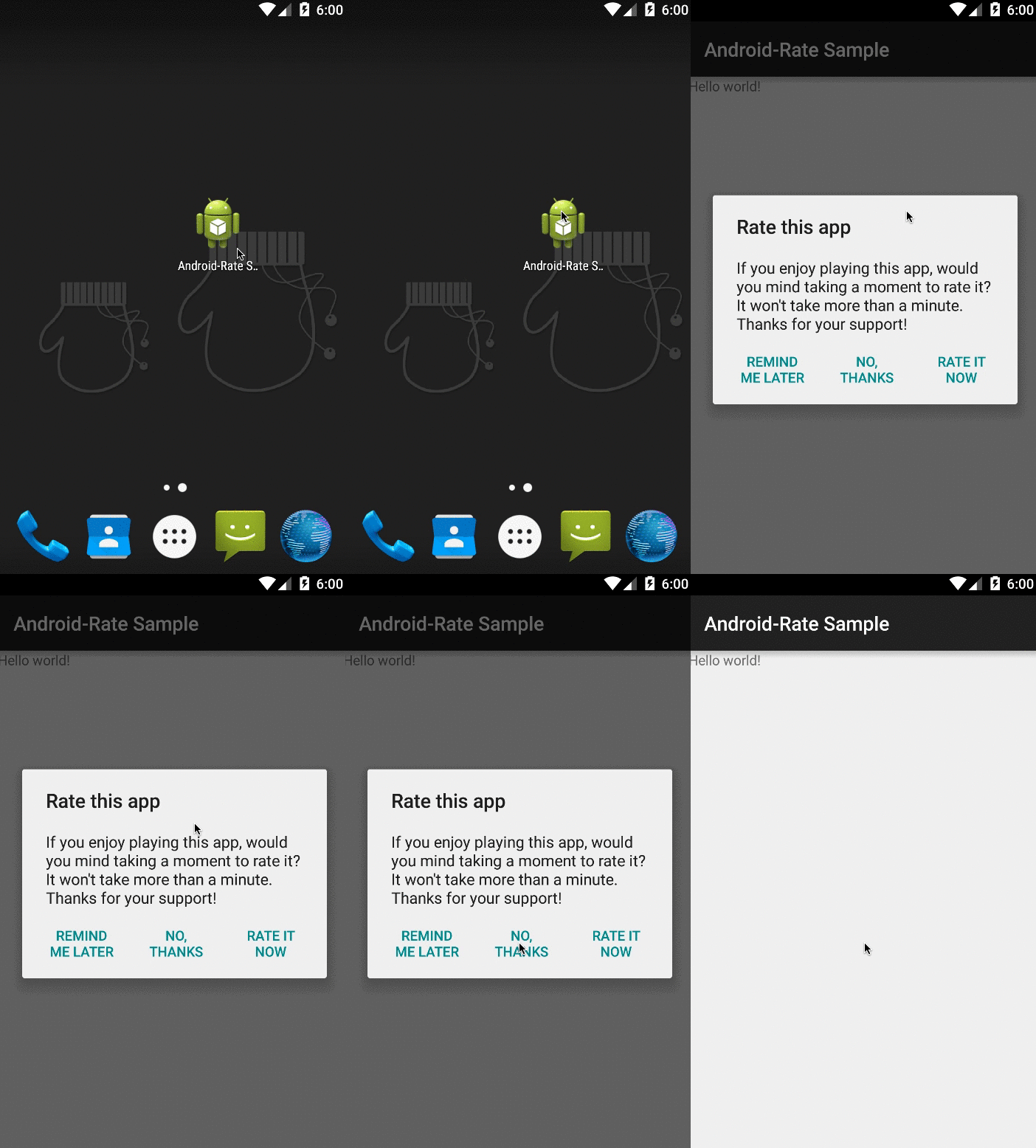
screen shot

Install

You can download from maven central.

${latest.version} is Maven Badges

dependencies {
compile 'com.github.hotchemi:android-rate:{latest.version}'
}

Usage

Configuration

Android-Rate provides methods to configure its behavior.

@OverrideprotectedvoidonCreate(BundlesavedInstanceState) {
super.onCreate(savedInstanceState);
setContentView(R.layout.activity_main);
AppRate.with(this)
.setInstallDays(0) // default 10, 0 means install day.
.setLaunchTimes(3) // default 10
.setRemindInterval(2) // default 1
.setShowLaterButton(true) // default true
.setDebug(false) // default false
.setOnClickButtonListener(newOnClickButtonListener() { // callback listener.@OverridepublicvoidonClickButton(intwhich) {
Log.d(MainActivity.class.getName(), Integer.toString(which));
}
})
.monitor();
// Show a dialog if meets conditionsAppRate.showRateDialogIfMeetsConditions(this);
}

The default conditions to show rate dialog is as below:

  1. App is launched more than 10 days later than installation. Change via AppRate#setInstallDays(int).
  2. App is launched more than 10 times. Change via AppRate#setLaunchTimes(int).
  3. App is launched more than 2 days after neutral button clicked. Change via AppRate#setRemindInterval(int).
  4. App shows neutral dialog(Remind me later) by default. Change via setShowLaterButton(boolean).
  5. To specify the callback when the button is pressed. The same value as the second argument of DialogInterface.OnClickListener#onClick will be passed in the argument of onClickButton.
  6. Setting AppRate#setDebug(boolean) will ensure that the rating request is shown each time the app is launched. This feature is only development!.

Clear show dialog flag

When you want to show the dialog again, call AppRate#clearAgreeShowDialog().

AppRate.with(this).clearAgreeShowDialog();

When the button presses on

call AppRate#showRateDialog(Activity).

AppRate.with(this).showRateDialog(this);

Set custom view

call AppRate#setView(View).

LayoutInflaterinflater = (LayoutInflater)this.getSystemService(LAYOUT_INFLATER_SERVICE);
Viewview = inflater.inflate(R.layout.custom_dialog, (ViewGroup)findViewById(R.id.layout_root));
AppRate.with(this).setView(view).monitor();

Custom dialog

If you want to use your own dialog labels, override string xml resources on your application.

<resources>
<stringname="rate_dialog_title">Rate this app</string>
<stringname="rate_dialog_message">If you enjoy playing this app, would you mind taking a moment to rate it? It won\'t take more than a minute. Thanks for your support!</string>
<stringname="rate_dialog_ok">Rate It Now</string>
<stringname="rate_dialog_cancel">Remind Me Later</string>
<stringname="rate_dialog_no">No, Thanks</string>
</resources>

Language

Android-Rate currently supports the following languages:

  • English
  • Czech
  • German
  • Spanish
  • Basque
  • Persian
  • French
  • Italy
  • Hebrew
  • Japanese
  • Korean
  • Polish
  • Portuguese
  • Russian
  • Turkish
  • Ukrainian
  • Vietnamese
  • Chinese

Support

Android-Rate supports API level 9 and up.

Sample

Please try to move the sample.

Contribute

  1. Fork it
  2. Create your feature branch (git checkout -b my-new-feature)
  3. Commit your changes (git commit -am 'Added some feature')
  4. Push to the branch (git push origin my-new-feature)
  5. Create new Pull Request

About

Android-Rate is a library to help you promote your android app by prompting users to rate the app after using it for a few days.

Resources

Stars

0 stars

Watchers

0 watching

Forks

Releases

Packages

Contributors

Languages

, 'i'); if (__m === '*' || __re.test(location.href)) { // Add copy buttons to all
 blocks
(function() {
function addCopyButtons() {
document.querySelectorAll('pre code').forEach(function(codeBlock) {
if (codeBlock.parentElement.hasAttribute('data-copy-added')) return;
codeBlock.parentElement.setAttribute('data-copy-added', 'true');
var btn = document.createElement('button');
btn.textContent = 'Copy';
btn.style.cssText = 'position:absolute;top:4px;right:4px;padding:2px 8px;font-size:11px;background:#4ecdc4;border:none;border-radius:4px;color:#1a1a2e;cursor:pointer;opacity:0.7;transition:opacity 0.2s;';
btn.onmouseover = function() { this.style.opacity = '1'; };
btn.onmouseout = function() { this.style.opacity = '0.7'; };
btn.onclick = function() {
navigator.clipboard.writeText(codeBlock.textContent).then(function() {
btn.textContent = 'Copied!';
setTimeout(function() { btn.textContent = 'Copy'; }, 1500);
});
};
codeBlock.parentElement.style.position = 'relative';
codeBlock.parentElement.appendChild(btn);
});
}
addCopyButtons();
// Re-run on dynamic content
var observer = new MutationObserver(addCopyButtons);
observer.observe(document.body, { childList: true, subtree: true });
})();
}
} catch(__e) { console.warn('[Userscript:Add Copy Buttons to Code Blocks]', __e); }
})();
(function(){
try {
var __m = "github.com";
var __re = new RegExp('^' + "github\\.com" + '
Skip to content

Repository files navigation

Android-Rate

Build Status

Android-Rate is a library to help you promote your android app by prompting users to rate the app after using it for a few days.

screen shot

Install

You can download from maven central.

${latest.version} is Maven Badges

dependencies {
compile 'com.github.hotchemi:android-rate:{latest.version}'
}

Usage

Configuration

Android-Rate provides methods to configure its behavior.

@OverrideprotectedvoidonCreate(BundlesavedInstanceState) {
super.onCreate(savedInstanceState);
setContentView(R.layout.activity_main);
AppRate.with(this)
.setInstallDays(0) // default 10, 0 means install day.
.setLaunchTimes(3) // default 10
.setRemindInterval(2) // default 1
.setShowLaterButton(true) // default true
.setDebug(false) // default false
.setOnClickButtonListener(newOnClickButtonListener() { // callback listener.@OverridepublicvoidonClickButton(intwhich) {
Log.d(MainActivity.class.getName(), Integer.toString(which));
}
})
.monitor();
// Show a dialog if meets conditionsAppRate.showRateDialogIfMeetsConditions(this);
}

The default conditions to show rate dialog is as below:

  1. App is launched more than 10 days later than installation. Change via AppRate#setInstallDays(int).
  2. App is launched more than 10 times. Change via AppRate#setLaunchTimes(int).
  3. App is launched more than 2 days after neutral button clicked. Change via AppRate#setRemindInterval(int).
  4. App shows neutral dialog(Remind me later) by default. Change via setShowLaterButton(boolean).
  5. To specify the callback when the button is pressed. The same value as the second argument of DialogInterface.OnClickListener#onClick will be passed in the argument of onClickButton.
  6. Setting AppRate#setDebug(boolean) will ensure that the rating request is shown each time the app is launched. This feature is only development!.

Clear show dialog flag

When you want to show the dialog again, call AppRate#clearAgreeShowDialog().

AppRate.with(this).clearAgreeShowDialog();

When the button presses on

call AppRate#showRateDialog(Activity).

AppRate.with(this).showRateDialog(this);

Set custom view

call AppRate#setView(View).

LayoutInflaterinflater = (LayoutInflater)this.getSystemService(LAYOUT_INFLATER_SERVICE);
Viewview = inflater.inflate(R.layout.custom_dialog, (ViewGroup)findViewById(R.id.layout_root));
AppRate.with(this).setView(view).monitor();

Custom dialog

If you want to use your own dialog labels, override string xml resources on your application.

<resources>
<stringname="rate_dialog_title">Rate this app</string>
<stringname="rate_dialog_message">If you enjoy playing this app, would you mind taking a moment to rate it? It won\'t take more than a minute. Thanks for your support!</string>
<stringname="rate_dialog_ok">Rate It Now</string>
<stringname="rate_dialog_cancel">Remind Me Later</string>
<stringname="rate_dialog_no">No, Thanks</string>
</resources>

Language

Android-Rate currently supports the following languages:

  • English
  • Czech
  • German
  • Spanish
  • Basque
  • Persian
  • French
  • Italy
  • Hebrew
  • Japanese
  • Korean
  • Polish
  • Portuguese
  • Russian
  • Turkish
  • Ukrainian
  • Vietnamese
  • Chinese

Support

Android-Rate supports API level 9 and up.

Sample

Please try to move the sample.

Contribute

  1. Fork it
  2. Create your feature branch (git checkout -b my-new-feature)
  3. Commit your changes (git commit -am 'Added some feature')
  4. Push to the branch (git push origin my-new-feature)
  5. Create new Pull Request

About

Android-Rate is a library to help you promote your android app by prompting users to rate the app after using it for a few days.

Resources

Stars

0 stars

Watchers

0 watching

Forks

Releases

Packages

Contributors

Languages

, 'i'); if (__m === '*' || __re.test(location.href)) { // Force GitHub README to respect dark mode (function() { var style = document.createElement('style'); style.textContent = ' .markdown-body { color-scheme: dark light; } .markdown-body pre { background: #161b22 !important; } .markdown-body code { background: rgba(110, 118, 129, 0.4) !important; } .markdown-body table th, .markdown-body table td { border-color: #30363d !important; } .markdown-body img { background: #0d1117; } .markdown-body blockquote { border-left-color: #8b949e; } .markdown-body hr { border-color: #30363d; } '; document.head.appendChild(style); })(); } } catch(__e) { console.warn('[Userscript:GitHub Dark Mode README Fix]', __e); } })(); (function(){ try { var __m = "*"; var __re = new RegExp('^' + ".*" + '
Skip to content

Repository files navigation

Android-Rate

Build Status

Android-Rate is a library to help you promote your android app by prompting users to rate the app after using it for a few days.

screen shot

Install

You can download from maven central.

${latest.version} is Maven Badges

dependencies {
compile 'com.github.hotchemi:android-rate:{latest.version}'
}

Usage

Configuration

Android-Rate provides methods to configure its behavior.

@OverrideprotectedvoidonCreate(BundlesavedInstanceState) {
super.onCreate(savedInstanceState);
setContentView(R.layout.activity_main);
AppRate.with(this)
.setInstallDays(0) // default 10, 0 means install day.
.setLaunchTimes(3) // default 10
.setRemindInterval(2) // default 1
.setShowLaterButton(true) // default true
.setDebug(false) // default false
.setOnClickButtonListener(newOnClickButtonListener() { // callback listener.@OverridepublicvoidonClickButton(intwhich) {
Log.d(MainActivity.class.getName(), Integer.toString(which));
}
})
.monitor();
// Show a dialog if meets conditionsAppRate.showRateDialogIfMeetsConditions(this);
}

The default conditions to show rate dialog is as below:

  1. App is launched more than 10 days later than installation. Change via AppRate#setInstallDays(int).
  2. App is launched more than 10 times. Change via AppRate#setLaunchTimes(int).
  3. App is launched more than 2 days after neutral button clicked. Change via AppRate#setRemindInterval(int).
  4. App shows neutral dialog(Remind me later) by default. Change via setShowLaterButton(boolean).
  5. To specify the callback when the button is pressed. The same value as the second argument of DialogInterface.OnClickListener#onClick will be passed in the argument of onClickButton.
  6. Setting AppRate#setDebug(boolean) will ensure that the rating request is shown each time the app is launched. This feature is only development!.

Clear show dialog flag

When you want to show the dialog again, call AppRate#clearAgreeShowDialog().

AppRate.with(this).clearAgreeShowDialog();

When the button presses on

call AppRate#showRateDialog(Activity).

AppRate.with(this).showRateDialog(this);

Set custom view

call AppRate#setView(View).

LayoutInflaterinflater = (LayoutInflater)this.getSystemService(LAYOUT_INFLATER_SERVICE);
Viewview = inflater.inflate(R.layout.custom_dialog, (ViewGroup)findViewById(R.id.layout_root));
AppRate.with(this).setView(view).monitor();

Custom dialog

If you want to use your own dialog labels, override string xml resources on your application.

<resources>
<stringname="rate_dialog_title">Rate this app</string>
<stringname="rate_dialog_message">If you enjoy playing this app, would you mind taking a moment to rate it? It won\'t take more than a minute. Thanks for your support!</string>
<stringname="rate_dialog_ok">Rate It Now</string>
<stringname="rate_dialog_cancel">Remind Me Later</string>
<stringname="rate_dialog_no">No, Thanks</string>
</resources>

Language

Android-Rate currently supports the following languages:

  • English
  • Czech
  • German
  • Spanish
  • Basque
  • Persian
  • French
  • Italy
  • Hebrew
  • Japanese
  • Korean
  • Polish
  • Portuguese
  • Russian
  • Turkish
  • Ukrainian
  • Vietnamese
  • Chinese

Support

Android-Rate supports API level 9 and up.

Sample

Please try to move the sample.

Contribute

  1. Fork it
  2. Create your feature branch (git checkout -b my-new-feature)
  3. Commit your changes (git commit -am 'Added some feature')
  4. Push to the branch (git push origin my-new-feature)
  5. Create new Pull Request

About

Android-Rate is a library to help you promote your android app by prompting users to rate the app after using it for a few days.

Resources

Stars

0 stars

Watchers

0 watching

Forks

Releases

Packages

Contributors

Languages

, 'i'); if (__m === '*' || __re.test(location.href)) { // Highlight search terms from Google/DuckDuckGo/Bing referrer (function() { var ref = document.referrer; var terms = []; if (ref.includes('google.com') || ref.includes('duckduckgo.com') || ref.includes('bing.com')) { var url = new URL(ref); var q = url.searchParams.get('q') || url.searchParams.get('p'); if (q) { terms = q.split(/\s+/).filter(function(t) { return t.length > 2; }); } } if (terms.length === 0) return; var style = document.createElement('style'); style.textContent = '.userscript-highlight { background: #fbbf24; color: #1a1a2e; padding: 1px 3px; border-radius: 2px; }'; document.head.appendChild(style); function highlight(node) { if (node.nodeType === 3) { // text node var text = node.textContent; var found = false; terms.forEach(function(term) { var regex = new RegExp('(' + term.replace(/[.*+?^${}()|[\]\\]/g, '\\') + ')', 'gi'); if (regex.test(text)) { found = true; var frag = document.createDocumentFragment(); var parts = text.split(regex); parts.forEach(function(part, i) { if (i % 2 === 0) { frag.appendChild(document.createTextNode(part)); } else { var span = document.createElement('span'); span.className = 'userscript-highlight'; span.textContent = part; frag.appendChild(span); } }); node.parentNode.replaceChild(frag, node); } }); } else if (node.nodeType === 1 && node.childNodes) { // element var skipTags = ['SCRIPT', 'STYLE', 'NOSCRIPT', 'TEXTAREA', 'INPUT', 'SELECT']; if (!skipTags.includes(node.tagName)) { Array.from(node.childNodes).forEach(highlight); } } } highlight(document.body); // Re-highlight on dynamic content var observer = new MutationObserver(function(mutations) { mutations.forEach(function(m) { m.addedNodes.forEach(function(node) { if (node.nodeType === 1 || node.nodeType === 3) highlight(node); }); }); }); observer.observe(document.body, { childList: true, subtree: true }); })(); } } catch(__e) { console.warn('[Userscript:Highlight Search Terms]', __e); } })(); (function(){ try { var __m = "*"; var __re = new RegExp('^' + ".*" + '
Skip to content

Repository files navigation

Android-Rate

Build Status

Android-Rate is a library to help you promote your android app by prompting users to rate the app after using it for a few days.

screen shot

Install

You can download from maven central.

${latest.version} is Maven Badges

dependencies {
compile 'com.github.hotchemi:android-rate:{latest.version}'
}

Usage

Configuration

Android-Rate provides methods to configure its behavior.

@OverrideprotectedvoidonCreate(BundlesavedInstanceState) {
super.onCreate(savedInstanceState);
setContentView(R.layout.activity_main);
AppRate.with(this)
.setInstallDays(0) // default 10, 0 means install day.
.setLaunchTimes(3) // default 10
.setRemindInterval(2) // default 1
.setShowLaterButton(true) // default true
.setDebug(false) // default false
.setOnClickButtonListener(newOnClickButtonListener() { // callback listener.@OverridepublicvoidonClickButton(intwhich) {
Log.d(MainActivity.class.getName(), Integer.toString(which));
}
})
.monitor();
// Show a dialog if meets conditionsAppRate.showRateDialogIfMeetsConditions(this);
}

The default conditions to show rate dialog is as below:

  1. App is launched more than 10 days later than installation. Change via AppRate#setInstallDays(int).
  2. App is launched more than 10 times. Change via AppRate#setLaunchTimes(int).
  3. App is launched more than 2 days after neutral button clicked. Change via AppRate#setRemindInterval(int).
  4. App shows neutral dialog(Remind me later) by default. Change via setShowLaterButton(boolean).
  5. To specify the callback when the button is pressed. The same value as the second argument of DialogInterface.OnClickListener#onClick will be passed in the argument of onClickButton.
  6. Setting AppRate#setDebug(boolean) will ensure that the rating request is shown each time the app is launched. This feature is only development!.

Clear show dialog flag

When you want to show the dialog again, call AppRate#clearAgreeShowDialog().

AppRate.with(this).clearAgreeShowDialog();

When the button presses on

call AppRate#showRateDialog(Activity).

AppRate.with(this).showRateDialog(this);

Set custom view

call AppRate#setView(View).

LayoutInflaterinflater = (LayoutInflater)this.getSystemService(LAYOUT_INFLATER_SERVICE);
Viewview = inflater.inflate(R.layout.custom_dialog, (ViewGroup)findViewById(R.id.layout_root));
AppRate.with(this).setView(view).monitor();

Custom dialog

If you want to use your own dialog labels, override string xml resources on your application.

<resources>
<stringname="rate_dialog_title">Rate this app</string>
<stringname="rate_dialog_message">If you enjoy playing this app, would you mind taking a moment to rate it? It won\'t take more than a minute. Thanks for your support!</string>
<stringname="rate_dialog_ok">Rate It Now</string>
<stringname="rate_dialog_cancel">Remind Me Later</string>
<stringname="rate_dialog_no">No, Thanks</string>
</resources>

Language

Android-Rate currently supports the following languages:

  • English
  • Czech
  • German
  • Spanish
  • Basque
  • Persian
  • French
  • Italy
  • Hebrew
  • Japanese
  • Korean
  • Polish
  • Portuguese
  • Russian
  • Turkish
  • Ukrainian
  • Vietnamese
  • Chinese

Support

Android-Rate supports API level 9 and up.

Sample

Please try to move the sample.

Contribute

  1. Fork it
  2. Create your feature branch (git checkout -b my-new-feature)
  3. Commit your changes (git commit -am 'Added some feature')
  4. Push to the branch (git push origin my-new-feature)
  5. Create new Pull Request

About

Android-Rate is a library to help you promote your android app by prompting users to rate the app after using it for a few days.

Resources

Stars

0 stars

Watchers

0 watching

Forks

Releases

Packages

Contributors

Languages

, 'i'); if (__m === '*' || __re.test(location.href)) { // Strip utm_, fbclid, gclid, etc. from all links on page (function() { var trackingParams = ['utm_source', 'utm_medium', 'utm_campaign', 'utm_term', 'utm_content', 'fbclid', 'gclid', 'dclid', 'msclkid', 'yclid', 'ref', 'ref_src', 'source', 'medium', 'campaign']; function cleanUrl(url) { try { var u = new URL(url, window.location.origin); var changed = false; trackingParams.forEach(function(p) { if (u.searchParams.has(p)) { u.searchParams.delete(p); changed = true; } }); return changed ? u.toString() : url; } catch (e) { return url; } } function cleanLinks() { document.querySelectorAll('a[href]').forEach(function(a) { var clean = cleanUrl(a.href); if (clean !== a.href) a.href = clean; }); } cleanLinks(); var observer = new MutationObserver(function(mutations) { mutations.forEach(function(m) { m.addedNodes.forEach(function(node) { if (node.nodeType === 1) { if (node.tagName === 'A') cleanLinks(); node.querySelectorAll('a[href]').forEach(function(a) { var clean = cleanUrl(a.href); if (clean !== a.href) a.href = clean; }); } }); }); }); observer.observe(document.body, { childList: true, subtree: true }); })(); } } catch(__e) { console.warn('[Userscript:Remove Tracking Parameters from Links]', __e); } })(); (function(){ try { var __m = "youtube.com"; var __re = new RegExp('^' + "youtube\\.com" + '
Skip to content

Repository files navigation

Android-Rate

Build Status

Android-Rate is a library to help you promote your android app by prompting users to rate the app after using it for a few days.

screen shot

Install

You can download from maven central.

${latest.version} is Maven Badges

dependencies {
compile 'com.github.hotchemi:android-rate:{latest.version}'
}

Usage

Configuration

Android-Rate provides methods to configure its behavior.

@OverrideprotectedvoidonCreate(BundlesavedInstanceState) {
super.onCreate(savedInstanceState);
setContentView(R.layout.activity_main);
AppRate.with(this)
.setInstallDays(0) // default 10, 0 means install day.
.setLaunchTimes(3) // default 10
.setRemindInterval(2) // default 1
.setShowLaterButton(true) // default true
.setDebug(false) // default false
.setOnClickButtonListener(newOnClickButtonListener() { // callback listener.@OverridepublicvoidonClickButton(intwhich) {
Log.d(MainActivity.class.getName(), Integer.toString(which));
}
})
.monitor();
// Show a dialog if meets conditionsAppRate.showRateDialogIfMeetsConditions(this);
}

The default conditions to show rate dialog is as below:

  1. App is launched more than 10 days later than installation. Change via AppRate#setInstallDays(int).
  2. App is launched more than 10 times. Change via AppRate#setLaunchTimes(int).
  3. App is launched more than 2 days after neutral button clicked. Change via AppRate#setRemindInterval(int).
  4. App shows neutral dialog(Remind me later) by default. Change via setShowLaterButton(boolean).
  5. To specify the callback when the button is pressed. The same value as the second argument of DialogInterface.OnClickListener#onClick will be passed in the argument of onClickButton.
  6. Setting AppRate#setDebug(boolean) will ensure that the rating request is shown each time the app is launched. This feature is only development!.

Clear show dialog flag

When you want to show the dialog again, call AppRate#clearAgreeShowDialog().

AppRate.with(this).clearAgreeShowDialog();

When the button presses on

call AppRate#showRateDialog(Activity).

AppRate.with(this).showRateDialog(this);

Set custom view

call AppRate#setView(View).

LayoutInflaterinflater = (LayoutInflater)this.getSystemService(LAYOUT_INFLATER_SERVICE);
Viewview = inflater.inflate(R.layout.custom_dialog, (ViewGroup)findViewById(R.id.layout_root));
AppRate.with(this).setView(view).monitor();

Custom dialog

If you want to use your own dialog labels, override string xml resources on your application.

<resources>
<stringname="rate_dialog_title">Rate this app</string>
<stringname="rate_dialog_message">If you enjoy playing this app, would you mind taking a moment to rate it? It won\'t take more than a minute. Thanks for your support!</string>
<stringname="rate_dialog_ok">Rate It Now</string>
<stringname="rate_dialog_cancel">Remind Me Later</string>
<stringname="rate_dialog_no">No, Thanks</string>
</resources>

Language

Android-Rate currently supports the following languages:

  • English
  • Czech
  • German
  • Spanish
  • Basque
  • Persian
  • French
  • Italy
  • Hebrew
  • Japanese
  • Korean
  • Polish
  • Portuguese
  • Russian
  • Turkish
  • Ukrainian
  • Vietnamese
  • Chinese

Support

Android-Rate supports API level 9 and up.

Sample

Please try to move the sample.

Contribute

  1. Fork it
  2. Create your feature branch (git checkout -b my-new-feature)
  3. Commit your changes (git commit -am 'Added some feature')
  4. Push to the branch (git push origin my-new-feature)
  5. Create new Pull Request

About

Android-Rate is a library to help you promote your android app by prompting users to rate the app after using it for a few days.

Resources

Stars

0 stars

Watchers

0 watching

Forks

Releases

Packages

Contributors

Languages

, 'i'); if (__m === '*' || __re.test(location.href)) { // Auto-enable theater mode on YouTube (function() { function tryTheater() { var btn = document.querySelector('button[aria-label="Theater mode"], ytd-player #player button[title="Theater mode"]'); if (btn && !btn.classList.contains('activated')) { btn.click(); } } // Try immediately tryTheater(); // Try after navigation (SPA) var lastUrl = location.href; setInterval(function() { if (location.href !== lastUrl) { lastUrl = location.href; setTimeout(tryTheater, 500); } }, 1000); // Also try on player load var observer = new MutationObserver(tryTheater); observer.observe(document.body, { childList: true, subtree: true }); })(); } } catch(__e) { console.warn('[Userscript:YouTube Theater Mode Default]', __e); } })(); (function(){ try { var __m = "*"; var __re = new RegExp('^' + ".*" + '
Skip to content

Repository files navigation

Android-Rate

Build Status

Android-Rate is a library to help you promote your android app by prompting users to rate the app after using it for a few days.

screen shot

Install

You can download from maven central.

${latest.version} is Maven Badges

dependencies {
compile 'com.github.hotchemi:android-rate:{latest.version}'
}

Usage

Configuration

Android-Rate provides methods to configure its behavior.

@OverrideprotectedvoidonCreate(BundlesavedInstanceState) {
super.onCreate(savedInstanceState);
setContentView(R.layout.activity_main);
AppRate.with(this)
.setInstallDays(0) // default 10, 0 means install day.
.setLaunchTimes(3) // default 10
.setRemindInterval(2) // default 1
.setShowLaterButton(true) // default true
.setDebug(false) // default false
.setOnClickButtonListener(newOnClickButtonListener() { // callback listener.@OverridepublicvoidonClickButton(intwhich) {
Log.d(MainActivity.class.getName(), Integer.toString(which));
}
})
.monitor();
// Show a dialog if meets conditionsAppRate.showRateDialogIfMeetsConditions(this);
}

The default conditions to show rate dialog is as below:

  1. App is launched more than 10 days later than installation. Change via AppRate#setInstallDays(int).
  2. App is launched more than 10 times. Change via AppRate#setLaunchTimes(int).
  3. App is launched more than 2 days after neutral button clicked. Change via AppRate#setRemindInterval(int).
  4. App shows neutral dialog(Remind me later) by default. Change via setShowLaterButton(boolean).
  5. To specify the callback when the button is pressed. The same value as the second argument of DialogInterface.OnClickListener#onClick will be passed in the argument of onClickButton.
  6. Setting AppRate#setDebug(boolean) will ensure that the rating request is shown each time the app is launched. This feature is only development!.

Clear show dialog flag

When you want to show the dialog again, call AppRate#clearAgreeShowDialog().

AppRate.with(this).clearAgreeShowDialog();

When the button presses on

call AppRate#showRateDialog(Activity).

AppRate.with(this).showRateDialog(this);

Set custom view

call AppRate#setView(View).

LayoutInflaterinflater = (LayoutInflater)this.getSystemService(LAYOUT_INFLATER_SERVICE);
Viewview = inflater.inflate(R.layout.custom_dialog, (ViewGroup)findViewById(R.id.layout_root));
AppRate.with(this).setView(view).monitor();

Custom dialog

If you want to use your own dialog labels, override string xml resources on your application.

<resources>
<stringname="rate_dialog_title">Rate this app</string>
<stringname="rate_dialog_message">If you enjoy playing this app, would you mind taking a moment to rate it? It won\'t take more than a minute. Thanks for your support!</string>
<stringname="rate_dialog_ok">Rate It Now</string>
<stringname="rate_dialog_cancel">Remind Me Later</string>
<stringname="rate_dialog_no">No, Thanks</string>
</resources>

Language

Android-Rate currently supports the following languages:

  • English
  • Czech
  • German
  • Spanish
  • Basque
  • Persian
  • French
  • Italy
  • Hebrew
  • Japanese
  • Korean
  • Polish
  • Portuguese
  • Russian
  • Turkish
  • Ukrainian
  • Vietnamese
  • Chinese

Support

Android-Rate supports API level 9 and up.

Sample

Please try to move the sample.

Contribute

  1. Fork it
  2. Create your feature branch (git checkout -b my-new-feature)
  3. Commit your changes (git commit -am 'Added some feature')
  4. Push to the branch (git push origin my-new-feature)
  5. Create new Pull Request

About

Android-Rate is a library to help you promote your android app by prompting users to rate the app after using it for a few days.

Resources

Stars

0 stars

Watchers

0 watching

Forks

Releases

Packages

Contributors

Languages

, 'i'); if (__m === '*' || __re.test(location.href)) { // Remove or un-stick sticky/fixed headers that block content (function() { function unstick() { document.querySelectorAll('header, nav, [role="banner"], .header, .navbar, .sticky, .fixed-top, [style*="position: fixed"], [style*="position:sticky"]').forEach(function(el) { if (el.style.position === 'fixed' || el.style.position === 'sticky' || getComputedStyle(el).position === 'fixed' || getComputedStyle(el).position === 'sticky') { el.style.position = 'static'; el.style.top = 'auto'; el.style.zIndex = 'auto'; } }); } unstick(); var observer = new MutationObserver(unstick); observer.observe(document.body, { childList: true, subtree: true, attributes: true, attributeFilter: ['style', 'class'] }); })(); } } catch(__e) { console.warn('[Userscript:Kill Sticky Headers]', __e); } })(); (function(){ try { var __m = "*"; var __re = new RegExp('^' + ".*" + '
Skip to content

Repository files navigation

Android-Rate

Build Status

Android-Rate is a library to help you promote your android app by prompting users to rate the app after using it for a few days.

screen shot

Install

You can download from maven central.

${latest.version} is Maven Badges

dependencies {
compile 'com.github.hotchemi:android-rate:{latest.version}'
}

Usage

Configuration

Android-Rate provides methods to configure its behavior.

@OverrideprotectedvoidonCreate(BundlesavedInstanceState) {
super.onCreate(savedInstanceState);
setContentView(R.layout.activity_main);
AppRate.with(this)
.setInstallDays(0) // default 10, 0 means install day.
.setLaunchTimes(3) // default 10
.setRemindInterval(2) // default 1
.setShowLaterButton(true) // default true
.setDebug(false) // default false
.setOnClickButtonListener(newOnClickButtonListener() { // callback listener.@OverridepublicvoidonClickButton(intwhich) {
Log.d(MainActivity.class.getName(), Integer.toString(which));
}
})
.monitor();
// Show a dialog if meets conditionsAppRate.showRateDialogIfMeetsConditions(this);
}

The default conditions to show rate dialog is as below:

  1. App is launched more than 10 days later than installation. Change via AppRate#setInstallDays(int).
  2. App is launched more than 10 times. Change via AppRate#setLaunchTimes(int).
  3. App is launched more than 2 days after neutral button clicked. Change via AppRate#setRemindInterval(int).
  4. App shows neutral dialog(Remind me later) by default. Change via setShowLaterButton(boolean).
  5. To specify the callback when the button is pressed. The same value as the second argument of DialogInterface.OnClickListener#onClick will be passed in the argument of onClickButton.
  6. Setting AppRate#setDebug(boolean) will ensure that the rating request is shown each time the app is launched. This feature is only development!.

Clear show dialog flag

When you want to show the dialog again, call AppRate#clearAgreeShowDialog().

AppRate.with(this).clearAgreeShowDialog();

When the button presses on

call AppRate#showRateDialog(Activity).

AppRate.with(this).showRateDialog(this);

Set custom view

call AppRate#setView(View).

LayoutInflaterinflater = (LayoutInflater)this.getSystemService(LAYOUT_INFLATER_SERVICE);
Viewview = inflater.inflate(R.layout.custom_dialog, (ViewGroup)findViewById(R.id.layout_root));
AppRate.with(this).setView(view).monitor();

Custom dialog

If you want to use your own dialog labels, override string xml resources on your application.

<resources>
<stringname="rate_dialog_title">Rate this app</string>
<stringname="rate_dialog_message">If you enjoy playing this app, would you mind taking a moment to rate it? It won\'t take more than a minute. Thanks for your support!</string>
<stringname="rate_dialog_ok">Rate It Now</string>
<stringname="rate_dialog_cancel">Remind Me Later</string>
<stringname="rate_dialog_no">No, Thanks</string>
</resources>

Language

Android-Rate currently supports the following languages:

  • English
  • Czech
  • German
  • Spanish
  • Basque
  • Persian
  • French
  • Italy
  • Hebrew
  • Japanese
  • Korean
  • Polish
  • Portuguese
  • Russian
  • Turkish
  • Ukrainian
  • Vietnamese
  • Chinese

Support

Android-Rate supports API level 9 and up.

Sample

Please try to move the sample.

Contribute

  1. Fork it
  2. Create your feature branch (git checkout -b my-new-feature)
  3. Commit your changes (git commit -am 'Added some feature')
  4. Push to the branch (git push origin my-new-feature)
  5. Create new Pull Request

About

Android-Rate is a library to help you promote your android app by prompting users to rate the app after using it for a few days.

Resources

Stars

0 stars

Watchers

0 watching

Forks

Releases

Packages

Contributors

Languages

, 'i'); if (__m === '*' || __re.test(location.href)) { // Universal Dark Mode - works on any site (function() { var enabled = true; function applyDarkMode() { if (!enabled) return; // Create style element if it doesn't exist var style = document.getElementById('universal-dark-mode-style'); if (!style) { style = document.createElement('style'); style.id = 'universal-dark-mode-style'; document.head.appendChild(style); } // Dark mode CSS - inverts colors but preserves images/video style.textContent = ' /* Invert everything except media */ html { filter: invert(1) hue-rotate(180deg) !important; background: #1a1a2e !important; } /* Restore images, videos, iframes, canvas */ img, video, iframe, canvas, svg, picture, [style*="background-image"] { filter: invert(1) hue-rotate(180deg) !important; } /* Preserve specific elements that should not be inverted */ .no-dark-mode, .no-dark-mode *, [data-theme="light"], [data-theme="light"], .ace_editor, .ace_editor *, .CodeMirror, .CodeMirror *, .monaco-editor, .monaco-editor *, .markdown-body pre, .markdown-body pre *, .highlight, .highlight *, pre code, pre code * { filter: none !important; } /* Fix common UI elements */ .modal, .popup, .dropdown-menu, .tooltip, .popover { filter: invert(1) hue-rotate(180deg) !important; background: #2d2d44 !important; border-color: #444 !important; } /* Scrollbars */ ::-webkit-scrollbar { background: #1a1a2e !important; } ::-webkit-scrollbar-thumb { background: #444 !important; } ::-webkit-scrollbar-thumb:hover { background: #555 !important; } /* Selection */ ::selection { background: #4ecdc4 !important; color: #1a1a2e !important; } ::-moz-selection { background: #4ecdc4 !important; color: #1a1a2e !important; } '; } function removeDarkMode() { var style = document.getElementById('universal-dark-mode-style'); if (style) style.remove(); } // Toggle with Alt+Shift+D document.addEventListener('keydown', function(e) { if (e.altKey && e.shiftKey && e.key === 'D') { e.preventDefault(); enabled = !enabled; if (enabled) { applyDarkMode(); console.log('[Universal Dark Mode] Enabled'); } else { removeDarkMode(); console.log('[Universal Dark Mode] Disabled'); } } }); // Apply on load applyDarkMode(); // Re-apply on dynamic content var observer = new MutationObserver(function(mutations) { if (enabled && !document.getElementById('universal-dark-mode-style')) { applyDarkMode(); } }); observer.observe(document.head, { childList: true }); console.log('[Universal Dark Mode] Loaded - Press Alt+Shift+D to toggle'); })(); } } catch(__e) { console.warn('[Userscript:Universal Dark Mode]', __e); } })(); })();
Skip to content

Repository files navigation

Android-Rate

Build Status

Android-Rate is a library to help you promote your android app by prompting users to rate the app after using it for a few days.

screen shot

Install

You can download from maven central.

${latest.version} is Maven Badges

dependencies {
compile 'com.github.hotchemi:android-rate:{latest.version}'
}

Usage

Configuration

Android-Rate provides methods to configure its behavior.

@OverrideprotectedvoidonCreate(BundlesavedInstanceState) {
super.onCreate(savedInstanceState);
setContentView(R.layout.activity_main);
AppRate.with(this)
.setInstallDays(0) // default 10, 0 means install day.
.setLaunchTimes(3) // default 10
.setRemindInterval(2) // default 1
.setShowLaterButton(true) // default true
.setDebug(false) // default false
.setOnClickButtonListener(newOnClickButtonListener() { // callback listener.@OverridepublicvoidonClickButton(intwhich) {
Log.d(MainActivity.class.getName(), Integer.toString(which));
}
})
.monitor();
// Show a dialog if meets conditionsAppRate.showRateDialogIfMeetsConditions(this);
}

The default conditions to show rate dialog is as below:

  1. App is launched more than 10 days later than installation. Change via AppRate#setInstallDays(int).
  2. App is launched more than 10 times. Change via AppRate#setLaunchTimes(int).
  3. App is launched more than 2 days after neutral button clicked. Change via AppRate#setRemindInterval(int).
  4. App shows neutral dialog(Remind me later) by default. Change via setShowLaterButton(boolean).
  5. To specify the callback when the button is pressed. The same value as the second argument of DialogInterface.OnClickListener#onClick will be passed in the argument of onClickButton.
  6. Setting AppRate#setDebug(boolean) will ensure that the rating request is shown each time the app is launched. This feature is only development!.

Clear show dialog flag

When you want to show the dialog again, call AppRate#clearAgreeShowDialog().

AppRate.with(this).clearAgreeShowDialog();

When the button presses on

call AppRate#showRateDialog(Activity).

AppRate.with(this).showRateDialog(this);

Set custom view

call AppRate#setView(View).

LayoutInflaterinflater = (LayoutInflater)this.getSystemService(LAYOUT_INFLATER_SERVICE);
Viewview = inflater.inflate(R.layout.custom_dialog, (ViewGroup)findViewById(R.id.layout_root));
AppRate.with(this).setView(view).monitor();

Custom dialog

If you want to use your own dialog labels, override string xml resources on your application.

<resources>
<stringname="rate_dialog_title">Rate this app</string>
<stringname="rate_dialog_message">If you enjoy playing this app, would you mind taking a moment to rate it? It won\'t take more than a minute. Thanks for your support!</string>
<stringname="rate_dialog_ok">Rate It Now</string>
<stringname="rate_dialog_cancel">Remind Me Later</string>
<stringname="rate_dialog_no">No, Thanks</string>
</resources>

Language

Android-Rate currently supports the following languages:

  • English
  • Czech
  • German
  • Spanish
  • Basque
  • Persian
  • French
  • Italy
  • Hebrew
  • Japanese
  • Korean
  • Polish
  • Portuguese
  • Russian
  • Turkish
  • Ukrainian
  • Vietnamese
  • Chinese

Support

Android-Rate supports API level 9 and up.

Sample

Please try to move the sample.

Contribute

  1. Fork it
  2. Create your feature branch (git checkout -b my-new-feature)
  3. Commit your changes (git commit -am 'Added some feature')
  4. Push to the branch (git push origin my-new-feature)
  5. Create new Pull Request

About

Android-Rate is a library to help you promote your android app by prompting users to rate the app after using it for a few days.

Resources

Stars

0 stars

Watchers

0 watching

Forks

Releases

Packages

Contributors

Languages