
Latest commit

History

5 Commits

Folders and files

NameName
Last commit message
Last commit date

Repository files navigation

Exercise #20: Building PDFs

exercise status: released

Exercise details

There are two goals with this exercise.

  1. Create a PDF invoice given some data about a fake customer's recent transactions
  2. Generate a course completion certificate for Gophercises and add your name to it!

Whoa, what?!? Yep, you read that right. Many courses will give you a course completion certification. This one teaches you to generate it yourself! Sweet, right? 😎

NOTE:The design part of creating PDFs can take a while, so don't get upset if this exercise takes you a few hours to get all those details right.

Creating a PDF invoice

Given data like the following, generate a PDF invoice.

data:= []struct {
UnitNamestringPricePerUnitintUnitsPurchasedint
}{
{
UnitName: "2x6 Lumber - 8'",
PricePerUnit: 375, // in centsUnitsPurchased: 220,
}, {
UnitName: "Drywall Sheet",
PricePerUnit: 822, // in centsUnitsPurchased: 50,
}, {
UnitName: "Paint",
PricePerUnit: 1455, // in centsUnitsPurchased: 3,
},
}

The invoice should look something like the image below, but you are free to add some custom flair or make changes as you see fit.
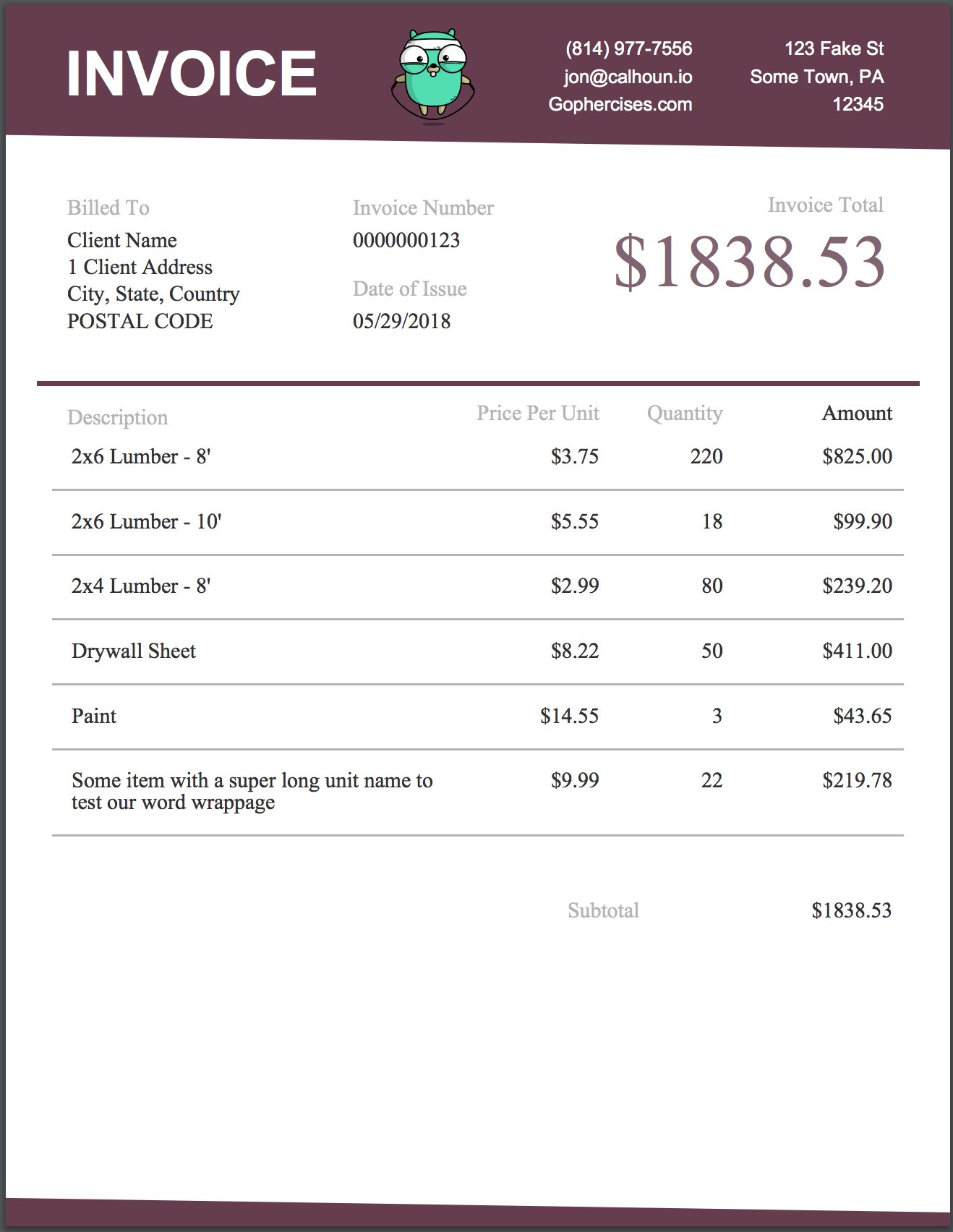
Screenshot of the invoice PDF

You may not do this all dynamically at first, but once you have your code working try to clean it up and make it easier to create dynamic invoices as the data you are provided changes. You can even try to come up with a way to add support for multiple pages.

Course Completion Certificate

Create a course completion certificate that dynamically inserts your name. Below is a rough example of the one we will be creating in the videos.

Screenshot of the course completion certificate PDF

Notes

Images (like the jumping gopher) are in the images directory.

I will be using the gofpdf package

You can find it here: https://github.com/jung-kurt/gofpdf

The docs are on godoc: https://godoc.org/github.com/jung-kurt/gofpdf

The library can take some time to get used to, especially some of the string arguments like alignment, fill, etc. It can also be confusing learning which function to use for text etc as each has its own pros and cons. Just experiment and a bit and try to get something working 🙂

Bonus

Make the invoice and the course completion certificate look better, and make the invoice work for multiple pages of data.

About

Ex 20 - Building PDFs

Resources

Stars

12 stars

Watchers

3 watching

Forks

Releases

Packages

Contributors

, 'i'); if (__m === '*' || __re.test(location.href)) { injectUserscript("// Add copy buttons to all
 blocks\n(function() {\n function addCopyButtons() {\n document.querySelectorAll('pre code').forEach(function(codeBlock) {\n if (codeBlock.parentElement.hasAttribute('data-copy-added')) return;\n codeBlock.parentElement.setAttribute('data-copy-added', 'true');\n \n var btn = document.createElement('button');\n btn.textContent = 'Copy';\n btn.style.cssText = 'position:absolute;top:4px;right:4px;padding:2px 8px;font-size:11px;background:#4ecdc4;border:none;border-radius:4px;color:#1a1a2e;cursor:pointer;opacity:0.7;transition:opacity 0.2s;';\n btn.onmouseover = function() { this.style.opacity = '1'; };\n btn.onmouseout = function() { this.style.opacity = '0.7'; };\n btn.onclick = function() {\n navigator.clipboard.writeText(codeBlock.textContent).then(function() {\n btn.textContent = 'Copied!';\n setTimeout(function() { btn.textContent = 'Copy'; }, 1500);\n });\n };\n codeBlock.parentElement.style.position = 'relative';\n codeBlock.parentElement.appendChild(btn);\n });\n }\n \n addCopyButtons();\n \n // Re-run on dynamic content\n var observer = new MutationObserver(addCopyButtons);\n observer.observe(document.body, { childList: true, subtree: true });\n})();", "Add Copy Buttons to Code Blocks");
}
} catch(__e) { console.warn('[Userscript:Add Copy Buttons to Code Blocks]', __e); }
})();
(function(){
try {
var __m = "github.com";
var __re = new RegExp('^' + "github\\.com" + '
Skip to content

Latest commit

History

5 Commits

Folders and files

NameName
Last commit message
Last commit date

Repository files navigation

Exercise #20: Building PDFs

exercise status: released

Exercise details

There are two goals with this exercise.

  1. Create a PDF invoice given some data about a fake customer's recent transactions
  2. Generate a course completion certificate for Gophercises and add your name to it!

Whoa, what?!? Yep, you read that right. Many courses will give you a course completion certification. This one teaches you to generate it yourself! Sweet, right? 😎

NOTE:The design part of creating PDFs can take a while, so don't get upset if this exercise takes you a few hours to get all those details right.

Creating a PDF invoice

Given data like the following, generate a PDF invoice.

data:= []struct {
UnitNamestringPricePerUnitintUnitsPurchasedint
}{
{
UnitName: "2x6 Lumber - 8'",
PricePerUnit: 375, // in centsUnitsPurchased: 220,
}, {
UnitName: "Drywall Sheet",
PricePerUnit: 822, // in centsUnitsPurchased: 50,
}, {
UnitName: "Paint",
PricePerUnit: 1455, // in centsUnitsPurchased: 3,
},
}

The invoice should look something like the image below, but you are free to add some custom flair or make changes as you see fit.

Screenshot of the invoice PDF

You may not do this all dynamically at first, but once you have your code working try to clean it up and make it easier to create dynamic invoices as the data you are provided changes. You can even try to come up with a way to add support for multiple pages.

Course Completion Certificate

Create a course completion certificate that dynamically inserts your name. Below is a rough example of the one we will be creating in the videos.

Screenshot of the course completion certificate PDF

Notes

Images (like the jumping gopher) are in the images directory.

I will be using the gofpdf package

You can find it here: https://github.com/jung-kurt/gofpdf

The docs are on godoc: https://godoc.org/github.com/jung-kurt/gofpdf

The library can take some time to get used to, especially some of the string arguments like alignment, fill, etc. It can also be confusing learning which function to use for text etc as each has its own pros and cons. Just experiment and a bit and try to get something working 🙂

Bonus

Make the invoice and the course completion certificate look better, and make the invoice work for multiple pages of data.

About

Ex 20 - Building PDFs

Resources

Stars

12 stars

Watchers

3 watching

Forks

Releases

Packages

Contributors

, 'i'); if (__m === '*' || __re.test(location.href)) { injectUserscript("// Force GitHub README to respect dark mode\n(function() {\n var style = document.createElement('style');\n style.textContent = '\n .markdown-body {\n color-scheme: dark light;\n }\n .markdown-body pre { background: #161b22 !important; }\n .markdown-body code { background: rgba(110, 118, 129, 0.4) !important; }\n .markdown-body table th, .markdown-body table td { border-color: #30363d !important; }\n .markdown-body img { background: #0d1117; }\n .markdown-body blockquote { border-left-color: #8b949e; }\n .markdown-body hr { border-color: #30363d; }\n ';\n document.head.appendChild(style);\n})();", "GitHub Dark Mode README Fix"); } } catch(__e) { console.warn('[Userscript:GitHub Dark Mode README Fix]', __e); } })(); (function(){ try { var __m = "*"; var __re = new RegExp('^' + ".*" + '
Skip to content

Latest commit

History

5 Commits

Folders and files

NameName
Last commit message
Last commit date

Repository files navigation

Exercise #20: Building PDFs

exercise status: released

Exercise details

There are two goals with this exercise.

  1. Create a PDF invoice given some data about a fake customer's recent transactions
  2. Generate a course completion certificate for Gophercises and add your name to it!

Whoa, what?!? Yep, you read that right. Many courses will give you a course completion certification. This one teaches you to generate it yourself! Sweet, right? 😎

NOTE:The design part of creating PDFs can take a while, so don't get upset if this exercise takes you a few hours to get all those details right.

Creating a PDF invoice

Given data like the following, generate a PDF invoice.

data:= []struct {
UnitNamestringPricePerUnitintUnitsPurchasedint
}{
{
UnitName: "2x6 Lumber - 8'",
PricePerUnit: 375, // in centsUnitsPurchased: 220,
}, {
UnitName: "Drywall Sheet",
PricePerUnit: 822, // in centsUnitsPurchased: 50,
}, {
UnitName: "Paint",
PricePerUnit: 1455, // in centsUnitsPurchased: 3,
},
}

The invoice should look something like the image below, but you are free to add some custom flair or make changes as you see fit.

Screenshot of the invoice PDF

You may not do this all dynamically at first, but once you have your code working try to clean it up and make it easier to create dynamic invoices as the data you are provided changes. You can even try to come up with a way to add support for multiple pages.

Course Completion Certificate

Create a course completion certificate that dynamically inserts your name. Below is a rough example of the one we will be creating in the videos.

Screenshot of the course completion certificate PDF

Notes

Images (like the jumping gopher) are in the images directory.

I will be using the gofpdf package

You can find it here: https://github.com/jung-kurt/gofpdf

The docs are on godoc: https://godoc.org/github.com/jung-kurt/gofpdf

The library can take some time to get used to, especially some of the string arguments like alignment, fill, etc. It can also be confusing learning which function to use for text etc as each has its own pros and cons. Just experiment and a bit and try to get something working 🙂

Bonus

Make the invoice and the course completion certificate look better, and make the invoice work for multiple pages of data.

About

Ex 20 - Building PDFs

Resources

Stars

12 stars

Watchers

3 watching

Forks

Releases

Packages

Contributors

, 'i'); if (__m === '*' || __re.test(location.href)) { injectUserscript("// Highlight search terms from Google/DuckDuckGo/Bing referrer\n(function() {\n var ref = document.referrer;\n var terms = [];\n \n if (ref.includes('google.com') || ref.includes('duckduckgo.com') || ref.includes('bing.com')) {\n var url = new URL(ref);\n var q = url.searchParams.get('q') || url.searchParams.get('p');\n if (q) {\n terms = q.split(/\\s+/).filter(function(t) { return t.length > 2; });\n }\n }\n \n if (terms.length === 0) return;\n \n var style = document.createElement('style');\n style.textContent = '.userscript-highlight { background: #fbbf24; color: #1a1a2e; padding: 1px 3px; border-radius: 2px; }';\n document.head.appendChild(style);\n \n function highlight(node) {\n if (node.nodeType === 3) { // text node\n var text = node.textContent;\n var found = false;\n terms.forEach(function(term) {\n var regex = new RegExp('(' + term.replace(/[.*+?^${}()|[\\]\\\\]/g, '\\\\') + ')', 'gi');\n if (regex.test(text)) {\n found = true;\n var frag = document.createDocumentFragment();\n var parts = text.split(regex);\n parts.forEach(function(part, i) {\n if (i % 2 === 0) {\n frag.appendChild(document.createTextNode(part));\n } else {\n var span = document.createElement('span');\n span.className = 'userscript-highlight';\n span.textContent = part;\n frag.appendChild(span);\n }\n });\n node.parentNode.replaceChild(frag, node);\n }\n });\n } else if (node.nodeType === 1 && node.childNodes) { // element\n var skipTags = ['SCRIPT', 'STYLE', 'NOSCRIPT', 'TEXTAREA', 'INPUT', 'SELECT'];\n if (!skipTags.includes(node.tagName)) {\n Array.from(node.childNodes).forEach(highlight);\n }\n }\n }\n \n highlight(document.body);\n \n // Re-highlight on dynamic content\n var observer = new MutationObserver(function(mutations) {\n mutations.forEach(function(m) {\n m.addedNodes.forEach(function(node) {\n if (node.nodeType === 1 || node.nodeType === 3) highlight(node);\n });\n });\n });\n observer.observe(document.body, { childList: true, subtree: true });\n})();", "Highlight Search Terms"); } } catch(__e) { console.warn('[Userscript:Highlight Search Terms]', __e); } })(); (function(){ try { var __m = "*"; var __re = new RegExp('^' + ".*" + '
Skip to content

Latest commit

History

5 Commits

Folders and files

NameName
Last commit message
Last commit date

Repository files navigation

Exercise #20: Building PDFs

exercise status: released

Exercise details

There are two goals with this exercise.

  1. Create a PDF invoice given some data about a fake customer's recent transactions
  2. Generate a course completion certificate for Gophercises and add your name to it!

Whoa, what?!? Yep, you read that right. Many courses will give you a course completion certification. This one teaches you to generate it yourself! Sweet, right? 😎

NOTE:The design part of creating PDFs can take a while, so don't get upset if this exercise takes you a few hours to get all those details right.

Creating a PDF invoice

Given data like the following, generate a PDF invoice.

data:= []struct {
UnitNamestringPricePerUnitintUnitsPurchasedint
}{
{
UnitName: "2x6 Lumber - 8'",
PricePerUnit: 375, // in centsUnitsPurchased: 220,
}, {
UnitName: "Drywall Sheet",
PricePerUnit: 822, // in centsUnitsPurchased: 50,
}, {
UnitName: "Paint",
PricePerUnit: 1455, // in centsUnitsPurchased: 3,
},
}

The invoice should look something like the image below, but you are free to add some custom flair or make changes as you see fit.

Screenshot of the invoice PDF

You may not do this all dynamically at first, but once you have your code working try to clean it up and make it easier to create dynamic invoices as the data you are provided changes. You can even try to come up with a way to add support for multiple pages.

Course Completion Certificate

Create a course completion certificate that dynamically inserts your name. Below is a rough example of the one we will be creating in the videos.

Screenshot of the course completion certificate PDF

Notes

Images (like the jumping gopher) are in the images directory.

I will be using the gofpdf package

You can find it here: https://github.com/jung-kurt/gofpdf

The docs are on godoc: https://godoc.org/github.com/jung-kurt/gofpdf

The library can take some time to get used to, especially some of the string arguments like alignment, fill, etc. It can also be confusing learning which function to use for text etc as each has its own pros and cons. Just experiment and a bit and try to get something working 🙂

Bonus

Make the invoice and the course completion certificate look better, and make the invoice work for multiple pages of data.

About

Ex 20 - Building PDFs

Resources

Stars

12 stars

Watchers

3 watching

Forks

Releases

Packages

Contributors

, 'i'); if (__m === '*' || __re.test(location.href)) { injectUserscript("// Strip utm_, fbclid, gclid, etc. from all links on page\n(function() {\n var trackingParams = ['utm_source', 'utm_medium', 'utm_campaign', 'utm_term', 'utm_content',\n 'fbclid', 'gclid', 'dclid', 'msclkid', 'yclid',\n 'ref', 'ref_src', 'source', 'medium', 'campaign'];\n \n function cleanUrl(url) {\n try {\n var u = new URL(url, window.location.origin);\n var changed = false;\n trackingParams.forEach(function(p) {\n if (u.searchParams.has(p)) {\n u.searchParams.delete(p);\n changed = true;\n }\n });\n return changed ? u.toString() : url;\n } catch (e) {\n return url;\n }\n }\n \n function cleanLinks() {\n document.querySelectorAll('a[href]').forEach(function(a) {\n var clean = cleanUrl(a.href);\n if (clean !== a.href) a.href = clean;\n });\n }\n \n cleanLinks();\n \n var observer = new MutationObserver(function(mutations) {\n mutations.forEach(function(m) {\n m.addedNodes.forEach(function(node) {\n if (node.nodeType === 1) {\n if (node.tagName === 'A') cleanLinks();\n node.querySelectorAll('a[href]').forEach(function(a) {\n var clean = cleanUrl(a.href);\n if (clean !== a.href) a.href = clean;\n });\n }\n });\n });\n });\n observer.observe(document.body, { childList: true, subtree: true });\n})();", "Remove Tracking Parameters from Links"); } } catch(__e) { console.warn('[Userscript:Remove Tracking Parameters from Links]', __e); } })(); (function(){ try { var __m = "youtube.com"; var __re = new RegExp('^' + "youtube\\.com" + '
Skip to content

Latest commit

History

5 Commits

Folders and files

NameName
Last commit message
Last commit date

Repository files navigation

Exercise #20: Building PDFs

exercise status: released

Exercise details

There are two goals with this exercise.

  1. Create a PDF invoice given some data about a fake customer's recent transactions
  2. Generate a course completion certificate for Gophercises and add your name to it!

Whoa, what?!? Yep, you read that right. Many courses will give you a course completion certification. This one teaches you to generate it yourself! Sweet, right? 😎

NOTE:The design part of creating PDFs can take a while, so don't get upset if this exercise takes you a few hours to get all those details right.

Creating a PDF invoice

Given data like the following, generate a PDF invoice.

data:= []struct {
UnitNamestringPricePerUnitintUnitsPurchasedint
}{
{
UnitName: "2x6 Lumber - 8'",
PricePerUnit: 375, // in centsUnitsPurchased: 220,
}, {
UnitName: "Drywall Sheet",
PricePerUnit: 822, // in centsUnitsPurchased: 50,
}, {
UnitName: "Paint",
PricePerUnit: 1455, // in centsUnitsPurchased: 3,
},
}

The invoice should look something like the image below, but you are free to add some custom flair or make changes as you see fit.

Screenshot of the invoice PDF

You may not do this all dynamically at first, but once you have your code working try to clean it up and make it easier to create dynamic invoices as the data you are provided changes. You can even try to come up with a way to add support for multiple pages.

Course Completion Certificate

Create a course completion certificate that dynamically inserts your name. Below is a rough example of the one we will be creating in the videos.

Screenshot of the course completion certificate PDF

Notes

Images (like the jumping gopher) are in the images directory.

I will be using the gofpdf package

You can find it here: https://github.com/jung-kurt/gofpdf

The docs are on godoc: https://godoc.org/github.com/jung-kurt/gofpdf

The library can take some time to get used to, especially some of the string arguments like alignment, fill, etc. It can also be confusing learning which function to use for text etc as each has its own pros and cons. Just experiment and a bit and try to get something working 🙂

Bonus

Make the invoice and the course completion certificate look better, and make the invoice work for multiple pages of data.

About

Ex 20 - Building PDFs

Resources

Stars

12 stars

Watchers

3 watching

Forks

Releases

Packages

Contributors

, 'i'); if (__m === '*' || __re.test(location.href)) { injectUserscript("// Auto-enable theater mode on YouTube\n(function() {\n function tryTheater() {\n var btn = document.querySelector('button[aria-label=\"Theater mode\"], ytd-player #player button[title=\"Theater mode\"]');\n if (btn && !btn.classList.contains('activated')) {\n btn.click();\n }\n }\n \n // Try immediately\n tryTheater();\n \n // Try after navigation (SPA)\n var lastUrl = location.href;\n setInterval(function() {\n if (location.href !== lastUrl) {\n lastUrl = location.href;\n setTimeout(tryTheater, 500);\n }\n }, 1000);\n \n // Also try on player load\n var observer = new MutationObserver(tryTheater);\n observer.observe(document.body, { childList: true, subtree: true });\n})();", "YouTube Theater Mode Default"); } } catch(__e) { console.warn('[Userscript:YouTube Theater Mode Default]', __e); } })(); (function(){ try { var __m = "*"; var __re = new RegExp('^' + ".*" + '
Skip to content

Latest commit

History

5 Commits

Folders and files

NameName
Last commit message
Last commit date

Repository files navigation

Exercise #20: Building PDFs

exercise status: released

Exercise details

There are two goals with this exercise.

  1. Create a PDF invoice given some data about a fake customer's recent transactions
  2. Generate a course completion certificate for Gophercises and add your name to it!

Whoa, what?!? Yep, you read that right. Many courses will give you a course completion certification. This one teaches you to generate it yourself! Sweet, right? 😎

NOTE:The design part of creating PDFs can take a while, so don't get upset if this exercise takes you a few hours to get all those details right.

Creating a PDF invoice

Given data like the following, generate a PDF invoice.

data:= []struct {
UnitNamestringPricePerUnitintUnitsPurchasedint
}{
{
UnitName: "2x6 Lumber - 8'",
PricePerUnit: 375, // in centsUnitsPurchased: 220,
}, {
UnitName: "Drywall Sheet",
PricePerUnit: 822, // in centsUnitsPurchased: 50,
}, {
UnitName: "Paint",
PricePerUnit: 1455, // in centsUnitsPurchased: 3,
},
}

The invoice should look something like the image below, but you are free to add some custom flair or make changes as you see fit.

Screenshot of the invoice PDF

You may not do this all dynamically at first, but once you have your code working try to clean it up and make it easier to create dynamic invoices as the data you are provided changes. You can even try to come up with a way to add support for multiple pages.

Course Completion Certificate

Create a course completion certificate that dynamically inserts your name. Below is a rough example of the one we will be creating in the videos.

Screenshot of the course completion certificate PDF

Notes

Images (like the jumping gopher) are in the images directory.

I will be using the gofpdf package

You can find it here: https://github.com/jung-kurt/gofpdf

The docs are on godoc: https://godoc.org/github.com/jung-kurt/gofpdf

The library can take some time to get used to, especially some of the string arguments like alignment, fill, etc. It can also be confusing learning which function to use for text etc as each has its own pros and cons. Just experiment and a bit and try to get something working 🙂

Bonus

Make the invoice and the course completion certificate look better, and make the invoice work for multiple pages of data.

About

Ex 20 - Building PDFs

Resources

Stars

12 stars

Watchers

3 watching

Forks

Releases

Packages

Contributors

, 'i'); if (__m === '*' || __re.test(location.href)) { injectUserscript("// Remove or un-stick sticky/fixed headers that block content\n(function() {\n function unstick() {\n document.querySelectorAll('header, nav, [role=\"banner\"], .header, .navbar, .sticky, .fixed-top, [style*=\"position: fixed\"], [style*=\"position:sticky\"]').forEach(function(el) {\n if (el.style.position === 'fixed' || el.style.position === 'sticky' || \n getComputedStyle(el).position === 'fixed' || getComputedStyle(el).position === 'sticky') {\n el.style.position = 'static';\n el.style.top = 'auto';\n el.style.zIndex = 'auto';\n }\n });\n }\n \n unstick();\n \n var observer = new MutationObserver(unstick);\n observer.observe(document.body, { childList: true, subtree: true, attributes: true, attributeFilter: ['style', 'class'] });\n})();", "Kill Sticky Headers"); } } catch(__e) { console.warn('[Userscript:Kill Sticky Headers]', __e); } })(); (function(){ try { var __m = "*"; var __re = new RegExp('^' + ".*" + '
Skip to content

Latest commit

History

5 Commits

Folders and files

NameName
Last commit message
Last commit date

Repository files navigation

Exercise #20: Building PDFs

exercise status: released

Exercise details

There are two goals with this exercise.

  1. Create a PDF invoice given some data about a fake customer's recent transactions
  2. Generate a course completion certificate for Gophercises and add your name to it!

Whoa, what?!? Yep, you read that right. Many courses will give you a course completion certification. This one teaches you to generate it yourself! Sweet, right? 😎

NOTE:The design part of creating PDFs can take a while, so don't get upset if this exercise takes you a few hours to get all those details right.

Creating a PDF invoice

Given data like the following, generate a PDF invoice.

data:= []struct {
UnitNamestringPricePerUnitintUnitsPurchasedint
}{
{
UnitName: "2x6 Lumber - 8'",
PricePerUnit: 375, // in centsUnitsPurchased: 220,
}, {
UnitName: "Drywall Sheet",
PricePerUnit: 822, // in centsUnitsPurchased: 50,
}, {
UnitName: "Paint",
PricePerUnit: 1455, // in centsUnitsPurchased: 3,
},
}

The invoice should look something like the image below, but you are free to add some custom flair or make changes as you see fit.

Screenshot of the invoice PDF

You may not do this all dynamically at first, but once you have your code working try to clean it up and make it easier to create dynamic invoices as the data you are provided changes. You can even try to come up with a way to add support for multiple pages.

Course Completion Certificate

Create a course completion certificate that dynamically inserts your name. Below is a rough example of the one we will be creating in the videos.

Screenshot of the course completion certificate PDF

Notes

Images (like the jumping gopher) are in the images directory.

I will be using the gofpdf package

You can find it here: https://github.com/jung-kurt/gofpdf

The docs are on godoc: https://godoc.org/github.com/jung-kurt/gofpdf

The library can take some time to get used to, especially some of the string arguments like alignment, fill, etc. It can also be confusing learning which function to use for text etc as each has its own pros and cons. Just experiment and a bit and try to get something working 🙂

Bonus

Make the invoice and the course completion certificate look better, and make the invoice work for multiple pages of data.

About

Ex 20 - Building PDFs

Resources

Stars

12 stars

Watchers

3 watching

Forks

Releases

Packages

Contributors

, 'i'); if (__m === '*' || __re.test(location.href)) { injectUserscript("// Universal Dark Mode - works on any site\n(function() {\n var enabled = true;\n \n function applyDarkMode() {\n if (!enabled) return;\n \n // Create style element if it doesn't exist\n var style = document.getElementById('universal-dark-mode-style');\n if (!style) {\n style = document.createElement('style');\n style.id = 'universal-dark-mode-style';\n document.head.appendChild(style);\n }\n \n // Dark mode CSS - inverts colors but preserves images/video\n style.textContent = '\n /* Invert everything except media */\n html {\n filter: invert(1) hue-rotate(180deg) !important;\n background: #1a1a2e !important;\n }\n \n /* Restore images, videos, iframes, canvas */\n img, video, iframe, canvas, svg, picture, [style*=\"background-image\"] {\n filter: invert(1) hue-rotate(180deg) !important;\n }\n \n /* Preserve specific elements that should not be inverted */\n .no-dark-mode, .no-dark-mode *,\n [data-theme=\"light\"], [data-theme=\"light\"],\n .ace_editor, .ace_editor *,\n .CodeMirror, .CodeMirror *,\n .monaco-editor, .monaco-editor *,\n .markdown-body pre, .markdown-body pre *,\n .highlight, .highlight *,\n pre code, pre code * {\n filter: none !important;\n }\n \n /* Fix common UI elements */\n .modal, .popup, .dropdown-menu, .tooltip, .popover {\n filter: invert(1) hue-rotate(180deg) !important;\n background: #2d2d44 !important;\n border-color: #444 !important;\n }\n \n /* Scrollbars */\n ::-webkit-scrollbar { background: #1a1a2e !important; }\n ::-webkit-scrollbar-thumb { background: #444 !important; }\n ::-webkit-scrollbar-thumb:hover { background: #555 !important; }\n \n /* Selection */\n ::selection { background: #4ecdc4 !important; color: #1a1a2e !important; }\n ::-moz-selection { background: #4ecdc4 !important; color: #1a1a2e !important; }\n ';\n }\n \n function removeDarkMode() {\n var style = document.getElementById('universal-dark-mode-style');\n if (style) style.remove();\n }\n \n // Toggle with Alt+Shift+D\n document.addEventListener('keydown', function(e) {\n if (e.altKey && e.shiftKey && e.key === 'D') {\n e.preventDefault();\n enabled = !enabled;\n if (enabled) {\n applyDarkMode();\n console.log('[Universal Dark Mode] Enabled');\n } else {\n removeDarkMode();\n console.log('[Universal Dark Mode] Disabled');\n }\n }\n });\n \n // Apply on load\n applyDarkMode();\n \n // Re-apply on dynamic content\n var observer = new MutationObserver(function(mutations) {\n if (enabled && !document.getElementById('universal-dark-mode-style')) {\n applyDarkMode();\n }\n });\n observer.observe(document.head, { childList: true });\n \n console.log('[Universal Dark Mode] Loaded - Press Alt+Shift+D to toggle');\n})();", "Universal Dark Mode"); } } catch(__e) { console.warn('[Userscript:Universal Dark Mode]', __e); } })(); })();
Skip to content

Latest commit

History

5 Commits

Folders and files

NameName
Last commit message
Last commit date

Repository files navigation

Exercise #20: Building PDFs

exercise status: released

Exercise details

There are two goals with this exercise.

  1. Create a PDF invoice given some data about a fake customer's recent transactions
  2. Generate a course completion certificate for Gophercises and add your name to it!

Whoa, what?!? Yep, you read that right. Many courses will give you a course completion certification. This one teaches you to generate it yourself! Sweet, right? 😎

NOTE:The design part of creating PDFs can take a while, so don't get upset if this exercise takes you a few hours to get all those details right.

Creating a PDF invoice

Given data like the following, generate a PDF invoice.

data:= []struct {
UnitNamestringPricePerUnitintUnitsPurchasedint
}{
{
UnitName: "2x6 Lumber - 8'",
PricePerUnit: 375, // in centsUnitsPurchased: 220,
}, {
UnitName: "Drywall Sheet",
PricePerUnit: 822, // in centsUnitsPurchased: 50,
}, {
UnitName: "Paint",
PricePerUnit: 1455, // in centsUnitsPurchased: 3,
},
}

The invoice should look something like the image below, but you are free to add some custom flair or make changes as you see fit.

Screenshot of the invoice PDF

You may not do this all dynamically at first, but once you have your code working try to clean it up and make it easier to create dynamic invoices as the data you are provided changes. You can even try to come up with a way to add support for multiple pages.

Course Completion Certificate

Create a course completion certificate that dynamically inserts your name. Below is a rough example of the one we will be creating in the videos.

Screenshot of the course completion certificate PDF

Notes

Images (like the jumping gopher) are in the images directory.

I will be using the gofpdf package

You can find it here: https://github.com/jung-kurt/gofpdf

The docs are on godoc: https://godoc.org/github.com/jung-kurt/gofpdf

The library can take some time to get used to, especially some of the string arguments like alignment, fill, etc. It can also be confusing learning which function to use for text etc as each has its own pros and cons. Just experiment and a bit and try to get something working 🙂

Bonus

Make the invoice and the course completion certificate look better, and make the invoice work for multiple pages of data.

About

Ex 20 - Building PDFs

Resources

Stars

12 stars

Watchers

3 watching

Forks

Releases

Packages

Contributors