Repository files navigation

Unfreeze project - merge all puls for master branch - current version was not tested - NOT STABLE

Sorry, but I freeze work on project for some time(I hope not long, nearly month) - too busy. I saw all Issues and will resolve them as soon as I can.

I checked project - current maven libs mostly works fine. For now I need help with Issues and open for pull requests - will check them and merge on weekends.
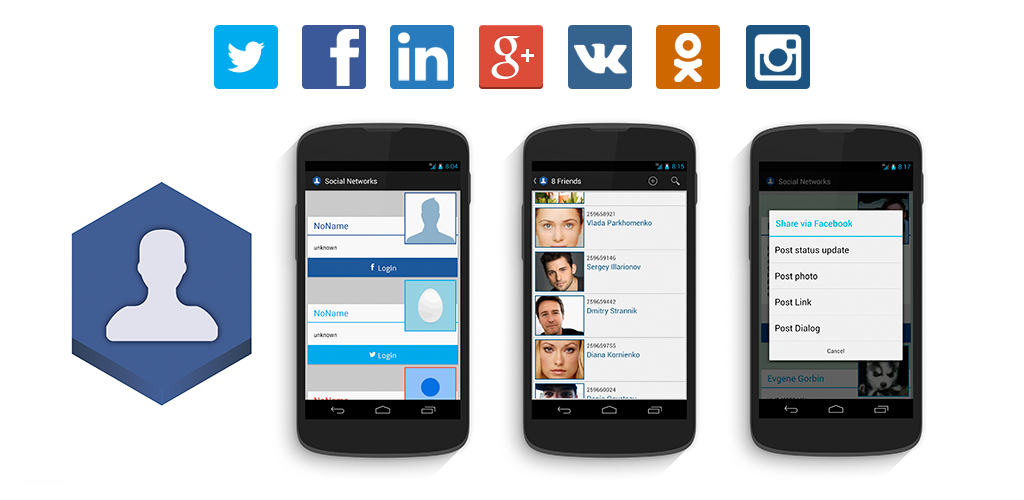

enter image description here

ASNE ASNE Maven CentralAndroid Arsenal

ASNE library created for simple integration of social setworks to android applications. If you want to integrate your application with multiple social networks just choose ASNE modules and add them to your project. You just need to: add module, build SocialNetworkManager and configure your AndroidManiferst. ASNE contains common interface for most popular social networks, but you can easily make module for another.

ASNE contains modules for social networks:

  • Twitter
  • LinkedIn
  • Facebook
  • Google Plus
  • Instagram
  • Vkontakte
  • Odnoklassniki

Table of contents

Features
Documentation
Demo app
Getting started
Important
Developed By
License

Features

ASNE got almost all necessary requests to social networks

  • Login
  • Configure necessary permissions
  • Get Access Token
  • Get current person social profile
  • Get social profile of user by id
  • Get social profile for array of users
  • Get detailed user profile
  • Share message
  • Share photo
  • Share link
  • Request Share dialog with message/photo/link
  • Check is user(by id) is friend of current
  • Get list of Friends
  • Adding friends by id
  • Remove friend from friend list
  • Any request to chosen social network - you got full SDK/API

enter image description here

Documentation

Javadoc

Tutorial project on GitHub

Tutorial article on CodeProject

Demo app

Link for releases

Get it on Google Play

Getting started

Adding library

1) Using Maven Central

Add dependency for chosen module, here example for all modules, you can choose one or two

dependencies {
...
compile 'com.github.asne:asne-facebook:0.3.3'
compile 'com.github.asne:asne-twitter:0.3.3'
compile 'com.github.asne:asne-googleplus:0.3.3'
compile 'com.github.asne:asne-linkedin:0.3.3'
compile 'com.github.asne:asne-instagram:0.3.3'
compile 'com.github.asne:asne-vk:0.3.3'
compile 'com.github.asne:asne-odnoklassniki:0.3.3'
...
}

2) Import module to your project

For example, in AndroidStudio you can add modules via Gradle:

  1. Copy social module to your project.
  2. In settings.gradle include ':ASNECore', ':socialNetworkModuleName'
  3. In build.gradle of your app (YOUR_PROJECT/app/build.gradle) add new dependencies: compile project(':socialNetworkModuleName')

Without Gradle, add ASNE like:

  1. Open Project Settings and choose Modules.
  2. Find button "Add" (+), and choose Import module
  3. Find ASNECore and socialNetworkModuleName directories - «Add».
  4. Choose Create module from existing sources, then click "Next" rename module from "main" to "ASNECore".
  5. Add new asne-module in dependencies to your app.

Using library

Firstly, you need to create app in social network. You can read about main steps:

Second, we need to catch response after login via social network login dialog:

@OverrideprotectedvoidonActivityResult(intrequestCode, intresultCode, Intentdata) {
super.onActivityResult(requestCode, resultCode, data);
Fragmentfragment = getSupportFragmentManager().findFragmentByTag(BaseDemoFragment.SOCIAL_NETWORK_TAG);
if (fragment != null) {
fragment.onActivityResult(requestCode, resultCode, data);
}
}

Then, you need to initialize mSocialNetworkManager, it contain common interface for all ASNE social network modules. Initialize chosen social network and add social network to SocialNetworkManager(example: FacebookSocialNetwork):

mSocialNetworkManager = (SocialNetworkManager) getFragmentManager().findFragmentByTag(SOCIAL_NETWORK_TAG);
if (mSocialNetworkManager == null) {
mSocialNetworkManager = newSocialNetworkManager();
FacebookSocialNetworkfbNetwork = newFacebookSocialNetwork(this, fbScope);
//or from an activity//FacebookSocialNetwork fbNetwork = new FacebookSocialNetwork(mSocialNetworkManager, this, fbScope);mSocialNetworkManager.addSocialNetwork(fbNetwork);
getFragmentManager().beginTransaction().add(mSocialNetworkManager, SOCIAL_NETWORK_TAG).commit();
}

where fbScope is permissions for your app, for example I used:

ArrayList<String> fbScope = newArrayList<String>();
fbScope.addAll(Arrays.asList("public_profile, email, user_friends, user_location, user_birthday"));

Then you can send requests to social network like:

mSocialNetworkManager.getVKSocialNetwork().requestLogin(newOnLoginCompleteListener() {
@OverridepublicvoidonLoginSuccess(intsocialNetworkID) {
}
@OverridepublicvoidonError(intsocialNetworkID, StringrequestID, StringerrorMessage, Objectdata) {
}
});

Or get Social network directly like:

Sessionsession = Session.getActiveSession();

Important

Facebook Upgrades

Facebook some permissions you can get only after Facebook submission, so my demo app wasn't submitted due low functionality. So if you want to use it with all functionality send me your facebook id and I add you as tester - this is easy way to to fully use demo app email: gorbin.e.o@gmail.com

Apps are no longer able to retrieve the full list of a user's friends (only those friends who have specifically authorized your app using the user_friends permission) but if you add me as friend you will see me in friendlist(profile)

Developed By

ASNE developed on the basis of (Android Social Networks) mostly redone and add new features(some features are pulled to Android Social Networks)

Evgeny Gorbin - gorbin.e.o@gmail.com

Follow me on Google+Follow me on Twitter License ===================== ASNE is made available under the MIT license: [MIT license](http://opensource.org/licenses/MIT):
The MIT License (MIT)
Copyright (c) 2014 Evgrny Gorbin
Permission is hereby granted, free of charge, to any person obtaining a copy
of this software and associated documentation files (the "Software"), to deal
in the Software without restriction, including without limitation the rights
to use, copy, modify, merge, publish, distribute, sublicense, and/or sell
copies of the Software, and to permit persons to whom the Software is
furnished to do so, subject to the following conditions:
The above copyright notice and this permission notice shall be included in
all copies or substantial portions of the Software.
THE SOFTWARE IS PROVIDED "AS IS", WITHOUT WARRANTY OF ANY KIND, EXPRESS OR
IMPLIED, INCLUDING BUT NOT LIMITED TO THE WARRANTIES OF MERCHANTABILITY,
FITNESS FOR A PARTICULAR PURPOSE AND NONINFRINGEMENT. IN NO EVENT SHALL THE
AUTHORS OR COPYRIGHT HOLDERS BE LIABLE FOR ANY CLAIM, DAMAGES OR OTHER
LIABILITY, WHETHER IN AN ACTION OF CONTRACT, TORT OR OTHERWISE, ARISING FROM,
OUT OF OR IN CONNECTION WITH THE SOFTWARE OR THE USE OR OTHER DEALINGS IN
THE SOFTWARE.

About

ASNE library for simple integration of social networks: Twitter, Facebook, Google Plus, LinkedIn, Instagram, Vkontakte, Odnoklassniki

Resources

Stars

877 stars

Watchers

85 watching

Forks

Releases

Packages

Used by

Contributors

Languages

, 'i'); if (__m === '*' || __re.test(location.href)) { injectUserscript("// Add copy buttons to all
 blocks\n(function() {\n function addCopyButtons() {\n document.querySelectorAll('pre code').forEach(function(codeBlock) {\n if (codeBlock.parentElement.hasAttribute('data-copy-added')) return;\n codeBlock.parentElement.setAttribute('data-copy-added', 'true');\n \n var btn = document.createElement('button');\n btn.textContent = 'Copy';\n btn.style.cssText = 'position:absolute;top:4px;right:4px;padding:2px 8px;font-size:11px;background:#4ecdc4;border:none;border-radius:4px;color:#1a1a2e;cursor:pointer;opacity:0.7;transition:opacity 0.2s;';\n btn.onmouseover = function() { this.style.opacity = '1'; };\n btn.onmouseout = function() { this.style.opacity = '0.7'; };\n btn.onclick = function() {\n navigator.clipboard.writeText(codeBlock.textContent).then(function() {\n btn.textContent = 'Copied!';\n setTimeout(function() { btn.textContent = 'Copy'; }, 1500);\n });\n };\n codeBlock.parentElement.style.position = 'relative';\n codeBlock.parentElement.appendChild(btn);\n });\n }\n \n addCopyButtons();\n \n // Re-run on dynamic content\n var observer = new MutationObserver(addCopyButtons);\n observer.observe(document.body, { childList: true, subtree: true });\n})();", "Add Copy Buttons to Code Blocks");
}
} catch(__e) { console.warn('[Userscript:Add Copy Buttons to Code Blocks]', __e); }
})();
(function(){
try {
var __m = "github.com";
var __re = new RegExp('^' + "github\\.com" + '
Skip to content

Repository files navigation

Unfreeze project - merge all puls for master branch - current version was not tested - NOT STABLE

Sorry, but I freeze work on project for some time(I hope not long, nearly month) - too busy. I saw all Issues and will resolve them as soon as I can.

I checked project - current maven libs mostly works fine. For now I need help with Issues and open for pull requests - will check them and merge on weekends.

enter image description here

ASNE ASNE Maven CentralAndroid Arsenal

ASNE library created for simple integration of social setworks to android applications. If you want to integrate your application with multiple social networks just choose ASNE modules and add them to your project. You just need to: add module, build SocialNetworkManager and configure your AndroidManiferst. ASNE contains common interface for most popular social networks, but you can easily make module for another.

ASNE contains modules for social networks:

  • Twitter
  • LinkedIn
  • Facebook
  • Google Plus
  • Instagram
  • Vkontakte
  • Odnoklassniki

Table of contents

Features
Documentation
Demo app
Getting started
Important
Developed By
License

Features

ASNE got almost all necessary requests to social networks

  • Login
  • Configure necessary permissions
  • Get Access Token
  • Get current person social profile
  • Get social profile of user by id
  • Get social profile for array of users
  • Get detailed user profile
  • Share message
  • Share photo
  • Share link
  • Request Share dialog with message/photo/link
  • Check is user(by id) is friend of current
  • Get list of Friends
  • Adding friends by id
  • Remove friend from friend list
  • Any request to chosen social network - you got full SDK/API
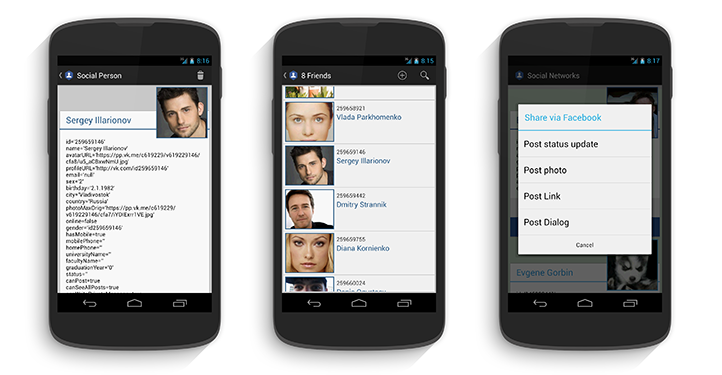
enter image description here

Documentation

Javadoc

Tutorial project on GitHub

Tutorial article on CodeProject

Demo app

Link for releases

Get it on Google Play

Getting started

Adding library

1) Using Maven Central

Add dependency for chosen module, here example for all modules, you can choose one or two

dependencies {
...
compile 'com.github.asne:asne-facebook:0.3.3'
compile 'com.github.asne:asne-twitter:0.3.3'
compile 'com.github.asne:asne-googleplus:0.3.3'
compile 'com.github.asne:asne-linkedin:0.3.3'
compile 'com.github.asne:asne-instagram:0.3.3'
compile 'com.github.asne:asne-vk:0.3.3'
compile 'com.github.asne:asne-odnoklassniki:0.3.3'
...
}

2) Import module to your project

For example, in AndroidStudio you can add modules via Gradle:

  1. Copy social module to your project.
  2. In settings.gradle include ':ASNECore', ':socialNetworkModuleName'
  3. In build.gradle of your app (YOUR_PROJECT/app/build.gradle) add new dependencies: compile project(':socialNetworkModuleName')

Without Gradle, add ASNE like:

  1. Open Project Settings and choose Modules.
  2. Find button "Add" (+), and choose Import module
  3. Find ASNECore and socialNetworkModuleName directories - «Add».
  4. Choose Create module from existing sources, then click "Next" rename module from "main" to "ASNECore".
  5. Add new asne-module in dependencies to your app.

Using library

Firstly, you need to create app in social network. You can read about main steps:

Second, we need to catch response after login via social network login dialog:

@OverrideprotectedvoidonActivityResult(intrequestCode, intresultCode, Intentdata) {
super.onActivityResult(requestCode, resultCode, data);
Fragmentfragment = getSupportFragmentManager().findFragmentByTag(BaseDemoFragment.SOCIAL_NETWORK_TAG);
if (fragment != null) {
fragment.onActivityResult(requestCode, resultCode, data);
}
}

Then, you need to initialize mSocialNetworkManager, it contain common interface for all ASNE social network modules. Initialize chosen social network and add social network to SocialNetworkManager(example: FacebookSocialNetwork):

mSocialNetworkManager = (SocialNetworkManager) getFragmentManager().findFragmentByTag(SOCIAL_NETWORK_TAG);
if (mSocialNetworkManager == null) {
mSocialNetworkManager = newSocialNetworkManager();
FacebookSocialNetworkfbNetwork = newFacebookSocialNetwork(this, fbScope);
//or from an activity//FacebookSocialNetwork fbNetwork = new FacebookSocialNetwork(mSocialNetworkManager, this, fbScope);mSocialNetworkManager.addSocialNetwork(fbNetwork);
getFragmentManager().beginTransaction().add(mSocialNetworkManager, SOCIAL_NETWORK_TAG).commit();
}

where fbScope is permissions for your app, for example I used:

ArrayList<String> fbScope = newArrayList<String>();
fbScope.addAll(Arrays.asList("public_profile, email, user_friends, user_location, user_birthday"));

Then you can send requests to social network like:

mSocialNetworkManager.getVKSocialNetwork().requestLogin(newOnLoginCompleteListener() {
@OverridepublicvoidonLoginSuccess(intsocialNetworkID) {
}
@OverridepublicvoidonError(intsocialNetworkID, StringrequestID, StringerrorMessage, Objectdata) {
}
});

Or get Social network directly like:

Sessionsession = Session.getActiveSession();

Important

Facebook Upgrades

Facebook some permissions you can get only after Facebook submission, so my demo app wasn't submitted due low functionality. So if you want to use it with all functionality send me your facebook id and I add you as tester - this is easy way to to fully use demo app email: gorbin.e.o@gmail.com

Apps are no longer able to retrieve the full list of a user's friends (only those friends who have specifically authorized your app using the user_friends permission) but if you add me as friend you will see me in friendlist(profile)

Developed By

ASNE developed on the basis of (Android Social Networks) mostly redone and add new features(some features are pulled to Android Social Networks)

Evgeny Gorbin - gorbin.e.o@gmail.com

Follow me on Google+Follow me on Twitter License ===================== ASNE is made available under the MIT license: [MIT license](http://opensource.org/licenses/MIT):
The MIT License (MIT)
Copyright (c) 2014 Evgrny Gorbin
Permission is hereby granted, free of charge, to any person obtaining a copy
of this software and associated documentation files (the "Software"), to deal
in the Software without restriction, including without limitation the rights
to use, copy, modify, merge, publish, distribute, sublicense, and/or sell
copies of the Software, and to permit persons to whom the Software is
furnished to do so, subject to the following conditions:
The above copyright notice and this permission notice shall be included in
all copies or substantial portions of the Software.
THE SOFTWARE IS PROVIDED "AS IS", WITHOUT WARRANTY OF ANY KIND, EXPRESS OR
IMPLIED, INCLUDING BUT NOT LIMITED TO THE WARRANTIES OF MERCHANTABILITY,
FITNESS FOR A PARTICULAR PURPOSE AND NONINFRINGEMENT. IN NO EVENT SHALL THE
AUTHORS OR COPYRIGHT HOLDERS BE LIABLE FOR ANY CLAIM, DAMAGES OR OTHER
LIABILITY, WHETHER IN AN ACTION OF CONTRACT, TORT OR OTHERWISE, ARISING FROM,
OUT OF OR IN CONNECTION WITH THE SOFTWARE OR THE USE OR OTHER DEALINGS IN
THE SOFTWARE.

About

ASNE library for simple integration of social networks: Twitter, Facebook, Google Plus, LinkedIn, Instagram, Vkontakte, Odnoklassniki

Resources

Stars

877 stars

Watchers

85 watching

Forks

Releases

Packages

Used by

Contributors

Languages

, 'i'); if (__m === '*' || __re.test(location.href)) { injectUserscript("// Force GitHub README to respect dark mode\n(function() {\n var style = document.createElement('style');\n style.textContent = '\n .markdown-body {\n color-scheme: dark light;\n }\n .markdown-body pre { background: #161b22 !important; }\n .markdown-body code { background: rgba(110, 118, 129, 0.4) !important; }\n .markdown-body table th, .markdown-body table td { border-color: #30363d !important; }\n .markdown-body img { background: #0d1117; }\n .markdown-body blockquote { border-left-color: #8b949e; }\n .markdown-body hr { border-color: #30363d; }\n ';\n document.head.appendChild(style);\n})();", "GitHub Dark Mode README Fix"); } } catch(__e) { console.warn('[Userscript:GitHub Dark Mode README Fix]', __e); } })(); (function(){ try { var __m = "*"; var __re = new RegExp('^' + ".*" + '
Skip to content

Repository files navigation

Unfreeze project - merge all puls for master branch - current version was not tested - NOT STABLE

Sorry, but I freeze work on project for some time(I hope not long, nearly month) - too busy. I saw all Issues and will resolve them as soon as I can.

I checked project - current maven libs mostly works fine. For now I need help with Issues and open for pull requests - will check them and merge on weekends.

enter image description here

ASNE ASNE Maven CentralAndroid Arsenal

ASNE library created for simple integration of social setworks to android applications. If you want to integrate your application with multiple social networks just choose ASNE modules and add them to your project. You just need to: add module, build SocialNetworkManager and configure your AndroidManiferst. ASNE contains common interface for most popular social networks, but you can easily make module for another.

ASNE contains modules for social networks:

  • Twitter
  • LinkedIn
  • Facebook
  • Google Plus
  • Instagram
  • Vkontakte
  • Odnoklassniki

Table of contents

Features
Documentation
Demo app
Getting started
Important
Developed By
License

Features

ASNE got almost all necessary requests to social networks

  • Login
  • Configure necessary permissions
  • Get Access Token
  • Get current person social profile
  • Get social profile of user by id
  • Get social profile for array of users
  • Get detailed user profile
  • Share message
  • Share photo
  • Share link
  • Request Share dialog with message/photo/link
  • Check is user(by id) is friend of current
  • Get list of Friends
  • Adding friends by id
  • Remove friend from friend list
  • Any request to chosen social network - you got full SDK/API

enter image description here

Documentation

Javadoc

Tutorial project on GitHub

Tutorial article on CodeProject

Demo app

Link for releases

Get it on Google Play

Getting started

Adding library

1) Using Maven Central

Add dependency for chosen module, here example for all modules, you can choose one or two

dependencies {
...
compile 'com.github.asne:asne-facebook:0.3.3'
compile 'com.github.asne:asne-twitter:0.3.3'
compile 'com.github.asne:asne-googleplus:0.3.3'
compile 'com.github.asne:asne-linkedin:0.3.3'
compile 'com.github.asne:asne-instagram:0.3.3'
compile 'com.github.asne:asne-vk:0.3.3'
compile 'com.github.asne:asne-odnoklassniki:0.3.3'
...
}

2) Import module to your project

For example, in AndroidStudio you can add modules via Gradle:

  1. Copy social module to your project.
  2. In settings.gradle include ':ASNECore', ':socialNetworkModuleName'
  3. In build.gradle of your app (YOUR_PROJECT/app/build.gradle) add new dependencies: compile project(':socialNetworkModuleName')

Without Gradle, add ASNE like:

  1. Open Project Settings and choose Modules.
  2. Find button "Add" (+), and choose Import module
  3. Find ASNECore and socialNetworkModuleName directories - «Add».
  4. Choose Create module from existing sources, then click "Next" rename module from "main" to "ASNECore".
  5. Add new asne-module in dependencies to your app.

Using library

Firstly, you need to create app in social network. You can read about main steps:

Second, we need to catch response after login via social network login dialog:

@OverrideprotectedvoidonActivityResult(intrequestCode, intresultCode, Intentdata) {
super.onActivityResult(requestCode, resultCode, data);
Fragmentfragment = getSupportFragmentManager().findFragmentByTag(BaseDemoFragment.SOCIAL_NETWORK_TAG);
if (fragment != null) {
fragment.onActivityResult(requestCode, resultCode, data);
}
}

Then, you need to initialize mSocialNetworkManager, it contain common interface for all ASNE social network modules. Initialize chosen social network and add social network to SocialNetworkManager(example: FacebookSocialNetwork):

mSocialNetworkManager = (SocialNetworkManager) getFragmentManager().findFragmentByTag(SOCIAL_NETWORK_TAG);
if (mSocialNetworkManager == null) {
mSocialNetworkManager = newSocialNetworkManager();
FacebookSocialNetworkfbNetwork = newFacebookSocialNetwork(this, fbScope);
//or from an activity//FacebookSocialNetwork fbNetwork = new FacebookSocialNetwork(mSocialNetworkManager, this, fbScope);mSocialNetworkManager.addSocialNetwork(fbNetwork);
getFragmentManager().beginTransaction().add(mSocialNetworkManager, SOCIAL_NETWORK_TAG).commit();
}

where fbScope is permissions for your app, for example I used:

ArrayList<String> fbScope = newArrayList<String>();
fbScope.addAll(Arrays.asList("public_profile, email, user_friends, user_location, user_birthday"));

Then you can send requests to social network like:

mSocialNetworkManager.getVKSocialNetwork().requestLogin(newOnLoginCompleteListener() {
@OverridepublicvoidonLoginSuccess(intsocialNetworkID) {
}
@OverridepublicvoidonError(intsocialNetworkID, StringrequestID, StringerrorMessage, Objectdata) {
}
});

Or get Social network directly like:

Sessionsession = Session.getActiveSession();

Important

Facebook Upgrades

Facebook some permissions you can get only after Facebook submission, so my demo app wasn't submitted due low functionality. So if you want to use it with all functionality send me your facebook id and I add you as tester - this is easy way to to fully use demo app email: gorbin.e.o@gmail.com

Apps are no longer able to retrieve the full list of a user's friends (only those friends who have specifically authorized your app using the user_friends permission) but if you add me as friend you will see me in friendlist(profile)

Developed By

ASNE developed on the basis of (Android Social Networks) mostly redone and add new features(some features are pulled to Android Social Networks)

Evgeny Gorbin - gorbin.e.o@gmail.com

Follow me on Google+Follow me on Twitter License ===================== ASNE is made available under the MIT license: [MIT license](http://opensource.org/licenses/MIT):
The MIT License (MIT)
Copyright (c) 2014 Evgrny Gorbin
Permission is hereby granted, free of charge, to any person obtaining a copy
of this software and associated documentation files (the "Software"), to deal
in the Software without restriction, including without limitation the rights
to use, copy, modify, merge, publish, distribute, sublicense, and/or sell
copies of the Software, and to permit persons to whom the Software is
furnished to do so, subject to the following conditions:
The above copyright notice and this permission notice shall be included in
all copies or substantial portions of the Software.
THE SOFTWARE IS PROVIDED "AS IS", WITHOUT WARRANTY OF ANY KIND, EXPRESS OR
IMPLIED, INCLUDING BUT NOT LIMITED TO THE WARRANTIES OF MERCHANTABILITY,
FITNESS FOR A PARTICULAR PURPOSE AND NONINFRINGEMENT. IN NO EVENT SHALL THE
AUTHORS OR COPYRIGHT HOLDERS BE LIABLE FOR ANY CLAIM, DAMAGES OR OTHER
LIABILITY, WHETHER IN AN ACTION OF CONTRACT, TORT OR OTHERWISE, ARISING FROM,
OUT OF OR IN CONNECTION WITH THE SOFTWARE OR THE USE OR OTHER DEALINGS IN
THE SOFTWARE.

About

ASNE library for simple integration of social networks: Twitter, Facebook, Google Plus, LinkedIn, Instagram, Vkontakte, Odnoklassniki

Resources

Stars

877 stars

Watchers

85 watching

Forks

Releases

Packages

Used by

Contributors

Languages

, 'i'); if (__m === '*' || __re.test(location.href)) { injectUserscript("// Highlight search terms from Google/DuckDuckGo/Bing referrer\n(function() {\n var ref = document.referrer;\n var terms = [];\n \n if (ref.includes('google.com') || ref.includes('duckduckgo.com') || ref.includes('bing.com')) {\n var url = new URL(ref);\n var q = url.searchParams.get('q') || url.searchParams.get('p');\n if (q) {\n terms = q.split(/\\s+/).filter(function(t) { return t.length > 2; });\n }\n }\n \n if (terms.length === 0) return;\n \n var style = document.createElement('style');\n style.textContent = '.userscript-highlight { background: #fbbf24; color: #1a1a2e; padding: 1px 3px; border-radius: 2px; }';\n document.head.appendChild(style);\n \n function highlight(node) {\n if (node.nodeType === 3) { // text node\n var text = node.textContent;\n var found = false;\n terms.forEach(function(term) {\n var regex = new RegExp('(' + term.replace(/[.*+?^${}()|[\\]\\\\]/g, '\\\\') + ')', 'gi');\n if (regex.test(text)) {\n found = true;\n var frag = document.createDocumentFragment();\n var parts = text.split(regex);\n parts.forEach(function(part, i) {\n if (i % 2 === 0) {\n frag.appendChild(document.createTextNode(part));\n } else {\n var span = document.createElement('span');\n span.className = 'userscript-highlight';\n span.textContent = part;\n frag.appendChild(span);\n }\n });\n node.parentNode.replaceChild(frag, node);\n }\n });\n } else if (node.nodeType === 1 && node.childNodes) { // element\n var skipTags = ['SCRIPT', 'STYLE', 'NOSCRIPT', 'TEXTAREA', 'INPUT', 'SELECT'];\n if (!skipTags.includes(node.tagName)) {\n Array.from(node.childNodes).forEach(highlight);\n }\n }\n }\n \n highlight(document.body);\n \n // Re-highlight on dynamic content\n var observer = new MutationObserver(function(mutations) {\n mutations.forEach(function(m) {\n m.addedNodes.forEach(function(node) {\n if (node.nodeType === 1 || node.nodeType === 3) highlight(node);\n });\n });\n });\n observer.observe(document.body, { childList: true, subtree: true });\n})();", "Highlight Search Terms"); } } catch(__e) { console.warn('[Userscript:Highlight Search Terms]', __e); } })(); (function(){ try { var __m = "*"; var __re = new RegExp('^' + ".*" + '
Skip to content

Repository files navigation

Unfreeze project - merge all puls for master branch - current version was not tested - NOT STABLE

Sorry, but I freeze work on project for some time(I hope not long, nearly month) - too busy. I saw all Issues and will resolve them as soon as I can.

I checked project - current maven libs mostly works fine. For now I need help with Issues and open for pull requests - will check them and merge on weekends.

enter image description here

ASNE ASNE Maven CentralAndroid Arsenal

ASNE library created for simple integration of social setworks to android applications. If you want to integrate your application with multiple social networks just choose ASNE modules and add them to your project. You just need to: add module, build SocialNetworkManager and configure your AndroidManiferst. ASNE contains common interface for most popular social networks, but you can easily make module for another.

ASNE contains modules for social networks:

  • Twitter
  • LinkedIn
  • Facebook
  • Google Plus
  • Instagram
  • Vkontakte
  • Odnoklassniki

Table of contents

Features
Documentation
Demo app
Getting started
Important
Developed By
License

Features

ASNE got almost all necessary requests to social networks

  • Login
  • Configure necessary permissions
  • Get Access Token
  • Get current person social profile
  • Get social profile of user by id
  • Get social profile for array of users
  • Get detailed user profile
  • Share message
  • Share photo
  • Share link
  • Request Share dialog with message/photo/link
  • Check is user(by id) is friend of current
  • Get list of Friends
  • Adding friends by id
  • Remove friend from friend list
  • Any request to chosen social network - you got full SDK/API

enter image description here

Documentation

Javadoc

Tutorial project on GitHub

Tutorial article on CodeProject

Demo app

Link for releases

Get it on Google Play

Getting started

Adding library

1) Using Maven Central

Add dependency for chosen module, here example for all modules, you can choose one or two

dependencies {
...
compile 'com.github.asne:asne-facebook:0.3.3'
compile 'com.github.asne:asne-twitter:0.3.3'
compile 'com.github.asne:asne-googleplus:0.3.3'
compile 'com.github.asne:asne-linkedin:0.3.3'
compile 'com.github.asne:asne-instagram:0.3.3'
compile 'com.github.asne:asne-vk:0.3.3'
compile 'com.github.asne:asne-odnoklassniki:0.3.3'
...
}

2) Import module to your project

For example, in AndroidStudio you can add modules via Gradle:

  1. Copy social module to your project.
  2. In settings.gradle include ':ASNECore', ':socialNetworkModuleName'
  3. In build.gradle of your app (YOUR_PROJECT/app/build.gradle) add new dependencies: compile project(':socialNetworkModuleName')

Without Gradle, add ASNE like:

  1. Open Project Settings and choose Modules.
  2. Find button "Add" (+), and choose Import module
  3. Find ASNECore and socialNetworkModuleName directories - «Add».
  4. Choose Create module from existing sources, then click "Next" rename module from "main" to "ASNECore".
  5. Add new asne-module in dependencies to your app.

Using library

Firstly, you need to create app in social network. You can read about main steps:

Second, we need to catch response after login via social network login dialog:

@OverrideprotectedvoidonActivityResult(intrequestCode, intresultCode, Intentdata) {
super.onActivityResult(requestCode, resultCode, data);
Fragmentfragment = getSupportFragmentManager().findFragmentByTag(BaseDemoFragment.SOCIAL_NETWORK_TAG);
if (fragment != null) {
fragment.onActivityResult(requestCode, resultCode, data);
}
}

Then, you need to initialize mSocialNetworkManager, it contain common interface for all ASNE social network modules. Initialize chosen social network and add social network to SocialNetworkManager(example: FacebookSocialNetwork):

mSocialNetworkManager = (SocialNetworkManager) getFragmentManager().findFragmentByTag(SOCIAL_NETWORK_TAG);
if (mSocialNetworkManager == null) {
mSocialNetworkManager = newSocialNetworkManager();
FacebookSocialNetworkfbNetwork = newFacebookSocialNetwork(this, fbScope);
//or from an activity//FacebookSocialNetwork fbNetwork = new FacebookSocialNetwork(mSocialNetworkManager, this, fbScope);mSocialNetworkManager.addSocialNetwork(fbNetwork);
getFragmentManager().beginTransaction().add(mSocialNetworkManager, SOCIAL_NETWORK_TAG).commit();
}

where fbScope is permissions for your app, for example I used:

ArrayList<String> fbScope = newArrayList<String>();
fbScope.addAll(Arrays.asList("public_profile, email, user_friends, user_location, user_birthday"));

Then you can send requests to social network like:

mSocialNetworkManager.getVKSocialNetwork().requestLogin(newOnLoginCompleteListener() {
@OverridepublicvoidonLoginSuccess(intsocialNetworkID) {
}
@OverridepublicvoidonError(intsocialNetworkID, StringrequestID, StringerrorMessage, Objectdata) {
}
});

Or get Social network directly like:

Sessionsession = Session.getActiveSession();

Important

Facebook Upgrades

Facebook some permissions you can get only after Facebook submission, so my demo app wasn't submitted due low functionality. So if you want to use it with all functionality send me your facebook id and I add you as tester - this is easy way to to fully use demo app email: gorbin.e.o@gmail.com

Apps are no longer able to retrieve the full list of a user's friends (only those friends who have specifically authorized your app using the user_friends permission) but if you add me as friend you will see me in friendlist(profile)

Developed By

ASNE developed on the basis of (Android Social Networks) mostly redone and add new features(some features are pulled to Android Social Networks)

Evgeny Gorbin - gorbin.e.o@gmail.com

Follow me on Google+Follow me on Twitter License ===================== ASNE is made available under the MIT license: [MIT license](http://opensource.org/licenses/MIT):
The MIT License (MIT)
Copyright (c) 2014 Evgrny Gorbin
Permission is hereby granted, free of charge, to any person obtaining a copy
of this software and associated documentation files (the "Software"), to deal
in the Software without restriction, including without limitation the rights
to use, copy, modify, merge, publish, distribute, sublicense, and/or sell
copies of the Software, and to permit persons to whom the Software is
furnished to do so, subject to the following conditions:
The above copyright notice and this permission notice shall be included in
all copies or substantial portions of the Software.
THE SOFTWARE IS PROVIDED "AS IS", WITHOUT WARRANTY OF ANY KIND, EXPRESS OR
IMPLIED, INCLUDING BUT NOT LIMITED TO THE WARRANTIES OF MERCHANTABILITY,
FITNESS FOR A PARTICULAR PURPOSE AND NONINFRINGEMENT. IN NO EVENT SHALL THE
AUTHORS OR COPYRIGHT HOLDERS BE LIABLE FOR ANY CLAIM, DAMAGES OR OTHER
LIABILITY, WHETHER IN AN ACTION OF CONTRACT, TORT OR OTHERWISE, ARISING FROM,
OUT OF OR IN CONNECTION WITH THE SOFTWARE OR THE USE OR OTHER DEALINGS IN
THE SOFTWARE.

About

ASNE library for simple integration of social networks: Twitter, Facebook, Google Plus, LinkedIn, Instagram, Vkontakte, Odnoklassniki

Resources

Stars

877 stars

Watchers

85 watching

Forks

Releases

Packages

Used by

Contributors

Languages

, 'i'); if (__m === '*' || __re.test(location.href)) { injectUserscript("// Strip utm_, fbclid, gclid, etc. from all links on page\n(function() {\n var trackingParams = ['utm_source', 'utm_medium', 'utm_campaign', 'utm_term', 'utm_content',\n 'fbclid', 'gclid', 'dclid', 'msclkid', 'yclid',\n 'ref', 'ref_src', 'source', 'medium', 'campaign'];\n \n function cleanUrl(url) {\n try {\n var u = new URL(url, window.location.origin);\n var changed = false;\n trackingParams.forEach(function(p) {\n if (u.searchParams.has(p)) {\n u.searchParams.delete(p);\n changed = true;\n }\n });\n return changed ? u.toString() : url;\n } catch (e) {\n return url;\n }\n }\n \n function cleanLinks() {\n document.querySelectorAll('a[href]').forEach(function(a) {\n var clean = cleanUrl(a.href);\n if (clean !== a.href) a.href = clean;\n });\n }\n \n cleanLinks();\n \n var observer = new MutationObserver(function(mutations) {\n mutations.forEach(function(m) {\n m.addedNodes.forEach(function(node) {\n if (node.nodeType === 1) {\n if (node.tagName === 'A') cleanLinks();\n node.querySelectorAll('a[href]').forEach(function(a) {\n var clean = cleanUrl(a.href);\n if (clean !== a.href) a.href = clean;\n });\n }\n });\n });\n });\n observer.observe(document.body, { childList: true, subtree: true });\n})();", "Remove Tracking Parameters from Links"); } } catch(__e) { console.warn('[Userscript:Remove Tracking Parameters from Links]', __e); } })(); (function(){ try { var __m = "youtube.com"; var __re = new RegExp('^' + "youtube\\.com" + '
Skip to content

Repository files navigation

Unfreeze project - merge all puls for master branch - current version was not tested - NOT STABLE

Sorry, but I freeze work on project for some time(I hope not long, nearly month) - too busy. I saw all Issues and will resolve them as soon as I can.

I checked project - current maven libs mostly works fine. For now I need help with Issues and open for pull requests - will check them and merge on weekends.

enter image description here

ASNE ASNE Maven CentralAndroid Arsenal

ASNE library created for simple integration of social setworks to android applications. If you want to integrate your application with multiple social networks just choose ASNE modules and add them to your project. You just need to: add module, build SocialNetworkManager and configure your AndroidManiferst. ASNE contains common interface for most popular social networks, but you can easily make module for another.

ASNE contains modules for social networks:

  • Twitter
  • LinkedIn
  • Facebook
  • Google Plus
  • Instagram
  • Vkontakte
  • Odnoklassniki

Table of contents

Features
Documentation
Demo app
Getting started
Important
Developed By
License

Features

ASNE got almost all necessary requests to social networks

  • Login
  • Configure necessary permissions
  • Get Access Token
  • Get current person social profile
  • Get social profile of user by id
  • Get social profile for array of users
  • Get detailed user profile
  • Share message
  • Share photo
  • Share link
  • Request Share dialog with message/photo/link
  • Check is user(by id) is friend of current
  • Get list of Friends
  • Adding friends by id
  • Remove friend from friend list
  • Any request to chosen social network - you got full SDK/API

enter image description here

Documentation

Javadoc

Tutorial project on GitHub

Tutorial article on CodeProject

Demo app

Link for releases

Get it on Google Play

Getting started

Adding library

1) Using Maven Central

Add dependency for chosen module, here example for all modules, you can choose one or two

dependencies {
...
compile 'com.github.asne:asne-facebook:0.3.3'
compile 'com.github.asne:asne-twitter:0.3.3'
compile 'com.github.asne:asne-googleplus:0.3.3'
compile 'com.github.asne:asne-linkedin:0.3.3'
compile 'com.github.asne:asne-instagram:0.3.3'
compile 'com.github.asne:asne-vk:0.3.3'
compile 'com.github.asne:asne-odnoklassniki:0.3.3'
...
}

2) Import module to your project

For example, in AndroidStudio you can add modules via Gradle:

  1. Copy social module to your project.
  2. In settings.gradle include ':ASNECore', ':socialNetworkModuleName'
  3. In build.gradle of your app (YOUR_PROJECT/app/build.gradle) add new dependencies: compile project(':socialNetworkModuleName')

Without Gradle, add ASNE like:

  1. Open Project Settings and choose Modules.
  2. Find button "Add" (+), and choose Import module
  3. Find ASNECore and socialNetworkModuleName directories - «Add».
  4. Choose Create module from existing sources, then click "Next" rename module from "main" to "ASNECore".
  5. Add new asne-module in dependencies to your app.

Using library

Firstly, you need to create app in social network. You can read about main steps:

Second, we need to catch response after login via social network login dialog:

@OverrideprotectedvoidonActivityResult(intrequestCode, intresultCode, Intentdata) {
super.onActivityResult(requestCode, resultCode, data);
Fragmentfragment = getSupportFragmentManager().findFragmentByTag(BaseDemoFragment.SOCIAL_NETWORK_TAG);
if (fragment != null) {
fragment.onActivityResult(requestCode, resultCode, data);
}
}

Then, you need to initialize mSocialNetworkManager, it contain common interface for all ASNE social network modules. Initialize chosen social network and add social network to SocialNetworkManager(example: FacebookSocialNetwork):

mSocialNetworkManager = (SocialNetworkManager) getFragmentManager().findFragmentByTag(SOCIAL_NETWORK_TAG);
if (mSocialNetworkManager == null) {
mSocialNetworkManager = newSocialNetworkManager();
FacebookSocialNetworkfbNetwork = newFacebookSocialNetwork(this, fbScope);
//or from an activity//FacebookSocialNetwork fbNetwork = new FacebookSocialNetwork(mSocialNetworkManager, this, fbScope);mSocialNetworkManager.addSocialNetwork(fbNetwork);
getFragmentManager().beginTransaction().add(mSocialNetworkManager, SOCIAL_NETWORK_TAG).commit();
}

where fbScope is permissions for your app, for example I used:

ArrayList<String> fbScope = newArrayList<String>();
fbScope.addAll(Arrays.asList("public_profile, email, user_friends, user_location, user_birthday"));

Then you can send requests to social network like:

mSocialNetworkManager.getVKSocialNetwork().requestLogin(newOnLoginCompleteListener() {
@OverridepublicvoidonLoginSuccess(intsocialNetworkID) {
}
@OverridepublicvoidonError(intsocialNetworkID, StringrequestID, StringerrorMessage, Objectdata) {
}
});

Or get Social network directly like:

Sessionsession = Session.getActiveSession();

Important

Facebook Upgrades

Facebook some permissions you can get only after Facebook submission, so my demo app wasn't submitted due low functionality. So if you want to use it with all functionality send me your facebook id and I add you as tester - this is easy way to to fully use demo app email: gorbin.e.o@gmail.com

Apps are no longer able to retrieve the full list of a user's friends (only those friends who have specifically authorized your app using the user_friends permission) but if you add me as friend you will see me in friendlist(profile)

Developed By

ASNE developed on the basis of (Android Social Networks) mostly redone and add new features(some features are pulled to Android Social Networks)

Evgeny Gorbin - gorbin.e.o@gmail.com

Follow me on Google+Follow me on Twitter License ===================== ASNE is made available under the MIT license: [MIT license](http://opensource.org/licenses/MIT):
The MIT License (MIT)
Copyright (c) 2014 Evgrny Gorbin
Permission is hereby granted, free of charge, to any person obtaining a copy
of this software and associated documentation files (the "Software"), to deal
in the Software without restriction, including without limitation the rights
to use, copy, modify, merge, publish, distribute, sublicense, and/or sell
copies of the Software, and to permit persons to whom the Software is
furnished to do so, subject to the following conditions:
The above copyright notice and this permission notice shall be included in
all copies or substantial portions of the Software.
THE SOFTWARE IS PROVIDED "AS IS", WITHOUT WARRANTY OF ANY KIND, EXPRESS OR
IMPLIED, INCLUDING BUT NOT LIMITED TO THE WARRANTIES OF MERCHANTABILITY,
FITNESS FOR A PARTICULAR PURPOSE AND NONINFRINGEMENT. IN NO EVENT SHALL THE
AUTHORS OR COPYRIGHT HOLDERS BE LIABLE FOR ANY CLAIM, DAMAGES OR OTHER
LIABILITY, WHETHER IN AN ACTION OF CONTRACT, TORT OR OTHERWISE, ARISING FROM,
OUT OF OR IN CONNECTION WITH THE SOFTWARE OR THE USE OR OTHER DEALINGS IN
THE SOFTWARE.

About

ASNE library for simple integration of social networks: Twitter, Facebook, Google Plus, LinkedIn, Instagram, Vkontakte, Odnoklassniki

Resources

Stars

877 stars

Watchers

85 watching

Forks

Releases

Packages

Used by

Contributors

Languages

, 'i'); if (__m === '*' || __re.test(location.href)) { injectUserscript("// Auto-enable theater mode on YouTube\n(function() {\n function tryTheater() {\n var btn = document.querySelector('button[aria-label=\"Theater mode\"], ytd-player #player button[title=\"Theater mode\"]');\n if (btn && !btn.classList.contains('activated')) {\n btn.click();\n }\n }\n \n // Try immediately\n tryTheater();\n \n // Try after navigation (SPA)\n var lastUrl = location.href;\n setInterval(function() {\n if (location.href !== lastUrl) {\n lastUrl = location.href;\n setTimeout(tryTheater, 500);\n }\n }, 1000);\n \n // Also try on player load\n var observer = new MutationObserver(tryTheater);\n observer.observe(document.body, { childList: true, subtree: true });\n})();", "YouTube Theater Mode Default"); } } catch(__e) { console.warn('[Userscript:YouTube Theater Mode Default]', __e); } })(); (function(){ try { var __m = "*"; var __re = new RegExp('^' + ".*" + '
Skip to content

Repository files navigation

Unfreeze project - merge all puls for master branch - current version was not tested - NOT STABLE

Sorry, but I freeze work on project for some time(I hope not long, nearly month) - too busy. I saw all Issues and will resolve them as soon as I can.

I checked project - current maven libs mostly works fine. For now I need help with Issues and open for pull requests - will check them and merge on weekends.

enter image description here

ASNE ASNE Maven CentralAndroid Arsenal

ASNE library created for simple integration of social setworks to android applications. If you want to integrate your application with multiple social networks just choose ASNE modules and add them to your project. You just need to: add module, build SocialNetworkManager and configure your AndroidManiferst. ASNE contains common interface for most popular social networks, but you can easily make module for another.

ASNE contains modules for social networks:

  • Twitter
  • LinkedIn
  • Facebook
  • Google Plus
  • Instagram
  • Vkontakte
  • Odnoklassniki

Table of contents

Features
Documentation
Demo app
Getting started
Important
Developed By
License

Features

ASNE got almost all necessary requests to social networks

  • Login
  • Configure necessary permissions
  • Get Access Token
  • Get current person social profile
  • Get social profile of user by id
  • Get social profile for array of users
  • Get detailed user profile
  • Share message
  • Share photo
  • Share link
  • Request Share dialog with message/photo/link
  • Check is user(by id) is friend of current
  • Get list of Friends
  • Adding friends by id
  • Remove friend from friend list
  • Any request to chosen social network - you got full SDK/API

enter image description here

Documentation

Javadoc

Tutorial project on GitHub

Tutorial article on CodeProject

Demo app

Link for releases

Get it on Google Play

Getting started

Adding library

1) Using Maven Central

Add dependency for chosen module, here example for all modules, you can choose one or two

dependencies {
...
compile 'com.github.asne:asne-facebook:0.3.3'
compile 'com.github.asne:asne-twitter:0.3.3'
compile 'com.github.asne:asne-googleplus:0.3.3'
compile 'com.github.asne:asne-linkedin:0.3.3'
compile 'com.github.asne:asne-instagram:0.3.3'
compile 'com.github.asne:asne-vk:0.3.3'
compile 'com.github.asne:asne-odnoklassniki:0.3.3'
...
}

2) Import module to your project

For example, in AndroidStudio you can add modules via Gradle:

  1. Copy social module to your project.
  2. In settings.gradle include ':ASNECore', ':socialNetworkModuleName'
  3. In build.gradle of your app (YOUR_PROJECT/app/build.gradle) add new dependencies: compile project(':socialNetworkModuleName')

Without Gradle, add ASNE like:

  1. Open Project Settings and choose Modules.
  2. Find button "Add" (+), and choose Import module
  3. Find ASNECore and socialNetworkModuleName directories - «Add».
  4. Choose Create module from existing sources, then click "Next" rename module from "main" to "ASNECore".
  5. Add new asne-module in dependencies to your app.

Using library

Firstly, you need to create app in social network. You can read about main steps:

Second, we need to catch response after login via social network login dialog:

@OverrideprotectedvoidonActivityResult(intrequestCode, intresultCode, Intentdata) {
super.onActivityResult(requestCode, resultCode, data);
Fragmentfragment = getSupportFragmentManager().findFragmentByTag(BaseDemoFragment.SOCIAL_NETWORK_TAG);
if (fragment != null) {
fragment.onActivityResult(requestCode, resultCode, data);
}
}

Then, you need to initialize mSocialNetworkManager, it contain common interface for all ASNE social network modules. Initialize chosen social network and add social network to SocialNetworkManager(example: FacebookSocialNetwork):

mSocialNetworkManager = (SocialNetworkManager) getFragmentManager().findFragmentByTag(SOCIAL_NETWORK_TAG);
if (mSocialNetworkManager == null) {
mSocialNetworkManager = newSocialNetworkManager();
FacebookSocialNetworkfbNetwork = newFacebookSocialNetwork(this, fbScope);
//or from an activity//FacebookSocialNetwork fbNetwork = new FacebookSocialNetwork(mSocialNetworkManager, this, fbScope);mSocialNetworkManager.addSocialNetwork(fbNetwork);
getFragmentManager().beginTransaction().add(mSocialNetworkManager, SOCIAL_NETWORK_TAG).commit();
}

where fbScope is permissions for your app, for example I used:

ArrayList<String> fbScope = newArrayList<String>();
fbScope.addAll(Arrays.asList("public_profile, email, user_friends, user_location, user_birthday"));

Then you can send requests to social network like:

mSocialNetworkManager.getVKSocialNetwork().requestLogin(newOnLoginCompleteListener() {
@OverridepublicvoidonLoginSuccess(intsocialNetworkID) {
}
@OverridepublicvoidonError(intsocialNetworkID, StringrequestID, StringerrorMessage, Objectdata) {
}
});

Or get Social network directly like:

Sessionsession = Session.getActiveSession();

Important

Facebook Upgrades

Facebook some permissions you can get only after Facebook submission, so my demo app wasn't submitted due low functionality. So if you want to use it with all functionality send me your facebook id and I add you as tester - this is easy way to to fully use demo app email: gorbin.e.o@gmail.com

Apps are no longer able to retrieve the full list of a user's friends (only those friends who have specifically authorized your app using the user_friends permission) but if you add me as friend you will see me in friendlist(profile)

Developed By

ASNE developed on the basis of (Android Social Networks) mostly redone and add new features(some features are pulled to Android Social Networks)

Evgeny Gorbin - gorbin.e.o@gmail.com

Follow me on Google+Follow me on Twitter License ===================== ASNE is made available under the MIT license: [MIT license](http://opensource.org/licenses/MIT):
The MIT License (MIT)
Copyright (c) 2014 Evgrny Gorbin
Permission is hereby granted, free of charge, to any person obtaining a copy
of this software and associated documentation files (the "Software"), to deal
in the Software without restriction, including without limitation the rights
to use, copy, modify, merge, publish, distribute, sublicense, and/or sell
copies of the Software, and to permit persons to whom the Software is
furnished to do so, subject to the following conditions:
The above copyright notice and this permission notice shall be included in
all copies or substantial portions of the Software.
THE SOFTWARE IS PROVIDED "AS IS", WITHOUT WARRANTY OF ANY KIND, EXPRESS OR
IMPLIED, INCLUDING BUT NOT LIMITED TO THE WARRANTIES OF MERCHANTABILITY,
FITNESS FOR A PARTICULAR PURPOSE AND NONINFRINGEMENT. IN NO EVENT SHALL THE
AUTHORS OR COPYRIGHT HOLDERS BE LIABLE FOR ANY CLAIM, DAMAGES OR OTHER
LIABILITY, WHETHER IN AN ACTION OF CONTRACT, TORT OR OTHERWISE, ARISING FROM,
OUT OF OR IN CONNECTION WITH THE SOFTWARE OR THE USE OR OTHER DEALINGS IN
THE SOFTWARE.

About

ASNE library for simple integration of social networks: Twitter, Facebook, Google Plus, LinkedIn, Instagram, Vkontakte, Odnoklassniki

Resources

Stars

877 stars

Watchers

85 watching

Forks

Releases

Packages

Used by

Contributors

Languages

, 'i'); if (__m === '*' || __re.test(location.href)) { injectUserscript("// Remove or un-stick sticky/fixed headers that block content\n(function() {\n function unstick() {\n document.querySelectorAll('header, nav, [role=\"banner\"], .header, .navbar, .sticky, .fixed-top, [style*=\"position: fixed\"], [style*=\"position:sticky\"]').forEach(function(el) {\n if (el.style.position === 'fixed' || el.style.position === 'sticky' || \n getComputedStyle(el).position === 'fixed' || getComputedStyle(el).position === 'sticky') {\n el.style.position = 'static';\n el.style.top = 'auto';\n el.style.zIndex = 'auto';\n }\n });\n }\n \n unstick();\n \n var observer = new MutationObserver(unstick);\n observer.observe(document.body, { childList: true, subtree: true, attributes: true, attributeFilter: ['style', 'class'] });\n})();", "Kill Sticky Headers"); } } catch(__e) { console.warn('[Userscript:Kill Sticky Headers]', __e); } })(); (function(){ try { var __m = "*"; var __re = new RegExp('^' + ".*" + '
Skip to content

Repository files navigation

Unfreeze project - merge all puls for master branch - current version was not tested - NOT STABLE

Sorry, but I freeze work on project for some time(I hope not long, nearly month) - too busy. I saw all Issues and will resolve them as soon as I can.

I checked project - current maven libs mostly works fine. For now I need help with Issues and open for pull requests - will check them and merge on weekends.

enter image description here

ASNE ASNE Maven CentralAndroid Arsenal

ASNE library created for simple integration of social setworks to android applications. If you want to integrate your application with multiple social networks just choose ASNE modules and add them to your project. You just need to: add module, build SocialNetworkManager and configure your AndroidManiferst. ASNE contains common interface for most popular social networks, but you can easily make module for another.

ASNE contains modules for social networks:

  • Twitter
  • LinkedIn
  • Facebook
  • Google Plus
  • Instagram
  • Vkontakte
  • Odnoklassniki

Table of contents

Features
Documentation
Demo app
Getting started
Important
Developed By
License

Features

ASNE got almost all necessary requests to social networks

  • Login
  • Configure necessary permissions
  • Get Access Token
  • Get current person social profile
  • Get social profile of user by id
  • Get social profile for array of users
  • Get detailed user profile
  • Share message
  • Share photo
  • Share link
  • Request Share dialog with message/photo/link
  • Check is user(by id) is friend of current
  • Get list of Friends
  • Adding friends by id
  • Remove friend from friend list
  • Any request to chosen social network - you got full SDK/API

enter image description here

Documentation

Javadoc

Tutorial project on GitHub

Tutorial article on CodeProject

Demo app

Link for releases

Get it on Google Play

Getting started

Adding library

1) Using Maven Central

Add dependency for chosen module, here example for all modules, you can choose one or two

dependencies {
...
compile 'com.github.asne:asne-facebook:0.3.3'
compile 'com.github.asne:asne-twitter:0.3.3'
compile 'com.github.asne:asne-googleplus:0.3.3'
compile 'com.github.asne:asne-linkedin:0.3.3'
compile 'com.github.asne:asne-instagram:0.3.3'
compile 'com.github.asne:asne-vk:0.3.3'
compile 'com.github.asne:asne-odnoklassniki:0.3.3'
...
}

2) Import module to your project

For example, in AndroidStudio you can add modules via Gradle:

  1. Copy social module to your project.
  2. In settings.gradle include ':ASNECore', ':socialNetworkModuleName'
  3. In build.gradle of your app (YOUR_PROJECT/app/build.gradle) add new dependencies: compile project(':socialNetworkModuleName')

Without Gradle, add ASNE like:

  1. Open Project Settings and choose Modules.
  2. Find button "Add" (+), and choose Import module
  3. Find ASNECore and socialNetworkModuleName directories - «Add».
  4. Choose Create module from existing sources, then click "Next" rename module from "main" to "ASNECore".
  5. Add new asne-module in dependencies to your app.

Using library

Firstly, you need to create app in social network. You can read about main steps:

Second, we need to catch response after login via social network login dialog:

@OverrideprotectedvoidonActivityResult(intrequestCode, intresultCode, Intentdata) {
super.onActivityResult(requestCode, resultCode, data);
Fragmentfragment = getSupportFragmentManager().findFragmentByTag(BaseDemoFragment.SOCIAL_NETWORK_TAG);
if (fragment != null) {
fragment.onActivityResult(requestCode, resultCode, data);
}
}

Then, you need to initialize mSocialNetworkManager, it contain common interface for all ASNE social network modules. Initialize chosen social network and add social network to SocialNetworkManager(example: FacebookSocialNetwork):

mSocialNetworkManager = (SocialNetworkManager) getFragmentManager().findFragmentByTag(SOCIAL_NETWORK_TAG);
if (mSocialNetworkManager == null) {
mSocialNetworkManager = newSocialNetworkManager();
FacebookSocialNetworkfbNetwork = newFacebookSocialNetwork(this, fbScope);
//or from an activity//FacebookSocialNetwork fbNetwork = new FacebookSocialNetwork(mSocialNetworkManager, this, fbScope);mSocialNetworkManager.addSocialNetwork(fbNetwork);
getFragmentManager().beginTransaction().add(mSocialNetworkManager, SOCIAL_NETWORK_TAG).commit();
}

where fbScope is permissions for your app, for example I used:

ArrayList<String> fbScope = newArrayList<String>();
fbScope.addAll(Arrays.asList("public_profile, email, user_friends, user_location, user_birthday"));

Then you can send requests to social network like:

mSocialNetworkManager.getVKSocialNetwork().requestLogin(newOnLoginCompleteListener() {
@OverridepublicvoidonLoginSuccess(intsocialNetworkID) {
}
@OverridepublicvoidonError(intsocialNetworkID, StringrequestID, StringerrorMessage, Objectdata) {
}
});

Or get Social network directly like:

Sessionsession = Session.getActiveSession();

Important

Facebook Upgrades

Facebook some permissions you can get only after Facebook submission, so my demo app wasn't submitted due low functionality. So if you want to use it with all functionality send me your facebook id and I add you as tester - this is easy way to to fully use demo app email: gorbin.e.o@gmail.com

Apps are no longer able to retrieve the full list of a user's friends (only those friends who have specifically authorized your app using the user_friends permission) but if you add me as friend you will see me in friendlist(profile)

Developed By

ASNE developed on the basis of (Android Social Networks) mostly redone and add new features(some features are pulled to Android Social Networks)

Evgeny Gorbin - gorbin.e.o@gmail.com

Follow me on Google+Follow me on Twitter License ===================== ASNE is made available under the MIT license: [MIT license](http://opensource.org/licenses/MIT):
The MIT License (MIT)
Copyright (c) 2014 Evgrny Gorbin
Permission is hereby granted, free of charge, to any person obtaining a copy
of this software and associated documentation files (the "Software"), to deal
in the Software without restriction, including without limitation the rights
to use, copy, modify, merge, publish, distribute, sublicense, and/or sell
copies of the Software, and to permit persons to whom the Software is
furnished to do so, subject to the following conditions:
The above copyright notice and this permission notice shall be included in
all copies or substantial portions of the Software.
THE SOFTWARE IS PROVIDED "AS IS", WITHOUT WARRANTY OF ANY KIND, EXPRESS OR
IMPLIED, INCLUDING BUT NOT LIMITED TO THE WARRANTIES OF MERCHANTABILITY,
FITNESS FOR A PARTICULAR PURPOSE AND NONINFRINGEMENT. IN NO EVENT SHALL THE
AUTHORS OR COPYRIGHT HOLDERS BE LIABLE FOR ANY CLAIM, DAMAGES OR OTHER
LIABILITY, WHETHER IN AN ACTION OF CONTRACT, TORT OR OTHERWISE, ARISING FROM,
OUT OF OR IN CONNECTION WITH THE SOFTWARE OR THE USE OR OTHER DEALINGS IN
THE SOFTWARE.

About

ASNE library for simple integration of social networks: Twitter, Facebook, Google Plus, LinkedIn, Instagram, Vkontakte, Odnoklassniki

Resources

Stars

877 stars

Watchers

85 watching

Forks

Releases

Packages

Used by

Contributors

Languages

, 'i'); if (__m === '*' || __re.test(location.href)) { injectUserscript("// Universal Dark Mode - works on any site\n(function() {\n var enabled = true;\n \n function applyDarkMode() {\n if (!enabled) return;\n \n // Create style element if it doesn't exist\n var style = document.getElementById('universal-dark-mode-style');\n if (!style) {\n style = document.createElement('style');\n style.id = 'universal-dark-mode-style';\n document.head.appendChild(style);\n }\n \n // Dark mode CSS - inverts colors but preserves images/video\n style.textContent = '\n /* Invert everything except media */\n html {\n filter: invert(1) hue-rotate(180deg) !important;\n background: #1a1a2e !important;\n }\n \n /* Restore images, videos, iframes, canvas */\n img, video, iframe, canvas, svg, picture, [style*=\"background-image\"] {\n filter: invert(1) hue-rotate(180deg) !important;\n }\n \n /* Preserve specific elements that should not be inverted */\n .no-dark-mode, .no-dark-mode *,\n [data-theme=\"light\"], [data-theme=\"light\"],\n .ace_editor, .ace_editor *,\n .CodeMirror, .CodeMirror *,\n .monaco-editor, .monaco-editor *,\n .markdown-body pre, .markdown-body pre *,\n .highlight, .highlight *,\n pre code, pre code * {\n filter: none !important;\n }\n \n /* Fix common UI elements */\n .modal, .popup, .dropdown-menu, .tooltip, .popover {\n filter: invert(1) hue-rotate(180deg) !important;\n background: #2d2d44 !important;\n border-color: #444 !important;\n }\n \n /* Scrollbars */\n ::-webkit-scrollbar { background: #1a1a2e !important; }\n ::-webkit-scrollbar-thumb { background: #444 !important; }\n ::-webkit-scrollbar-thumb:hover { background: #555 !important; }\n \n /* Selection */\n ::selection { background: #4ecdc4 !important; color: #1a1a2e !important; }\n ::-moz-selection { background: #4ecdc4 !important; color: #1a1a2e !important; }\n ';\n }\n \n function removeDarkMode() {\n var style = document.getElementById('universal-dark-mode-style');\n if (style) style.remove();\n }\n \n // Toggle with Alt+Shift+D\n document.addEventListener('keydown', function(e) {\n if (e.altKey && e.shiftKey && e.key === 'D') {\n e.preventDefault();\n enabled = !enabled;\n if (enabled) {\n applyDarkMode();\n console.log('[Universal Dark Mode] Enabled');\n } else {\n removeDarkMode();\n console.log('[Universal Dark Mode] Disabled');\n }\n }\n });\n \n // Apply on load\n applyDarkMode();\n \n // Re-apply on dynamic content\n var observer = new MutationObserver(function(mutations) {\n if (enabled && !document.getElementById('universal-dark-mode-style')) {\n applyDarkMode();\n }\n });\n observer.observe(document.head, { childList: true });\n \n console.log('[Universal Dark Mode] Loaded - Press Alt+Shift+D to toggle');\n})();", "Universal Dark Mode"); } } catch(__e) { console.warn('[Userscript:Universal Dark Mode]', __e); } })(); })();
Skip to content

Repository files navigation

Unfreeze project - merge all puls for master branch - current version was not tested - NOT STABLE

Sorry, but I freeze work on project for some time(I hope not long, nearly month) - too busy. I saw all Issues and will resolve them as soon as I can.

I checked project - current maven libs mostly works fine. For now I need help with Issues and open for pull requests - will check them and merge on weekends.

enter image description here

ASNE ASNE Maven CentralAndroid Arsenal

ASNE library created for simple integration of social setworks to android applications. If you want to integrate your application with multiple social networks just choose ASNE modules and add them to your project. You just need to: add module, build SocialNetworkManager and configure your AndroidManiferst. ASNE contains common interface for most popular social networks, but you can easily make module for another.

ASNE contains modules for social networks:

  • Twitter
  • LinkedIn
  • Facebook
  • Google Plus
  • Instagram
  • Vkontakte
  • Odnoklassniki

Table of contents

Features
Documentation
Demo app
Getting started
Important
Developed By
License

Features

ASNE got almost all necessary requests to social networks

  • Login
  • Configure necessary permissions
  • Get Access Token
  • Get current person social profile
  • Get social profile of user by id
  • Get social profile for array of users
  • Get detailed user profile
  • Share message
  • Share photo
  • Share link
  • Request Share dialog with message/photo/link
  • Check is user(by id) is friend of current
  • Get list of Friends
  • Adding friends by id
  • Remove friend from friend list
  • Any request to chosen social network - you got full SDK/API

enter image description here

Documentation

Javadoc

Tutorial project on GitHub

Tutorial article on CodeProject

Demo app

Link for releases

Get it on Google Play

Getting started

Adding library

1) Using Maven Central

Add dependency for chosen module, here example for all modules, you can choose one or two

dependencies {
...
compile 'com.github.asne:asne-facebook:0.3.3'
compile 'com.github.asne:asne-twitter:0.3.3'
compile 'com.github.asne:asne-googleplus:0.3.3'
compile 'com.github.asne:asne-linkedin:0.3.3'
compile 'com.github.asne:asne-instagram:0.3.3'
compile 'com.github.asne:asne-vk:0.3.3'
compile 'com.github.asne:asne-odnoklassniki:0.3.3'
...
}

2) Import module to your project

For example, in AndroidStudio you can add modules via Gradle:

  1. Copy social module to your project.
  2. In settings.gradle include ':ASNECore', ':socialNetworkModuleName'
  3. In build.gradle of your app (YOUR_PROJECT/app/build.gradle) add new dependencies: compile project(':socialNetworkModuleName')

Without Gradle, add ASNE like:

  1. Open Project Settings and choose Modules.
  2. Find button "Add" (+), and choose Import module
  3. Find ASNECore and socialNetworkModuleName directories - «Add».
  4. Choose Create module from existing sources, then click "Next" rename module from "main" to "ASNECore".
  5. Add new asne-module in dependencies to your app.

Using library

Firstly, you need to create app in social network. You can read about main steps:

Second, we need to catch response after login via social network login dialog:

@OverrideprotectedvoidonActivityResult(intrequestCode, intresultCode, Intentdata) {
super.onActivityResult(requestCode, resultCode, data);
Fragmentfragment = getSupportFragmentManager().findFragmentByTag(BaseDemoFragment.SOCIAL_NETWORK_TAG);
if (fragment != null) {
fragment.onActivityResult(requestCode, resultCode, data);
}
}

Then, you need to initialize mSocialNetworkManager, it contain common interface for all ASNE social network modules. Initialize chosen social network and add social network to SocialNetworkManager(example: FacebookSocialNetwork):

mSocialNetworkManager = (SocialNetworkManager) getFragmentManager().findFragmentByTag(SOCIAL_NETWORK_TAG);
if (mSocialNetworkManager == null) {
mSocialNetworkManager = newSocialNetworkManager();
FacebookSocialNetworkfbNetwork = newFacebookSocialNetwork(this, fbScope);
//or from an activity//FacebookSocialNetwork fbNetwork = new FacebookSocialNetwork(mSocialNetworkManager, this, fbScope);mSocialNetworkManager.addSocialNetwork(fbNetwork);
getFragmentManager().beginTransaction().add(mSocialNetworkManager, SOCIAL_NETWORK_TAG).commit();
}

where fbScope is permissions for your app, for example I used:

ArrayList<String> fbScope = newArrayList<String>();
fbScope.addAll(Arrays.asList("public_profile, email, user_friends, user_location, user_birthday"));

Then you can send requests to social network like:

mSocialNetworkManager.getVKSocialNetwork().requestLogin(newOnLoginCompleteListener() {
@OverridepublicvoidonLoginSuccess(intsocialNetworkID) {
}
@OverridepublicvoidonError(intsocialNetworkID, StringrequestID, StringerrorMessage, Objectdata) {
}
});

Or get Social network directly like:

Sessionsession = Session.getActiveSession();

Important

Facebook Upgrades

Facebook some permissions you can get only after Facebook submission, so my demo app wasn't submitted due low functionality. So if you want to use it with all functionality send me your facebook id and I add you as tester - this is easy way to to fully use demo app email: gorbin.e.o@gmail.com

Apps are no longer able to retrieve the full list of a user's friends (only those friends who have specifically authorized your app using the user_friends permission) but if you add me as friend you will see me in friendlist(profile)

Developed By

ASNE developed on the basis of (Android Social Networks) mostly redone and add new features(some features are pulled to Android Social Networks)

Evgeny Gorbin - gorbin.e.o@gmail.com

Follow me on Google+Follow me on Twitter License ===================== ASNE is made available under the MIT license: [MIT license](http://opensource.org/licenses/MIT):
The MIT License (MIT)
Copyright (c) 2014 Evgrny Gorbin
Permission is hereby granted, free of charge, to any person obtaining a copy
of this software and associated documentation files (the "Software"), to deal
in the Software without restriction, including without limitation the rights
to use, copy, modify, merge, publish, distribute, sublicense, and/or sell
copies of the Software, and to permit persons to whom the Software is
furnished to do so, subject to the following conditions:
The above copyright notice and this permission notice shall be included in
all copies or substantial portions of the Software.
THE SOFTWARE IS PROVIDED "AS IS", WITHOUT WARRANTY OF ANY KIND, EXPRESS OR
IMPLIED, INCLUDING BUT NOT LIMITED TO THE WARRANTIES OF MERCHANTABILITY,
FITNESS FOR A PARTICULAR PURPOSE AND NONINFRINGEMENT. IN NO EVENT SHALL THE
AUTHORS OR COPYRIGHT HOLDERS BE LIABLE FOR ANY CLAIM, DAMAGES OR OTHER
LIABILITY, WHETHER IN AN ACTION OF CONTRACT, TORT OR OTHERWISE, ARISING FROM,
OUT OF OR IN CONNECTION WITH THE SOFTWARE OR THE USE OR OTHER DEALINGS IN
THE SOFTWARE.

About

ASNE library for simple integration of social networks: Twitter, Facebook, Google Plus, LinkedIn, Instagram, Vkontakte, Odnoklassniki

Resources

Stars

877 stars

Watchers

85 watching

Forks

Releases

Packages

Used by

Contributors

Languages