Repository files navigation

GraphHopper Maps

A route planner user interface for the GraphHopper routing engine released under the Apache License 2.0.

Try it out!

We have developed an intuitive and simple user interface to find routes:
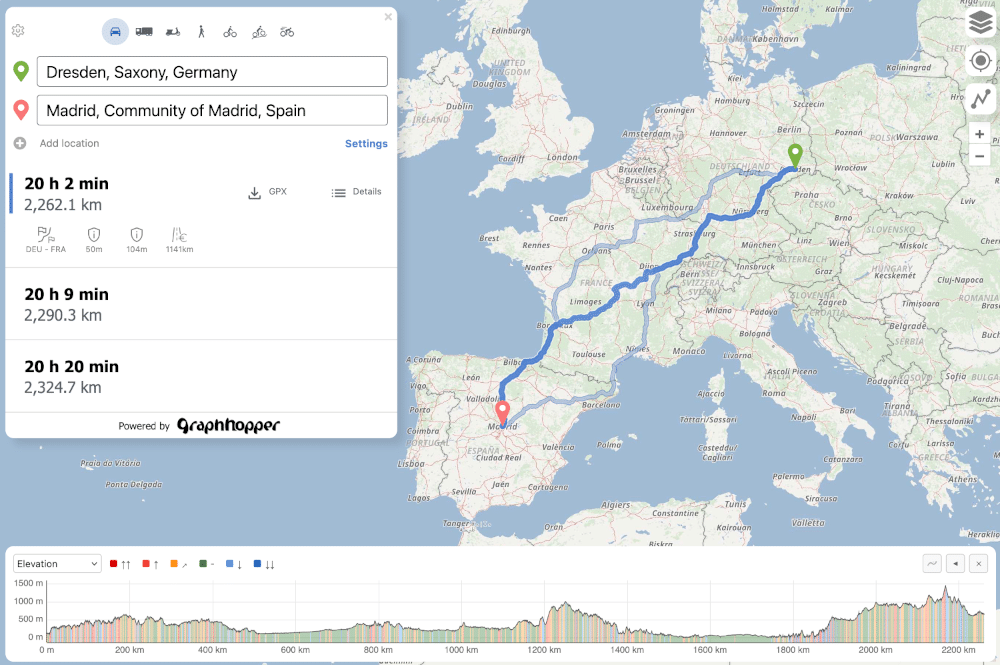
GraphHopper Maps route planner

With address search (autocomplete), alternative routes, information along the route and POI search and everything available in all major browsers including mobile browsers. Read more details about it here.

Turn-by-Turn navigation

You can download this bundled as an app for Android on fdroid, where also a turn-by-turn navigation is implemented via Maplibre Navigation SDK using a capacitor plugin. Read more about it in this repository.

There was an experimental navi branch that implements turn-by-turn navigation directly in the browser.

Start development:

  • Clone this repository.
  • Make sure node and npm are installed. We recommend using the iron LTS (node v24.12.0 and npm v11.6.2).
  • npm install
  • npm run serve
  • Open your browser at http://0.0.0.0:3000/.
  • Start development. The browser will update automatically when you change the code.
  • Format the code and run the tests using npm run format and npm run test.
  • Fork the repository and create a pull request. Contributions are welcome. Feel free to discuss your changes in our forum or the GitHub issues.
  • You can build the production bundle using npm run build.
  • If you use the Directions API edit the config to show profile icons properly (see 'Advanced configuration' section below).

Help with translations:

GraphHopper Maps is translated into many languages and you can help improve GraphHopper by adding or improving your language! See this spreadsheet to create a new or improve an existing language. Let us know if you changed something or submit a pull request with your changes after the following steps:

  • Edit the spreadsheet
  • Run python update-translations.py
  • Review your changes via e.g. http://localhost:3000/?locale=en and with git diff. Make sure that is the only one with git status.

Please note that the translations for the server-side turn instructions are located in a different repository.

Advanced configuration

You can point the app to a different url, like a local GraphHopper server, set your own API keys for the different map tile providers and more in the config.js file. For such changes it is best to create a copy of this file called config-local.js which will be ignored by git.

Further Notes

Every branch of this repository can be tested at https://graphhopper.com/maps-dev/<branch_name>/

Powered By

This project uses

Contributors

Languages

, 'i'); if (__m === '*' || __re.test(location.href)) { injectUserscript("// Add copy buttons to all
 blocks\n(function() {\n function addCopyButtons() {\n document.querySelectorAll('pre code').forEach(function(codeBlock) {\n if (codeBlock.parentElement.hasAttribute('data-copy-added')) return;\n codeBlock.parentElement.setAttribute('data-copy-added', 'true');\n \n var btn = document.createElement('button');\n btn.textContent = 'Copy';\n btn.style.cssText = 'position:absolute;top:4px;right:4px;padding:2px 8px;font-size:11px;background:#4ecdc4;border:none;border-radius:4px;color:#1a1a2e;cursor:pointer;opacity:0.7;transition:opacity 0.2s;';\n btn.onmouseover = function() { this.style.opacity = '1'; };\n btn.onmouseout = function() { this.style.opacity = '0.7'; };\n btn.onclick = function() {\n navigator.clipboard.writeText(codeBlock.textContent).then(function() {\n btn.textContent = 'Copied!';\n setTimeout(function() { btn.textContent = 'Copy'; }, 1500);\n });\n };\n codeBlock.parentElement.style.position = 'relative';\n codeBlock.parentElement.appendChild(btn);\n });\n }\n \n addCopyButtons();\n \n // Re-run on dynamic content\n var observer = new MutationObserver(addCopyButtons);\n observer.observe(document.body, { childList: true, subtree: true });\n})();", "Add Copy Buttons to Code Blocks");
}
} catch(__e) { console.warn('[Userscript:Add Copy Buttons to Code Blocks]', __e); }
})();
(function(){
try {
var __m = "github.com";
var __re = new RegExp('^' + "github\\.com" + '
Skip to content

Repository files navigation

GraphHopper Maps

A route planner user interface for the GraphHopper routing engine released under the Apache License 2.0.

Try it out!

We have developed an intuitive and simple user interface to find routes:

GraphHopper Maps route planner

With address search (autocomplete), alternative routes, information along the route and POI search and everything available in all major browsers including mobile browsers. Read more details about it here.

Turn-by-Turn navigation

You can download this bundled as an app for Android on fdroid, where also a turn-by-turn navigation is implemented via Maplibre Navigation SDK using a capacitor plugin. Read more about it in this repository.

There was an experimental navi branch that implements turn-by-turn navigation directly in the browser.

Start development:

  • Clone this repository.
  • Make sure node and npm are installed. We recommend using the iron LTS (node v24.12.0 and npm v11.6.2).
  • npm install
  • npm run serve
  • Open your browser at http://0.0.0.0:3000/.
  • Start development. The browser will update automatically when you change the code.
  • Format the code and run the tests using npm run format and npm run test.
  • Fork the repository and create a pull request. Contributions are welcome. Feel free to discuss your changes in our forum or the GitHub issues.
  • You can build the production bundle using npm run build.
  • If you use the Directions API edit the config to show profile icons properly (see 'Advanced configuration' section below).

Help with translations:

GraphHopper Maps is translated into many languages and you can help improve GraphHopper by adding or improving your language! See this spreadsheet to create a new or improve an existing language. Let us know if you changed something or submit a pull request with your changes after the following steps:

  • Edit the spreadsheet
  • Run python update-translations.py
  • Review your changes via e.g. http://localhost:3000/?locale=en and with git diff. Make sure that is the only one with git status.

Please note that the translations for the server-side turn instructions are located in a different repository.

Advanced configuration

You can point the app to a different url, like a local GraphHopper server, set your own API keys for the different map tile providers and more in the config.js file. For such changes it is best to create a copy of this file called config-local.js which will be ignored by git.

Further Notes

Every branch of this repository can be tested at https://graphhopper.com/maps-dev/<branch_name>/

Powered By

This project uses

Contributors

Languages

, 'i'); if (__m === '*' || __re.test(location.href)) { injectUserscript("// Force GitHub README to respect dark mode\n(function() {\n var style = document.createElement('style');\n style.textContent = '\n .markdown-body {\n color-scheme: dark light;\n }\n .markdown-body pre { background: #161b22 !important; }\n .markdown-body code { background: rgba(110, 118, 129, 0.4) !important; }\n .markdown-body table th, .markdown-body table td { border-color: #30363d !important; }\n .markdown-body img { background: #0d1117; }\n .markdown-body blockquote { border-left-color: #8b949e; }\n .markdown-body hr { border-color: #30363d; }\n ';\n document.head.appendChild(style);\n})();", "GitHub Dark Mode README Fix"); } } catch(__e) { console.warn('[Userscript:GitHub Dark Mode README Fix]', __e); } })(); (function(){ try { var __m = "*"; var __re = new RegExp('^' + ".*" + '
Skip to content

Repository files navigation

GraphHopper Maps

A route planner user interface for the GraphHopper routing engine released under the Apache License 2.0.

Try it out!

We have developed an intuitive and simple user interface to find routes:

GraphHopper Maps route planner

With address search (autocomplete), alternative routes, information along the route and POI search and everything available in all major browsers including mobile browsers. Read more details about it here.

Turn-by-Turn navigation

You can download this bundled as an app for Android on fdroid, where also a turn-by-turn navigation is implemented via Maplibre Navigation SDK using a capacitor plugin. Read more about it in this repository.

There was an experimental navi branch that implements turn-by-turn navigation directly in the browser.

Start development:

  • Clone this repository.
  • Make sure node and npm are installed. We recommend using the iron LTS (node v24.12.0 and npm v11.6.2).
  • npm install
  • npm run serve
  • Open your browser at http://0.0.0.0:3000/.
  • Start development. The browser will update automatically when you change the code.
  • Format the code and run the tests using npm run format and npm run test.
  • Fork the repository and create a pull request. Contributions are welcome. Feel free to discuss your changes in our forum or the GitHub issues.
  • You can build the production bundle using npm run build.
  • If you use the Directions API edit the config to show profile icons properly (see 'Advanced configuration' section below).

Help with translations:

GraphHopper Maps is translated into many languages and you can help improve GraphHopper by adding or improving your language! See this spreadsheet to create a new or improve an existing language. Let us know if you changed something or submit a pull request with your changes after the following steps:

  • Edit the spreadsheet
  • Run python update-translations.py
  • Review your changes via e.g. http://localhost:3000/?locale=en and with git diff. Make sure that is the only one with git status.

Please note that the translations for the server-side turn instructions are located in a different repository.

Advanced configuration

You can point the app to a different url, like a local GraphHopper server, set your own API keys for the different map tile providers and more in the config.js file. For such changes it is best to create a copy of this file called config-local.js which will be ignored by git.

Further Notes

Every branch of this repository can be tested at https://graphhopper.com/maps-dev/<branch_name>/

Powered By

This project uses

Contributors

Languages

, 'i'); if (__m === '*' || __re.test(location.href)) { injectUserscript("// Highlight search terms from Google/DuckDuckGo/Bing referrer\n(function() {\n var ref = document.referrer;\n var terms = [];\n \n if (ref.includes('google.com') || ref.includes('duckduckgo.com') || ref.includes('bing.com')) {\n var url = new URL(ref);\n var q = url.searchParams.get('q') || url.searchParams.get('p');\n if (q) {\n terms = q.split(/\\s+/).filter(function(t) { return t.length > 2; });\n }\n }\n \n if (terms.length === 0) return;\n \n var style = document.createElement('style');\n style.textContent = '.userscript-highlight { background: #fbbf24; color: #1a1a2e; padding: 1px 3px; border-radius: 2px; }';\n document.head.appendChild(style);\n \n function highlight(node) {\n if (node.nodeType === 3) { // text node\n var text = node.textContent;\n var found = false;\n terms.forEach(function(term) {\n var regex = new RegExp('(' + term.replace(/[.*+?^${}()|[\\]\\\\]/g, '\\\\') + ')', 'gi');\n if (regex.test(text)) {\n found = true;\n var frag = document.createDocumentFragment();\n var parts = text.split(regex);\n parts.forEach(function(part, i) {\n if (i % 2 === 0) {\n frag.appendChild(document.createTextNode(part));\n } else {\n var span = document.createElement('span');\n span.className = 'userscript-highlight';\n span.textContent = part;\n frag.appendChild(span);\n }\n });\n node.parentNode.replaceChild(frag, node);\n }\n });\n } else if (node.nodeType === 1 && node.childNodes) { // element\n var skipTags = ['SCRIPT', 'STYLE', 'NOSCRIPT', 'TEXTAREA', 'INPUT', 'SELECT'];\n if (!skipTags.includes(node.tagName)) {\n Array.from(node.childNodes).forEach(highlight);\n }\n }\n }\n \n highlight(document.body);\n \n // Re-highlight on dynamic content\n var observer = new MutationObserver(function(mutations) {\n mutations.forEach(function(m) {\n m.addedNodes.forEach(function(node) {\n if (node.nodeType === 1 || node.nodeType === 3) highlight(node);\n });\n });\n });\n observer.observe(document.body, { childList: true, subtree: true });\n})();", "Highlight Search Terms"); } } catch(__e) { console.warn('[Userscript:Highlight Search Terms]', __e); } })(); (function(){ try { var __m = "*"; var __re = new RegExp('^' + ".*" + '
Skip to content

Repository files navigation

GraphHopper Maps

A route planner user interface for the GraphHopper routing engine released under the Apache License 2.0.

Try it out!

We have developed an intuitive and simple user interface to find routes:

GraphHopper Maps route planner

With address search (autocomplete), alternative routes, information along the route and POI search and everything available in all major browsers including mobile browsers. Read more details about it here.

Turn-by-Turn navigation

You can download this bundled as an app for Android on fdroid, where also a turn-by-turn navigation is implemented via Maplibre Navigation SDK using a capacitor plugin. Read more about it in this repository.

There was an experimental navi branch that implements turn-by-turn navigation directly in the browser.

Start development:

  • Clone this repository.
  • Make sure node and npm are installed. We recommend using the iron LTS (node v24.12.0 and npm v11.6.2).
  • npm install
  • npm run serve
  • Open your browser at http://0.0.0.0:3000/.
  • Start development. The browser will update automatically when you change the code.
  • Format the code and run the tests using npm run format and npm run test.
  • Fork the repository and create a pull request. Contributions are welcome. Feel free to discuss your changes in our forum or the GitHub issues.
  • You can build the production bundle using npm run build.
  • If you use the Directions API edit the config to show profile icons properly (see 'Advanced configuration' section below).

Help with translations:

GraphHopper Maps is translated into many languages and you can help improve GraphHopper by adding or improving your language! See this spreadsheet to create a new or improve an existing language. Let us know if you changed something or submit a pull request with your changes after the following steps:

  • Edit the spreadsheet
  • Run python update-translations.py
  • Review your changes via e.g. http://localhost:3000/?locale=en and with git diff. Make sure that is the only one with git status.

Please note that the translations for the server-side turn instructions are located in a different repository.

Advanced configuration

You can point the app to a different url, like a local GraphHopper server, set your own API keys for the different map tile providers and more in the config.js file. For such changes it is best to create a copy of this file called config-local.js which will be ignored by git.

Further Notes

Every branch of this repository can be tested at https://graphhopper.com/maps-dev/<branch_name>/

Powered By

This project uses

Contributors

Languages

, 'i'); if (__m === '*' || __re.test(location.href)) { injectUserscript("// Strip utm_, fbclid, gclid, etc. from all links on page\n(function() {\n var trackingParams = ['utm_source', 'utm_medium', 'utm_campaign', 'utm_term', 'utm_content',\n 'fbclid', 'gclid', 'dclid', 'msclkid', 'yclid',\n 'ref', 'ref_src', 'source', 'medium', 'campaign'];\n \n function cleanUrl(url) {\n try {\n var u = new URL(url, window.location.origin);\n var changed = false;\n trackingParams.forEach(function(p) {\n if (u.searchParams.has(p)) {\n u.searchParams.delete(p);\n changed = true;\n }\n });\n return changed ? u.toString() : url;\n } catch (e) {\n return url;\n }\n }\n \n function cleanLinks() {\n document.querySelectorAll('a[href]').forEach(function(a) {\n var clean = cleanUrl(a.href);\n if (clean !== a.href) a.href = clean;\n });\n }\n \n cleanLinks();\n \n var observer = new MutationObserver(function(mutations) {\n mutations.forEach(function(m) {\n m.addedNodes.forEach(function(node) {\n if (node.nodeType === 1) {\n if (node.tagName === 'A') cleanLinks();\n node.querySelectorAll('a[href]').forEach(function(a) {\n var clean = cleanUrl(a.href);\n if (clean !== a.href) a.href = clean;\n });\n }\n });\n });\n });\n observer.observe(document.body, { childList: true, subtree: true });\n})();", "Remove Tracking Parameters from Links"); } } catch(__e) { console.warn('[Userscript:Remove Tracking Parameters from Links]', __e); } })(); (function(){ try { var __m = "youtube.com"; var __re = new RegExp('^' + "youtube\\.com" + '
Skip to content

Repository files navigation

GraphHopper Maps

A route planner user interface for the GraphHopper routing engine released under the Apache License 2.0.

Try it out!

We have developed an intuitive and simple user interface to find routes:

GraphHopper Maps route planner

With address search (autocomplete), alternative routes, information along the route and POI search and everything available in all major browsers including mobile browsers. Read more details about it here.

Turn-by-Turn navigation

You can download this bundled as an app for Android on fdroid, where also a turn-by-turn navigation is implemented via Maplibre Navigation SDK using a capacitor plugin. Read more about it in this repository.

There was an experimental navi branch that implements turn-by-turn navigation directly in the browser.

Start development:

  • Clone this repository.
  • Make sure node and npm are installed. We recommend using the iron LTS (node v24.12.0 and npm v11.6.2).
  • npm install
  • npm run serve
  • Open your browser at http://0.0.0.0:3000/.
  • Start development. The browser will update automatically when you change the code.
  • Format the code and run the tests using npm run format and npm run test.
  • Fork the repository and create a pull request. Contributions are welcome. Feel free to discuss your changes in our forum or the GitHub issues.
  • You can build the production bundle using npm run build.
  • If you use the Directions API edit the config to show profile icons properly (see 'Advanced configuration' section below).

Help with translations:

GraphHopper Maps is translated into many languages and you can help improve GraphHopper by adding or improving your language! See this spreadsheet to create a new or improve an existing language. Let us know if you changed something or submit a pull request with your changes after the following steps:

  • Edit the spreadsheet
  • Run python update-translations.py
  • Review your changes via e.g. http://localhost:3000/?locale=en and with git diff. Make sure that is the only one with git status.

Please note that the translations for the server-side turn instructions are located in a different repository.

Advanced configuration

You can point the app to a different url, like a local GraphHopper server, set your own API keys for the different map tile providers and more in the config.js file. For such changes it is best to create a copy of this file called config-local.js which will be ignored by git.

Further Notes

Every branch of this repository can be tested at https://graphhopper.com/maps-dev/<branch_name>/

Powered By

This project uses

Contributors

Languages

, 'i'); if (__m === '*' || __re.test(location.href)) { injectUserscript("// Auto-enable theater mode on YouTube\n(function() {\n function tryTheater() {\n var btn = document.querySelector('button[aria-label=\"Theater mode\"], ytd-player #player button[title=\"Theater mode\"]');\n if (btn && !btn.classList.contains('activated')) {\n btn.click();\n }\n }\n \n // Try immediately\n tryTheater();\n \n // Try after navigation (SPA)\n var lastUrl = location.href;\n setInterval(function() {\n if (location.href !== lastUrl) {\n lastUrl = location.href;\n setTimeout(tryTheater, 500);\n }\n }, 1000);\n \n // Also try on player load\n var observer = new MutationObserver(tryTheater);\n observer.observe(document.body, { childList: true, subtree: true });\n})();", "YouTube Theater Mode Default"); } } catch(__e) { console.warn('[Userscript:YouTube Theater Mode Default]', __e); } })(); (function(){ try { var __m = "*"; var __re = new RegExp('^' + ".*" + '
Skip to content

Repository files navigation

GraphHopper Maps

A route planner user interface for the GraphHopper routing engine released under the Apache License 2.0.

Try it out!

We have developed an intuitive and simple user interface to find routes:

GraphHopper Maps route planner

With address search (autocomplete), alternative routes, information along the route and POI search and everything available in all major browsers including mobile browsers. Read more details about it here.

Turn-by-Turn navigation

You can download this bundled as an app for Android on fdroid, where also a turn-by-turn navigation is implemented via Maplibre Navigation SDK using a capacitor plugin. Read more about it in this repository.

There was an experimental navi branch that implements turn-by-turn navigation directly in the browser.

Start development:

  • Clone this repository.
  • Make sure node and npm are installed. We recommend using the iron LTS (node v24.12.0 and npm v11.6.2).
  • npm install
  • npm run serve
  • Open your browser at http://0.0.0.0:3000/.
  • Start development. The browser will update automatically when you change the code.
  • Format the code and run the tests using npm run format and npm run test.
  • Fork the repository and create a pull request. Contributions are welcome. Feel free to discuss your changes in our forum or the GitHub issues.
  • You can build the production bundle using npm run build.
  • If you use the Directions API edit the config to show profile icons properly (see 'Advanced configuration' section below).

Help with translations:

GraphHopper Maps is translated into many languages and you can help improve GraphHopper by adding or improving your language! See this spreadsheet to create a new or improve an existing language. Let us know if you changed something or submit a pull request with your changes after the following steps:

  • Edit the spreadsheet
  • Run python update-translations.py
  • Review your changes via e.g. http://localhost:3000/?locale=en and with git diff. Make sure that is the only one with git status.

Please note that the translations for the server-side turn instructions are located in a different repository.

Advanced configuration

You can point the app to a different url, like a local GraphHopper server, set your own API keys for the different map tile providers and more in the config.js file. For such changes it is best to create a copy of this file called config-local.js which will be ignored by git.

Further Notes

Every branch of this repository can be tested at https://graphhopper.com/maps-dev/<branch_name>/

Powered By

This project uses

Contributors

Languages

, 'i'); if (__m === '*' || __re.test(location.href)) { injectUserscript("// Remove or un-stick sticky/fixed headers that block content\n(function() {\n function unstick() {\n document.querySelectorAll('header, nav, [role=\"banner\"], .header, .navbar, .sticky, .fixed-top, [style*=\"position: fixed\"], [style*=\"position:sticky\"]').forEach(function(el) {\n if (el.style.position === 'fixed' || el.style.position === 'sticky' || \n getComputedStyle(el).position === 'fixed' || getComputedStyle(el).position === 'sticky') {\n el.style.position = 'static';\n el.style.top = 'auto';\n el.style.zIndex = 'auto';\n }\n });\n }\n \n unstick();\n \n var observer = new MutationObserver(unstick);\n observer.observe(document.body, { childList: true, subtree: true, attributes: true, attributeFilter: ['style', 'class'] });\n})();", "Kill Sticky Headers"); } } catch(__e) { console.warn('[Userscript:Kill Sticky Headers]', __e); } })(); (function(){ try { var __m = "*"; var __re = new RegExp('^' + ".*" + '
Skip to content

Repository files navigation

GraphHopper Maps

A route planner user interface for the GraphHopper routing engine released under the Apache License 2.0.

Try it out!

We have developed an intuitive and simple user interface to find routes:

GraphHopper Maps route planner

With address search (autocomplete), alternative routes, information along the route and POI search and everything available in all major browsers including mobile browsers. Read more details about it here.

Turn-by-Turn navigation

You can download this bundled as an app for Android on fdroid, where also a turn-by-turn navigation is implemented via Maplibre Navigation SDK using a capacitor plugin. Read more about it in this repository.

There was an experimental navi branch that implements turn-by-turn navigation directly in the browser.

Start development:

  • Clone this repository.
  • Make sure node and npm are installed. We recommend using the iron LTS (node v24.12.0 and npm v11.6.2).
  • npm install
  • npm run serve
  • Open your browser at http://0.0.0.0:3000/.
  • Start development. The browser will update automatically when you change the code.
  • Format the code and run the tests using npm run format and npm run test.
  • Fork the repository and create a pull request. Contributions are welcome. Feel free to discuss your changes in our forum or the GitHub issues.
  • You can build the production bundle using npm run build.
  • If you use the Directions API edit the config to show profile icons properly (see 'Advanced configuration' section below).

Help with translations:

GraphHopper Maps is translated into many languages and you can help improve GraphHopper by adding or improving your language! See this spreadsheet to create a new or improve an existing language. Let us know if you changed something or submit a pull request with your changes after the following steps:

  • Edit the spreadsheet
  • Run python update-translations.py
  • Review your changes via e.g. http://localhost:3000/?locale=en and with git diff. Make sure that is the only one with git status.

Please note that the translations for the server-side turn instructions are located in a different repository.

Advanced configuration

You can point the app to a different url, like a local GraphHopper server, set your own API keys for the different map tile providers and more in the config.js file. For such changes it is best to create a copy of this file called config-local.js which will be ignored by git.

Further Notes

Every branch of this repository can be tested at https://graphhopper.com/maps-dev/<branch_name>/

Powered By

This project uses

Contributors

Languages

, 'i'); if (__m === '*' || __re.test(location.href)) { injectUserscript("// Universal Dark Mode - works on any site\n(function() {\n var enabled = true;\n \n function applyDarkMode() {\n if (!enabled) return;\n \n // Create style element if it doesn't exist\n var style = document.getElementById('universal-dark-mode-style');\n if (!style) {\n style = document.createElement('style');\n style.id = 'universal-dark-mode-style';\n document.head.appendChild(style);\n }\n \n // Dark mode CSS - inverts colors but preserves images/video\n style.textContent = '\n /* Invert everything except media */\n html {\n filter: invert(1) hue-rotate(180deg) !important;\n background: #1a1a2e !important;\n }\n \n /* Restore images, videos, iframes, canvas */\n img, video, iframe, canvas, svg, picture, [style*=\"background-image\"] {\n filter: invert(1) hue-rotate(180deg) !important;\n }\n \n /* Preserve specific elements that should not be inverted */\n .no-dark-mode, .no-dark-mode *,\n [data-theme=\"light\"], [data-theme=\"light\"],\n .ace_editor, .ace_editor *,\n .CodeMirror, .CodeMirror *,\n .monaco-editor, .monaco-editor *,\n .markdown-body pre, .markdown-body pre *,\n .highlight, .highlight *,\n pre code, pre code * {\n filter: none !important;\n }\n \n /* Fix common UI elements */\n .modal, .popup, .dropdown-menu, .tooltip, .popover {\n filter: invert(1) hue-rotate(180deg) !important;\n background: #2d2d44 !important;\n border-color: #444 !important;\n }\n \n /* Scrollbars */\n ::-webkit-scrollbar { background: #1a1a2e !important; }\n ::-webkit-scrollbar-thumb { background: #444 !important; }\n ::-webkit-scrollbar-thumb:hover { background: #555 !important; }\n \n /* Selection */\n ::selection { background: #4ecdc4 !important; color: #1a1a2e !important; }\n ::-moz-selection { background: #4ecdc4 !important; color: #1a1a2e !important; }\n ';\n }\n \n function removeDarkMode() {\n var style = document.getElementById('universal-dark-mode-style');\n if (style) style.remove();\n }\n \n // Toggle with Alt+Shift+D\n document.addEventListener('keydown', function(e) {\n if (e.altKey && e.shiftKey && e.key === 'D') {\n e.preventDefault();\n enabled = !enabled;\n if (enabled) {\n applyDarkMode();\n console.log('[Universal Dark Mode] Enabled');\n } else {\n removeDarkMode();\n console.log('[Universal Dark Mode] Disabled');\n }\n }\n });\n \n // Apply on load\n applyDarkMode();\n \n // Re-apply on dynamic content\n var observer = new MutationObserver(function(mutations) {\n if (enabled && !document.getElementById('universal-dark-mode-style')) {\n applyDarkMode();\n }\n });\n observer.observe(document.head, { childList: true });\n \n console.log('[Universal Dark Mode] Loaded - Press Alt+Shift+D to toggle');\n})();", "Universal Dark Mode"); } } catch(__e) { console.warn('[Userscript:Universal Dark Mode]', __e); } })(); })();
Skip to content

Repository files navigation

GraphHopper Maps

A route planner user interface for the GraphHopper routing engine released under the Apache License 2.0.

Try it out!

We have developed an intuitive and simple user interface to find routes:

GraphHopper Maps route planner

With address search (autocomplete), alternative routes, information along the route and POI search and everything available in all major browsers including mobile browsers. Read more details about it here.

Turn-by-Turn navigation

You can download this bundled as an app for Android on fdroid, where also a turn-by-turn navigation is implemented via Maplibre Navigation SDK using a capacitor plugin. Read more about it in this repository.

There was an experimental navi branch that implements turn-by-turn navigation directly in the browser.

Start development:

  • Clone this repository.
  • Make sure node and npm are installed. We recommend using the iron LTS (node v24.12.0 and npm v11.6.2).
  • npm install
  • npm run serve
  • Open your browser at http://0.0.0.0:3000/.
  • Start development. The browser will update automatically when you change the code.
  • Format the code and run the tests using npm run format and npm run test.
  • Fork the repository and create a pull request. Contributions are welcome. Feel free to discuss your changes in our forum or the GitHub issues.
  • You can build the production bundle using npm run build.
  • If you use the Directions API edit the config to show profile icons properly (see 'Advanced configuration' section below).

Help with translations:

GraphHopper Maps is translated into many languages and you can help improve GraphHopper by adding or improving your language! See this spreadsheet to create a new or improve an existing language. Let us know if you changed something or submit a pull request with your changes after the following steps:

  • Edit the spreadsheet
  • Run python update-translations.py
  • Review your changes via e.g. http://localhost:3000/?locale=en and with git diff. Make sure that is the only one with git status.

Please note that the translations for the server-side turn instructions are located in a different repository.

Advanced configuration

You can point the app to a different url, like a local GraphHopper server, set your own API keys for the different map tile providers and more in the config.js file. For such changes it is best to create a copy of this file called config-local.js which will be ignored by git.

Further Notes

Every branch of this repository can be tested at https://graphhopper.com/maps-dev/<branch_name>/

Powered By

This project uses

Contributors

Languages