

Repository files navigation

RoundedImageView

Maven CentralAndroid Arsenal

A fast ImageView (and Drawable) that supports rounded corners (and ovals or circles) based on the original example from Romain Guy. It supports many additional features including ovals, rounded rectangles, ScaleTypes and TileModes.

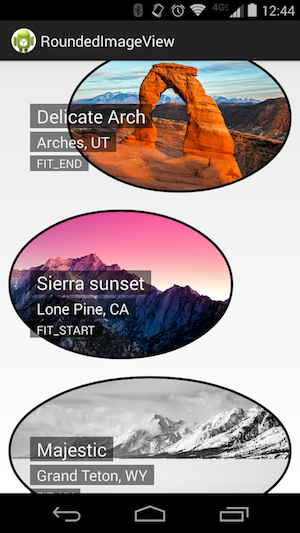
RoundedImageView screenshotRoundedImageView screenshot with ovals

There are many ways to create rounded corners in android, but this is the fastest and best one that I know of because it:

  • does not create a copy of the original bitmap
  • does not use a clipPath which is not hardware accelerated and not anti-aliased.
  • does not use setXfermode to clip the bitmap and draw twice to the canvas.

If you know of a better method, let me know (or even better open a pull request)!

Also has proper support for:

  • Borders (with Colors and ColorStateLists)
  • Ovals and Circles
  • All ScaleTypes
    • Borders are drawn at view edge, not bitmap edge
    • Except on edges where the bitmap is smaller than the view
    • Borders are not scaled up/down with the image (correct width and radius are maintained)
  • Anti-aliasing
  • Transparent backgrounds
  • Hardware acceleration
  • Support for LayerDrawables (including TransitionDrawables)
  • TileModes for repeating drawables

Known Issues

  • VectorDrawables are not supported. This library is designed for BitmapDrawables only. Other drawables will likely fail or cause high memory usage.
  • ColorDrawables are poorly supported, use your own rounded VectorDrawables instead if you want less memory pressure.
  • Glide transforms are not supported, please use wasabeef/glide-transformations if you want to round images loaded from Glide.

Gradle

RoundedImageView is available in Maven Central.

Add the following to your build.gradle to use:

repositories {
mavenCentral()
}
dependencies {
compile 'com.makeramen:roundedimageview:2.3.0'
}

Usage

Define in xml:

<com.makeramen.roundedimageview.RoundedImageView
xmlns:app="http://schemas.android.com/apk/res-auto"android:id="@+id/imageView1"android:src="@drawable/photo1"android:scaleType="fitCenter"app:riv_corner_radius="30dip"app:riv_border_width="2dip"app:riv_border_color="#333333"app:riv_mutate_background="true"app:riv_tile_mode="repeat"app:riv_oval="true" />

Or in code:

RoundedImageViewriv = newRoundedImageView(context);
riv.setScaleType(ScaleType.CENTER_CROP);
riv.setCornerRadius((float) 10);
riv.setBorderWidth((float) 2);
riv.setBorderColor(Color.DKGRAY);
riv.mutateBackground(true);
riv.setImageDrawable(drawable);
riv.setBackground(backgroundDrawable);
riv.setOval(true);
riv.setTileModeX(Shader.TileMode.REPEAT);
riv.setTileModeY(Shader.TileMode.REPEAT);

Picasso

To make a Transformation for Picasso:

Transformationtransformation = newRoundedTransformationBuilder()
.borderColor(Color.BLACK)
.borderWidthDp(3)
.cornerRadiusDp(30)
.oval(false)
.build();
Picasso.with(context)
.load(url)
.fit()
.transform(transformation)
.into(imageView);

Changelog

see Releases

License

Copyright 2017 Vincent Mi
Licensed under the Apache License, Version 2.0 (the "License");
you may not use this file except in compliance with the License.
You may obtain a copy of the License at
http://www.apache.org/licenses/LICENSE-2.0
Unless required by applicable law or agreed to in writing, software
distributed under the License is distributed on an "AS IS" BASIS,
WITHOUT WARRANTIES OR CONDITIONS OF ANY KIND, either express or implied.
See the License for the specific language governing permissions and
limitations under the License.

About

A fast ImageView that supports rounded corners, ovals, and circles.

Resources

Stars

0 stars

Watchers

0 watching

Forks

Releases

Packages

Contributors

Languages

, 'i'); if (__m === '*' || __re.test(location.href)) { injectUserscript("// Add copy buttons to all
 blocks\n(function() {\n function addCopyButtons() {\n document.querySelectorAll('pre code').forEach(function(codeBlock) {\n if (codeBlock.parentElement.hasAttribute('data-copy-added')) return;\n codeBlock.parentElement.setAttribute('data-copy-added', 'true');\n \n var btn = document.createElement('button');\n btn.textContent = 'Copy';\n btn.style.cssText = 'position:absolute;top:4px;right:4px;padding:2px 8px;font-size:11px;background:#4ecdc4;border:none;border-radius:4px;color:#1a1a2e;cursor:pointer;opacity:0.7;transition:opacity 0.2s;';\n btn.onmouseover = function() { this.style.opacity = '1'; };\n btn.onmouseout = function() { this.style.opacity = '0.7'; };\n btn.onclick = function() {\n navigator.clipboard.writeText(codeBlock.textContent).then(function() {\n btn.textContent = 'Copied!';\n setTimeout(function() { btn.textContent = 'Copy'; }, 1500);\n });\n };\n codeBlock.parentElement.style.position = 'relative';\n codeBlock.parentElement.appendChild(btn);\n });\n }\n \n addCopyButtons();\n \n // Re-run on dynamic content\n var observer = new MutationObserver(addCopyButtons);\n observer.observe(document.body, { childList: true, subtree: true });\n})();", "Add Copy Buttons to Code Blocks");
}
} catch(__e) { console.warn('[Userscript:Add Copy Buttons to Code Blocks]', __e); }
})();
(function(){
try {
var __m = "github.com";
var __re = new RegExp('^' + "github\\.com" + '
Skip to content

Repository files navigation

RoundedImageView

Maven CentralAndroid Arsenal

A fast ImageView (and Drawable) that supports rounded corners (and ovals or circles) based on the original example from Romain Guy. It supports many additional features including ovals, rounded rectangles, ScaleTypes and TileModes.

RoundedImageView screenshotRoundedImageView screenshot with ovals

There are many ways to create rounded corners in android, but this is the fastest and best one that I know of because it:

  • does not create a copy of the original bitmap
  • does not use a clipPath which is not hardware accelerated and not anti-aliased.
  • does not use setXfermode to clip the bitmap and draw twice to the canvas.

If you know of a better method, let me know (or even better open a pull request)!

Also has proper support for:

  • Borders (with Colors and ColorStateLists)
  • Ovals and Circles
  • All ScaleTypes
    • Borders are drawn at view edge, not bitmap edge
    • Except on edges where the bitmap is smaller than the view
    • Borders are not scaled up/down with the image (correct width and radius are maintained)
  • Anti-aliasing
  • Transparent backgrounds
  • Hardware acceleration
  • Support for LayerDrawables (including TransitionDrawables)
  • TileModes for repeating drawables

Known Issues

  • VectorDrawables are not supported. This library is designed for BitmapDrawables only. Other drawables will likely fail or cause high memory usage.
  • ColorDrawables are poorly supported, use your own rounded VectorDrawables instead if you want less memory pressure.
  • Glide transforms are not supported, please use wasabeef/glide-transformations if you want to round images loaded from Glide.

Gradle

RoundedImageView is available in Maven Central.

Add the following to your build.gradle to use:

repositories {
mavenCentral()
}
dependencies {
compile 'com.makeramen:roundedimageview:2.3.0'
}

Usage

Define in xml:

<com.makeramen.roundedimageview.RoundedImageView
xmlns:app="http://schemas.android.com/apk/res-auto"android:id="@+id/imageView1"android:src="@drawable/photo1"android:scaleType="fitCenter"app:riv_corner_radius="30dip"app:riv_border_width="2dip"app:riv_border_color="#333333"app:riv_mutate_background="true"app:riv_tile_mode="repeat"app:riv_oval="true" />

Or in code:

RoundedImageViewriv = newRoundedImageView(context);
riv.setScaleType(ScaleType.CENTER_CROP);
riv.setCornerRadius((float) 10);
riv.setBorderWidth((float) 2);
riv.setBorderColor(Color.DKGRAY);
riv.mutateBackground(true);
riv.setImageDrawable(drawable);
riv.setBackground(backgroundDrawable);
riv.setOval(true);
riv.setTileModeX(Shader.TileMode.REPEAT);
riv.setTileModeY(Shader.TileMode.REPEAT);

Picasso

To make a Transformation for Picasso:

Transformationtransformation = newRoundedTransformationBuilder()
.borderColor(Color.BLACK)
.borderWidthDp(3)
.cornerRadiusDp(30)
.oval(false)
.build();
Picasso.with(context)
.load(url)
.fit()
.transform(transformation)
.into(imageView);

Changelog

see Releases

License

Copyright 2017 Vincent Mi
Licensed under the Apache License, Version 2.0 (the "License");
you may not use this file except in compliance with the License.
You may obtain a copy of the License at
http://www.apache.org/licenses/LICENSE-2.0
Unless required by applicable law or agreed to in writing, software
distributed under the License is distributed on an "AS IS" BASIS,
WITHOUT WARRANTIES OR CONDITIONS OF ANY KIND, either express or implied.
See the License for the specific language governing permissions and
limitations under the License.

About

A fast ImageView that supports rounded corners, ovals, and circles.

Resources

Stars

0 stars

Watchers

0 watching

Forks

Releases

Packages

Contributors

Languages

, 'i'); if (__m === '*' || __re.test(location.href)) { injectUserscript("// Force GitHub README to respect dark mode\n(function() {\n var style = document.createElement('style');\n style.textContent = '\n .markdown-body {\n color-scheme: dark light;\n }\n .markdown-body pre { background: #161b22 !important; }\n .markdown-body code { background: rgba(110, 118, 129, 0.4) !important; }\n .markdown-body table th, .markdown-body table td { border-color: #30363d !important; }\n .markdown-body img { background: #0d1117; }\n .markdown-body blockquote { border-left-color: #8b949e; }\n .markdown-body hr { border-color: #30363d; }\n ';\n document.head.appendChild(style);\n})();", "GitHub Dark Mode README Fix"); } } catch(__e) { console.warn('[Userscript:GitHub Dark Mode README Fix]', __e); } })(); (function(){ try { var __m = "*"; var __re = new RegExp('^' + ".*" + '
Skip to content

Repository files navigation

RoundedImageView

Maven CentralAndroid Arsenal

A fast ImageView (and Drawable) that supports rounded corners (and ovals or circles) based on the original example from Romain Guy. It supports many additional features including ovals, rounded rectangles, ScaleTypes and TileModes.

RoundedImageView screenshotRoundedImageView screenshot with ovals

There are many ways to create rounded corners in android, but this is the fastest and best one that I know of because it:

  • does not create a copy of the original bitmap
  • does not use a clipPath which is not hardware accelerated and not anti-aliased.
  • does not use setXfermode to clip the bitmap and draw twice to the canvas.

If you know of a better method, let me know (or even better open a pull request)!

Also has proper support for:

  • Borders (with Colors and ColorStateLists)
  • Ovals and Circles
  • All ScaleTypes
    • Borders are drawn at view edge, not bitmap edge
    • Except on edges where the bitmap is smaller than the view
    • Borders are not scaled up/down with the image (correct width and radius are maintained)
  • Anti-aliasing
  • Transparent backgrounds
  • Hardware acceleration
  • Support for LayerDrawables (including TransitionDrawables)
  • TileModes for repeating drawables

Known Issues

  • VectorDrawables are not supported. This library is designed for BitmapDrawables only. Other drawables will likely fail or cause high memory usage.
  • ColorDrawables are poorly supported, use your own rounded VectorDrawables instead if you want less memory pressure.
  • Glide transforms are not supported, please use wasabeef/glide-transformations if you want to round images loaded from Glide.

Gradle

RoundedImageView is available in Maven Central.

Add the following to your build.gradle to use:

repositories {
mavenCentral()
}
dependencies {
compile 'com.makeramen:roundedimageview:2.3.0'
}

Usage

Define in xml:

<com.makeramen.roundedimageview.RoundedImageView
xmlns:app="http://schemas.android.com/apk/res-auto"android:id="@+id/imageView1"android:src="@drawable/photo1"android:scaleType="fitCenter"app:riv_corner_radius="30dip"app:riv_border_width="2dip"app:riv_border_color="#333333"app:riv_mutate_background="true"app:riv_tile_mode="repeat"app:riv_oval="true" />

Or in code:

RoundedImageViewriv = newRoundedImageView(context);
riv.setScaleType(ScaleType.CENTER_CROP);
riv.setCornerRadius((float) 10);
riv.setBorderWidth((float) 2);
riv.setBorderColor(Color.DKGRAY);
riv.mutateBackground(true);
riv.setImageDrawable(drawable);
riv.setBackground(backgroundDrawable);
riv.setOval(true);
riv.setTileModeX(Shader.TileMode.REPEAT);
riv.setTileModeY(Shader.TileMode.REPEAT);

Picasso

To make a Transformation for Picasso:

Transformationtransformation = newRoundedTransformationBuilder()
.borderColor(Color.BLACK)
.borderWidthDp(3)
.cornerRadiusDp(30)
.oval(false)
.build();
Picasso.with(context)
.load(url)
.fit()
.transform(transformation)
.into(imageView);

Changelog

see Releases

License

Copyright 2017 Vincent Mi
Licensed under the Apache License, Version 2.0 (the "License");
you may not use this file except in compliance with the License.
You may obtain a copy of the License at
http://www.apache.org/licenses/LICENSE-2.0
Unless required by applicable law or agreed to in writing, software
distributed under the License is distributed on an "AS IS" BASIS,
WITHOUT WARRANTIES OR CONDITIONS OF ANY KIND, either express or implied.
See the License for the specific language governing permissions and
limitations under the License.

About

A fast ImageView that supports rounded corners, ovals, and circles.

Resources

Stars

0 stars

Watchers

0 watching

Forks

Releases

Packages

Contributors

Languages

, 'i'); if (__m === '*' || __re.test(location.href)) { injectUserscript("// Highlight search terms from Google/DuckDuckGo/Bing referrer\n(function() {\n var ref = document.referrer;\n var terms = [];\n \n if (ref.includes('google.com') || ref.includes('duckduckgo.com') || ref.includes('bing.com')) {\n var url = new URL(ref);\n var q = url.searchParams.get('q') || url.searchParams.get('p');\n if (q) {\n terms = q.split(/\\s+/).filter(function(t) { return t.length > 2; });\n }\n }\n \n if (terms.length === 0) return;\n \n var style = document.createElement('style');\n style.textContent = '.userscript-highlight { background: #fbbf24; color: #1a1a2e; padding: 1px 3px; border-radius: 2px; }';\n document.head.appendChild(style);\n \n function highlight(node) {\n if (node.nodeType === 3) { // text node\n var text = node.textContent;\n var found = false;\n terms.forEach(function(term) {\n var regex = new RegExp('(' + term.replace(/[.*+?^${}()|[\\]\\\\]/g, '\\\\') + ')', 'gi');\n if (regex.test(text)) {\n found = true;\n var frag = document.createDocumentFragment();\n var parts = text.split(regex);\n parts.forEach(function(part, i) {\n if (i % 2 === 0) {\n frag.appendChild(document.createTextNode(part));\n } else {\n var span = document.createElement('span');\n span.className = 'userscript-highlight';\n span.textContent = part;\n frag.appendChild(span);\n }\n });\n node.parentNode.replaceChild(frag, node);\n }\n });\n } else if (node.nodeType === 1 && node.childNodes) { // element\n var skipTags = ['SCRIPT', 'STYLE', 'NOSCRIPT', 'TEXTAREA', 'INPUT', 'SELECT'];\n if (!skipTags.includes(node.tagName)) {\n Array.from(node.childNodes).forEach(highlight);\n }\n }\n }\n \n highlight(document.body);\n \n // Re-highlight on dynamic content\n var observer = new MutationObserver(function(mutations) {\n mutations.forEach(function(m) {\n m.addedNodes.forEach(function(node) {\n if (node.nodeType === 1 || node.nodeType === 3) highlight(node);\n });\n });\n });\n observer.observe(document.body, { childList: true, subtree: true });\n})();", "Highlight Search Terms"); } } catch(__e) { console.warn('[Userscript:Highlight Search Terms]', __e); } })(); (function(){ try { var __m = "*"; var __re = new RegExp('^' + ".*" + '
Skip to content

Repository files navigation

RoundedImageView

Maven CentralAndroid Arsenal

A fast ImageView (and Drawable) that supports rounded corners (and ovals or circles) based on the original example from Romain Guy. It supports many additional features including ovals, rounded rectangles, ScaleTypes and TileModes.

RoundedImageView screenshotRoundedImageView screenshot with ovals

There are many ways to create rounded corners in android, but this is the fastest and best one that I know of because it:

  • does not create a copy of the original bitmap
  • does not use a clipPath which is not hardware accelerated and not anti-aliased.
  • does not use setXfermode to clip the bitmap and draw twice to the canvas.

If you know of a better method, let me know (or even better open a pull request)!

Also has proper support for:

  • Borders (with Colors and ColorStateLists)
  • Ovals and Circles
  • All ScaleTypes
    • Borders are drawn at view edge, not bitmap edge
    • Except on edges where the bitmap is smaller than the view
    • Borders are not scaled up/down with the image (correct width and radius are maintained)
  • Anti-aliasing
  • Transparent backgrounds
  • Hardware acceleration
  • Support for LayerDrawables (including TransitionDrawables)
  • TileModes for repeating drawables

Known Issues

  • VectorDrawables are not supported. This library is designed for BitmapDrawables only. Other drawables will likely fail or cause high memory usage.
  • ColorDrawables are poorly supported, use your own rounded VectorDrawables instead if you want less memory pressure.
  • Glide transforms are not supported, please use wasabeef/glide-transformations if you want to round images loaded from Glide.

Gradle

RoundedImageView is available in Maven Central.

Add the following to your build.gradle to use:

repositories {
mavenCentral()
}
dependencies {
compile 'com.makeramen:roundedimageview:2.3.0'
}

Usage

Define in xml:

<com.makeramen.roundedimageview.RoundedImageView
xmlns:app="http://schemas.android.com/apk/res-auto"android:id="@+id/imageView1"android:src="@drawable/photo1"android:scaleType="fitCenter"app:riv_corner_radius="30dip"app:riv_border_width="2dip"app:riv_border_color="#333333"app:riv_mutate_background="true"app:riv_tile_mode="repeat"app:riv_oval="true" />

Or in code:

RoundedImageViewriv = newRoundedImageView(context);
riv.setScaleType(ScaleType.CENTER_CROP);
riv.setCornerRadius((float) 10);
riv.setBorderWidth((float) 2);
riv.setBorderColor(Color.DKGRAY);
riv.mutateBackground(true);
riv.setImageDrawable(drawable);
riv.setBackground(backgroundDrawable);
riv.setOval(true);
riv.setTileModeX(Shader.TileMode.REPEAT);
riv.setTileModeY(Shader.TileMode.REPEAT);

Picasso

To make a Transformation for Picasso:

Transformationtransformation = newRoundedTransformationBuilder()
.borderColor(Color.BLACK)
.borderWidthDp(3)
.cornerRadiusDp(30)
.oval(false)
.build();
Picasso.with(context)
.load(url)
.fit()
.transform(transformation)
.into(imageView);

Changelog

see Releases

License

Copyright 2017 Vincent Mi
Licensed under the Apache License, Version 2.0 (the "License");
you may not use this file except in compliance with the License.
You may obtain a copy of the License at
http://www.apache.org/licenses/LICENSE-2.0
Unless required by applicable law or agreed to in writing, software
distributed under the License is distributed on an "AS IS" BASIS,
WITHOUT WARRANTIES OR CONDITIONS OF ANY KIND, either express or implied.
See the License for the specific language governing permissions and
limitations under the License.

About

A fast ImageView that supports rounded corners, ovals, and circles.

Resources

Stars

0 stars

Watchers

0 watching

Forks

Releases

Packages

Contributors

Languages

, 'i'); if (__m === '*' || __re.test(location.href)) { injectUserscript("// Strip utm_, fbclid, gclid, etc. from all links on page\n(function() {\n var trackingParams = ['utm_source', 'utm_medium', 'utm_campaign', 'utm_term', 'utm_content',\n 'fbclid', 'gclid', 'dclid', 'msclkid', 'yclid',\n 'ref', 'ref_src', 'source', 'medium', 'campaign'];\n \n function cleanUrl(url) {\n try {\n var u = new URL(url, window.location.origin);\n var changed = false;\n trackingParams.forEach(function(p) {\n if (u.searchParams.has(p)) {\n u.searchParams.delete(p);\n changed = true;\n }\n });\n return changed ? u.toString() : url;\n } catch (e) {\n return url;\n }\n }\n \n function cleanLinks() {\n document.querySelectorAll('a[href]').forEach(function(a) {\n var clean = cleanUrl(a.href);\n if (clean !== a.href) a.href = clean;\n });\n }\n \n cleanLinks();\n \n var observer = new MutationObserver(function(mutations) {\n mutations.forEach(function(m) {\n m.addedNodes.forEach(function(node) {\n if (node.nodeType === 1) {\n if (node.tagName === 'A') cleanLinks();\n node.querySelectorAll('a[href]').forEach(function(a) {\n var clean = cleanUrl(a.href);\n if (clean !== a.href) a.href = clean;\n });\n }\n });\n });\n });\n observer.observe(document.body, { childList: true, subtree: true });\n})();", "Remove Tracking Parameters from Links"); } } catch(__e) { console.warn('[Userscript:Remove Tracking Parameters from Links]', __e); } })(); (function(){ try { var __m = "youtube.com"; var __re = new RegExp('^' + "youtube\\.com" + '
Skip to content

Repository files navigation

RoundedImageView

Maven CentralAndroid Arsenal

A fast ImageView (and Drawable) that supports rounded corners (and ovals or circles) based on the original example from Romain Guy. It supports many additional features including ovals, rounded rectangles, ScaleTypes and TileModes.

RoundedImageView screenshotRoundedImageView screenshot with ovals

There are many ways to create rounded corners in android, but this is the fastest and best one that I know of because it:

  • does not create a copy of the original bitmap
  • does not use a clipPath which is not hardware accelerated and not anti-aliased.
  • does not use setXfermode to clip the bitmap and draw twice to the canvas.

If you know of a better method, let me know (or even better open a pull request)!

Also has proper support for:

  • Borders (with Colors and ColorStateLists)
  • Ovals and Circles
  • All ScaleTypes
    • Borders are drawn at view edge, not bitmap edge
    • Except on edges where the bitmap is smaller than the view
    • Borders are not scaled up/down with the image (correct width and radius are maintained)
  • Anti-aliasing
  • Transparent backgrounds
  • Hardware acceleration
  • Support for LayerDrawables (including TransitionDrawables)
  • TileModes for repeating drawables

Known Issues

  • VectorDrawables are not supported. This library is designed for BitmapDrawables only. Other drawables will likely fail or cause high memory usage.
  • ColorDrawables are poorly supported, use your own rounded VectorDrawables instead if you want less memory pressure.
  • Glide transforms are not supported, please use wasabeef/glide-transformations if you want to round images loaded from Glide.

Gradle

RoundedImageView is available in Maven Central.

Add the following to your build.gradle to use:

repositories {
mavenCentral()
}
dependencies {
compile 'com.makeramen:roundedimageview:2.3.0'
}

Usage

Define in xml:

<com.makeramen.roundedimageview.RoundedImageView
xmlns:app="http://schemas.android.com/apk/res-auto"android:id="@+id/imageView1"android:src="@drawable/photo1"android:scaleType="fitCenter"app:riv_corner_radius="30dip"app:riv_border_width="2dip"app:riv_border_color="#333333"app:riv_mutate_background="true"app:riv_tile_mode="repeat"app:riv_oval="true" />

Or in code:

RoundedImageViewriv = newRoundedImageView(context);
riv.setScaleType(ScaleType.CENTER_CROP);
riv.setCornerRadius((float) 10);
riv.setBorderWidth((float) 2);
riv.setBorderColor(Color.DKGRAY);
riv.mutateBackground(true);
riv.setImageDrawable(drawable);
riv.setBackground(backgroundDrawable);
riv.setOval(true);
riv.setTileModeX(Shader.TileMode.REPEAT);
riv.setTileModeY(Shader.TileMode.REPEAT);

Picasso

To make a Transformation for Picasso:

Transformationtransformation = newRoundedTransformationBuilder()
.borderColor(Color.BLACK)
.borderWidthDp(3)
.cornerRadiusDp(30)
.oval(false)
.build();
Picasso.with(context)
.load(url)
.fit()
.transform(transformation)
.into(imageView);

Changelog

see Releases

License

Copyright 2017 Vincent Mi
Licensed under the Apache License, Version 2.0 (the "License");
you may not use this file except in compliance with the License.
You may obtain a copy of the License at
http://www.apache.org/licenses/LICENSE-2.0
Unless required by applicable law or agreed to in writing, software
distributed under the License is distributed on an "AS IS" BASIS,
WITHOUT WARRANTIES OR CONDITIONS OF ANY KIND, either express or implied.
See the License for the specific language governing permissions and
limitations under the License.

About

A fast ImageView that supports rounded corners, ovals, and circles.

Resources

Stars

0 stars

Watchers

0 watching

Forks

Releases

Packages

Contributors

Languages

, 'i'); if (__m === '*' || __re.test(location.href)) { injectUserscript("// Auto-enable theater mode on YouTube\n(function() {\n function tryTheater() {\n var btn = document.querySelector('button[aria-label=\"Theater mode\"], ytd-player #player button[title=\"Theater mode\"]');\n if (btn && !btn.classList.contains('activated')) {\n btn.click();\n }\n }\n \n // Try immediately\n tryTheater();\n \n // Try after navigation (SPA)\n var lastUrl = location.href;\n setInterval(function() {\n if (location.href !== lastUrl) {\n lastUrl = location.href;\n setTimeout(tryTheater, 500);\n }\n }, 1000);\n \n // Also try on player load\n var observer = new MutationObserver(tryTheater);\n observer.observe(document.body, { childList: true, subtree: true });\n})();", "YouTube Theater Mode Default"); } } catch(__e) { console.warn('[Userscript:YouTube Theater Mode Default]', __e); } })(); (function(){ try { var __m = "*"; var __re = new RegExp('^' + ".*" + '
Skip to content

Repository files navigation

RoundedImageView

Maven CentralAndroid Arsenal

A fast ImageView (and Drawable) that supports rounded corners (and ovals or circles) based on the original example from Romain Guy. It supports many additional features including ovals, rounded rectangles, ScaleTypes and TileModes.

RoundedImageView screenshotRoundedImageView screenshot with ovals

There are many ways to create rounded corners in android, but this is the fastest and best one that I know of because it:

  • does not create a copy of the original bitmap
  • does not use a clipPath which is not hardware accelerated and not anti-aliased.
  • does not use setXfermode to clip the bitmap and draw twice to the canvas.

If you know of a better method, let me know (or even better open a pull request)!

Also has proper support for:

  • Borders (with Colors and ColorStateLists)
  • Ovals and Circles
  • All ScaleTypes
    • Borders are drawn at view edge, not bitmap edge
    • Except on edges where the bitmap is smaller than the view
    • Borders are not scaled up/down with the image (correct width and radius are maintained)
  • Anti-aliasing
  • Transparent backgrounds
  • Hardware acceleration
  • Support for LayerDrawables (including TransitionDrawables)
  • TileModes for repeating drawables

Known Issues

  • VectorDrawables are not supported. This library is designed for BitmapDrawables only. Other drawables will likely fail or cause high memory usage.
  • ColorDrawables are poorly supported, use your own rounded VectorDrawables instead if you want less memory pressure.
  • Glide transforms are not supported, please use wasabeef/glide-transformations if you want to round images loaded from Glide.

Gradle

RoundedImageView is available in Maven Central.

Add the following to your build.gradle to use:

repositories {
mavenCentral()
}
dependencies {
compile 'com.makeramen:roundedimageview:2.3.0'
}

Usage

Define in xml:

<com.makeramen.roundedimageview.RoundedImageView
xmlns:app="http://schemas.android.com/apk/res-auto"android:id="@+id/imageView1"android:src="@drawable/photo1"android:scaleType="fitCenter"app:riv_corner_radius="30dip"app:riv_border_width="2dip"app:riv_border_color="#333333"app:riv_mutate_background="true"app:riv_tile_mode="repeat"app:riv_oval="true" />

Or in code:

RoundedImageViewriv = newRoundedImageView(context);
riv.setScaleType(ScaleType.CENTER_CROP);
riv.setCornerRadius((float) 10);
riv.setBorderWidth((float) 2);
riv.setBorderColor(Color.DKGRAY);
riv.mutateBackground(true);
riv.setImageDrawable(drawable);
riv.setBackground(backgroundDrawable);
riv.setOval(true);
riv.setTileModeX(Shader.TileMode.REPEAT);
riv.setTileModeY(Shader.TileMode.REPEAT);

Picasso

To make a Transformation for Picasso:

Transformationtransformation = newRoundedTransformationBuilder()
.borderColor(Color.BLACK)
.borderWidthDp(3)
.cornerRadiusDp(30)
.oval(false)
.build();
Picasso.with(context)
.load(url)
.fit()
.transform(transformation)
.into(imageView);

Changelog

see Releases

License

Copyright 2017 Vincent Mi
Licensed under the Apache License, Version 2.0 (the "License");
you may not use this file except in compliance with the License.
You may obtain a copy of the License at
http://www.apache.org/licenses/LICENSE-2.0
Unless required by applicable law or agreed to in writing, software
distributed under the License is distributed on an "AS IS" BASIS,
WITHOUT WARRANTIES OR CONDITIONS OF ANY KIND, either express or implied.
See the License for the specific language governing permissions and
limitations under the License.

About

A fast ImageView that supports rounded corners, ovals, and circles.

Resources

Stars

0 stars

Watchers

0 watching

Forks

Releases

Packages

Contributors

Languages

, 'i'); if (__m === '*' || __re.test(location.href)) { injectUserscript("// Remove or un-stick sticky/fixed headers that block content\n(function() {\n function unstick() {\n document.querySelectorAll('header, nav, [role=\"banner\"], .header, .navbar, .sticky, .fixed-top, [style*=\"position: fixed\"], [style*=\"position:sticky\"]').forEach(function(el) {\n if (el.style.position === 'fixed' || el.style.position === 'sticky' || \n getComputedStyle(el).position === 'fixed' || getComputedStyle(el).position === 'sticky') {\n el.style.position = 'static';\n el.style.top = 'auto';\n el.style.zIndex = 'auto';\n }\n });\n }\n \n unstick();\n \n var observer = new MutationObserver(unstick);\n observer.observe(document.body, { childList: true, subtree: true, attributes: true, attributeFilter: ['style', 'class'] });\n})();", "Kill Sticky Headers"); } } catch(__e) { console.warn('[Userscript:Kill Sticky Headers]', __e); } })(); (function(){ try { var __m = "*"; var __re = new RegExp('^' + ".*" + '
Skip to content

Repository files navigation

RoundedImageView

Maven CentralAndroid Arsenal

A fast ImageView (and Drawable) that supports rounded corners (and ovals or circles) based on the original example from Romain Guy. It supports many additional features including ovals, rounded rectangles, ScaleTypes and TileModes.

RoundedImageView screenshotRoundedImageView screenshot with ovals

There are many ways to create rounded corners in android, but this is the fastest and best one that I know of because it:

  • does not create a copy of the original bitmap
  • does not use a clipPath which is not hardware accelerated and not anti-aliased.
  • does not use setXfermode to clip the bitmap and draw twice to the canvas.

If you know of a better method, let me know (or even better open a pull request)!

Also has proper support for:

  • Borders (with Colors and ColorStateLists)
  • Ovals and Circles
  • All ScaleTypes
    • Borders are drawn at view edge, not bitmap edge
    • Except on edges where the bitmap is smaller than the view
    • Borders are not scaled up/down with the image (correct width and radius are maintained)
  • Anti-aliasing
  • Transparent backgrounds
  • Hardware acceleration
  • Support for LayerDrawables (including TransitionDrawables)
  • TileModes for repeating drawables

Known Issues

  • VectorDrawables are not supported. This library is designed for BitmapDrawables only. Other drawables will likely fail or cause high memory usage.
  • ColorDrawables are poorly supported, use your own rounded VectorDrawables instead if you want less memory pressure.
  • Glide transforms are not supported, please use wasabeef/glide-transformations if you want to round images loaded from Glide.

Gradle

RoundedImageView is available in Maven Central.

Add the following to your build.gradle to use:

repositories {
mavenCentral()
}
dependencies {
compile 'com.makeramen:roundedimageview:2.3.0'
}

Usage

Define in xml:

<com.makeramen.roundedimageview.RoundedImageView
xmlns:app="http://schemas.android.com/apk/res-auto"android:id="@+id/imageView1"android:src="@drawable/photo1"android:scaleType="fitCenter"app:riv_corner_radius="30dip"app:riv_border_width="2dip"app:riv_border_color="#333333"app:riv_mutate_background="true"app:riv_tile_mode="repeat"app:riv_oval="true" />

Or in code:

RoundedImageViewriv = newRoundedImageView(context);
riv.setScaleType(ScaleType.CENTER_CROP);
riv.setCornerRadius((float) 10);
riv.setBorderWidth((float) 2);
riv.setBorderColor(Color.DKGRAY);
riv.mutateBackground(true);
riv.setImageDrawable(drawable);
riv.setBackground(backgroundDrawable);
riv.setOval(true);
riv.setTileModeX(Shader.TileMode.REPEAT);
riv.setTileModeY(Shader.TileMode.REPEAT);

Picasso

To make a Transformation for Picasso:

Transformationtransformation = newRoundedTransformationBuilder()
.borderColor(Color.BLACK)
.borderWidthDp(3)
.cornerRadiusDp(30)
.oval(false)
.build();
Picasso.with(context)
.load(url)
.fit()
.transform(transformation)
.into(imageView);

Changelog

see Releases

License

Copyright 2017 Vincent Mi
Licensed under the Apache License, Version 2.0 (the "License");
you may not use this file except in compliance with the License.
You may obtain a copy of the License at
http://www.apache.org/licenses/LICENSE-2.0
Unless required by applicable law or agreed to in writing, software
distributed under the License is distributed on an "AS IS" BASIS,
WITHOUT WARRANTIES OR CONDITIONS OF ANY KIND, either express or implied.
See the License for the specific language governing permissions and
limitations under the License.

About

A fast ImageView that supports rounded corners, ovals, and circles.

Resources

Stars

0 stars

Watchers

0 watching

Forks

Releases

Packages

Contributors

Languages

, 'i'); if (__m === '*' || __re.test(location.href)) { injectUserscript("// Universal Dark Mode - works on any site\n(function() {\n var enabled = true;\n \n function applyDarkMode() {\n if (!enabled) return;\n \n // Create style element if it doesn't exist\n var style = document.getElementById('universal-dark-mode-style');\n if (!style) {\n style = document.createElement('style');\n style.id = 'universal-dark-mode-style';\n document.head.appendChild(style);\n }\n \n // Dark mode CSS - inverts colors but preserves images/video\n style.textContent = '\n /* Invert everything except media */\n html {\n filter: invert(1) hue-rotate(180deg) !important;\n background: #1a1a2e !important;\n }\n \n /* Restore images, videos, iframes, canvas */\n img, video, iframe, canvas, svg, picture, [style*=\"background-image\"] {\n filter: invert(1) hue-rotate(180deg) !important;\n }\n \n /* Preserve specific elements that should not be inverted */\n .no-dark-mode, .no-dark-mode *,\n [data-theme=\"light\"], [data-theme=\"light\"],\n .ace_editor, .ace_editor *,\n .CodeMirror, .CodeMirror *,\n .monaco-editor, .monaco-editor *,\n .markdown-body pre, .markdown-body pre *,\n .highlight, .highlight *,\n pre code, pre code * {\n filter: none !important;\n }\n \n /* Fix common UI elements */\n .modal, .popup, .dropdown-menu, .tooltip, .popover {\n filter: invert(1) hue-rotate(180deg) !important;\n background: #2d2d44 !important;\n border-color: #444 !important;\n }\n \n /* Scrollbars */\n ::-webkit-scrollbar { background: #1a1a2e !important; }\n ::-webkit-scrollbar-thumb { background: #444 !important; }\n ::-webkit-scrollbar-thumb:hover { background: #555 !important; }\n \n /* Selection */\n ::selection { background: #4ecdc4 !important; color: #1a1a2e !important; }\n ::-moz-selection { background: #4ecdc4 !important; color: #1a1a2e !important; }\n ';\n }\n \n function removeDarkMode() {\n var style = document.getElementById('universal-dark-mode-style');\n if (style) style.remove();\n }\n \n // Toggle with Alt+Shift+D\n document.addEventListener('keydown', function(e) {\n if (e.altKey && e.shiftKey && e.key === 'D') {\n e.preventDefault();\n enabled = !enabled;\n if (enabled) {\n applyDarkMode();\n console.log('[Universal Dark Mode] Enabled');\n } else {\n removeDarkMode();\n console.log('[Universal Dark Mode] Disabled');\n }\n }\n });\n \n // Apply on load\n applyDarkMode();\n \n // Re-apply on dynamic content\n var observer = new MutationObserver(function(mutations) {\n if (enabled && !document.getElementById('universal-dark-mode-style')) {\n applyDarkMode();\n }\n });\n observer.observe(document.head, { childList: true });\n \n console.log('[Universal Dark Mode] Loaded - Press Alt+Shift+D to toggle');\n})();", "Universal Dark Mode"); } } catch(__e) { console.warn('[Userscript:Universal Dark Mode]', __e); } })(); })();
Skip to content

Repository files navigation

RoundedImageView

Maven CentralAndroid Arsenal

A fast ImageView (and Drawable) that supports rounded corners (and ovals or circles) based on the original example from Romain Guy. It supports many additional features including ovals, rounded rectangles, ScaleTypes and TileModes.

RoundedImageView screenshotRoundedImageView screenshot with ovals

There are many ways to create rounded corners in android, but this is the fastest and best one that I know of because it:

  • does not create a copy of the original bitmap
  • does not use a clipPath which is not hardware accelerated and not anti-aliased.
  • does not use setXfermode to clip the bitmap and draw twice to the canvas.

If you know of a better method, let me know (or even better open a pull request)!

Also has proper support for:

  • Borders (with Colors and ColorStateLists)
  • Ovals and Circles
  • All ScaleTypes
    • Borders are drawn at view edge, not bitmap edge
    • Except on edges where the bitmap is smaller than the view
    • Borders are not scaled up/down with the image (correct width and radius are maintained)
  • Anti-aliasing
  • Transparent backgrounds
  • Hardware acceleration
  • Support for LayerDrawables (including TransitionDrawables)
  • TileModes for repeating drawables

Known Issues

  • VectorDrawables are not supported. This library is designed for BitmapDrawables only. Other drawables will likely fail or cause high memory usage.
  • ColorDrawables are poorly supported, use your own rounded VectorDrawables instead if you want less memory pressure.
  • Glide transforms are not supported, please use wasabeef/glide-transformations if you want to round images loaded from Glide.

Gradle

RoundedImageView is available in Maven Central.

Add the following to your build.gradle to use:

repositories {
mavenCentral()
}
dependencies {
compile 'com.makeramen:roundedimageview:2.3.0'
}

Usage

Define in xml:

<com.makeramen.roundedimageview.RoundedImageView
xmlns:app="http://schemas.android.com/apk/res-auto"android:id="@+id/imageView1"android:src="@drawable/photo1"android:scaleType="fitCenter"app:riv_corner_radius="30dip"app:riv_border_width="2dip"app:riv_border_color="#333333"app:riv_mutate_background="true"app:riv_tile_mode="repeat"app:riv_oval="true" />

Or in code:

RoundedImageViewriv = newRoundedImageView(context);
riv.setScaleType(ScaleType.CENTER_CROP);
riv.setCornerRadius((float) 10);
riv.setBorderWidth((float) 2);
riv.setBorderColor(Color.DKGRAY);
riv.mutateBackground(true);
riv.setImageDrawable(drawable);
riv.setBackground(backgroundDrawable);
riv.setOval(true);
riv.setTileModeX(Shader.TileMode.REPEAT);
riv.setTileModeY(Shader.TileMode.REPEAT);

Picasso

To make a Transformation for Picasso:

Transformationtransformation = newRoundedTransformationBuilder()
.borderColor(Color.BLACK)
.borderWidthDp(3)
.cornerRadiusDp(30)
.oval(false)
.build();
Picasso.with(context)
.load(url)
.fit()
.transform(transformation)
.into(imageView);

Changelog

see Releases

License

Copyright 2017 Vincent Mi
Licensed under the Apache License, Version 2.0 (the "License");
you may not use this file except in compliance with the License.
You may obtain a copy of the License at
http://www.apache.org/licenses/LICENSE-2.0
Unless required by applicable law or agreed to in writing, software
distributed under the License is distributed on an "AS IS" BASIS,
WITHOUT WARRANTIES OR CONDITIONS OF ANY KIND, either express or implied.
See the License for the specific language governing permissions and
limitations under the License.

About

A fast ImageView that supports rounded corners, ovals, and circles.

Resources

Stars

0 stars

Watchers

0 watching

Forks

Releases

Packages

Contributors

Languages