
• Now include multiple buttons feature you asked :)
• Now available on Cocoapods : AMSmoothAlert
I saw this pretty cool alert view concept on Dribbble so i decided to reproduce it !
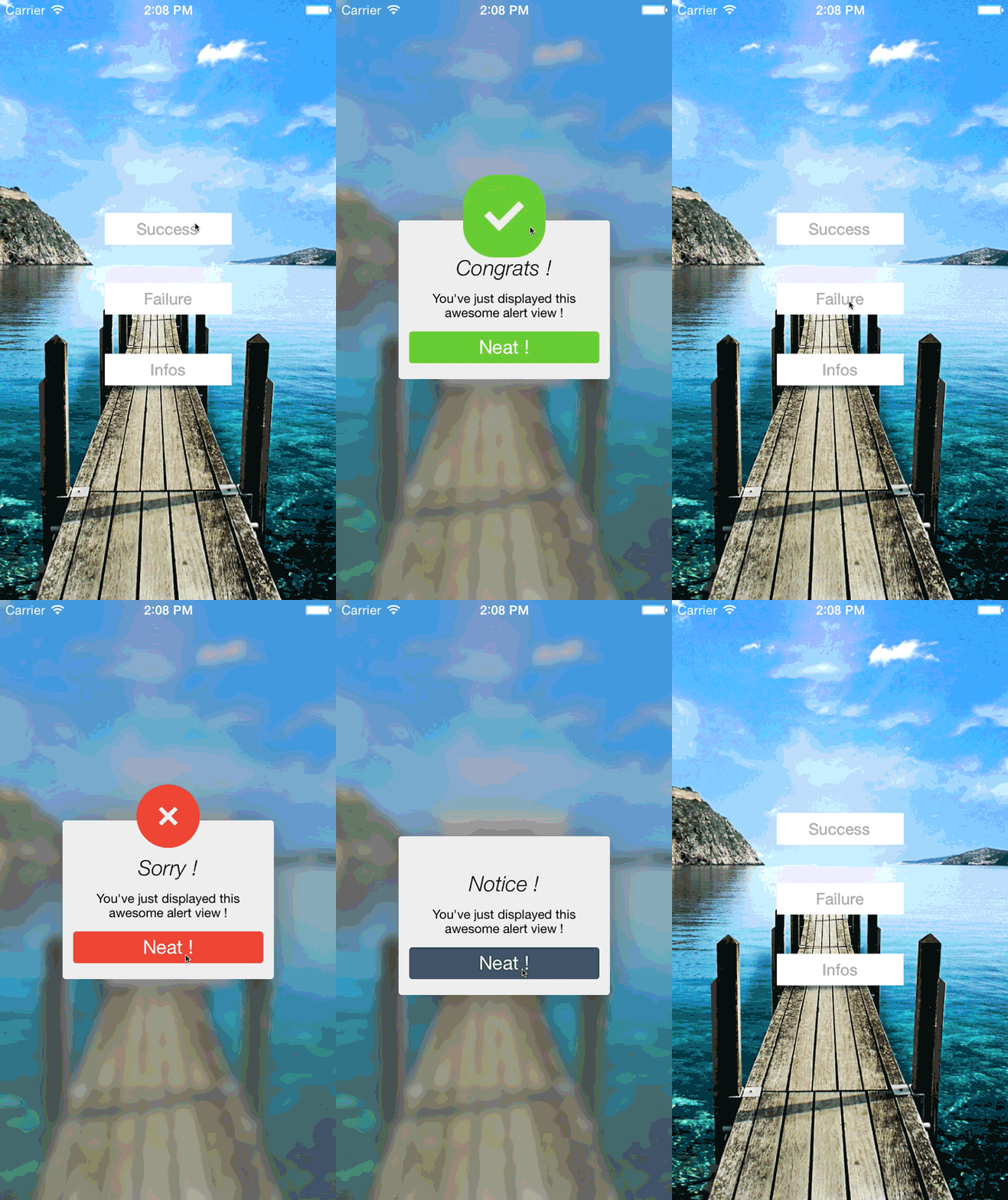
(the above gif is slower than the real speed animation)
##Installation Cocoapods
Add this in your Podfile
pod 'AMSmoothAlert', '~> 1.0'
It uses :
- GPUImage Framework
Please note that GPUImage doesn't support arm64 devices yet.
##Easy to use !
AMSmoothAlertView *alert = [[AMSmoothAlertView alloc]initWithTitle:@"Congrats !"andText:@"You've just displayed this awesome alert view !"forAlertType:AlertSuccess];Main methods :
//initialisation with a Title and a Text message//drop animation init
- (id) initDropAlertWithTitle:(NSString*) title andText:(NSString*) text andCancelButton: BOOL)hasCancelButton forAlertType:(AlertType) type;
- (id) initDropAlertWithTitle:(NSString*) title andText:(NSString*) text andCancelButton:(BOOL)hasCancelButton forAlertType:(AlertType) type andColor:(UIColor*) color;
//fade in animation init
- (id) initFadeAlertWithTitle:(NSString*) title andText:(NSString*) text andCancelButton:(BOOL)hasCancelButton forAlertType:(AlertType) type;
- (id) initFadeAlertWithTitle:(NSString*) title andText:(NSString*) text andCancelButton:(BOOL)hasCancelButton forAlertType:(AlertType) type andColor:(UIColor*) color;
//set corner radius or not on the alertView
- (void) setCornerRadius:(float)cornerRadius;
//show the alertview!
- (void) show;
//dismiss it !
- (void) dismissAlertView;
Support completion blocks
alert.completionBlock = ^void (AMSmoothAlertView *alertObj, UIButton *button) {
if(button == alertObj.defaultButton) {
NSLog(@"Default");
} else {
NSLog(@"Others");
}
};
You can edit title and text fonts, circle icon, colors and the "ok" button (multiple button feature is coming soon).
//title font customization
[alert setTitleFont:[UIFont fontWithName:@"Verdana"size:25.0f]];
//text message font customization
[alert setTextFont:[UIFont fontWithName:@"Futura-Medium"size:13.0f]];
//icon customization
[alert.logoView setImage:[UIImage imageNamed:@"checkMark.png"]];
Three types of alert views (for now)
typedefenum AlertType : NSInteger AlertType;
enum AlertType : NSInteger {
AlertSuccess,
AlertFailure,
AlertInfo
};
##Incoming improvements
- KVO bindings (change the button label for example)
- performances
- more customisation
- more circles + icons
- more animations
Also check out my other controller AMLoginViewController
Antoine